page 80 FORD EXPEDITION 2021 Workshop Manual
[x] Cancel search | Manufacturer: FORD, Model Year: 2021, Model line: EXPEDITION, Model: FORD EXPEDITION 2021Pages: 574, PDF Size: 8.33 MB
Page 133 of 574
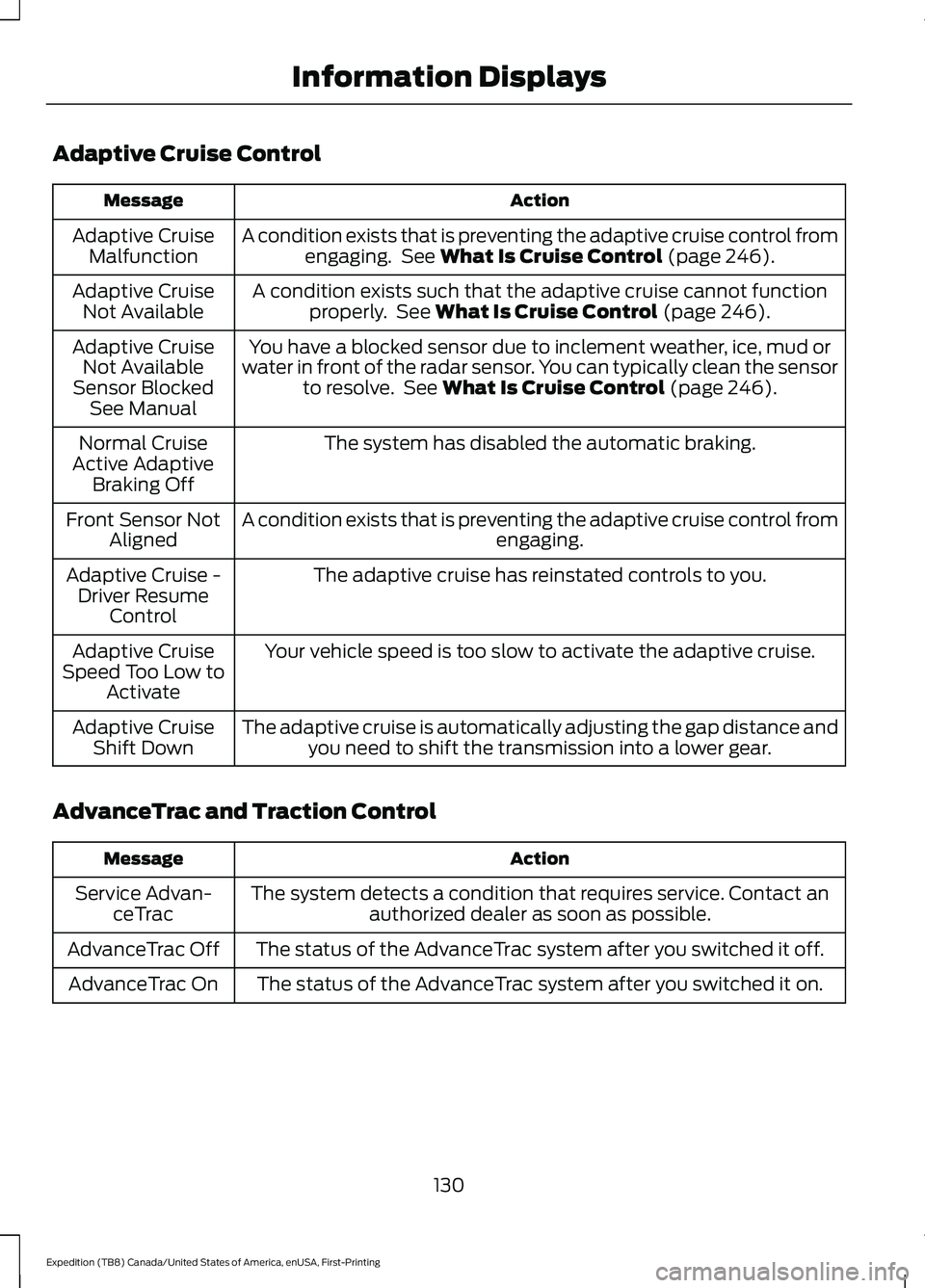
Adaptive Cruise Control
Action
Message
A condition exists that is preventing the adaptive cruise control fromengaging. See What Is Cruise Control (page 246).
Adaptive Cruise
Malfunction
A condition exists such that the adaptive cruise cannot functionproperly. See
What Is Cruise Control (page 246).
Adaptive Cruise
Not Available
You have a blocked sensor due to inclement weather, ice, mud or
water in front of the radar sensor. You can typically clean the sensor to resolve. See
What Is Cruise Control (page 246).
Adaptive Cruise
Not Available
Sensor Blocked See Manual
The system has disabled the automatic braking.
Normal Cruise
Active Adaptive Braking Off
A condition exists that is preventing the adaptive cruise control from engaging.
Front Sensor Not
Aligned
The adaptive cruise has reinstated controls to you.
Adaptive Cruise -
Driver Resume Control
Your vehicle speed is too slow to activate the adaptive cruise.
Adaptive Cruise
Speed Too Low to Activate
The adaptive cruise is automatically adjusting the gap distance andyou need to shift the transmission into a lower gear.
Adaptive Cruise
Shift Down
AdvanceTrac and Traction Control Action
Message
The system detects a condition that requires service. Contact anauthorized dealer as soon as possible.
Service Advan-
ceTrac
The status of the AdvanceTrac system after you switched it off.
AdvanceTrac Off
The status of the AdvanceTrac system after you switched it on.
AdvanceTrac On
130
Expedition (TB8) Canada/United States of America, enUSA, First-Printing Information Displays
Page 134 of 574
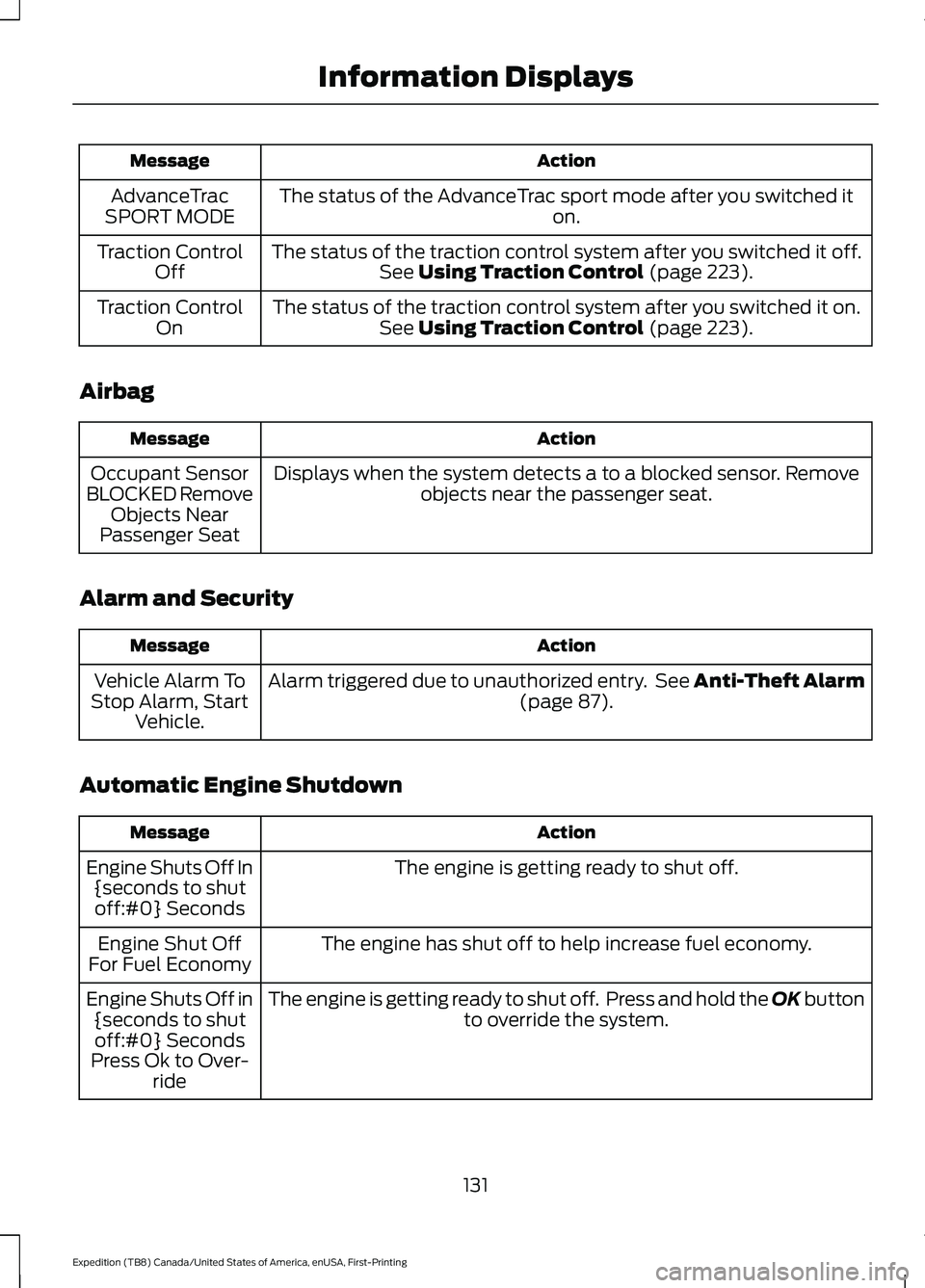
Action
Message
The status of the AdvanceTrac sport mode after you switched it on.
AdvanceTrac
SPORT MODE
The status of the traction control system after you switched it off.See Using Traction Control (page 223).
Traction Control
Off
The status of the traction control system after you switched it on.See
Using Traction Control (page 223).
Traction Control
On
Airbag Action
Message
Displays when the system detects a to a blocked sensor. Remove objects near the passenger seat.
Occupant Sensor
BLOCKED Remove Objects Near
Passenger Seat
Alarm and Security Action
Message
Alarm triggered due to unauthorized entry. See Anti-Theft Alarm (page
87).
Vehicle Alarm To
Stop Alarm, Start Vehicle.
Automatic Engine Shutdown Action
Message
The engine is getting ready to shut off.
Engine Shuts Off In
{seconds to shutoff:#0} Seconds
The engine has shut off to help increase fuel economy.
Engine Shut Off
For Fuel Economy
The engine is getting ready to shut off. Press and hold the OK button to override the system.
Engine Shuts Off in
{seconds to shutoff:#0} Seconds
Press Ok to Over- ride
131
Expedition (TB8) Canada/United States of America, enUSA, First-Printing Information Displays
Page 135 of 574
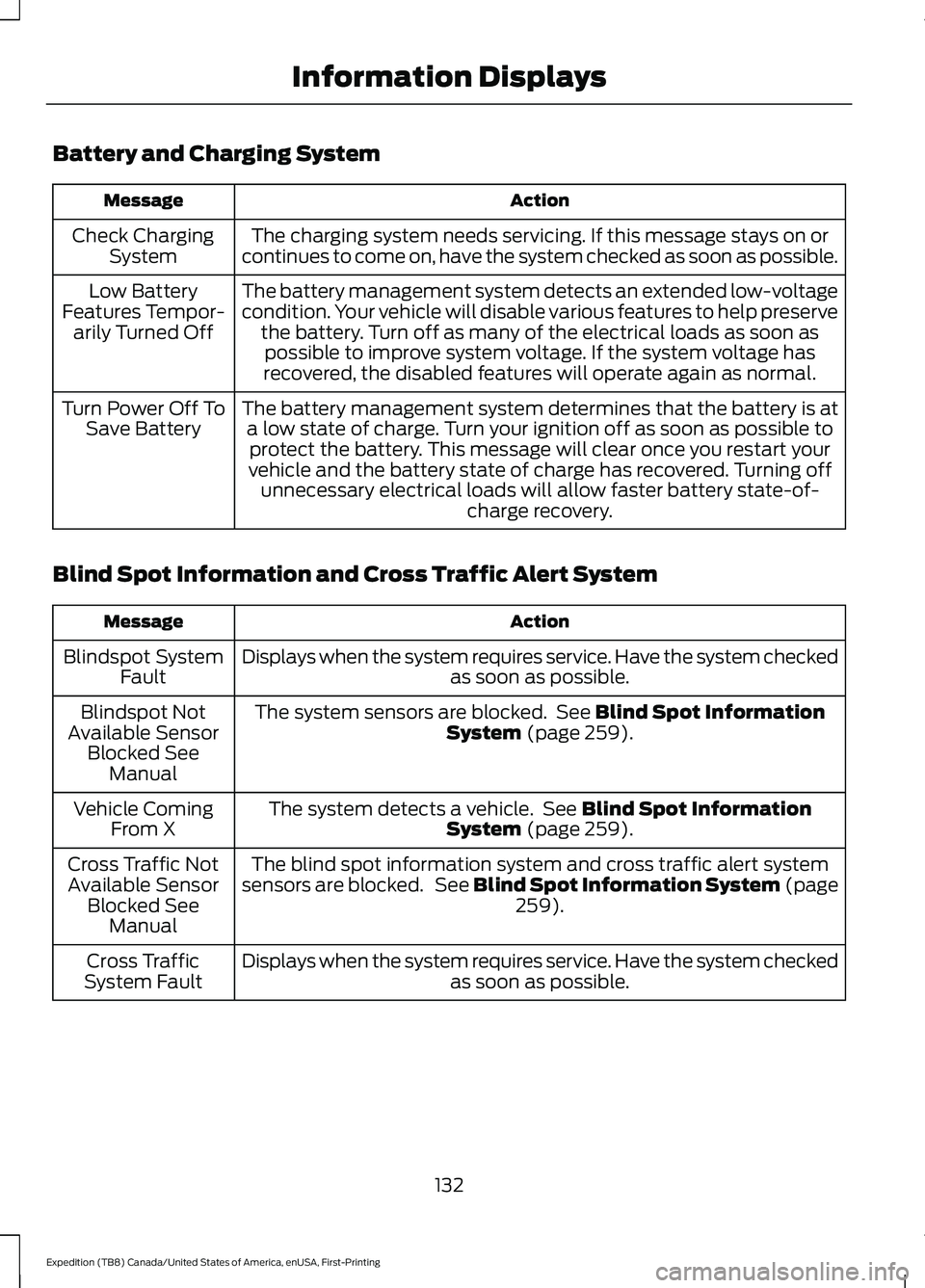
Battery and Charging System
Action
Message
The charging system needs servicing. If this message stays on or
continues to come on, have the system checked as soon as possible.
Check Charging
System
The battery management system detects an extended low-voltage
condition. Your vehicle will disable various features to help preservethe battery. Turn off as many of the electrical loads as soon aspossible to improve system voltage. If the system voltage has
recovered, the disabled features will operate again as normal.
Low Battery
Features Tempor- arily Turned Off
The battery management system determines that the battery is ata low state of charge. Turn your ignition off as soon as possible toprotect the battery. This message will clear once you restart your
vehicle and the battery state of charge has recovered. Turning off unnecessary electrical loads will allow faster battery state-of- charge recovery.
Turn Power Off To
Save Battery
Blind Spot Information and Cross Traffic Alert System Action
Message
Displays when the system requires service. Have the system checked as soon as possible.
Blindspot System
Fault
The system sensors are blocked. See Blind Spot Information
System (page 259).
Blindspot Not
Available Sensor Blocked See Manual
The system detects a vehicle. See
Blind Spot Information
System (page 259).
Vehicle Coming
From X
The blind spot information system and cross traffic alert system
sensors are blocked. See
Blind Spot Information System (page
259).
Cross Traffic Not
Available Sensor Blocked See Manual
Displays when the system requires service. Have the system checked as soon as possible.
Cross Traffic
System Fault
132
Expedition (TB8) Canada/United States of America, enUSA, First-Printing Information Displays
Page 136 of 574
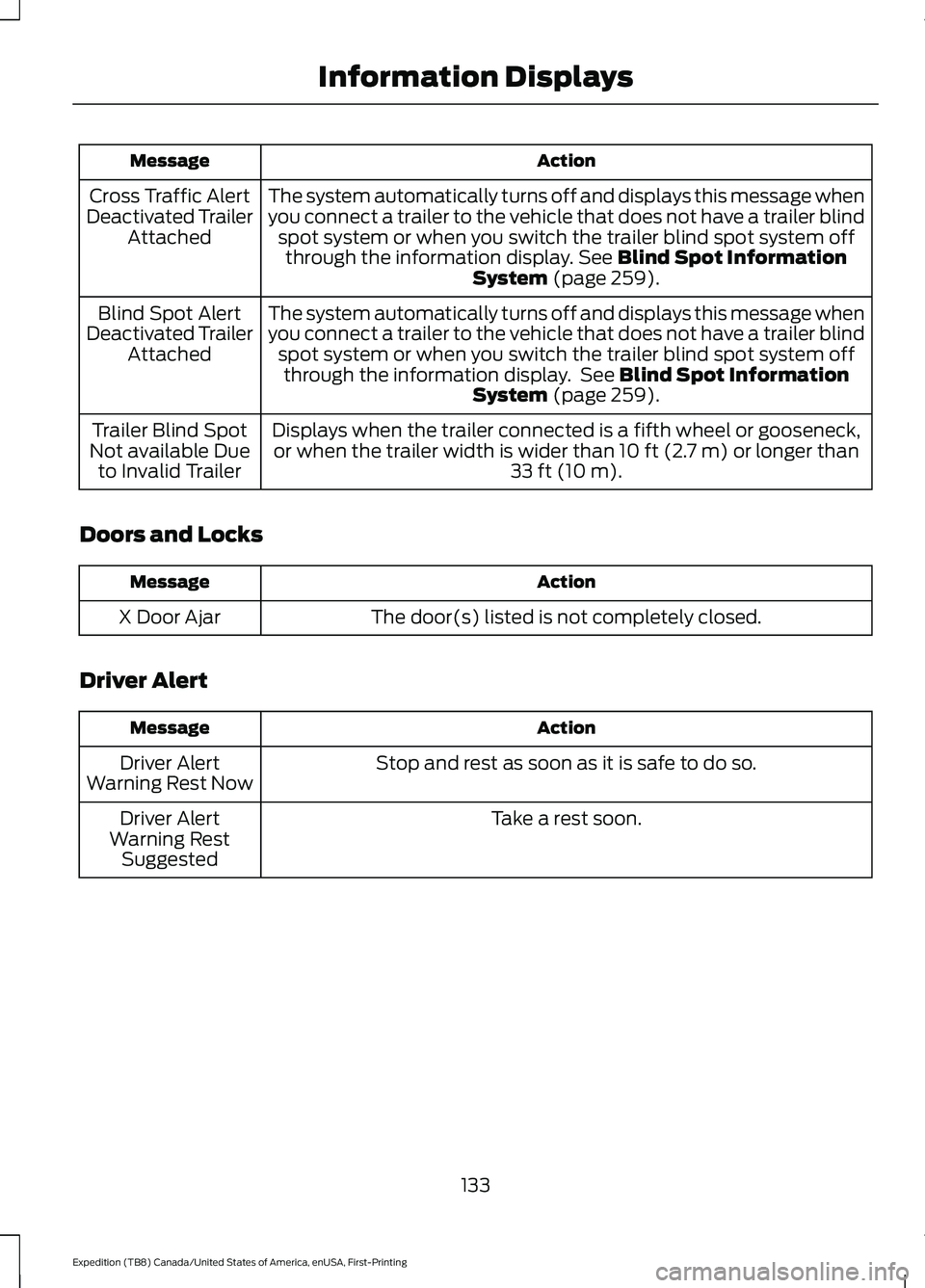
Action
Message
The system automatically turns off and displays this message when
you connect a trailer to the vehicle that does not have a trailer blindspot system or when you switch the trailer blind spot system offthrough the information display. See Blind Spot Information
System (page 259).
Cross Traffic Alert
Deactivated Trailer Attached
The system automatically turns off and displays this message when
you connect a trailer to the vehicle that does not have a trailer blindspot system or when you switch the trailer blind spot system offthrough the information display. See
Blind Spot Information
System (page 259).
Blind Spot Alert
Deactivated Trailer Attached
Displays when the trailer connected is a fifth wheel or gooseneck,or when the trailer width is wider than
10 ft (2.7 m) or longer than
33 ft (10 m).
Trailer Blind Spot
Not available Due to Invalid Trailer
Doors and Locks Action
Message
The door(s) listed is not completely closed.
X Door Ajar
Driver Alert Action
Message
Stop and rest as soon as it is safe to do so.
Driver Alert
Warning Rest Now
Take a rest soon.
Driver Alert
Warning Rest Suggested
133
Expedition (TB8) Canada/United States of America, enUSA, First-Printing Information Displays
Page 139 of 574
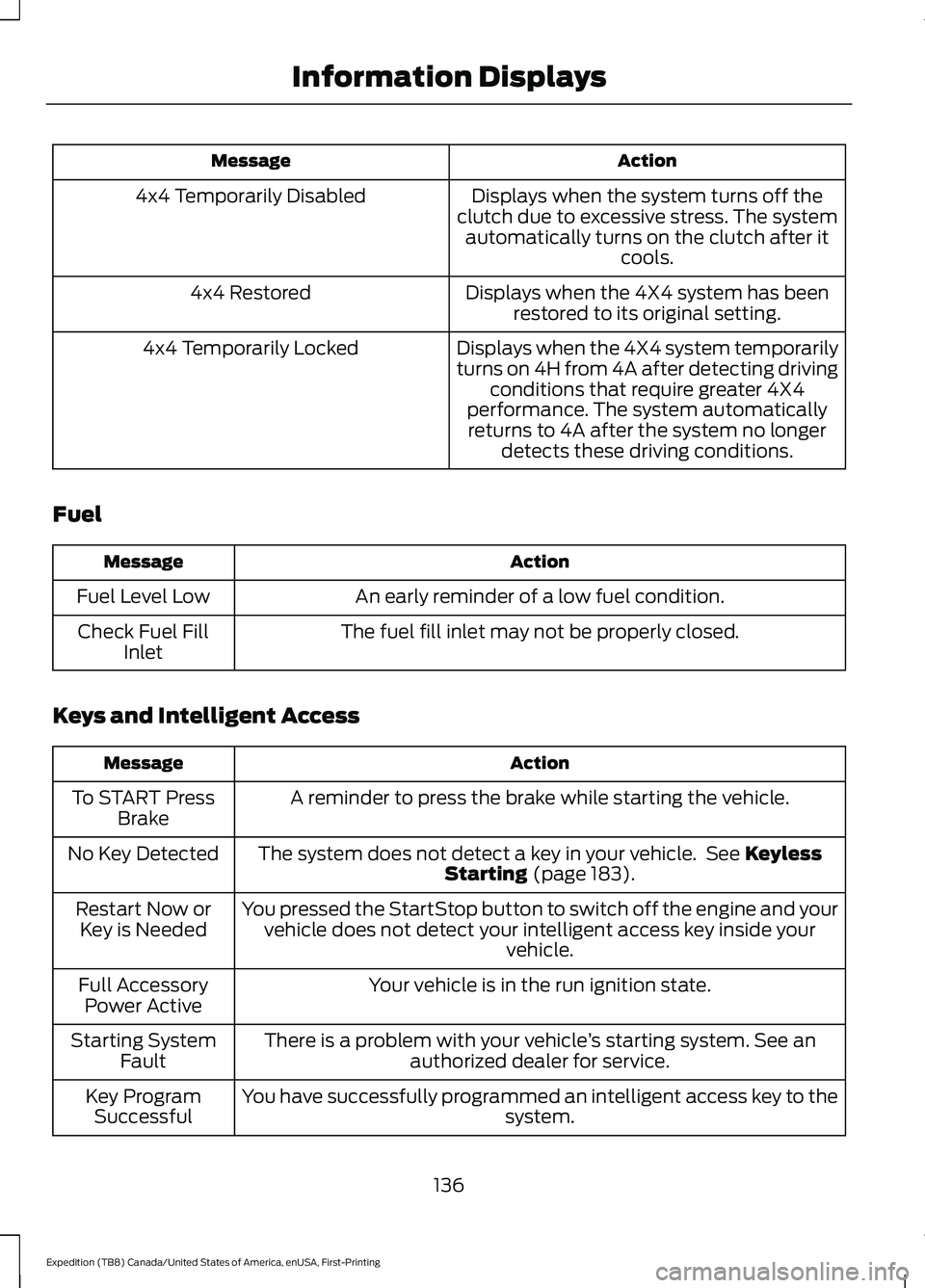
Action
Message
Displays when the system turns off the
clutch due to excessive stress. The system automatically turns on the clutch after it cools.
4x4 Temporarily Disabled
Displays when the 4X4 system has beenrestored to its original setting.
4x4 Restored
Displays when the 4X4 system temporarily
turns on 4H from 4A after detecting drivingconditions that require greater 4X4
performance. The system automatically returns to 4A after the system no longer detects these driving conditions.
4x4 Temporarily Locked
Fuel Action
Message
An early reminder of a low fuel condition.
Fuel Level Low
The fuel fill inlet may not be properly closed.
Check Fuel Fill
Inlet
Keys and Intelligent Access Action
Message
A reminder to press the brake while starting the vehicle.
To START Press
Brake
The system does not detect a key in your vehicle. See Keyless
Starting (page 183).
No Key Detected
You pressed the StartStop button to switch off the engine and yourvehicle does not detect your intelligent access key inside your vehicle.
Restart Now or
Key is Needed
Your vehicle is in the run ignition state.
Full Accessory
Power Active
There is a problem with your vehicle ’s starting system. See an
authorized dealer for service.
Starting System
Fault
You have successfully programmed an intelligent access key to the system.
Key Program
Successful
136
Expedition (TB8) Canada/United States of America, enUSA, First-Printing Information Displays
Page 141 of 574
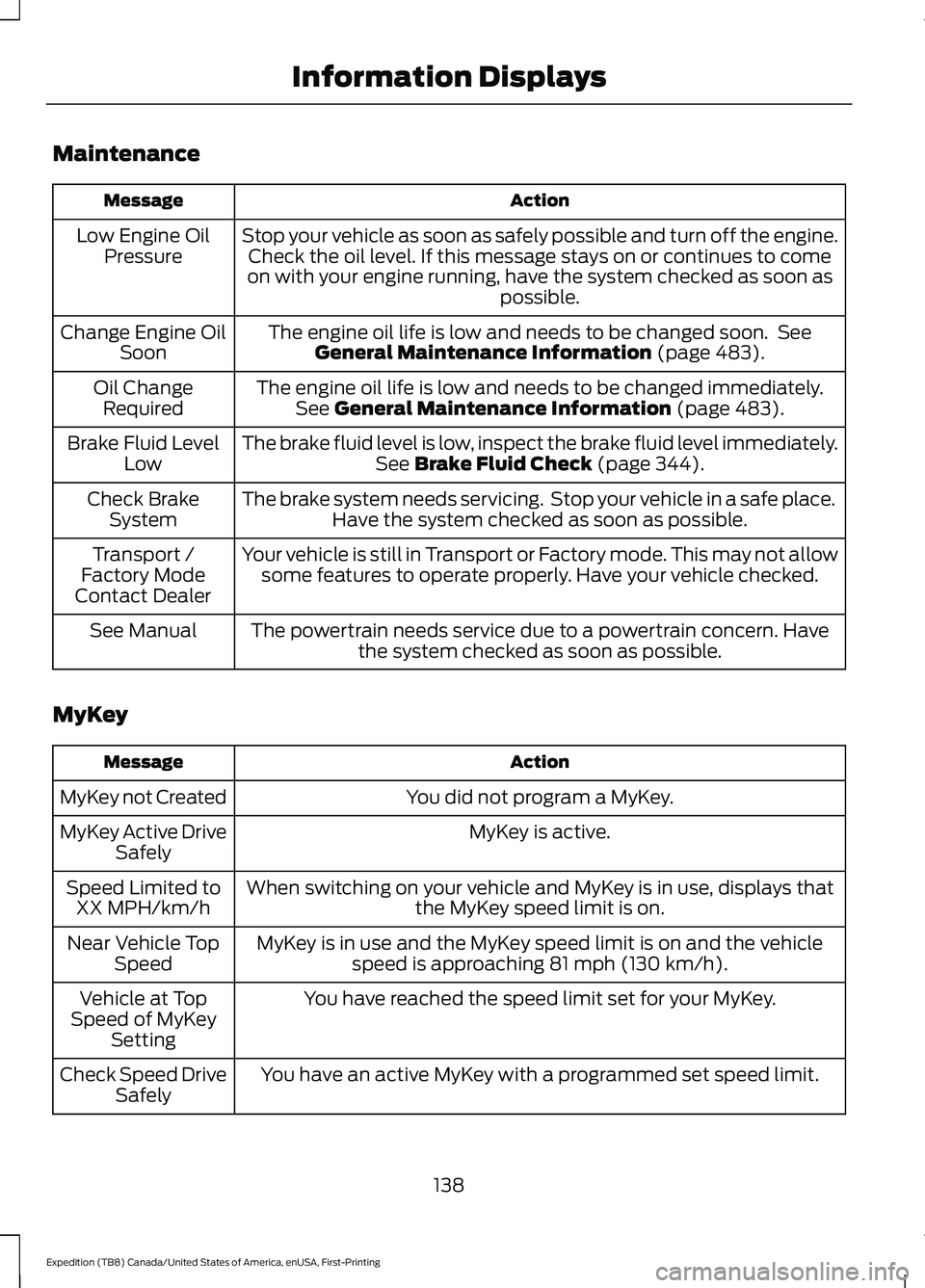
Maintenance
Action
Message
Stop your vehicle as soon as safely possible and turn off the engine.Check the oil level. If this message stays on or continues to come
on with your engine running, have the system checked as soon as possible.
Low Engine Oil
Pressure
The engine oil life is low and needs to be changed soon. SeeGeneral Maintenance Information (page 483).
Change Engine Oil
Soon
The engine oil life is low and needs to be changed immediately.See
General Maintenance Information (page 483).
Oil Change
Required
The brake fluid level is low, inspect the brake fluid level immediately.See
Brake Fluid Check (page 344).
Brake Fluid Level
Low
The brake system needs servicing. Stop your vehicle in a safe place.Have the system checked as soon as possible.
Check Brake
System
Your vehicle is still in Transport or Factory mode. This may not allowsome features to operate properly. Have your vehicle checked.
Transport /
Factory Mode
Contact Dealer
The powertrain needs service due to a powertrain concern. Havethe system checked as soon as possible.
See Manual
MyKey Action
Message
You did not program a MyKey.
MyKey not Created
MyKey is active.
MyKey Active Drive
Safely
When switching on your vehicle and MyKey is in use, displays that the MyKey speed limit is on.
Speed Limited to
XX MPH/km/h
MyKey is in use and the MyKey speed limit is on and the vehiclespeed is approaching
81 mph (130 km/h).
Near Vehicle Top
Speed
You have reached the speed limit set for your MyKey.
Vehicle at Top
Speed of MyKey Setting
You have an active MyKey with a programmed set speed limit.
Check Speed Drive
Safely
138
Expedition (TB8) Canada/United States of America, enUSA, First-Printing Information Displays
Page 143 of 574
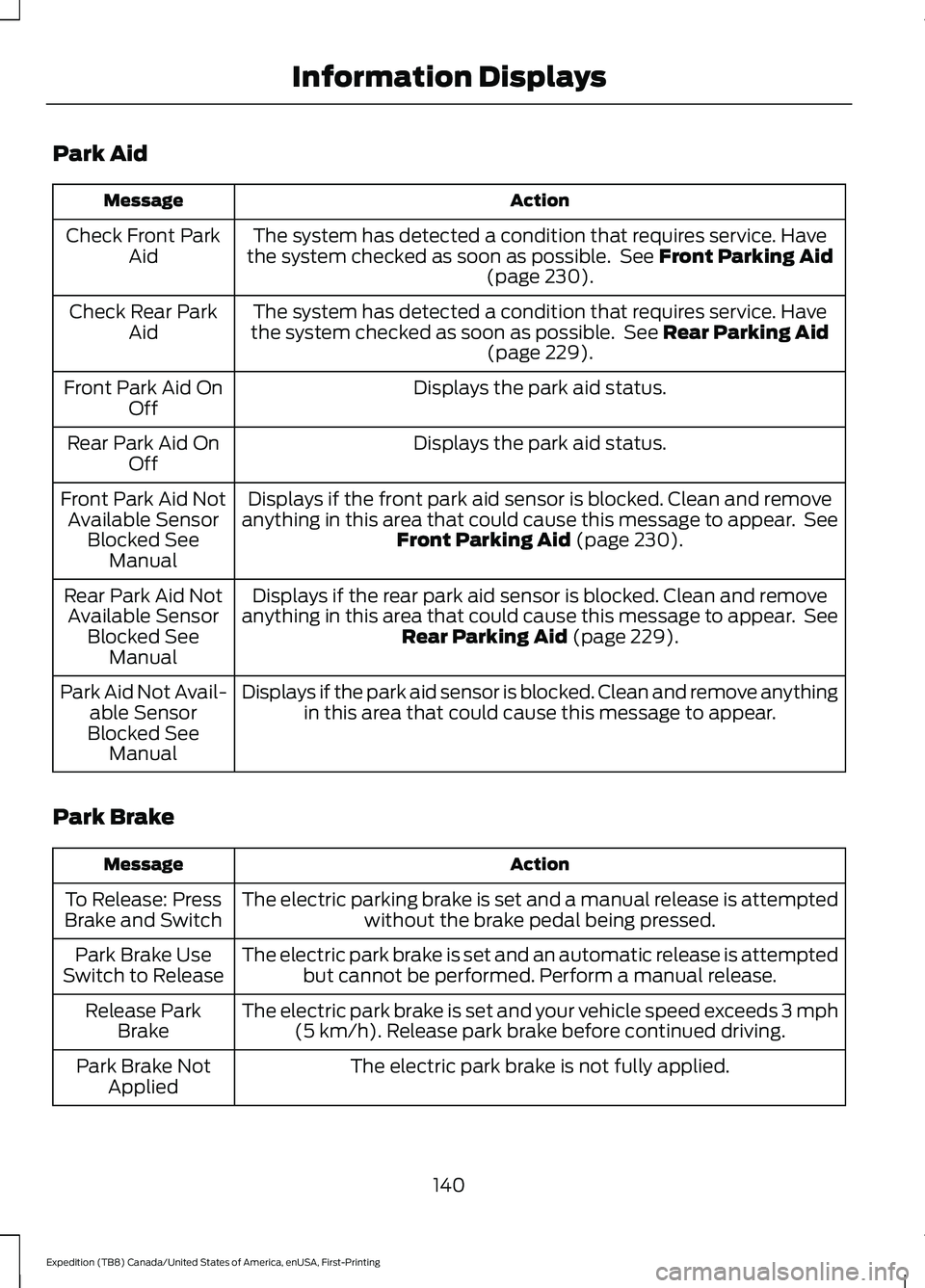
Park Aid
Action
Message
The system has detected a condition that requires service. Have
the system checked as soon as possible. See Front Parking Aid
(page 230).
Check Front Park
Aid
The system has detected a condition that requires service. Have
the system checked as soon as possible. See
Rear Parking Aid
(page 229).
Check Rear Park
Aid
Displays the park aid status.
Front Park Aid On
Off
Displays the park aid status.
Rear Park Aid On
Off
Displays if the front park aid sensor is blocked. Clean and remove
anything in this area that could cause this message to appear. See Front Parking Aid
(page 230).
Front Park Aid Not
Available Sensor Blocked See Manual
Displays if the rear park aid sensor is blocked. Clean and remove
anything in this area that could cause this message to appear. See Rear Parking Aid
(page 229).
Rear Park Aid Not
Available Sensor Blocked See Manual
Displays if the park aid sensor is blocked. Clean and remove anythingin this area that could cause this message to appear.
Park Aid Not Avail-
able Sensor
Blocked See Manual
Park Brake Action
Message
The electric parking brake is set and a manual release is attemptedwithout the brake pedal being pressed.
To Release: Press
Brake and Switch
The electric park brake is set and an automatic release is attemptedbut cannot be performed. Perform a manual release.
Park Brake Use
Switch to Release
The electric park brake is set and your vehicle speed exceeds 3 mph(5 km/h)
. Release park brake before continued driving.
Release Park
Brake
The electric park brake is not fully applied.
Park Brake Not
Applied
140
Expedition (TB8) Canada/United States of America, enUSA, First-Printing Information Displays
Page 145 of 574
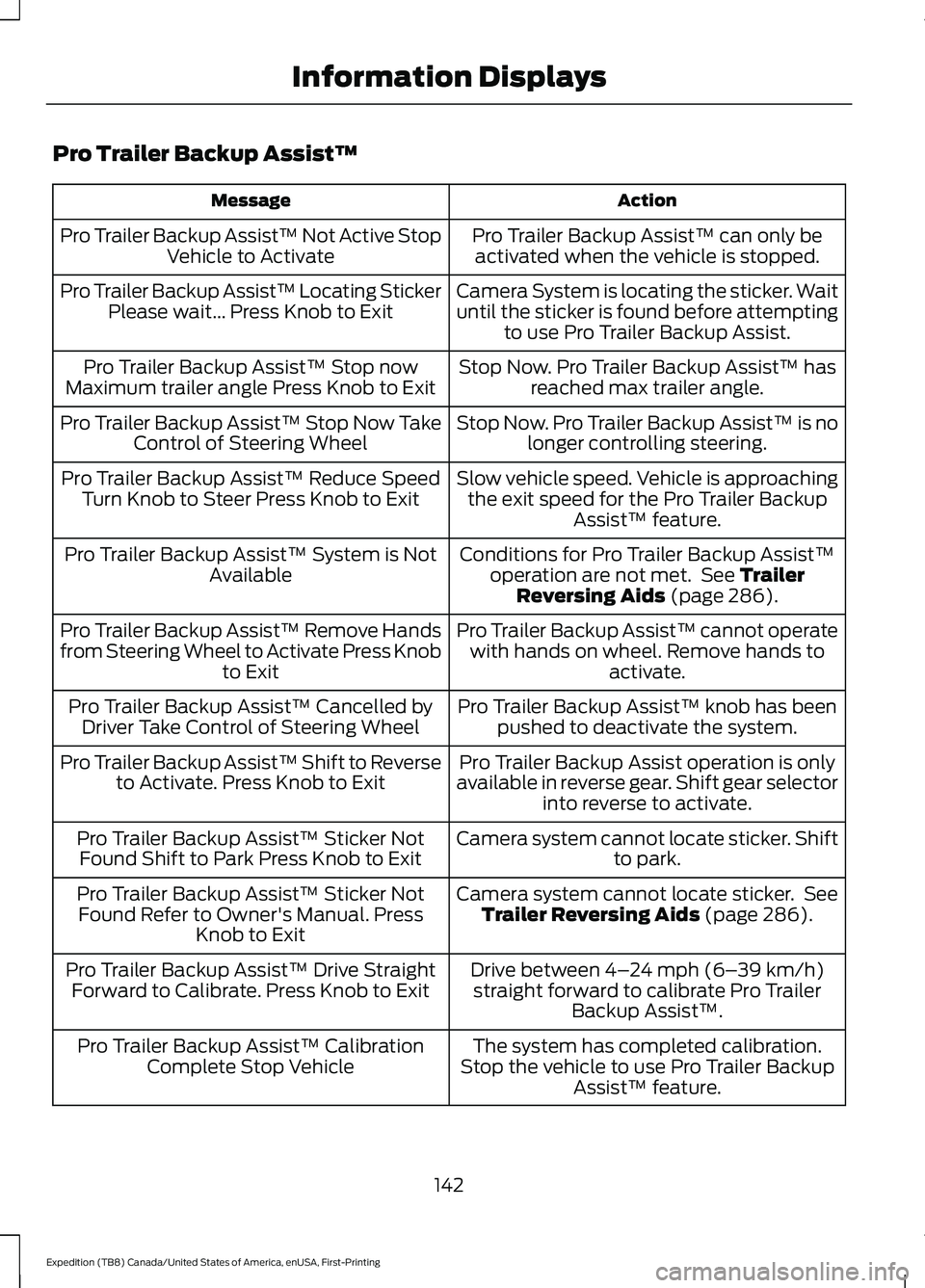
Pro Trailer Backup Assist™
Action
Message
Pro Trailer Backup Assist™ can only beactivated when the vehicle is stopped.
Pro Trailer Backup Assist™ Not Active Stop
Vehicle to Activate
Camera System is locating the sticker. Wait
until the sticker is found before attemptingto use Pro Trailer Backup Assist.
Pro Trailer Backup Assist™ Locating Sticker
Please wait... Press Knob to Exit
Stop Now. Pro Trailer Backup Assist™ hasreached max trailer angle.
Pro Trailer Backup Assist™ Stop now
Maximum trailer angle Press Knob to Exit
Stop Now. Pro Trailer Backup Assist™ is nolonger controlling steering.
Pro Trailer Backup Assist™ Stop Now Take
Control of Steering Wheel
Slow vehicle speed. Vehicle is approachingthe exit speed for the Pro Trailer Backup Assist™ feature.
Pro Trailer Backup Assist™ Reduce Speed
Turn Knob to Steer Press Knob to Exit
Conditions for Pro Trailer Backup Assist™operation are not met. See Trailer
Reversing Aids (page 286).
Pro Trailer Backup Assist™ System is Not
Available
Pro Trailer Backup Assist™ cannot operatewith hands on wheel. Remove hands to activate.
Pro Trailer Backup Assist™ Remove Hands
from Steering Wheel to Activate Press Knob
to Exit
Pro Trailer Backup Assist™ knob has beenpushed to deactivate the system.
Pro Trailer Backup Assist™ Cancelled by
Driver Take Control of Steering Wheel
Pro Trailer Backup Assist operation is only
available in reverse gear. Shift gear selector into reverse to activate.
Pro Trailer Backup Assist™ Shift to Reverse
to Activate. Press Knob to Exit
Camera system cannot locate sticker. Shiftto park.
Pro Trailer Backup Assist™ Sticker Not
Found Shift to Park Press Knob to Exit
Camera system cannot locate sticker. SeeTrailer Reversing Aids
(page 286).
Pro Trailer Backup Assist™ Sticker Not
Found Refer to Owner's Manual. Press Knob to Exit
Drive between
4–24 mph (6– 39 km/h)
straight forward to calibrate Pro Trailer Backup Assist™.
Pro Trailer Backup Assist™ Drive Straight
Forward to Calibrate. Press Knob to Exit
The system has completed calibration.
Stop the vehicle to use Pro Trailer Backup Assist™ feature.
Pro Trailer Backup Assist™ Calibration
Complete Stop Vehicle
142
Expedition (TB8) Canada/United States of America, enUSA, First-Printing Information Displays
Page 147 of 574
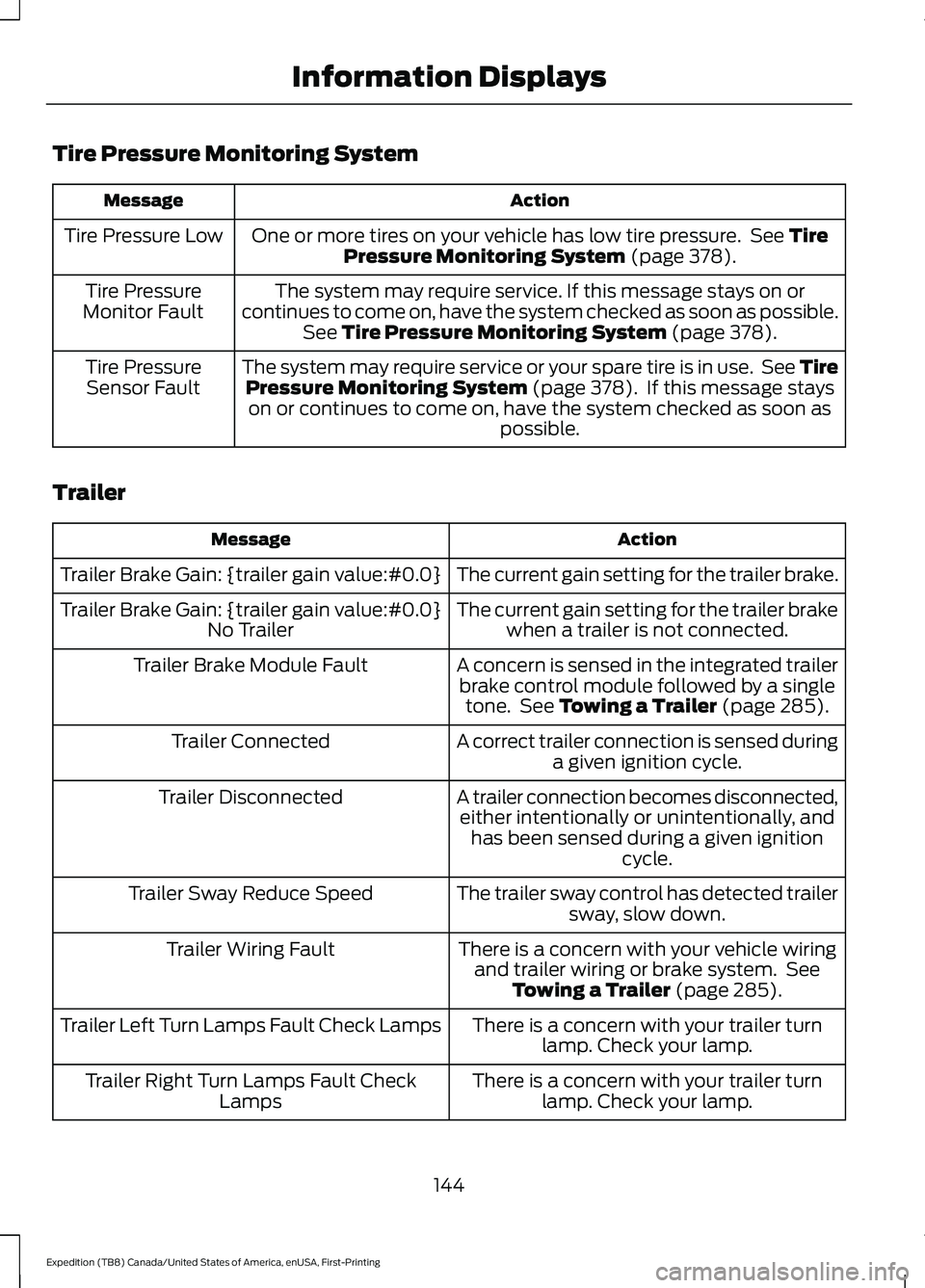
Tire Pressure Monitoring System
Action
Message
One or more tires on your vehicle has low tire pressure. See Tire
Pressure Monitoring System (page 378).
Tire Pressure Low
The system may require service. If this message stays on or
continues to come on, have the system checked as soon as possible. See
Tire Pressure Monitoring System (page 378).
Tire Pressure
Monitor Fault
The system may require service or your spare tire is in use. See TirePressure Monitoring System
(page 378). If this message stays
on or continues to come on, have the system checked as soon as possible.
Tire Pressure
Sensor Fault
Trailer Action
Message
The current gain setting for the trailer brake.
Trailer Brake Gain: {trailer gain value:#0.0}
The current gain setting for the trailer brakewhen a trailer is not connected.
Trailer Brake Gain: {trailer gain value:#0.0}
No Trailer
A concern is sensed in the integrated trailerbrake control module followed by a single tone. See
Towing a Trailer (page 285).
Trailer Brake Module Fault
A correct trailer connection is sensed duringa given ignition cycle.
Trailer Connected
A trailer connection becomes disconnected,either intentionally or unintentionally, and has been sensed during a given ignition cycle.
Trailer Disconnected
The trailer sway control has detected trailersway, slow down.
Trailer Sway Reduce Speed
There is a concern with your vehicle wiringand trailer wiring or brake system. See Towing a Trailer
(page 285).
Trailer Wiring Fault
There is a concern with your trailer turnlamp. Check your lamp.
Trailer Left Turn Lamps Fault Check Lamps
There is a concern with your trailer turnlamp. Check your lamp.
Trailer Right Turn Lamps Fault Check
Lamps
144
Expedition (TB8) Canada/United States of America, enUSA, First-Printing Information Displays
Page 148 of 574
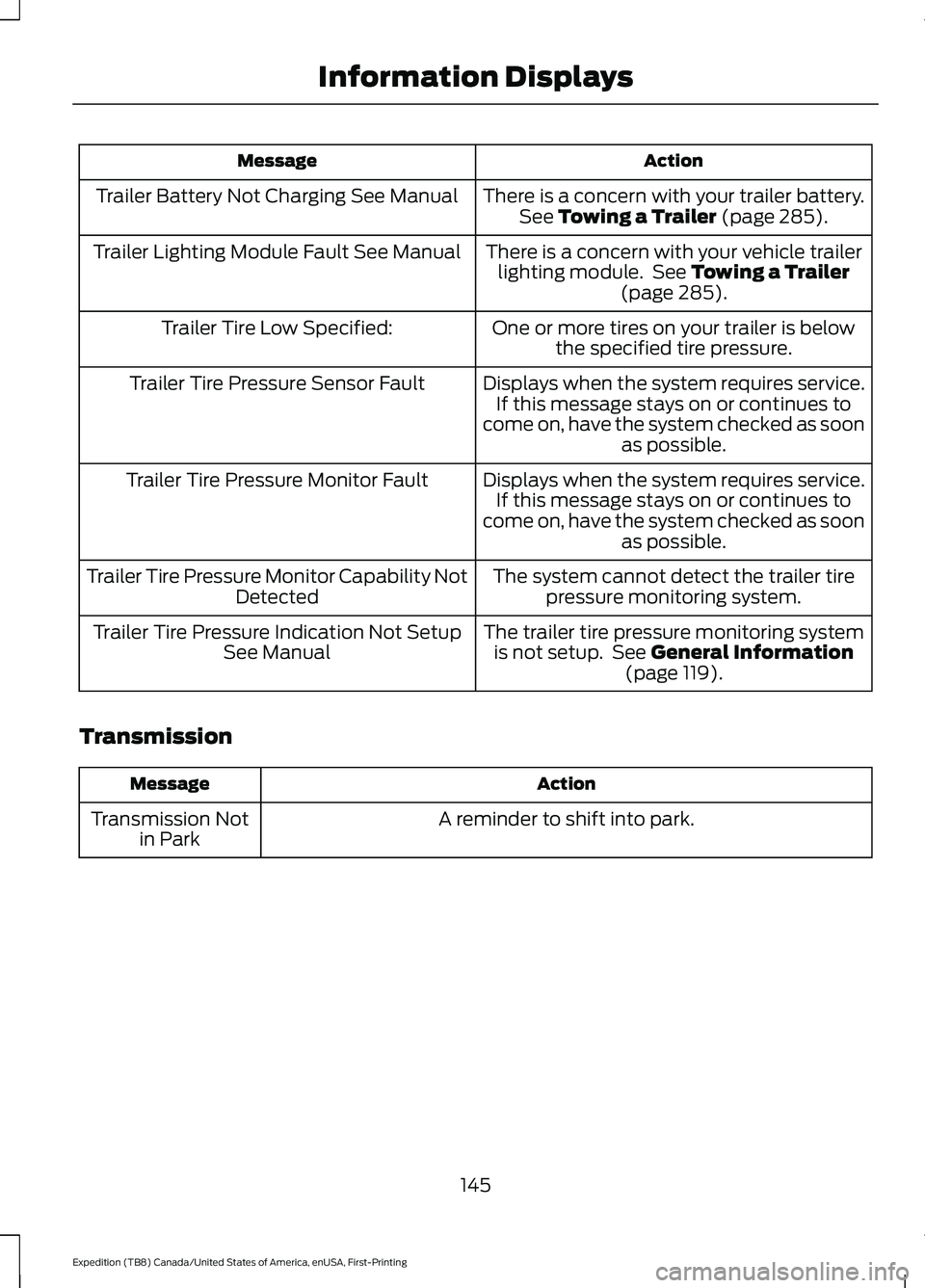
Action
Message
There is a concern with your trailer battery.See Towing a Trailer (page 285).
Trailer Battery Not Charging See Manual
There is a concern with your vehicle trailerlighting module. See
Towing a Trailer
(page 285).
Trailer Lighting Module Fault See Manual
One or more tires on your trailer is belowthe specified tire pressure.
Trailer Tire Low Specified:
Displays when the system requires service.If this message stays on or continues to
come on, have the system checked as soon as possible.
Trailer Tire Pressure Sensor Fault
Displays when the system requires service.If this message stays on or continues to
come on, have the system checked as soon as possible.
Trailer Tire Pressure Monitor Fault
The system cannot detect the trailer tirepressure monitoring system.
Trailer Tire Pressure Monitor Capability Not
Detected
The trailer tire pressure monitoring systemis not setup. See
General Information
(page 119).
Trailer Tire Pressure Indication Not Setup
See Manual
Transmission Action
Message
A reminder to shift into park.
Transmission Not
in Park
145
Expedition (TB8) Canada/United States of America, enUSA, First-Printing Information Displays