brakes FORD EXPEDITION 2023 User Guide
[x] Cancel search | Manufacturer: FORD, Model Year: 2023, Model line: EXPEDITION, Model: FORD EXPEDITION 2023Pages: 658, PDF Size: 16.16 MB
Page 235 of 658
BRAKES – FREQUENTLY ASKEDQUESTIONS
Is it normal for my brakes to makenoise?
Occasional brake noise is normal. If ametal-to-metal, continuous grinding,or continuous squeal sound is present,the brake lining could be worn-out.Have the system checked by anauthorized dealer.
There is an electrical motor soundwhen I press on the brake pedal oractivate the park brake switch. Is thisnormal?
Yes, those sounds are the electronicbrake booster or the electronic parkbrake operating.
Note: Brake dust could accumulate on thewheels, even under normal drivingconditions. Some dust is normal as thebrakes wear and does not contribute tobrake noise. See Cleaning Wheels (page430).
231
2023 Expedition (TB8) Canada/United States of America, enUSA, Edition date: 202207, DOMBrakes
Page 236 of 658
WHAT IS THE ELECTRIC
PARKING BRAKE
The electric parking brake is used to holdyour vehicle on slopes and flat roads.
APPLYING THE ELECTRIC
PARKING BRAKE
WARNING: Apply the parkingbrake, shift into park (P), switch theignition off and remove the key beforeyou leave your vehicle. Failure to followthis instruction could result in personalinjury or death.
WARNING: If you drive extendeddistances with the parking brake applied,you could cause damage to the brakesystem.
WARNING: The electric parkingbrake does not operate if the vehiclebattery has run out of charge.
The switch is on the lower partof the instrument panel.
Pull the switch up to apply the electricparking brake. The red warning lampflashes, then steadily illuminates when theparking brake is applied.
Note:You can apply the electric parkingbrake when the ignition is off.
Note:The electric parking brake couldautomatically apply when park (P) isselected. See Park (P) (page 213).
APPLYING THE ELECTRIC
PARKING BRAKE IN AN
EMERGENCY
You can use the electric parking brake toslow or stop your vehicle in an emergency.
Pull the switch up and hold it.
The red warning lamp illuminates, a tonesounds and the stoplamps turn on whenyou use the electric parking brake in anemergency.
The electric parking brake continues toslow your vehicle down unless you releasethe switch.
Note:Do not apply the electric parkingbrake when your vehicle is moving, exceptin an emergency. If you repeatedly use theelectric parking brake to slow or stop yourvehicle, you could cause damage to thebrake system.
MANUALLY RELEASING THE
ELECTRIC PARKING BRAKE
1.Switch the ignition on.
2.Press and hold the brake pedal.
3.Push the switch down.
The red warning lamp turns off.
Pulling Away on a Hill When Towing aTrailer
1.Press and hold the brake pedal.
2.Pull the switch upward and hold it.
3.Shift into gear.
4.Press the accelerator pedal until enginehas developed sufficient torque toprevent your vehicle from rolling downthe hill.
5.Release the switch and pull away in anormal manner.
232
2023 Expedition (TB8) Canada/United States of America, enUSA, Edition date: 202207, DOMElectric Parking BrakeE267156
Page 239 of 658
WHAT IS REVERSE BRAKING
ASSIST
Reverse braking assist is designed toreduce impact damage or assist in avoidinga collision while in reverse (R). Usingsensors on the rear of the vehicle, it candetect a possible collision and apply thebrakes. If full braking occurs, the systemattempts to stop the vehicle a safedistance from the obstacle.
HOW DOES REVERSE
BRAKING ASSIST WORK
Reverse braking assist functions when inreverse (R) and traveling at a speed of1–7 mph (2–12 km/h).
If the system detects an obstacle behindyour vehicle, it provides a warning throughthe rear parking aid or cross traffic alertsystem.
REVERSE BRAKING ASSIST
PRECAUTIONS
WARNING: You are responsible forcontrolling your vehicle at all times. Thesystem is designed to be an aid and doesnot relieve you of your responsibility todrive with due care and attention. Failureto follow this instruction could result inthe loss of control of your vehicle,personal injury or death.
WARNING: To help avoid personalinjury, always use caution when inreverse (R) and when using the sensingsystem.
WARNING: The system may notoperate properly during severe weatherconditions, for example snow, ice, heavyrain and spray. Always drive with duecare and attention. Failure to take caremay result in a crash.
WARNING: Traffic control systems,fluorescent lamps, inclement weather,air brakes, external motors and fans mayaffect the correct operation of thesensing system. This may cause reducedperformance or false alerts.
WARNING: Some situations andobjects prevent hazard detection. Forexample low or direct sunlight, inclementweather, unconventional vehicle types,and pedestrians. Apply the brakes whennecessary. Failure to follow thisinstruction could result in the loss ofcontrol of your vehicle, personal injury ordeath.
WARNING: Do not use the systemwith accessories that extend beyond thefront or rear of your vehicle, for examplea trailer hitch or bike rack. The system isnot able to make corrections for theadditional length of the accessories.
The system only applies the brakes for ashort period of time when an event occurs.Act as soon as you notice the brakes applyto remain in control of the vehicle. If youdo not intervene the vehicle may start tomove again.
Note:Certain add-on devices around thebumper or fascia may create false alerts.For example, large trailer hitches, bicycle orsurfboard racks, license plate brackets,bumper covers or any other device that mayblock the normal detection zone of thesystem. Remove the add-on device toprevent false alerts.
235
2023 Expedition (TB8) Canada/United States of America, enUSA, Edition date: 202207, DOMReverse Braking Assist (If Equipped)
Page 240 of 658
Note:The system does not react to smallor moving objects, particularly those closeto the ground.
Note:The system does not operate duringhard acceleration or steering.
Note:If your vehicle sustains damage tothe bumper or fascia leaving it misalignedor bent, it could alter the sensing zonecausing inaccurate measurement ofobstacles or false alerts.
Note:Vehicle loading and suspensionchanges can impact the angle of the sensorsand may change the normal detection zoneof the system resulting in inaccuratemeasurement of obstacles or false alerts.
Note:When you connect a trailer, thesystem may detect the trailer and providean alert, or the system turns off. If thesystem does not turn off, manually switchthe system off after you connect the trailer.
Note:You may experience reduced systemperformance on road surfaces that limitdeceleration. For example, roads with ice,loose gravel, mud or sand.
SWITCHING REVERSE
BRAKING ASSIST ON AND OFF
- VEHICLES WITH: 12 INCH
SCREEN
1.Press Features on the touchscreen.
2.Press Driver Assistance.
3.Switch Reverse Brake Assist on or off.
Note:The system is unavailable when therear parking aid, cross traffic alert or tractioncontrol is off.
Note:If your vehicle is not equipped withcross traffic alert the reverse braking assistrelies on input from the rear parking aid andrear camera sensors.
Note:The default setting is on in someregions.
SWITCHING REVERSE
BRAKING ASSIST ON AND OFF
- VEHICLES WITH: 15 INCH
SCREEN
1.Access the vehicle drawer on thetouchscreen.
2.Press SETTINGS.
3.Press Driver Assistance.
4.Switch Reverse Brake Assist on or off.
Note:The system is unavailable when therear parking aid, cross traffic alert or tractioncontrol is off.
Note:If your vehicle is not equipped withcross traffic alert the reverse braking assistrelies on input from the rear parking aid andrear camera sensors.
Note:The default setting is on in someregions.
OVERRIDING REVERSE
BRAKING ASSIST
There could be instances whenunexpected or unwanted braking occurs.Firmly pressing the accelerator pedal orswitching the feature off overrides thesystem.
REVERSE BRAKING ASSIST
INDICATORS
If the system determines that a collisionwith an obstacle may occur, full brakingmay apply.
A message and warningindicator appear when thesystem applies the brakes.
236
2023 Expedition (TB8) Canada/United States of America, enUSA, Edition date: 202207, DOMReverse Braking Assist (If Equipped)E293490
Page 241 of 658
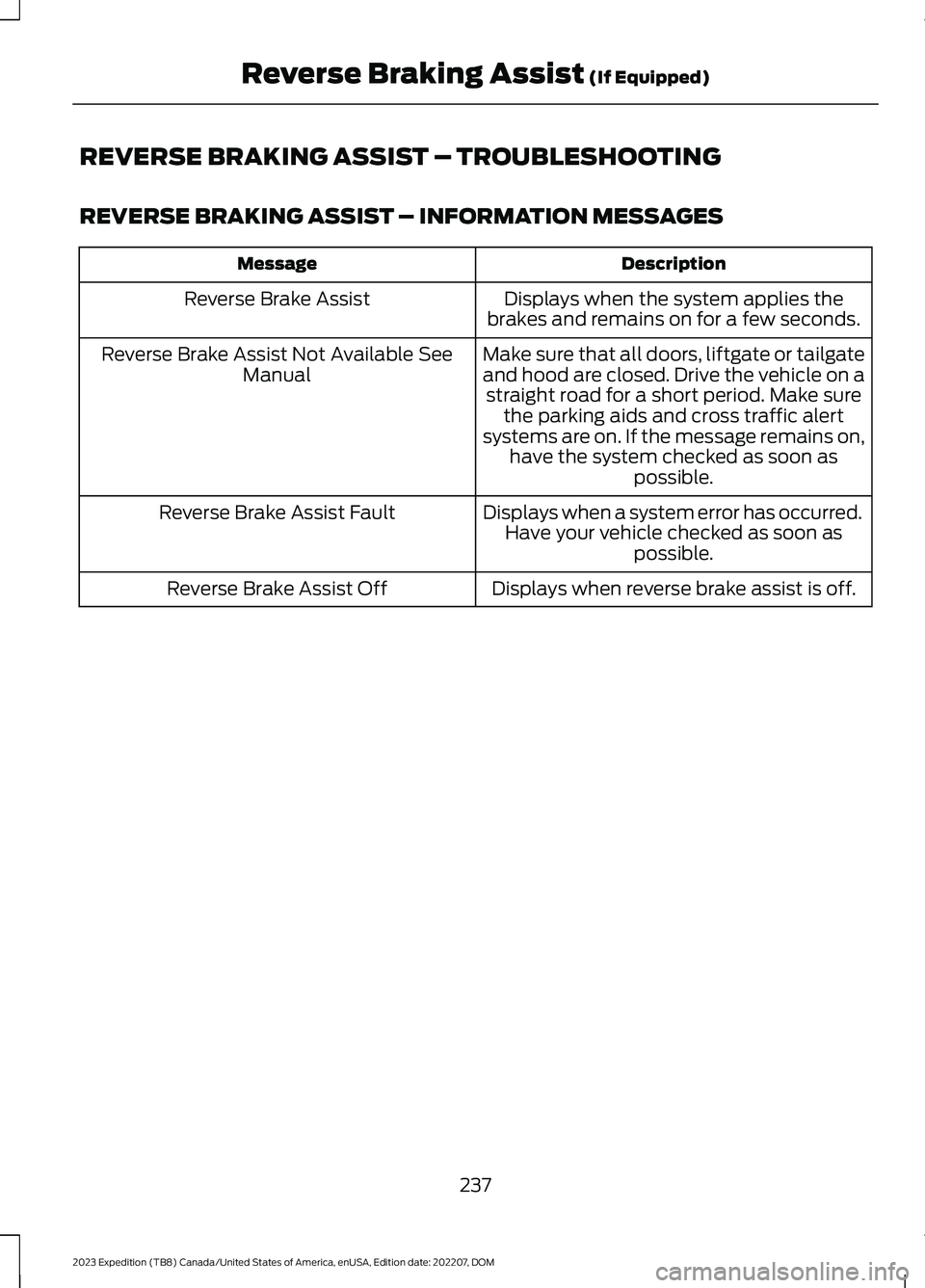
REVERSE BRAKING ASSIST – TROUBLESHOOTING
REVERSE BRAKING ASSIST – INFORMATION MESSAGES
DescriptionMessage
Displays when the system applies thebrakes and remains on for a few seconds.Reverse Brake Assist
Make sure that all doors, liftgate or tailgateand hood are closed. Drive the vehicle on astraight road for a short period. Make surethe parking aids and cross traffic alertsystems are on. If the message remains on,have the system checked as soon aspossible.
Reverse Brake Assist Not Available SeeManual
Displays when a system error has occurred.Have your vehicle checked as soon aspossible.
Reverse Brake Assist Fault
Displays when reverse brake assist is off.Reverse Brake Assist Off
237
2023 Expedition (TB8) Canada/United States of America, enUSA, Edition date: 202207, DOMReverse Braking Assist (If Equipped)
Page 243 of 658
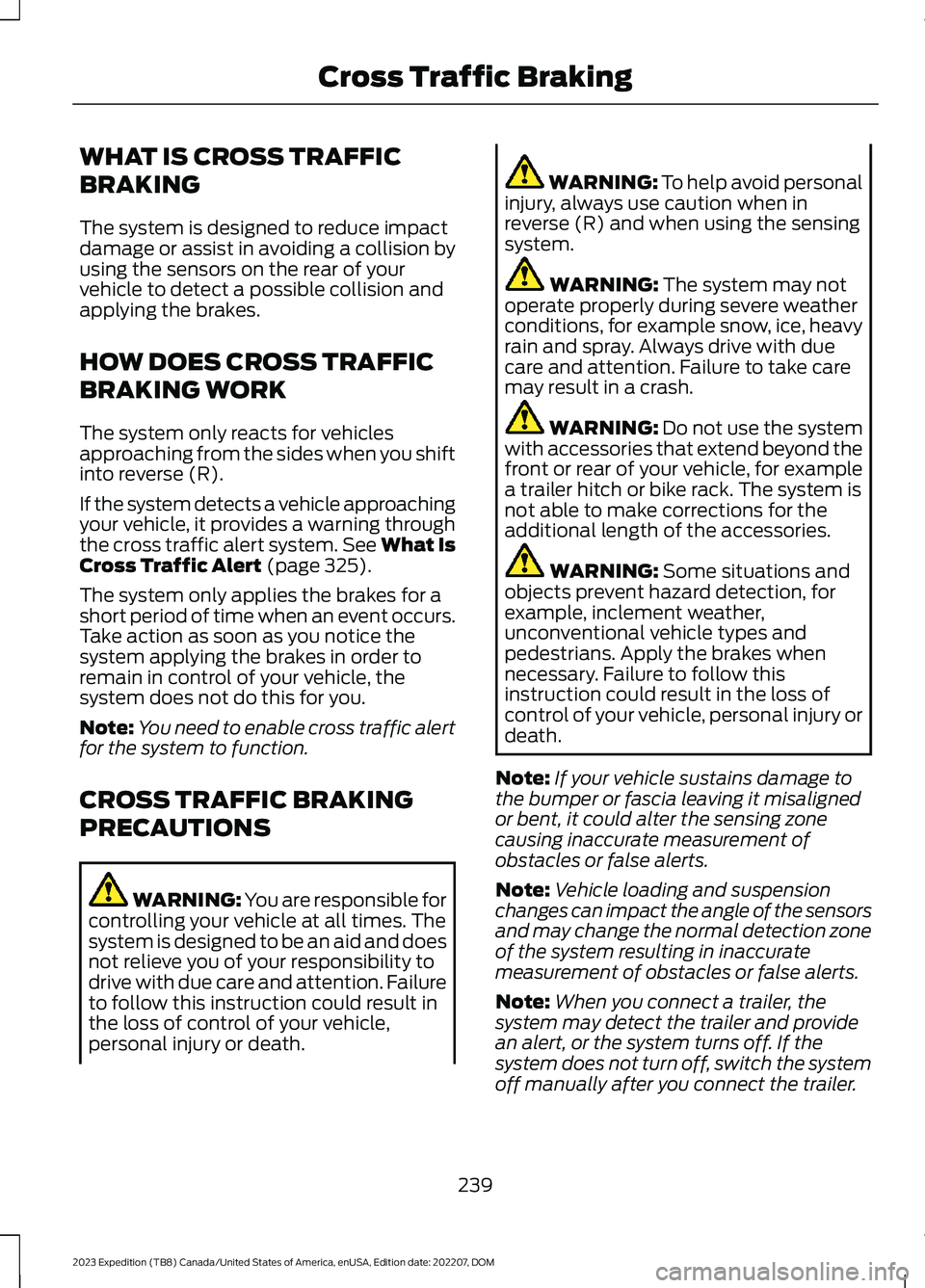
WHAT IS CROSS TRAFFIC
BRAKING
The system is designed to reduce impactdamage or assist in avoiding a collision byusing the sensors on the rear of yourvehicle to detect a possible collision andapplying the brakes.
HOW DOES CROSS TRAFFIC
BRAKING WORK
The system only reacts for vehiclesapproaching from the sides when you shiftinto reverse (R).
If the system detects a vehicle approachingyour vehicle, it provides a warning throughthe cross traffic alert system. See What IsCross Traffic Alert (page 325).
The system only applies the brakes for ashort period of time when an event occurs.Take action as soon as you notice thesystem applying the brakes in order toremain in control of your vehicle, thesystem does not do this for you.
Note:You need to enable cross traffic alertfor the system to function.
CROSS TRAFFIC BRAKING
PRECAUTIONS
WARNING: You are responsible forcontrolling your vehicle at all times. Thesystem is designed to be an aid and doesnot relieve you of your responsibility todrive with due care and attention. Failureto follow this instruction could result inthe loss of control of your vehicle,personal injury or death.
WARNING: To help avoid personalinjury, always use caution when inreverse (R) and when using the sensingsystem.
WARNING: The system may notoperate properly during severe weatherconditions, for example snow, ice, heavyrain and spray. Always drive with duecare and attention. Failure to take caremay result in a crash.
WARNING: Do not use the systemwith accessories that extend beyond thefront or rear of your vehicle, for examplea trailer hitch or bike rack. The system isnot able to make corrections for theadditional length of the accessories.
WARNING: Some situations andobjects prevent hazard detection, forexample, inclement weather,unconventional vehicle types andpedestrians. Apply the brakes whennecessary. Failure to follow thisinstruction could result in the loss ofcontrol of your vehicle, personal injury ordeath.
Note:If your vehicle sustains damage tothe bumper or fascia leaving it misalignedor bent, it could alter the sensing zonecausing inaccurate measurement ofobstacles or false alerts.
Note:Vehicle loading and suspensionchanges can impact the angle of the sensorsand may change the normal detection zoneof the system resulting in inaccuratemeasurement of obstacles or false alerts.
Note:When you connect a trailer, thesystem may detect the trailer and providean alert, or the system turns off. If thesystem does not turn off, switch the systemoff manually after you connect the trailer.
239
2023 Expedition (TB8) Canada/United States of America, enUSA, Edition date: 202207, DOMCross Traffic Braking
Page 244 of 658
Note:You may experience reduced systemperformance on road surfaces that limitdeceleration. For example, roads with ice,loose gravel, mud or sand.
SWITCHING CROSS TRAFFIC
BRAKING ON AND OFF
1.Press Features on the touchscreen.
2.Press Driver Assistance.
3.Switch Cross Traffic Braking on oroff.
OVERRIDING CROSS TRAFFIC
BRAKING
There could be instances whenunexpected or unwanted braking occurs.Firmly pressing the accelerator pedal orswitching the feature off overrides thesystem.
CROSS TRAFFIC BRAKING
INDICATORS
If the system determines that a collisionwith an obstacle may occur, full brakingmay apply. Bring your vehicle to a stop asafe distance away from the obstacle.
A message and warningindicator appear when thesystem applies the brakes.
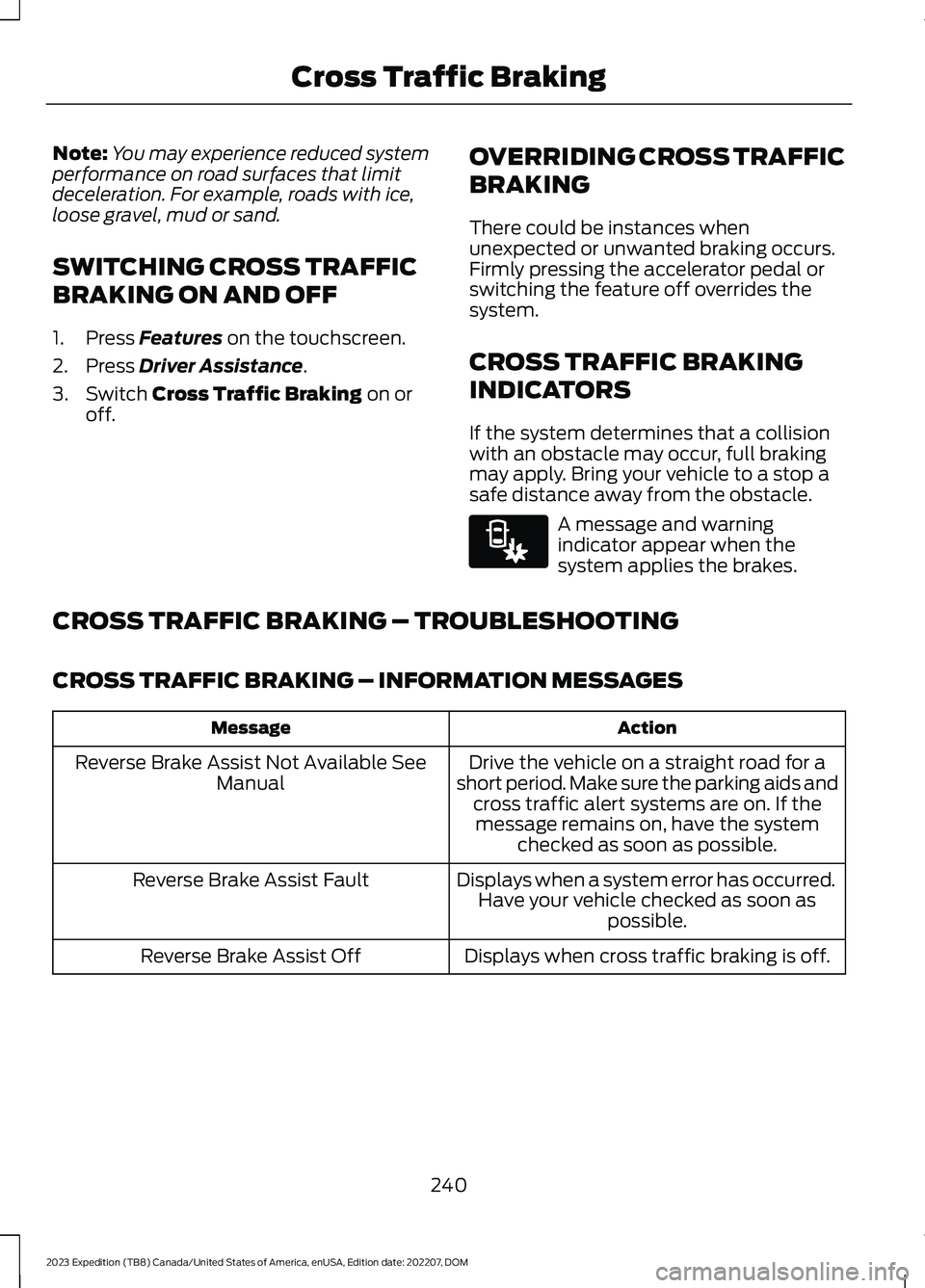
CROSS TRAFFIC BRAKING – TROUBLESHOOTING
CROSS TRAFFIC BRAKING – INFORMATION MESSAGES
ActionMessage
Drive the vehicle on a straight road for ashort period. Make sure the parking aids andcross traffic alert systems are on. If themessage remains on, have the systemchecked as soon as possible.
Reverse Brake Assist Not Available SeeManual
Displays when a system error has occurred.Have your vehicle checked as soon aspossible.
Reverse Brake Assist Fault
Displays when cross traffic braking is off.Reverse Brake Assist Off
240
2023 Expedition (TB8) Canada/United States of America, enUSA, Edition date: 202207, DOMCross Traffic BrakingE293490
Page 246 of 658
WHAT IS HILL START ASSIST
Hill Start Assist makes it easier for you topull away when your vehicle is on a slopewithout using the parking brake.
HOW DOES HILL START
ASSIST WORK
When the system activates, your vehicleremains stationary for a few seconds afteryou release the brake pedal. This gives youtime to move your foot from the brakepedal to the accelerator pedal. The brakesrelease when you apply the acceleratorpedal and the vehicle begins to moveforward, or the vehicle is stationary beyondhill start assist hold time.
The system activates when your vehicle isin any forward gear and facing uphill, orwhen your vehicle is in reverse (R) andfacing downhill.
HILL START ASSIST
PRECAUTIONS
WARNING: The system does notreplace the parking brake. When youleave your vehicle, always apply theparking brake.
WARNING: You must remain inyour vehicle when the system turns on.At all times you are responsible forcontrolling your vehicle, supervising thesystem, and intervening if required.Failure to follow this instruction couldresult in the loss of control of yourvehicle, personal injury or death.
HILL START ASSIST –
TROUBLESHOOTING
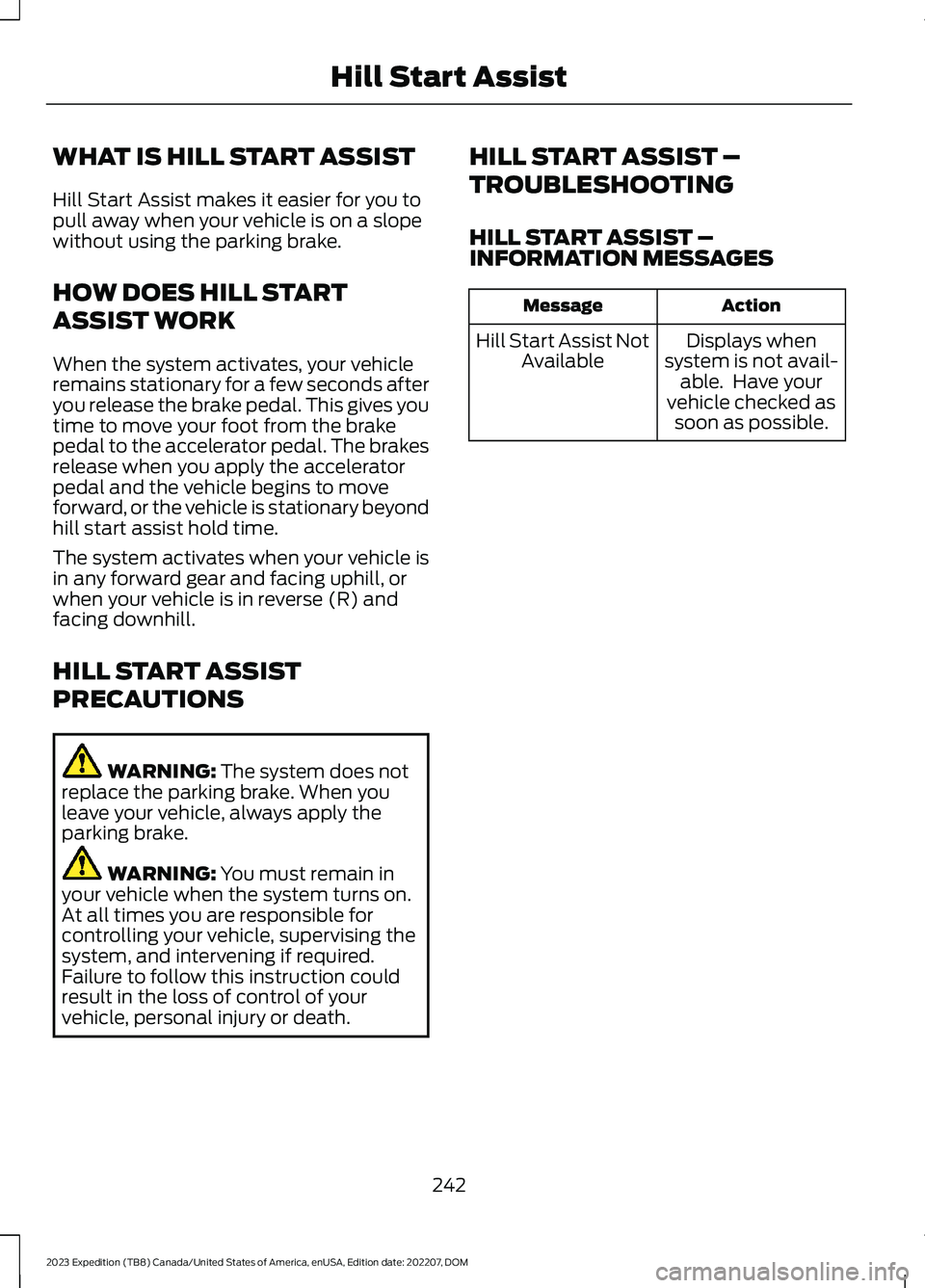
HILL START ASSIST –INFORMATION MESSAGES
ActionMessage
Displays whensystem is not avail-able. Have yourvehicle checked assoon as possible.
Hill Start Assist NotAvailable
242
2023 Expedition (TB8) Canada/United States of America, enUSA, Edition date: 202207, DOMHill Start Assist
Page 247 of 658
HOW DOES AUTO HOLD WORK
Auto hold applies the brakes to hold yourvehicle after you bring the vehicle to a stop.This can help when waiting on a hill or intraffic.
SWITCHING AUTO HOLD ON
AND OFF
WARNING: The system does notreplace the parking brake. When youleave your vehicle, always apply theparking brake.
WARNING: You must remain inyour vehicle when the system turns on.At all times you are responsible forcontrolling your vehicle, supervising thesystem, and intervening if required.Failure to follow this instruction couldresult in the loss of control of yourvehicle, personal injury or death.
You can switch the system on or off byaccessing the menu in the SYNC displayscreen.
1.Press Features on the touchscreen.
2.Press Driver Assistance.
Note:You can only switch the system onafter you close the driver door.
Note:The system remembers the lastsetting when you start your vehicle.
Note:When using an automatic car wash,make sure to switch auto hold off or shift toneutral (N) with the brake pedal applied toensure auto hold is not active.
USING AUTO HOLD
1.Bring your vehicle to a complete stop.The auto hold active indicatorilluminates in the information display.
2.Release the brake pedal. The systemholds your vehicle at a standstill. Theauto hold active indicator remainsilluminated in the information display.
3.Apply the accelerator and drive off ina normal manner. The system releasesthe brakes and the auto hold activeindicator switches off.
Note:The system only activates if youapply enough brake pressure on the brakepedal to bring the vehicle to a standstill.
Note:Under certain conditions, the systemcould apply the electric parking brake. Thebrake system warning lamp illuminates. Theelectric parking brake releases when youpress the accelerator pedal. SeeAutomatically Releasing the ElectricParking Brake (page 233).
Note:Auto hold cancels if you shift intoreverse (R), or neutral (N), and press thebrake pedal.
There could be actions that can cause theauto hold system not to work when thefollowing occur:
•When you use active park assist.
•The driver door is open.
•You shift into reverse (R), or neutral(N) before the system is active.
•Your vehicle is in temporary neutralmode.
AUTO HOLD INDICATORS
Illuminates when the system isactive.
243
2023 Expedition (TB8) Canada/United States of America, enUSA, Edition date: 202207, DOMAuto HoldE323448
Page 249 of 658
WHAT IS TRACTION CONTROL
The traction control system helps to avoiddrive wheel spin and loss of traction.
HOW DOES TRACTION
CONTROL WORK
If your wheels begin to spin, the loss oftraction can compromise steering controland stability of the vehicle. The tractioncontrol system applies the brakes toindividual wheels and when needed,reduces engine power at the same time toincrease traction.
SWITCHING TRACTION
CONTROL ON AND OFF
WARNING: Operating your vehiclewith the traction control disabled couldlead to an increased risk of loss of vehiclecontrol, vehicle rollover, personal injuryand death.
The traction control system turns on eachtime you switch the ignition on.
The button for the stability and tractioncontrol system is on the instrument panel.
Press and release the button to switchtraction control off. The stability controlsystem remains fully active, to switch it off,press and hold the button for a fewseconds, then release.
When you switch traction control off, amessage and an illuminated icon appearon the instrument cluster.
Press the switch again to turn the tractioncontrol system back on to normaloperation.
If your vehicle is stuck in mud or snow,switching traction control off may bebeneficial as this allows the wheels to spin.
TRACTION CONTROL
INDICATOR
Stability and Traction ControlIndicator
If the indicator does notilluminate when you switch theignition on, or remains on whenthe engine is running, this indicates amalfunction. Have your vehicle checkedby an authorized dealer as soon aspossible.
The traction control off indicatorilluminates when you switch thetraction control system off, orwhen an alternative stability control modeis selected that requires the tractioncontrol off depending on the drive modeselected.
245
2023 Expedition (TB8) Canada/United States of America, enUSA, Edition date: 202207, DOMTraction ControlE327252 E138639 E130458