change wheel FORD EXPEDITION 2023 User Guide
[x] Cancel search | Manufacturer: FORD, Model Year: 2023, Model line: EXPEDITION, Model: FORD EXPEDITION 2023Pages: 658, PDF Size: 16.16 MB
Page 274 of 658
Side View Camera
The side view camera is on the outsidemirror. It provides a video image of the areaon the sides of your vehicle to aid you whenparking.
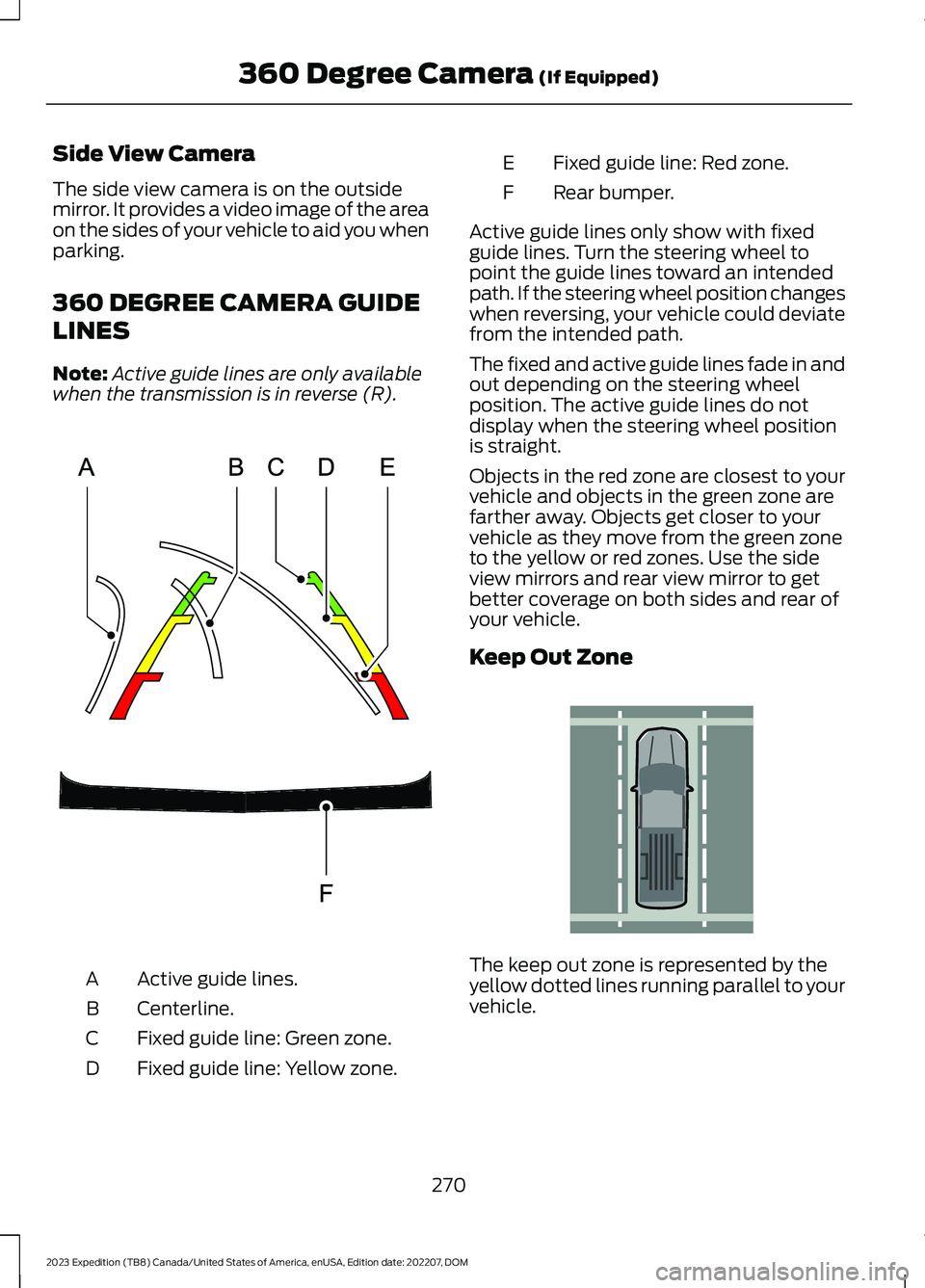
360 DEGREE CAMERA GUIDE
LINES
Note:Active guide lines are only availablewhen the transmission is in reverse (R).
Active guide lines.A
Centerline.B
Fixed guide line: Green zone.C
Fixed guide line: Yellow zone.D
Fixed guide line: Red zone.E
Rear bumper.F
Active guide lines only show with fixedguide lines. Turn the steering wheel topoint the guide lines toward an intendedpath. If the steering wheel position changeswhen reversing, your vehicle could deviatefrom the intended path.
The fixed and active guide lines fade in andout depending on the steering wheelposition. The active guide lines do notdisplay when the steering wheel positionis straight.
Objects in the red zone are closest to yourvehicle and objects in the green zone arefarther away. Objects get closer to yourvehicle as they move from the green zoneto the yellow or red zones. Use the sideview mirrors and rear view mirror to getbetter coverage on both sides and rear ofyour vehicle.
Keep Out Zone
The keep out zone is represented by theyellow dotted lines running parallel to yourvehicle.
270
2023 Expedition (TB8) Canada/United States of America, enUSA, Edition date: 202207, DOM360 Degree Camera (If Equipped)E306774 E310341
Page 281 of 658
WHAT IS CRUISE CONTROL
Cruise control lets you maintain a setspeed without keeping your foot on theaccelerator pedal.
Requirements
Use cruise control when the vehicle speedis greater than 15 mph in imperial units and20 km/h in metric units.
SWITCHING CRUISE CONTROL
ON AND OFF
WARNING: Do not use cruisecontrol on winding roads, in heavy trafficor when the road surface is slippery. Thiscould result in loss of vehicle control,serious injury or death.
The cruise controls are on the steeringwheel.
Switching Cruise Control On
Press the button to activate thesystem. When the systemactivates, the set speed is equalto the current vehicle speed or 15 mph (20km/h), whichever is greater. If the speed istoo low, or other conditions are not correctfor cruise control activation, the systementers standby mode.
Switching Cruise Control Off
Press the button when thesystem is active or switch theignition off.
Note:When you switch cruise control off,the set speed clears.
SETTING THE CRUISE
CONTROL SPEED
WARNING: When you are goingdownhill, your vehicle speed couldincrease above the set speed. Thesystem does not apply the brakes.
Drive to the speed you prefer.
Press either the SET+ or SET-buttons to set the current speed.
Take your foot off the accelerator pedal.
Note:The indicator changes color in theinformation display.
Changing the Set Speed
Press the SET+ button toincrease the set speed in smallincrements. Press and hold theSET+ button to accelerate. Release thebutton when you have reached yourpreferred speed.
Press the SET- button todecrease the set speed in smallincrements. Press and hold theSET- button to decelerate. Release thebutton when you have reached yourpreferred speed.
Note: If you accelerate by pressing theaccelerator pedal, the set speed does notchange. When you release the acceleratorpedal, your vehicle returns to the speed thatyou previously set.
277
2023 Expedition (TB8) Canada/United States of America, enUSA, Edition date: 202207, DOMCruise ControlE332905 E332905 E246884 E246885 E246884 E246885
Page 285 of 658
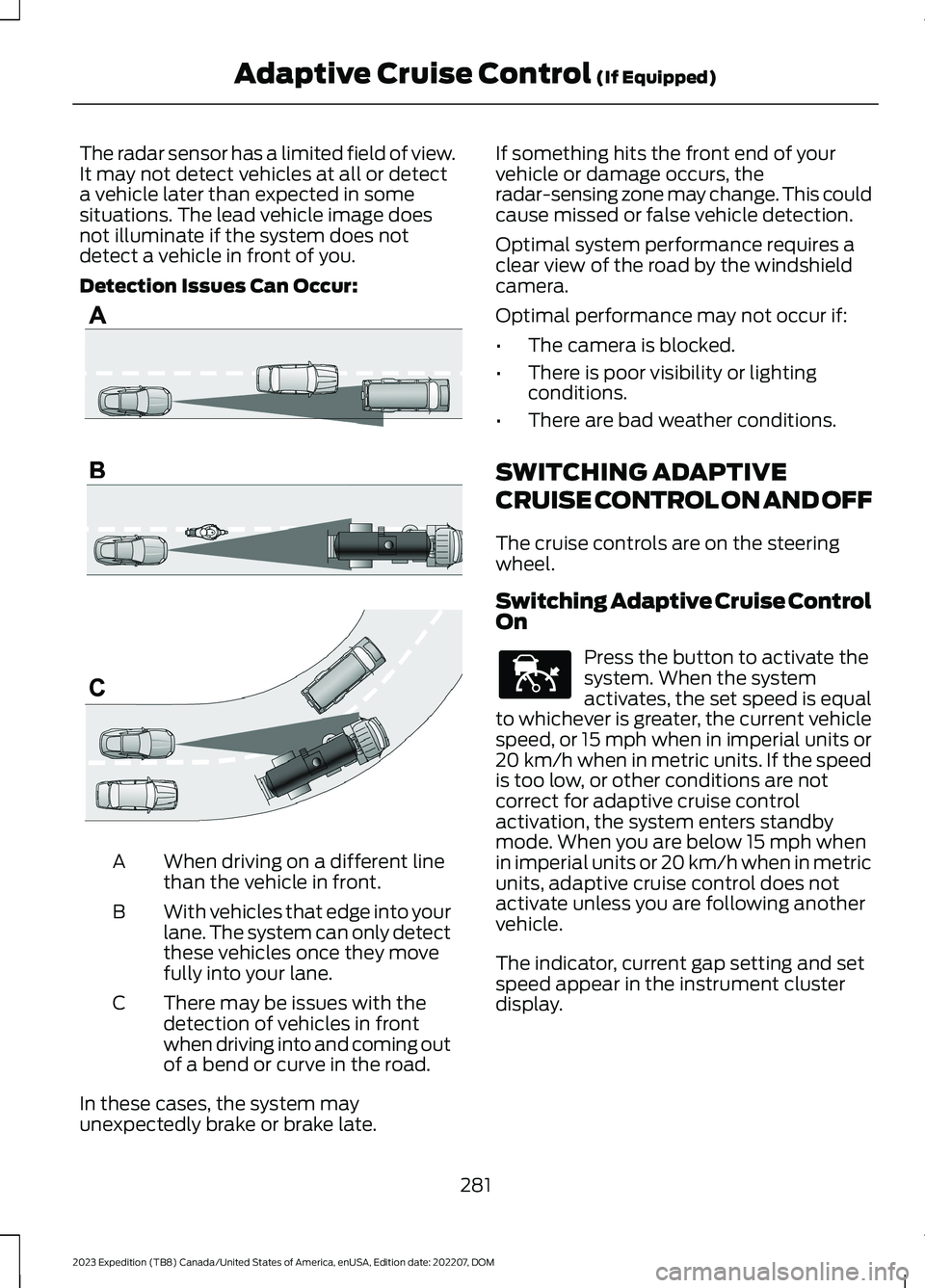
The radar sensor has a limited field of view.It may not detect vehicles at all or detecta vehicle later than expected in somesituations. The lead vehicle image doesnot illuminate if the system does notdetect a vehicle in front of you.
Detection Issues Can Occur:
When driving on a different linethan the vehicle in front.A
With vehicles that edge into yourlane. The system can only detectthese vehicles once they movefully into your lane.
B
There may be issues with thedetection of vehicles in frontwhen driving into and coming outof a bend or curve in the road.
C
In these cases, the system mayunexpectedly brake or brake late.
If something hits the front end of yourvehicle or damage occurs, theradar-sensing zone may change. This couldcause missed or false vehicle detection.
Optimal system performance requires aclear view of the road by the windshieldcamera.
Optimal performance may not occur if:
•The camera is blocked.
•There is poor visibility or lightingconditions.
•There are bad weather conditions.
SWITCHING ADAPTIVE
CRUISE CONTROL ON AND OFF
The cruise controls are on the steeringwheel.
Switching Adaptive Cruise ControlOn
Press the button to activate thesystem. When the systemactivates, the set speed is equalto whichever is greater, the current vehiclespeed, or 15 mph when in imperial units or20 km/h when in metric units. If the speedis too low, or other conditions are notcorrect for adaptive cruise controlactivation, the system enters standbymode. When you are below 15 mph whenin imperial units or 20 km/h when in metricunits, adaptive cruise control does notactivate unless you are following anothervehicle.
The indicator, current gap setting and setspeed appear in the instrument clusterdisplay.
281
2023 Expedition (TB8) Canada/United States of America, enUSA, Edition date: 202207, DOMAdaptive Cruise Control (If Equipped)E71621 E144529
Page 294 of 658
WARNING: Do not use the systemif any changes or modifications to thesteering wheel have been made. Anychanges or modifications to the steeringwheel could affect the functionality orperformance of the system. Failure tofollow this instruction could result in theloss of control of your vehicle, personalinjury or death.
Adaptive cruise control precautions applyto lane centering unless stated otherwiseor contradicted by a lane centeringprecaution. See Adaptive Cruise ControlPrecautions (page 279).
LANE CENTERINGREQUIREMENTS
You must keep your hands on the steeringwheel at all times.
Lane centering only activates when all ofthe following occur:
•Adaptive cruise control with lanecentering is enabled in your informationand entertainment screen. SeeSwitching the Lane Keeping SystemOn and Off (page 310).
•You have adaptive cruise control withstop and go enabled and set.
•The steering sensor detects your handson the steering wheel.
•The system detects both lane markingswhen driving on a straight road.
•Your vehicle is initially centered in thelane between two visible line markings.
Note:If the system does not detect validlane line markings, the system will remainin standby until valid line markings areavailable.
LANE CENTERING LIMITATIONS
Adaptive cruise control limitations applyto lane centering unless stated otherwiseor contradicted by a lane centeringlimitation. See Adaptive Cruise ControlLimitations (page 280).
Lane centering may not correctly operatein any of the following conditions:
•The lane width is too narrow or wide.
•The curve in the road is too small.
•The system does not detect theminimum required lane markings orwhen lanes merge or split.
•When the required steering effort tomaintain lane center exceeds the lanecentering system limit.
•When driving in areas that are underconstruction or when road work is inprogress.
•If the front windshield camera and/orthe front radar are blocked.
•When using a spare tire.
•Inclement weather conditionsincluding, but not limited to, high wind,heavy rain, and fog.
•Driving into direct sunlight.
•When modification to the steeringsystem has been made, includingalterations to the steering wheel.
•When towing a trailer.
See Lane Keeping System Precautions(page 309).
Note:The system steering assistance islimited and may not have sufficient effortfor all driving situations and/or conditions,such as driving through tight curves ordriving through curves at high speeds.
Note:In exceptional conditions, the systemmay deviate from the lane center.
290
2023 Expedition (TB8) Canada/United States of America, enUSA, Edition date: 202207, DOMAdaptive Cruise Control (If Equipped)
Page 295 of 658
SWITCHING LANE CENTERING ONAND OFF - VEHICLES WITH: 12INCH SCREEN
Keep your hands on the steering wheel atall times.
The controls are on the steering wheel.
Press the button.
The indicator appears in the instrumentcluster display. When the system is on, thecolor of the indicator changes to indicatethe system status.
You can override the system at any timeby steering your vehicle.
Note:The correct requirements must bemet before you can switch the system on.See Lane Centering Requirements (page290).
Enabling and Disabling LaneCentering
1.Press Features on the touchscreen.
2.Press Driver Assistance.
3.Press Cruise Control.
4.Press Lane Centering Assist.
SWITCHING LANE CENTERING ONAND OFF - VEHICLES WITH: 15INCH SCREEN
You must keep your hands on the steeringwheel at all times.
The controls are on the steering wheel.
Press the button.
The indicator appears in the instrumentcluster display. When the system is on, thecolor of the indicator changes to indicatethe system status.
You can override the system at any timeby steering your vehicle.
Note:The correct requirements must bemet before you can switch the system on.See Lane Centering Requirements (page290).
Enabling and Disabling LaneCentering
1.Access the vehicle drawer on thetouchscreen.
2.Press SETTINGS.
3.Press Driver Assistance.
4.Press Cruise Control.
5.Press Adaptive Cruise Control.
6.Press Lane Centering Assist.
LANE CENTERING ALERTS
You must keep your hands on the steeringwheel at all times.
When the system is active and detects nosteering activity for a period of time, thesystem alerts you to put your hands on thesteering wheel. If you do not reactappropriately to the warnings the adaptivecruise control with lane centering systemcancels and slows your vehicle down toidle speeds while maintaining steeringcontrol. See Lane Centering AutomaticCancellation (page 292).
The system also alerts you if your vehiclecrosses lane line markings withoutdetected steering activity.
Note:The system could detect a light gripor light touch on the steering wheel ashands-off driving.
291
2023 Expedition (TB8) Canada/United States of America, enUSA, Edition date: 202207, DOMAdaptive Cruise Control (If Equipped)E308131 E308131
Page 296 of 658
LANE CENTERING AUTOMATICCANCELLATION
When an external condition cancels thesystem, and your hands are on the steeringwheel, a tone sounds and a messageappears in the instrument cluster display.
When an external condition cancels thesystem, and your hands are not on thesteering wheel, the system immediatelyalerts you to take control of the vehicle. Ifthis alert is ignored, the system slows thevehicle while maintaining steeringassistance when lane markings areavailable. When no lane markings areavailable, the vehicle comes to a stop.
If your vehicle starts to slowdown after system cancellation,you must take full control of thevehicle. To re-enable adaptive cruisecontrol with lane centering aftercancellation, press and release the resumebutton.
Automatic cancellation can also occur if:
•The lane becomes too wide or narrow.
•The system cannot detect valid lanemarkings.
•Lane markings cross over one another.
•The curve of the road is too sharp.
Note:If your vehicle slows down due to yourinactivity twice within a key cycle, thesystem disables. To reset the system, whenthe vehicle is stationary, return the gearselector to park (P) and turn the vehicle off.Then, restart the vehicle with your foot onthe brake pedal.
LANE CENTERING MANUALCANCELLATION
When you perform the following actions,adaptive cruise control with lane centeringwill cancel:
•The brake pedal is pressed.
•Adaptive cruise control button isswitched off on the steering wheel.
The lane centering system is momentarilysuppressed when either of the followingactions are performed:
•Turn signal indicator is latched ortapped.
•You steer the vehicle out of lane.
LANE CENTERING INDICATORS
Illuminates when you switchlane centering on. The color ofthe indicator changes to indicatethe system status.
Gray status indicates the system is on butin standby mode.
Green status indicates the system isenabled and applying steering assistanceto keep the vehicle in the center of the lane.
Amber status with an audible tone, thatthen changes to gray status, indicates asystem automatic cancellation.
INTELLIGENT ADAPTIVE
CRUISE CONTROL
HOW DOES INTELLIGENTADAPTIVE CRUISE CONTROLWORK
Intelligent adaptive cruise controlcombines speed sign recognition andnavigation map data with adaptive cruisecontrol to adjust the cruise set speed tothe speed limit detected by the speed signrecognition system. As the system detectsnew speed signs, the set speed updates.
292
2023 Expedition (TB8) Canada/United States of America, enUSA, Edition date: 202207, DOMAdaptive Cruise Control (If Equipped)E308130 E297977
Page 302 of 658
WARNING: Do not use the systemif any changes or modifications to thesteering wheel have been made. Anychanges or modifications to the steeringwheel could affect the functionality orperformance of the system. Failure tofollow this instruction could result in theloss of control of your vehicle, personalinjury or death.
WARNING: The system may notfunction if the sensor is blocked.
WARNING: Pay close attention tochanging road conditions such asentering or leaving a highway, on roadswith intersections or roundabouts, roadswithout visible lanes of travel, roads thatare winding, slippery, unpaved, or steepslopes.
WARNING: The system is not acrash warning or avoidance system.
WARNING: Large contrasts inoutside lighting can limit sensorperformance.
WARNING: The system attemptsto keep your vehicle in the center of thelane as well as maintain speed and gapcontrol. The system may not be able toperform these tasks in all situations. Donot use the system in complex oruncertain driving conditions. Failure tofollow this instruction could result in theloss of control of your vehicle, personalinjury or death.
WARNING: Your vehicle could driftout of the lane of travel. Always beprepared to manually steer your vehicle.Failure to follow this instruction couldresult in the loss of control of yourvehicle, personal injury or death.
WARNING: The system will notoperate if the sensor cannot track theroad lane markings.
BLUECRUISE REQUIREMENTS
BlueCruise only activates when all of thefollowing occur:
•BlueCruise is enabled in yourinformation and entertainment screen.See BlueCruise Settings (page 299).
•Adaptive cruise control is on.
•The system detects both lanemarkings.
•Your hands are on the steering wheel.
•Your eyes are on the road.
Note:For hands-free mode to work, yourvehicle must be on certain limited accessdivided freeways.
Note:The system may require updatedsoftware for hands-free mode. See VehicleSoftware Updates (page 532).
BLUECRUISE LIMITATIONS
Any of the following conditions could resultin BlueCruise not correctly operating:
•You do not have your vehicle centeredin the lane.
•The lane is too narrow or too wide.
•The system does not detect at leastone lane marking or when lanes mergeor split.
•You are applying a low amount ofsteering input.
•You are using the system in areas underconstruction.
•If you make any aftermarketmodifications to the steering system.
•You are using a spare tire.
298
2023 Expedition (TB8) Canada/United States of America, enUSA, Edition date: 202207, DOMBlueCruise (If Equipped)
Page 303 of 658
The driver-facing camera may not operatecorrectly due to any of the following:
•You have a pre-existing eye condition,such as an eye misalignment, or havehad eye surgery.
•You cover your facial features by amask, hat or other items.
•The lighting conditions changesignificantly.
•You are not in the field of view of thecamera.
•You position or tilt yourself to one side.
•You are moving around extensively.
•You are wearing glasses or sunglassesthat are too dark or reflective.
Note:The system has limited steeringassistance and may not be sufficient for alldriving situations.
Note:In exceptional conditions, such asinclement weather or direct sunlight, thesystem could deviate from the center line.
Note:The information provided by thenavigation map data could be inaccurate orout of date.
BLUECRUISE SETTINGS
Enabling BlueCruise
1.Access the vehicle drawer on thetouchscreen.
2.Press SETTINGS.
3.Press Driver Assistance.
4.Press Cruise Control.
5.Press Lane Centering withHands-Free.
Enabling Activation Prompts
1.Access the vehicle drawer on thetouchscreen.
2.Press SETTINGS.
3.Press Driver Assistance.
4.Press Cruise Control.
5.Press Activation Prompts.
SWITCHING BLUECRUISE ON
AND OFF
Switching BlueCruise On
The controls are on the steering wheel.
Using Activation Prompts
When the prompt appears, pressthe button to switch BlueCruiseon.
The indicator appears in the instrumentcluster. When the system is on, the colorof the indicator changes to indicate thesystem status.
Note:You must enable activation promptsin the touchscreen.
Using Steering Wheel Controls
Using the adaptive cruise controland lateral support buttons,make sure both systems areactive. BlueCruise activates.
Switching BlueCruise Off
Press either the lateral supportor adaptive cruise control buttonwhen system is active or instandby mode.
BlueCruise turns off througheach ignition cycle.
299
2023 Expedition (TB8) Canada/United States of America, enUSA, Edition date: 202207, DOMBlueCruise (If Equipped)E144529 E308131 E144529 E308131 E144529
Page 304 of 658
BLUECRUISE ALERTS
When BlueCruise is providing hands-ondriving or transitioning to hands-on drivingfrom hands-free driving and detects nosteering activity for a certain period of time,the system alerts you with a message inthe instrument cluster to put your handson the steering wheel. After the first alert,the system alerts you with a message inthe instrument cluster and an audiblewarning.
When BlueCruise is providing hands-on orhands-free driving and detects you are notlooking at the road for a certain period oftime, the system alerts you to return youreyes to the road. Depending on where youare looking, the alert can be a message inthe instrument cluster and an audiblewarning.
If you do not react to the warnings,BlueCruise cancels, quickly activates andreleases the brakes, and slows your vehicledown to low speeds while maintainingsteering control.
If your vehicle slows down and you resumecontrol, a message appears to prompt youto press the accelerator pedal to allow thesystem to resume.
Note:If the system detects repeatedinactivity, it disables until the next key cycle.
BLUECRUISE AUTOMATIC
CANCELLATION
When an external condition cancelsBlueCruise, for example, no lane markingsavailable, a tone sounds and a messageappears in the instrument cluster.
If your vehicle starts to slowdown, you must take control ofsteering and press and releasethe button to reactivate BlueCruise.
System cancellation can also occur if:
•The lane becomes too narrow.
•The system cannot detect valid lanemarkings.
•Lane markings cross.
•Your eyes are not on the road or yourhands are not on the steering wheel.
If you have your hands on the steeringwheel and your eyes are on the road whenthe feature is active and a cancellationoccurs, the system sounds a tone anddisplays a cancelled graphic in theinstrument cluster.
If you are not paying attention to the roador your hands are not on the steering wheeland a cancellation occurs, the systemdisplays a message and a tone sounds untilyou resume control. If you do not resumecontrol in time, BlueCruise quickly activatesand releases the brakes, and slows yourvehicle to low speeds while maintainingsteering control. If your vehicle slows downand you resume control, a messageappears to prompt you to press theaccelerator pedal to allow the system toresume.
Note:The system disables until the vehicleis turned off and back on if it detectsrepeated inactivity.
BLUECRUISE INDICATORS
When on, the color of theindicator changes to indicate thestatus.
Gray indicates BlueCruise is on but inactive.
Green indicates BlueCruise is active andapplying continuous steering support.
Blue indicates BlueCruise is active andhands-free driving mode is available.
300
2023 Expedition (TB8) Canada/United States of America, enUSA, Edition date: 202207, DOMBlueCruise (If Equipped)E308130 E297977
Page 307 of 658
WHAT IS DRIVE MODE
CONTROL
Your vehicle has various drive modes thatyou can select for different drivingconditions. Depending on the drive modethat you select, the system adjusts variousvehicle settings.
HOW DOES DRIVE MODE
CONTROL WORK
Drive mode control adjusts your vehicleconfiguration for each mode you select.
Changing the drive mode adjusts thesteering effort and feel of the steeringsystem.
The stability and traction control assistyour vehicle control in adverse conditionsor high-performance driving.
Throttle control enhances the powertrainresponse, transmission controls becomeoptimized with shift schedules, andfour-wheel drive settings are optimizedand tuned to each mode.
Changing the drive mode can engage ordisengage the electronic lockingdifferentials.
Changing the drive mode changes thefour-wheel drive mode to the defaultsetting for the selected drive mode.
Note:The system has diagnostic checksthat continuously monitor the system forproper operation. If a mode is unavailabledue to a system fault, the drive modesystem defaults to normal. When thesystem defaults to normal, the drivelinesettings remain the same as prior to thesystem fault.
Note:The system reverts to the normalmode each time you start your vehicle. Atstartup the system also displays a prompton the instrument cluster display that givesyou the option to return to the previouslyselected drive mode during the last ignitioncycle. If you select yes, the system returnsto the last selected drive mode and thedefault driveline settings associated withthat mode. If you select no, the systemremains in normal mode and the drivelinesettings remain the same as selected in theprior ignition cycle. If you do not select yesor no, the system stays in normal mode andthe driveline settings remain the same asselected in the prior ignition cycle.
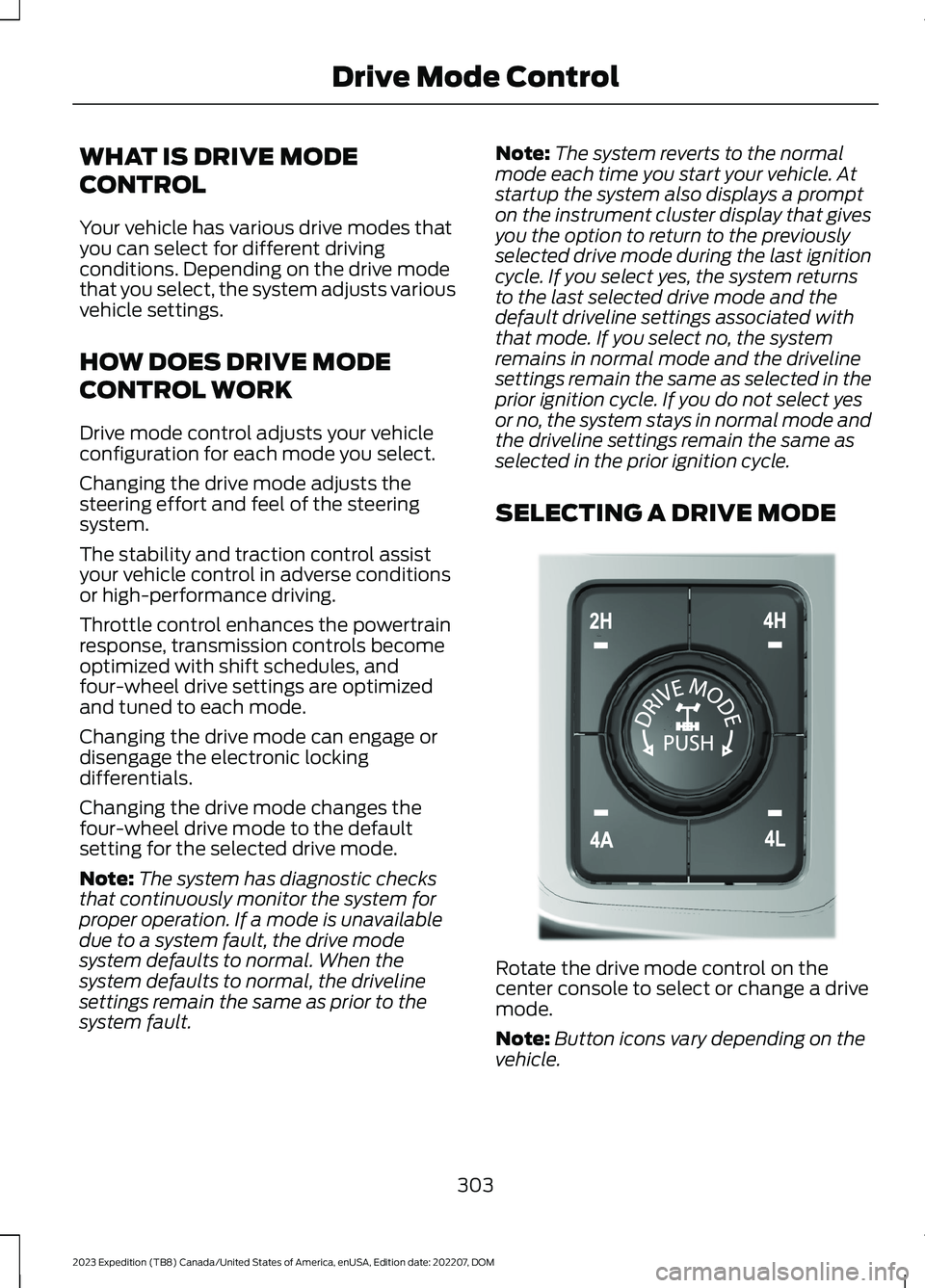
SELECTING A DRIVE MODE
Rotate the drive mode control on thecenter console to select or change a drivemode.
Note:Button icons vary depending on thevehicle.
303
2023 Expedition (TB8) Canada/United States of America, enUSA, Edition date: 202207, DOMDrive Mode ControlE308146