change wheel FORD EXPEDITION 2023 Service Manual
[x] Cancel search | Manufacturer: FORD, Model Year: 2023, Model line: EXPEDITION, Model: FORD EXPEDITION 2023Pages: 658, PDF Size: 16.16 MB
Page 507 of 658
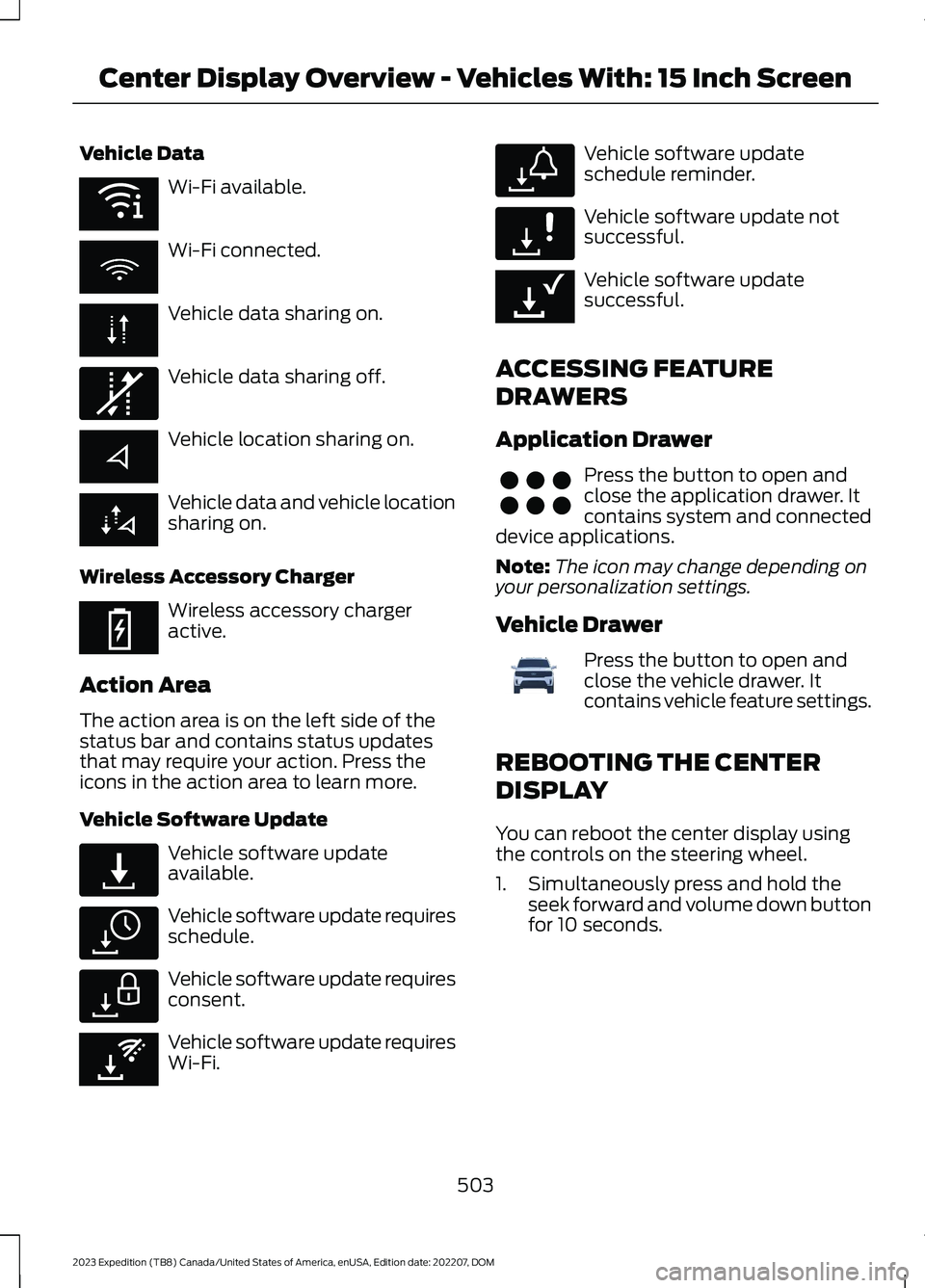
Vehicle Data
Wi-Fi available.
Wi-Fi connected.
Vehicle data sharing on.
Vehicle data sharing off.
Vehicle location sharing on.
Vehicle data and vehicle locationsharing on.
Wireless Accessory Charger
Wireless accessory chargeractive.
Action Area
The action area is on the left side of thestatus bar and contains status updatesthat may require your action. Press theicons in the action area to learn more.
Vehicle Software Update
Vehicle software updateavailable.
Vehicle software update requiresschedule.
Vehicle software update requiresconsent.
Vehicle software update requiresWi-Fi.
Vehicle software updateschedule reminder.
Vehicle software update notsuccessful.
Vehicle software updatesuccessful.
ACCESSING FEATURE
DRAWERS
Application Drawer
Press the button to open andclose the application drawer. Itcontains system and connecteddevice applications.
Note:The icon may change depending onyour personalization settings.
Vehicle Drawer
Press the button to open andclose the vehicle drawer. Itcontains vehicle feature settings.
REBOOTING THE CENTER
DISPLAY
You can reboot the center display usingthe controls on the steering wheel.
1.Simultaneously press and hold theseek forward and volume down buttonfor 10 seconds.
503
2023 Expedition (TB8) Canada/United States of America, enUSA, Edition date: 202207, DOMCenter Display Overview - Vehicles With: 15 Inch ScreenE353219 E335292 E353214 E327789 E327785 E327786 E353217 E327787 E327788 E353218 E356583 E372642
Page 511 of 658
WHAT IS ALEXA BUILT-IN
Allows you to use Alexa in your vehicle forauto specific use cases on the road andgives you access to an ever evolvingnumber of skills that help to make your lifemore productive, entertaining, andconnected while using your vehicle.
ALEXA BUILT-IN
REQUIREMENTS
To use Alexa, all of the following mustoccur:
•Your vehicle modem is enabled.
•You are logged into an existing Amazonaccount.
•Vehicle location services are enabled.
•Vehicle connectivity and vehicle datasharing is enabled.
SIGNING INTO YOUR
ACCOUNT
Press the button in the statusbar and follow the on-screenprompts.
To sign in using the settings menu:
1.Press Settings on the touchscreen.
2.Press Amazon Alexa.
3.Press Get Started.
4.Sign into your account by eitherscanning the QR code or entering theon-screen code into the Amazonwebsite.
5.Once logged in, follow the on-screenprompts.
6.When complete, the vehicle informsyou that Alexa is ready to be used inthe vehicle.
Signing Out of Your Account
1.Press Settings on the touchscreen.
2.Press Amazon Alexa.
3.Press Sign Out.
USING ALEXA BUILT-IN
To use Alexa, say “Alexa” or press the voiceinteraction button on the steering wheeland then say “Alexa” to invoke Alexa tostart listening.
Note:If the wake word is not enabled, youcan only use the voice interaction button.
You can use Alexa for the following andmore:
•Entertainment.
•Hands-free calling.
•Traffic and navigation.
•Vehicle controls.
•Smart home device control.
•Weather and news information.
ALEXA BUILT-IN SETTINGS
Enabling the Wake Word
1.Press Settings on the touchscreen.
2.Press Amazon Alexa.
3.Switch Listen for Wake Word on or off.
Note:If the wake word is not enabled, youcan only use the voice interaction button.
Contact List
Displays a list of connected phones andcontact sharing status for each phone.
To change the contact sharing status:
1.Press Settings on the touchscreen.
2.Press Amazon Alexa.
3.Press Contact List.
507
2023 Expedition (TB8) Canada/United States of America, enUSA, Edition date: 202207, DOMAlexa Built-In - Vehicles With: 12 Inch ScreenE368039
Page 513 of 658
WHAT IS ALEXA BUILT-IN
Allows you to use Alexa in your vehicle forauto specific use cases on the road andgives you access to an ever evolvingnumber of skills that help to make your lifemore productive, entertaining, andconnected while using your vehicle.
ALEXA BUILT-IN
REQUIREMENTS
To use Alexa, all of the following mustoccur:
•Your vehicle modem is enabled.
•You are logged into an existing Amazonaccount.
•Vehicle location services are enabled.
•Vehicle connectivity and vehicle datasharing is enabled.
SIGNING INTO YOUR
ACCOUNT
Press the button in the statusbar and follow the on-screenprompts.
To sign in using the settings menu:
1.Access the vehicle drawer.
2.Press SETTINGS.
3.Press Amazon Alexa.
4.Press Get Started.
5.Sign into the Amazon account by eitherscanning the QR code or entering theon-screen code into the Amazonwebsite.
6.Once logged in, follow the on-screenprompts.
7.When complete, the vehicle informsyou that Alexa is ready to be used inthe vehicle.
Signing Out of Your Account
1.Access the vehicle drawer.
2.Press SETTINGS.
3.Press Amazon Alexa.
4.Press Sign Out.
USING ALEXA BUILT-IN
To use Alexa, say “Alexa” or press the voiceinteraction button on the steering wheeland then say “Alexa” to invoke Alexa tostart listening.
Note:If the wake word is not enabled, youcan only use the voice interaction button.
You can use Alexa for the following andmore:
•Entertainment.
•Hands-free calling.
•Traffic and navigation.
•Vehicle controls.
•Smart home device control.
•Weather and news information.
ALEXA BUILT-IN SETTINGS
Enabling the Wake Word
1.Access the vehicle drawer.
2.Press SETTINGS.
3.Press Amazon Alexa.
4.Switch Listen for Wake Word on or off.
Note:If the wake word is not enabled, youcan only use the voice interaction button.
Contact List
Displays a list of connected phones andcontact sharing status for each phone.
To change the contact sharing status:
1.Access the vehicle drawer.
509
2023 Expedition (TB8) Canada/United States of America, enUSA, Edition date: 202207, DOMAlexa Built-In - Vehicles With: 15 Inch ScreenE368039
Page 547 of 658
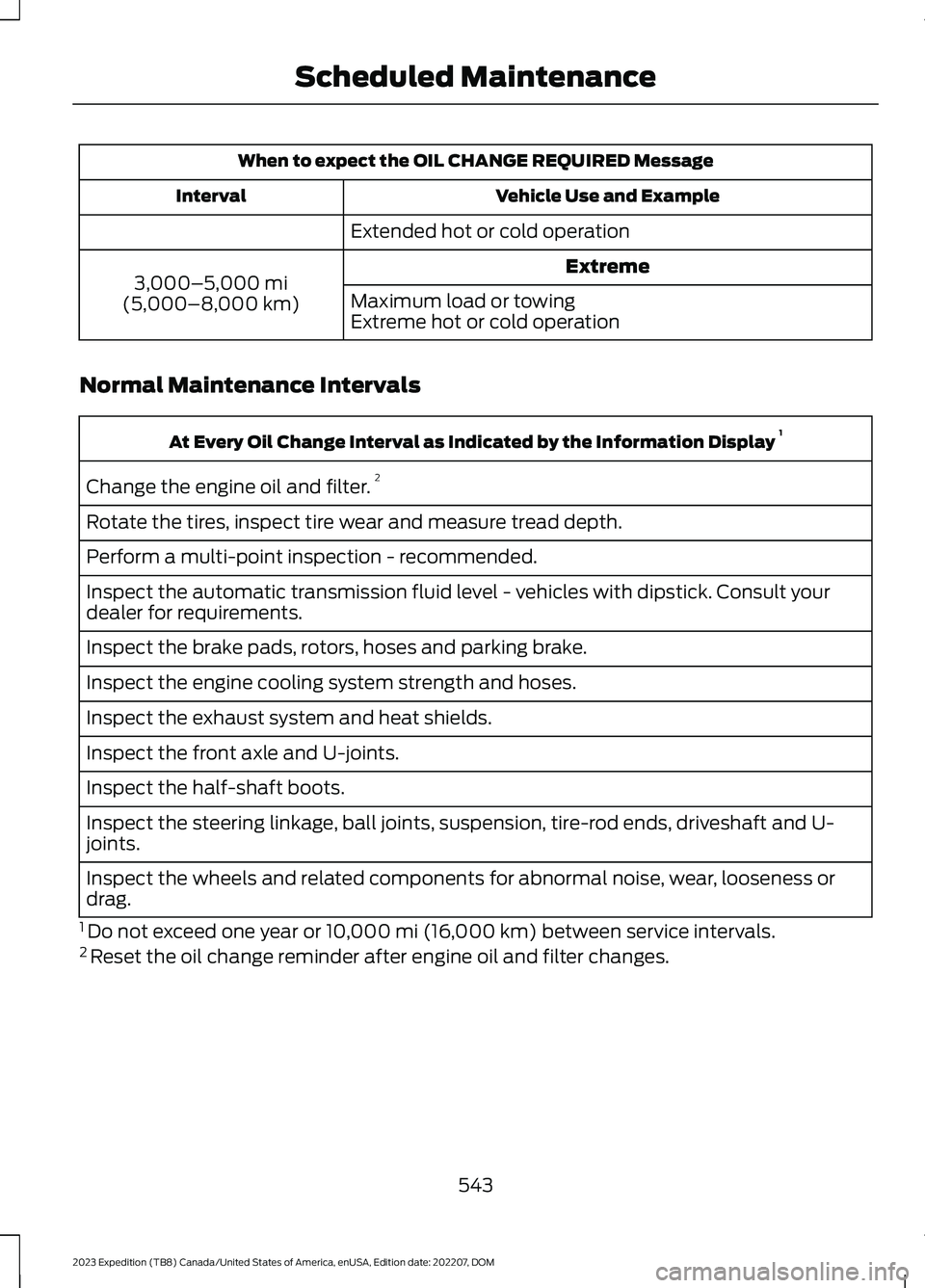
When to expect the OIL CHANGE REQUIRED Message
Vehicle Use and ExampleInterval
Extended hot or cold operation
Extreme3,000–5,000 mi(5,000–8,000 km)Maximum load or towingExtreme hot or cold operation
Normal Maintenance Intervals
At Every Oil Change Interval as Indicated by the Information Display 1
Change the engine oil and filter.2
Rotate the tires, inspect tire wear and measure tread depth.
Perform a multi-point inspection - recommended.
Inspect the automatic transmission fluid level - vehicles with dipstick. Consult yourdealer for requirements.
Inspect the brake pads, rotors, hoses and parking brake.
Inspect the engine cooling system strength and hoses.
Inspect the exhaust system and heat shields.
Inspect the front axle and U-joints.
Inspect the half-shaft boots.
Inspect the steering linkage, ball joints, suspension, tire-rod ends, driveshaft and U-joints.
Inspect the wheels and related components for abnormal noise, wear, looseness ordrag.
1 Do not exceed one year or 10,000 mi (16,000 km) between service intervals.2 Reset the oil change reminder after engine oil and filter changes.
543
2023 Expedition (TB8) Canada/United States of America, enUSA, Edition date: 202207, DOMScheduled Maintenance
Page 548 of 658
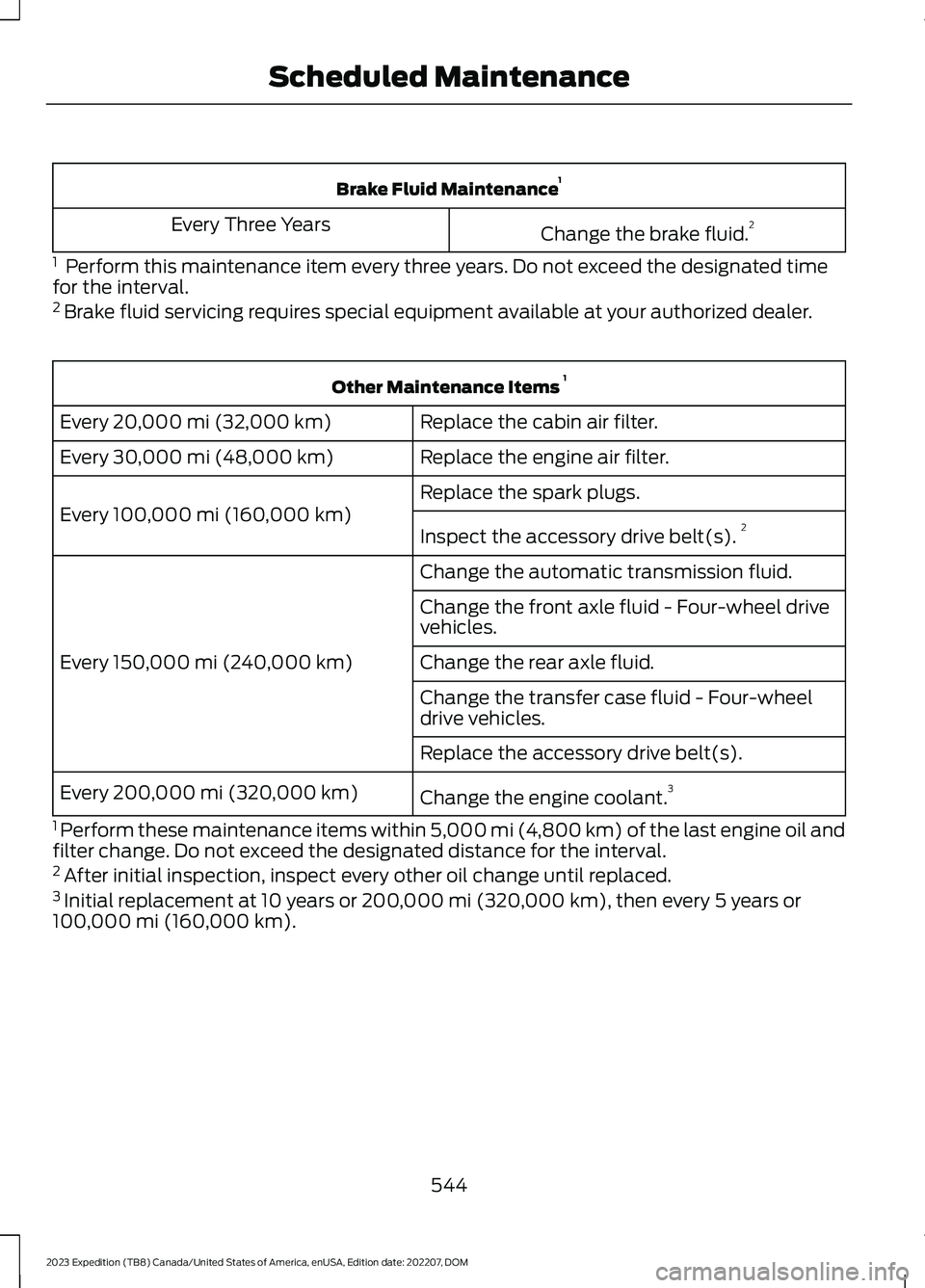
Brake Fluid Maintenance1
Change the brake fluid.2Every Three Years
1 Perform this maintenance item every three years. Do not exceed the designated timefor the interval.2 Brake fluid servicing requires special equipment available at your authorized dealer.
Other Maintenance Items 1
Replace the cabin air filter.Every 20,000 mi (32,000 km)
Replace the engine air filter.Every 30,000 mi (48,000 km)
Replace the spark plugs.Every 100,000 mi (160,000 km)Inspect the accessory drive belt(s).2
Change the automatic transmission fluid.
Every 150,000 mi (240,000 km)
Change the front axle fluid - Four-wheel drivevehicles.
Change the rear axle fluid.
Change the transfer case fluid - Four-wheeldrive vehicles.
Replace the accessory drive belt(s).
Change the engine coolant.3Every 200,000 mi (320,000 km)
1 Perform these maintenance items within 5,000 mi (4,800 km) of the last engine oil andfilter change. Do not exceed the designated distance for the interval.2 After initial inspection, inspect every other oil change until replaced.3 Initial replacement at 10 years or 200,000 mi (320,000 km), then every 5 years or100,000 mi (160,000 km).
544
2023 Expedition (TB8) Canada/United States of America, enUSA, Edition date: 202207, DOMScheduled Maintenance
Page 549 of 658
SPECIAL OPERATING
CONDITIONS SCHEDULED
MAINTENANCE
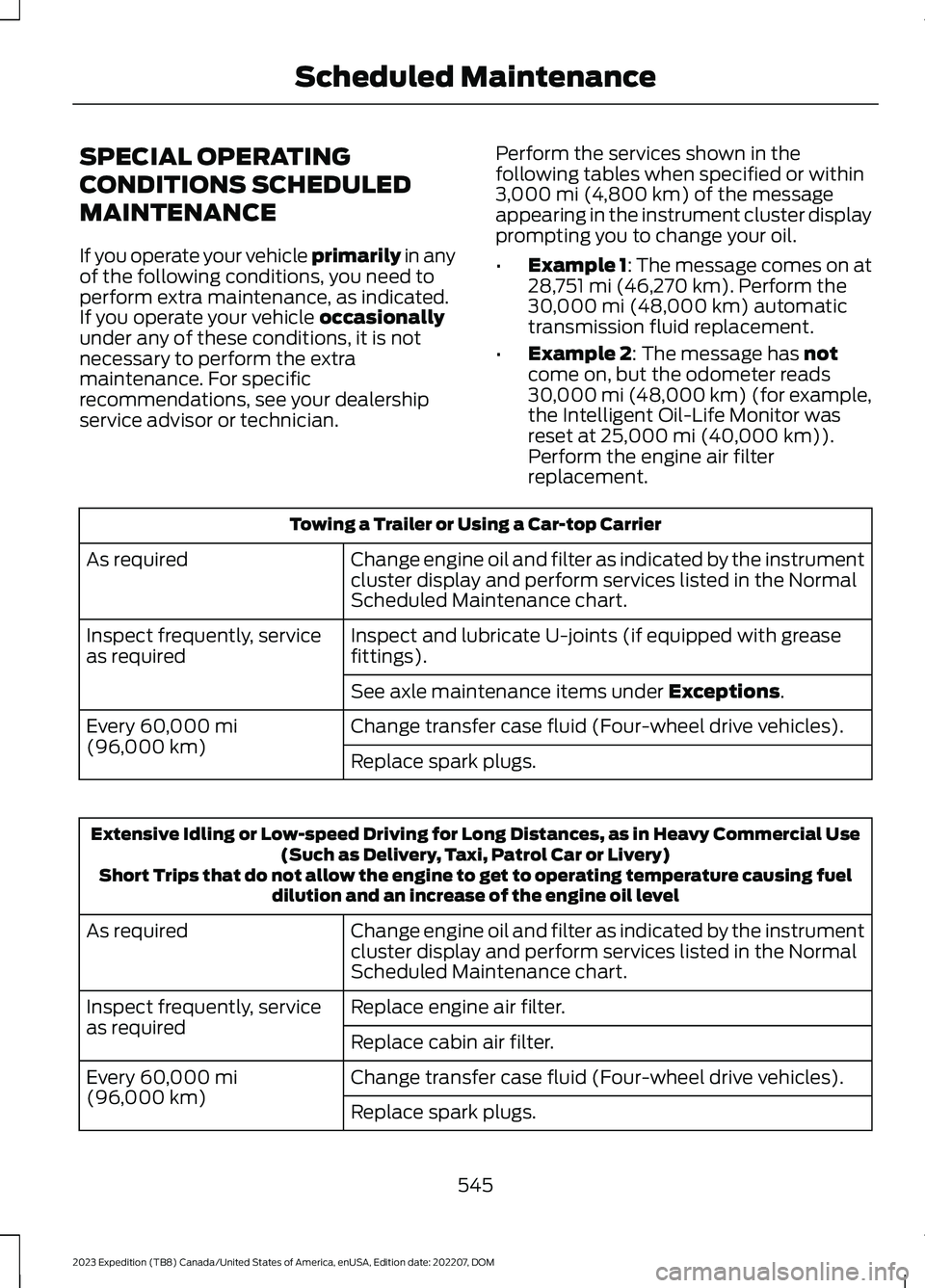
If you operate your vehicle primarily in anyof the following conditions, you need toperform extra maintenance, as indicated.If you operate your vehicle occasionallyunder any of these conditions, it is notnecessary to perform the extramaintenance. For specificrecommendations, see your dealershipservice advisor or technician.
Perform the services shown in thefollowing tables when specified or within3,000 mi (4,800 km) of the messageappearing in the instrument cluster displayprompting you to change your oil.
•Example 1: The message comes on at28,751 mi (46,270 km). Perform the30,000 mi (48,000 km) automatictransmission fluid replacement.
•Example 2: The message has notcome on, but the odometer reads30,000 mi (48,000 km) (for example,the Intelligent Oil-Life Monitor wasreset at 25,000 mi (40,000 km)).Perform the engine air filterreplacement.
Towing a Trailer or Using a Car-top Carrier
Change engine oil and filter as indicated by the instrumentcluster display and perform services listed in the NormalScheduled Maintenance chart.
As required
Inspect and lubricate U-joints (if equipped with greasefittings).Inspect frequently, serviceas required
See axle maintenance items under Exceptions.
Change transfer case fluid (Four-wheel drive vehicles).Every 60,000 mi(96,000 km)Replace spark plugs.
Extensive Idling or Low-speed Driving for Long Distances, as in Heavy Commercial Use(Such as Delivery, Taxi, Patrol Car or Livery)Short Trips that do not allow the engine to get to operating temperature causing fueldilution and an increase of the engine oil level
Change engine oil and filter as indicated by the instrumentcluster display and perform services listed in the NormalScheduled Maintenance chart.
As required
Replace engine air filter.Inspect frequently, serviceas requiredReplace cabin air filter.
Change transfer case fluid (Four-wheel drive vehicles).Every 60,000 mi(96,000 km)Replace spark plugs.
545
2023 Expedition (TB8) Canada/United States of America, enUSA, Edition date: 202207, DOMScheduled Maintenance
Page 550 of 658
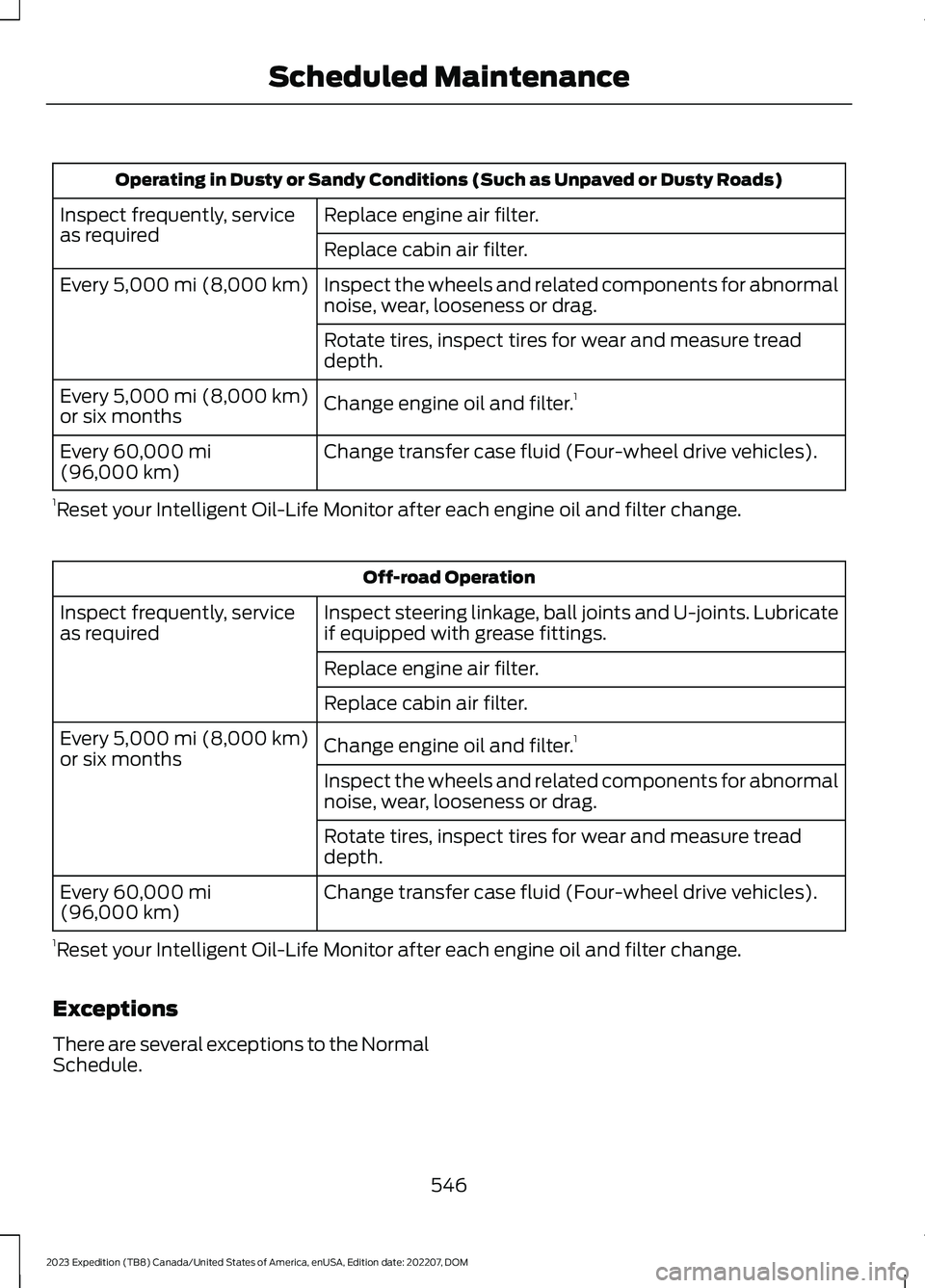
Operating in Dusty or Sandy Conditions (Such as Unpaved or Dusty Roads)
Replace engine air filter.Inspect frequently, serviceas requiredReplace cabin air filter.
Inspect the wheels and related components for abnormalnoise, wear, looseness or drag.Every 5,000 mi (8,000 km)
Rotate tires, inspect tires for wear and measure treaddepth.
Change engine oil and filter.1Every 5,000 mi (8,000 km)or six months
Change transfer case fluid (Four-wheel drive vehicles).Every 60,000 mi(96,000 km)
1Reset your Intelligent Oil-Life Monitor after each engine oil and filter change.
Off-road Operation
Inspect steering linkage, ball joints and U-joints. Lubricateif equipped with grease fittings.Inspect frequently, serviceas required
Replace engine air filter.
Replace cabin air filter.
Change engine oil and filter.1Every 5,000 mi (8,000 km)or six monthsInspect the wheels and related components for abnormalnoise, wear, looseness or drag.
Rotate tires, inspect tires for wear and measure treaddepth.
Change transfer case fluid (Four-wheel drive vehicles).Every 60,000 mi(96,000 km)
1Reset your Intelligent Oil-Life Monitor after each engine oil and filter change.
Exceptions
There are several exceptions to the NormalSchedule.
546
2023 Expedition (TB8) Canada/United States of America, enUSA, Edition date: 202207, DOMScheduled Maintenance
Page 551 of 658
Axle and Transfer Case Maintenance
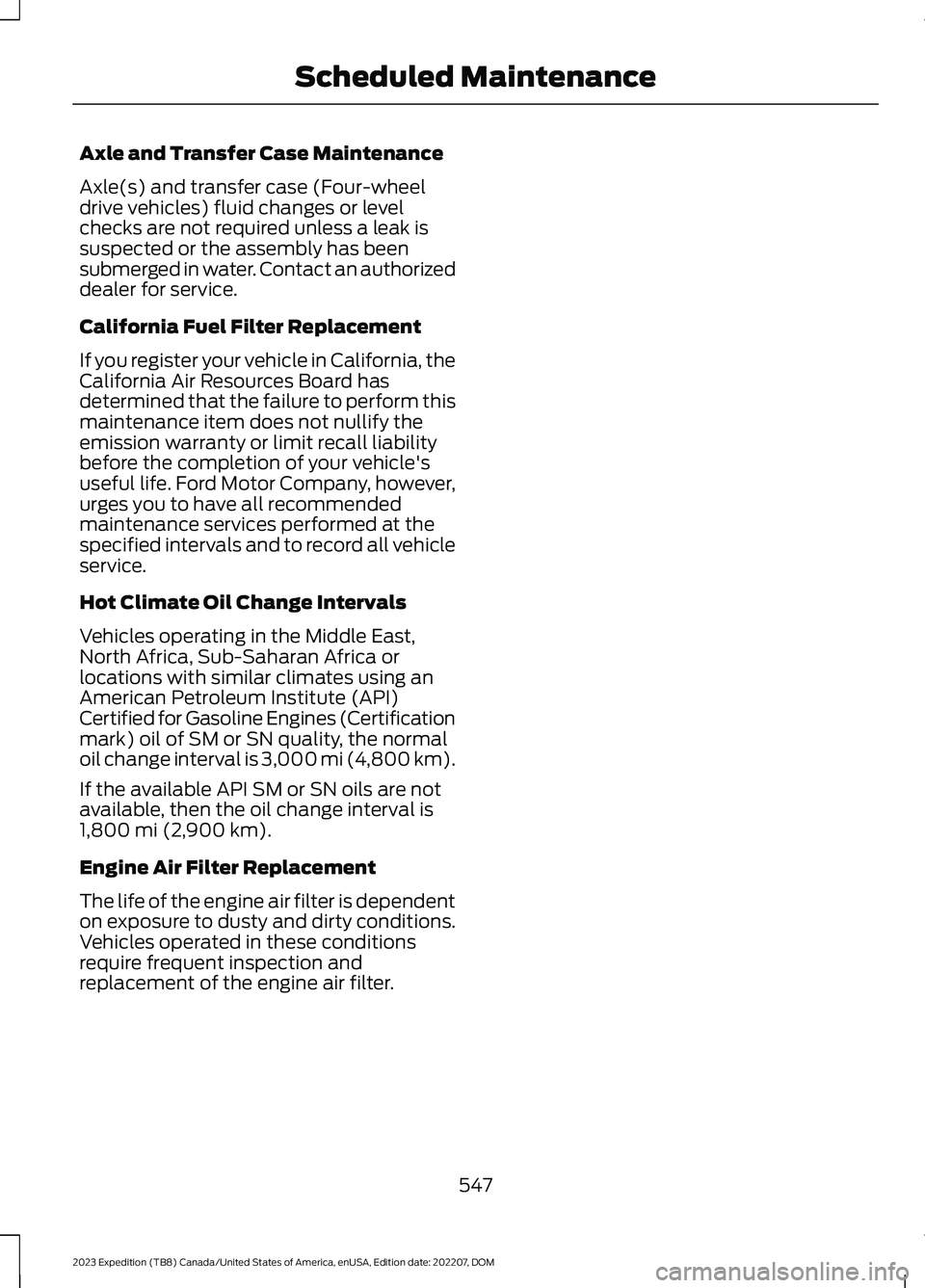
Axle(s) and transfer case (Four-wheeldrive vehicles) fluid changes or levelchecks are not required unless a leak issuspected or the assembly has beensubmerged in water. Contact an authorizeddealer for service.
California Fuel Filter Replacement
If you register your vehicle in California, theCalifornia Air Resources Board hasdetermined that the failure to perform thismaintenance item does not nullify theemission warranty or limit recall liabilitybefore the completion of your vehicle'suseful life. Ford Motor Company, however,urges you to have all recommendedmaintenance services performed at thespecified intervals and to record all vehicleservice.
Hot Climate Oil Change Intervals
Vehicles operating in the Middle East,North Africa, Sub-Saharan Africa orlocations with similar climates using anAmerican Petroleum Institute (API)Certified for Gasoline Engines (Certificationmark) oil of SM or SN quality, the normaloil change interval is 3,000 mi (4,800 km).
If the available API SM or SN oils are notavailable, then the oil change interval is1,800 mi (2,900 km).
Engine Air Filter Replacement
The life of the engine air filter is dependenton exposure to dusty and dirty conditions.Vehicles operated in these conditionsrequire frequent inspection andreplacement of the engine air filter.
547
2023 Expedition (TB8) Canada/United States of America, enUSA, Edition date: 202207, DOMScheduled Maintenance
Page 604 of 658
General Operation
•Voice Command Control: Certainfunctions within the SYNC® systemmay be accomplished using voicecommands. Using voice commandswhile driving helps you to operate thesystem without removing your handsfrom the wheel or eyes from the road.
•Prolonged Views of Screen: Do notaccess any function requiring aprolonged view of the screen while youare driving. Pull over in a safe and legalmanner before attempting to access afunction of the system requiringprolonged attention.
•Volume Setting: Do not raise thevolume excessively. Keep the volumeat a level where you can still hearoutside traffic and emergency signalswhile driving. Driving while unable tohear these sounds could cause anaccident.
•Navigation Features: Any navigationfeatures included in the system areintended to provide turn by turninstructions to get you to a desireddestination. Please make certain allpersons using this system carefullyread and follow instructions and safetyinformation fully.
•Distraction Hazard: Any navigationfeatures may require manual(non-verbal) setup. Attempting toperform such set-up or insert datawhile driving can distract your attentionand could cause an accident or otherserious injury. Stop the vehicle in a safeand legal manner before attemptingthese operations.
•Let Your Judgment Prevail: Anynavigation features are provided onlyas an aid. Make your driving decisionsbased on your observations of localconditions and existing trafficregulations. Any such feature is not a
substitute for your personal judgment.Any route suggestions made by thissystem should never replace any localtraffic regulations or your personaljudgment or knowledge of safe drivingpractices.
•Route Safety: Do not follow the routesuggestions if doing so would result inan unsafe or illegal maneuver, if youwould be placed in an unsafe situation,or if you would be directed into an areathat you consider unsafe. The driver isultimately responsible for the safeoperation of the vehicle and therefore,must evaluate whether it is safe tofollow the suggested directions.
•Potential Map Inaccuracy: Mapsused by this system may be inaccuratebecause of changes in roads, trafficcontrols or driving conditions. Alwaysuse good judgment and common sensewhen following the suggested routes.
•Emergency Services: Do not rely onany navigation features included in thesystem to route you to emergencyservices. Ask local authorities or anemergency services operator for theselocations. Not all emergency servicessuch as police, fire stations, hospitalsand clinics are likely to be contained inthe map database for such navigationfeatures.
600
2023 Expedition (TB8) Canada/United States of America, enUSA, Edition date: 202207, DOMCustomer Information