instrument cluster FORD EXPEDITION 2023 User Guide
[x] Cancel search | Manufacturer: FORD, Model Year: 2023, Model line: EXPEDITION, Model: FORD EXPEDITION 2023Pages: 658, PDF Size: 16.16 MB
Page 141 of 658
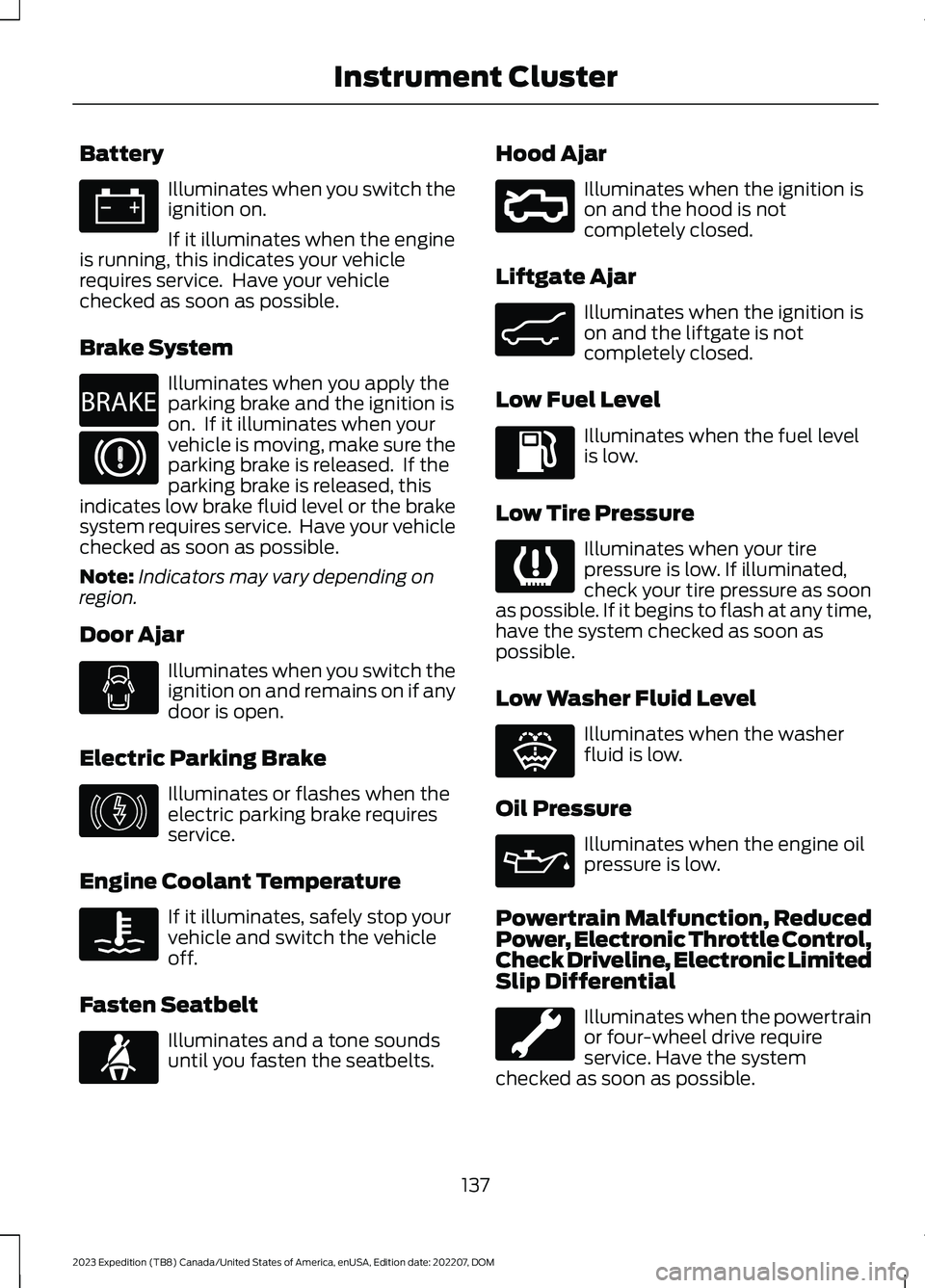
Battery
Illuminates when you switch theignition on.
If it illuminates when the engineis running, this indicates your vehiclerequires service. Have your vehiclechecked as soon as possible.
Brake System
Illuminates when you apply theparking brake and the ignition ison. If it illuminates when yourvehicle is moving, make sure theparking brake is released. If theparking brake is released, thisindicates low brake fluid level or the brakesystem requires service. Have your vehiclechecked as soon as possible.
Note:Indicators may vary depending onregion.
Door Ajar
Illuminates when you switch theignition on and remains on if anydoor is open.
Electric Parking Brake
Illuminates or flashes when theelectric parking brake requiresservice.
Engine Coolant Temperature
If it illuminates, safely stop yourvehicle and switch the vehicleoff.
Fasten Seatbelt
Illuminates and a tone soundsuntil you fasten the seatbelts.
Hood Ajar
Illuminates when the ignition ison and the hood is notcompletely closed.
Liftgate Ajar
Illuminates when the ignition ison and the liftgate is notcompletely closed.
Low Fuel Level
Illuminates when the fuel levelis low.
Low Tire Pressure
Illuminates when your tirepressure is low. If illuminated,check your tire pressure as soonas possible. If it begins to flash at any time,have the system checked as soon aspossible.
Low Washer Fluid Level
Illuminates when the washerfluid is low.
Oil Pressure
Illuminates when the engine oilpressure is low.
Powertrain Malfunction, ReducedPower, Electronic Throttle Control,Check Driveline, Electronic LimitedSlip Differential
Illuminates when the powertrainor four-wheel drive requireservice. Have the systemchecked as soon as possible.
137
2023 Expedition (TB8) Canada/United States of America, enUSA, Edition date: 202207, DOMInstrument ClusterE67021 E270480 E67024 E146190 E103308 E71880 E296055 E162453 E139232 E132353 E67022
Page 142 of 658
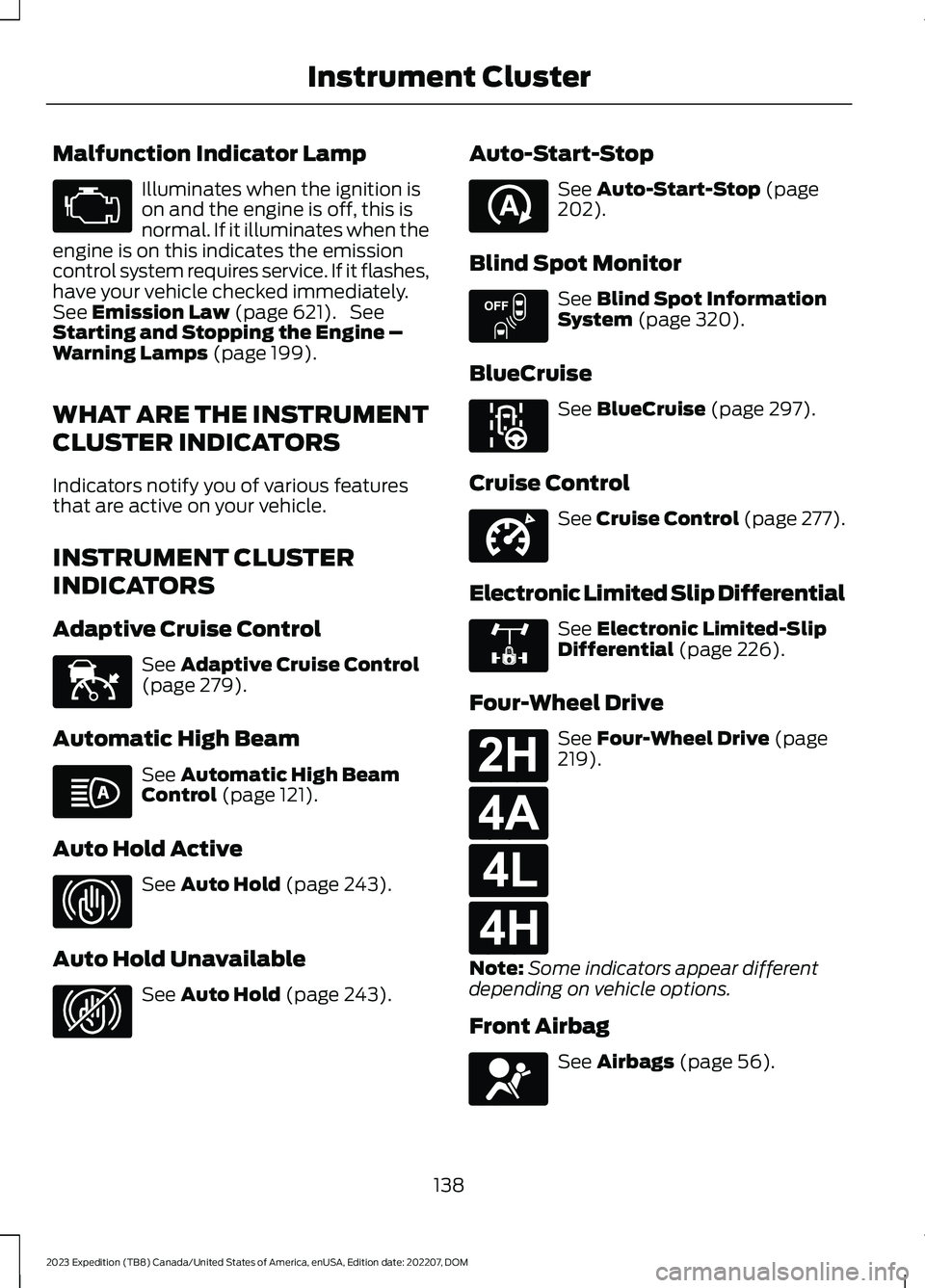
Malfunction Indicator Lamp
Illuminates when the ignition ison and the engine is off, this isnormal. If it illuminates when theengine is on this indicates the emissioncontrol system requires service. If it flashes,have your vehicle checked immediately.See Emission Law (page 621). SeeStarting and Stopping the Engine –Warning Lamps (page 199).
WHAT ARE THE INSTRUMENT
CLUSTER INDICATORS
Indicators notify you of various featuresthat are active on your vehicle.
INSTRUMENT CLUSTER
INDICATORS
Adaptive Cruise Control
See Adaptive Cruise Control(page 279).
Automatic High Beam
See Automatic High BeamControl (page 121).
Auto Hold Active
See Auto Hold (page 243).
Auto Hold Unavailable
See Auto Hold (page 243).
Auto-Start-Stop
See Auto-Start-Stop (page202).
Blind Spot Monitor
See Blind Spot InformationSystem (page 320).
BlueCruise
See BlueCruise (page 297).
Cruise Control
See Cruise Control (page 277).
Electronic Limited Slip Differential
See Electronic Limited-SlipDifferential (page 226).
Four-Wheel Drive
See Four-Wheel Drive (page219).
Note:Some indicators appear differentdepending on vehicle options.
Front Airbag
See Airbags (page 56).
138
2023 Expedition (TB8) Canada/United States of America, enUSA, Edition date: 202207, DOMInstrument ClusterE67028 E144524 E146105 E323448 E323449 E121377 E151262 E297977 E332905 E325779 E181778 E181781 E181780 E181779 E67017
Page 143 of 658
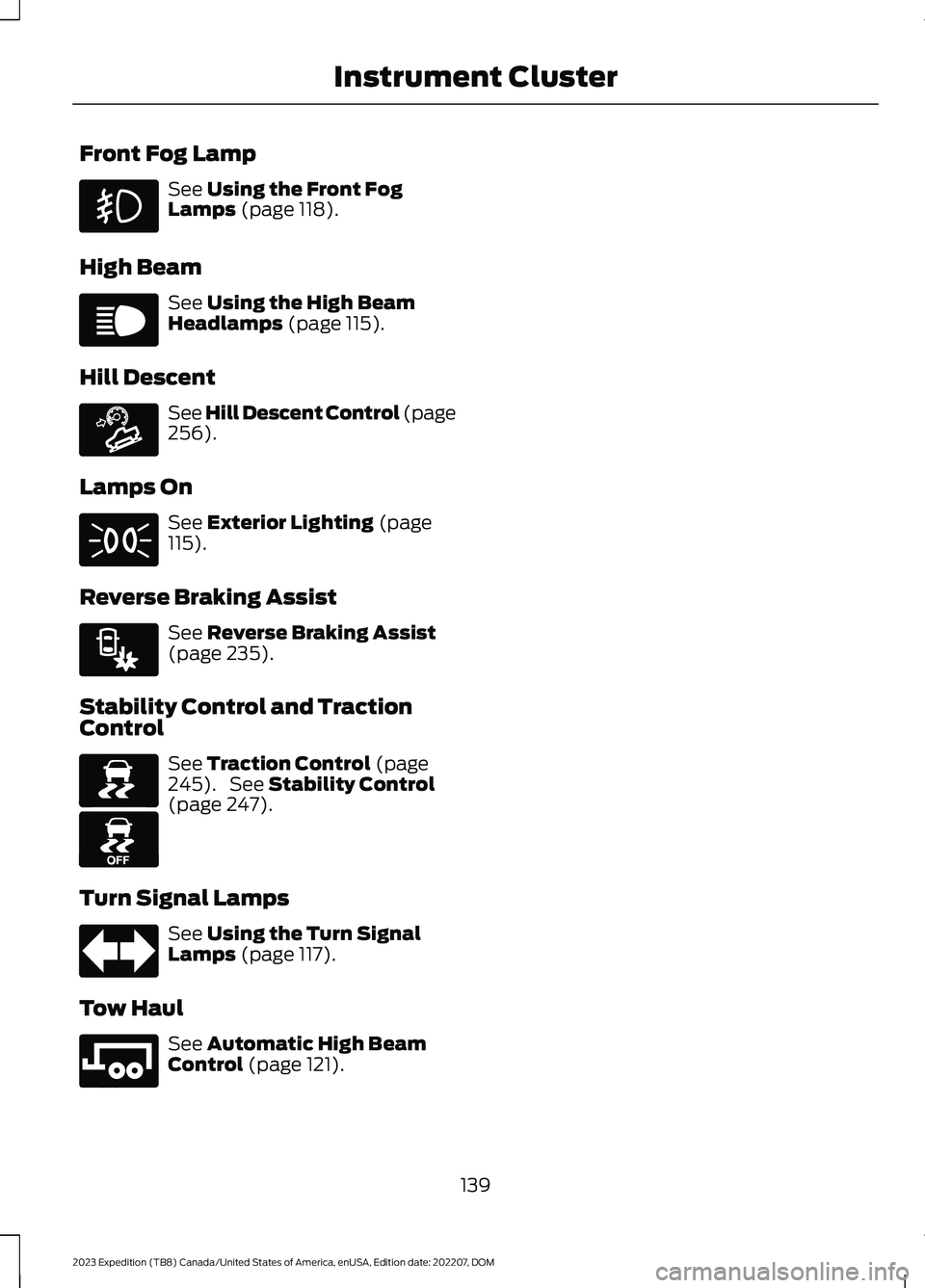
Front Fog Lamp
See Using the Front FogLamps (page 118).
High Beam
See Using the High BeamHeadlamps (page 115).
Hill Descent
See Hill Descent Control (page256).
Lamps On
See Exterior Lighting (page115).
Reverse Braking Assist
See Reverse Braking Assist(page 235).
Stability Control and TractionControl
See Traction Control (page245). See Stability Control(page 247).
Turn Signal Lamps
See Using the Turn SignalLamps (page 117).
Tow Haul
See Automatic High BeamControl (page 121).
139
2023 Expedition (TB8) Canada/United States of America, enUSA, Edition date: 202207, DOMInstrument Cluster E67019 E163171 E71341 E293490 E138639 E130458 E67018 E246592
Page 144 of 658
USING THE INSTRUMENT
CLUSTER DISPLAY CONTROLS
WARNING: Driving while distractedcan result in loss of vehicle control, crashand injury. We strongly recommend thatyou use extreme caution when using anydevice that may take your focus off theroad. Your primary responsibility is thesafe operation of your vehicle. Werecommend against the use of anyhand-held device while driving andencourage the use of voice-operatedsystems when possible. Make sure youare aware of all applicable local lawsthat may affect the use of electronicdevices while driving.
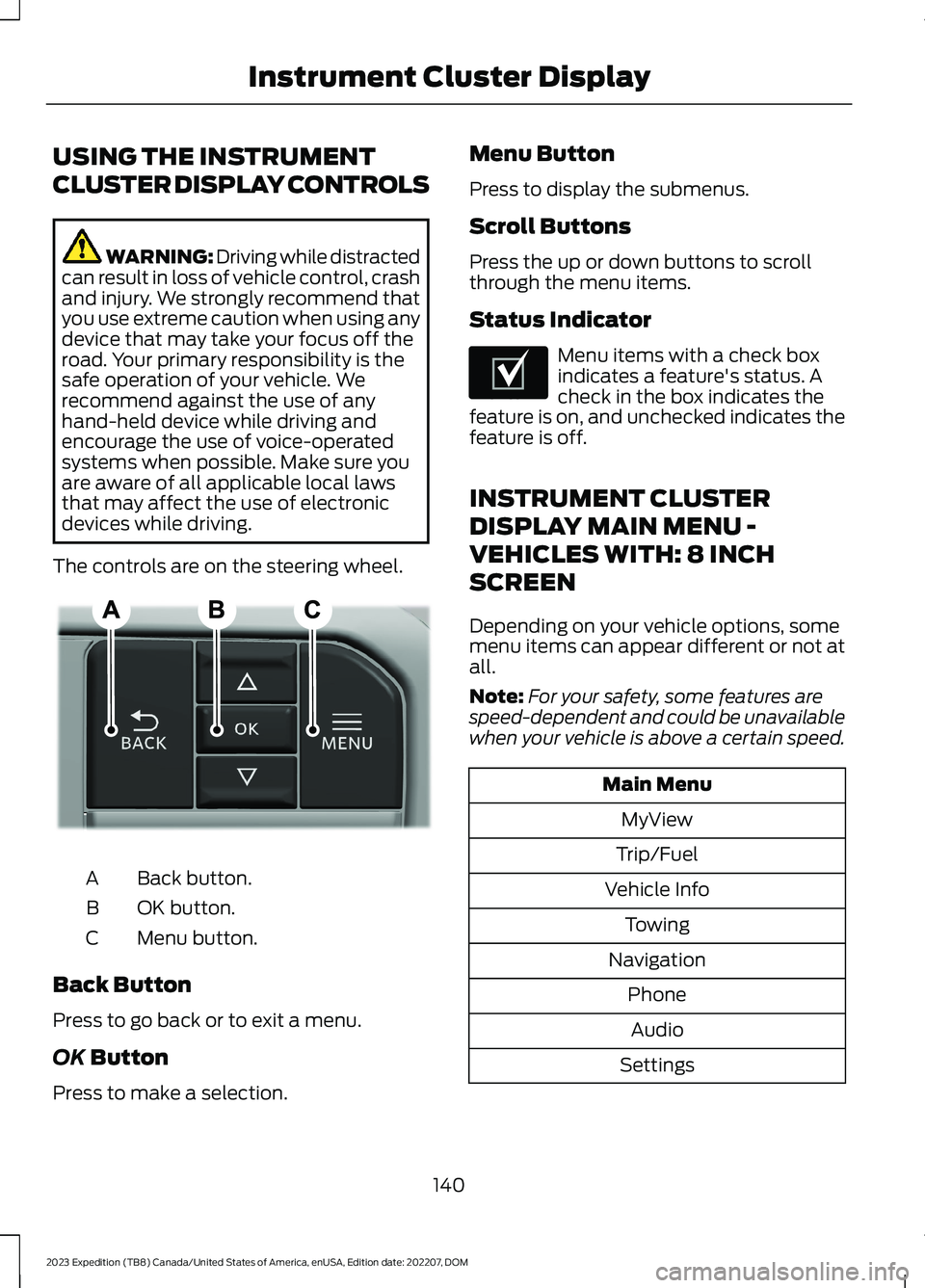
The controls are on the steering wheel.
Back button.A
OK button.B
Menu button.C
Back Button
Press to go back or to exit a menu.
OK Button
Press to make a selection.
Menu Button
Press to display the submenus.
Scroll Buttons
Press the up or down buttons to scrollthrough the menu items.
Status Indicator
Menu items with a check boxindicates a feature's status. Acheck in the box indicates thefeature is on, and unchecked indicates thefeature is off.
INSTRUMENT CLUSTER
DISPLAY MAIN MENU -
VEHICLES WITH: 8 INCH
SCREEN
Depending on your vehicle options, somemenu items can appear different or not atall.
Note:For your safety, some features arespeed-dependent and could be unavailablewhen your vehicle is above a certain speed.
Main Menu
MyView
Trip/Fuel
Vehicle Info
Towing
Navigation
Phone
Audio
Settings
140
2023 Expedition (TB8) Canada/United States of America, enUSA, Edition date: 202207, DOMInstrument Cluster DisplayE309379 E204495
Page 145 of 658
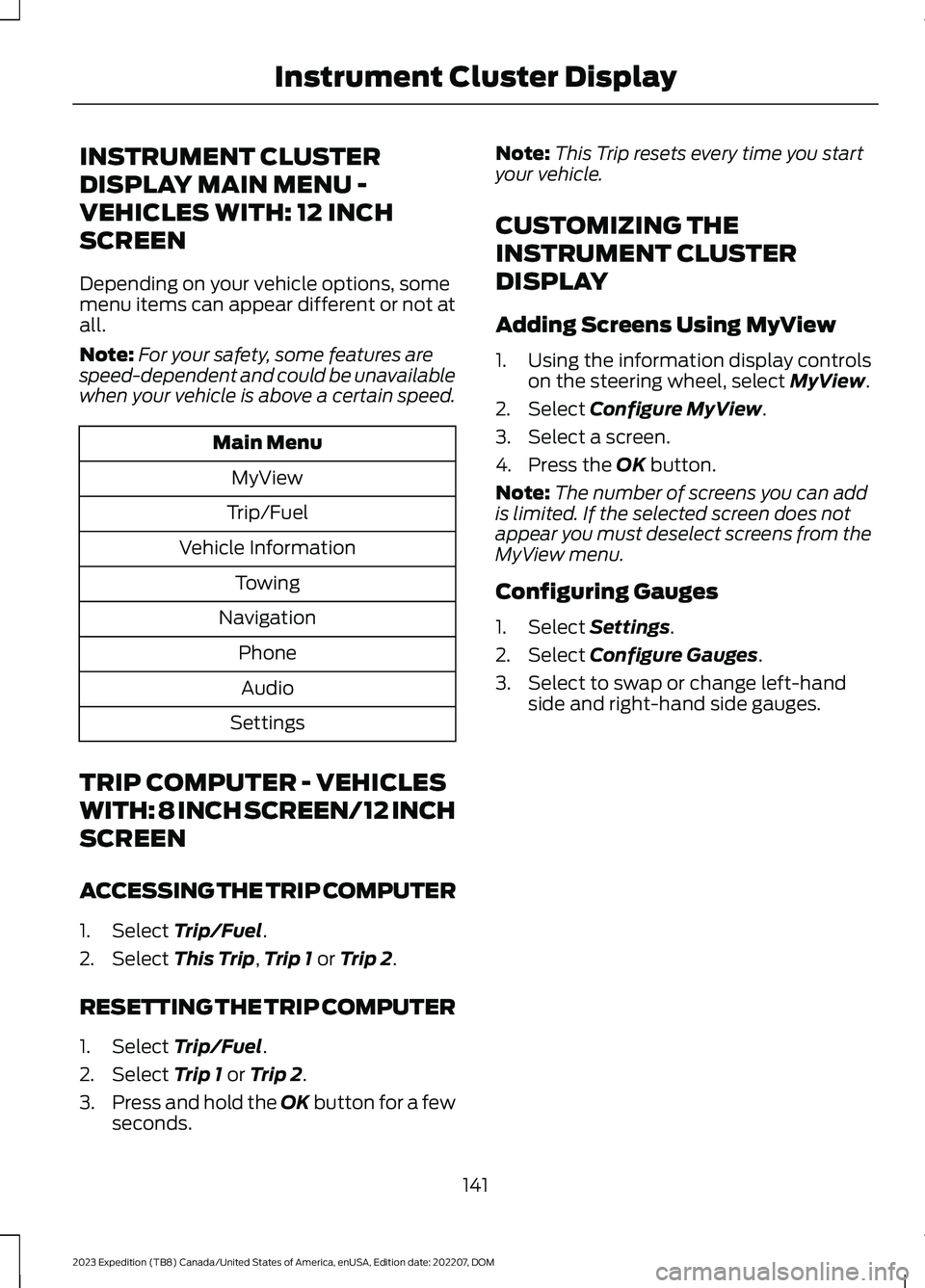
INSTRUMENT CLUSTER
DISPLAY MAIN MENU -
VEHICLES WITH: 12 INCH
SCREEN
Depending on your vehicle options, somemenu items can appear different or not atall.
Note:For your safety, some features arespeed-dependent and could be unavailablewhen your vehicle is above a certain speed.
Main Menu
MyView
Trip/Fuel
Vehicle Information
Towing
Navigation
Phone
Audio
Settings
TRIP COMPUTER - VEHICLES
WITH: 8 INCH SCREEN/12 INCH
SCREEN
ACCESSING THE TRIP COMPUTER
1.Select Trip/Fuel.
2.Select This Trip,Trip 1 or Trip 2.
RESETTING THE TRIP COMPUTER
1.Select Trip/Fuel.
2.Select Trip 1 or Trip 2.
3.Press and hold the OK button for a fewseconds.
Note:This Trip resets every time you startyour vehicle.
CUSTOMIZING THE
INSTRUMENT CLUSTER
DISPLAY
Adding Screens Using MyView
1.Using the information display controlson the steering wheel, select MyView.
2.Select Configure MyView.
3.Select a screen.
4.Press the OK button.
Note:The number of screens you can addis limited. If the selected screen does notappear you must deselect screens from theMyView menu.
Configuring Gauges
1.Select Settings.
2.Select Configure Gauges.
3.Select to swap or change left-handside and right-hand side gauges.
141
2023 Expedition (TB8) Canada/United States of America, enUSA, Edition date: 202207, DOMInstrument Cluster Display
Page 206 of 658
WHAT IS AUTO-START-STOP
The system is designed to help reduce fuelconsumption and CO2 emissions bystopping the engine when it is idling, forexample at traffic lights.
AUTO-START-STOP
PRECAUTIONS
WARNING: Apply the parkingbrake, shift into park (P), switch theignition off and remove the key beforeyou leave your vehicle. Failure to followthis instruction could result in personalinjury or death.
WARNING: Apply the parkingbrake, shift into park (P), switch theignition off and remove the key beforeyou open the hood or have any serviceor repair work completed. If you do notswitch the ignition off, the engine couldrestart at any time. Failure to follow thisinstruction could result in personal injuryor death.
SWITCHING AUTO-START-
STOP ON AND OFF
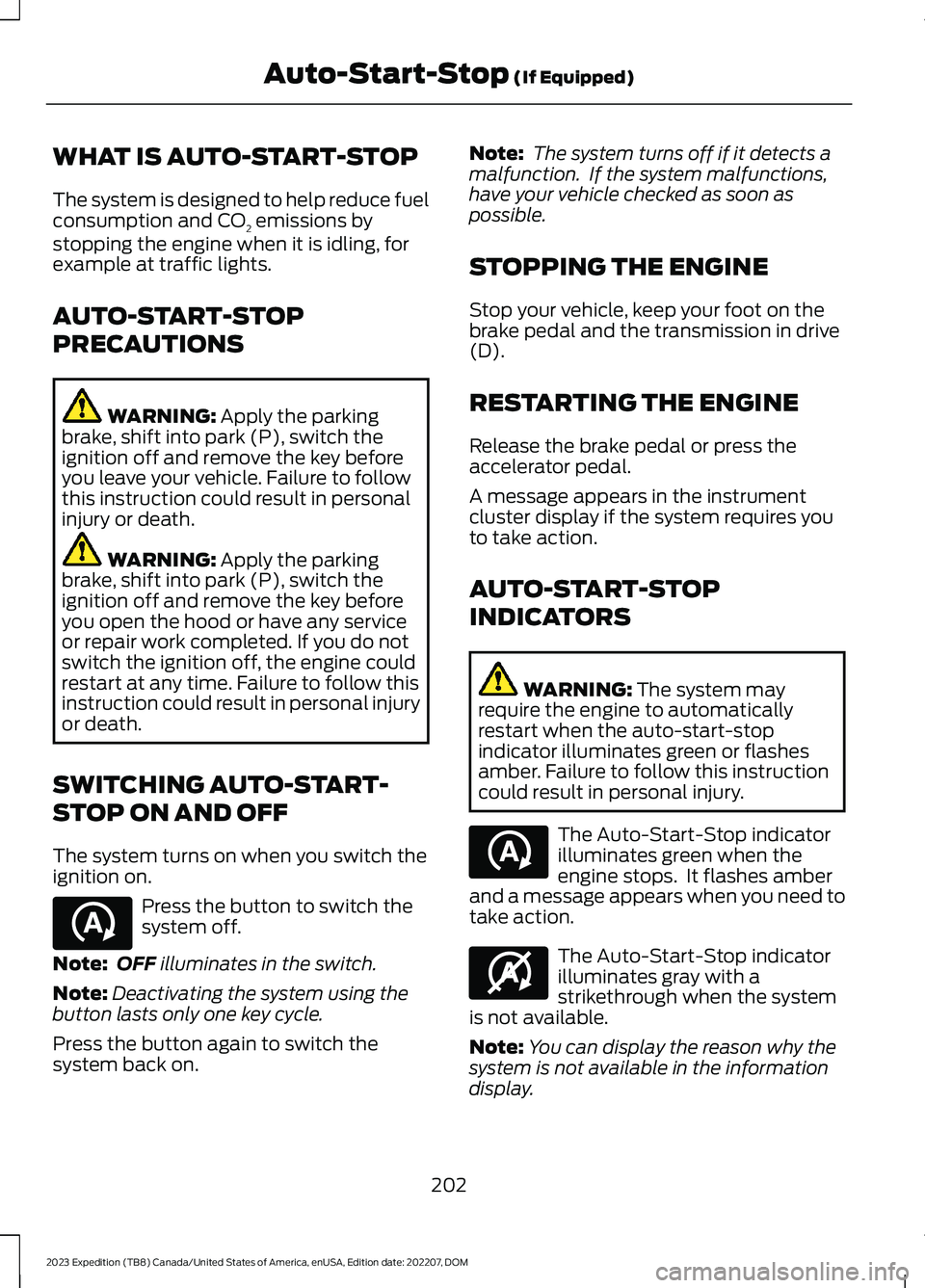
The system turns on when you switch theignition on.
Press the button to switch thesystem off.
Note:OFF illuminates in the switch.
Note:Deactivating the system using thebutton lasts only one key cycle.
Press the button again to switch thesystem back on.
Note: The system turns off if it detects amalfunction. If the system malfunctions,have your vehicle checked as soon aspossible.
STOPPING THE ENGINE
Stop your vehicle, keep your foot on thebrake pedal and the transmission in drive(D).
RESTARTING THE ENGINE
Release the brake pedal or press theaccelerator pedal.
A message appears in the instrumentcluster display if the system requires youto take action.
AUTO-START-STOP
INDICATORS
WARNING: The system mayrequire the engine to automaticallyrestart when the auto-start-stopindicator illuminates green or flashesamber. Failure to follow this instructioncould result in personal injury.
The Auto-Start-Stop indicatorilluminates green when theengine stops. It flashes amberand a message appears when you need totake action.
The Auto-Start-Stop indicatorilluminates gray with astrikethrough when the systemis not available.
Note:You can display the reason why thesystem is not available in the informationdisplay.
202
2023 Expedition (TB8) Canada/United States of America, enUSA, Edition date: 202207, DOMAuto-Start-Stop (If Equipped)E121377 E121377 E146361
Page 207 of 658
AUTO-START-STOP –
TROUBLESHOOTING
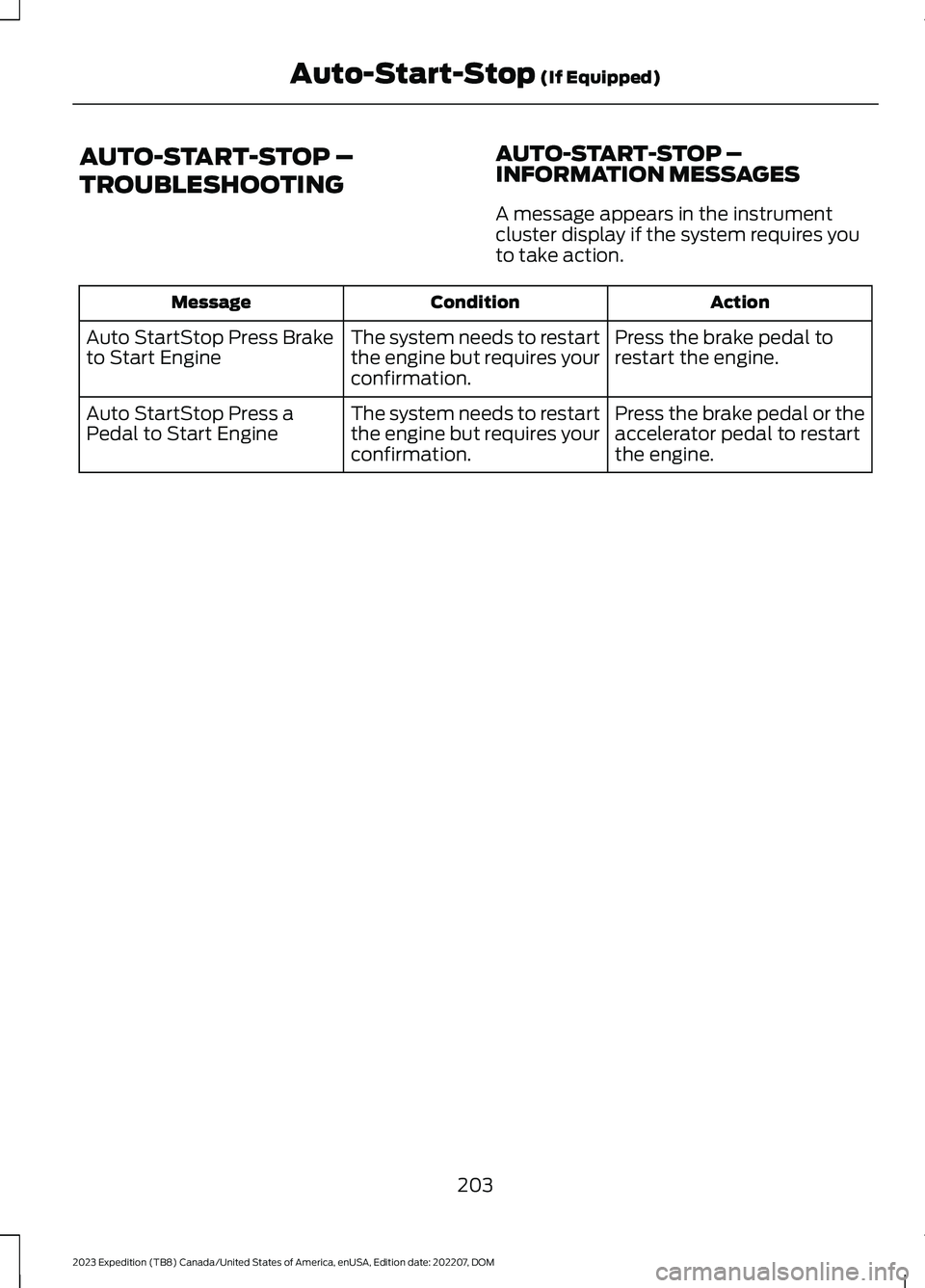
AUTO-START-STOP –INFORMATION MESSAGES
A message appears in the instrumentcluster display if the system requires youto take action.
ActionConditionMessage
Press the brake pedal torestart the engine.The system needs to restartthe engine but requires yourconfirmation.
Auto StartStop Press Braketo Start Engine
Press the brake pedal or theaccelerator pedal to restartthe engine.
The system needs to restartthe engine but requires yourconfirmation.
Auto StartStop Press aPedal to Start Engine
203
2023 Expedition (TB8) Canada/United States of America, enUSA, Edition date: 202207, DOMAuto-Start-Stop (If Equipped)
Page 214 of 658
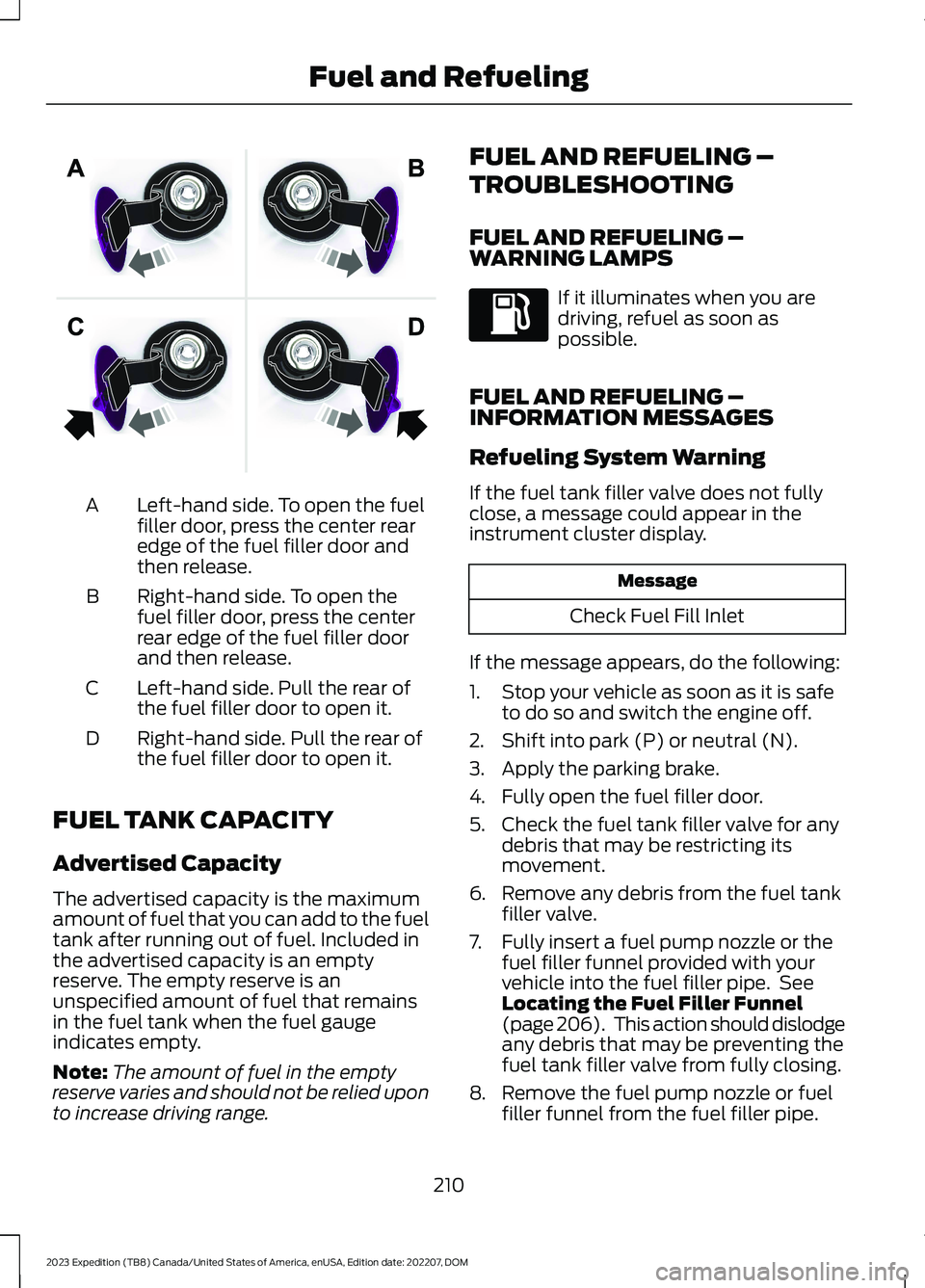
Left-hand side. To open the fuelfiller door, press the center rearedge of the fuel filler door andthen release.
A
Right-hand side. To open thefuel filler door, press the centerrear edge of the fuel filler doorand then release.
B
Left-hand side. Pull the rear ofthe fuel filler door to open it.C
Right-hand side. Pull the rear ofthe fuel filler door to open it.D
FUEL TANK CAPACITY
Advertised Capacity
The advertised capacity is the maximumamount of fuel that you can add to the fueltank after running out of fuel. Included inthe advertised capacity is an emptyreserve. The empty reserve is anunspecified amount of fuel that remainsin the fuel tank when the fuel gaugeindicates empty.
Note:The amount of fuel in the emptyreserve varies and should not be relied uponto increase driving range.
FUEL AND REFUELING –
TROUBLESHOOTING
FUEL AND REFUELING –WARNING LAMPS
If it illuminates when you aredriving, refuel as soon aspossible.
FUEL AND REFUELING –INFORMATION MESSAGES
Refueling System Warning
If the fuel tank filler valve does not fullyclose, a message could appear in theinstrument cluster display.
Message
Check Fuel Fill Inlet
If the message appears, do the following:
1.Stop your vehicle as soon as it is safeto do so and switch the engine off.
2.Shift into park (P) or neutral (N).
3.Apply the parking brake.
4.Fully open the fuel filler door.
5.Check the fuel tank filler valve for anydebris that may be restricting itsmovement.
6.Remove any debris from the fuel tankfiller valve.
7.Fully insert a fuel pump nozzle or thefuel filler funnel provided with yourvehicle into the fuel filler pipe. SeeLocating the Fuel Filler Funnel(page 206). This action should dislodgeany debris that may be preventing thefuel tank filler valve from fully closing.
8.Remove the fuel pump nozzle or fuelfiller funnel from the fuel filler pipe.
210
2023 Expedition (TB8) Canada/United States of America, enUSA, Edition date: 202207, DOMFuel and RefuelingE206911
Page 218 of 658
MANUAL (M)
In manual (M) you can select a specificgear. See Manually Shifting Gears (page215).
Note:We recommend using this mode fordriving on hilly or mountainous roads orwhen towing a trailer. See Towing a Trailer(page 358).
SHIFTING YOUR VEHICLE INTO
GEAR
Console Shifter
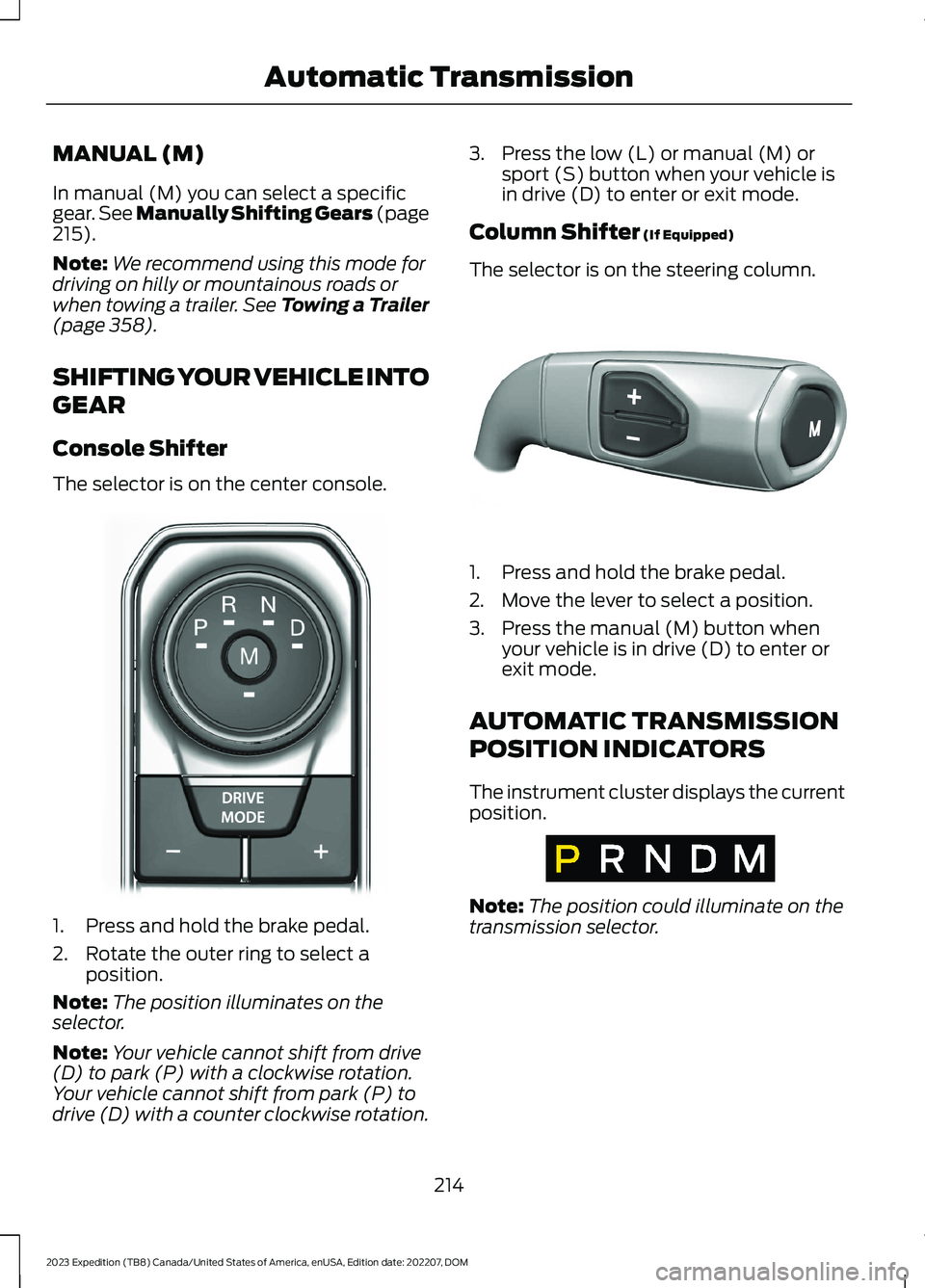
The selector is on the center console.
1.Press and hold the brake pedal.
2.Rotate the outer ring to select aposition.
Note:The position illuminates on theselector.
Note:Your vehicle cannot shift from drive(D) to park (P) with a clockwise rotation.Your vehicle cannot shift from park (P) todrive (D) with a counter clockwise rotation.
3.Press the low (L) or manual (M) orsport (S) button when your vehicle isin drive (D) to enter or exit mode.
Column Shifter (If Equipped)
The selector is on the steering column.
1.Press and hold the brake pedal.
2.Move the lever to select a position.
3.Press the manual (M) button whenyour vehicle is in drive (D) to enter orexit mode.
AUTOMATIC TRANSMISSION
POSITION INDICATORS
The instrument cluster displays the currentposition.
Note:The position could illuminate on thetransmission selector.
214
2023 Expedition (TB8) Canada/United States of America, enUSA, Edition date: 202207, DOMAutomatic TransmissionE252861 E327267 E317778
Page 219 of 658
MANUALLY SHIFTING GEARS
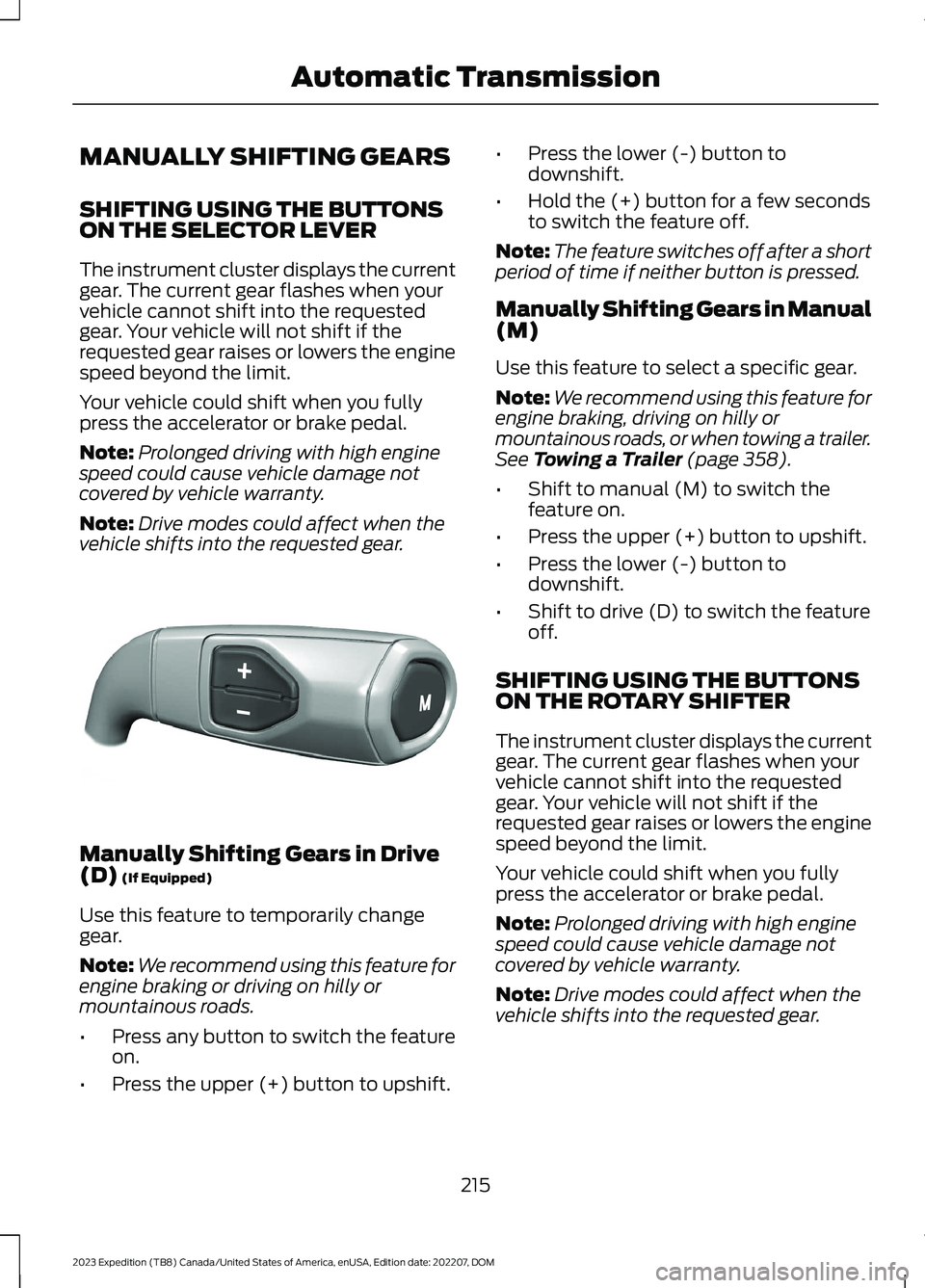
SHIFTING USING THE BUTTONSON THE SELECTOR LEVER
The instrument cluster displays the currentgear. The current gear flashes when yourvehicle cannot shift into the requestedgear. Your vehicle will not shift if therequested gear raises or lowers the enginespeed beyond the limit.
Your vehicle could shift when you fullypress the accelerator or brake pedal.
Note:Prolonged driving with high enginespeed could cause vehicle damage notcovered by vehicle warranty.
Note:Drive modes could affect when thevehicle shifts into the requested gear.
Manually Shifting Gears in Drive(D) (If Equipped)
Use this feature to temporarily changegear.
Note:We recommend using this feature forengine braking or driving on hilly ormountainous roads.
•Press any button to switch the featureon.
•Press the upper (+) button to upshift.
•Press the lower (-) button todownshift.
•Hold the (+) button for a few secondsto switch the feature off.
Note:The feature switches off after a shortperiod of time if neither button is pressed.
Manually Shifting Gears in Manual(M)
Use this feature to select a specific gear.
Note:We recommend using this feature forengine braking, driving on hilly ormountainous roads, or when towing a trailer.See Towing a Trailer (page 358).
•Shift to manual (M) to switch thefeature on.
•Press the upper (+) button to upshift.
•Press the lower (-) button todownshift.
•Shift to drive (D) to switch the featureoff.
SHIFTING USING THE BUTTONSON THE ROTARY SHIFTER
The instrument cluster displays the currentgear. The current gear flashes when yourvehicle cannot shift into the requestedgear. Your vehicle will not shift if therequested gear raises or lowers the enginespeed beyond the limit.
Your vehicle could shift when you fullypress the accelerator or brake pedal.
Note:Prolonged driving with high enginespeed could cause vehicle damage notcovered by vehicle warranty.
Note:Drive modes could affect when thevehicle shifts into the requested gear.
215
2023 Expedition (TB8) Canada/United States of America, enUSA, Edition date: 202207, DOMAutomatic TransmissionE327267