instrument cluster FORD EXPEDITION 2023 Owner's Manual
[x] Cancel search | Manufacturer: FORD, Model Year: 2023, Model line: EXPEDITION, Model: FORD EXPEDITION 2023Pages: 658, PDF Size: 16.16 MB
Page 221 of 658
Do not tow your vehicle in this mode.Failure to follow these instructions couldresult in vehicle damage not covered bythe vehicle warranty.
ENTERING TEMPORARYNEUTRAL MODE
1.Bring your vehicle to a complete stop.
2.Press and hold the brake pedal.
3.Power your vehicle on.
4.Shift into neutral (N).
Note:An instructional message appears.
5.Press the manual (M) button.
Note:A confirmation message appearswhen your vehicle enters the mode.
6.Release the brake pedal.
Note:Your vehicle is free to roll.
7.Switch your vehicle off.
Note:Do not tow your vehicle in this mode.
Note:The neutral (N) indicator on thetransmission selector may flash in thismode.
EXITING TEMPORARY NEUTRALMODE
1.Press the brake pedal.
2.Shift into park (P), or power yourvehicle on and shift into drive (D) orreverse (R).
USING PROGRESSIVE RANGE
SELECTION (IF EQUIPPED)
Progressive range selection gives you theability to lock out gears from the automaticshifting range. This could provide you withan improved driving experience by reducingtransmission shifts, for example, in slipperyconditions or steep slopes.
With the transmission in drive (D), pressthe - button to begin to switch the featureon.
Press the - button again to continue lockingout higher gears. Beginning with the highestgear, the instrument cluster will indicatethe current gear and highest gear available.For example, press the - button twice tolock out 10th and 9th gears.
Note:The instrument cluster will indicatethe current gear and highest gear available.
Press the + button to unlock gears to allowthe transmission to shift to higher gears.
Note: The transmission automaticallyshifts within the gear range you select.
AUTOMATIC RETURN TO
PARK (P)
WHAT IS AUTOMATIC RETURN TOPARK (P)
Your vehicle shifts into park (P) if youattempt to exit your vehicle without thetransmission in park (P).
HOW DOES AUTOMATIC RETURNTO PARK (P) WORK
Your vehicle shifts into park (P) when yourvehicle is stationary and any of thefollowing occur:
•You switch the vehicle off.
•You open the driver door with yourseatbelt unlatched.
•You unlatch the driver seatbelt whenthe driver door is open.
Note:Do not use automatic return to park(P) when your vehicle is moving, except inan emergency. See Starting and Stoppingthe Engine (page 193).
217
2023 Expedition (TB8) Canada/United States of America, enUSA, Edition date: 202207, DOMAutomatic Transmission
Page 230 of 658
WHAT IS THE ELECTRONIC
LIMITED-SLIP DIFFERENTIAL
The electronic limited-slip differentialsystem directs torque across the axle,enabling the vehicle to drive over terrainand road conditions that a conventionalaxle cannot. The system is active at alltimes and requires no input from the driver.
Note:If your vehicle is not at optimaloperating conditions or a system fault ispresent, a warning may display in theinstrument cluster. Depending on thewarning, you may need to service yourvehicle.
Operating the Electronic Limited-SlipDifferential with a Spare orMismatched Tires
If your vehicle has an electronic limited-slipdifferential, do not use a spare tire of adifferent size than the tire provided. If youhave a spare tire installed, a message mayappear indicating the system has disabledautomatically or reduced function toprevent system overheat and damage. Werecommend you reinstall the repaired orreplaced spare tire as soon as possible.When you replace the spare tire, thesystem resumes normal operation on thenext key cycle.
Trailer Towing
The electronic limited-slip differentialenhances vehicle stability during trailer towoperation. During high demand traileringevents, such as steep slopes, high speedsor with a spare tire, the system may providea warning in the instrument cluster andreduce function or enter a temporarilydisabled state. To resume normal function,stop the vehicle in a safe location andallow the unit to adequately cool. Oncethe system reaches normal operatingtemperatures, system function restoresand the electronic limited-slip differentialrestored message displays.
ELECTRONIC LIMITED-SLIP
DIFFERENTIAL INDICATORS
The locker mode mayautomatically disengage basedon certain conditions such asvehicle speed. When engaged, a telltale inthe instrument cluster illuminates amber.When you exceed the speed the telltaleturns gray, the locker disengages and staysin standby mode until you meet the speedconditions. If the system faults and thelocker cannot engage, a warning messagedisplays in the instrument cluster.
Automatic Re-engagementSpeedMaximum EngagementSpeedDrive Mode
35 mph (57 km/h)40 mph (65 km/h)Normal
20 mph (32 km/h)25 mph (40 km/h)Slippery
35 mph (57 km/h)40 mph (65 km/h)Eco
57 mph (92 km/h)62 mph (100 km/h)Mud/Ruts
57 mph (92 km/h)62 mph (100 km/h)Sand
35 mph (57 km/h)40 mph (65 km/h)Sport
35 mph (57 km/h)40 mph (65 km/h)Tow/Haul
226
2023 Expedition (TB8) Canada/United States of America, enUSA, Edition date: 202207, DOMElectronic Limited-Slip Differential (If Equipped)E163170
Page 249 of 658
WHAT IS TRACTION CONTROL
The traction control system helps to avoiddrive wheel spin and loss of traction.
HOW DOES TRACTION
CONTROL WORK
If your wheels begin to spin, the loss oftraction can compromise steering controland stability of the vehicle. The tractioncontrol system applies the brakes toindividual wheels and when needed,reduces engine power at the same time toincrease traction.
SWITCHING TRACTION
CONTROL ON AND OFF
WARNING: Operating your vehiclewith the traction control disabled couldlead to an increased risk of loss of vehiclecontrol, vehicle rollover, personal injuryand death.
The traction control system turns on eachtime you switch the ignition on.
The button for the stability and tractioncontrol system is on the instrument panel.
Press and release the button to switchtraction control off. The stability controlsystem remains fully active, to switch it off,press and hold the button for a fewseconds, then release.
When you switch traction control off, amessage and an illuminated icon appearon the instrument cluster.
Press the switch again to turn the tractioncontrol system back on to normaloperation.
If your vehicle is stuck in mud or snow,switching traction control off may bebeneficial as this allows the wheels to spin.
TRACTION CONTROL
INDICATOR
Stability and Traction ControlIndicator
If the indicator does notilluminate when you switch theignition on, or remains on whenthe engine is running, this indicates amalfunction. Have your vehicle checkedby an authorized dealer as soon aspossible.
The traction control off indicatorilluminates when you switch thetraction control system off, orwhen an alternative stability control modeis selected that requires the tractioncontrol off depending on the drive modeselected.
245
2023 Expedition (TB8) Canada/United States of America, enUSA, Edition date: 202207, DOMTraction ControlE327252 E138639 E130458
Page 256 of 658
TRAIL ONE PEDAL DRIVEINDICATORS
When trail one pedal drive isactive, the indicator displays
green in the instrument cluster. When thesystem is switched on but is unavailableor in standby mode, it displays grey.
TRAIL ONE PEDAL DRIVE – TROUBLESHOOTING
TRAIL ONE PEDAL DRIVE – INFORMATION MESSAGES
ActionMessage
Displays when trail one pedal drive is active,use the SET+ or SET- to switch to trailcontrol.
Trail 1-Pedal Drive Active Use SET Buttonfor Trail Control
Displays when you switch trail one pedaldrive off.Trail Control with Trail 1- Pedal Drive Off
Trail control is in a driveline state notsupported for trail one pedal drive. Set aspeed to activate trail control or change thedriveline state to four-wheel drive high (4H)or four-wheel drive low (4L) modes toactive trail one pedal drive.
Trail Control Enabled Use SET button toSet Speed Trail 1-Pedal Drive Available in4H or 4L
Displays when trail control is active andallows you to resume using trail one pedaldrive when you press the CANCEL button.
Trail Control Active Use CANCEL button toresume Trail 1-Pedal Drive
252
2023 Expedition (TB8) Canada/United States of America, enUSA, Edition date: 202207, DOMTrail Control (If Equipped)1E328584
Page 269 of 658
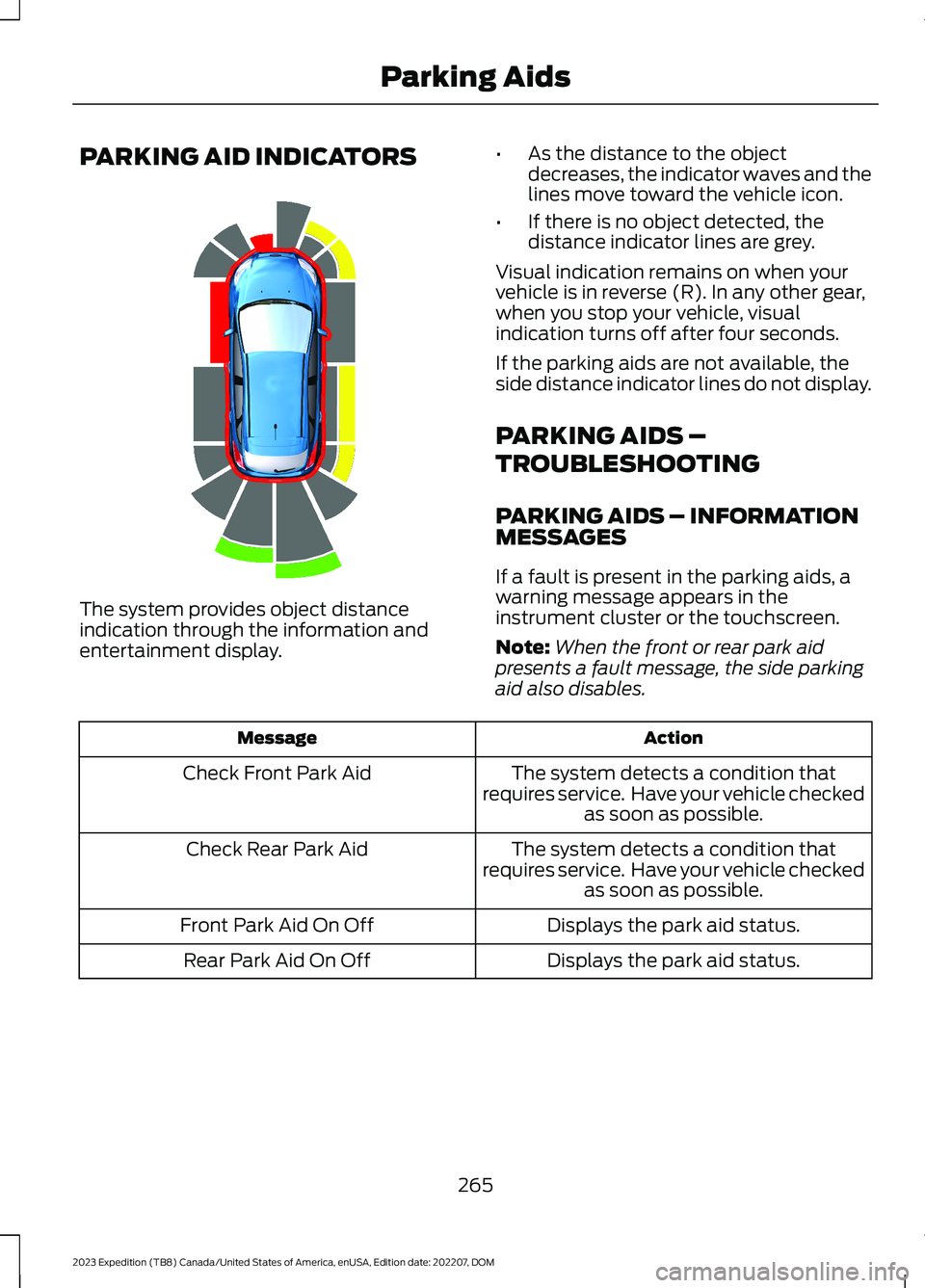
PARKING AID INDICATORS
The system provides object distanceindication through the information andentertainment display.
•As the distance to the objectdecreases, the indicator waves and thelines move toward the vehicle icon.
•If there is no object detected, thedistance indicator lines are grey.
Visual indication remains on when yourvehicle is in reverse (R). In any other gear,when you stop your vehicle, visualindication turns off after four seconds.
If the parking aids are not available, theside distance indicator lines do not display.
PARKING AIDS –
TROUBLESHOOTING
PARKING AIDS – INFORMATIONMESSAGES
If a fault is present in the parking aids, awarning message appears in theinstrument cluster or the touchscreen.
Note:When the front or rear park aidpresents a fault message, the side parkingaid also disables.
ActionMessage
The system detects a condition thatrequires service. Have your vehicle checkedas soon as possible.
Check Front Park Aid
The system detects a condition thatrequires service. Have your vehicle checkedas soon as possible.
Check Rear Park Aid
Displays the park aid status.Front Park Aid On Off
Displays the park aid status.Rear Park Aid On Off
265
2023 Expedition (TB8) Canada/United States of America, enUSA, Edition date: 202207, DOMParking AidsE190459
Page 285 of 658
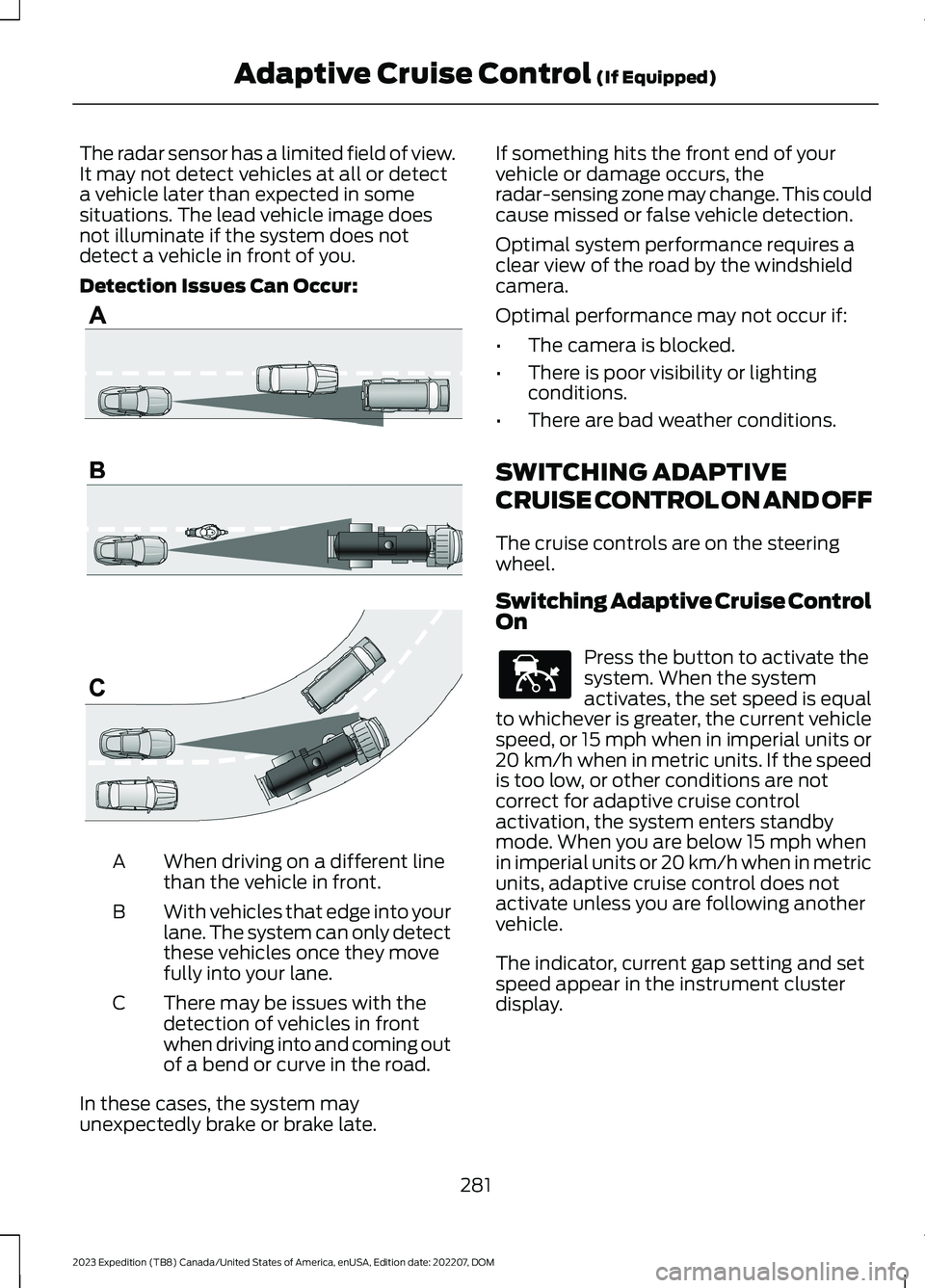
The radar sensor has a limited field of view.It may not detect vehicles at all or detecta vehicle later than expected in somesituations. The lead vehicle image doesnot illuminate if the system does notdetect a vehicle in front of you.
Detection Issues Can Occur:
When driving on a different linethan the vehicle in front.A
With vehicles that edge into yourlane. The system can only detectthese vehicles once they movefully into your lane.
B
There may be issues with thedetection of vehicles in frontwhen driving into and coming outof a bend or curve in the road.
C
In these cases, the system mayunexpectedly brake or brake late.
If something hits the front end of yourvehicle or damage occurs, theradar-sensing zone may change. This couldcause missed or false vehicle detection.
Optimal system performance requires aclear view of the road by the windshieldcamera.
Optimal performance may not occur if:
•The camera is blocked.
•There is poor visibility or lightingconditions.
•There are bad weather conditions.
SWITCHING ADAPTIVE
CRUISE CONTROL ON AND OFF
The cruise controls are on the steeringwheel.
Switching Adaptive Cruise ControlOn
Press the button to activate thesystem. When the systemactivates, the set speed is equalto whichever is greater, the current vehiclespeed, or 15 mph when in imperial units or20 km/h when in metric units. If the speedis too low, or other conditions are notcorrect for adaptive cruise controlactivation, the system enters standbymode. When you are below 15 mph whenin imperial units or 20 km/h when in metricunits, adaptive cruise control does notactivate unless you are following anothervehicle.
The indicator, current gap setting and setspeed appear in the instrument clusterdisplay.
281
2023 Expedition (TB8) Canada/United States of America, enUSA, Edition date: 202207, DOMAdaptive Cruise Control (If Equipped)E71621 E144529
Page 286 of 658
Switching Adaptive Cruise ControlOff
Press the button when thesystem is in standby mode orswitch the ignition off.
Note:When you switch the system off, theset speed clears.
ADAPTIVE CRUISE CONTROL
AUTOMATIC CANCELLATION
The system may cancel if:
•The tires lose traction.
•You apply the parking brake.
The system may cancel and set the parkingbrake if:
•You unbuckle the seatbelt and openthe driver door after adaptive cruisecontrol stops your vehicle.
•Adaptive cruise control holds yourvehicle at a stop continuously for morethan three minutes.
The system may deactivate or preventactivating when requested if:
•The vehicle has a blocked sensor.
•The brake temperature is too high.
•There is a failure in the system or arelated system.
SETTING THE ADAPTIVE
CRUISE CONTROL SPEED -
VEHICLES WITH: 8 INCH
SCREEN
Drive to the speed you prefer.
Press either button to set thecurrent speed.
Take your foot off the accelerator pedal.
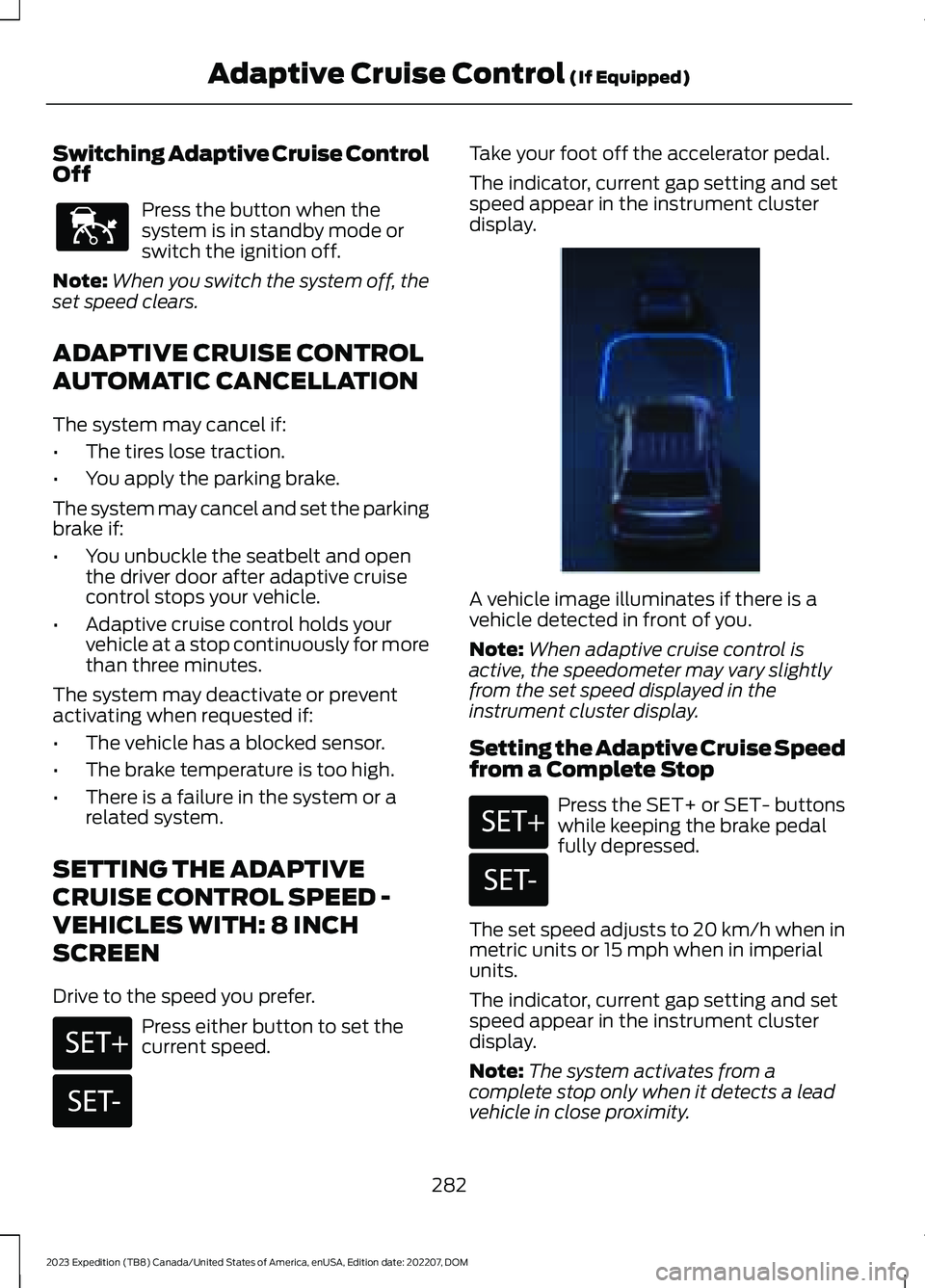
The indicator, current gap setting and setspeed appear in the instrument clusterdisplay.
A vehicle image illuminates if there is avehicle detected in front of you.
Note:When adaptive cruise control isactive, the speedometer may vary slightlyfrom the set speed displayed in theinstrument cluster display.
Setting the Adaptive Cruise Speedfrom a Complete Stop
Press the SET+ or SET- buttonswhile keeping the brake pedalfully depressed.
The set speed adjusts to 20 km/h when inmetric units or 15 mph when in imperialunits.
The indicator, current gap setting and setspeed appear in the instrument clusterdisplay.
Note:The system activates from acomplete stop only when it detects a leadvehicle in close proximity.
282
2023 Expedition (TB8) Canada/United States of America, enUSA, Edition date: 202207, DOMAdaptive Cruise Control (If Equipped)E144529 E246884 E246885 E356731 E246884 E246885
Page 287 of 658
Manually Changing the Set Speed
Press the button to increase theset speed in small increments.Press and hold the button toincrease the set speed in large increments.Release the button when the set speed isequal to the desired speed.
Press the button to decrease theset speed in small increments.Press and hold the button todecrease the set speed in large increments.Release the button when the set speed isequal to the desired speed.
You can also press the accelerator or brakepedal until you reach the speed you prefer.Press either button to select the currentspeed as the set speed.
The system may apply the brakes to slowyour vehicle to the new set speed. The setspeed continuously displays in theinformation display when the system isactive.
SETTING THE ADAPTIVE
CRUISE CONTROL SPEED -
VEHICLES WITH: 12 INCH
SCREEN
Drive to the speed you prefer.
Press either button to set thecurrent speed.
Take your foot off the accelerator pedal.
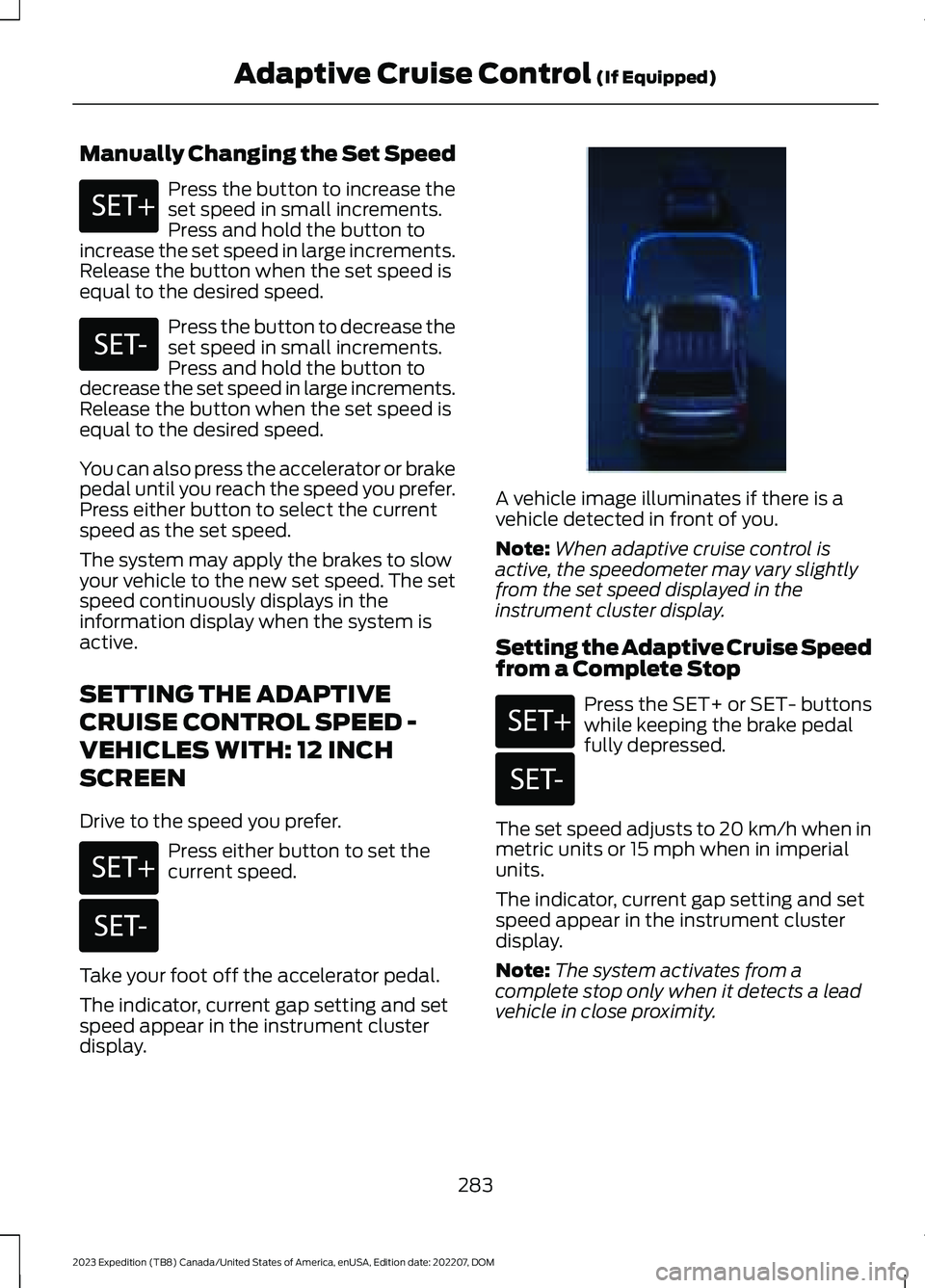
The indicator, current gap setting and setspeed appear in the instrument clusterdisplay.
A vehicle image illuminates if there is avehicle detected in front of you.
Note:When adaptive cruise control isactive, the speedometer may vary slightlyfrom the set speed displayed in theinstrument cluster display.
Setting the Adaptive Cruise Speedfrom a Complete Stop
Press the SET+ or SET- buttonswhile keeping the brake pedalfully depressed.
The set speed adjusts to 20 km/h when inmetric units or 15 mph when in imperialunits.
The indicator, current gap setting and setspeed appear in the instrument clusterdisplay.
Note:The system activates from acomplete stop only when it detects a leadvehicle in close proximity.
283
2023 Expedition (TB8) Canada/United States of America, enUSA, Edition date: 202207, DOMAdaptive Cruise Control (If Equipped)E246884 E246885 E246884 E246885 E356731 E246884 E246885
Page 292 of 658
ActionMessage
Cruise control does not resume automatic-ally when this display is active.Stopped
If the lead vehicle begins to move, you areprompted to press the resume button.Press button to resume
Press and release the button or use theaccelerator pedal to resume following thelead vehicle.
Displays when on a limited access highwayafter following a vehicle to a complete stop.In this situation, your vehicle resumesfollowing the lead vehicle without a buttonpress or pressing the accelerator pedal. Thesystem can remain in auto-resume statefor approximately 30 seconds, after whichit no longer automatically resumes.
Auto-Resume
OVERRIDING THE SET SPEED
WARNING: If you override thesystem by pressing the acceleratorpedal, it does not automatically applythe brakes to maintain a gap from anyvehicle ahead.
When you press the accelerator pedal, youoverride the set speed and gap distance.
Use the accelerator pedal to intentionallyexceed the set speed limit.
When you override the system, the greenindicator illuminates and the vehicle icondoes not appear in the instrument clusterdisplay.
The system resumes operation when yourelease the accelerator pedal. The vehiclespeed decreases to the set speed, or alower speed if following a slower vehicle.
ADAPTIVE CRUISE CONTROL
INDICATORS
Illuminates when you switchadaptive cruise control on. Thecolor of the indicator changes toindicate the system status.
White indicates the system is on butinactive.
Green indicates that you set the speed andthe system is active.
288
2023 Expedition (TB8) Canada/United States of America, enUSA, Edition date: 202207, DOMAdaptive Cruise Control (If Equipped)E144529
Page 295 of 658
SWITCHING LANE CENTERING ONAND OFF - VEHICLES WITH: 12INCH SCREEN
Keep your hands on the steering wheel atall times.
The controls are on the steering wheel.
Press the button.
The indicator appears in the instrumentcluster display. When the system is on, thecolor of the indicator changes to indicatethe system status.
You can override the system at any timeby steering your vehicle.
Note:The correct requirements must bemet before you can switch the system on.See Lane Centering Requirements (page290).
Enabling and Disabling LaneCentering
1.Press Features on the touchscreen.
2.Press Driver Assistance.
3.Press Cruise Control.
4.Press Lane Centering Assist.
SWITCHING LANE CENTERING ONAND OFF - VEHICLES WITH: 15INCH SCREEN
You must keep your hands on the steeringwheel at all times.
The controls are on the steering wheel.
Press the button.
The indicator appears in the instrumentcluster display. When the system is on, thecolor of the indicator changes to indicatethe system status.
You can override the system at any timeby steering your vehicle.
Note:The correct requirements must bemet before you can switch the system on.See Lane Centering Requirements (page290).
Enabling and Disabling LaneCentering
1.Access the vehicle drawer on thetouchscreen.
2.Press SETTINGS.
3.Press Driver Assistance.
4.Press Cruise Control.
5.Press Adaptive Cruise Control.
6.Press Lane Centering Assist.
LANE CENTERING ALERTS
You must keep your hands on the steeringwheel at all times.
When the system is active and detects nosteering activity for a period of time, thesystem alerts you to put your hands on thesteering wheel. If you do not reactappropriately to the warnings the adaptivecruise control with lane centering systemcancels and slows your vehicle down toidle speeds while maintaining steeringcontrol. See Lane Centering AutomaticCancellation (page 292).
The system also alerts you if your vehiclecrosses lane line markings withoutdetected steering activity.
Note:The system could detect a light gripor light touch on the steering wheel ashands-off driving.
291
2023 Expedition (TB8) Canada/United States of America, enUSA, Edition date: 202207, DOMAdaptive Cruise Control (If Equipped)E308131 E308131