roof FORD EXPEDITION 2023 User Guide
[x] Cancel search | Manufacturer: FORD, Model Year: 2023, Model line: EXPEDITION, Model: FORD EXPEDITION 2023Pages: 658, PDF Size: 16.16 MB
Page 414 of 658
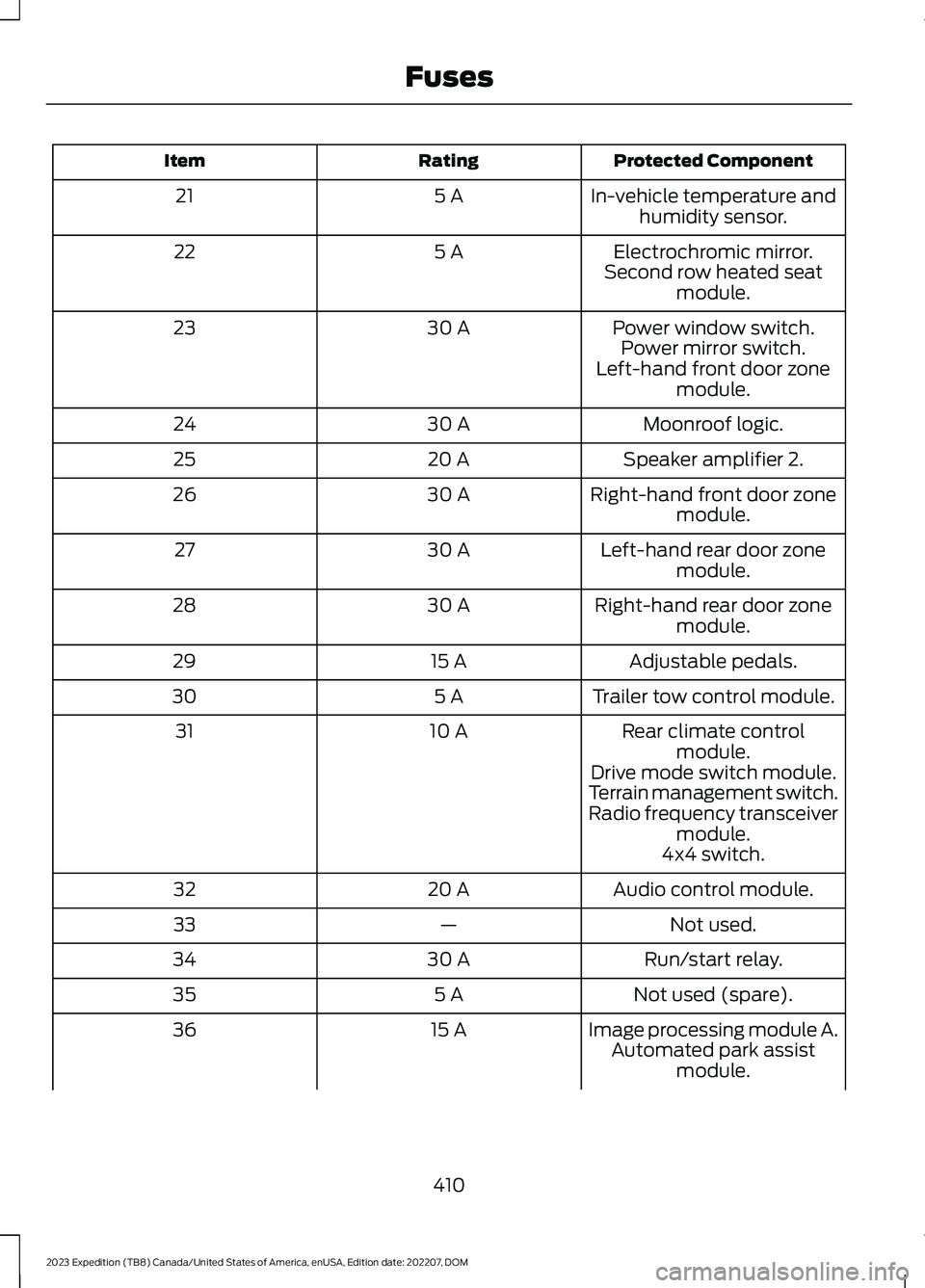
Protected ComponentRatingItem
In-vehicle temperature andhumidity sensor.5 A21
Electrochromic mirror.5 A22Second row heated seatmodule.
Power window switch.30 A23Power mirror switch.Left-hand front door zonemodule.
Moonroof logic.30 A24
Speaker amplifier 2.20 A25
Right-hand front door zonemodule.30 A26
Left-hand rear door zonemodule.30 A27
Right-hand rear door zonemodule.30 A28
Adjustable pedals.15 A29
Trailer tow control module.5 A30
Rear climate controlmodule.10 A31
Drive mode switch module.Terrain management switch.Radio frequency transceivermodule.4x4 switch.
Audio control module.20 A32
Not used.—33
Run/start relay.30 A34
Not used (spare).5 A35
Image processing module A.15 A36Automated park assistmodule.
410
2023 Expedition (TB8) Canada/United States of America, enUSA, Edition date: 202207, DOMFuses
Page 436 of 658
Note:Avoid cleaners or polishes thatincrease the gloss of the upper portion ofthe instrument panel. The dull finish in thisarea helps protect you from undesirablewindshield reflection.
CLEANING PLASTIC
We recommend that you only use a mildsoap and water solution on a soft cloth.Dry the area with a clean, soft cloth.
CLEANING DISPLAYS ANDSCREENS
We recommend that you only use amicrofiber cloth in a circular motion toclean off the fingerprint or dust.
If dirt or fingerprints are still on the screen,apply a small amount of alcohol to thecloth and try to clean it again.
Note:Do not pour or spray alcohol onto thetouchscreen.
Note: Do not use detergent or any type ofsolvent to clean the touchscreen.
CLEANING SEATS AND THEHEADLINER
WARNING: On vehicles equippedwith seat-mounted airbags, do not usechemical solvents or strong detergents.Such products could contaminate theside airbag system and affectperformance of the side airbag in a crash.
Cleaning Fabric Seats and theHeadliner
We recommend that you only clean thefabric seats and headliners in the followingway:
1.Remove dust and loose dirt with avacuum cleaner.
2.Wipe the surface with a soft, dampcloth and a mild soap and watersolution. Dry the area with a clean, softcloth.
3.For additional information andassistance, we recommend that youcontact an authorized dealer.
For heavy stains, spot clean the area. If aring forms on the fabric, immediately cleanthe entire area, but do not oversaturate orthe ring could set.
Cleaning Vinyl and Leather
We recommend that you only clean theleather and vinyl surfaces in the followingway:
1.Remove dust and loose dirt with avacuum cleaner.
2.Wipe the surface with a soft, dampcloth and a mild soap and watersolution. Dry the area with a clean, softcloth.
3.For additional information andassistance, we recommend that youcontact an authorized dealer.
With King Ranch Edition
Your vehicle has seating covered inpremium, top-grain leather that isextremely durable, but still requires specialcare and maintenance in order to preservelongevity and comfort.
Regular cleaning and conditioningmaintains the appearance of the leather.
Scratches
Because the leather in the seat comesfrom genuine steer hides, there may beevidence of naturally occurring markings,such as small scars. These markings givecharacter to the seating covers and areconsidered to be proof of a genuine leatherproduct.
432
2023 Expedition (TB8) Canada/United States of America, enUSA, Edition date: 202207, DOMVehicle Care
Page 437 of 658
To lessen the appearance of certainscratches and other wear marks, applyconditioner on the affected area.
Conditioning
•Clean the surfaces using the stepsoutlined in the cleaning leather andvinyl section.
•Make sure the leather is dry then applya nickel-sized amount of conditionerto a clean, dry cloth.
•Rub the conditioner into the leatheruntil it disappears. Allow theconditioner to dry, then repeat theprocess for the entire interior. If a filmappears, wipe it off with a dry, cleancloth.
For additional information, visit:www.krsaddleshop.com
CLEANING CARPETS AND FLOORMATS
We recommend that you only clean yourcarpets in the following way:
1.Remove dust and loose dirt with avacuum cleaner.
2.Wipe the surface with a soft, dampcloth and a mild soap and watersolution. Dry the area with a clean, softcloth.
3.For additional information andassistance, we recommend that youcontact an authorized dealer.
For heavy stains, spot clean the area. If aring forms on the fabric, clean the entirearea immediately, but do not oversaturateor the ring could set.
We recommend that you only clean yourfloor mats in the following way:
1.Remove dust and loose dirt with avacuum cleaner.
2.Wash rubber floor mats using mildsoap and lukewarm or cold water.
3.Completely dry the floor mat beforeplacing them back in your vehicle.
CLEANING SEATBELTS
WARNING: Do not use cleaningsolvents, bleach or dye on the vehicle'sseatbelts, as these actions may weakenthe belt webbing.
1.Wipe the surface with a soft, dampcloth and a mild soap and watersolution. Dry the area with a clean, softcloth.
CLEANING MOONROOF TRACKS
1.Remove debris from the tracks with avacuum cleaner.
2.Wipe the bulb seal and mating paintedroof metal surface with a soft, dampcloth and a mild soap and watersolution.
Note:The moonroof rail tracks are greasedto maintain proper functionality. Do notwipe off the grease.
REPAIRING MINOR PAINT
DAMAGE
We recommend that you contact anauthorized dealer to identify your vehiclecolor code. Authorized dealers havetouch-up paint to match your vehicle'scolor.
Before repairing minor paint damage, usea cleaner to remove particles such as birddroppings, tree sap, insect deposits, tarspots, road salt and industrial fallout.
Read the instructions before using cleaningproducts.
433
2023 Expedition (TB8) Canada/United States of America, enUSA, Edition date: 202207, DOMVehicle Care
Page 489 of 658
Depending on the station quality, you couldhear a slight sound change when thestation changes between analog anddigital audio.
You cannot access a saved HD station ifyour vehicle is outside the station’sreception area.
SWITCHING DIGITAL RADIORECEPTION ON AND OFF
1.Press Settings on the touchscreen.
2.Press Radio Settings.
3.Switch AM HD Radio or FM HD Radioon or off.
DIGITAL RADIO INDICATORS
HD Radio Indicator
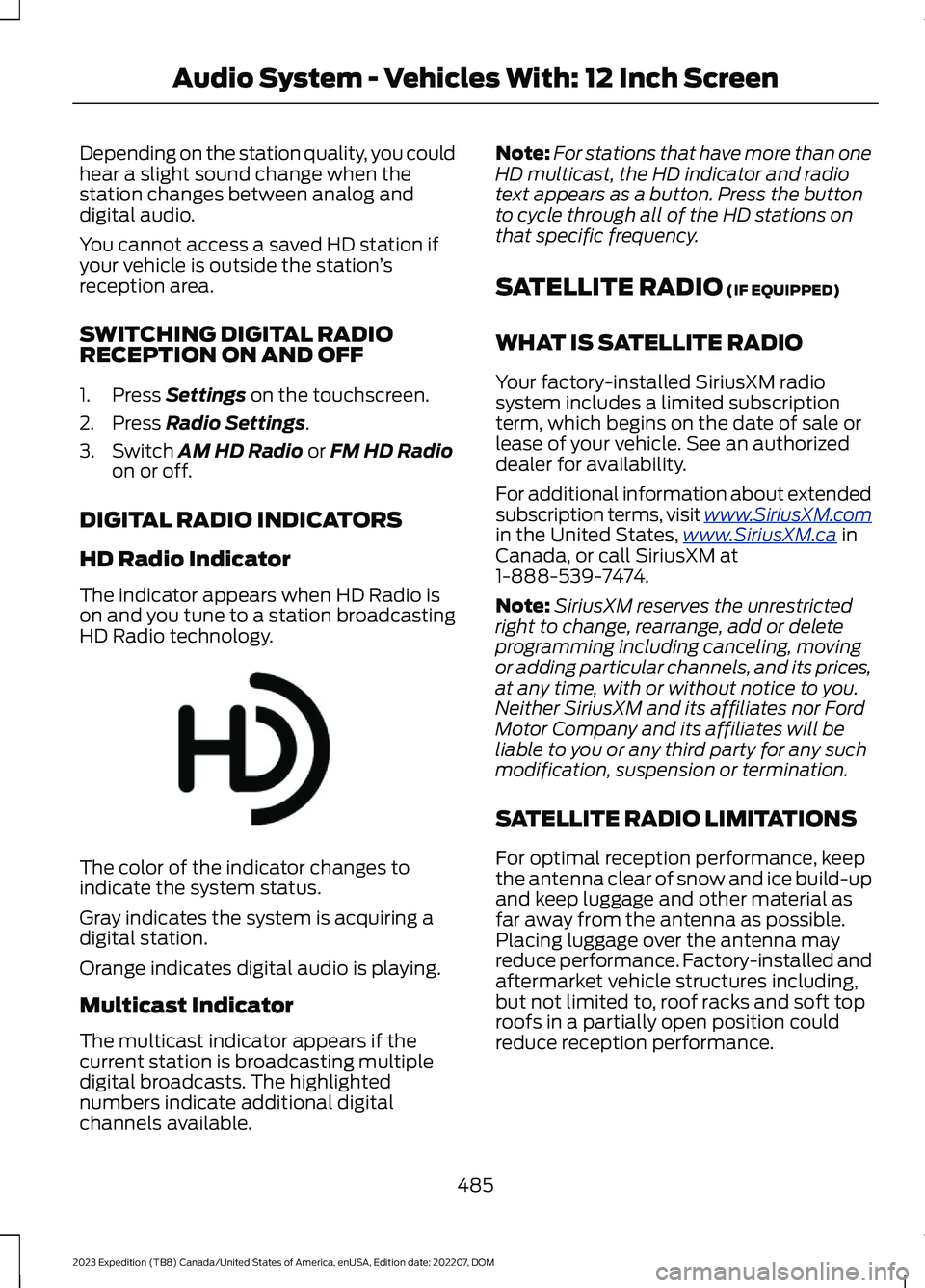
The indicator appears when HD Radio ison and you tune to a station broadcastingHD Radio technology.
The color of the indicator changes toindicate the system status.
Gray indicates the system is acquiring adigital station.
Orange indicates digital audio is playing.
Multicast Indicator
The multicast indicator appears if thecurrent station is broadcasting multipledigital broadcasts. The highlightednumbers indicate additional digitalchannels available.
Note:For stations that have more than oneHD multicast, the HD indicator and radiotext appears as a button. Press the buttonto cycle through all of the HD stations onthat specific frequency.
SATELLITE RADIO (IF EQUIPPED)
WHAT IS SATELLITE RADIO
Your factory-installed SiriusXM radiosystem includes a limited subscriptionterm, which begins on the date of sale orlease of your vehicle. See an authorizeddealer for availability.
For additional information about extendedsubscription terms, visit www.SiriusXM.comin the United States,www.SiriusXM.ca inCanada, or call SiriusXM at1-888-539-7474.
Note:SiriusXM reserves the unrestrictedright to change, rearrange, add or deleteprogramming including canceling, movingor adding particular channels, and its prices,at any time, with or without notice to you.Neither SiriusXM and its affiliates nor FordMotor Company and its affiliates will beliable to you or any third party for any suchmodification, suspension or termination.
SATELLITE RADIO LIMITATIONS
For optimal reception performance, keepthe antenna clear of snow and ice build-upand keep luggage and other material asfar away from the antenna as possible.Placing luggage over the antenna mayreduce performance. Factory-installed andaftermarket vehicle structures including,but not limited to, roof racks and soft toproofs in a partially open position couldreduce reception performance.
485
2023 Expedition (TB8) Canada/United States of America, enUSA, Edition date: 202207, DOMAudio System - Vehicles With: 12 Inch ScreenE142616
Page 500 of 658
Depending on the station quality, you couldhear a slight sound change when thestation changes between analog anddigital audio.
You cannot access a saved HD station ifyour vehicle is outside the station’sreception area.
SWITCHING DIGITAL RADIORECEPTION ON AND OFF
1.Press Settings on the touchscreen.
2.Press Radio Settings.
3.Switch AM HD Radio or FM HD Radioon or off.
DIGITAL RADIO INDICATORS
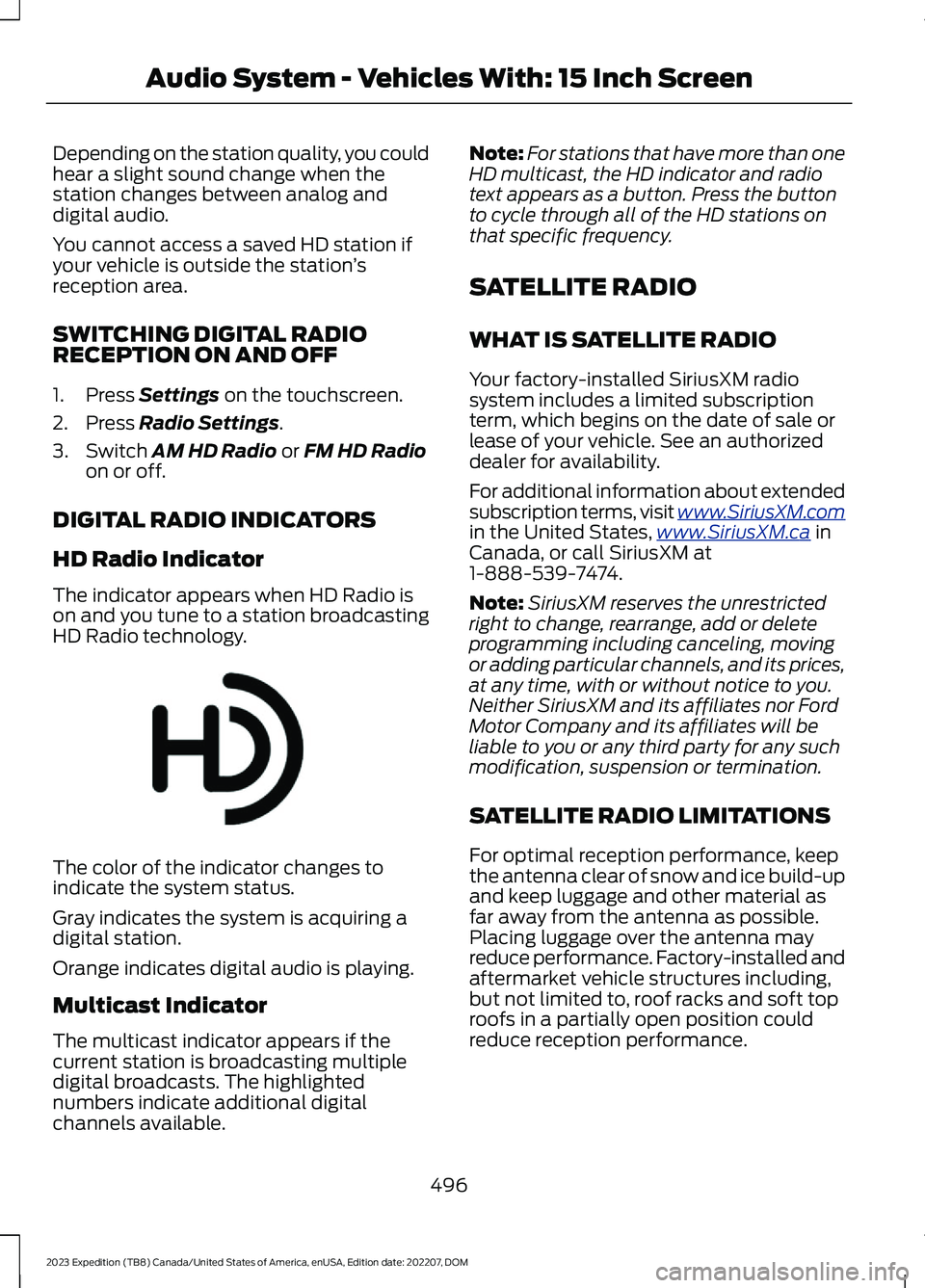
HD Radio Indicator
The indicator appears when HD Radio ison and you tune to a station broadcastingHD Radio technology.
The color of the indicator changes toindicate the system status.
Gray indicates the system is acquiring adigital station.
Orange indicates digital audio is playing.
Multicast Indicator
The multicast indicator appears if thecurrent station is broadcasting multipledigital broadcasts. The highlightednumbers indicate additional digitalchannels available.
Note:For stations that have more than oneHD multicast, the HD indicator and radiotext appears as a button. Press the buttonto cycle through all of the HD stations onthat specific frequency.
SATELLITE RADIO
WHAT IS SATELLITE RADIO
Your factory-installed SiriusXM radiosystem includes a limited subscriptionterm, which begins on the date of sale orlease of your vehicle. See an authorizeddealer for availability.
For additional information about extendedsubscription terms, visit www.SiriusXM.comin the United States,www.SiriusXM.ca inCanada, or call SiriusXM at1-888-539-7474.
Note:SiriusXM reserves the unrestrictedright to change, rearrange, add or deleteprogramming including canceling, movingor adding particular channels, and its prices,at any time, with or without notice to you.Neither SiriusXM and its affiliates nor FordMotor Company and its affiliates will beliable to you or any third party for any suchmodification, suspension or termination.
SATELLITE RADIO LIMITATIONS
For optimal reception performance, keepthe antenna clear of snow and ice build-upand keep luggage and other material asfar away from the antenna as possible.Placing luggage over the antenna mayreduce performance. Factory-installed andaftermarket vehicle structures including,but not limited to, roof racks and soft toproofs in a partially open position couldreduce reception performance.
496
2023 Expedition (TB8) Canada/United States of America, enUSA, Edition date: 202207, DOMAudio System - Vehicles With: 15 Inch ScreenE142616
Page 553 of 658
BBB AUTO LINE Application: Using theinformation that follows, call or write torequest a program application. You will beasked for your name and address, generalinformation about your new vehicle,information about your warranty concerns,and any steps you have already taken totry to resolve them. A Customer ClaimForm will be mailed that needs to becompleted, signed and returned to the BBBalong with proof of ownership. Uponreceipt, the BBB reviews the claim foreligibility under the Program SummaryGuidelines.
You can get more information bycalling BBB AUTO LINE at1-800-955-5100, or writing to:
BBB AUTO LINE a Division of BBBNational Programs, Inc.1676 International Drive, Suite 550McLean, VA 22102
BBB AUTO LINE applications can also berequested by calling the Ford MotorCompany Customer Relationship Centerat 1-800-392-3673.
For additional information, refer to theBetter Business Bureau website.
Note:Ford Motor Company reserves theright to change eligibility limitations, modifyprocedures, or to discontinue this processat any time without notice and withoutobligation.
THE MEDIATION AND
ARBITRATION PROGRAM -
CANADA
For vehicles delivered to authorizedCanadian dealers. In those cases whereyou continue to feel that the efforts by Fordof Canada and the authorized dealer toresolve a factory-related vehicle serviceconcern have been unsatisfactory, Ford ofCanada participates in an impartial thirdparty mediation/arbitration programadministered by the Canadian MotorVehicle Arbitration Plan (CAMVAP).
The CAMVAP program is a straightforwardand relatively speedy alternative to resolvea disagreement when all other efforts toproduce a settlement have failed. Thisprocedure is without cost to you and isdesigned to eliminate the need for lengthyand expensive legal proceedings.
In the CAMVAP program, impartialthird-party arbitrators conduct hearings atmutually convenient times and places inan informal environment. These impartialarbitrators review the positions of theparties, make decisions and, whenappropriate, render awards to resolvedisputes. CAMVAP decisions are fast, fair,and final as the arbitrator’s award isbinding on both you and Ford of Canada.
CAMVAP services are available in allCanadian territories and provinces. Formore information, without charge orobligation, call your CAMVAP ProvincialAdministrator directly at 1-800-207-0685or visit www.camvap.ca.
ORDERING A CANADIAN
FRENCH OWNER'S MANUAL
You can obtain a French owner's manualfrom an authorized dealer or by contactingHelm, LLC at:
549
2023 Expedition (TB8) Canada/United States of America, enUSA, Edition date: 202207, DOMCustomer Information
Page 621 of 658
view it, and (ii) save it, provided that youdo not remove any copyright notices thatappear and do not modify the Data in anyway. You agree not to otherwise reproduce,copy, modify, decompile, disassemble orreverse engineer any portion of this Data,and may not transfer or distribute it in anyform, for any purpose, except to the extentpermitted by mandatory laws.
Restrictions
Except where you have been specificallylicensed to do so by NAV2 , and withoutlimiting the preceding paragraph, you maynot (a) use this Data with any products,systems, or applications installed orotherwise connected to or incommunication with vehicles, capable ofvehicle navigation, positioning, dispatch,real time route guidance, fleetmanagement or similar applications; or (b)with or in communication with anypositioning devices or any mobile orwireless-connected electronic or computerdevices, including without limitationcellular phones, palmtop and handheldcomputers, pagers, and personal digitalassistants or PDAs. You agree to ceaseusing this Data if you fail to comply withthese terms and conditions.
Limited Warranty
NAV2 warrants that (a) the Data willperform substantially in accordance withthe accompanying written materials for aperiod of ninety (90) days from the dateof receipt, and (b) any support servicesprovided by NAV2 shall be substantially asdescribed in applicable written materialsprovided to you by NAV2, and NAV2’ssupport engineers will make commerciallyreasonable efforts to solve any problemissues.
Customer Remedies
NAV2 and its suppliers’ entire liability andyour exclusive remedy shall be, at NAV2’ssole discretion, either (a) return of the pricepaid, if any, or (b) repair or replacement ofthe Data that do not meet NAV2’s LimitedWarranty and that are returned to NAV2with a copy of your receipt. This LimitedWarranty is void if failure of the Data hasresulted from accident, abuse, ormisapplication. Any replacement Data willbe warranted for the remainder of theoriginal warranty period or thirty (30) days,whichever is longer. Neither these remediesnor any product support services offeredby NAV2 are available without proof ofpurchase from an authorized internationalsource.
No Other Warranty:
EXCEPT FOR THE LMITED WARRANTYSET FORTH ABOVE AND TO THE EXTENTPERMITTED BY APPLICABLE LAW, NAV2AND ITS LICENSORS (INCLUDING THEIRLICENSORS AND SUPPLIERS) DISCLAIMANY WARRANTIES, EXPRESS OR IMPLIED,OF QUALITY, PERFORMANCE,MERCHANTABILITY, FITNESS FOR APARTICULAR PURPOSE, OWNERSHIP ORNON-INFRINGEMENT. Certain warrantyexclusions may not be permitted underapplicable law, so to that extent the aboveexclusion may not apply to you.
Limited Liability:
TO THE EXTENT PERMITTED BYAPPLICABLE LAW, NAV2 AND ITSLICENSORS (INCLUDING THEIRLICENSORS AND SUPPLIERS) SHALL NOTBE LIABLE TO YOU: IN RESPECT OF ANYCLAIM, DEMAND OR ACTION,IRRESPECTIVE OF THE NATURE OF THECAUSE OF THE CLAIM, DEMAND ORACTION ALLEGING ANY LOSS, INJURY ORDAMAGES, DIRECT OR INDIRECT, WHICHMAY RESULT FROM THE USE ORPOSSESSION OF THE INFORMATION; OR
617
2023 Expedition (TB8) Canada/United States of America, enUSA, Edition date: 202207, DOMCustomer Information
Page 637 of 658
Changing the Vehicle Wi-Fi HotspotName or Password - Vehicles With: 15Inch Screen................................................480Charging a Device.........................................185Charging a Wireless Device......................190Checking MyKey System Status................77Checking the Brake Fluid..........................229Checking the Coolant.................................415Checking the Seatbelts...............................54Checking the Tire Pressures....................448Checking the Wiper Blades.........................111Children and Airbags....................................60Child Restraint Anchor Points...................38Locating the Child Restraint Lower AnchorPoints...................................................................38Locating the Child Restraint Top TetherAnchor Points...................................................39What Are the Child Restraint AnchorPoints...................................................................38Child Restraints...............................................39Child Restraint Position Information............39Child Restraints Recommendation................41Child Safety.......................................................37Child Restraint Anchor Points.........................38Child Restraints.....................................................39Installing Child Restraints..................................41Child Safety Locks..........................................47Child Safety Precautions.............................37Cleaning Products.......................................429Cleaning the Exterior..................................430Cleaning Camera Lenses andSensors..............................................................431Cleaning Chrome, Aluminium or StainlessSteel..................................................................430Cleaning Headlamps and RearLamps...............................................................430Cleaning Stripes or Graphics..........................431Cleaning the Engine Compartment.............431Cleaning the Exterior Precautions..............430Cleaning the Underbody..................................431Cleaning Wheels................................................430Cleaning Windows and WiperBlades...............................................................430Cleaning the Interior....................................431Cleaning Carpets and Floor Mats................433Cleaning Displays and Screens....................432Cleaning Moonroof Tracks.............................433Cleaning Plastic..................................................432
Cleaning Seatbelts............................................433Cleaning Seats and the Headliner...............432Cleaning the Instrument Panel.....................431Clearing All MyKeys........................................77Climate Control.............................................148Auto Mode............................................................150Climate Control Hints..................................151Closing the Liftgate.......................................93Closing the Hands-Free Liftgate....................94Closing the Liftgate From Inside YourVehicle.................................................................93Closing the Liftgate From Outside YourVehicle.................................................................93Closing the Liftgate Using the RemoteControl................................................................94Cold Weather Precautions.......................389Connected Navigation...............................526Connected Vehicle......................................475Connected Vehicle –Troubleshooting............................................476Connecting the Vehicle to a MobileNetwork............................................................475Connected Vehicle Data..............................28Connected Vehicle Limitations...............475Connected Vehicle Requirements.........475Connected Vehicle –Troubleshooting........................................476Connected Vehicle – Frequently AskedQuestions.........................................................476Connecting a Bluetooth® Device..........520Connecting a Trailer....................................355Connecting a Trailer –Troubleshooting.............................................357Hitches...................................................................354Connecting a Trailer Precautions..........354Connecting a Trailer –Troubleshooting........................................357Connecting a Trailer – InformationMessages..........................................................357Connecting the Vehicle to a MobileNetwork........................................................475Connecting FordPass to the Modem..........475Enabling and Disabling the Modem...........475What Is the Modem..........................................475Connecting the Vehicle to a Wi-FiNetwork - Vehicles With: 12 InchScreen...........................................................476
633
2023 Expedition (TB8) Canada/United States of America, enUSA, Edition date: 202207, DOMIndex
Page 644 of 658
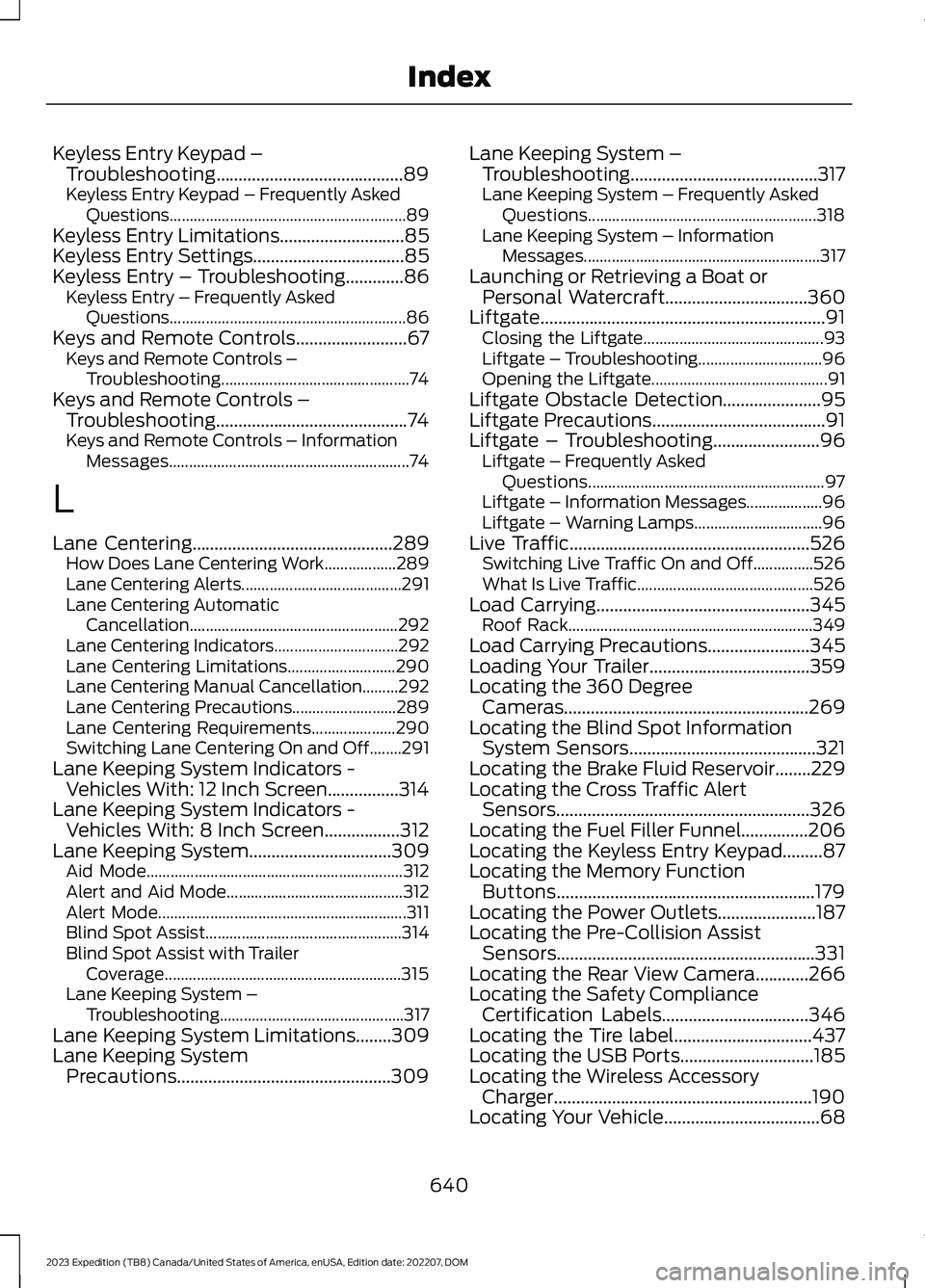
Keyless Entry Keypad –Troubleshooting..........................................89Keyless Entry Keypad – Frequently AskedQuestions...........................................................89Keyless Entry Limitations............................85Keyless Entry Settings..................................85Keyless Entry – Troubleshooting.............86Keyless Entry – Frequently AskedQuestions...........................................................86Keys and Remote Controls.........................67Keys and Remote Controls –Troubleshooting...............................................74Keys and Remote Controls –Troubleshooting...........................................74Keys and Remote Controls – InformationMessages............................................................74
L
Lane Centering.............................................289How Does Lane Centering Work..................289Lane Centering Alerts........................................291Lane Centering AutomaticCancellation....................................................292Lane Centering Indicators...............................292Lane Centering Limitations...........................290Lane Centering Manual Cancellation.........292Lane Centering Precautions..........................289Lane Centering Requirements.....................290Switching Lane Centering On and Off........291Lane Keeping System Indicators -Vehicles With: 12 Inch Screen................314Lane Keeping System Indicators -Vehicles With: 8 Inch Screen.................312Lane Keeping System................................309Aid Mode................................................................312Alert and Aid Mode............................................312Alert Mode..............................................................311Blind Spot Assist.................................................314Blind Spot Assist with TrailerCoverage...........................................................315Lane Keeping System –Troubleshooting..............................................317Lane Keeping System Limitations........309Lane Keeping SystemPrecautions................................................309
Lane Keeping System –Troubleshooting..........................................317Lane Keeping System – Frequently AskedQuestions.........................................................318Lane Keeping System – InformationMessages...........................................................317Launching or Retrieving a Boat orPersonal Watercraft................................360Liftgate................................................................91Closing the Liftgate.............................................93Liftgate – Troubleshooting...............................96Opening the Liftgate............................................91Liftgate Obstacle Detection......................95Liftgate Precautions.......................................91Liftgate – Troubleshooting........................96Liftgate – Frequently AskedQuestions...........................................................97Liftgate – Information Messages...................96Liftgate – Warning Lamps................................96Live Traffic......................................................526Switching Live Traffic On and Off...............526What Is Live Traffic............................................526Load Carrying................................................345Roof Rack.............................................................349Load Carrying Precautions.......................345Loading Your Trailer....................................359Locating the 360 DegreeCameras.......................................................269Locating the Blind Spot InformationSystem Sensors..........................................321Locating the Brake Fluid Reservoir........229Locating the Cross Traffic AlertSensors.........................................................326Locating the Fuel Filler Funnel...............206Locating the Keyless Entry Keypad.........87Locating the Memory FunctionButtons..........................................................179Locating the Power Outlets......................187Locating the Pre-Collision AssistSensors..........................................................331Locating the Rear View Camera............266Locating the Safety ComplianceCertification Labels.................................346Locating the Tire label...............................437Locating the USB Ports..............................185Locating the Wireless AccessoryCharger..........................................................190Locating Your Vehicle...................................68
640
2023 Expedition (TB8) Canada/United States of America, enUSA, Edition date: 202207, DOMIndex
Page 645 of 658
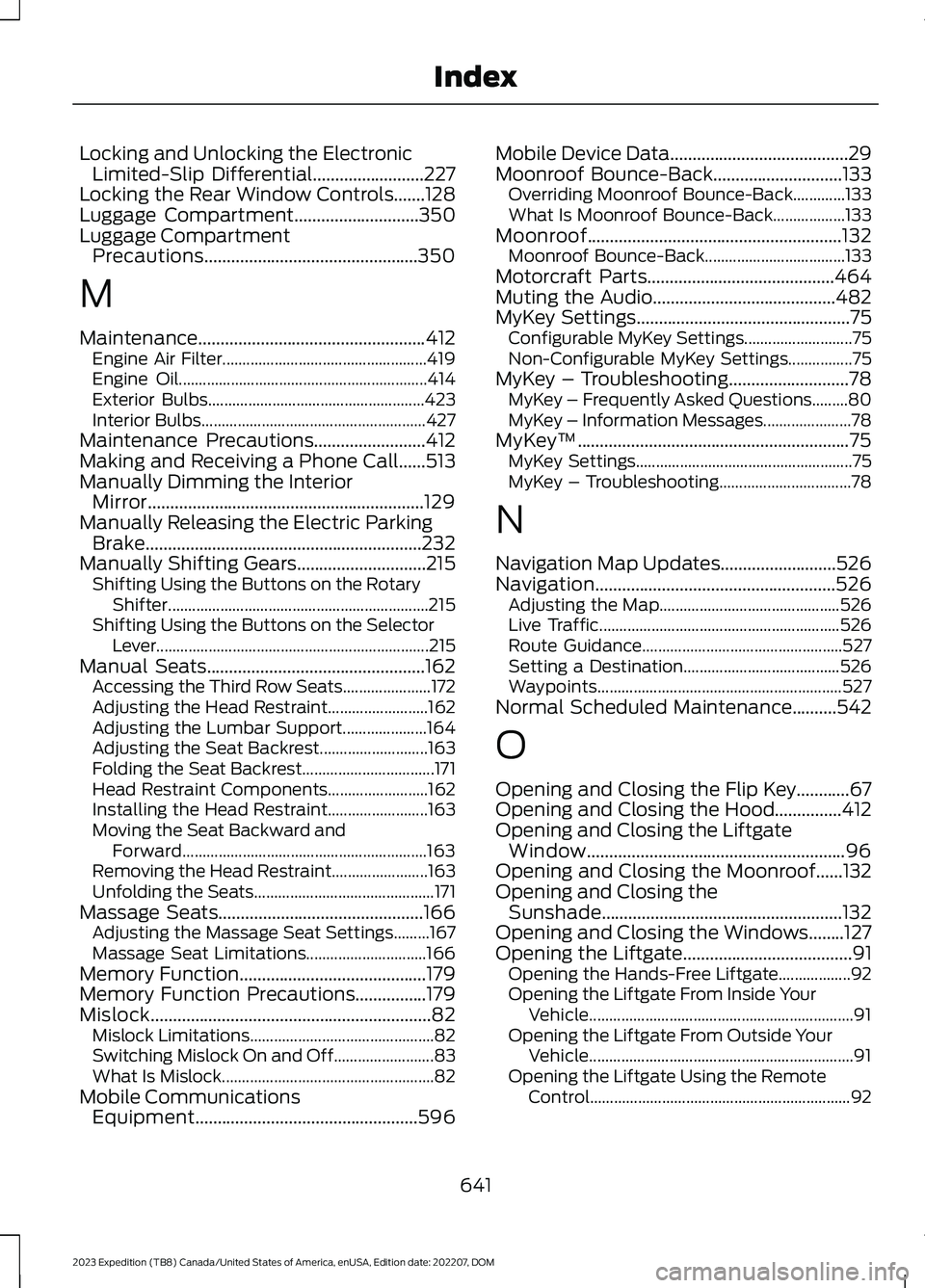
Locking and Unlocking the ElectronicLimited-Slip Differential.........................227Locking the Rear Window Controls.......128Luggage Compartment............................350Luggage CompartmentPrecautions................................................350
M
Maintenance...................................................412Engine Air Filter...................................................419Engine Oil..............................................................414Exterior Bulbs......................................................423Interior Bulbs........................................................427Maintenance Precautions.........................412Making and Receiving a Phone Call......513Manually Dimming the InteriorMirror..............................................................129Manually Releasing the Electric ParkingBrake..............................................................232Manually Shifting Gears.............................215Shifting Using the Buttons on the RotaryShifter.................................................................215Shifting Using the Buttons on the SelectorLever....................................................................215Manual Seats.................................................162Accessing the Third Row Seats......................172Adjusting the Head Restraint.........................162Adjusting the Lumbar Support.....................164Adjusting the Seat Backrest...........................163Folding the Seat Backrest.................................171Head Restraint Components.........................162Installing the Head Restraint.........................163Moving the Seat Backward andForward.............................................................163Removing the Head Restraint........................163Unfolding the Seats.............................................171Massage Seats..............................................166Adjusting the Massage Seat Settings.........167Massage Seat Limitations..............................166Memory Function..........................................179Memory Function Precautions................179Mislock...............................................................82Mislock Limitations..............................................82Switching Mislock On and Off.........................83What Is Mislock.....................................................82Mobile CommunicationsEquipment..................................................596
Mobile Device Data........................................29Moonroof Bounce-Back.............................133Overriding Moonroof Bounce-Back.............133What Is Moonroof Bounce-Back..................133Moonroof.........................................................132Moonroof Bounce-Back...................................133Motorcraft Parts..........................................464Muting the Audio.........................................482MyKey Settings................................................75Configurable MyKey Settings...........................75Non-Configurable MyKey Settings................75MyKey – Troubleshooting...........................78MyKey – Frequently Asked Questions.........80MyKey – Information Messages......................78MyKey™.............................................................75MyKey Settings......................................................75MyKey – Troubleshooting.................................78
N
Navigation Map Updates..........................526Navigation......................................................526Adjusting the Map.............................................526Live Traffic............................................................526Route Guidance..................................................527Setting a Destination.......................................526Waypoints.............................................................527Normal Scheduled Maintenance..........542
O
Opening and Closing the Flip Key............67Opening and Closing the Hood...............412Opening and Closing the LiftgateWindow..........................................................96Opening and Closing the Moonroof......132Opening and Closing theSunshade......................................................132Opening and Closing the Windows........127Opening the Liftgate......................................91Opening the Hands-Free Liftgate..................92Opening the Liftgate From Inside YourVehicle..................................................................91Opening the Liftgate From Outside YourVehicle..................................................................91Opening the Liftgate Using the RemoteControl.................................................................92
641
2023 Expedition (TB8) Canada/United States of America, enUSA, Edition date: 202207, DOMIndex