steering FORD EXPEDITION 2023 Owner's Manual
[x] Cancel search | Manufacturer: FORD, Model Year: 2023, Model line: EXPEDITION, Model: FORD EXPEDITION 2023Pages: 658, PDF Size: 16.16 MB
Page 150 of 658
Note:If you switch the auto mode on, thesystem attempts to heat or cool the interiorto 72°F (22°C). When you switch the vehicleon, the climate control system returns tothe last used settings.
Note:If you switch the last settings on, thesystem remembers the last used settings.
Heated Seat Settings (If Equipped)
1.Press Settings on the touchscreen.
2.Press Vehicle Settings.
3.Press Remote Start Setup.
4.Press Seats.
5.Press Auto or Off.
Note:If you switch the heated seat settingson, the heated seats turn on during coldweather.
Note:You cannot adjust the heated seatsettings when you remotely start yourvehicle.
Heated Steering Wheel Settings (If
Equipped)
1.Press Settings on the touchscreen.
2.Press Vehicle Settings.
3.Press Remote Start Setup.
4.Press Seats and Steering Wheel.
5.Press Auto or Off.
Note:If you switch the heated steeringwheel settings on, the heated steering wheelturns on during cold weather.
Note:You cannot adjust the heatedsteering wheel settings when you remotelystart your vehicle.
Remote Start Duration
1.Press Settings on the touchscreen.
2.Press Vehicle Settings.
3.Press Remote Start Setup.
4.Press Duration.
5.Press the duration you prefer.
REMOTE START SETTINGS -
VEHICLES WITH: 15 INCH
SCREEN
Switching Climate Control AutoMode On and Off
1.Access the vehicle drawer on thetouchscreen.
2.Press SETTINGS.
3.Press Vehicle.
4.Press Remote Start Setup.
5.Press Auto or Last settings.
Note:If you switch the auto mode on, thesystem attempts to heat or cool the interiorto 72°F (22°C). When you switch the vehicleon, the climate control system returns tothe last used settings.
Note:If you switch the last settings on, thesystem remembers the last used settings.
Heated Seat Settings (If Equipped)
1.Access the vehicle drawer on thetouchscreen.
2.Press SETTINGS.
3.Press Vehicle.
4.Press Remote Start Setup.
5.Press Seats.
6.Press Auto or Off.
Note:If you switch the heated seat settingson, the heated seats turn on during coldweather.
Heated Steering Wheel Settings (If
Equipped)
1.Access the vehicle drawer on thetouchscreen.
2.Press SETTINGS.
146
2023 Expedition (TB8) Canada/United States of America, enUSA, Edition date: 202207, DOMRemote Start (If Equipped)
Page 151 of 658
3.Press Vehicle.
4.Press Remote Start Setup.
5.Press Seats and Steering Wheel.
6.Press Auto or Off.
Note:If you switch the heated steeringwheel settings on, the heated steering wheelturns on during cold weather.
Remote Start Duration
1.Access the vehicle drawer on thetouchscreen.
2.Press SETTINGS.
3.Press Vehicle.
4.Press Remote Start Setup.
5.Press Duration.
6.Press the duration you prefer.
147
2023 Expedition (TB8) Canada/United States of America, enUSA, Edition date: 202207, DOMRemote Start (If Equipped)
Page 165 of 658
FRONT SEAT PRECAUTIONS
WARNING: Sitting improperly, outof position or with the seatback reclinedtoo far can take weight off the seatcushion and affect the decision of thepassenger sensing system, resulting inserious injury or death in the event of acrash. Always sit upright against yourseat back, with your feet on the floor.
WARNING: Do not recline the seatbackrest too far as this can cause theoccupant to slide under the seatbelt,resulting in personal injury in the eventof a crash.
WARNING: Do not place objectshigher than the top of the seat backrest.Failure to follow this instruction couldresult in personal injury or death in theevent of a sudden stop or crash.
WARNING: Do not adjust the driverseat or seat backrest when your vehicleis moving. This may result in sudden seatmovement, causing the loss of controlof your vehicle.
SITTING IN THE CORRECT
POSITION
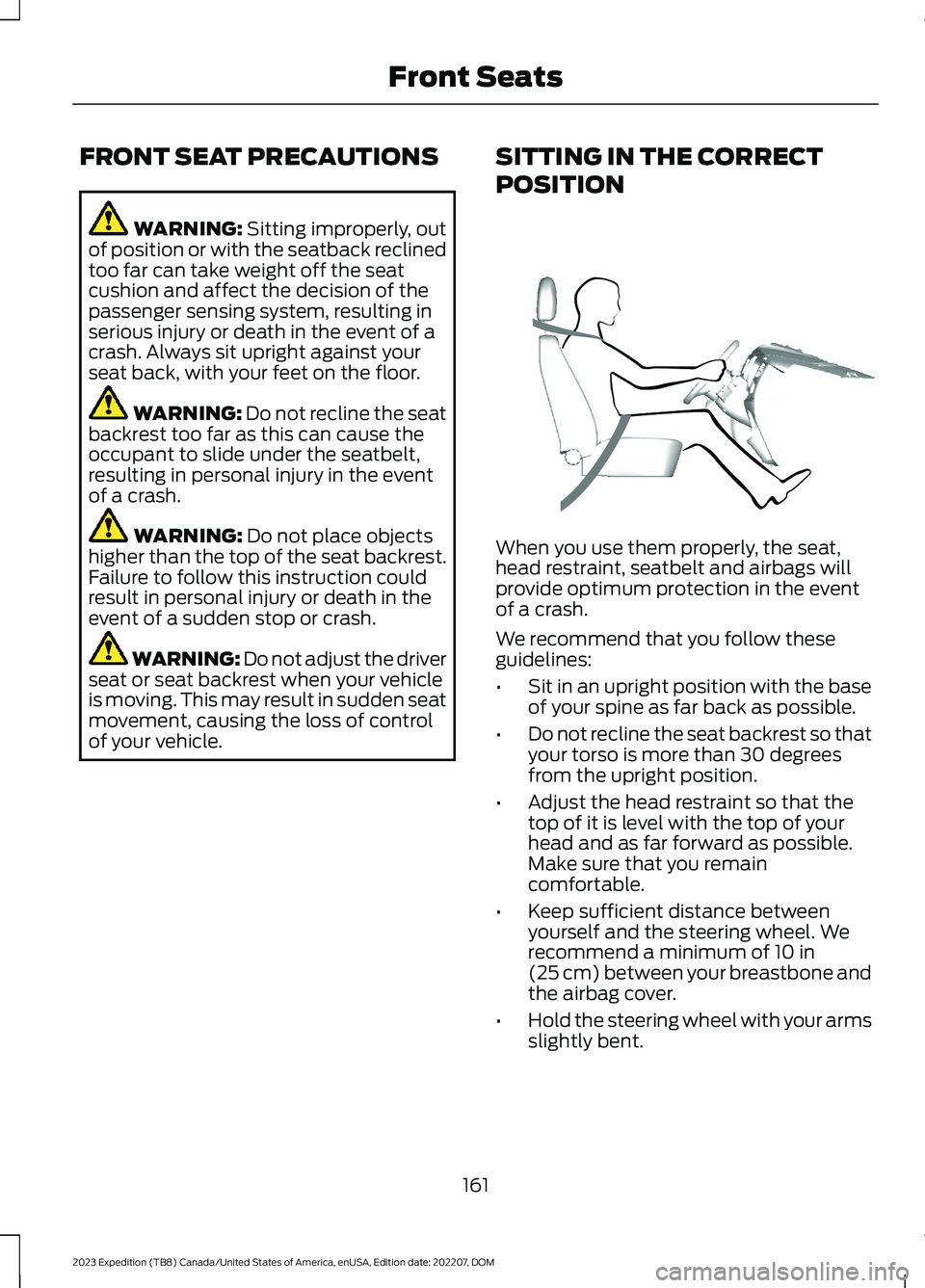
When you use them properly, the seat,head restraint, seatbelt and airbags willprovide optimum protection in the eventof a crash.
We recommend that you follow theseguidelines:
•Sit in an upright position with the baseof your spine as far back as possible.
•Do not recline the seat backrest so thatyour torso is more than 30 degreesfrom the upright position.
•Adjust the head restraint so that thetop of it is level with the top of yourhead and as far forward as possible.Make sure that you remaincomfortable.
•Keep sufficient distance betweenyourself and the steering wheel. Werecommend a minimum of 10 in(25 cm) between your breastbone andthe airbag cover.
•Hold the steering wheel with your armsslightly bent.
161
2023 Expedition (TB8) Canada/United States of America, enUSA, Edition date: 202207, DOMFront SeatsE68595
Page 177 of 658
To return the seat to the seating position,slide the seat rearward while pulling downon the seat backrest until the latch fullyengages.
To move the seat further back, pull thelever under the front of the seat and slideit backward.
Note: You must move the seat to the fullforward position before you move itrearward. Otherwise, the seat may not slideproperly rearward.
Note:You can slide the outermost seatsforward when using a child restraint.
Adjusting the Second RowOutermost Seats for Easy Exit
When exiting your vehicle from the thirdrow seats, pull the lever up on the uppercorner of the outermost seats. Then, pushthe seat forward until it stops.
POWER SEATS (IF EQUIPPED)
ADJUSTING THE HEADRESTRAINT
The third row outermost head restraintsare fixed and cannot be removed.
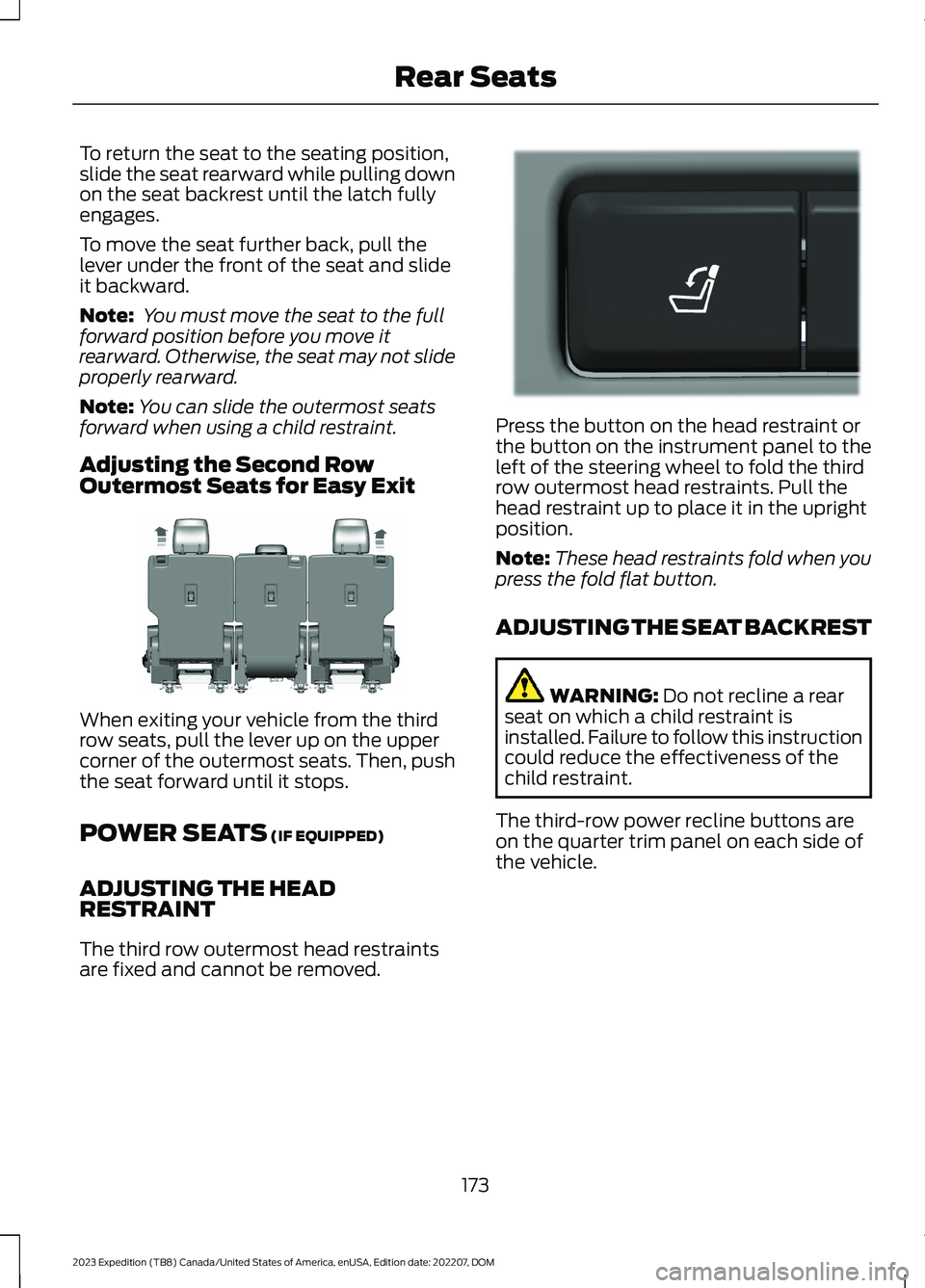
Press the button on the head restraint orthe button on the instrument panel to theleft of the steering wheel to fold the thirdrow outermost head restraints. Pull thehead restraint up to place it in the uprightposition.
Note:These head restraints fold when youpress the fold flat button.
ADJUSTING THE SEAT BACKREST
WARNING: Do not recline a rearseat on which a child restraint isinstalled. Failure to follow this instructioncould reduce the effectiveness of thechild restraint.
The third-row power recline buttons areon the quarter trim panel on each side ofthe vehicle.
173
2023 Expedition (TB8) Canada/United States of America, enUSA, Edition date: 202207, DOMRear SeatsE246708 E272543
Page 183 of 658
WHAT IS THE MEMORY
FUNCTION
The memory function recalls the positionof these features:
•Driver seat.
•Power mirrors.
•Optional power steering column.
•Optional power adjustable pedals.
MEMORY FUNCTION
PRECAUTIONS
WARNING: Before activating thememory seat, make sure that the areaimmediately surrounding the seat is clearof obstructions and that all occupantsare clear of moving parts.
WARNING: Do not use the memoryfunction when your vehicle is moving.
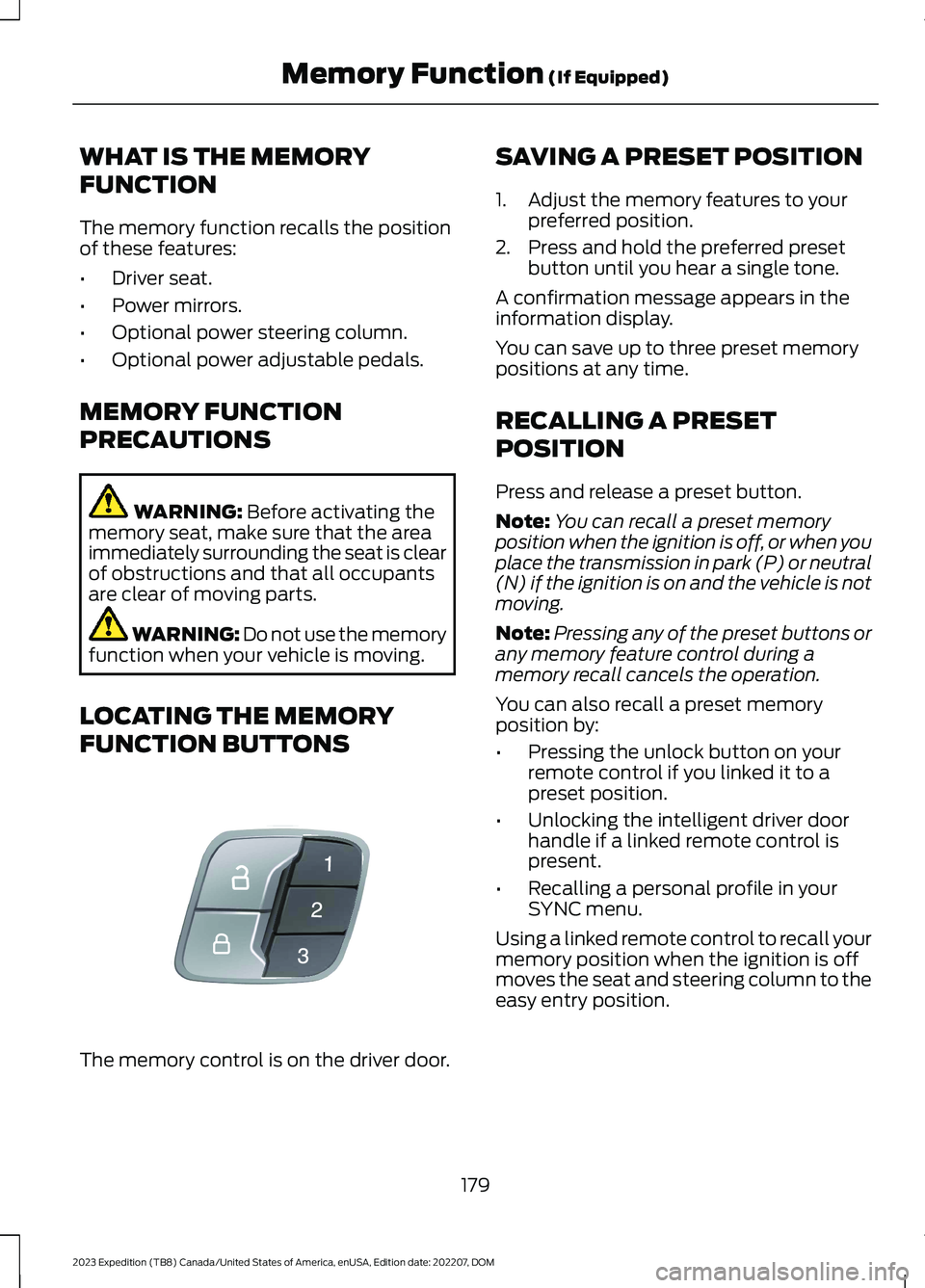
LOCATING THE MEMORY
FUNCTION BUTTONS
The memory control is on the driver door.
SAVING A PRESET POSITION
1.Adjust the memory features to yourpreferred position.
2.Press and hold the preferred presetbutton until you hear a single tone.
A confirmation message appears in theinformation display.
You can save up to three preset memorypositions at any time.
RECALLING A PRESET
POSITION
Press and release a preset button.
Note:You can recall a preset memoryposition when the ignition is off, or when youplace the transmission in park (P) or neutral(N) if the ignition is on and the vehicle is notmoving.
Note:Pressing any of the preset buttons orany memory feature control during amemory recall cancels the operation.
You can also recall a preset memoryposition by:
•Pressing the unlock button on yourremote control if you linked it to apreset position.
•Unlocking the intelligent driver doorhandle if a linked remote control ispresent.
•Recalling a personal profile in yourSYNC menu.
Using a linked remote control to recall yourmemory position when the ignition is offmoves the seat and steering column to theeasy entry position.
179
2023 Expedition (TB8) Canada/United States of America, enUSA, Edition date: 202207, DOMMemory Function (If Equipped)E142554
Page 201 of 658
4.Press the push button ignition switch.
STOPPING THE ENGINE WHENYOUR VEHICLE IS MOVING -VEHICLES WITHOUT: PUSHBUTTON START
WARNING: Switching off theengine when your vehicle is still movingresults in a significant decrease inbraking assistance. Higher effort isrequired to apply the brakes and to stopyour vehicle. A significant decrease insteering assistance could also occur. Thesteering does not lock, but higher effortcould be required to steer your vehicle.When you switch the ignition off, someelectrical circuits, for example airbags,also turn off. If you unintentionally switchthe ignition off, shift into neutral (N) andrestart the engine.
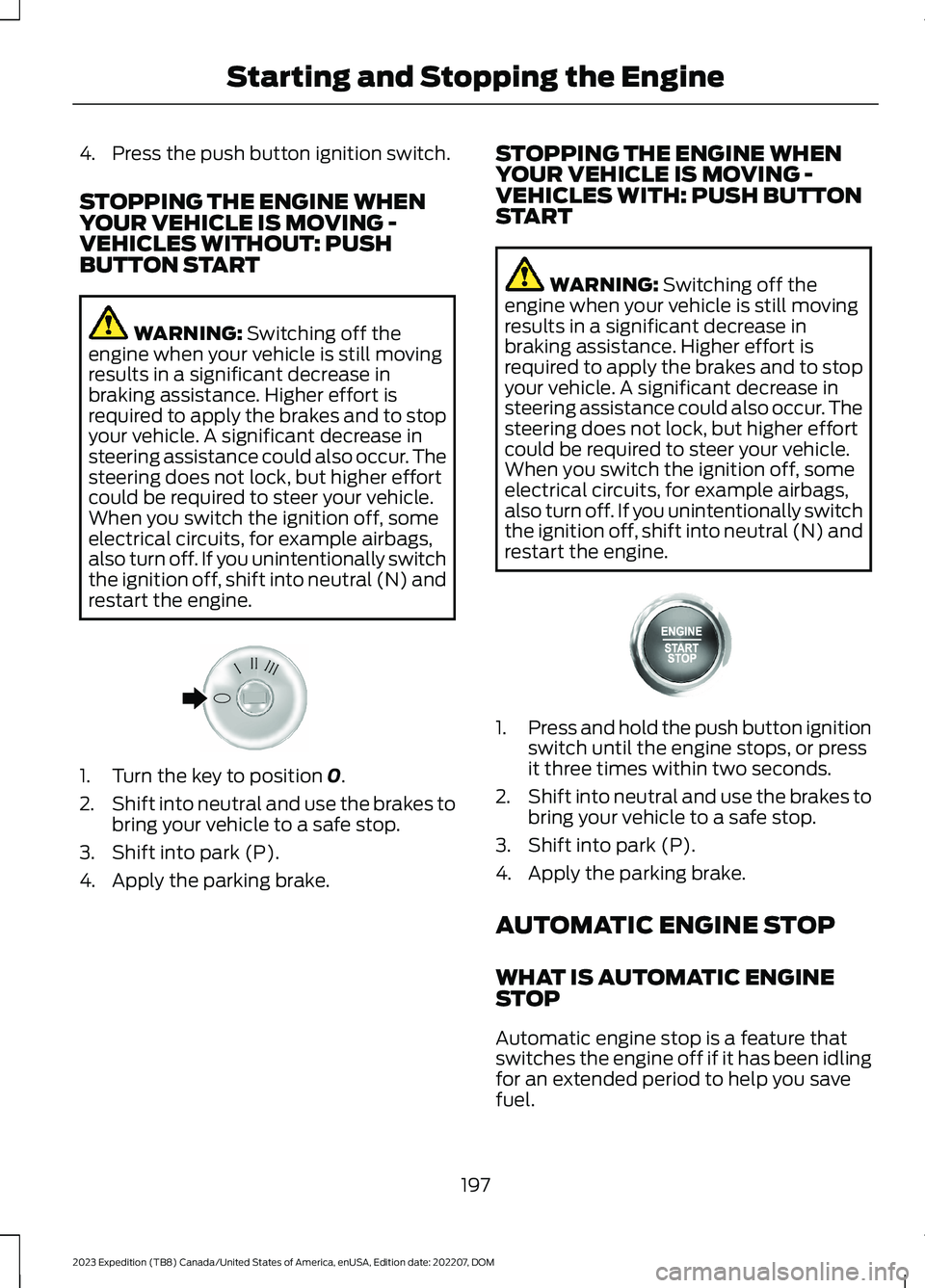
1.Turn the key to position 0.
2.Shift into neutral and use the brakes tobring your vehicle to a safe stop.
3.Shift into park (P).
4.Apply the parking brake.
STOPPING THE ENGINE WHENYOUR VEHICLE IS MOVING -VEHICLES WITH: PUSH BUTTONSTART
WARNING: Switching off theengine when your vehicle is still movingresults in a significant decrease inbraking assistance. Higher effort isrequired to apply the brakes and to stopyour vehicle. A significant decrease insteering assistance could also occur. Thesteering does not lock, but higher effortcould be required to steer your vehicle.When you switch the ignition off, someelectrical circuits, for example airbags,also turn off. If you unintentionally switchthe ignition off, shift into neutral (N) andrestart the engine.
1.Press and hold the push button ignitionswitch until the engine stops, or pressit three times within two seconds.
2.Shift into neutral and use the brakes tobring your vehicle to a safe stop.
3.Shift into park (P).
4.Apply the parking brake.
AUTOMATIC ENGINE STOP
WHAT IS AUTOMATIC ENGINESTOP
Automatic engine stop is a feature thatswitches the engine off if it has been idlingfor an extended period to help you savefuel.
197
2023 Expedition (TB8) Canada/United States of America, enUSA, Edition date: 202207, DOMStarting and Stopping the EngineE322405 E357998
Page 218 of 658
MANUAL (M)
In manual (M) you can select a specificgear. See Manually Shifting Gears (page215).
Note:We recommend using this mode fordriving on hilly or mountainous roads orwhen towing a trailer. See Towing a Trailer(page 358).
SHIFTING YOUR VEHICLE INTO
GEAR
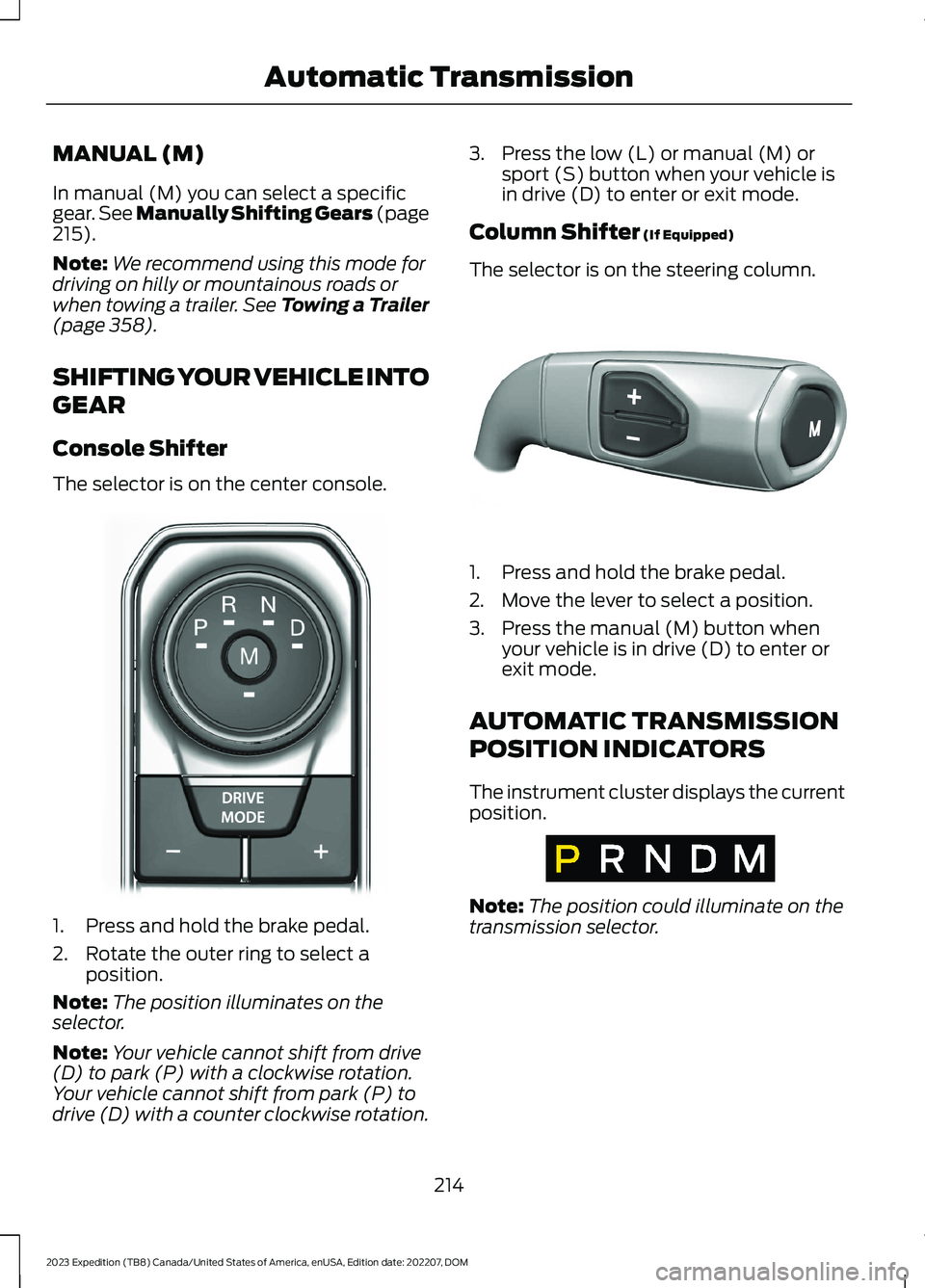
Console Shifter
The selector is on the center console.
1.Press and hold the brake pedal.
2.Rotate the outer ring to select aposition.
Note:The position illuminates on theselector.
Note:Your vehicle cannot shift from drive(D) to park (P) with a clockwise rotation.Your vehicle cannot shift from park (P) todrive (D) with a counter clockwise rotation.
3.Press the low (L) or manual (M) orsport (S) button when your vehicle isin drive (D) to enter or exit mode.
Column Shifter (If Equipped)
The selector is on the steering column.
1.Press and hold the brake pedal.
2.Move the lever to select a position.
3.Press the manual (M) button whenyour vehicle is in drive (D) to enter orexit mode.
AUTOMATIC TRANSMISSION
POSITION INDICATORS
The instrument cluster displays the currentposition.
Note:The position could illuminate on thetransmission selector.
214
2023 Expedition (TB8) Canada/United States of America, enUSA, Edition date: 202207, DOMAutomatic TransmissionE252861 E327267 E317778
Page 223 of 658
HOW DOES FOUR-WHEEL
DRIVE WORK
Using the 1-Speed Automatic Four-Wheel Drive System
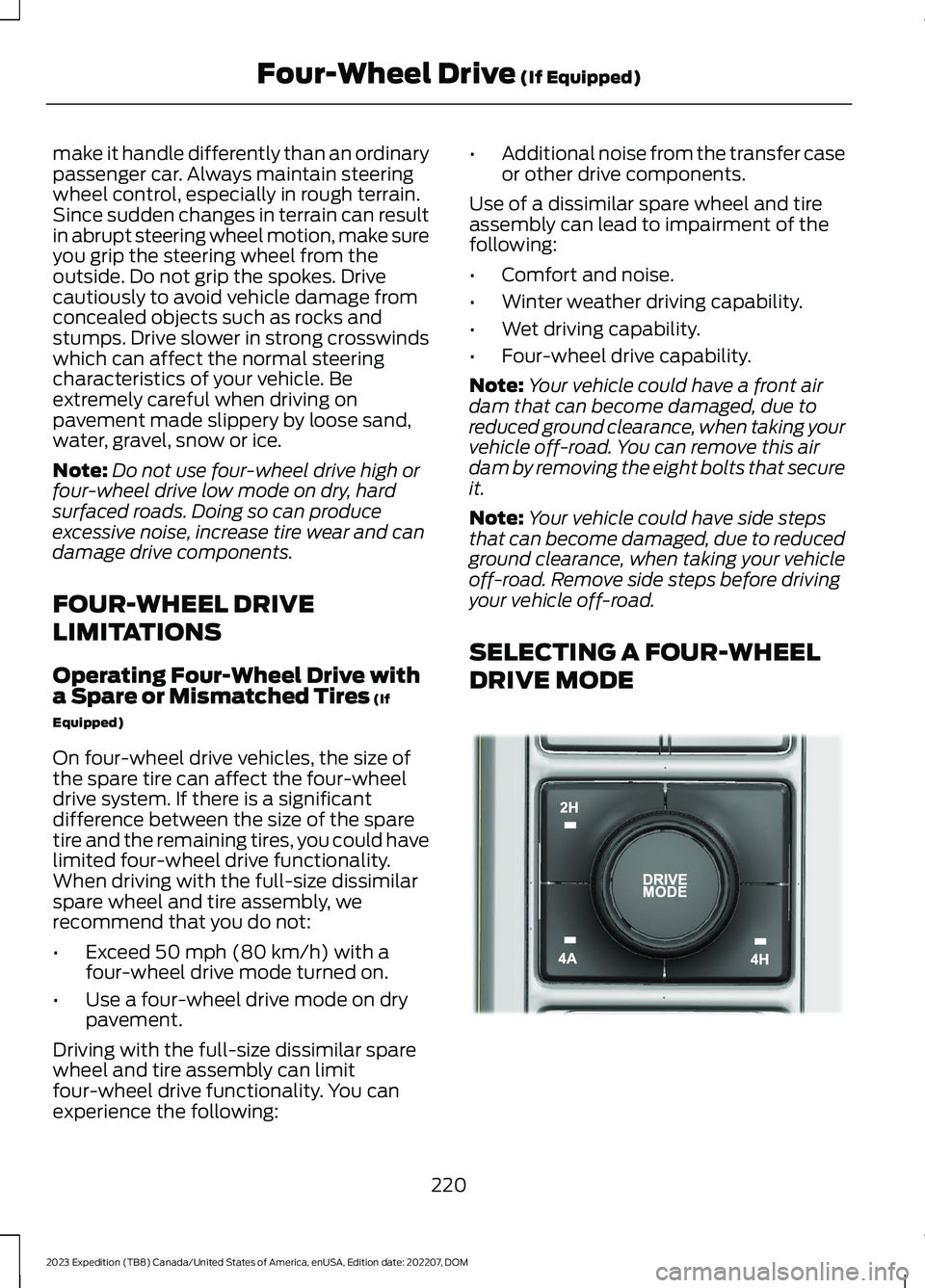
The 1-speed automatic four-wheel drivesystem utilizes an electronically controlledon-demand 1-speed transfer case. Thissystem monitors various vehicle sensoryinputs to provide an increased level ofperformance. This system offers the drivertwo-wheel drive high, four-wheel driveauto and four-wheel drive high as availablemodes of operation via the selectable drivemode switch. When you select four-wheeldrive auto the system continuously variespower to the front wheels for optimumperformance for all on-road conditions.When you select four-wheel drive high thesystem provides power to the front andrear wheels for use in off-road or slipperyconditions such as deep snow, sand ormud. There is further information on drivingin unique driving conditions. See DrivingHints (page 389).
Using the 2-Speed AutomaticFour-Wheel Drive System (If Equipped)
The 2-speed automatic four-wheel drivesystem utilizes an electronically controlledon-demand 2-speed transfer case. Thissystem monitors various vehicle sensoryinputs to provide an increased level ofperformance. This system offers the drivertwo-wheel drive high, four-wheel driveauto, four-wheel drive high, and four-wheeldrive low as available modes of operation.When you select four-wheel drive auto thesystem continuously varies power to thefront wheels for optimum performance forall on-road conditions. When you selecteither four-wheel drive high or four-wheeldrive low with the appropriate drive modes,the four-wheel drive system provideselectronically locked power to the frontand rear wheels for use in off-road or
slippery conditions such as deep snow,sand or mud. Selecting four-wheel drivelow also provides additional gearing forincreased torque multiplication forconditions like deep sand, snow, steepslopes, or pulling heavy objects. SeeSelecting a Four-Wheel Drive Mode(page 220).Additionally, the system iscapable of recreational flat towing byputting the transfer case into neutral (N).See Recreationally Towing YourVehicle (page 400).
There is further information on driving inunique driving conditions. See DrivingHints (page 389).
FOUR-WHEEL DRIVE
PRECAUTIONS
WARNING: Vehicles with a highercenter of gravity (utility and four-wheeldrive vehicles) handle differently thanvehicles with a lower center of gravity(passenger cars). Avoid sharp turns,excessive speed and abrupt steering inthese vehicles. Failure to drive cautiouslyincreases the risk of losing control of yourvehicle, vehicle rollover, personal injuryand death.
WARNING: Do not becomeoverconfident in the ability of four-wheeldrive vehicles. Although a four-wheeldrive vehicle may accelerate better thana two-wheel drive vehicle in low tractionsituations, it won't stop any faster thantwo-wheel drive vehicles. Always driveat a safe speed.
Truck and utility vehicles can differ fromsome other vehicles. Your vehicle could behigher to allow it to travel over roughterrain without getting stuck or damagingunderbody components. The differencesthat make your vehicle so versatile also
219
2023 Expedition (TB8) Canada/United States of America, enUSA, Edition date: 202207, DOMFour-Wheel Drive (If Equipped)
Page 224 of 658
make it handle differently than an ordinarypassenger car. Always maintain steeringwheel control, especially in rough terrain.Since sudden changes in terrain can resultin abrupt steering wheel motion, make sureyou grip the steering wheel from theoutside. Do not grip the spokes. Drivecautiously to avoid vehicle damage fromconcealed objects such as rocks andstumps. Drive slower in strong crosswindswhich can affect the normal steeringcharacteristics of your vehicle. Beextremely careful when driving onpavement made slippery by loose sand,water, gravel, snow or ice.
Note:Do not use four-wheel drive high orfour-wheel drive low mode on dry, hardsurfaced roads. Doing so can produceexcessive noise, increase tire wear and candamage drive components.
FOUR-WHEEL DRIVE
LIMITATIONS
Operating Four-Wheel Drive witha Spare or Mismatched Tires (If
Equipped)
On four-wheel drive vehicles, the size ofthe spare tire can affect the four-wheeldrive system. If there is a significantdifference between the size of the sparetire and the remaining tires, you could havelimited four-wheel drive functionality.When driving with the full-size dissimilarspare wheel and tire assembly, werecommend that you do not:
•Exceed 50 mph (80 km/h) with afour-wheel drive mode turned on.
•Use a four-wheel drive mode on drypavement.
Driving with the full-size dissimilar sparewheel and tire assembly can limitfour-wheel drive functionality. You canexperience the following:
•Additional noise from the transfer caseor other drive components.
Use of a dissimilar spare wheel and tireassembly can lead to impairment of thefollowing:
•Comfort and noise.
•Winter weather driving capability.
•Wet driving capability.
•Four-wheel drive capability.
Note:Your vehicle could have a front airdam that can become damaged, due toreduced ground clearance, when taking yourvehicle off-road. You can remove this airdam by removing the eight bolts that secureit.
Note:Your vehicle could have side stepsthat can become damaged, due to reducedground clearance, when taking your vehicleoff-road. Remove side steps before drivingyour vehicle off-road.
SELECTING A FOUR-WHEEL
DRIVE MODE
220
2023 Expedition (TB8) Canada/United States of America, enUSA, Edition date: 202207, DOMFour-Wheel Drive (If Equipped)E357409
Page 228 of 658
Note:If your vehicle has anti-lock brakes,apply the brakes steadily. Do not pump thebrakes.
DRIVING ON SNOW AND ICE
Four-wheel drive vehicles have advantagesover two-wheel drive vehicles in snow andice but can skid like any other vehicle.Should you start to slide while driving onsnowy or icy roads, turn the steering wheelin the direction of the slide until you regaincontrol.
Avoid sudden applications of power andquick changes of direction on snow andice. Apply the accelerator slowly andsteadily when starting from a full stop.Avoid sudden braking. Although afour-wheel drive vehicle can acceleratebetter than a two-wheel drive vehicle insnow and ice, it cannot stop any faster asbraking occurs at all four wheels. Do notbecome overconfident as to roadconditions.
Make sure you allow sufficient distancebetween you and other vehicles forstopping. Drive slower than usual andconsider using one of the lower gears. Inemergency stopping situations, apply thebrake steadily. Do not pump the brakepedal. See Anti-Lock Braking SystemLimitations (page 229).
Note:Excessive tire slippage can causetransmission damage.
FOUR-WHEEL DRIVE –
TROUBLESHOOTING
FOUR-WHEEL DRIVE – WARNINGLAMPS
Illuminates when a four-wheeldrive or power train fault ispresent.
Note:When a system fault is present, thesystem can typically remain in whichevermode was selected prior to the faultcondition occurring. It does not default totwo-wheel drive in all circumstances. Whenthis warning is displayed, have your vehicleserviced by an authorized dealer.
FOUR-WHEEL DRIVE – INFORMATION MESSAGES
ActionMessage
A four-wheel drive system fault is present.Have your vehicle checked as soon aspossible.
Check 4x4
The four-wheel drive system is making ashift.4x4 Shift in Progress
Displays when you attempt to switch tofour-wheel drive low mode and you do notshift the transmission to neutral (N) first.
For 4x4 LOW Shift to N
224
2023 Expedition (TB8) Canada/United States of America, enUSA, Edition date: 202207, DOMFour-Wheel Drive (If Equipped)