warning FORD EXPEDITION 2023 Workshop Manual
[x] Cancel search | Manufacturer: FORD, Model Year: 2023, Model line: EXPEDITION, Model: FORD EXPEDITION 2023Pages: 658, PDF Size: 16.16 MB
Page 122 of 658
SWITCHING THE DAYTIMERUNNING LAMPS ON AND OFF -VEHICLES WITH: CONFIGURABLEDAYTIME RUNNING LAMPS/15INCH SCREEN
WARNING: The daytime runninglamps system does not activate the rearlamps and may not provide adequatelighting during low visibility drivingconditions. Make sure you switch theheadlamps on, as appropriate, during alllow visibility conditions. Failure to do somay result in a crash.
1.Access the vehicle drawer on thetouchscreen.
2.Press SETTINGS.
3.Press Vehicle.
4.Press Lighting.
5.Switch Daytime Running Lights on oroff.
The daytime running lamps turn on whenall of the following occur:
•You switch the system on.
•You switch the vehicle on.
•The transmission is not in park (P) forvehicles with automatic transmissionsor you release the parking brake forvehicles with manual transmissions.
•The lighting control is in the autolampsposition.
•The headlamps are off.
Note:Other lighting control positions donot turn on the daytime running lamps.
SWITCHING THE DAYTIMERUNNING LAMPS ON AND OFF -VEHICLES WITH: DAYTIMERUNNING LAMPS (DRL)
WARNING: The daytime runninglamps system does not activate the rearlamps and may not provide adequatelighting during low visibility drivingconditions. Make sure you switch theheadlamps on, as appropriate, during alllow visibility conditions. Failure to do somay result in a crash.
Daytime running lamps are always onunless you switch on the headlamps oryour vehicle is in park (P).
USING THE FRONT FOG LAMPS (If
Equipped)
To switch the lamps on or off:
1.Set the lighting control to the parkinglamps, headlamps or autolampsposition.
Note:When the lighting control is in theautolamps position, you cannot switch thefog lamps on unless the low beamheadlamps are on.
2.
Press the button on thelighting control to switch the front foglamps on or off.
Note:Only switch the front fog lamps onduring reduced visibility.
Note:The brightness of the daytime runninglamps may decrease when the front foglamps are switched on.
Note:The front fog lamps lights switch offautomatically when high beams areactivated.
118
2023 Expedition (TB8) Canada/United States of America, enUSA, Edition date: 202207, DOMExterior Lighting
Page 123 of 658
Front Fog Lamps Indicator
It illuminates when you switchthe front fog lamps on.
SWITCHING THE SPOT LAMPS ONAND OFF (If Equipped)
The spot lamp buttons are near the lightingcontrol.
Press the button to switch on theleft-hand spot lamp.
Press the button to switch on theright-hand spot lamp.
Move the position of the exterior mirrorsto adjust the aim.
Note:Make sure you switch your vehicle on,with the vehicle in accessory mode orrunning.
Note:The spot lamps turn off after 6 mph(10 km/h).
Note:The spot lamps illuminate the areain front of and to the side of your vehicle.
EXTERIOR LAMP INDICATORS
Front Fog Lamp
It illuminates when you switchthe front fog lamps on.
Turn Signal Lamp
It flashes when you switch theturn signal lamps on.
Note:An increase in the rate of flashingwarns of a failed turn signal lamp.
EXTERIOR LAMPS ON AUDIBLEWARNING
Sounds when you open the driver door andthe exterior lamps are on.
EXTERIOR ZONE LIGHTING
WHAT IS EXTERIOR ZONELIGHTING
Exterior zone lighting divides the exteriorlighting into zones and allows you to switchthem on and off to provide lighting aroundthe perimeter of your vehicle.
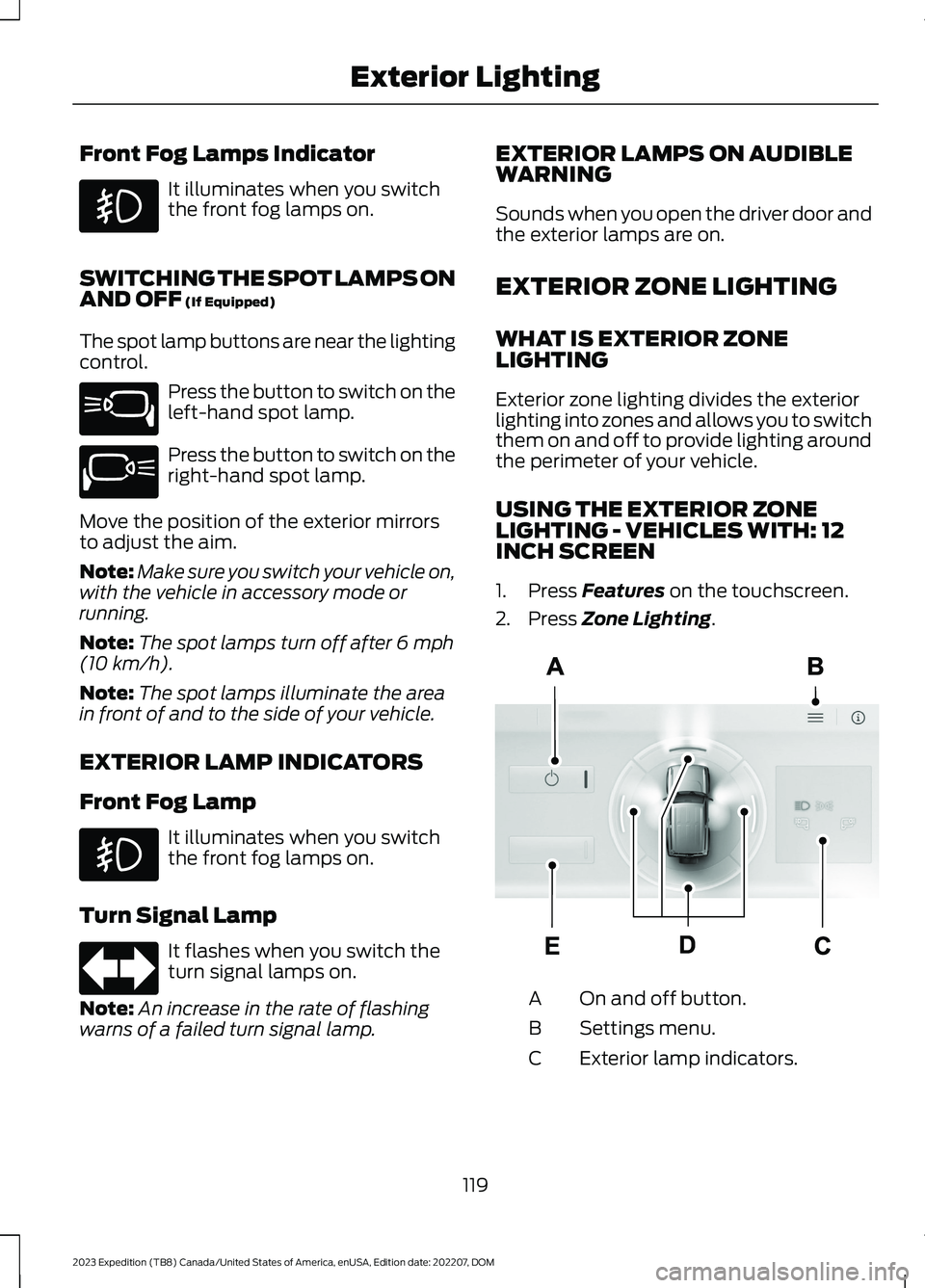
USING THE EXTERIOR ZONELIGHTING - VEHICLES WITH: 12INCH SCREEN
1.Press Features on the touchscreen.
2.Press Zone Lighting.
On and off button.A
Settings menu.B
Exterior lamp indicators.C
119
2023 Expedition (TB8) Canada/United States of America, enUSA, Edition date: 202207, DOMExterior Lighting E340436 E340437 E67018 E343474
Page 126 of 658
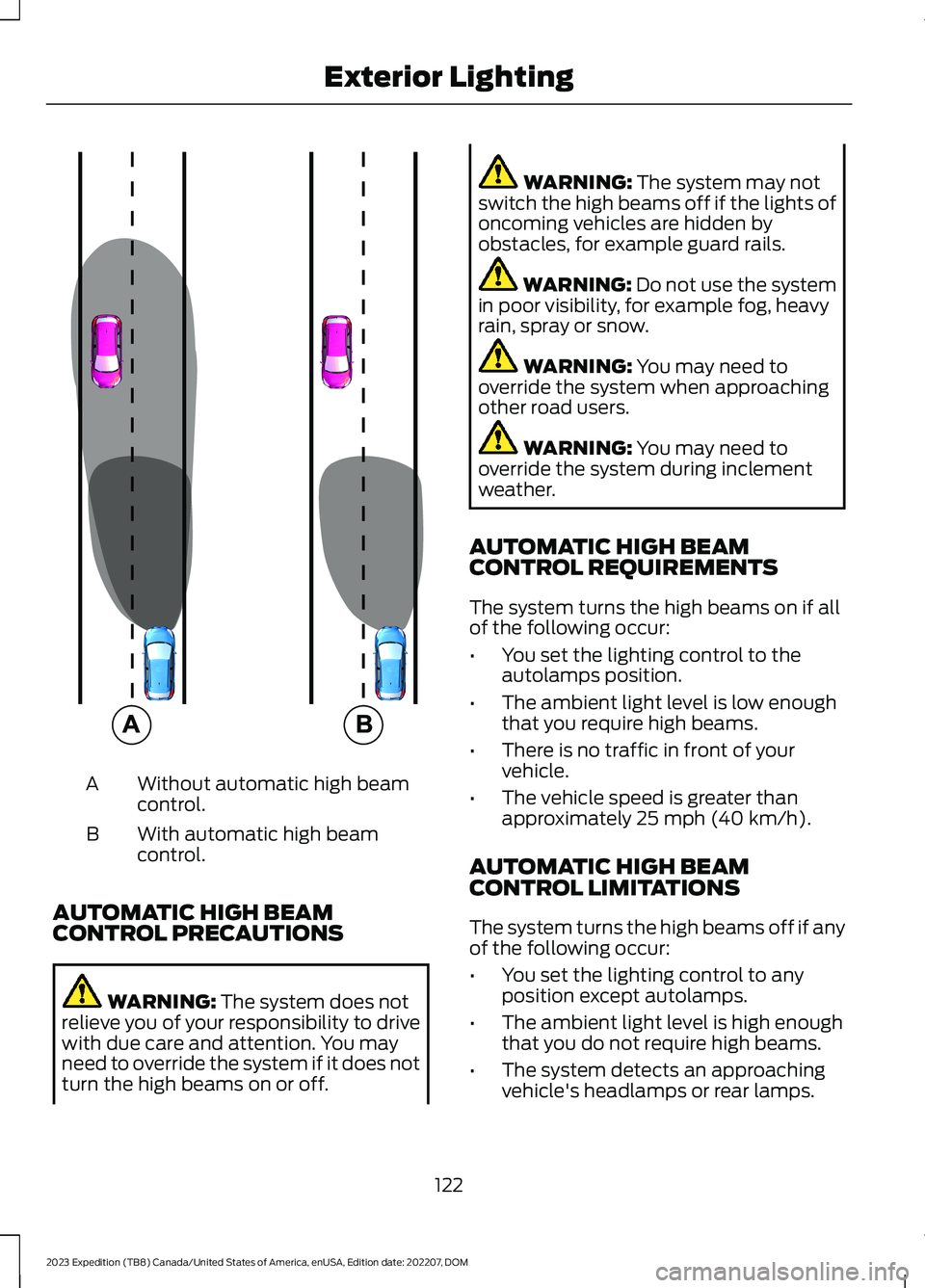
Without automatic high beamcontrol.A
With automatic high beamcontrol.B
AUTOMATIC HIGH BEAMCONTROL PRECAUTIONS
WARNING: The system does notrelieve you of your responsibility to drivewith due care and attention. You mayneed to override the system if it does notturn the high beams on or off.
WARNING: The system may notswitch the high beams off if the lights ofoncoming vehicles are hidden byobstacles, for example guard rails.
WARNING: Do not use the systemin poor visibility, for example fog, heavyrain, spray or snow.
WARNING: You may need tooverride the system when approachingother road users.
WARNING: You may need tooverride the system during inclementweather.
AUTOMATIC HIGH BEAMCONTROL REQUIREMENTS
The system turns the high beams on if allof the following occur:
•You set the lighting control to theautolamps position.
•The ambient light level is low enoughthat you require high beams.
•There is no traffic in front of yourvehicle.
•The vehicle speed is greater thanapproximately 25 mph (40 km/h).
AUTOMATIC HIGH BEAMCONTROL LIMITATIONS
The system turns the high beams off if anyof the following occur:
•You set the lighting control to anyposition except autolamps.
•The ambient light level is high enoughthat you do not require high beams.
•The system detects an approachingvehicle's headlamps or rear lamps.
122
2023 Expedition (TB8) Canada/United States of America, enUSA, Edition date: 202207, DOMExterior Lighting E327596
Page 131 of 658
OPENING AND CLOSING THE
WINDOWS
WARNING: Do not leave childrenunattended in your vehicle and do notlet them play with the power windows.Failure to follow this instruction couldresult in personal injury.
WARNING: When closing thepower windows, verify they are free ofobstruction and make sure that childrenand pets are not in the proximity of thewindow openings.
Press the window control switchto open the window. Lift thewindow control switch to closethe window.
Note:The power windows operate with theignition on, and for several minutes after youswitch the ignition off or until you open afront door.
To reduce wind noise or pulsing noise whenone window is open, slightly open theopposite window.
One-Touch Open
Fully press the window control switch andrelease it. Press again or lift it to stop thewindow.
One-Touch Close
Fully lift the window control switch andrelease it. Press again or lift it to stop thewindow.
Resetting One-Touch Close
Carry out all steps within 30 seconds ofstarting the sequence.
1.Close the window.
2.Press and hold the window controlswitch until the window is fully open.Keep the window control switchpressed for a few seconds.
3.Lift and hold the window control switchuntil the window is fully closed. Keepthe window control switch held for afew seconds.
4.Press and hold the window controlswitch until the window is fully open.Keep the window control switchpressed for a few seconds.
5.Lift and hold the window control switchuntil the window is fully closed. Keepthe window control switch held for afew seconds.
Note:Repeat the procedure if the windowdoes not close when you use one-touch.
GLOBAL OPENING
WHAT IS GLOBAL OPENING
You can use the remote control to openthe windows with the ignition off.
USING GLOBAL OPENING
1.Press and release the unlock button onthe remote control.
2.Press and hold the unlock button onthe remote control.
3.Release the button when the windowsstart to open.
Press the lock or the unlock button on theremote control to stop global opening.
Note:You can use global opening for ashort period of time when you unlock yourvehicle using the remote control.
127
2023 Expedition (TB8) Canada/United States of America, enUSA, Edition date: 202207, DOMWindows
Page 132 of 658
SWITCHING GLOBAL OPENING ONAND OFF
1.Using the information display controlson the steering wheel, select Settings.
2.Select Vehicle.
3.Select Windows.
4.Switch Remote Open on or off.
WINDOW BOUNCE-BACK
WHAT IS WINDOW BOUNCE-BACK
The window stops and reverses if it detectsan obstruction when closing.
OVERRIDING WINDOW BOUNCE-BACK
WARNING: If you overridebounce-back, the window does notreverse if it detects an obstacle. Takecare when closing the windows to avoidpersonal injury or damage to yourvehicle.
1.Close the window until it reaches thepoint of resistance and let it reverse.
2.Lift and hold the window control switchwithin two seconds to overridebounce-back and close the window.Bounce-back is now disabled and youcan close the window manually.
Note:The window goes past the point ofresistance and you can fully close it.
Note:If the window does not close, haveyour vehicle checked as soon as possible.
LOCKING THE REAR WINDOW
CONTROLS (IF EQUIPPED)
Press the window control switchto lock or unlock the rear windowcontrols. It illuminates when youlock the rear window controls.
128
2023 Expedition (TB8) Canada/United States of America, enUSA, Edition date: 202207, DOMWindows
Page 133 of 658
INTERIOR MIRROR
PRECAUTIONS
WARNING: Do not adjust themirrors when your vehicle is moving. Thiscould result in the loss of control of yourvehicle, serious personal injury or death.
Note:Do not clean the mirror housing orglass with harsh abrasives, fuel or otherpetroleum-based cleaning products.
MANUALLY DIMMING THE
INTERIOR MIRROR
Pull the tab below the mirror toward youto reduce glare at night.
AUTO-DIMMING INTERIOR
MIRROR (IF EQUIPPED)
WHAT IS THE AUTO-DIMMINGINTERIOR MIRROR
The mirror dims to reduce the effect ofbright light from behind. It returns tonormal when the bright light from behindis no longer present or if you shift intoreverse (R).
AUTO-DIMMING INTERIORMIRROR LIMITATIONS
Do not block the sensors on the front andback of the mirror.
Note:A rear center passenger or raised rearcenter head restraint could prevent lightfrom reaching the sensor.
129
2023 Expedition (TB8) Canada/United States of America, enUSA, Edition date: 202207, DOMInterior Mirror
Page 134 of 658
ADJUSTING THE EXTERIOR
MIRRORS
WARNING: Do not adjust themirrors when your vehicle is moving. Thiscould result in the loss of control of yourvehicle, serious personal injury or death.
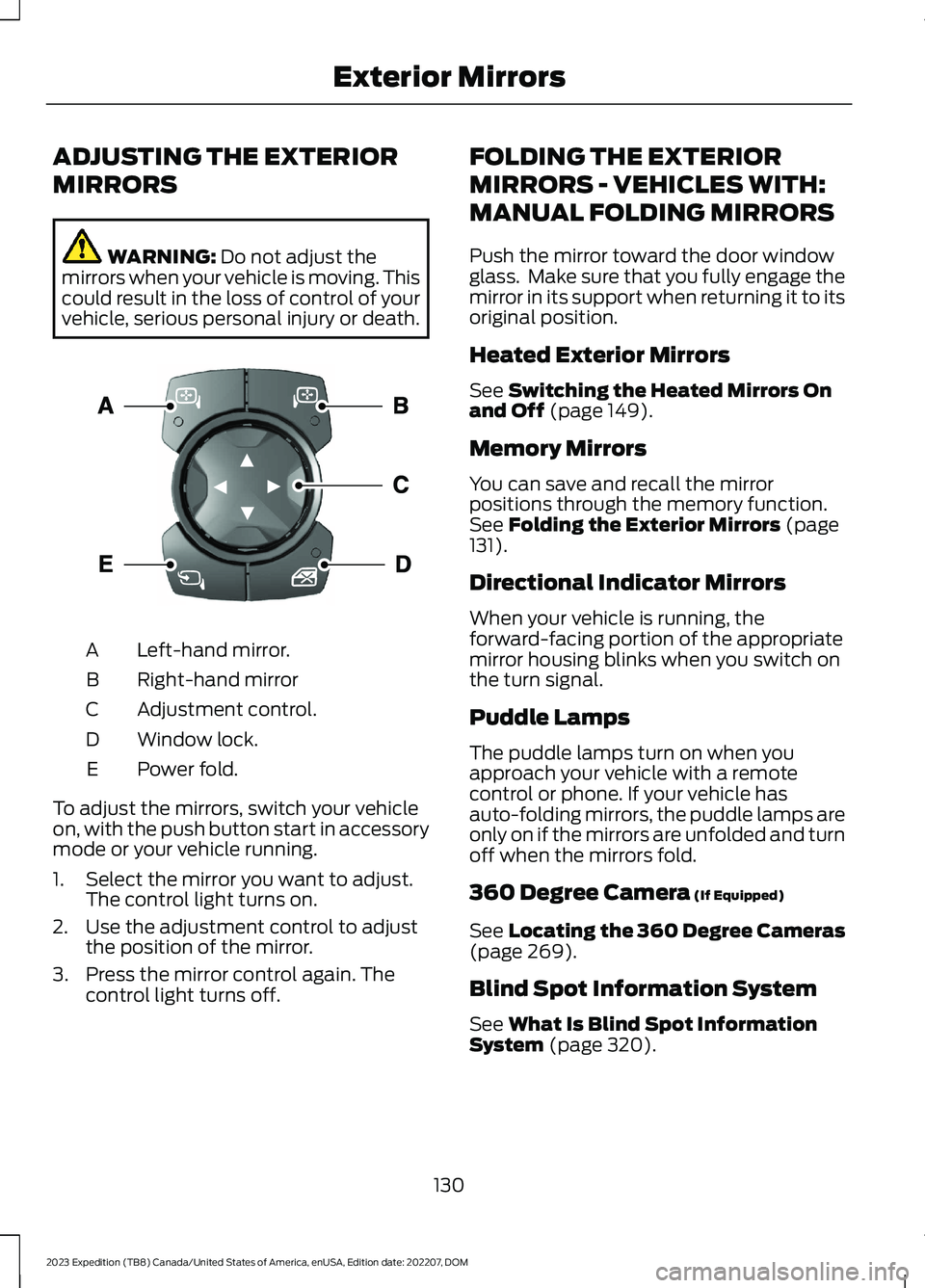
Left-hand mirror.A
Right-hand mirrorB
Adjustment control.C
Window lock.D
Power fold.E
To adjust the mirrors, switch your vehicleon, with the push button start in accessorymode or your vehicle running.
1.Select the mirror you want to adjust.The control light turns on.
2.Use the adjustment control to adjustthe position of the mirror.
3.Press the mirror control again. Thecontrol light turns off.
FOLDING THE EXTERIOR
MIRRORS - VEHICLES WITH:
MANUAL FOLDING MIRRORS
Push the mirror toward the door windowglass. Make sure that you fully engage themirror in its support when returning it to itsoriginal position.
Heated Exterior Mirrors
See Switching the Heated Mirrors Onand Off (page 149).
Memory Mirrors
You can save and recall the mirrorpositions through the memory function.See Folding the Exterior Mirrors (page131).
Directional Indicator Mirrors
When your vehicle is running, theforward-facing portion of the appropriatemirror housing blinks when you switch onthe turn signal.
Puddle Lamps
The puddle lamps turn on when youapproach your vehicle with a remotecontrol or phone. If your vehicle hasauto-folding mirrors, the puddle lamps areonly on if the mirrors are unfolded and turnoff when the mirrors fold.
360 Degree Camera (If Equipped)
See Locating the 360 Degree Cameras(page 269).
Blind Spot Information System
See What Is Blind Spot InformationSystem (page 320).
130
2023 Expedition (TB8) Canada/United States of America, enUSA, Edition date: 202207, DOMExterior MirrorsE369398
Page 136 of 658
OPENING AND CLOSING THE
SUNSHADE
WARNING: Do not leave childrenunattended in your vehicle and do notlet them play with the sun shades.Failure to follow this instruction couldresult in personal injury.
The controls are on the overhead console.
Opening the Sun Shade
Press and release the switch toactivate the one-touch openfeature. To stop movement,press the switch a second time. The sunshade also opens when you open themoonroof.
Note:The sun shade stops short of its fullyopened position for the comfort of rearpassengers. To fully open the sun shade,press the switch again.
Closing the Sun Shade
Press and release the switch toactivate the one-touch closefeature. To stop movement,press the switch a second time.
Note:If fully open, the sun shade stopsafter covering the rear glass panel. Pressand release again to fully close the sunshade.
Note:The sun shade does not fully closeunless the moonroof glass is fully closed.
OPENING AND CLOSING THE
MOONROOF
WARNING: Do not leave childrenunattended in your vehicle and do notlet them play with the moonroof. Failureto follow this instruction could result inpersonal injury.
WARNING: When closing themoonroof, verify that it is free ofobstruction and make sure that childrenand pets are not in the proximity of theroof opening.
The moonroof controls are located on theoverhead console.
Opening the Moonroof
Press and release the switch toactivate the one-touch openfeature. To stop movement,press the switch a second time.
Note:The moonroof stops short of the fullyopened position to reduce wind noise orrumbling that may happen with themoonroof fully open.
Press and release the switch again to fullyopen the moonroof.
Closing the Moonroof
Press and release the switch toactivate the one-touch closefeature, from either the open orvent positions. To stop movement, pressthe switch a second time.
132
2023 Expedition (TB8) Canada/United States of America, enUSA, Edition date: 202207, DOMMoonroof (If Equipped)E312249 E312250 E340663 E340636
Page 137 of 658
VENTING THE MOONROOF
WARNING: Do not leave childrenunattended in your vehicle and do notlet them play with the moonroof. Failureto follow this instruction could result inpersonal injury.
The moonroof controls are on theoverhead console.
With the moonroof in the closedposition, press and release theswitch to vent the moonroof.
To close the moonroof from thevent position, press and releasethe moonroof close switch.
MOONROOF BOUNCE-BACK
WHAT IS MOONROOF BOUNCE-BACK
The moonroof stops and reverses somedistance if it detects an obstacle whenclosing.
OVERRIDING MOONROOFBOUNCE-BACK
Press and hold the close switch within twoseconds after the moonroof comes to astop.
133
2023 Expedition (TB8) Canada/United States of America, enUSA, Edition date: 202207, DOMMoonroof (If Equipped)E340635 E340636
Page 140 of 658
FUEL GAUGE LIMITATIONS
The fuel gauge may not provide anaccurate reading when your vehicle is onan incline.
LOCATING THE FUEL FILLERDOOR
The arrow adjacent to the fuel pumpsymbol indicates on which side of yourvehicle the fuel filler door is located.
WHAT IS THE LOW FUELREMINDER
A low fuel level reminder displays andsounds when the distance to emptyreaches 75 mi (120 km) to empty forMyKey, and at 50 mi (80 km),25 mi(40 km),12 mi (20 km) and 0 mi (0 km)for all vehicle keys.
Note:The low fuel reminder can appear atdifferent fuel gauge positions depending onfuel economy conditions. This variation isnormal.
WHAT IS DISTANCE TO EMPTY
Indicates the approximate distance yourvehicle can travel on the fuel remaining inthe tank. Changes in driving pattern cancause the value to not only decrease butalso increase or stay constant for periodsof time.
ENGINE COOLANT
TEMPERATURE GAUGE
Indicates the engine coolant temperature.
ENGINE OIL PRESSURE GAUGE
Indicates the engine oil pressure.
Note:This is a configurable gauge.
TRANSMISSION FLUID
TEMPERATURE GAUGE
Indicates the transmission fluidtemperature.
Special operating conditions can causehigher than normal operatingtemperatures. See Special OperatingConditions Scheduled Maintenance(page 545).
Note:This is a configurable gauge.
TURBO BOOST GAUGE -
VEHICLES WITH: 12 INCH
SCREEN
Indicates the amount of manifold airpressure in the engine.
Note:This is a configurable gauge.
WHAT ARE THE INSTRUMENT
CLUSTER WARNING LAMPS
Warning lamps alert you to a vehiclecondition that could become serious.Some lamps illuminate when you startyour vehicle to make sure they work. If anylamps remain on after starting your vehicle,refer to the respective system warninglamp for further information.
INSTRUMENT CLUSTER
WARNING LAMPS
Anti-Lock Brake System
If it illuminates when you aredriving, this indicates amalfunction. Your vehiclecontinues to have normal braking withoutthe anti-lock brake system function. Haveyour vehicle checked as soon as possible.
136
2023 Expedition (TB8) Canada/United States of America, enUSA, Edition date: 202207, DOMInstrument ClusterE67020