key FORD EXPEDITION 2023 Repair Manual
[x] Cancel search | Manufacturer: FORD, Model Year: 2023, Model line: EXPEDITION, Model: FORD EXPEDITION 2023Pages: 658, PDF Size: 16.16 MB
Page 413 of 658
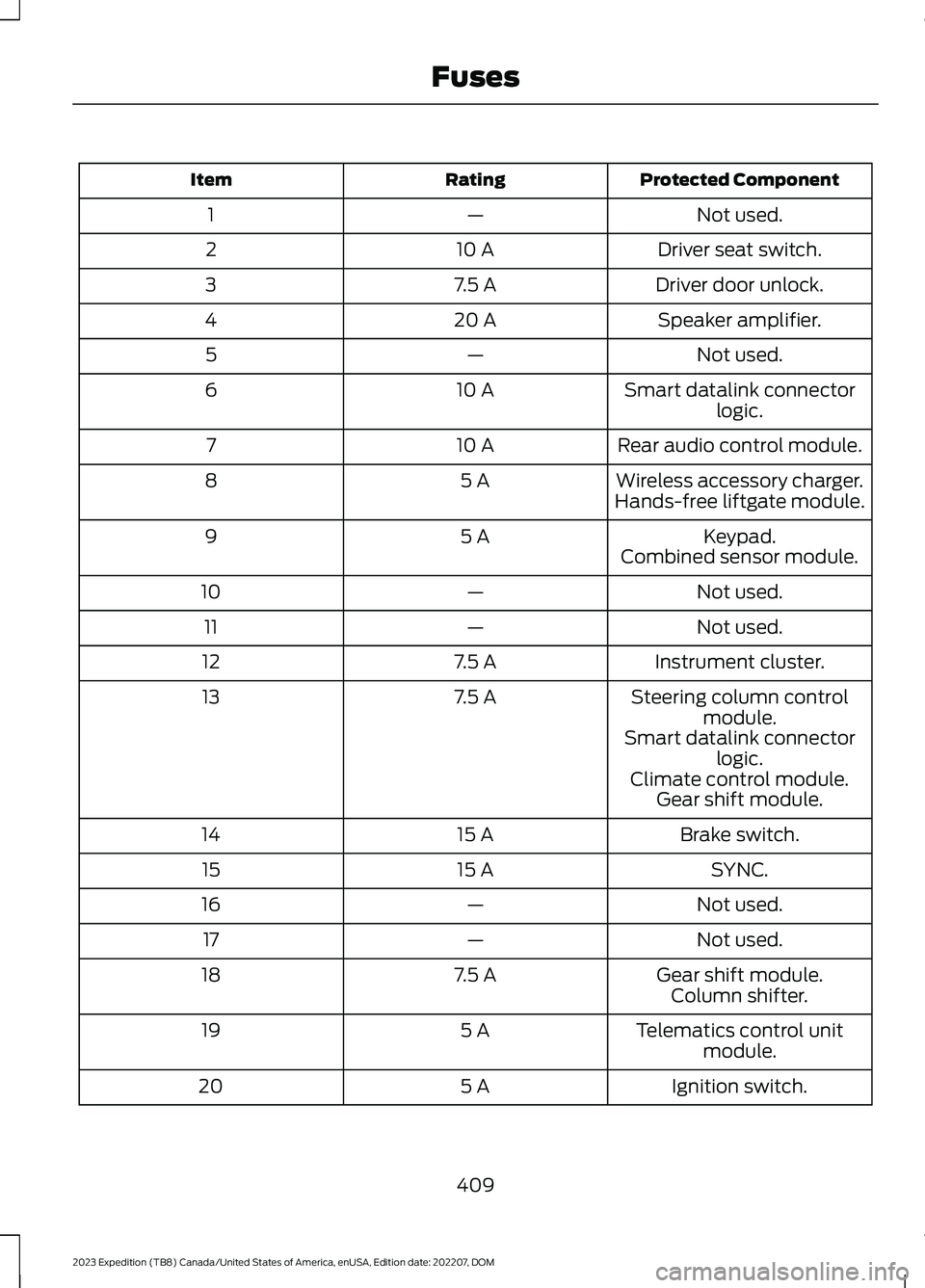
Protected ComponentRatingItem
Not used.—1
Driver seat switch.10 A2
Driver door unlock.7.5 A3
Speaker amplifier.20 A4
Not used.—5
Smart datalink connectorlogic.10 A6
Rear audio control module.10 A7
Wireless accessory charger.5 A8Hands-free liftgate module.
Keypad.5 A9Combined sensor module.
Not used.—10
Not used.—11
Instrument cluster.7.5 A12
Steering column controlmodule.7.5 A13
Smart datalink connectorlogic.Climate control module.Gear shift module.
Brake switch.15 A14
SYNC.15 A15
Not used.—16
Not used.—17
Gear shift module.7.5 A18Column shifter.
Telematics control unitmodule.5 A19
Ignition switch.5 A20
409
2023 Expedition (TB8) Canada/United States of America, enUSA, Edition date: 202207, DOMFuses
Page 458 of 658
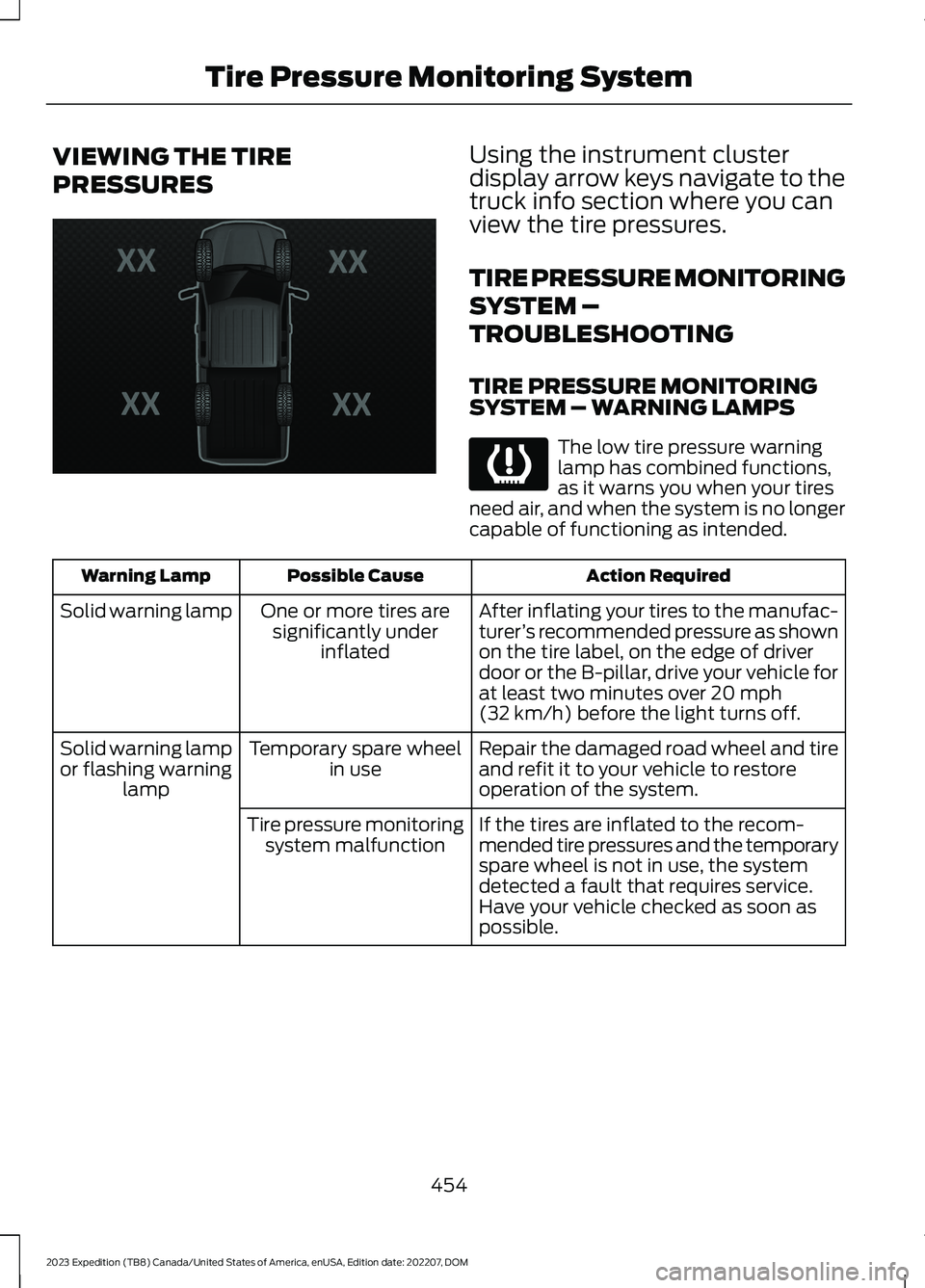
VIEWING THE TIRE
PRESSURES
Using the instrument clusterdisplay arrow keys navigate to thetruck info section where you canview the tire pressures.
TIRE PRESSURE MONITORING
SYSTEM –
TROUBLESHOOTING
TIRE PRESSURE MONITORINGSYSTEM – WARNING LAMPS
The low tire pressure warninglamp has combined functions,as it warns you when your tiresneed air, and when the system is no longercapable of functioning as intended.
Action RequiredPossible CauseWarning Lamp
After inflating your tires to the manufac-turer’s recommended pressure as shownon the tire label, on the edge of driverdoor or the B-pillar, drive your vehicle forat least two minutes over 20 mph(32 km/h) before the light turns off.
One or more tires aresignificantly underinflated
Solid warning lamp
Repair the damaged road wheel and tireand refit it to your vehicle to restoreoperation of the system.
Temporary spare wheelin useSolid warning lampor flashing warninglamp
If the tires are inflated to the recom-mended tire pressures and the temporaryspare wheel is not in use, the systemdetected a fault that requires service.Have your vehicle checked as soon aspossible.
Tire pressure monitoringsystem malfunction
454
2023 Expedition (TB8) Canada/United States of America, enUSA, Edition date: 202207, DOMTire Pressure Monitoring SystemE224333 E139232
Page 503 of 658
CENTER DISPLAY
PRECAUTIONS
WARNING: Driving while distractedcan result in loss of vehicle control, crashand injury. We strongly recommend thatyou use extreme caution when using anydevice that may take your focus off theroad. Your primary responsibility is thesafe operation of your vehicle. Werecommend against the use of anyhand-held device while driving andencourage the use of voice-operatedsystems when possible. Make sure youare aware of all applicable local lawsthat may affect the use of electronicdevices while driving.
CENTER DISPLAY
LIMITATIONS
Speed-restricted Features
For your safety, some features are notavailable while the vehicle is in motion ator above 5 mph (8 km/h). Settings thatare not critical while driving your vehicleare shown as restricted on your display.Some of these settings include:
•Software updates.
•Personal profiles setup.
•Valet mode setup.
•Driver assistance settings.
•MyKey setup.
•Door keypad code setup.
These restricted features becomeavailable when your vehicle is no longer inmotion.
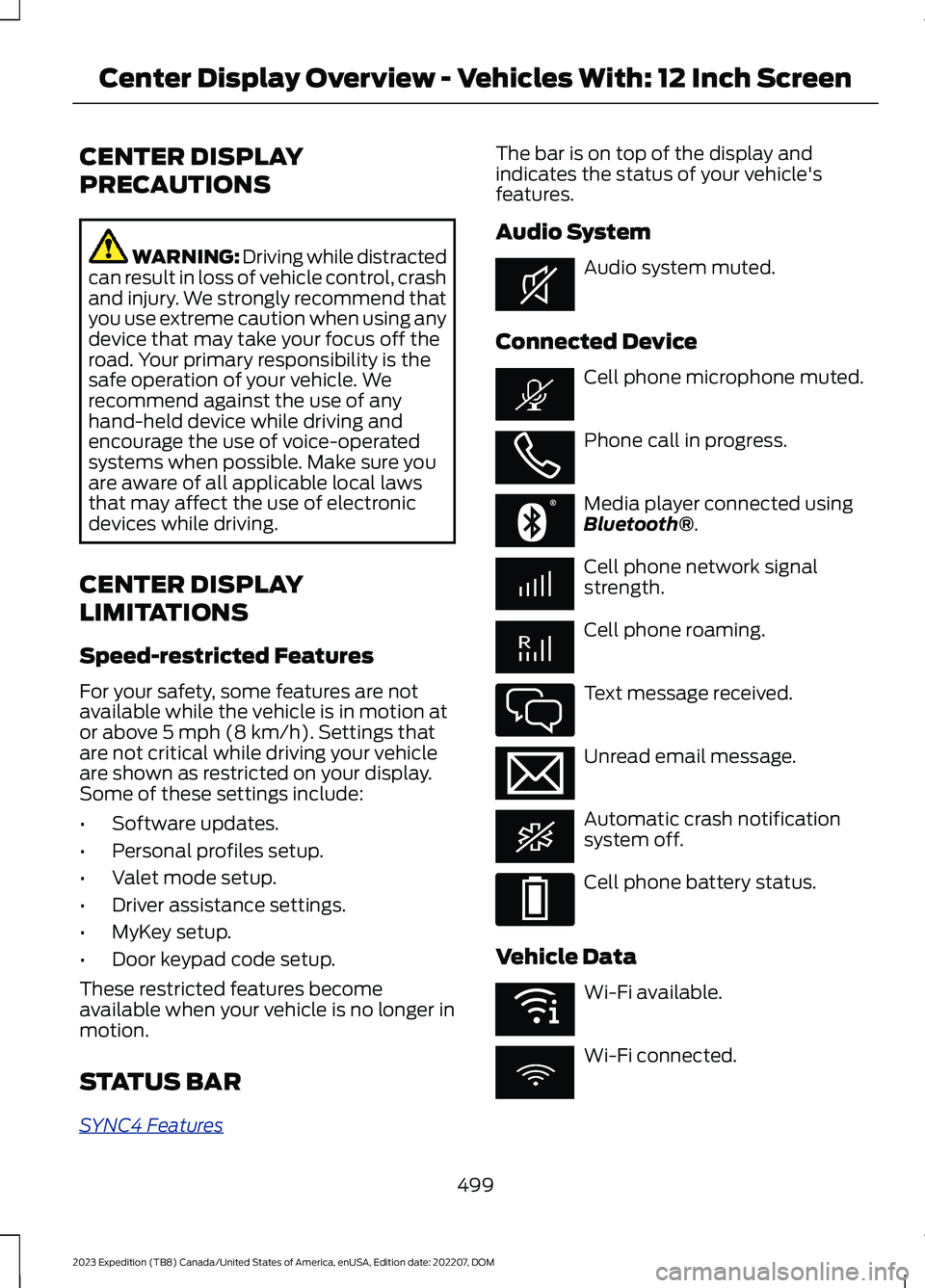
STATUS BAR
SYNC4 Features
The bar is on top of the display andindicates the status of your vehicle'sfeatures.
Audio System
Audio system muted.
Connected Device
Cell phone microphone muted.
Phone call in progress.
Media player connected usingBluetooth®.
Cell phone network signalstrength.
Cell phone roaming.
Text message received.
Unread email message.
Automatic crash notificationsystem off.
Cell phone battery status.
Vehicle Data
Wi-Fi available.
Wi-Fi connected.
499
2023 Expedition (TB8) Canada/United States of America, enUSA, Edition date: 202207, DOMCenter Display Overview - Vehicles With: 12 Inch ScreenE353221 E353213 E353208 E335295 E353216 E335293 E353219
Page 506 of 658
CENTER DISPLAY
PRECAUTIONS
WARNING: Driving while distractedcan result in loss of vehicle control, crashand injury. We strongly recommend thatyou use extreme caution when using anydevice that may take your focus off theroad. Your primary responsibility is thesafe operation of your vehicle. Werecommend against the use of anyhand-held device while driving andencourage the use of voice-operatedsystems when possible. Make sure youare aware of all applicable local lawsthat may affect the use of electronicdevices while driving.
CENTER DISPLAY
LIMITATIONS
Speed-restricted Features
For your safety, some features are notavailable while the vehicle is in motion ator above 5 mph (8 km/h). Settings thatare not critical while driving your vehicleare shown as restricted on your display.Some of these settings include:
•Software updates.
•Personal profiles setup.
•Valet mode setup.
•Driver assistance settings.
•MyKey setup.
•Door keypad code setup.
These restricted features becomeavailable when your vehicle is no longer inmotion.
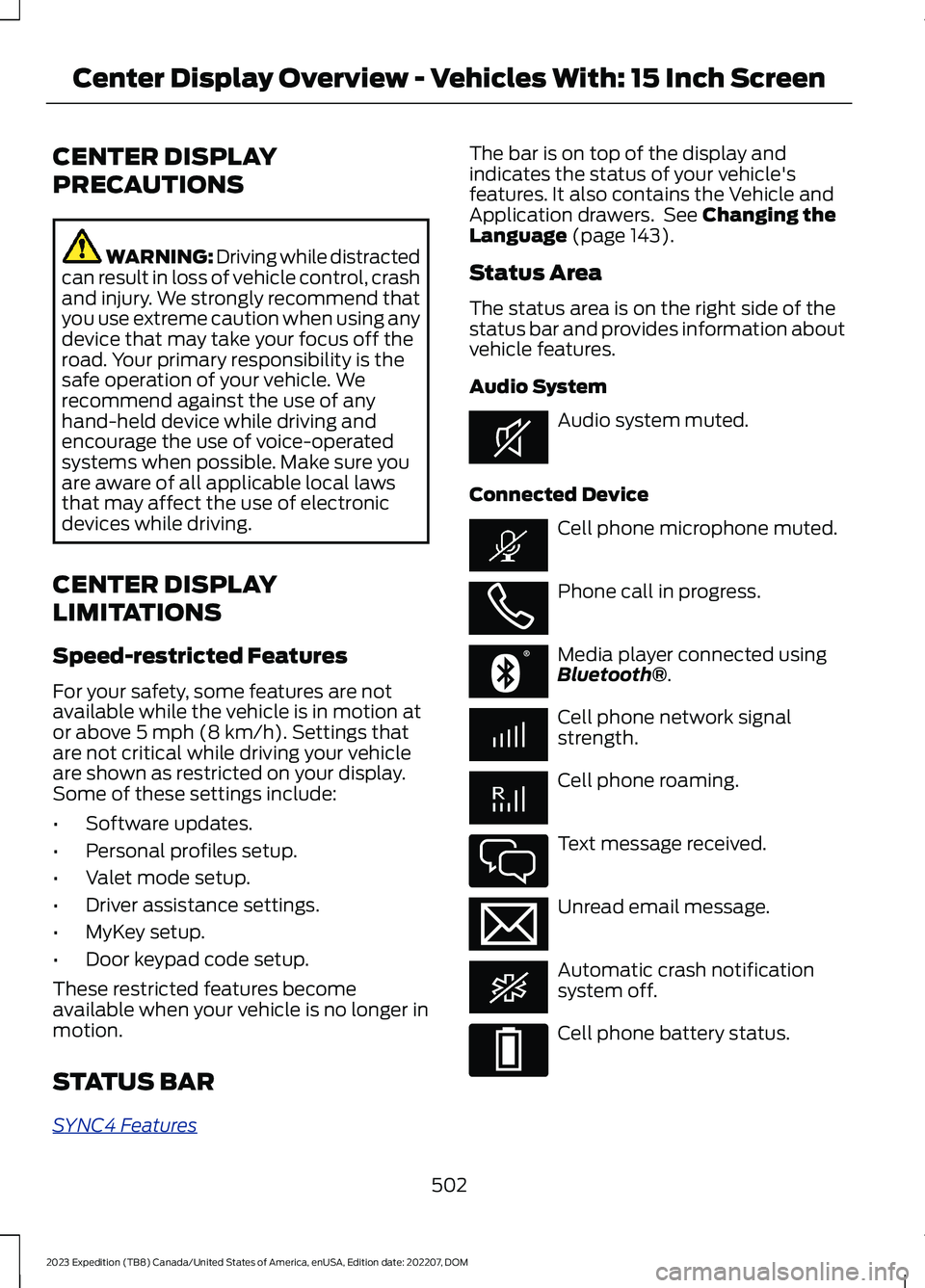
STATUS BAR
SYNC4 Features
The bar is on top of the display andindicates the status of your vehicle'sfeatures. It also contains the Vehicle andApplication drawers. See Changing theLanguage (page 143).
Status Area
The status area is on the right side of thestatus bar and provides information aboutvehicle features.
Audio System
Audio system muted.
Connected Device
Cell phone microphone muted.
Phone call in progress.
Media player connected usingBluetooth®.
Cell phone network signalstrength.
Cell phone roaming.
Text message received.
Unread email message.
Automatic crash notificationsystem off.
Cell phone battery status.
502
2023 Expedition (TB8) Canada/United States of America, enUSA, Edition date: 202207, DOMCenter Display Overview - Vehicles With: 15 Inch ScreenE353221 E353213 E353208 E335295 E353216 E335293
Page 515 of 658
PHONE PRECAUTIONS
WARNING: Driving while distractedcan result in loss of vehicle control, crashand injury. We strongly recommend thatyou use extreme caution when using anydevice that may take your focus off theroad. Your primary responsibility is thesafe operation of your vehicle. Werecommend against the use of anyhand-held device while driving andencourage the use of voice-operatedsystems when possible. Make sure youare aware of all applicable local lawsthat may affect the use of electronicdevices while driving.
CONNECTING YOUR PHONE
Go to the settings menu on your device andswitch Bluetooth® on.
Press the phone option on thefeature bar.
1.Press Add Phone.
Note:A prompt alerts you to search for yourvehicle on your cell phone.
2.Select your vehicle on your cell phone.
Note:A number appears on your cell phoneand on the touchscreen.
3.Confirm the number on your cell phonematches the number on thetouchscreen.
Note:The touchscreen indicates that youhave successfully paired your cell phone.
4.Download the phonebook from yourcell phone when you are prompted.
Note:If you pair more than one cell phone,use the phone settings on the center displayto specify the primary phone. You canchange this setting at any time.
PHONE MENU
This menu becomes available after pairinga phone.
Recent Call List
Display and select an entry from a list ofprevious calls.
Contacts
Display a smart search form to look up yourcontacts. Use the List button toalphabetically sort your contacts.
Favorites
Display the list of favorite contacts thatare set up on your phone.
Messaging
Displays the list of text messages to read,listen to, or respond to.
Email
Displays the list of emails to read, listen to,or respond to.
Phone List
Display the list of paired or connecteddevices that you can select.
Note:Up to 12 devices can be stored.
Do Not Disturb
Reject incoming calls and switch ring tonesand alerts off.
Phone Keypad
Directly dial a number.
511
2023 Expedition (TB8) Canada/United States of America, enUSA, Edition date: 202207, DOMPhone - Vehicles With: 12 Inch Screen
Page 517 of 658
MAKING AND RECEIVING A
PHONE CALL
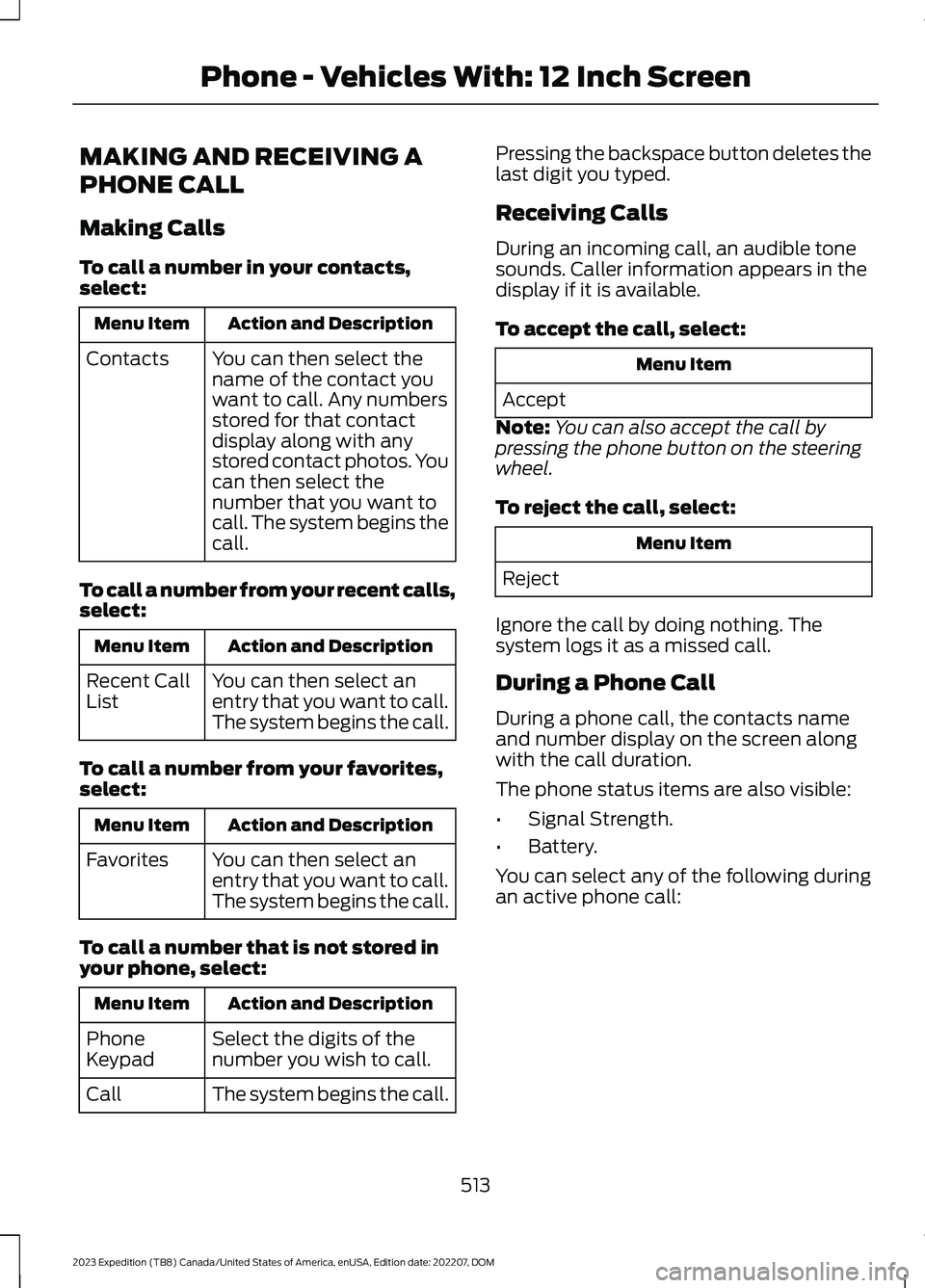
Making Calls
To call a number in your contacts,select:
Action and DescriptionMenu Item
You can then select thename of the contact youwant to call. Any numbersstored for that contactdisplay along with anystored contact photos. Youcan then select thenumber that you want tocall. The system begins thecall.
Contacts
To call a number from your recent calls,select:
Action and DescriptionMenu Item
You can then select anentry that you want to call.The system begins the call.
Recent CallList
To call a number from your favorites,select:
Action and DescriptionMenu Item
You can then select anentry that you want to call.The system begins the call.
Favorites
To call a number that is not stored inyour phone, select:
Action and DescriptionMenu Item
Select the digits of thenumber you wish to call.PhoneKeypad
The system begins the call.Call
Pressing the backspace button deletes thelast digit you typed.
Receiving Calls
During an incoming call, an audible tonesounds. Caller information appears in thedisplay if it is available.
To accept the call, select:
Menu Item
Accept
Note:You can also accept the call bypressing the phone button on the steeringwheel.
To reject the call, select:
Menu Item
Reject
Ignore the call by doing nothing. Thesystem logs it as a missed call.
During a Phone Call
During a phone call, the contacts nameand number display on the screen alongwith the call duration.
The phone status items are also visible:
•Signal Strength.
•Battery.
You can select any of the following duringan active phone call:
513
2023 Expedition (TB8) Canada/United States of America, enUSA, Edition date: 202207, DOMPhone - Vehicles With: 12 Inch Screen
Page 518 of 658
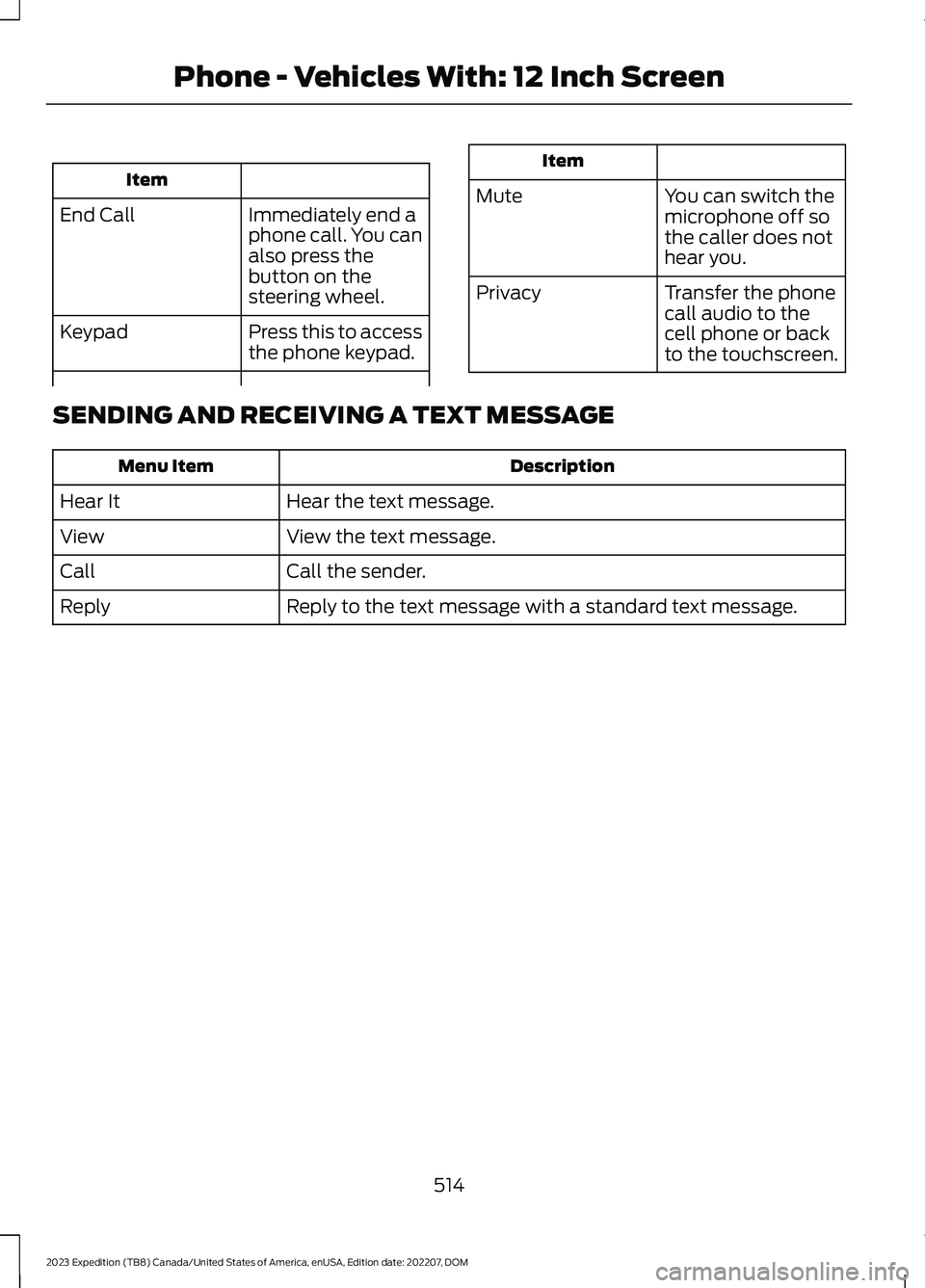
Item
Immediately end aphone call. You canalso press thebutton on thesteering wheel.
End Call
Press this to accessthe phone keypad.Keypad
Item
MuteYou can switch themicrophone off sothe caller does nothear you.
Transfer the phonecall audio to thecell phone or backto the touchscreen.
Privacy
SENDING AND RECEIVING A TEXT MESSAGE
DescriptionMenu Item
Hear the text message.Hear It
View the text message.View
Call the sender.Call
Reply to the text message with a standard text message.Reply
514
2023 Expedition (TB8) Canada/United States of America, enUSA, Edition date: 202207, DOMPhone - Vehicles With: 12 Inch Screen
Page 520 of 658
PHONE PRECAUTIONS
WARNING: Driving while distractedcan result in loss of vehicle control, crashand injury. We strongly recommend thatyou use extreme caution when using anydevice that may take your focus off theroad. Your primary responsibility is thesafe operation of your vehicle. Werecommend against the use of anyhand-held device while driving andencourage the use of voice-operatedsystems when possible. Make sure youare aware of all applicable local lawsthat may affect the use of electronicdevices while driving.
CONNECTING YOUR PHONE
Connecting your phone stores contact andcall data on your vehicle. This data is usedto provide intelligent suggestions. You canswitch this off in the touchscreen settingsmenu.
Note:Unpairing your phone will remove thecontact and call data from your vehicle andstop intelligent call suggestions.
Go to the settings menu on your device andswitch Bluetooth® on.
Select the phone option in thefeature drawer.
1.Select Add Phone.
2.Follow the instructions on the screento pair your device.
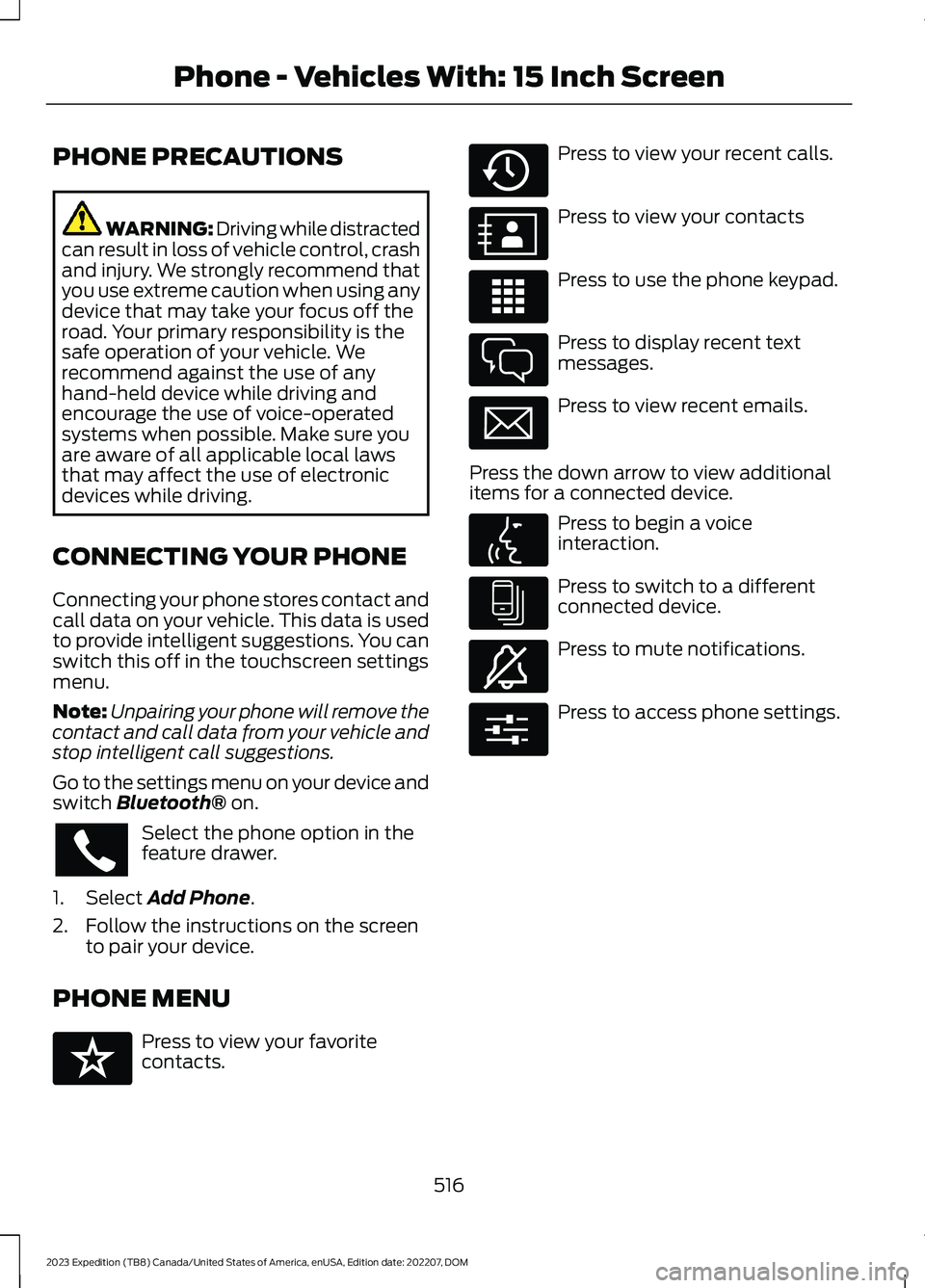
PHONE MENU
Press to view your favoritecontacts.
Press to view your recent calls.
Press to view your contacts
Press to use the phone keypad.
Press to display recent textmessages.
Press to view recent emails.
Press the down arrow to view additionalitems for a connected device.
Press to begin a voiceinteraction.
Press to switch to a differentconnected device.
Press to mute notifications.
Press to access phone settings.
516
2023 Expedition (TB8) Canada/United States of America, enUSA, Edition date: 202207, DOMPhone - Vehicles With: 15 Inch Screen E329089 E329088 E329086 E329087 E329085 E329084 E329083 E329082 E329081 E280315
Page 521 of 658
MAKING AND RECEIVING A
PHONE CALL
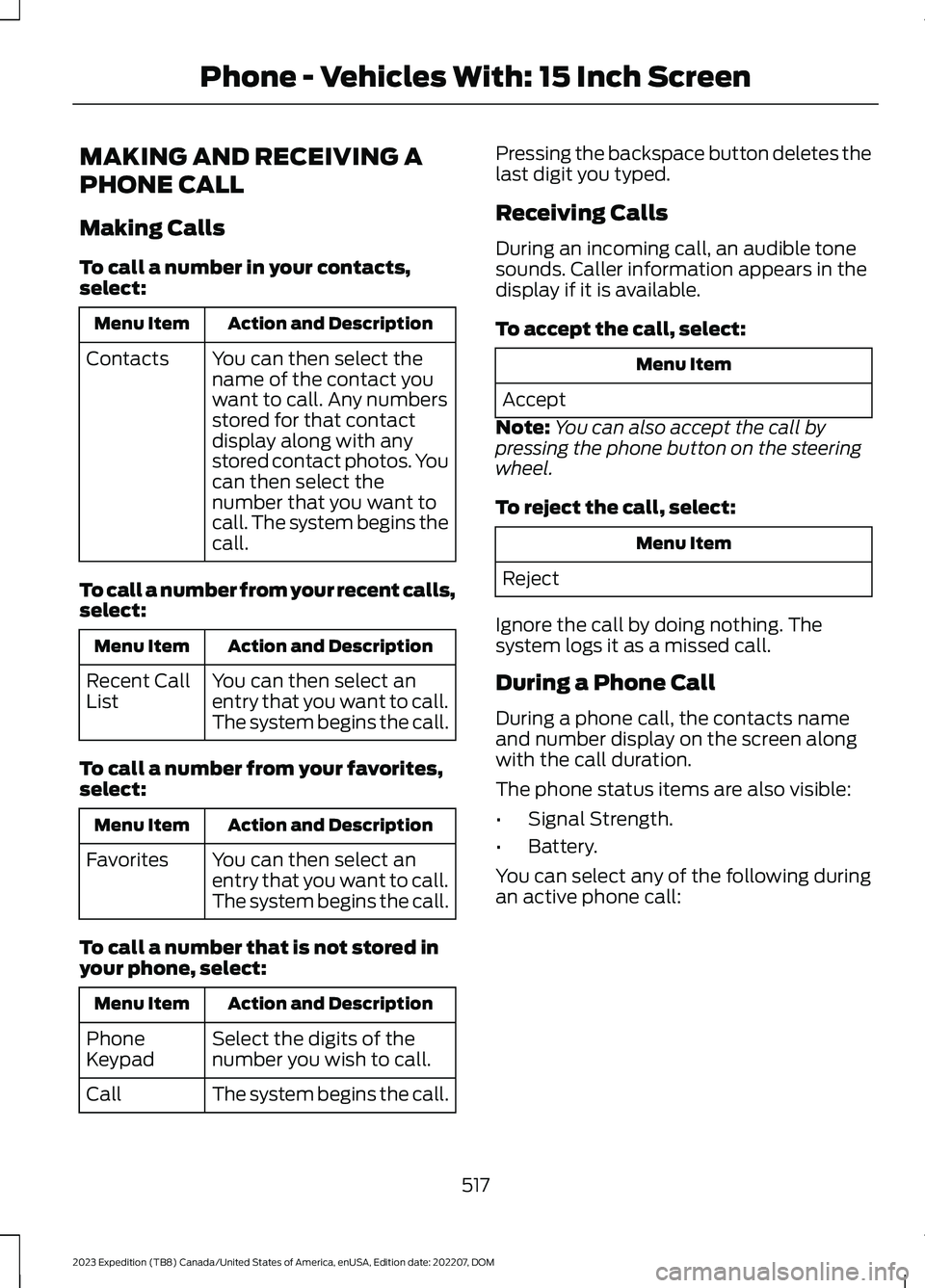
Making Calls
To call a number in your contacts,select:
Action and DescriptionMenu Item
You can then select thename of the contact youwant to call. Any numbersstored for that contactdisplay along with anystored contact photos. Youcan then select thenumber that you want tocall. The system begins thecall.
Contacts
To call a number from your recent calls,select:
Action and DescriptionMenu Item
You can then select anentry that you want to call.The system begins the call.
Recent CallList
To call a number from your favorites,select:
Action and DescriptionMenu Item
You can then select anentry that you want to call.The system begins the call.
Favorites
To call a number that is not stored inyour phone, select:
Action and DescriptionMenu Item
Select the digits of thenumber you wish to call.PhoneKeypad
The system begins the call.Call
Pressing the backspace button deletes thelast digit you typed.
Receiving Calls
During an incoming call, an audible tonesounds. Caller information appears in thedisplay if it is available.
To accept the call, select:
Menu Item
Accept
Note:You can also accept the call bypressing the phone button on the steeringwheel.
To reject the call, select:
Menu Item
Reject
Ignore the call by doing nothing. Thesystem logs it as a missed call.
During a Phone Call
During a phone call, the contacts nameand number display on the screen alongwith the call duration.
The phone status items are also visible:
•Signal Strength.
•Battery.
You can select any of the following duringan active phone call:
517
2023 Expedition (TB8) Canada/United States of America, enUSA, Edition date: 202207, DOMPhone - Vehicles With: 15 Inch Screen
Page 522 of 658
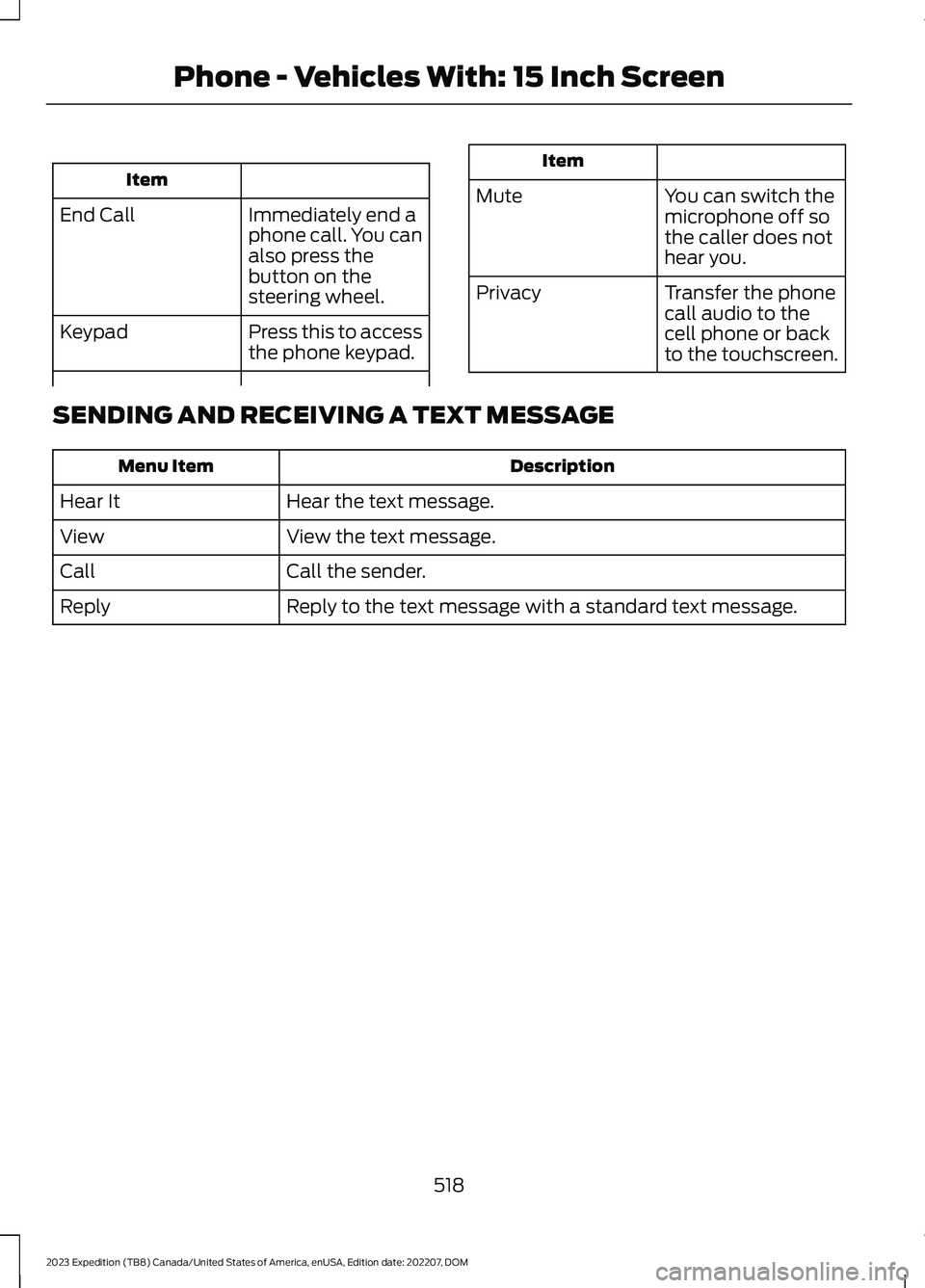
Item
Immediately end aphone call. You canalso press thebutton on thesteering wheel.
End Call
Press this to accessthe phone keypad.Keypad
Item
MuteYou can switch themicrophone off sothe caller does nothear you.
Transfer the phonecall audio to thecell phone or backto the touchscreen.
Privacy
SENDING AND RECEIVING A TEXT MESSAGE
DescriptionMenu Item
Hear the text message.Hear It
View the text message.View
Call the sender.Call
Reply to the text message with a standard text message.Reply
518
2023 Expedition (TB8) Canada/United States of America, enUSA, Edition date: 202207, DOMPhone - Vehicles With: 15 Inch Screen