lock FORD EXPEDITION 2023 Manual Online
[x] Cancel search | Manufacturer: FORD, Model Year: 2023, Model line: EXPEDITION, Model: FORD EXPEDITION 2023Pages: 658, PDF Size: 16.16 MB
Page 245 of 658
CROSS TRAFFIC BRAKING –FREQUENTLY ASKED QUESTIONS
Why is cross traffic braking unavailable?
•Make sure the cross traffic alert systemis on. See Cross Traffic Alert (page325).
•The vehicle has sustained a rear endimpact. Contact an authorized dealerto have the sensors checked for propercoverage and operation.
•An ABS, traction control or stabilitycontrol event may have occurred. Crosstraffic braking resumes operation whenthe event is complete.
•Make sure there are no blocked orfaulted sensors. See Cross TrafficAlert (page 325).
•You recently had your vehicle serviced,or the battery disconnected. Drive yourvehicle a short distance to resumesystem operation.
Note:If the answers to why the system isunavailable do not assist in returning crosstraffic braking to available, have the systemchecked as soon as possible.
241
2023 Expedition (TB8) Canada/United States of America, enUSA, Edition date: 202207, DOMCross Traffic Braking
Page 254 of 658
WHAT IS TRAIL CONTROL
WARNING: The system does notcontrol speed in low traction conditionsor extremely steep slopes. The systemis designed to be an aid and does notrelieve you of your responsibility to drivewith due care and attention. Failure tofollow this instruction could result inpersonal injury.
Trail control lets you focus on steeringduring low-speed and off-road use bycontrolling your vehicle's acceleration andbraking to maintain the speed that you set.
You may hear a noise from the anti-lockbrake system pump motor when you usethe system. This is normal.
SWITCHING TRAIL CONTROL
ON AND OFF
Press the button.
The system switches off if you press thebutton again or exceed 40 mph (64 km/h).
SETTING THE TRAIL CONTROL
SPEED
Note:The buttons are located on thesteering wheel.
Drive to your preferred speed.
Press button to increase the setcurrent speed.
Press button to decrease the setcurrent speed.
Note:The indicator changes color.
You can adjust the set speed in small orlarge increments. Press the toggle buttonupward or downward once to adjust theset speed in small increments. Press andhold the toggle button upward ordownward to adjust the set speed in largeincrements.
You can also adjust the set speed bybraking.
Note:Pressing the brake pedal does notswitch off the system.
CANCELING THE SET SPEED
Press the button.
TRAIL CONTROL INDICATORS
TRAIL ONE PEDAL DRIVE
WHAT IS TRAIL ONE PEDAL DRIVE
Trail one pedal drive allows you toaccelerate and brake using only theaccelerator pedal. The system assistswhen driving through difficult off-roadterrain. Pressing the accelerator pedaldown accelerates your vehicle andreleasing pressure on the acceleratorpedal, with your foot still on the pedal,slows your vehicle down. Releasing theaccelerator pedal may allow your vehicleto come to a complete stop, somesituations may require you to press thebrake pedal to come to a complete stop.
250
2023 Expedition (TB8) Canada/United States of America, enUSA, Edition date: 202207, DOMTrail Control (If Equipped)E370613 E246884 E246885 E350925 E370613
Page 258 of 658
WHAT IS TRAIL TURN ASSIST
Trail turn assist can reduce the turningradius of your vehicle by applying thebrakes to the inside rear wheel inlow-speed, high steering-angle maneuvers.
TRAIL TURN ASSIST
PRECAUTIONS
Note:Do not use trail turn assist on dry,hard surfaced roads. Doing so can produceexcessive noise, increase tire wear and maydamage drive line, or braking components.Trail turn assist is only intended for slippery,or loose surfaces.
You may hear noise from the anti-lockbrake system while trail turn assist isactive. This is normal operation.
TRAIL TURN ASSIST
LIMITATIONS
Trail turn assist can only be used when thevehicle’s four-wheel drive system is in thefour-wheel drive high (4H), or four-wheeldrive low (4L) modes.
SWITCHING TRAIL TURN
ASSIST ON AND OFF
Trail turn assist can be turned on or offfrom the trail turn assist button in thefeatures section of the vehicle on screendisplay. Once selected to be on from thismenu, trail turn assist will be on when thevehicle is in four-wheel drive high (4H) orfour-wheel drive low (4L), but will notactivate until:
•Vehicle speed is less than 12 mph(19.3 km/h).
•Steering wheel is almost fully turnedto the left or right.
You can turn off trail turn assist by doingany of the following:
•Pressing the trail turn assist buttonagain.
•Selecting a two-wheel drive high, orfour-wheel drive auto.
If the system is turned off by switching toa two-wheel drive high (2H) or four-wheeldrive auto (4A), the system will be on againwhen four-wheel drive high (4H) orfour-wheel drive low (4L) is re-selected.
TRAIL TURN ASSIST
INDICATORS
When trail turn assist is on, oneof these two indicators will bedisplayed, depending on thedirection of the vehicle’s lastturn. When the feature is on butnot in use, the indicator light willbe gray. When the feature is active theindicator light will be green.
254
2023 Expedition (TB8) Canada/United States of America, enUSA, Edition date: 202207, DOMTrail Turn Assist (If Equipped)E338899 E338900
Page 263 of 658
STEERING – INFORMATION MESSAGES
ActionMessage
The power steering system has detected acondition that requires service. Have yourvehicle checked as soon as possible.
Steering Fault Service Now
The power steering system is not working.Stop your vehicle in a safe place. Have yourvehicle checked as soon as possible.
Steering Loss Stop Safely
The power steering system has detected acondition that requires service. Have yourvehicle checked as soon as possible.
Steering Assist Fault Service Required
The steering system has detected a condi-tion that requires service. Have your vehiclechecked as soon as possible.
Steering Lock Malfunction Service Now
259
2023 Expedition (TB8) Canada/United States of America, enUSA, Edition date: 202207, DOMSteering
Page 265 of 658
PARKING AID PRECAUTIONS
WARNING: To help avoid personalinjury, always use caution when inreverse (R) and when using the sensingsystem.
WARNING: The system may notdetect objects with surfaces that absorbreflection. Always drive with due careand attention. Failure to take care mayresult in a crash.
WARNING: Traffic control systems,fluorescent lamps, inclement weather,air brakes, external motors and fans mayaffect the correct operation of thesensing system. This may cause reducedperformance or false alerts.
WARNING: The system may notdetect small or moving objects,particularly those close to the ground.
WARNING: The parking aid systemcan only assist you to detect objectswhen your vehicle is moving at parkingspeeds. To help avoid personal injury youmust take care when using the parkingaid system.
WARNING: The system may notfunction if the sensor is blocked.
WARNING: In cold and severeweather conditions the system may notfunction. Rain, snow and spray can alllimit sensor performance.
WARNING: If damage occurs in theimmediate area surrounding the sensor,have your vehicle checked as soon aspossible.
Note:If your vehicle sustains damageleaving the sensors misaligned, this willcause inaccurate measurements or falsealerts.
When you connect a trailer to your vehicle,the rear parking aid detects the trailer andprovides an alert. Disable the parking aidwhen you connect a trailer to prevent thealert.
Note:Connected trailers might be detectedby the vehicle and parking aid turns offautomatically in those instances.
Note:Certain add-on devices installedaround the bumper or fascia may createfalse alerts, for example, large trailerhitches, bike or surfboard racks, license platebrackets, bumper covers or any other devicethat could block the normal detection zoneof the parking aid system. Aftermarket sparetires or spare tire covers mounted to the reartailgate could cause false alerts from thepark aid system. Remove the add-on deviceto prevent false alerts.
Note: Keep the sensors free from snow, iceand large accumulations of dirt. If thesensors are covered, the system's accuracycan be affected.
Do not clean the sensors with sharpobjects.
Note: When using a programmed MyKey,you cannot switch the parking aids off. SeeMyKey™ (page 75).
SWITCHING PARKING AID ON
AND OFF
Press the parking aid button anduse the menu to turn the systemon and off.
The system can also be turned off usingthe pop-up message that appears whenyou are in reverse (R).
261
2023 Expedition (TB8) Canada/United States of America, enUSA, Edition date: 202207, DOMParking AidsPE326188
Page 268 of 658
The side parking aid may not function if:
•Your vehicle remains stationary for overtwo minutes.
•The anti-lock brake system activates.
•The traction control system activates.
•Your vehicle is in park (P).
•The steering wheel angle informationis not available. You must drive at least492 ft (150 m) above 19 mph(30 km/h) to reset the steering wheelangle information.
Note:If you switch traction control off, theside sensing system also turns off.
To reinitialize the system, drive the lengthof your vehicle.
The side parking aid does not detect anobject that is moving toward the side ofyour vehicle, for example another vehiclemoving at a low speed, if it does not passa front or rear parking aid sensor.
If the transmission is in reverse (R), the sidesensing system provides audible warnings.When your vehicle is moving slowly,obstacles are detected within 24 in(60 cm) and are inside the driving path ofyour vehicle. If your vehicle remainsstationary for a few seconds, the audiblewarning turns off. Visual indication isalways present in reverse (R).
If your vehicle is in neutral (N), the sidesensing system provides visual indicationonly when your vehicle is moving slowlyand there is a front or rear parking aidobstacle detected, and the side obstacleis within 24 in (60 cm) from the side ofyour vehicle. If your vehicle remainsstationary for a few seconds, the visualindication turns off.
If the transmission is in drive (D) or anyother forward gear, the side sensing systemprovides audible and visual warnings.When your vehicle is moving slowly,obstacles are detected within 24 in(60 cm) and are inside the driving path ofyour vehicle. If your vehicle remainsstationary for a few seconds, the visualindication and audible warning turns off.
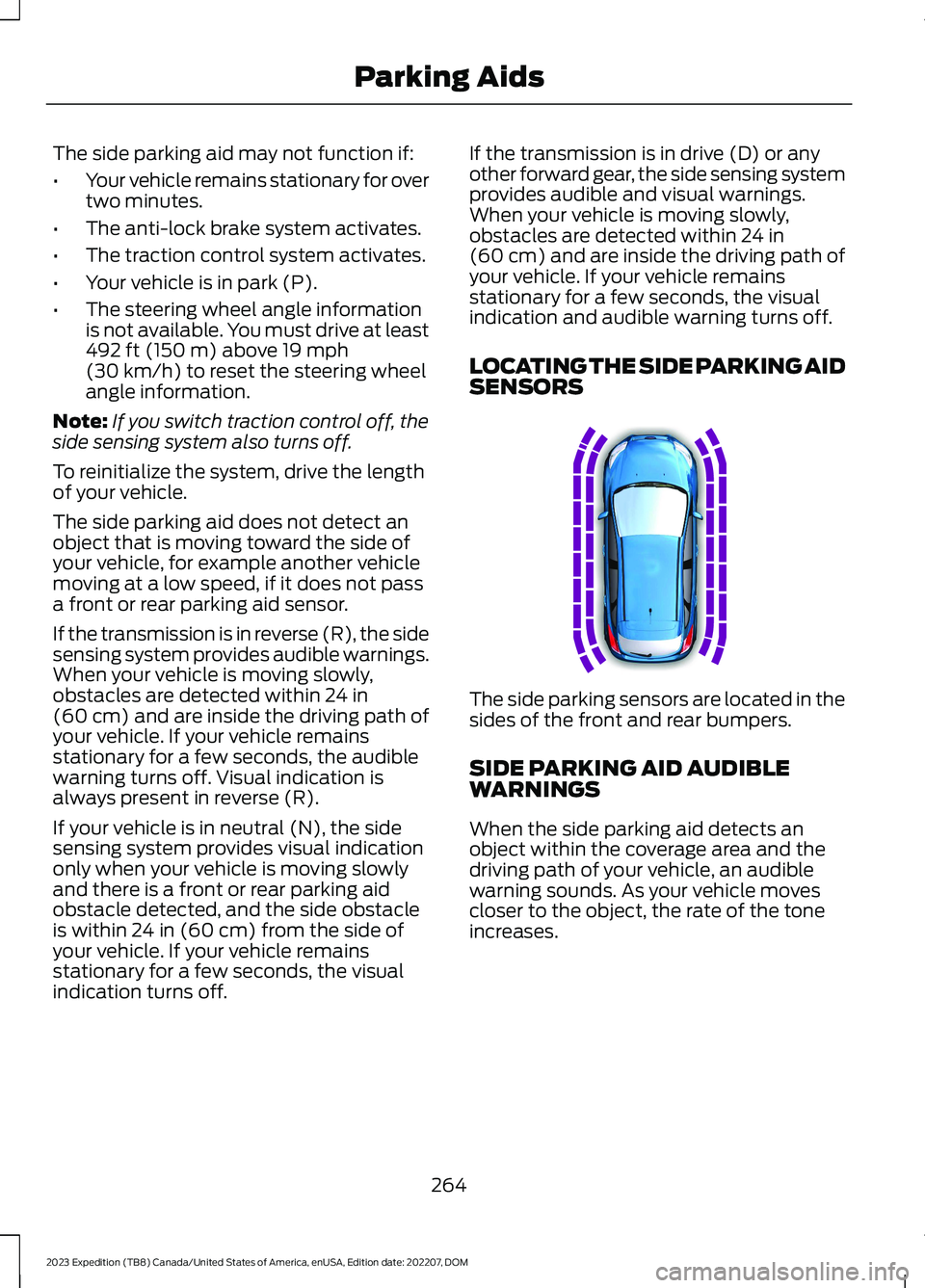
LOCATING THE SIDE PARKING AIDSENSORS
The side parking sensors are located in thesides of the front and rear bumpers.
SIDE PARKING AID AUDIBLEWARNINGS
When the side parking aid detects anobject within the coverage area and thedriving path of your vehicle, an audiblewarning sounds. As your vehicle movescloser to the object, the rate of the toneincreases.
264
2023 Expedition (TB8) Canada/United States of America, enUSA, Edition date: 202207, DOMParking AidsE187810
Page 279 of 658
4.Use the turn signal to choose thedirection to exit the parking space.
5.Press and hold the brake pedal.
6.Release the steering wheel and shiftinto neutral (N).
7.Release the parking brake.
8.Press and hold the parking aid button.
9.Release the brake pedal to allow yourvehicle to move.
Note:After active park assist drives yourvehicle to a position where you can exit theparking space in a forward movement, amessage appears instructing you to take fullcontrol of your vehicle.
10.Take control of your vehicle.
Note:You can slow down your vehicle atany time by pressing the brake pedal.
ACTIVE PARK ASSIST –
TROUBLESHOOTING
ACTIVE PARK ASSIST –INFORMATION MESSAGES
ActionMessage
The systemrequires service.Have your vehiclechecked as soon aspossible.
Active Park Fault
ACTIVE PARK ASSIST –FREQUENTLY ASKED QUESTIONS
Why does active park assist notoperate correctly?
The system is unable to detect avehicle, curb or object to park next toor in between. The system needsboundary objects to operate correctly.
Why does active park assist not searchfor a parking space?
You have switched traction control off.
Why does active park assist not searchfor a parking space?
The transmission is in reverse (R). Yourvehicle must be moving forward to beable to detect a parking space.
Why does active park assist not offera parking space?
The sensors could be blocked. Forexample, snow, ice or largeaccumulations of dirt. Blocked sensorscan affect how the system functions.
Why does active park assist not offera parking space?
The sensors in the front or rear bumpercould be damaged.
Why does active park assist not offera parking space?
There is not enough room in theparking space for your vehicle to safelypark.
Why does active park assist not offera parking space?
There is not enough space for theparking maneuver on the opposite sideof the parking space.
Why does active park assist not offera parking space?
The parking space is more than 5 ft(1.5 m) or less than 2 ft (0.5 m) awayfrom your vehicle.
Why does active park assist not offera parking space?
Your vehicle's speed is greater than22 mph (35 km/h) for parallel parkingor greater than 19 mph (30 km/h) forperpendicular parking.
275
2023 Expedition (TB8) Canada/United States of America, enUSA, Edition date: 202207, DOMActive Park Assist (If Equipped)
Page 284 of 658
ADAPTIVE CRUISE CONTROL
LIMITATIONS
Sensor Limitations
WARNING: On rare occasions,detection issues can occur due to theroad infrastructures, for example bridges,tunnels and safety barriers. In thesecases, the system may brake late orunexpectedly. At all times, you areresponsible for controlling your vehicle,supervising the system and intervening,if required.
WARNING: If the systemmalfunctions, have your vehicle checkedas soon as possible.
WARNING: Large contrasts inoutside lighting can limit sensorperformance.
WARNING: The system only warnsof vehicles detected by the radar sensor.In some cases there may be no warningor a delayed warning. Apply the brakeswhen necessary. Failure to follow thisinstruction could result in personal injuryor death.
WARNING: The system may notdetect stationary or slow movingvehicles below 6 mph (10 km/h).
WARNING: The system does notdetect pedestrians or objects in the road.
WARNING: The system does notdetect oncoming vehicles in the samelane.
WARNING: The system may notoperate properly if the sensor is blocked.Keep the windshield free fromobstruction.
WARNING: The sensor mayincorrectly track lane markings as otherstructures or objects. This can result ina false or missed warning.
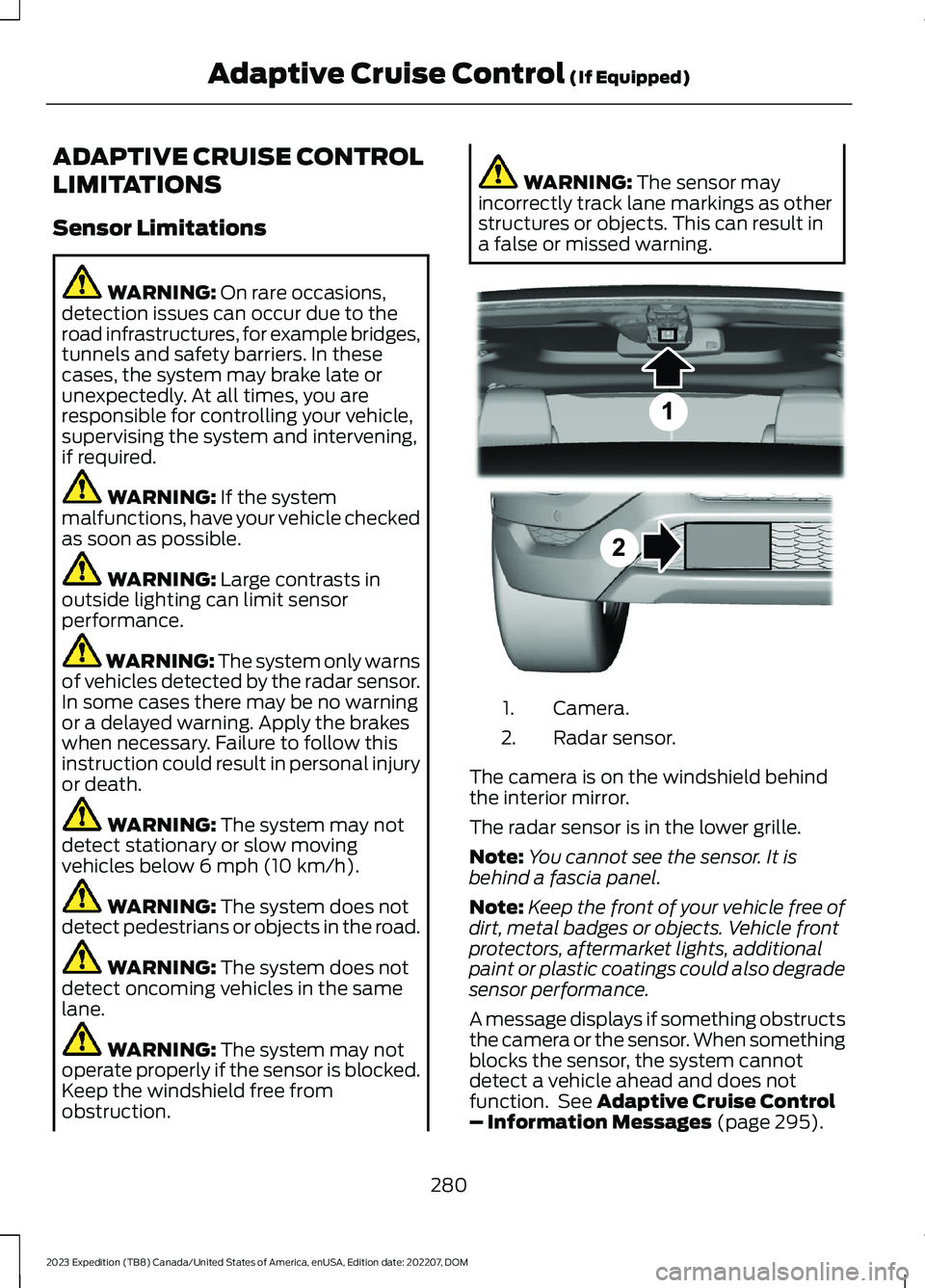
Camera.1.
Radar sensor.2.
The camera is on the windshield behindthe interior mirror.
The radar sensor is in the lower grille.
Note:You cannot see the sensor. It isbehind a fascia panel.
Note:Keep the front of your vehicle free ofdirt, metal badges or objects. Vehicle frontprotectors, aftermarket lights, additionalpaint or plastic coatings could also degradesensor performance.
A message displays if something obstructsthe camera or the sensor. When somethingblocks the sensor, the system cannotdetect a vehicle ahead and does notfunction. See Adaptive Cruise Control– Information Messages (page 295).
280
2023 Expedition (TB8) Canada/United States of America, enUSA, Edition date: 202207, DOMAdaptive Cruise Control (If Equipped)E305503
Page 285 of 658
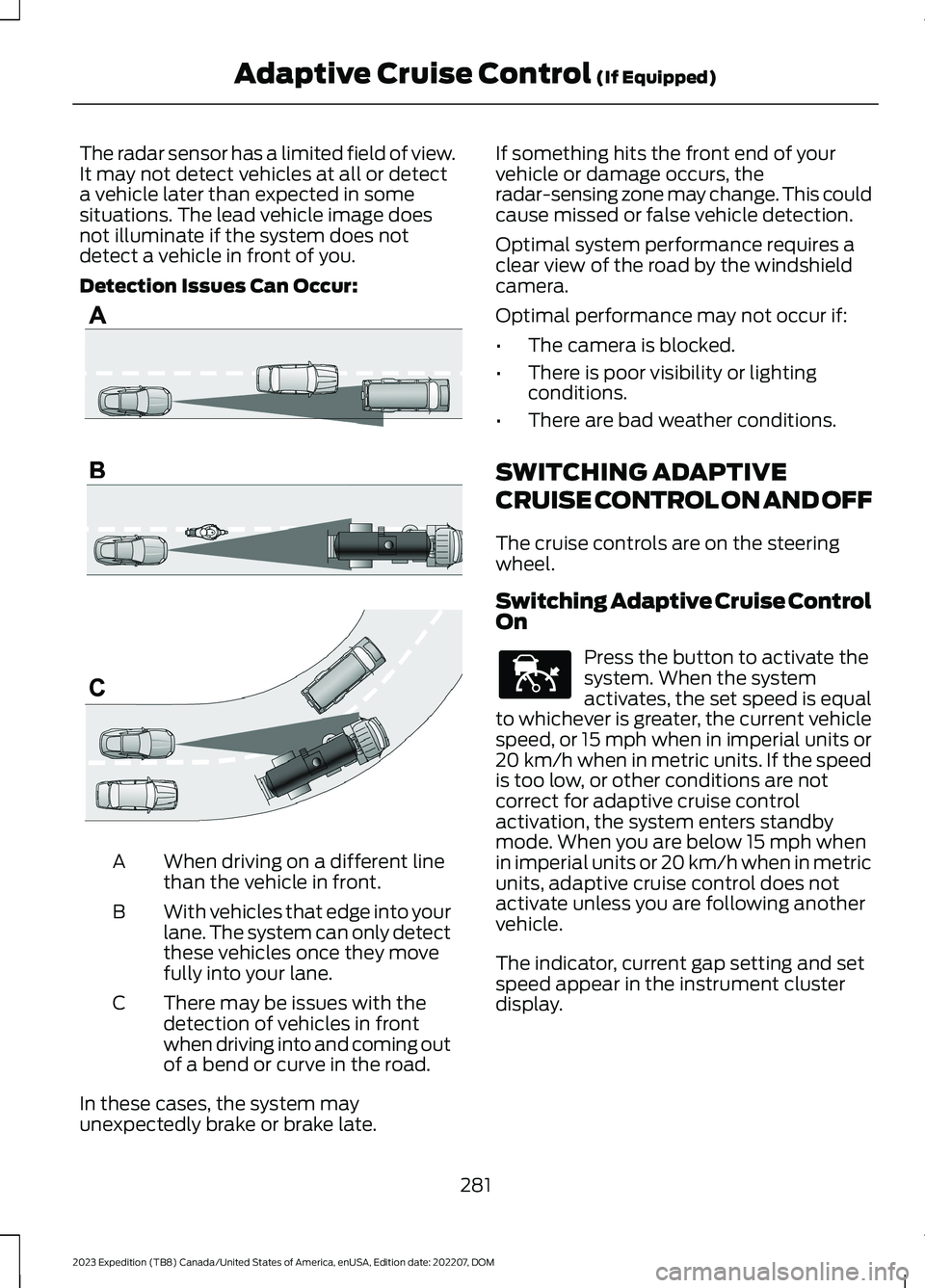
The radar sensor has a limited field of view.It may not detect vehicles at all or detecta vehicle later than expected in somesituations. The lead vehicle image doesnot illuminate if the system does notdetect a vehicle in front of you.
Detection Issues Can Occur:
When driving on a different linethan the vehicle in front.A
With vehicles that edge into yourlane. The system can only detectthese vehicles once they movefully into your lane.
B
There may be issues with thedetection of vehicles in frontwhen driving into and coming outof a bend or curve in the road.
C
In these cases, the system mayunexpectedly brake or brake late.
If something hits the front end of yourvehicle or damage occurs, theradar-sensing zone may change. This couldcause missed or false vehicle detection.
Optimal system performance requires aclear view of the road by the windshieldcamera.
Optimal performance may not occur if:
•The camera is blocked.
•There is poor visibility or lightingconditions.
•There are bad weather conditions.
SWITCHING ADAPTIVE
CRUISE CONTROL ON AND OFF
The cruise controls are on the steeringwheel.
Switching Adaptive Cruise ControlOn
Press the button to activate thesystem. When the systemactivates, the set speed is equalto whichever is greater, the current vehiclespeed, or 15 mph when in imperial units or20 km/h when in metric units. If the speedis too low, or other conditions are notcorrect for adaptive cruise controlactivation, the system enters standbymode. When you are below 15 mph whenin imperial units or 20 km/h when in metricunits, adaptive cruise control does notactivate unless you are following anothervehicle.
The indicator, current gap setting and setspeed appear in the instrument clusterdisplay.
281
2023 Expedition (TB8) Canada/United States of America, enUSA, Edition date: 202207, DOMAdaptive Cruise Control (If Equipped)E71621 E144529
Page 286 of 658
Switching Adaptive Cruise ControlOff
Press the button when thesystem is in standby mode orswitch the ignition off.
Note:When you switch the system off, theset speed clears.
ADAPTIVE CRUISE CONTROL
AUTOMATIC CANCELLATION
The system may cancel if:
•The tires lose traction.
•You apply the parking brake.
The system may cancel and set the parkingbrake if:
•You unbuckle the seatbelt and openthe driver door after adaptive cruisecontrol stops your vehicle.
•Adaptive cruise control holds yourvehicle at a stop continuously for morethan three minutes.
The system may deactivate or preventactivating when requested if:
•The vehicle has a blocked sensor.
•The brake temperature is too high.
•There is a failure in the system or arelated system.
SETTING THE ADAPTIVE
CRUISE CONTROL SPEED -
VEHICLES WITH: 8 INCH
SCREEN
Drive to the speed you prefer.
Press either button to set thecurrent speed.
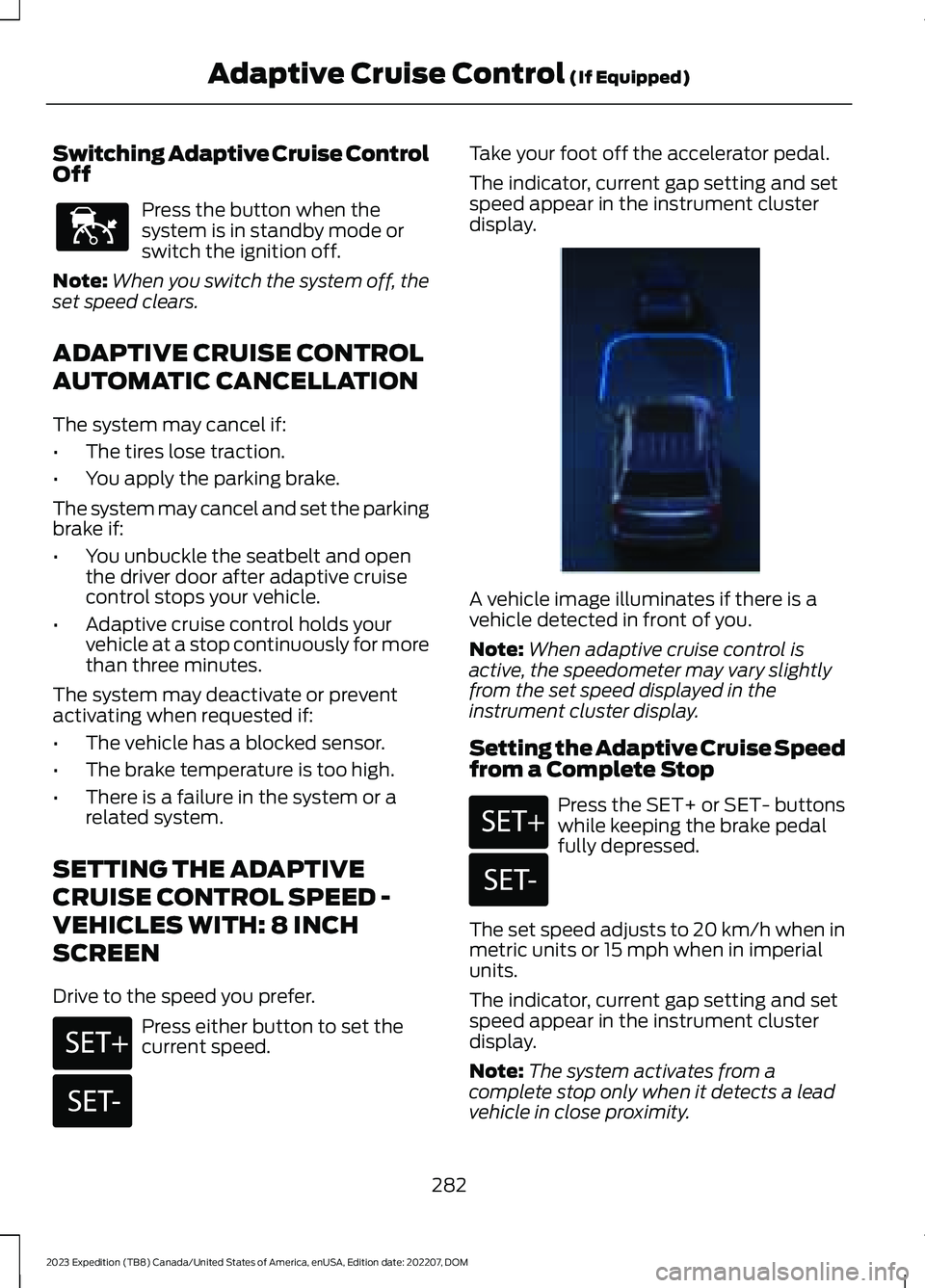
Take your foot off the accelerator pedal.
The indicator, current gap setting and setspeed appear in the instrument clusterdisplay.
A vehicle image illuminates if there is avehicle detected in front of you.
Note:When adaptive cruise control isactive, the speedometer may vary slightlyfrom the set speed displayed in theinstrument cluster display.
Setting the Adaptive Cruise Speedfrom a Complete Stop
Press the SET+ or SET- buttonswhile keeping the brake pedalfully depressed.
The set speed adjusts to 20 km/h when inmetric units or 15 mph when in imperialunits.
The indicator, current gap setting and setspeed appear in the instrument clusterdisplay.
Note:The system activates from acomplete stop only when it detects a leadvehicle in close proximity.
282
2023 Expedition (TB8) Canada/United States of America, enUSA, Edition date: 202207, DOMAdaptive Cruise Control (If Equipped)E144529 E246884 E246885 E356731 E246884 E246885