spare tire FORD EXPEDITION 2023 Owners Manual
[x] Cancel search | Manufacturer: FORD, Model Year: 2023, Model line: EXPEDITION, Model: FORD EXPEDITION 2023Pages: 658, PDF Size: 16.16 MB
Page 76 of 658
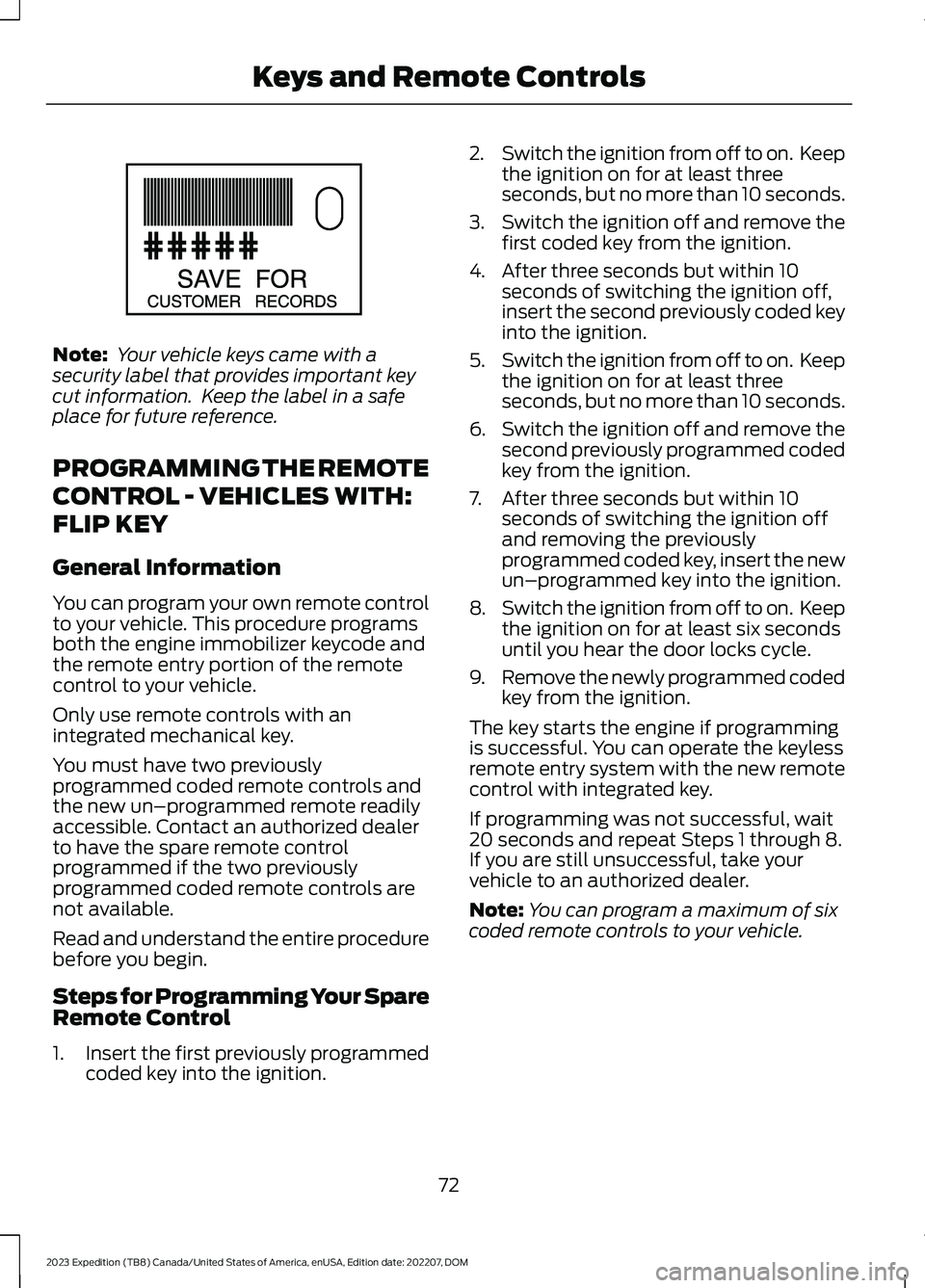
Note: Your vehicle keys came with asecurity label that provides important keycut information. Keep the label in a safeplace for future reference.
PROGRAMMING THE REMOTE
CONTROL - VEHICLES WITH:
FLIP KEY
General Information
You can program your own remote controlto your vehicle. This procedure programsboth the engine immobilizer keycode andthe remote entry portion of the remotecontrol to your vehicle.
Only use remote controls with anintegrated mechanical key.
You must have two previouslyprogrammed coded remote controls andthe new un–programmed remote readilyaccessible. Contact an authorized dealerto have the spare remote controlprogrammed if the two previouslyprogrammed coded remote controls arenot available.
Read and understand the entire procedurebefore you begin.
Steps for Programming Your SpareRemote Control
1.Insert the first previously programmedcoded key into the ignition.
2.Switch the ignition from off to on. Keepthe ignition on for at least threeseconds, but no more than 10 seconds.
3.Switch the ignition off and remove thefirst coded key from the ignition.
4.After three seconds but within 10seconds of switching the ignition off,insert the second previously coded keyinto the ignition.
5.Switch the ignition from off to on. Keepthe ignition on for at least threeseconds, but no more than 10 seconds.
6.Switch the ignition off and remove thesecond previously programmed codedkey from the ignition.
7.After three seconds but within 10seconds of switching the ignition offand removing the previouslyprogrammed coded key, insert the newun–programmed key into the ignition.
8.Switch the ignition from off to on. Keepthe ignition on for at least six secondsuntil you hear the door locks cycle.
9.Remove the newly programmed codedkey from the ignition.
The key starts the engine if programmingis successful. You can operate the keylessremote entry system with the new remotecontrol with integrated key.
If programming was not successful, wait20 seconds and repeat Steps 1 through 8.If you are still unsuccessful, take yourvehicle to an authorized dealer.
Note:You can program a maximum of sixcoded remote controls to your vehicle.
72
2023 Expedition (TB8) Canada/United States of America, enUSA, Edition date: 202207, DOMKeys and Remote ControlsE151795
Page 77 of 658
PROGRAMMING THE REMOTE
CONTROL - VEHICLES WITH:
PUSH BUTTON START
General Information
You must have two previouslyprogrammed remote controls inside yourvehicle and the new unprogrammedremote controls readily accessible. Contactan authorized dealer to have the spareremote control programmed if twopreviously programmed remotes are notavailable. Make sure that your vehicle isoff before beginning this procedure. Makesure that you close all the doors beforebeginning and that they remain closedthroughout the procedure. Perform allsteps within 30 seconds of starting thesequence. Stop and wait for at least oneminute before starting again if you performany steps out of sequence.
Read and understand the entire procedurebefore you begin.
Note:You can program a maximum of fourremote controls to your vehicle.
Note:If your programmed remote controlsare lost or stolen and you do not have anextra coded remote, you need to have yourvehicle towed to an authorized dealer. Storean extra programmed remote away fromyour vehicle in a safe place to help preventany inconvenience. Contact an authorizeddealer to purchase additional spare orreplacement remotes.
Steps for Programming Your SpareRemote Control
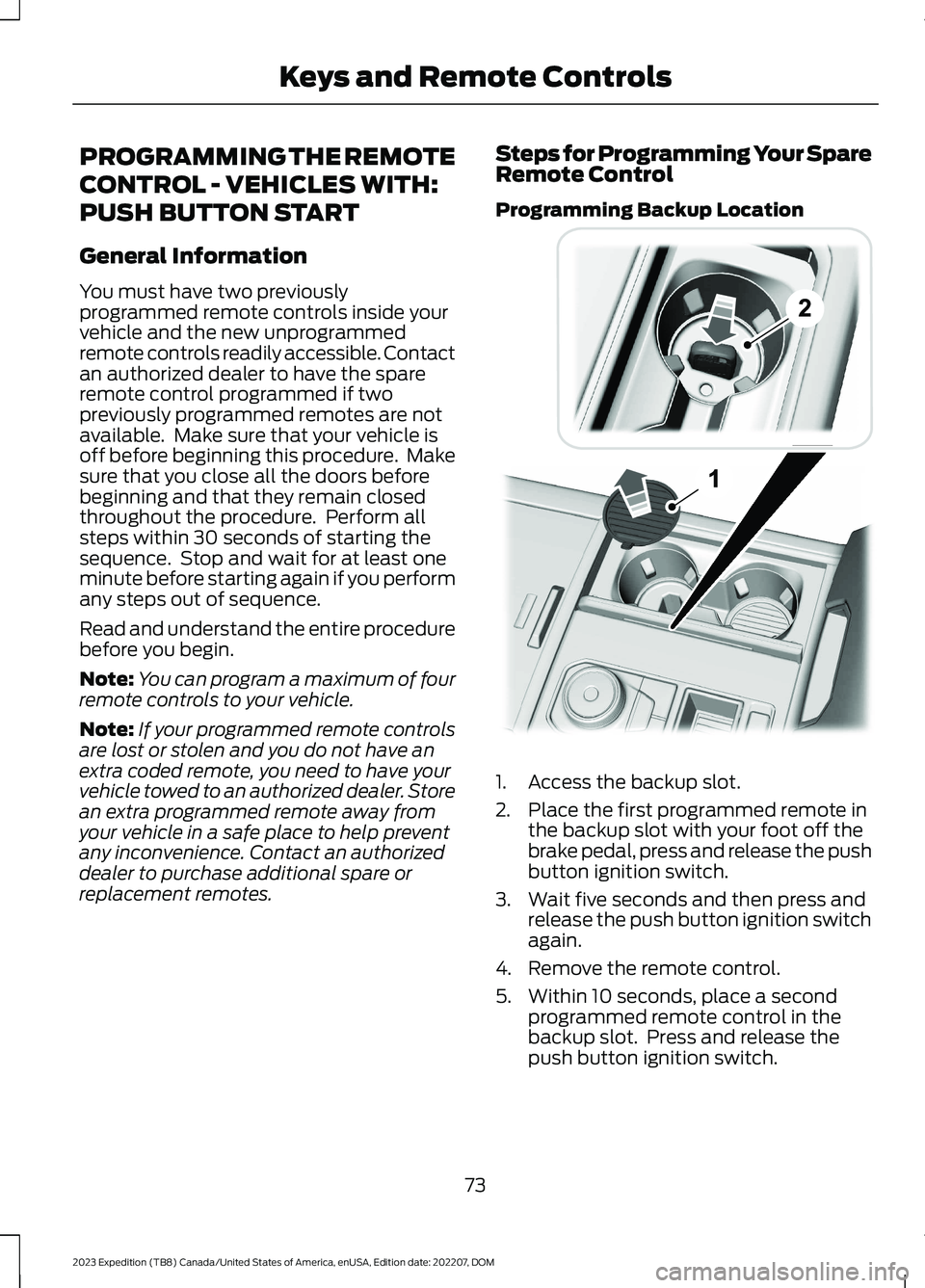
Programming Backup Location
1.Access the backup slot.
2.Place the first programmed remote inthe backup slot with your foot off thebrake pedal, press and release the pushbutton ignition switch.
3.Wait five seconds and then press andrelease the push button ignition switchagain.
4.Remove the remote control.
5.Within 10 seconds, place a secondprogrammed remote control in thebackup slot. Press and release thepush button ignition switch.
73
2023 Expedition (TB8) Canada/United States of America, enUSA, Edition date: 202207, DOMKeys and Remote Controls E256153
Page 224 of 658
make it handle differently than an ordinarypassenger car. Always maintain steeringwheel control, especially in rough terrain.Since sudden changes in terrain can resultin abrupt steering wheel motion, make sureyou grip the steering wheel from theoutside. Do not grip the spokes. Drivecautiously to avoid vehicle damage fromconcealed objects such as rocks andstumps. Drive slower in strong crosswindswhich can affect the normal steeringcharacteristics of your vehicle. Beextremely careful when driving onpavement made slippery by loose sand,water, gravel, snow or ice.
Note:Do not use four-wheel drive high orfour-wheel drive low mode on dry, hardsurfaced roads. Doing so can produceexcessive noise, increase tire wear and candamage drive components.
FOUR-WHEEL DRIVE
LIMITATIONS
Operating Four-Wheel Drive witha Spare or Mismatched Tires (If
Equipped)
On four-wheel drive vehicles, the size ofthe spare tire can affect the four-wheeldrive system. If there is a significantdifference between the size of the sparetire and the remaining tires, you could havelimited four-wheel drive functionality.When driving with the full-size dissimilarspare wheel and tire assembly, werecommend that you do not:
•Exceed 50 mph (80 km/h) with afour-wheel drive mode turned on.
•Use a four-wheel drive mode on drypavement.
Driving with the full-size dissimilar sparewheel and tire assembly can limitfour-wheel drive functionality. You canexperience the following:
•Additional noise from the transfer caseor other drive components.
Use of a dissimilar spare wheel and tireassembly can lead to impairment of thefollowing:
•Comfort and noise.
•Winter weather driving capability.
•Wet driving capability.
•Four-wheel drive capability.
Note:Your vehicle could have a front airdam that can become damaged, due toreduced ground clearance, when taking yourvehicle off-road. You can remove this airdam by removing the eight bolts that secureit.
Note:Your vehicle could have side stepsthat can become damaged, due to reducedground clearance, when taking your vehicleoff-road. Remove side steps before drivingyour vehicle off-road.
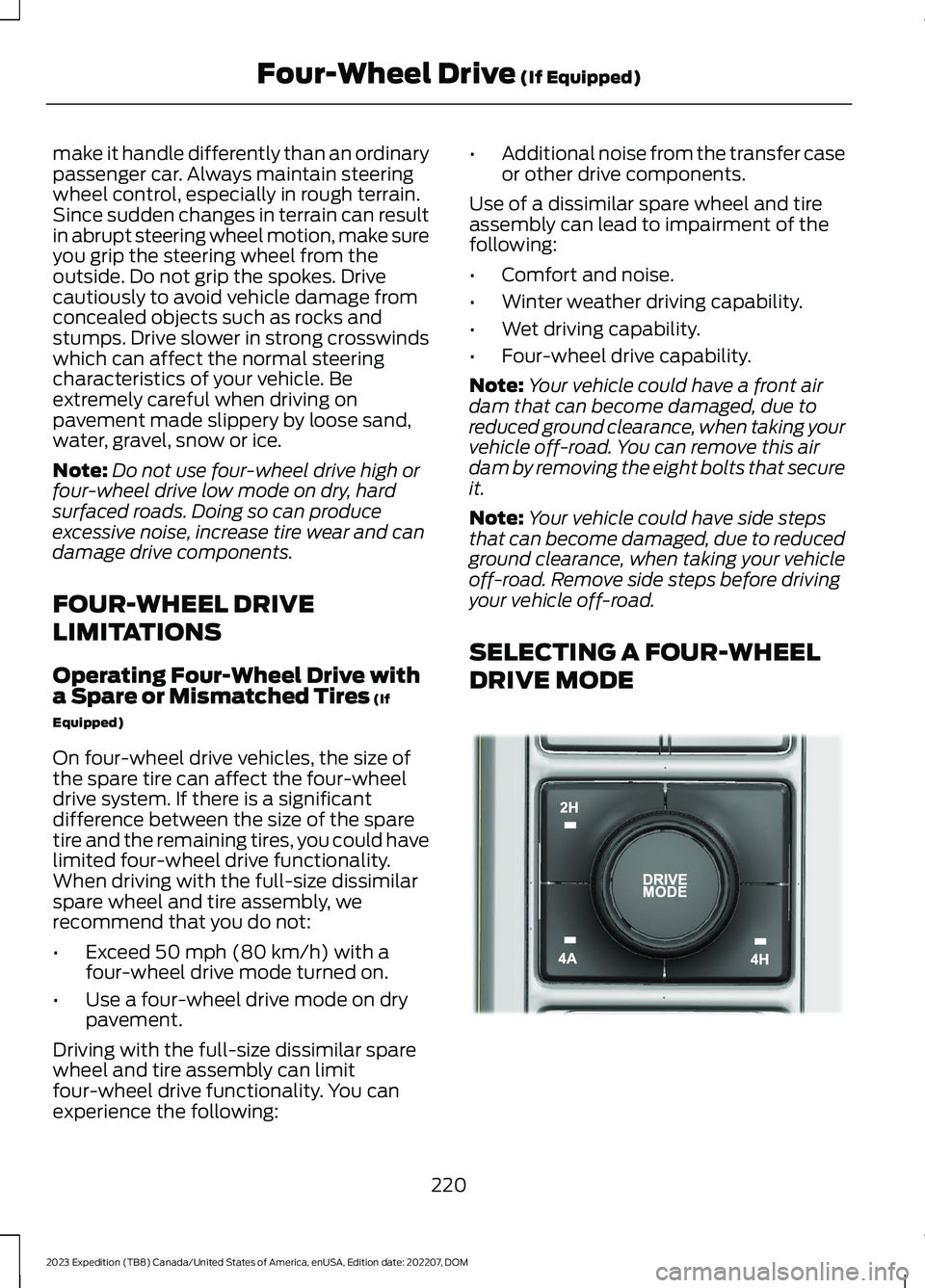
SELECTING A FOUR-WHEEL
DRIVE MODE
220
2023 Expedition (TB8) Canada/United States of America, enUSA, Edition date: 202207, DOMFour-Wheel Drive (If Equipped)E357409
Page 230 of 658
WHAT IS THE ELECTRONIC
LIMITED-SLIP DIFFERENTIAL
The electronic limited-slip differentialsystem directs torque across the axle,enabling the vehicle to drive over terrainand road conditions that a conventionalaxle cannot. The system is active at alltimes and requires no input from the driver.
Note:If your vehicle is not at optimaloperating conditions or a system fault ispresent, a warning may display in theinstrument cluster. Depending on thewarning, you may need to service yourvehicle.
Operating the Electronic Limited-SlipDifferential with a Spare orMismatched Tires
If your vehicle has an electronic limited-slipdifferential, do not use a spare tire of adifferent size than the tire provided. If youhave a spare tire installed, a message mayappear indicating the system has disabledautomatically or reduced function toprevent system overheat and damage. Werecommend you reinstall the repaired orreplaced spare tire as soon as possible.When you replace the spare tire, thesystem resumes normal operation on thenext key cycle.
Trailer Towing
The electronic limited-slip differentialenhances vehicle stability during trailer towoperation. During high demand traileringevents, such as steep slopes, high speedsor with a spare tire, the system may providea warning in the instrument cluster andreduce function or enter a temporarilydisabled state. To resume normal function,stop the vehicle in a safe location andallow the unit to adequately cool. Oncethe system reaches normal operatingtemperatures, system function restoresand the electronic limited-slip differentialrestored message displays.
ELECTRONIC LIMITED-SLIP
DIFFERENTIAL INDICATORS
The locker mode mayautomatically disengage basedon certain conditions such asvehicle speed. When engaged, a telltale inthe instrument cluster illuminates amber.When you exceed the speed the telltaleturns gray, the locker disengages and staysin standby mode until you meet the speedconditions. If the system faults and thelocker cannot engage, a warning messagedisplays in the instrument cluster.
Automatic Re-engagementSpeedMaximum EngagementSpeedDrive Mode
35 mph (57 km/h)40 mph (65 km/h)Normal
20 mph (32 km/h)25 mph (40 km/h)Slippery
35 mph (57 km/h)40 mph (65 km/h)Eco
57 mph (92 km/h)62 mph (100 km/h)Mud/Ruts
57 mph (92 km/h)62 mph (100 km/h)Sand
35 mph (57 km/h)40 mph (65 km/h)Sport
35 mph (57 km/h)40 mph (65 km/h)Tow/Haul
226
2023 Expedition (TB8) Canada/United States of America, enUSA, Edition date: 202207, DOMElectronic Limited-Slip Differential (If Equipped)E163170
Page 232 of 658
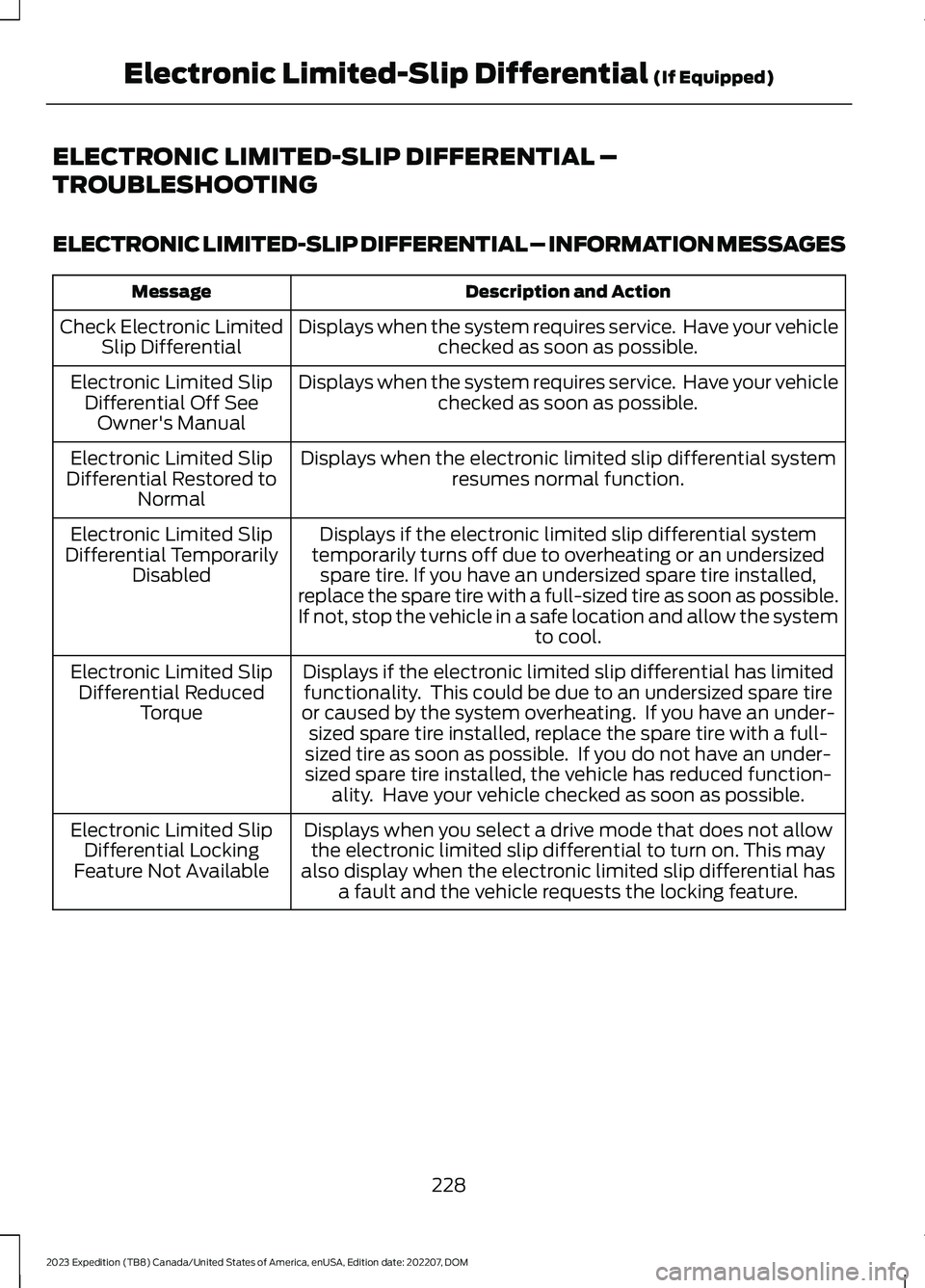
ELECTRONIC LIMITED-SLIP DIFFERENTIAL –
TROUBLESHOOTING
ELECTRONIC LIMITED-SLIP DIFFERENTIAL – INFORMATION MESSAGES
Description and ActionMessage
Displays when the system requires service. Have your vehiclechecked as soon as possible.Check Electronic LimitedSlip Differential
Displays when the system requires service. Have your vehiclechecked as soon as possible.Electronic Limited SlipDifferential Off SeeOwner's Manual
Displays when the electronic limited slip differential systemresumes normal function.Electronic Limited SlipDifferential Restored toNormal
Displays if the electronic limited slip differential systemtemporarily turns off due to overheating or an undersizedspare tire. If you have an undersized spare tire installed,replace the spare tire with a full-sized tire as soon as possible.If not, stop the vehicle in a safe location and allow the systemto cool.
Electronic Limited SlipDifferential TemporarilyDisabled
Displays if the electronic limited slip differential has limitedfunctionality. This could be due to an undersized spare tireor caused by the system overheating. If you have an under-sized spare tire installed, replace the spare tire with a full-sized tire as soon as possible. If you do not have an under-sized spare tire installed, the vehicle has reduced function-ality. Have your vehicle checked as soon as possible.
Electronic Limited SlipDifferential ReducedTorque
Displays when you select a drive mode that does not allowthe electronic limited slip differential to turn on. This mayalso display when the electronic limited slip differential hasa fault and the vehicle requests the locking feature.
Electronic Limited SlipDifferential LockingFeature Not Available
228
2023 Expedition (TB8) Canada/United States of America, enUSA, Edition date: 202207, DOMElectronic Limited-Slip Differential (If Equipped)
Page 265 of 658
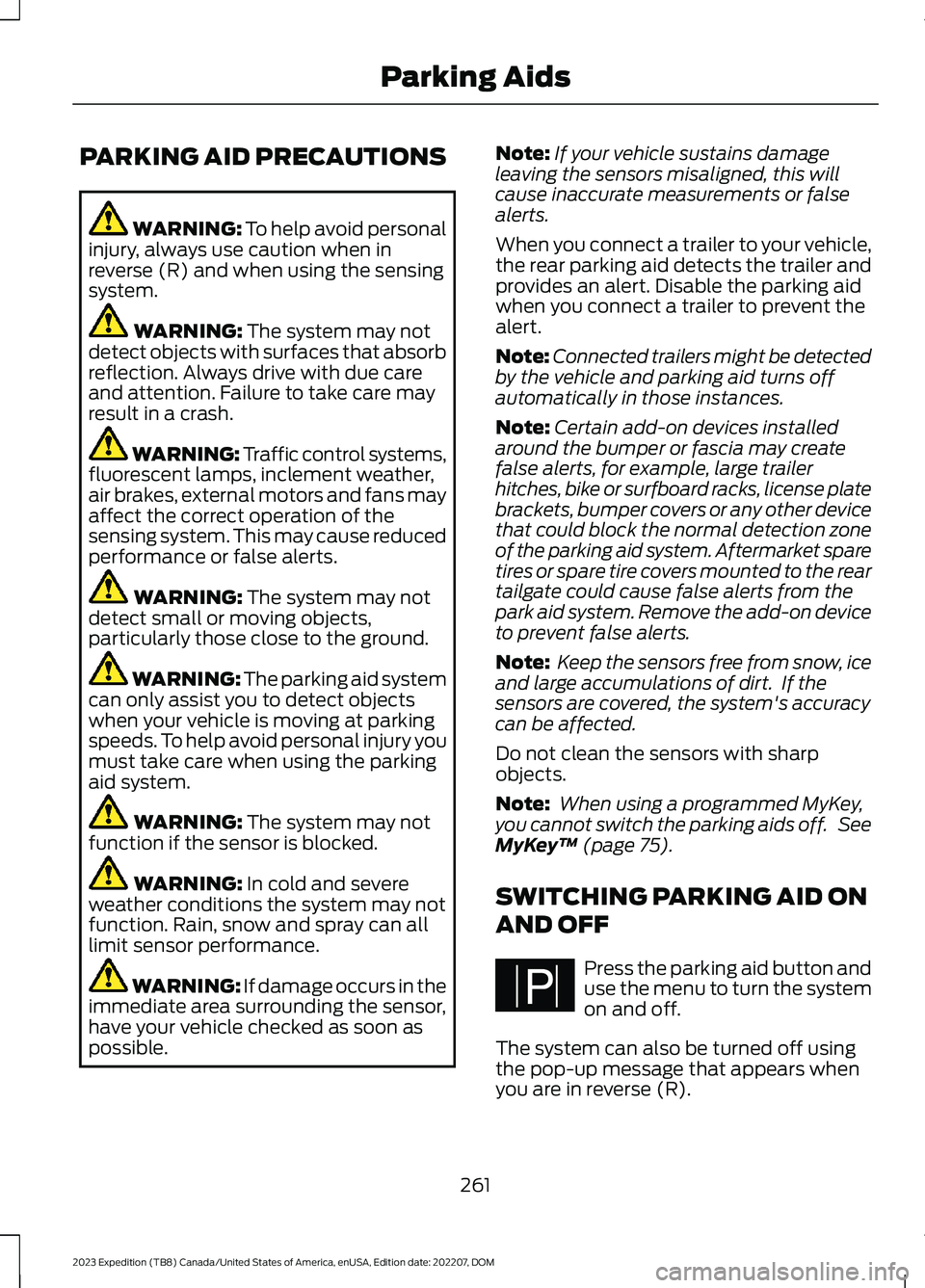
PARKING AID PRECAUTIONS
WARNING: To help avoid personalinjury, always use caution when inreverse (R) and when using the sensingsystem.
WARNING: The system may notdetect objects with surfaces that absorbreflection. Always drive with due careand attention. Failure to take care mayresult in a crash.
WARNING: Traffic control systems,fluorescent lamps, inclement weather,air brakes, external motors and fans mayaffect the correct operation of thesensing system. This may cause reducedperformance or false alerts.
WARNING: The system may notdetect small or moving objects,particularly those close to the ground.
WARNING: The parking aid systemcan only assist you to detect objectswhen your vehicle is moving at parkingspeeds. To help avoid personal injury youmust take care when using the parkingaid system.
WARNING: The system may notfunction if the sensor is blocked.
WARNING: In cold and severeweather conditions the system may notfunction. Rain, snow and spray can alllimit sensor performance.
WARNING: If damage occurs in theimmediate area surrounding the sensor,have your vehicle checked as soon aspossible.
Note:If your vehicle sustains damageleaving the sensors misaligned, this willcause inaccurate measurements or falsealerts.
When you connect a trailer to your vehicle,the rear parking aid detects the trailer andprovides an alert. Disable the parking aidwhen you connect a trailer to prevent thealert.
Note:Connected trailers might be detectedby the vehicle and parking aid turns offautomatically in those instances.
Note:Certain add-on devices installedaround the bumper or fascia may createfalse alerts, for example, large trailerhitches, bike or surfboard racks, license platebrackets, bumper covers or any other devicethat could block the normal detection zoneof the parking aid system. Aftermarket sparetires or spare tire covers mounted to the reartailgate could cause false alerts from thepark aid system. Remove the add-on deviceto prevent false alerts.
Note: Keep the sensors free from snow, iceand large accumulations of dirt. If thesensors are covered, the system's accuracycan be affected.
Do not clean the sensors with sharpobjects.
Note: When using a programmed MyKey,you cannot switch the parking aids off. SeeMyKey™ (page 75).
SWITCHING PARKING AID ON
AND OFF
Press the parking aid button anduse the menu to turn the systemon and off.
The system can also be turned off usingthe pop-up message that appears whenyou are in reverse (R).
261
2023 Expedition (TB8) Canada/United States of America, enUSA, Edition date: 202207, DOMParking AidsPE326188
Page 280 of 658
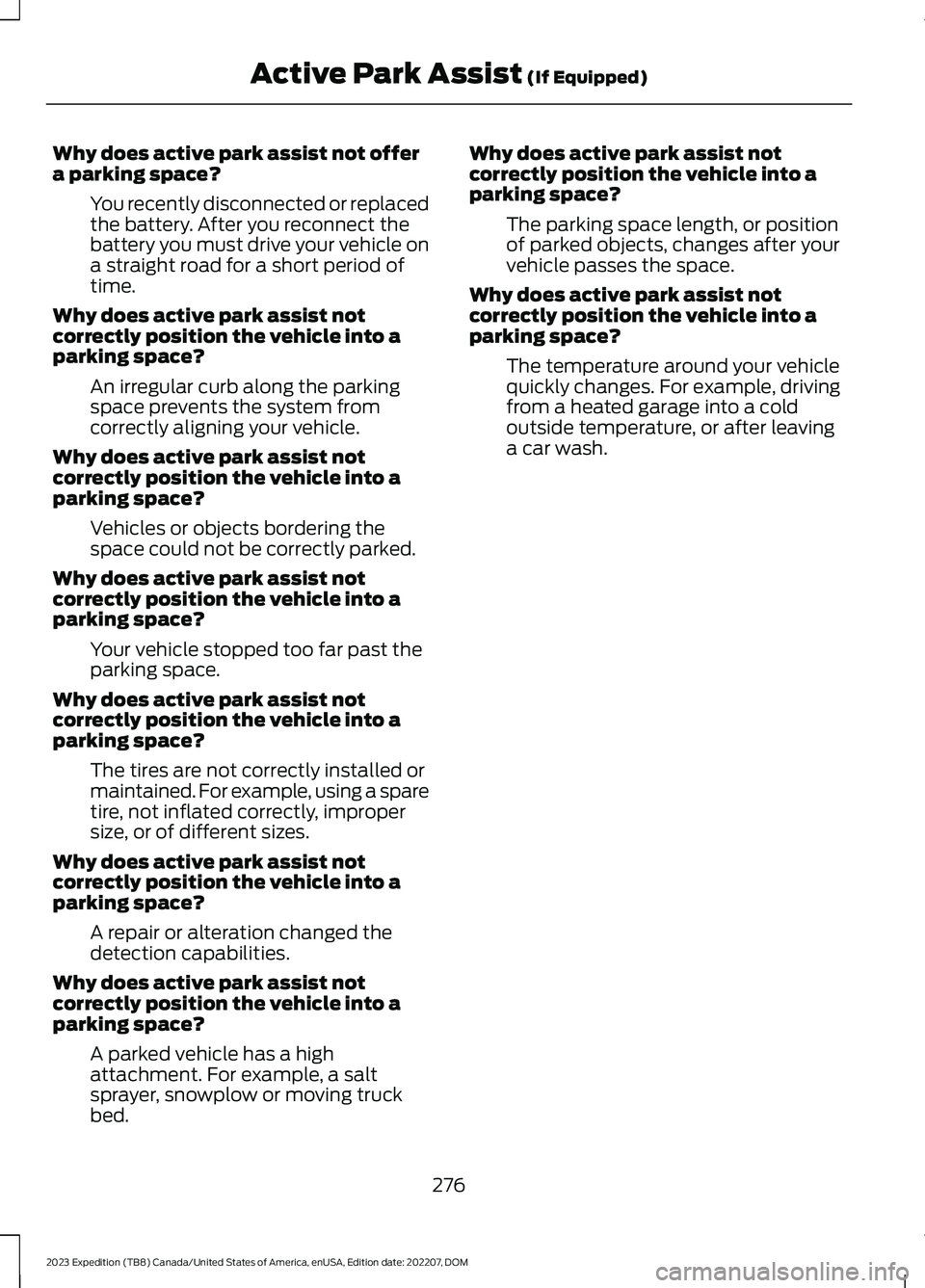
Why does active park assist not offera parking space?
You recently disconnected or replacedthe battery. After you reconnect thebattery you must drive your vehicle ona straight road for a short period oftime.
Why does active park assist notcorrectly position the vehicle into aparking space?
An irregular curb along the parkingspace prevents the system fromcorrectly aligning your vehicle.
Why does active park assist notcorrectly position the vehicle into aparking space?
Vehicles or objects bordering thespace could not be correctly parked.
Why does active park assist notcorrectly position the vehicle into aparking space?
Your vehicle stopped too far past theparking space.
Why does active park assist notcorrectly position the vehicle into aparking space?
The tires are not correctly installed ormaintained. For example, using a sparetire, not inflated correctly, impropersize, or of different sizes.
Why does active park assist notcorrectly position the vehicle into aparking space?
A repair or alteration changed thedetection capabilities.
Why does active park assist notcorrectly position the vehicle into aparking space?
A parked vehicle has a highattachment. For example, a saltsprayer, snowplow or moving truckbed.
Why does active park assist notcorrectly position the vehicle into aparking space?
The parking space length, or positionof parked objects, changes after yourvehicle passes the space.
Why does active park assist notcorrectly position the vehicle into aparking space?
The temperature around your vehiclequickly changes. For example, drivingfrom a heated garage into a coldoutside temperature, or after leavinga car wash.
276
2023 Expedition (TB8) Canada/United States of America, enUSA, Edition date: 202207, DOMActive Park Assist (If Equipped)
Page 294 of 658
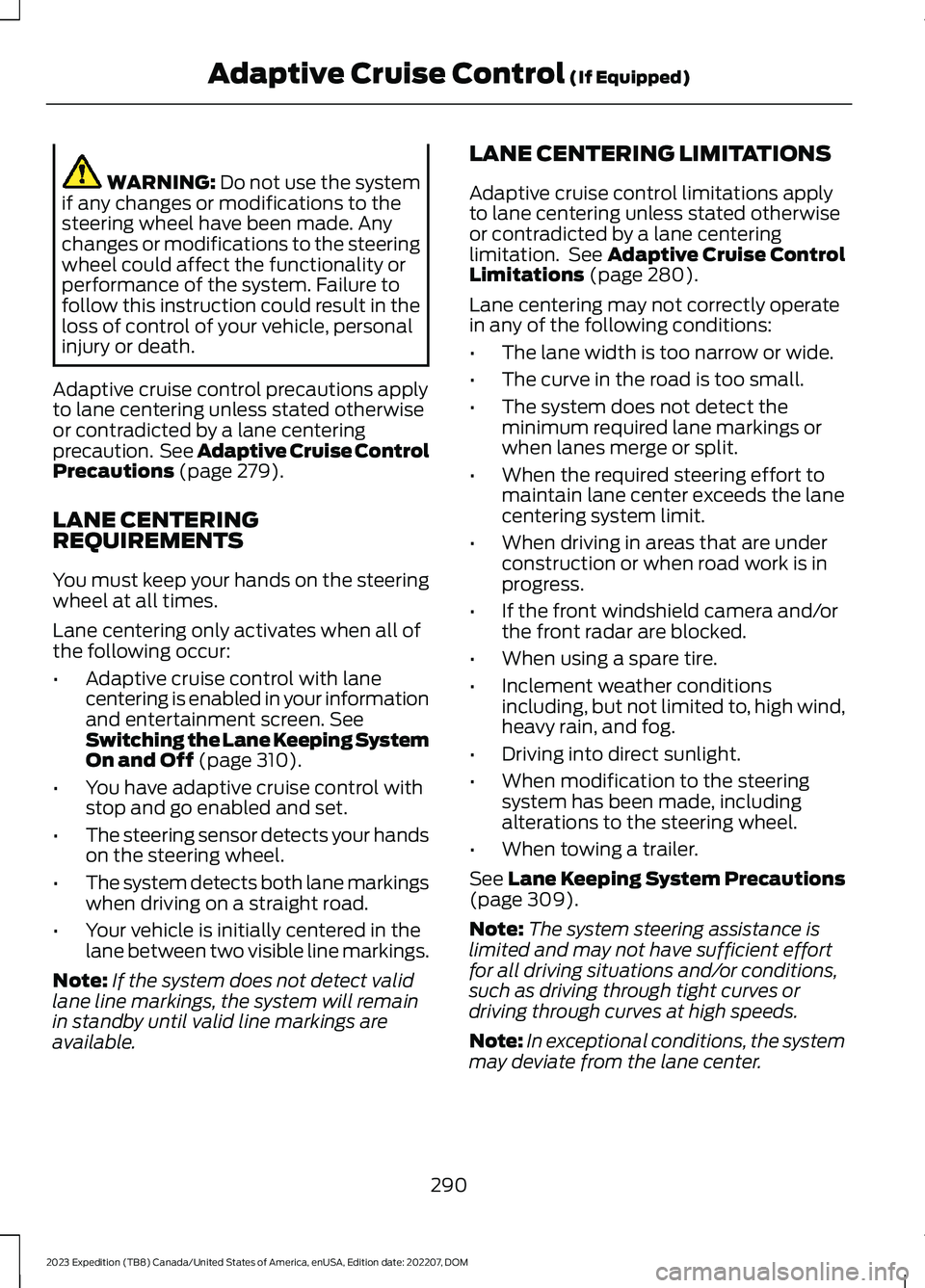
WARNING: Do not use the systemif any changes or modifications to thesteering wheel have been made. Anychanges or modifications to the steeringwheel could affect the functionality orperformance of the system. Failure tofollow this instruction could result in theloss of control of your vehicle, personalinjury or death.
Adaptive cruise control precautions applyto lane centering unless stated otherwiseor contradicted by a lane centeringprecaution. See Adaptive Cruise ControlPrecautions (page 279).
LANE CENTERINGREQUIREMENTS
You must keep your hands on the steeringwheel at all times.
Lane centering only activates when all ofthe following occur:
•Adaptive cruise control with lanecentering is enabled in your informationand entertainment screen. SeeSwitching the Lane Keeping SystemOn and Off (page 310).
•You have adaptive cruise control withstop and go enabled and set.
•The steering sensor detects your handson the steering wheel.
•The system detects both lane markingswhen driving on a straight road.
•Your vehicle is initially centered in thelane between two visible line markings.
Note:If the system does not detect validlane line markings, the system will remainin standby until valid line markings areavailable.
LANE CENTERING LIMITATIONS
Adaptive cruise control limitations applyto lane centering unless stated otherwiseor contradicted by a lane centeringlimitation. See Adaptive Cruise ControlLimitations (page 280).
Lane centering may not correctly operatein any of the following conditions:
•The lane width is too narrow or wide.
•The curve in the road is too small.
•The system does not detect theminimum required lane markings orwhen lanes merge or split.
•When the required steering effort tomaintain lane center exceeds the lanecentering system limit.
•When driving in areas that are underconstruction or when road work is inprogress.
•If the front windshield camera and/orthe front radar are blocked.
•When using a spare tire.
•Inclement weather conditionsincluding, but not limited to, high wind,heavy rain, and fog.
•Driving into direct sunlight.
•When modification to the steeringsystem has been made, includingalterations to the steering wheel.
•When towing a trailer.
See Lane Keeping System Precautions(page 309).
Note:The system steering assistance islimited and may not have sufficient effortfor all driving situations and/or conditions,such as driving through tight curves ordriving through curves at high speeds.
Note:In exceptional conditions, the systemmay deviate from the lane center.
290
2023 Expedition (TB8) Canada/United States of America, enUSA, Edition date: 202207, DOMAdaptive Cruise Control (If Equipped)
Page 302 of 658
WARNING: Do not use the systemif any changes or modifications to thesteering wheel have been made. Anychanges or modifications to the steeringwheel could affect the functionality orperformance of the system. Failure tofollow this instruction could result in theloss of control of your vehicle, personalinjury or death.
WARNING: The system may notfunction if the sensor is blocked.
WARNING: Pay close attention tochanging road conditions such asentering or leaving a highway, on roadswith intersections or roundabouts, roadswithout visible lanes of travel, roads thatare winding, slippery, unpaved, or steepslopes.
WARNING: The system is not acrash warning or avoidance system.
WARNING: Large contrasts inoutside lighting can limit sensorperformance.
WARNING: The system attemptsto keep your vehicle in the center of thelane as well as maintain speed and gapcontrol. The system may not be able toperform these tasks in all situations. Donot use the system in complex oruncertain driving conditions. Failure tofollow this instruction could result in theloss of control of your vehicle, personalinjury or death.
WARNING: Your vehicle could driftout of the lane of travel. Always beprepared to manually steer your vehicle.Failure to follow this instruction couldresult in the loss of control of yourvehicle, personal injury or death.
WARNING: The system will notoperate if the sensor cannot track theroad lane markings.
BLUECRUISE REQUIREMENTS
BlueCruise only activates when all of thefollowing occur:
•BlueCruise is enabled in yourinformation and entertainment screen.See BlueCruise Settings (page 299).
•Adaptive cruise control is on.
•The system detects both lanemarkings.
•Your hands are on the steering wheel.
•Your eyes are on the road.
Note:For hands-free mode to work, yourvehicle must be on certain limited accessdivided freeways.
Note:The system may require updatedsoftware for hands-free mode. See VehicleSoftware Updates (page 532).
BLUECRUISE LIMITATIONS
Any of the following conditions could resultin BlueCruise not correctly operating:
•You do not have your vehicle centeredin the lane.
•The lane is too narrow or too wide.
•The system does not detect at leastone lane marking or when lanes mergeor split.
•You are applying a low amount ofsteering input.
•You are using the system in areas underconstruction.
•If you make any aftermarketmodifications to the steering system.
•You are using a spare tire.
298
2023 Expedition (TB8) Canada/United States of America, enUSA, Edition date: 202207, DOMBlueCruise (If Equipped)
Page 363 of 658
Certain states require functioning trailerbrakes for trailers over a specified weight.Be sure to check state regulations for thisspecified weight.
Ford Motor Company recommendsseparate functioning brake systems fortrailers weighing more than 1,500 lb(680 kg) when loaded.
TOWING A TRAILER
LIMITATIONS
The vehicle's load capacitydesignation is by weight, not byvolume, so you cannot necessarilyuse all available space whenloading a vehicle or trailer.
Note:Your vehicle could havereduced performance whenoperating at high altitudes andwhen heavily loaded or towing a
trailer. When driving at elevation,to match driving performance asperceived at sea level, reduce grossvehicle weight and grosscombination weight by 2% per1,000 ft (300 m) elevation.
LOADING YOUR TRAILER
To help minimize how trailermovement affects your vehiclewhen driving:
•Load the heaviest items closestto the trailer floor.
•Load the heaviest itemscentered between the left andright side trailer tires.
•Load the heaviest items abovethe trailer axles or just slightlyforward toward the trailertongue. Do not allow the finaltrailer tongue weight to goabove or below 10-15% of theloaded trailer weight. Thetrailer tongue weight shouldnever exceed 10% of themaximum towing capacity.
•Select a ball mount with thecorrect rise or drop. When boththe loaded vehicle and trailerare connected, the trailer frameshould be level, or slightlyangled down toward yourvehicle, when viewed from theside.
TRAILER TOWING HINTS
Towing a trailer places an extra load onyour vehicle's engine, transmission, axle,brakes, tires and suspension. Periodicallyinspect these components during and afterany towing operation.
When driving with a trailer or payload, aslight takeoff vibration or shudder may bepresent due to the increased payloadweight.
Your vehicle may have a temporary orconventional spare tire. A temporary sparetire is different in diameter or width,tread-type, or is from a differentmanufacturer than the road tires on yourvehicle. Consult information on the tirelabel or Safety Compliance label forlimitations when using.
359
2023 Expedition (TB8) Canada/United States of America, enUSA, Edition date: 202207, DOMTowing a Trailer