AUX FORD EXPEDITION EL 2009 Owner's Guide
[x] Cancel search | Manufacturer: FORD, Model Year: 2009, Model line: EXPEDITION EL, Model: FORD EXPEDITION EL 2009Pages: 415, PDF Size: 5.4 MB
Page 90 of 415
5. R Rear fan speed control: Press to enable the auxiliary system
or to adjust the rear fan speed from the front control. Press to manually
increase or decrease the fan speed. When the rear fan button is pressed,
the display will show only the rear cabin settings. After the rear setting
changes are completed on the front control, the display will
automatically show all climate settings.
6. Passenger heated seat control: Press to activate/deactivate the
passenger heated seat. See Climate controlled seats in the Seating and
Safety Restraints chapter.
7. Passenger cooled seat control: Press to activate/deactivate the
passenger cooled seat. See Climate controlled seats in the Seating and
Safety Restraints chapter.
8. REAR: Press to enable the control located in the rear floor console (if
equipped). Press again to turn the auxiliary system off. When the REAR
button is pressed, the display will show only the rear cabin settings.
After the rear setting changes are completed on the front control, the
display will automatically show all climate settings.
9. Airflow direction control: Press to toggle through the air
distribution modes listed below. The selected mode will be shown in the
display.
: Distributes air through the instrument panel vents.
: Distributes air through the instrument panel and the floor vents.
: Distributes air through the floor vents.
: Distributes air through the windshield defroster vents, demister
vents and the floor vents.
10. Driver heated seat control: Press to activate/deactivate the
driver heated seat. See Climate controlled seats in the Seating and
Safety Restraints chapter.
11. Driver cooled seat control: Press to activate/deactivate the
driver cooled seat. See Climate controlled seats in the Seating and
Safety Restraints chapter.
2009 Expedition (exd)
Owners Guide, 2nd Printing
USA (fus)Climate Controls
90
Page 93 of 415
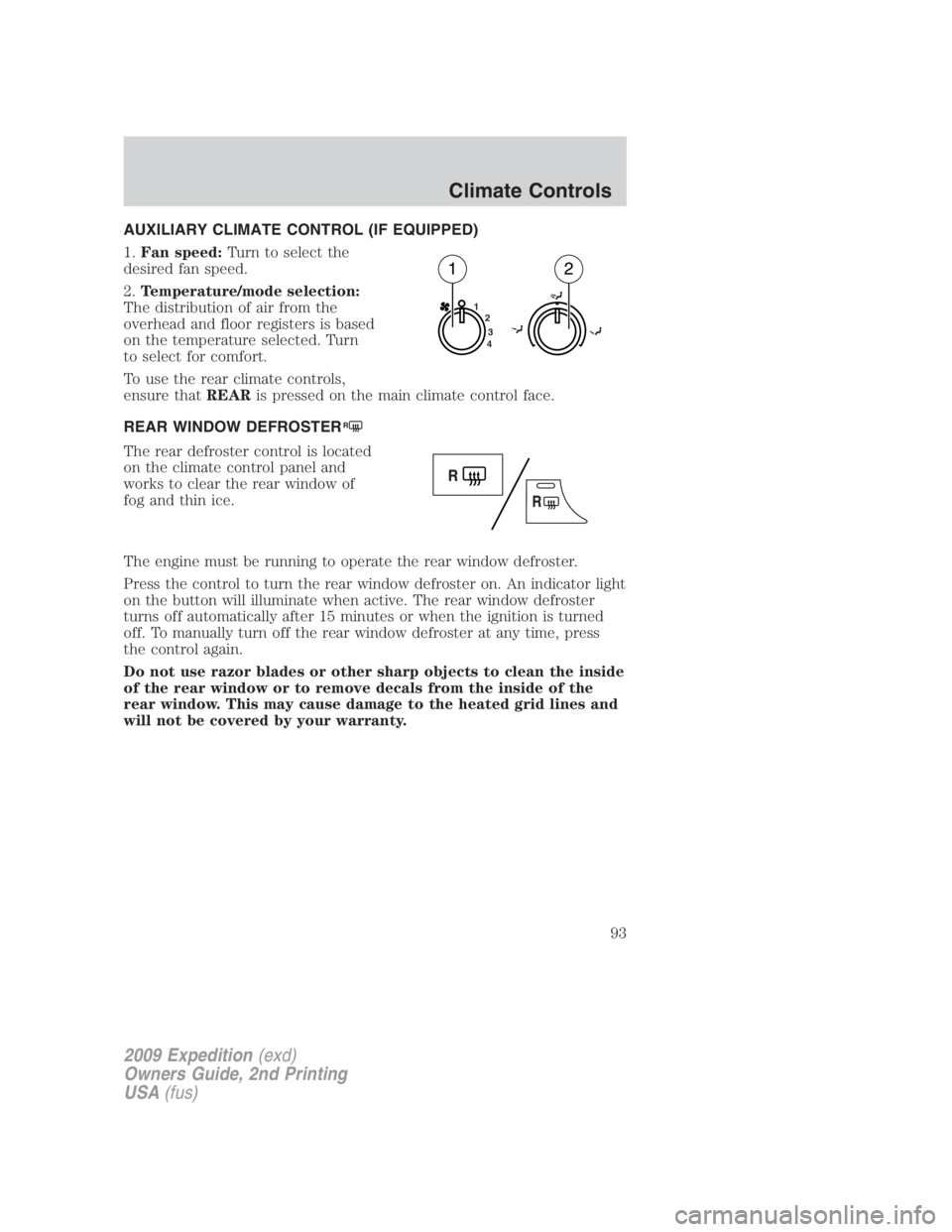
AUXILIARY CLIMATE CONTROL (IF EQUIPPED)
1. Fan speed: Turn to select the
desired fan speed.
2. Temperature/mode selection:
The distribution of air from the
overhead and floor registers is based
on the temperature selected. Turn
to select for comfort.
To use the rear climate controls,
ensure that REAR is pressed on the main climate control face.
REAR WINDOW DEFROSTER R
The rear defroster control is located
on the climate control panel and
works to clear the rear window of
fog and thin ice.
The engine must be running to operate the rear window defroster.
Press the control to turn the rear window defroster on. An indicator light
on the button will illuminate when active. The rear window defroster
turns off automatically after 15 minutes or when the ignition is turned
off. To manually turn off the rear window defroster at any time, press
the control again.
Do not use razor blades or other sharp objects to clean the inside
of the rear window or to remove decals from the inside of the
rear window. This may cause damage to the heated grid lines and
will not be covered by your warranty. 1
2
3
4
1 2
2009 Expedition (exd)
Owners Guide, 2nd Printing
USA (fus) Climate Controls
93
Page 110 of 415
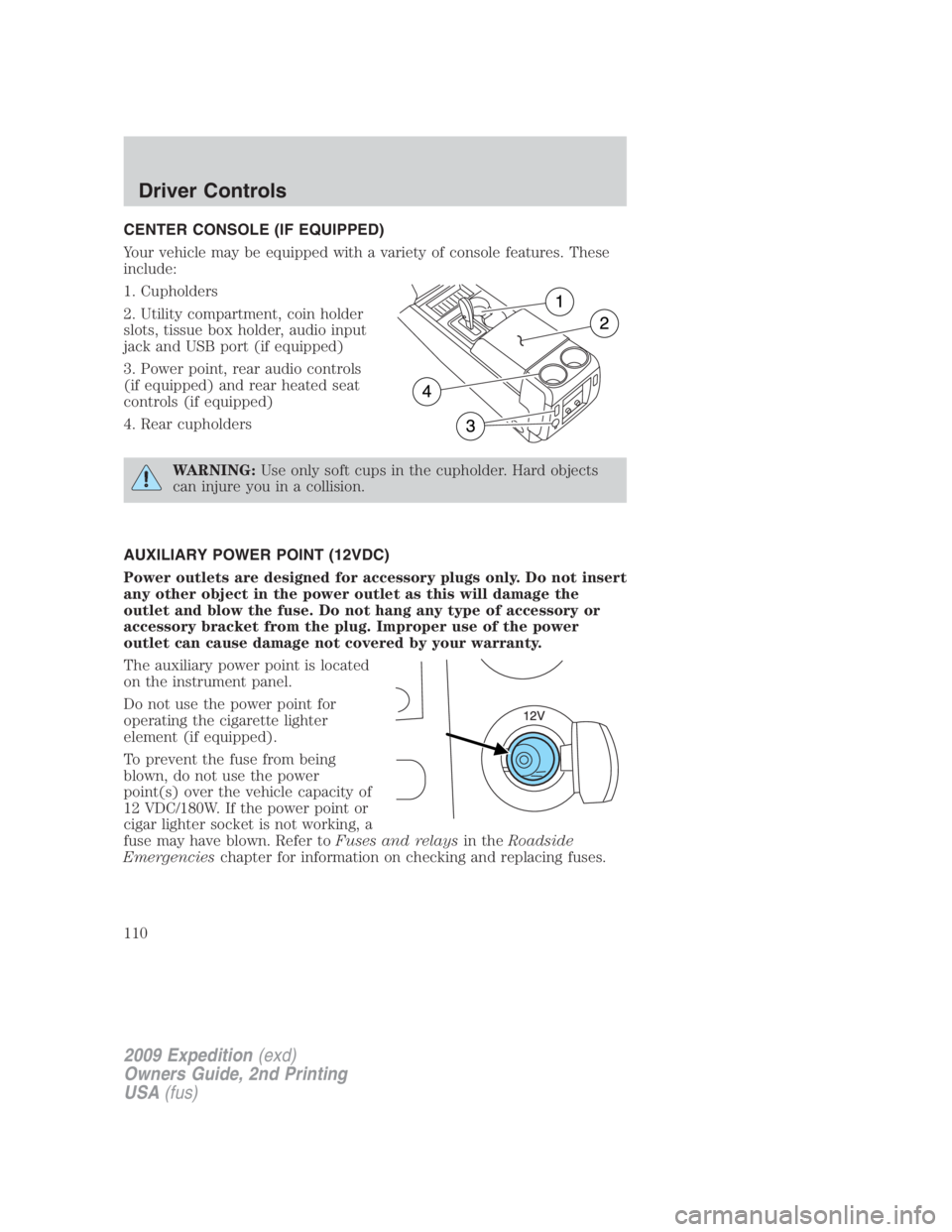
CENTER CONSOLE (IF EQUIPPED)
Your vehicle may be equipped with a variety of console features. These
include:
1. Cupholders
2. Utility compartment, coin holder
slots, tissue box holder, audio input
jack and USB port (if equipped)
3. Power point, rear audio controls
(if equipped) and rear heated seat
controls (if equipped)
4. Rear cupholders
WARNING: Use only soft cups in the cupholder. Hard objects
can injure you in a collision.
AUXILIARY POWER POINT (12VDC)
Power outlets are designed for accessory plugs only. Do not insert
any other object in the power outlet as this will damage the
outlet and blow the fuse. Do not hang any type of accessory or
accessory bracket from the plug. Improper use of the power
outlet can cause damage not covered by your warranty.
The auxiliary power point is located
on the instrument panel.
Do not use the power point for
operating the cigarette lighter
element (if equipped).
To prevent the fuse from being
blown, do not use the power
point(s) over the vehicle capacity of
12 VDC/180W. If the power point or
cigar lighter socket is not working, a
fuse may have blown. Refer to Fuses and relays in the Roadside
Emergencies chapter for information on checking and replacing fuses.
2009 Expedition (exd)
Owners Guide, 2nd Printing
USA (fus)Driver Controls
110
Page 111 of 415
To have full capacity usage of your power point, the engine is required to
be running to avoid unintentional discharge of the battery. To prevent
the battery from being discharged:
• do not use the power point longer than necessary when the engine is
not running,
• do not leave battery chargers, video game adapters, computers and
other devices plugged in overnight or when the vehicle is parked for
extended periods.
Always keep the power point caps closed when not being used.
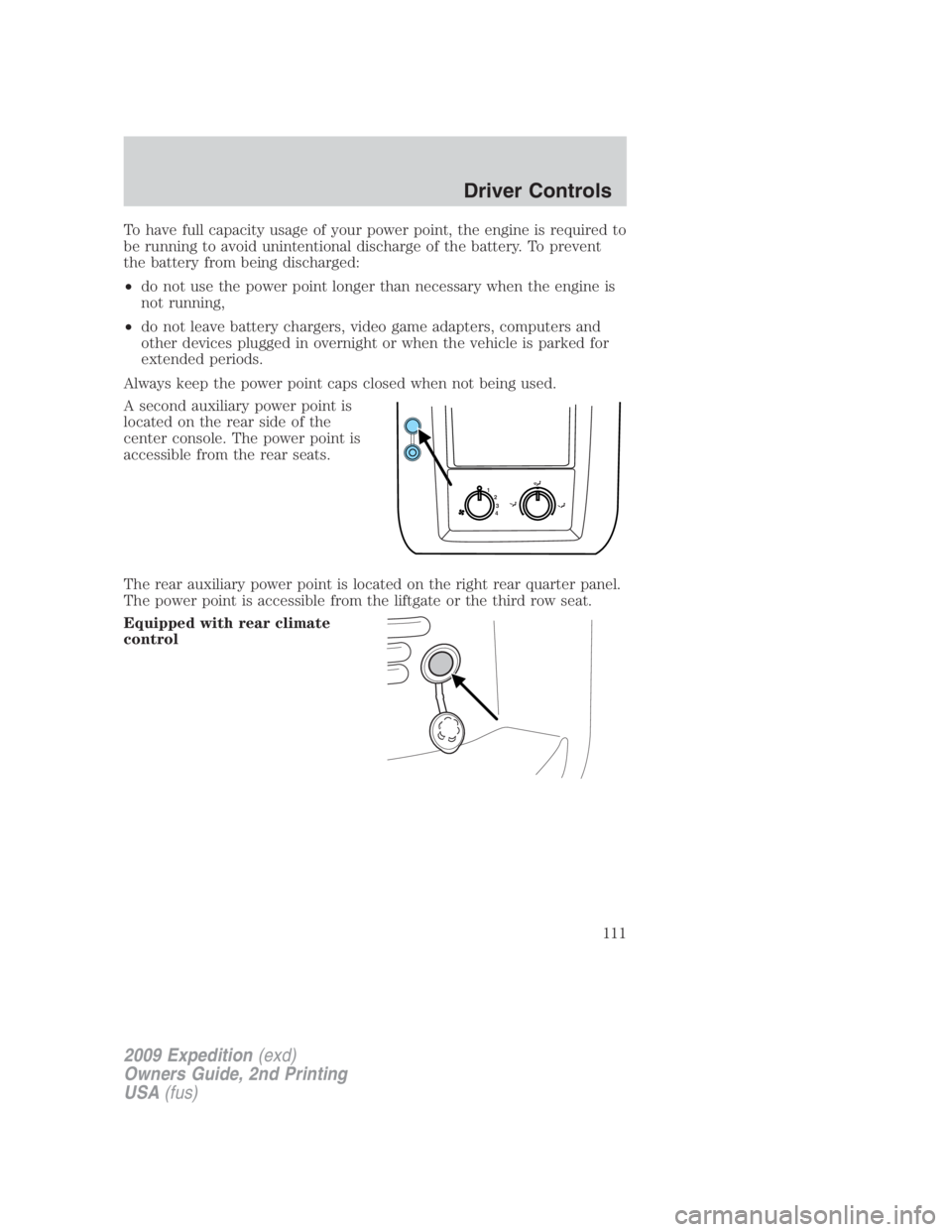
A second auxiliary power point is
located on the rear side of the
center console. The power point is
accessible from the rear seats.
The rear auxiliary power point is located on the right rear quarter panel.
The power point is accessible from the liftgate or the third row seat.
Equipped with rear climate
control 1
2
3
4
2009 Expedition (exd)
Owners Guide, 2nd Printing
USA (fus) Driver Controls
111
Page 123 of 415
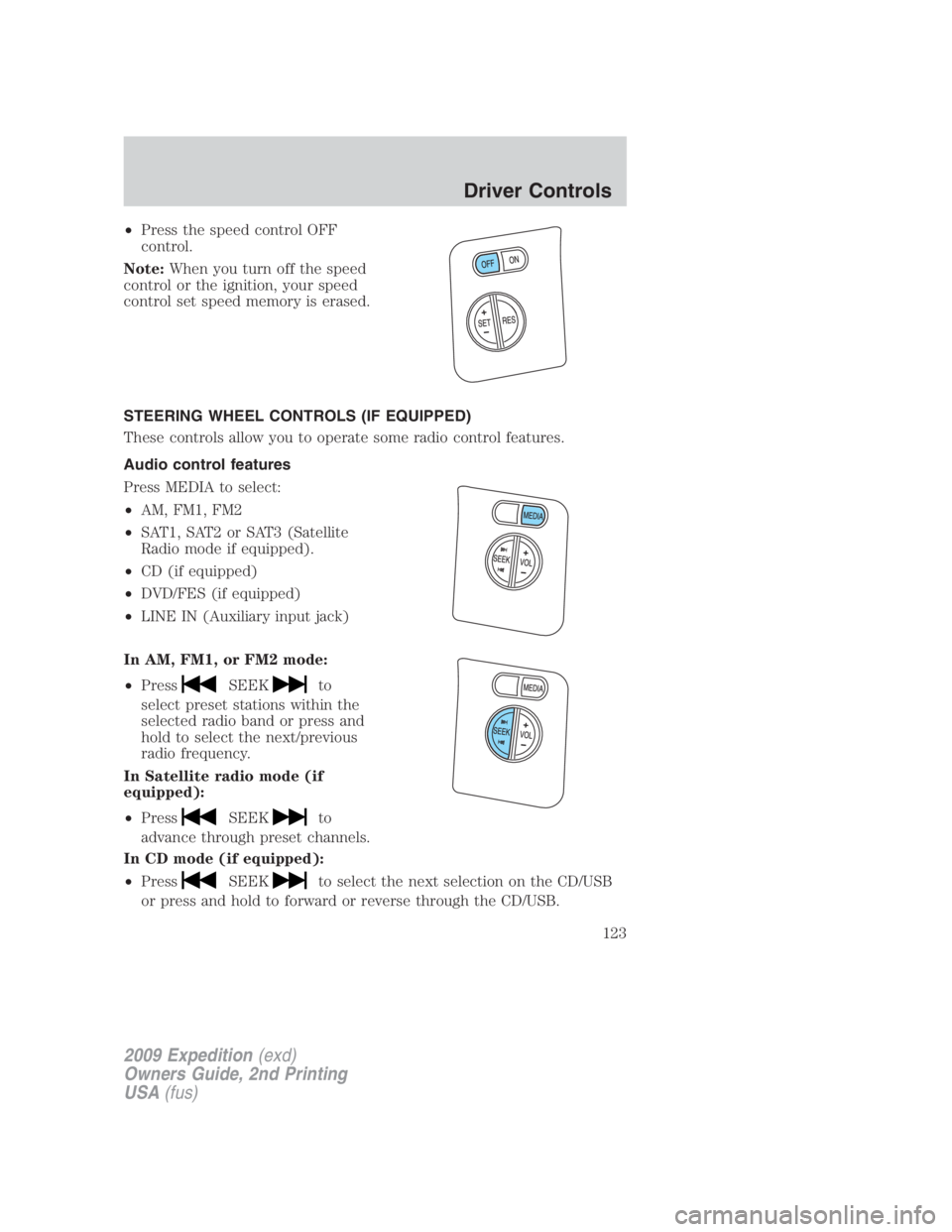
• Press the speed control OFF
control.
Note: When you turn off the speed
control or the ignition, your speed
control set speed memory is erased.
STEERING WHEEL CONTROLS (IF EQUIPPED)
These controls allow you to operate some radio control features.
Audio control features
Press MEDIA to select:
• AM, FM1, FM2
• SAT1, SAT2 or SAT3 (Satellite
Radio mode if equipped).
• CD (if equipped)
• DVD/FES (if equipped)
• LINE IN (Auxiliary input jack)
In AM, FM1, or FM2 mode:
• Press SEEK to
select preset stations within the
selected radio band or press and
hold to select the next/previous
radio frequency.
In Satellite radio mode (if
equipped):
• Press SEEK to
advance through preset channels.
In CD mode (if equipped):
• Press SEEK to select the next selection on the CD/USB
or press and hold to forward or reverse through the CD/USB.
2009 Expedition (exd)
Owners Guide, 2nd Printing
USA (fus) Driver Controls
123
Page 325 of 415
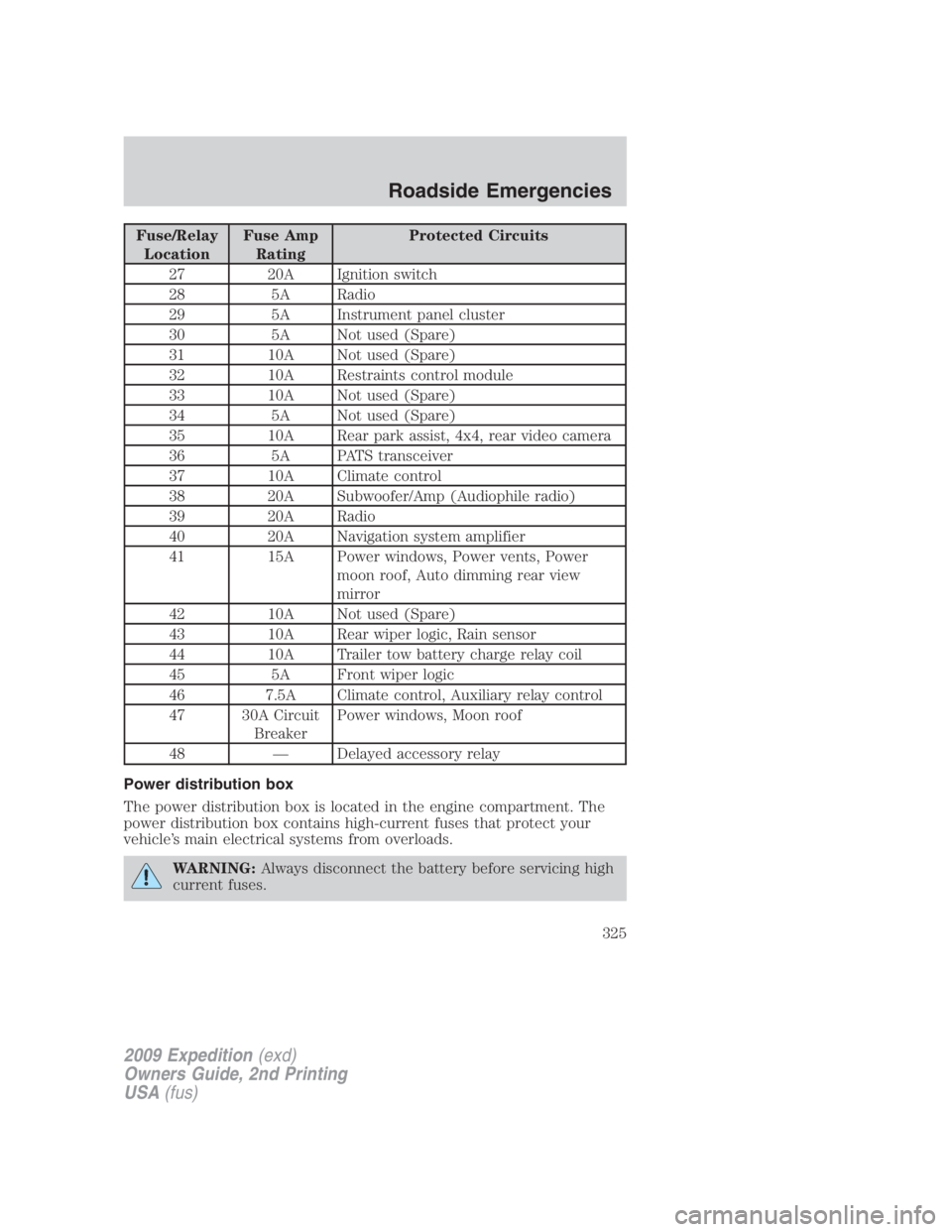
Fuse/Relay
Location Fuse Amp
Rating Protected Circuits
27 20A Ignition switch
28 5A Radio
29 5A Instrument panel cluster
30 5A Not used (Spare)
31 10A Not used (Spare)
32 10A Restraints control module
33 10A Not used (Spare)
34 5A Not used (Spare)
35 10A Rear park assist, 4x4, rear video camera
36 5A PATS transceiver
37 10A Climate control
38 20A Subwoofer/Amp (Audiophile radio)
39 20A Radio
40 20A Navigation system amplifier
41 15A Power windows, Power vents, Power
moon roof, Auto dimming rear view
mirror
42 10A Not used (Spare)
43 10A Rear wiper logic, Rain sensor
44 10A Trailer tow battery charge relay coil
45 5A Front wiper logic
46 7.5A Climate control, Auxiliary relay control
47 30A Circuit
Breaker Power windows, Moon roof
48 — Delayed accessory relay
Power distribution box
The power distribution box is located in the engine compartment. The
power distribution box contains high-current fuses that protect your
vehicle’s main electrical systems from overloads.
WARNING: Always disconnect the battery before servicing high
current fuses.
2009 Expedition (exd)
Owners Guide, 2nd Printing
USA (fus) Roadside Emergencies
325
Page 327 of 415
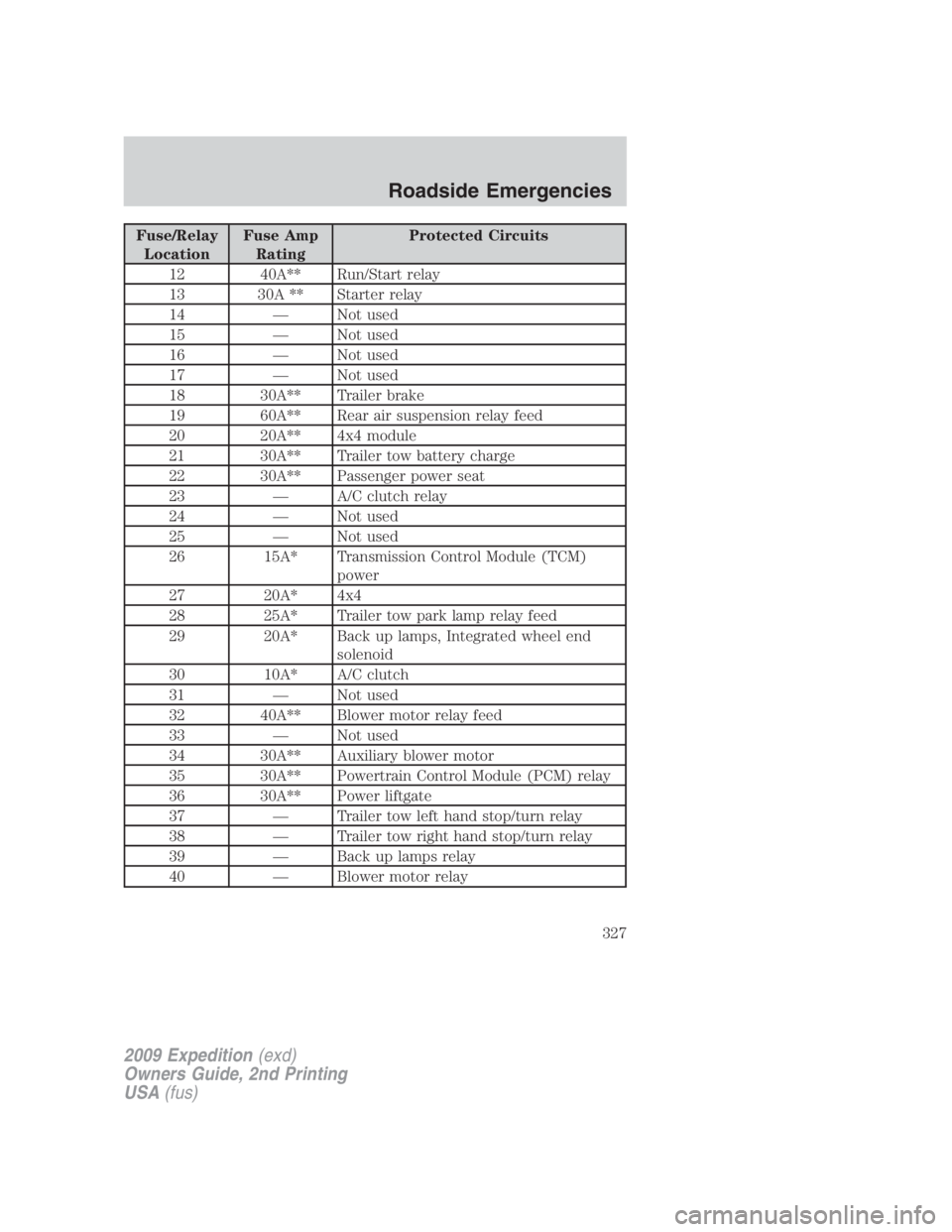
Fuse/Relay
Location Fuse Amp
Rating Protected Circuits
12 40A** Run/Start relay
13 30A ** Starter relay
14 — Not used
15 — Not used
16 — Not used
17 — Not used
18 30A** Trailer brake
19 60A** Rear air suspension relay feed
20 20A** 4x4 module
21 30A** Trailer tow battery charge
22 30A** Passenger power seat
23 — A/C clutch relay
24 — Not used
25 — Not used
26 15A* Transmission Control Module (TCM)
power
27 20A* 4x4
28 25A* Trailer tow park lamp relay feed
29 20A* Back up lamps, Integrated wheel end
solenoid
30 10A* A/C clutch
31 — Not used
32 40A** Blower motor relay feed
33 — Not used
34 30A** Auxiliary blower motor
35 30A** Powertrain Control Module (PCM) relay
36 30A** Power liftgate
37 — Trailer tow left hand stop/turn relay
38 — Trailer tow right hand stop/turn relay
39 — Back up lamps relay
40 — Blower motor relay
2009 Expedition (exd)
Owners Guide, 2nd Printing
USA (fus) Roadside Emergencies
327
Page 328 of 415
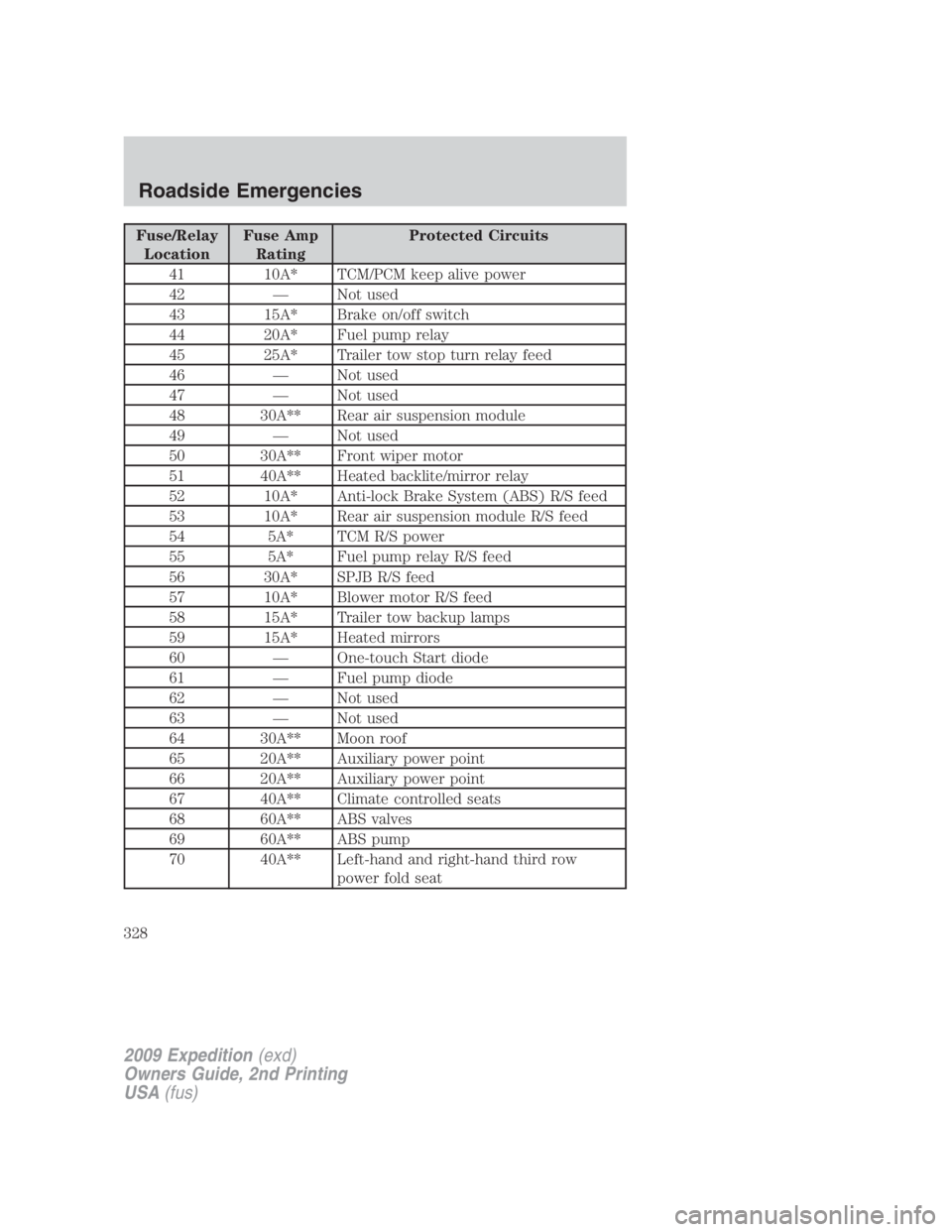
Fuse/Relay
Location Fuse Amp
Rating Protected Circuits
41 10A* TCM/PCM keep alive power
42 — Not used
43 15A* Brake on/off switch
44 20A* Fuel pump relay
45 25A* Trailer tow stop turn relay feed
46 — Not used
47 — Not used
48 30A** Rear air suspension module
49 — Not used
50 30A** Front wiper motor
51 40A** Heated backlite/mirror relay
52 10A* Anti-lock Brake System (ABS) R/S feed
53 10A* Rear air suspension module R/S feed
54 5A* TCM R/S power
55 5A* Fuel pump relay R/S feed
56 30A* SPJB R/S feed
57 10A* Blower motor R/S feed
58 15A* Trailer tow backup lamps
59 15A* Heated mirrors
60 — One-touch Start diode
61 — Fuel pump diode
62 — Not used
63 — Not used
64 30A** Moon roof
65 20A** Auxiliary power point
66 20A** Auxiliary power point
67 40A** Climate controlled seats
68 60A** ABS valves
69 60A** ABS pump
70 40A** Left-hand and right-hand third row
power fold seat
2009 Expedition (exd)
Owners Guide, 2nd Printing
USA (fus)Roadside Emergencies
328
Page 329 of 415
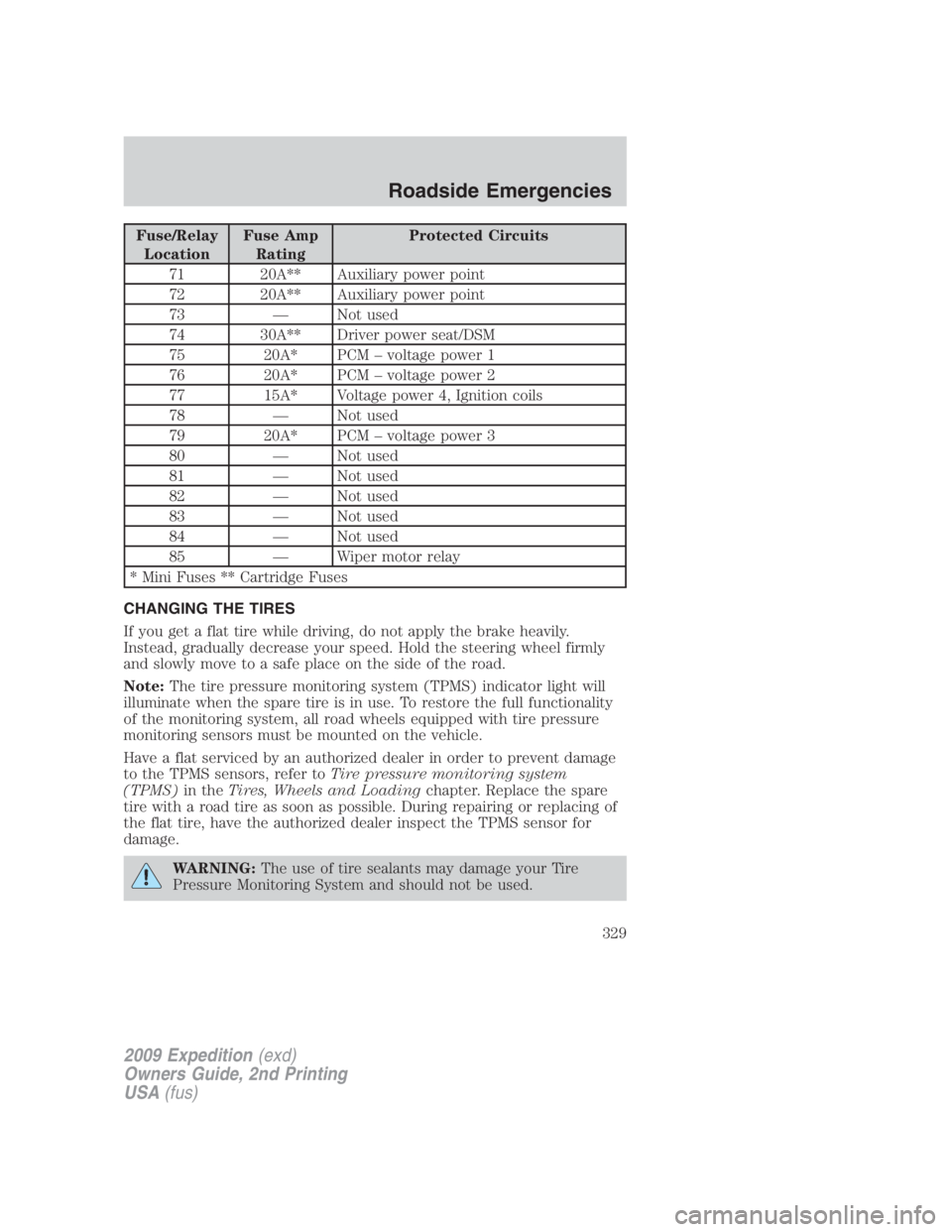
Fuse/Relay
Location Fuse Amp
Rating Protected Circuits
71 20A** Auxiliary power point
72 20A** Auxiliary power point
73 — Not used
74 30A** Driver power seat/DSM
75 20A* PCM – voltage power 1
76 20A* PCM – voltage power 2
77 15A* Voltage power 4, Ignition coils
78 — Not used
79 20A* PCM – voltage power 3
80 — Not used
81 — Not used
82 — Not used
83 — Not used
84 — Not used
85 — Wiper motor relay
* Mini Fuses ** Cartridge Fuses
CHANGING THE TIRES
If you get a flat tire while driving, do not apply the brake heavily.
Instead, gradually decrease your speed. Hold the steering wheel firmly
and slowly move to a safe place on the side of the road.
Note: The tire pressure monitoring system (TPMS) indicator light will
illuminate when the spare tire is in use. To restore the full functionality
of the monitoring system, all road wheels equipped with tire pressure
monitoring sensors must be mounted on the vehicle.
Have a flat serviced by an authorized dealer in order to prevent damage
to the TPMS sensors, refer to Tire pressure monitoring system
(TPMS) in the Tires, Wheels and Loading chapter. Replace the spare
tire with a road tire as soon as possible. During repairing or replacing of
the flat tire, have the authorized dealer inspect the TPMS sensor for
damage.
WARNING: The use of tire sealants may damage your Tire
Pressure Monitoring System and should not be used.
2009 Expedition (exd)
Owners Guide, 2nd Printing
USA (fus) Roadside Emergencies
329
Page 365 of 415
Working with the engine on
1. Set the parking brake and shift to P (Park).
2. Block the wheels.
WARNING: To reduce the risk of vehicle damage and/or
personal burn injuries, do not start your engine with the air
cleaner removed and do not remove it while the engine is running.
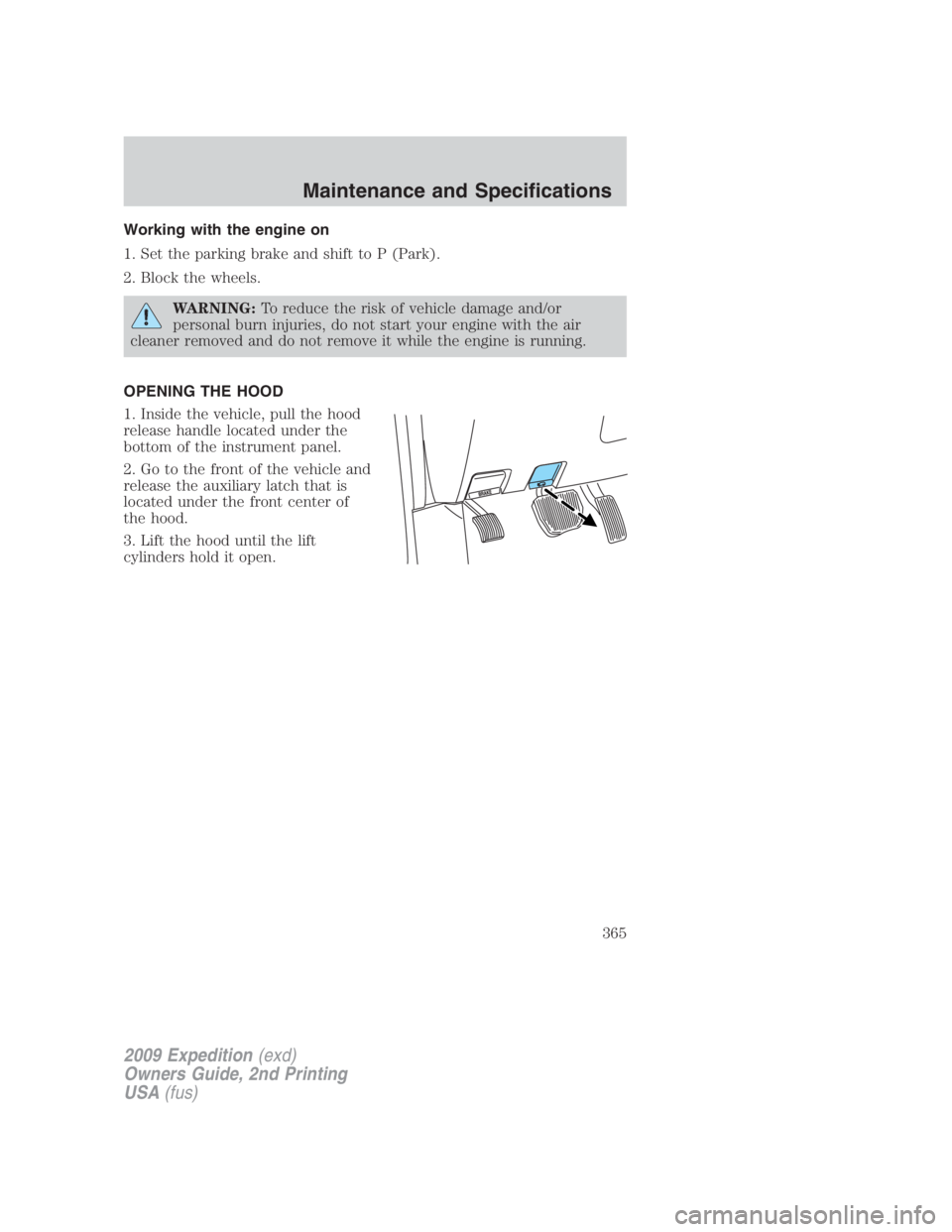
OPENING THE HOOD
1. Inside the vehicle, pull the hood
release handle located under the
bottom of the instrument panel.
2. Go to the front of the vehicle and
release the auxiliary latch that is
located under the front center of
the hood.
3. Lift the hood until the lift
cylinders hold it open.
2009 Expedition (exd)
Owners Guide, 2nd Printing
USA (fus) Maintenance and Specifications
365