sensor FORD EXPEDITION EL 2016 User Guide
[x] Cancel search | Manufacturer: FORD, Model Year: 2016, Model line: EXPEDITION EL, Model: FORD EXPEDITION EL 2016Pages: 421, PDF Size: 7.39 MB
Page 85 of 421
Heated Exterior Mirrors
See Heated Windows and Mirrors (page121).
Memory Mirrors (If Equipped)
You can save and recall the mirrorpositions through the memory function.See Memory Function (page 126).
Auto-Dimming Feature
The driver exterior mirror automaticallydims with the auto-dimming interior mirror.
Signal Indicator Mirrors (If Equipped)
The outer portion of the appropriate mirrorhousing blinks when you switch on thedirection indicator.
Blind Spot Monitor (If Equipped)
See Blind Spot Information System(page 188).
INTERIOR MIRROR
WARNING
Do not adjust the mirror when yourvehicle is moving.
Note:Do not clean the housing or glass ofany mirror with harsh abrasives, fuel or otherpetroleum or ammonia-based cleaningproducts.
You can adjust the interior mirror to yourpreference. Some mirrors also have asecond pivot point. This lets you move themirror head up or down and from side toside.
Auto-Dimming Mirror
Note:Do not block the sensors on the frontand back of the mirror. Mirror performancemay be affected. A rear center passenger orraised rear center head restraint may alsoblock light from reaching the sensor.
The mirror will dim automatically to reduceglare when bright lights are detected frombehind your vehicle. It will automaticallyreturn to normal reflection when you selectreverse gear to make sure you have a clearview when backing up.
CHILDMINDER MIRROR
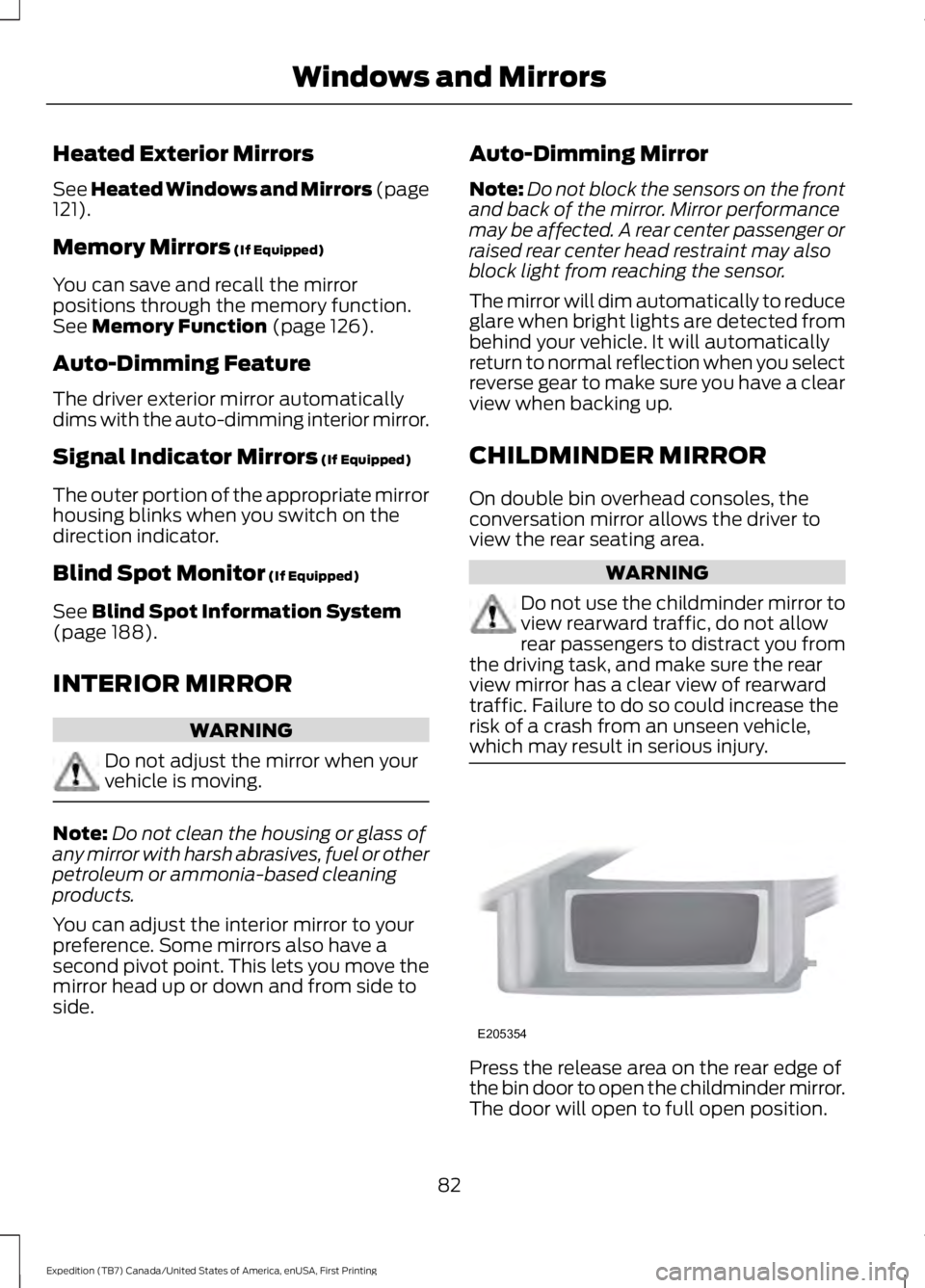
On double bin overhead consoles, theconversation mirror allows the driver toview the rear seating area.
WARNING
Do not use the childminder mirror toview rearward traffic, do not allowrear passengers to distract you fromthe driving task, and make sure the rearview mirror has a clear view of rearwardtraffic. Failure to do so could increase therisk of a crash from an unseen vehicle,which may result in serious injury.
Press the release area on the rear edge ofthe bin door to open the childminder mirror.The door will open to full open position.
82
Expedition (TB7) Canada/United States of America, enUSA, First Printing
Windows and MirrorsE205354
Page 108 of 421
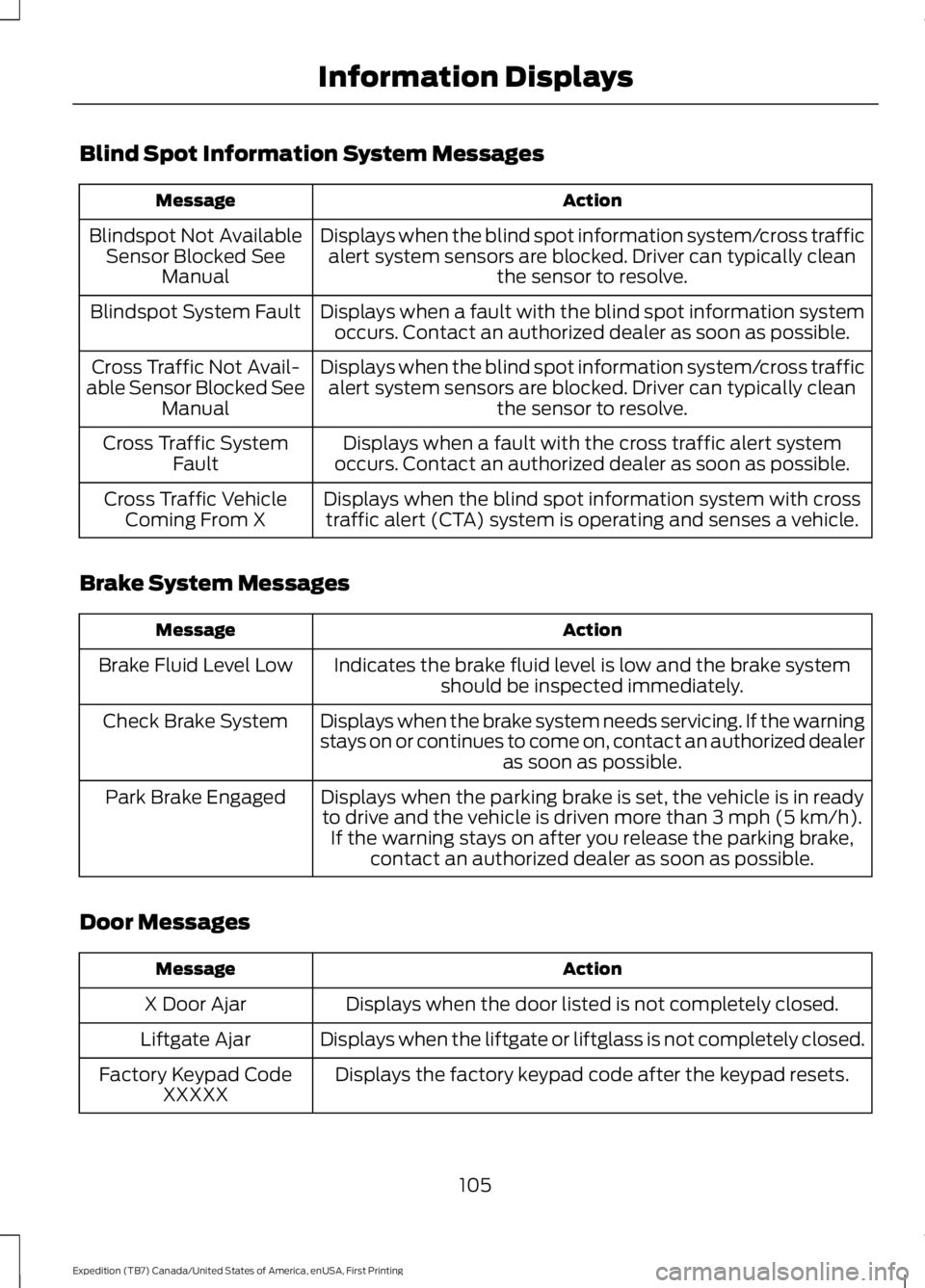
Blind Spot Information System Messages
ActionMessage
Displays when the blind spot information system/cross trafficalert system sensors are blocked. Driver can typically cleanthe sensor to resolve.
Blindspot Not AvailableSensor Blocked SeeManual
Displays when a fault with the blind spot information systemoccurs. Contact an authorized dealer as soon as possible.Blindspot System Fault
Displays when the blind spot information system/cross trafficalert system sensors are blocked. Driver can typically cleanthe sensor to resolve.
Cross Traffic Not Avail-able Sensor Blocked SeeManual
Displays when a fault with the cross traffic alert systemoccurs. Contact an authorized dealer as soon as possible.Cross Traffic SystemFault
Displays when the blind spot information system with crosstraffic alert (CTA) system is operating and senses a vehicle.Cross Traffic VehicleComing From X
Brake System Messages
ActionMessage
Indicates the brake fluid level is low and the brake systemshould be inspected immediately.Brake Fluid Level Low
Displays when the brake system needs servicing. If the warningstays on or continues to come on, contact an authorized dealeras soon as possible.
Check Brake System
Displays when the parking brake is set, the vehicle is in readyto drive and the vehicle is driven more than 3 mph (5 km/h).If the warning stays on after you release the parking brake,contact an authorized dealer as soon as possible.
Park Brake Engaged
Door Messages
ActionMessage
Displays when the door listed is not completely closed.X Door Ajar
Displays when the liftgate or liftglass is not completely closed.Liftgate Ajar
Displays the factory keypad code after the keypad resets.Factory Keypad CodeXXXXX
105
Expedition (TB7) Canada/United States of America, enUSA, First Printing
Information Displays
Page 113 of 421
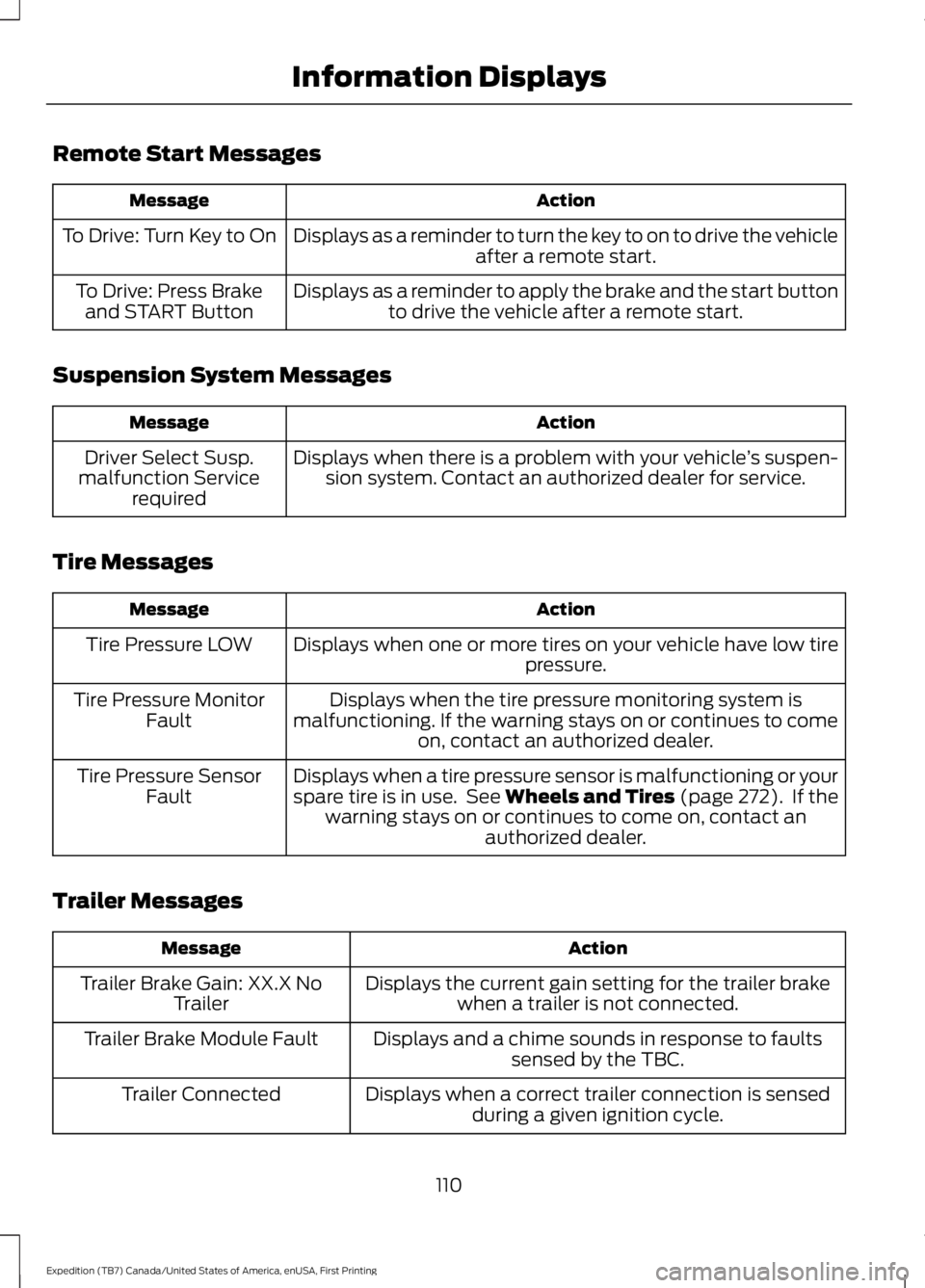
Remote Start Messages
ActionMessage
Displays as a reminder to turn the key to on to drive the vehicleafter a remote start.To Drive: Turn Key to On
Displays as a reminder to apply the brake and the start buttonto drive the vehicle after a remote start.To Drive: Press Brakeand START Button
Suspension System Messages
ActionMessage
Displays when there is a problem with your vehicle’s suspen-sion system. Contact an authorized dealer for service.Driver Select Susp.malfunction Servicerequired
Tire Messages
ActionMessage
Displays when one or more tires on your vehicle have low tirepressure.Tire Pressure LOW
Displays when the tire pressure monitoring system ismalfunctioning. If the warning stays on or continues to comeon, contact an authorized dealer.
Tire Pressure MonitorFault
Displays when a tire pressure sensor is malfunctioning or yourspare tire is in use. See Wheels and Tires (page 272). If thewarning stays on or continues to come on, contact anauthorized dealer.
Tire Pressure SensorFault
Trailer Messages
ActionMessage
Displays the current gain setting for the trailer brakewhen a trailer is not connected.Trailer Brake Gain: XX.X NoTrailer
Displays and a chime sounds in response to faultssensed by the TBC.Trailer Brake Module Fault
Displays when a correct trailer connection is sensedduring a given ignition cycle.Trailer Connected
110
Expedition (TB7) Canada/United States of America, enUSA, First Printing
Information Displays
Page 146 of 421
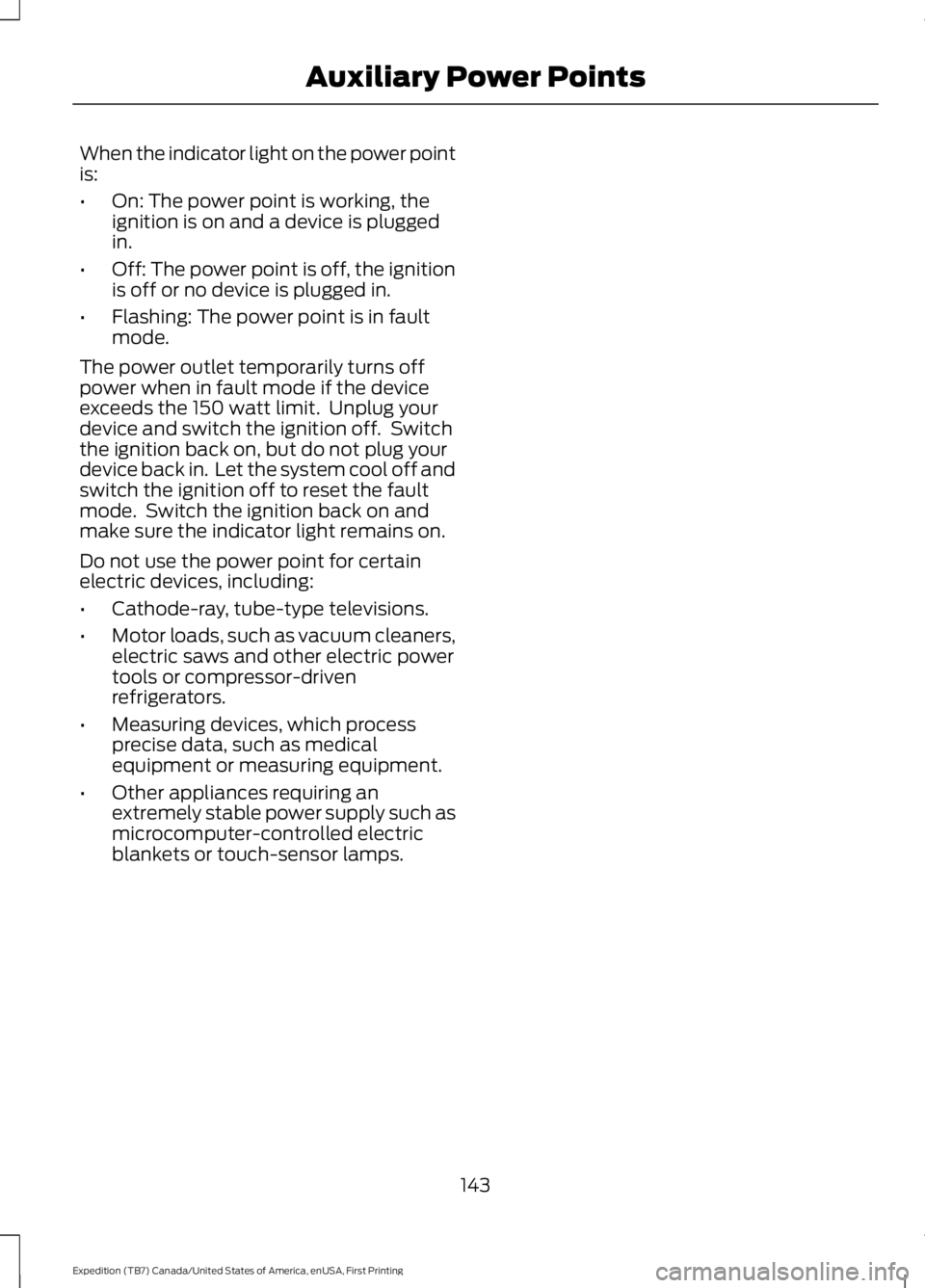
When the indicator light on the power pointis:
•On: The power point is working, theignition is on and a device is pluggedin.
•Off: The power point is off, the ignitionis off or no device is plugged in.
•Flashing: The power point is in faultmode.
The power outlet temporarily turns offpower when in fault mode if the deviceexceeds the 150 watt limit. Unplug yourdevice and switch the ignition off. Switchthe ignition back on, but do not plug yourdevice back in. Let the system cool off andswitch the ignition off to reset the faultmode. Switch the ignition back on andmake sure the indicator light remains on.
Do not use the power point for certainelectric devices, including:
•Cathode-ray, tube-type televisions.
•Motor loads, such as vacuum cleaners,electric saws and other electric powertools or compressor-drivenrefrigerators.
•Measuring devices, which processprecise data, such as medicalequipment or measuring equipment.
•Other appliances requiring anextremely stable power supply such asmicrocomputer-controlled electricblankets or touch-sensor lamps.
143
Expedition (TB7) Canada/United States of America, enUSA, First Printing
Auxiliary Power Points
Page 177 of 421
Using Hill Start Assist
1. Bring your vehicle to a completestandstill. Keep the brake pedalpressed and select an uphill gear (forexample, first (1) when facing uphill orreverse (R) when facing downhill).
2. If the sensors detect that your vehicleis on a slope, the system will activateautomatically.
3. When you remove your foot from thebrake pedal, your vehicle will remainon the slope without rolling away forabout two or three seconds. This holdtime will automatically be extended ifyou are in the process of driving off.
4. Drive off in the normal manner. Thebrakes will release automatically.
Switching the System On and Off
You can switch this feature on or off if yourvehicle is equipped with a manualtransmission and an information display.See General Information (page 92). Thesystem remembers the last setting whenyou start your vehicle.
If your vehicle is not equipped with amanual transmission and an informationdisplay, you cannot turn the system on oroff. When you switch the ignition on, thesystem automatically turns on.
174
Expedition (TB7) Canada/United States of America, enUSA, First Printing
Brakes
Page 179 of 421
PRINCIPLE OF OPERATION
WARNINGS
Vehicle modifications involvingbraking system, aftermarket roofracks, suspension, steering system,tire construction and wheel and tire sizemay change the handling characteristicsof your vehicle and may adversely affectthe performance of the electronic stabilitycontrol system. In addition, installing anystereo loudspeakers may interfere withand adversely affect the electronic stabilitycontrol system. Install any aftermarketstereo loudspeaker as far as possible fromthe front center console, the tunnel, andthe front seats in order to minimize the riskof interfering with the electronic stabilitycontrol sensors. Reducing theeffectiveness of the electronic stabilitycontrol system could lead to an increasedrisk of loss of vehicle control, vehiclerollover, personal injury and death.
Remember that even advancedtechnology cannot defy the laws ofphysics. It’s always possible to losecontrol of a vehicle due to inappropriatedriver input for the conditions. Aggressivedriving on any road condition can causeyou to lose control of your vehicleincreasing the risk of personal injury orproperty damage. Activation of theelectronic stability control system is anindication that at least some of the tireshave exceeded their ability to grip the road;this could reduce the operator’s ability tocontrol the vehicle potentially resulting ina loss of vehicle control, vehicle rollover,personal injury and death. If your electronicstability control system activates, SLOWDOWN.
The system automatically turns on eachtime you switch the ignition on.
If a driving condition activates either thestability control or the traction controlsystem you may experience the followingconditions:
•The stability and traction control lightflashes.
•Your vehicle slows down.
•Reduced engine power.
•A vibration in the brake pedal.
•The brake pedal is stiffer than usual.
•If the driving condition is severe andyour foot is not on the brake, the brakepedal may move as the systemsapplies higher brake forces.
The stability control system has severalfeatures built into it to help you maintaincontrol of your vehicle:
Electronic Stability Control
The system enhances your vehicle’s abilityto prevent skids or lateral slides byapplying brakes to one or more of thewheels individually and, if necessary,reducing engine power.
Roll Stability Control
The system enhances your vehicle’s abilityto prevent rollovers by detecting yourvehicle’s roll motion and the rate at whichit changes by applying the brakes to oneor more wheels individually.
Traction Control
The system enhances your vehicle’s abilityto maintain traction of the wheels bydetecting and controlling wheel spin. SeeUsing Traction Control (page 175).
176
Expedition (TB7) Canada/United States of America, enUSA, First Printing
Stability Control
Page 184 of 421
PRINCIPLE OF OPERATION
WARNINGS
To help avoid personal injury, pleaseread and understand the limitationsof the system as contained in thissection. Sensing is only an aid for some(generally large and fixed) objects whenmoving on a flat surface at parking speeds.Certain objects with surfaces that absorbultrasonic waves, surrounding vehicle'sparking aid systems, traffic controlsystems, fluorescent lamps, inclementweather, air brakes, and external motorsand fans may also affect the function ofthe sensing system; this may includereduced performance or a false activation.
To help avoid personal injury, alwaysuse caution when in reverse (R) andwhen using the sensing system.
This system is not designed toprevent contact with small or movingobjects. The system is designed toprovide a warning to assist the driver indetecting large stationary objects to avoiddamaging your vehicle. The system maynot detect smaller objects, particularlythose close to the ground.
Certain add-on devices such as largetrailer hitches, bike or surfboard racksand any device that may block thenormal detection zone of the system, maycreate false beeps.
Note:Keep the sensors, located on thebumper or fascia, free from snow, ice andlarge accumulations of dirt. If the sensorsare covered, the system’s accuracy can beaffected. Do not clean the sensors withsharp objects.
Note:If your vehicle sustains damage tothe bumper or fascia, leaving it misalignedor bent, the sensing zone may be alteredcausing inaccurate measurement ofobstacles or false alarms.
Note:The sensing system cannot be turnedoff when a MyKey is present. See Principleof Operation (page 46).
Note:If you attach certain add-on devicessuch as a trailer or bike rack, the rear sensingsystem may detect that add-on device andtherefore provide warnings. It is suggestedthat you disable the rear sensing systemwhen you attach an add-on device to yourvehicle to prevent these warnings.
The sensing system warns the driver ofobstacles within a certain range of yourvehicle. The system turns on automaticallywhenever you switch the ignition on.
The system can be switched off throughthe information display menu or from thepop-up message that appears once youshift the transmission into reverse (R). SeeGeneral Information (page 92).
Note:On vehicles with front parking aid youcan use the parking aid switch to switch thesystem off.
If a fault is present in the system, a warningmessage appears in the informationdisplay. See Information Messages(page 103).
REAR PARKING AID
The rear sensors are only active when thetransmission is in reverse (R). As yourvehicle moves closer to the obstacle, therate of the audible warning increases.When the obstacle is less than 10 in(25 cm) away, the warning soundscontinuously. If the system detects astationary or receding object farther than10 in (25 cm) from the corners of thebumper, the tone sounds for only threeseconds. Once the system detects anobject approaching, the warning soundsagain.
181
Expedition (TB7) Canada/United States of America, enUSA, First Printing
Parking Aids
Page 185 of 421
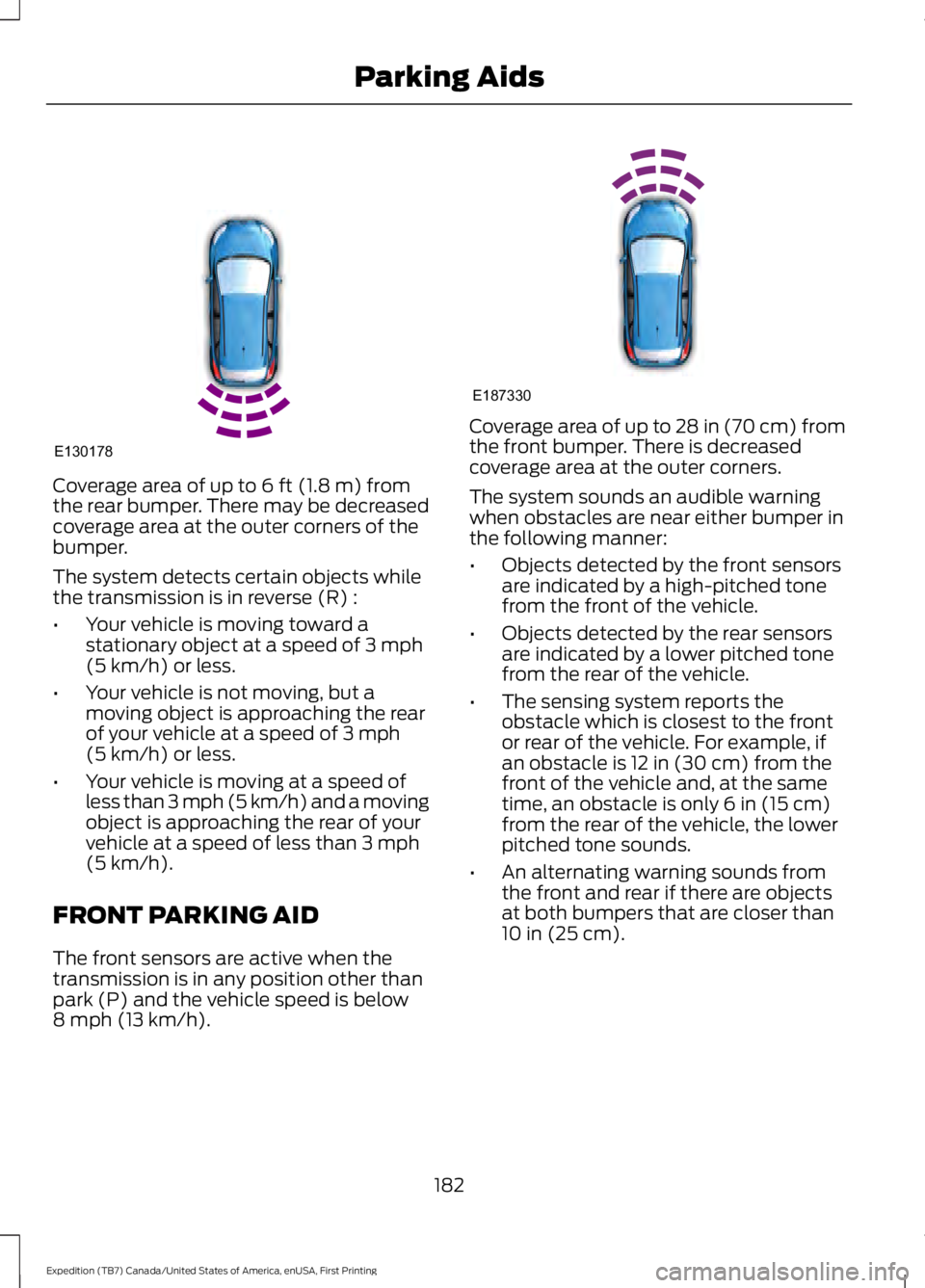
Coverage area of up to 6 ft (1.8 m) fromthe rear bumper. There may be decreasedcoverage area at the outer corners of thebumper.
The system detects certain objects whilethe transmission is in reverse (R) :
•Your vehicle is moving toward astationary object at a speed of 3 mph(5 km/h) or less.
•Your vehicle is not moving, but amoving object is approaching the rearof your vehicle at a speed of 3 mph(5 km/h) or less.
•Your vehicle is moving at a speed ofless than 3 mph (5 km/h) and a movingobject is approaching the rear of yourvehicle at a speed of less than 3 mph(5 km/h).
FRONT PARKING AID
The front sensors are active when thetransmission is in any position other thanpark (P) and the vehicle speed is below8 mph (13 km/h).
Coverage area of up to 28 in (70 cm) fromthe front bumper. There is decreasedcoverage area at the outer corners.
The system sounds an audible warningwhen obstacles are near either bumper inthe following manner:
•Objects detected by the front sensorsare indicated by a high-pitched tonefrom the front of the vehicle.
•Objects detected by the rear sensorsare indicated by a lower pitched tonefrom the rear of the vehicle.
•The sensing system reports theobstacle which is closest to the frontor rear of the vehicle. For example, ifan obstacle is 12 in (30 cm) from thefront of the vehicle and, at the sametime, an obstacle is only 6 in (15 cm)from the rear of the vehicle, the lowerpitched tone sounds.
•An alternating warning sounds fromthe front and rear if there are objectsat both bumpers that are closer than10 in (25 cm).
182
Expedition (TB7) Canada/United States of America, enUSA, First Printing
Parking AidsE130178 E187330
Page 192 of 421
The Blind Spot Information Systemilluminates an amber alert indicator in theoutside mirror on the side of your vehiclethe approaching vehicle is coming from.When the Blind Spot Information Systemis alerting on a vehicle and thecorresponding turn signal is ON, the BlindSpot Information System alert indicatorflashes as an increased warning level.
The alert indicator dims when the systemdetects nighttime darkness.
Note:The alert indicator flashes in case ofan alert and the turn signal is set to that sideat the same time.
System Sensor Blockage
WARNING
To help avoid injuries, NEVER use theBlind Spot Information System as areplacement for using the interiorand exterior mirrors or looking over yourshoulder before changing lanes. The BlindSpot Information System is not areplacement for careful driving.
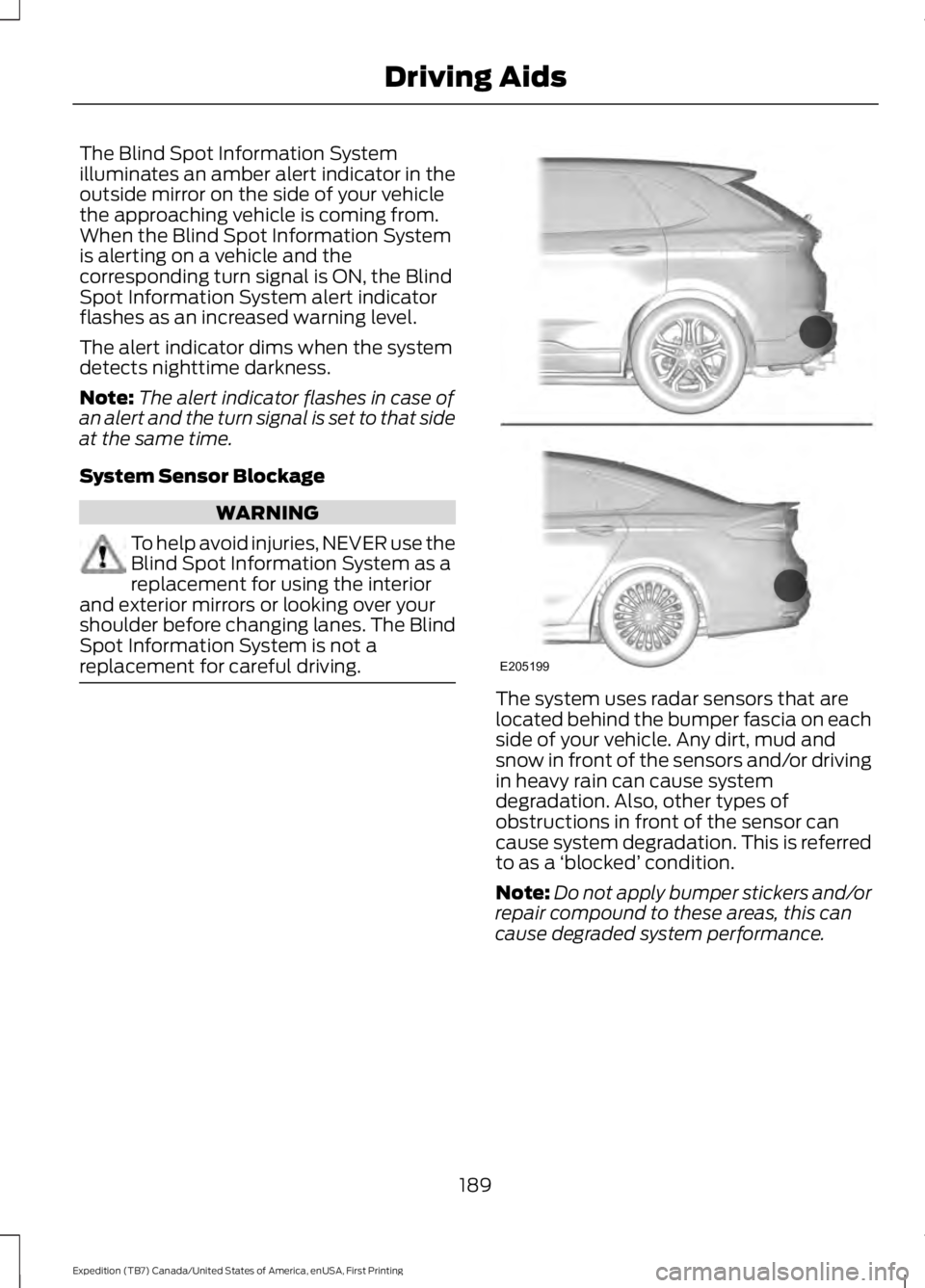
The system uses radar sensors that arelocated behind the bumper fascia on eachside of your vehicle. Any dirt, mud andsnow in front of the sensors and/or drivingin heavy rain can cause systemdegradation. Also, other types ofobstructions in front of the sensor cancause system degradation. This is referredto as a ‘blocked’ condition.
Note:Do not apply bumper stickers and/orrepair compound to these areas, this cancause degraded system performance.
189
Expedition (TB7) Canada/United States of America, enUSA, First Printing
Driving AidsE205199
Page 193 of 421
If the system detects a degradedperformance condition, a message warningof a blocked sensor will appear in theinformation display. Also the BLIS alertindicators will remain ON and BLIS will nolonger provide any vehicle warnings. Youcan clear the information display warningbut the alert indicators will remainilluminated.
A "blocked" condition can be cleared intwo ways:
•After the blockage in front of thesensors is removed or therainfall/snowfall rate decreases orstops, drive for a few minutes in trafficto allow the sensors to detect passingvehicles.
•By cycling the ignition from ON to OFFand then back ON.
Note:If your vehicle has a tow bar with afactory equipped trailer tow module and itis towing a trailer, the sensors willautomatically turn the Blind SpotInformation System off. If your vehicle hasa tow bar but no factory equipped trailertow module, it is recommended to turn theBlind Spot Information System offmanually. Operating the Blind SpotInformation System with a trailer attachedwill cause poor system performance.
System Errors
If the system senses a problem with theleft or right sensor, the telltale willilluminate and a message will appear inthe information display. See InformationMessages (page 103).
Switching the System Off and On
You can temporarily switch the Blind SpotInformation System off in the informationdisplay. See General Information (page92). When the Blind Spot InformationSystem switches off, you will not receivealerts and the information display showsa system off message. The telltale in thecluster also illuminates. When you switchthe Blind Spot Information System on oroff, the alert indicators flash twice.
Note:The Blind Spot Information Systemremembers the last selected on or offsetting.
You can also have the Blind SpotInformation System switched offpermanently at an authorized dealer. Onceswitched off permanently, the system canonly be switched back on at an authorizeddealer.
CROSS TRAFFIC ALERT
WARNING
To help avoid personal injury, NEVERuse the Cross Traffic Alert system asa replacement for using the interiorand exterior mirrors and looking over yourshoulder before backing out of a parkingspace. Cross Traffic Alert is not areplacement for careful driving.
Cross Traffic Alert is designed to warn youof vehicles approaching from the sideswhen the transmission is in reverse (R).
Using the System
Cross Traffic Alert turns on when you startthe engine and you shift into reverse (R).Once shifted out of reverse (R), CrossTraffic Alert turns off.
Note:Cross Traffic Alert only functionswhile your transmission is in reverse (R).
190
Expedition (TB7) Canada/United States of America, enUSA, First Printing
Driving Aids