warning FORD EXPEDITION EL 2017 Workshop Manual
[x] Cancel search | Manufacturer: FORD, Model Year: 2017, Model line: EXPEDITION EL, Model: FORD EXPEDITION EL 2017Pages: 500, PDF Size: 6.13 MB
Page 91 of 500
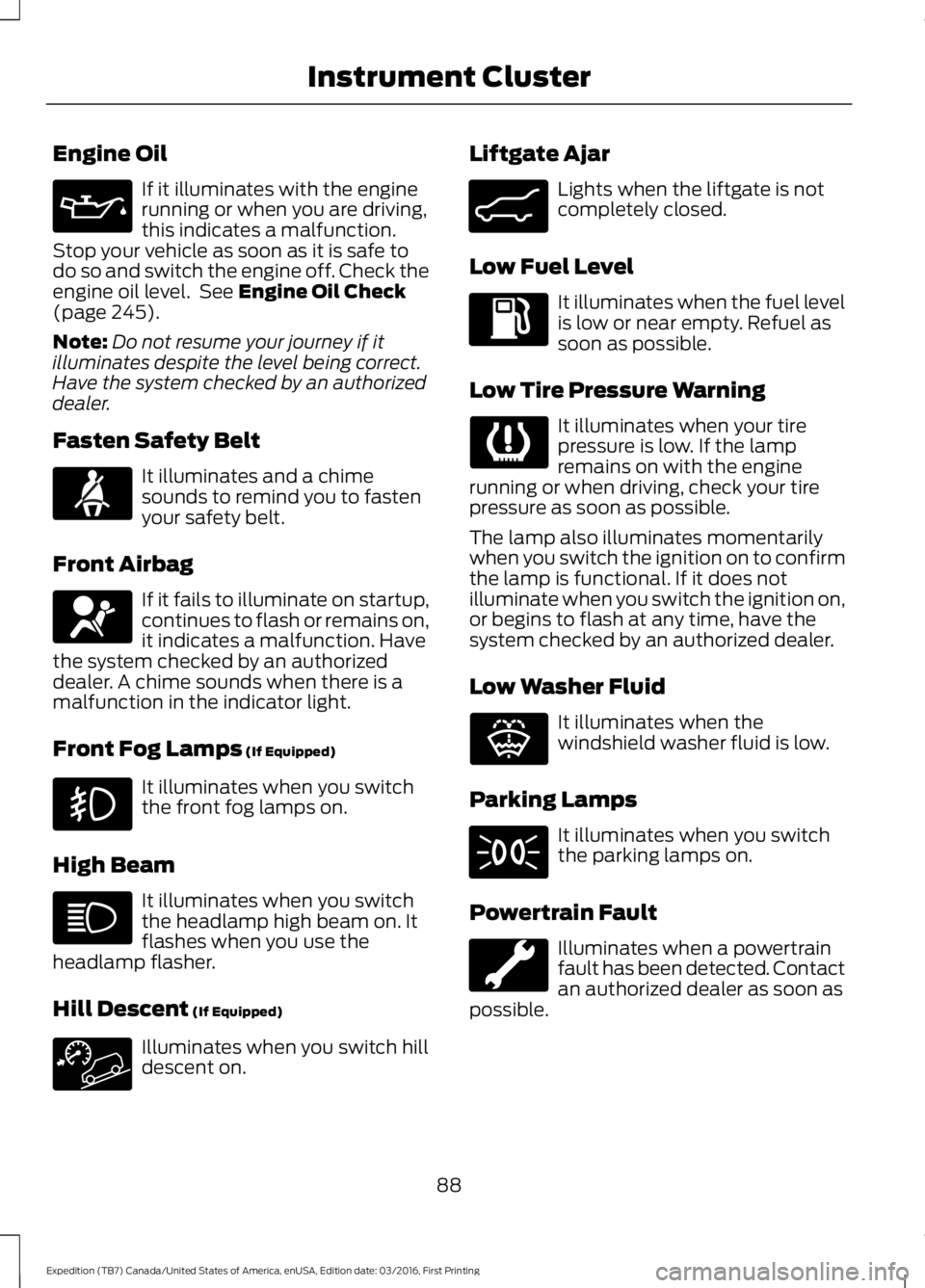
Engine Oil
If it illuminates with the enginerunning or when you are driving,this indicates a malfunction.Stop your vehicle as soon as it is safe todo so and switch the engine off. Check theengine oil level. See Engine Oil Check(page 245).
Note:Do not resume your journey if itilluminates despite the level being correct.Have the system checked by an authorizeddealer.
Fasten Safety Belt
It illuminates and a chimesounds to remind you to fastenyour safety belt.
Front Airbag
If it fails to illuminate on startup,continues to flash or remains on,it indicates a malfunction. Havethe system checked by an authorizeddealer. A chime sounds when there is amalfunction in the indicator light.
Front Fog Lamps (If Equipped)
It illuminates when you switchthe front fog lamps on.
High Beam
It illuminates when you switchthe headlamp high beam on. Itflashes when you use theheadlamp flasher.
Hill Descent (If Equipped)
Illuminates when you switch hilldescent on.
Liftgate Ajar
Lights when the liftgate is notcompletely closed.
Low Fuel Level
It illuminates when the fuel levelis low or near empty. Refuel assoon as possible.
Low Tire Pressure Warning
It illuminates when your tirepressure is low. If the lampremains on with the enginerunning or when driving, check your tirepressure as soon as possible.
The lamp also illuminates momentarilywhen you switch the ignition on to confirmthe lamp is functional. If it does notilluminate when you switch the ignition on,or begins to flash at any time, have thesystem checked by an authorized dealer.
Low Washer Fluid
It illuminates when thewindshield washer fluid is low.
Parking Lamps
It illuminates when you switchthe parking lamps on.
Powertrain Fault
Illuminates when a powertrainfault has been detected. Contactan authorized dealer as soon aspossible.
88
Expedition (TB7) Canada/United States of America, enUSA, Edition date: 03/2016, First Printing
Instrument Cluster E162453 E132353
Page 92 of 500
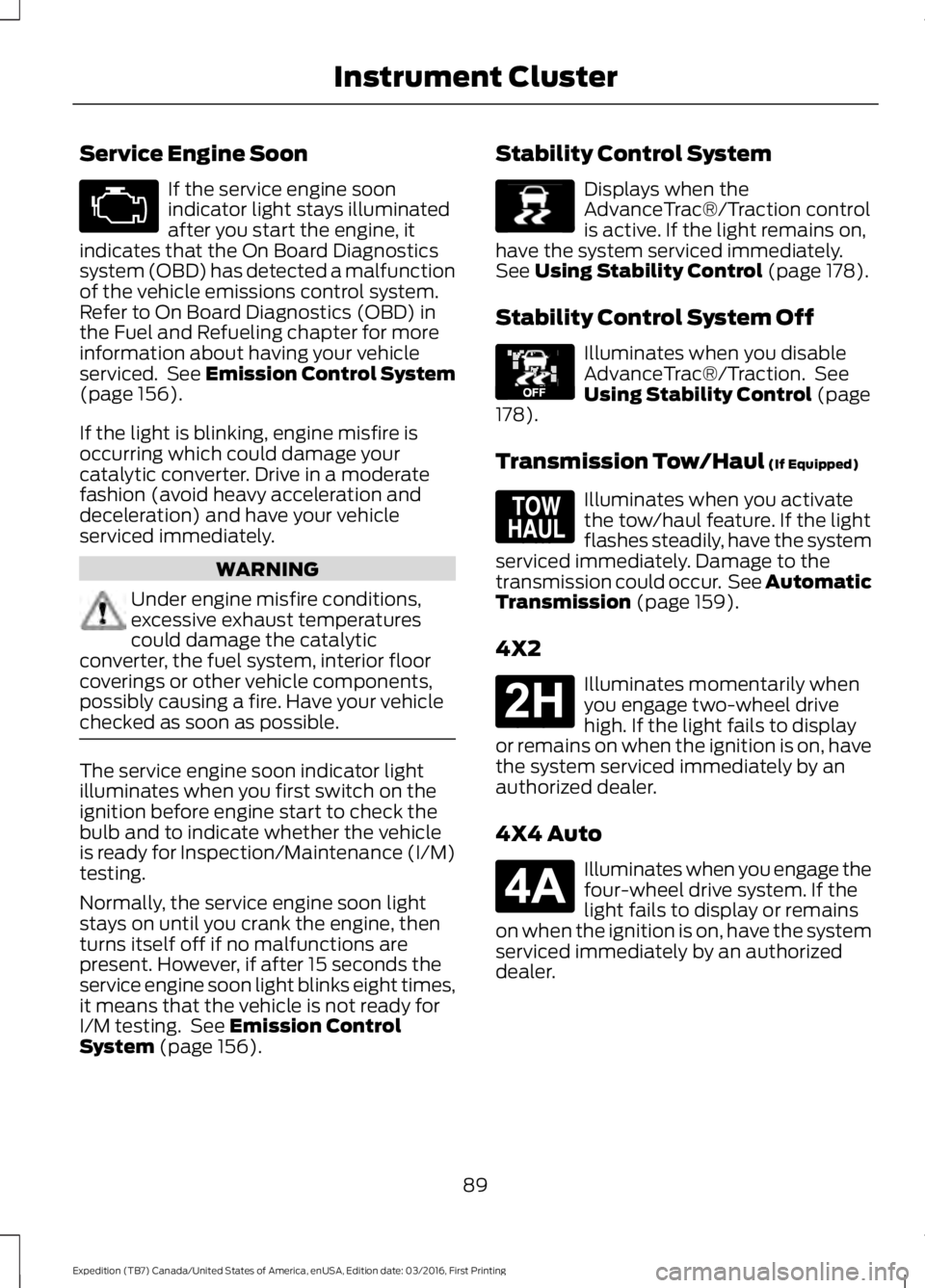
Service Engine Soon
If the service engine soonindicator light stays illuminatedafter you start the engine, itindicates that the On Board Diagnosticssystem (OBD) has detected a malfunctionof the vehicle emissions control system.Refer to On Board Diagnostics (OBD) inthe Fuel and Refueling chapter for moreinformation about having your vehicleserviced. See Emission Control System(page 156).
If the light is blinking, engine misfire isoccurring which could damage yourcatalytic converter. Drive in a moderatefashion (avoid heavy acceleration anddeceleration) and have your vehicleserviced immediately.
WARNING
Under engine misfire conditions,excessive exhaust temperaturescould damage the catalyticconverter, the fuel system, interior floorcoverings or other vehicle components,possibly causing a fire. Have your vehiclechecked as soon as possible.
The service engine soon indicator lightilluminates when you first switch on theignition before engine start to check thebulb and to indicate whether the vehicleis ready for Inspection/Maintenance (I/M)testing.
Normally, the service engine soon lightstays on until you crank the engine, thenturns itself off if no malfunctions arepresent. However, if after 15 seconds theservice engine soon light blinks eight times,it means that the vehicle is not ready forI/M testing. See Emission ControlSystem (page 156).
Stability Control System
Displays when theAdvanceTrac®/Traction controlis active. If the light remains on,have the system serviced immediately.See Using Stability Control (page 178).
Stability Control System Off
Illuminates when you disableAdvanceTrac®/Traction. SeeUsing Stability Control (page178).
Transmission Tow/Haul (If Equipped)
Illuminates when you activatethe tow/haul feature. If the lightflashes steadily, have the systemserviced immediately. Damage to thetransmission could occur. See AutomaticTransmission (page 159).
4X2
Illuminates momentarily whenyou engage two-wheel drivehigh. If the light fails to displayor remains on when the ignition is on, havethe system serviced immediately by anauthorized dealer.
4X4 Auto
Illuminates when you engage thefour-wheel drive system. If thelight fails to display or remainson when the ignition is on, have the systemserviced immediately by an authorizeddealer.
89
Expedition (TB7) Canada/United States of America, enUSA, Edition date: 03/2016, First Printing
Instrument Cluster E138639 E130458 E161509 E181778 E181781
Page 93 of 500
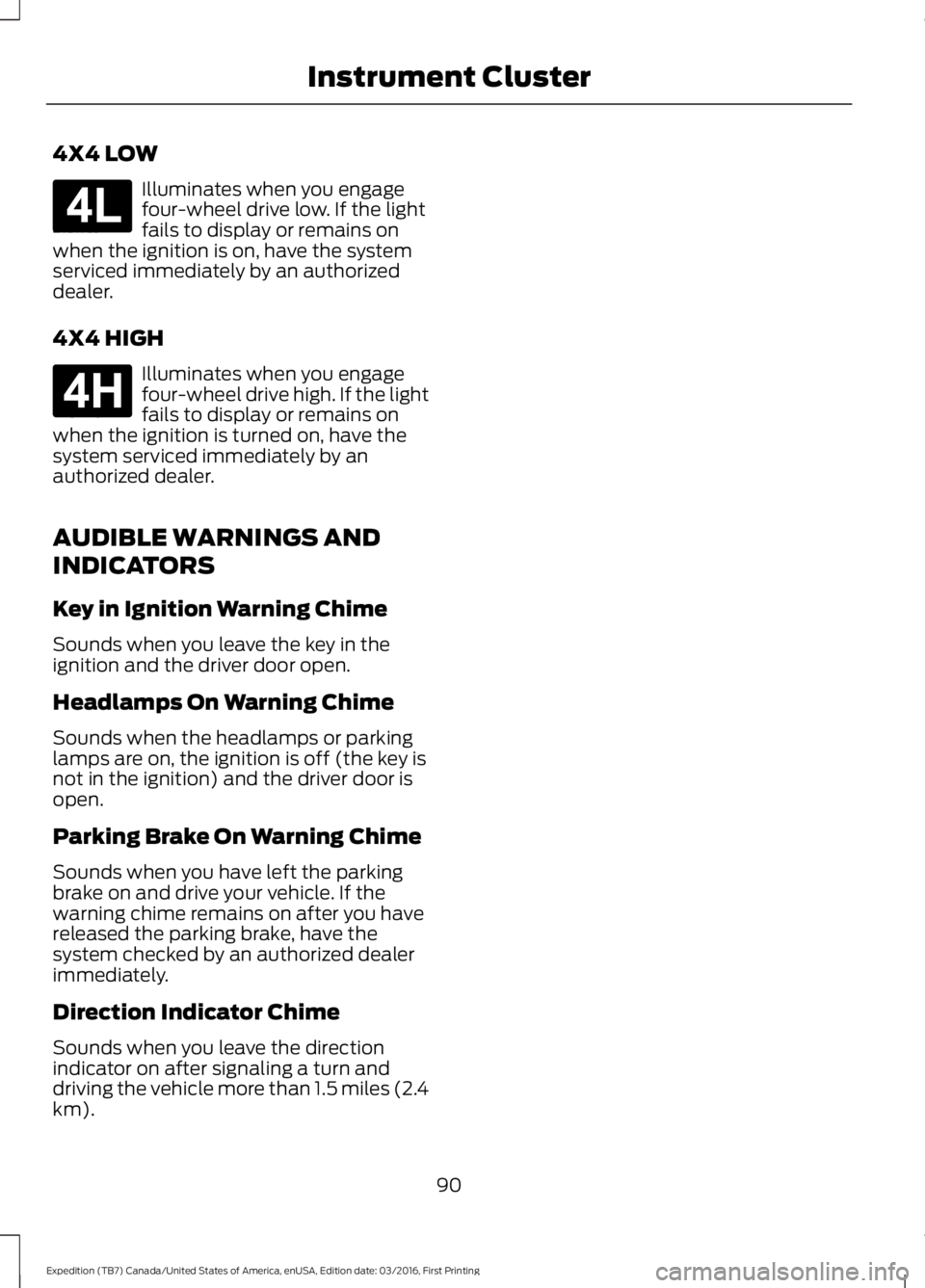
4X4 LOW
Illuminates when you engagefour-wheel drive low. If the lightfails to display or remains onwhen the ignition is on, have the systemserviced immediately by an authorizeddealer.
4X4 HIGH
Illuminates when you engagefour-wheel drive high. If the lightfails to display or remains onwhen the ignition is turned on, have thesystem serviced immediately by anauthorized dealer.
AUDIBLE WARNINGS AND
INDICATORS
Key in Ignition Warning Chime
Sounds when you leave the key in theignition and the driver door open.
Headlamps On Warning Chime
Sounds when the headlamps or parkinglamps are on, the ignition is off (the key isnot in the ignition) and the driver door isopen.
Parking Brake On Warning Chime
Sounds when you have left the parkingbrake on and drive your vehicle. If thewarning chime remains on after you havereleased the parking brake, have thesystem checked by an authorized dealerimmediately.
Direction Indicator Chime
Sounds when you leave the directionindicator on after signaling a turn anddriving the vehicle more than 1.5 miles (2.4km).
90
Expedition (TB7) Canada/United States of America, enUSA, Edition date: 03/2016, First Printing
Instrument ClusterE181780 E181779
Page 94 of 500
GENERAL INFORMATION
WARNING
Driving while distracted can result inloss of vehicle control, crash andinjury. We strongly recommend thatyou use extreme caution when using anydevice that may take your focus off theroad. Your primary responsibility is the safeoperation of your vehicle. We recommendagainst the use of any handheld devicewhile driving and encourage the use ofvoice-operated systems when possible.Make sure you are aware of all applicablelocal laws that may affect the use ofelectronic devices while driving.
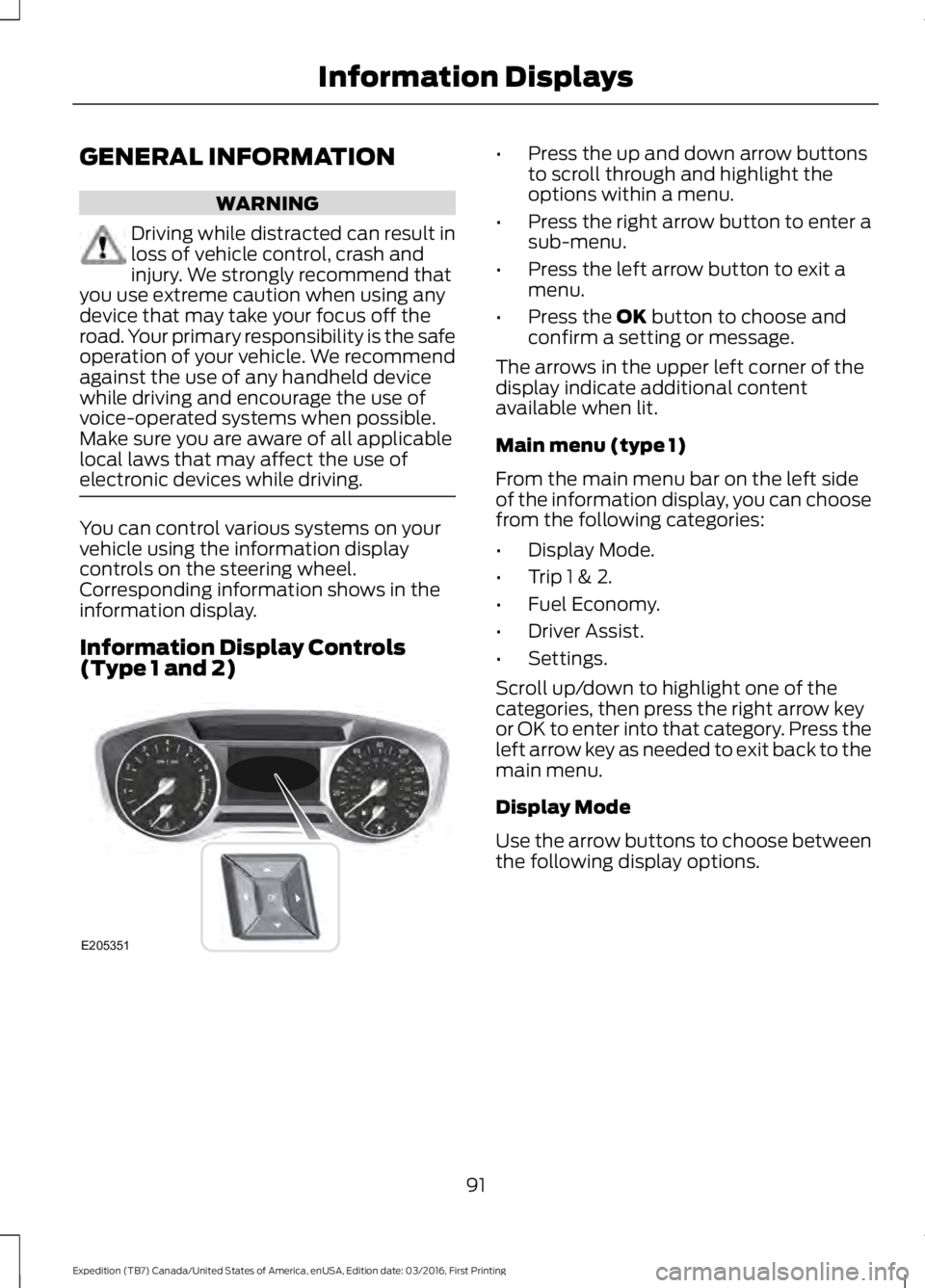
You can control various systems on yourvehicle using the information displaycontrols on the steering wheel.Corresponding information shows in theinformation display.
Information Display Controls(Type 1 and 2)
•Press the up and down arrow buttonsto scroll through and highlight theoptions within a menu.
•Press the right arrow button to enter asub-menu.
•Press the left arrow button to exit amenu.
•Press the OK button to choose andconfirm a setting or message.
The arrows in the upper left corner of thedisplay indicate additional contentavailable when lit.
Main menu (type 1)
From the main menu bar on the left sideof the information display, you can choosefrom the following categories:
•Display Mode.
•Trip 1 & 2.
•Fuel Economy.
•Driver Assist.
•Settings.
Scroll up/down to highlight one of thecategories, then press the right arrow keyor OK to enter into that category. Press theleft arrow key as needed to exit back to themain menu.
Display Mode
Use the arrow buttons to choose betweenthe following display options.
91
Expedition (TB7) Canada/United States of America, enUSA, Edition date: 03/2016, First Printing
Information DisplaysE205351
Page 107 of 500
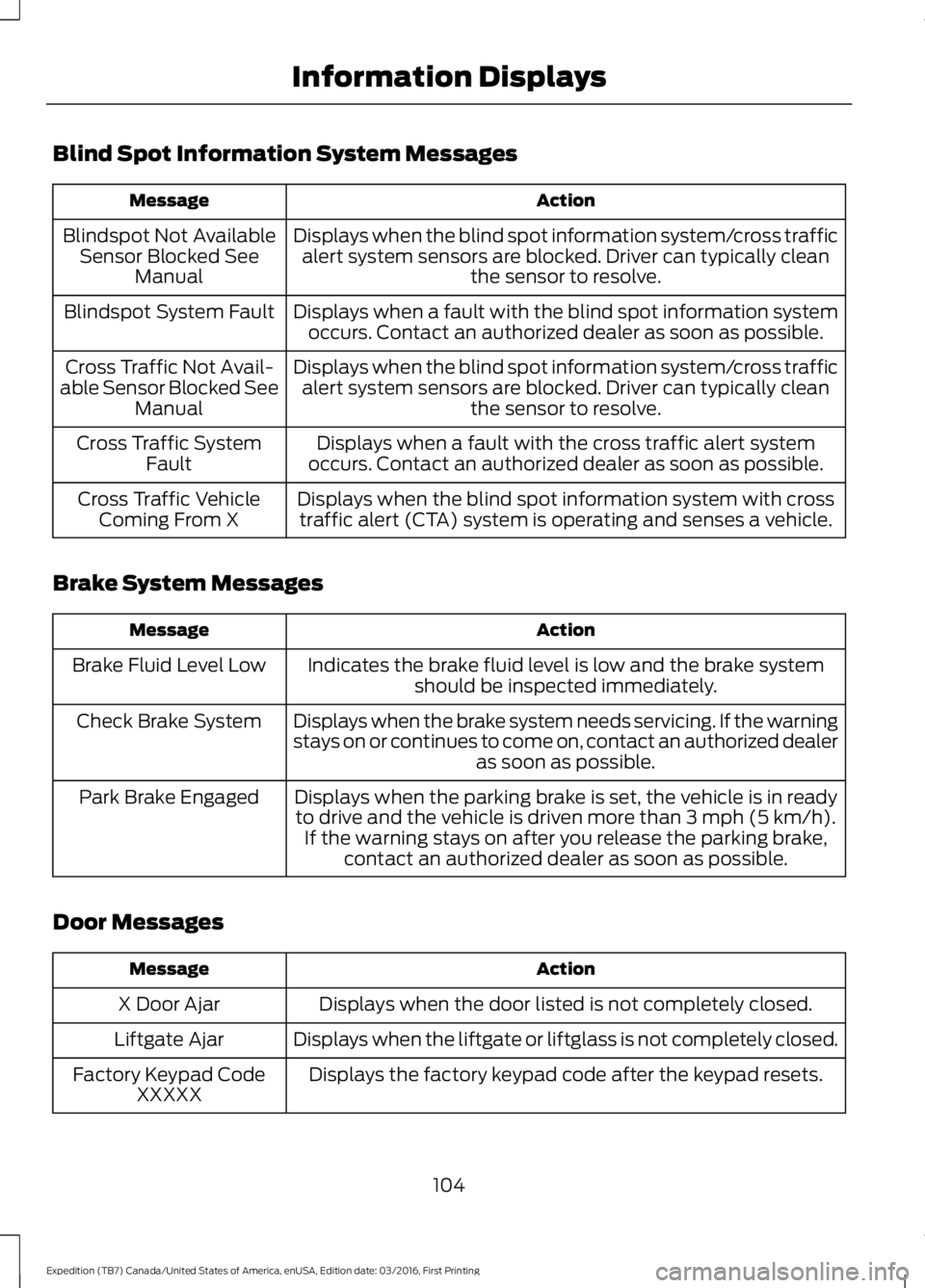
Blind Spot Information System Messages
ActionMessage
Displays when the blind spot information system/cross trafficalert system sensors are blocked. Driver can typically cleanthe sensor to resolve.
Blindspot Not AvailableSensor Blocked SeeManual
Displays when a fault with the blind spot information systemoccurs. Contact an authorized dealer as soon as possible.Blindspot System Fault
Displays when the blind spot information system/cross trafficalert system sensors are blocked. Driver can typically cleanthe sensor to resolve.
Cross Traffic Not Avail-able Sensor Blocked SeeManual
Displays when a fault with the cross traffic alert systemoccurs. Contact an authorized dealer as soon as possible.Cross Traffic SystemFault
Displays when the blind spot information system with crosstraffic alert (CTA) system is operating and senses a vehicle.Cross Traffic VehicleComing From X
Brake System Messages
ActionMessage
Indicates the brake fluid level is low and the brake systemshould be inspected immediately.Brake Fluid Level Low
Displays when the brake system needs servicing. If the warningstays on or continues to come on, contact an authorized dealeras soon as possible.
Check Brake System
Displays when the parking brake is set, the vehicle is in readyto drive and the vehicle is driven more than 3 mph (5 km/h).If the warning stays on after you release the parking brake,contact an authorized dealer as soon as possible.
Park Brake Engaged
Door Messages
ActionMessage
Displays when the door listed is not completely closed.X Door Ajar
Displays when the liftgate or liftglass is not completely closed.Liftgate Ajar
Displays the factory keypad code after the keypad resets.Factory Keypad CodeXXXXX
104
Expedition (TB7) Canada/United States of America, enUSA, Edition date: 03/2016, First Printing
Information Displays
Page 109 of 500
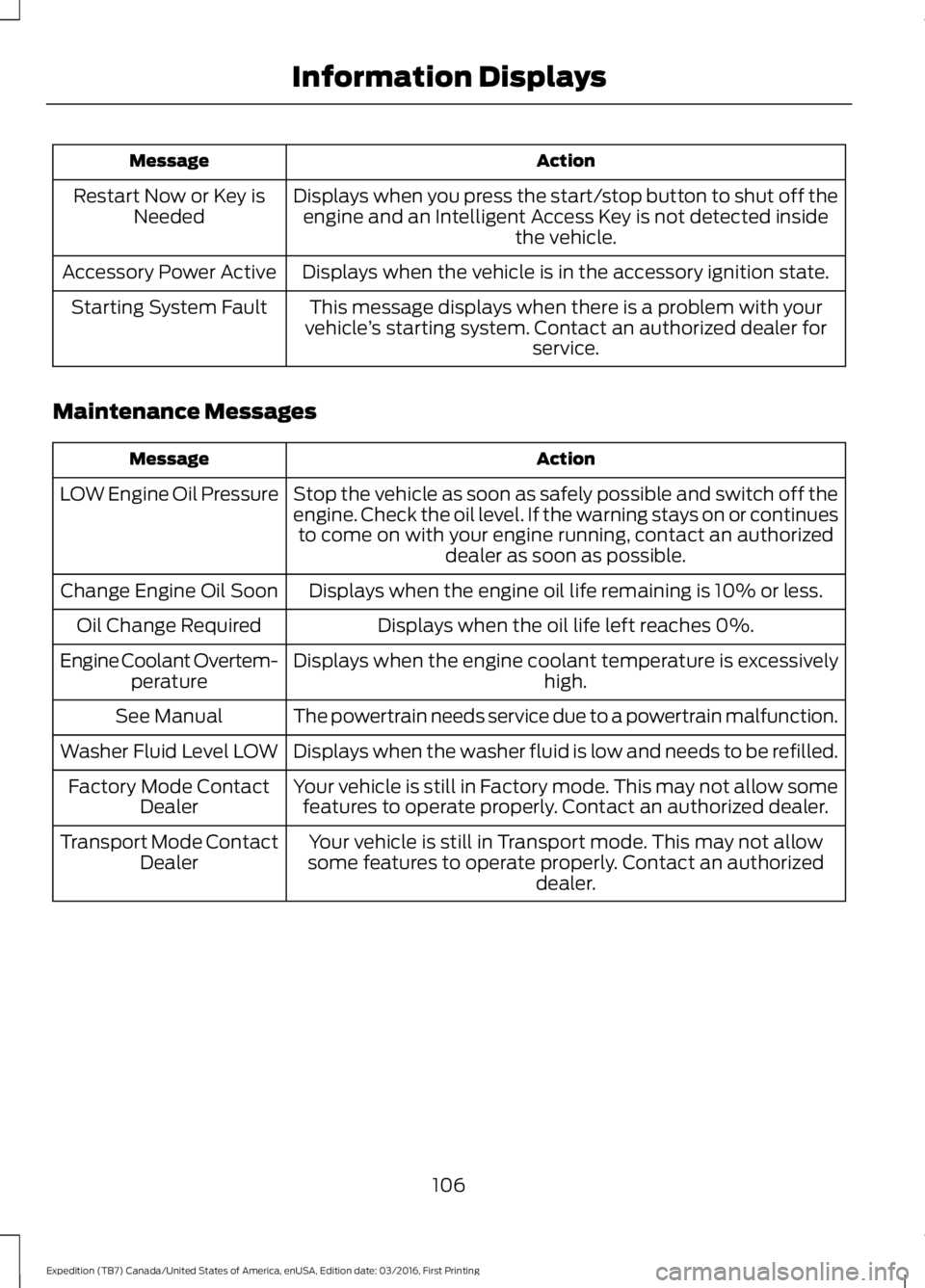
ActionMessage
Displays when you press the start/stop button to shut off theengine and an Intelligent Access Key is not detected insidethe vehicle.
Restart Now or Key isNeeded
Displays when the vehicle is in the accessory ignition state.Accessory Power Active
This message displays when there is a problem with yourvehicle’s starting system. Contact an authorized dealer forservice.
Starting System Fault
Maintenance Messages
ActionMessage
Stop the vehicle as soon as safely possible and switch off theengine. Check the oil level. If the warning stays on or continuesto come on with your engine running, contact an authorizeddealer as soon as possible.
LOW Engine Oil Pressure
Displays when the engine oil life remaining is 10% or less.Change Engine Oil Soon
Displays when the oil life left reaches 0%.Oil Change Required
Displays when the engine coolant temperature is excessivelyhigh.Engine Coolant Overtem-perature
The powertrain needs service due to a powertrain malfunction.See Manual
Displays when the washer fluid is low and needs to be refilled.Washer Fluid Level LOW
Your vehicle is still in Factory mode. This may not allow somefeatures to operate properly. Contact an authorized dealer.Factory Mode ContactDealer
Your vehicle is still in Transport mode. This may not allowsome features to operate properly. Contact an authorizeddealer.
Transport Mode ContactDealer
106
Expedition (TB7) Canada/United States of America, enUSA, Edition date: 03/2016, First Printing
Information Displays
Page 112 of 500
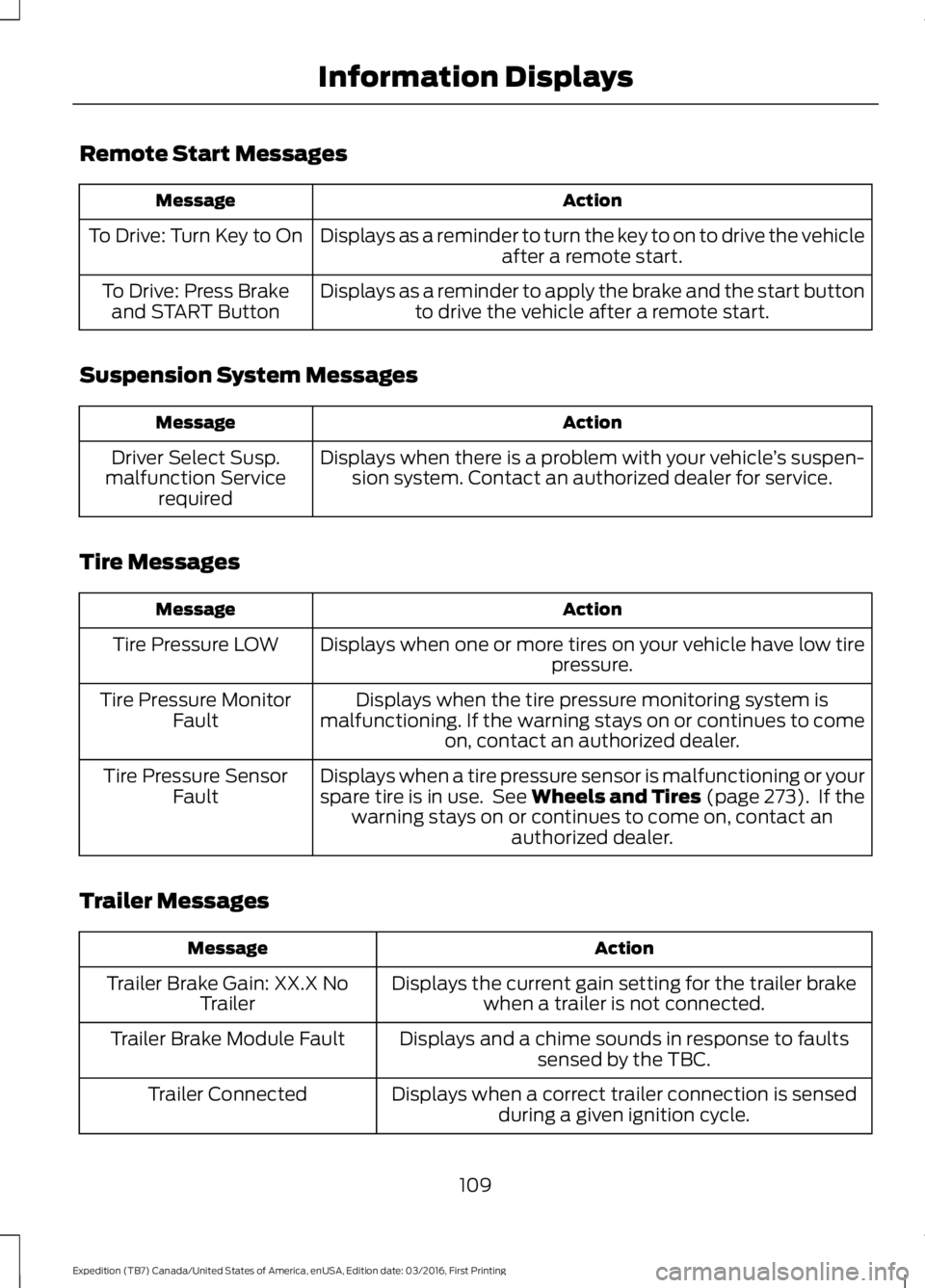
Remote Start Messages
ActionMessage
Displays as a reminder to turn the key to on to drive the vehicleafter a remote start.To Drive: Turn Key to On
Displays as a reminder to apply the brake and the start buttonto drive the vehicle after a remote start.To Drive: Press Brakeand START Button
Suspension System Messages
ActionMessage
Displays when there is a problem with your vehicle’s suspen-sion system. Contact an authorized dealer for service.Driver Select Susp.malfunction Servicerequired
Tire Messages
ActionMessage
Displays when one or more tires on your vehicle have low tirepressure.Tire Pressure LOW
Displays when the tire pressure monitoring system ismalfunctioning. If the warning stays on or continues to comeon, contact an authorized dealer.
Tire Pressure MonitorFault
Displays when a tire pressure sensor is malfunctioning or yourspare tire is in use. See Wheels and Tires (page 273). If thewarning stays on or continues to come on, contact anauthorized dealer.
Tire Pressure SensorFault
Trailer Messages
ActionMessage
Displays the current gain setting for the trailer brakewhen a trailer is not connected.Trailer Brake Gain: XX.X NoTrailer
Displays and a chime sounds in response to faultssensed by the TBC.Trailer Brake Module Fault
Displays when a correct trailer connection is sensedduring a given ignition cycle.Trailer Connected
109
Expedition (TB7) Canada/United States of America, enUSA, Edition date: 03/2016, First Printing
Information Displays
Page 119 of 500
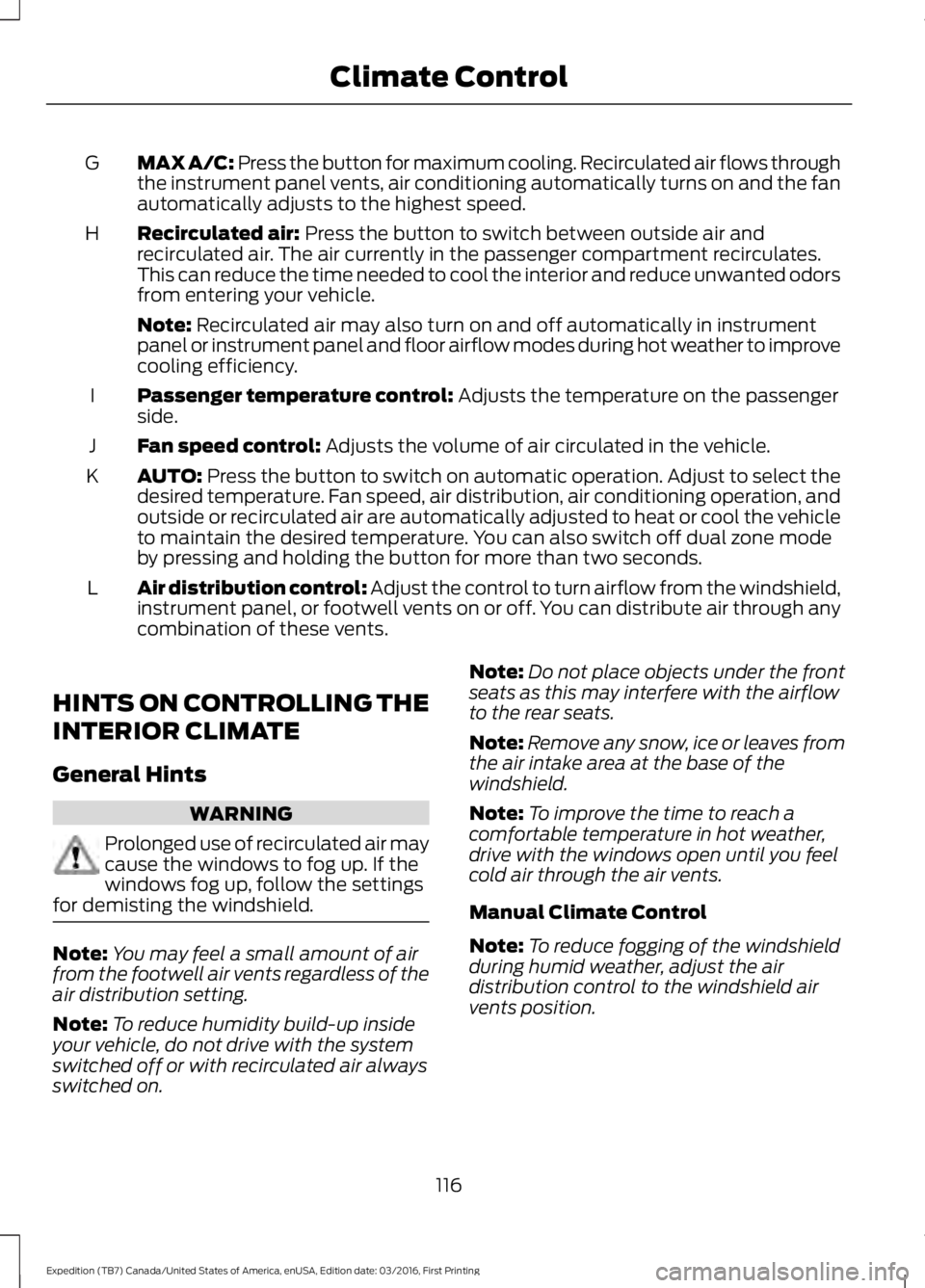
MAX A/C: Press the button for maximum cooling. Recirculated air flows throughthe instrument panel vents, air conditioning automatically turns on and the fanautomatically adjusts to the highest speed.
G
Recirculated air: Press the button to switch between outside air andrecirculated air. The air currently in the passenger compartment recirculates.This can reduce the time needed to cool the interior and reduce unwanted odorsfrom entering your vehicle.
H
Note: Recirculated air may also turn on and off automatically in instrumentpanel or instrument panel and floor airflow modes during hot weather to improvecooling efficiency.
Passenger temperature control: Adjusts the temperature on the passengerside.I
Fan speed control: Adjusts the volume of air circulated in the vehicle.J
AUTO: Press the button to switch on automatic operation. Adjust to select thedesired temperature. Fan speed, air distribution, air conditioning operation, andoutside or recirculated air are automatically adjusted to heat or cool the vehicleto maintain the desired temperature. You can also switch off dual zone modeby pressing and holding the button for more than two seconds.
K
Air distribution control: Adjust the control to turn airflow from the windshield,instrument panel, or footwell vents on or off. You can distribute air through anycombination of these vents.
L
HINTS ON CONTROLLING THE
INTERIOR CLIMATE
General Hints
WARNING
Prolonged use of recirculated air maycause the windows to fog up. If thewindows fog up, follow the settingsfor demisting the windshield.
Note:You may feel a small amount of airfrom the footwell air vents regardless of theair distribution setting.
Note:To reduce humidity build-up insideyour vehicle, do not drive with the systemswitched off or with recirculated air alwaysswitched on.
Note:Do not place objects under the frontseats as this may interfere with the airflowto the rear seats.
Note:Remove any snow, ice or leaves fromthe air intake area at the base of thewindshield.
Note:To improve the time to reach acomfortable temperature in hot weather,drive with the windows open until you feelcold air through the air vents.
Manual Climate Control
Note:To reduce fogging of the windshieldduring humid weather, adjust the airdistribution control to the windshield airvents position.
116
Expedition (TB7) Canada/United States of America, enUSA, Edition date: 03/2016, First Printing
Climate Control
Page 124 of 500
SITTING IN THE CORRECT
POSITION
WARNINGS
Sitting improperly, out of position orwith the seatback reclined too farcan take weight off the seat cushionand affect the decision of the passengersensing system, resulting in serious injuryor death in the event of a crash. Always situpright against your seat back, with yourfeet on the floor.
Do not recline the seatback as thiscan cause the occupant to slideunder the safety belt, resulting inserious injury in the event of a crash.
Do not place objects higher than theseatback to reduce the risk of seriousinjury in the event of a crash or duringheavy braking.
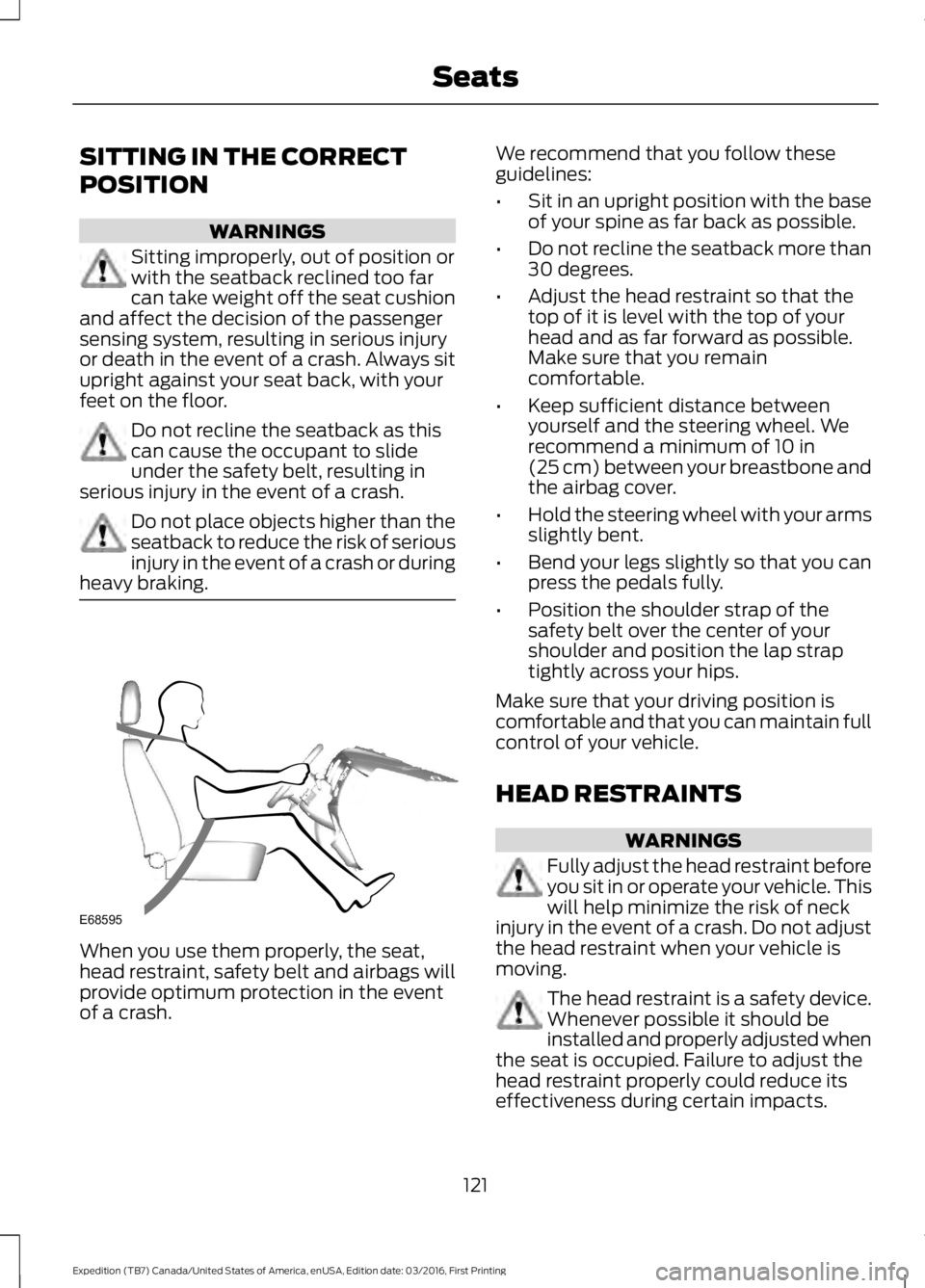
When you use them properly, the seat,head restraint, safety belt and airbags willprovide optimum protection in the eventof a crash.
We recommend that you follow theseguidelines:
•Sit in an upright position with the baseof your spine as far back as possible.
•Do not recline the seatback more than30 degrees.
•Adjust the head restraint so that thetop of it is level with the top of yourhead and as far forward as possible.Make sure that you remaincomfortable.
•Keep sufficient distance betweenyourself and the steering wheel. Werecommend a minimum of 10 in(25 cm) between your breastbone andthe airbag cover.
•Hold the steering wheel with your armsslightly bent.
•Bend your legs slightly so that you canpress the pedals fully.
•Position the shoulder strap of thesafety belt over the center of yourshoulder and position the lap straptightly across your hips.
Make sure that your driving position iscomfortable and that you can maintain fullcontrol of your vehicle.
HEAD RESTRAINTS
WARNINGS
Fully adjust the head restraint beforeyou sit in or operate your vehicle. Thiswill help minimize the risk of neckinjury in the event of a crash. Do not adjustthe head restraint when your vehicle ismoving.
The head restraint is a safety device.Whenever possible it should beinstalled and properly adjusted whenthe seat is occupied. Failure to adjust thehead restraint properly could reduce itseffectiveness during certain impacts.
121
Expedition (TB7) Canada/United States of America, enUSA, Edition date: 03/2016, First Printing
SeatsE68595
Page 125 of 500
WARNINGS
Install the head restraint properly tohelp minimize the risk of neck injuryin the event of a crash.
Note:Adjust the seatback to an uprightdriving position before adjusting the headrestraint. Adjust the head restraint so thatthe top of it is level with the top of your headand as far forward as possible. Make surethat you remain comfortable. If you areextremely tall, adjust the head restraint toits highest position.
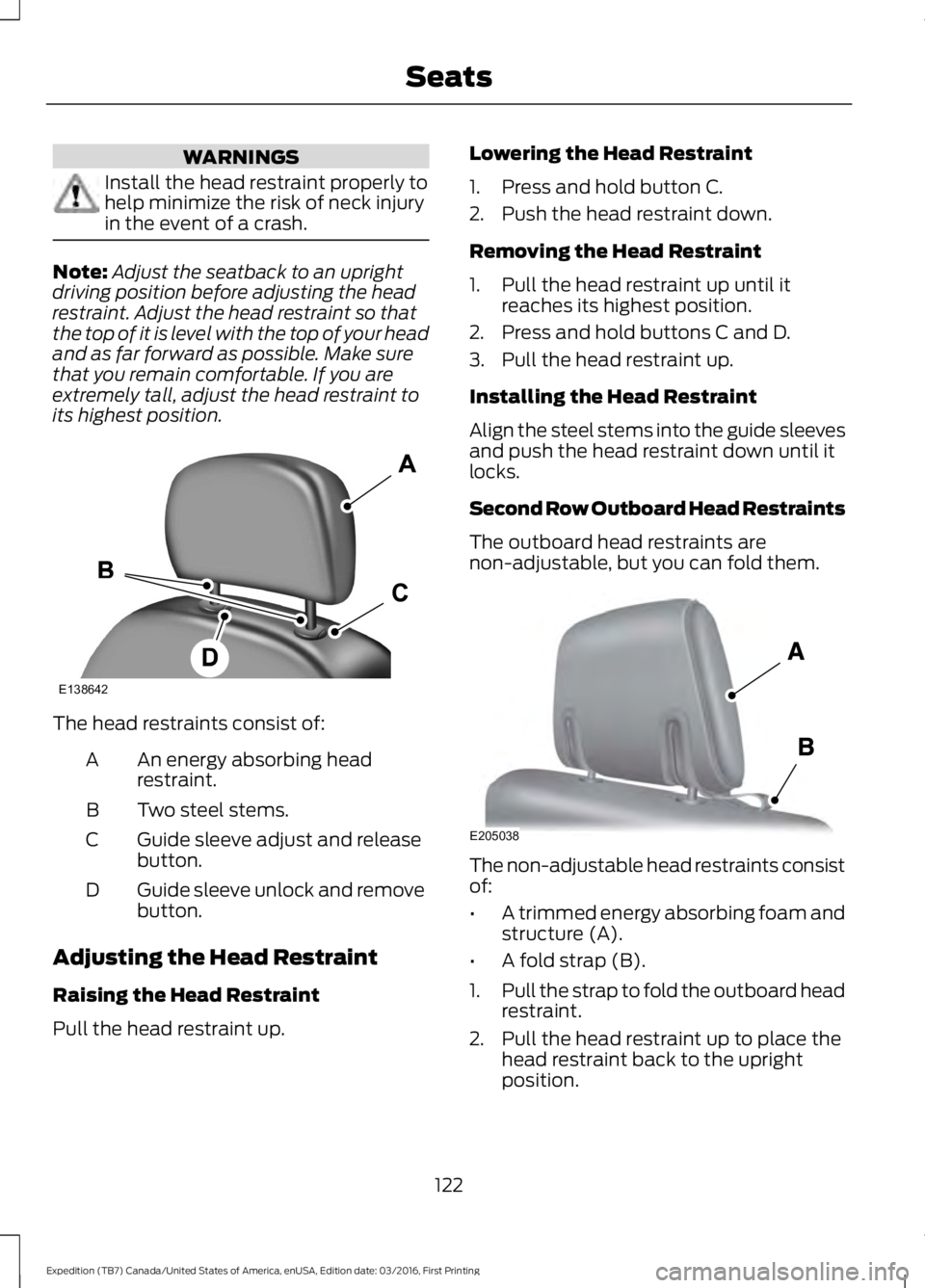
The head restraints consist of:
An energy absorbing headrestraint.A
Two steel stems.B
Guide sleeve adjust and releasebutton.C
Guide sleeve unlock and removebutton.D
Adjusting the Head Restraint
Raising the Head Restraint
Pull the head restraint up.
Lowering the Head Restraint
1. Press and hold button C.
2. Push the head restraint down.
Removing the Head Restraint
1. Pull the head restraint up until itreaches its highest position.
2. Press and hold buttons C and D.
3. Pull the head restraint up.
Installing the Head Restraint
Align the steel stems into the guide sleevesand push the head restraint down until itlocks.
Second Row Outboard Head Restraints
The outboard head restraints arenon-adjustable, but you can fold them.
The non-adjustable head restraints consistof:
•A trimmed energy absorbing foam andstructure (A).
•A fold strap (B).
1.Pull the strap to fold the outboard headrestraint.
2. Pull the head restraint up to place thehead restraint back to the uprightposition.
122
Expedition (TB7) Canada/United States of America, enUSA, Edition date: 03/2016, First Printing
SeatsE138642 E205038