instrument panel FORD EXPLORER 2006 4.G User Guide
[x] Cancel search | Manufacturer: FORD, Model Year: 2006, Model line: EXPLORER, Model: FORD EXPLORER 2006 4.GPages: 328, PDF Size: 3.59 MB
Page 47 of 328
Replacing exterior bulbs
Check the operation of all the bulbs frequently.
Replacing the interior bulbs
Check the operation of the bulbs frequently. To replace any of the
interior bulbs, see a dealer or qualified technician.
Using the right bulbs
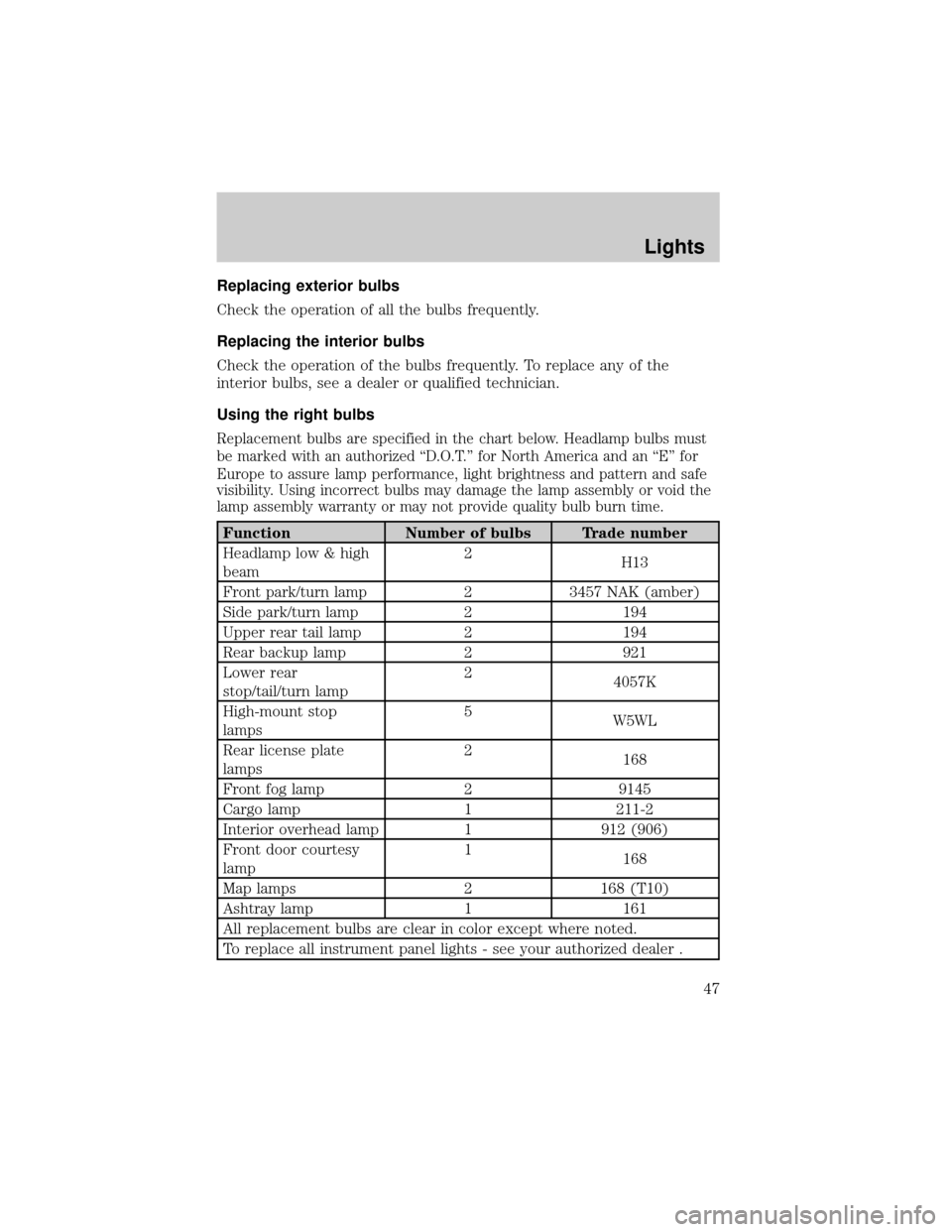
Replacement bulbs are specified in the chart below. Headlamp bulbs must
be marked with an authorized ªD.O.T.º for North America and an ªEº for
Europe to assure lamp performance, light brightness and pattern and safe
visibility. Using incorrect bulbs may damage the lamp assembly or void the
lamp assembly warranty or may not provide quality bulb burn time.
Function Number of bulbs Trade number
Headlamp low & high
beam2
H13
Front park/turn lamp 2 3457 NAK (amber)
Side park/turn lamp 2 194
Upper rear tail lamp 2 194
Rear backup lamp 2 921
Lower rear
stop/tail/turn lamp2
4057K
High-mount stop
lamps5
W5WL
Rear license plate
lamps2
168
Front fog lamp 2 9145
Cargo lamp 1 211-2
Interior overhead lamp 1 912 (906)
Front door courtesy
lamp1
168
Map lamps 2 168 (T10)
Ashtray lamp 1 161
All replacement bulbs are clear in color except where noted.
To replace all instrument panel lights - see your authorized dealer .
Lights
47
Page 103 of 328
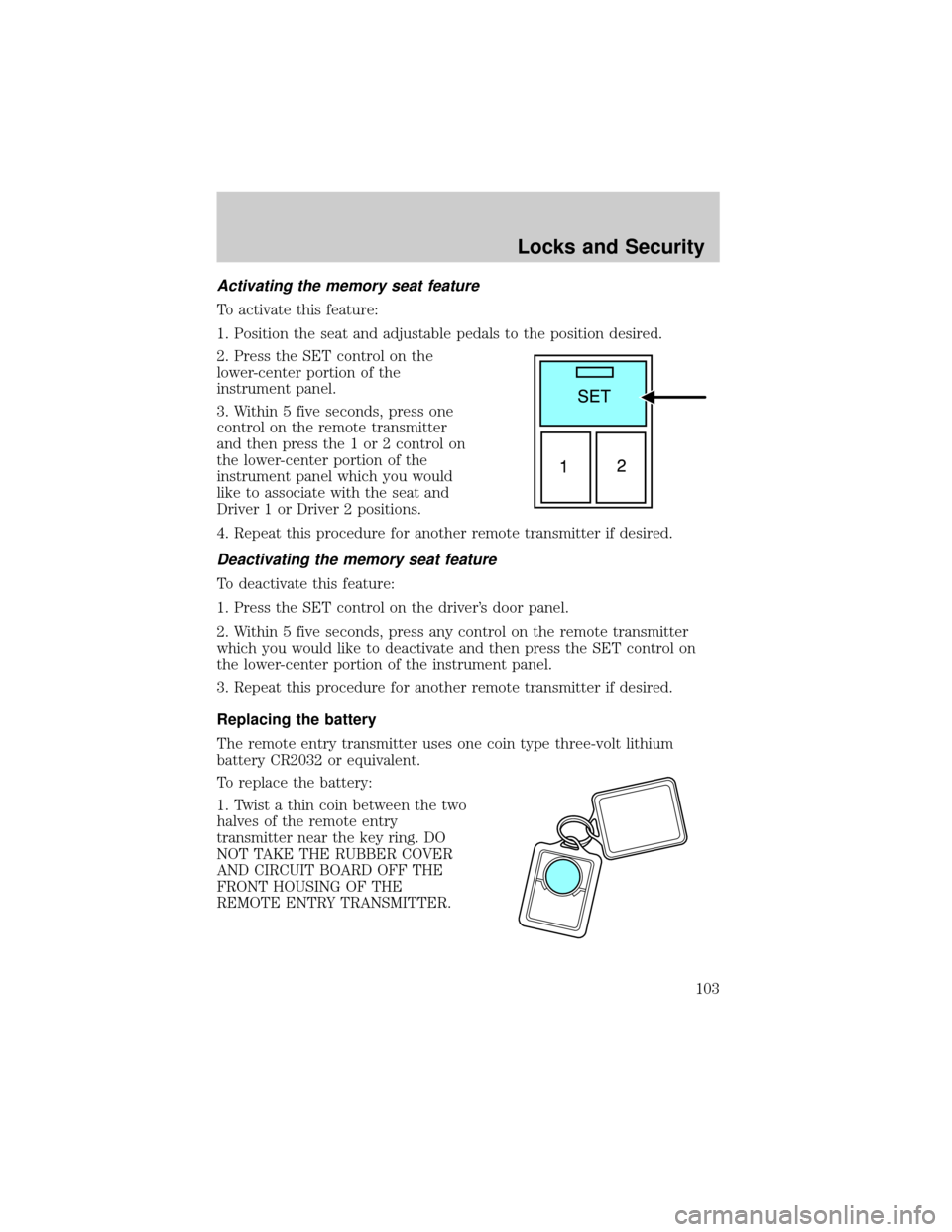
Activating the memory seat feature
To activate this feature:
1. Position the seat and adjustable pedals to the position desired.
2. Press the SET control on the
lower-center portion of the
instrument panel.
3. Within 5 five seconds, press one
control on the remote transmitter
and then press the 1 or 2 control on
the lower-center portion of the
instrument panel which you would
like to associate with the seat and
Driver 1 or Driver 2 positions.
4. Repeat this procedure for another remote transmitter if desired.
Deactivating the memory seat feature
To deactivate this feature:
1. Press the SET control on the driver's door panel.
2. Within 5 five seconds, press any control on the remote transmitter
which you would like to deactivate and then press the SET control on
the lower-center portion of the instrument panel.
3. Repeat this procedure for another remote transmitter if desired.
Replacing the battery
The remote entry transmitter uses one coin type three-volt lithium
battery CR2032 or equivalent.
To replace the battery:
1. Twist a thin coin between the two
halves of the remote entry
transmitter near the key ring. DO
NOT TAKE THE RUBBER COVER
AND CIRCUIT BOARD OFF THE
FRONT HOUSING OF THE
REMOTE ENTRY TRANSMITTER.
Locks and Security
103
Page 111 of 328

6. Release the 3²4.
The user should receive a horn chirp to indicate the system has been
disabled or a chirp followed by a honk to indicate the system has been
enabled.
Message center procedure
For information on activating/deactivating the autounlock feature using
the vehicle's message center (if equipped), refer toMessage center
information in theDriver Controlschapter.
SECURILOCKYPASSIVE ANTI-THEFT SYSTEM
SecuriLockypassive anti-theft system is an engine immobilization
system. This system is designed to help prevent the engine from being
started unless acoded key programmed to your vehicleis used. The
use of the wrong type of coded key may lead to a ªno-startº condition.
Your vehicle comes with two coded keys; additional coded keys may be
purchased from your authorized dealer. The authorized dealer can
program your spare keys to your vehicle or you can program the keys
yourself. Refer toProgramming spare keysfor instructions on how to
program the coded key.
Note:The SecuriLockypassive anti-theft system is not compatible with
non-Ford aftermarket remote start systems. Use of these systems may
result in vehicle starting problems and a loss of security protection.
Note:Large metallic objects, electronic devices that are used to
purchase gasoline or similar items, or a second coded key on the same
key chain may cause vehicle starting issues. You need to prevent these
objects from touching the coded key while starting the engine. These
objects will not cause damage to the coded key, but may cause a
momentary issue if they are too close to the key when starting the
engine. If a problem occurs, turn the ignition off, remove all objects on
the key chain away from the coded key and restart the engine.
Anti-theft indicator
The anti-theft indicator is located on top of the instrument panel.
²When the ignition is in the 1 (OFF/LOCK) position, the indicator will
flash once every 2 seconds to indicate the SecuriLockysystem is
functioning as a theft deterrent.
²When the ignition is in the 3 (ON) position, the indicator will glow for
3 seconds to indicate normal system functionality.
If a problem occurs with the SecuriLockysystem, the indicator will flash
rapidly or glow steadily when the ignition is in the 3 (ON) position. If this
occurs, the vehicle should be taken to an authorized dealer for service.
Locks and Security
111
Page 118 of 328
Press the control to recline the
seatback forward or rearward.
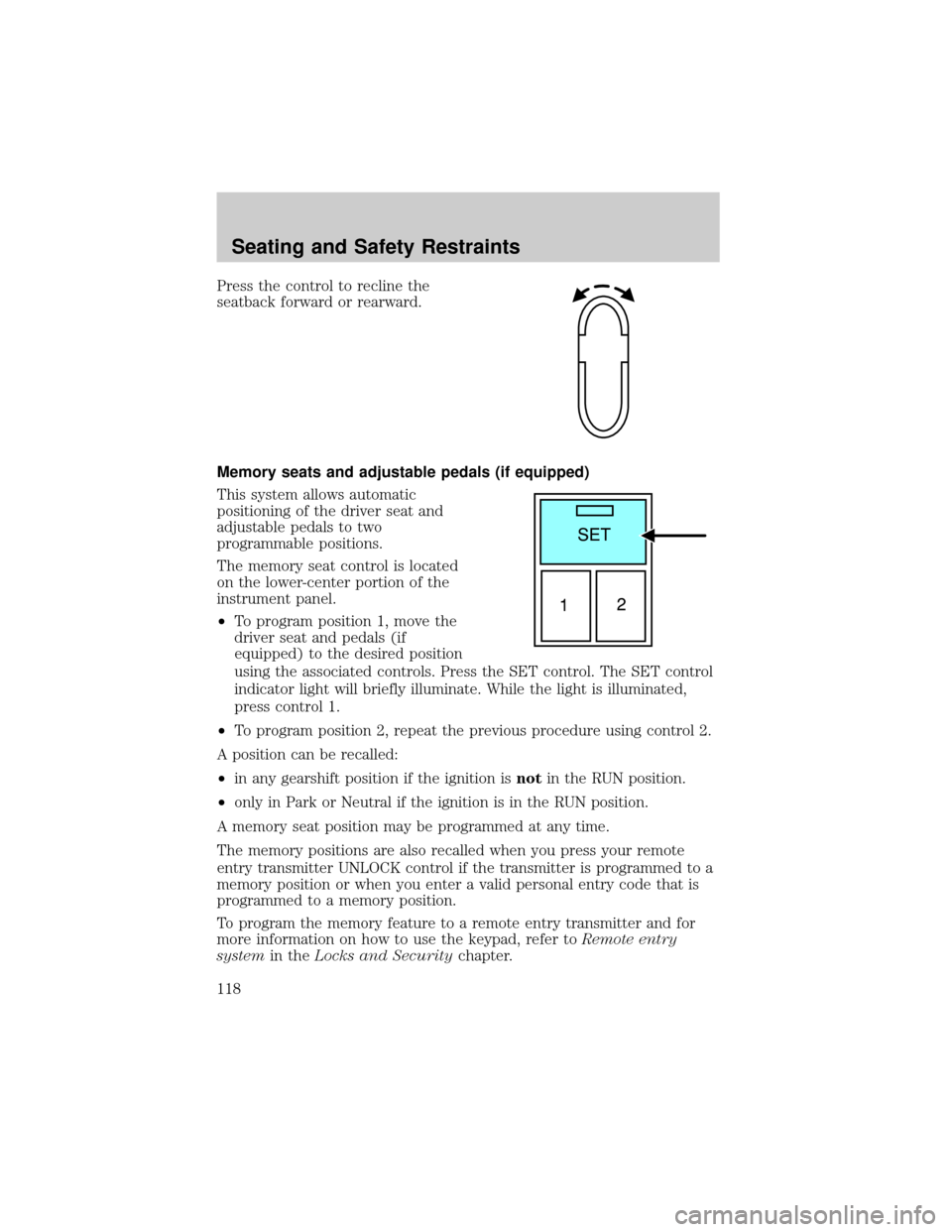
Memory seats and adjustable pedals (if equipped)
This system allows automatic
positioning of the driver seat and
adjustable pedals to two
programmable positions.
The memory seat control is located
on the lower-center portion of the
instrument panel.
²To program position 1, move the
driver seat and pedals (if
equipped) to the desired position
using the associated controls. Press the SET control. The SET control
indicator light will briefly illuminate. While the light is illuminated,
press control 1.
²To program position 2, repeat the previous procedure using control 2.
A position can be recalled:
²in any gearshift position if the ignition isnotin the RUN position.
²only in Park or Neutral if the ignition is in the RUN position.
A memory seat position may be programmed at any time.
The memory positions are also recalled when you press your remote
entry transmitter UNLOCK control if the transmitter is programmed to a
memory position or when you enter a valid personal entry code that is
programmed to a memory position.
To program the memory feature to a remote entry transmitter and for
more information on how to use the keypad, refer toRemote entry
systemin theLocks and Securitychapter.
Seating and Safety Restraints
118
Page 119 of 328
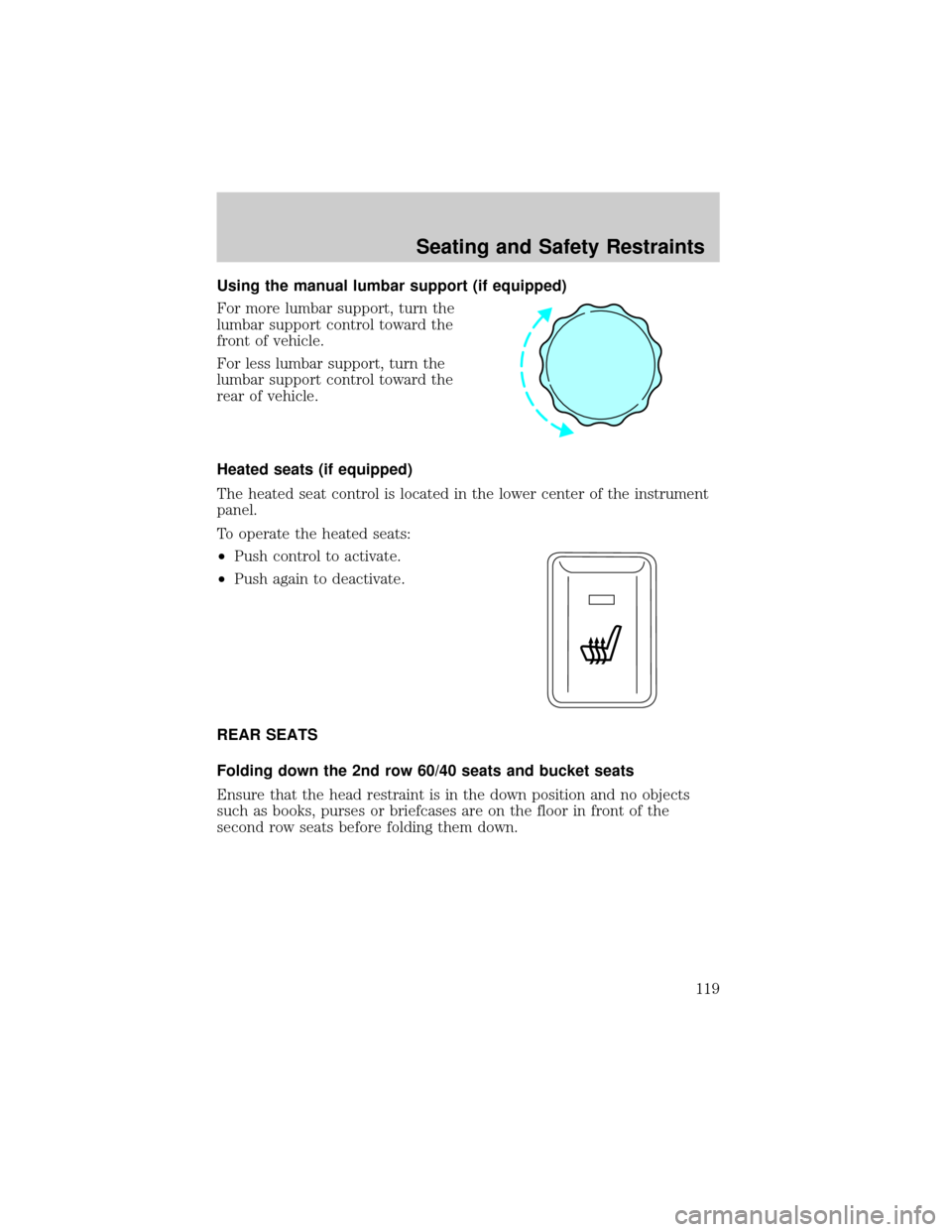
Using the manual lumbar support (if equipped)
For more lumbar support, turn the
lumbar support control toward the
front of vehicle.
For less lumbar support, turn the
lumbar support control toward the
rear of vehicle.
Heated seats (if equipped)
The heated seat control is located in the lower center of the instrument
panel.
To operate the heated seats:
²Push control to activate.
²Push again to deactivate.
REAR SEATS
Folding down the 2nd row 60/40 seats and bucket seats
Ensure that the head restraint is in the down position and no objects
such as books, purses or briefcases are on the floor in front of the
second row seats before folding them down.
Seating and Safety Restraints
119
Page 146 of 328
For side airbag equipped vehicles, the front passenger sensing system
will turn off the passenger seat side airbag if:
²the seat is empty and safety belt is unbuckled.
²a child or small person occupies the front passenger seat and the child
or small person is unbuckled.
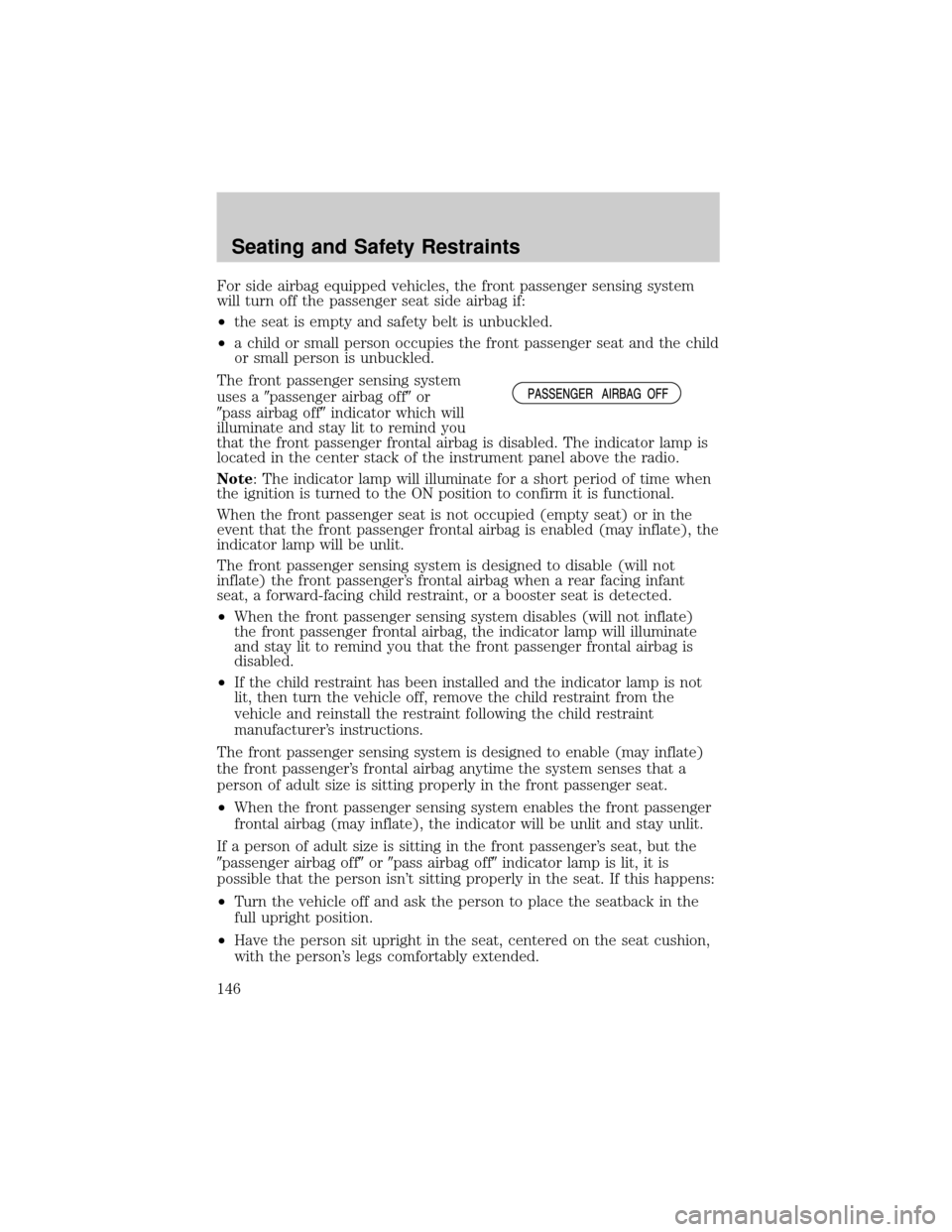
The front passenger sensing system
uses a9passenger airbag off9or
9pass airbag off9indicator which will
illuminate and stay lit to remind you
that the front passenger frontal airbag is disabled. The indicator lamp is
located in the center stack of the instrument panel above the radio.
Note: The indicator lamp will illuminate for a short period of time when
the ignition is turned to the ON position to confirm it is functional.
When the front passenger seat is not occupied (empty seat) or in the
event that the front passenger frontal airbag is enabled (may inflate), the
indicator lamp will be unlit.
The front passenger sensing system is designed to disable (will not
inflate) the front passenger's frontal airbag when a rear facing infant
seat, a forward-facing child restraint, or a booster seat is detected.
²When the front passenger sensing system disables (will not inflate)
the front passenger frontal airbag, the indicator lamp will illuminate
and stay lit to remind you that the front passenger frontal airbag is
disabled.
²If the child restraint has been installed and the indicator lamp is not
lit, then turn the vehicle off, remove the child restraint from the
vehicle and reinstall the restraint following the child restraint
manufacturer's instructions.
The front passenger sensing system is designed to enable (may inflate)
the front passenger's frontal airbag anytime the system senses that a
person of adult size is sitting properly in the front passenger seat.
²When the front passenger sensing system enables the front passenger
frontal airbag (may inflate), the indicator will be unlit and stay unlit.
If a person of adult size is sitting in the front passenger's seat, but the
9passenger airbag off9or9pass airbag off9indicator lamp is lit, it is
possible that the person isn't sitting properly in the seat. If this happens:
²Turn the vehicle off and ask the person to place the seatback in the
full upright position.
²Have the person sit upright in the seat, centered on the seat cushion,
with the person's legs comfortably extended.
Seating and Safety Restraints
146
Page 212 of 328

ADVANCETRACTWITH ROLL STABILITY CONTROLY(RSC)
STABILITY ENHANCEMENT SYSTEM
The AdvanceTractwith RSC system provides stability enhancement
features such as Roll Stability Controly(RSC), Electronic Stability
Control (ESC) and Traction Control (TCS) for certain driving situations.
The system includes an AdvanceTractwith RSC on/off button, and a
ªsliding carº icon in the instrument cluster.
Some drivers may notice a slight movement of the brake pedal when the
AdvanceTractwith RSC performs a system self-check. During
AdvanceTractwith RSC operation you may experience the following:
²A rumble, grunting, or grinding noise after startup and when driving
off
²A slight deceleration of the vehicle
²The AdvanceTractwith RSC indicator light will flash when the system
is activated.
²If your foot is on the brake pedal, you will feel a vibration in the
pedal.
²If the driving condition is severe and your foot is not on the brake, the
brake pedal will move to apply higher brake forces. You may also hear
a whoosh of air from under the instrument panel during this severe
condition.
Traction Control
Traction Control helps your vehicle maintain traction, when driving on
slippery and/or hilly road surfaces, by detecting and controlling wheel
spin. Excessive wheel spin is controlled by momentarily reducing engine
power and/or applying the anti-lock brakes. Traction Control is a driver
aid that helps your vehicle.
If your vehicle should become stuck in deep snow or mud, try switching
the AdvanceTractwith RSC system off by pressing the AdvanceTract
with RSC button momentarily. This will allow your tires to ªdigº for
traction.
If the AdvanceTractwith RSC system is activated excessively in a short
period of time, the brake portion of the system will disable to allow the
brakes to cool down. In this situation, Traction Control will use only
engine power reduction to help control the wheels from over-spinning.
When the brakes have cooled down, the system will again function
normally. Anti-lock braking, RSC and ESC are not affected by this
condition and will function normally during the cool-down period.
Driving
212
Page 240 of 328
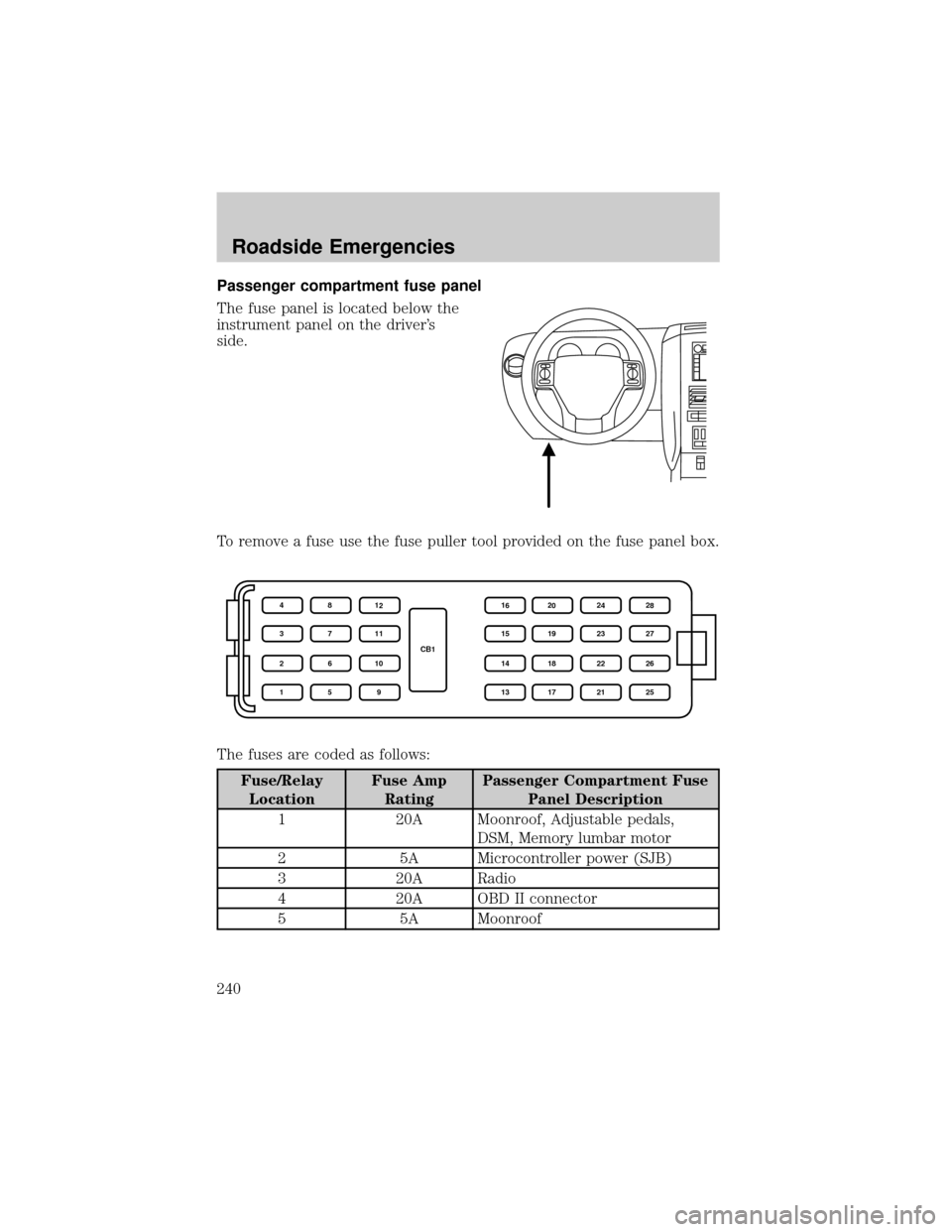
Passenger compartment fuse panel
The fuse panel is located below the
instrument panel on the driver's
side.
To remove a fuse use the fuse puller tool provided on the fuse panel box.
The fuses are coded as follows:
Fuse/Relay
LocationFuse Amp
RatingPassenger Compartment Fuse
Panel Description
1 20A Moonroof, Adjustable pedals,
DSM, Memory lumbar motor
2 5A Microcontroller power (SJB)
3 20A Radio
4 20A OBD II connector
5 5A Moonroof
CB1 4
3
2
18
7
6
512
11
10
916
15
14
1320
19
18
1724
23
22
2128
27
26
25
Roadside Emergencies
240
Page 241 of 328
Fuse/Relay
LocationFuse Amp
RatingPassenger Compartment Fuse
Panel Description
6 20A Liftglass release motor, Door
unlock/lock
7 15A Trailer stop/turn
8 15A Ignition switch power, PATS
9 2A 6R TCM/PCM (Ignition
RUN/START), Fuel pump relay
10 5A Front wiper RUN/ACC relay in
PDB
11 5A Radio start
12 5A Rear wiper motor RUN/ACC,
Trailer battery charge relay in
PDB, Radio
13 15A Heated mirror, Rear defrost
indicator
14 20A Horn
15 10A Reverse lamps
16 10A Trailer reverse lamps
17 10A RCM, PAD lamp, OCS module
18 10A Reverse park aid, IVD switch,
IVD, 4x4 module, 4x4 switch,
Heated seat switches, Compass,
Electrochromatic mirror, AUX
climate control
19 Ð Not used
20 10A Manual climate, DEATC, Brake
shift
21 Ð Not used
22 15A Brake switch, Stop lamps, Turn
lamps
23 15A Power mirrors, Interior lamps,
Puddle lamps, Battery saver,
Instrument illumination, Homelink
Roadside Emergencies
241
Page 272 of 328

PLASTIC (NON-PAINTED) EXTERIOR PARTS
Use only approved products to clean plastic parts. These products are
available from your authorized dealer.
²For routine cleaning, use Motorcraft Detail Wash (ZC-3±A).
²If tar or grease spots are present, use Motorcraft Bug and Tar
Remover (ZC-42).
²For plastic headlamp lenses, use Motorcraft Ultra Clear Spray Glass
Cleaner (ZC-23).
WINDOWS AND WIPER BLADES
The windshield, rear and side windows and the wiper blades should be
cleaned regularly. If the wipers do not wipe properly, substances on the
vehicle's glass or the wiper blades may be the cause. These may include
hot wax treatments used by commercial car washes, water repellant
coatings, tree sap, or other organic contamination; these contaminants
may cause squeaking or chatter noise from the blades, and streaking and
smearing of the windshield. To clean these items, follow these tips:
²The windshield, rear windows and side windows may be cleaned with
a non-abrasive cleaner such as Motorcraft Ultra-Clear Spray Glass
Cleaner (ZC-23), available from your authorized dealer.
²The wiper blades can be cleaned with isopropyl (rubbing) alcohol or
Motorcraft Premium Windshield Washer Concentrate (ZC-32±A),
available from your authorized dealer. This washer fluid contains
special solution in addition to alcohol which helps to remove the hot
wax deposited on the wiper blade and windshield from automated car
wash facilities. Be sure to replace wiper blades when they appear
worn or do not function properly.
²Do not use abrasives, as they may cause scratches.
²Do not use fuel, kerosene, or paint thinner to clean any parts.
Do not use sharp objects, such as a razor blade, to clean the
inside of the rear window or to remove decals, as it may cause
damage to the rear window defroster's heated grid lines.
INSTRUMENT PANEL AND CLUSTER LENS
Clean the instrument panel with a damp cloth, then with a clean, dry
cloth, or use Motorcraft Dash & Vinyl Cleaner (ZC-38-A).
²Avoid cleaners or polish that increase the gloss of the upper portion of
the instrument panel. The dull finish in this area helps protect the
driver from undesirable windshield reflection.
Cleaning
272