turn signal FORD EXPLORER 2013 5.G Owner's Manual
[x] Cancel search | Manufacturer: FORD, Model Year: 2013, Model line: EXPLORER, Model: FORD EXPLORER 2013 5.GPages: 576, PDF Size: 6.87 MB
Page 500 of 576
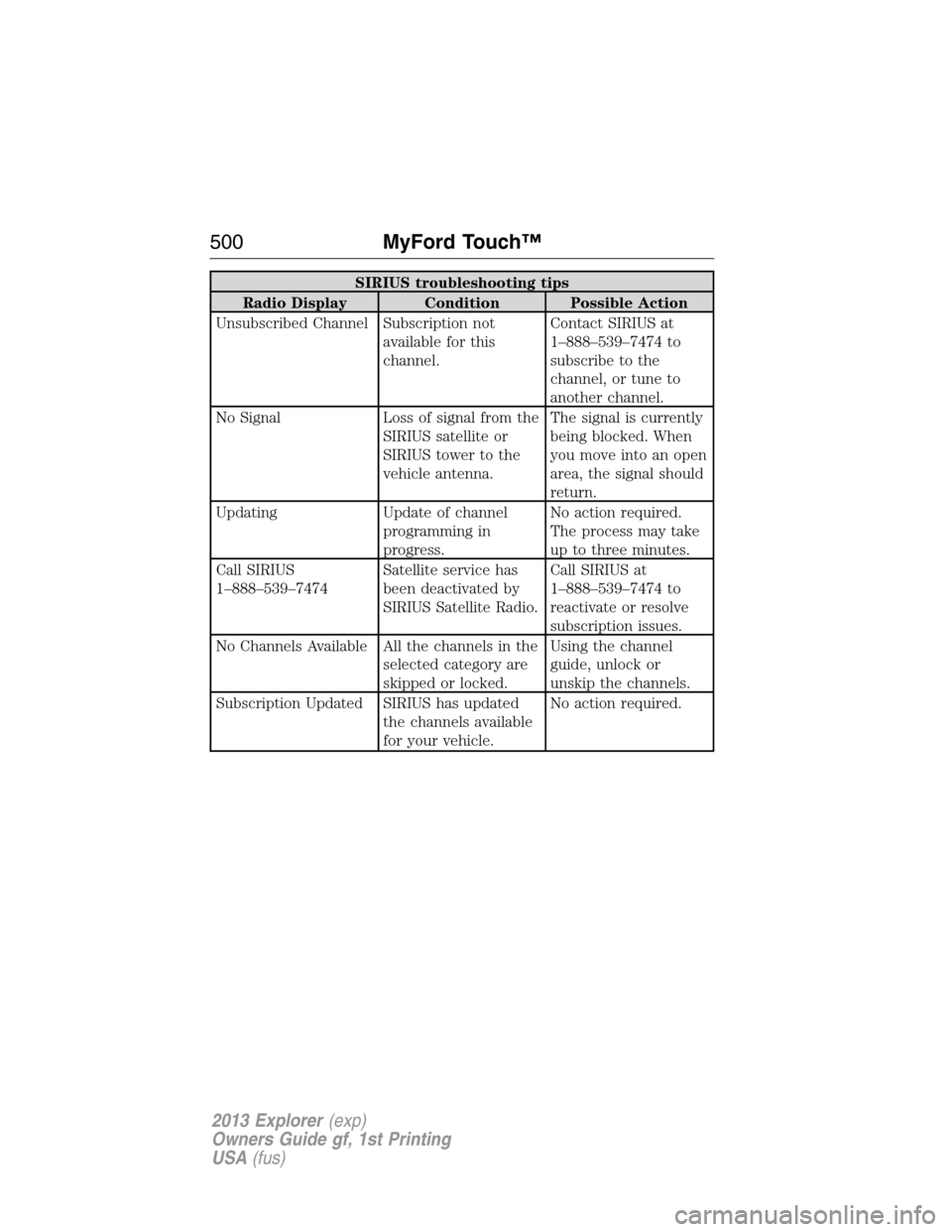
SIRIUS troubleshooting tips
Radio Display Condition Possible Action
Unsubscribed Channel Subscription not
available for this
channel.Contact SIRIUS at
1–888–539–7474 to
subscribe to the
channel, or tune to
another channel.
No Signal Loss of signal from the
SIRIUS satellite or
SIRIUS tower to the
vehicle antenna.The signal is currently
being blocked. When
you move into an open
area, the signal should
return.
Updating Update of channel
programming in
progress.No action required.
The process may take
up to three minutes.
Call SIRIUS
1–888–539–7474Satellite service has
been deactivated by
SIRIUS Satellite Radio.Call SIRIUS at
1–888–539–7474 to
reactivate or resolve
subscription issues.
No Channels Available All the channels in the
selected category are
skipped or locked.Using the channel
guide, unlock or
unskip the channels.
Subscription Updated SIRIUS has updated
the channels available
for your vehicle.No action required.
500MyFord Touch™
2013 Explorer(exp)
Owners Guide gf, 1st Printing
USA(fus)
Page 533 of 576
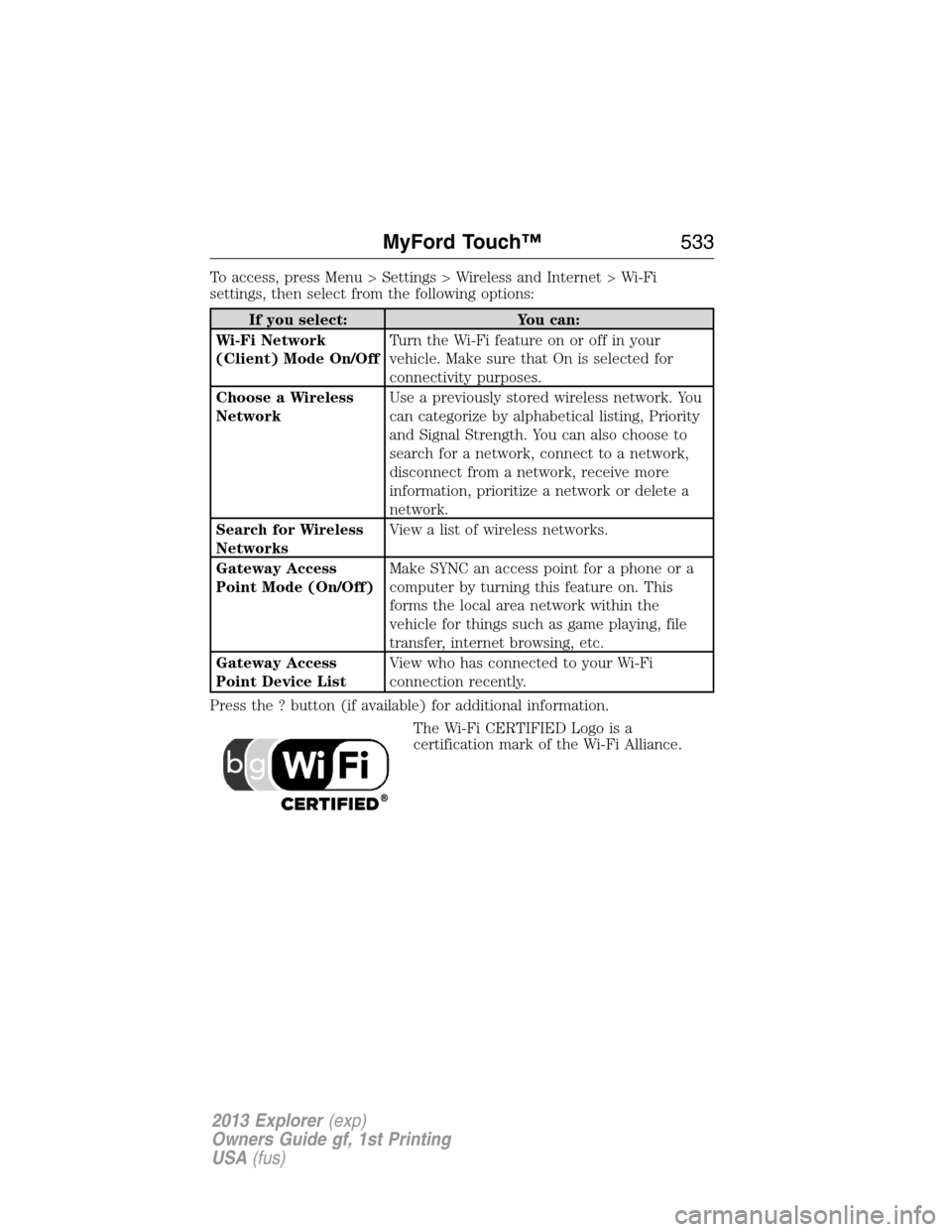
To access, press Menu > Settings > Wireless and Internet > Wi-Fi
settings, then select from the following options:
If you select: You can:
Wi-Fi Network
(Client) Mode On/OffTurn the Wi-Fi feature on or off in your
vehicle. Make sure that On is selected for
connectivity purposes.
Choose a Wireless
NetworkUse a previously stored wireless network. You
can categorize by alphabetical listing, Priority
and Signal Strength. You can also choose to
search for a network, connect to a network,
disconnect from a network, receive more
information, prioritize a network or delete a
network.
Search for Wireless
NetworksView a list of wireless networks.
Gateway Access
Point Mode (On/Off)Make SYNC an access point for a phone or a
computer by turning this feature on. This
forms the local area network within the
vehicle for things such as game playing, file
transfer, internet browsing, etc.
Gateway Access
Point Device ListView who has connected to your Wi-Fi
connection recently.
Press the ? button (if available) for additional information.
The Wi-Fi CERTIFIED Logo is a
certification mark of the Wi-Fi Alliance.
MyFord Touch™533
2013 Explorer(exp)
Owners Guide gf, 1st Printing
USA(fus)
Page 547 of 576
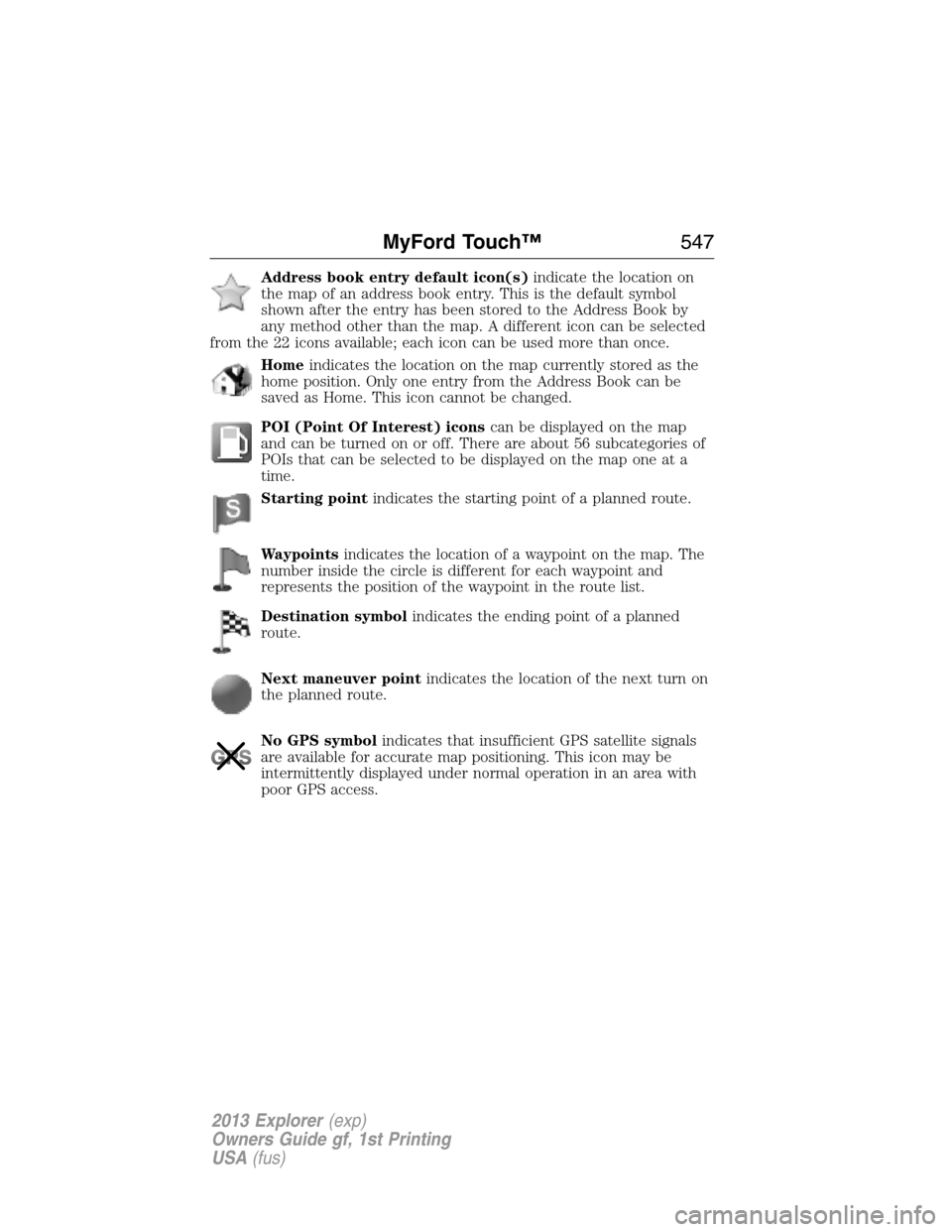
Address book entry default icon(s)indicate the location on
the map of an address book entry. This is the default symbol
shown after the entry has been stored to the Address Book by
any method other than the map. A different icon can be selected
from the 22 icons available; each icon can be used more than once.
Homeindicates the location on the map currently stored as the
home position. Only one entry from the Address Book can be
saved as Home. This icon cannot be changed.
POI (Point Of Interest) iconscan be displayed on the map
and can be turned on or off. There are about 56 subcategories of
POIs that can be selected to be displayed on the map one at a
time.
Starting pointindicates the starting point of a planned route.
Waypointsindicates the location of a waypoint on the map. The
number inside the circle is different for each waypoint and
represents the position of the waypoint in the route list.
Destination symbolindicates the ending point of a planned
route.
Next maneuver pointindicates the location of the next turn on
the planned route.
No GPS symbolindicates that insufficient GPS satellite signals
are available for accurate map positioning. This icon may be
intermittently displayed under normal operation in an area with
poor GPS access.
MyFord Touch™547
2013 Explorer(exp)
Owners Guide gf, 1st Printing
USA(fus)
Page 557 of 576
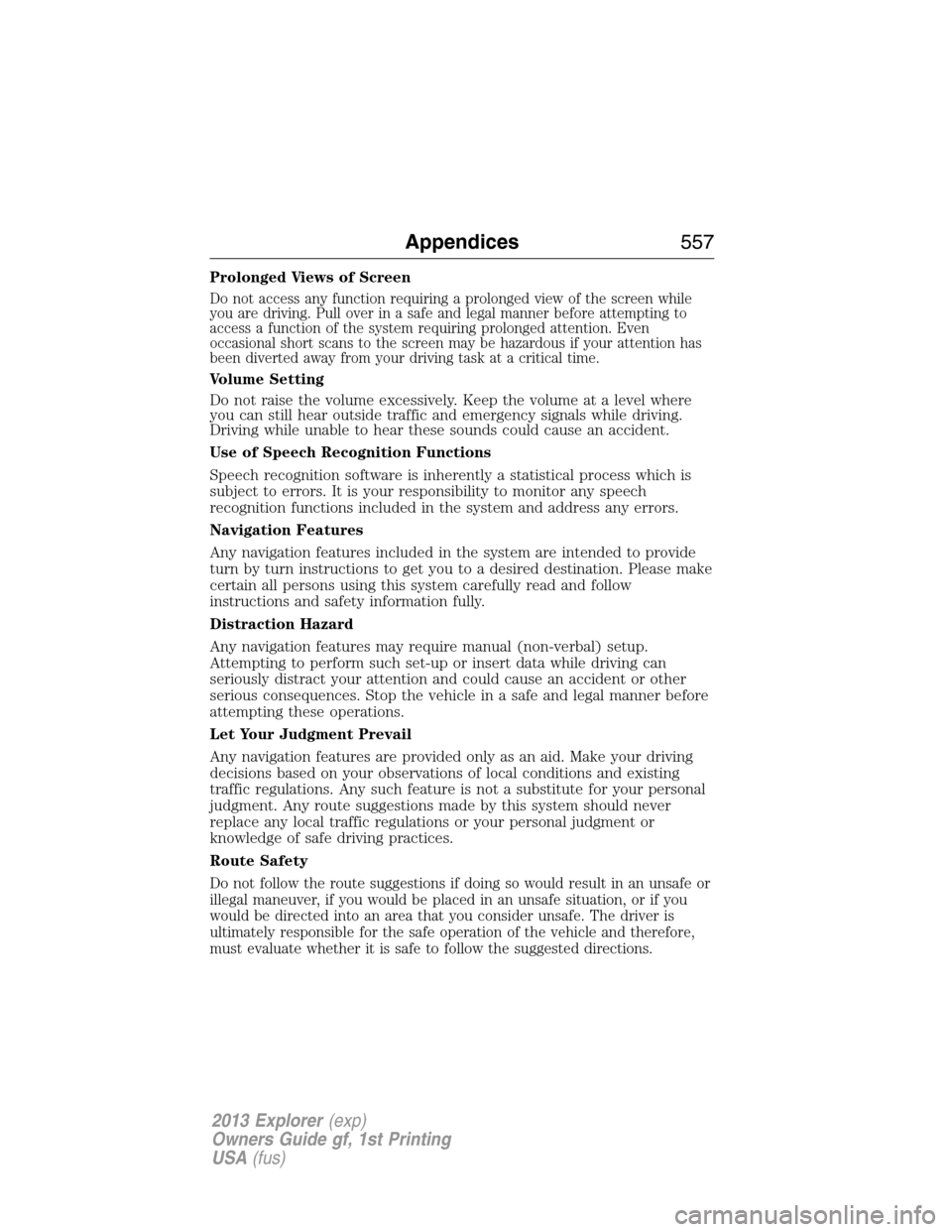
Prolonged Views of Screen
Do not access any function requiring a prolonged view of the screen while
you are driving. Pull over in a safe and legal manner before attempting to
access a function of the system requiring prolonged attention. Even
occasional short scans to the screen may be hazardous if your attention has
been diverted away from your driving task at a critical time.
Volume Setting
Do not raise the volume excessively. Keep the volume at a level where
you can still hear outside traffic and emergency signals while driving.
Driving while unable to hear these sounds could cause an accident.
Use of Speech Recognition Functions
Speech recognition software is inherently a statistical process which is
subject to errors. It is your responsibility to monitor any speech
recognition functions included in the system and address any errors.
Navigation Features
Any navigation features included in the system are intended to provide
turn by turn instructions to get you to a desired destination. Please make
certain all persons using this system carefully read and follow
instructions and safety information fully.
Distraction Hazard
Any navigation features may require manual (non-verbal) setup.
Attempting to perform such set-up or insert data while driving can
seriously distract your attention and could cause an accident or other
serious consequences. Stop the vehicle in a safe and legal manner before
attempting these operations.
Let Your Judgment Prevail
Any navigation features are provided only as an aid. Make your driving
decisions based on your observations of local conditions and existing
traffic regulations. Any such feature is not a substitute for your personal
judgment. Any route suggestions made by this system should never
replace any local traffic regulations or your personal judgment or
knowledge of safe driving practices.
Route Safety
Do not follow the route suggestions if doing so would result in an unsafe or
illegal maneuver, if you would be placed in an unsafe situation, or if you
would be directed into an area that you consider unsafe. The driver is
ultimately responsible for the safe operation of the vehicle and therefore,
must evaluate whether it is safe to follow the suggested directions.
Appendices557
2013 Explorer(exp)
Owners Guide gf, 1st Printing
USA(fus)
Page 576 of 576
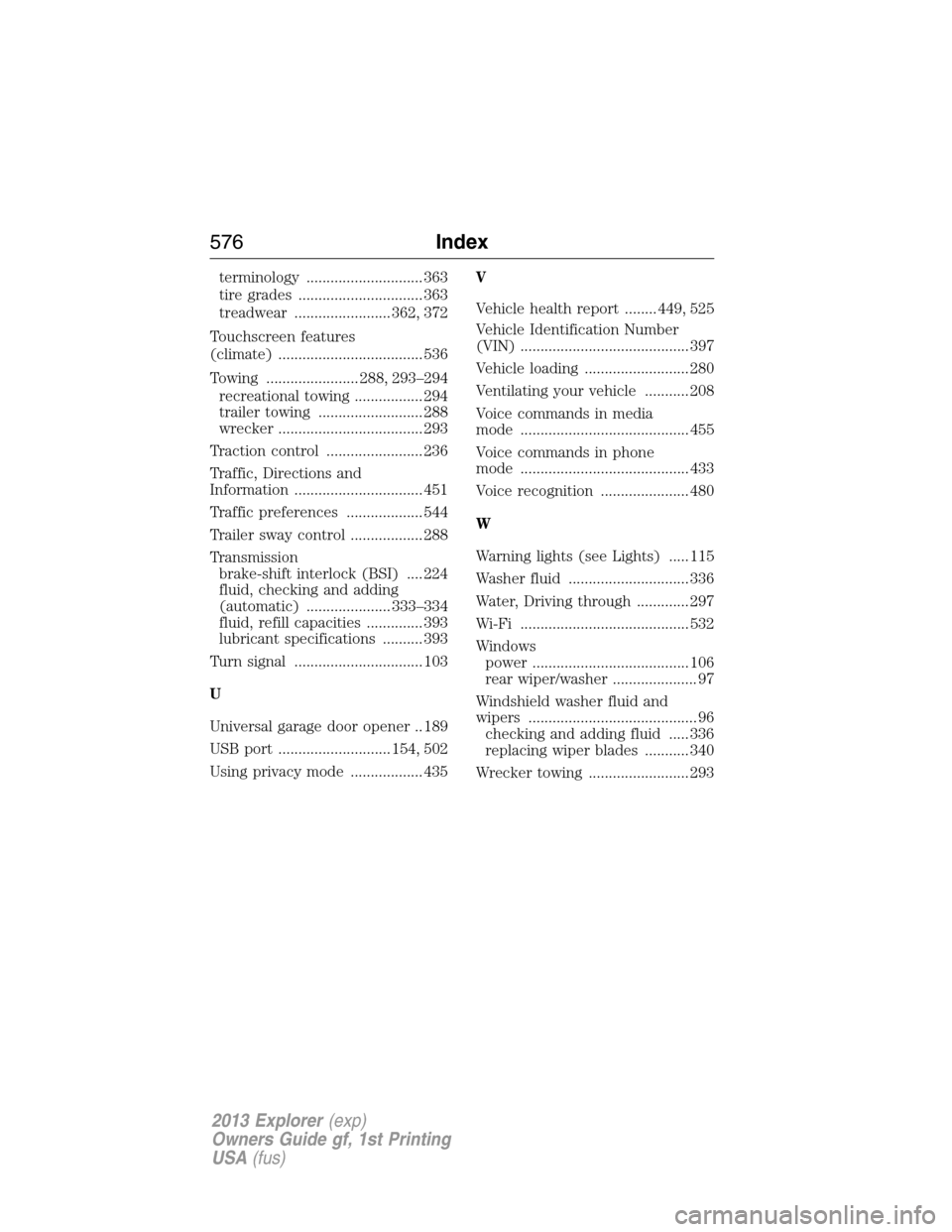
terminology ............................. 363
tire grades ............................... 363
treadwear ........................ 362, 372
Touchscreen features
(climate) .................................... 536
Towing ....................... 288, 293–294
recreational towing ................. 294
trailer towing .......................... 288
wrecker .................................... 293
Traction control ........................ 236
Traffic, Directions and
Information ................................ 451
Traffic preferences ................... 544
Trailer sway control .................. 288
Transmission
brake-shift interlock (BSI) .... 224
fluid, checking and adding
(automatic) ..................... 333–334
fluid, refill capacities .............. 393
lubricant specifications .......... 393
Turn signal ................................ 103
U
Universal garage door opener .. 189
USB port ............................ 154, 502
Using privacy mode .................. 435V
Vehicle health report ........ 449, 525
Vehicle Identification Number
(VIN) .......................................... 397
Vehicle loading .......................... 280
Ventilating your vehicle ........... 208
Voice commands in media
mode .......................................... 455
Voice commands in phone
mode .......................................... 433
Voice recognition ...................... 480
W
Warning lights (see Lights) ..... 115
Washer fluid .............................. 336
Water, Driving through ............. 297
Wi-Fi .......................................... 532
Windows
power ....................................... 106
rear wiper/washer ..................... 97
Windshield washer fluid and
wipers .......................................... 96
checking and adding fluid ..... 336
replacing wiper blades ........... 340
Wrecker towing ......................... 293
576Index
2013 Explorer(exp)
Owners Guide gf, 1st Printing
USA(fus)