remote control FORD EXPLORER 2014 5.G Owner's Manual
[x] Cancel search | Manufacturer: FORD, Model Year: 2014, Model line: EXPLORER, Model: FORD EXPLORER 2014 5.GPages: 586, PDF Size: 9.07 MB
Page 89 of 586
6. Press theSTART/STOPbutton within one minute. A message will
appear in the information display indicating that the new intelligent
access key was programmed.
7. Remove the intelligent access key from the center console pocket and
press the unlock button on the newly programmed intelligent access key
to exit programming mode.
8. Verify that the remote entry functions operate (press lock then
unlock, making sure you end in unlock) and that the vehicle starts with
new intelligent access key.
ANTI-THEFT ALARM (IF EQUIPPED)
The system will warn you of unauthorized entry to your vehicle.
The turn signal lamps will flash and sound the horn up to a total of 10
times when:
•any door, the hood or the luggage compartment is opened without
using the keypad, the remote control or the intelligent access
transmitter (if equipped)
•the ignition is turned on with an invalid key.
Take all keys and remote controls to an authorized dealer if there is any
potential alarm problem with your vehicle.
Arming the Alarm
The system is ready to arm whenever the ignition is off. Lock the vehicle
to arm the alarm.
The turn signal lamps will flash once after locking the vehicle to indicate
the alarm is in the pre-armed mode. It will become fully armed in
20 seconds.
88Security
2014 Explorer(exp)
Owners Guide gf, 1st Printing, April 2013
USA(fus)
Page 90 of 586
Disarming the Alarm
To disarm the alarm, do any of the following:
•Press the power door unlock button within the 20-second pre-armed
mode.
•Press the unlock button on the remote control.
•Unlock the doors with the keyless entry pad.
•Enter the vehicle using intelligent access (if equipped).
•Turn the ignition on with a valid key (if equipped with an integrated
keyhead transmitter only).
•Press the panic button on the remote control. The alarm system will
still be armed, but this shuts off the horn and turn lamps when the
alarm is sounding.
Note:If the driver door is unlocked with a key, a tone will sound when
you open the door and a message will appear in the information display.
You will have 12 seconds to disarm the alarm using any of the actions
above, otherwise the alarm will trigger.
Security89
2014 Explorer(exp)
Owners Guide gf, 1st Printing, April 2013
USA(fus)
Page 105 of 586
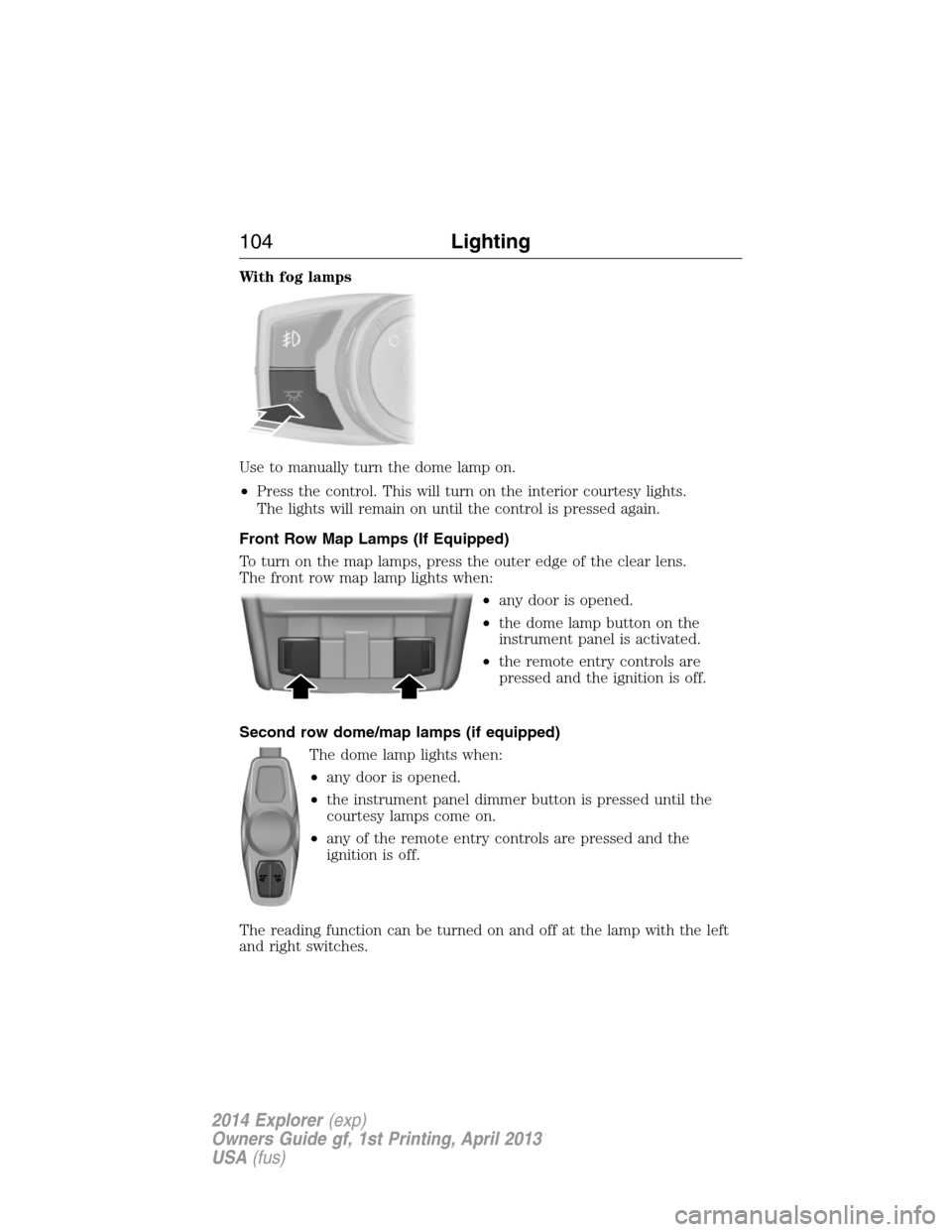
With fog lamps
Use to manually turn the dome lamp on.
•Press the control. This will turn on the interior courtesy lights.
The lights will remain on until the control is pressed again.
Front Row Map Lamps (If Equipped)
To turn on the map lamps, press the outer edge of the clear lens.
The front row map lamp lights when:
•any door is opened.
•the dome lamp button on the
instrument panel is activated.
•the remote entry controls are
pressed and the ignition is off.
Second row dome/map lamps (if equipped)
The dome lamp lights when:
•any door is opened.
•the instrument panel dimmer button is pressed until the
courtesy lamps come on.
•any of the remote entry controls are pressed and the
ignition is off.
The reading function can be turned on and off at the lamp with the left
and right switches.
104Lighting
2014 Explorer(exp)
Owners Guide gf, 1st Printing, April 2013
USA(fus)
Page 106 of 586
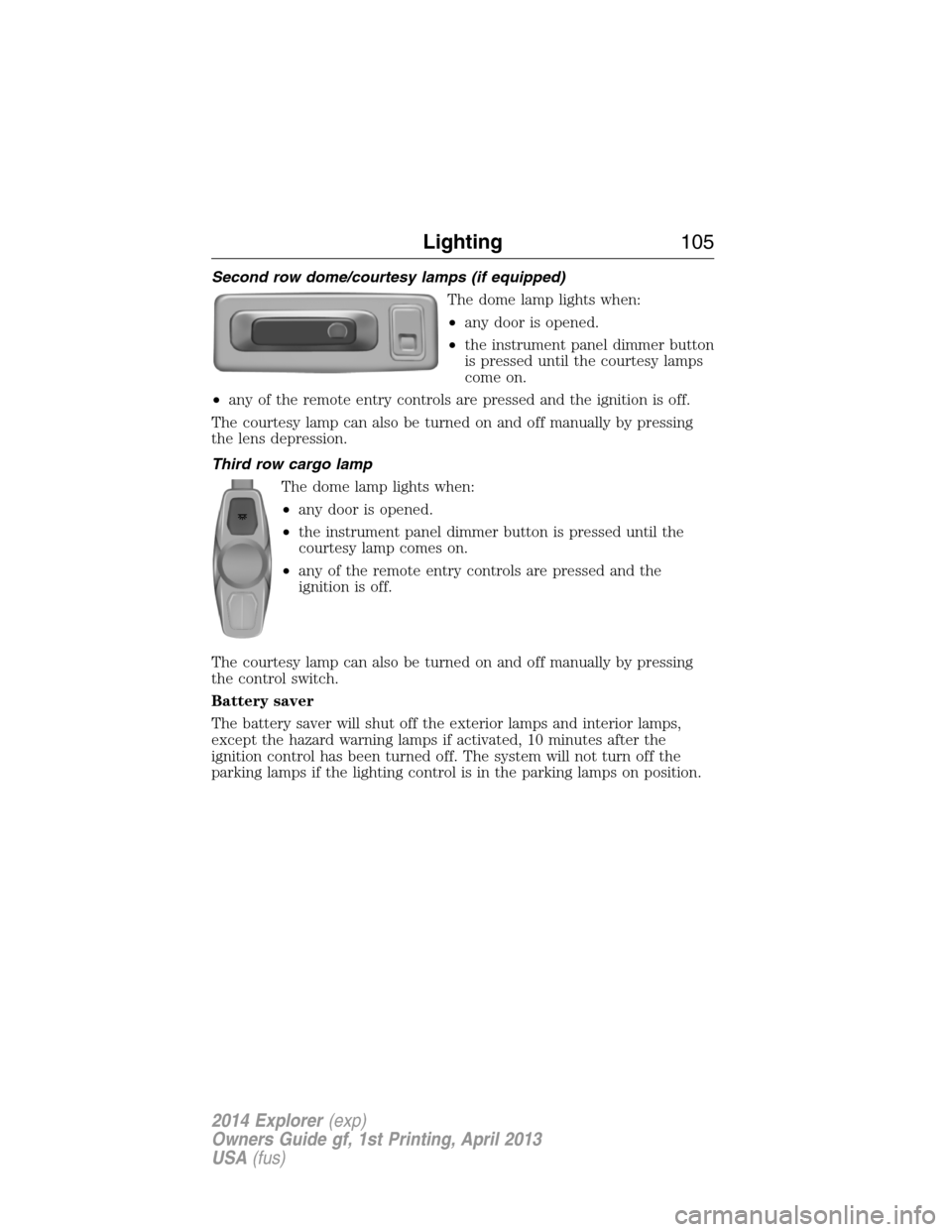
Second row dome/courtesy lamps (if equipped)
The dome lamp lights when:
•any door is opened.
•the instrument panel dimmer button
is pressed until the courtesy lamps
come on.
•any of the remote entry controls are pressed and the ignition is off.
The courtesy lamp can also be turned on and off manually by pressing
the lens depression.
Third row cargo lamp
The dome lamp lights when:
•any door is opened.
•the instrument panel dimmer button is pressed until the
courtesy lamp comes on.
•any of the remote entry controls are pressed and the
ignition is off.
The courtesy lamp can also be turned on and off manually by pressing
the control switch.
Battery saver
The battery saver will shut off the exterior lamps and interior lamps,
except the hazard warning lamps if activated, 10 minutes after the
ignition control has been turned off. The system will not turn off the
parking lamps if the lighting control is in the parking lamps on position.
Lighting105
2014 Explorer(exp)
Owners Guide gf, 1st Printing, April 2013
USA(fus)
Page 125 of 586
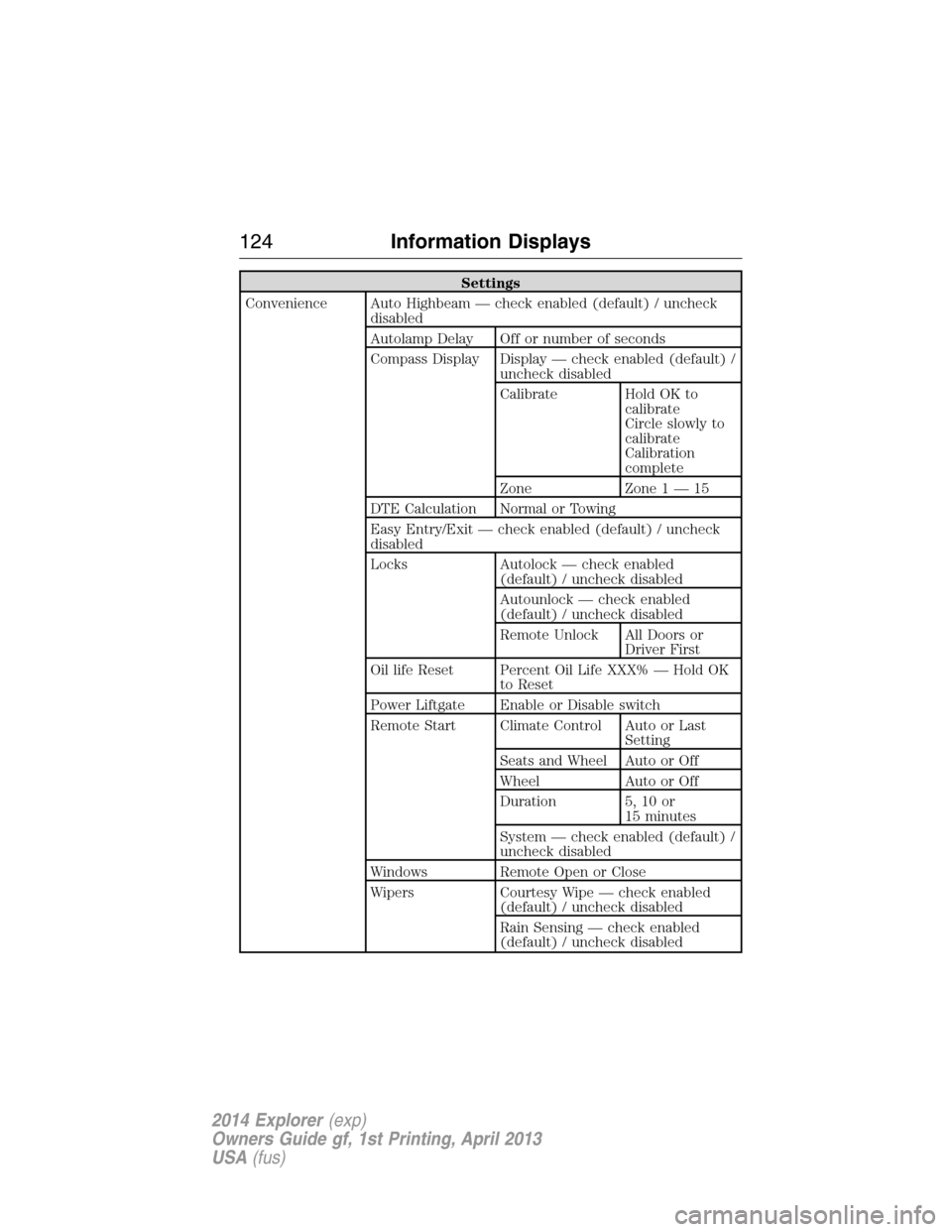
Settings
Convenience Auto Highbeam — check enabled (default) / uncheck
disabled
Autolamp Delay Off or number of seconds
Compass Display Display — check enabled (default) /
uncheck disabled
Calibrate Hold OK to
calibrate
Circle slowly to
calibrate
Calibration
complete
Zone Zone 1 — 15
DTE Calculation Normal or Towing
Easy Entry/Exit — check enabled (default) / uncheck
disabled
Locks Autolock — check enabled
(default) / uncheck disabled
Autounlock — check enabled
(default) / uncheck disabled
Remote Unlock All Doors or
Driver First
Oil life Reset Percent Oil Life XXX% — Hold OK
to Reset
Power Liftgate Enable or Disable switch
Remote Start Climate Control Auto or Last
Setting
Seats and Wheel Auto or Off
Wheel Auto or Off
Duration 5, 10 or
15 minutes
System — check enabled (default) /
uncheck disabled
Windows Remote Open or Close
Wipers Courtesy Wipe — check enabled
(default) / uncheck disabled
Rain Sensing — check enabled
(default) / uncheck disabled
124Information Displays
2014 Explorer(exp)
Owners Guide gf, 1st Printing, April 2013
USA(fus)
Page 131 of 586
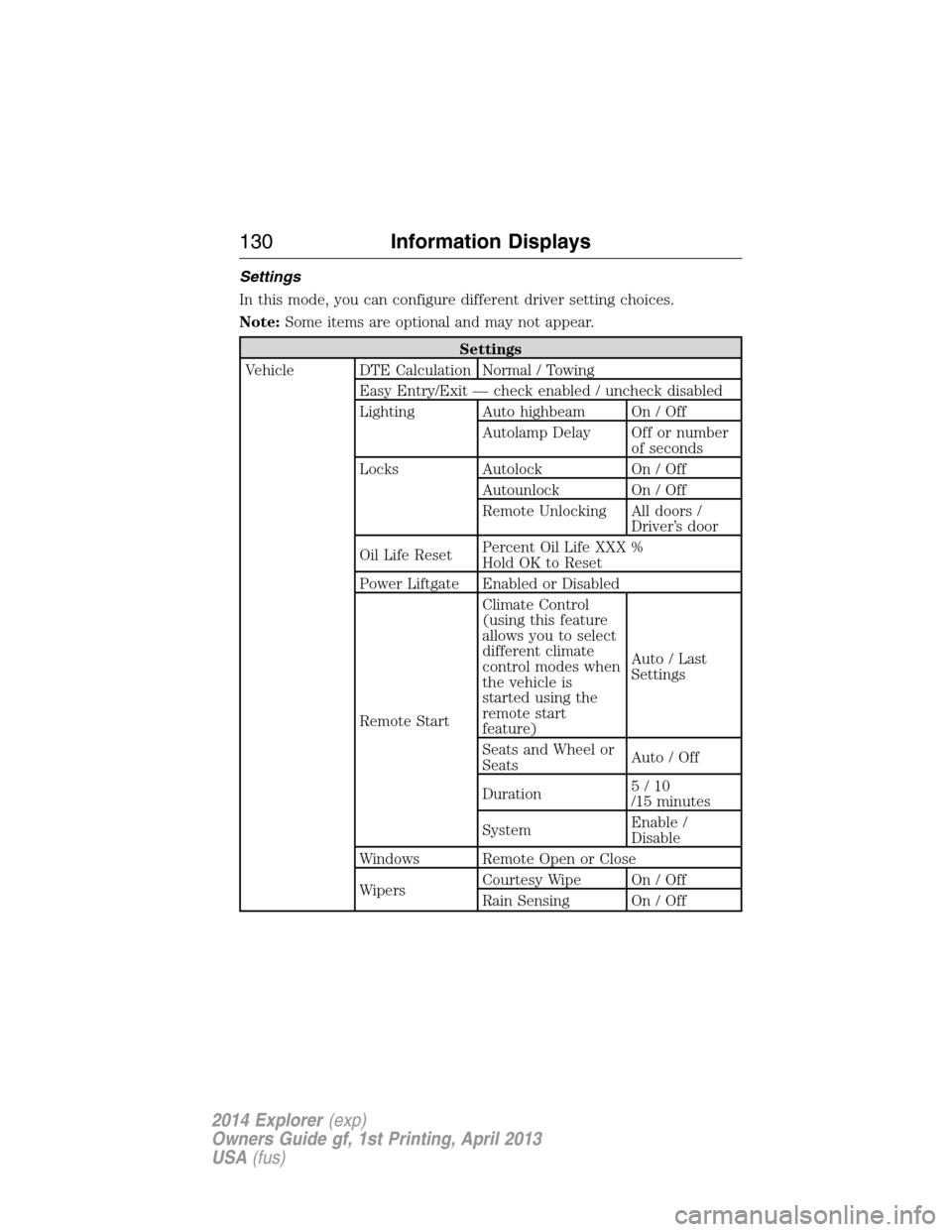
Settings
In this mode, you can configure different driver setting choices.
Note:Some items are optional and may not appear.
Settings
Vehicle DTE Calculation Normal / Towing
Easy Entry/Exit — check enabled / uncheck disabled
Lighting Auto highbeam On / Off
Autolamp Delay Off or number
of seconds
Locks Autolock On / Off
Autounlock On / Off
Remote Unlocking All doors /
Driver’s door
Oil Life ResetPercent Oil Life XXX %
Hold OK to Reset
Power Liftgate Enabled or Disabled
Remote StartClimate Control
(using this feature
allows you to select
different climate
control modes when
the vehicle is
started using the
remote start
feature)Auto / Last
Settings
Seats and Wheel or
SeatsAuto / Off
Duration5/10
/15 minutes
SystemEnable /
Disable
Windows Remote Open or Close
WipersCourtesy Wipe On / Off
Rain Sensing On / Off
130Information Displays
2014 Explorer(exp)
Owners Guide gf, 1st Printing, April 2013
USA(fus)
Page 142 of 586
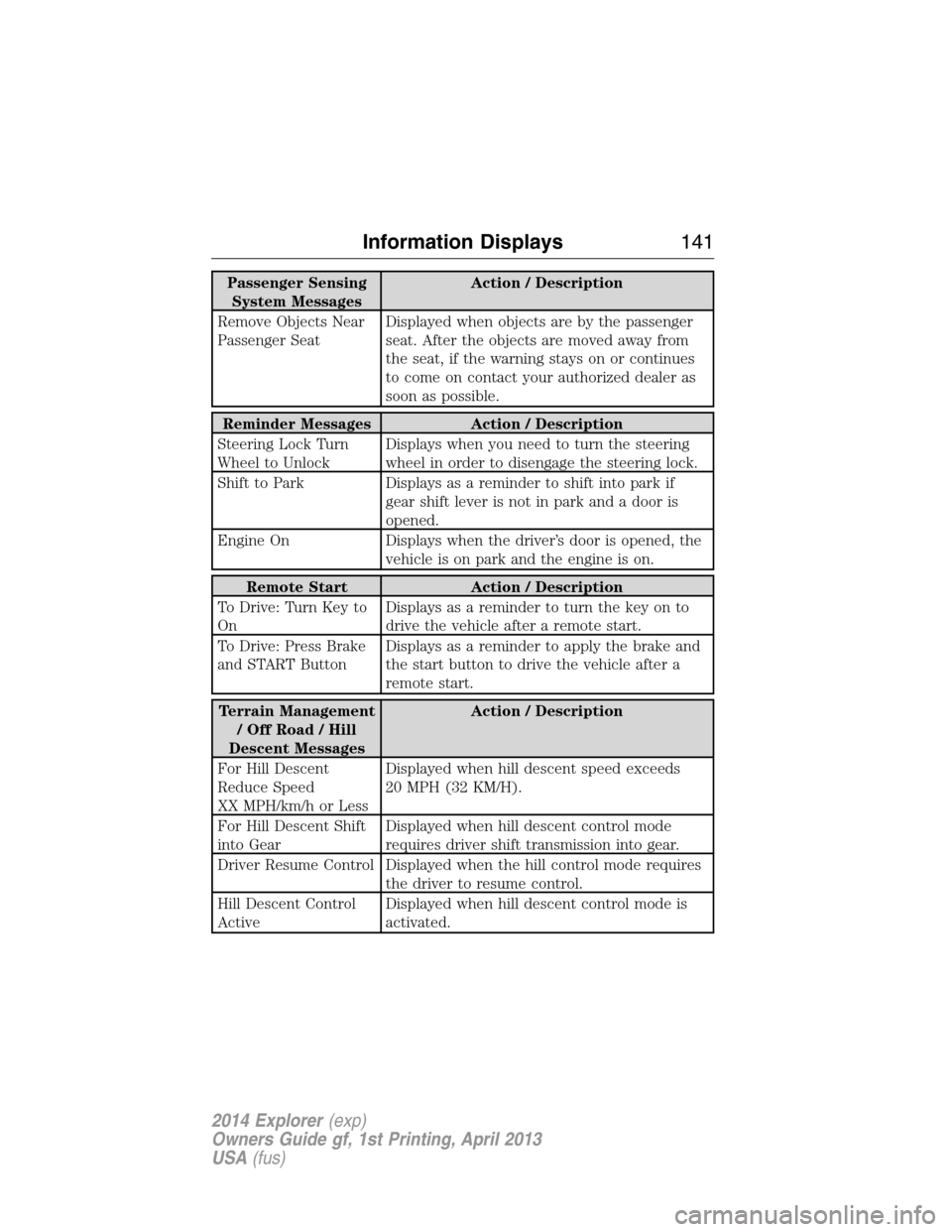
Passenger Sensing
System MessagesAction / Description
Remove Objects Near
Passenger SeatDisplayed when objects are by the passenger
seat. After the objects are moved away from
the seat, if the warning stays on or continues
to come on contact your authorized dealer as
soon as possible.
Reminder Messages Action / Description
Steering Lock Turn
Wheel to UnlockDisplays when you need to turn the steering
wheel in order to disengage the steering lock.
Shift to Park Displays as a reminder to shift into park if
gear shift lever is not in park and a door is
opened.
Engine On Displays when the driver’s door is opened, the
vehicle is on park and the engine is on.
Remote Start Action / Description
To Drive: Turn Key to
OnDisplays as a reminder to turn the key on to
drive the vehicle after a remote start.
To Drive: Press Brake
and START ButtonDisplays as a reminder to apply the brake and
the start button to drive the vehicle after a
remote start.
Terrain Management
/OffRoad/Hill
Descent MessagesAction / Description
For Hill Descent
Reduce Speed
XX MPH/km/h or LessDisplayed when hill descent speed exceeds
20 MPH (32 KM/H).
For Hill Descent Shift
into GearDisplayed when hill descent control mode
requires driver shift transmission into gear.
Driver Resume Control Displayed when the hill control mode requires
the driver to resume control.
Hill Descent Control
ActiveDisplayed when hill descent control mode is
activated.
Information Displays141
2014 Explorer(exp)
Owners Guide gf, 1st Printing, April 2013
USA(fus)
Page 154 of 586
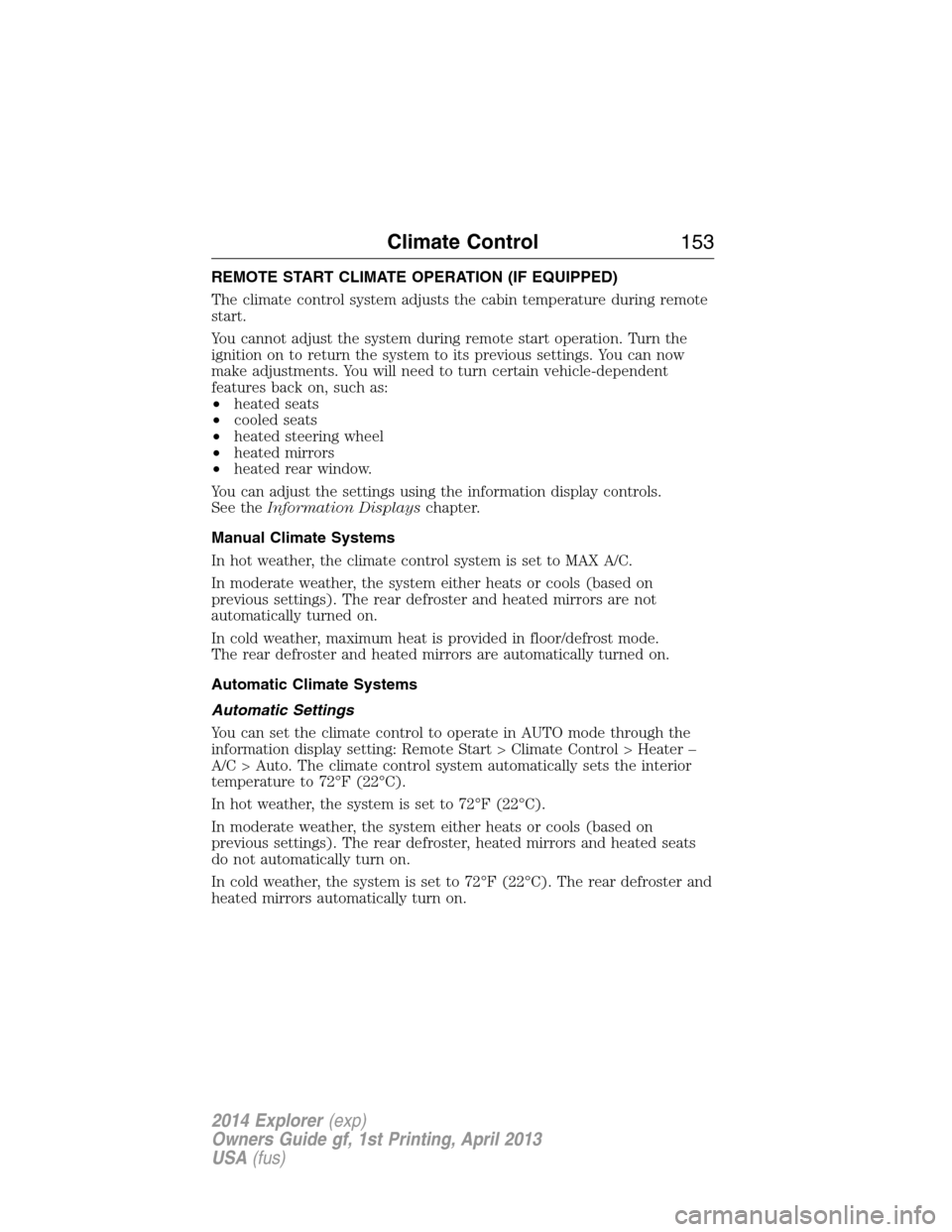
REMOTE START CLIMATE OPERATION (IF EQUIPPED)
The climate control system adjusts the cabin temperature during remote
start.
You cannot adjust the system during remote start operation. Turn the
ignition on to return the system to its previous settings. You can now
make adjustments. You will need to turn certain vehicle-dependent
features back on, such as:
•heated seats
•cooled seats
•heated steering wheel
•heated mirrors
•heated rear window.
You can adjust the settings using the information display controls.
See theInformation Displayschapter.
Manual Climate Systems
In hot weather, the climate control system is set to MAX A/C.
In moderate weather, the system either heats or cools (based on
previous settings). The rear defroster and heated mirrors are not
automatically turned on.
In cold weather, maximum heat is provided in floor/defrost mode.
The rear defroster and heated mirrors are automatically turned on.
Automatic Climate Systems
Automatic Settings
You can set the climate control to operate in AUTO mode through the
information display setting: Remote Start > Climate Control > Heater –
A/C > Auto. The climate control system automatically sets the interior
temperature to 72°F (22°C).
In hot weather, the system is set to 72°F (22°C).
In moderate weather, the system either heats or cools (based on
previous settings). The rear defroster, heated mirrors and heated seats
do not automatically turn on.
In cold weather, the system is set to 72°F (22°C). The rear defroster and
heated mirrors automatically turn on.
Climate Control153
2014 Explorer(exp)
Owners Guide gf, 1st Printing, April 2013
USA(fus)
Page 155 of 586
Last Settings
You can set the climate control to operate using the last climate control
settings through the information display setting: Remote Start > Climate
Control > Heater – A/C > Last Settings. The climate control system
automatically uses the settings last selected before you turned off the
engine.
Heated and Cooled Devices
The climate control system controls other heated and cooled devices
inside the vehicle. You can switch these devices on (if available, and
selected toAUTOin the information displays) during remote start.
Heated devices usually switch on during cold weather, and cooled
devices during hot weather.
154Climate Control
2014 Explorer(exp)
Owners Guide gf, 1st Printing, April 2013
USA(fus)
Page 163 of 586
Recalling memory positions with the remote control
You can recall memory positions when you press unlock on your remote
control (if the transmitter is programmed to a memory position) or,
when you enter a valid personal entry code that is programmed to a
memory position. If the easy entry feature is enabled, the seat will first
move to the easy entry position. The seat will move to the final position
when the key is in the ignition or when the push button start system
(if equipped) is put in accessory mode or started.
To program the memory feature to a remote control, see theKeys and
Remote Controlchapter.
Easy Entry and Exit Feature (If Equipped)
This feature can move the seat rearward and the steering column up and
forward to allow extra room to exit the vehicle.
This occurs when:
•the transmission selector lever is in positionNorP
•the key is removed from the ignition or the push button start system
is switched off.
The seat and steering wheel will move to their original positions when:
•the transmission selector lever is in positionNorP
•the key is placed in the ignition or when the push button start system
is put in accessory mode or started.
Turn the easy entry feature off or on through the information display.
See theInformation Displayschapter.
162Seats
2014 Explorer(exp)
Owners Guide gf, 1st Printing, April 2013
USA(fus)