air condition FORD EXPLORER 2015 5.G User Guide
[x] Cancel search | Manufacturer: FORD, Model Year: 2015, Model line: EXPLORER, Model: FORD EXPLORER 2015 5.GPages: 596, PDF Size: 6.32 MB
Page 146 of 596
E.MAX A/C:Turn the temperature control dial all the way past the full
cool position to maximize cooling. Recirculated air flows through the
instrument panel vents, air conditioning automatically turns on, and the
fan automatically adjusts to the highest speed.
F.Front temperature control:Controls the temperature of the airflow
in the front of your vehicle. Adjust to select the desired temperature.
G.Rear fan speed control:Controls the volume of air circulated in the
rear of your vehicle. Press+or-to select the desired fan speed.
H.Rear temperature control:Controls the temperature of the airflow
in the rear of your vehicle. PressTEMP +andTEMP -to select the
desired temperature.
I.REAR CTRL:Press to change control of the rear climate controls
system from the front controls to the rear controls.
J.Rear climate control system power:Press the button to turn the
rear climate system on and off.
K.Front fan speed control:Controls the volume of air circulated in
your vehicle. Adjust to select the desired fan speed.
L.Heated rear window:Turns the heated rear window on and off. See
Heated windows and mirrorslater in this chapter for more
information.
M.Defrost:Press the button to distribute air to the windshield vents
and de-mister. Air distribution to instrument panel and footwell vents
turn off. You can use this setting to defog and clear the windshield of a
thin covering of ice.
Climate Control145
2015 Explorer(exp)
Owners Guide gf, 2nd Printing, September 2014
USA(fus)
Page 147 of 596
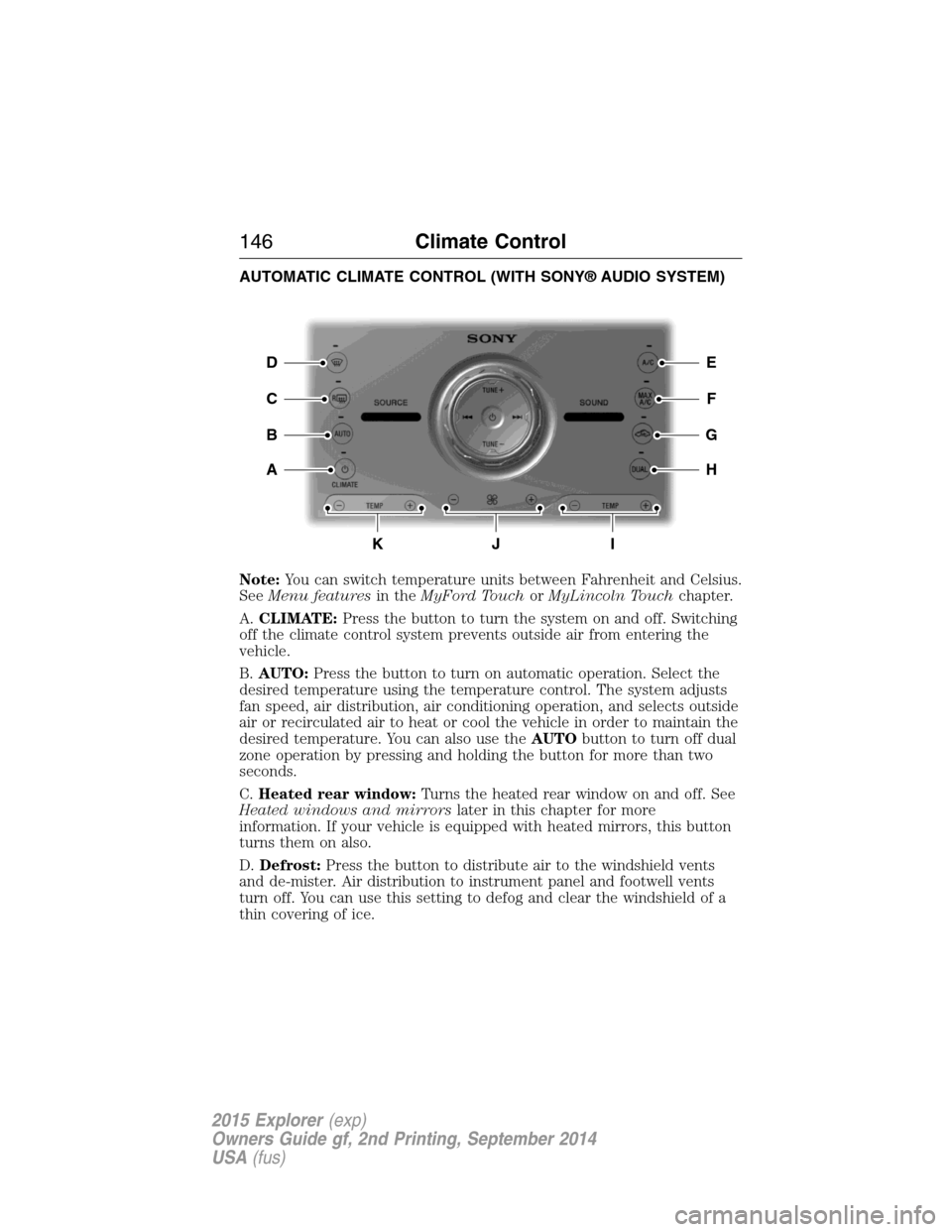
AUTOMATIC CLIMATE CONTROL (WITH SONY® AUDIO SYSTEM)
Note:You can switch temperature units between Fahrenheit and Celsius.
SeeMenu featuresin theMyFord TouchorMyLincoln Touchchapter.
A.CLIMATE:Press the button to turn the system on and off. Switching
off the climate control system prevents outside air from entering the
vehicle.
B.AUTO:Press the button to turn on automatic operation. Select the
desired temperature using the temperature control. The system adjusts
fan speed, air distribution, air conditioning operation, and selects outside
air or recirculated air to heat or cool the vehicle in order to maintain the
desired temperature. You can also use theAUTObutton to turn off dual
zone operation by pressing and holding the button for more than two
seconds.
C.Heated rear window:Turns the heated rear window on and off. See
Heated windows and mirrorslater in this chapter for more
information. If your vehicle is equipped with heated mirrors, this button
turns them on also.
D.Defrost:Press the button to distribute air to the windshield vents
and de-mister. Air distribution to instrument panel and footwell vents
turn off. You can use this setting to defog and clear the windshield of a
thin covering of ice.
E
F
G
H
D
C
A
B
KJI
146Climate Control
2015 Explorer(exp)
Owners Guide gf, 2nd Printing, September 2014
USA(fus)
Page 148 of 596
E.A/C:Press the button to turn air conditioning compressor on or off.
Use air conditioning with recirculated air to improve cooling performance
and efficiency.
F.MAX A/C:Press the button to maximize cooling. Recirculated air
flows through the instrument panel vents, air conditioning automatically
turns on, and the fan automatically adjusts to the highest speed.
G.Recirculated air:Press the button to switch between outside air and
recirculated air. When you select recirculated air, the air currently in the
passenger compartment recirculates. This may reduce the time needed
to cool the interior (when used withA/C) and may reduce unwanted
odors from entering your vehicle.
Note:Recirculated air may turn off automatically (or be prevented
from turning on) in all airflow modes exceptMAX A/Cto reduce risk
of fogging.
H.DUAL:Press the button to allow the passenger to set their
temperature independent of the driver temperature.
I.Passenger temperature control:Press+or-to increase or decrease
the air temperature on the passenger side of the vehicle. This turns on
dual zone mode.
J.Fan speed control:Press+or-to increase or decrease the volume
of air circulated in the vehicle.
K.Driver temperature control:Press+or-to increase or decrease
the air temperature for the driver side of the vehicle. This control also
adjusts the passenger side temperature when not in dual zone mode.
Climate Control147
2015 Explorer(exp)
Owners Guide gf, 2nd Printing, September 2014
USA(fus)
Page 149 of 596
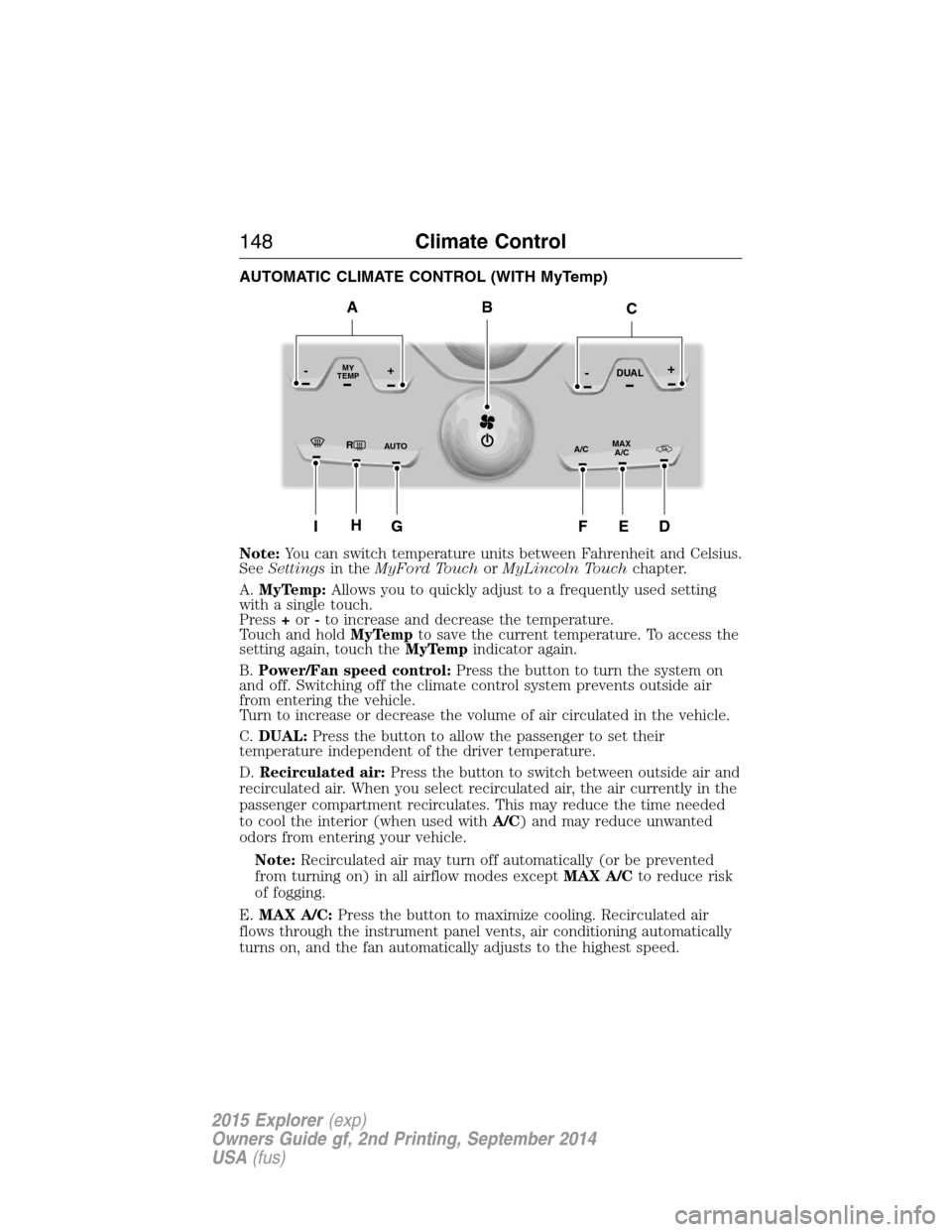
AUTOMATIC CLIMATE CONTROL (WITH MyTemp)
Note:You can switch temperature units between Fahrenheit and Celsius.
SeeSettingsin theMyFord TouchorMyLincoln Touchchapter.
A.MyTemp:Allows you to quickly adjust to a frequently used setting
with a single touch.
Press+or-to increase and decrease the temperature.
Touch and holdMyTempto save the current temperature. To access the
setting again, touch theMyTempindicator again.
B.Power/Fan speed control:Press the button to turn the system on
and off. Switching off the climate control system prevents outside air
from entering the vehicle.
Turn to increase or decrease the volume of air circulated in the vehicle.
C.DUAL:Press the button to allow the passenger to set their
temperature independent of the driver temperature.
D.Recirculated air:Press the button to switch between outside air and
recirculated air. When you select recirculated air, the air currently in the
passenger compartment recirculates. This may reduce the time needed
to cool the interior (when used withA/C) and may reduce unwanted
odors from entering your vehicle.
Note:Recirculated air may turn off automatically (or be prevented
from turning on) in all airflow modes exceptMAX A/Cto reduce risk
of fogging.
E.MAX A/C:Press the button to maximize cooling. Recirculated air
flows through the instrument panel vents, air conditioning automatically
turns on, and the fan automatically adjusts to the highest speed.
RMAX
A/C A/C
TEMP
AU TO
MY-+DUAL-+
IG
B
HEDF
AC
148Climate Control
2015 Explorer(exp)
Owners Guide gf, 2nd Printing, September 2014
USA(fus)
Page 150 of 596
F.A/C:Press the button to turn air conditioning compressor on or off.
Use air conditioning with recirculated air to improve cooling performance
and efficiency.
G.
AUTO:Press the button to turn on automatic operation. Select the
desired temperature using the temperature control. The system adjusts fan
speed, air distribution, air conditioning operation, and selects outside air or
recirculated air to heat or cool the vehicle in order to maintain the desired
temperature. You can also use theAUTObutton to turn off dual zone
operation by pressing and holding the button for more than two seconds.
H.Heated rear window:Turns the heated rear window on and off. See
Heated windows and mirrorslater in this chapter for more
information. If your vehicle is equipped with heated mirrors, this button
turns them on also.
I.Defrost:Press the button to distribute air to the windshield vents and
de-mister. Air distribution to instrument panel and footwell vents turn
off. You can use this setting to defog and clear the windshield of a thin
covering of ice.
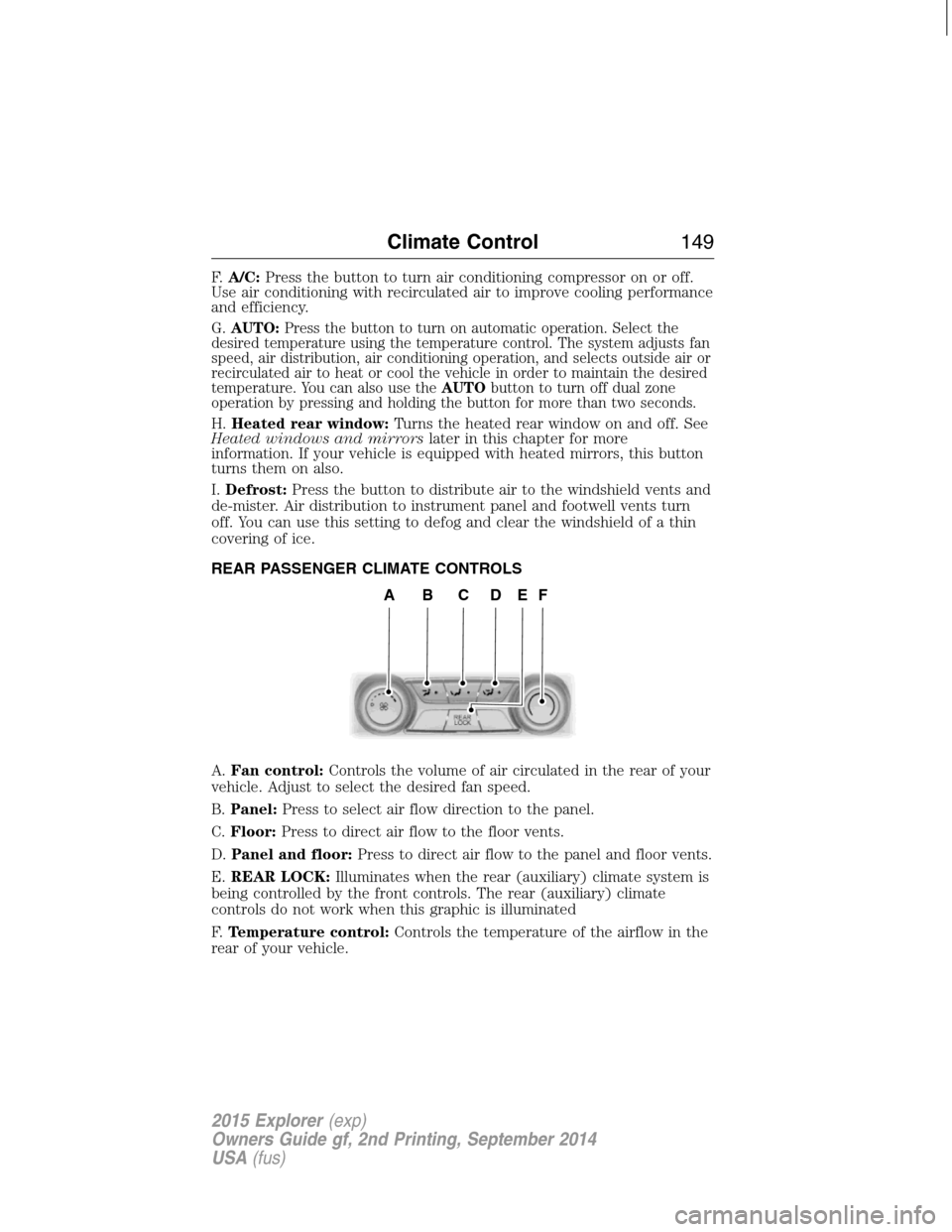
REAR PASSENGER CLIMATE CONTROLS
A.Fan control:Controls the volume of air circulated in the rear of your
vehicle. Adjust to select the desired fan speed.
B.Panel:Press to select air flow direction to the panel.
C.Floor:Press to direct air flow to the floor vents.
D.Panel and floor:Press to direct air flow to the panel and floor vents.
E.REAR LOCK:Illuminates when the rear (auxiliary) climate system is
being controlled by the front controls. The rear (auxiliary) climate
controls do not work when this graphic is illuminated
F.Temperature control:Controls the temperature of the airflow in the
rear of your vehicle.
ABCDEF
Climate Control149
2015 Explorer(exp)
Owners Guide gf, 2nd Printing, September 2014
USA(fus)
Page 213 of 596
USING YOUR FOUR WHEEL DRIVE (4WD) SYSTEM
The intelligent 4WD system continuously monitors vehicle conditions and
automatically adjusts the power distribution between the front and rear
wheels. It combines transparent all-surface operation with highly capable
four-wheel drive.
The 4WD system is always active and requires no driver input. It is
capable of handling all road conditions, including street and highway
driving as well as off-road and winter driving. The driver can optimize
more 4WD control by moving the terrain management switch for the
correct terrain. See theTerrain Managementchapter for more
information.
Note:When an 4WD system fault is present, the warning Check AWD
will display in the information display. The 4WD system is not
functioning correctly and will default to front-wheel drive. When this
warning is displayed, have your vehicle serviced at an authorized dealer.
Note:The AWD Off message may also be displayed in the information
display if the 4WD system has overheated and defaulted to front-wheel
drive. This condition may occur if the vehicle was operated in extreme
conditions with excessive wheel slip, such as deep sand. To resume
normal 4WD function as soon as possible, stop the vehicle in a safe
location and stop the engine for at least 10 minutes. After the engine has
been restarted and the 4WD system has adequately cooled, the AWD Off
message will turn off and normal 4WD function will return. The AWD Off
message will turn off when the system cools and normal 4WD function
returns.
If your vehicle is equipped with 4WD, a spare tire of a different size
other than the tire provided should never be used. If the mini-spare tire
is installed, the 4WD system may disable automatically and enter
front-wheel drive only mode to protect driveline components. This
condition may be indicated by an AWD Off message in the information
display. If there is an AWD Off message in the information display from
using the spare tire, this indicator should turn off after reinstalling the
repaired or replaced normal road tire and cycling the ignition off and on.
It is recommended to reinstall the repaired or replaced road tire as soon
as possible. Major dissimilar tire sizes between the front and rear axles
could cause the 4WD system to stop functioning and default to
front-wheel drive or damage the 4WD system.
212Four-Wheel Drive (If Equipped)
2015 Explorer(exp)
Owners Guide gf, 2nd Printing, September 2014
USA(fus)
Page 219 of 596
Should you start to slide while driving on snowy or icy roads, turn the
steering wheel in the direction of the slide until you regain control.
Avoid sudden applications of power and quick changes of direction on
snow and ice. Apply the accelerator slowly and steadily when starting
from a full stop.
Avoid sudden braking as well. Although a 4WD vehicle may accelerate
better than a two-wheel drive vehicle in snow and ice, it won’t stop any
faster, because as in other vehicles, braking occurs at all four wheels. Do
not become overconfident as to road conditions.
Make sure you allow sufficient distance between you and other vehicles
for stopping. Drive slower than usual and consider using one of the lower
gears. In emergency stopping situations, avoid locking of the wheels. Use
a “squeeze” technique, push on the brake pedal with a steadily increasing
force which allows the wheels to brake yet continue to roll so that you
may steer in the direction you want to travel. If you lock the wheels,
release the brake pedal and repeat the squeeze technique. Since your
vehicle is equipped with a Four Wheel Anti-Lock Brake System (ABS),
apply the brake steadily. Do not “pump” the brakes. Refer toBrakes
chapter for additional information on the operation of the anti-lock brake
system.
Maintenance and modifications
The suspension and steering systems on your vehicle have been designed
and tested to provide predictable performance whether loaded or empty
and durable load carrying capability. For this reason, Ford Motor
Company strongly recommends that you do not make modifications such
as adding or removing parts (such as lift kits or stabilizer bars) or by
using replacement parts not equivalent to the original factory equipment.
Any modifications to a vehicle that raise the center of gravity can make
it more likely the vehicle will roll over as a result of a loss of control.
Ford Motor Company recommends that caution be used with any vehicle
equipped with a high load or device (such as ladder racks or pickup box
cover).
Failure to maintain your vehicle properly may void the warranty, increase
your repair cost, reduce vehicle performance and operational capabilities
and adversely affect driver and passenger safety. Frequent inspection of
vehicle chassis components is recommended if the vehicle is subjected to
heavy off-road usage.
218Four-Wheel Drive (If Equipped)
2015 Explorer(exp)
Owners Guide gf, 2nd Printing, September 2014
USA(fus)
Page 280 of 596

When Towing a Trailer
•Do not drive faster than 70 mph (113 km/h) during the first 500 miles
(800 kilometers).
•Do not make full-throttle starts.
•Check your hitch, electrical connections and trailer wheel lug nuts
thoroughly after you have traveled 50 miles (80 kilometers).
•When stopped in congested or heavy traffic during hot weather, place
the gearshift in positionPto aid engine and transmission cooling and
to help air conditioning performance.
•Turn off the speed control with heavy loads or in hilly terrain. The
speed control may turn off automatically when you are towing on
long, steep grades.
•Shift to a lower gear when driving down a long or steep hill. Do not
apply the brakes continuously, as they may overheat and become less
effective.
•Use the Grade Assist or Tow/Haul feature when towing. These
provide engine braking and help eliminate excessive transmission
shifting for optimum fuel economy and transmission cooling.
•Allow more distance for stopping with a trailer attached. Anticipate
stops and brake gradually.
•Avoid parking on a grade. However, if you must park on a grade:
1. Turn the steering wheel to point your vehicle tires away from
traffic flow.
2. Set your vehicle parking brake.
3. Place the automatic transmission in positionP.
4. Place wheel chocks in front and back of the trailer wheels.
(Chocks not included with vehicle.)
Launching or Retrieving a Boat or Personal Watercraft (PWC)
Note:Disconnect the wiring to the trailerbeforebacking the trailer into
the water.
Note:Reconnect the wiring to the trailerafterremoving the trailer from
the water.
When backing down a ramp during boat launching or retrieval:
•Do not allow the static water level to rise above the bottom edge of
the rear bumper.
•Do not allow waves to break higher than 6 inches (15 centimeters)
above the bottom edge of the rear bumper.
Towing279
2015 Explorer(exp)
Owners Guide gf, 2nd Printing, September 2014
USA(fus)
Page 282 of 596
It is acceptable to have your front-wheel drive vehicle towed from the
front if using proper wheel lift equipment to raise the front wheels off
the ground. When towing in this manner, the rear wheels can remain on
the ground.
Front-wheel drive vehicles must have the front wheels placed on a tow
dolly when towing your vehicle from the rear using wheel lift equipment.
This prevents damage to the transmission.
Towing an all-wheel drive vehicle requires that all wheels be off the
ground, such as using a wheel lift and dollies or flatbed equipment. This
prevents damage to the transmission, all-wheel drive system and vehicle.
TOWING THE VEHICLE ON FOUR WHEELS
Emergency Towing
If your vehicle becomes inoperable (without access to wheel dollies,
car-hauling trailer, or flatbed transport vehicle), it can be flat-towed (all
wheels on the ground, regardless of the powertrain and transmission
configuration) under the following conditions:
•Your vehicle is facing forward for towing in a forward direction.
•Place the transmission in positionN.SeeAutomatic transmissionin
theTransmissionchapter if you cannot move the transmission into
N.
•Maximum speed is 35 mph (56 km/h).
•Maximum distance is 50 miles (80 kilometers).
Recreational Towing
Vehicles Equipped with a 2.0L Engine
Note:Put your climate control system in recirculated air mode to
prevent exhaust fumes from entering your vehicle. See theClimate
Controlchapter.
Follow these guidelines if you have a need for recreational towing, such
as towing your vehicle behind a motorhome. We designed these
guidelines to prevent damage to your transmission.
Front-wheel drive vehiclesCANNOTbe flat-towed (all wheels on the
ground) as vehicle or transmission damage may occur. You must place
the front wheels on a two-wheel tow dolly. If you are using a tow dolly,
follow the instructions specified by the equipment provider.
Towing281
2015 Explorer(exp)
Owners Guide gf, 2nd Printing, September 2014
USA(fus)
Page 284 of 596
BREAKING-IN
You need to break in new tires for approximately 300 miles
(480 kilometers). During this time, your vehicle may exhibit some unique
driving characteristics. Avoid driving too fast during the first 1000 miles
(1600 kilometers). Vary your speed frequently and change up through
the gears early. Do not labor the engine. Do not tow during the first
1000 miles (1600 kilometers).
ECONOMICAL DRIVING
Fuel economy is affected by several things, such as how you drive, the
conditions you drive under and how you maintain your vehicle.
There are some things to keep in mind that may improve your fuel economy:
•Accelerate and slow down in a smooth, moderate fashion.
•Drive at steady speeds without stopping.
•Anticipate stops; slowing down may eliminate the need to stop.
•Combine errands and minimize stop-and-go driving.
•Close the windows for high-speed driving.
•Drive at reasonable speeds (traveling at 55 mph [88 km/h] uses 15%
less fuel than traveling at 65 mph [105 km/h]).
•Keep the tires properly inflated and use only the recommended size.
•Use the recommended engine oil.
•Perform all regularly scheduled maintenance.
There are also some things you may not want to do because they may
reduce your fuel economy:
•Sudden or hard accelerations.
•Rev the engine before turning it off.
•Idle for periods longer than one minute.
•Warm up your vehicle on cold mornings.
•Use the air conditioner or front defroster.
•Use the speed control in hilly terrain.
•Rest your foot on the brake pedal while driving.
•Drive a heavily loaded vehicle or tow a trailer.
•Carry unnecessary weight (approximately 1 mpg [0.4 km/L] is lost for
every 400 pounds [180 kilograms] of weight carried).
Driving Hints283
2015 Explorer(exp)
Owners Guide gf, 2nd Printing, September 2014
USA(fus)