lock FORD EXPLORER 2016 5.G Service Manual
[x] Cancel search | Manufacturer: FORD, Model Year: 2016, Model line: EXPLORER, Model: FORD EXPLORER 2016 5.GPages: 541, PDF Size: 6.51 MB
Page 116 of 541
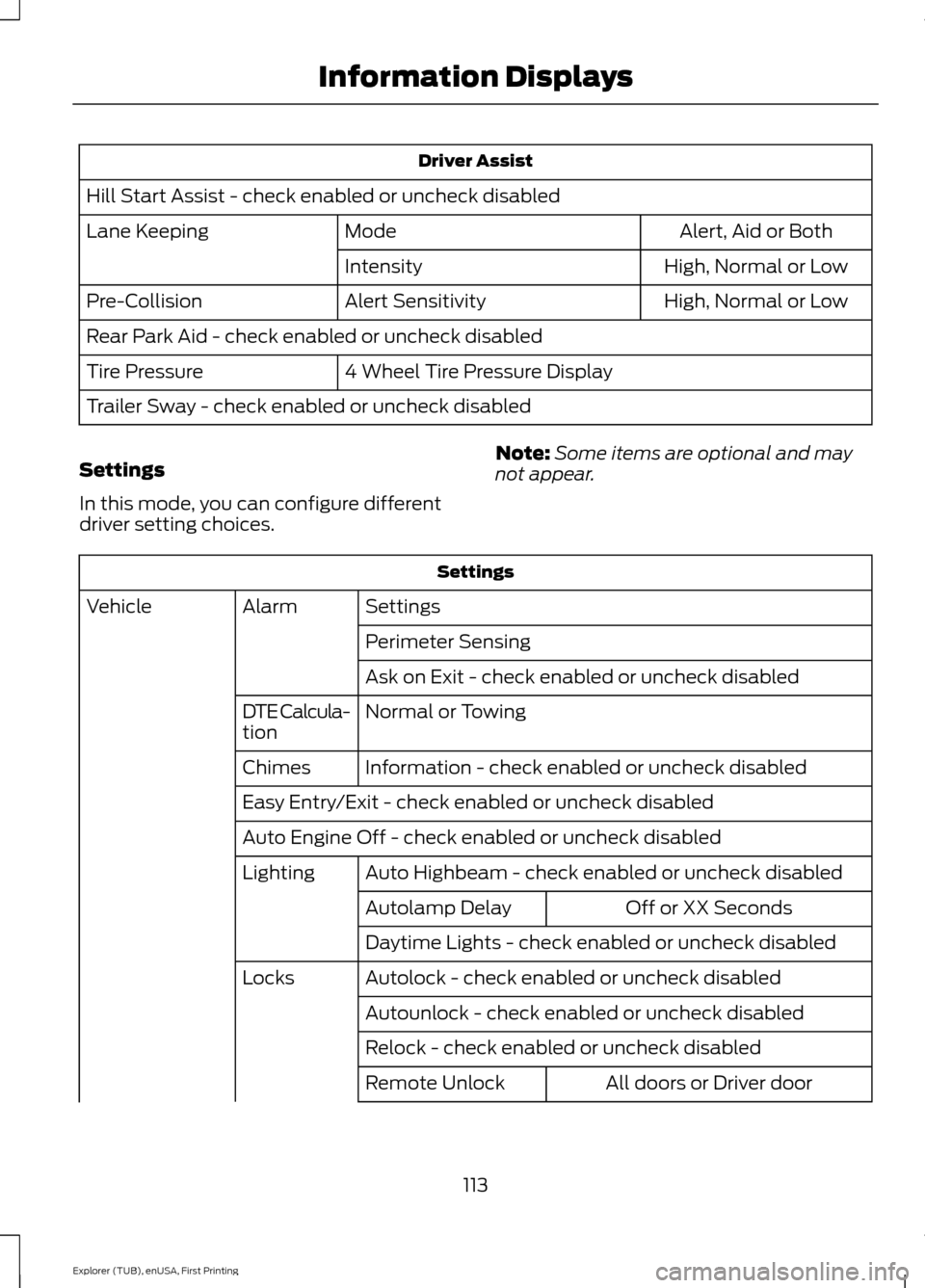
Driver Assist
Hill Start Assist - check enabled or uncheck disabled Alert, Aid or Both
Mode
Lane Keeping
High, Normal or Low
Intensity
High, Normal or Low
Alert Sensitivity
Pre-Collision
Rear Park Aid - check enabled or uncheck disabled
4 Wheel Tire Pressure Display
Tire Pressure
Trailer Sway - check enabled or uncheck disabled
Settings
In this mode, you can configure different
driver setting choices. Note:
Some items are optional and may
not appear. Settings
Settings
Alarm
Vehicle
Perimeter Sensing
Ask on Exit - check enabled or uncheck disabled
Normal or Towing
DTE Calcula-
tion
Information - check enabled or uncheck disabled
Chimes
Easy Entry/Exit - check enabled or uncheck disabled
Auto Engine Off - check enabled or uncheck disabled
Auto Highbeam - check enabled or uncheck disabled
Lighting
Off or XX Seconds
Autolamp Delay
Daytime Lights - check enabled or uncheck disabled
Autolock - check enabled or uncheck disabled
Locks
Autounlock - check enabled or uncheck disabled
Relock - check enabled or uncheck disabled All doors or Driver door
Remote Unlock
113
Explorer (TUB), enUSA, First Printing Information Displays
Page 119 of 541
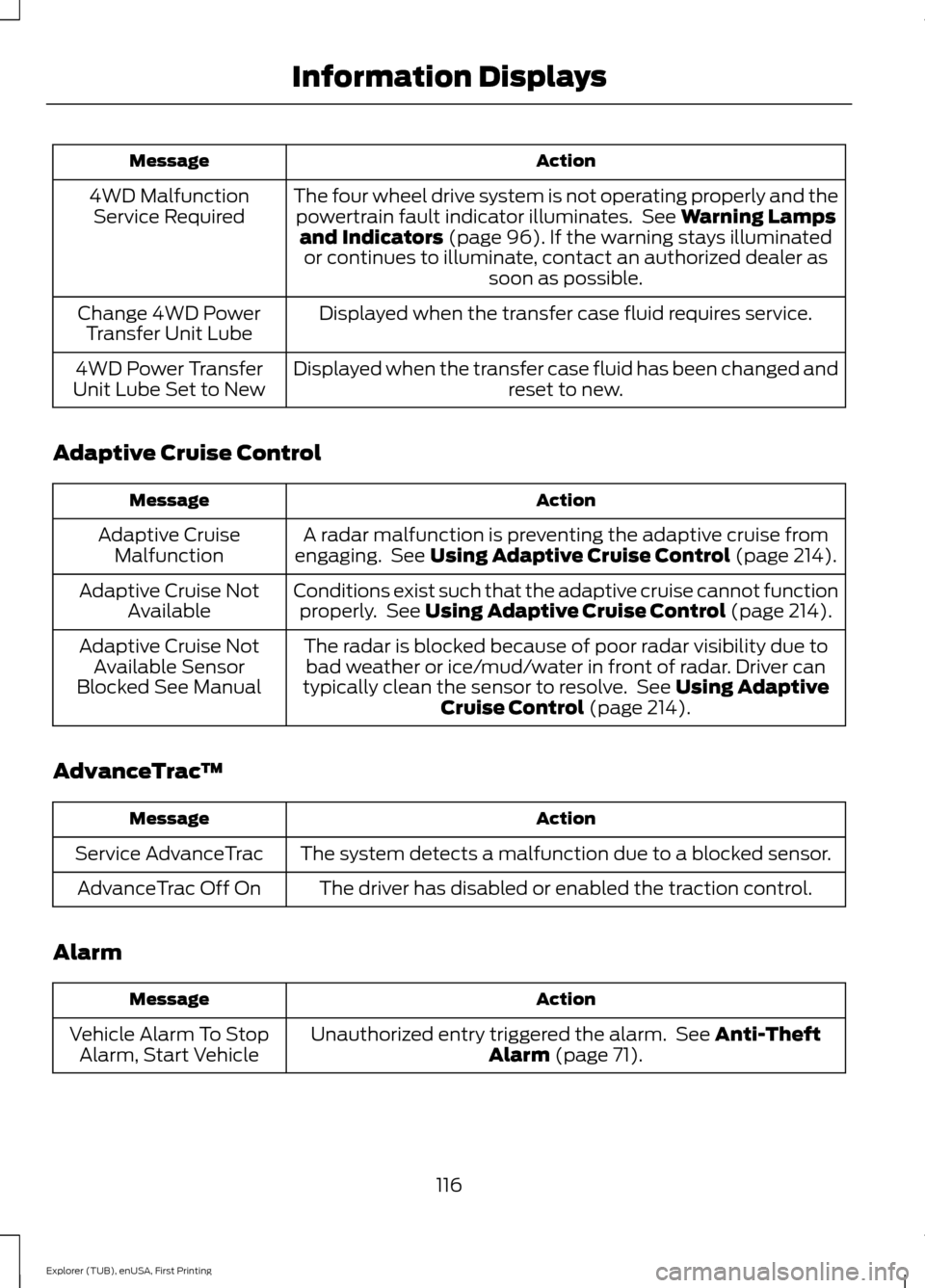
Action
Message
The four wheel drive system is not operating properly and thepowertrain fault indicator illuminates. See Warning Lamps
and Indicators (page 96). If the warning stays illuminated
or continues to illuminate, contact an authorized dealer as soon as possible.
4WD Malfunction
Service Required
Displayed when the transfer case fluid requires service.
Change 4WD Power
Transfer Unit Lube
Displayed when the transfer case fluid has been changed and reset to new.
4WD Power Transfer
Unit Lube Set to New
Adaptive Cruise Control Action
Message
A radar malfunction is preventing the adaptive cruise from
engaging. See
Using Adaptive Cruise Control (page 214).
Adaptive Cruise
Malfunction
Conditions exist such that the adaptive cruise cannot functionproperly. See
Using Adaptive Cruise Control (page 214).
Adaptive Cruise Not
Available
The radar is blocked because of poor radar visibility due tobad weather or ice/mud/water in front of radar. Driver can
typically clean the sensor to resolve. See
Using Adaptive
Cruise Control (page 214).
Adaptive Cruise Not
Available Sensor
Blocked See Manual
AdvanceTrac ™ Action
Message
The system detects a malfunction due to a blocked sensor.
Service AdvanceTrac
The driver has disabled or enabled the traction control.
AdvanceTrac Off On
Alarm Action
Message
Unauthorized entry triggered the alarm. See
Anti-Theft
Alarm (page 71).
Vehicle Alarm To Stop
Alarm, Start Vehicle
116
Explorer (TUB), enUSA, First Printing Information Displays
Page 121 of 541
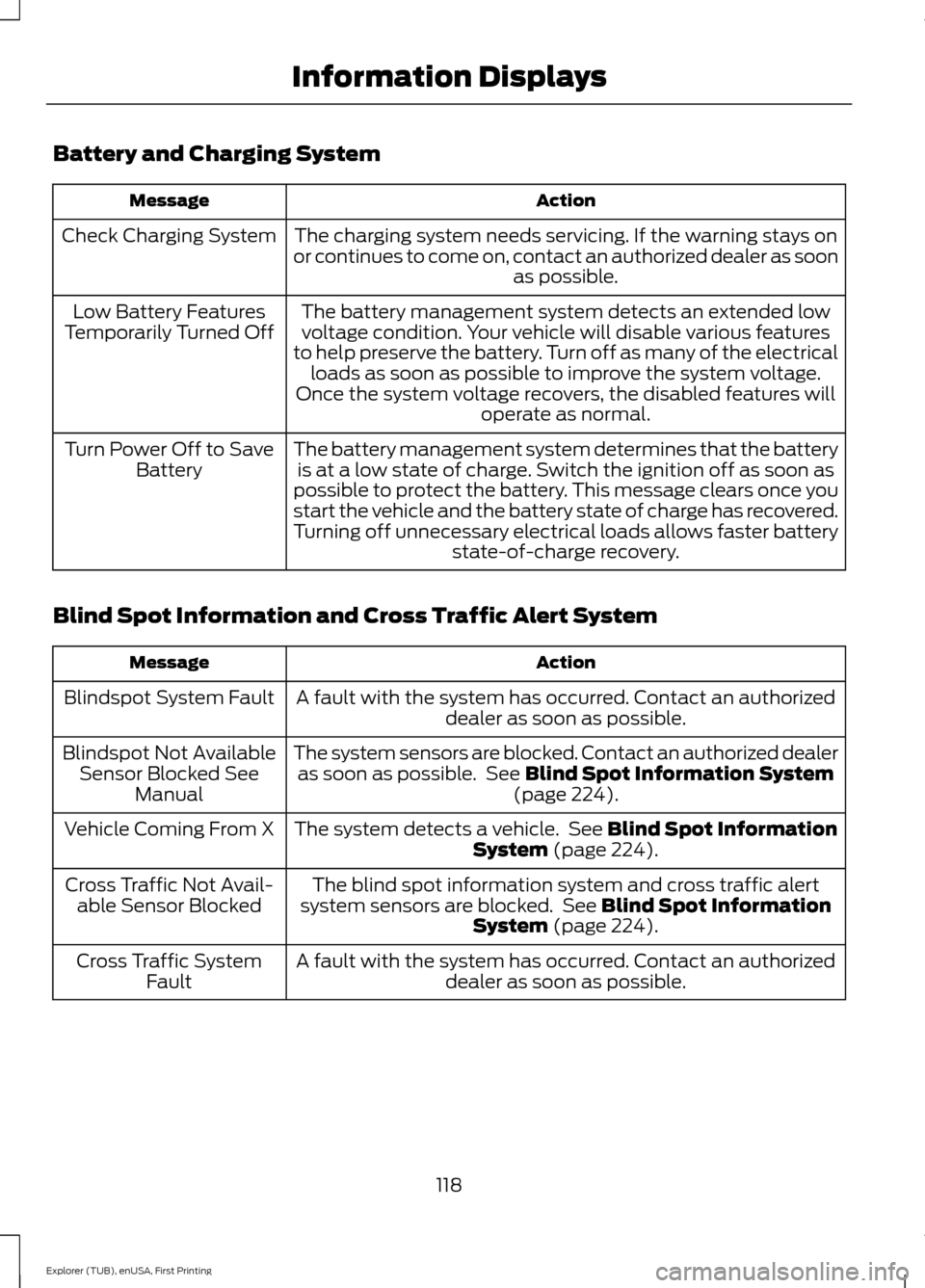
Battery and Charging System
Action
Message
The charging system needs servicing. If the warning stays on
or continues to come on, contact an authorized dealer as soon as possible.
Check Charging System
The battery management system detects an extended lowvoltage condition. Your vehicle will disable various features
to help preserve the battery. Turn off as many of the electrical loads as soon as possible to improve the system voltage.
Once the system voltage recovers, the disabled features will operate as normal.
Low Battery Features
Temporarily Turned Off
The battery management system determines that the batteryis at a low state of charge. Switch the ignition off as soon as
possible to protect the battery. This message clears once you
start the vehicle and the battery state of charge has recovered.
Turning off unnecessary electrical loads allows faster battery state-of-charge recovery.
Turn Power Off to Save
Battery
Blind Spot Information and Cross Traffic Alert System Action
Message
A fault with the system has occurred. Contact an authorizeddealer as soon as possible.
Blindspot System Fault
The system sensors are blocked. Contact an authorized dealeras soon as possible. See Blind Spot Information System
(page 224).
Blindspot Not Available
Sensor Blocked See Manual
The system detects a vehicle. See
Blind Spot Information
System (page 224).
Vehicle Coming From X
The blind spot information system and cross traffic alert
system sensors are blocked. See
Blind Spot Information
System (page 224).
Cross Traffic Not Avail-
able Sensor Blocked
A fault with the system has occurred. Contact an authorizeddealer as soon as possible.
Cross Traffic System
Fault
118
Explorer (TUB), enUSA, First Printing Information Displays
Page 122 of 541
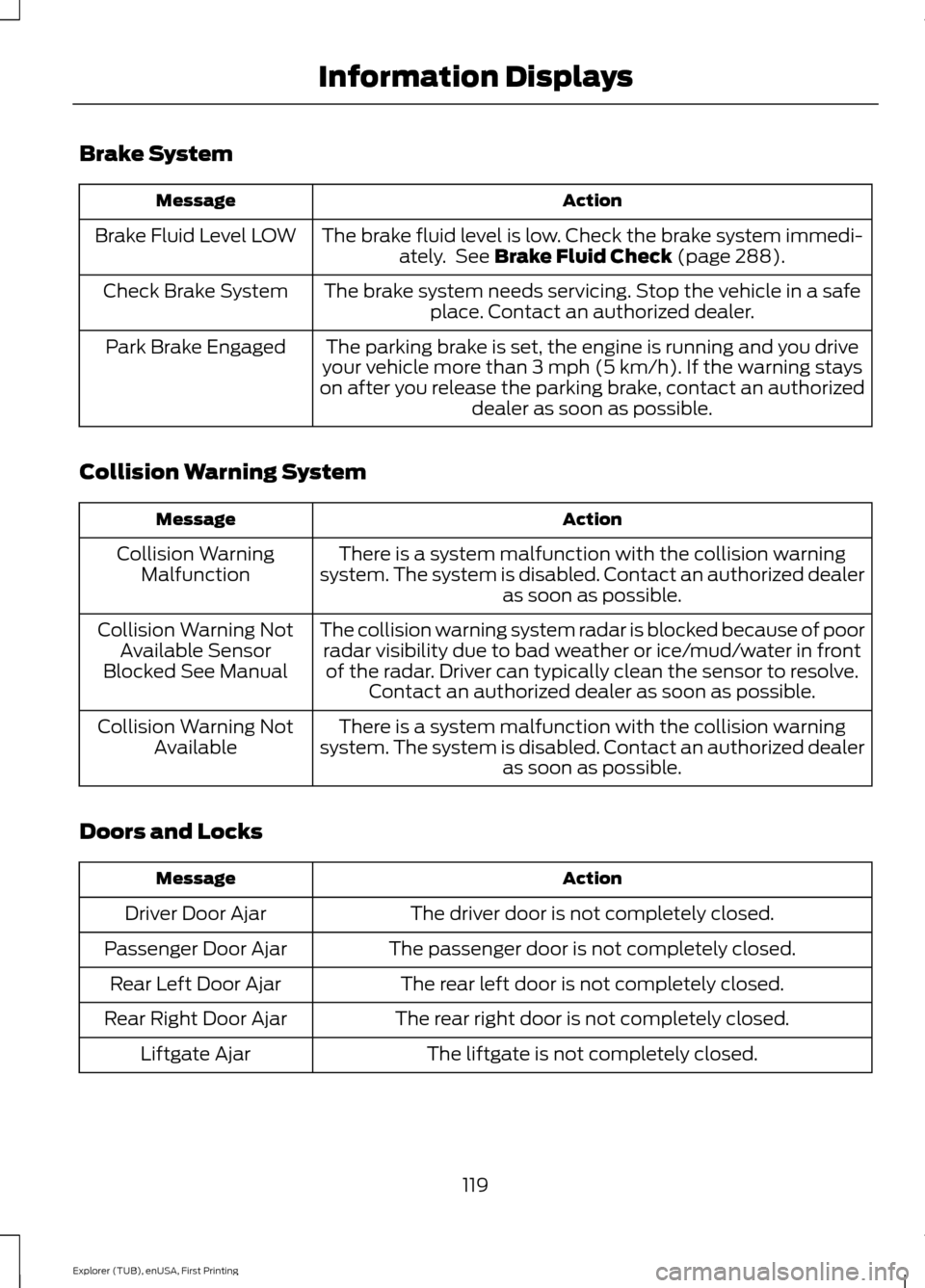
Brake System
Action
Message
The brake fluid level is low. Check the brake system immedi-ately. See Brake Fluid Check (page 288).
Brake Fluid Level LOW
The brake system needs servicing. Stop the vehicle in a safeplace. Contact an authorized dealer.
Check Brake System
The parking brake is set, the engine is running and you drive
your vehicle more than 3 mph (5 km/h). If the warning stays
on after you release the parking brake, contact an authorized dealer as soon as possible.
Park Brake Engaged
Collision Warning System Action
Message
There is a system malfunction with the collision warning
system. The system is disabled. Contact an authorized dealer as soon as possible.
Collision Warning
Malfunction
The collision warning system radar is blocked because of poorradar visibility due to bad weather or ice/mud/water in frontof the radar. Driver can typically clean the sensor to resolve. Contact an authorized dealer as soon as possible.
Collision Warning Not
Available Sensor
Blocked See Manual
There is a system malfunction with the collision warning
system. The system is disabled. Contact an authorized dealer as soon as possible.
Collision Warning Not
Available
Doors and Locks Action
Message
The driver door is not completely closed.
Driver Door Ajar
The passenger door is not completely closed.
Passenger Door Ajar
The rear left door is not completely closed.
Rear Left Door Ajar
The rear right door is not completely closed.
Rear Right Door Ajar
The liftgate is not completely closed.
Liftgate Ajar
119
Explorer (TUB), enUSA, First Printing Information Displays
Page 123 of 541
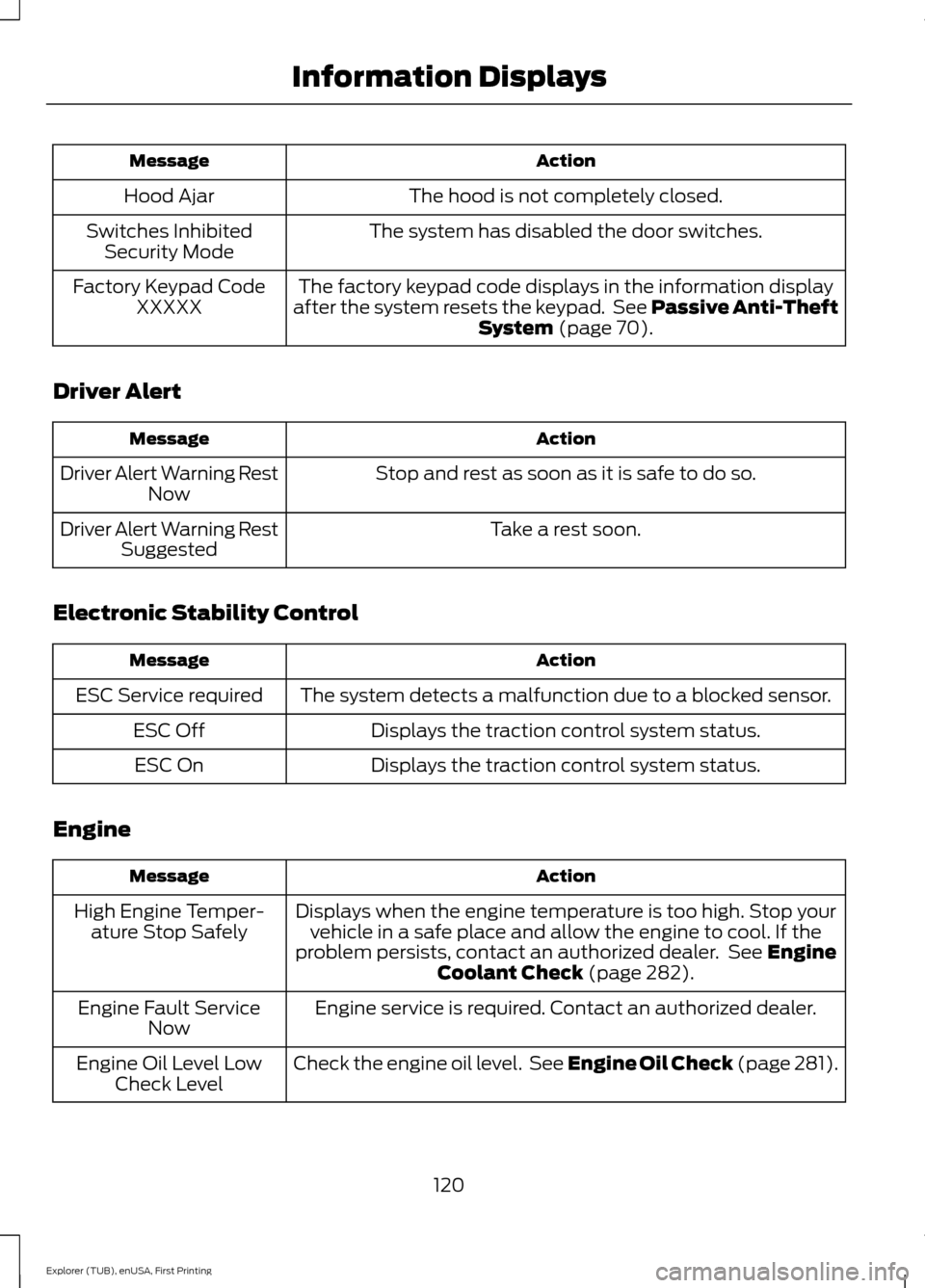
Action
Message
The hood is not completely closed.
Hood Ajar
The system has disabled the door switches.
Switches Inhibited
Security Mode
The factory keypad code displays in the information display
after the system resets the keypad. See Passive Anti-Theft System (page 70).
Factory Keypad Code
XXXXX
Driver Alert Action
Message
Stop and rest as soon as it is safe to do so.
Driver Alert Warning Rest
Now
Take a rest soon.
Driver Alert Warning Rest
Suggested
Electronic Stability Control Action
Message
The system detects a malfunction due to a blocked sensor.
ESC Service required
Displays the traction control system status.
ESC Off
Displays the traction control system status.
ESC On
Engine Action
Message
Displays when the engine temperature is too high. Stop yourvehicle in a safe place and allow the engine to cool. If the
problem persists, contact an authorized dealer. See
Engine
Coolant Check (page 282).
High Engine Temper-
ature Stop Safely
Engine service is required. Contact an authorized dealer.
Engine Fault Service
Now
Check the engine oil level. See Engine Oil Check (page 281).
Engine Oil Level Low
Check Level
120
Explorer (TUB), enUSA, First Printing Information Displays
Page 128 of 541
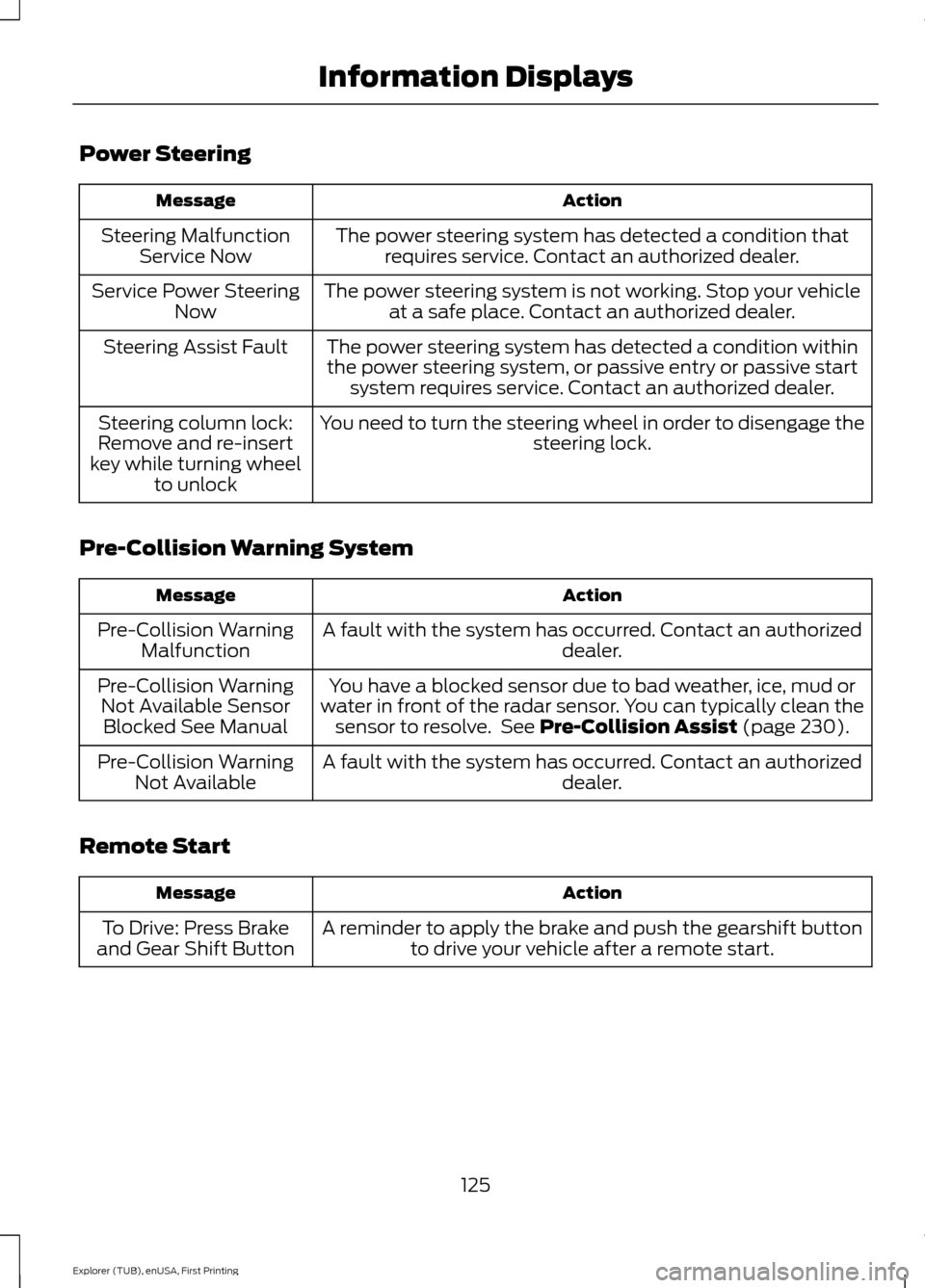
Power Steering
Action
Message
The power steering system has detected a condition thatrequires service. Contact an authorized dealer.
Steering Malfunction
Service Now
The power steering system is not working. Stop your vehicleat a safe place. Contact an authorized dealer.
Service Power Steering
Now
The power steering system has detected a condition withinthe power steering system, or passive entry or passive start system requires service. Contact an authorized dealer.
Steering Assist Fault
You need to turn the steering wheel in order to disengage thesteering lock.
Steering column lock:
Remove and re-insert
key while turning wheel to unlock
Pre-Collision Warning System Action
Message
A fault with the system has occurred. Contact an authorized dealer.
Pre-Collision Warning
Malfunction
You have a blocked sensor due to bad weather, ice, mud or
water in front of the radar sensor. You can typically clean the sensor to resolve. See Pre-Collision Assist (page 230).
Pre-Collision Warning
Not Available SensorBlocked See Manual
A fault with the system has occurred. Contact an authorized dealer.
Pre-Collision Warning
Not Available
Remote Start Action
Message
A reminder to apply the brake and push the gearshift buttonto drive your vehicle after a remote start.
To Drive: Press Brake
and Gear Shift Button
125
Explorer (TUB), enUSA, First Printing Information Displays
Page 129 of 541
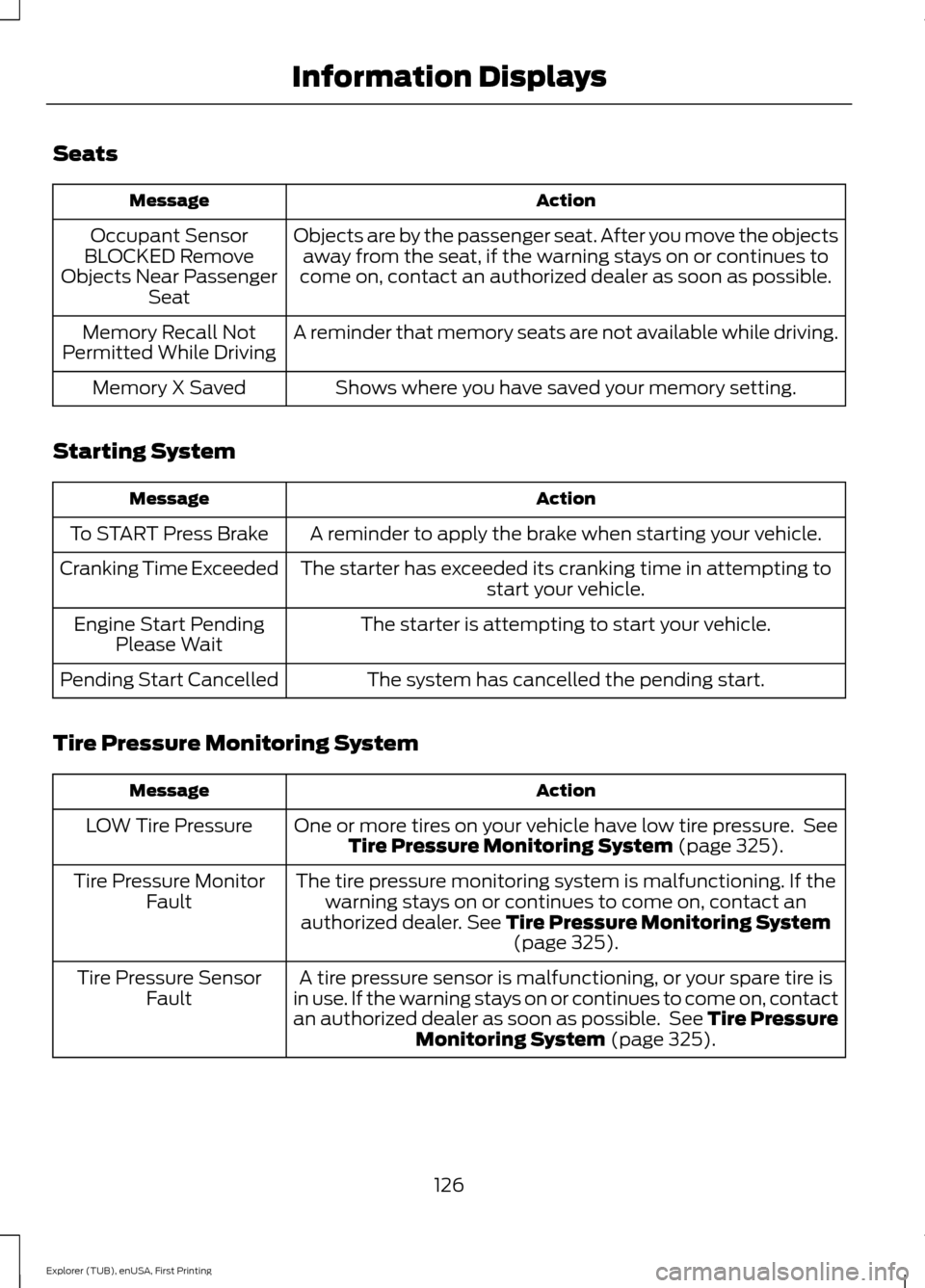
Seats
Action
Message
Objects are by the passenger seat. After you move the objectsaway from the seat, if the warning stays on or continues to
come on, contact an authorized dealer as soon as possible.
Occupant Sensor
BLOCKED Remove
Objects Near Passenger Seat
A reminder that memory seats are not available while driving.
Memory Recall Not
Permitted While Driving
Shows where you have saved your memory setting.
Memory X Saved
Starting System Action
Message
A reminder to apply the brake when starting your vehicle.
To START Press Brake
The starter has exceeded its cranking time in attempting tostart your vehicle.
Cranking Time Exceeded
The starter is attempting to start your vehicle.
Engine Start Pending
Please Wait
The system has cancelled the pending start.
Pending Start Cancelled
Tire Pressure Monitoring System Action
Message
One or more tires on your vehicle have low tire pressure. SeeTire Pressure Monitoring System (page 325).
LOW Tire Pressure
The tire pressure monitoring system is malfunctioning. If thewarning stays on or continues to come on, contact an
authorized dealer.
See Tire Pressure Monitoring System (page 325).
Tire Pressure Monitor
Fault
A tire pressure sensor is malfunctioning, or your spare tire is
in use. If the warning stays on or continues to come on, contact
an authorized dealer as soon as possible. See Tire Pressure Monitoring System
(page 325).
Tire Pressure Sensor
Fault
126
Explorer (TUB), enUSA, First Printing Information Displays
Page 131 of 541
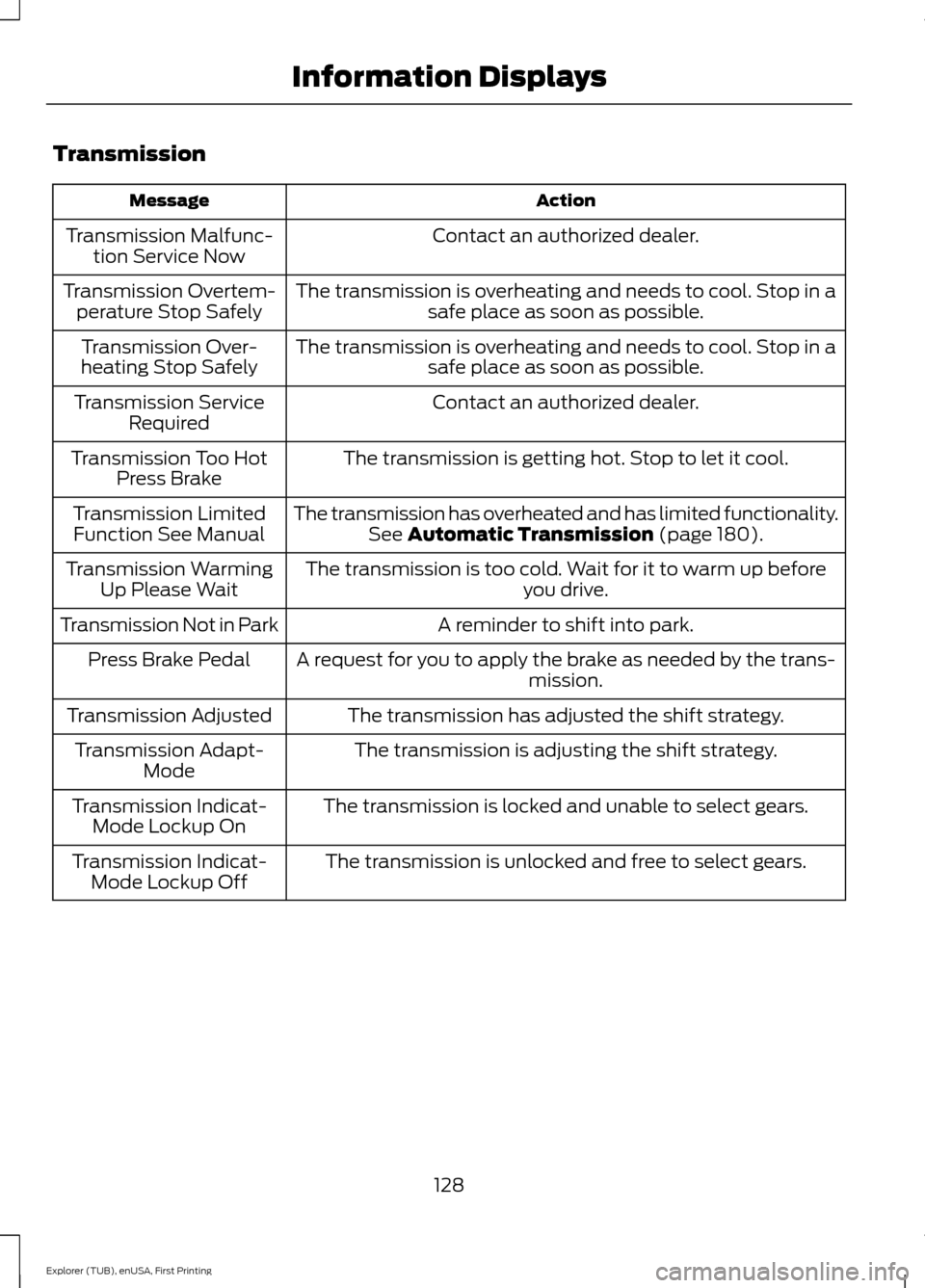
Transmission
Action
Message
Contact an authorized dealer.
Transmission Malfunc-
tion Service Now
The transmission is overheating and needs to cool. Stop in asafe place as soon as possible.
Transmission Overtem-
perature Stop Safely
The transmission is overheating and needs to cool. Stop in asafe place as soon as possible.
Transmission Over-
heating Stop Safely
Contact an authorized dealer.
Transmission Service
Required
The transmission is getting hot. Stop to let it cool.
Transmission Too Hot
Press Brake
The transmission has overheated and has limited functionality.See Automatic Transmission (page 180).
Transmission Limited
Function See Manual
The transmission is too cold. Wait for it to warm up beforeyou drive.
Transmission Warming
Up Please Wait
A reminder to shift into park.
Transmission Not in Park
A request for you to apply the brake as needed by the trans-mission.
Press Brake Pedal
The transmission has adjusted the shift strategy.
Transmission Adjusted
The transmission is adjusting the shift strategy.
Transmission Adapt-
Mode
The transmission is locked and unable to select gears.
Transmission Indicat-
Mode Lockup On
The transmission is unlocked and free to select gears.
Transmission Indicat-
Mode Lockup Off
128
Explorer (TUB), enUSA, First Printing Information Displays
Page 133 of 541
MAX A/C: Adjust the control for maximum cooling. Recirculated air flows
through the instrument panel vents, air conditioning automatically turns on and
the fan automatically adjusts to the highest speed.
E
Temperature control:
Controls the temperature of the air circulated in your
vehicle.
F
Note:
To prevent window fogging, you cannot select recirculated air when
maximum defrost is on.
Recirculated air:
Press the button to switch between outside air and
recirculated air. The air currently in the passenger compartment recirculates.
This can reduce the time needed to cool the interior and reduce unwanted odors
from entering your vehicle.
G
Note:
Recirculated air may also turn on and off automatically in instrument
panel or instrument panel and floor airflow modes during hot weather to improve
cooling efficiency.
Rear passenger temperature control:
Adjust the temperature to the rear of
the passenger compartment.
H
Rear climate control lock:
When illuminated, you can only operate the rear
passenger settings through the front controls.
I
Rear passenger power:
Press the button to switch the system on and off.
J
Rear fan speed control:
Adjust the volume of air circulated to the rear of the
passenger compartment.
K
Heated rear window:
Press the button to switch the heated rear window on
and off.
L
130
Explorer (TUB), enUSA, First Printing Climate Control
Page 141 of 541
Fan speed control: Adjust the volume of air circulated in the vehicle.
A
Heated seats (if equipped):
Press the button to switch the heated seats on
and off. See Heated Seats (page 154).
B
Temperature control:
Control the temperature of the air circulated in your
vehicle.
C
Air distribution control:
Adjust the control to turn airflow from the instrument
panel or footwell vents on or off. You can distribute air through any combination
of these vents.
D
Fan speed control lock:
When illuminated, you can only operate the rear
passenger settings through the front controls.
E
HEATED WINDOWS AND
MIRRORS
(If Equipped)
Heated Rear Window
Note: Make sure the engine is running
before operating the heated windows. Press the button to clear the
heated rear window of thin ice
and fog. The heated rear window
will automatically turn off after a short
period of time. Start the engine before you
switch the heated rear window on.
Note: Do not use razor blades or other
sharp objects to clean or remove decals
from the inside of the heated rear window.
The vehicle warranty does not cover
damage caused to the heated rear window
grid lines.
Heated Exterior Mirror
When you switch the heated rear window
on, the heated exterior mirrors will
automatically turn on.
Note: Do not remove ice from the mirrors
with a scraper or adjust the mirror glass
when it is frozen in place.
Note: Do not clean the mirror housing or
glass with harsh abrasives, fuel or other
petroleum-based cleaning products. CABIN AIR FILTER
Your vehicle is equipped with a cabin air
filter, which gives you and your passengers
the following benefits:
•
It improves your driving comfort by
reducing particle concentration.
• It improves the interior compartment
cleanliness.
• It protects the climate control
components from particle deposits.
You can locate the cabin air filter behind
the glove box.
Note: Make sure you have a cabin air filter
installed at all times. This prevents foreign
objects from entering the system. Running
the system without a filter in place could
result in degradation or damage to the
system.
Replace the filter at regular intervals. See
Scheduled Maintenance
(page 486).
For additional cabin air filter information,
or to replace the filter, see an authorized
dealer.
138
Explorer (TUB), enUSA, First Printing Climate ControlE184884