steering wheel FORD EXPLORER 2016 5.G Repair Manual
[x] Cancel search | Manufacturer: FORD, Model Year: 2016, Model line: EXPLORER, Model: FORD EXPLORER 2016 5.GPages: 541, PDF Size: 6.51 MB
Page 459 of 541
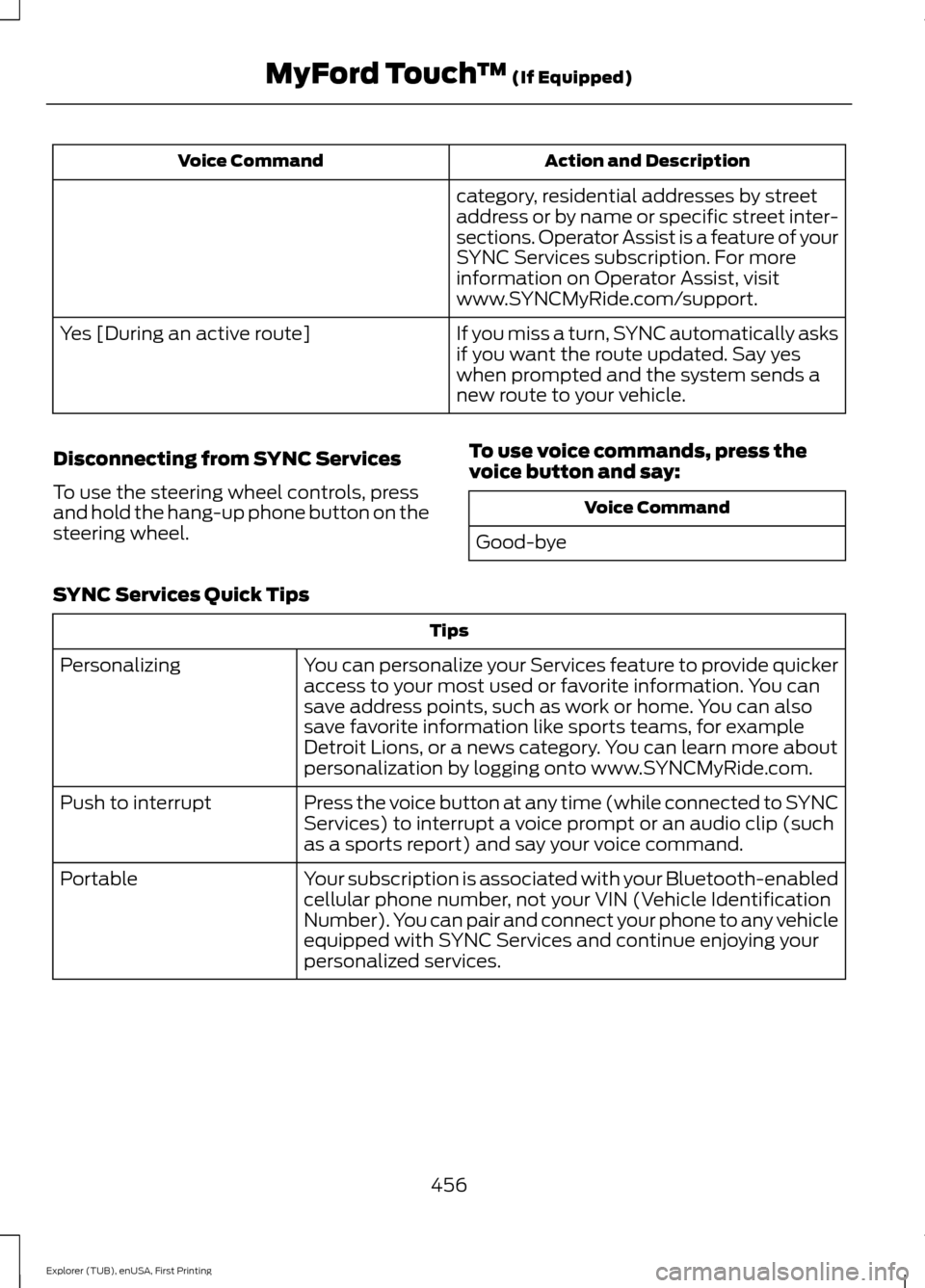
Action and Description
Voice Command
category, residential addresses by street
address or by name or specific street inter-
sections. Operator Assist is a feature of your
SYNC Services subscription. For more
information on Operator Assist, visit
www.SYNCMyRide.com/support.
If you miss a turn, SYNC automatically asks
if you want the route updated. Say yes
when prompted and the system sends a
new route to your vehicle.
Yes [During an active route]
Disconnecting from SYNC Services
To use the steering wheel controls, press
and hold the hang-up phone button on the
steering wheel. To use voice commands, press the
voice button and say: Voice Command
Good-bye
SYNC Services Quick Tips Tips
You can personalize your Services feature to provide quicker
access to your most used or favorite information. You can
save address points, such as work or home. You can also
save favorite information like sports teams, for example
Detroit Lions, or a news category. You can learn more about
personalization by logging onto www.SYNCMyRide.com.
Personalizing
Press the voice button at any time (while connected to SYNC
Services) to interrupt a voice prompt or an audio clip (such
as a sports report) and say your voice command.
Push to interrupt
Your subscription is associated with your Bluetooth-enabled
cellular phone number, not your VIN (Vehicle Identification
Number). You can pair and connect your phone to any vehicle
equipped with SYNC Services and continue enjoying your
personalized services.
Portable
456
Explorer (TUB), enUSA, First Printing MyFord Touch
™ (If Equipped)
Page 460 of 541
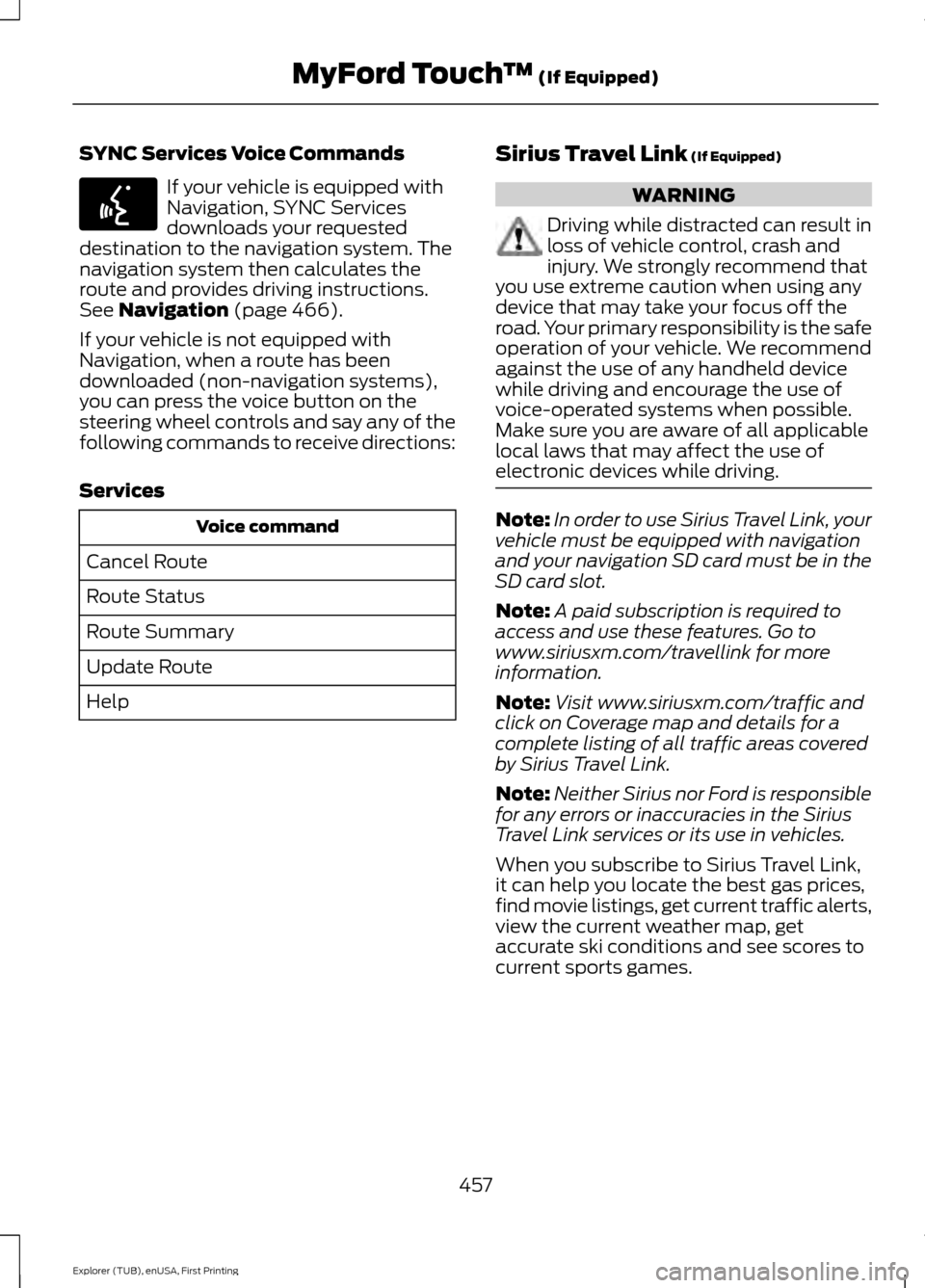
SYNC Services Voice Commands
If your vehicle is equipped with
Navigation, SYNC Services
downloads your requested
destination to the navigation system. The
navigation system then calculates the
route and provides driving instructions.
See Navigation (page 466).
If your vehicle is not equipped with
Navigation, when a route has been
downloaded (non-navigation systems),
you can press the voice button on the
steering wheel controls and say any of the
following commands to receive directions:
Services Voice command
Cancel Route
Route Status
Route Summary
Update Route
Help Sirius Travel Link
(If Equipped) WARNING
Driving while distracted can result in
loss of vehicle control, crash and
injury. We strongly recommend that
you use extreme caution when using any
device that may take your focus off the
road. Your primary responsibility is the safe
operation of your vehicle. We recommend
against the use of any handheld device
while driving and encourage the use of
voice-operated systems when possible.
Make sure you are aware of all applicable
local laws that may affect the use of
electronic devices while driving. Note:
In order to use Sirius Travel Link, your
vehicle must be equipped with navigation
and your navigation SD card must be in the
SD card slot.
Note: A paid subscription is required to
access and use these features. Go to
www.siriusxm.com/travellink for more
information.
Note: Visit www.siriusxm.com/traffic and
click on Coverage map and details for a
complete listing of all traffic areas covered
by Sirius Travel Link.
Note: Neither Sirius nor Ford is responsible
for any errors or inaccuracies in the Sirius
Travel Link services or its use in vehicles.
When you subscribe to Sirius Travel Link,
it can help you locate the best gas prices,
find movie listings, get current traffic alerts,
view the current weather map, get
accurate ski conditions and see scores to
current sports games.
457
Explorer (TUB), enUSA, First Printing MyFord Touch
™
(If Equipped)E142599
Page 461 of 541
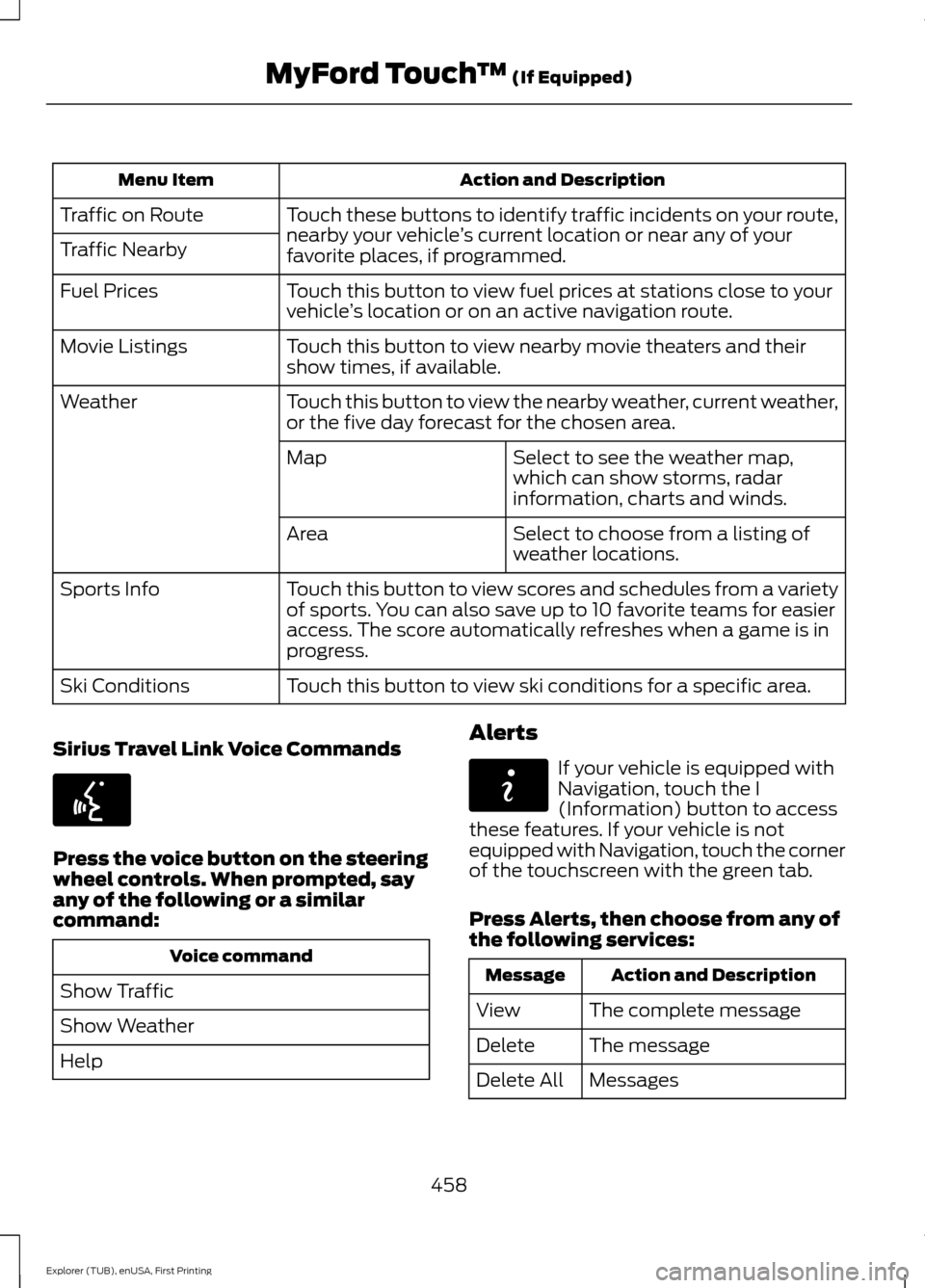
Action and Description
Menu Item
Touch these buttons to identify traffic incidents on your route,
nearby your vehicle ’s current location or near any of your
favorite places, if programmed.
Traffic on Route
Traffic Nearby
Touch this button to view fuel prices at stations close to your
vehicle’s location or on an active navigation route.
Fuel Prices
Touch this button to view nearby movie theaters and their
show times, if available.
Movie Listings
Touch this button to view the nearby weather, current weather,
or the five day forecast for the chosen area.
Weather
Select to see the weather map,
which can show storms, radar
information, charts and winds.
Map
Select to choose from a listing of
weather locations.
Area
Touch this button to view scores and schedules from a variety
of sports. You can also save up to 10 favorite teams for easier
access. The score automatically refreshes when a game is in
progress.
Sports Info
Touch this button to view ski conditions for a specific area.
Ski Conditions
Sirius Travel Link Voice Commands Press the voice button on the steering
wheel controls. When prompted, say
any of the following or a similar
command:
Voice command
Show Traffic
Show Weather
Help Alerts If your vehicle is equipped with
Navigation, touch the I
(Information) button to access
these features. If your vehicle is not
equipped with Navigation, touch the corner
of the touchscreen with the green tab.
Press Alerts, then choose from any of
the following services: Action and Description
Message
The complete message
View
The message
Delete
Messages
Delete All
458
Explorer (TUB), enUSA, First Printing MyFord Touch
™
(If Equipped)E142599 E142608
Page 463 of 541
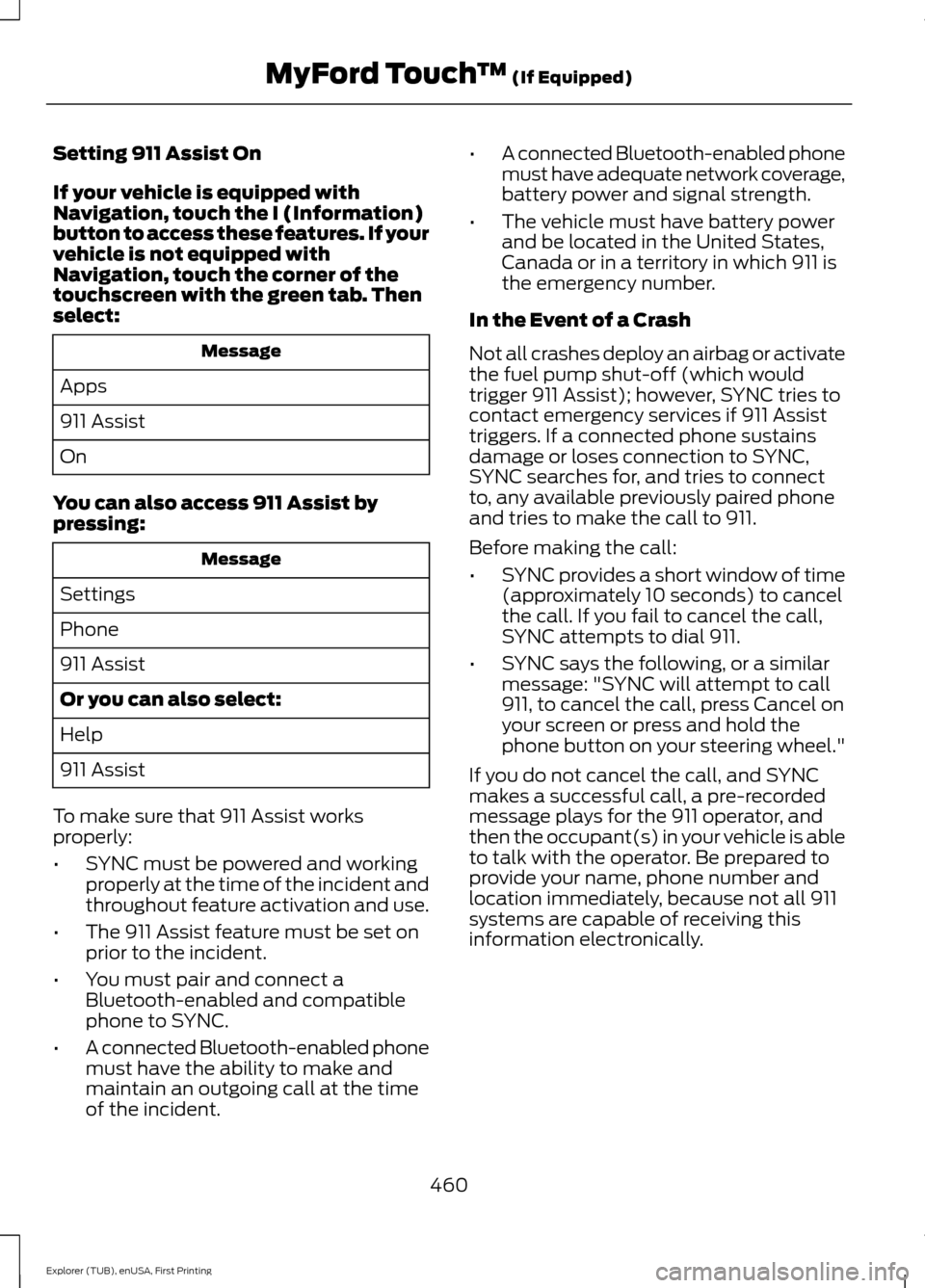
Setting 911 Assist On
If your vehicle is equipped with
Navigation, touch the I (Information)
button to access these features. If your
vehicle is not equipped with
Navigation, touch the corner of the
touchscreen with the green tab. Then
select:
Message
Apps
911 Assist
On
You can also access 911 Assist by
pressing: Message
Settings
Phone
911 Assist
Or you can also select:
Help
911 Assist
To make sure that 911 Assist works
properly:
• SYNC must be powered and working
properly at the time of the incident and
throughout feature activation and use.
• The 911 Assist feature must be set on
prior to the incident.
• You must pair and connect a
Bluetooth-enabled and compatible
phone to SYNC.
• A connected Bluetooth-enabled phone
must have the ability to make and
maintain an outgoing call at the time
of the incident. •
A connected Bluetooth-enabled phone
must have adequate network coverage,
battery power and signal strength.
• The vehicle must have battery power
and be located in the United States,
Canada or in a territory in which 911 is
the emergency number.
In the Event of a Crash
Not all crashes deploy an airbag or activate
the fuel pump shut-off (which would
trigger 911 Assist); however, SYNC tries to
contact emergency services if 911 Assist
triggers. If a connected phone sustains
damage or loses connection to SYNC,
SYNC searches for, and tries to connect
to, any available previously paired phone
and tries to make the call to 911.
Before making the call:
• SYNC provides a short window of time
(approximately 10 seconds) to cancel
the call. If you fail to cancel the call,
SYNC attempts to dial 911.
• SYNC says the following, or a similar
message: "SYNC will attempt to call
911, to cancel the call, press Cancel on
your screen or press and hold the
phone button on your steering wheel."
If you do not cancel the call, and SYNC
makes a successful call, a pre-recorded
message plays for the 911 operator, and
then the occupant(s) in your vehicle is able
to talk with the operator. Be prepared to
provide your name, phone number and
location immediately, because not all 911
systems are capable of receiving this
information electronically.
460
Explorer (TUB), enUSA, First Printing MyFord Touch
™ (If Equipped)
Page 468 of 541
Note: To prevent window fogging, you cannot select recirculated air when MAX
Defrost is on.
Driver settings:
L
Touch the
+ or – to increase or decrease the air temperature on the driver side
of the vehicle.
Touch the heated seat icon to switch the heated seat off and on (if equipped).
Touch the climate-controlled seat icon to switch the climate-controlled seat
off and on (if equipped).
Touch
MyTemp to select your preset temperature setpoint. Touch and hold
MyTemp to save a new preset temperature setpoint.
Touch the heated steering wheel icon to switch the heated steering wheel on
and off (if equipped).
Note: If your vehicle is equipped with a
wood-trimmed steering wheel, it does not
heat between the 10 o'clock and 2 o'clock
positions.
Climate Control Voice Commands
Note: Depending on the current climate
control settings, the fan speed may
automatically go down while issuing voice
commands or while making and receiving
phone calls via SYNC to reduce the amount
of background noise in the vehicle. The fan
speed automatically returns to normal
operation once the voice session ends. You
can adjust fan speed normally during a voice
session by pressing the fan buttons (or
turning the fan knob) to increase or
decrease the fan speed to the desired
setting. To disable this automatic fan speed
reduction feature during voice sessions,
press and hold the climate control
AC and
Recirc buttons simultaneously, release and
then increase fan speed within 2 seconds.
To re-enable this feature, repeat this
sequence. Press the voice button on the
steering wheel controls. When
prompted, say any of the
following or a similar command: Voice commands
Climate On
Climate Off Adjust the temperature to between 15.0 - 30.0°C or59 - 86°F.
Set temperature
465
Explorer (TUB), enUSA, First Printing MyFord Touch
™
(If Equipped)E142599
Page 477 of 541
Action and Description
Menu Item
Touch this button to select a scrolled location on the map as
your destination. You may scroll the map by pressing your index
finger on the map display. When you reach the desired location,
simply let go and then touch this button.
Set as Dest
Touch this button to set the current location as a waypoint.
Set as Waypoint
Touch this button to save the current location to your favorites.
Save to Favorites
Touch this button to select icons to display on the map. You
can select up to three icons to display on the map at the same
time. You can switch these features:
POI Icons
Off
On
When on an active route, select any of the following options:
View / Edit Route
View Route
Edit Destination/Waypoints
Edit Turn List
Detour
Edit Route Preferences
Edit Traffic Preferences
Cancel Route
HERE is the digital map provider for the
navigation application. If you find map data
errors, you may report them directly to
HERE by going to
www.here.com/mapcreator. HERE
evaluates all reported map errors and
responds with the result of their
investigation by e-mail. Navigation Map Updates
Annual navigation map updates are
available for purchase through your
dealership, by calling 1-866-462-8837 (in
Mexico, call 01-800-557-5539) or going
to www.navigation.com/sync. You need
to specify the make and model of your
vehicle to determine if there is an update
available.
Navigation Voice Commands When in navigation mode, press
the voice button on the steering
wheel controls.
474
Explorer (TUB), enUSA, First Printing MyFord Touch
™ (If Equipped)E142599
Page 530 of 541
1
180 Degree Parking Aid Camera..............211
Camera Views...................................................... 212
Using the 180 degree camera system..........211
4
4WD See: Four-Wheel Drive..................................... 184
A
A/C See: Climate Control......................................... 129
About This Manual...........................................7
ABS See: Brakes........................................................... 189
ABS driving hints See: Hints on Driving With Anti-Lock
Brakes................................................................ 189
Accessories
....................................................482
Exterior Style....................................................... 482
Interior Style........................................................ 482
Lifestyle................................................................. 482
Peace of Mind..................................................... 482
Accessories See: Replacement Parts
Recommendation............................................. 11
ACC See: Using Adaptive Cruise Control.............214
Active Park Assist
........................................202
Deactivating the Active Park Assist
Feature............................................................. 206
Parallel Parking, Perpendicular Parking, Park Out Assist.............................................. 202
Troubleshooting the System........................ 206
Adjusting the Headlamps..........................291 Vertical Aim Adjustment.................................. 291
Adjusting the Pedals.....................................76
Adjusting the Steering Wheel - Vehicles With: Manual Adjustable Steering
Column
............................................................72 Adjusting the Steering Wheel - Vehicles
With: Power Adjustable Steering
Column
............................................................72
Easy Entry and Exit Feature.............................. 73
End of Travel Position......................................... 73
Memory Feature.................................................... 73
Airbag Disposal...............................................47
Air Conditioning See: Climate Control......................................... 129
Alarm See: Anti-Theft Alarm.......................................... 71
Anti-Theft Alarm.............................................71 Arming the Alarm.................................................. 71
Disarming the Alarm............................................ 71
Appendices....................................................505
Audible Warnings and Indicators
...........100
Automatic Transmission Warning
Chime................................................................ 100
Engine On Warning Chime............................. 100
Headlamps On Warning Chime................... 100
Key in Ignition Warning Chime...................... 100
Keyless Warning Alert ..................................... 100
Parking Brake On Warning Chime...............100
Audio Control
...................................................73
Seek and Media..................................................... 74
Type 1........................................................................\
. 73
Type 2........................................................................\
73
Audio System................................................353 General Information......................................... 353
Audio Unit - Vehicles With: AM/FM/CD/ SYNC
.............................................................354
Audio Unit - Vehicles With: Premium AM/FM/CD..................................................357
Audio Unit - Vehicles With: Sony AM/ FM/CD..........................................................358
Menu Structure.................................................. 360
Autolamps
.........................................................81
Windshield Wiper Activated
Headlamps......................................................... 81
Automatic Climate Control - Vehicles With: Premium AM/FM/CD.....................131
Automatic Climate Control - Vehicles With: Sony Audio System.......................132
Automatic High Beam Control.................83 Activating the System........................................ 84
Manually Overriding the System.................... 84
527
Explorer (TUB), enUSA, First Printing Index
Page 534 of 541
Getting the Services You Need..............260
Away From Home............................................. 260
H
Handbrake See: Parking Brake............................................. 190
Hazard Warning Flashers.........................256
HDC See: Using Hill Descent Control.................... 196
Headlamp Exit Delay....................................82
Head Restraints............................................140 Adjusting the Head Restraint.......................... 141
Tilting Head Restraints .................................... 142
Heated Seats.................................................154 Front Seats............................................................ 154
Rear Seats............................................................. 155
Heated Steering Wheel
................................75
Heated Windows and Mirrors..................138 Heated Exterior Mirror....................................... 138
Heated Rear Window........................................ 138
Heating See: Climate Control......................................... 129
Hill Start Assist
.............................................190
Switching the System On and Off................191
Using Hill Start Assist....................................... 190
Hints on Controlling the Interior Climate..........................................................134
Cooling the Interior Quickly............................ 136
General Hints....................................................... 134
Heating the Interior Quickly............................ 135
Recommended Settings for Cooling ..........136
Recommended Settings for Heating..........136
Side Window Defogging in Cold Weather............................................................. 137
Hints on Driving With Anti-Lock Brakes............................................................189
Hood Lock See: Opening and Closing the Hood...........276
I
Ignition Switch
...............................................165
In California (U.S. Only).............................261
Information Display Control.......................75
Information Display Control Features...........75
Information Displays
....................................101
General Information........................................... 101Information....................................................453
911 Assist............................................................... 459
Alerts...................................................................... 458
Calendar............................................................... 459
Sirius Travel Link................................................. 457
SYNC Services (If Equipped, United States Only).................................................................. 453
Vehicle Health Report (If Equipped, US Only)................................................................... 461
Information Messages
.................................115
4WD........................................................................\
.. 115
Adaptive Cruise Control.................................... 116
AdvanceTrac ™..................................................... 116
Alarm........................................................................\
116
Automatic Engine Shutdown.......................... 117
Automatic High Beam Control........................ 117
Battery and Charging System......................... 118
Blind Spot Information and Cross Traffic Alert System..................................................... 118
Brake System........................................................ 119
Collision Warning System................................ 119
Doors and Locks.................................................. 119
Driver Alert............................................................ 120
Electronic Stability Control............................. 120
Engine..................................................................... 120
Fuel........................................................................\
.... 121
Hill Descent Control............................................ 121
Hill Start Assist..................................................... 121
Keys and Intelligent Access............................. 122
Lane Keeping System........................................ 123
Maintenance......................................................... 123
MyKey...................................................................... 124
Park Aid.................................................................. 124
Park Brake.............................................................. 124
Power Steering.................................................... 125
Pre-Collision Warning System....................... 125
Remote Start........................................................ 125
Seats........................................................................\
126
Starting System.................................................. 126
Terrain Management System......................... 127
Tire Pressure Monitoring System.................. 126
Traction Control................................................... 127
Trailer....................................................................... 127
Transmission........................................................ 128
531
Explorer (TUB), enUSA, First Printing Index
Page 537 of 541
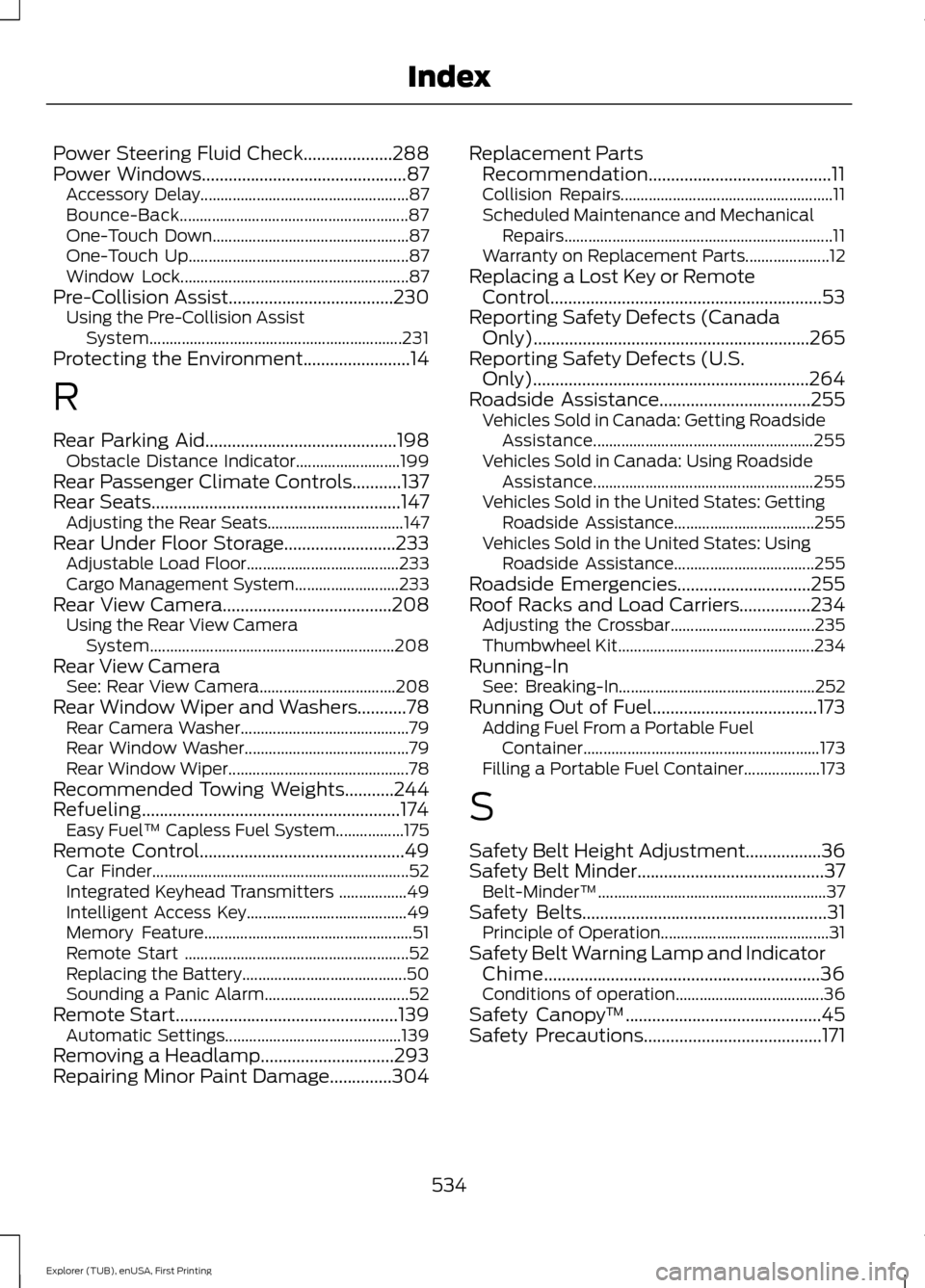
Power Steering Fluid Check....................288
Power Windows..............................................87
Accessory Delay.................................................... 87
Bounce-Back......................................................... 87
One-Touch Down................................................. 87
One-Touch Up....................................................... 87
Window Lock......................................................... 87
Pre-Collision Assist.....................................230 Using the Pre-Collision Assist
System............................................................... 231
Protecting the Environment........................14
R
Rear Parking Aid...........................................198 Obstacle Distance Indicator.......................... 199
Rear Passenger Climate Controls...........137
Rear Seats
........................................................147
Adjusting the Rear Seats.................................. 147
Rear Under Floor Storage.........................233 Adjustable Load Floor...................................... 233
Cargo Management System.......................... 233
Rear View Camera
......................................208
Using the Rear View Camera
System............................................................. 208
Rear View Camera See: Rear View Camera.................................. 208
Rear Window Wiper and Washers...........78 Rear Camera Washer.......................................... 79
Rear Window Washer......................................... 79
Rear Window Wiper............................................. 78
Recommended Towing Weights
...........244
Refueling..........................................................174 Easy Fuel ™ Capless Fuel System.................175
Remote Control
..............................................49
Car Finder................................................................ 52
Integrated Keyhead Transmitters .................49
Intelligent Access Key........................................ 49
Memory Feature.................................................... 51
Remote Start ........................................................ 52
Replacing the Battery......................................... 50
Sounding a Panic Alarm.................................... 52
Remote Start..................................................139 Automatic Settings............................................ 139
Removing a Headlamp..............................293
Repairing Minor Paint Damage
..............304 Replacement Parts
Recommendation.........................................11
Collision Repairs..................................................... 11
Scheduled Maintenance and Mechanical Repairs................................................................... 11
Warranty on Replacement Parts..................... 12
Replacing a Lost Key or Remote Control.............................................................53
Reporting Safety Defects (Canada Only)..............................................................265
Reporting Safety Defects (U.S. Only)..............................................................264
Roadside Assistance..................................255 Vehicles Sold in Canada: Getting Roadside
Assistance....................................................... 255
Vehicles Sold in Canada: Using Roadside Assistance....................................................... 255
Vehicles Sold in the United States: Getting Roadside Assistance................................... 255
Vehicles Sold in the United States: Using Roadside Assistance................................... 255
Roadside Emergencies
..............................255
Roof Racks and Load Carriers................234 Adjusting the Crossbar.................................... 235
Thumbwheel Kit................................................. 234
Running-In See: Breaking-In................................................. 252
Running Out of Fuel.....................................173 Adding Fuel From a Portable Fuel
Container........................................................... 173
Filling a Portable Fuel Container................... 173
S
Safety Belt Height Adjustment.................36
Safety Belt Minder..........................................37 Belt-Minder™......................................................... 37
Safety Belts
.......................................................31
Principle of Operation.......................................... 31
Safety Belt Warning Lamp and Indicator Chime..............................................................36
Conditions of operation..................................... 36
Safety Canopy ™
............................................45
Safety Precautions........................................171
534
Explorer (TUB), enUSA, First Printing Index
Page 538 of 541
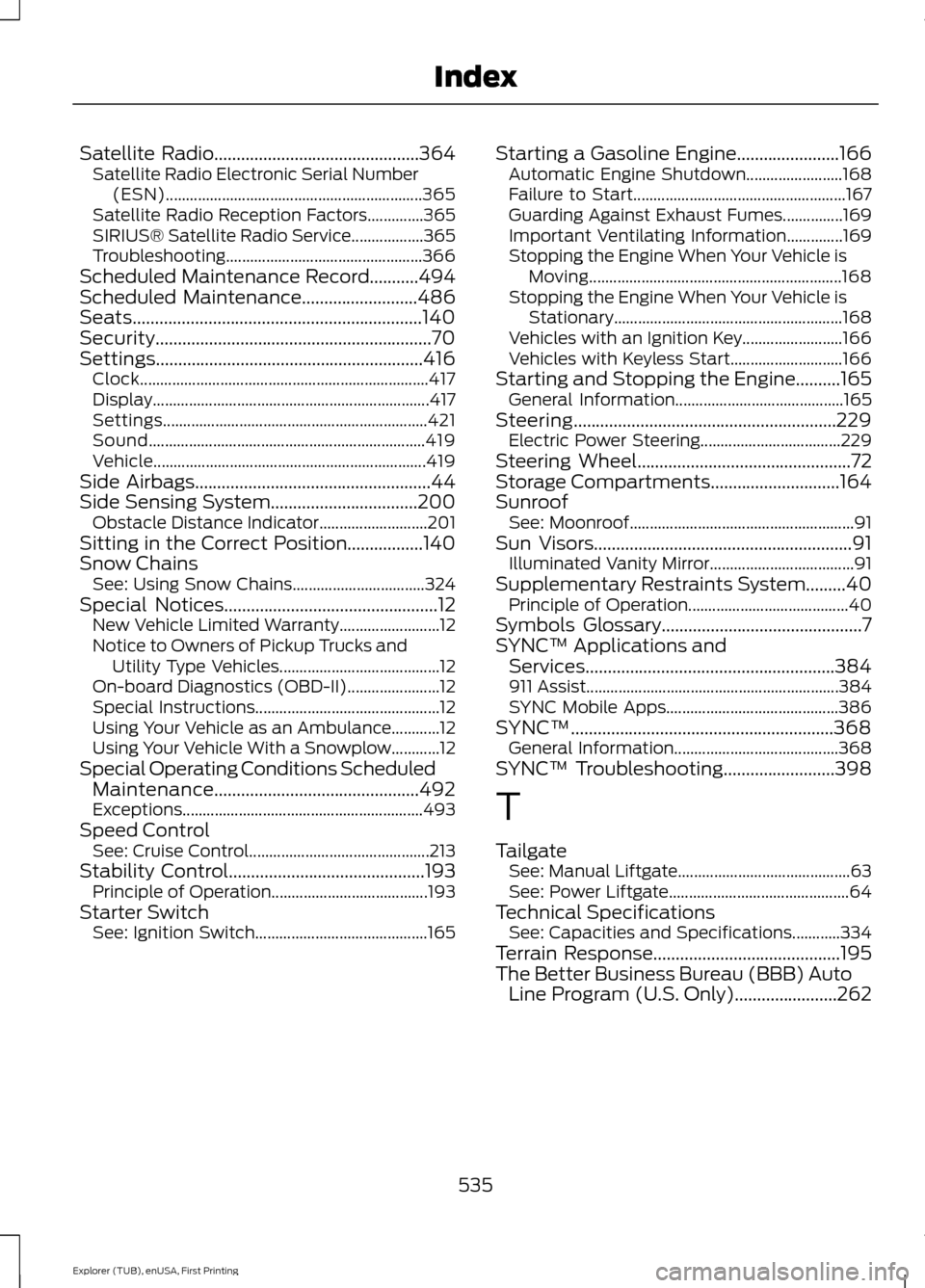
Satellite Radio..............................................364
Satellite Radio Electronic Serial Number
(ESN)................................................................ 365
Satellite Radio Reception Factors..............365
SIRIUS® Satellite Radio Service.................. 365
Troubleshooting................................................. 366
Scheduled Maintenance Record...........494
Scheduled Maintenance..........................486
Seats.................................................................140
Security..............................................................70
Settings............................................................416 Clock........................................................................\
417
Display..................................................................... 417
Settings.................................................................. 421
Sound..................................................................... 419
Vehicle.................................................................... 419
Side Airbags
.....................................................44
Side Sensing System.................................200 Obstacle Distance Indicator........................... 201
Sitting in the Correct Position.................140
Snow Chains See: Using Snow Chains................................. 324
Special Notices................................................12 New Vehicle Limited Warranty......................... 12
Notice to Owners of Pickup Trucks and Utility Type Vehicles........................................ 12
On-board Diagnostics (OBD-II)....................... 12
Special Instructions.............................................. 12
Using Your Vehicle as an Ambulance............12
Using Your Vehicle With a Snowplow............12
Special Operating Conditions Scheduled Maintenance..............................................492
Exceptions............................................................ 493
Speed Control See: Cruise Control............................................. 213
Stability Control
............................................193
Principle of Operation....................................... 193
Starter Switch See: Ignition Switch........................................... 165Starting a Gasoline Engine.......................166
Automatic Engine Shutdown........................ 168
Failure to Start..................................................... 167
Guarding Against Exhaust Fumes...............169
Important Ventilating Information..............169
Stopping the Engine When Your Vehicle is Moving............................................................... 168
Stopping the Engine When Your Vehicle is Stationary......................................................... 168
Vehicles with an Ignition Key......................... 166
Vehicles with Keyless Start............................ 166
Starting and Stopping the Engine..........165 General Information.......................................... 165
Steering...........................................................229 Electric Power Steering................................... 229
Steering Wheel
................................................72
Storage Compartments.............................164
Sunroof See: Moonroof........................................................ 91
Sun Visors
..........................................................91
Illuminated Vanity Mirror.................................... 91
Supplementary Restraints System.........40 Principle of Operation........................................ 40
Symbols Glossary
.............................................7
SYNC™ Applications and Services........................................................384
911 Assist............................................................... 384
SYNC Mobile Apps........................................... 386
SYNC™...........................................................368 General Information......................................... 368
SYNC™ Troubleshooting
.........................398
T
Tailgate See: Manual Liftgate........................................... 63
See: Power Liftgate............................................. 64
Technical Specifications See: Capacities and Specifications............334
Terrain Response
..........................................195
The Better Business Bureau (BBB) Auto Line Program (U.S. Only).......................262
535
Explorer (TUB), enUSA, First Printing Index