fuel pressure FORD EXPLORER 2019 User Guide
[x] Cancel search | Manufacturer: FORD, Model Year: 2019, Model line: EXPLORER, Model: FORD EXPLORER 2019Pages: 571, PDF Size: 6.8 MB
Page 317 of 571
GENERAL INFORMATION
Use only approved wheel and tire sizes,
using other sizes could damage your
vehicle. If you change the diameter of the
tires from that fitted at the factory, the
speedometer may not display the correct
speed. If you intend to change the size of
the wheels from that fitted by the
manufacturer, you can check the suitability
with an authorized dealer.
Additional information related to the
functionality and maintenance of your tires
can be found later in this chapter. See Tire
Care (page 316).
You can find the recommended tire
inflation pressures can on the Tire Label,
which is on the B-pillar or the edge of the
driver door. You can also find this
information on the Safety Compliance
Certification Label, affixed to either the
door hinge pillar, door-latch post, or the
door edge that meets the door latch post;
next to the driver seating position.
We strongly recommend maintaining these
tire pressures at all times. Failure to follow
the tire pressure recommendations can
cause uneven treadwear patterns, reduced
fuel economy, and adversely affect the
way your vehicle handles.
Note: Check and set the tire pressure at the
ambient temperature in which you are
intending to drive your vehicle and when the
tires are cold.
Note: Check your tire pressures at least
once per month.
If your vehicle has a spare tire, set the
pressure to the highest value given for your
vehicle and tire size combination. Notice to utility vehicle and truck
owners WARNING:
Utility vehicles have a
significantly higher rollover rate than
other types of vehicles. WARNING: Vehicles with a higher
center of gravity (utility and four-wheel
drive vehicles) handle differently than
vehicles with a lower center of gravity
(passenger cars). Avoid sharp turns,
excessive speed and abrupt steering in
these vehicles. Failure to drive cautiously
increases the risk of losing control of your
vehicle, vehicle rollover, personal injury
and death. WARNING:
In a rollover crash, an
unbelted person is significantly more
likely to die than a person wearing a
seatbelt. WARNING:
Do not become
overconfident in the ability of four-wheel
drive vehicles. Although a four-wheel
drive vehicle may accelerate better than
a two-wheel drive vehicle in low traction
situations, it won't stop any faster than
two-wheel drive vehicles. Always drive
at a safe speed.
Utility vehicles and trucks handle
differently than passenger cars in the
various driving conditions that are
encountered on streets, highways and
off-road. Utility vehicles and trucks are not
designed for cornering at speeds as high
as passenger cars any more than low-slung
sports cars are designed to perform
satisfactorily under off-road conditions.
314
Explorer (TUB) Canada/United States of America, enUSA, Edition date: 201807, Second-Printing Wheels and Tires
Page 334 of 571
them to the proper pressure. Driving on a
significantly under-inflated tire causes the
tire to overheat and can lead to tire failure.
Under-inflation also reduces fuel efficiency
and tire tread life, and may affect the
vehicle
’s handling and stopping ability.
Please note that the TPMS is not a
substitute for proper tire maintenance, and
it is the driver ’s responsibility to maintain
correct tire pressure, even if under-inflation
has not reached the level to trigger
illumination of the TPMS low tire pressure
telltale.
Your vehicle has also been equipped with
a TPMS malfunction indicator to indicate
when the system is not operating properly.
The TPMS malfunction indicator is
combined with the low tire pressure
telltale. When the system detects a
malfunction, the telltale will flash for
approximately one minute and then remain
continuously illuminated. This sequence
will continue upon subsequent vehicle
start-ups as long as the malfunction exists.
When the malfunction indicator is
illuminated, the system may not be able
to detect or signal low tire pressure as
intended. TPMS malfunctions may occur
for a variety of reasons, including the
installation of replacement or alternate
tires or wheels on the vehicle that prevent
the TPMS from functioning properly.
Always check the TPMS malfunction
telltale after replacing one or more tires or
wheels on your vehicle to ensure that the
replacement or alternate tires and wheels
allow the TPMS to continue to function
properly.
This device complies with Part 15 of the
FCC Rules and with License exempt RSS
Standards of Industry Canada. Operation
is subject to the following two conditions:
1. This device may not cause harmful interference, and 2. This device must accept any
interference received, including
interference that may cause undesired
operation.
Note: Changes or modifications not
expressively approved by the party
responsible for compliance could void the
user's authority to operate the equipment.
The term "IC:" before the radio certification
number only signifies that Industry Canada
technical specifications were met.
Changing Tires With a Tire
Pressure Monitoring System Note:
Each road tire is equipped with a tire
pressure sensor located inside the wheel
and tire assembly cavity. The pressure
sensor is attached to the valve stem. The
pressure sensor is covered by the tire and is
not visible unless the tire is removed. Take
care when changing the tire to avoid
damaging the sensor.
You should always have your tires serviced
by an authorized dealer.
Check the tire pressure periodically (at
least monthly) using an accurate tire
gauge. See When Inflating Your Tires in
this chapter.
331
Explorer (TUB) Canada/United States of America, enUSA, Edition date: 201807, Second-Printing Wheels and TiresE142549
Page 350 of 571
CAPACITIES AND SPECIFICATIONS - 2.3L ECOBOOST™
Capacities
WARNING: The air conditioning refrigerant system contains refrigerant under
high pressure. Only qualified personnel should service the air conditioning refrigerant
system. Opening the air conditioning refrigerant system can cause personal injury. Capacity
Item
5.7 qt (5.4 L)
Engine oil (with oil filter)
12.0 qt (11.31 L)
Engine coolant (without oil cooler)
12.2 qt (11.52 L)
Engine coolant (with oil cooler)
Between MIN/MAX on brake fluid reservoir
Brake fluid
2.11 pt (1.0 L)
Rear axle fluid (four-wheel drive)
9.0 qt (8.5 L)1
Automatic transmission fluid
23.7 fl oz (700 ml)
Power Transfer Unit (PTU) fluid (four-
wheel drive)
Fill as required
Windshield washer fluid
18.6 gal (70.4 L)
Fuel tank
2.80 lb (1.27 kg)
A/C refrigerant
7.3 fl oz (215 ml)
A/C refrigerant compressor oil
1 Approximate dry fill capacity. Actual amount may vary during fluid changes.
347
Explorer (TUB) Canada/United States of America, enUSA, Edition date: 201807, Second-Printing Capacities and Specifications
Page 359 of 571
Capacities
WARNING: The air conditioning refrigerant system contains refrigerant under
high pressure. Only qualified personnel should service the air conditioning refrigerant
system. Opening the air conditioning refrigerant system can cause personal injury. Capacity
Item
6.0 qt (5.7 L)
Engine oil (with oil filter)
12.4 qt (11.73 L)
Engine coolant (without oil cooler)
13.5 qt (12.79 L)
Engine coolant (with oil cooler)
Between MIN/MAX on brake fluid reservoir
Brake fluid
2.11 pt (1.0 L)
Rear axle fluid (four-wheel drive)
10.9 qt (10.3 L)1
Automatic transmission fluid (6F50)
11.6 qt (11 L)1
Automatic transmission fluid (6F55)
17.9 fl oz (0.53 L)
Power Transfer Unit (PTU) fluid (four-
wheel drive)
Fill as required
Windshield washer fluid
18.6 gal (70.4 L)
Fuel tank
2.1 lb (0.96 kg)
A/C refrigerant (front only)
2.8 lb (1.27 kg)
A/C refrigerant (front and rear)
5.6 fl oz (165 ml)
A/C refrigerant compressor oil (front only)
7.3 fl oz (216 ml)
A/C refrigerant compressor oil (front and
rear)
1 Approximate dry fill capacity. Actual amount may vary during fluid changes.
356
Explorer (TUB) Canada/United States of America, enUSA, Edition date: 201807, Second-Printing Capacities and Specifications
Page 398 of 571
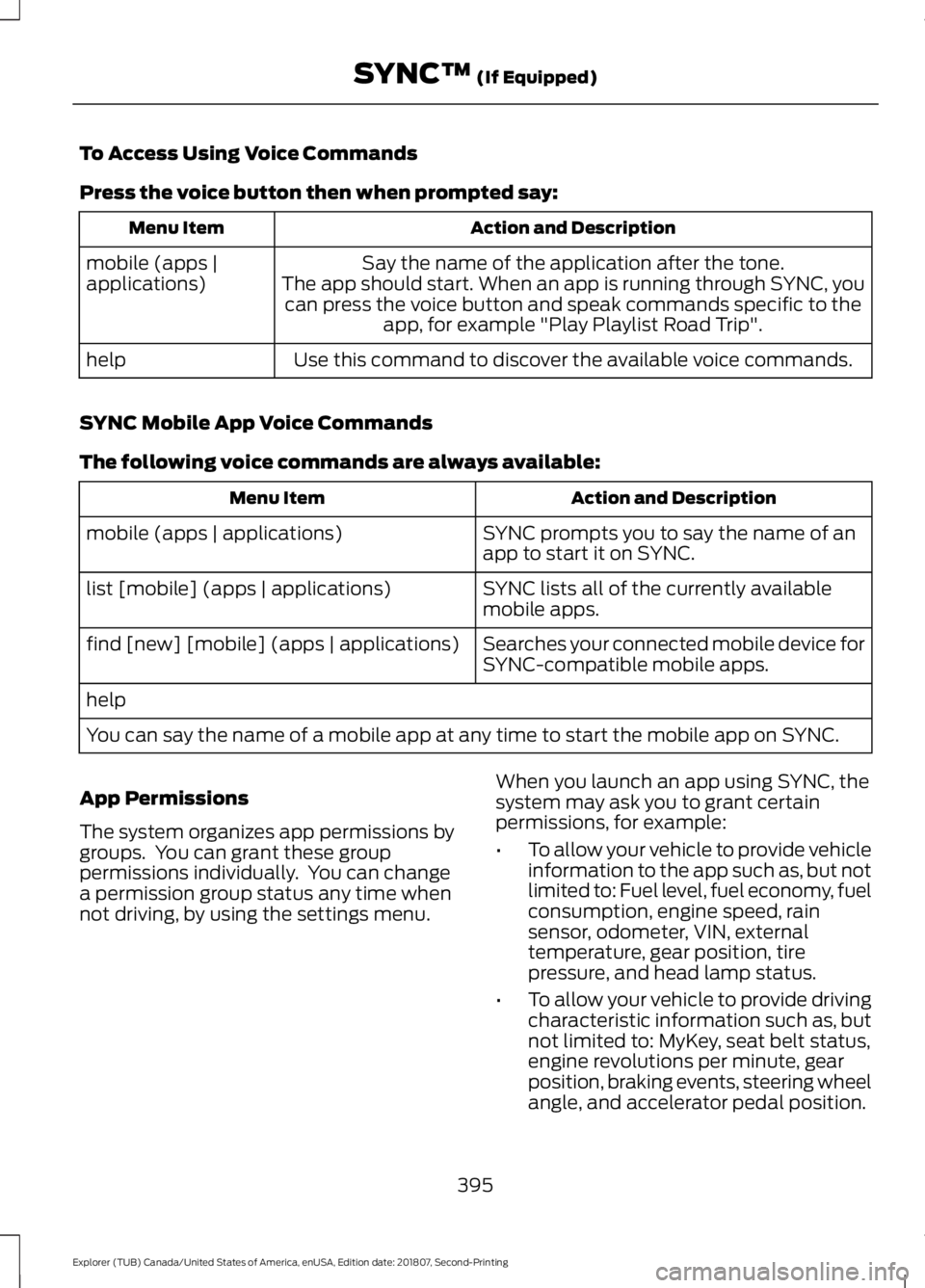
To Access Using Voice Commands
Press the voice button then when prompted say:
Action and Description
Menu Item
Say the name of the application after the tone.
The app should start. When an app is running through SYNC, you can press the voice button and speak commands specific to the app, for example "Play Playlist Road Trip".
mobile (apps |
applications)
Use this command to discover the available voice commands.
help
SYNC Mobile App Voice Commands
The following voice commands are always available: Action and Description
Menu Item
SYNC prompts you to say the name of an
app to start it on SYNC.
mobile (apps | applications)
SYNC lists all of the currently available
mobile apps.
list [mobile] (apps | applications)
Searches your connected mobile device for
SYNC-compatible mobile apps.
find [new] [mobile] (apps | applications)
help
You can say the name of a mobile app at any time to start the mobile app on SYNC.
App Permissions
The system organizes app permissions by
groups. You can grant these group
permissions individually. You can change
a permission group status any time when
not driving, by using the settings menu. When you launch an app using SYNC, the
system may ask you to grant certain
permissions, for example:
•
To allow your vehicle to provide vehicle
information to the app such as, but not
limited to: Fuel level, fuel economy, fuel
consumption, engine speed, rain
sensor, odometer, VIN, external
temperature, gear position, tire
pressure, and head lamp status.
• To allow your vehicle to provide driving
characteristic information such as, but
not limited to: MyKey, seat belt status,
engine revolutions per minute, gear
position, braking events, steering wheel
angle, and accelerator pedal position.
395
Explorer (TUB) Canada/United States of America, enUSA, Edition date: 201807, Second-Printing SYNC™ (If Equipped)
Page 500 of 571
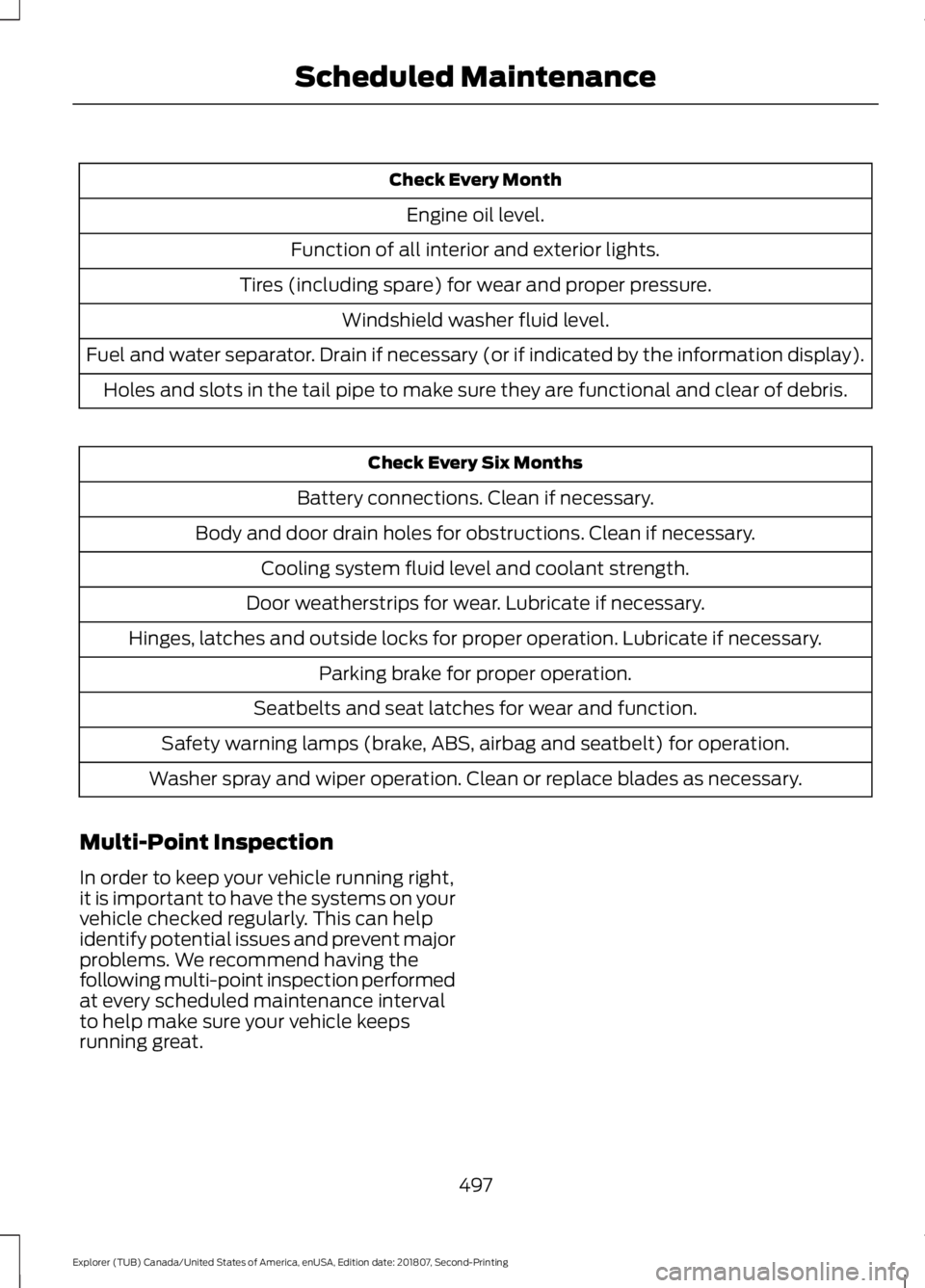
Check Every Month
Engine oil level.
Function of all interior and exterior lights.
Tires (including spare) for wear and proper pressure. Windshield washer fluid level.
Fuel and water separator. Drain if necessary (or if indicated by the information display). Holes and slots in the tail pipe to make sure they are functional and clear of debris. Check Every Six Months
Battery connections. Clean if necessary.
Body and door drain holes for obstructions. Clean if necessary. Cooling system fluid level and coolant strength.
Door weatherstrips for wear. Lubricate if necessary.
Hinges, latches and outside locks for proper operation. Lubricate if necessary. Parking brake for proper operation.
Seatbelts and seat latches for wear and function.
Safety warning lamps (brake, ABS, airbag and seatbelt) for operation.
Washer spray and wiper operation. Clean or replace blades as necessary.
Multi-Point Inspection
In order to keep your vehicle running right,
it is important to have the systems on your
vehicle checked regularly. This can help
identify potential issues and prevent major
problems. We recommend having the
following multi-point inspection performed
at every scheduled maintenance interval
to help make sure your vehicle keeps
running great.
497
Explorer (TUB) Canada/United States of America, enUSA, Edition date: 201807, Second-Printing Scheduled Maintenance
Page 564 of 571
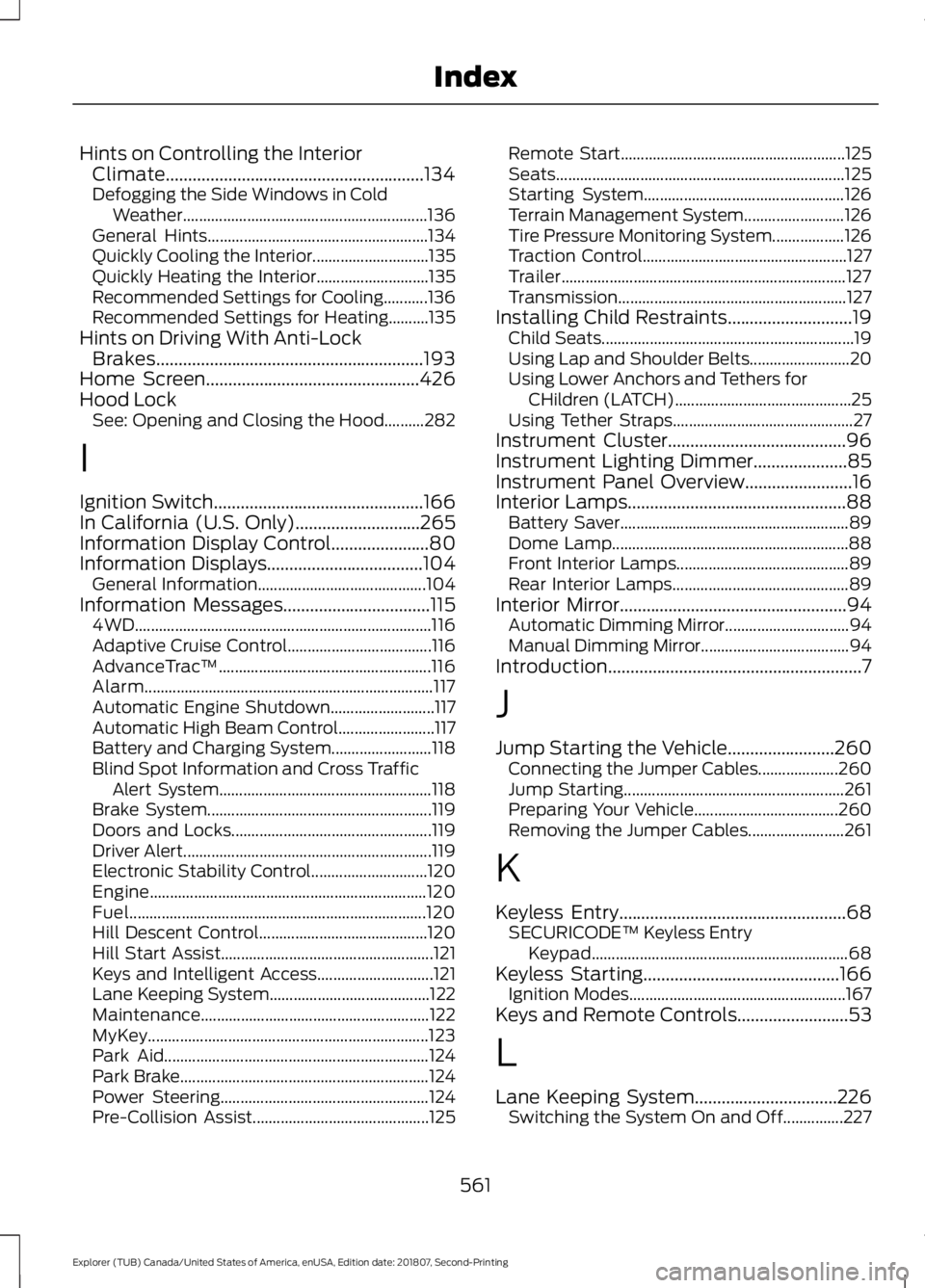
Hints on Controlling the Interior
Climate..........................................................134
Defogging the Side Windows in Cold Weather............................................................. 136
General Hints....................................................... 134
Quickly Cooling the Interior............................. 135
Quickly Heating the Interior............................ 135
Recommended Settings for Cooling...........136
Recommended Settings for Heating..........135
Hints on Driving With Anti-Lock Brakes............................................................193
Home Screen................................................426
Hood Lock See: Opening and Closing the Hood..........282
I
Ignition Switch
...............................................166
In California (U.S. Only)............................265
Information Display Control......................80
Information Displays
...................................104
General Information.......................................... 104
Information Messages
.................................115
4WD........................................................................\
.. 116
Adaptive Cruise Control.................................... 116
AdvanceTrac ™..................................................... 116
Alarm........................................................................\
117
Automatic Engine Shutdown.......................... 117
Automatic High Beam Control........................ 117
Battery and Charging System......................... 118
Blind Spot Information and Cross Traffic Alert System..................................................... 118
Brake System........................................................ 119
Doors and Locks.................................................. 119
Driver Alert.............................................................. 119
Electronic Stability Control............................. 120
Engine..................................................................... 120
Fuel........................................................................\
.. 120
Hill Descent Control.......................................... 120
Hill Start Assist..................................................... 121
Keys and Intelligent Access............................. 121
Lane Keeping System........................................ 122
Maintenance......................................................... 122
MyKey...................................................................... 123
Park Aid.................................................................. 124
Park Brake.............................................................. 124
Power Steering.................................................... 124
Pre-Collision Assist............................................ 125Remote Start........................................................
125
Seats........................................................................\
125
Starting System.................................................. 126
Terrain Management System......................... 126
Tire Pressure Monitoring System.................. 126
Traction Control................................................... 127
Trailer....................................................................... 127
Transmission......................................................... 127
Installing Child Restraints............................19 Child Seats............................................................... 19
Using Lap and Shoulder Belts......................... 20
Using Lower Anchors and Tethers for CHildren (LATCH)............................................ 25
Using Tether Straps............................................. 27
Instrument Cluster........................................96
Instrument Lighting Dimmer
.....................85
Instrument Panel Overview........................16
Interior Lamps
.................................................88
Battery Saver......................................................... 89
Dome Lamp........................................................... 88
Front Interior Lamps........................................... 89
Rear Interior Lamps............................................ 89
Interior Mirror...................................................94 Automatic Dimming Mirror............................... 94
Manual Dimming Mirror..................................... 94
Introduction.........................................................7
J
Jump Starting the Vehicle........................260 Connecting the Jumper Cables.................... 260
Jump Starting....................................................... 261
Preparing Your Vehicle.................................... 260
Removing the Jumper Cables........................ 261
K
Keyless Entry
...................................................68
SECURICODE™ Keyless Entry
Keypad................................................................ 68
Keyless Starting
............................................166
Ignition Modes...................................................... 167
Keys and Remote Controls.........................53
L
Lane Keeping System................................226 Switching the System On and Off...............227
561
Explorer (TUB) Canada/United States of America, enUSA, Edition date: 201807, Second-Printing Index
Page 570 of 571
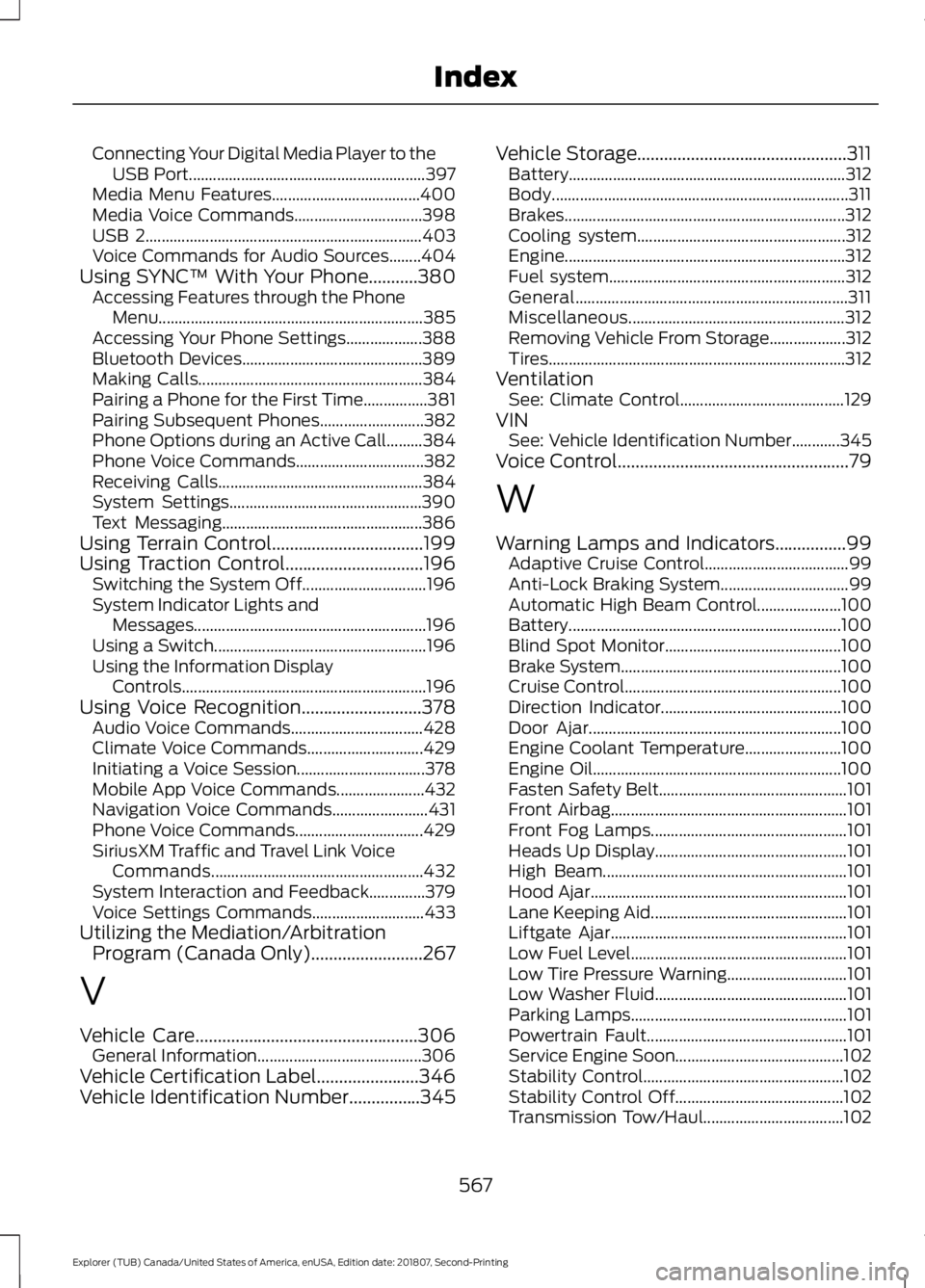
Connecting Your Digital Media Player to the
USB Port........................................................... 397
Media Menu Features..................................... 400
Media Voice Commands................................ 398
USB 2..................................................................... 403
Voice Commands for Audio Sources........404
Using SYNC™ With Your Phone...........380 Accessing Features through the Phone
Menu.................................................................. 385
Accessing Your Phone Settings................... 388
Bluetooth Devices............................................. 389
Making Calls........................................................ 384
Pairing a Phone for the First Time................381
Pairing Subsequent Phones.......................... 382
Phone Options during an Active Call.........384
Phone Voice Commands................................ 382
Receiving Calls................................................... 384
System Settings................................................ 390
Text Messaging.................................................. 386
Using Terrain Control..................................199
Using Traction Control...............................196 Switching the System Off............................... 196
System Indicator Lights and Messages.......................................................... 196
Using a Switch..................................................... 196
Using the Information Display Controls............................................................. 196
Using Voice Recognition...........................378 Audio Voice Commands................................. 428
Climate Voice Commands............................. 429
Initiating a Voice Session................................ 378
Mobile App Voice Commands...................... 432
Navigation Voice Commands........................ 431
Phone Voice Commands................................ 429
SiriusXM Traffic and Travel Link Voice Commands..................................................... 432
System Interaction and Feedback..............379
Voice Settings Commands............................ 433
Utilizing the Mediation/Arbitration Program (Canada Only).........................267
V
Vehicle Care..................................................306 General Information......................................... 306
Vehicle Certification Label.......................346
Vehicle Identification Number................345 Vehicle Storage...............................................311
Battery..................................................................... 312
Body........................................................................\
.. 311
Brakes...................................................................... 312
Cooling system.................................................... 312
Engine...................................................................... 312
Fuel system........................................................... 312
General.................................................................... 311
Miscellaneous...................................................... 312
Removing Vehicle From Storage................... 312
Tires........................................................................\
.. 312
Ventilation See: Climate Control......................................... 129
VIN See: Vehicle Identification Number............345
Voice Control
....................................................79
W
Warning Lamps and Indicators................99 Adaptive Cruise Control.................................... 99
Anti-Lock Braking System................................ 99
Automatic High Beam Control..................... 100
Battery.................................................................... 100
Blind Spot Monitor............................................ 100
Brake System....................................................... 100
Cruise Control...................................................... 100
Direction Indicator............................................. 100
Door Ajar............................................................... 100
Engine Coolant Temperature........................ 100
Engine Oil.............................................................. 100
Fasten Safety Belt............................................... 101
Front Airbag........................................................... 101
Front Fog Lamps................................................. 101
Heads Up Display................................................ 101
High Beam............................................................. 101
Hood Ajar................................................................ 101
Lane Keeping Aid................................................. 101
Liftgate Ajar........................................................... 101
Low Fuel Level...................................................... 101
Low Tire Pressure Warning.............................. 101
Low Washer Fluid................................................ 101
Parking Lamps...................................................... 101
Powertrain Fault.................................................. 101
Service Engine Soon.......................................... 102
Stability Control.................................................. 102
Stability Control Off.......................................... 102
Transmission Tow/Haul................................... 102
567
Explorer (TUB) Canada/United States of America, enUSA, Edition date: 201807, Second-Printing Index