weight FORD EXPLORER 2019 Owner's Guide
[x] Cancel search | Manufacturer: FORD, Model Year: 2019, Model line: EXPLORER, Model: FORD EXPLORER 2019Pages: 571, PDF Size: 6.8 MB
Page 322 of 571
A.
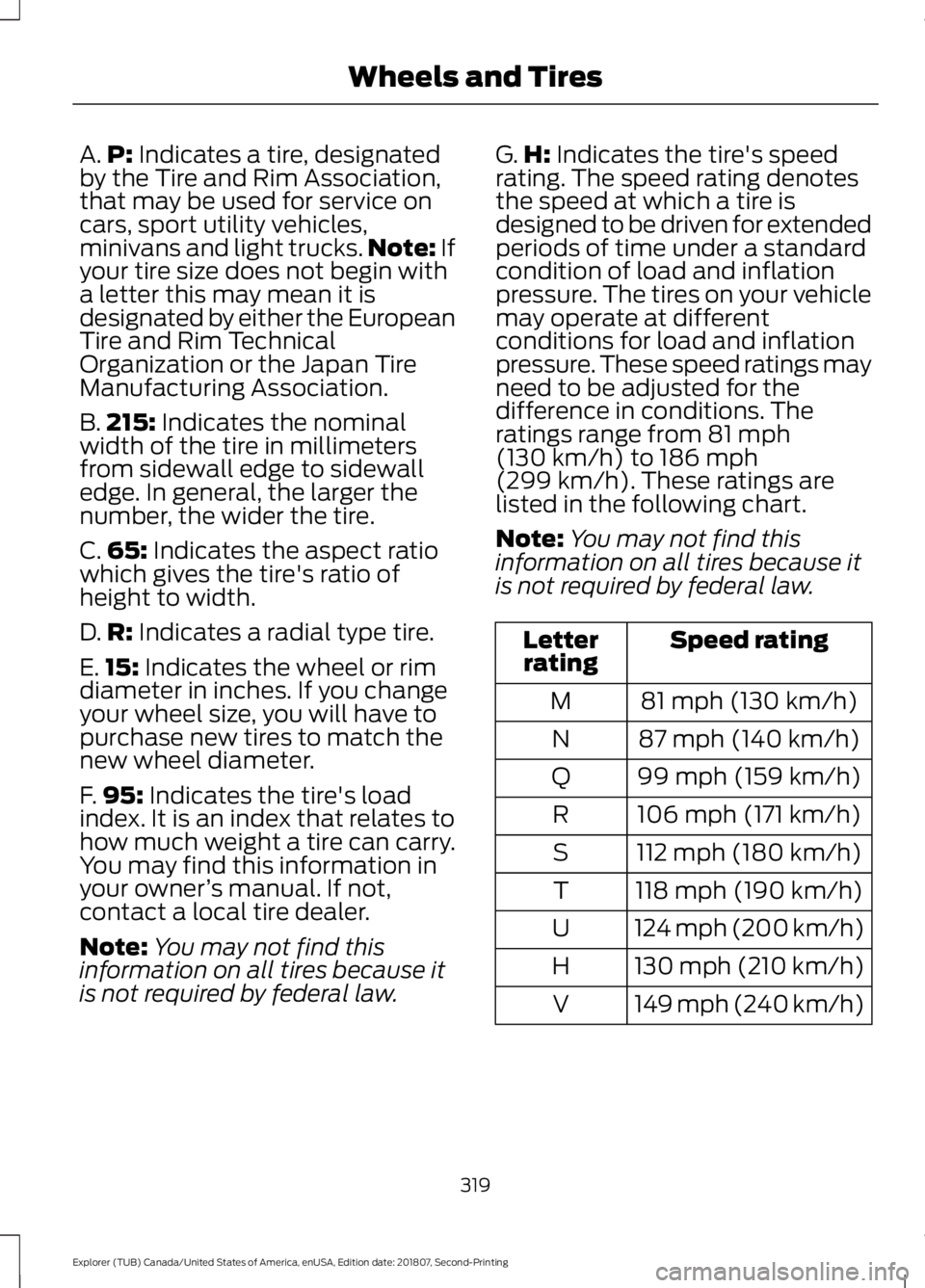
P: Indicates a tire, designated
by the Tire and Rim Association,
that may be used for service on
cars, sport utility vehicles,
minivans and light trucks. Note:
If
your tire size does not begin with
a letter this may mean it is
designated by either the European
Tire and Rim Technical
Organization or the Japan Tire
Manufacturing Association.
B. 215:
Indicates the nominal
width of the tire in millimeters
from sidewall edge to sidewall
edge. In general, the larger the
number, the wider the tire.
C. 65:
Indicates the aspect ratio
which gives the tire's ratio of
height to width.
D. R:
Indicates a radial type tire.
E. 15:
Indicates the wheel or rim
diameter in inches. If you change
your wheel size, you will have to
purchase new tires to match the
new wheel diameter.
F. 95:
Indicates the tire's load
index. It is an index that relates to
how much weight a tire can carry.
You may find this information in
your owner ’s manual. If not,
contact a local tire dealer.
Note: You may not find this
information on all tires because it
is not required by federal law. G.
H:
Indicates the tire's speed
rating. The speed rating denotes
the speed at which a tire is
designed to be driven for extended
periods of time under a standard
condition of load and inflation
pressure. The tires on your vehicle
may operate at different
conditions for load and inflation
pressure. These speed ratings may
need to be adjusted for the
difference in conditions. The
ratings range from
81 mph
(130 km/h) to 186 mph
(299 km/h). These ratings are
listed in the following chart.
Note: You may not find this
information on all tires because it
is not required by federal law. Speed rating
Letter
rating
81 mph (130 km/h)
M
87 mph (140 km/h)
N
99 mph (159 km/h)
Q
106 mph (171 km/h)
R
112 mph (180 km/h)
S
118 mph (190 km/h)
T
124 mph (200 km/h)
U
130 mph (210 km/h)
H
149 mph (240 km/h)
V
319
Explorer (TUB) Canada/United States of America, enUSA, Edition date: 201807, Second-Printing Wheels and Tires
Page 339 of 571
WARNING: Do not work on your
vehicle when the jack is the only support.
If the vehicle slips off the jack, you or
someone else could be seriously injured. WARNING:
Do not attempt to
change a tire on the side of the vehicle
close to moving traffic. Pull far enough
off the road to avoid the danger of being
hit when operating the jack or changing
the wheel. WARNING:
Always use the jack
provided as original equipment with your
vehicle. If using a jack other than the one
provided, make sure the jack capacity is
adequate for the vehicle weight,
including any vehicle cargo or
modifications. If you are unsure if the jack
capacity is adequate, contact the
authorized dealer.
Note: Passengers should not remain in your
vehicle when the vehicle is being jacked.
Note: Jack at the specified locations to
avoid damage to the vehicle.
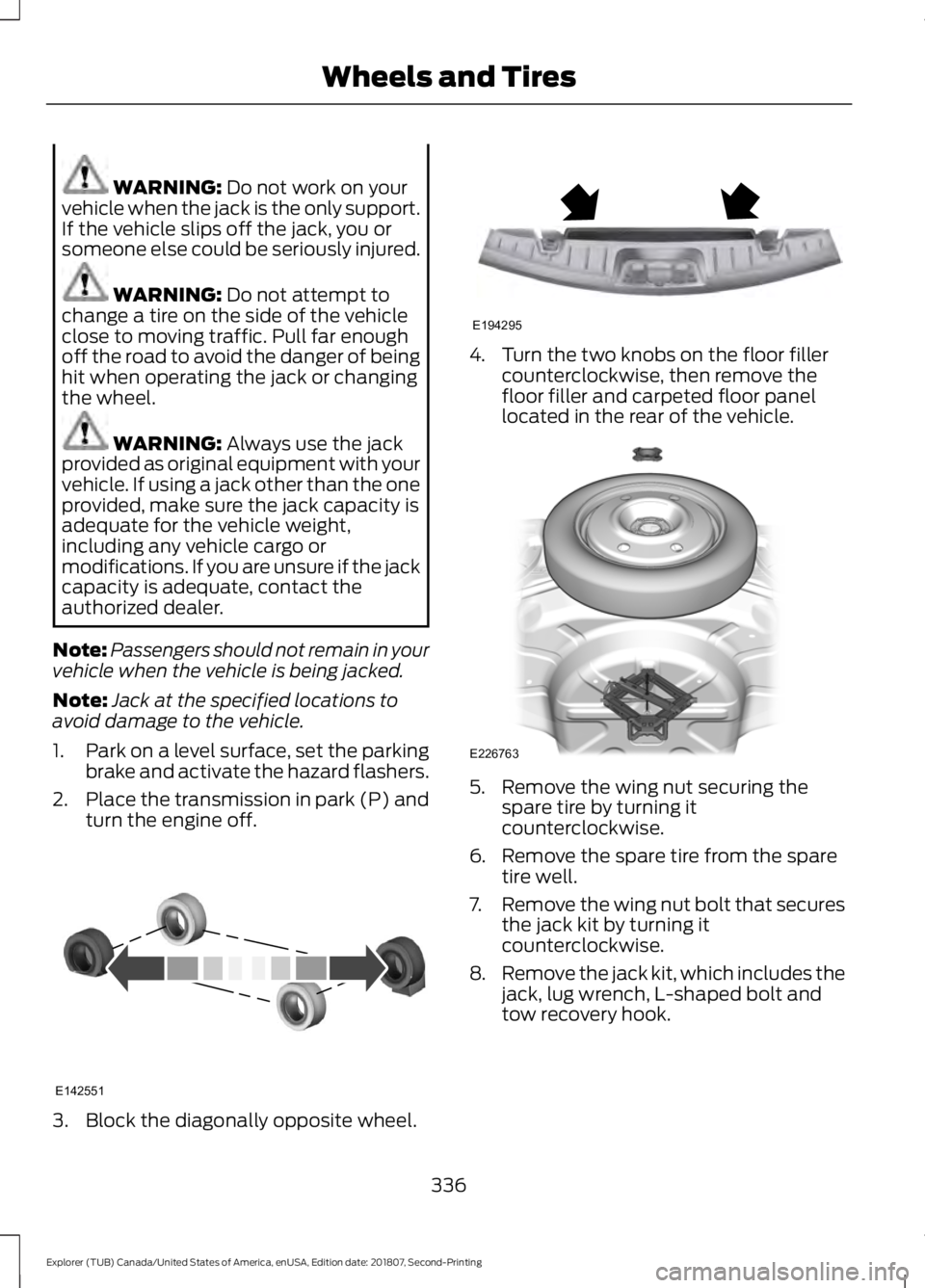
1. Park on a level surface, set the parking
brake and activate the hazard flashers.
2. Place the transmission in park (P) and
turn the engine off. 3. Block the diagonally opposite wheel. 4. Turn the two knobs on the floor filler
counterclockwise, then remove the
floor filler and carpeted floor panel
located in the rear of the vehicle. 5. Remove the wing nut securing the
spare tire by turning it
counterclockwise.
6. Remove the spare tire from the spare tire well.
7. Remove the wing nut bolt that secures
the jack kit by turning it
counterclockwise.
8. Remove the jack kit, which includes the
jack, lug wrench, L-shaped bolt and
tow recovery hook.
336
Explorer (TUB) Canada/United States of America, enUSA, Edition date: 201807, Second-Printing Wheels and TiresE142551 E194295 E226763
Page 348 of 571
VEHICLE IDENTIFICATION
NUMBER
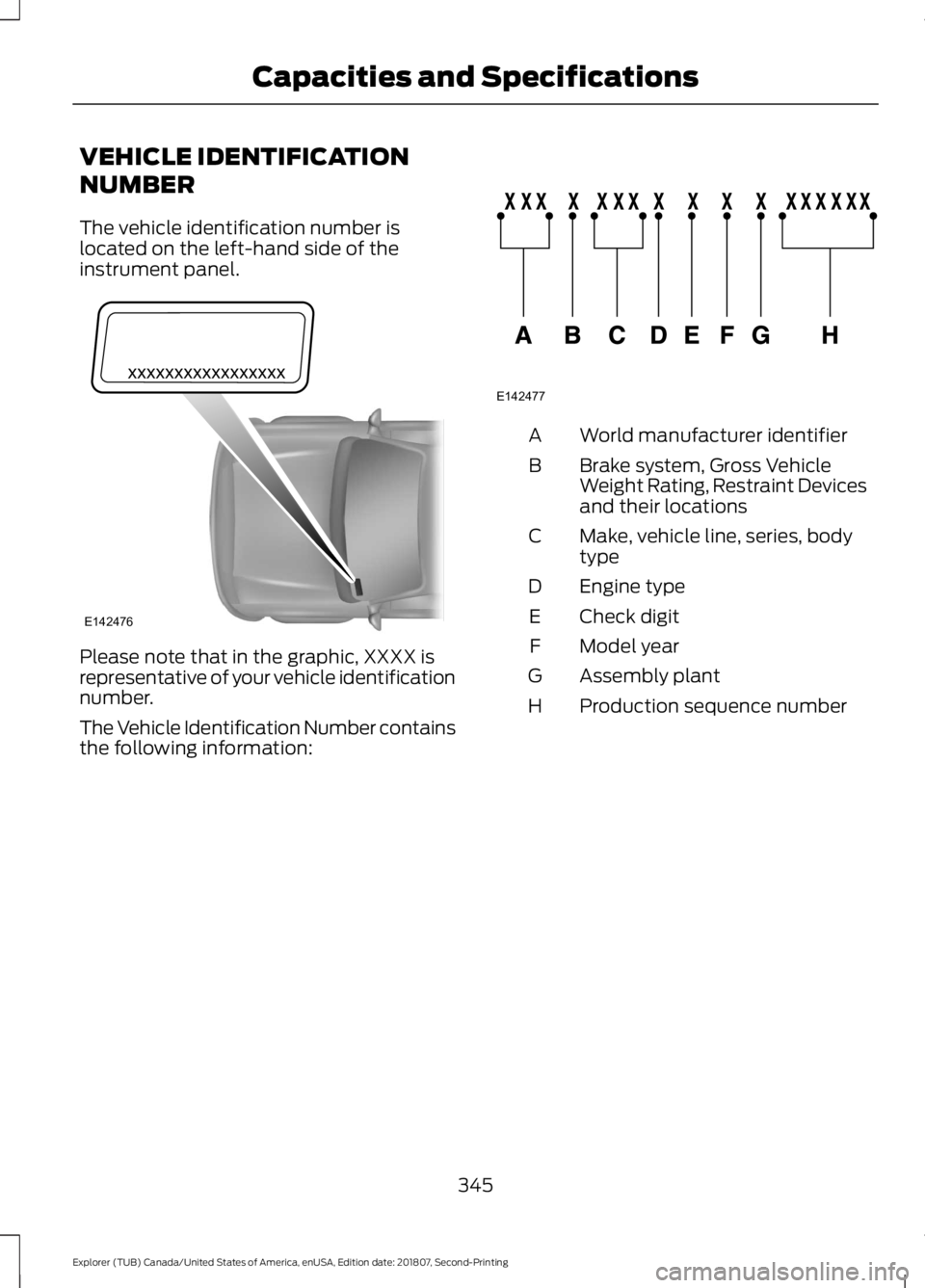
The vehicle identification number is
located on the left-hand side of the
instrument panel.
Please note that in the graphic, XXXX is
representative of your vehicle identification
number.
The Vehicle Identification Number contains
the following information: World manufacturer identifier
A
Brake system, Gross Vehicle
Weight Rating, Restraint Devices
and their locations
B
Make, vehicle line, series, body
type
C
Engine type
D
Check digit
E
Model year
F
Assembly plant
G
Production sequence number
H
345
Explorer (TUB) Canada/United States of America, enUSA, Edition date: 201807, Second-Printing Capacities and SpecificationsE142476 E142477
Page 495 of 571
For maximum vehicle performance, keep
the following information in mind when
adding accessories or equipment to your
vehicle:
•
When adding accessories, equipment,
passengers and luggage to your
vehicle, do not exceed the total weight
capacity of the vehicle or of the front
or rear axle (GVWR or GAWR as
indicated on the Safety Compliance
Certification label). Ask an authorized
dealer for specific weight information.
• The Federal Communications
Commission (FCC) and Canadian
Radio Telecommunications
Commission (CRTC) regulate the use
of mobile communications systems
that are equipped with radio
transmitters, for example two-way
radios, telephones and theft alarms.
Any such equipment installed in your
vehicle should comply with Federal
Communications Commission (FCC)
and Canadian Radio
Telecommunications Commission
(CRTC) regulations and should be
installed only by an authorized dealer.
• An authorized dealer needs to install
mobile communications systems.
Improper installation may harm the
operation of your vehicle, particularly
if the manufacturer did not design the
mobile communication system
specifically for automotive use.
• If you or an authorized Ford dealer add
any non-Ford electrical or electronic
accessories or components to your
vehicle, you may adversely affect
battery performance and durability. In
addition, you may also adversely affect
the performance of other electrical
systems in the vehicle.
492
Explorer (TUB) Canada/United States of America, enUSA, Edition date: 201807, Second-Printing Accessories
Page 567 of 571
Rear Under Floor Storage.........................239
Adjustable Load Floor...................................... 239
Cargo Management System......................... 239
Rear View Camera........................................212 Camera Guidelines............................................. 213
Manual Zoom....................................................... 215
Obstacle Distance Indicator........................... 214
Rear Camera Delay............................................ 215
Using the Rear View Camera System.........213
Rear View Camera See: Rear View Camera.................................... 212
Rear Window Wiper and Washers...........83 Rear Camera Washer.......................................... 83
Rear Window Washer......................................... 83
Rear Window Wiper Blade............................... 83
Recommended Towing Weights...........248
Refueling..........................................................176 Refueling System Overview............................ 176
Refueling System Warning.............................. 178
Refueling Your Vehicle....................................... 177
Remote Control..............................................53 Car Finder................................................................ 58
Integrated Keyhead Transmitter..................... 53
Intelligent Access Key......................................... 54
Memory Feature.................................................... 57
Remote Start......................................................... 58
Replacing the Battery......................................... 55
Sounding the Panic Alarm................................ 58
Remote Start
.................................................138
Automatic Settings............................................ 138
Heated and Cooled Features......................... 138
Last Settings........................................................ 138
Repairing Minor Paint Damage.................311
Replacement Parts Recommendation........................................12
Collision Repairs.................................................... 12
Scheduled Maintenance and Mechanical Repairs.................................................................. 12
Warranty on Replacement Parts..................... 12
Replacing a Lost Key or Remote Control............................................................59
Reporting Safety Defects (Canada Only)..............................................................269
Reporting Safety Defects (U.S. Only)..............................................................269
Roadside Assistance..................................258 Vehicles Sold in Canada: Getting Roadside
Assistance....................................................... 259Vehicles Sold in the United States: Getting
Roadside Assistance................................... 258
Vehicles Sold in the United States: Using Roadside Assistance................................... 258
Roadside Emergencies
..............................258
Roof Racks and Load Carriers................240
Adjusting the Crossbar..................................... 241
Thumbwheel Kit.................................................. 241
Running-In See: Breaking-In................................................. 255
Running Out of Fuel.....................................174 Adding Fuel From a Portable Fuel
Container........................................................... 175
Filling a Portable Fuel Container................... 175
S
Safety Canopy ™
............................................49
Safety Precautions.......................................172
Satellite Radio
...............................................372
Satellite Radio Electronic Serial Number
(ESN)................................................................. 373
Satellite Radio Reception Factors...............373
SiriusXM Satellite Radio Service.................. 373
Troubleshooting................................................. 374
Scheduled Maintenance Record...........503
Scheduled Maintenance
..........................495
Seatbelt Extension........................................42
Seatbelt Height Adjustment......................39
Seatbelt Reminder
........................................40
Belt-Minder™....................................................... 40
Seatbelts...........................................................35 Principle of Operation......................................... 35
Seatbelt Warning Lamp and Indicator Chime..............................................................40
Conditions of operation.................................... 40
Seats.................................................................139
Security...............................................................75
Settings...........................................................463 911 Assist.............................................................. 468
Ambient Lighting................................................ 475
Bluetooth.............................................................. 465
Clock...................................................................... 465
Display.................................................................... 476
General................................................................... 473
Media Player....................................................... 464
Mobile Apps.......................................................... 471
Navigation............................................................ 469
564
Explorer (TUB) Canada/United States of America, enUSA, Edition date: 201807, Second-Printing Index