audio FORD EXPLORER 2023 User Guide
[x] Cancel search | Manufacturer: FORD, Model Year: 2023, Model line: EXPLORER, Model: FORD EXPLORER 2023Pages: 573, PDF Size: 16.1 MB
Page 120 of 573
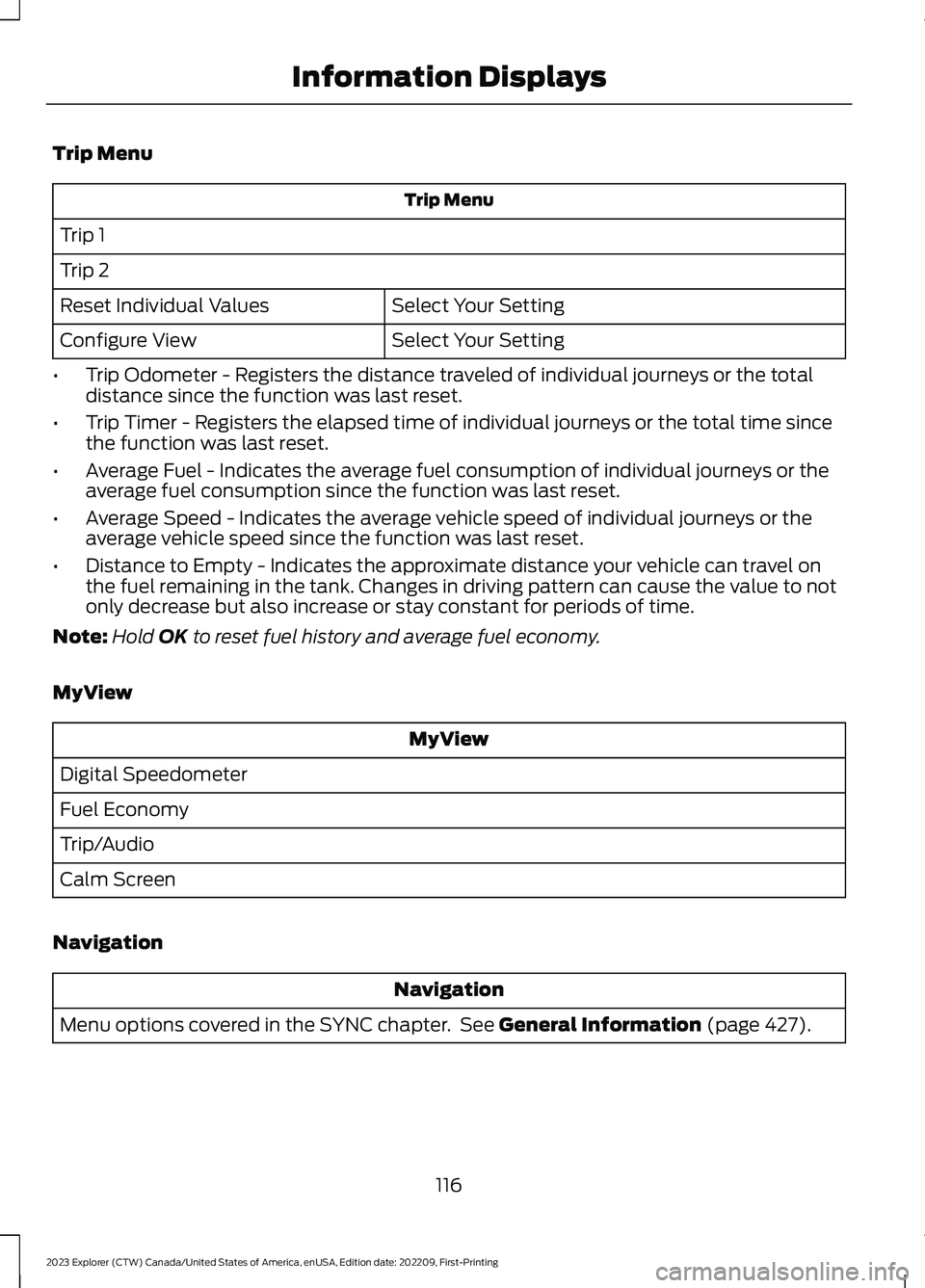
Trip Menu
Trip Menu
Trip 1
Trip 2
Select Your SettingReset Individual Values
Select Your SettingConfigure View
•Trip Odometer - Registers the distance traveled of individual journeys or the totaldistance since the function was last reset.
•Trip Timer - Registers the elapsed time of individual journeys or the total time sincethe function was last reset.
•Average Fuel - Indicates the average fuel consumption of individual journeys or theaverage fuel consumption since the function was last reset.
•Average Speed - Indicates the average vehicle speed of individual journeys or theaverage vehicle speed since the function was last reset.
•Distance to Empty - Indicates the approximate distance your vehicle can travel onthe fuel remaining in the tank. Changes in driving pattern can cause the value to notonly decrease but also increase or stay constant for periods of time.
Note:Hold OK to reset fuel history and average fuel economy.
MyView
MyView
Digital Speedometer
Fuel Economy
Trip/Audio
Calm Screen
Navigation
Navigation
Menu options covered in the SYNC chapter. See General Information (page 427).
116
2023 Explorer (CTW) Canada/United States of America, enUSA, Edition date: 202209, First-PrintingInformation Displays
Page 121 of 573
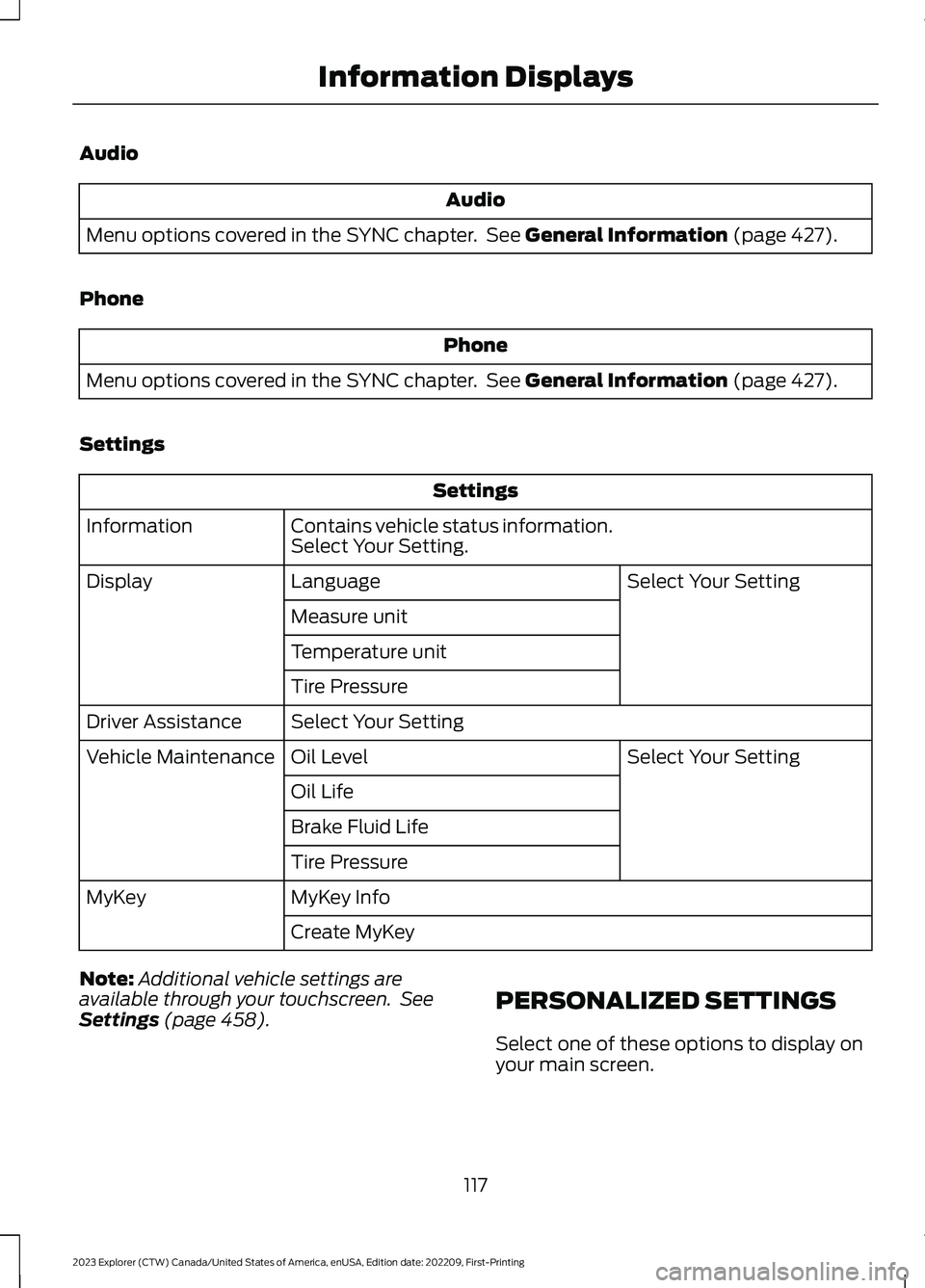
Audio
Audio
Menu options covered in the SYNC chapter. See General Information (page 427).
Phone
Phone
Menu options covered in the SYNC chapter. See General Information (page 427).
Settings
Settings
Contains vehicle status information.Select Your Setting.Information
Select Your SettingLanguageDisplay
Measure unit
Temperature unit
Tire Pressure
Select Your SettingDriver Assistance
Select Your SettingOil LevelVehicle Maintenance
Oil Life
Brake Fluid Life
Tire Pressure
MyKey InfoMyKey
Create MyKey
Note:Additional vehicle settings areavailable through your touchscreen. SeeSettings (page 458).PERSONALIZED SETTINGS
Select one of these options to display onyour main screen.
117
2023 Explorer (CTW) Canada/United States of America, enUSA, Edition date: 202209, First-PrintingInformation Displays
Page 132 of 573
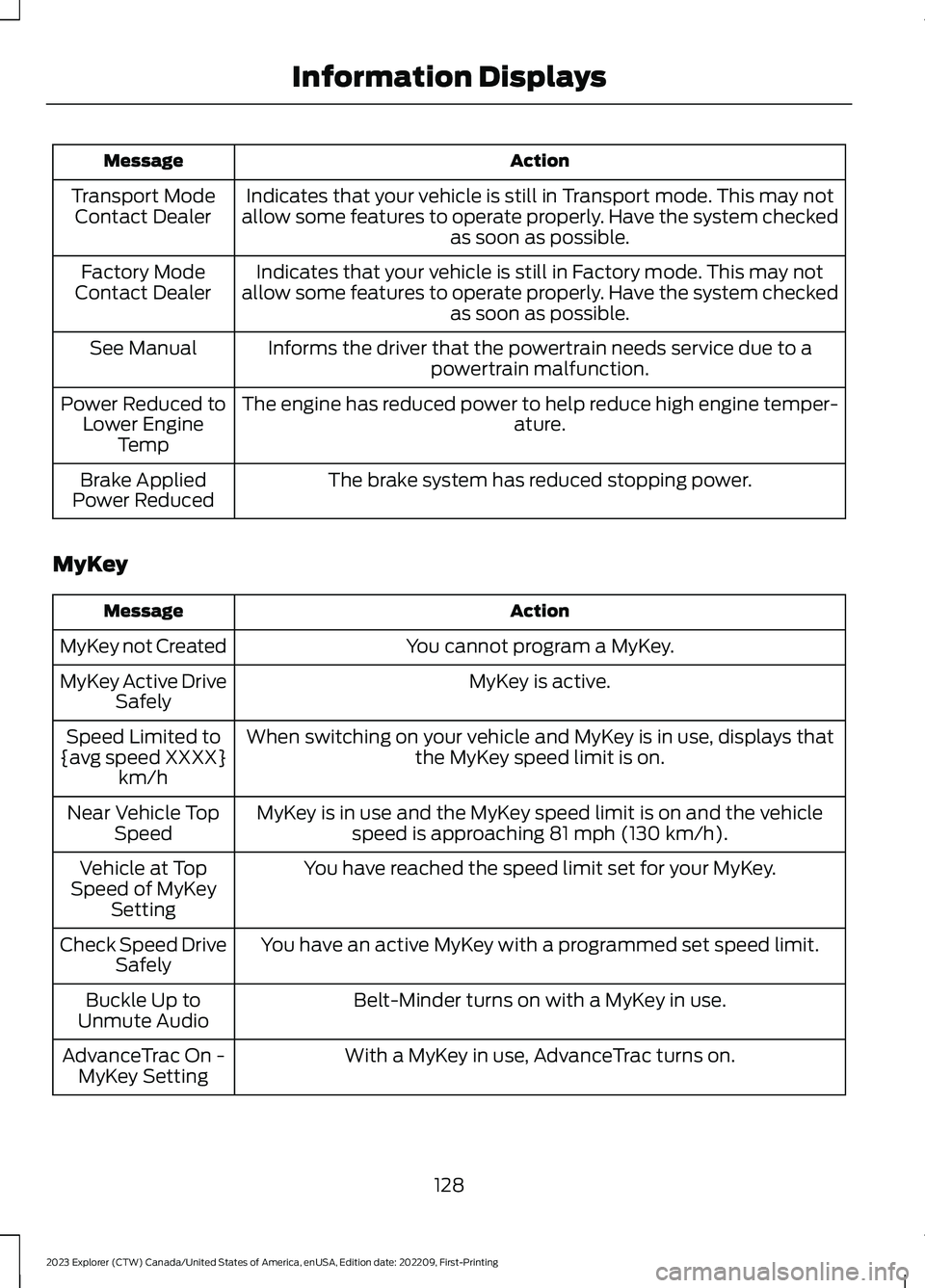
ActionMessage
Indicates that your vehicle is still in Transport mode. This may notallow some features to operate properly. Have the system checkedas soon as possible.
Transport ModeContact Dealer
Indicates that your vehicle is still in Factory mode. This may notallow some features to operate properly. Have the system checkedas soon as possible.
Factory ModeContact Dealer
Informs the driver that the powertrain needs service due to apowertrain malfunction.See Manual
The engine has reduced power to help reduce high engine temper-ature.Power Reduced toLower EngineTemp
The brake system has reduced stopping power.Brake AppliedPower Reduced
MyKey
ActionMessage
You cannot program a MyKey.MyKey not Created
MyKey is active.MyKey Active DriveSafely
When switching on your vehicle and MyKey is in use, displays thatthe MyKey speed limit is on.Speed Limited to{avg speed XXXX}km/h
MyKey is in use and the MyKey speed limit is on and the vehiclespeed is approaching 81 mph (130 km/h).Near Vehicle TopSpeed
You have reached the speed limit set for your MyKey.Vehicle at TopSpeed of MyKeySetting
You have an active MyKey with a programmed set speed limit.Check Speed DriveSafely
Belt-Minder turns on with a MyKey in use.Buckle Up toUnmute Audio
With a MyKey in use, AdvanceTrac turns on.AdvanceTrac On -MyKey Setting
128
2023 Explorer (CTW) Canada/United States of America, enUSA, Edition date: 202209, First-PrintingInformation Displays
Page 230 of 573
WARNING: To help avoid personalinjury, always use caution when inreverse (R) and when using the sensingsystem.
WARNING: The parking aid systemcan only assist you to detect objectswhen your vehicle is moving at parkingspeeds. To help avoid personal injury youmust take care when using the parkingaid system.
Note:Keep the sensors free from snow, iceand large accumulations of dirt.
Note:Do not cover up the sensors.
Note:Do not clean the sensors with sharpobjects.
Note:If your vehicle sustains damageleaving the sensors misaligned, this maycause inaccurate measurements or falsealerts.
Note:Some accessories, for example largetrailer hitches or bike or surfboard racks, cancause reduced performance or false alerts.
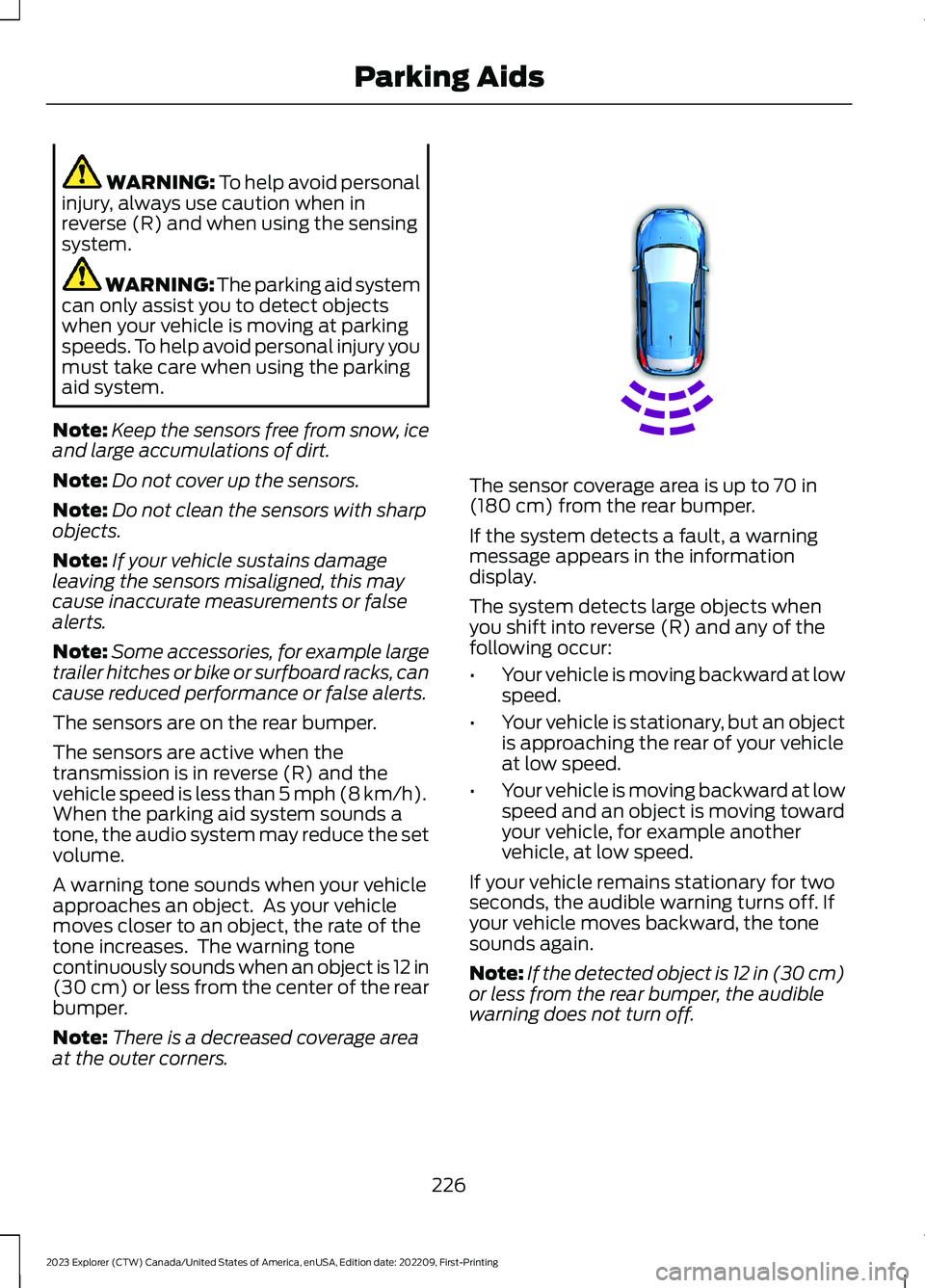
The sensors are on the rear bumper.
The sensors are active when thetransmission is in reverse (R) and thevehicle speed is less than 5 mph (8 km/h).When the parking aid system sounds atone, the audio system may reduce the setvolume.
A warning tone sounds when your vehicleapproaches an object. As your vehiclemoves closer to an object, the rate of thetone increases. The warning tonecontinuously sounds when an object is 12 in(30 cm) or less from the center of the rearbumper.
Note:There is a decreased coverage areaat the outer corners.
The sensor coverage area is up to 70 in(180 cm) from the rear bumper.
If the system detects a fault, a warningmessage appears in the informationdisplay.
The system detects large objects whenyou shift into reverse (R) and any of thefollowing occur:
•Your vehicle is moving backward at lowspeed.
•Your vehicle is stationary, but an objectis approaching the rear of your vehicleat low speed.
•Your vehicle is moving backward at lowspeed and an object is moving towardyour vehicle, for example anothervehicle, at low speed.
If your vehicle remains stationary for twoseconds, the audible warning turns off. Ifyour vehicle moves backward, the tonesounds again.
Note:If the detected object is 12 in (30 cm)or less from the rear bumper, the audiblewarning does not turn off.
226
2023 Explorer (CTW) Canada/United States of America, enUSA, Edition date: 202209, First-PrintingParking AidsE130178
Page 231 of 573
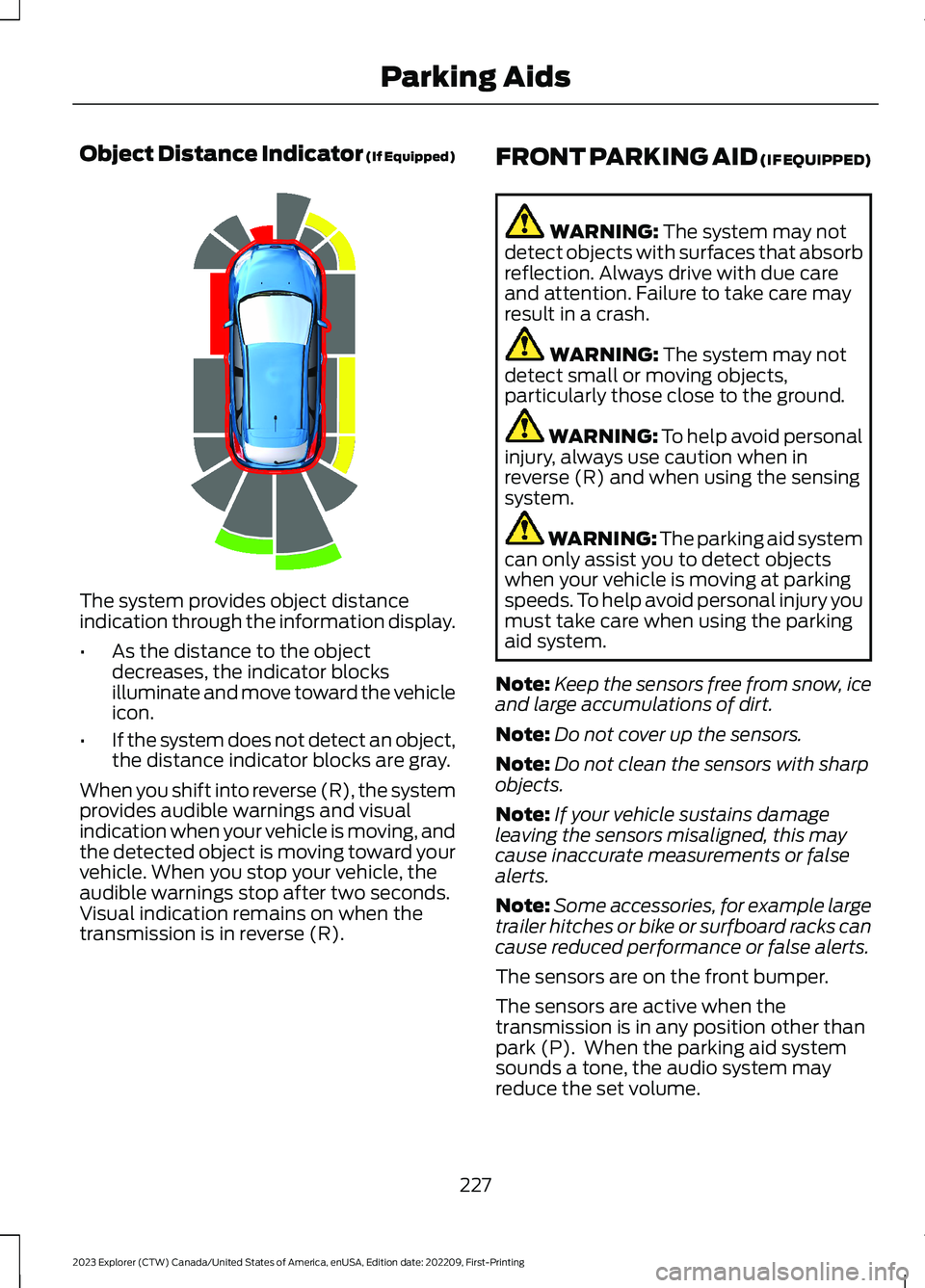
Object Distance Indicator (If Equipped)
The system provides object distanceindication through the information display.
•As the distance to the objectdecreases, the indicator blocksilluminate and move toward the vehicleicon.
•If the system does not detect an object,the distance indicator blocks are gray.
When you shift into reverse (R), the systemprovides audible warnings and visualindication when your vehicle is moving, andthe detected object is moving toward yourvehicle. When you stop your vehicle, theaudible warnings stop after two seconds.Visual indication remains on when thetransmission is in reverse (R).
FRONT PARKING AID (IF EQUIPPED)
WARNING: The system may notdetect objects with surfaces that absorbreflection. Always drive with due careand attention. Failure to take care mayresult in a crash.
WARNING: The system may notdetect small or moving objects,particularly those close to the ground.
WARNING: To help avoid personalinjury, always use caution when inreverse (R) and when using the sensingsystem.
WARNING: The parking aid systemcan only assist you to detect objectswhen your vehicle is moving at parkingspeeds. To help avoid personal injury youmust take care when using the parkingaid system.
Note:Keep the sensors free from snow, iceand large accumulations of dirt.
Note:Do not cover up the sensors.
Note:Do not clean the sensors with sharpobjects.
Note:If your vehicle sustains damageleaving the sensors misaligned, this maycause inaccurate measurements or falsealerts.
Note:Some accessories, for example largetrailer hitches or bike or surfboard racks cancause reduced performance or false alerts.
The sensors are on the front bumper.
The sensors are active when thetransmission is in any position other thanpark (P). When the parking aid systemsounds a tone, the audio system mayreduce the set volume.
227
2023 Explorer (CTW) Canada/United States of America, enUSA, Edition date: 202209, First-PrintingParking AidsE190459
Page 317 of 573
Protected ComponentFuse RatingFuse or RelayNumber
Terrain management switch.10A31Selectable drive mode switch.Transceiver module.
Audio control module.20A32
Not used.—33
Run/start relay.30A34
Not used (spare).5A35
Park assist module.15A36Image processing module A.
Not used (spare).20A37
Left-hand rear power window.30A38Right-hand rear power window.
Note: Spare fuse amperage may vary.
CHANGING A FUSE
Fuses
WARNING: Always replace a fusewith one that has the specifiedamperage rating. Using a fuse with ahigher amperage rating can cause severewire damage and could start a fire.If electrical components in the vehicle arenot working, a fuse may have blown. Blownfuses are identified by a broken wire withinthe fuse. Check the appropriate fusesbefore replacing any electricalcomponents.
313
2023 Explorer (CTW) Canada/United States of America, enUSA, Edition date: 202209, First-PrintingFusesE217331
Page 335 of 573
•Climate control.
•Heated steering wheel.
•Audio unit.
•Navigation system.
A message may appear in the informationdisplay to alert you that battery protectionactions are active. This message is only fornotification that an action is taking place,and not intended to indicate an electricalproblem or that the battery requiresreplacement.
After battery replacement, or in somecases after charging the battery with anexternal charger, the battery managementsystem requires eight hours of vehicle sleeptime to relearn the battery state of charge.During this time, your vehicle must remainfully locked with the ignition switched off.
Note:Prior to relearning the battery stateof charge, the battery management systemmay temporarily disable some electricalsystems.
Electrical Accessory Installation
To make sure the battery managementsystem works correctly, do not connect anelectrical device ground connectiondirectly to the battery negative post. Thiscan cause inaccurate measurements ofthe battery condition and potentialincorrect system operation.
Note:If you add electrical accessories orcomponents to the vehicle, it may adverselyaffect battery performance and durability.This may also affect the performance ofother electrical systems in the vehicle.
Remove and Reinstall the Battery
Install a battery approved for use by ourspecifications. See Capacities andSpecifications (page 378).
To disconnect or remove the battery, dothe following:
1.Apply the parking brake and switch theignition off.
2.Switch all electrical equipment off, forexample lights and radio.
3.Wait a minimum of two minutes beforedisconnecting the battery.
Note:The engine management system hasa power hold function and remains poweredfor a period of time after you switch theignition off. This is to allow the system tostore diagnostic and adaptive tables.Disconnecting the battery without waitingcan cause damage not covered by thevehicle warranty.
4.Disconnect the negative battery cableterminal.
5.Disconnect the positive battery cableterminal.
6.Remove the battery securing clamp.
7.Remove the battery.
8.To install, reverse the removalprocedure.
Note:Before reconnecting the battery,make sure the ignition remains switched off.
Note:Make sure to fully tighten the batterycables.
If you disconnect or replace the vehiclebattery, you must reset the followingfeatures:
•Window bounce-back. See PowerWindows (page 94).
•Clock Settings.
•Pre-set radio stations.
Battery Disposal
Make sure that you dispose ofold batteries in anenvironmentally friendly way.Seek advice from your local authorityabout recycling old batteries.
331
2023 Explorer (CTW) Canada/United States of America, enUSA, Edition date: 202209, First-PrintingMaintenanceE107998
Page 338 of 573
•Climate control.
•Heated steering wheel.
•Audio unit.
•Navigation system.
A message may appear in the informationdisplay to alert you that battery protectionactions are active. This message is only fornotification that an action is taking place,and not intended to indicate an electricalproblem or that the battery requiresreplacement.
After battery replacement, or in somecases after charging the battery with anexternal charger, the battery managementsystem requires eight hours of vehicle sleeptime to relearn the battery state of charge.During this time, your vehicle must remainfully locked with the ignition switched off.
Note:Prior to relearning the battery stateof charge, the battery management systemmay temporarily disable some electricalsystems.
Electrical Accessory Installation
To make sure the battery managementsystem works correctly, do not connect anelectrical device ground connectiondirectly to the battery negative post. Thiscan cause inaccurate measurements ofthe battery condition and potentialincorrect system operation.
Note:If you add electrical accessories orcomponents to the vehicle, it may adverselyaffect battery performance and durability.This may also affect the performance ofother electrical systems in the vehicle.
Remove and Reinstall the Battery
Install a battery approved for use by ourspecifications. See Capacities andSpecifications (page 378).
To disconnect or remove the battery, dothe following:
1.Apply the parking brake and switch theignition off.
2.Switch all electrical equipment off, forexample lights and radio.
3.Wait a minimum of two minutes beforedisconnecting the battery.
Note:The engine management system hasa power hold function and remains poweredfor a period of time after you switch theignition off. This is to allow the system tostore diagnostic and adaptive tables.Disconnecting the battery without waitingcan cause damage not covered by thevehicle warranty.
4.Disconnect the negative battery cableterminal.
5.Disconnect the positive battery cableterminal.
6.Remove the battery securing clamp.
7.Remove the battery.
8.To install, reverse the removalprocedure.
Note:Before reconnecting the battery,make sure the ignition remains switched off.
Note:Make sure to fully tighten the batterycables.
If you disconnect or replace the vehiclebattery, you must reset the followingfeatures:
•Window bounce-back. See PowerWindows (page 94).
•Clock Settings.
•Pre-set radio stations.
Battery Disposal
Make sure that you dispose ofold batteries in anenvironmentally friendly way.Seek advice from your local authorityabout recycling old batteries.
334
2023 Explorer (CTW) Canada/United States of America, enUSA, Edition date: 202209, First-PrintingMaintenanceE107998
Page 423 of 573
GENERAL INFORMATION
WARNING: Driving while distractedcan result in loss of vehicle control, crashand injury. We strongly recommend thatyou use extreme caution when using anydevice that may take your focus off theroad. Your primary responsibility is thesafe operation of your vehicle. Werecommend against the use of any
hand-held device while driving andencourage the use of voice-operatedsystems when possible. Make sure youare aware of all applicable local lawsthat may affect the use of electronicdevices while driving.
Radio Frequencies and ReceptionFactors
Note:Listening to loud audio for longperiods of time could damage your hearing.
Radio Reception Factors
The further you travel from an AM or FM station, theweaker the signal and the weaker the reception.Distance and strength
Hills, mountains, tall buildings, bridges, tunnels, freewayoverpasses, parking garages, dense tree foliage andthunderstorms can interfere with the reception.
Terrain
When you pass a ground-based broadcast repeatingtower, a stronger signal may overtake a weaker one andresult in the audio system muting.
Station overload
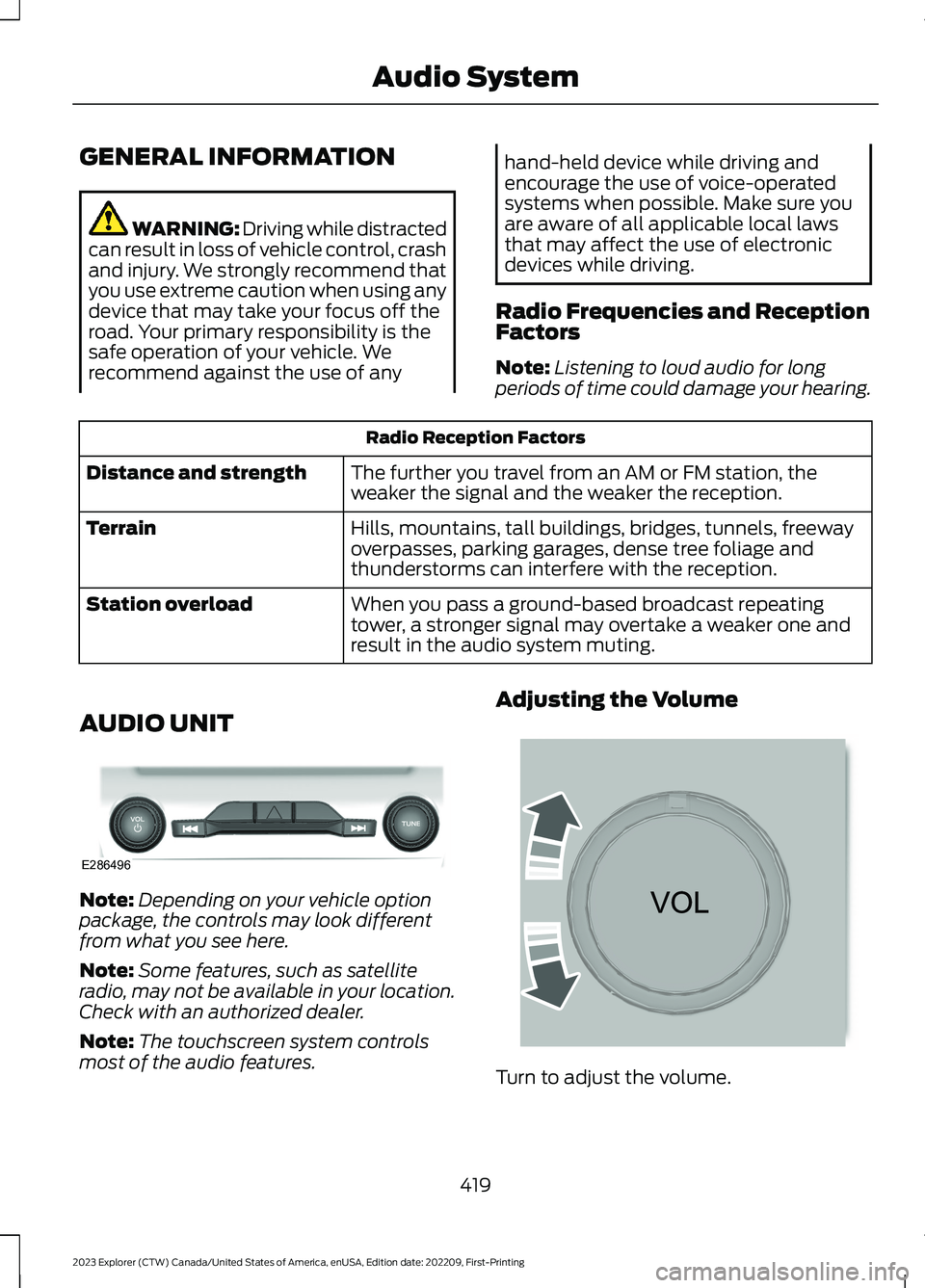
AUDIO UNIT
Note:Depending on your vehicle optionpackage, the controls may look differentfrom what you see here.
Note:Some features, such as satelliteradio, may not be available in your location.Check with an authorized dealer.
Note:The touchscreen system controlsmost of the audio features.
Adjusting the Volume
Turn to adjust the volume.
419
2023 Explorer (CTW) Canada/United States of America, enUSA, Edition date: 202209, First-PrintingAudio SystemE286496 E265373
Page 424 of 573
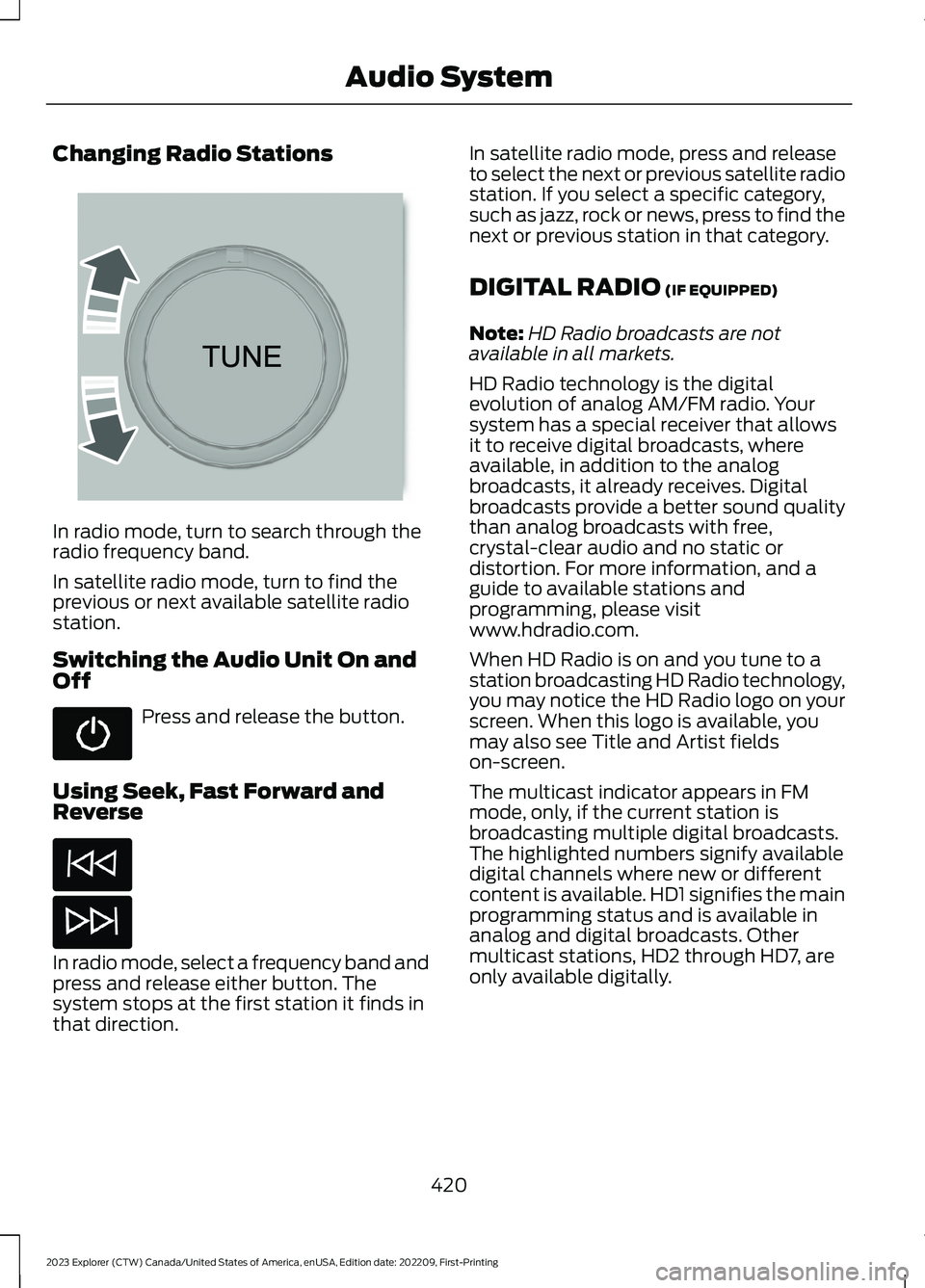
Changing Radio Stations
In radio mode, turn to search through theradio frequency band.
In satellite radio mode, turn to find theprevious or next available satellite radiostation.
Switching the Audio Unit On andOff
Press and release the button.
Using Seek, Fast Forward andReverse
In radio mode, select a frequency band andpress and release either button. Thesystem stops at the first station it finds inthat direction.
In satellite radio mode, press and releaseto select the next or previous satellite radiostation. If you select a specific category,such as jazz, rock or news, press to find thenext or previous station in that category.
DIGITAL RADIO (IF EQUIPPED)
Note:HD Radio broadcasts are notavailable in all markets.
HD Radio technology is the digitalevolution of analog AM/FM radio. Yoursystem has a special receiver that allowsit to receive digital broadcasts, whereavailable, in addition to the analogbroadcasts, it already receives. Digitalbroadcasts provide a better sound qualitythan analog broadcasts with free,crystal-clear audio and no static ordistortion. For more information, and aguide to available stations andprogramming, please visitwww.hdradio.com.
When HD Radio is on and you tune to astation broadcasting HD Radio technology,you may notice the HD Radio logo on yourscreen. When this logo is available, youmay also see Title and Artist fieldson-screen.
The multicast indicator appears in FMmode, only, if the current station isbroadcasting multiple digital broadcasts.The highlighted numbers signify availabledigital channels where new or differentcontent is available. HD1 signifies the mainprogramming status and is available inanalog and digital broadcasts. Othermulticast stations, HD2 through HD7, areonly available digitally.
420
2023 Explorer (CTW) Canada/United States of America, enUSA, Edition date: 202209, First-PrintingAudio System E265696