audio FORD EXPLORER 2023 Owner's Manual
[x] Cancel search | Manufacturer: FORD, Model Year: 2023, Model line: EXPLORER, Model: FORD EXPLORER 2023Pages: 573, PDF Size: 16.1 MB
Page 425 of 573
When HD Radio broadcasts are active, youcan access the following functions:
•Memory presets allow you to save anactive channel as a memory preset.Touch and hold a memory preset slotuntil the sound returns. There is a briefmute while the radio saves the station.Sound returns when finished. When
switching to an HD2 or HD3 memorypreset, the sound mutes before thedigital audio plays, because the systemhas to reacquire the digital signal.
Note:As with any saved radio station, youcannot access the saved station if yourvehicle is outside the station’s receptionarea.
HD Radio Reception and Station Troubleshooting
Potential Reception Issues
If you are listening to a multicast station and you are onthe fringe of the reception area, the station may mute dueto weak signal strength.
Reception area
If you are listening to HD1, the system switches back tothe analog broadcast until the digital broadcast is availableagain. However, if you are listening to any of the possibleHD2-HD7 multicast channels, the station mutes and staysmuted unless it is able to connect to the digital signalagain.
When the system first receives a station, aside from HD2-HD7 multicast stations, it first plays the station in theanalog version. Once the receiver verifies the station is anHD Radio station, it shifts to the digital version. Dependingon the station quality, you may hear a slight sound changewhen the station changes from analog to digital. Blendingis the shift from analog to digital sound or digital back toanalog sound.
Station blending
In order to provide the best possibleexperience, use the contact form to reportany station issues found while listening toa station broadcasting with HD Radiotechnology. Independent entities own andoperate each station. These stations areresponsible for the accuracy of all audiostreams and data fields.
421
2023 Explorer (CTW) Canada/United States of America, enUSA, Edition date: 202209, First-PrintingAudio System
Page 426 of 573
Potential Station Issues
ActionCauseIssues
No action required. This is abroadcast issue.This is poor time alignmentby the radio broadcaster.Echo, stutter, skip or repeatin audio.Increase or decrease inaudio volume.
No action required. Thereception issue may clear upas you continue to drive.
The radio is shifting betweenanalog and digital audio.Sound fading or blending inand out.
No action required. This isnormal behavior. Wait untilthe audio is available.
The digital multicast is notavailable until the HD Radiobroadcast is decoded. Oncedecoded, the audio is avail-able.
There is an audio mutedelay when selecting HD2 orHD3, multicast preset ordirect tune.
No action required. Thestation is not available inyour current location.
The previously storedmulticast preset or directtune is not available in yourcurrent reception area.
Cannot access the HD2 orHD3 multicast channelswhen recalling a preset orfrom a direct tune.
Fill out the station issueform at website listed
below.1
Data service issue by theradio broadcaster.Text information does notmatch currently playingaudio.
Fill out the station issueform at website listed
below.1
Data service issue by theradio broadcaster.There is no text informationshown for currently selectedfrequency.
1 http://hdradio.com/stations/feedback.
HD Radio Technology manufactured underlicense from iBiquity Digital Corporationand foreign patents. HD Radio and the HDand HD Radio logos are proprietarytrademarks of DTS. Ford and DTS are notresponsible for the content sent using HDRadio technology. Content may bechanged, added or deleted at any time atthe station owner's discretion.
SATELLITE RADIO (IF EQUIPPED)
SiriusXM® Satellite Radio broadcasts avariety of music, news, sports, weather,traffic and entertainment satellite radiochannels. For more information and acomplete list of SiriusXM satellite radiochannels, visit www.siriusxm.com in theUnited States, www.siriusxm.ca in Canada,or call SiriusXM at 1-888-539-7474.
422
2023 Explorer (CTW) Canada/United States of America, enUSA, Edition date: 202209, First-PrintingAudio System
Page 427 of 573
Note:This receiver includes the eCosreal-time operating system. eCos ispublished under the eCos License.
Satellite Radio Reception Factors
Potential Satellite Radio Reception Issues
For optimal reception performance, keep the antennaclear of snow and ice build-up and keep luggage and othermaterial as far away from the antenna as possible.Factory-installed and aftermarket vehicle structuresincluding, but not limited to, roof racks and soft top roofsin a partially open position could reduce receptionperformance.
Antenna obstructions
Hills, mountains, tall buildings, bridges, tunnels, freewayoverpasses, parking garages, dense tree foliage andthunderstorms can interfere with your reception.
Terrain
When you pass a ground-based broadcast-repeatingtower, a stronger signal may overtake a weaker one andthe audio system could mute.
Station overload
Your display may show ACQUIRING . . . to indicate theinterference and the audio system could mute.Satellite radio signal interfer-ence
SiriusXM Satellite Radio Service
Note:SiriusXM reserves the unrestrictedright to change, rearrange, add or deleteprogramming including canceling, movingor adding particular channels, and its prices,at any time, with or without notice to you.Neither SiriusXM and its affiliates nor FordMotor Company and its affiliates will beliable to you or any third party for any suchmodification, suspension or termination.
423
2023 Explorer (CTW) Canada/United States of America, enUSA, Edition date: 202209, First-PrintingAudio SystemE208625
Page 428 of 573
SiriusXM satellite radio is asubscription-based satellite radio servicethat broadcasts a variety of music, sports,news, weather, traffic and entertainmentprogramming. Your factory-installedSiriusXM satellite radio system includeshardware and a limited subscription term,which begins on the date of sale or leaseof your vehicle. See an authorized dealerfor availability.
For more information on extendedsubscription terms, a service fee is required,the online media player and a completelist of SiriusXM satellite radio channels,and other features, please visitwww.siriusxm.com in the United States,www.siriusxm.ca in Canada, or callSiriusXM at 1-888-539-7474.
Satellite Radio Electronic SerialNumber (ESN)
You need your ESN to activate, modify ortrack your satellite radio account.
Locating Your ESN
1.Select SiriusXM as the audio source.
2.Tune to channel 0.
Troubleshooting
ActionConditionMessage
No action required. Thismessage should disappearshortly.
Radio requires more thantwo seconds to produceaudio for the selectedchannel.
Acquiring…
If this message does notclear shortly, or with an igni-tion key cycle, your receivermay have a fault. See anauthorized dealer for service.
There is an internal moduleor system failure present.Satellite antenna fault
SIRIUS system failure
Tune to another channel orchoose another preset.The channel is no longeravailable.Invalid Channel
Contact SiriusXM at 1-888-539-7474 to subscribe tothe channel, or tune toanother channel.
Your subscription does notinclude this channel.Unsubscribed Channel
The signal is blocked. Whenyou move into an open area,the signal should return.
The signal is lost from theSiriusXM satellite or Siri-usXM tower to your vehicleantenna.
No Signal
424
2023 Explorer (CTW) Canada/United States of America, enUSA, Edition date: 202209, First-PrintingAudio System
Page 429 of 573
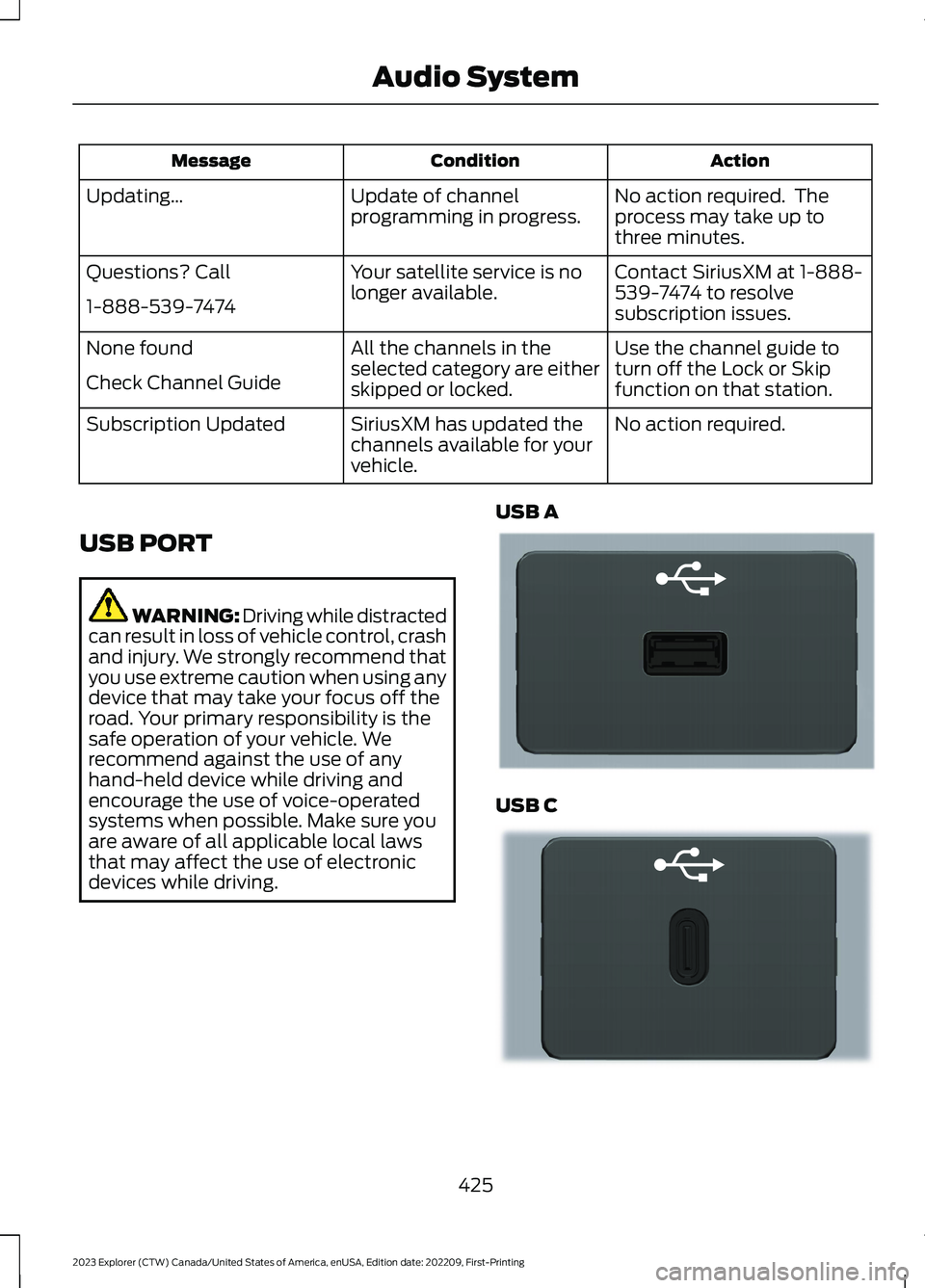
ActionConditionMessage
No action required. Theprocess may take up tothree minutes.
Update of channelprogramming in progress.Updating…
Contact SiriusXM at 1-888-539-7474 to resolvesubscription issues.
Your satellite service is nolonger available.Questions? Call
1-888-539-7474
Use the channel guide toturn off the Lock or Skipfunction on that station.
All the channels in theselected category are eitherskipped or locked.
None found
Check Channel Guide
No action required.SiriusXM has updated thechannels available for yourvehicle.
Subscription Updated
USB PORT
WARNING: Driving while distractedcan result in loss of vehicle control, crashand injury. We strongly recommend thatyou use extreme caution when using anydevice that may take your focus off theroad. Your primary responsibility is thesafe operation of your vehicle. Werecommend against the use of anyhand-held device while driving andencourage the use of voice-operatedsystems when possible. Make sure youare aware of all applicable local lawsthat may affect the use of electronicdevices while driving.
USB A
USB C
425
2023 Explorer (CTW) Canada/United States of America, enUSA, Edition date: 202209, First-PrintingAudio SystemE201595 E301114
Page 430 of 573
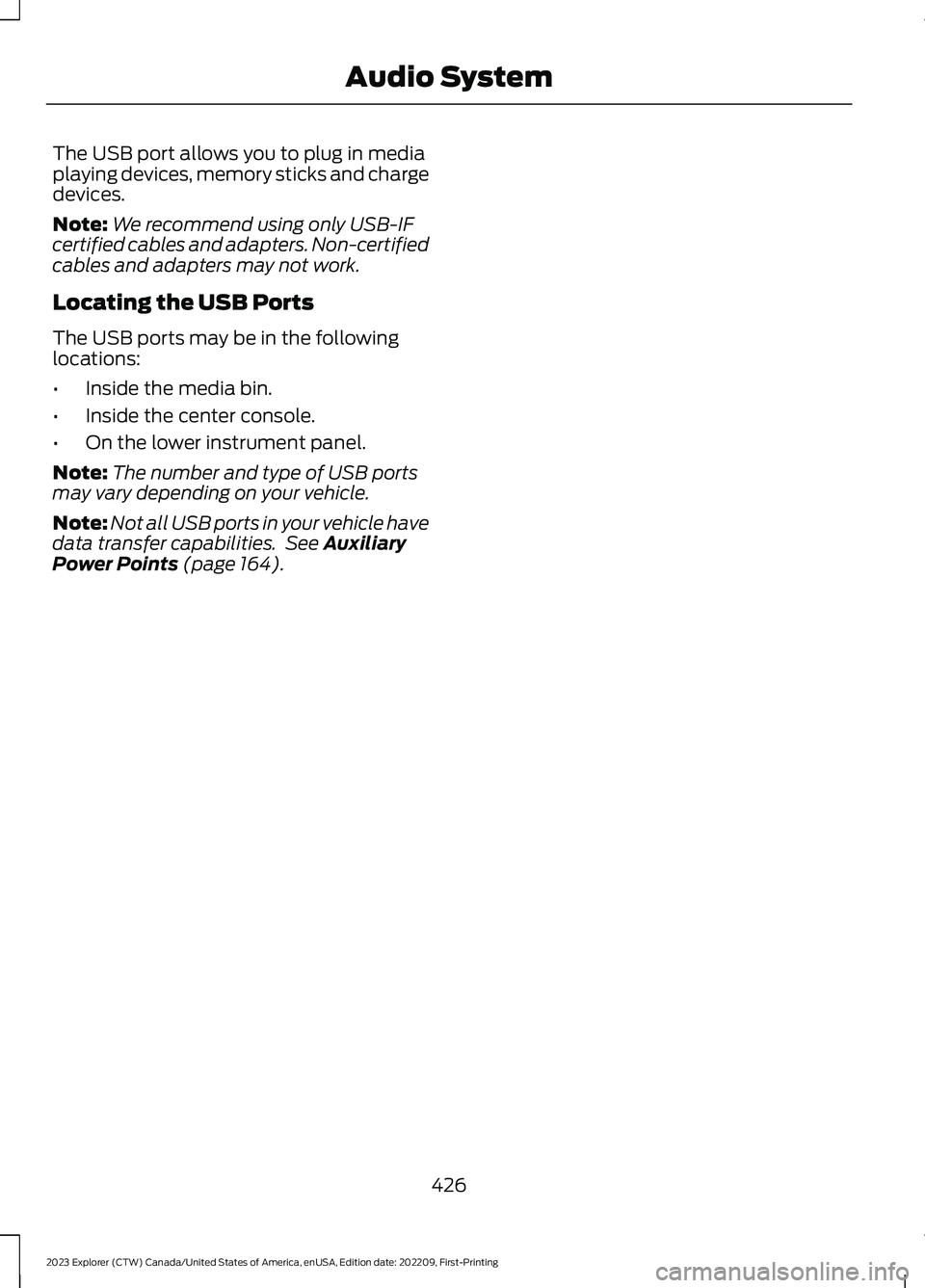
The USB port allows you to plug in mediaplaying devices, memory sticks and chargedevices.
Note:We recommend using only USB-IFcertified cables and adapters. Non-certifiedcables and adapters may not work.
Locating the USB Ports
The USB ports may be in the followinglocations:
•Inside the media bin.
•Inside the center console.
•On the lower instrument panel.
Note:The number and type of USB portsmay vary depending on your vehicle.
Note:Not all USB ports in your vehicle havedata transfer capabilities. See AuxiliaryPower Points (page 164).
426
2023 Explorer (CTW) Canada/United States of America, enUSA, Edition date: 202209, First-PrintingAudio System
Page 431 of 573
GENERAL INFORMATION
WARNING: Driving while distractedcan result in loss of vehicle control, crashand injury. We strongly recommend thatyou use extreme caution when using anydevice that may take your focus off theroad. Your primary responsibility is thesafe operation of your vehicle. Werecommend against the use of anyhand-held device while driving andencourage the use of voice-operatedsystems when possible. Make sure youare aware of all applicable local lawsthat may affect the use of electronicdevices while driving.
About SYNC
The system allows you to interact with theentertainment, information andcommunication systems on your vehicleusing voice commands and a touchscreen.The system provides easy interaction withaudio, phone, navigation, mobile apps andsettings.
Note:You can switch the system on anduse it for up to an hour without switchingthe ignition on.
Note:You can use the system after youswitch the ignition off for up to 10 minutesor until you open a door.
Note:For your safety, some features arespeed-dependent. Their use is limited towhen your vehicle speed is less than 3 mph(5 km/h).
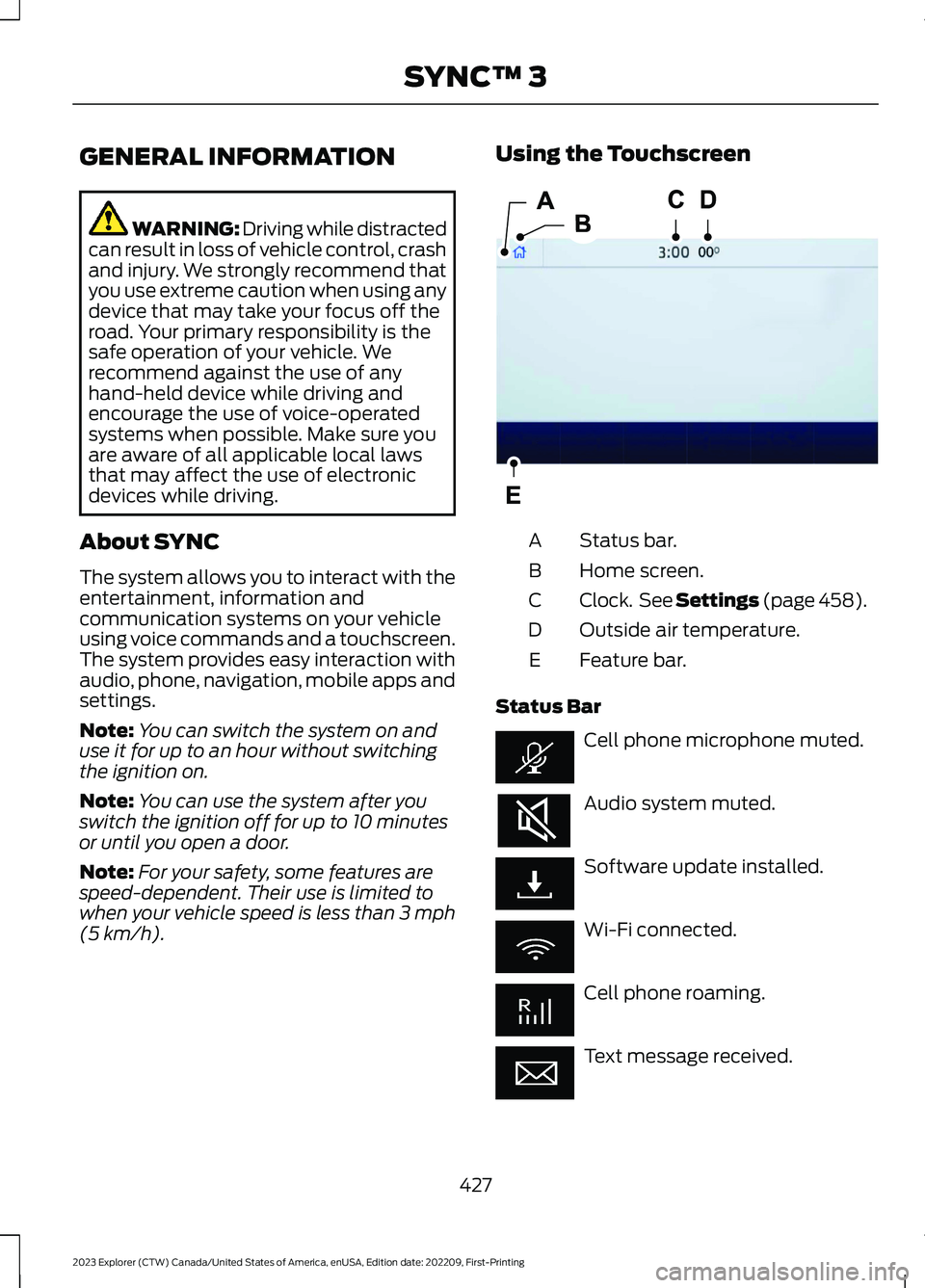
Using the Touchscreen
Status bar.A
Home screen.B
Clock. See Settings (page 458).C
Outside air temperature.D
Feature bar.E
Status Bar
Cell phone microphone muted.
Audio system muted.
Software update installed.
Wi-Fi connected.
Cell phone roaming.
Text message received.
427
2023 Explorer (CTW) Canada/United States of America, enUSA, Edition date: 202209, First-PrintingSYNC™ 3E293823
Page 434 of 573
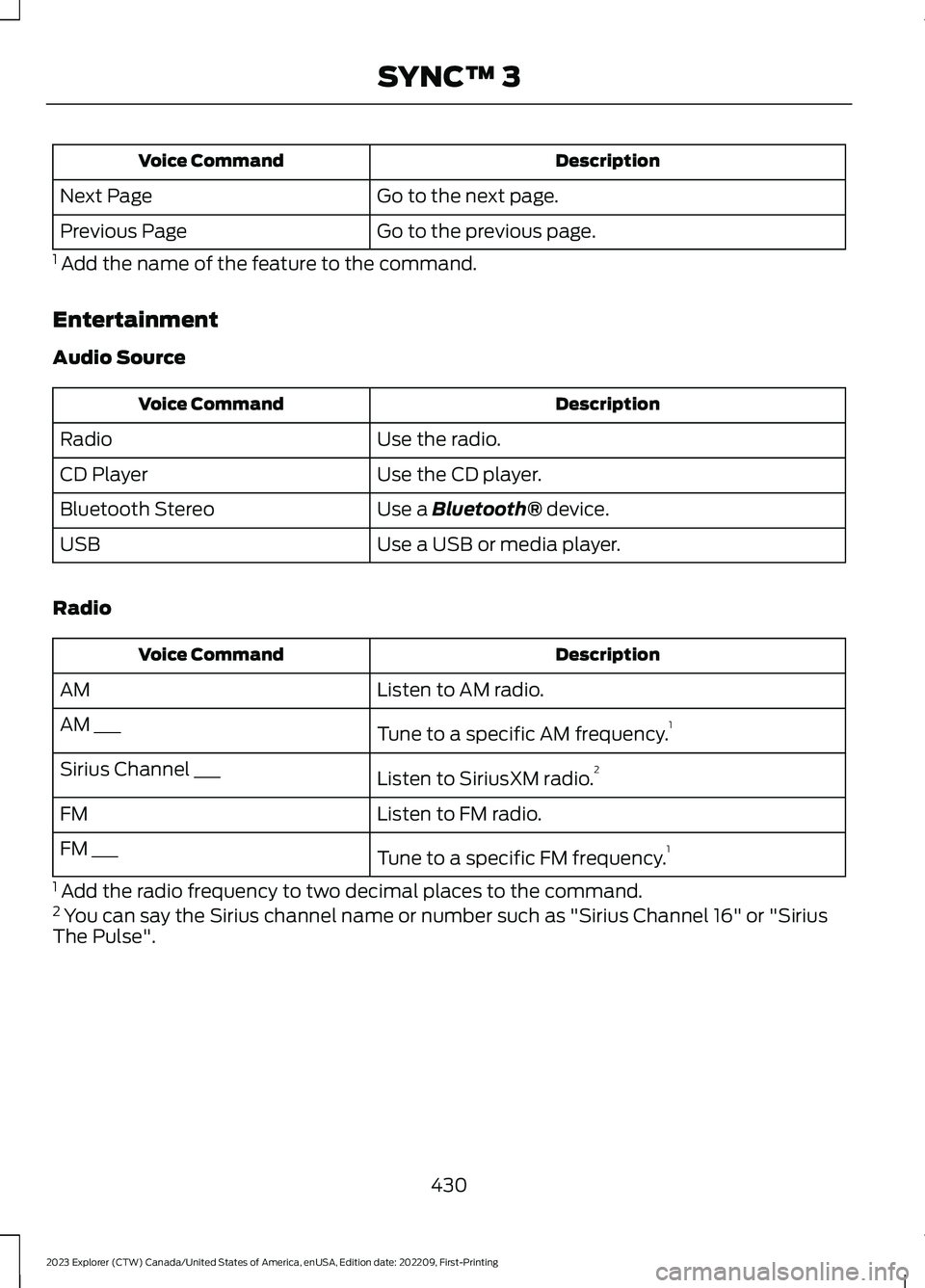
DescriptionVoice Command
Go to the next page.Next Page
Go to the previous page.Previous Page
1 Add the name of the feature to the command.
Entertainment
Audio Source
DescriptionVoice Command
Use the radio.Radio
Use the CD player.CD Player
Use a Bluetooth® device.Bluetooth Stereo
Use a USB or media player.USB
Radio
DescriptionVoice Command
Listen to AM radio.AM
Tune to a specific AM frequency.1AM ___
Listen to SiriusXM radio.2Sirius Channel ___
Listen to FM radio.FM
Tune to a specific FM frequency.1FM ___
1 Add the radio frequency to two decimal places to the command.2 You can say the Sirius channel name or number such as "Sirius Channel 16" or "SiriusThe Pulse".
430
2023 Explorer (CTW) Canada/United States of America, enUSA, Edition date: 202209, First-PrintingSYNC™ 3
Page 435 of 573
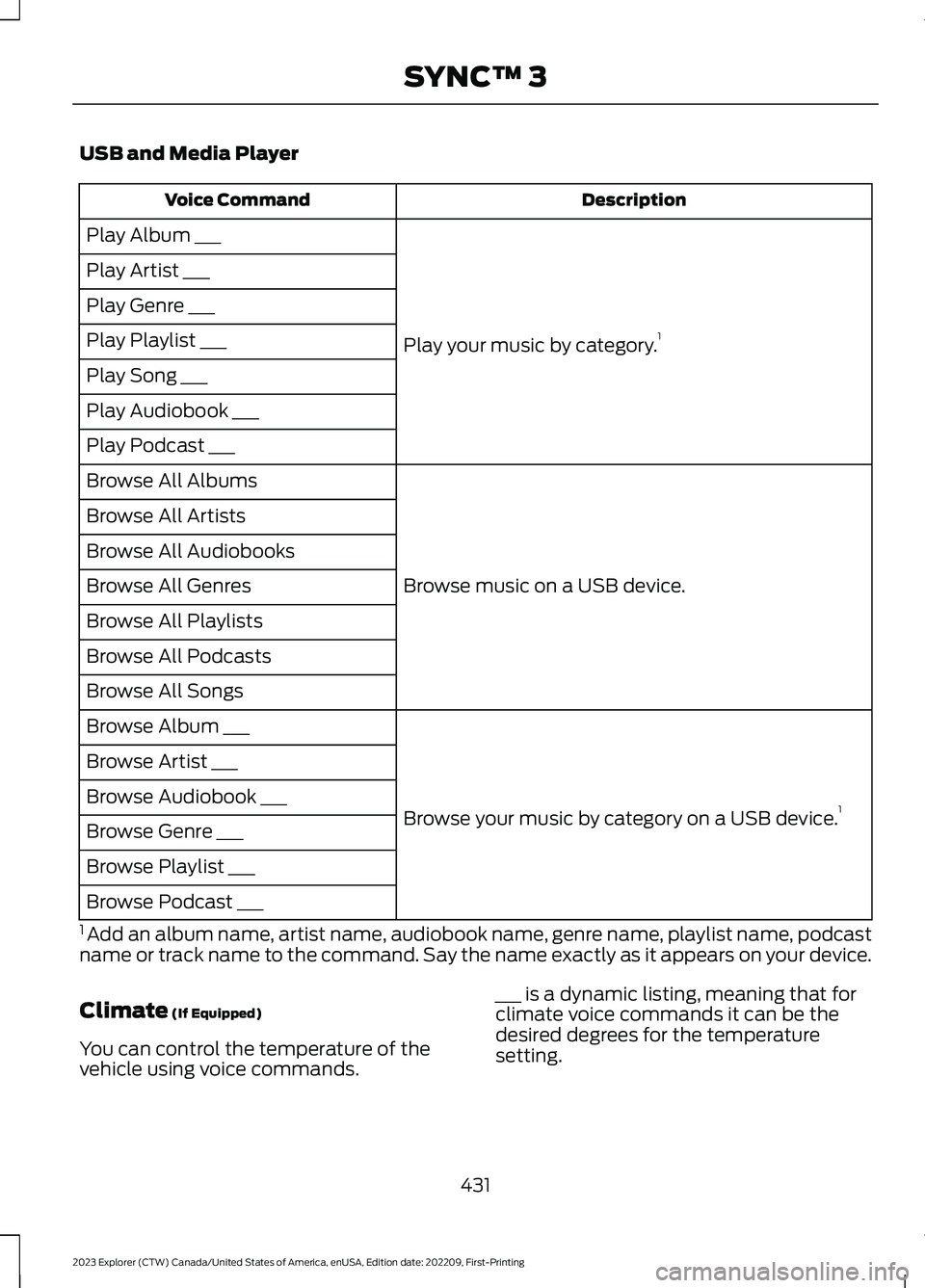
USB and Media Player
DescriptionVoice Command
Play your music by category.1
Play Album ___
Play Artist ___
Play Genre ___
Play Playlist ___
Play Song ___
Play Audiobook ___
Play Podcast ___
Browse music on a USB device.
Browse All Albums
Browse All Artists
Browse All Audiobooks
Browse All Genres
Browse All Playlists
Browse All Podcasts
Browse All Songs
Browse your music by category on a USB device.1
Browse Album ___
Browse Artist ___
Browse Audiobook ___
Browse Genre ___
Browse Playlist ___
Browse Podcast ___
1 Add an album name, artist name, audiobook name, genre name, playlist name, podcastname or track name to the command. Say the name exactly as it appears on your device.
Climate (If Equipped)
You can control the temperature of thevehicle using voice commands.
___ is a dynamic listing, meaning that forclimate voice commands it can be thedesired degrees for the temperaturesetting.
431
2023 Explorer (CTW) Canada/United States of America, enUSA, Edition date: 202209, First-PrintingSYNC™ 3
Page 439 of 573
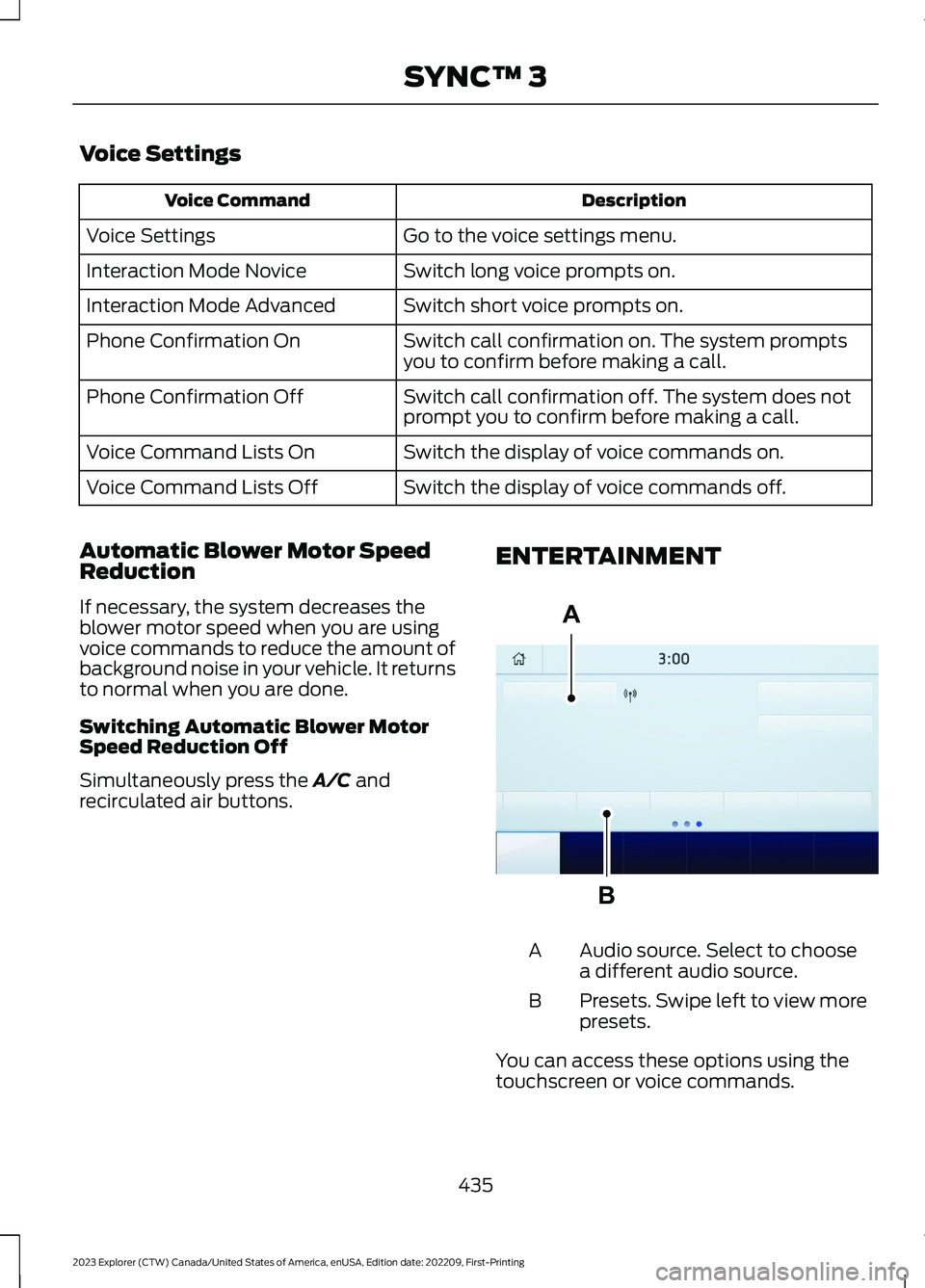
Voice Settings
DescriptionVoice Command
Go to the voice settings menu.Voice Settings
Switch long voice prompts on.Interaction Mode Novice
Switch short voice prompts on.Interaction Mode Advanced
Switch call confirmation on. The system promptsyou to confirm before making a call.Phone Confirmation On
Switch call confirmation off. The system does notprompt you to confirm before making a call.Phone Confirmation Off
Switch the display of voice commands on.Voice Command Lists On
Switch the display of voice commands off.Voice Command Lists Off
Automatic Blower Motor SpeedReduction
If necessary, the system decreases theblower motor speed when you are usingvoice commands to reduce the amount ofbackground noise in your vehicle. It returnsto normal when you are done.
Switching Automatic Blower MotorSpeed Reduction Off
Simultaneously press the A/C andrecirculated air buttons.
ENTERTAINMENT
Audio source. Select to choosea different audio source.A
Presets. Swipe left to view morepresets.B
You can access these options using thetouchscreen or voice commands.
435
2023 Explorer (CTW) Canada/United States of America, enUSA, Edition date: 202209, First-PrintingSYNC™ 3ABE293491