transmission FORD EXPLORER 2023 User Guide
[x] Cancel search | Manufacturer: FORD, Model Year: 2023, Model line: EXPLORER, Model: FORD EXPLORER 2023Pages: 573, PDF Size: 16.1 MB
Page 99 of 573
Press the control to lock or unlock the rearwindow controls. It illuminates when youlock the rear window controls.
Accessory Delay
You can use the window switches forseveral minutes after you switch theignition off or until you open either frontdoor.
GLOBAL OPENING
You can use the remote control to openthe windows with the ignition off.
Note:You can enable or disable this featurein the information display, or see anauthorized dealer. See GeneralInformation (page 115).
Note:To operate this feature, accessorydelay must not be active.
Remote Control Front Windows
After you unlock your vehicle with theremote control, you can open the windowsfor a short period of time. Press and holdthe remote control unlock button to openthe windows. Release the button oncemovement starts. Press the lock or unlockbutton to stop movement.
EXTERIOR MIRRORS -
EXCLUDING: ST
Power Exterior Mirrors
WARNING: Do not adjust themirrors when your vehicle is moving. Thiscould result in the loss of control of yourvehicle, serious personal injury or death.
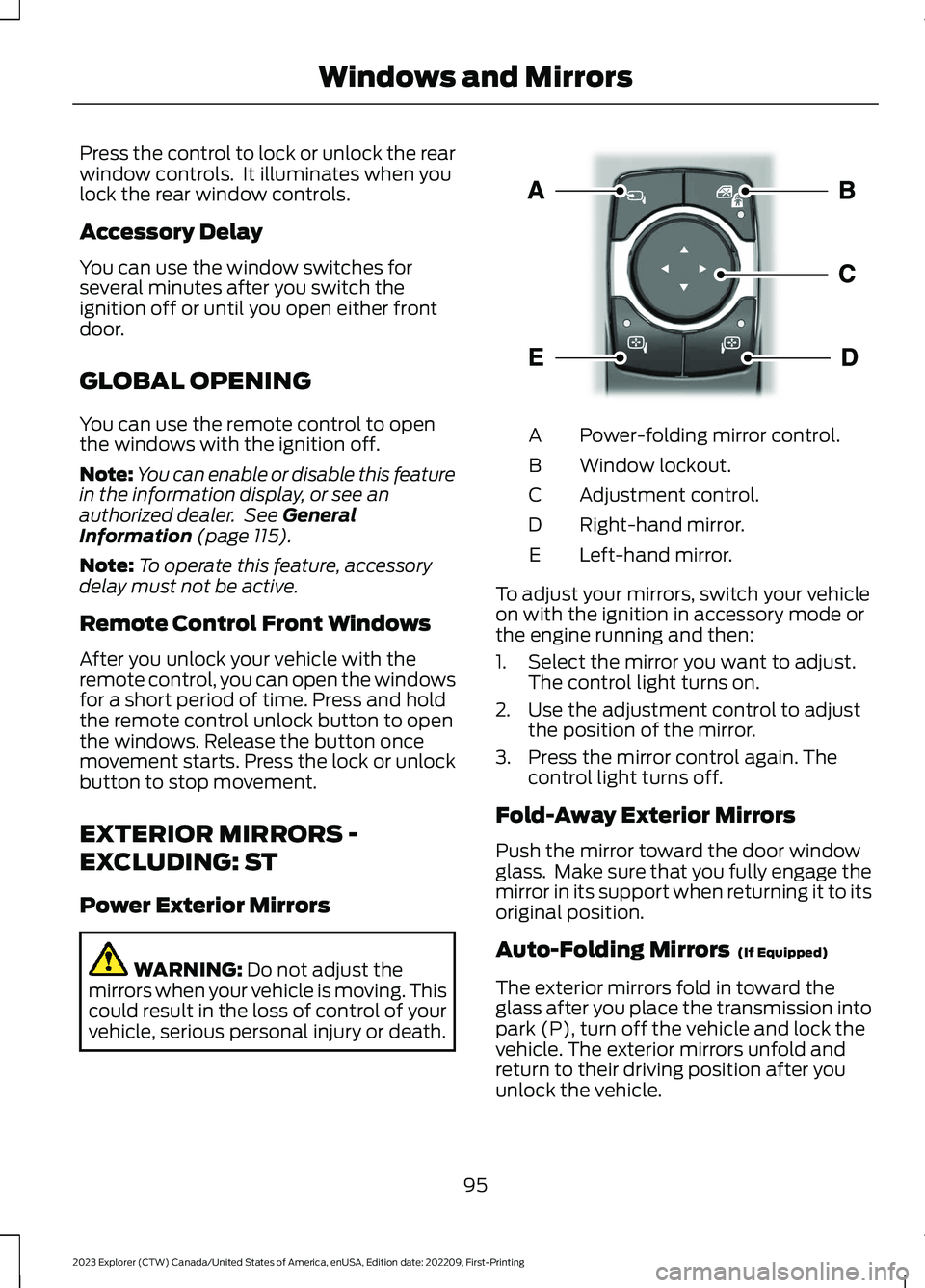
Power-folding mirror control.A
Window lockout.B
Adjustment control.C
Right-hand mirror.D
Left-hand mirror.E
To adjust your mirrors, switch your vehicleon with the ignition in accessory mode orthe engine running and then:
1.Select the mirror you want to adjust.The control light turns on.
2.Use the adjustment control to adjustthe position of the mirror.
3.Press the mirror control again. Thecontrol light turns off.
Fold-Away Exterior Mirrors
Push the mirror toward the door windowglass. Make sure that you fully engage themirror in its support when returning it to itsoriginal position.
Auto-Folding Mirrors (If Equipped)
The exterior mirrors fold in toward theglass after you place the transmission intopark (P), turn off the vehicle and lock thevehicle. The exterior mirrors unfold andreturn to their driving position after youunlock the vehicle.
95
2023 Explorer (CTW) Canada/United States of America, enUSA, Edition date: 202209, First-PrintingWindows and MirrorsE295322
Page 101 of 573
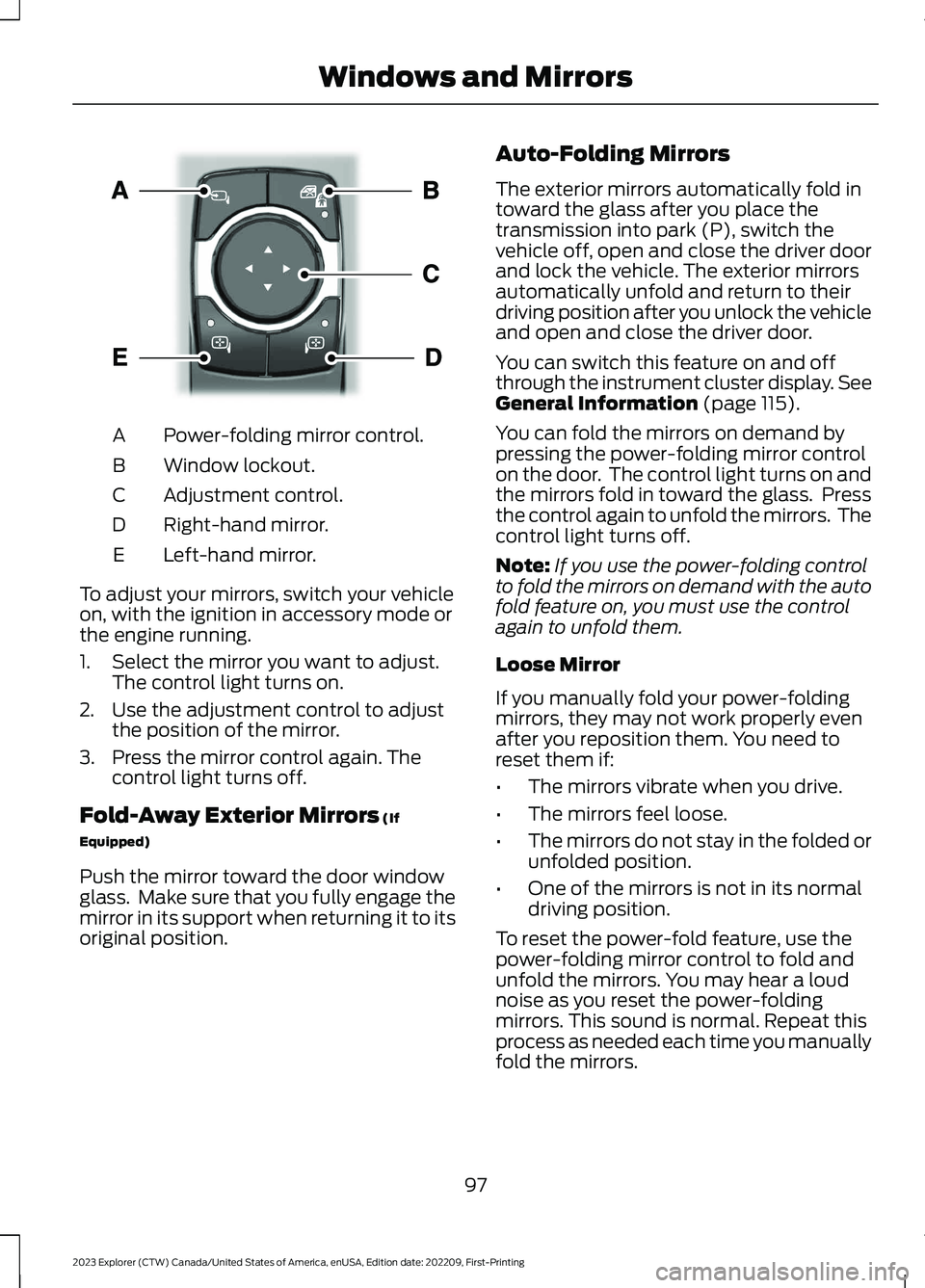
Power-folding mirror control.A
Window lockout.B
Adjustment control.C
Right-hand mirror.D
Left-hand mirror.E
To adjust your mirrors, switch your vehicleon, with the ignition in accessory mode orthe engine running.
1.Select the mirror you want to adjust.The control light turns on.
2.Use the adjustment control to adjustthe position of the mirror.
3.Press the mirror control again. Thecontrol light turns off.
Fold-Away Exterior Mirrors (If
Equipped)
Push the mirror toward the door windowglass. Make sure that you fully engage themirror in its support when returning it to itsoriginal position.
Auto-Folding Mirrors
The exterior mirrors automatically fold intoward the glass after you place thetransmission into park (P), switch thevehicle off, open and close the driver doorand lock the vehicle. The exterior mirrorsautomatically unfold and return to theirdriving position after you unlock the vehicleand open and close the driver door.
You can switch this feature on and offthrough the instrument cluster display. SeeGeneral Information (page 115).
You can fold the mirrors on demand bypressing the power-folding mirror controlon the door. The control light turns on andthe mirrors fold in toward the glass. Pressthe control again to unfold the mirrors. Thecontrol light turns off.
Note:If you use the power-folding controlto fold the mirrors on demand with the autofold feature on, you must use the controlagain to unfold them.
Loose Mirror
If you manually fold your power-foldingmirrors, they may not work properly evenafter you reposition them. You need toreset them if:
•The mirrors vibrate when you drive.
•The mirrors feel loose.
•The mirrors do not stay in the folded orunfolded position.
•One of the mirrors is not in its normaldriving position.
To reset the power-fold feature, use thepower-folding mirror control to fold andunfold the mirrors. You may hear a loudnoise as you reset the power-foldingmirrors. This sound is normal. Repeat thisprocess as needed each time you manuallyfold the mirrors.
97
2023 Explorer (CTW) Canada/United States of America, enUSA, Edition date: 202209, First-PrintingWindows and MirrorsE295322
Page 129 of 573
ActionMessage
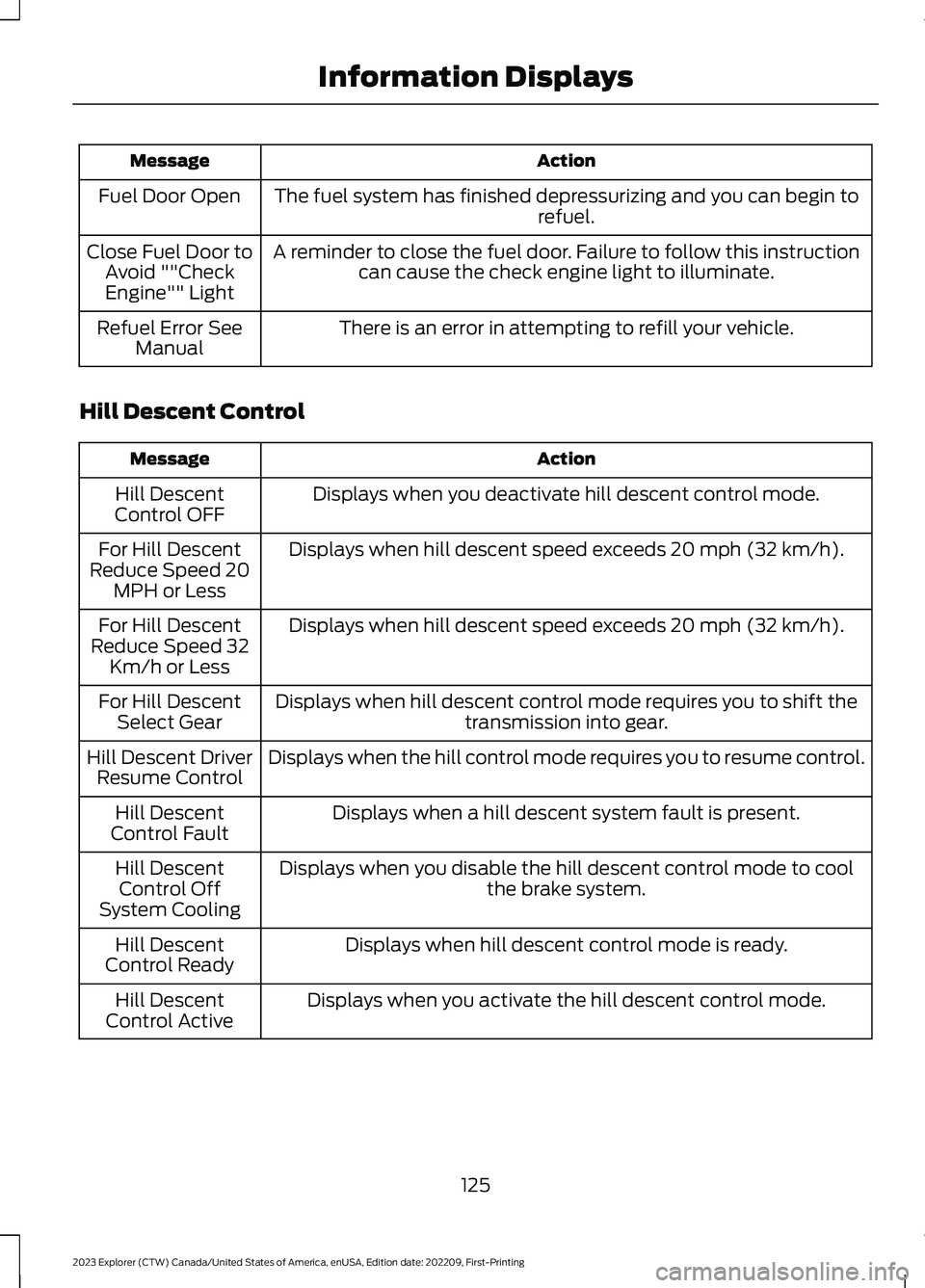
The fuel system has finished depressurizing and you can begin torefuel.Fuel Door Open
A reminder to close the fuel door. Failure to follow this instructioncan cause the check engine light to illuminate.Close Fuel Door toAvoid ""CheckEngine"" Light
There is an error in attempting to refill your vehicle.Refuel Error SeeManual
Hill Descent Control
ActionMessage
Displays when you deactivate hill descent control mode.Hill DescentControl OFF
Displays when hill descent speed exceeds 20 mph (32 km/h).For Hill DescentReduce Speed 20MPH or Less
Displays when hill descent speed exceeds 20 mph (32 km/h).For Hill DescentReduce Speed 32Km/h or Less
Displays when hill descent control mode requires you to shift thetransmission into gear.For Hill DescentSelect Gear
Displays when the hill control mode requires you to resume control.Hill Descent DriverResume Control
Displays when a hill descent system fault is present.Hill DescentControl Fault
Displays when you disable the hill descent control mode to coolthe brake system.Hill DescentControl OffSystem Cooling
Displays when hill descent control mode is ready.Hill DescentControl Ready
Displays when you activate the hill descent control mode.Hill DescentControl Active
125
2023 Explorer (CTW) Canada/United States of America, enUSA, Edition date: 202209, First-PrintingInformation Displays
Page 138 of 573
Transmission
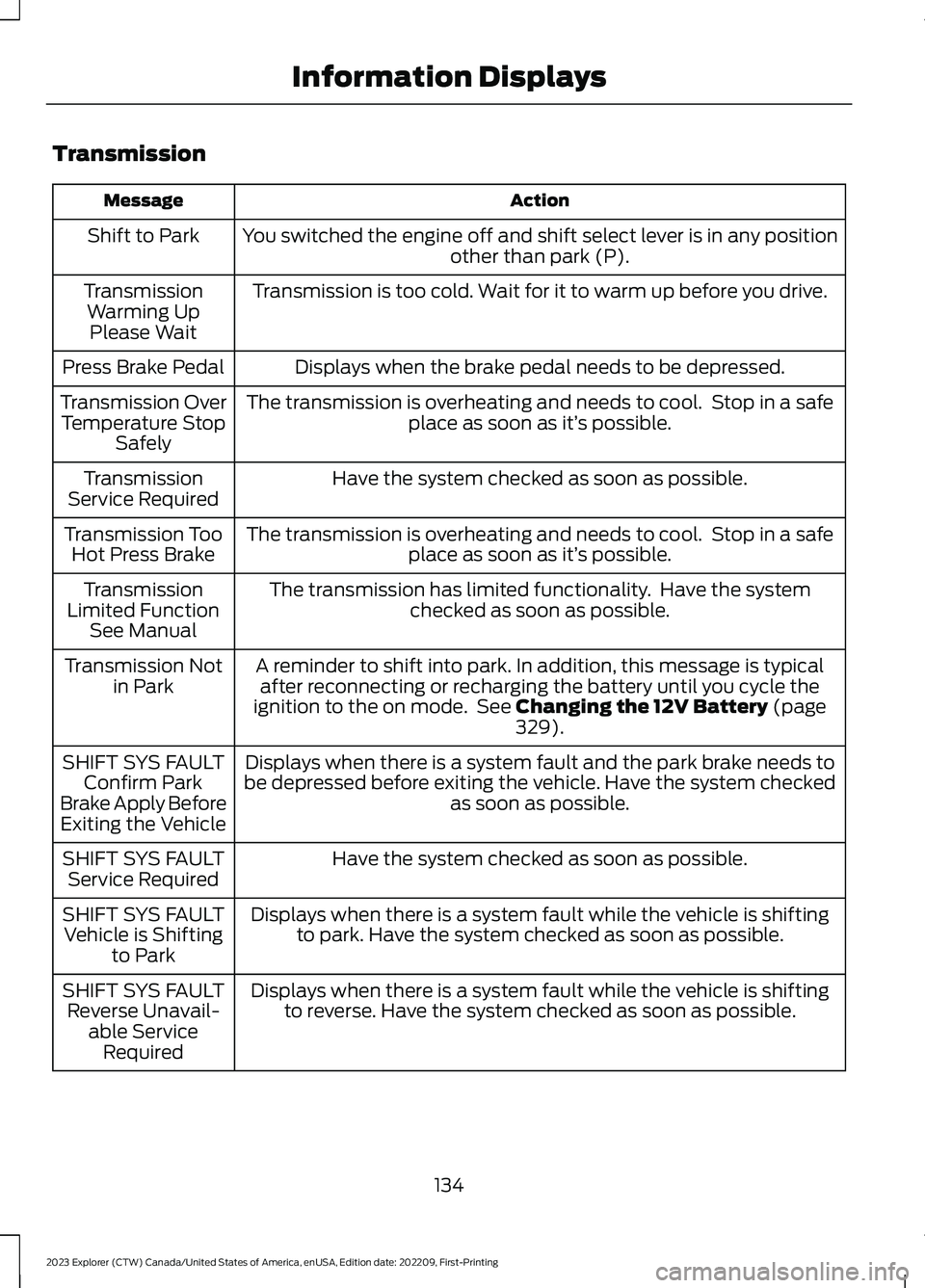
ActionMessage
You switched the engine off and shift select lever is in any positionother than park (P).Shift to Park
Transmission is too cold. Wait for it to warm up before you drive.TransmissionWarming UpPlease Wait
Displays when the brake pedal needs to be depressed.Press Brake Pedal
The transmission is overheating and needs to cool. Stop in a safeplace as soon as it’s possible.Transmission OverTemperature StopSafely
Have the system checked as soon as possible.TransmissionService Required
The transmission is overheating and needs to cool. Stop in a safeplace as soon as it’s possible.Transmission TooHot Press Brake
The transmission has limited functionality. Have the systemchecked as soon as possible.TransmissionLimited FunctionSee Manual
A reminder to shift into park. In addition, this message is typicalafter reconnecting or recharging the battery until you cycle theignition to the on mode. See Changing the 12V Battery (page329).
Transmission Notin Park
Displays when there is a system fault and the park brake needs tobe depressed before exiting the vehicle. Have the system checkedas soon as possible.
SHIFT SYS FAULTConfirm ParkBrake Apply BeforeExiting the Vehicle
Have the system checked as soon as possible.SHIFT SYS FAULTService Required
Displays when there is a system fault while the vehicle is shiftingto park. Have the system checked as soon as possible.SHIFT SYS FAULTVehicle is Shiftingto Park
Displays when there is a system fault while the vehicle is shiftingto reverse. Have the system checked as soon as possible.SHIFT SYS FAULTReverse Unavail-able ServiceRequired
134
2023 Explorer (CTW) Canada/United States of America, enUSA, Edition date: 202209, First-PrintingInformation Displays
Page 139 of 573
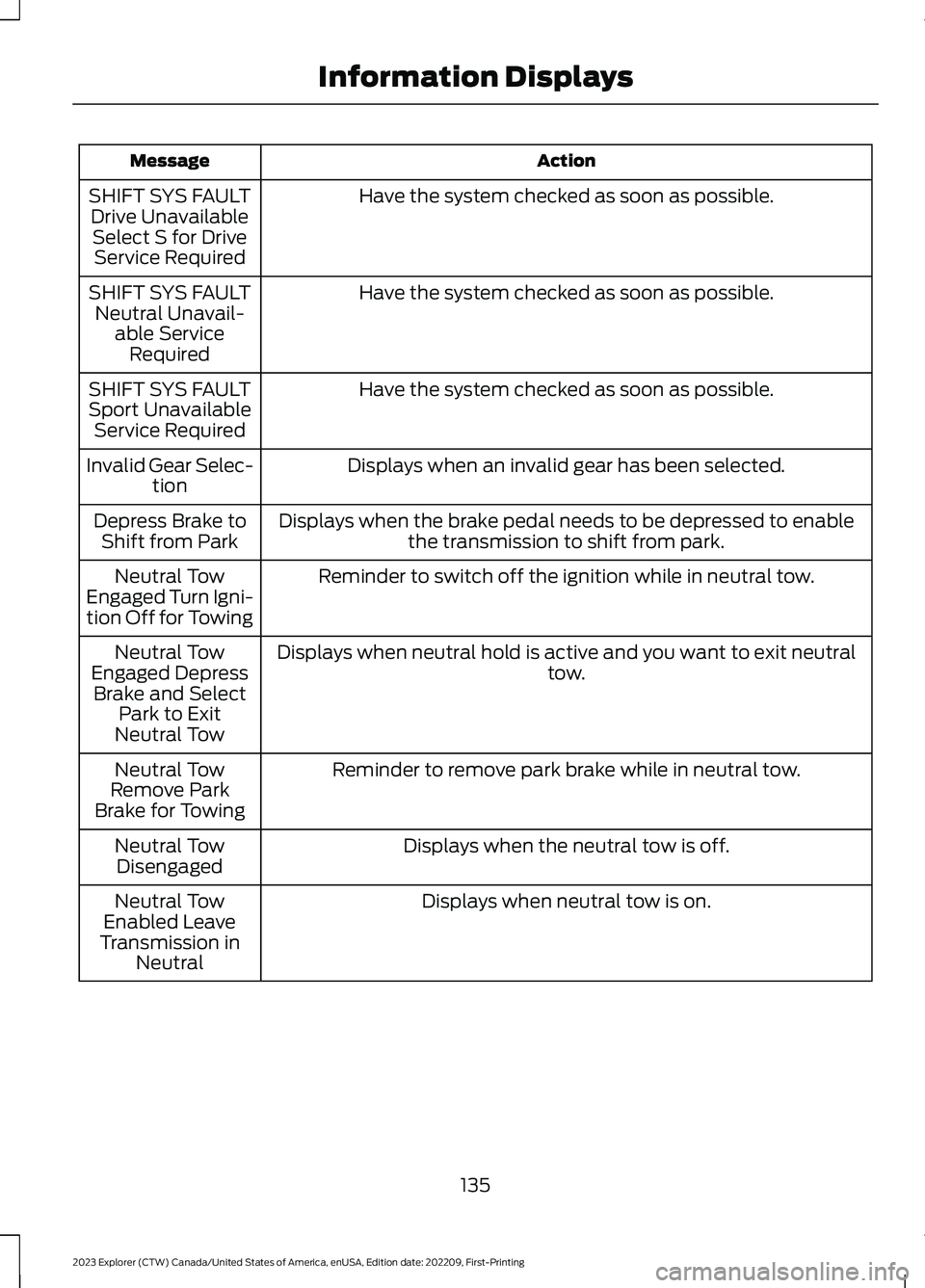
ActionMessage
Have the system checked as soon as possible.SHIFT SYS FAULTDrive UnavailableSelect S for DriveService Required
Have the system checked as soon as possible.SHIFT SYS FAULTNeutral Unavail-able ServiceRequired
Have the system checked as soon as possible.SHIFT SYS FAULTSport UnavailableService Required
Displays when an invalid gear has been selected.Invalid Gear Selec-tion
Displays when the brake pedal needs to be depressed to enablethe transmission to shift from park.Depress Brake toShift from Park
Reminder to switch off the ignition while in neutral tow.Neutral TowEngaged Turn Igni-tion Off for Towing
Displays when neutral hold is active and you want to exit neutraltow.Neutral TowEngaged DepressBrake and SelectPark to ExitNeutral Tow
Reminder to remove park brake while in neutral tow.Neutral TowRemove ParkBrake for Towing
Displays when the neutral tow is off.Neutral TowDisengaged
Displays when neutral tow is on.Neutral TowEnabled LeaveTransmission inNeutral
135
2023 Explorer (CTW) Canada/United States of America, enUSA, Edition date: 202209, First-PrintingInformation Displays
Page 155 of 573
Recalling a PreSet Position
Press and release the preset buttonassociated with your preferred drivingposition. The memory features move tothe position stored for that preset.
Note:You can only recall a preset memoryposition when the ignition is off, or when thetransmission is in park (P) or neutral (N)and the vehicle is not moving if the ignitionis on.
You can also recall a preset memoryposition by:
•Pressing the unlock button on yourremote control if it is linked to a presetposition.
•Unlocking the driver door handle if alinked remote control is present.
Note:Using a linked remote control torecall your memory position when theignition is off moves the seat to the EasyEntry position.
Note:Pressing any active memory featureadjustment control, or any memory buttonduring a memory recall, cancels theoperation.
Linking a PreSet Position to yourRemote Control
Your vehicle can save the preset memorypositions for up to three remote controls.
1.With the ignition on, move the memoryfeatures to the preferred positions.
2.Press and hold the preferred presetbutton for about five seconds. A tonesounds after about two seconds.Continue holding until you hear asecond tone.
3.Within three seconds, press the lockbutton on the remote control you arelinking.
To unlink a remote control, follow thesame procedure – except in step 3, pressthe unlock button on the remote control.
Note:If more than one linked remotecontrol or intelligent access key is in range,the memory function moves to the settingsof the first key to recall a memory position.
Easy Entry and Exit Feature
If you enable the easy entry and exitfeature, it moves the driver seat positionrearward up to 2 in (5 cm) when you switchthe ignition off.
The driver seat returns to the previousposition when you switch the ignition on.
You can enable or disable this featurethrough the touchscreen. See Settings(page 458).
REAR SEATS
Adjusting the Second Row RearSeats
WARNING: Always drive and ridewith your seatback upright and the lapbelt snug and low across the hips.
WARNING: Do not recline the seatbackrest too far as this can cause theoccupant to slide under the seatbelt,resulting in personal injury in the eventof a crash.
151
2023 Explorer (CTW) Canada/United States of America, enUSA, Edition date: 202209, First-PrintingSeats
Page 159 of 573
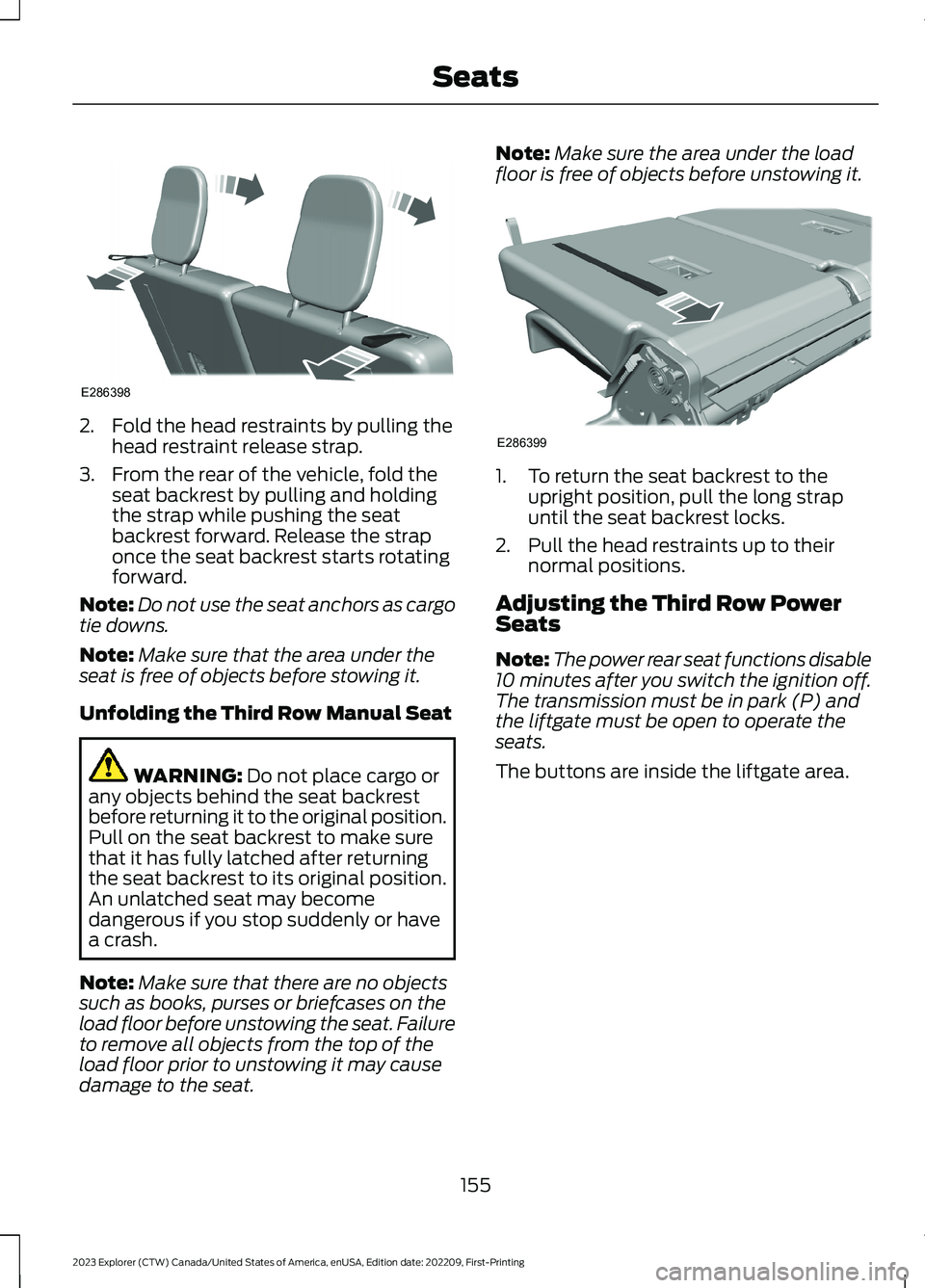
2.Fold the head restraints by pulling thehead restraint release strap.
3.From the rear of the vehicle, fold theseat backrest by pulling and holdingthe strap while pushing the seatbackrest forward. Release the straponce the seat backrest starts rotatingforward.
Note:Do not use the seat anchors as cargotie downs.
Note:Make sure that the area under theseat is free of objects before stowing it.
Unfolding the Third Row Manual Seat
WARNING: Do not place cargo orany objects behind the seat backrestbefore returning it to the original position.Pull on the seat backrest to make surethat it has fully latched after returningthe seat backrest to its original position.An unlatched seat may becomedangerous if you stop suddenly or havea crash.
Note:Make sure that there are no objectssuch as books, purses or briefcases on theload floor before unstowing the seat. Failureto remove all objects from the top of theload floor prior to unstowing it may causedamage to the seat.
Note:Make sure the area under the loadfloor is free of objects before unstowing it.
1.To return the seat backrest to theupright position, pull the long strapuntil the seat backrest locks.
2.Pull the head restraints up to theirnormal positions.
Adjusting the Third Row PowerSeats
Note:The power rear seat functions disable10 minutes after you switch the ignition off.The transmission must be in park (P) andthe liftgate must be open to operate theseats.
The buttons are inside the liftgate area.
155
2023 Explorer (CTW) Canada/United States of America, enUSA, Edition date: 202209, First-PrintingSeatsE286398 E286399
Page 166 of 573
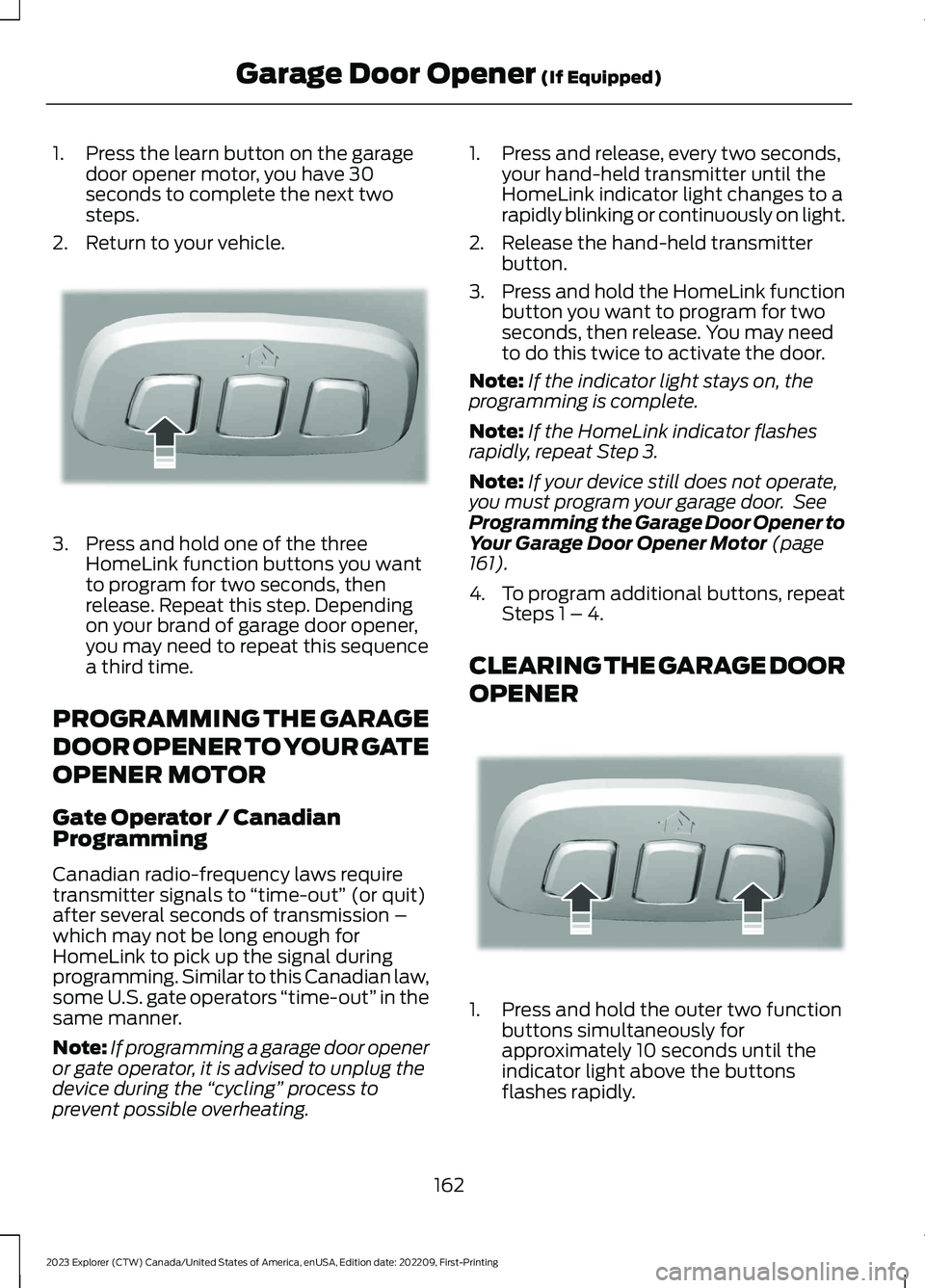
1.Press the learn button on the garagedoor opener motor, you have 30seconds to complete the next twosteps.
2.Return to your vehicle.
3.Press and hold one of the threeHomeLink function buttons you wantto program for two seconds, thenrelease. Repeat this step. Dependingon your brand of garage door opener,you may need to repeat this sequencea third time.
PROGRAMMING THE GARAGE
DOOR OPENER TO YOUR GATE
OPENER MOTOR
Gate Operator / CanadianProgramming
Canadian radio-frequency laws requiretransmitter signals to “time-out” (or quit)after several seconds of transmission –which may not be long enough forHomeLink to pick up the signal duringprogramming. Similar to this Canadian law,some U.S. gate operators “time-out” in thesame manner.
Note:If programming a garage door openeror gate operator, it is advised to unplug thedevice during the “cycling” process toprevent possible overheating.
1.Press and release, every two seconds,your hand-held transmitter until theHomeLink indicator light changes to arapidly blinking or continuously on light.
2.Release the hand-held transmitterbutton.
3.Press and hold the HomeLink functionbutton you want to program for twoseconds, then release. You may needto do this twice to activate the door.
Note:If the indicator light stays on, theprogramming is complete.
Note:If the HomeLink indicator flashesrapidly, repeat Step 3.
Note:If your device still does not operate,you must program your garage door. SeeProgramming the Garage Door Opener toYour Garage Door Opener Motor (page161).
4.To program additional buttons, repeatSteps 1 – 4.
CLEARING THE GARAGE DOOR
OPENER
1.Press and hold the outer two functionbuttons simultaneously forapproximately 10 seconds until theindicator light above the buttonsflashes rapidly.
162
2023 Explorer (CTW) Canada/United States of America, enUSA, Edition date: 202209, First-PrintingGarage Door Opener (If Equipped)E188212 E188213
Page 173 of 573
KEYLESS STARTING (IF EQUIPPED)
Note:The system may not function if theremote control is close to metal objects orelectronic devices, for example keys or a cellphone.
Note:A valid remote control must belocated inside your vehicle to switch theignition on and start your vehicle.
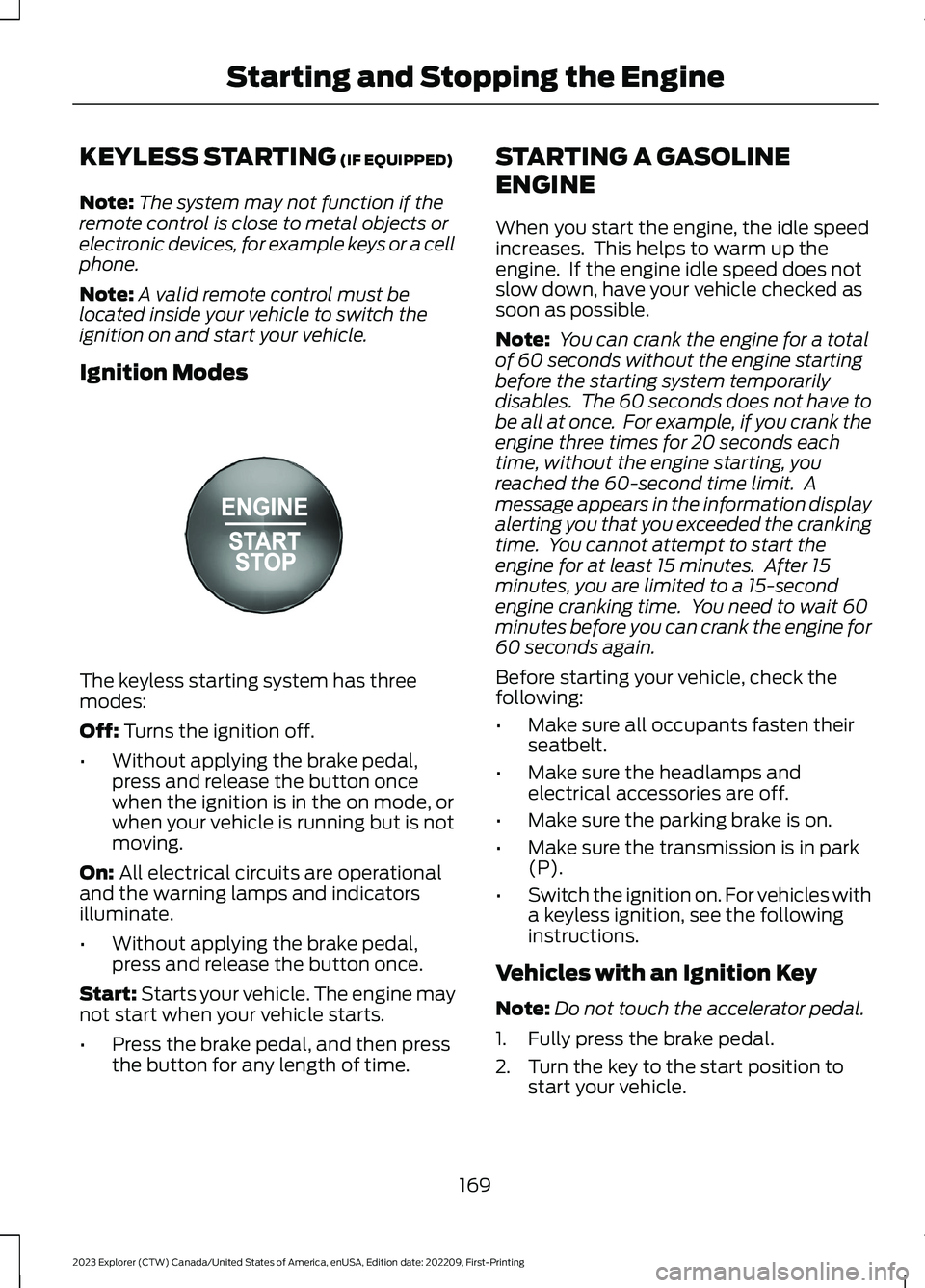
Ignition Modes
The keyless starting system has threemodes:
Off: Turns the ignition off.
•Without applying the brake pedal,press and release the button oncewhen the ignition is in the on mode, orwhen your vehicle is running but is notmoving.
On: All electrical circuits are operationaland the warning lamps and indicatorsilluminate.
•Without applying the brake pedal,press and release the button once.
Start: Starts your vehicle. The engine maynot start when your vehicle starts.
•Press the brake pedal, and then pressthe button for any length of time.
STARTING A GASOLINE
ENGINE
When you start the engine, the idle speedincreases. This helps to warm up theengine. If the engine idle speed does notslow down, have your vehicle checked assoon as possible.
Note: You can crank the engine for a totalof 60 seconds without the engine startingbefore the starting system temporarilydisables. The 60 seconds does not have tobe all at once. For example, if you crank theengine three times for 20 seconds eachtime, without the engine starting, youreached the 60-second time limit. Amessage appears in the information displayalerting you that you exceeded the crankingtime. You cannot attempt to start theengine for at least 15 minutes. After 15minutes, you are limited to a 15-secondengine cranking time. You need to wait 60minutes before you can crank the engine for60 seconds again.
Before starting your vehicle, check thefollowing:
•Make sure all occupants fasten theirseatbelt.
•Make sure the headlamps andelectrical accessories are off.
•Make sure the parking brake is on.
•Make sure the transmission is in park(P).
•Switch the ignition on. For vehicles witha keyless ignition, see the followinginstructions.
Vehicles with an Ignition Key
Note:Do not touch the accelerator pedal.
1.Fully press the brake pedal.
2.Turn the key to the start position tostart your vehicle.
169
2023 Explorer (CTW) Canada/United States of America, enUSA, Edition date: 202209, First-PrintingStarting and Stopping the EngineE357532
Page 174 of 573
Note:The engine may continue crankingfor up to 15 seconds or until it starts.
Note:If you cannot start the engine on thefirst try, wait for a short period and try again.
Vehicles with Keyless Start
Note:Do not touch the accelerator pedal.
Note:You must have your intelligent accesskey in your vehicle in order to shift thetransmission out of park (P).
1.Fully press the brake pedal.
2.Press the push button ignition switch.
The system does not function if:
•The passive key frequencies arejammed.
•The key battery has no charge.
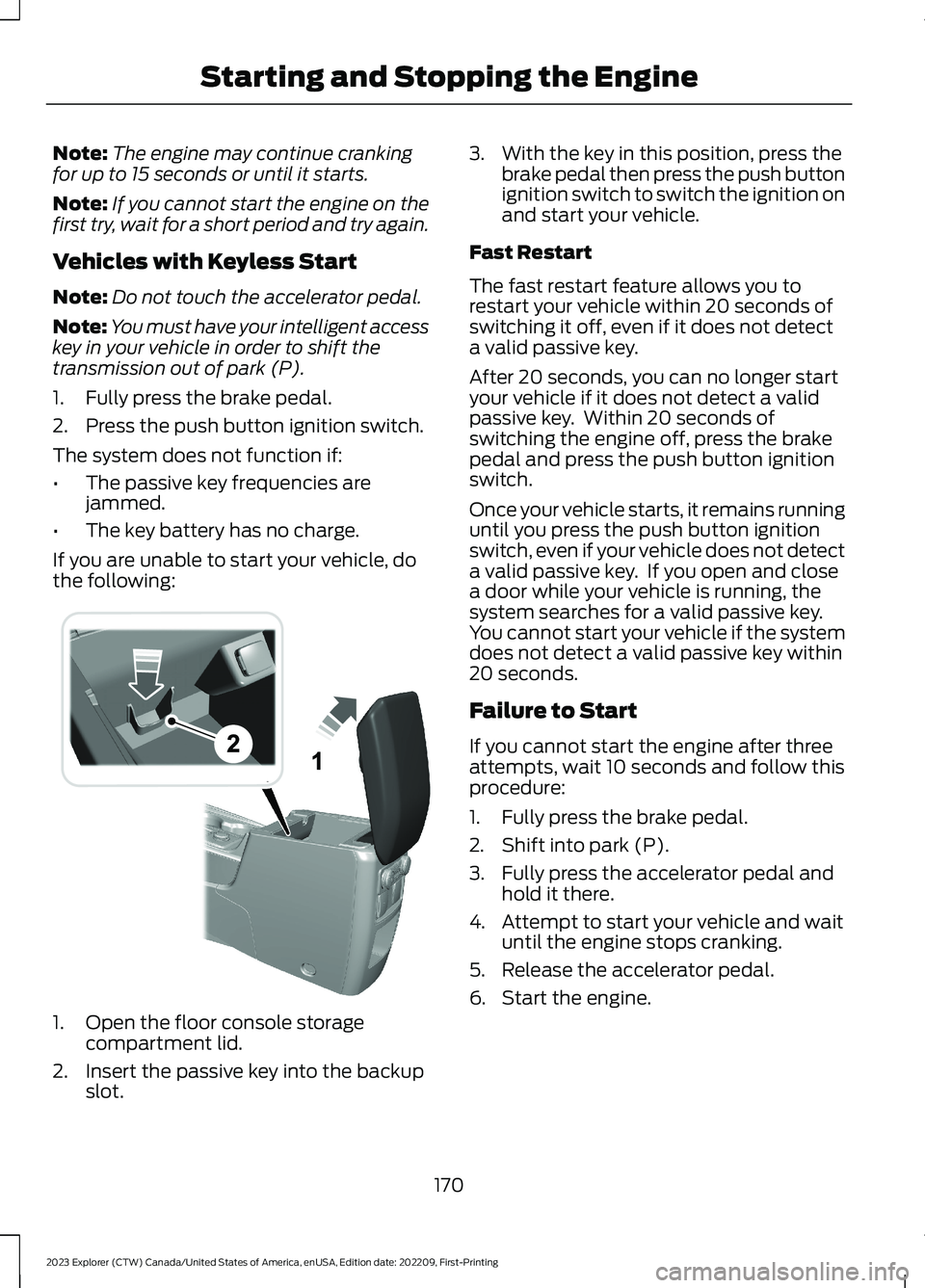
If you are unable to start your vehicle, dothe following:
1.Open the floor console storagecompartment lid.
2.Insert the passive key into the backupslot.
3.With the key in this position, press thebrake pedal then press the push buttonignition switch to switch the ignition onand start your vehicle.
Fast Restart
The fast restart feature allows you torestart your vehicle within 20 seconds ofswitching it off, even if it does not detecta valid passive key.
After 20 seconds, you can no longer startyour vehicle if it does not detect a validpassive key. Within 20 seconds ofswitching the engine off, press the brakepedal and press the push button ignitionswitch.
Once your vehicle starts, it remains runninguntil you press the push button ignitionswitch, even if your vehicle does not detecta valid passive key. If you open and closea door while your vehicle is running, thesystem searches for a valid passive key.You cannot start your vehicle if the systemdoes not detect a valid passive key within20 seconds.
Failure to Start
If you cannot start the engine after threeattempts, wait 10 seconds and follow thisprocedure:
1.Fully press the brake pedal.
2.Shift into park (P).
3.Fully press the accelerator pedal andhold it there.
4.Attempt to start your vehicle and waituntil the engine stops cranking.
5.Release the accelerator pedal.
6.Start the engine.
170
2023 Explorer (CTW) Canada/United States of America, enUSA, Edition date: 202209, First-PrintingStarting and Stopping the EngineE297184