cruise control FORD EXPLORER 2023 Owner's Manual
[x] Cancel search | Manufacturer: FORD, Model Year: 2023, Model line: EXPLORER, Model: FORD EXPLORER 2023Pages: 573, PDF Size: 16.1 MB
Page 253 of 573
Use the touchscreen to select thefollowing:
1.Select Settings.
2.Select Driver Assist.
3.Select Cruise Control.
4.Select Normal.
The cruise control indicatorreplaces the adaptive cruisecontrol indicator if you selectnormal cruise control. The gap settingdoes not display, and the system does notrespond to lead vehicles. Automaticbraking remains active to maintain setspeed. The system remembers the lastsetting when you start your vehicle.
SWITCHING LANE CENTERING
ON AND OFF
The cruise controls are on the steeringwheel. See Cruise Control (page 81).
Press the button.
The indicator appears in the informationdisplay. When the system is on, the colorof the indicator changes to indicate thesystem status. See Adaptive CruiseControl Indicators (page 248).
Note:Adaptive cruise control must be onbefore you can switch lane centering on.
Activating Lane Centering
The system only activates when all of thefollowing occur:
•You have adaptive cruise control withstop-and-go on.
•Your hands are on the steering wheel.
•The system detects both lanemarkings.
Note:If it does not detect valid lanemarkings, the system stays inactive untilvalid markings are available.
You can override the system at any timeby steering your vehicle.
System Alerts and AutomaticCancellation
You must keep your hands on the steeringwheel at all times.
When the system is active and detects nosteering activity for a certain period of time,the system alerts you to put your hands onthe steering wheel. If you do not react tothe warnings the system cancels and slowsyour vehicle down to idle speeds whilemaintaining steering control.
The system also alerts you if your vehiclecrosses lane markings without detectedsteering activity.
Note:The system may detect a light gripor touch on the steering wheel as hands-offdriving.
When an external condition cancels thesystem, for example, no lane markingsavailable, a tone sounds and a messageappears in the information display.
If your vehicle starts to slowdown, you must provide steeringinput to the wheel and press andrelease the button to regain full systemperformance.
Automatic cancellation can also occur if:
•The lane becomes too wide or toonarrow.
•The system cannot detect valid lanemarkings.
•Lane markings are crossed.
Note:The system disables until the nextkey cycle if your vehicle slows down due todriver inactivity twice within a key cycle.
249
2023 Explorer (CTW) Canada/United States of America, enUSA, Edition date: 202209, First-PrintingAdaptive Cruise Control (If Equipped)E71340 E262175
Page 254 of 573
SWITCHING INTELLIGENT
MODE ON AND OFF
WARNING: You are responsible forcontrolling your vehicle at all times. Thesystem is designed to be an aid and doesnot relieve you of your responsibility todrive with due care and attention. Failureto follow this instruction could result inthe loss of control of your vehicle,personal injury or death.
1.Press Settings on the touchscreen.
2.Press Driver Assistance.
3.Press Cruise Control.
4.Press Intelligent.
Changing the Set Speed withIntelligent Adaptive Cruise Control
When intelligent mode is on, the systemadjusts the set speed to the speed limitdetected by the camera and the speedlimit information provided by thenavigation system.
Note:The set speed adjusts when thesystem detects a different maximum speedlimit.
Note:The speed limit information providedby the navigation map data may beinaccurate or out of date. See Navigation(page 449).
Note:The system alerts you if the set speedincreases beyond the speed limit. SeeAdaptive Cruise Control Indicators (page248).
If the system does not detect a speed limit,the vehicle speed remains at the currentset speed.
You can override the set speed at any time.You may need to override or cancel thesystem in certain situations such asinclement weather or if an incorrect speedis set.
Note:The system may not detect and readspeed limit signs with conditionalinformation, for example, when a sign isflashing, during specific time ranges, orwhen children are present.
Note:Under certain conditions, the systemmay not adjust the vehicle speed until afteryour vehicle passes the speed limit sign.
ADJUSTING THE SET SPEED
TOLERANCE
You can set a permanent speed tolerancethat is above or below the detected speedlimit.
1.Press Settings on the touchscreen.
2.Press Driver Assistance.
3.Press Cruise Control.
4.Press Intelligent.
5.Press Tolerance.
6.Use + and - to set the tolerance.
Note:You cannot set the tolerance morethan 20 mph (30 km/h) above or below therecognized speed.
ADAPTIVE CRUISE CONTROL
– TROUBLESHOOTING
ADAPTIVE CRUISE CONTROL –INFORMATION MESSAGES -VEHICLES WITH: LANECENTERING
Note:Depending on your vehicle optionsand instrument cluster type, not allmessages display or are available.
250
2023 Explorer (CTW) Canada/United States of America, enUSA, Edition date: 202209, First-PrintingAdaptive Cruise Control (If Equipped)
Page 255 of 573
Note:The system could abbreviate orshorten certain messages depending uponwhich cluster type you have.
ActionMessage
Return your hands to the steering wheel and provide steeringinput to cancel the message.Keep Hands on SteeringWheel
To reset the feature when the vehicle is stationary, return thegear selector to park and turn the vehicle off. Restart thevehicle with your foot on the brake pedal.
Lane Centering AssistNot Available
You must immediately take full control of the vehicle.Resume Control
Resume adaptive cruise control with lane centering byapplying foot pressure on the accelerator pedal. You can alsoresume the feature by pressing the resume button on thesteering wheel.
Press Accelerator Pedalto Resume
251
2023 Explorer (CTW) Canada/United States of America, enUSA, Edition date: 202209, First-PrintingAdaptive Cruise Control (If Equipped)
Page 256 of 573
ADAPTIVE CRUISE CONTROL –INFORMATION MESSAGES -VEHICLES WITH: INTELLIGENTADAPTIVE CRUISE CONTROL
Note:Depending on your vehicle optionsand instrument cluster type, not allmessages display or are available.
Note:Certain messages may beabbreviated or shortened depending uponwhich cluster type you have.
ActionMessage
Conditions exist preventing the system from being available.Intelligent Cruise ControlSpeed Sign RecognitionNot Available
252
2023 Explorer (CTW) Canada/United States of America, enUSA, Edition date: 202209, First-PrintingAdaptive Cruise Control (If Equipped)
Page 257 of 573
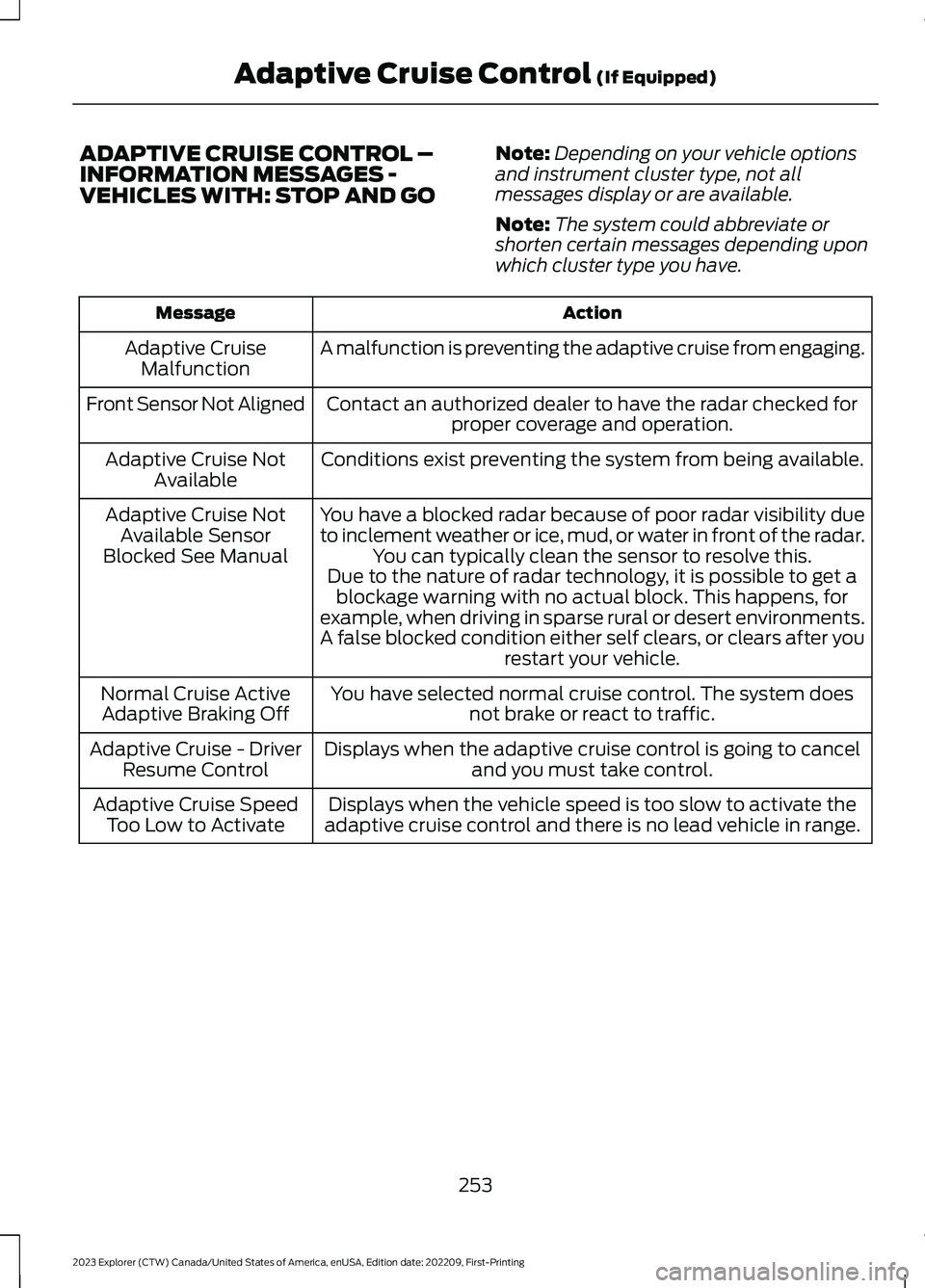
ADAPTIVE CRUISE CONTROL –INFORMATION MESSAGES -VEHICLES WITH: STOP AND GO
Note:Depending on your vehicle optionsand instrument cluster type, not allmessages display or are available.
Note:The system could abbreviate orshorten certain messages depending uponwhich cluster type you have.
ActionMessage
A malfunction is preventing the adaptive cruise from engaging.Adaptive CruiseMalfunction
Front Sensor Not AlignedContact an authorized dealer to have the radar checked forproper coverage and operation.
Conditions exist preventing the system from being available.Adaptive Cruise NotAvailable
You have a blocked radar because of poor radar visibility dueto inclement weather or ice, mud, or water in front of the radar.You can typically clean the sensor to resolve this.
Adaptive Cruise NotAvailable SensorBlocked See ManualDue to the nature of radar technology, it is possible to get ablockage warning with no actual block. This happens, forexample, when driving in sparse rural or desert environments.A false blocked condition either self clears, or clears after yourestart your vehicle.
You have selected normal cruise control. The system doesnot brake or react to traffic.Normal Cruise ActiveAdaptive Braking Off
Displays when the adaptive cruise control is going to canceland you must take control.Adaptive Cruise - DriverResume Control
Displays when the vehicle speed is too slow to activate theadaptive cruise control and there is no lead vehicle in range.Adaptive Cruise SpeedToo Low to Activate
253
2023 Explorer (CTW) Canada/United States of America, enUSA, Edition date: 202209, First-PrintingAdaptive Cruise Control (If Equipped)
Page 274 of 573

Note:Brake support and active braking areactive at speeds up to 75 mph (120 km/h).If your vehicle has a radar sensor includedwith adaptive cruise control, then brakesupport and active braking are active up tothe maximum speed of the vehicle.
Note:If you perceive pre-collision assistalerts as being too frequent or disturbing,then you can reduce the alert sensitivity,though we recommend using the highestsensitivity setting where possible. Settinglower sensitivity would lead to fewer andlater system warnings.
Distance Indication and Alert (If
Equipped)
Distance indication and alert is a functionthat provides the driver with a graphicalindication of the time gap to otherpreceding vehicles traveling in the samedirection. Distance indication and alertshows one of the graphics that follow inthe information display.
If the time gap to a preceding vehicle issmall, a red visual indication displays tothe driver.
Note:Distance indication and alertdeactivates and the graphics do not displaywhen adaptive cruise control is active.
Time GapDistance GapGraphicsSensitivitySpeed
>0.9sec>82 ft (25 m)GreyNormal62 mph(100 km/h)
0.6sec —0.9sec56–82 ft(17–25 m)YellowNormal62 mph(100 km/h)
<0.6sec<56 ft (17 m)RedNormal62 mph(100 km/h)
Evasive Steering Assist (If Equipped)
If your vehicle is rapidly approaching astationary vehicle or a vehicle traveling inthe same direction as your vehicle, thesystem design helps you steer around thevehicle.
The system only activates when all of thefollowing occur:
•The system detects a vehicle aheadand starts to apply active braking.
•You turn the steering wheel in anattempt to steer around the vehicle.
270
2023 Explorer (CTW) Canada/United States of America, enUSA, Edition date: 202209, First-PrintingDriving AidsE358669
Page 311 of 573
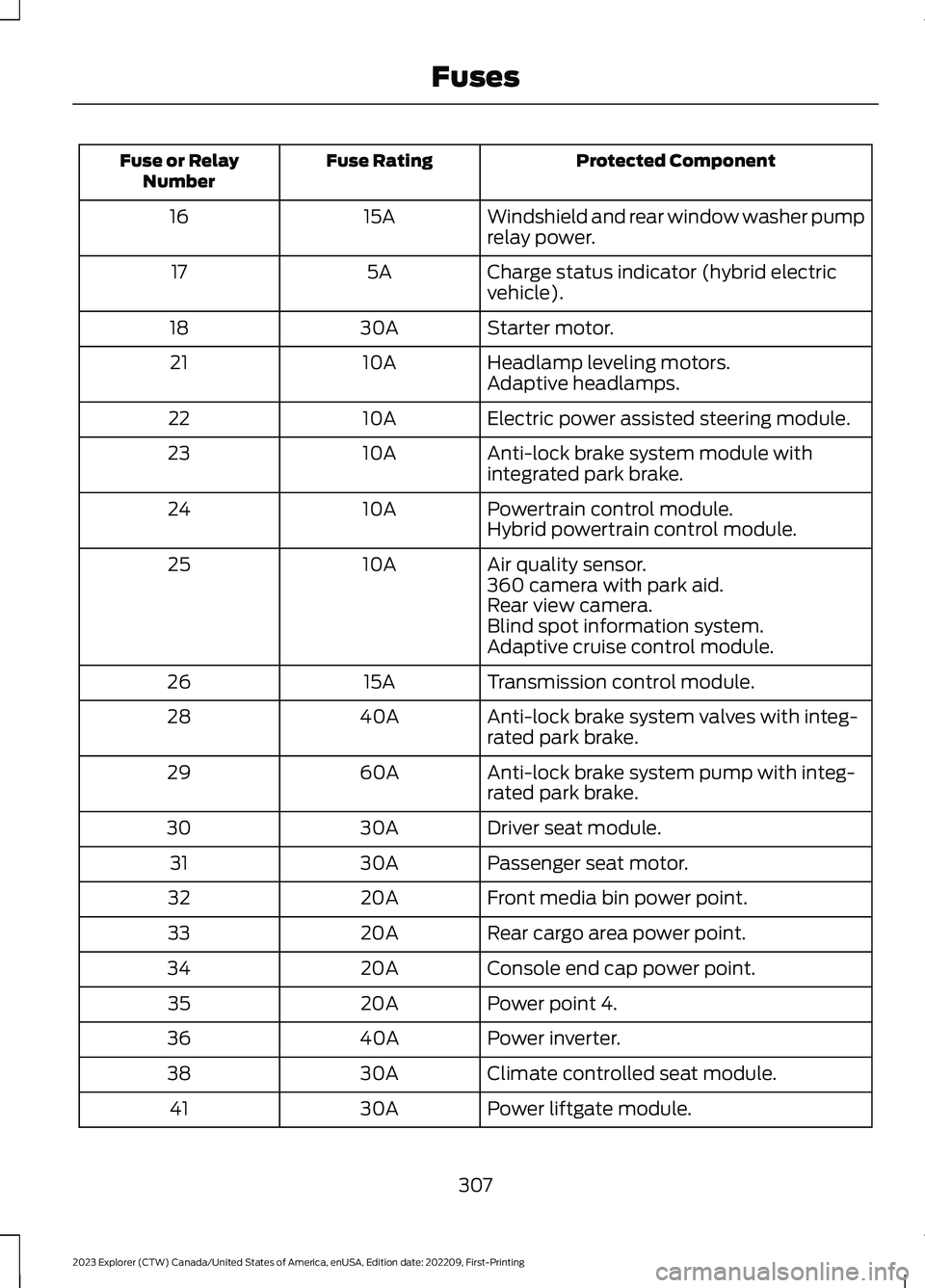
Protected ComponentFuse RatingFuse or RelayNumber
Windshield and rear window washer pumprelay power.15A16
Charge status indicator (hybrid electricvehicle).5A17
Starter motor.30A18
Headlamp leveling motors.10A21Adaptive headlamps.
Electric power assisted steering module.10A22
Anti-lock brake system module withintegrated park brake.10A23
Powertrain control module.10A24Hybrid powertrain control module.
Air quality sensor.10A25360 camera with park aid.Rear view camera.Blind spot information system.Adaptive cruise control module.
Transmission control module.15A26
Anti-lock brake system valves with integ-rated park brake.40A28
Anti-lock brake system pump with integ-rated park brake.60A29
Driver seat module.30A30
Passenger seat motor.30A31
Front media bin power point.20A32
Rear cargo area power point.20A33
Console end cap power point.20A34
Power point 4.20A35
Power inverter.40A36
Climate controlled seat module.30A38
Power liftgate module.30A41
307
2023 Explorer (CTW) Canada/United States of America, enUSA, Edition date: 202209, First-PrintingFuses
Page 498 of 573
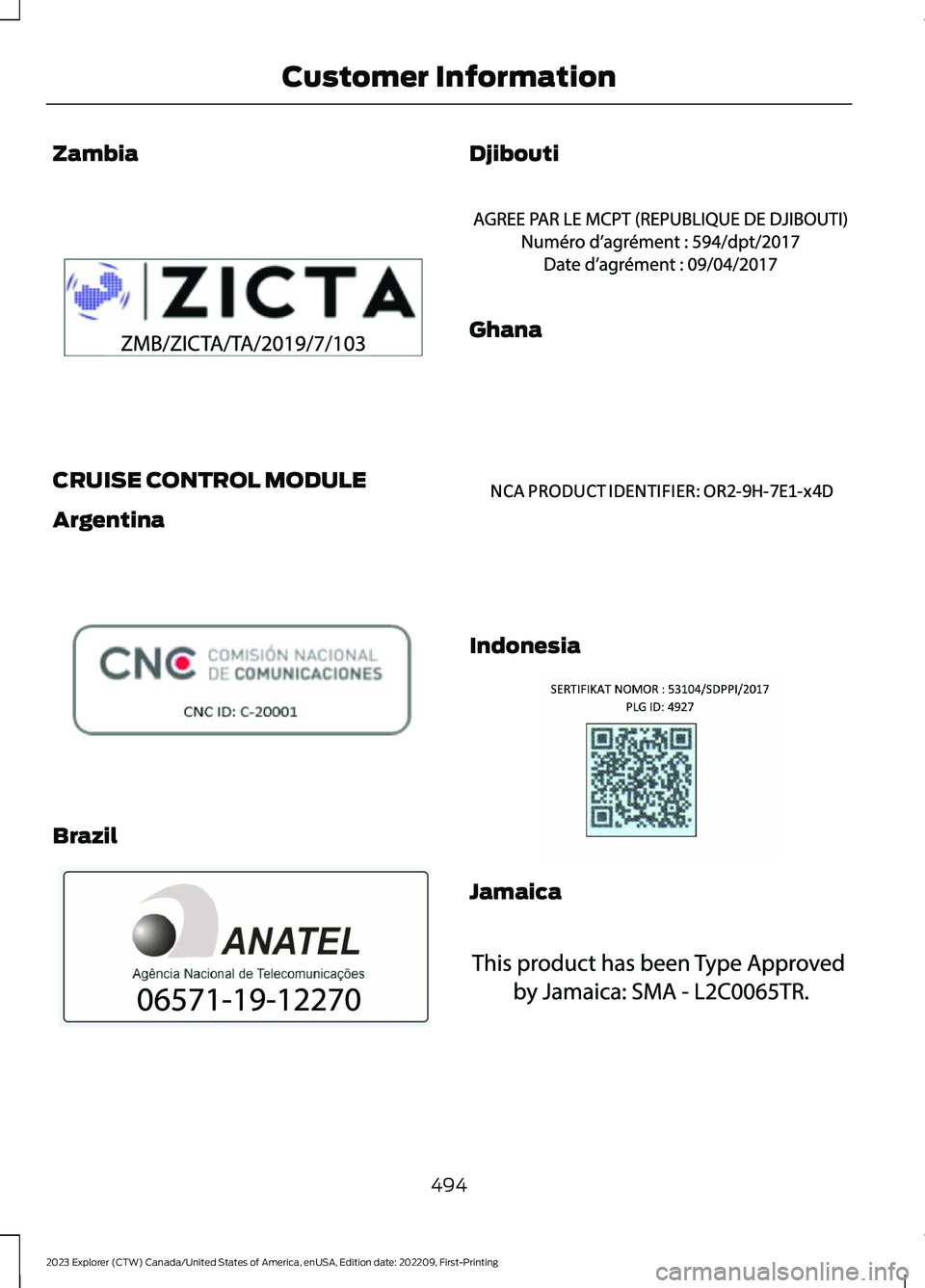
Zambia
CRUISE CONTROL MODULE
Argentina
Brazil
Djibouti
Ghana
Indonesia
Jamaica
494
2023 Explorer (CTW) Canada/United States of America, enUSA, Edition date: 202209, First-PrintingCustomer InformationE340511 E308030 E340118 E342394 E340191 E342395 E340518
Page 565 of 573
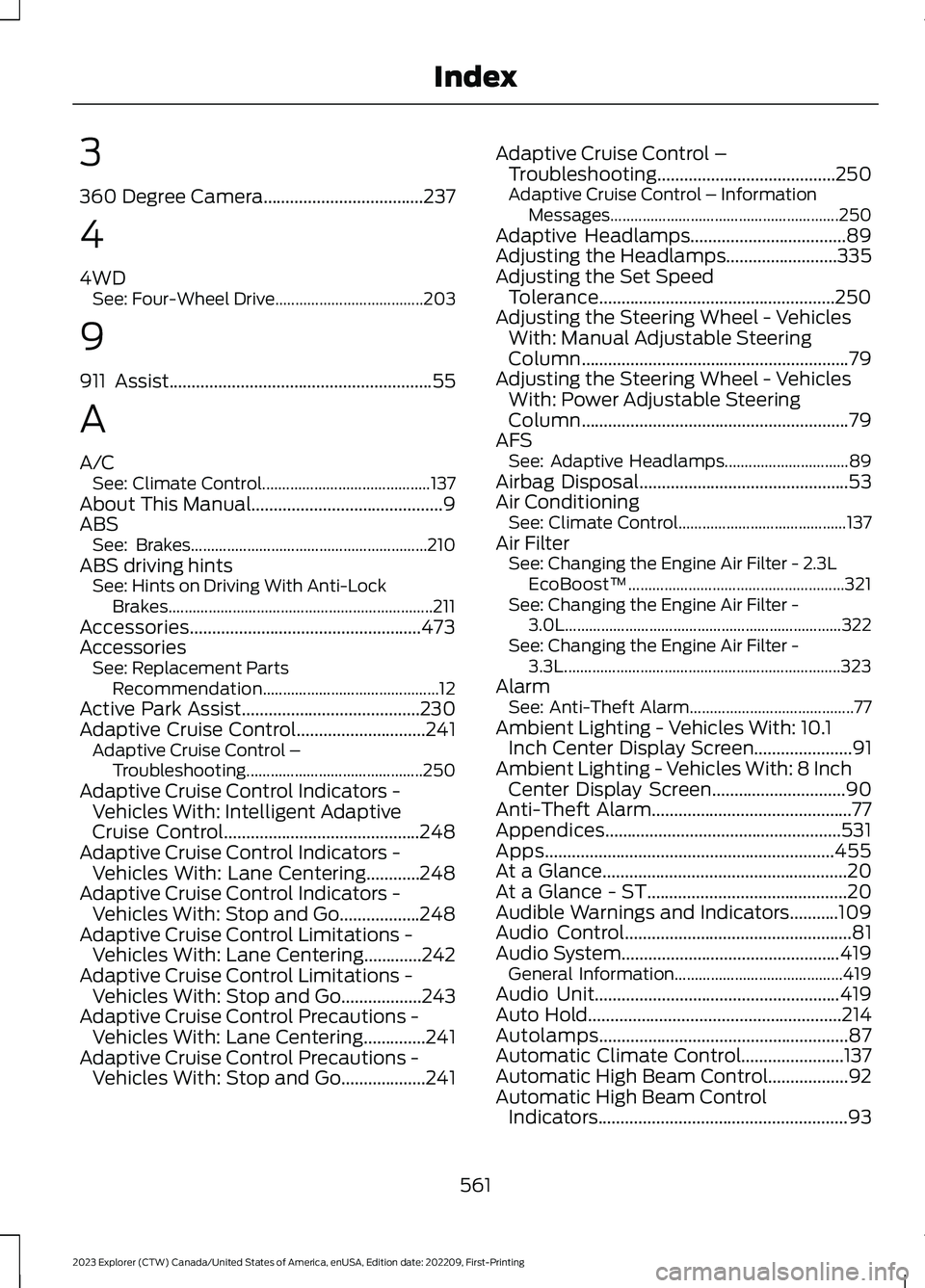
3
360 Degree Camera....................................237
4
4WDSee: Four-Wheel Drive.....................................203
9
911 Assist...........................................................55
A
A/CSee: Climate Control..........................................137About This Manual...........................................9ABSSee: Brakes...........................................................210ABS driving hintsSee: Hints on Driving With Anti-LockBrakes..................................................................211Accessories....................................................473AccessoriesSee: Replacement PartsRecommendation............................................12Active Park Assist........................................230Adaptive Cruise Control.............................241Adaptive Cruise Control –Troubleshooting............................................250Adaptive Cruise Control Indicators -Vehicles With: Intelligent AdaptiveCruise Control............................................248Adaptive Cruise Control Indicators -Vehicles With: Lane Centering............248Adaptive Cruise Control Indicators -Vehicles With: Stop and Go..................248Adaptive Cruise Control Limitations -Vehicles With: Lane Centering.............242Adaptive Cruise Control Limitations -Vehicles With: Stop and Go..................243Adaptive Cruise Control Precautions -Vehicles With: Lane Centering..............241Adaptive Cruise Control Precautions -Vehicles With: Stop and Go...................241
Adaptive Cruise Control –Troubleshooting........................................250Adaptive Cruise Control – InformationMessages.........................................................250Adaptive Headlamps...................................89Adjusting the Headlamps.........................335Adjusting the Set SpeedTolerance.....................................................250Adjusting the Steering Wheel - VehiclesWith: Manual Adjustable SteeringColumn............................................................79Adjusting the Steering Wheel - VehiclesWith: Power Adjustable SteeringColumn............................................................79AFSSee: Adaptive Headlamps...............................89Airbag Disposal...............................................53Air ConditioningSee: Climate Control..........................................137Air FilterSee: Changing the Engine Air Filter - 2.3LEcoBoost™......................................................321See: Changing the Engine Air Filter -3.0L.....................................................................322See: Changing the Engine Air Filter -3.3L.....................................................................323AlarmSee: Anti-Theft Alarm.........................................77Ambient Lighting - Vehicles With: 10.1Inch Center Display Screen......................91Ambient Lighting - Vehicles With: 8 InchCenter Display Screen..............................90Anti-Theft Alarm.............................................77Appendices.....................................................531Apps.................................................................455At a Glance.......................................................20At a Glance - ST.............................................20Audible Warnings and Indicators...........109Audio Control...................................................81Audio System.................................................419General Information..........................................419Audio Unit.......................................................419Auto Hold.........................................................214Autolamps........................................................87Automatic Climate Control.......................137Automatic High Beam Control..................92Automatic High Beam ControlIndicators........................................................93
561
2023 Explorer (CTW) Canada/United States of America, enUSA, Edition date: 202209, First-PrintingIndex
Page 567 of 573
Connecting the Vehicle to a MobileNetwork.........................................................414Connecting FordPass to the Modem..........414Enabling and Disabling the Modem............414What Is the Modem...........................................414Connecting the Vehicle to a Wi-FiNetwork - Vehicles With: SYNC 3........414Coolant CheckSee: Engine Coolant Check............................324Crash Sensors and Airbag Indicator........52Creating a MyKey...........................................65Creating a Vehicle Wi-Fi Hotspot...........418Cross Traffic Alert........................................263Cruise Control...............................................239Cruise Control Indicators..........................240Cruise Control - Vehicles With: CruiseControl.............................................................81Cruise Control - Vehicles With: Stop andGo......................................................................82Cup Holders....................................................167Customer Assistance.................................298Customer Information...............................485Radio Frequency CertificationLabels...............................................................485
D
Data Privacy......................................................15Daytime Running Lamps - Vehicles With:Configurable Daytime RunningLamps.............................................................88Daytime Running Lamps - Vehicles With:Daytime Running Lamps (DRL)............88Digital Radio..................................................420Direction Indicators.......................................89Doors and Locks.............................................68Drive Mode Control......................................273Drive Modes..........................................................273Drive Modes....................................................273Deep Snow/Sand...............................................273Eco...........................................................................274Normal...................................................................274Slippery..................................................................274Sport.......................................................................274Tow/Haul...............................................................274Trail..........................................................................274Driver Alert.....................................................254Driver and Passenger Airbags....................47
Driver and Passenger Knee Airbags.........51Driving Aids....................................................254Driving Economically.................................288Driving Hints..................................................288Driving Through Shallow Water.............289DRLSee: Daytime Running Lamps - Vehicles With:Configurable Daytime RunningLamps.................................................................88See: Daytime Running Lamps - Vehicles With:Daytime Running Lamps (DRL)................88
E
Electric Parking Brake...................................211Electric Vehicle Information....................454Electromagnetic Compatibility...............531Emergency Call Limitations.......................56Emergency Call Requirements.................55Emergency Call System Data.....................18Emission Law.................................................192End User License Agreement.................534Engine Block Heater.....................................174Engine Coolant Check................................324Engine Emission Control............................192Engine ImmobilizerSee: Passive Anti-Theft System......................77Engine Oil Check...........................................319Engine Oil Dipstick - 2.3LEcoBoost™..................................................319Engine Oil Dipstick - 3.0L..........................319Engine Oil Dipstick - 3.3L...........................319Engine Specifications - 2.3LEcoBoost™.................................................378Engine Specifications - 3.0L, ST............378Engine Specifications - 3.0L...................380Engine Specifications - 3.3L,Gasoline.......................................................380Engine Specifications - 3.3L, HybridElectric Vehicle (HEV).............................381Entertainment..............................................435Environment.....................................................19EPBSee: Electric Parking Brake...............................211Essential Towing Checks..........................285Event Data.........................................................16Export Unique Options.................................14Exterior Mirrors - Excluding: ST.................95
563
2023 Explorer (CTW) Canada/United States of America, enUSA, Edition date: 202209, First-PrintingIndex