ignition FORD EXPLORER 2023 Owner's Manual
[x] Cancel search | Manufacturer: FORD, Model Year: 2023, Model line: EXPLORER, Model: FORD EXPLORER 2023Pages: 573, PDF Size: 16.1 MB
Page 92 of 573
DAYTIME RUNNING LAMPS -
VEHICLES WITH:
CONFIGURABLE DAYTIME
RUNNING LAMPS
WARNING: The daytime runninglamps system does not activate the rearlamps and may not provide adequatelighting during low visibility drivingconditions. Make sure you switch theheadlamps on, as appropriate, during alllow visibility conditions. Failure to do somay result in a crash.
Switch the daytime running lamps on oroff using the touchscreen:
1.Select Settings. See Settings (page458).
2.Select Vehicle.
3.Select Lighting.
The daytime running lamps turn on when:
1.The lamps are on in the informationdisplay.
2.You switch the ignition on.
3.The transmission is not in park (P) forvehicles with automatic transmissionsor you release the parking brake forvehicles with manual transmissions.
4.The lighting control is in the autolampsposition.
5.The headlamps are off.
The other lighting control switch positionsdo not turn on the daytime running lamps.
If the daytime running lamps are off in theinformation display, the lamps stay off inall switch positions.
DAYTIME RUNNING LAMPS -
VEHICLES WITH: DAYTIME
RUNNING LAMPS (DRL)
WARNING: The daytime runninglamps system does not activate the rearlamps and may not provide adequatelighting during low visibility drivingconditions. Make sure you switch theheadlamps on, as appropriate, during alllow visibility conditions. Failure to do somay result in a crash.
The system turns the lamps on in daylightconditions.
Daytime running lamps are always onunless the headlamps are on or yourvehicle is in park (P).
FRONT FOG LAMPS (IF EQUIPPED)
Using the Front Fog Lamps
To switch the lamps on or off:
1.Set the lighting control to the parkinglamps, headlamps or autolampsposition.
Note:When the lighting control is in theautolamps position, you cannot switch thefog lamps on unless the low beamheadlamps are on.
2.
Press the button on thelighting control to switch the front foglamps on or off.
Note:Only switch the front fog lamps onduring reduced visibility.
Note:The brightness of the daytime runninglamps may decrease when the front foglamps are on.
88
2023 Explorer (CTW) Canada/United States of America, enUSA, Edition date: 202209, First-PrintingLighting
Page 99 of 573
Press the control to lock or unlock the rearwindow controls. It illuminates when youlock the rear window controls.
Accessory Delay
You can use the window switches forseveral minutes after you switch theignition off or until you open either frontdoor.
GLOBAL OPENING
You can use the remote control to openthe windows with the ignition off.
Note:You can enable or disable this featurein the information display, or see anauthorized dealer. See GeneralInformation (page 115).
Note:To operate this feature, accessorydelay must not be active.
Remote Control Front Windows
After you unlock your vehicle with theremote control, you can open the windowsfor a short period of time. Press and holdthe remote control unlock button to openthe windows. Release the button oncemovement starts. Press the lock or unlockbutton to stop movement.
EXTERIOR MIRRORS -
EXCLUDING: ST
Power Exterior Mirrors
WARNING: Do not adjust themirrors when your vehicle is moving. Thiscould result in the loss of control of yourvehicle, serious personal injury or death.
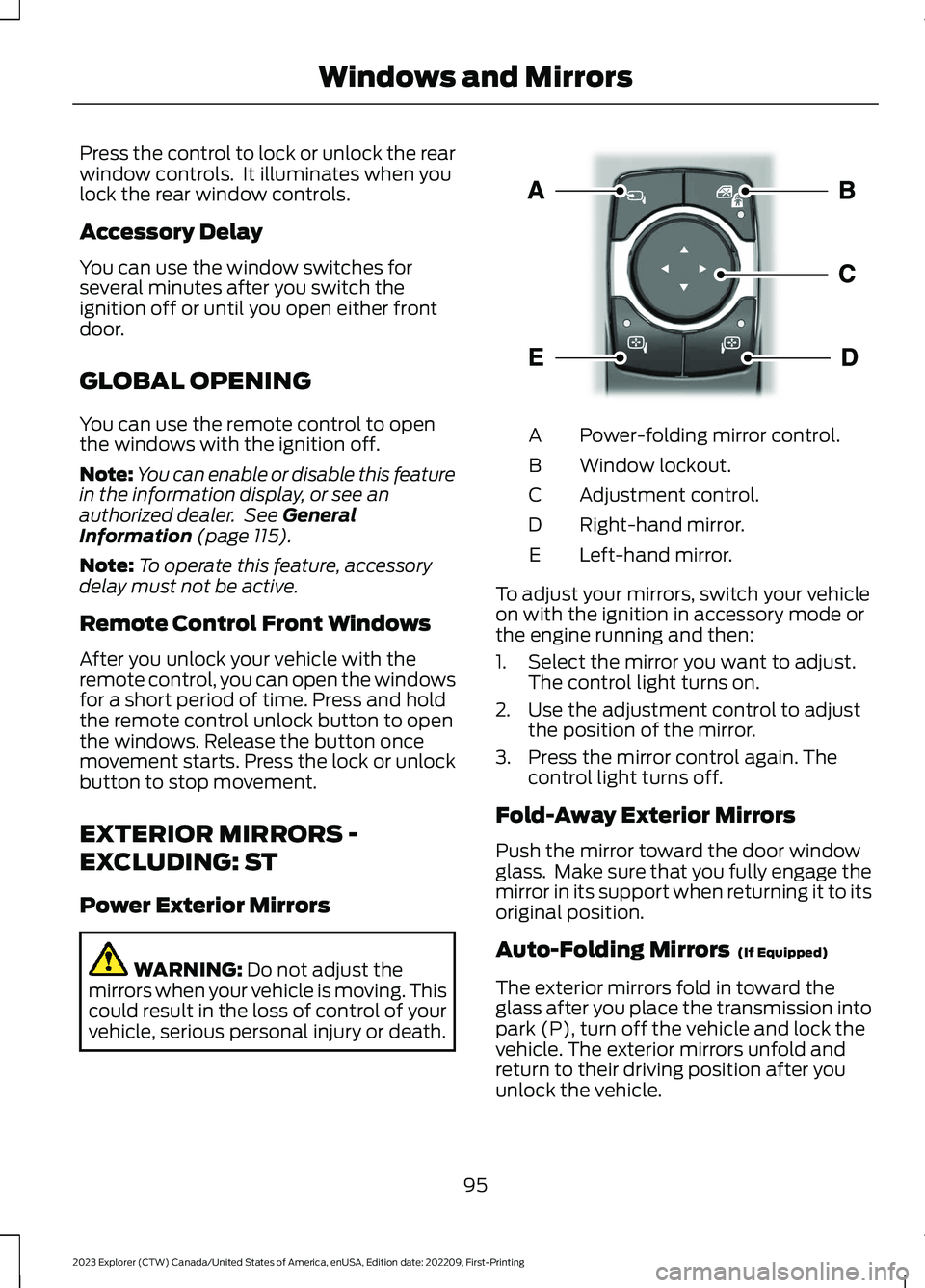
Power-folding mirror control.A
Window lockout.B
Adjustment control.C
Right-hand mirror.D
Left-hand mirror.E
To adjust your mirrors, switch your vehicleon with the ignition in accessory mode orthe engine running and then:
1.Select the mirror you want to adjust.The control light turns on.
2.Use the adjustment control to adjustthe position of the mirror.
3.Press the mirror control again. Thecontrol light turns off.
Fold-Away Exterior Mirrors
Push the mirror toward the door windowglass. Make sure that you fully engage themirror in its support when returning it to itsoriginal position.
Auto-Folding Mirrors (If Equipped)
The exterior mirrors fold in toward theglass after you place the transmission intopark (P), turn off the vehicle and lock thevehicle. The exterior mirrors unfold andreturn to their driving position after youunlock the vehicle.
95
2023 Explorer (CTW) Canada/United States of America, enUSA, Edition date: 202209, First-PrintingWindows and MirrorsE295322
Page 101 of 573
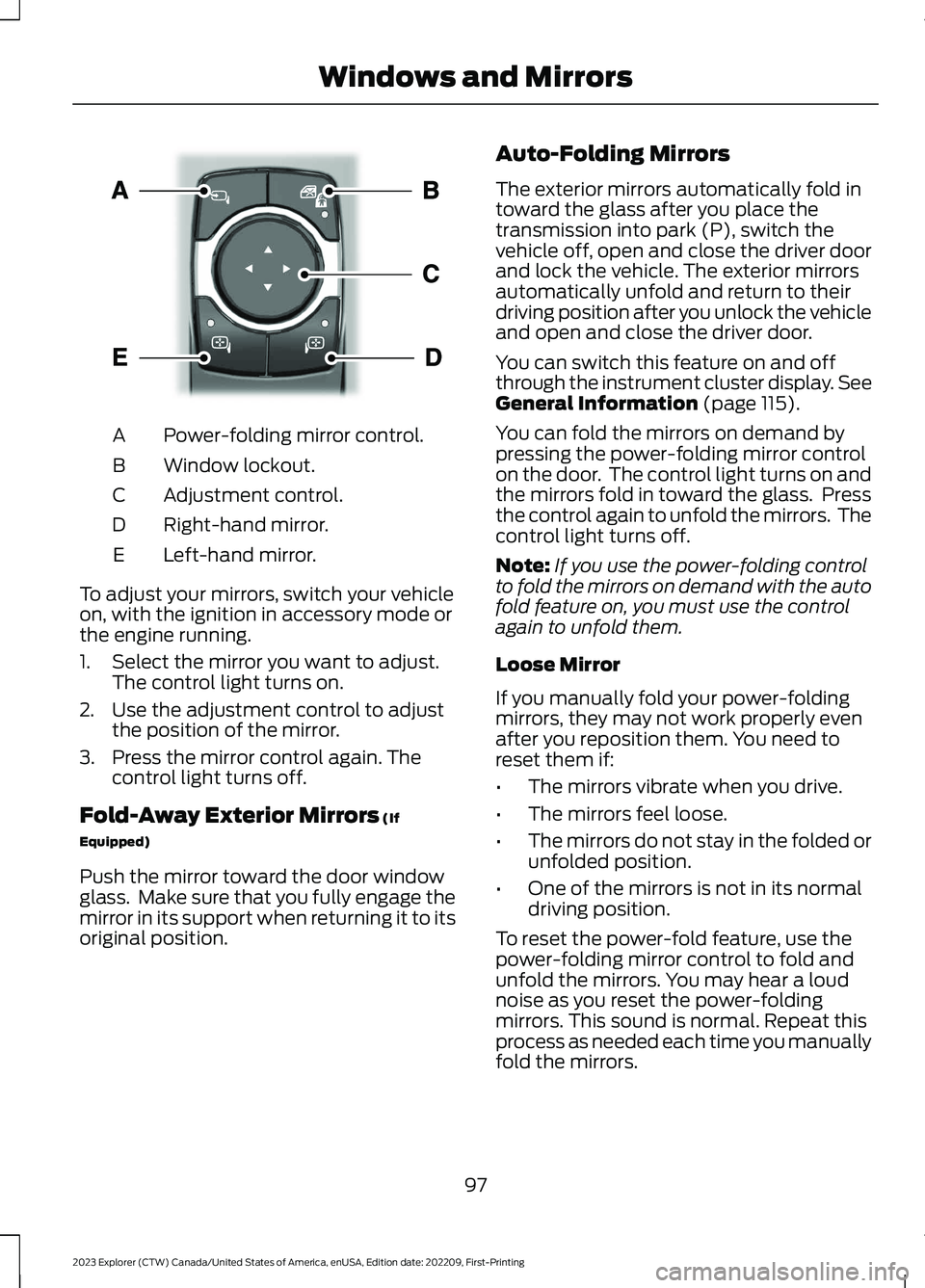
Power-folding mirror control.A
Window lockout.B
Adjustment control.C
Right-hand mirror.D
Left-hand mirror.E
To adjust your mirrors, switch your vehicleon, with the ignition in accessory mode orthe engine running.
1.Select the mirror you want to adjust.The control light turns on.
2.Use the adjustment control to adjustthe position of the mirror.
3.Press the mirror control again. Thecontrol light turns off.
Fold-Away Exterior Mirrors (If
Equipped)
Push the mirror toward the door windowglass. Make sure that you fully engage themirror in its support when returning it to itsoriginal position.
Auto-Folding Mirrors
The exterior mirrors automatically fold intoward the glass after you place thetransmission into park (P), switch thevehicle off, open and close the driver doorand lock the vehicle. The exterior mirrorsautomatically unfold and return to theirdriving position after you unlock the vehicleand open and close the driver door.
You can switch this feature on and offthrough the instrument cluster display. SeeGeneral Information (page 115).
You can fold the mirrors on demand bypressing the power-folding mirror controlon the door. The control light turns on andthe mirrors fold in toward the glass. Pressthe control again to unfold the mirrors. Thecontrol light turns off.
Note:If you use the power-folding controlto fold the mirrors on demand with the autofold feature on, you must use the controlagain to unfold them.
Loose Mirror
If you manually fold your power-foldingmirrors, they may not work properly evenafter you reposition them. You need toreset them if:
•The mirrors vibrate when you drive.
•The mirrors feel loose.
•The mirrors do not stay in the folded orunfolded position.
•One of the mirrors is not in its normaldriving position.
To reset the power-fold feature, use thepower-folding mirror control to fold andunfold the mirrors. You may hear a loudnoise as you reset the power-foldingmirrors. This sound is normal. Repeat thisprocess as needed each time you manuallyfold the mirrors.
97
2023 Explorer (CTW) Canada/United States of America, enUSA, Edition date: 202209, First-PrintingWindows and MirrorsE295322
Page 110 of 573
On (white light): Illuminates when youswitch on the adaptive cruise controlsystem. Turns off when you switch thecruise control system off.
Engaged (green light): Illuminates whenyou engage the adaptive cruise controlsystem. Turns off when you disengage thecruise control system.
Anti-Lock Braking System
If it illuminates when you aredriving, this indicates a systemerror. You continue to have thenormal braking (without ABS) unless thebrake system warning lamp alsoilluminates. Have the system checked.
Automatic High Beam Control
Illuminates when this feature ison. See What Is AutomaticHigh Beam Control (page 92).
Auto Hold Active
Illuminates when the systemholds your vehicle stationary.
Auto Hold Unavailable
Illuminates when the system ison, but unavailable to hold yourvehicle stationary.
Auto Start-stop (If Equipped)
Illuminates when the engineshuts down or in conjunctionwith a message.
Battery
If it illuminates while driving, itindicates a system error.Immediately switch off allunnecessary electrical equipment andhave the system checked.
Blind Spot Monitor
Illuminates when you switch thisfeature off or in conjunction witha message. See Blind SpotInformation System (page 259).
Brake System Warning Lamp
WARNING: Driving your vehiclewith the warning lamp on is dangerous.A significant decrease in brakingperformance may occur. It may take youlonger to stop your vehicle. Have yourvehicle checked as soon as possible.Driving extended distances with theparking brake engaged can cause brakefailure and the risk of personal injury.
Note:Indicators vary depending on region.
This lamp is a dual function lamp andilluminates when:
•You apply the parking brake with theignition on.
•Your vehicle has a brake fault or lowbrake fluid level, regardless of parkingbrake position.
If the lamp illuminates when youare moving, you may have theparking brake applied. Make surethe parking brake is off. Haveyour vehicle checked as soon aspossible if the lamp continues toilluminate.
106
2023 Explorer (CTW) Canada/United States of America, enUSA, Edition date: 202209, First-PrintingInstrument ClusterE67020 E146105 E197933 E322410 E197934 E322411 E121377 E67021 E151262 E270480 E67024
Page 111 of 573
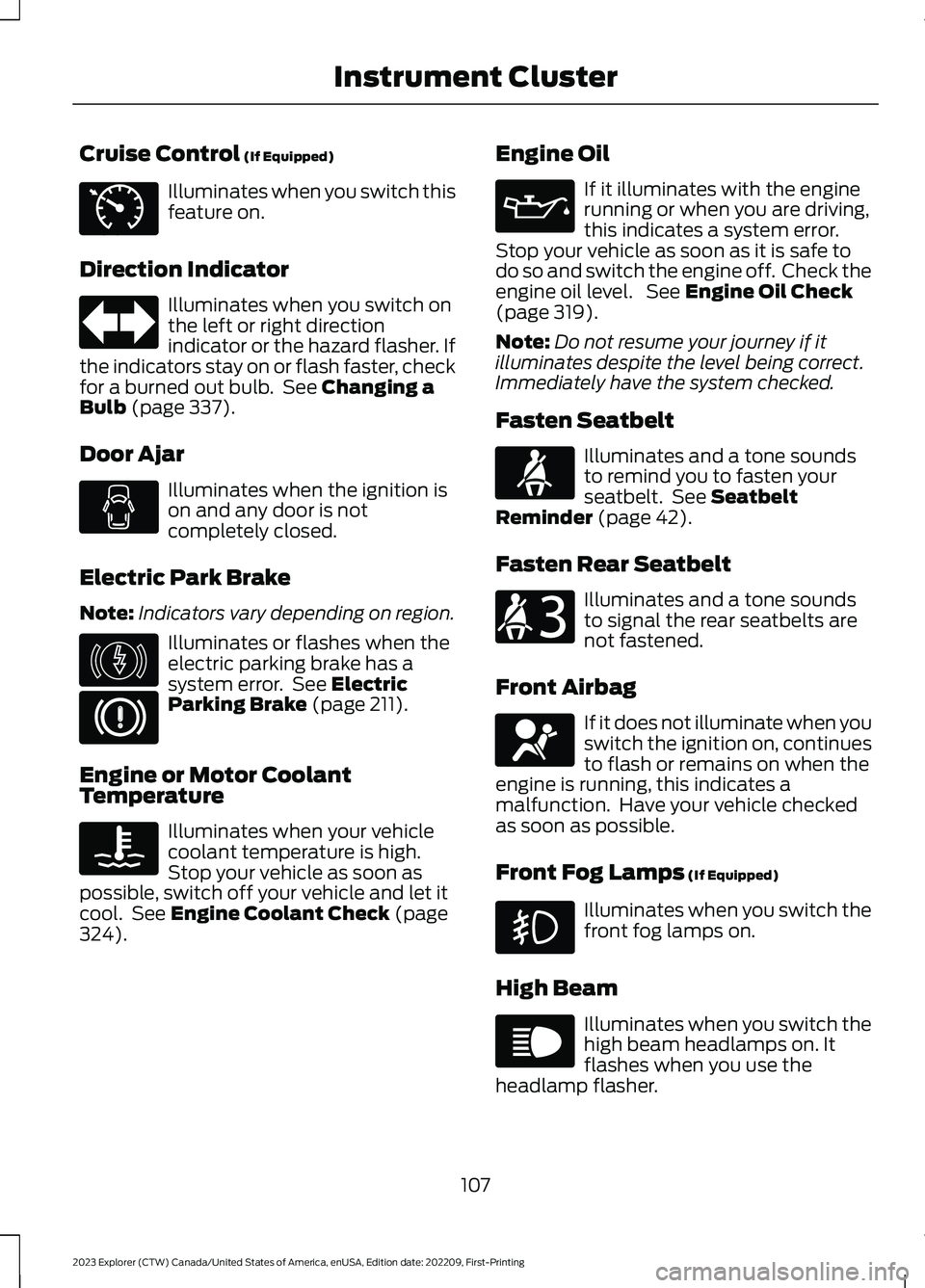
Cruise Control (If Equipped)
Illuminates when you switch thisfeature on.
Direction Indicator
Illuminates when you switch onthe left or right directionindicator or the hazard flasher. Ifthe indicators stay on or flash faster, checkfor a burned out bulb. See Changing aBulb (page 337).
Door Ajar
Illuminates when the ignition ison and any door is notcompletely closed.
Electric Park Brake
Note:Indicators vary depending on region.
Illuminates or flashes when theelectric parking brake has asystem error. See ElectricParking Brake (page 211).
Engine or Motor CoolantTemperature
Illuminates when your vehiclecoolant temperature is high.Stop your vehicle as soon aspossible, switch off your vehicle and let itcool. See Engine Coolant Check (page324).
Engine Oil
If it illuminates with the enginerunning or when you are driving,this indicates a system error.Stop your vehicle as soon as it is safe todo so and switch the engine off. Check theengine oil level. See Engine Oil Check(page 319).
Note:Do not resume your journey if itilluminates despite the level being correct.Immediately have the system checked.
Fasten Seatbelt
Illuminates and a tone soundsto remind you to fasten yourseatbelt. See SeatbeltReminder (page 42).
Fasten Rear Seatbelt
Illuminates and a tone soundsto signal the rear seatbelts arenot fastened.
Front Airbag
If it does not illuminate when youswitch the ignition on, continuesto flash or remains on when theengine is running, this indicates amalfunction. Have your vehicle checkedas soon as possible.
Front Fog Lamps (If Equipped)
Illuminates when you switch thefront fog lamps on.
High Beam
Illuminates when you switch thehigh beam headlamps on. Itflashes when you use theheadlamp flasher.
107
2023 Explorer (CTW) Canada/United States of America, enUSA, Edition date: 202209, First-PrintingInstrument ClusterE71340 E67018 E146190 E67024 E103308 E67022 E71880 E206718 E67017 E67019
Page 112 of 573
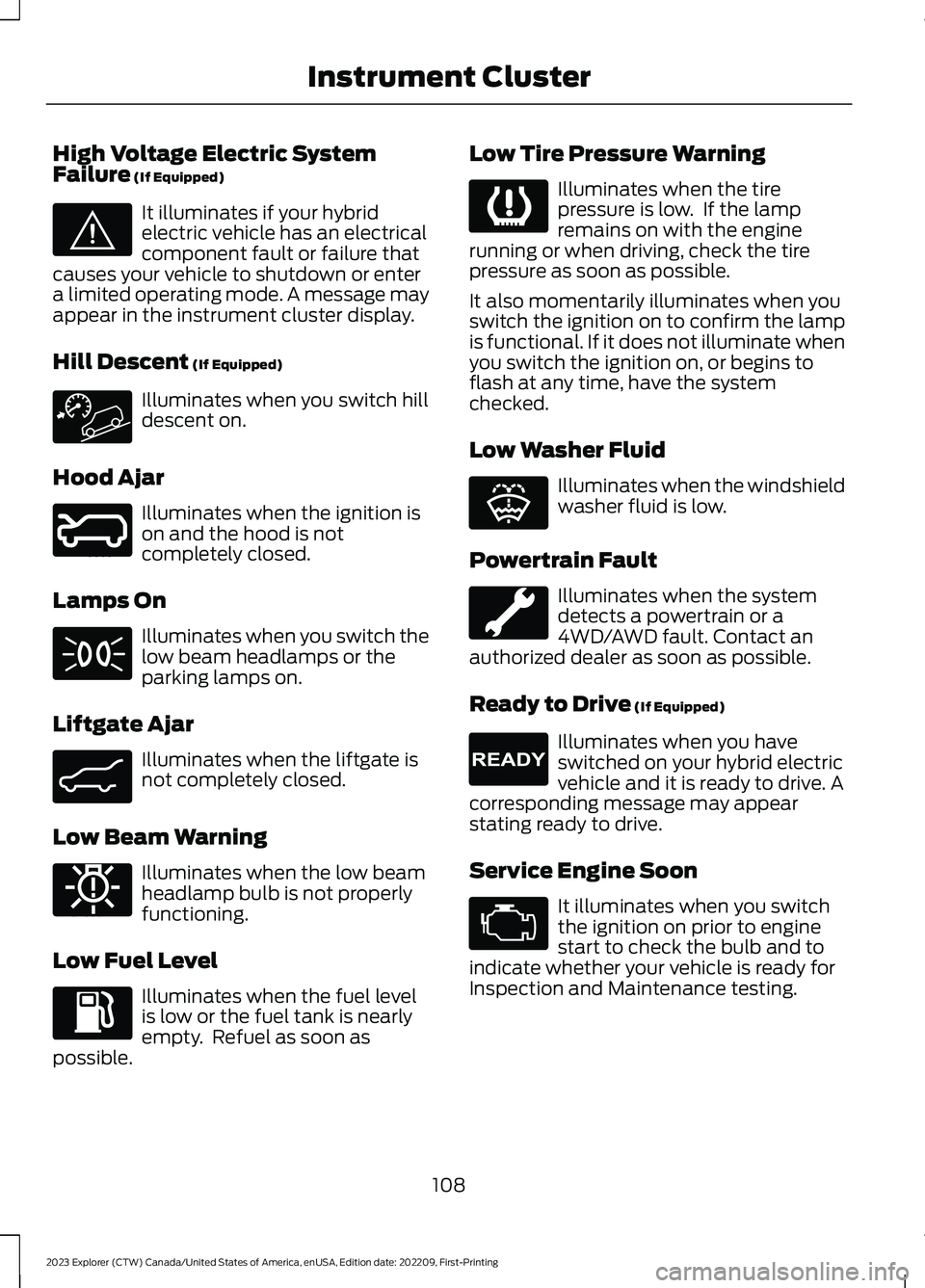
High Voltage Electric SystemFailure (If Equipped)
It illuminates if your hybridelectric vehicle has an electricalcomponent fault or failure thatcauses your vehicle to shutdown or entera limited operating mode. A message mayappear in the instrument cluster display.
Hill Descent (If Equipped)
Illuminates when you switch hilldescent on.
Hood Ajar
Illuminates when the ignition ison and the hood is notcompletely closed.
Lamps On
Illuminates when you switch thelow beam headlamps or theparking lamps on.
Liftgate Ajar
Illuminates when the liftgate isnot completely closed.
Low Beam Warning
Illuminates when the low beamheadlamp bulb is not properlyfunctioning.
Low Fuel Level
Illuminates when the fuel levelis low or the fuel tank is nearlyempty. Refuel as soon aspossible.
Low Tire Pressure Warning
Illuminates when the tirepressure is low. If the lampremains on with the enginerunning or when driving, check the tirepressure as soon as possible.
It also momentarily illuminates when youswitch the ignition on to confirm the lampis functional. If it does not illuminate whenyou switch the ignition on, or begins toflash at any time, have the systemchecked.
Low Washer Fluid
Illuminates when the windshieldwasher fluid is low.
Powertrain Fault
Illuminates when the systemdetects a powertrain or a4WD/AWD fault. Contact anauthorized dealer as soon as possible.
Ready to Drive (If Equipped)
Illuminates when you haveswitched on your hybrid electricvehicle and it is ready to drive. Acorresponding message may appearstating ready to drive.
Service Engine Soon
It illuminates when you switchthe ignition on prior to enginestart to check the bulb and toindicate whether your vehicle is ready forInspection and Maintenance testing.
108
2023 Explorer (CTW) Canada/United States of America, enUSA, Edition date: 202209, First-PrintingInstrument ClusterE144693 E246598 E71341 E162453 E181350 E139232 E132353 E224090 E67028
Page 113 of 573
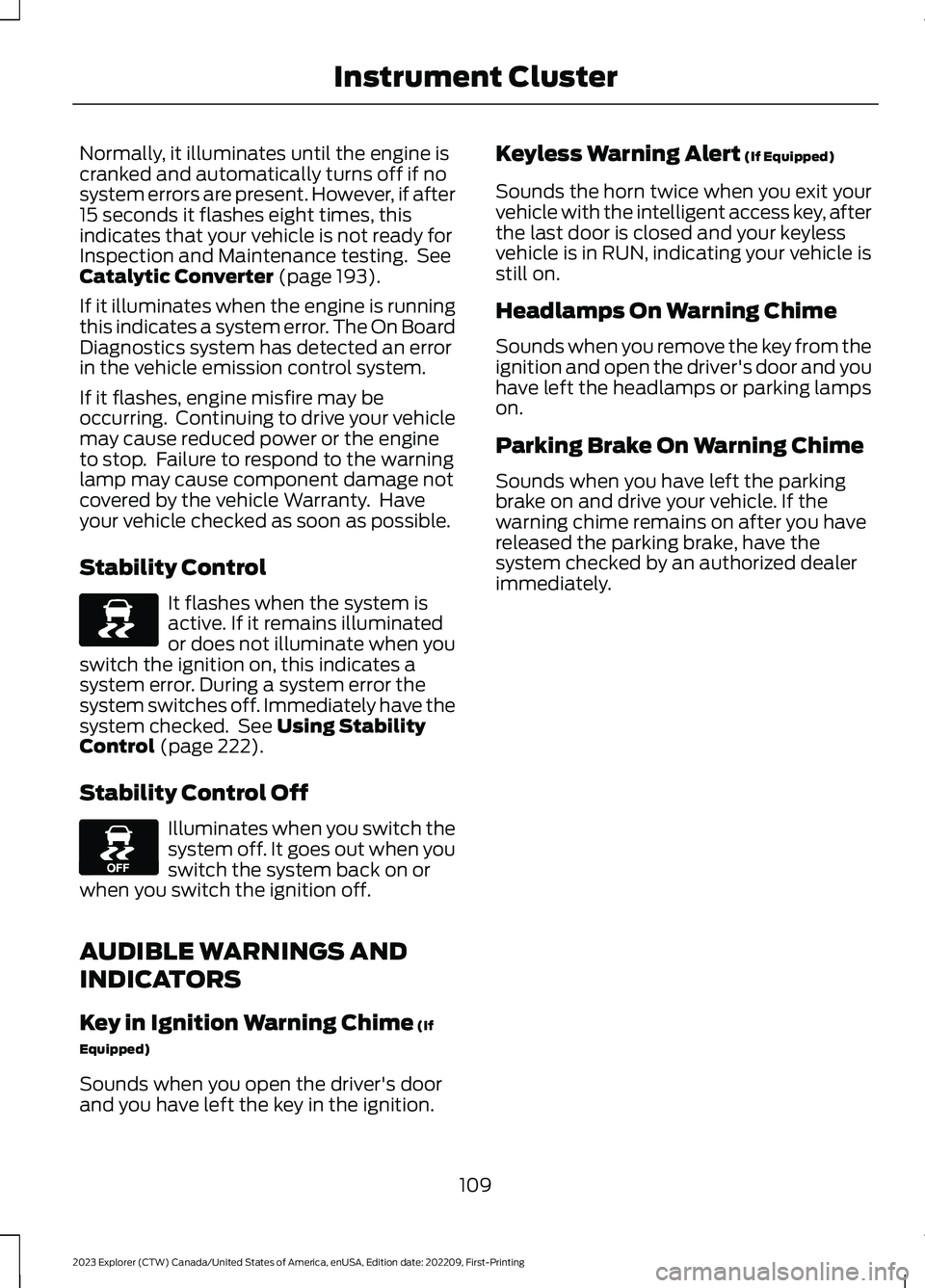
Normally, it illuminates until the engine iscranked and automatically turns off if nosystem errors are present. However, if after15 seconds it flashes eight times, thisindicates that your vehicle is not ready forInspection and Maintenance testing. SeeCatalytic Converter (page 193).
If it illuminates when the engine is runningthis indicates a system error. The On BoardDiagnostics system has detected an errorin the vehicle emission control system.
If it flashes, engine misfire may beoccurring. Continuing to drive your vehiclemay cause reduced power or the engineto stop. Failure to respond to the warninglamp may cause component damage notcovered by the vehicle Warranty. Haveyour vehicle checked as soon as possible.
Stability Control
It flashes when the system isactive. If it remains illuminatedor does not illuminate when youswitch the ignition on, this indicates asystem error. During a system error thesystem switches off. Immediately have thesystem checked. See Using StabilityControl (page 222).
Stability Control Off
Illuminates when you switch thesystem off. It goes out when youswitch the system back on orwhen you switch the ignition off.
AUDIBLE WARNINGS AND
INDICATORS
Key in Ignition Warning Chime (If
Equipped)
Sounds when you open the driver's doorand you have left the key in the ignition.
Keyless Warning Alert (If Equipped)
Sounds the horn twice when you exit yourvehicle with the intelligent access key, afterthe last door is closed and your keylessvehicle is in RUN, indicating your vehicle isstill on.
Headlamps On Warning Chime
Sounds when you remove the key from theignition and open the driver's door and youhave left the headlamps or parking lampson.
Parking Brake On Warning Chime
Sounds when you have left the parkingbrake on and drive your vehicle. If thewarning chime remains on after you havereleased the parking brake, have thesystem checked by an authorized dealerimmediately.
109
2023 Explorer (CTW) Canada/United States of America, enUSA, Edition date: 202209, First-PrintingInstrument ClusterE138639 E130458
Page 126 of 573
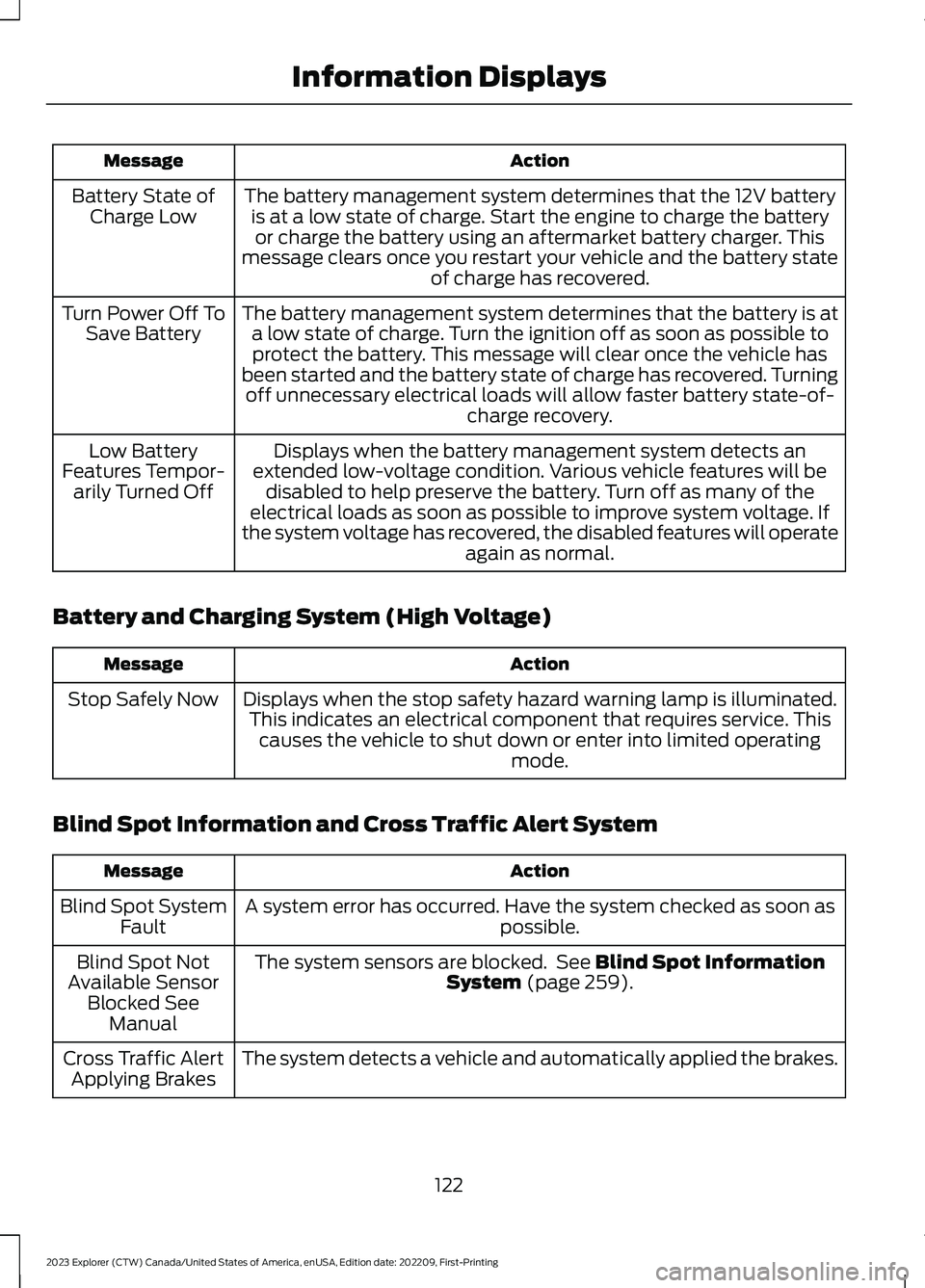
ActionMessage
The battery management system determines that the 12V batteryis at a low state of charge. Start the engine to charge the batteryor charge the battery using an aftermarket battery charger. Thismessage clears once you restart your vehicle and the battery stateof charge has recovered.
Battery State ofCharge Low
The battery management system determines that the battery is ata low state of charge. Turn the ignition off as soon as possible toprotect the battery. This message will clear once the vehicle hasbeen started and the battery state of charge has recovered. Turningoff unnecessary electrical loads will allow faster battery state-of-charge recovery.
Turn Power Off ToSave Battery
Displays when the battery management system detects anextended low-voltage condition. Various vehicle features will bedisabled to help preserve the battery. Turn off as many of theelectrical loads as soon as possible to improve system voltage. Ifthe system voltage has recovered, the disabled features will operateagain as normal.
Low BatteryFeatures Tempor-arily Turned Off
Battery and Charging System (High Voltage)
ActionMessage
Displays when the stop safety hazard warning lamp is illuminated.This indicates an electrical component that requires service. Thiscauses the vehicle to shut down or enter into limited operatingmode.
Stop Safely Now
Blind Spot Information and Cross Traffic Alert System
ActionMessage
A system error has occurred. Have the system checked as soon aspossible.Blind Spot SystemFault
The system sensors are blocked. See Blind Spot InformationSystem (page 259).Blind Spot NotAvailable SensorBlocked SeeManual
The system detects a vehicle and automatically applied the brakes.Cross Traffic AlertApplying Brakes
122
2023 Explorer (CTW) Canada/United States of America, enUSA, Edition date: 202209, First-PrintingInformation Displays
Page 130 of 573
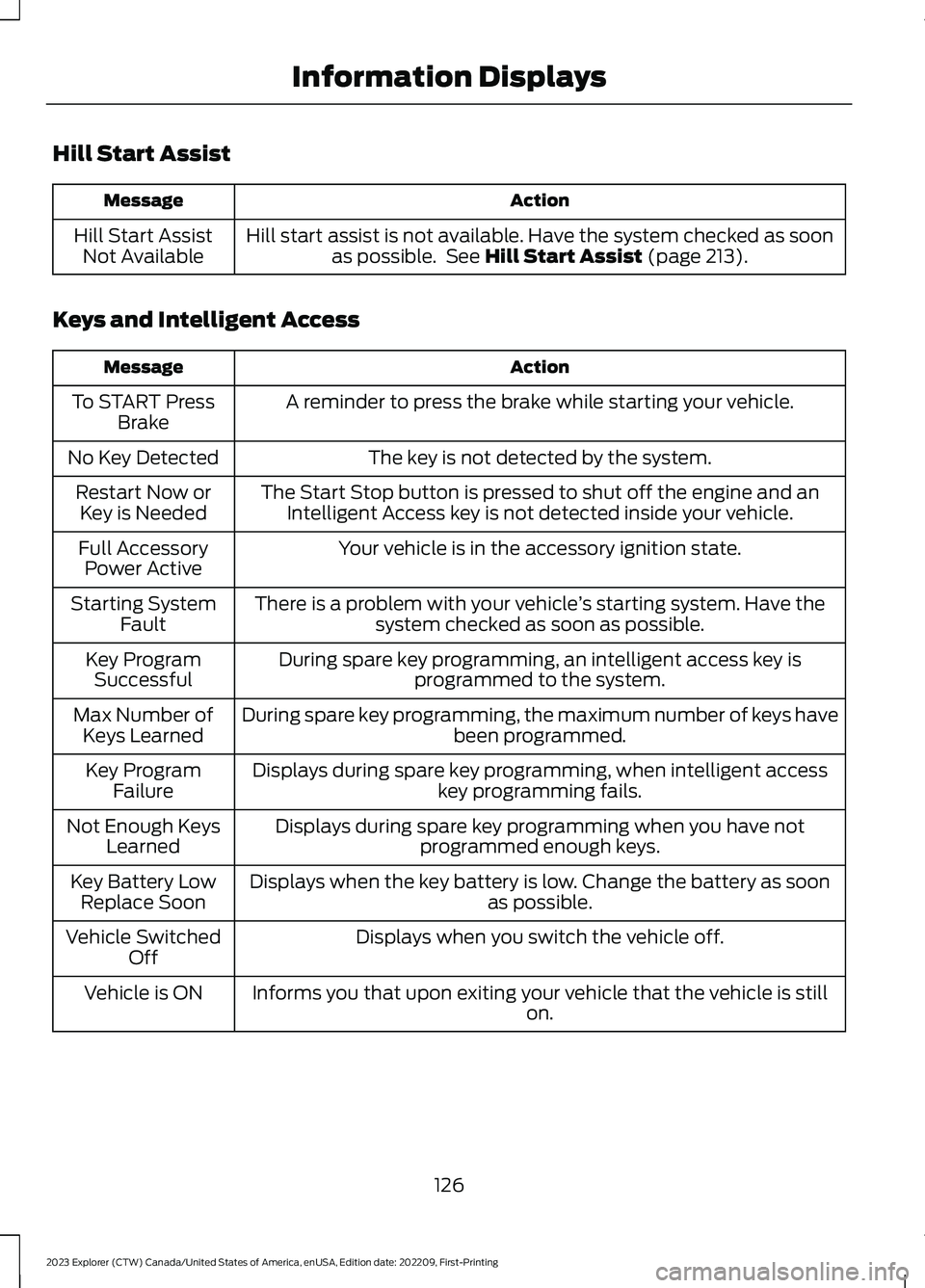
Hill Start Assist
ActionMessage
Hill start assist is not available. Have the system checked as soonas possible. See Hill Start Assist (page 213).Hill Start AssistNot Available
Keys and Intelligent Access
ActionMessage
A reminder to press the brake while starting your vehicle.To START PressBrake
The key is not detected by the system.No Key Detected
The Start Stop button is pressed to shut off the engine and anIntelligent Access key is not detected inside your vehicle.Restart Now orKey is Needed
Your vehicle is in the accessory ignition state.Full AccessoryPower Active
There is a problem with your vehicle’s starting system. Have thesystem checked as soon as possible.Starting SystemFault
During spare key programming, an intelligent access key isprogrammed to the system.Key ProgramSuccessful
During spare key programming, the maximum number of keys havebeen programmed.Max Number ofKeys Learned
Displays during spare key programming, when intelligent accesskey programming fails.Key ProgramFailure
Displays during spare key programming when you have notprogrammed enough keys.Not Enough KeysLearned
Displays when the key battery is low. Change the battery as soonas possible.Key Battery LowReplace Soon
Displays when you switch the vehicle off.Vehicle SwitchedOff
Informs you that upon exiting your vehicle that the vehicle is stillon.Vehicle is ON
126
2023 Explorer (CTW) Canada/United States of America, enUSA, Edition date: 202209, First-PrintingInformation Displays
Page 137 of 573
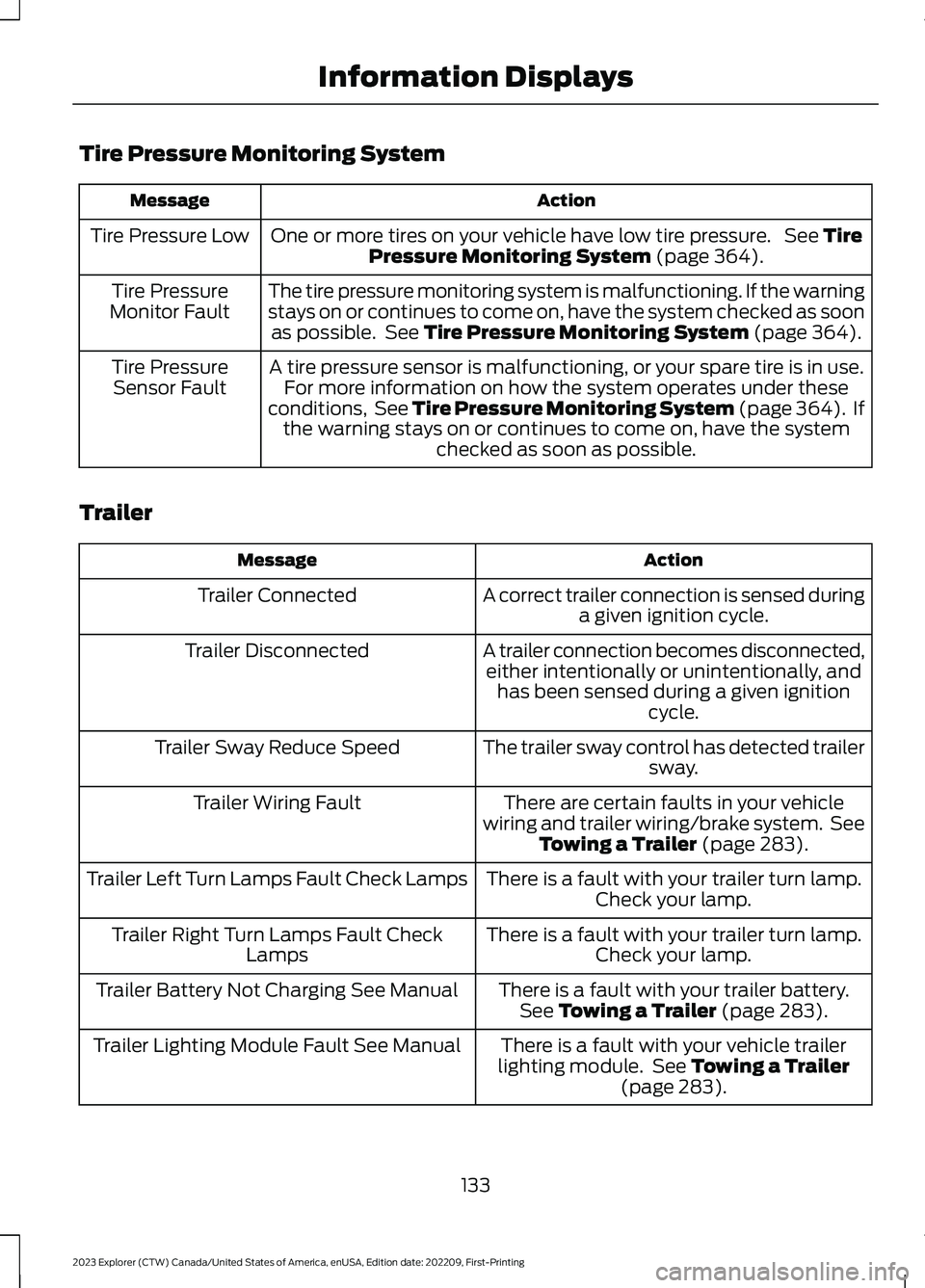
Tire Pressure Monitoring System
ActionMessage
One or more tires on your vehicle have low tire pressure. See TirePressure Monitoring System (page 364).Tire Pressure Low
The tire pressure monitoring system is malfunctioning. If the warningstays on or continues to come on, have the system checked as soonas possible. See Tire Pressure Monitoring System (page 364).
Tire PressureMonitor Fault
A tire pressure sensor is malfunctioning, or your spare tire is in use.For more information on how the system operates under theseconditions, See Tire Pressure Monitoring System (page 364). Ifthe warning stays on or continues to come on, have the systemchecked as soon as possible.
Tire PressureSensor Fault
Trailer
ActionMessage
A correct trailer connection is sensed duringa given ignition cycle.Trailer Connected
A trailer connection becomes disconnected,either intentionally or unintentionally, andhas been sensed during a given ignitioncycle.
Trailer Disconnected
The trailer sway control has detected trailersway.Trailer Sway Reduce Speed
There are certain faults in your vehiclewiring and trailer wiring/brake system. SeeTowing a Trailer (page 283).
Trailer Wiring Fault
There is a fault with your trailer turn lamp.Check your lamp.Trailer Left Turn Lamps Fault Check Lamps
There is a fault with your trailer turn lamp.Check your lamp.Trailer Right Turn Lamps Fault CheckLamps
There is a fault with your trailer battery.See Towing a Trailer (page 283).Trailer Battery Not Charging See Manual
There is a fault with your vehicle trailerlighting module. See Towing a Trailer(page 283).
Trailer Lighting Module Fault See Manual
133
2023 Explorer (CTW) Canada/United States of America, enUSA, Edition date: 202209, First-PrintingInformation Displays