tow FORD EXPLORER 2023 Owner's Manual
[x] Cancel search | Manufacturer: FORD, Model Year: 2023, Model line: EXPLORER, Model: FORD EXPLORER 2023Pages: 573, PDF Size: 16.1 MB
Page 101 of 573
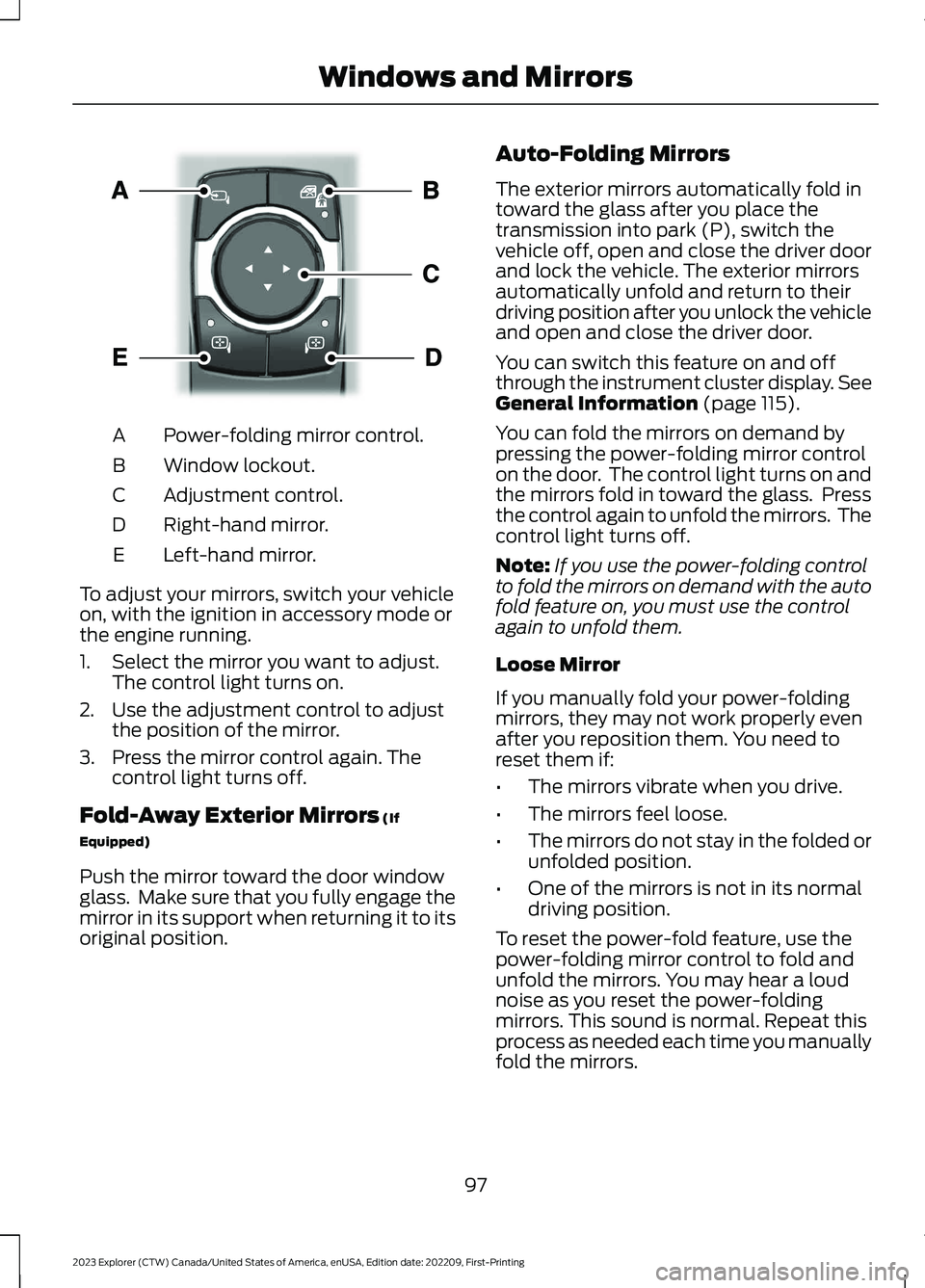
Power-folding mirror control.A
Window lockout.B
Adjustment control.C
Right-hand mirror.D
Left-hand mirror.E
To adjust your mirrors, switch your vehicleon, with the ignition in accessory mode orthe engine running.
1.Select the mirror you want to adjust.The control light turns on.
2.Use the adjustment control to adjustthe position of the mirror.
3.Press the mirror control again. Thecontrol light turns off.
Fold-Away Exterior Mirrors (If
Equipped)
Push the mirror toward the door windowglass. Make sure that you fully engage themirror in its support when returning it to itsoriginal position.
Auto-Folding Mirrors
The exterior mirrors automatically fold intoward the glass after you place thetransmission into park (P), switch thevehicle off, open and close the driver doorand lock the vehicle. The exterior mirrorsautomatically unfold and return to theirdriving position after you unlock the vehicleand open and close the driver door.
You can switch this feature on and offthrough the instrument cluster display. SeeGeneral Information (page 115).
You can fold the mirrors on demand bypressing the power-folding mirror controlon the door. The control light turns on andthe mirrors fold in toward the glass. Pressthe control again to unfold the mirrors. Thecontrol light turns off.
Note:If you use the power-folding controlto fold the mirrors on demand with the autofold feature on, you must use the controlagain to unfold them.
Loose Mirror
If you manually fold your power-foldingmirrors, they may not work properly evenafter you reposition them. You need toreset them if:
•The mirrors vibrate when you drive.
•The mirrors feel loose.
•The mirrors do not stay in the folded orunfolded position.
•One of the mirrors is not in its normaldriving position.
To reset the power-fold feature, use thepower-folding mirror control to fold andunfold the mirrors. You may hear a loudnoise as you reset the power-foldingmirrors. This sound is normal. Repeat thisprocess as needed each time you manuallyfold the mirrors.
97
2023 Explorer (CTW) Canada/United States of America, enUSA, Edition date: 202209, First-PrintingWindows and MirrorsE295322
Page 102 of 573
Heated Exterior Mirrors
See Heated Exterior Mirrors (page 142).
Memory Mirrors
You can save and recall the mirrorpositions through the memory function.See Memory Function (page 150).
Auto-dimming Feature (If Equipped)
The driver exterior mirror dims when theinterior auto-dimming mirror turns on.
Direction Indicator Mirrors (If Equipped)
When the vehicle is running, theforward-facing portion of the appropriatemirror housing blinks when you switch onthe direction indicator.
Puddle Lamps
The lamps on the bottom part of the mirrorhousing illuminate when you use yourremote control to unlock the doors or whenyou open a door.
360-Degree Camera (If Equipped)
See 360 Degree Camera (page 237).
Blind Spot Information System
See Blind Spot Information System(page 259).
INTERIOR MIRROR
WARNING: Do not adjust themirrors when your vehicle is moving. Thiscould result in the loss of control of yourvehicle, serious personal injury or death.
Note:Do not clean the mirror housing orglass with harsh abrasives, fuel or otherpetroleum-based cleaning products.
You can adjust the interior mirror to yourpreference. Some mirrors also have asecond pivot point. This lets you move themirror head up or down and from side toside.
Manual Dimming Mirror
Pull the tab below the mirror toward youto reduce the effect of bright light frombehind.
Automatic Dimming Mirror (If Equipped)
Note:Do not block the sensors on the frontand back of the mirror. A rear centerpassenger or raised rear center headrestraint may also block light from reachingthe sensor.
The mirror dims to reduce the effect ofbright light from behind. It returns tonormal when the bright light from behindis no longer present or if you shift intoreverse (R).
SUN VISORS
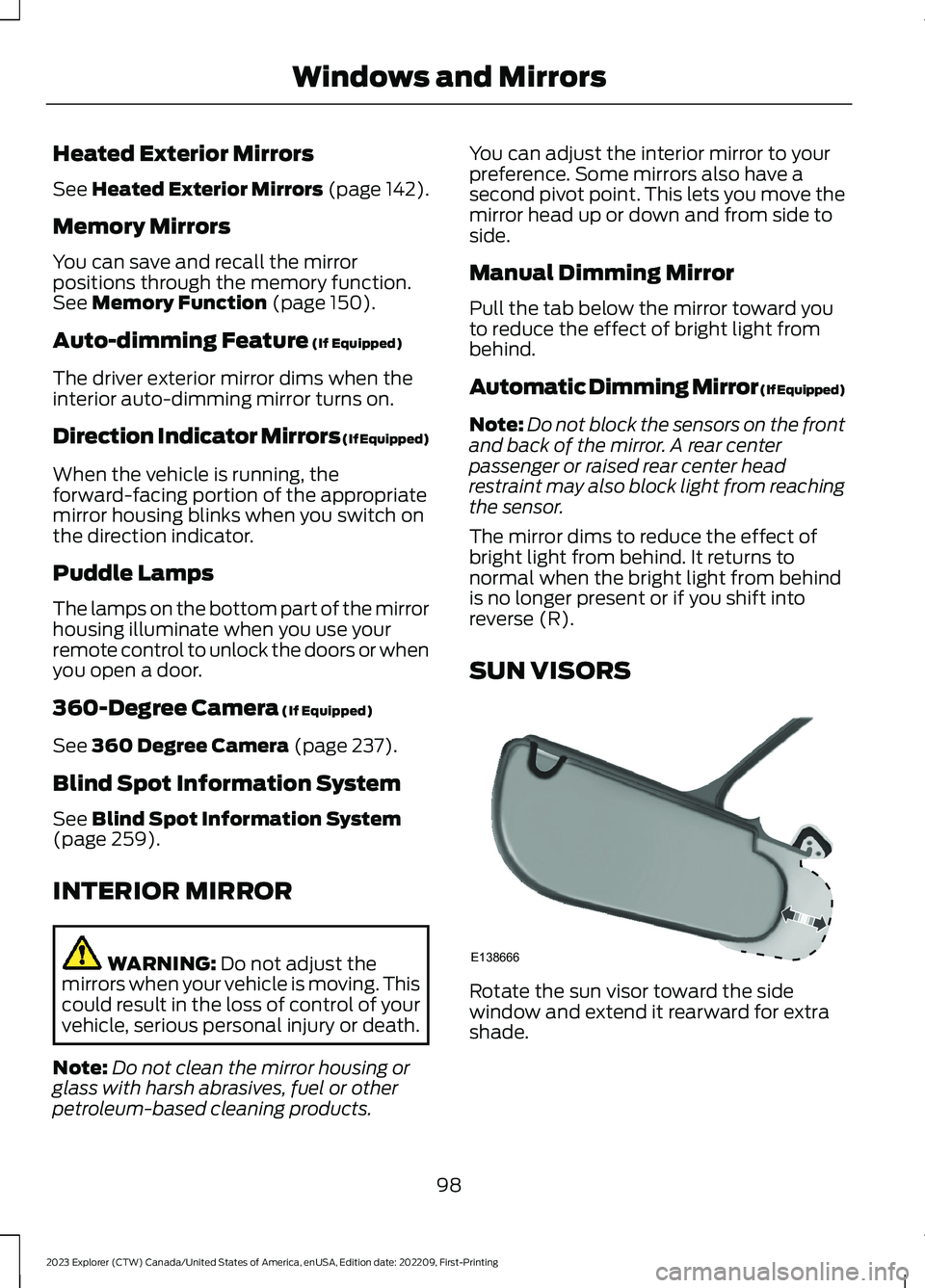
Rotate the sun visor toward the sidewindow and extend it rearward for extrashade.
98
2023 Explorer (CTW) Canada/United States of America, enUSA, Edition date: 202209, First-PrintingWindows and MirrorsE138666
Page 115 of 573
Select Screens
Select Screens
Menu options covered in Personalized Settings. See Personalized Settings (page117).
Audio
Audio
Menu options covered in the SYNC chapter. See General Information (page 427).
Navigation
Navigation
Menu options covered in the SYNC chapter. See General Information (page 427).
Phone
Phone
Menu options covered in the SYNC chapter. See General Information (page 427).
Settings
Settings
Brake Coach
Percent Oil Life Indication XXX%Hold Ok to ResetOil Life
Hold Ok to ResetTire Monitor
Hold Ok to InitializeNeutral Tow
Note:Additional vehicle settings areavailable through your touchscreen. SeeSettings (page 458).
111
2023 Explorer (CTW) Canada/United States of America, enUSA, Edition date: 202209, First-PrintingInformation Displays
Page 118 of 573
Phone
Phone
Menu options covered in the SYNC chapter. See General Information (page 427).
Settings
Settings
Brake Coach
Percent Oil Life Indication XXX%Hold Ok to ResetOil Life
Hold Ok to ResetTire Monitor
Hold Ok to InitializeNeutral Tow
Note:Additional vehicle settings areavailable through your touchscreen. SeeSettings (page 458).
Display Setup
Display Setup
Add Tachometer to View
Speedometer units
Hold Ok to ResetDriving History1
1 Hybrid only
Note:Additional display settings areavailable through your touchscreen. SeeSettings (page 458).
Hybrid Display Information (If
Equipped)
Unique hybrid vehicle information displayson your instrument cluster display whenyou shut off your vehicle or come to a stop.
Brake Coach
Appears after the vehicle has come to astop. It coaches you to brake in a mannerthat maximizes the amount of energyreturned through the regenerative brakingsystem.
The percent displayed indicates theregenerative braking efficiency, with 100%representing the maximum amount ofenergy recovery.
114
2023 Explorer (CTW) Canada/United States of America, enUSA, Edition date: 202209, First-PrintingInformation Displays
Page 137 of 573
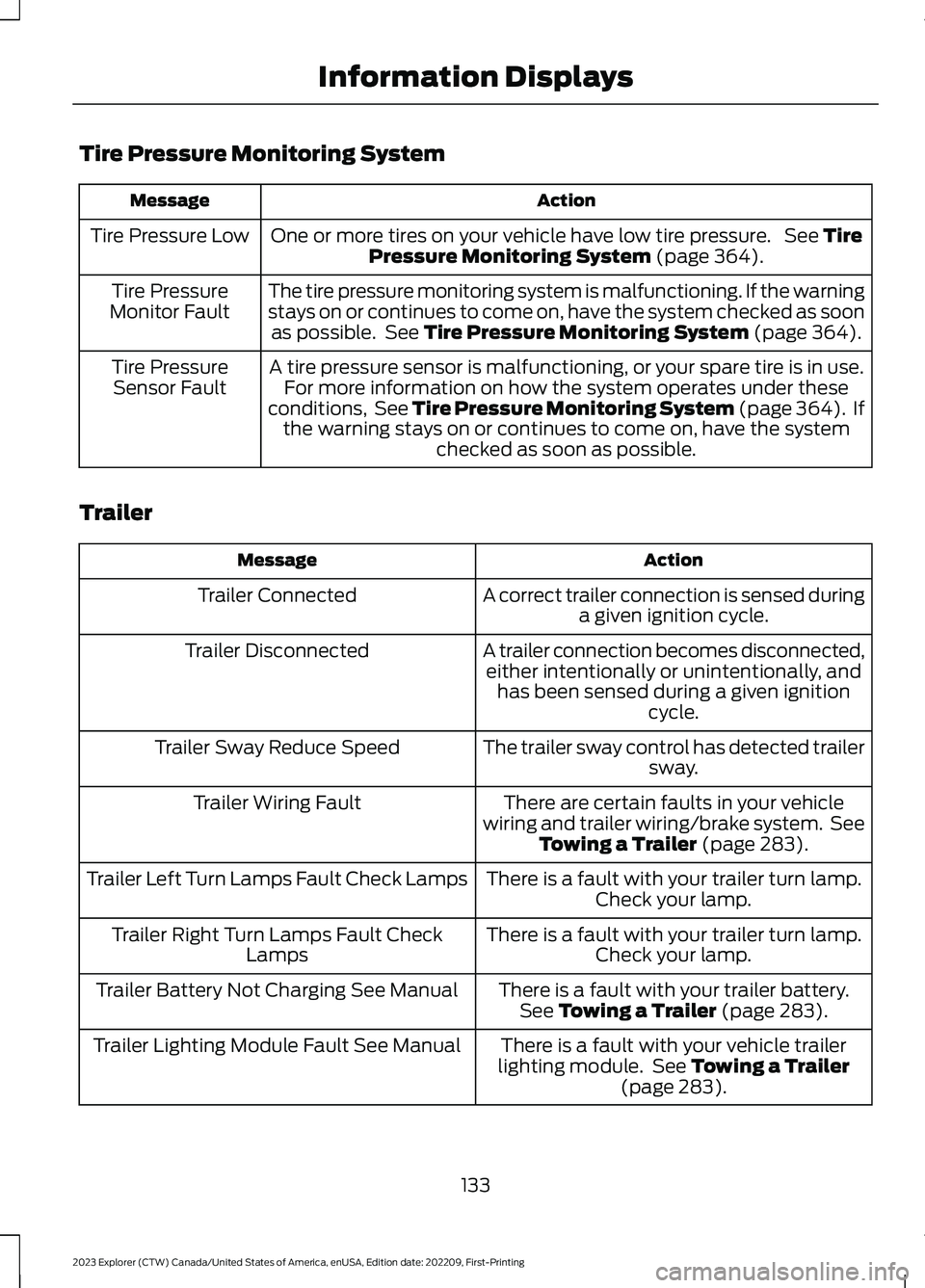
Tire Pressure Monitoring System
ActionMessage
One or more tires on your vehicle have low tire pressure. See TirePressure Monitoring System (page 364).Tire Pressure Low
The tire pressure monitoring system is malfunctioning. If the warningstays on or continues to come on, have the system checked as soonas possible. See Tire Pressure Monitoring System (page 364).
Tire PressureMonitor Fault
A tire pressure sensor is malfunctioning, or your spare tire is in use.For more information on how the system operates under theseconditions, See Tire Pressure Monitoring System (page 364). Ifthe warning stays on or continues to come on, have the systemchecked as soon as possible.
Tire PressureSensor Fault
Trailer
ActionMessage
A correct trailer connection is sensed duringa given ignition cycle.Trailer Connected
A trailer connection becomes disconnected,either intentionally or unintentionally, andhas been sensed during a given ignitioncycle.
Trailer Disconnected
The trailer sway control has detected trailersway.Trailer Sway Reduce Speed
There are certain faults in your vehiclewiring and trailer wiring/brake system. SeeTowing a Trailer (page 283).
Trailer Wiring Fault
There is a fault with your trailer turn lamp.Check your lamp.Trailer Left Turn Lamps Fault Check Lamps
There is a fault with your trailer turn lamp.Check your lamp.Trailer Right Turn Lamps Fault CheckLamps
There is a fault with your trailer battery.See Towing a Trailer (page 283).Trailer Battery Not Charging See Manual
There is a fault with your vehicle trailerlighting module. See Towing a Trailer(page 283).
Trailer Lighting Module Fault See Manual
133
2023 Explorer (CTW) Canada/United States of America, enUSA, Edition date: 202209, First-PrintingInformation Displays
Page 139 of 573
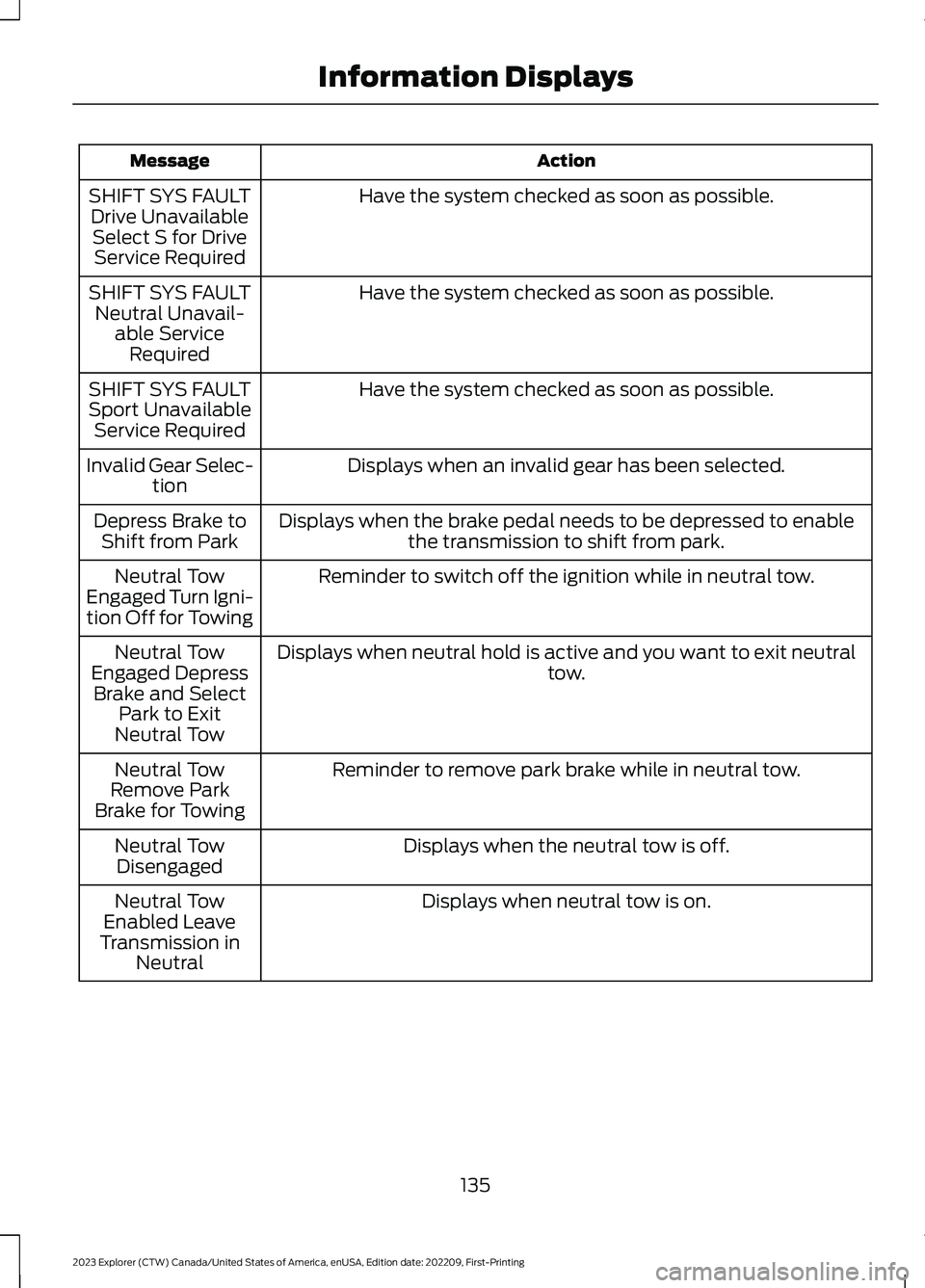
ActionMessage
Have the system checked as soon as possible.SHIFT SYS FAULTDrive UnavailableSelect S for DriveService Required
Have the system checked as soon as possible.SHIFT SYS FAULTNeutral Unavail-able ServiceRequired
Have the system checked as soon as possible.SHIFT SYS FAULTSport UnavailableService Required
Displays when an invalid gear has been selected.Invalid Gear Selec-tion
Displays when the brake pedal needs to be depressed to enablethe transmission to shift from park.Depress Brake toShift from Park
Reminder to switch off the ignition while in neutral tow.Neutral TowEngaged Turn Igni-tion Off for Towing
Displays when neutral hold is active and you want to exit neutraltow.Neutral TowEngaged DepressBrake and SelectPark to ExitNeutral Tow
Reminder to remove park brake while in neutral tow.Neutral TowRemove ParkBrake for Towing
Displays when the neutral tow is off.Neutral TowDisengaged
Displays when neutral tow is on.Neutral TowEnabled LeaveTransmission inNeutral
135
2023 Explorer (CTW) Canada/United States of America, enUSA, Edition date: 202209, First-PrintingInformation Displays
Page 147 of 573
WHAT IS THE CABIN AIR
FILTER
The cabin air filter improves the quality ofair in your vehicle by trapping dust, pollenand other particles.
REPLACING THE CABIN AIR
FILTER
Replace the filter at regular intervals. SeeScheduled Maintenance (page 476).
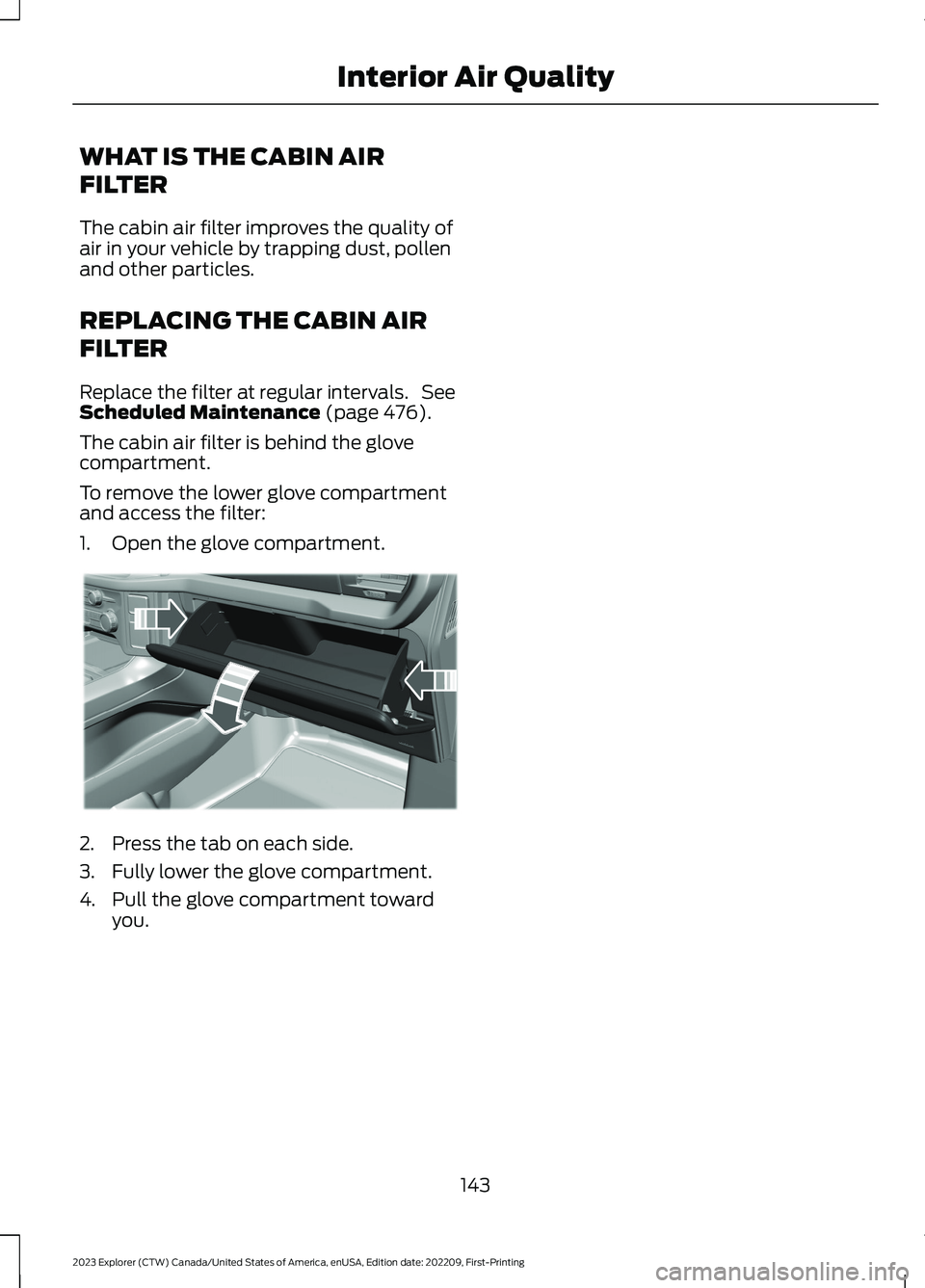
The cabin air filter is behind the glovecompartment.
To remove the lower glove compartmentand access the filter:
1.Open the glove compartment.
2.Press the tab on each side.
3.Fully lower the glove compartment.
4.Pull the glove compartment towardyou.
143
2023 Explorer (CTW) Canada/United States of America, enUSA, Edition date: 202209, First-PrintingInterior Air QualityE311296
Page 150 of 573
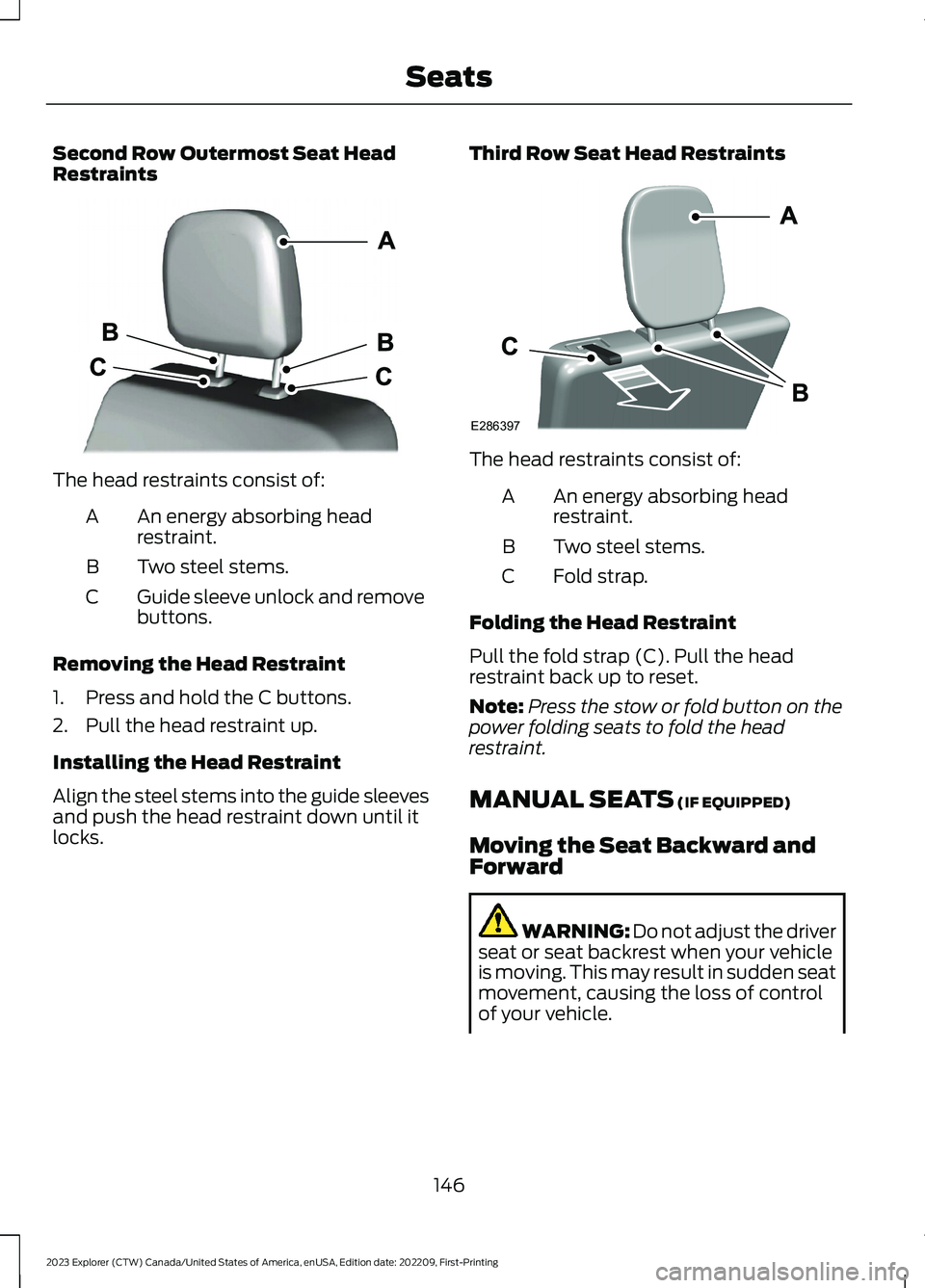
Second Row Outermost Seat HeadRestraints
The head restraints consist of:
An energy absorbing headrestraint.A
Two steel stems.B
Guide sleeve unlock and removebuttons.C
Removing the Head Restraint
1.Press and hold the C buttons.
2.Pull the head restraint up.
Installing the Head Restraint
Align the steel stems into the guide sleevesand push the head restraint down until itlocks.
Third Row Seat Head Restraints
The head restraints consist of:
An energy absorbing headrestraint.A
Two steel stems.B
Fold strap.C
Folding the Head Restraint
Pull the fold strap (C). Pull the headrestraint back up to reset.
Note:Press the stow or fold button on thepower folding seats to fold the headrestraint.
MANUAL SEATS (IF EQUIPPED)
Moving the Seat Backward andForward
WARNING: Do not adjust the driverseat or seat backrest when your vehicleis moving. This may result in sudden seatmovement, causing the loss of controlof your vehicle.
146
2023 Explorer (CTW) Canada/United States of America, enUSA, Edition date: 202209, First-PrintingSeatsE333253 E286397
Page 159 of 573
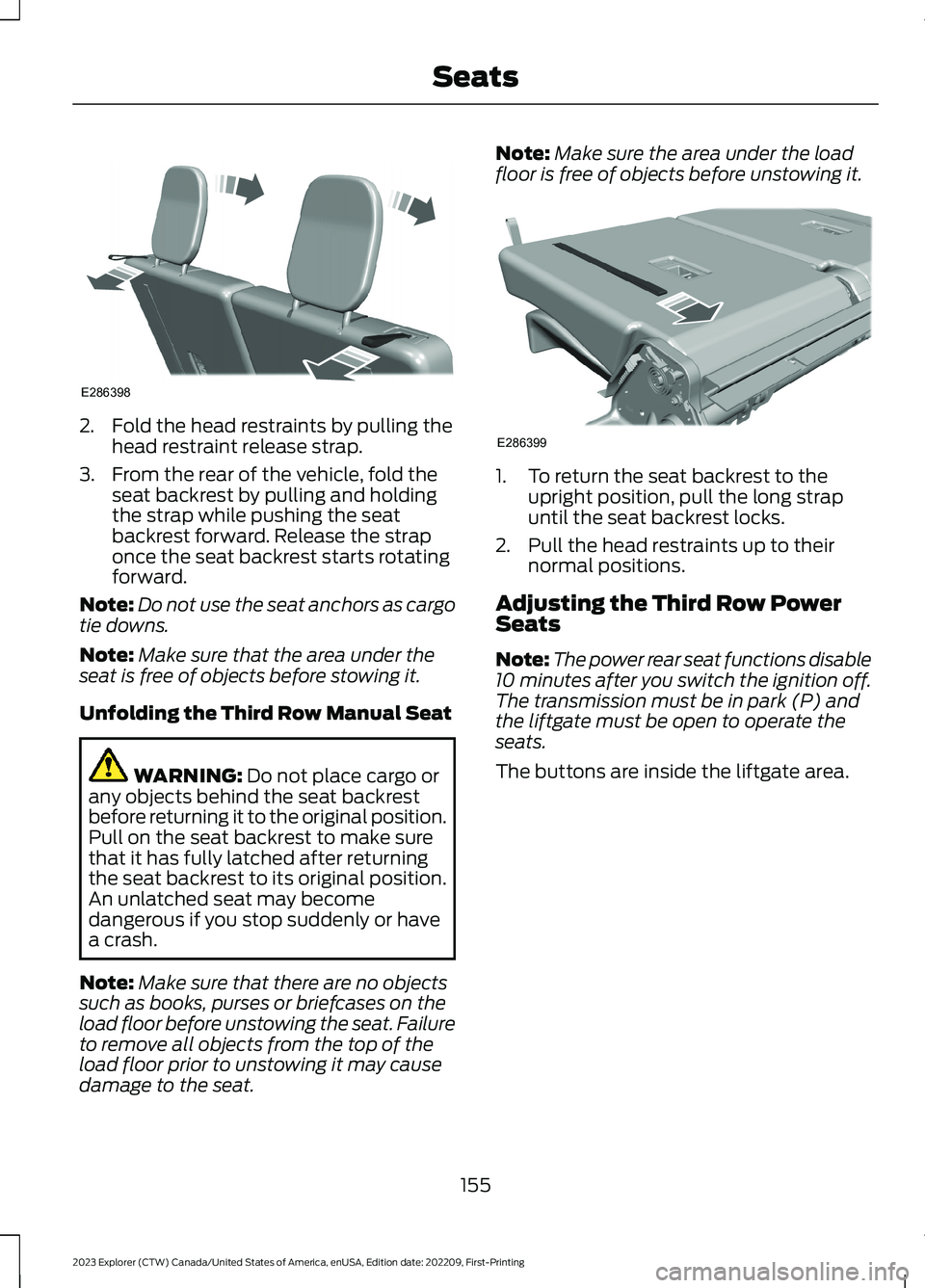
2.Fold the head restraints by pulling thehead restraint release strap.
3.From the rear of the vehicle, fold theseat backrest by pulling and holdingthe strap while pushing the seatbackrest forward. Release the straponce the seat backrest starts rotatingforward.
Note:Do not use the seat anchors as cargotie downs.
Note:Make sure that the area under theseat is free of objects before stowing it.
Unfolding the Third Row Manual Seat
WARNING: Do not place cargo orany objects behind the seat backrestbefore returning it to the original position.Pull on the seat backrest to make surethat it has fully latched after returningthe seat backrest to its original position.An unlatched seat may becomedangerous if you stop suddenly or havea crash.
Note:Make sure that there are no objectssuch as books, purses or briefcases on theload floor before unstowing the seat. Failureto remove all objects from the top of theload floor prior to unstowing it may causedamage to the seat.
Note:Make sure the area under the loadfloor is free of objects before unstowing it.
1.To return the seat backrest to theupright position, pull the long strapuntil the seat backrest locks.
2.Pull the head restraints up to theirnormal positions.
Adjusting the Third Row PowerSeats
Note:The power rear seat functions disable10 minutes after you switch the ignition off.The transmission must be in park (P) andthe liftgate must be open to operate theseats.
The buttons are inside the liftgate area.
155
2023 Explorer (CTW) Canada/United States of America, enUSA, Edition date: 202209, First-PrintingSeatsE286398 E286399
Page 171 of 573
CUP HOLDERS
Note:Stow items in the cupholderscarefully as items may become loose duringhard braking, acceleration or crashes,including hot drinks which may spill.
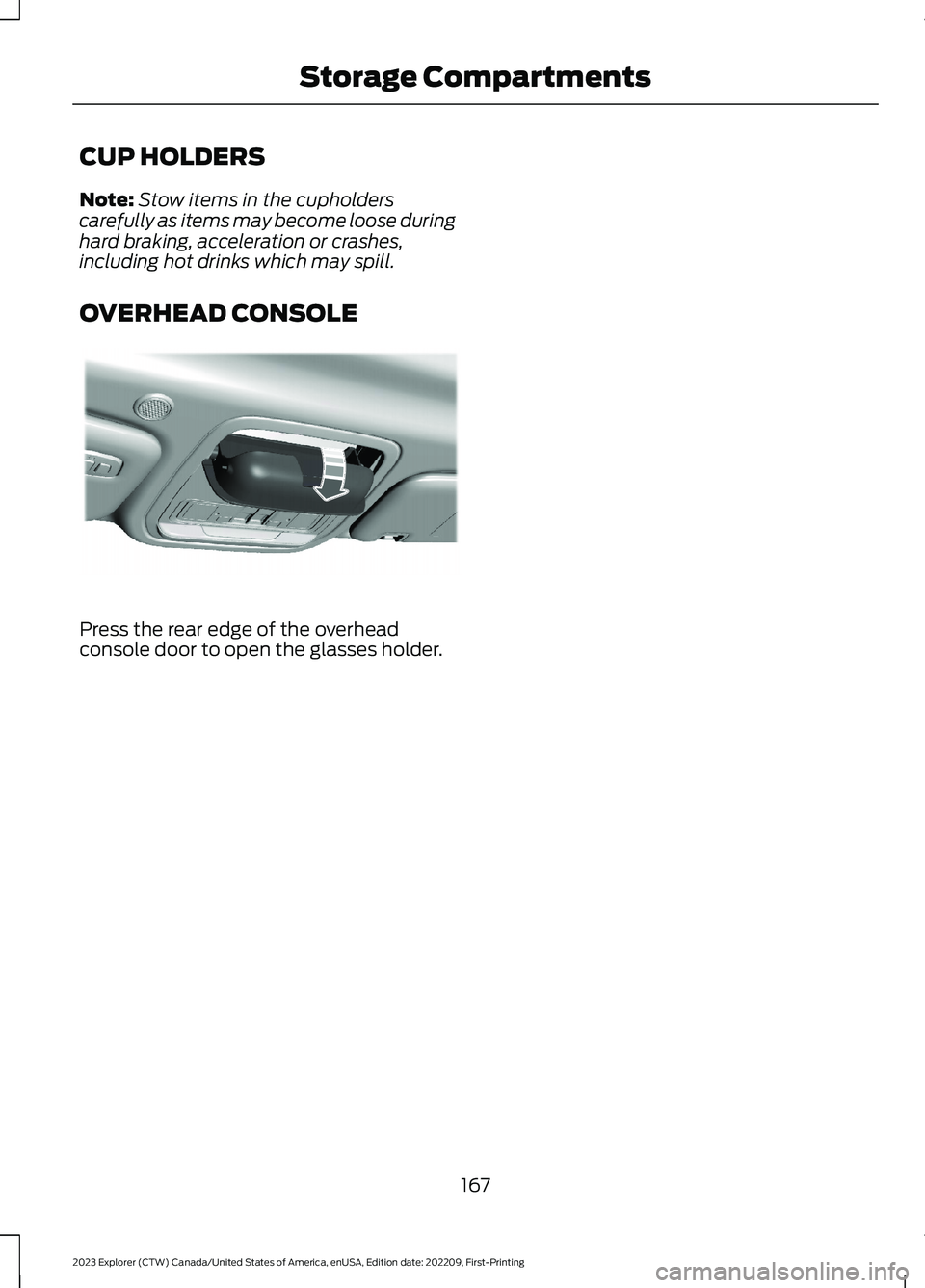
OVERHEAD CONSOLE
Press the rear edge of the overheadconsole door to open the glasses holder.
167
2023 Explorer (CTW) Canada/United States of America, enUSA, Edition date: 202209, First-PrintingStorage CompartmentsE307323