key FORD EXPLORER 2023 Repair Manual
[x] Cancel search | Manufacturer: FORD, Model Year: 2023, Model line: EXPLORER, Model: FORD EXPLORER 2023Pages: 573, PDF Size: 16.1 MB
Page 296 of 573
Vehicles Sold in Canada: GettingRoadside Assistance
To fully assist you should you have avehicle concern, Ford Motor Company ofCanada, Limited offers a complimentaryroadside assistance program. This programis eligible within Canada or the continentalUnited States.
The service is available 24 hours a day,seven days a week.
This program is separate from the NewVehicle Limited Warranty, but the coverageis concurrent with the powertrain coverageperiod of your vehicle. Canadian roadsidecoverage and benefits may differ from theU.S. coverage.
If you require more information, please callus in Canada at 1-800-665-2006, or visitour website at www.ford.ca.
HAZARD FLASHERS
Note:The hazard flashers operate whenthe ignition is in any position, or if the key isnot in the ignition. If used when the vehicleis not running, the battery loses charge. Asa result, there may be insufficient power torestart your vehicle.
The flasher control is on theinstrument panel. Use yourhazard flashers when yourvehicle is creating a safety hazard for othermotorists.
•Press the flasher control and all frontand rear direction indicators flash.
•Press the button again to switch themoff.
FUEL SHUTOFF
WARNING: If your vehicle has beeninvolved in a crash, have the fuel systemchecked. Failure to follow this instructioncould result in fire, personal injury ordeath.
Note:When you try to restart your vehicleafter a fuel shutoff, the vehicle makes surethat various systems are safe to restart.Once the vehicle determines the systemsare safe, then the vehicle allows you torestart.
Note:In the event that your vehicle doesnot restart after your third attempt, contacta qualified technician.
The fuel pump shutoff stops the flow offuel to the engine in the event of amoderate to severe crash. Not everyimpact causes a shutoff.
Should your vehicle shut off after a crash,you may restart your vehicle.
If your vehicle has a key system:
1.Switch off the ignition.
2.Switch to start position.
3.Switch off the ignition.
4.Switch on the ignition to re-enable thefuel pump.
5.If the vehicle does not start, repeatsteps 1 through 4.
If your vehicle has a push button startsystem:
1.Press START/STOP to switch off yourvehicle.
2.Press the brake pedal andSTART/STOP to switch on yourvehicle.
3.Remove your foot from the brake pedaland press START/STOP to switch offyour vehicle.
292
2023 Explorer (CTW) Canada/United States of America, enUSA, Edition date: 202209, First-PrintingRoadside EmergenciesE75790
Page 299 of 573
COLLISION, DAMAGE OR FIRE
EVENT
Guidance for Ford Motor CompanyElectric and Hybrid-ElectricVehicles Equipped With HighVoltage Batteries
(Vehicle Owner/Operator/GeneralPublic)Electric and Hybrid-Electric VehicleConsiderations
In the event of damage or fire involving anelectric vehicle or hybrid-electric vehicle:
•Always assume the high-voltagebattery and associated componentsare energized and fully charged.
•Exposed electrical components, wires,and high-voltage batteries presentpotential high-voltage shock hazards.
•Venting high-voltage battery vaporsare potentially toxic and flammable.
•Physical damage to the vehicle orhigh-voltage battery may result inimmediate or delayed release of toxic,flammable gases and fire.
Vehicle information and general safetypractices:
•Know the make and model of yourvehicle.
•Review the owner’s manual andbecome familiar with your vehicle’ssafety information and recommendedsafety practices.
•Do not attempt to repair damagedelectric and hybrid-electric vehiclesyourself.
Contact an authorized dealer.
Crashes
A crash or impact significant enough torequire an emergency response forconventional vehicles would also requirethe same response for an electric orhybrid-electric vehicle.
If possible:
•Move your vehicle to a safe, nearbylocation and remain on the scene.
•Roll down the windows beforeswitching your vehicle off.
•Place your vehicle in park (P), set theparking brake, switch off the vehicle,activate the hazard warning flashersand move your key(s) at least 15 ft(5 m) away from the vehicle.
Always:
•Call emergency assistance if neededand advise that an electric orhybrid-electric vehicle is involved.
•Exposed electrical components, wires,and high-voltage batteries presentpotential high-voltage shock hazards.
•Avoid contact with leaking fluids andgases, and remain out of the way ofoncoming traffic until emergencyresponders arrive.
•When emergency responders arrive,tell them that the vehicle involved is anelectric vehicle or hybrid-electricvehicle.
Fires
As with any vehicle, call emergencyassistance immediately if you see sparks,smoke or flames coming from the vehicle.Remain a safe distance from the vehicleand try to stay clear of the smoke.
•Exit the vehicle immediately.
•Advise emergency assistance that anelectric or hybrid-electric vehicle isinvolved.
295
2023 Explorer (CTW) Canada/United States of America, enUSA, Edition date: 202209, First-PrintingRoadside Emergencies
Page 315 of 573
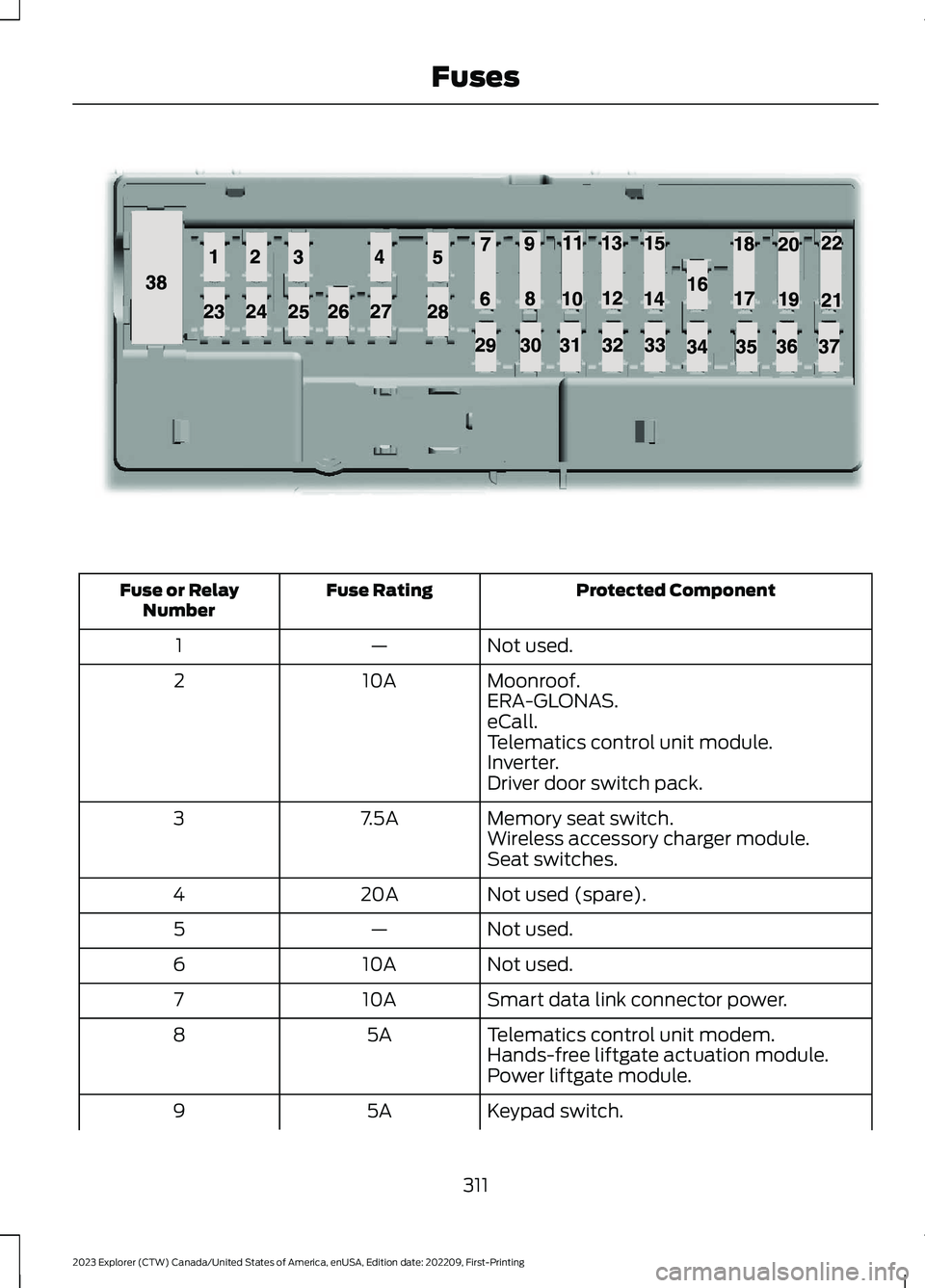
Protected ComponentFuse RatingFuse or RelayNumber
Not used.—1
Moonroof.10A2ERA-GLONAS.eCall.Telematics control unit module.Inverter.Driver door switch pack.
Memory seat switch.7.5A3Wireless accessory charger module.Seat switches.
Not used (spare).20A4
Not used.—5
Not used.10A6
Smart data link connector power.10A7
Telematics control unit modem.5A8Hands-free liftgate actuation module.Power liftgate module.
Keypad switch.5A9
311
2023 Explorer (CTW) Canada/United States of America, enUSA, Edition date: 202209, First-PrintingFusesE145984
Page 316 of 573
Protected ComponentFuse RatingFuse or RelayNumber
Rear climate control.
Not used.—10
Not used.—11
Climate control head.7.5A12Gear shift module.
Steering column control module.7.5A13Smart datalink connector.Instrument cluster.
Not used (spare).15A14
SYNC.15A15Integrated control panel.
Not used.—16
Headlamp control module.7.5A17
Not used (spare).7.5A18
Headlamp switch.5A19Push button ignition switch.
Ignition switch.5A20Telematics control unit module.Key inhibit solenoid lock.
Not used.5A21
Not used (spare).5A22
Not used (spare).30A23
Moonroof.30A24
Not used (spare).20A25
Not used (spare).30A26
Not used (spare).30A27
Not used (spare).30A28
Not used (spare).15A29
Trailer brake connector.5A30
312
2023 Explorer (CTW) Canada/United States of America, enUSA, Edition date: 202209, First-PrintingFuses
Page 352 of 573
Utility vehicles and trucks handledifferently than passenger cars in thevarious driving conditions that areencountered on streets, highways andoff-road. Utility vehicles and trucks are notdesigned for cornering at speeds as highas passenger cars any more than low-slungsports cars are designed to performsatisfactorily under off-road conditions.
Study your owner's manual and anysupplements for specific information aboutequipment features, instructions for safedriving and additional precautions toreduce the risk of an accident or seriousinjury.
Four-Wheel Drive system (ifequipped)
WARNING: Do not becomeoverconfident in the ability of four-wheeldrive vehicles. Although a four-wheeldrive vehicle may accelerate better thana two-wheel drive vehicle in low tractionsituations, it won't stop any faster thantwo-wheel drive vehicles. Always driveat a safe speed.
A vehicle equipped with Four-Wheel Drivehas the ability to use all four wheels topower itself. This increases traction whichmay enable you to safely drive over terrainand road conditions that a conventionaltwo-wheel drive vehicle cannot. Power issupplied to all four wheels through atransfer case. Four-wheel drive vehiclesallow you to select different modes asnecessary. You can find more informationon transfer case operation, drive modeselection, and transfer case maintenancein this manual. See Four-Wheel Drive(page 203). You should become thoroughlyfamiliar with this information before youoperate your vehicle.
We recommend installing the temporaryspare wheel and tire on the front axle whenpossible. This could provide limited 4WDtraction.
Four-wheel drive: Never use a spare tire ofa different size than the one provided withyour vehicle. This could cause thefour-wheel drive system to default torear-wheel drive.
How your vehicle differs fromother vehicles
Sport utility vehicles and trucks can differfrom some other vehicles in a fewnoticeable ways. Your vehicle may be:
•Higher - to allow higher load carryingcapacity and to allow it to travel overrough terrain without getting hung upor damaging underbody components.
•Shorter - to give it the capability toapproach inclines and drive over thecrest of a hill without getting hung upor damaging underbody components.All other things held equal, a shorterwheelbase may make your vehiclequicker to respond to steering inputsthan a vehicle with a longer wheelbase.
•Narrower - to provide greatermaneuverability in tight spaces,particularly in off-road use.
As a result of the above dimensionaldifferences, sport utility vehicles and trucksoften have a higher center of gravity and agreater difference in center of gravitybetween the loaded and unloadedcondition. These differences that makeyour vehicle so versatile also make ithandle differently than an ordinarypassenger car.
348
2023 Explorer (CTW) Canada/United States of America, enUSA, Edition date: 202209, First-PrintingWheels and Tires
Page 373 of 573
•To reduce the chances of interferencefrom another vehicle, perform thesystem reset procedure at least 3 ft(1 m) away from another Ford MotorCompany vehicle undergoing thesystem reset procedure at the sametime.
•Do not wait more than two minutesbetween resetting each tire sensor orthe system can time-out and you haveto repeat the entire procedure on allfour wheels.
•A double horn sounds indicating theneed to repeat the procedure.
Performing the System Reset Procedure
Read the entire procedure beforeattempting.
1.Drive the vehicle above 20 mph(32 km/h) for at least two minutes,then park in a safe location where youcan easily get to all four tires and haveaccess to an air pump.
2.Place the ignition in the off position andkeep the key in the ignition.
3.Cycle the ignition to the on positionwith the engine off.
4.Turn the hazard flashers on then offthree times. You must accomplish thiswithin 10 seconds. If you successfullyenter the reset mode, the horn soundsonce, the system indicator flashes anda message shows in the informationdisplay. If this does not occur, pleasetry again starting at step 2. If afterrepeated attempts to enter the resetmode, the horn does not sound, thesystem indicator does not flash and nomessage shows in the informationdisplay, seek service from yourauthorized dealer.
5.Train the tire pressure monitoringsystem sensors in the tires using thefollowing system reset sequencestarting with the left front tire in thefollowing clockwise order: Left front -driver side front tire, Right front -passenger side front tire, Right rear -passenger side rear tire, Left rear -driver side rear tire.
6.Remove the valve cap from the valvestem on the left front tire. Decrease theair pressure until the horn sounds.
Note:The single horn tone confirms thatthe sensor identification code has beenlearned by the module for this position. If adouble horn is heard, the reset procedurewas unsuccessful, and you must repeat it.
7.Remove the valve cap from the valvestem on the right front tire. Decreasethe air pressure until the horn sounds.
8.Remove the valve cap from the valvestem on the right rear tire. Decrease theair pressure until the horn sounds.
9.Remove the valve cap from the valvestem on the left rear tire. Decrease theair pressure until the horn sounds.Training is complete after the hornsounds for the last tire trained, driverside rear tire, the system indicatorstops flashing, and a message showsin the information display.
10.Turn the ignition off. If two short hornbeeps are heard, the reset procedurewas unsuccessful and you mustrepeat it. If after repeating theprocedure and two short beeps areheard when the ignition is turned tooff, seek assistance from yourauthorized dealer.
369
2023 Explorer (CTW) Canada/United States of America, enUSA, Edition date: 202209, First-PrintingWheels and Tires
Page 428 of 573
SiriusXM satellite radio is asubscription-based satellite radio servicethat broadcasts a variety of music, sports,news, weather, traffic and entertainmentprogramming. Your factory-installedSiriusXM satellite radio system includeshardware and a limited subscription term,which begins on the date of sale or leaseof your vehicle. See an authorized dealerfor availability.
For more information on extendedsubscription terms, a service fee is required,the online media player and a completelist of SiriusXM satellite radio channels,and other features, please visitwww.siriusxm.com in the United States,www.siriusxm.ca in Canada, or callSiriusXM at 1-888-539-7474.
Satellite Radio Electronic SerialNumber (ESN)
You need your ESN to activate, modify ortrack your satellite radio account.
Locating Your ESN
1.Select SiriusXM as the audio source.
2.Tune to channel 0.
Troubleshooting
ActionConditionMessage
No action required. Thismessage should disappearshortly.
Radio requires more thantwo seconds to produceaudio for the selectedchannel.
Acquiring…
If this message does notclear shortly, or with an igni-tion key cycle, your receivermay have a fault. See anauthorized dealer for service.
There is an internal moduleor system failure present.Satellite antenna fault
SIRIUS system failure
Tune to another channel orchoose another preset.The channel is no longeravailable.Invalid Channel
Contact SiriusXM at 1-888-539-7474 to subscribe tothe channel, or tune toanother channel.
Your subscription does notinclude this channel.Unsubscribed Channel
The signal is blocked. Whenyou move into an open area,the signal should return.
The signal is lost from theSiriusXM satellite or Siri-usXM tower to your vehicleantenna.
No Signal
424
2023 Explorer (CTW) Canada/United States of America, enUSA, Edition date: 202209, First-PrintingAudio System
Page 443 of 573
Troubleshooting Tips
ActionCauseMessage
No action required. Thismessage should disappearshortly.
Radio requires more than twoseconds to produce audio forthe selected channel.
Acquiring Signal
If this message does not clearshortly, or with an ignition keycycle, your receiver may havea fault. See an authorizeddealer for service.
There is an internal module orsystem failure present.Satellite antenna fault
SIRIUS system failure
Tune to another channel orchoose another preset.The channel is no longer avail-able.Invalid Channel
Contact SiriusXM at 1-888-539-7474 to subscribe to thechannel, or tune to anotherchannel.
Your subscription does notinclude this channel.Unsubscribed Channel
The signal is blocked. Whenyou move into an open area,the signal should return.
The signal is lost from the Siri-usXM satellite or SiriusXMtower to your vehicle antenna.
Satellite acquiringsignal…
No action required. Theprocess may take up to threeminutes.
Update of channel program-ming in progress.Updating…
Contact SiriusXM at 1-888-539-7474 to resolve subscrip-tion issues.
Your satellite service is nolonger available.Questions? Call 1-888-539-7474
Use the channel guide or theSirius XM Settings tile to turnoff the Lock or Skip function onthat station.
All the channels in the selectedcategory are either skipped orlocked.
None found. Checkchannel guide.
No action required.SiriusXM has updated thechannels available for yourvehicle.
SIRIUS Subscriptionupdated
HD Radio™ Information (IfAvailable)
To activate HD radio, please see the RadioSettings in the Settings Chapter. SeeSettings (page 458).
Note:HD Radio broadcasts are notavailable in all markets.
439
2023 Explorer (CTW) Canada/United States of America, enUSA, Edition date: 202209, First-PrintingSYNC™ 3
Page 452 of 573
Note:The touchscreen indicates that youhave successfully paired your cell phone.
4.Download the phonebook from yourcell phone when you are prompted.
Note:If you pair more than one cell phone,use the phone settings to specify theprimary phone. You can change this settingat any time.
Using Your Cell Phone (If Equipped)
Recent Call List
Display and select an entry from a list ofprevious calls.
Contacts
Display a smart search form to look up yourcontacts. Use the List button toalphabetically sort your contacts.
Change Phone
Display the list of paired or connecteddevices that you can select.
Phone Settings
Change ring tones, alerts or pair anotherphone.
Do Not Disturb
Reject incoming calls and switch ring tonesand alerts off.
Phone Keypad
Directly dial a number.
Mute
Mute the microphone when in a call.
Phone Voice Assistant
Say a command to use the Google or Sirivoice assistant available on yourconnected phone to access supportedfeatures.
Text Messaging
Setting Text Message Notification
iOS
1.Go to the settings menu on your cellphone.
2.Select Bluetooth®.
3.Select the information icon to the rightof your vehicle.
4.Switch text message notification on.
Android
1.Go to the settings menu on your cellphone.
2.Select Bluetooth®.
3.Select the profiles option.
4.Select the phone profile.
5.Switch text message notification on.
Using Text Messaging
DescriptionMenu Item
Hear the text message.Hear It
View the text message.View
Call the sender.Call
Reply to the text message with a standard text message.Reply
448
2023 Explorer (CTW) Canada/United States of America, enUSA, Edition date: 202209, First-PrintingSYNC™ 3
Page 454 of 573
Setting a Destination
Destination Entry Menu
DescriptionItem
Enter a destination address.Search
Display and select from a list of previous destinations.Previous Destinations
Set your saved home address as your destinationHome
Set your saved place of work as your destination.Work
Display and select from a list of favorite destinations.Favorites
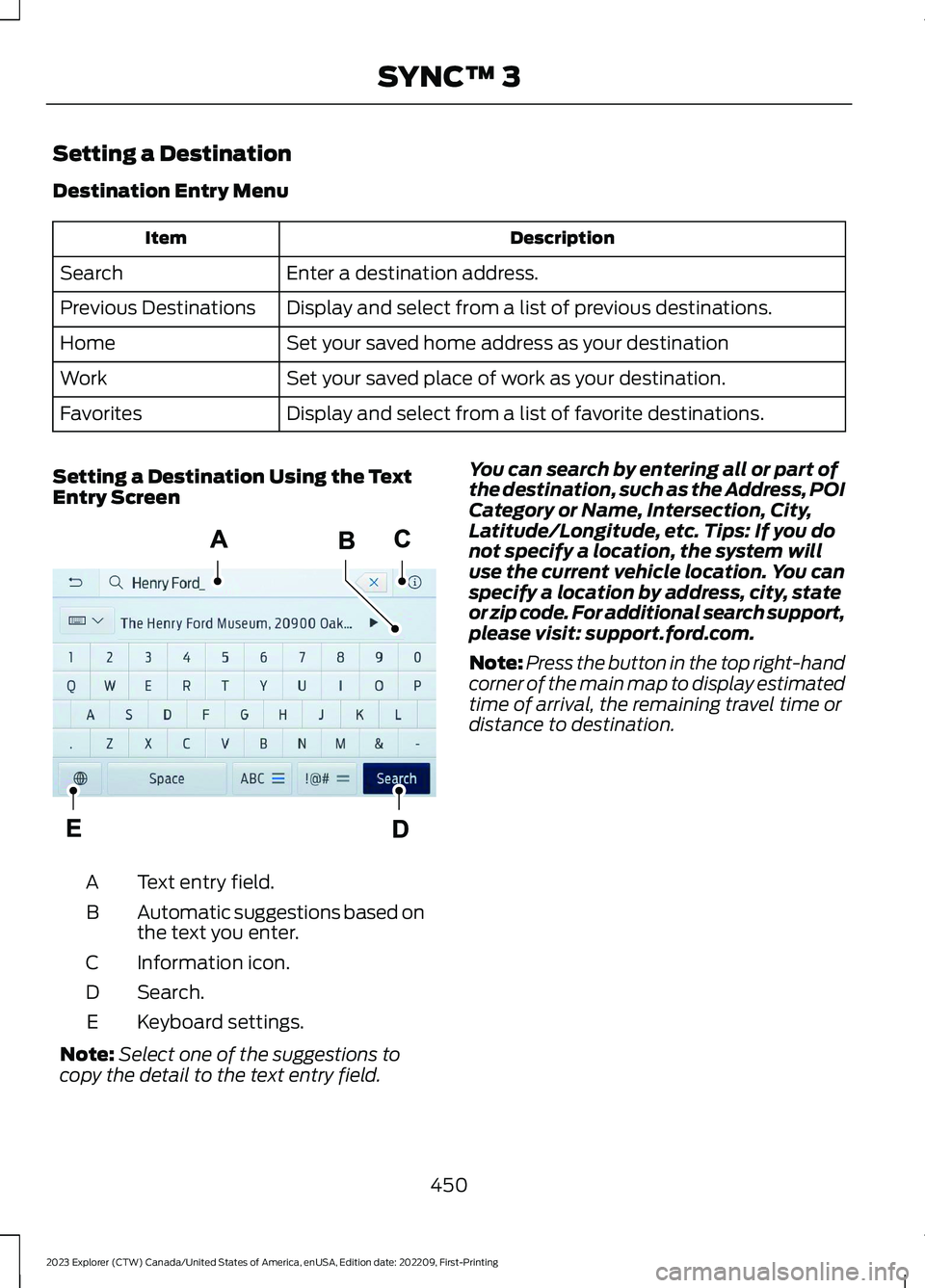
Setting a Destination Using the TextEntry Screen
Text entry field.A
Automatic suggestions based onthe text you enter.B
Information icon.C
Search.D
Keyboard settings.E
Note:Select one of the suggestions tocopy the detail to the text entry field.
You can search by entering all or part ofthe destination, such as the Address, POICategory or Name, Intersection, City,Latitude/Longitude, etc. Tips: If you donot specify a location, the system willuse the current vehicle location. You canspecify a location by address, city, stateor zip code. For additional search support,please visit: support.ford.com.
Note:Press the button in the top right-handcorner of the main map to display estimatedtime of arrival, the remaining travel time ordistance to destination.
450
2023 Explorer (CTW) Canada/United States of America, enUSA, Edition date: 202209, First-PrintingSYNC™ 3E297558