key FORD EXPLORER 2023 Workshop Manual
[x] Cancel search | Manufacturer: FORD, Model Year: 2023, Model line: EXPLORER, Model: FORD EXPLORER 2023Pages: 573, PDF Size: 16.1 MB
Page 184 of 573
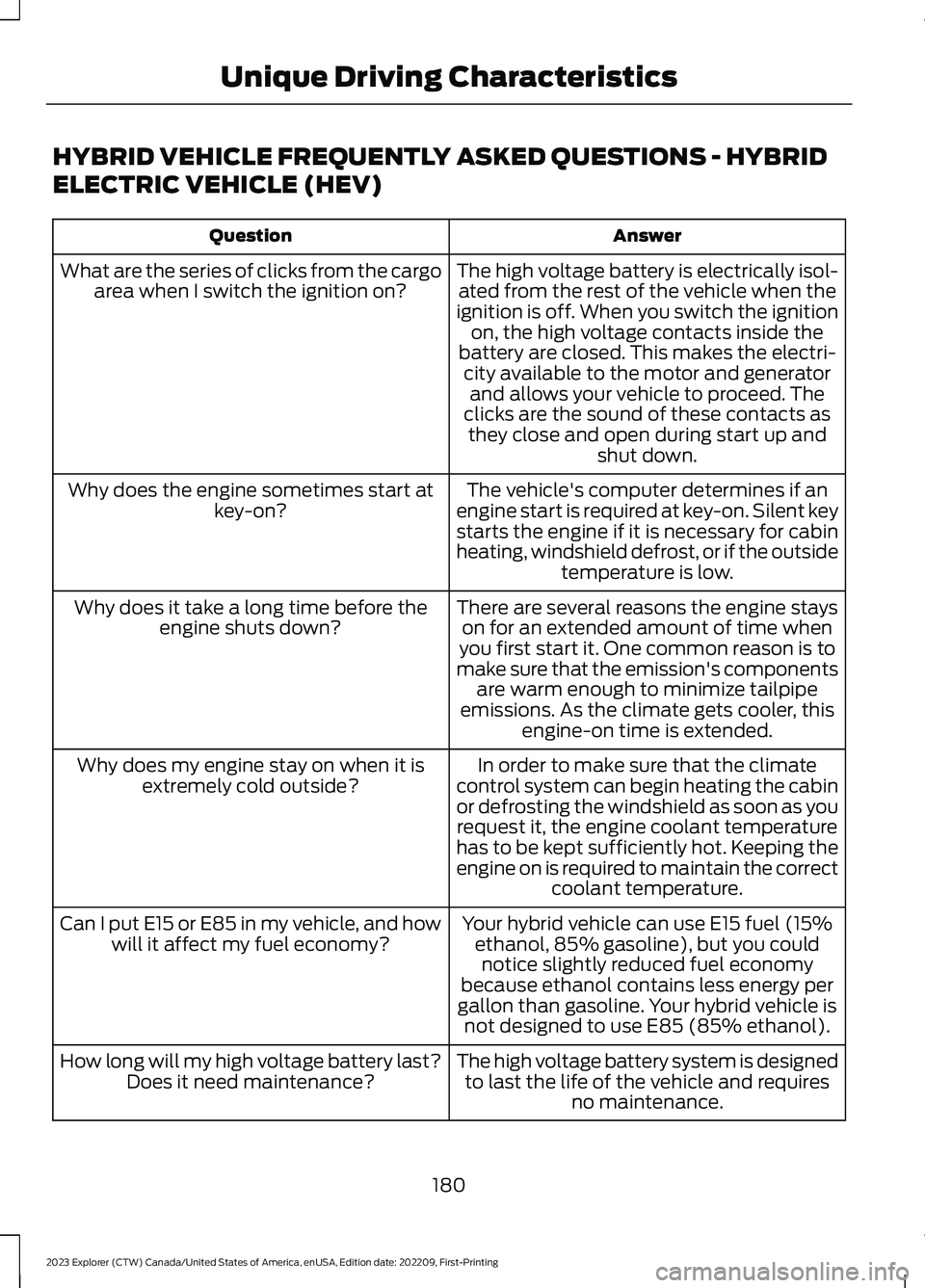
HYBRID VEHICLE FREQUENTLY ASKED QUESTIONS - HYBRID
ELECTRIC VEHICLE (HEV)
AnswerQuestion
The high voltage battery is electrically isol-ated from the rest of the vehicle when theignition is off. When you switch the ignitionon, the high voltage contacts inside thebattery are closed. This makes the electri-city available to the motor and generatorand allows your vehicle to proceed. Theclicks are the sound of these contacts asthey close and open during start up andshut down.
What are the series of clicks from the cargoarea when I switch the ignition on?
The vehicle's computer determines if anengine start is required at key-on. Silent keystarts the engine if it is necessary for cabinheating, windshield defrost, or if the outsidetemperature is low.
Why does the engine sometimes start atkey-on?
There are several reasons the engine stayson for an extended amount of time whenyou first start it. One common reason is tomake sure that the emission's componentsare warm enough to minimize tailpipeemissions. As the climate gets cooler, thisengine-on time is extended.
Why does it take a long time before theengine shuts down?
In order to make sure that the climatecontrol system can begin heating the cabinor defrosting the windshield as soon as yourequest it, the engine coolant temperaturehas to be kept sufficiently hot. Keeping theengine on is required to maintain the correctcoolant temperature.
Why does my engine stay on when it isextremely cold outside?
Your hybrid vehicle can use E15 fuel (15%ethanol, 85% gasoline), but you couldnotice slightly reduced fuel economybecause ethanol contains less energy pergallon than gasoline. Your hybrid vehicle isnot designed to use E85 (85% ethanol).
Can I put E15 or E85 in my vehicle, and howwill it affect my fuel economy?
The high voltage battery system is designedto last the life of the vehicle and requiresno maintenance.
How long will my high voltage battery last?Does it need maintenance?
180
2023 Explorer (CTW) Canada/United States of America, enUSA, Edition date: 202209, First-PrintingUnique Driving Characteristics
Page 199 of 573
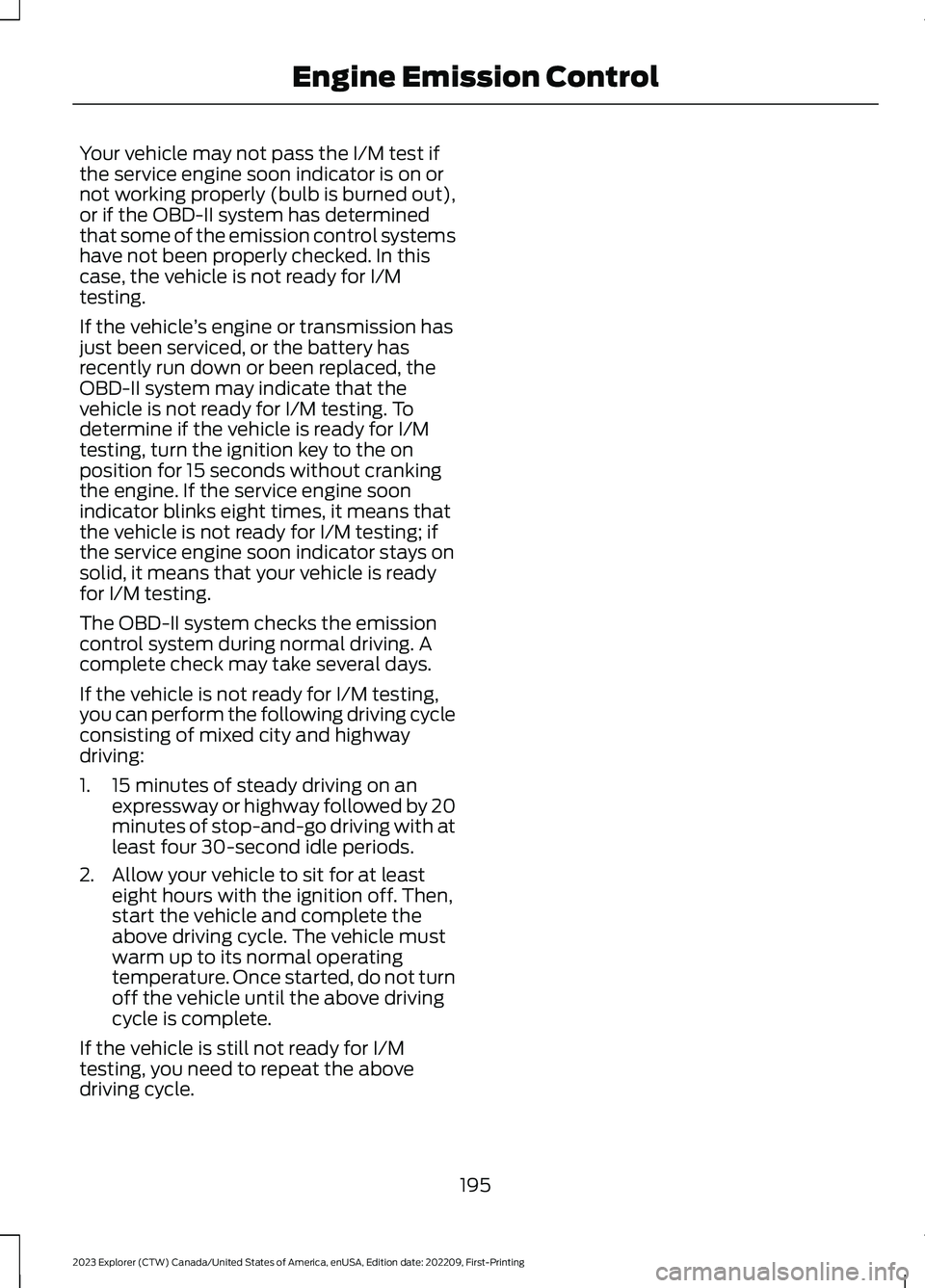
Your vehicle may not pass the I/M test ifthe service engine soon indicator is on ornot working properly (bulb is burned out),or if the OBD-II system has determinedthat some of the emission control systemshave not been properly checked. In thiscase, the vehicle is not ready for I/Mtesting.
If the vehicle’s engine or transmission hasjust been serviced, or the battery hasrecently run down or been replaced, theOBD-II system may indicate that thevehicle is not ready for I/M testing. Todetermine if the vehicle is ready for I/Mtesting, turn the ignition key to the onposition for 15 seconds without crankingthe engine. If the service engine soonindicator blinks eight times, it means thatthe vehicle is not ready for I/M testing; ifthe service engine soon indicator stays onsolid, it means that your vehicle is readyfor I/M testing.
The OBD-II system checks the emissioncontrol system during normal driving. Acomplete check may take several days.
If the vehicle is not ready for I/M testing,you can perform the following driving cycleconsisting of mixed city and highwaydriving:
1.15 minutes of steady driving on anexpressway or highway followed by 20minutes of stop-and-go driving with atleast four 30-second idle periods.
2.Allow your vehicle to sit for at leasteight hours with the ignition off. Then,start the vehicle and complete theabove driving cycle. The vehicle mustwarm up to its normal operatingtemperature. Once started, do not turnoff the vehicle until the above drivingcycle is complete.
If the vehicle is still not ready for I/Mtesting, you need to repeat the abovedriving cycle.
195
2023 Explorer (CTW) Canada/United States of America, enUSA, Edition date: 202209, First-PrintingEngine Emission Control
Page 200 of 573
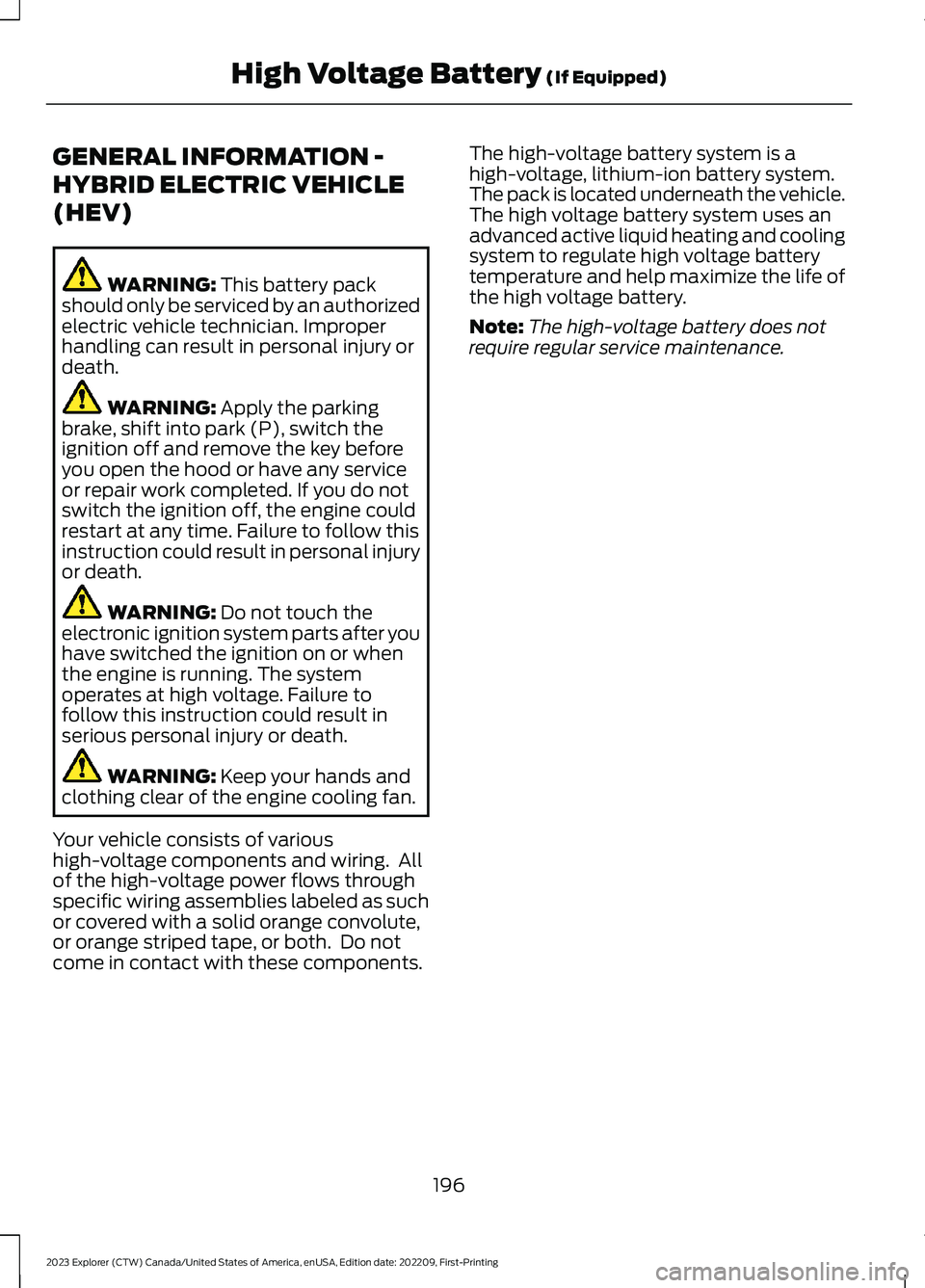
GENERAL INFORMATION -
HYBRID ELECTRIC VEHICLE
(HEV)
WARNING: This battery packshould only be serviced by an authorizedelectric vehicle technician. Improperhandling can result in personal injury ordeath.
WARNING: Apply the parkingbrake, shift into park (P), switch theignition off and remove the key beforeyou open the hood or have any serviceor repair work completed. If you do notswitch the ignition off, the engine couldrestart at any time. Failure to follow thisinstruction could result in personal injuryor death.
WARNING: Do not touch theelectronic ignition system parts after youhave switched the ignition on or whenthe engine is running. The systemoperates at high voltage. Failure tofollow this instruction could result inserious personal injury or death.
WARNING: Keep your hands andclothing clear of the engine cooling fan.
Your vehicle consists of varioushigh-voltage components and wiring. Allof the high-voltage power flows throughspecific wiring assemblies labeled as suchor covered with a solid orange convolute,or orange striped tape, or both. Do notcome in contact with these components.
The high-voltage battery system is ahigh-voltage, lithium-ion battery system.The pack is located underneath the vehicle.The high voltage battery system uses anadvanced active liquid heating and coolingsystem to regulate high voltage batterytemperature and help maximize the life ofthe high voltage battery.
Note:The high-voltage battery does notrequire regular service maintenance.
196
2023 Explorer (CTW) Canada/United States of America, enUSA, Edition date: 202209, First-PrintingHigh Voltage Battery (If Equipped)
Page 201 of 573
AUTOMATIC TRANSMISSION
WARNING: Apply the parking brakeand make sure your vehicle is in park (P).Power the vehicle off and remove thekeys or remote control whenever youleave your vehicle. Failure to follow thisinstruction could result in personal injuryor death.
WARNING: Do not apply the brakepedal and accelerator pedalsimultaneously. Applying both pedalssimultaneously for more than a fewseconds limits vehicle performance,which may result in difficulty maintainingspeed in traffic and could lead to seriousinjury.
Note:You may not be able to shift out ofpark (P) unless the intelligent access key isinside your vehicle.
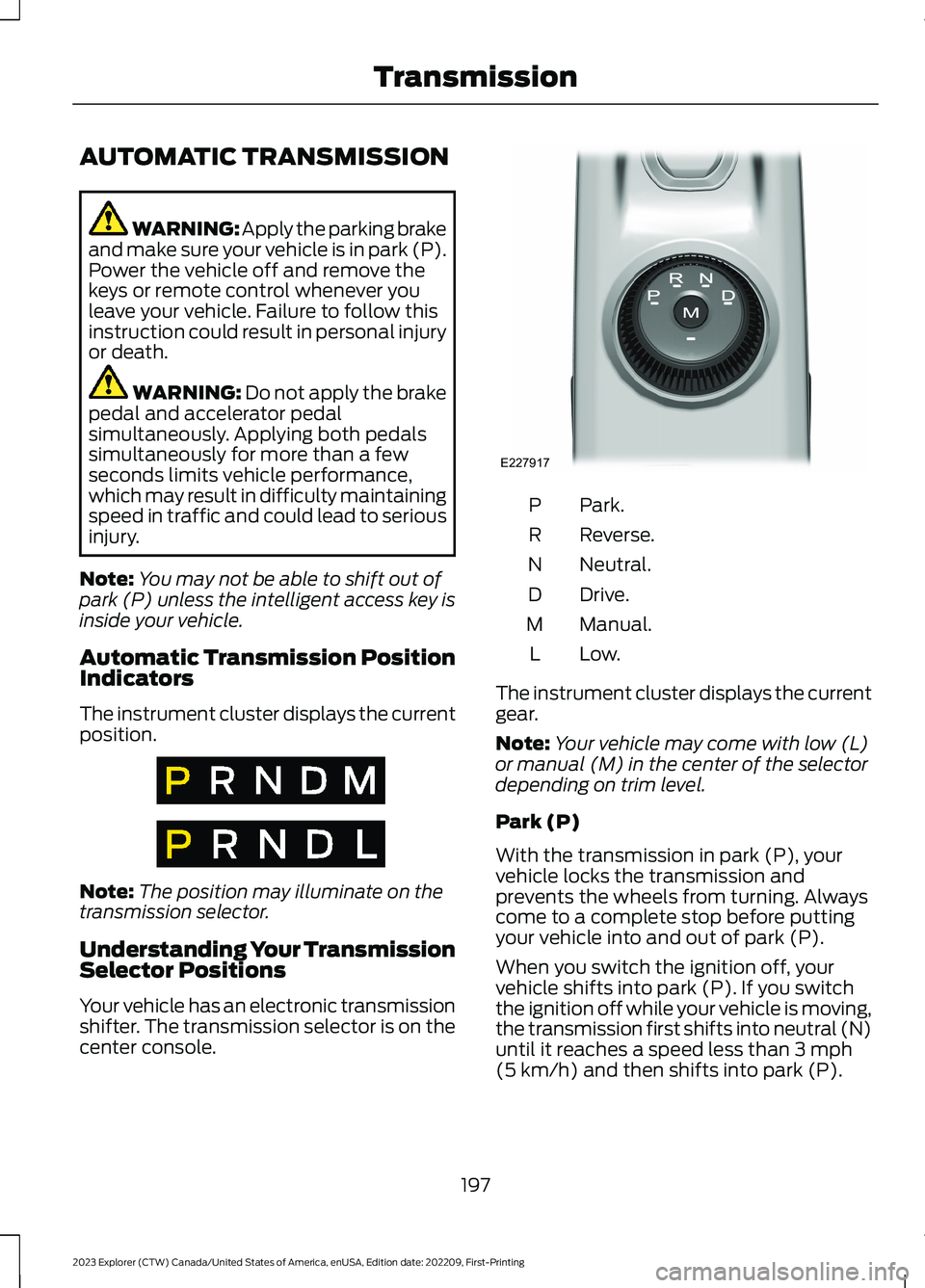
Automatic Transmission PositionIndicators
The instrument cluster displays the currentposition.
Note:The position may illuminate on thetransmission selector.
Understanding Your TransmissionSelector Positions
Your vehicle has an electronic transmissionshifter. The transmission selector is on thecenter console.
Park.P
Reverse.R
Neutral.N
Drive.D
Manual.M
Low.L
The instrument cluster displays the currentgear.
Note:Your vehicle may come with low (L)or manual (M) in the center of the selectordepending on trim level.
Park (P)
With the transmission in park (P), yourvehicle locks the transmission andprevents the wheels from turning. Alwayscome to a complete stop before puttingyour vehicle into and out of park (P).
When you switch the ignition off, yourvehicle shifts into park (P). If you switchthe ignition off while your vehicle is moving,the transmission first shifts into neutral (N)until it reaches a speed less than 3 mph(5 km/h) and then shifts into park (P).
197
2023 Explorer (CTW) Canada/United States of America, enUSA, Edition date: 202209, First-PrintingTransmissionE317778 E317777 E227917
Page 209 of 573
Driving in Special Conditions WithFour-Wheel drive (4WD)
Note:Use of the 4WD system in slippery,deep snow, and sand drive modes on drysurfaces could produce some vibration,driveline bind up, or excessive tire wear asthese drive modes are intended for slipperyand loose surfaces.
Note:The design of 4WD vehicles are fordriving on sand, snow, mud and rough roadsand have operating characteristics that aresomewhat different from conventionalvehicles, both on and off the highway.
Basic Operating Principles in SpecialConditions
•Drive slower in strong crosswinds whichcan affect the normal steeringcharacteristics of your vehicle.
•Be extremely careful when driving onpavement made slippery by loose sand,water, gravel, snow or ice.
If Your Vehicle Goes Off the Edge of thePavement
•If your vehicle goes off the edge of thepavement, slow down, but avoid severebrake application, ease the vehicleback onto the pavement only afterreducing your speed. Do not turn thesteering wheel too sharply whilereturning to the road surface.
•It could be safer to stay on the apronor shoulder of the road and slow downgradually before returning to thepavement. You could lose control if youdo not slow down or if you turn thesteering wheel too sharply or abruptly.
•It often could be less risky to strikesmall objects, such as highwayreflectors, with minor damage to yourvehicle rather than attempt a suddenreturn to the pavement which couldcause the vehicle to slide sideways outof control or rollover. Remember, yoursafety and the safety of others shouldbe your primary concern.
If Your Vehicle Gets Stuck
WARNING: Apply the parkingbrake, shift into park (P), switch theignition off and remove the key beforeyou leave your vehicle. Failure to followthis instruction could result in personalinjury or death.
WARNING: If the parking brake isfully released, but the brake warninglamp remains illuminated, the brakesmay not be working properly. Have yourvehicle checked as soon as possible.
WARNING: Do not spin the wheelsat over 34 mph (55 km/h). The tires mayfail and injure a passenger or bystander.
205
2023 Explorer (CTW) Canada/United States of America, enUSA, Edition date: 202209, First-PrintingFour-Wheel Drive (If Equipped)
Page 229 of 573
PRINCIPLE OF OPERATION
WARNING: To help avoid personalinjury, always use caution when inreverse (R) and when using the sensingsystem.
WARNING: The system may notdetect objects with surfaces that absorbreflection. Always drive with due careand attention. Failure to take care mayresult in a crash.
WARNING: Traffic control systems,inclement weather, air brakes, externalmotors and fans may affect the correctoperation of the sensing system. Thismay cause reduced performance or falsealerts.
WARNING: The system may notdetect small or moving objects,particularly those close to the ground.
Note:If your vehicle has MyKey™, thesensing system cannot be switched offwhen a MyKey™ is present. See Principleof Operation (page 64).
Note:Keep the sensors on the bumper orfascia free from snow, ice and largeaccumulations of dirt. If the sensors arecovered, the system’s accuracy can beaffected. Do not clean the sensors withsharp objects.
Note:If your vehicle sustains damage tothe bumper or fascia, leaving it misalignedor bent, the sensing zone may be alteredcausing inaccurate measurement ofobstacles or false alerts.
Note:Certain add-on devices installedaround the bumper or fascia may createfalse alerts. For example, large trailerhitches, bike or surfboard racks, license platebrackets, bumper covers or any other devicethat may block the normal detection zoneof the system. Remove the add-on deviceto prevent false alerts.
Note:When you connect a trailer to yourvehicle, the rear parking aid may detect thetrailer and therefore provide an alert. Disablethe rear parking aid when you connect atrailer to prevent the alert.
The sensing system warns the driver ofobstacles within a certain range of yourvehicle. The system turns on automaticallywhenever you switch the ignition on.
You can switch the system off through thetouchscreen, information display or fromthe pop-up message that appears onceyou shift the transmission into reverse (R).If your vehicle has a parking aid button, youcan switch the system off by pressing thebutton.
If a fault is present in the system, a warningmessage appears in the informationdisplay. See Information Messages(page 119).
REAR PARKING AID
WARNING: The system may notdetect objects with surfaces that absorbreflection. Always drive with due careand attention. Failure to take care mayresult in a crash.
WARNING: The system may notdetect small or moving objects,particularly those close to the ground.
225
2023 Explorer (CTW) Canada/United States of America, enUSA, Edition date: 202209, First-PrintingParking Aids
Page 235 of 573
WARNING: You are responsible forcontrolling your vehicle at all times. Thesystem is designed to be an aid and doesnot relieve you of your responsibility todrive with due care and attention. Failureto follow this instruction could result inthe loss of control of your vehicle,personal injury or death.
WARNING: Do not use the systemwith accessories that extend beyond thefront or rear of your vehicle, for examplea trailer hitch, bike rack or side mirrorextensions such as telescoping mirrorsor towing mirrors. The system is not ableto make corrections for the additionallength of the accessories.
The system assists parking into and out ofparking spaces. It uses sensors to detectparking spaces. The system then steers,accelerates, brakes and shifts gear asrequired to maneuver into or out of aparking space.
Using Active Park Assist
The active park assist button isnear the transmission selectoron the center console.
Press the active park assist button to bringup full screen notifications. Press either theactive park assist button or the soft keyson the display screen to switch betweenParallel Park In, Perpendicular Park In orParallel Park Out parking modes.
Driving into a Parking Space
Note:When parking perpendicularly, thesystem backs your vehicle into parkingspaces.
1.Press the active park assist button.
Note:The system does not recognizeparking space lines and centers your vehiclebetween objects.
Note:The system detects other vehiclesand curbs to find a parking space.
Note:The system searches for parallelparking spaces on the passenger side. Pressthe active park assist button again to makethe system search for perpendicular spaces.
2.Use the direction indicator lever tosearch for a parking space on the driveror passenger side of your vehicle.
3.Drive your vehicle approximately 3 ft(1 m) away from and parallel to theother parked vehicles when searchingfor a parking space.
Note: A tone sounds and a messageappears in the information display whenactive park assist finds a suitable parkingspace.
4.Press and hold the brake pedal.
5.Release the steering wheel and shiftinto neutral (N).
6.Press and hold the active park assistbutton.
7.Release the brake pedal to allow thevehicle to park.
Note:When parallel parking betweenobjects, the system parks closer to theobject in front of your vehicle to allow easieraccess to your luggage compartment.
Note:When perpendicular parking, thesystem aligns the front end of your vehiclewith the object next to it.
Note:When perpendicular parking, if thesystem detects only one object, it allowsenough distance to open the door on eitherside.
Note:You can slow down your vehicle atany time by pressing the brake pedal.
Note:When parking is complete the vehicleshifts into park (P).
231
2023 Explorer (CTW) Canada/United States of America, enUSA, Edition date: 202209, First-PrintingParking AidsE146186
Page 253 of 573
Use the touchscreen to select thefollowing:
1.Select Settings.
2.Select Driver Assist.
3.Select Cruise Control.
4.Select Normal.
The cruise control indicatorreplaces the adaptive cruisecontrol indicator if you selectnormal cruise control. The gap settingdoes not display, and the system does notrespond to lead vehicles. Automaticbraking remains active to maintain setspeed. The system remembers the lastsetting when you start your vehicle.
SWITCHING LANE CENTERING
ON AND OFF
The cruise controls are on the steeringwheel. See Cruise Control (page 81).
Press the button.
The indicator appears in the informationdisplay. When the system is on, the colorof the indicator changes to indicate thesystem status. See Adaptive CruiseControl Indicators (page 248).
Note:Adaptive cruise control must be onbefore you can switch lane centering on.
Activating Lane Centering
The system only activates when all of thefollowing occur:
•You have adaptive cruise control withstop-and-go on.
•Your hands are on the steering wheel.
•The system detects both lanemarkings.
Note:If it does not detect valid lanemarkings, the system stays inactive untilvalid markings are available.
You can override the system at any timeby steering your vehicle.
System Alerts and AutomaticCancellation
You must keep your hands on the steeringwheel at all times.
When the system is active and detects nosteering activity for a certain period of time,the system alerts you to put your hands onthe steering wheel. If you do not react tothe warnings the system cancels and slowsyour vehicle down to idle speeds whilemaintaining steering control.
The system also alerts you if your vehiclecrosses lane markings without detectedsteering activity.
Note:The system may detect a light gripor touch on the steering wheel as hands-offdriving.
When an external condition cancels thesystem, for example, no lane markingsavailable, a tone sounds and a messageappears in the information display.
If your vehicle starts to slowdown, you must provide steeringinput to the wheel and press andrelease the button to regain full systemperformance.
Automatic cancellation can also occur if:
•The lane becomes too wide or toonarrow.
•The system cannot detect valid lanemarkings.
•Lane markings are crossed.
Note:The system disables until the nextkey cycle if your vehicle slows down due todriver inactivity twice within a key cycle.
249
2023 Explorer (CTW) Canada/United States of America, enUSA, Edition date: 202209, First-PrintingAdaptive Cruise Control (If Equipped)E71340 E262175
Page 267 of 573
•Box trailers that have a width greaterthan 8.2 ft (2.5 m) could cause earlyalerts when you pass a vehicle.
•Clam shell or V-Nose box trailers witha width greater than 8.2 ft (2.5 m)could cause delayed alerts when avehicle traveling the same speed asyour vehicle merges lanes.
System Errors
If the system detects a fault, a warninglamp illuminates and a message displays.See Information Messages (page 119).
Switching the System On and Off
You can switch the blind spot informationsystem with trailer tow off by not selectinga trailer in the information display. SeeGeneral Information (page 115). In thiscase, the system turns off as long as atrailer is attached to your vehicle. As soonas you disconnect the trailer, the blind spotinformation system becomes active.
When you switch the system off, a warninglamp illuminates and the alert indicatorsflash twice.
Note:The system remembers the lasttrailer setting when you start your vehicle.
You cannot switch off the blind spotinformation system with trailer tow whenusing MyKey, but you can still change thetrailer settings. See MyKey™ (page 64).
To permanently switch the system off,contact an authorized dealer.
CROSS TRAFFIC ALERT
WARNING: Do not use the crosstraffic alert system as a replacement forusing the interior and exterior mirrors orlooking over your shoulder beforereversing out of a parking space. Thecross traffic alert system is not areplacement for careful driving.
WARNING: The system may notoperate properly during severe weatherconditions, for example snow, ice, heavyrain and spray. Always drive with duecare and attention. Failure to take caremay result in a crash.
The system alerts you of vehiclesapproaching from the sides behind yourvehicle when you shift into reverse (R).
Using Cross Traffic Alert
The system detects vehicles that approachat a speed between 4 mph (6 km/h) and37 mph (60 km/h). Coverage decreaseswhen the sensors are partially, mostly orfully obstructed. Slowly reversing helpsincrease the coverage area andeffectiveness.
The system turns on when you start theengine and you shift into reverse (R). Thesystem turns off when you shift out ofreverse (R).
263
2023 Explorer (CTW) Canada/United States of America, enUSA, Edition date: 202209, First-PrintingDriving Aids
Page 295 of 573

ROADSIDE ASSISTANCE
Vehicles Sold in the United States:Getting Roadside Assistance
To fully assist you should you have avehicle concern, Ford Motor Companyoffers a complimentary roadsideassistance program. This program isseparate from the New Vehicle LimitedWarranty.
The service is available:
•24 hours a day, seven days a week.
•For the coverage period supplied withyour vehicle.
Roadside Assistance covers:
•A flat tire change with a good spare(except vehicles supplied with a tireinflation kit).
•Battery jump start.
•Lock-out assistance (key replacementcost is the customer's responsibility).
•Fuel delivery — independent servicecontractors, if not prohibited by state,local or municipal law, shall deliver upto 2 gal (8 L) of gasoline or 5 gal (20 L)of diesel fuel to a disabled vehicle.Roadside Assistance limits fuel deliveryservice to two no-charge occurrenceswithin a 12-month period.
•Winch out — available within 100 ft(30 m) of a paved or countymaintained road, no recoveries.
•Towing — independent servicecontractors, if not prohibited by state,local or municipal law, shall tow Fordeligible vehicles to an authorized dealerwithin 35 mi (56 km) of thedisablement location or to the nearestauthorized dealer. If a memberrequests a tow to an authorized dealerthat is more than 35 mi (56 km) fromthe disablement location, the membershall be responsible for any mileagecosts in excess of 35 mi (56 km).
•Roadside Assistance includes up to$200 for a towed trailer if the disabledeligible vehicle requires service at thenearest authorized dealer. If the towingvehicle is operational but the trailer isnot, then the trailer does not qualify forany roadside services.
Vehicles Sold in the United States:Using Roadside Assistance
Complete the roadside assistanceidentification card and place it in yourwallet for quick reference. This card is inthe Owner's Manual kit.
United States vehicle customers whorequire Roadside Assistance, call1-800-241-3673.
If you need to arrange roadside assistancefor yourself, Ford Motor Companyreimburses a reasonable amount fortowing to the nearest dealership within35 mi (56 km). To obtain reimbursementinformation, United States vehiclecustomers call 1-800-241-3673.Customers need to submit their originalreceipts.
291
2023 Explorer (CTW) Canada/United States of America, enUSA, Edition date: 202209, First-PrintingRoadside Emergencies