steering wheel FORD EXPLORER 2023 Repair Manual
[x] Cancel search | Manufacturer: FORD, Model Year: 2023, Model line: EXPLORER, Model: FORD EXPLORER 2023Pages: 573, PDF Size: 16.1 MB
Page 433 of 573
Switching Automatic System UpdatesOn
Select the settings option on thefeature bar.
1.Select Automatic Updates.
2.Switch Automatic System Updateson.
The system is now set to check for andreceive system updates when it isconnected to a Wi-Fi network.
Note:You can use the system when adownload is in progress.
Note:If the system is disconnected fromthe Wi-Fi network when a download is inprogress, the download continues the nexttime the system is connected to a Wi-Finetwork.
Additional Information andAssistance
For additional information and assistance,we recommend that you contact anauthorized dealer or refer to the local Fordwebsite.
USING VOICE RECOGNITION
The system allows you to interact with theentertainment, information andcommunication systems on your vehicleusing voice commands. This allows youto keep your hands on the steering wheeland focus on what is in front of you.
Press the voice control buttonon the steering wheel and waitfor the voice prompt.
Note:Press the voice control button againto interrupt a voice prompt and beginspeaking.
Note:Turn the volume control when a voiceprompt plays to adjust the volume.
Note:Press and hold the voice controlbutton on the steering wheel to use Siri onyour iOS device.
The following voice commands aredesigned to help you from any screen:
•List of Commands
•Help
The following tables list some of the morefrequently used voice commands. For acomplete list of voice commands, refer toour website.
General
DescriptionVoice Command
Get a list of voice commands for a specific feature.1___ List of Commands
Cancel an active voice session.Cancel
Get a list of voice commands for a specific feature.1___ Help
Return to the previous screen.Go back
Go to the main menu.Main Menu
429
2023 Explorer (CTW) Canada/United States of America, enUSA, Edition date: 202209, First-PrintingSYNC™ 3E280315 E142599
Page 450 of 573
A/C: Touch to switch the air conditioningon or off. Use A/C with recirculated air toimprove cooling performance andefficiency.
Note:In certain conditions, such asmaximum defrost, the air conditioningcompressor may continue to operate eventhough you switch off the air conditioning.
Switching the Climate Control Onand Off
Touch the button.
Switching the Climate ControlledSeats On and Off
Touch the button to cyclethrough the various climatecontrolled seat settings.
Switching Dual Zone Mode On andOff
Touch the button to switch ontemperature control for theright-hand side of the vehicle.
Switching the Heated ExteriorMirrors On and Off
Touch the button.
Switching the Heated WindshieldOn and Off
Touch the button to clear thewindshield of thin ice and fog.The heated windshield turns offafter a short period of time.
Switching the Heated RearWindow On and Off
Touch the button to clear therear window of thin ice and fog.
Switching the Heated Seats Onand Off
Touch the button to cyclethrough the various heatsettings.
Switching the Heated SteeringWheel On and Off
Touch the button.
Switching Maximum AirConditioning On and Off
Touch the button for maximumcooling.
Recirculated air flows through theinstrument panel air vents, air conditioningturns on and the blower motor adjusts tothe highest speed.
Switching Maximum Defrost Onand Off
Touch the button for maximumdefrosting.
Air flows through the windshield air vents,and the blower motor adjusts to thehighest speed.
You can also use this setting to defog andclear the windshield of a thin covering ofice.
Note:To prevent window fogging, youcannot select recirculated air whenmaximum defrost is on.
446
2023 Explorer (CTW) Canada/United States of America, enUSA, Edition date: 202209, First-PrintingSYNC™ 3 E265282 E265280 E266189 E184884 E256621
Page 459 of 573
•Idling: The vehicle is running and in park(P). The engine and/or the high voltagebattery are on.
•Electric Driving: The vehicle is runningand in drive (D) or neutral (N). The highvoltage battery provides power to thewheels.
•Hybrid Driving: The vehicle is runningand in drive (D) or neutral (N). Theengine and the high voltage batteryprovide power to the wheels.
•Regenerative Braking: The vehicle isrunning in drive (D) and is slowingdown. Power captured by theregenerative braking system is sentback to the high voltage battery.
Engine On Due To
The following conditions help to explainwhy the engine is on, and what you can doto allow all electric operation.
•Drive Power: The engine is on due toaccelerator pedal pressure or speedcontrol activation. Reduce pressure onthe accelerator pedal or switch off thespeed control to return to full electricmode.
•High Speed: The engine is on becausethe vehicle speed exceeds the level forfull electric operation. Reduce thespeed to return to electric operation.
•Heater Setting: The engine is onbecause of the heater setting. Reduceor turn off the heater setting to returnto electric operation.
•Neutral Gear: The engine is on becausethe vehicle is in neutral (N). Shift outof neutral gear to return to electricoperation.
•Engine Cold: The engine is on becauseit is cold. The vehicle returns to electricoperation once the engine is sufficientlywarm.
•Battery Charging: The engine is on tocharge the high voltage battery. Thevehicle returns to electric operationonce the battery is charged.
•Low Gear: The engine is on becausethe vehicle is in low gear. Shift out oflow gear to return to electric operation.
•Normal Operation: The engine is on tooptimize vehicle operation. The vehiclereturns to electric operation whenpossible.
•Engine Braking Active: The engine is onto provide increased powertrainbraking. This can occur when you turnon grade assist, when speed control ison or when driving with your foot offthe accelerator pedal. Turning offgrade assist or speed control mayallow the vehicle to return to electricoperation.
•Battery Temperature: The engine is ondue to a high or low high voltagebattery temperature. This is a normaloperating condition. The vehicle returnsto electric operation when possible.
•Drive Mode: The engine is on due to thedrive mode selection. Select anappropriate drive mode for electric onlyoperation.
APPS
The system allows you interact with selectmobile apps while keeping your eyes onthe road. Voice commands, your steeringwheel buttons, or a quick tap on yourtouchscreen give you advanced control ofcompatible mobile apps. You can alsostream your favorite music or podcasts,share your time of arrival with friends, andkeep connected safely.
455
2023 Explorer (CTW) Canada/United States of America, enUSA, Edition date: 202209, First-PrintingSYNC™ 3
Page 464 of 573
SYNC™ 3 TROUBLESHOOTING
Voice Recognition
Possible Cause and ResolutionSymptom
The system does not under-stand what I am saying.–You might not be using supported voice commands.
•See Using Voice Recognition (page 429).
•For a complete list of voice commands, refer to ourwebsite.
–You might be speaking too soon.
•Wait for the voice prompt before you speak.
The system does not under-stand the name of a track orartist.
–Device limitation.Bluetooth® does not support voicecommands.
•Connect your device to a USB port.
•If you have an iOS device, press and hold the voicecontrol button on the steering wheel to use Siri toplay specific tracks.
–You might not be using supported voice commands.
•See Using Voice Recognition (page 429).
•For a complete list of voice commands, refer to ourwebsite.
–You might not be saying the name exactly as it appearson your device.
•Say the name of the track or artist exactly as itappears on your device. Spell out any abbreviationsin the name.
–The name contains special characters, for example *,- or +.
•Rename the files on your device or use the touch-screen to select and play the track.
The system does not under-stand the name of a contactin the phonebook on mydevice and calls the wrongcontact.
–You might not be saying the name exactly as it appearson your device.
•Say the first and last name of the contact exactlyas it appears on your device. Spell out any abbrevi-ations in the name.
–The name contains special characters, for example *,- or +.
•Rename the contact on your device or use thetouchscreen to select and call the contact.
460
2023 Explorer (CTW) Canada/United States of America, enUSA, Edition date: 202209, First-PrintingSYNC™ 3
Page 466 of 573
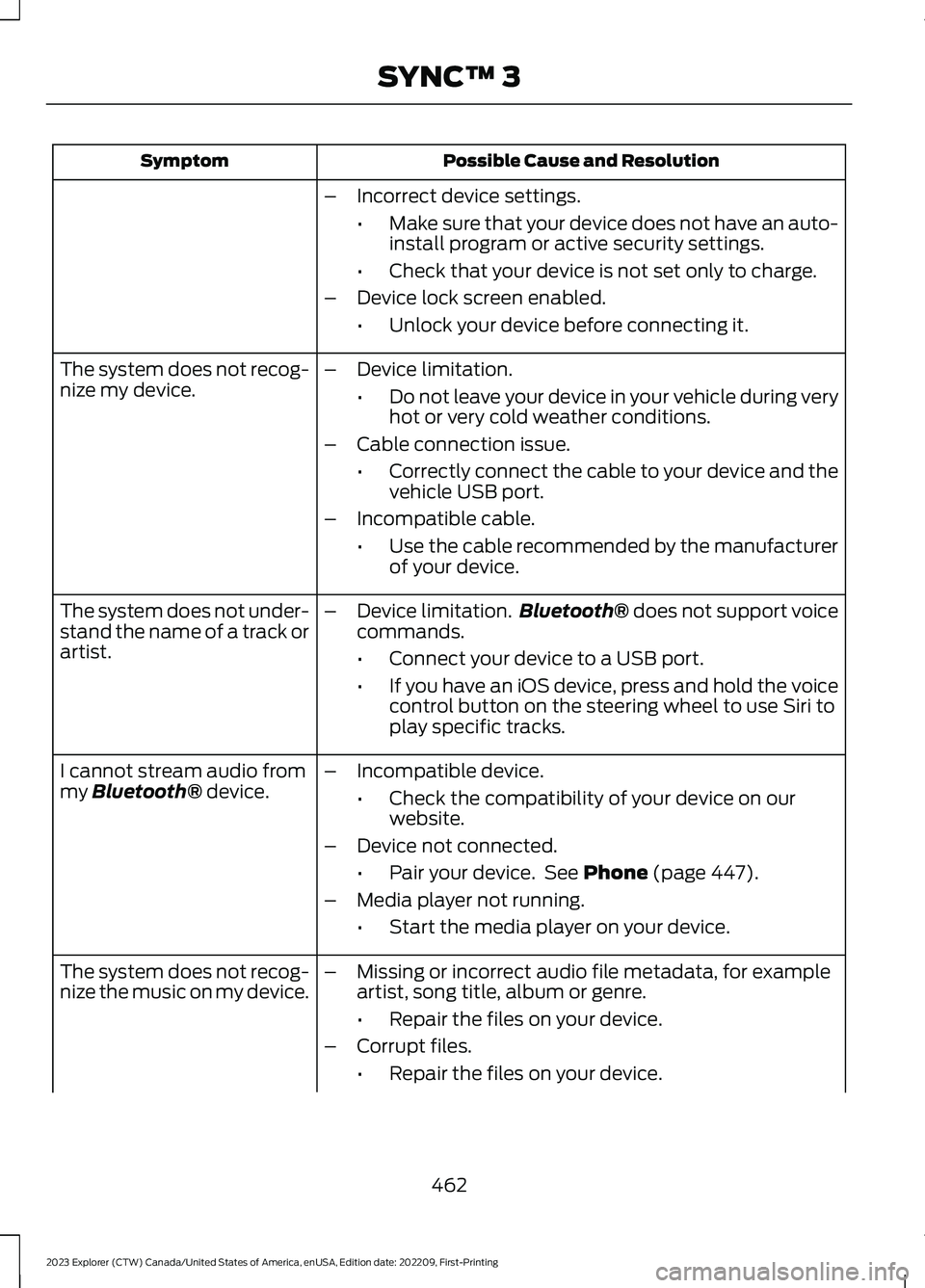
Possible Cause and ResolutionSymptom
–Incorrect device settings.
•Make sure that your device does not have an auto-install program or active security settings.
•Check that your device is not set only to charge.
–Device lock screen enabled.
•Unlock your device before connecting it.
The system does not recog-nize my device.–Device limitation.
•Do not leave your device in your vehicle during veryhot or very cold weather conditions.
–Cable connection issue.
•Correctly connect the cable to your device and thevehicle USB port.
–Incompatible cable.
•Use the cable recommended by the manufacturerof your device.
The system does not under-stand the name of a track orartist.
–Device limitation.Bluetooth® does not support voicecommands.
•Connect your device to a USB port.
•If you have an iOS device, press and hold the voicecontrol button on the steering wheel to use Siri toplay specific tracks.
I cannot stream audio frommy Bluetooth® device.–Incompatible device.
•Check the compatibility of your device on ourwebsite.
–Device not connected.
•Pair your device. See Phone (page 447).
–Media player not running.
•Start the media player on your device.
The system does not recog-nize the music on my device.–Missing or incorrect audio file metadata, for exampleartist, song title, album or genre.
•Repair the files on your device.
–Corrupt files.
•Repair the files on your device.
462
2023 Explorer (CTW) Canada/United States of America, enUSA, Edition date: 202209, First-PrintingSYNC™ 3
Page 485 of 573
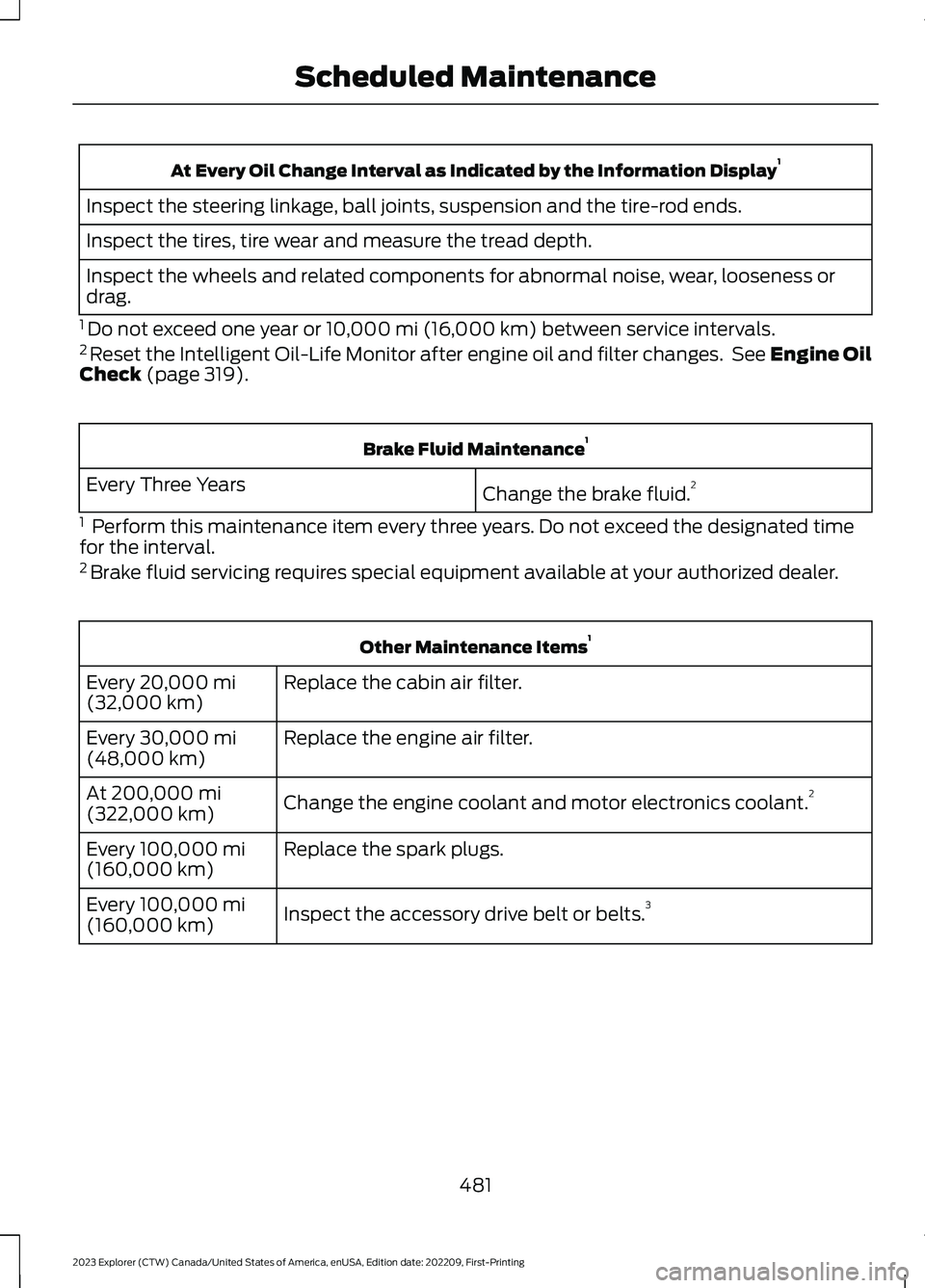
At Every Oil Change Interval as Indicated by the Information Display1
Inspect the steering linkage, ball joints, suspension and the tire-rod ends.
Inspect the tires, tire wear and measure the tread depth.
Inspect the wheels and related components for abnormal noise, wear, looseness ordrag.
1 Do not exceed one year or 10,000 mi (16,000 km) between service intervals.2 Reset the Intelligent Oil-Life Monitor after engine oil and filter changes. See Engine OilCheck (page 319).
Brake Fluid Maintenance1
Change the brake fluid.2Every Three Years
1 Perform this maintenance item every three years. Do not exceed the designated timefor the interval.2 Brake fluid servicing requires special equipment available at your authorized dealer.
Other Maintenance Items1
Replace the cabin air filter.Every 20,000 mi(32,000 km)
Replace the engine air filter.Every 30,000 mi(48,000 km)
Change the engine coolant and motor electronics coolant.2At 200,000 mi(322,000 km)
Replace the spark plugs.Every 100,000 mi(160,000 km)
Inspect the accessory drive belt or belts.3Every 100,000 mi(160,000 km)
481
2023 Explorer (CTW) Canada/United States of America, enUSA, Edition date: 202209, First-PrintingScheduled Maintenance
Page 489 of 573
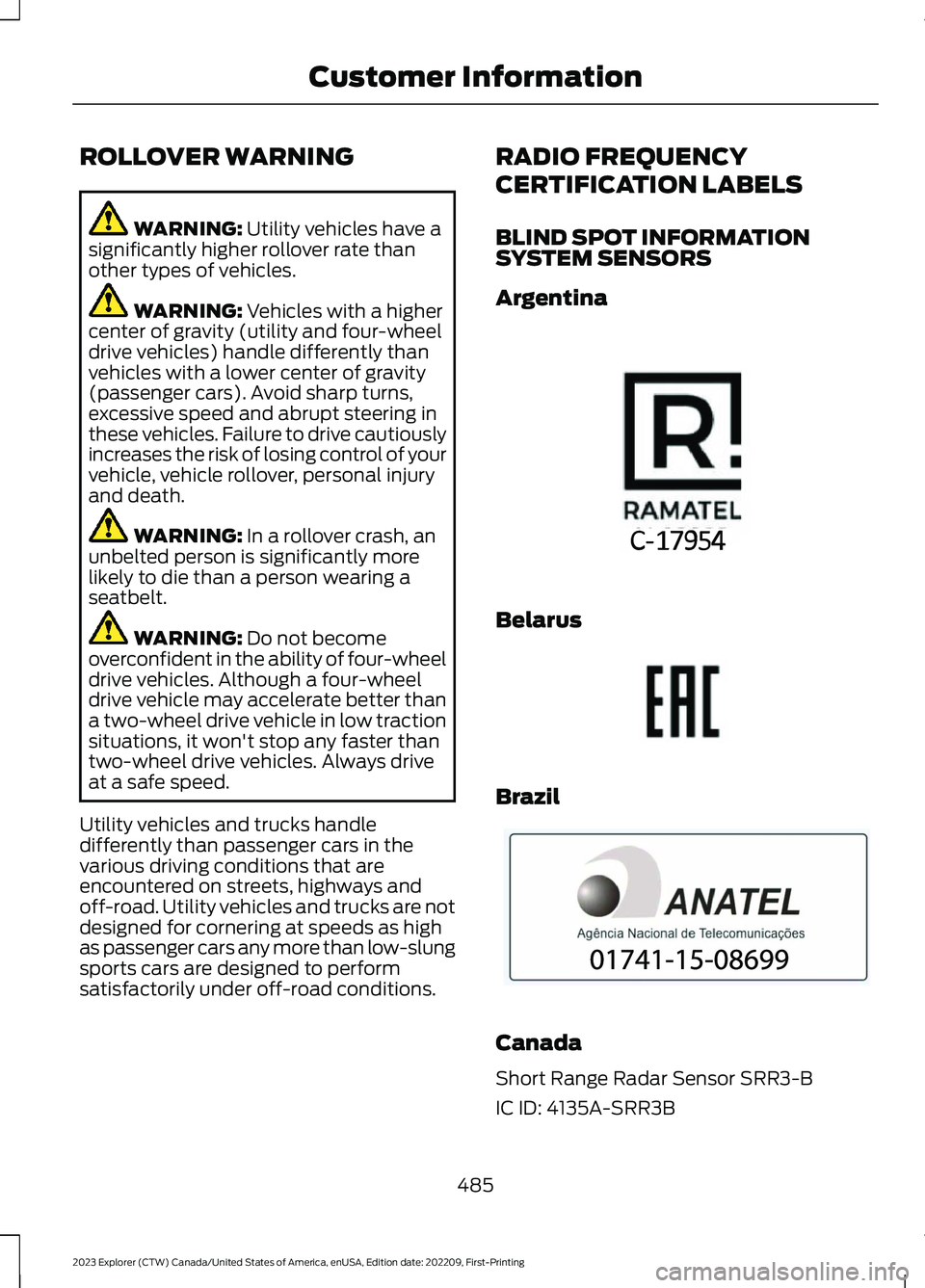
ROLLOVER WARNING
WARNING: Utility vehicles have asignificantly higher rollover rate thanother types of vehicles.
WARNING: Vehicles with a highercenter of gravity (utility and four-wheeldrive vehicles) handle differently thanvehicles with a lower center of gravity(passenger cars). Avoid sharp turns,excessive speed and abrupt steering inthese vehicles. Failure to drive cautiouslyincreases the risk of losing control of yourvehicle, vehicle rollover, personal injuryand death.
WARNING: In a rollover crash, anunbelted person is significantly morelikely to die than a person wearing aseatbelt.
WARNING: Do not becomeoverconfident in the ability of four-wheeldrive vehicles. Although a four-wheeldrive vehicle may accelerate better thana two-wheel drive vehicle in low tractionsituations, it won't stop any faster thantwo-wheel drive vehicles. Always driveat a safe speed.
Utility vehicles and trucks handledifferently than passenger cars in thevarious driving conditions that areencountered on streets, highways andoff-road. Utility vehicles and trucks are notdesigned for cornering at speeds as highas passenger cars any more than low-slungsports cars are designed to performsatisfactorily under off-road conditions.
RADIO FREQUENCY
CERTIFICATION LABELS
BLIND SPOT INFORMATIONSYSTEM SENSORS
Argentina
Belarus
Brazil
Canada
Short Range Radar Sensor SRR3-B
IC ID: 4135A-SRR3B
485
2023 Explorer (CTW) Canada/United States of America, enUSA, Edition date: 202209, First-PrintingCustomer InformationE363578 E253816 E340204
Page 565 of 573
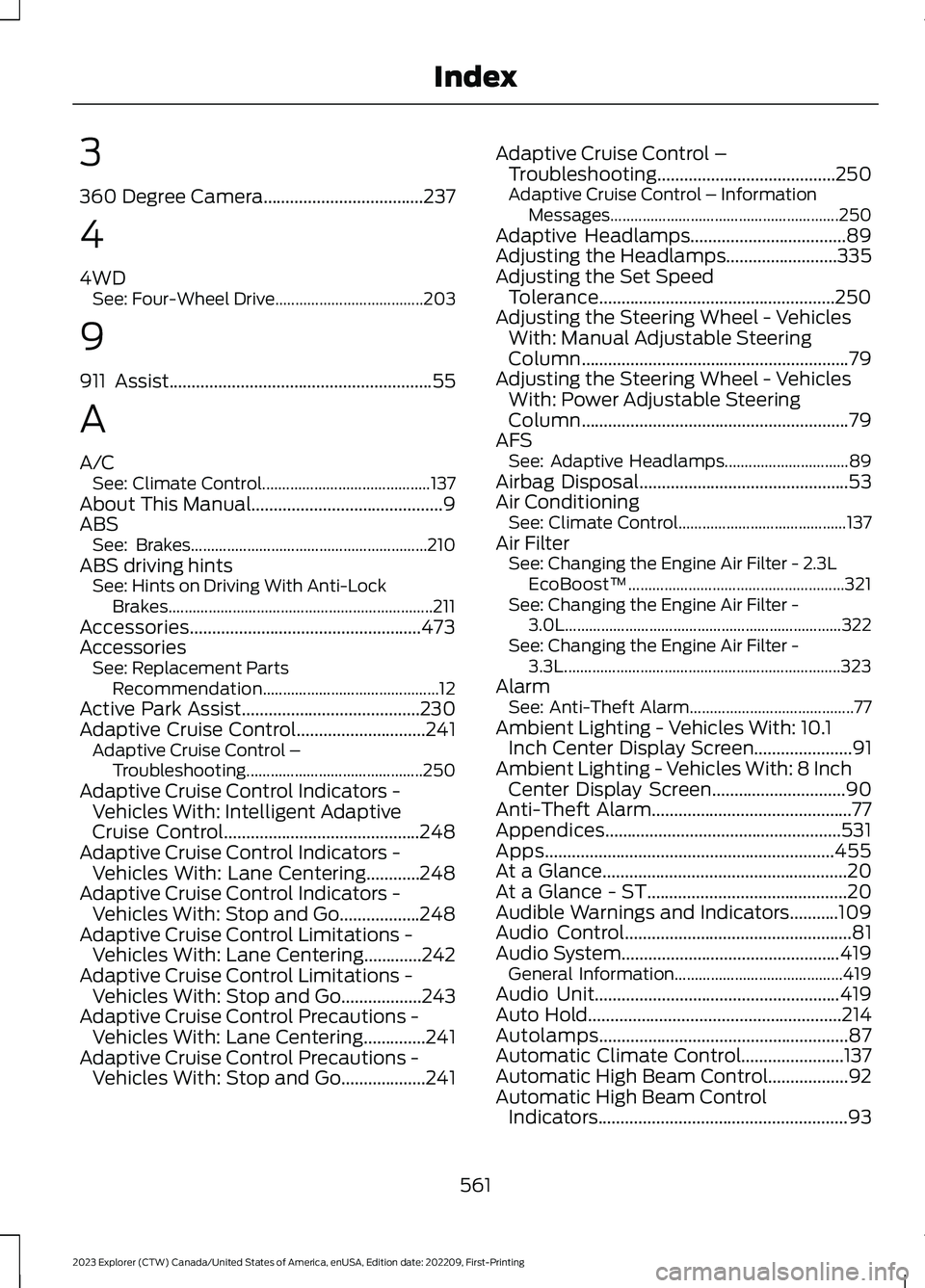
3
360 Degree Camera....................................237
4
4WDSee: Four-Wheel Drive.....................................203
9
911 Assist...........................................................55
A
A/CSee: Climate Control..........................................137About This Manual...........................................9ABSSee: Brakes...........................................................210ABS driving hintsSee: Hints on Driving With Anti-LockBrakes..................................................................211Accessories....................................................473AccessoriesSee: Replacement PartsRecommendation............................................12Active Park Assist........................................230Adaptive Cruise Control.............................241Adaptive Cruise Control –Troubleshooting............................................250Adaptive Cruise Control Indicators -Vehicles With: Intelligent AdaptiveCruise Control............................................248Adaptive Cruise Control Indicators -Vehicles With: Lane Centering............248Adaptive Cruise Control Indicators -Vehicles With: Stop and Go..................248Adaptive Cruise Control Limitations -Vehicles With: Lane Centering.............242Adaptive Cruise Control Limitations -Vehicles With: Stop and Go..................243Adaptive Cruise Control Precautions -Vehicles With: Lane Centering..............241Adaptive Cruise Control Precautions -Vehicles With: Stop and Go...................241
Adaptive Cruise Control –Troubleshooting........................................250Adaptive Cruise Control – InformationMessages.........................................................250Adaptive Headlamps...................................89Adjusting the Headlamps.........................335Adjusting the Set SpeedTolerance.....................................................250Adjusting the Steering Wheel - VehiclesWith: Manual Adjustable SteeringColumn............................................................79Adjusting the Steering Wheel - VehiclesWith: Power Adjustable SteeringColumn............................................................79AFSSee: Adaptive Headlamps...............................89Airbag Disposal...............................................53Air ConditioningSee: Climate Control..........................................137Air FilterSee: Changing the Engine Air Filter - 2.3LEcoBoost™......................................................321See: Changing the Engine Air Filter -3.0L.....................................................................322See: Changing the Engine Air Filter -3.3L.....................................................................323AlarmSee: Anti-Theft Alarm.........................................77Ambient Lighting - Vehicles With: 10.1Inch Center Display Screen......................91Ambient Lighting - Vehicles With: 8 InchCenter Display Screen..............................90Anti-Theft Alarm.............................................77Appendices.....................................................531Apps.................................................................455At a Glance.......................................................20At a Glance - ST.............................................20Audible Warnings and Indicators...........109Audio Control...................................................81Audio System.................................................419General Information..........................................419Audio Unit.......................................................419Auto Hold.........................................................214Autolamps........................................................87Automatic Climate Control.......................137Automatic High Beam Control..................92Automatic High Beam ControlIndicators........................................................93
561
2023 Explorer (CTW) Canada/United States of America, enUSA, Edition date: 202209, First-PrintingIndex
Page 568 of 573
Exterior Mirrors - ST......................................96
F
Fastening the Seatbelts..............................39Flat TireSee: Changing a Road Wheel........................370Floor Mats......................................................289Fog Lamps - FrontSee: Front Fog Lamps........................................88Ford Credit.........................................................12Ford Protect...................................................474Four-Wheel Drive........................................203Principle of Operation......................................203Front Fog Lamps............................................88Front Parking Aid..........................................227Front Passenger Sensing System............48Front Wiper BladesSee: Changing the Front Wiper Blades......336Fuel and Refueling........................................181Fuel Consumption.........................................191Fuel Filler Funnel Location........................183Fuel Filter........................................................336Fuel Quality - E85.........................................181Fuel Quality - Gasoline...............................183Fuel Shutoff...................................................292Fuses................................................................305Fuse Specification Chart..........................305
G
Garage Door Opener...................................160Garage Door Opener Limitations...........160Garage Door Opener Precautions.........160Garage Door Opener RadioFrequencies.................................................163Gauges - Vehicles With: 12.3 InchInstrument Cluster DisplayScreen............................................................102Gauges - Vehicles With: 4.2 InchInstrument Cluster DisplayScreen...........................................................104Gauges - Vehicles With: 6.5 InchInstrument Cluster DisplayScreen.............................................................101GearboxSee: Transmission...............................................197
General Information on RadioFrequencies...................................................57General Maintenance Information........476Getting Assistance Outside the U.S. andCanada..........................................................301Getting the Services You Need..............298Global Opening...............................................95
H
Hazard Flashers............................................292Headlamp AdjustingSee: Adjusting the Headlamps.....................335Headlamp Exit Delay....................................87HeadrestSee: Head Restraints.........................................144Head Restraints............................................144Heated Exterior Mirrors...............................142Heated Rear Window..................................142Heated Seats.................................................156Heated Steering Wheel................................82Heated Windshield.......................................141HeatingSee: Climate Control..........................................137High Voltage Battery...................................196General Information - Hybrid ElectricVehicle (HEV).................................................196Hill Descent Control....................................224Hill Descent Control Indicator.................224Hill Start Assist..............................................213Hints on Controlling the InteriorClimate..........................................................139Hints on Driving With Anti-LockBrakes..............................................................211Hood LockSee: Opening and Closing the Hood...........315Horn.....................................................................82How Does 911 Assist Work..........................55How Does Adaptive Cruise Control WithStop and Go Work.....................................241How Does Drive Mode ControlWork...............................................................273How Does the Garage Door OpenerWork...............................................................160How Does the Rear Occupant AlertSystem Work...............................................158
564
2023 Explorer (CTW) Canada/United States of America, enUSA, Edition date: 202209, First-PrintingIndex
Page 570 of 573
Overriding Automatic High BeamControl............................................................93Overriding Reverse Braking Assist..........217Overriding the Set Speed..........................247
P
Parking Aids...................................................225Principle of Operation......................................225Passive Anti-Theft System..........................77PATSSee: Passive Anti-Theft System......................77Pedestrian Alert System.............................54Pedestrian Protection..................................54Perchlorate.........................................................12Personalized Settings...................................117Personal Safety System™..........................45Phone...............................................................447Post-Crash Alert System..........................296Power Door LocksSee: Locking and Unlocking.............................68Power Liftgate..................................................73Power Seats....................................................147Power Steering Fluid Check.....................329Power Windows.............................................94Pre-Collision Assist....................................268Programming the Garage Door Openerto Your Garage Door OpenerMotor...............................................................161Programming the Garage Door Openerto Your Gate Opener Motor...................162Programming the Garage Door Openerto Your Hand-Held Transmitter............161Protecting the Environment........................19PunctureSee: Changing a Road Wheel........................370
R
Radio Frequency CertificationLabels...........................................................485Blind Spot Information SystemSensors............................................................485Body Control Module........................................491Cruise Control Module.....................................494Garage Door Opener.........................................497Keys and Remote Controls............................498Passive Anti-Theft System............................505
Radio Transceiver Module.............................509SYNC........................................................................511Telematics Control Unit...................................516Tire Pressure Monitoring SystemSensors..............................................................516Wireless Accessory Charging Module........523Rear Axle........................................................209Rear Occupant Alert System AudibleWarnings.......................................................159Rear Occupant Alert SystemIndicators......................................................159Rear Occupant Alert SystemLimitations...................................................158Rear Occupant Alert SystemPrecautions..................................................158Rear Occupant Alert System...................158Rear Parking Aid...........................................225Rear Passenger Climate Controls..........140Rear Seats........................................................151Rear Under Floor Storage.........................275Rear View Camera.......................................234Rear View CameraSee: Rear View Camera...................................234Rear Window Wiper and Washers...........85Rear Wiper BladesSee: Changing the Rear Wiper Blades.......337Recommended Towing Weights...........284Reduced Engine Performance...............288Refueling - Excluding: Hybrid ElectricVehicle (HEV).............................................185Refueling - Hybrid Electric Vehicle(HEV).............................................................188Remote Control...............................................57Remote Start..................................................142Repairing Minor Paint Damage..............344Replacement PartsRecommendation........................................12Replacing a Lost Key or RemoteControl............................................................63Replacing the Cabin Air Filter...................143Reporting Safety Defects (CanadaOnly)..............................................................303Reporting Safety Defects (U.S.Only)..............................................................303Reprogramming the Garage DoorOpener...........................................................163Resuming the Set Speed..........................240Reverse Braking Assist Indicators...........217
566
2023 Explorer (CTW) Canada/United States of America, enUSA, Edition date: 202209, First-PrintingIndex