warning FORD EXPLORER 2023 Repair Manual
[x] Cancel search | Manufacturer: FORD, Model Year: 2023, Model line: EXPLORER, Model: FORD EXPLORER 2023Pages: 573, PDF Size: 16.1 MB
Page 125 of 573
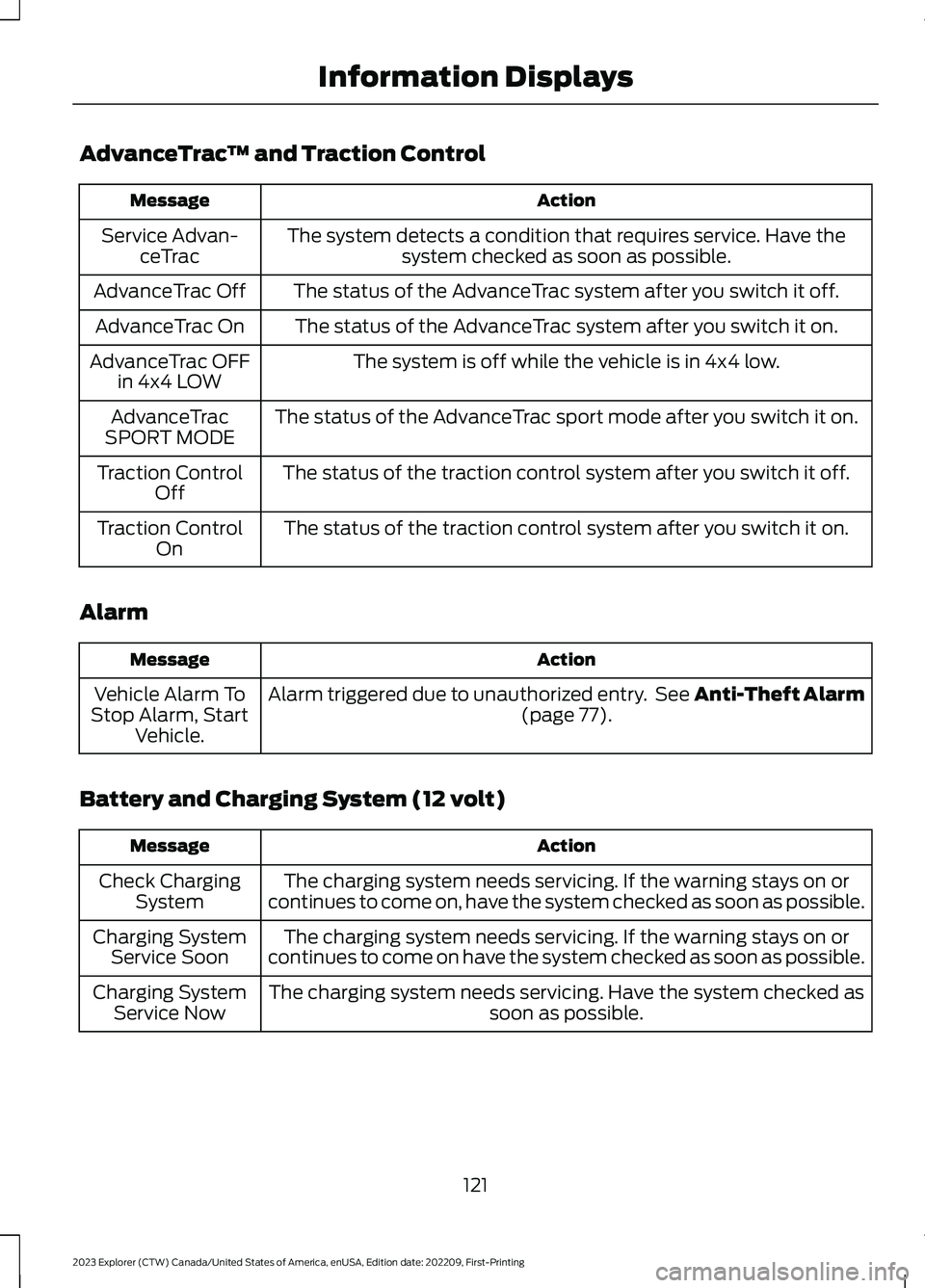
AdvanceTrac™ and Traction Control
ActionMessage
The system detects a condition that requires service. Have thesystem checked as soon as possible.Service Advan-ceTrac
The status of the AdvanceTrac system after you switch it off.AdvanceTrac Off
The status of the AdvanceTrac system after you switch it on.AdvanceTrac On
The system is off while the vehicle is in 4x4 low.AdvanceTrac OFFin 4x4 LOW
The status of the AdvanceTrac sport mode after you switch it on.AdvanceTracSPORT MODE
The status of the traction control system after you switch it off.Traction ControlOff
The status of the traction control system after you switch it on.Traction ControlOn
Alarm
ActionMessage
Alarm triggered due to unauthorized entry. See Anti-Theft Alarm(page 77).Vehicle Alarm ToStop Alarm, StartVehicle.
Battery and Charging System (12 volt)
ActionMessage
The charging system needs servicing. If the warning stays on orcontinues to come on, have the system checked as soon as possible.Check ChargingSystem
The charging system needs servicing. If the warning stays on orcontinues to come on have the system checked as soon as possible.Charging SystemService Soon
The charging system needs servicing. Have the system checked assoon as possible.Charging SystemService Now
121
2023 Explorer (CTW) Canada/United States of America, enUSA, Edition date: 202209, First-PrintingInformation Displays
Page 126 of 573
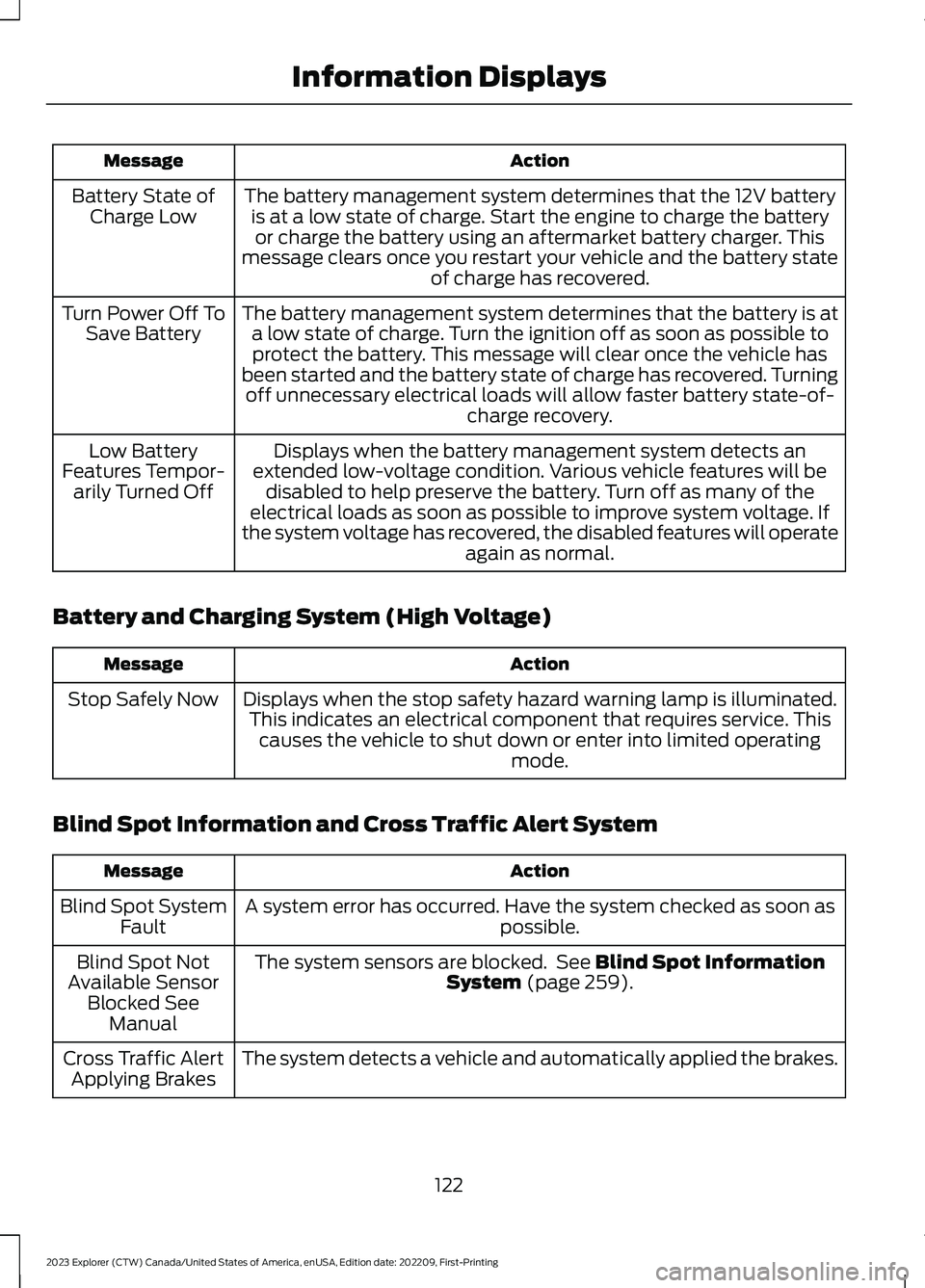
ActionMessage
The battery management system determines that the 12V batteryis at a low state of charge. Start the engine to charge the batteryor charge the battery using an aftermarket battery charger. Thismessage clears once you restart your vehicle and the battery stateof charge has recovered.
Battery State ofCharge Low
The battery management system determines that the battery is ata low state of charge. Turn the ignition off as soon as possible toprotect the battery. This message will clear once the vehicle hasbeen started and the battery state of charge has recovered. Turningoff unnecessary electrical loads will allow faster battery state-of-charge recovery.
Turn Power Off ToSave Battery
Displays when the battery management system detects anextended low-voltage condition. Various vehicle features will bedisabled to help preserve the battery. Turn off as many of theelectrical loads as soon as possible to improve system voltage. Ifthe system voltage has recovered, the disabled features will operateagain as normal.
Low BatteryFeatures Tempor-arily Turned Off
Battery and Charging System (High Voltage)
ActionMessage
Displays when the stop safety hazard warning lamp is illuminated.This indicates an electrical component that requires service. Thiscauses the vehicle to shut down or enter into limited operatingmode.
Stop Safely Now
Blind Spot Information and Cross Traffic Alert System
ActionMessage
A system error has occurred. Have the system checked as soon aspossible.Blind Spot SystemFault
The system sensors are blocked. See Blind Spot InformationSystem (page 259).Blind Spot NotAvailable SensorBlocked SeeManual
The system detects a vehicle and automatically applied the brakes.Cross Traffic AlertApplying Brakes
122
2023 Explorer (CTW) Canada/United States of America, enUSA, Edition date: 202209, First-PrintingInformation Displays
Page 128 of 573
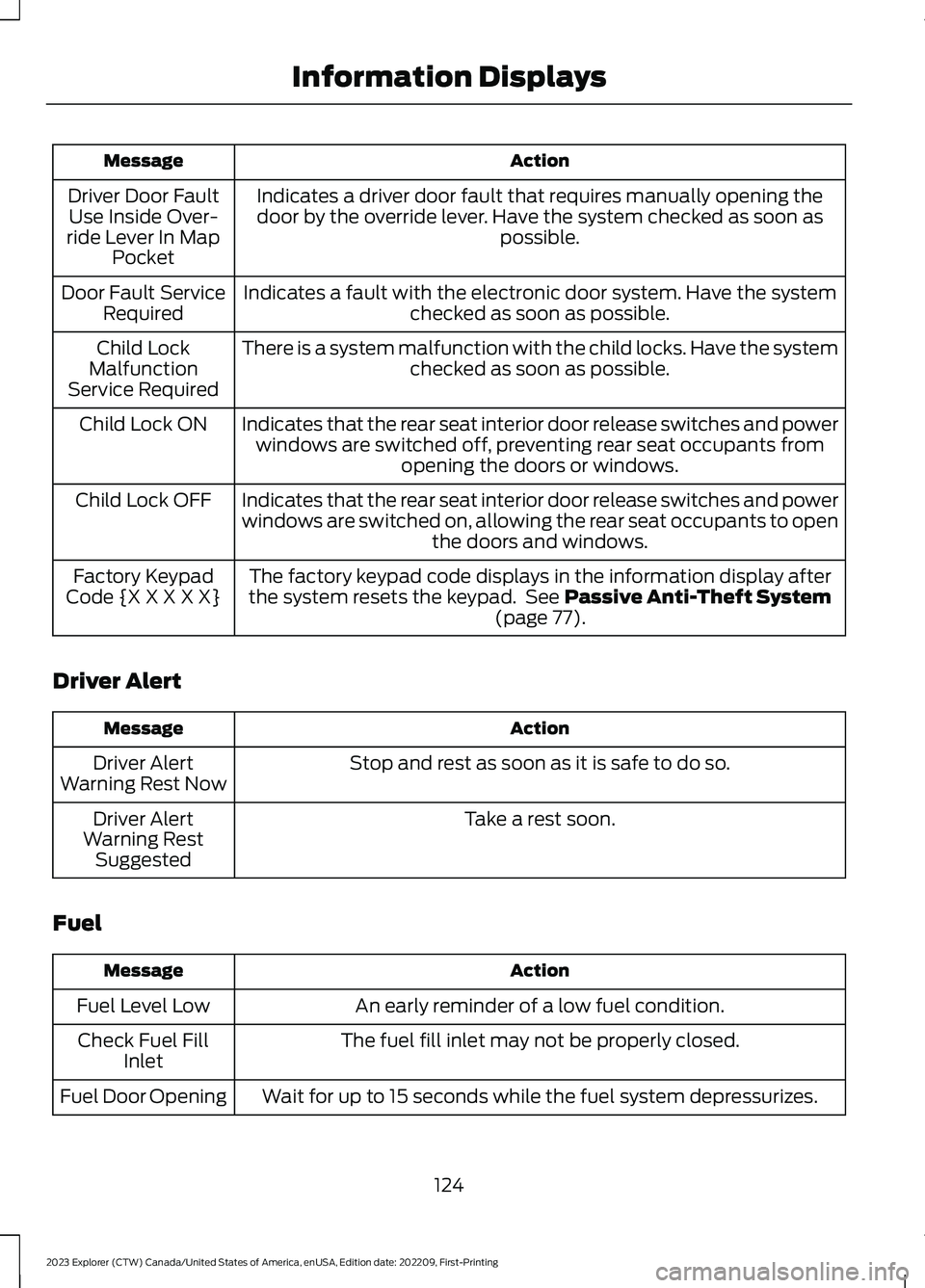
ActionMessage
Indicates a driver door fault that requires manually opening thedoor by the override lever. Have the system checked as soon aspossible.
Driver Door FaultUse Inside Over-ride Lever In MapPocket
Indicates a fault with the electronic door system. Have the systemchecked as soon as possible.Door Fault ServiceRequired
There is a system malfunction with the child locks. Have the systemchecked as soon as possible.Child LockMalfunctionService Required
Indicates that the rear seat interior door release switches and powerwindows are switched off, preventing rear seat occupants fromopening the doors or windows.
Child Lock ON
Indicates that the rear seat interior door release switches and powerwindows are switched on, allowing the rear seat occupants to openthe doors and windows.
Child Lock OFF
The factory keypad code displays in the information display afterthe system resets the keypad. See Passive Anti-Theft System(page 77).
Factory KeypadCode {X X X X X}
Driver Alert
ActionMessage
Stop and rest as soon as it is safe to do so.Driver AlertWarning Rest Now
Take a rest soon.Driver AlertWarning RestSuggested
Fuel
ActionMessage
An early reminder of a low fuel condition.Fuel Level Low
The fuel fill inlet may not be properly closed.Check Fuel FillInlet
Wait for up to 15 seconds while the fuel system depressurizes.Fuel Door Opening
124
2023 Explorer (CTW) Canada/United States of America, enUSA, Edition date: 202209, First-PrintingInformation Displays
Page 131 of 573
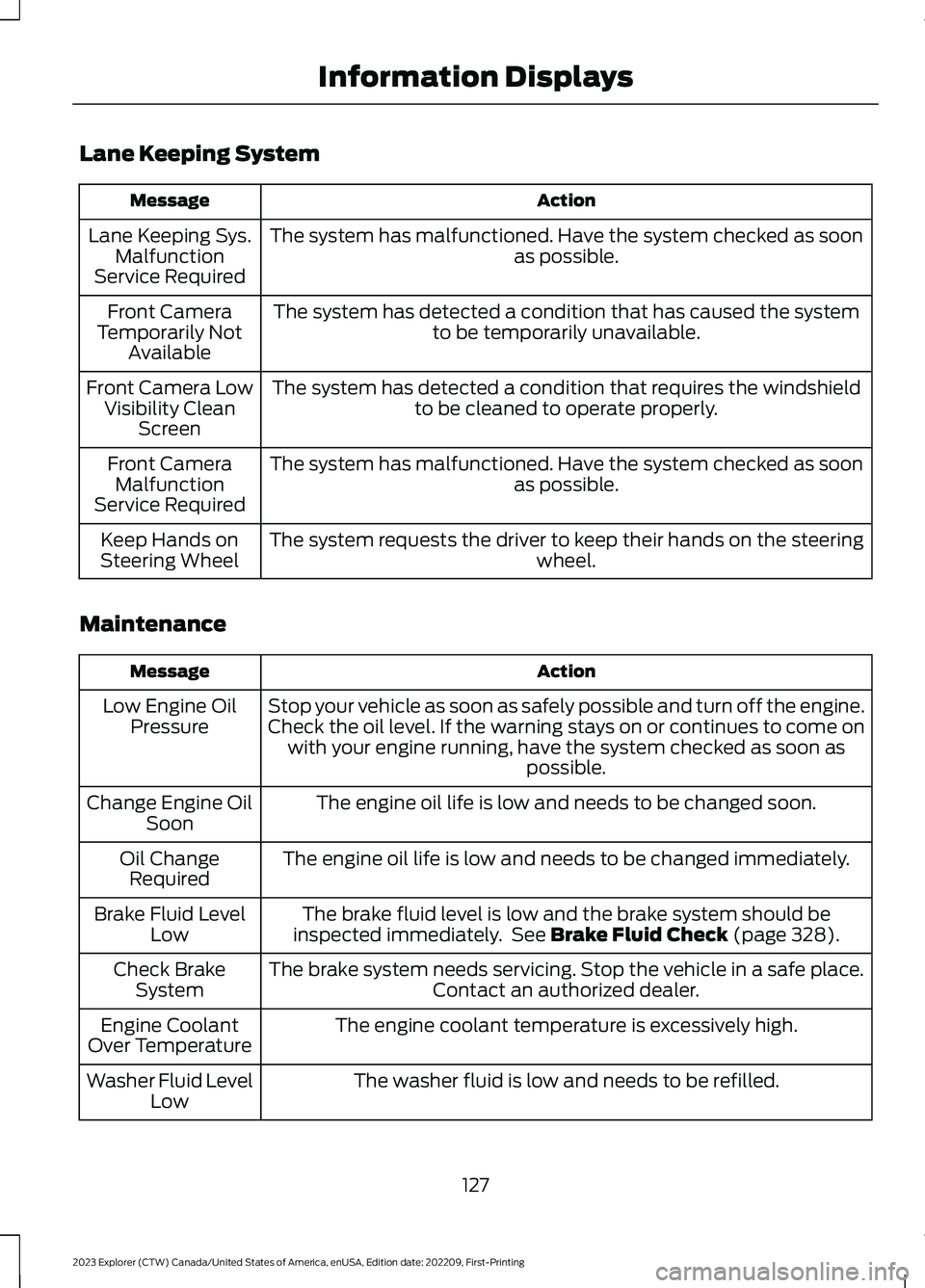
Lane Keeping System
ActionMessage
The system has malfunctioned. Have the system checked as soonas possible.Lane Keeping Sys.MalfunctionService Required
The system has detected a condition that has caused the systemto be temporarily unavailable.Front CameraTemporarily NotAvailable
The system has detected a condition that requires the windshieldto be cleaned to operate properly.Front Camera LowVisibility CleanScreen
The system has malfunctioned. Have the system checked as soonas possible.Front CameraMalfunctionService Required
The system requests the driver to keep their hands on the steeringwheel.Keep Hands onSteering Wheel
Maintenance
ActionMessage
Stop your vehicle as soon as safely possible and turn off the engine.Check the oil level. If the warning stays on or continues to come onwith your engine running, have the system checked as soon aspossible.
Low Engine OilPressure
The engine oil life is low and needs to be changed soon.Change Engine OilSoon
The engine oil life is low and needs to be changed immediately.Oil ChangeRequired
The brake fluid level is low and the brake system should beinspected immediately. See Brake Fluid Check (page 328).Brake Fluid LevelLow
The brake system needs servicing. Stop the vehicle in a safe place.Contact an authorized dealer.Check BrakeSystem
The engine coolant temperature is excessively high.Engine CoolantOver Temperature
The washer fluid is low and needs to be refilled.Washer Fluid LevelLow
127
2023 Explorer (CTW) Canada/United States of America, enUSA, Edition date: 202209, First-PrintingInformation Displays
Page 134 of 573
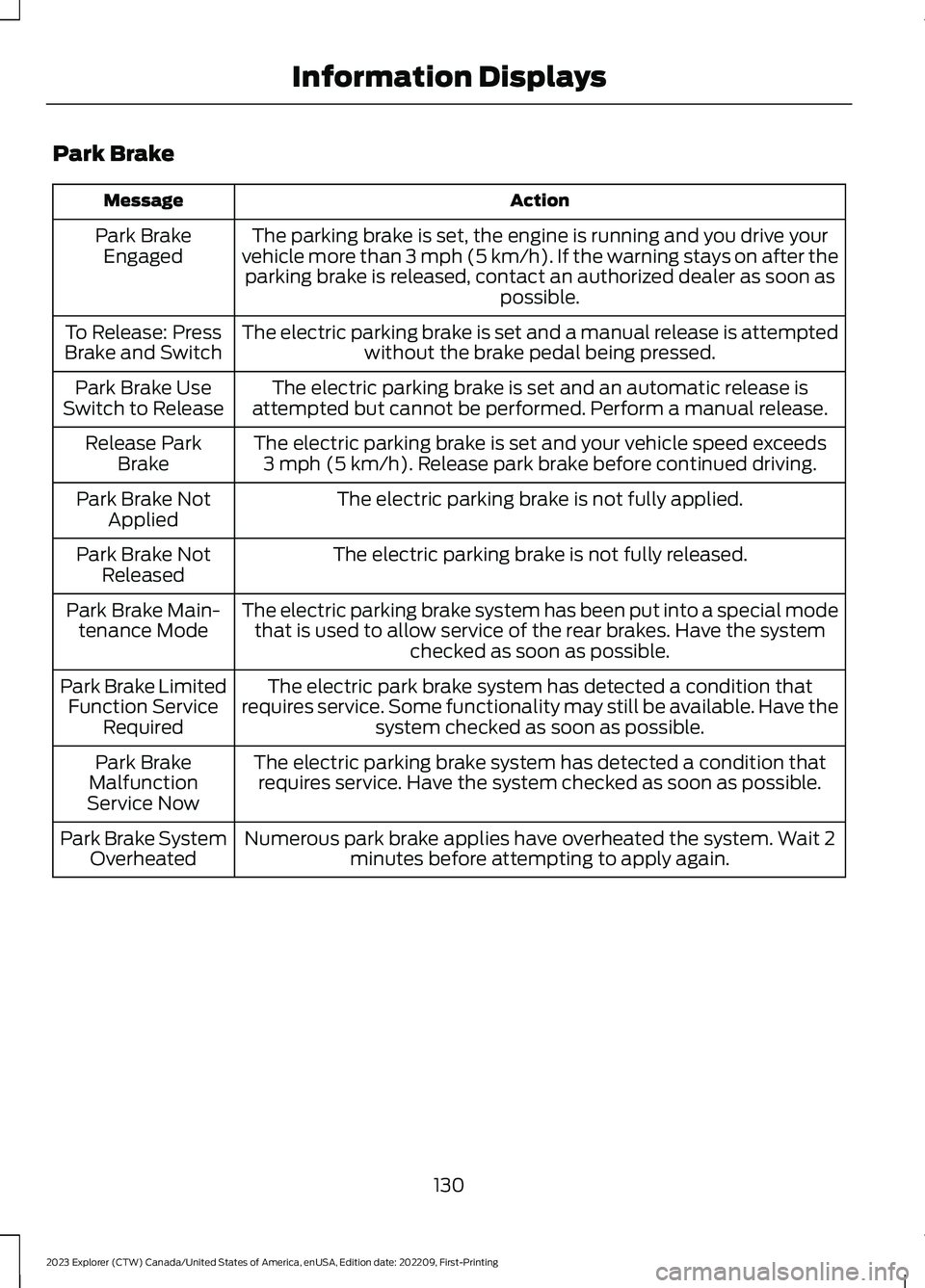
Park Brake
ActionMessage
The parking brake is set, the engine is running and you drive yourvehicle more than 3 mph (5 km/h). If the warning stays on after theparking brake is released, contact an authorized dealer as soon aspossible.
Park BrakeEngaged
The electric parking brake is set and a manual release is attemptedwithout the brake pedal being pressed.To Release: PressBrake and Switch
The electric parking brake is set and an automatic release isattempted but cannot be performed. Perform a manual release.Park Brake UseSwitch to Release
The electric parking brake is set and your vehicle speed exceeds3 mph (5 km/h). Release park brake before continued driving.Release ParkBrake
The electric parking brake is not fully applied.Park Brake NotApplied
The electric parking brake is not fully released.Park Brake NotReleased
The electric parking brake system has been put into a special modethat is used to allow service of the rear brakes. Have the systemchecked as soon as possible.
Park Brake Main-tenance Mode
The electric park brake system has detected a condition thatrequires service. Some functionality may still be available. Have thesystem checked as soon as possible.
Park Brake LimitedFunction ServiceRequired
The electric parking brake system has detected a condition thatrequires service. Have the system checked as soon as possible.Park BrakeMalfunctionService Now
Numerous park brake applies have overheated the system. Wait 2minutes before attempting to apply again.Park Brake SystemOverheated
130
2023 Explorer (CTW) Canada/United States of America, enUSA, Edition date: 202209, First-PrintingInformation Displays
Page 136 of 573
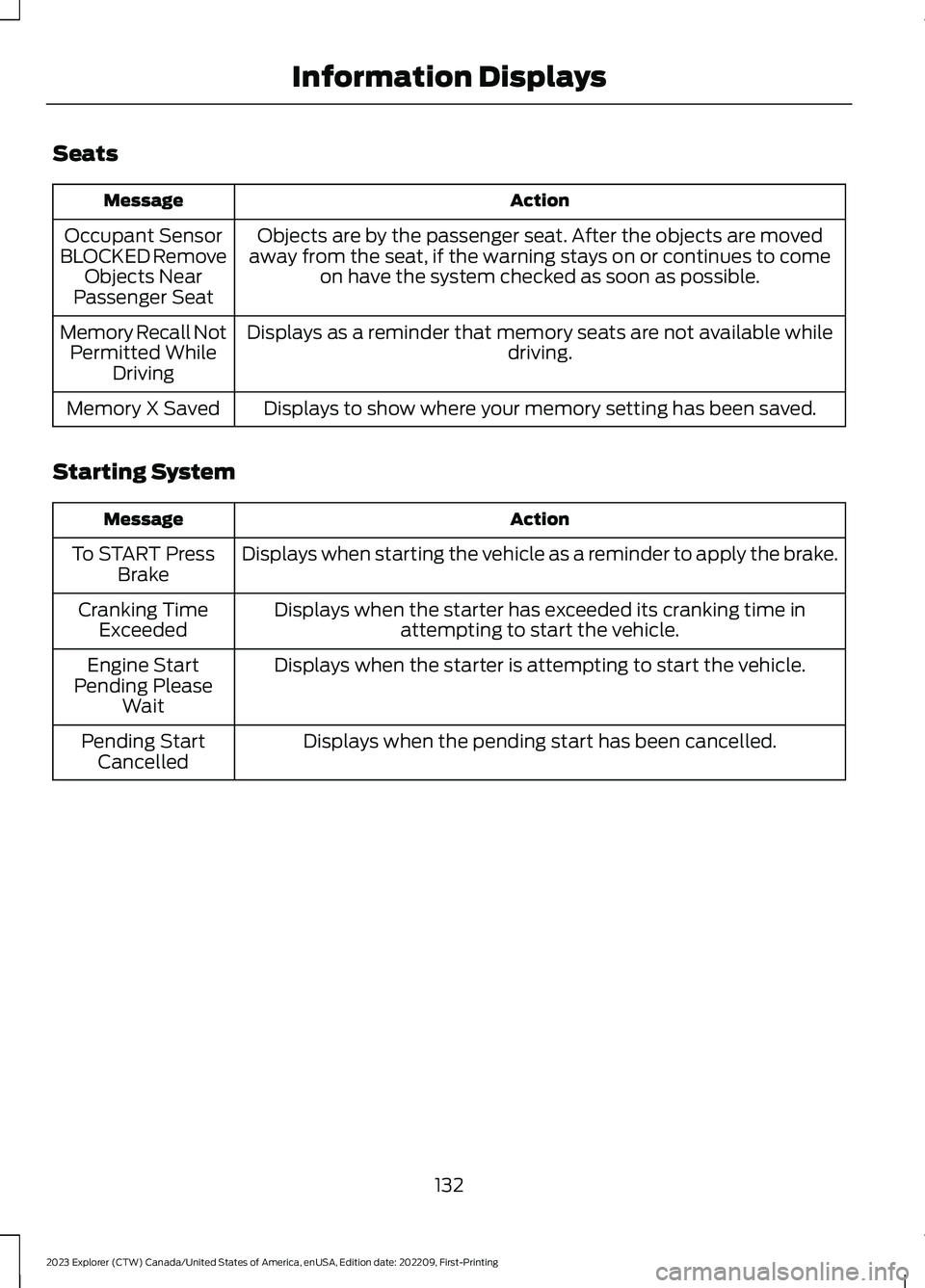
Seats
ActionMessage
Objects are by the passenger seat. After the objects are movedaway from the seat, if the warning stays on or continues to comeon have the system checked as soon as possible.
Occupant SensorBLOCKED RemoveObjects NearPassenger Seat
Displays as a reminder that memory seats are not available whiledriving.Memory Recall NotPermitted WhileDriving
Displays to show where your memory setting has been saved.Memory X Saved
Starting System
ActionMessage
Displays when starting the vehicle as a reminder to apply the brake.To START PressBrake
Displays when the starter has exceeded its cranking time inattempting to start the vehicle.Cranking TimeExceeded
Displays when the starter is attempting to start the vehicle.Engine StartPending PleaseWait
Displays when the pending start has been cancelled.Pending StartCancelled
132
2023 Explorer (CTW) Canada/United States of America, enUSA, Edition date: 202209, First-PrintingInformation Displays
Page 137 of 573
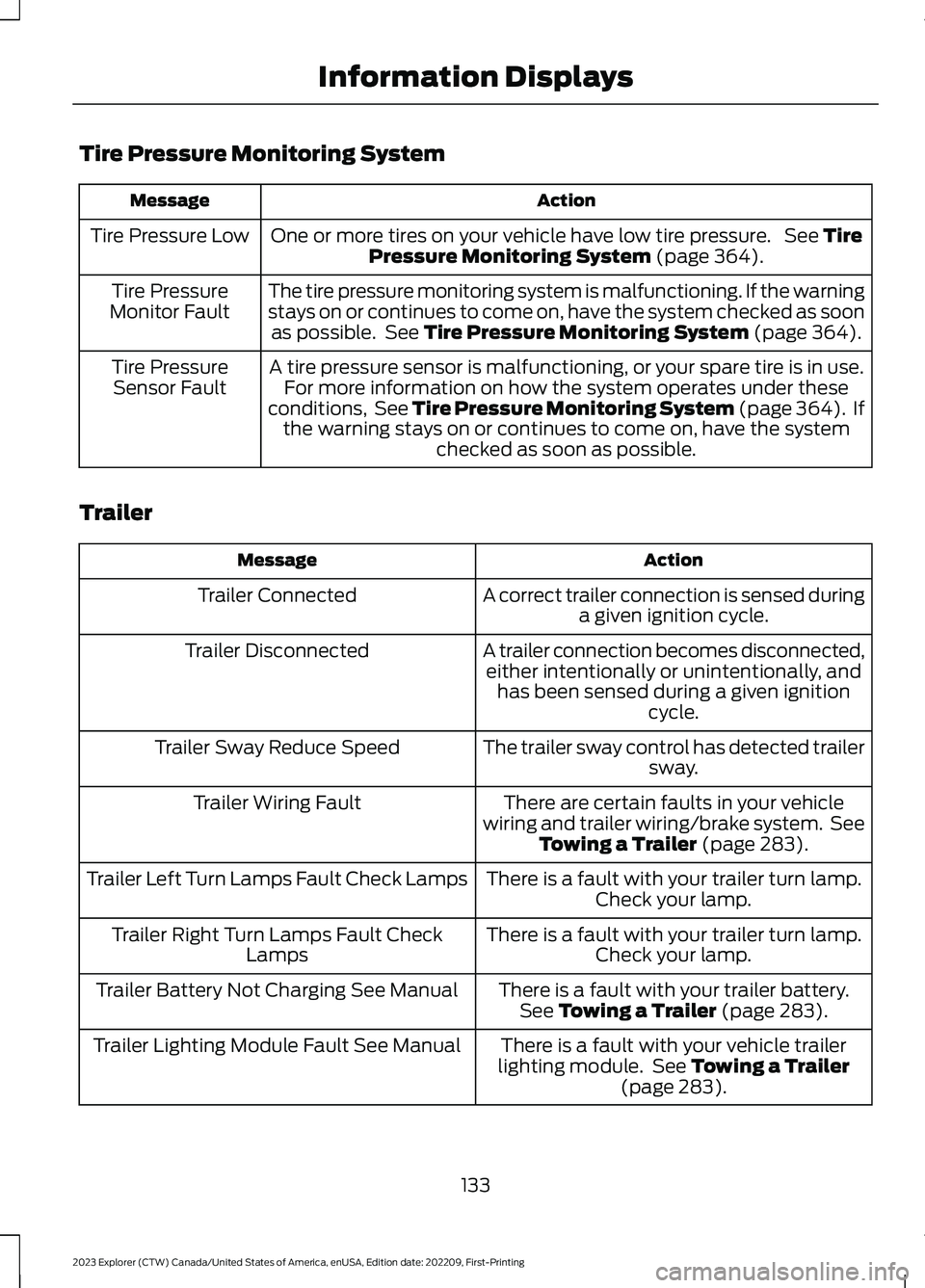
Tire Pressure Monitoring System
ActionMessage
One or more tires on your vehicle have low tire pressure. See TirePressure Monitoring System (page 364).Tire Pressure Low
The tire pressure monitoring system is malfunctioning. If the warningstays on or continues to come on, have the system checked as soonas possible. See Tire Pressure Monitoring System (page 364).
Tire PressureMonitor Fault
A tire pressure sensor is malfunctioning, or your spare tire is in use.For more information on how the system operates under theseconditions, See Tire Pressure Monitoring System (page 364). Ifthe warning stays on or continues to come on, have the systemchecked as soon as possible.
Tire PressureSensor Fault
Trailer
ActionMessage
A correct trailer connection is sensed duringa given ignition cycle.Trailer Connected
A trailer connection becomes disconnected,either intentionally or unintentionally, andhas been sensed during a given ignitioncycle.
Trailer Disconnected
The trailer sway control has detected trailersway.Trailer Sway Reduce Speed
There are certain faults in your vehiclewiring and trailer wiring/brake system. SeeTowing a Trailer (page 283).
Trailer Wiring Fault
There is a fault with your trailer turn lamp.Check your lamp.Trailer Left Turn Lamps Fault Check Lamps
There is a fault with your trailer turn lamp.Check your lamp.Trailer Right Turn Lamps Fault CheckLamps
There is a fault with your trailer battery.See Towing a Trailer (page 283).Trailer Battery Not Charging See Manual
There is a fault with your vehicle trailerlighting module. See Towing a Trailer(page 283).
Trailer Lighting Module Fault See Manual
133
2023 Explorer (CTW) Canada/United States of America, enUSA, Edition date: 202209, First-PrintingInformation Displays
Page 140 of 573
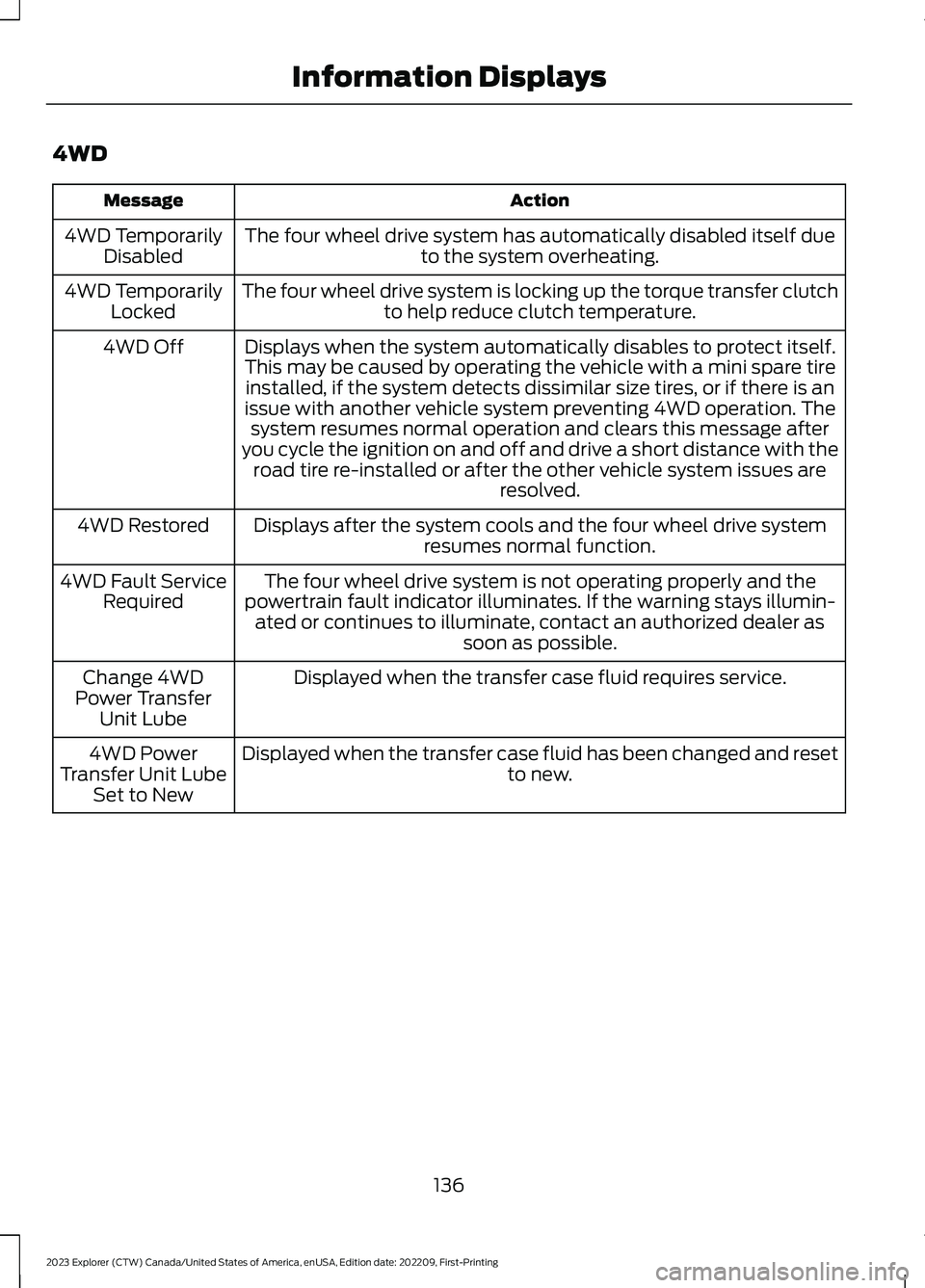
4WD
ActionMessage
The four wheel drive system has automatically disabled itself dueto the system overheating.4WD TemporarilyDisabled
The four wheel drive system is locking up the torque transfer clutchto help reduce clutch temperature.4WD TemporarilyLocked
Displays when the system automatically disables to protect itself.This may be caused by operating the vehicle with a mini spare tireinstalled, if the system detects dissimilar size tires, or if there is anissue with another vehicle system preventing 4WD operation. Thesystem resumes normal operation and clears this message afteryou cycle the ignition on and off and drive a short distance with theroad tire re-installed or after the other vehicle system issues areresolved.
4WD Off
Displays after the system cools and the four wheel drive systemresumes normal function.4WD Restored
The four wheel drive system is not operating properly and thepowertrain fault indicator illuminates. If the warning stays illumin-ated or continues to illuminate, contact an authorized dealer assoon as possible.
4WD Fault ServiceRequired
Displayed when the transfer case fluid requires service.Change 4WDPower TransferUnit Lube
Displayed when the transfer case fluid has been changed and resetto new.4WD PowerTransfer Unit LubeSet to New
136
2023 Explorer (CTW) Canada/United States of America, enUSA, Edition date: 202209, First-PrintingInformation Displays
Page 148 of 573
SITTING IN THE CORRECT
POSITION
WARNING: Sitting improperly, outof position or with the seatback reclinedtoo far can take weight off the seatcushion and affect the decision of thepassenger sensing system, resulting inserious injury or death in the event of acrash. Always sit upright against yourseat back, with your feet on the floor.
WARNING: Do not recline the seatbackrest too far as this can cause theoccupant to slide under the seatbelt,resulting in personal injury in the eventof a crash.
WARNING: Do not place objectshigher than the top of the seat backrest.Failure to follow this instruction couldresult in personal injury or death in theevent of a sudden stop or crash.
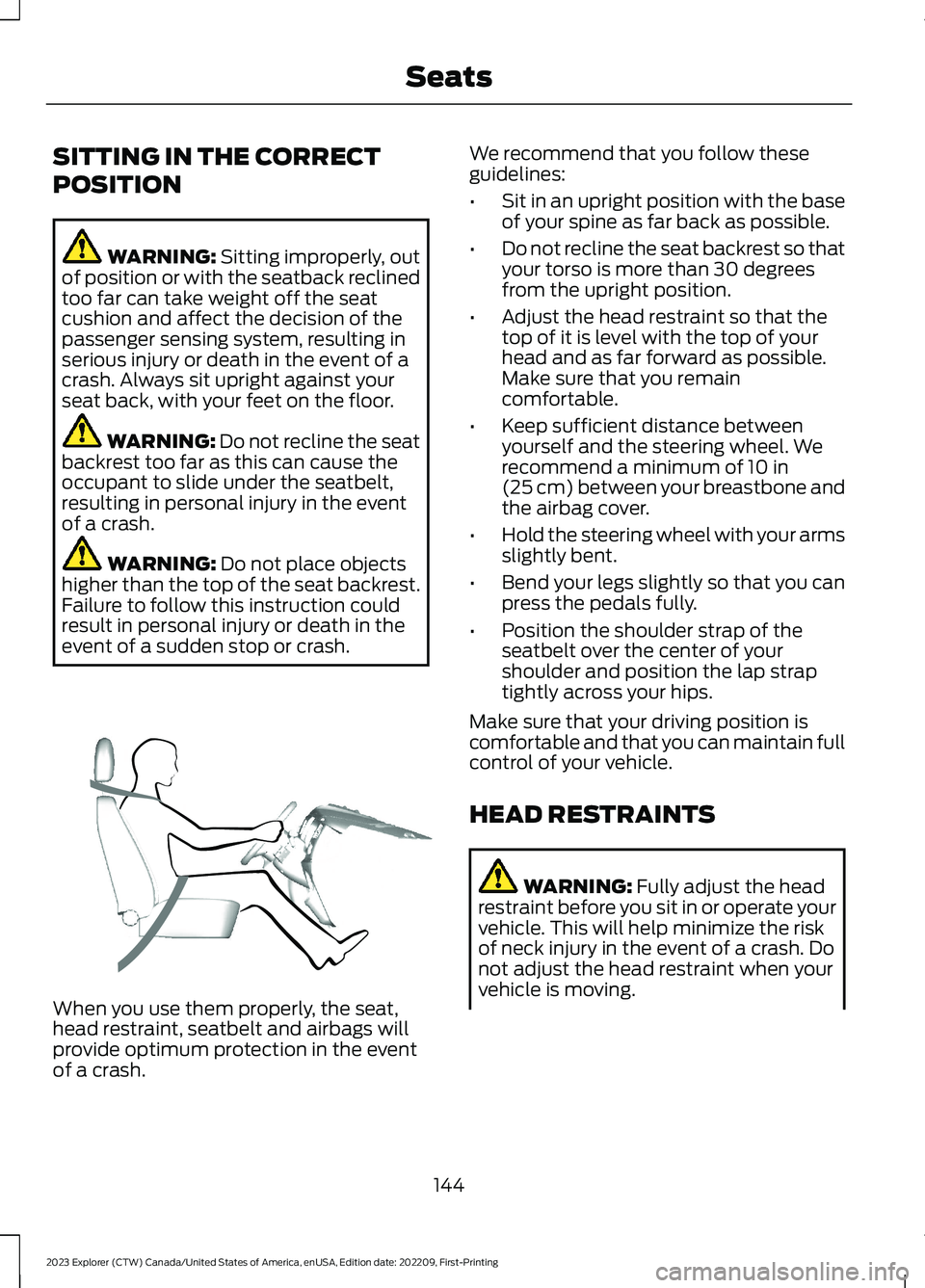
When you use them properly, the seat,head restraint, seatbelt and airbags willprovide optimum protection in the eventof a crash.
We recommend that you follow theseguidelines:
•Sit in an upright position with the baseof your spine as far back as possible.
•Do not recline the seat backrest so thatyour torso is more than 30 degreesfrom the upright position.
•Adjust the head restraint so that thetop of it is level with the top of yourhead and as far forward as possible.Make sure that you remaincomfortable.
•Keep sufficient distance betweenyourself and the steering wheel. Werecommend a minimum of 10 in(25 cm) between your breastbone andthe airbag cover.
•Hold the steering wheel with your armsslightly bent.
•Bend your legs slightly so that you canpress the pedals fully.
•Position the shoulder strap of theseatbelt over the center of yourshoulder and position the lap straptightly across your hips.
Make sure that your driving position iscomfortable and that you can maintain fullcontrol of your vehicle.
HEAD RESTRAINTS
WARNING: Fully adjust the headrestraint before you sit in or operate yourvehicle. This will help minimize the riskof neck injury in the event of a crash. Donot adjust the head restraint when yourvehicle is moving.
144
2023 Explorer (CTW) Canada/United States of America, enUSA, Edition date: 202209, First-PrintingSeatsE68595
Page 149 of 573
WARNING: The head restraint is asafety device. Whenever possible itshould be installed and properlyadjusted when the seat is occupied.Failure to adjust the head restraintproperly could reduce its effectivenessduring certain impacts.
Note:Adjust the seat backrest to an uprightdriving position before adjusting the headrestraint. Adjust the head restraint so thatthe top of it is level with the top of your headand as far forward as possible. Make surethat you remain comfortable. If you areextremely tall, adjust the head restraint toits highest position.
Adjusting the Head Restraints
Front Seat Head Restraints
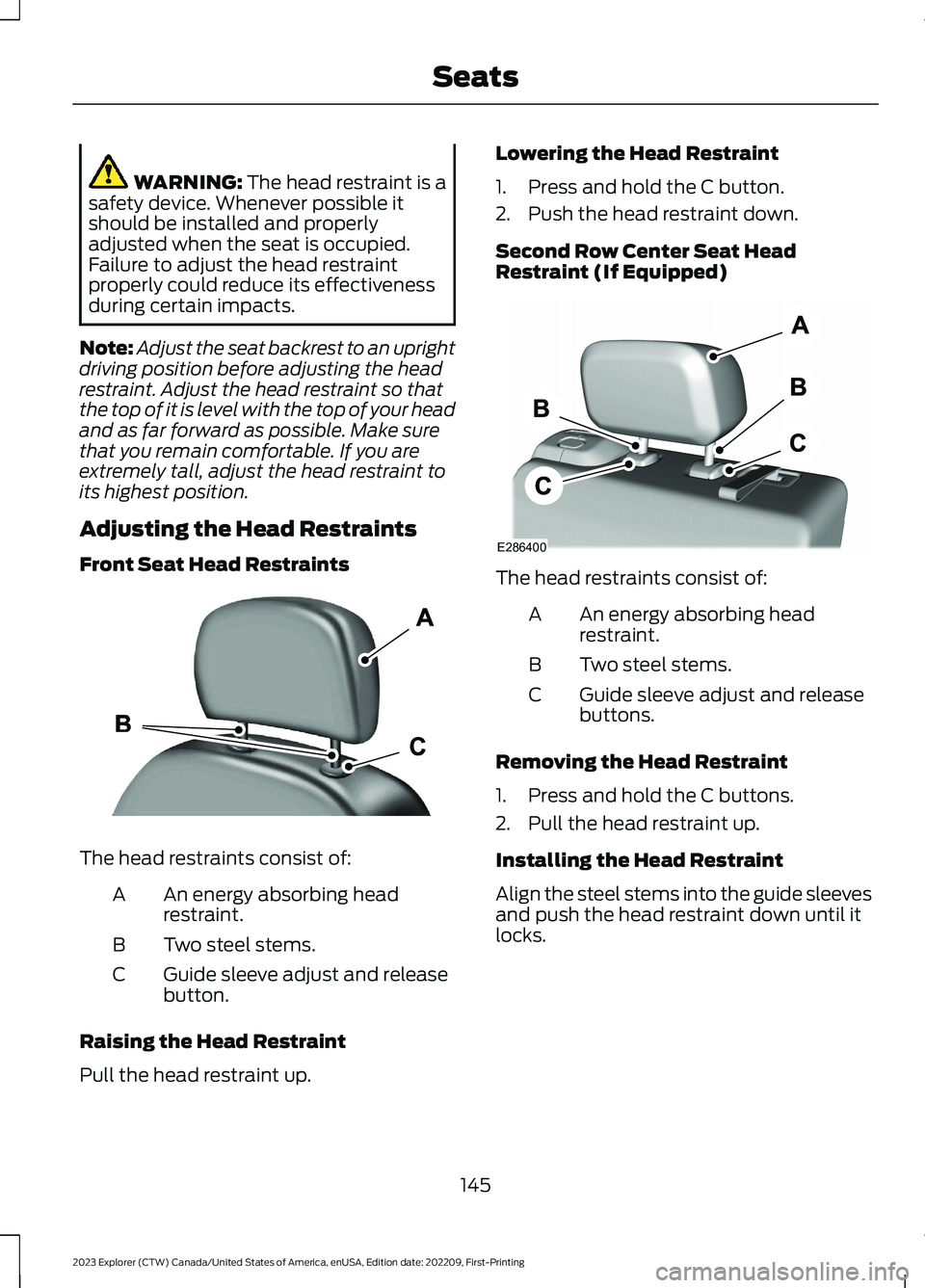
The head restraints consist of:
An energy absorbing headrestraint.A
Two steel stems.B
Guide sleeve adjust and releasebutton.C
Raising the Head Restraint
Pull the head restraint up.
Lowering the Head Restraint
1.Press and hold the C button.
2.Push the head restraint down.
Second Row Center Seat HeadRestraint (If Equipped)
The head restraints consist of:
An energy absorbing headrestraint.A
Two steel stems.B
Guide sleeve adjust and releasebuttons.C
Removing the Head Restraint
1.Press and hold the C buttons.
2.Pull the head restraint up.
Installing the Head Restraint
Align the steel stems into the guide sleevesand push the head restraint down until itlocks.
145
2023 Explorer (CTW) Canada/United States of America, enUSA, Edition date: 202209, First-PrintingSeatsE291139 E286400