lights FORD EXPLORER 2023 Owners Manual
[x] Cancel search | Manufacturer: FORD, Model Year: 2023, Model line: EXPLORER, Model: FORD EXPLORER 2023Pages: 573, PDF Size: 16.1 MB
Page 49 of 573
This system provides an improved overalllevel of frontal crash protection to frontseat occupants and is designed to helpfurther reduce the risk of airbag-relatedinjuries. The system analyzes differentoccupant conditions and crash severitybefore activating the appropriate safetydevices to help better protect occupantsin a variety of frontal crash situations.
Your vehicle's Personal Safety Systemconsists of:
•Driver and passenger dual-stage airbagsupplemental restraints.
•Front seat outermost seatbelts withpretensioners, energy managementretractors and seatbelt usage sensors.
•Front passenger sensing system.
•Passenger airbag off and on indicators.
•Front crash severity sensors.
•Restraints control module with impactand safing sensors.
•Restraint system warning light andtone.
•The electrical wiring for the airbags,crash sensors, seatbelt pretensioners,front seatbelt usage sensors, frontpassenger sensing system andindicator lights.
How Does the Personal SafetySystem Work?
The Personal Safety System can adapt thedeployment strategy of the safety devicesaccording to crash severity and occupantconditions. A collection of crash andoccupant sensors provides information tothe restraints control module. During acrash, the restraints control module maydeploy the seatbelt pretensioners, one orboth stages of the dual-stage airbagsbased on crash severity and occupantconditions.
45
2023 Explorer (CTW) Canada/United States of America, enUSA, Edition date: 202209, First-PrintingPersonal Safety System™
Page 93 of 573
Note:The lights on the front fog lamps turnoff when you switch the high beams on.
Front Fog Lamp Indicator
It illuminates when you switchthe front fog lamps on.
ADAPTIVE HEADLAMPS (IF
EQUIPPED)
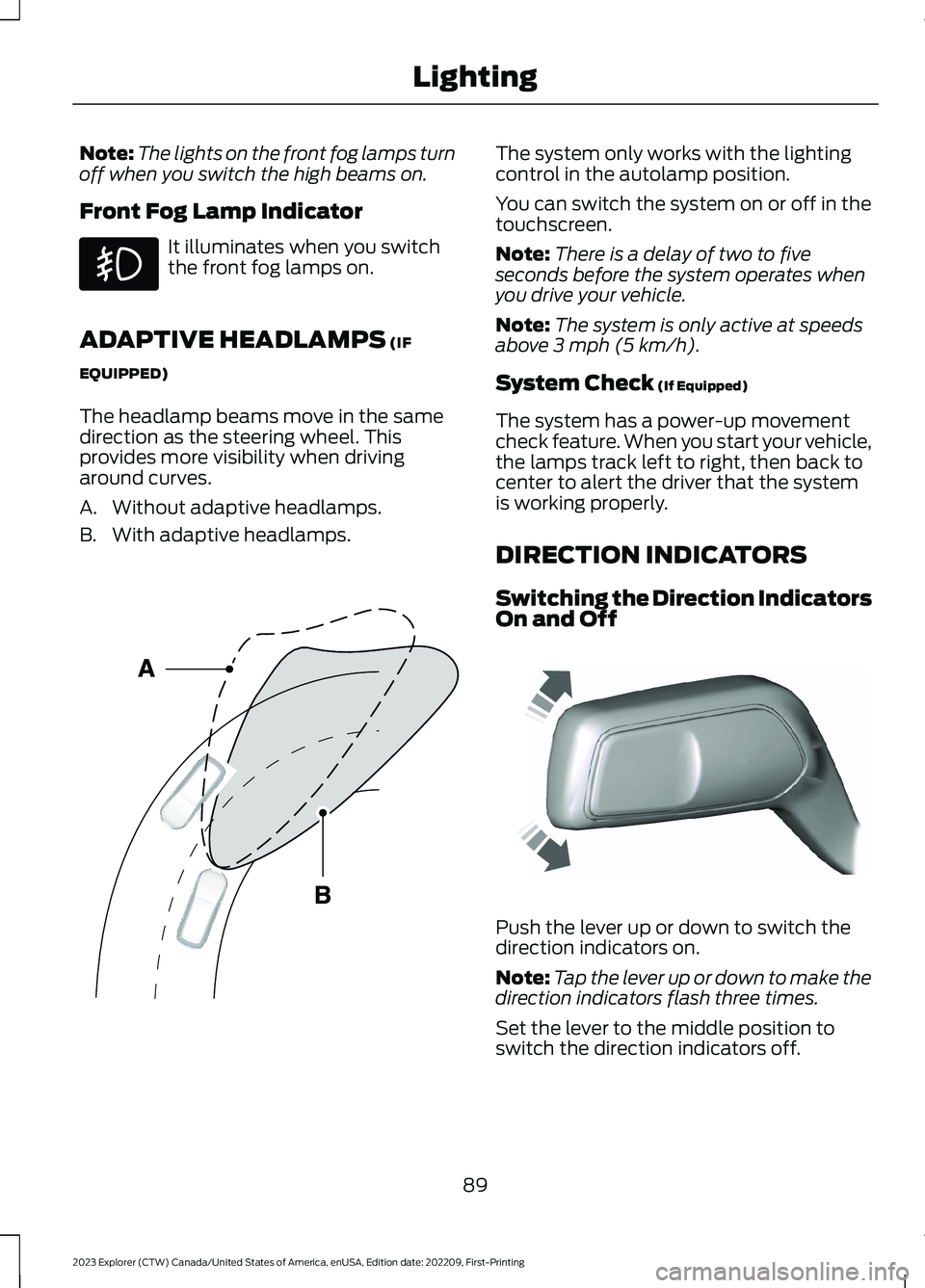
The headlamp beams move in the samedirection as the steering wheel. Thisprovides more visibility when drivingaround curves.
A.Without adaptive headlamps.
B.With adaptive headlamps.
The system only works with the lightingcontrol in the autolamp position.
You can switch the system on or off in thetouchscreen.
Note:There is a delay of two to fiveseconds before the system operates whenyou drive your vehicle.
Note:The system is only active at speedsabove 3 mph (5 km/h).
System Check (If Equipped)
The system has a power-up movementcheck feature. When you start your vehicle,the lamps track left to right, then back tocenter to alert the driver that the systemis working properly.
DIRECTION INDICATORS
Switching the Direction IndicatorsOn and Off
Push the lever up or down to switch thedirection indicators on.
Note:Tap the lever up or down to make thedirection indicators flash three times.
Set the lever to the middle position toswitch the direction indicators off.
89
2023 Explorer (CTW) Canada/United States of America, enUSA, Edition date: 202209, First-PrintingLighting E161714 E242676
Page 94 of 573
Direction Indicator
Flashes when you switch thedirection indicators on.
Note:An increase in the rate of flashingwarns of a failed indicator bulb.
INTERIOR LAMPS
The lamps turn on under the followingconditions:
•You open any door.
•You press a button on the remotecontrol.
•You press the all lamps on button onthe overhead console.
Front Interior Lamp
The front interior lamp switches are on theoverhead console.
Note:The position of each button on theoverhead console depends on your vehicle.
All Lamps On or Off
Press to switch all interior lampson or off.
Individual Map Lamps
Press to switch the left-handindividual dome lamp on and off.
Press to switch the right-handindividual dome lamp on and off.
Interior Lamp Function
Press to switch the interior lampfunction on and off.
When the interior lamp function is off andyou open a door, the courtesy and doorlamps stay off.
When the interior lamp function is on andyou open a door, the courtesy and doorlamps turn on.
Note:The indicator lamp lights amberwhen the door function is off.
Rear Interior Lamps
The rear interior lamps may be above therear seat or above the rear windows.
Press to switch the lamps on oroff.
Note:If you switch the rear lamps onthrough the overhead console, you cannotswitch them off with the rear lamp switch.
AMBIENT LIGHTING -
VEHICLES WITH: 8 INCH
CENTER DISPLAY SCREEN
Use the touchscreen to select thefollowing:
90
2023 Explorer (CTW) Canada/United States of America, enUSA, Edition date: 202209, First-PrintingLightingE67018 E281230 E259649 E262193 E281231 E259649
Page 100 of 573
You can switch this feature on and offthrough the information display. SeeGeneral Information (page 115).
You can fold the mirrors on demand bypressing the power-folding mirror controlon the door. The control lights and themirrors fold in toward the glass. Press thecontrol again to unfold the mirrors. Thecontrol light turns off.
Note:If you use the power-folding controlto fold the mirrors on demand with the autofold feature on, you must use the controlagain to unfold them.
Loose Mirror
If you manually fold your power-foldingmirrors, they may not work properly evenafter you re-position them. You need toreset them if:
•The mirrors vibrate when you drive.
•The mirrors feel loose.
•The mirrors do not stay in the folded orunfolded position.
•One of the mirrors is not in its normaldriving position.
To reset the power-fold feature, use thepower-folding mirror control to fold andunfold the mirrors. You may hear a loudnoise as you reset the power-foldingmirrors. This sound is normal. Repeat thisprocess as needed each time you manuallyfold the mirrors.
Heated Exterior Mirrors (If Equipped)
See Heated Exterior Mirrors (page 142).
Memory Mirrors (If Equipped)
You can save and recall the mirrorpositions through the memory function.See Memory Function (page 150).
Auto-dimming Feature (If Equipped)
The driver exterior mirror dims when theinterior auto-dimming mirror turns on.
Direction Indicator Mirrors (If Equipped)
When the vehicle is running, theforward-facing portion of the appropriatemirror housing blinks when you switch onthe direction indicator.
Puddle Lamps (If Equipped)
The lamps on the bottom part of the mirrorhousing light when you use yourtransmitter to unlock the doors or whenyou open a door.
360-Degree Camera (If Equipped)
See 360 Degree Camera (page 237).
Blind Spot Information System
See Blind Spot Information System(page 259).
EXTERIOR MIRRORS - ST
Power Exterior Mirrors
WARNING: Do not adjust themirrors when your vehicle is moving. Thiscould result in the loss of control of yourvehicle, serious personal injury or death.
96
2023 Explorer (CTW) Canada/United States of America, enUSA, Edition date: 202209, First-PrintingWindows and Mirrors
Page 161 of 573
Press the heated seat symbol to cyclethrough the various heat settings and off.More indicator lights indicate warmersettings.
Note:The heated seats switch on during aremote start if they are enabled.
Note:The heated seats may switch onwhen you start your vehicle if they were onwhen you previously switched your vehicleoff.
Automatic Climate ControlledSeats (If Equipped)
When you switch on the auto setting, theseats switch between the heated seatsand ventilated seats to match your climatecontrol setting.
Second Row Heated Seats
The heated seat controls are on the rearof the center console.
VENTILATED SEATS (IF EQUIPPED)
Do not do the following:
•Spill liquid on the front seats. This maycause the air vent holes to becomeblocked and not work properly.
•Place cargo or objects under the seats.They may block the air intake causingthe air vents to not work properly.
The engine must be running to use thisfeature.
Press this symbol to cycle through thevarious ventilation settings and off. Moreindicator lights indicate higher fan speeds.
Note:The ventilated seats switch on duringa remote start if they are enabled.
Note:The ventilated seats may switch onwhen you start your vehicle if they were onwhen you previously switched your vehicleoff.
If the engine falls below 350 RPM whenthe ventilated seats are on, the systemturns off. You need to switch it back on.
Note:To improve comfort, use theventilated seats along with the vehicle’s airconditioning system.
Automatic Climate ControlledSeats (If Equipped)
When you switch on the auto setting, theseats switch between the heated seatsand ventilated seats to match your climatecontrol setting.
157
2023 Explorer (CTW) Canada/United States of America, enUSA, Edition date: 202209, First-PrintingSeatsE146322 E224689
Page 217 of 573
HILL START ASSIST
WARNING: The system does notreplace the parking brake. When youleave your vehicle, always apply theparking brake.
WARNING: You must remain inyour vehicle when the system turns on.At all times, you are responsible forcontrolling your vehicle, supervising thesystem and intervening, if required.Failure to take care may result in the lossof control of your vehicle, seriouspersonal injury or death.
WARNING: The system will turnoff if a malfunction is apparent or if yourev the engine excessively. Failure to takecare may result in the loss of control ofyour vehicle, serious personal injury ordeath.
The system makes it easier to pull awaywhen your vehicle is on a slope without theneed to use the parking brake.
When the system is active, your vehicleremains stationary on the slope for two tothree seconds after you release the brakepedal. This allows time to move your footfrom the brake to the accelerator pedal.The system releases the brakesautomatically once the engine hasdeveloped sufficient torque to prevent yourvehicle from rolling down the slope. Thisis an advantage when pulling away on aslope, for example from a car park ramp,traffic lights or when reversing uphill intoa parking space.
The system activates on any slope thatcauses your vehicle to roll.
Note:There is no warning light to indicatethe system is either on or off.
Using Hill Start Assist
1.Press the brake pedal to bring yourvehicle to a complete standstill. Keepthe brake pedal pressed and shift intofirst gear when facing uphill or reverse(R) when facing downhill.
2.If the sensors detect that your vehicleis on a slope, the system activatesautomatically.
3.When you remove your foot from thebrake pedal, your vehicle remains onthe slope without rolling away forabout two to three seconds. This holdtime automatically extends if you arein the process of driving off.
4.Drive off in the normal manner. Thesystem releases the brakesautomatically.
Note:When you remove your foot from thebrake pedal and press the pedal again whenthe system is active, you will experiencesignificantly reduced brake pedal travel. Thisis normal.
Switching the System On and Off
Vehicles with Manual Transmission
You can switch this feature on or off in theinformation display. The systemremembers the last setting when you startyour vehicle.
Vehicles with Automatic Transmission
You cannot turn the system on or off.When you switch the ignition on, thesystem automatically turns on.
213
2023 Explorer (CTW) Canada/United States of America, enUSA, Edition date: 202209, First-PrintingBrakes
Page 224 of 573
PRINCIPLE OF OPERATION
The traction control system helps avoiddrive wheel spin and loss of traction.
If your vehicle begins to slide, the systemapplies the brakes to individual wheelsand, when needed, reduces engine powerat the same time. If the wheels spin whenaccelerating on slippery or loose surfaces,the system reduces engine power in orderto increase traction.
USING TRACTION CONTROL
WARNING: Operating your vehiclewith the traction control disabled couldlead to an increased risk of loss of vehiclecontrol, vehicle rollover, personal injuryand death.
The system automatically turns on eachtime you switch the ignition on.
If your vehicle is stuck in mud or snow,switching traction control off may bebeneficial as this allows the wheels to spin.
Note:When you switch traction control off,stability control remains fully active.
Switching the System Off
When you switch the system off or on, amessage appears in the informationdisplay showing system status.
You can switch the system off by using theswitch.
Using a Switch (If Equipped)
Use the traction control switch on thecenter console near the shifter to switchthe system off or on.
The traction control switch.
System Indicator Lights andMessages
The stability and traction controllight:
•Temporarily illuminates on enginestart-up.
•Flashes when a driving conditionactivates either of the systems.
•Illuminates if a problem occurs in eitherof the systems.
The stability and traction controloff light temporarily illuminateson engine start-up and stays onwhen you switch the traction controlsystem off.
220
2023 Explorer (CTW) Canada/United States of America, enUSA, Edition date: 202209, First-PrintingTraction ControlE297971 E138639 E130458
Page 248 of 573
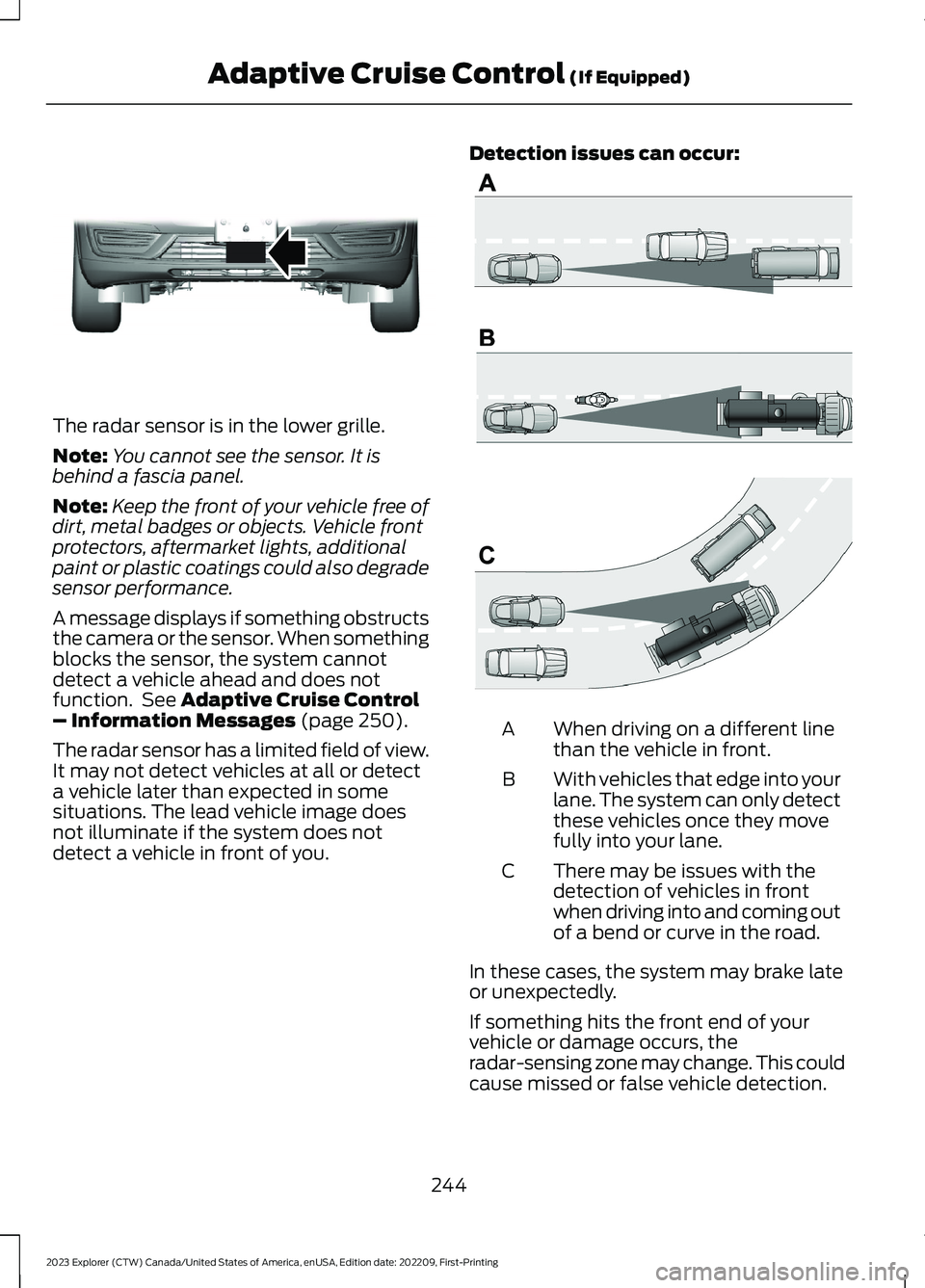
The radar sensor is in the lower grille.
Note:You cannot see the sensor. It isbehind a fascia panel.
Note:Keep the front of your vehicle free ofdirt, metal badges or objects. Vehicle frontprotectors, aftermarket lights, additionalpaint or plastic coatings could also degradesensor performance.
A message displays if something obstructsthe camera or the sensor. When somethingblocks the sensor, the system cannotdetect a vehicle ahead and does notfunction. See Adaptive Cruise Control– Information Messages (page 250).
The radar sensor has a limited field of view.It may not detect vehicles at all or detecta vehicle later than expected in somesituations. The lead vehicle image doesnot illuminate if the system does notdetect a vehicle in front of you.
Detection issues can occur:
When driving on a different linethan the vehicle in front.A
With vehicles that edge into yourlane. The system can only detectthese vehicles once they movefully into your lane.
B
There may be issues with thedetection of vehicles in frontwhen driving into and coming outof a bend or curve in the road.
C
In these cases, the system may brake lateor unexpectedly.
If something hits the front end of yourvehicle or damage occurs, theradar-sensing zone may change. This couldcause missed or false vehicle detection.
244
2023 Explorer (CTW) Canada/United States of America, enUSA, Edition date: 202209, First-PrintingAdaptive Cruise Control (If Equipped)E307892 E71621
Page 264 of 573
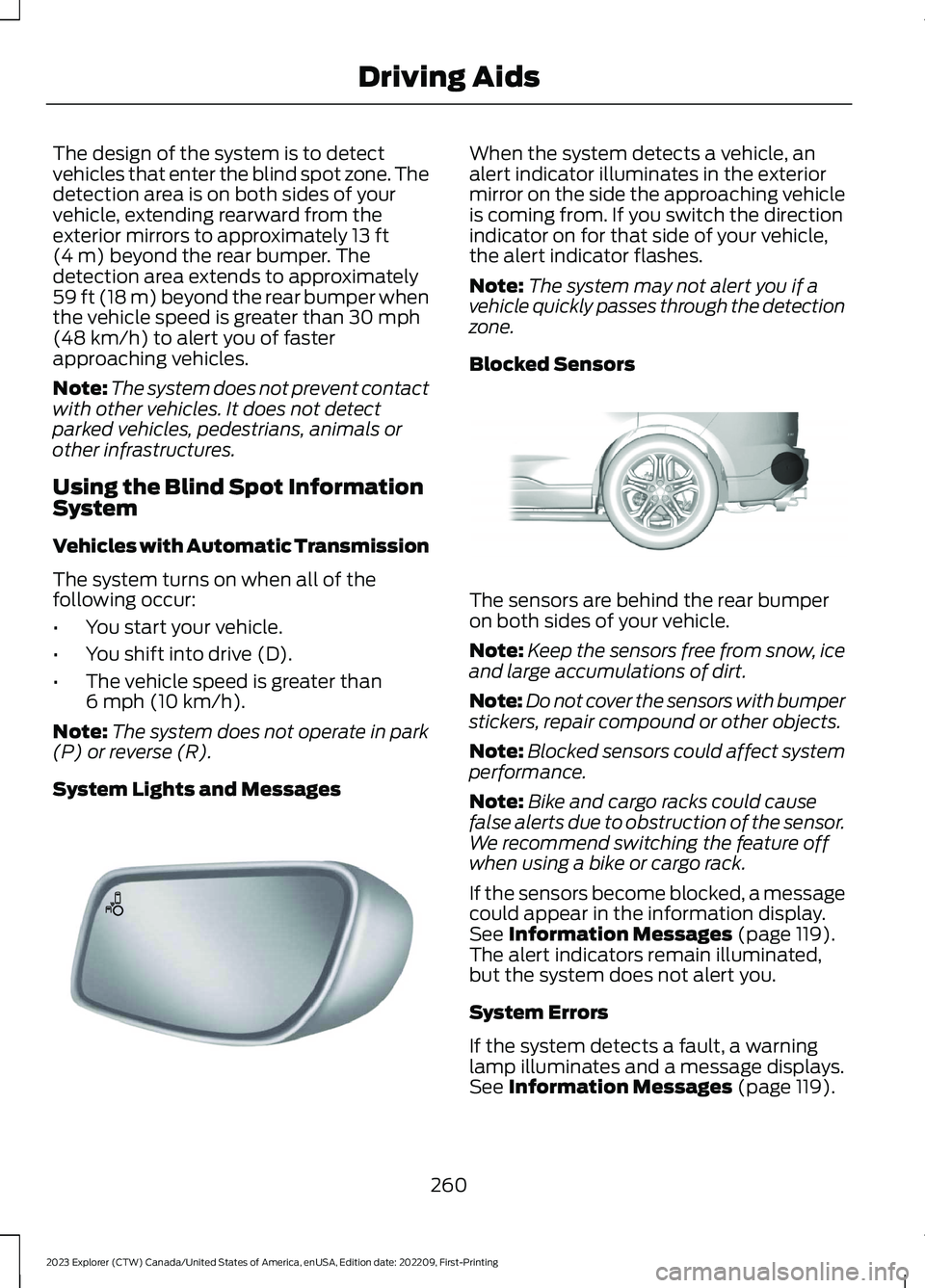
The design of the system is to detectvehicles that enter the blind spot zone. Thedetection area is on both sides of yourvehicle, extending rearward from theexterior mirrors to approximately 13 ft(4 m) beyond the rear bumper. Thedetection area extends to approximately59 ft (18 m) beyond the rear bumper whenthe vehicle speed is greater than 30 mph(48 km/h) to alert you of fasterapproaching vehicles.
Note:The system does not prevent contactwith other vehicles. It does not detectparked vehicles, pedestrians, animals orother infrastructures.
Using the Blind Spot InformationSystem
Vehicles with Automatic Transmission
The system turns on when all of thefollowing occur:
•You start your vehicle.
•You shift into drive (D).
•The vehicle speed is greater than6 mph (10 km/h).
Note:The system does not operate in park(P) or reverse (R).
System Lights and Messages
When the system detects a vehicle, analert indicator illuminates in the exteriormirror on the side the approaching vehicleis coming from. If you switch the directionindicator on for that side of your vehicle,the alert indicator flashes.
Note:The system may not alert you if avehicle quickly passes through the detectionzone.
Blocked Sensors
The sensors are behind the rear bumperon both sides of your vehicle.
Note:Keep the sensors free from snow, iceand large accumulations of dirt.
Note:Do not cover the sensors with bumperstickers, repair compound or other objects.
Note:Blocked sensors could affect systemperformance.
Note:Bike and cargo racks could causefalse alerts due to obstruction of the sensor.We recommend switching the feature offwhen using a bike or cargo rack.
If the sensors become blocked, a messagecould appear in the information display.See Information Messages (page 119).The alert indicators remain illuminated,but the system does not alert you.
System Errors
If the system detects a fault, a warninglamp illuminates and a message displays.See Information Messages (page 119).
260
2023 Explorer (CTW) Canada/United States of America, enUSA, Edition date: 202209, First-PrintingDriving AidsE142442 E205199
Page 289 of 573
ESSENTIAL TOWING CHECKS
Follow these guidelines for safe towing:
•Do not tow a trailer until you drive yourvehicle at least 1,000 mi (1,600 km).
•Consult your local motor vehicle lawsfor towing a trailer.
•See the instructions included withtowing accessories for the properinstallation and adjustmentspecifications.
•Service your vehicle more frequently ifyou tow a trailer. See ScheduledMaintenance (page 476).
•If you use a rental trailer, follow theinstructions the rental agency givesyou.
You can find information on loadspecification terms found on the tire labeland Safety Compliance label as well asinstructions on calculating your vehicle'sload in the Load Carrying chapter. SeeLoad Limit (page 277).
Remember to account for the trailertongue weight as part of your vehicle loadwhen calculating the total vehicle weight.
Hitches
Do not use a hitch that either clamps ontothe bumper or attaches to the axle.
Distribute the trailer load so 10-15% of thetotal trailer weight is on the tongue.
A weight distributing hitch is not requiredfor your vehicle.
Safety Chains
Note:Do not attach safety chains to thebumper.
Always connect the safety chains to thehook retainers of your vehicle hitch.
To connect the trailer’s safety chains, crossthem under the trailer tongue and allowenough slack for turning tight corners. Donot allow the chains to drag on the ground.
Trailer Brakes
WARNING: Do not connect atrailer's hydraulic brake system directlyto your vehicle's brake system. Yourvehicle may not have enough brakingpower and your chances of having acollision greatly increase.
Electric brakes and manual, automatic orsurge-type trailer brakes are safe if youinstall them properly and adjust them tothe manufacturer's specifications. Thetrailer brakes must meet local and federalregulations.
The rating for the tow vehicle's brakingsystem operation is at the gross vehicleweight rating, not the gross combinedweight rating.
Safe control of towed vehicles requiresseparate functioning brake systems forvehicles and trailers weighing more than1,500 lb (680 kg) when loaded.
Trailer Lamps
WARNING: Never connect anytrailer lamp wiring to the vehicle's taillamp wiring; this may damage theelectrical system resulting in fire. Contactyour authorized dealer as soon aspossible for assistance in proper trailertow wiring installation. Additionalelectrical equipment may be required.
Most towed vehicles require trailer lamps.Make sure all running lights, brake lights,direction indicators and hazard flashersare working.
285
2023 Explorer (CTW) Canada/United States of America, enUSA, Edition date: 202209, First-PrintingTowing