tires FORD EXPLORER 2023 Owners Manual
[x] Cancel search | Manufacturer: FORD, Model Year: 2023, Model line: EXPLORER, Model: FORD EXPLORER 2023Pages: 573, PDF Size: 16.1 MB
Page 11 of 573
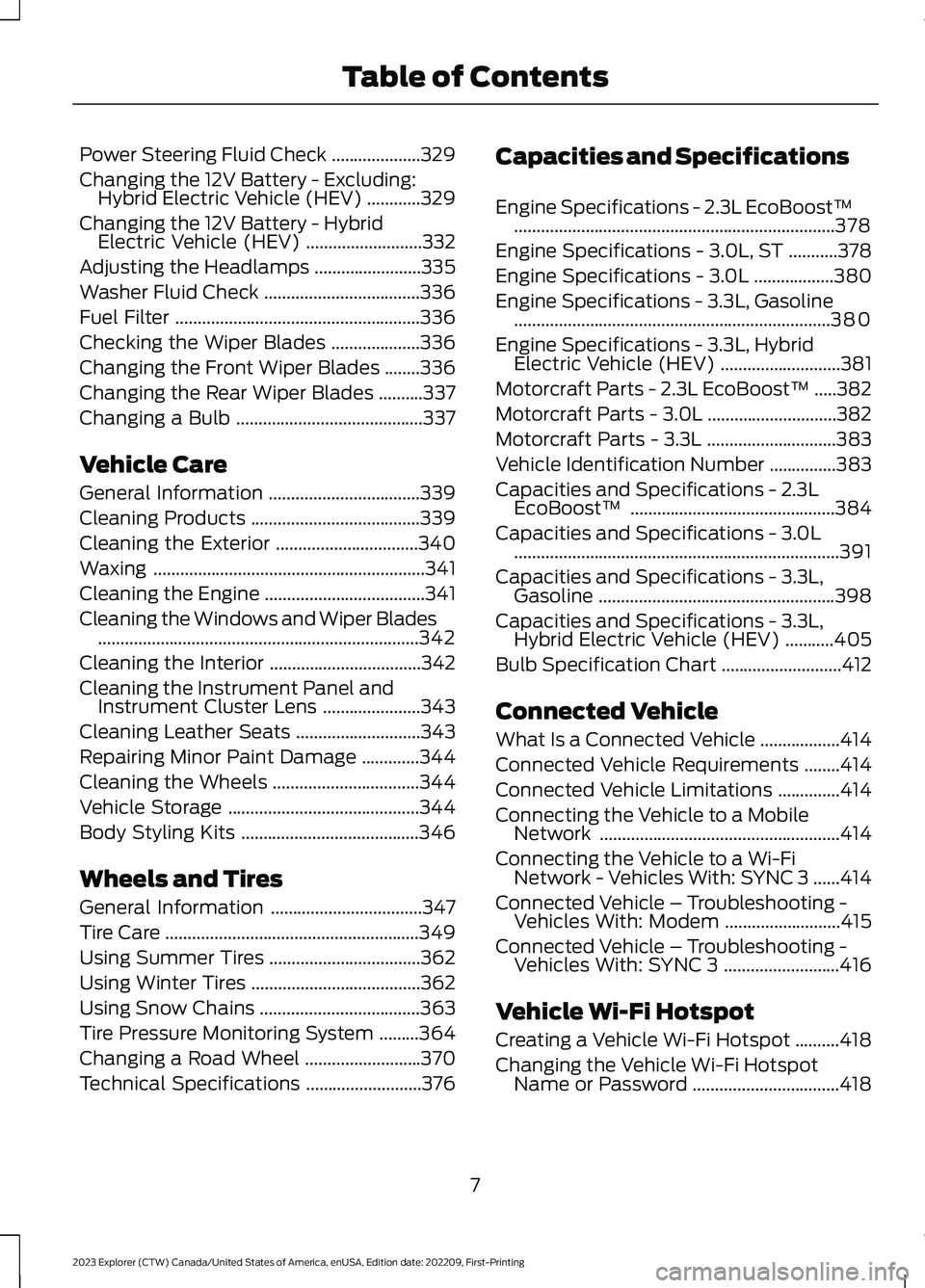
Power Steering Fluid Check....................329
Changing the 12V Battery - Excluding:Hybrid Electric Vehicle (HEV)............329
Changing the 12V Battery - HybridElectric Vehicle (HEV)..........................332
Adjusting the Headlamps........................335
Washer Fluid Check...................................336
Fuel Filter.......................................................336
Checking the Wiper Blades....................336
Changing the Front Wiper Blades........336
Changing the Rear Wiper Blades..........337
Changing a Bulb..........................................337
Vehicle Care
General Information..................................339
Cleaning Products......................................339
Cleaning the Exterior................................340
Waxing.............................................................341
Cleaning the Engine....................................341
Cleaning the Windows and Wiper Blades........................................................................342
Cleaning the Interior..................................342
Cleaning the Instrument Panel andInstrument Cluster Lens......................343
Cleaning Leather Seats............................343
Repairing Minor Paint Damage.............344
Cleaning the Wheels.................................344
Vehicle Storage...........................................344
Body Styling Kits........................................346
Wheels and Tires
General Information..................................347
Tire Care.........................................................349
Using Summer Tires..................................362
Using Winter Tires......................................362
Using Snow Chains....................................363
Tire Pressure Monitoring System.........364
Changing a Road Wheel..........................370
Technical Specifications..........................376
Capacities and Specifications
Engine Specifications - 2.3L EcoBoost™........................................................................378
Engine Specifications - 3.0L, ST...........378
Engine Specifications - 3.0L..................380
Engine Specifications - 3.3L, Gasoline.......................................................................380
Engine Specifications - 3.3L, HybridElectric Vehicle (HEV)...........................381
Motorcraft Parts - 2.3L EcoBoost™.....382
Motorcraft Parts - 3.0L.............................382
Motorcraft Parts - 3.3L.............................383
Vehicle Identification Number...............383
Capacities and Specifications - 2.3LEcoBoost™..............................................384
Capacities and Specifications - 3.0L.........................................................................391
Capacities and Specifications - 3.3L,Gasoline.....................................................398
Capacities and Specifications - 3.3L,Hybrid Electric Vehicle (HEV)...........405
Bulb Specification Chart...........................412
Connected Vehicle
What Is a Connected Vehicle..................414
Connected Vehicle Requirements........414
Connected Vehicle Limitations..............414
Connecting the Vehicle to a MobileNetwork......................................................414
Connecting the Vehicle to a Wi-FiNetwork - Vehicles With: SYNC 3......414
Connected Vehicle – Troubleshooting -Vehicles With: Modem..........................415
Connected Vehicle – Troubleshooting -Vehicles With: SYNC 3..........................416
Vehicle Wi-Fi Hotspot
Creating a Vehicle Wi-Fi Hotspot..........418
Changing the Vehicle Wi-Fi HotspotName or Password.................................418
7
2023 Explorer (CTW) Canada/United States of America, enUSA, Edition date: 202209, First-PrintingTable of Contents
Page 24 of 573
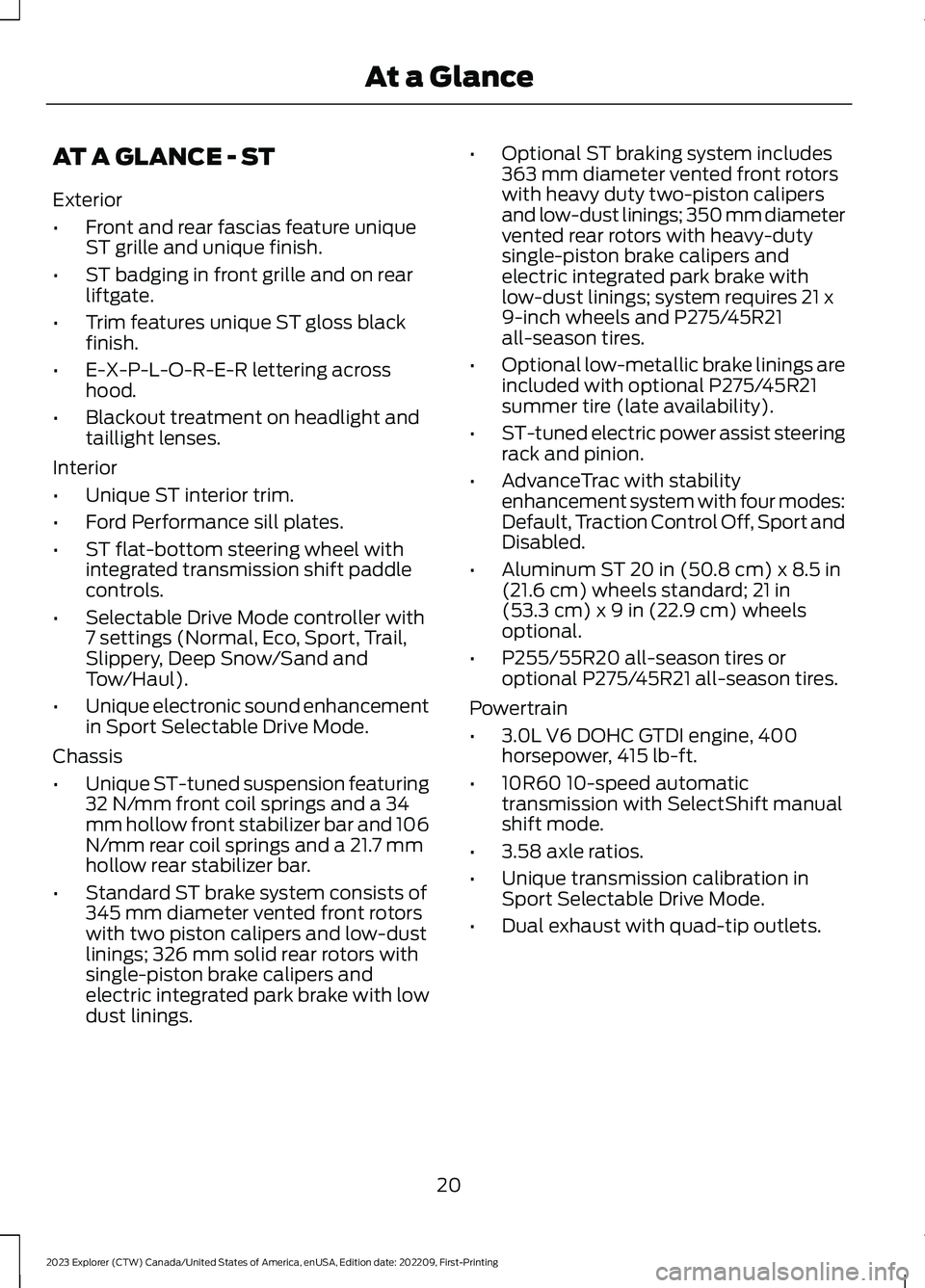
AT A GLANCE - ST
Exterior
•Front and rear fascias feature uniqueST grille and unique finish.
•ST badging in front grille and on rearliftgate.
•Trim features unique ST gloss blackfinish.
•E-X-P-L-O-R-E-R lettering acrosshood.
•Blackout treatment on headlight andtaillight lenses.
Interior
•Unique ST interior trim.
•Ford Performance sill plates.
•ST flat-bottom steering wheel withintegrated transmission shift paddlecontrols.
•Selectable Drive Mode controller with7 settings (Normal, Eco, Sport, Trail,Slippery, Deep Snow/Sand andTow/Haul).
•Unique electronic sound enhancementin Sport Selectable Drive Mode.
Chassis
•Unique ST-tuned suspension featuring32 N/mm front coil springs and a 34mm hollow front stabilizer bar and 106N/mm rear coil springs and a 21.7 mmhollow rear stabilizer bar.
•Standard ST brake system consists of345 mm diameter vented front rotorswith two piston calipers and low-dustlinings; 326 mm solid rear rotors withsingle-piston brake calipers andelectric integrated park brake with lowdust linings.
•Optional ST braking system includes363 mm diameter vented front rotorswith heavy duty two-piston calipersand low-dust linings; 350 mm diametervented rear rotors with heavy-dutysingle-piston brake calipers andelectric integrated park brake withlow-dust linings; system requires 21 x9-inch wheels and P275/45R21all-season tires.
•Optional low-metallic brake linings areincluded with optional P275/45R21summer tire (late availability).
•ST-tuned electric power assist steeringrack and pinion.
•AdvanceTrac with stabilityenhancement system with four modes:Default, Traction Control Off, Sport andDisabled.
•Aluminum ST 20 in (50.8 cm) x 8.5 in(21.6 cm) wheels standard; 21 in(53.3 cm) x 9 in (22.9 cm) wheelsoptional.
•P255/55R20 all-season tires oroptional P275/45R21 all-season tires.
Powertrain
•3.0L V6 DOHC GTDI engine, 400horsepower, 415 lb-ft.
•10R60 10-speed automatictransmission with SelectShift manualshift mode.
•3.58 axle ratios.
•Unique transmission calibration inSport Selectable Drive Mode.
•Dual exhaust with quad-tip outlets.
20
2023 Explorer (CTW) Canada/United States of America, enUSA, Edition date: 202209, First-PrintingAt a Glance
Page 96 of 573
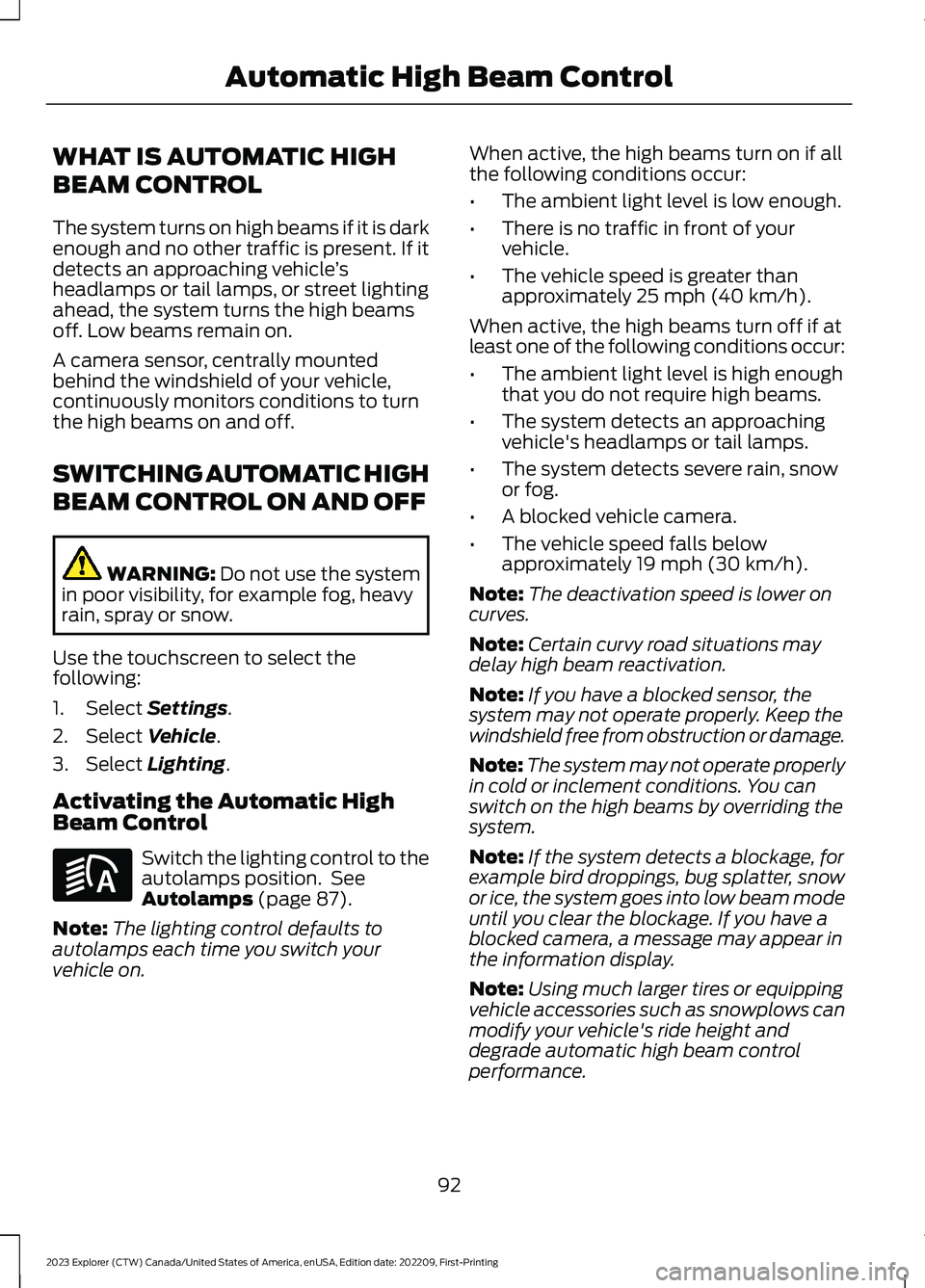
WHAT IS AUTOMATIC HIGH
BEAM CONTROL
The system turns on high beams if it is darkenough and no other traffic is present. If itdetects an approaching vehicle’sheadlamps or tail lamps, or street lightingahead, the system turns the high beamsoff. Low beams remain on.
A camera sensor, centrally mountedbehind the windshield of your vehicle,continuously monitors conditions to turnthe high beams on and off.
SWITCHING AUTOMATIC HIGH
BEAM CONTROL ON AND OFF
WARNING: Do not use the systemin poor visibility, for example fog, heavyrain, spray or snow.
Use the touchscreen to select thefollowing:
1.Select Settings.
2.Select Vehicle.
3.Select Lighting.
Activating the Automatic HighBeam Control
Switch the lighting control to theautolamps position. SeeAutolamps (page 87).
Note:The lighting control defaults toautolamps each time you switch yourvehicle on.
When active, the high beams turn on if allthe following conditions occur:
•The ambient light level is low enough.
•There is no traffic in front of yourvehicle.
•The vehicle speed is greater thanapproximately 25 mph (40 km/h).
When active, the high beams turn off if atleast one of the following conditions occur:
•The ambient light level is high enoughthat you do not require high beams.
•The system detects an approachingvehicle's headlamps or tail lamps.
•The system detects severe rain, snowor fog.
•A blocked vehicle camera.
•The vehicle speed falls belowapproximately 19 mph (30 km/h).
Note:The deactivation speed is lower oncurves.
Note:Certain curvy road situations maydelay high beam reactivation.
Note:If you have a blocked sensor, thesystem may not operate properly. Keep thewindshield free from obstruction or damage.
Note:The system may not operate properlyin cold or inclement conditions. You canswitch on the high beams by overriding thesystem.
Note:If the system detects a blockage, forexample bird droppings, bug splatter, snowor ice, the system goes into low beam modeuntil you clear the blockage. If you have ablocked camera, a message may appear inthe information display.
Note:Using much larger tires or equippingvehicle accessories such as snowplows canmodify your vehicle's ride height anddegrade automatic high beam controlperformance.
92
2023 Explorer (CTW) Canada/United States of America, enUSA, Edition date: 202209, First-PrintingAutomatic High Beam ControlE281240
Page 137 of 573
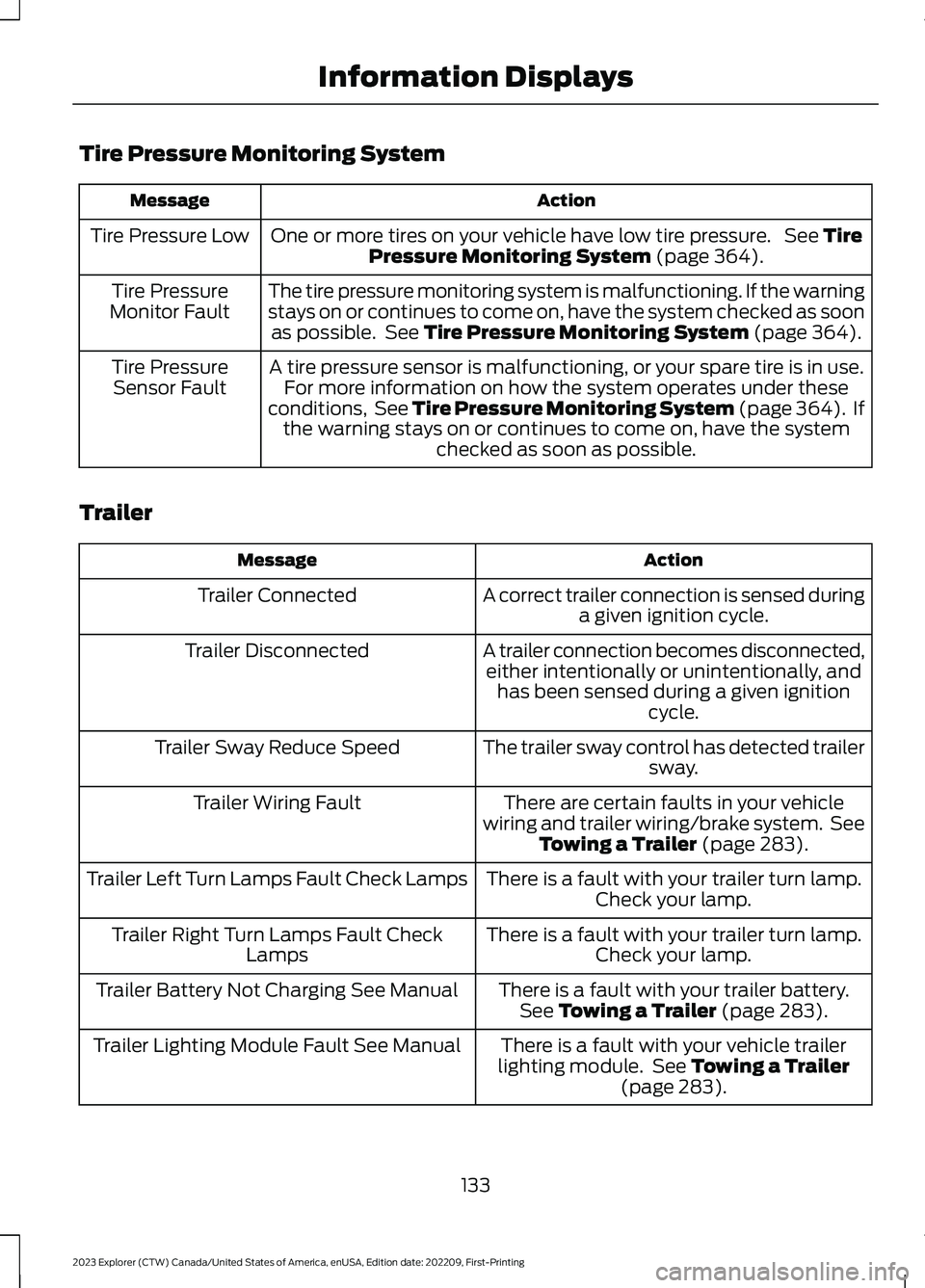
Tire Pressure Monitoring System
ActionMessage
One or more tires on your vehicle have low tire pressure. See TirePressure Monitoring System (page 364).Tire Pressure Low
The tire pressure monitoring system is malfunctioning. If the warningstays on or continues to come on, have the system checked as soonas possible. See Tire Pressure Monitoring System (page 364).
Tire PressureMonitor Fault
A tire pressure sensor is malfunctioning, or your spare tire is in use.For more information on how the system operates under theseconditions, See Tire Pressure Monitoring System (page 364). Ifthe warning stays on or continues to come on, have the systemchecked as soon as possible.
Tire PressureSensor Fault
Trailer
ActionMessage
A correct trailer connection is sensed duringa given ignition cycle.Trailer Connected
A trailer connection becomes disconnected,either intentionally or unintentionally, andhas been sensed during a given ignitioncycle.
Trailer Disconnected
The trailer sway control has detected trailersway.Trailer Sway Reduce Speed
There are certain faults in your vehiclewiring and trailer wiring/brake system. SeeTowing a Trailer (page 283).
Trailer Wiring Fault
There is a fault with your trailer turn lamp.Check your lamp.Trailer Left Turn Lamps Fault Check Lamps
There is a fault with your trailer turn lamp.Check your lamp.Trailer Right Turn Lamps Fault CheckLamps
There is a fault with your trailer battery.See Towing a Trailer (page 283).Trailer Battery Not Charging See Manual
There is a fault with your vehicle trailerlighting module. See Towing a Trailer(page 283).
Trailer Lighting Module Fault See Manual
133
2023 Explorer (CTW) Canada/United States of America, enUSA, Edition date: 202209, First-PrintingInformation Displays
Page 140 of 573
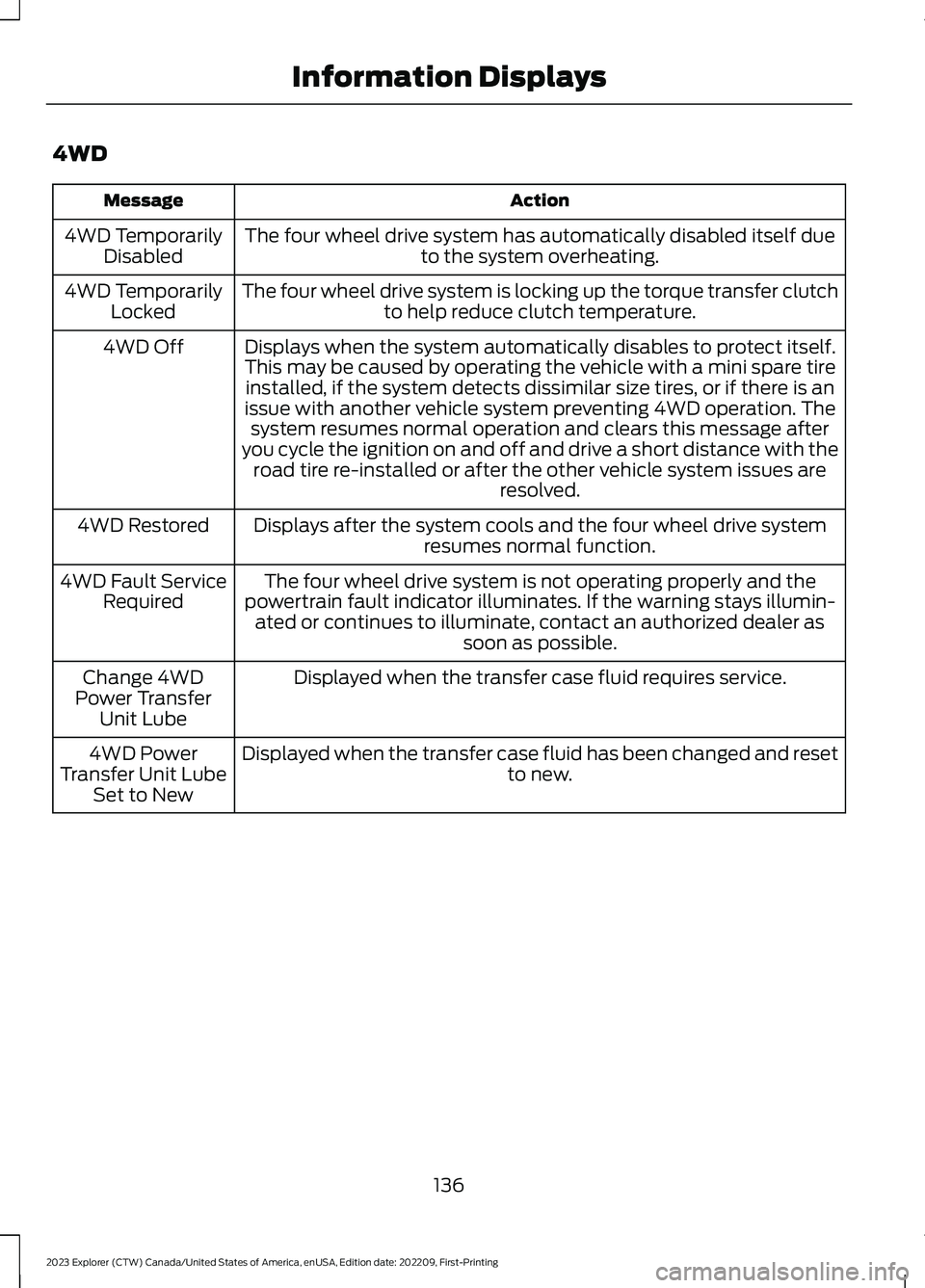
4WD
ActionMessage
The four wheel drive system has automatically disabled itself dueto the system overheating.4WD TemporarilyDisabled
The four wheel drive system is locking up the torque transfer clutchto help reduce clutch temperature.4WD TemporarilyLocked
Displays when the system automatically disables to protect itself.This may be caused by operating the vehicle with a mini spare tireinstalled, if the system detects dissimilar size tires, or if there is anissue with another vehicle system preventing 4WD operation. Thesystem resumes normal operation and clears this message afteryou cycle the ignition on and off and drive a short distance with theroad tire re-installed or after the other vehicle system issues areresolved.
4WD Off
Displays after the system cools and the four wheel drive systemresumes normal function.4WD Restored
The four wheel drive system is not operating properly and thepowertrain fault indicator illuminates. If the warning stays illumin-ated or continues to illuminate, contact an authorized dealer assoon as possible.
4WD Fault ServiceRequired
Displayed when the transfer case fluid requires service.Change 4WDPower TransferUnit Lube
Displayed when the transfer case fluid has been changed and resetto new.4WD PowerTransfer Unit LubeSet to New
136
2023 Explorer (CTW) Canada/United States of America, enUSA, Edition date: 202209, First-PrintingInformation Displays
Page 183 of 573
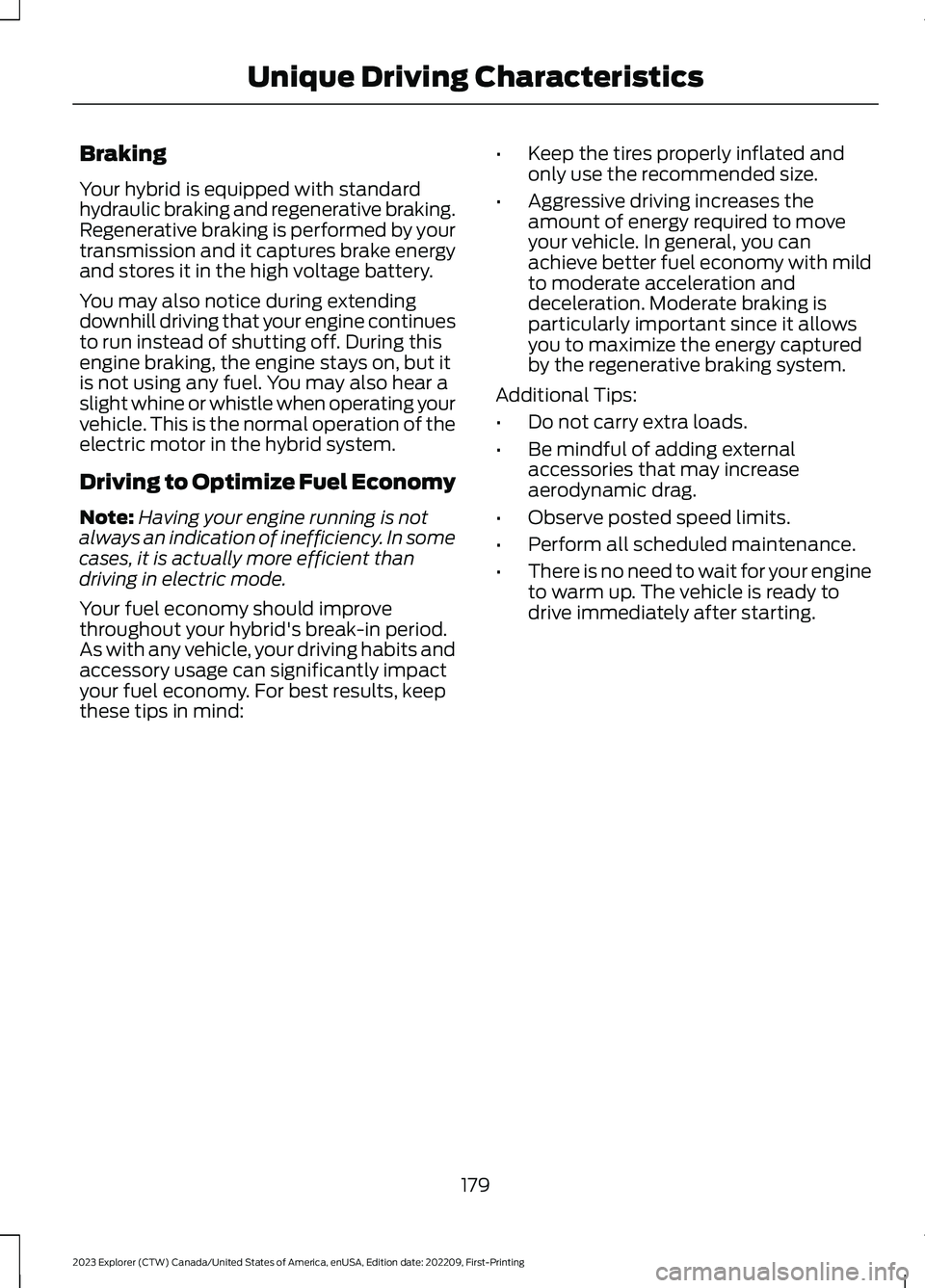
Braking
Your hybrid is equipped with standardhydraulic braking and regenerative braking.Regenerative braking is performed by yourtransmission and it captures brake energyand stores it in the high voltage battery.
You may also notice during extendingdownhill driving that your engine continuesto run instead of shutting off. During thisengine braking, the engine stays on, but itis not using any fuel. You may also hear aslight whine or whistle when operating yourvehicle. This is the normal operation of theelectric motor in the hybrid system.
Driving to Optimize Fuel Economy
Note:Having your engine running is notalways an indication of inefficiency. In somecases, it is actually more efficient thandriving in electric mode.
Your fuel economy should improvethroughout your hybrid's break-in period.As with any vehicle, your driving habits andaccessory usage can significantly impactyour fuel economy. For best results, keepthese tips in mind:
•Keep the tires properly inflated andonly use the recommended size.
•Aggressive driving increases theamount of energy required to moveyour vehicle. In general, you canachieve better fuel economy with mildto moderate acceleration anddeceleration. Moderate braking isparticularly important since it allowsyou to maximize the energy capturedby the regenerative braking system.
Additional Tips:
•Do not carry extra loads.
•Be mindful of adding externalaccessories that may increaseaerodynamic drag.
•Observe posted speed limits.
•Perform all scheduled maintenance.
•There is no need to wait for your engineto warm up. The vehicle is ready todrive immediately after starting.
179
2023 Explorer (CTW) Canada/United States of America, enUSA, Edition date: 202209, First-PrintingUnique Driving Characteristics
Page 206 of 573
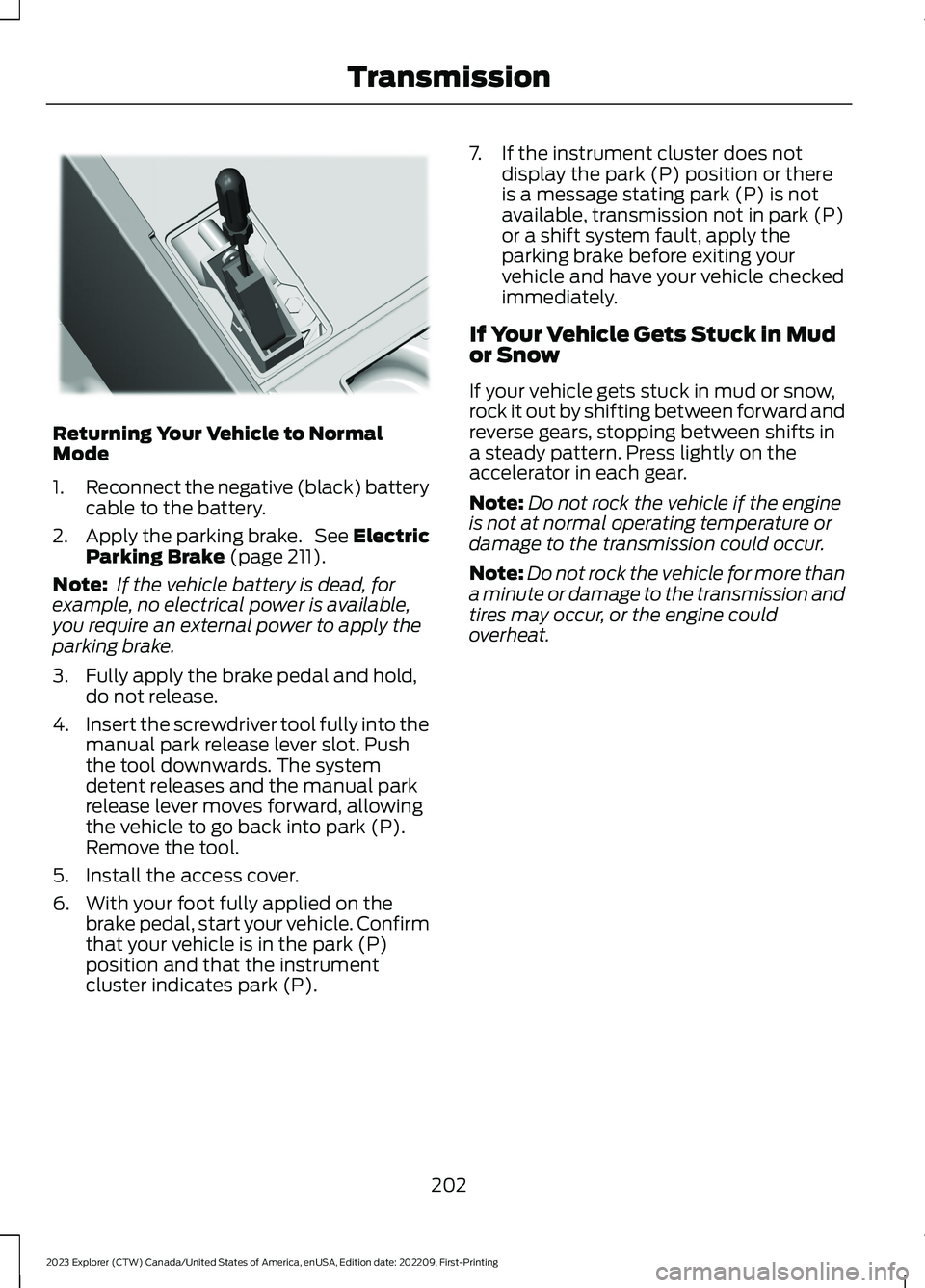
Returning Your Vehicle to NormalMode
1.Reconnect the negative (black) batterycable to the battery.
2.Apply the parking brake. See ElectricParking Brake (page 211).
Note: If the vehicle battery is dead, forexample, no electrical power is available,you require an external power to apply theparking brake.
3.Fully apply the brake pedal and hold,do not release.
4.Insert the screwdriver tool fully into themanual park release lever slot. Pushthe tool downwards. The systemdetent releases and the manual parkrelease lever moves forward, allowingthe vehicle to go back into park (P).Remove the tool.
5.Install the access cover.
6.With your foot fully applied on thebrake pedal, start your vehicle. Confirmthat your vehicle is in the park (P)position and that the instrumentcluster indicates park (P).
7.If the instrument cluster does notdisplay the park (P) position or thereis a message stating park (P) is notavailable, transmission not in park (P)or a shift system fault, apply theparking brake before exiting yourvehicle and have your vehicle checkedimmediately.
If Your Vehicle Gets Stuck in Mudor Snow
If your vehicle gets stuck in mud or snow,rock it out by shifting between forward andreverse gears, stopping between shifts ina steady pattern. Press lightly on theaccelerator in each gear.
Note:Do not rock the vehicle if the engineis not at normal operating temperature ordamage to the transmission could occur.
Note:Do not rock the vehicle for more thana minute or damage to the transmission andtires may occur, or the engine couldoverheat.
202
2023 Explorer (CTW) Canada/United States of America, enUSA, Edition date: 202209, First-PrintingTransmissionE297270
Page 207 of 573
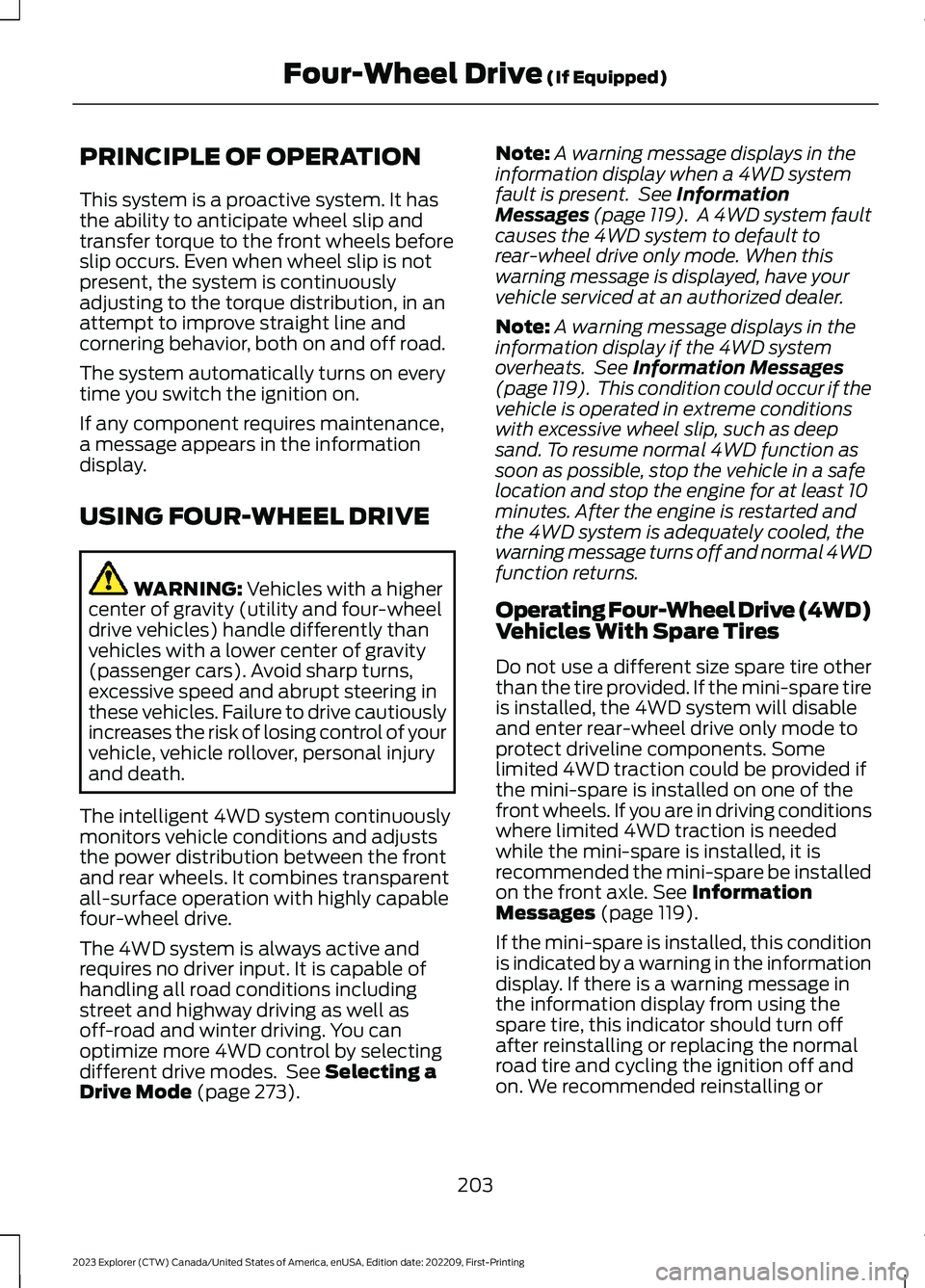
PRINCIPLE OF OPERATION
This system is a proactive system. It hasthe ability to anticipate wheel slip andtransfer torque to the front wheels beforeslip occurs. Even when wheel slip is notpresent, the system is continuouslyadjusting to the torque distribution, in anattempt to improve straight line andcornering behavior, both on and off road.
The system automatically turns on everytime you switch the ignition on.
If any component requires maintenance,a message appears in the informationdisplay.
USING FOUR-WHEEL DRIVE
WARNING: Vehicles with a highercenter of gravity (utility and four-wheeldrive vehicles) handle differently thanvehicles with a lower center of gravity(passenger cars). Avoid sharp turns,excessive speed and abrupt steering inthese vehicles. Failure to drive cautiouslyincreases the risk of losing control of yourvehicle, vehicle rollover, personal injuryand death.
The intelligent 4WD system continuouslymonitors vehicle conditions and adjuststhe power distribution between the frontand rear wheels. It combines transparentall-surface operation with highly capablefour-wheel drive.
The 4WD system is always active andrequires no driver input. It is capable ofhandling all road conditions includingstreet and highway driving as well asoff-road and winter driving. You canoptimize more 4WD control by selectingdifferent drive modes. See Selecting aDrive Mode (page 273).
Note:A warning message displays in theinformation display when a 4WD systemfault is present. See InformationMessages (page 119). A 4WD system faultcauses the 4WD system to default torear-wheel drive only mode. When thiswarning message is displayed, have yourvehicle serviced at an authorized dealer.
Note:A warning message displays in theinformation display if the 4WD systemoverheats. See Information Messages(page 119). This condition could occur if thevehicle is operated in extreme conditionswith excessive wheel slip, such as deepsand. To resume normal 4WD function assoon as possible, stop the vehicle in a safelocation and stop the engine for at least 10minutes. After the engine is restarted andthe 4WD system is adequately cooled, thewarning message turns off and normal 4WDfunction returns.
Operating Four-Wheel Drive (4WD)Vehicles With Spare Tires
Do not use a different size spare tire otherthan the tire provided. If the mini-spare tireis installed, the 4WD system will disableand enter rear-wheel drive only mode toprotect driveline components. Somelimited 4WD traction could be provided ifthe mini-spare is installed on one of thefront wheels. If you are in driving conditionswhere limited 4WD traction is neededwhile the mini-spare is installed, it isrecommended the mini-spare be installedon the front axle. See InformationMessages (page 119).
If the mini-spare is installed, this conditionis indicated by a warning in the informationdisplay. If there is a warning message inthe information display from using thespare tire, this indicator should turn offafter reinstalling or replacing the normalroad tire and cycling the ignition off andon. We recommended reinstalling or
203
2023 Explorer (CTW) Canada/United States of America, enUSA, Edition date: 202209, First-PrintingFour-Wheel Drive (If Equipped)
Page 208 of 573
replacing the normal road tire as soon aspossible. Major dissimilar tire sizesbetween the front and rear axles couldcause the 4WD system to stop functioningand default to rear-wheel drive or damagethe 4WD system.
The slip response system could activate ifthe mini spare is installed on the frontwheels. If the mini spare was installed onthe rear wheels the slip response systemwill fully disable. In situations where thereis a wintery mix or an off road situation,and you need to use a mini spare, you mustinstall the mini spare in the front tireposition and move a full size tire to the reartire position for the slip response systemto function.
Operating Four-Wheel drive (4WD)Vehicles with Mismatched Tires
WARNING: Only use replacementtires and wheels that are the same size,load index, speed rating and type (suchas P-metric versus LT-metric orall-season versus all-terrain) as thoseoriginally provided by Ford. Therecommended tire and wheel size maybe found on either the SafetyCompliance Certification Label (affixedto either the door hinge pillar, door-latchpost, or the door edge that meets thedoor-latch post, next to the driver'sseating position), or the Tire Label whichis located on the B-Pillar or edge of thedriver's door. If this information is notfound on these labels, then you shouldcontact your authorized dealer as soonas possible. Use of any tire or wheel notrecommended by Ford can affect thesafety and performance of your vehicle,which could result in an increased risk ofloss of vehicle control, vehicle rollover,personal injury and death.
Major dissimilar tire sizes between the frontand rear axles (for example, 17 inch lowprofile tires on the front axle and 22 inchhigh profile tires on the rear axle) couldcause the 4WD system to stop functioningand default to rear-wheel drive or damagethe 4WD system.
For optimum 4WD Performance, it isrecommended to follow the tire rotationmaintenance schedule. To avoid potential4WD malfunction or 4WD system damage,it is recommended to replace all four tiresrather than mixing significantly worn tireswith new tires. For example, using 3 worntread tires and 1 new tread tire all of thesame original tire size/brand, can betolerated by the 4WD system as long asthe worn tires still have usable tread depth.
How Your Vehicle Differs fromOther Vehicles
Truck and utility vehicles can differ fromsome other vehicles. Your vehicle could behigher to allow it to travel over roughterrain without getting hung up ordamaging underbody components.
The differences that make your vehicle soversatile also make it handle differentlythan an ordinary passenger car.
Maintain steering wheel control at alltimes, especially in rough terrain. Sincesudden changes in terrain can result inabrupt steering wheel motion, make sureyou grip the steering wheel from theoutside. Do not grip the spokes.
Drive cautiously to avoid vehicle damagefrom concealed objects such as rocks andstumps.
You should either know the terrain orexamine maps of the area before driving.Map out your route before driving in thearea. To maintain steering and brakingcontrol of your vehicle, you must have allfour wheels on the ground and they mustbe rolling, not sliding or spinning.
204
2023 Explorer (CTW) Canada/United States of America, enUSA, Edition date: 202209, First-PrintingFour-Wheel Drive (If Equipped)
Page 209 of 573
Driving in Special Conditions WithFour-Wheel drive (4WD)
Note:Use of the 4WD system in slippery,deep snow, and sand drive modes on drysurfaces could produce some vibration,driveline bind up, or excessive tire wear asthese drive modes are intended for slipperyand loose surfaces.
Note:The design of 4WD vehicles are fordriving on sand, snow, mud and rough roadsand have operating characteristics that aresomewhat different from conventionalvehicles, both on and off the highway.
Basic Operating Principles in SpecialConditions
•Drive slower in strong crosswinds whichcan affect the normal steeringcharacteristics of your vehicle.
•Be extremely careful when driving onpavement made slippery by loose sand,water, gravel, snow or ice.
If Your Vehicle Goes Off the Edge of thePavement
•If your vehicle goes off the edge of thepavement, slow down, but avoid severebrake application, ease the vehicleback onto the pavement only afterreducing your speed. Do not turn thesteering wheel too sharply whilereturning to the road surface.
•It could be safer to stay on the apronor shoulder of the road and slow downgradually before returning to thepavement. You could lose control if youdo not slow down or if you turn thesteering wheel too sharply or abruptly.
•It often could be less risky to strikesmall objects, such as highwayreflectors, with minor damage to yourvehicle rather than attempt a suddenreturn to the pavement which couldcause the vehicle to slide sideways outof control or rollover. Remember, yoursafety and the safety of others shouldbe your primary concern.
If Your Vehicle Gets Stuck
WARNING: Apply the parkingbrake, shift into park (P), switch theignition off and remove the key beforeyou leave your vehicle. Failure to followthis instruction could result in personalinjury or death.
WARNING: If the parking brake isfully released, but the brake warninglamp remains illuminated, the brakesmay not be working properly. Have yourvehicle checked as soon as possible.
WARNING: Do not spin the wheelsat over 34 mph (55 km/h). The tires mayfail and injure a passenger or bystander.
205
2023 Explorer (CTW) Canada/United States of America, enUSA, Edition date: 202209, First-PrintingFour-Wheel Drive (If Equipped)