ECU FORD F-150 2021 User Guide
[x] Cancel search | Manufacturer: FORD, Model Year: 2021, Model line: F-150, Model: FORD F-150 2021Pages: 796, PDF Size: 13.89 MB
Page 78 of 796
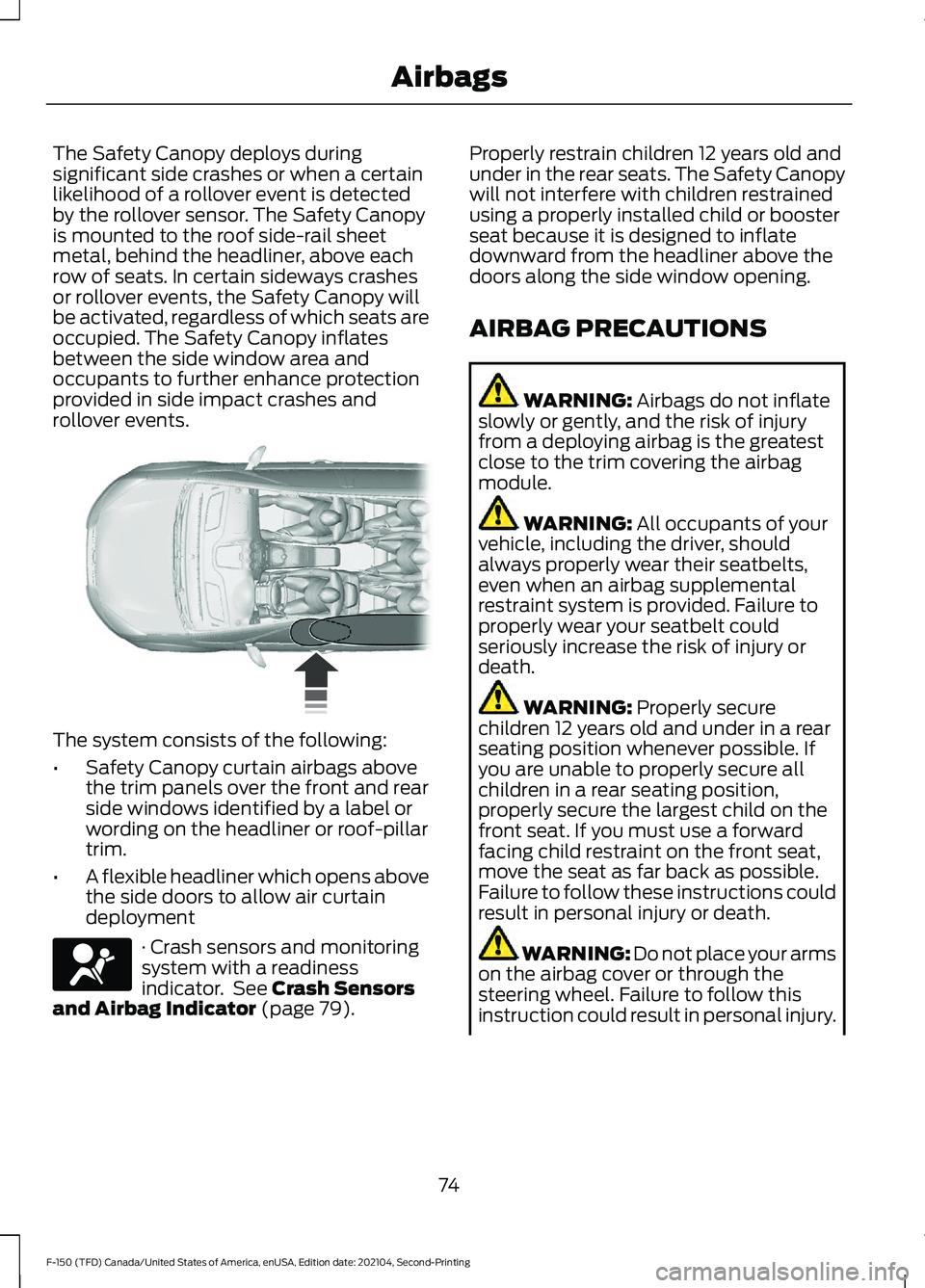
The Safety Canopy deploys during
significant side crashes or when a certain
likelihood of a rollover event is detected
by the rollover sensor. The Safety Canopy
is mounted to the roof side-rail sheet
metal, behind the headliner, above each
row of seats. In certain sideways crashes
or rollover events, the Safety Canopy will
be activated, regardless of which seats are
occupied. The Safety Canopy inflates
between the side window area and
occupants to further enhance protection
provided in side impact crashes and
rollover events.
The system consists of the following:
•
Safety Canopy curtain airbags above
the trim panels over the front and rear
side windows identified by a label or
wording on the headliner or roof-pillar
trim.
• A flexible headliner which opens above
the side doors to allow air curtain
deployment · Crash sensors and monitoring
system with a readiness
indicator. See Crash Sensors
and Airbag Indicator (page 79). Properly restrain children 12 years old and
under in the rear seats. The Safety Canopy
will not interfere with children restrained
using a properly installed child or booster
seat because it is designed to inflate
downward from the headliner above the
doors along the side window opening.
AIRBAG PRECAUTIONS
WARNING:
Airbags do not inflate
slowly or gently, and the risk of injury
from a deploying airbag is the greatest
close to the trim covering the airbag
module. WARNING:
All occupants of your
vehicle, including the driver, should
always properly wear their seatbelts,
even when an airbag supplemental
restraint system is provided. Failure to
properly wear your seatbelt could
seriously increase the risk of injury or
death. WARNING:
Properly secure
children 12 years old and under in a rear
seating position whenever possible. If
you are unable to properly secure all
children in a rear seating position,
properly secure the largest child on the
front seat. If you must use a forward
facing child restraint on the front seat,
move the seat as far back as possible.
Failure to follow these instructions could
result in personal injury or death. WARNING:
Do not place your arms
on the airbag cover or through the
steering wheel. Failure to follow this
instruction could result in personal injury.
74
F-150 (TFD) Canada/United States of America, enUSA, Edition date: 202104, Second-Printing Airbags E75004 E67017
Page 91 of 796
WHAT IS 911 ASSIST
911 Assist is a SYNC system feature that
can call for help.
For more information, visit
www
. o wner .f or d . c om .
HOW DOES 911 ASSIST WORK
If a crash deploys an airbag, excluding knee
airbags and rear inflatable seatbelts, or
activates the fuel pump shut-off, your
vehicle may be able to contact emergency
services by dialing 911 through a paired and
connected Bluetooth®-enabled phone.
Not all crashes will deploy an airbag or
activate the fuel pump shut-off. If a
connected cell phone sustains damage or
loses its connection to SYNC during a
crash, SYNC will search for and try to
connect to a previously paired cell phone.
SYNC will then attempt to call the
emergency services.
Before making the call:
• SYNC provides about 10 seconds to
cancel the call. If you fail to cancel the
call, SYNC attempts to dial 911.
• SYNC says the following, or a similar
message: "SYNC will attempt to call
911, to cancel the call, press Cancel on
your screen or press and hold the
phone button on your steering wheel."
If you do not cancel the call and SYNC
makes a successful call a pre-recorded
message plays for the 911 operator. The
occupants in your vehicle are able to talk
with the operator. Be prepared to provide
your name, phone number and location
immediately because not all 911 systems
are capable of receiving this information
electronically.
During an emergency call the system
transmits vehicle data to the emergency
service. EMERGENCY CALL
REQUIREMENTS WARNING:
Do not wait for 911
Assist to make an emergency call if you
can do it yourself. Dial emergency
services immediately to avoid delayed
response time which could increase the
risk of serious injury or death after a
crash. If you do not hear 911 Assist within
five seconds of the crash, the system or
phone may be damaged or
non-functional. WARNING:
Always place your
phone in a secure location in your vehicle
so it does not become a projectile or get
damaged in a crash. Failure to do so may
cause serious injury to someone or
damage the phone which could prevent
911 Assist from working properly. WARNING:
Unless the 911 Assist
setting is set on before a crash, the
system will not dial for help which could
delay response time, potentially
increasing the risk of serious injury or
death after a crash.
• SYNC is powered and working properly
at the time of the incident and
throughout feature activation and use.
• The 911 Assist feature must be set on
before the incident.
• You must pair and connect a
Bluetooth®
enabled and compatible
cell phone to SYNC.
• A connected
Bluetooth® enabled
phone must have the ability to make
and maintain an outgoing call at the
time of the incident.
87
F-150 (TFD) Canada/United States of America, enUSA, Edition date: 202104, Second-Printing 911 Assist
(If Equipped)
Page 95 of 796
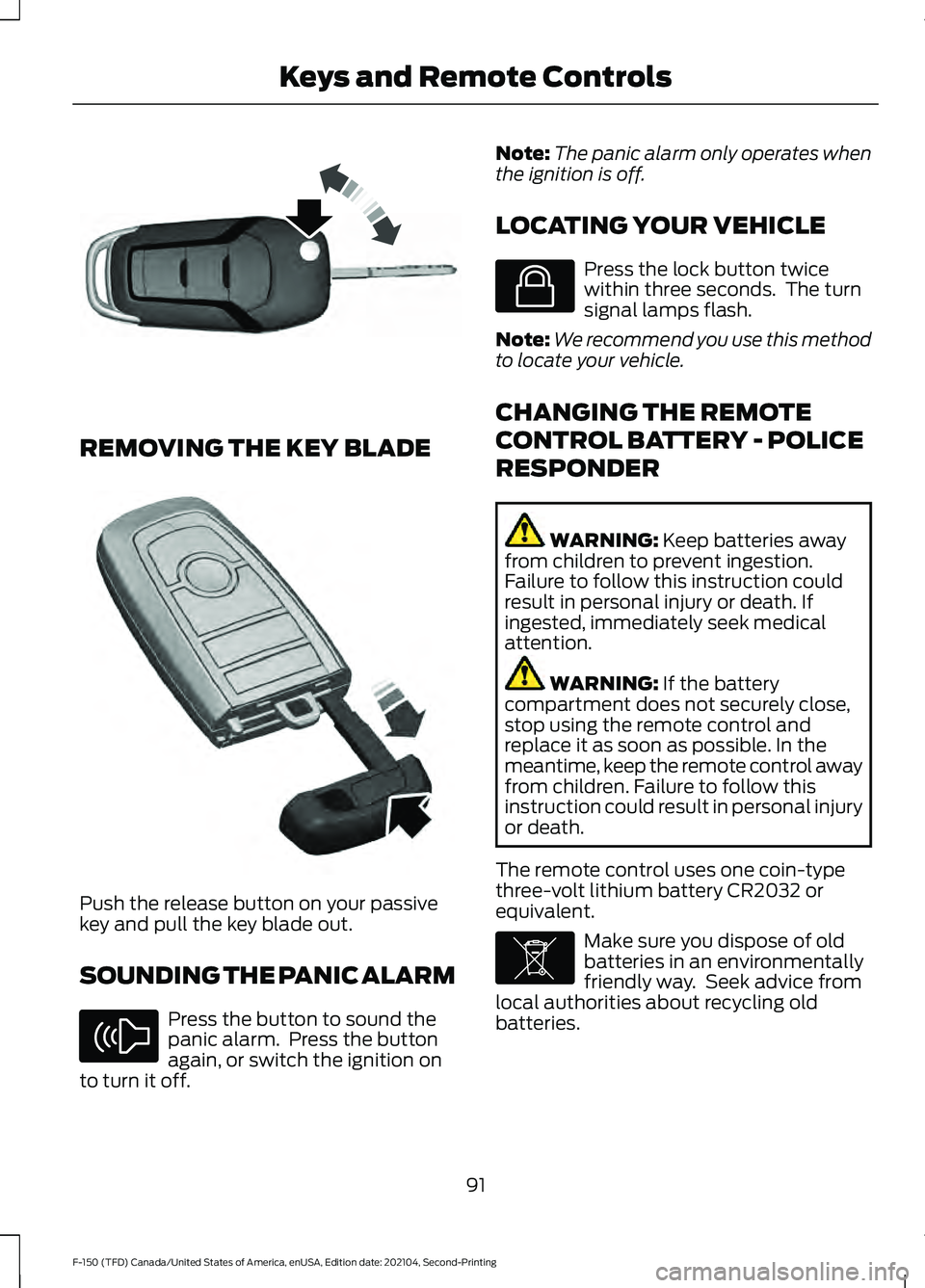
REMOVING THE KEY BLADE
Push the release button on your passive
key and pull the key blade out.
SOUNDING THE PANIC ALARM
Press the button to sound the
panic alarm. Press the button
again, or switch the ignition on
to turn it off. Note:
The panic alarm only operates when
the ignition is off.
LOCATING YOUR VEHICLE Press the lock button twice
within three seconds. The turn
signal lamps flash.
Note: We recommend you use this method
to locate your vehicle.
CHANGING THE REMOTE
CONTROL BATTERY - POLICE
RESPONDER WARNING: Keep batteries away
from children to prevent ingestion.
Failure to follow this instruction could
result in personal injury or death. If
ingested, immediately seek medical
attention. WARNING:
If the battery
compartment does not securely close,
stop using the remote control and
replace it as soon as possible. In the
meantime, keep the remote control away
from children. Failure to follow this
instruction could result in personal injury
or death.
The remote control uses one coin-type
three-volt lithium battery CR2032 or
equivalent. Make sure you dispose of old
batteries in an environmentally
friendly way. Seek advice from
local authorities about recycling old
batteries.
91
F-150 (TFD) Canada/United States of America, enUSA, Edition date: 202104, Second-Printing Keys and Remote ControlsE191532 E322866 E138624 E138623 E107998
Page 96 of 796
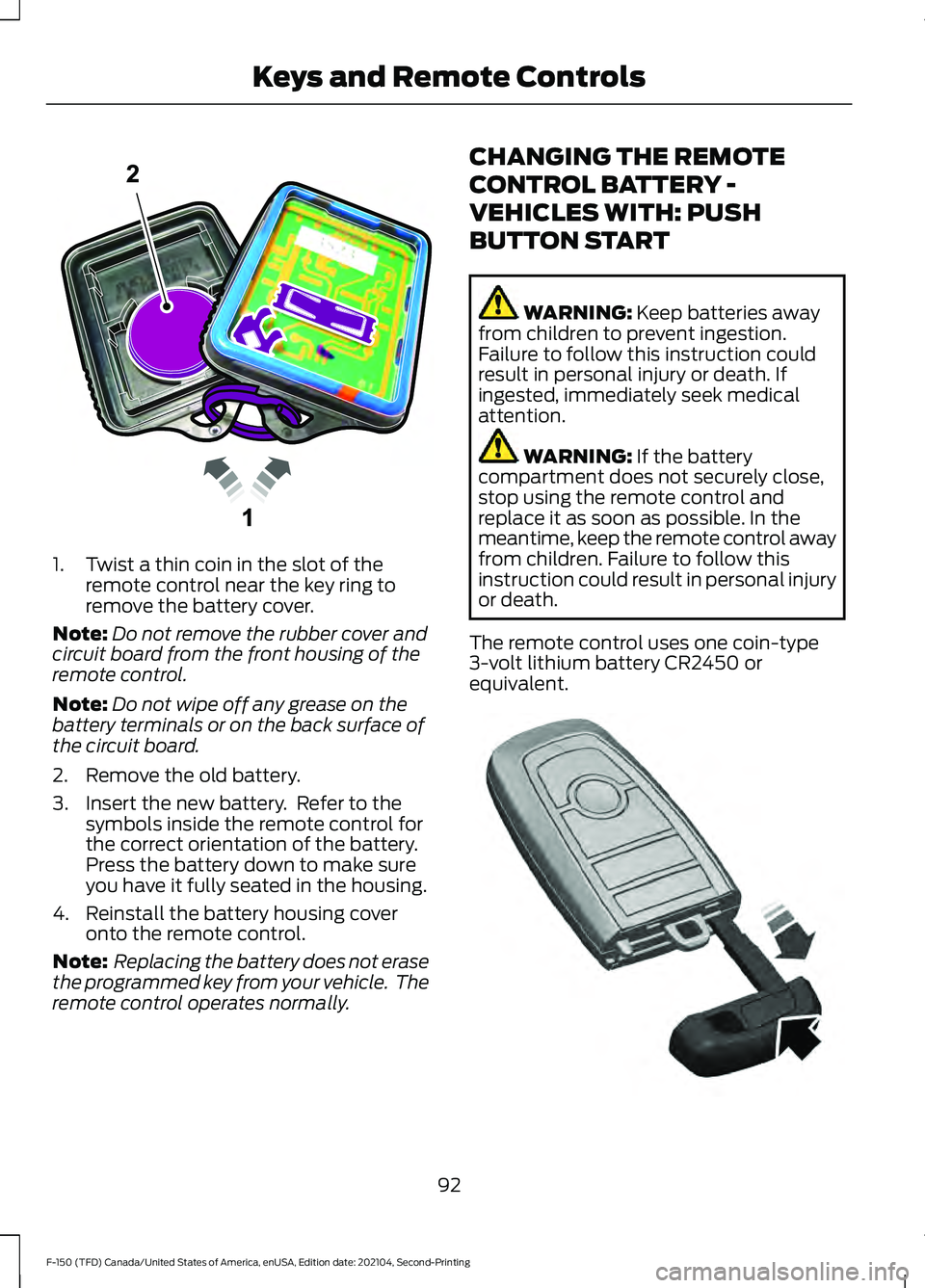
1. Twist a thin coin in the slot of the
remote control near the key ring to
remove the battery cover.
Note: Do not remove the rubber cover and
circuit board from the front housing of the
remote control.
Note: Do not wipe off any grease on the
battery terminals or on the back surface of
the circuit board.
2. Remove the old battery.
3. Insert the new battery. Refer to the symbols inside the remote control for
the correct orientation of the battery.
Press the battery down to make sure
you have it fully seated in the housing.
4. Reinstall the battery housing cover onto the remote control.
Note: Replacing the battery does not erase
the programmed key from your vehicle. The
remote control operates normally. CHANGING THE REMOTE
CONTROL BATTERY -
VEHICLES WITH: PUSH
BUTTON START WARNING: Keep batteries away
from children to prevent ingestion.
Failure to follow this instruction could
result in personal injury or death. If
ingested, immediately seek medical
attention. WARNING:
If the battery
compartment does not securely close,
stop using the remote control and
replace it as soon as possible. In the
meantime, keep the remote control away
from children. Failure to follow this
instruction could result in personal injury
or death.
The remote control uses one coin-type
3-volt lithium battery CR2450 or
equivalent. 92
F-150 (TFD) Canada/United States of America, enUSA, Edition date: 202104, Second-Printing Keys and Remote ControlsE203601 E322866
Page 98 of 796
CHANGING THE REMOTE
CONTROL BATTERY -
VEHICLES WITH: FLIP KEY
WARNING: Keep batteries away
from children to prevent ingestion.
Failure to follow this instruction could
result in personal injury or death. If
ingested, immediately seek medical
attention. WARNING:
If the battery
compartment does not securely close,
stop using the remote control and
replace it as soon as possible. In the
meantime, keep the remote control away
from children. Failure to follow this
instruction could result in personal injury
or death.
Battery Replacement Procedure
The remote control uses one coin-type
3-volt lithium battery CR2032 or
equivalent.
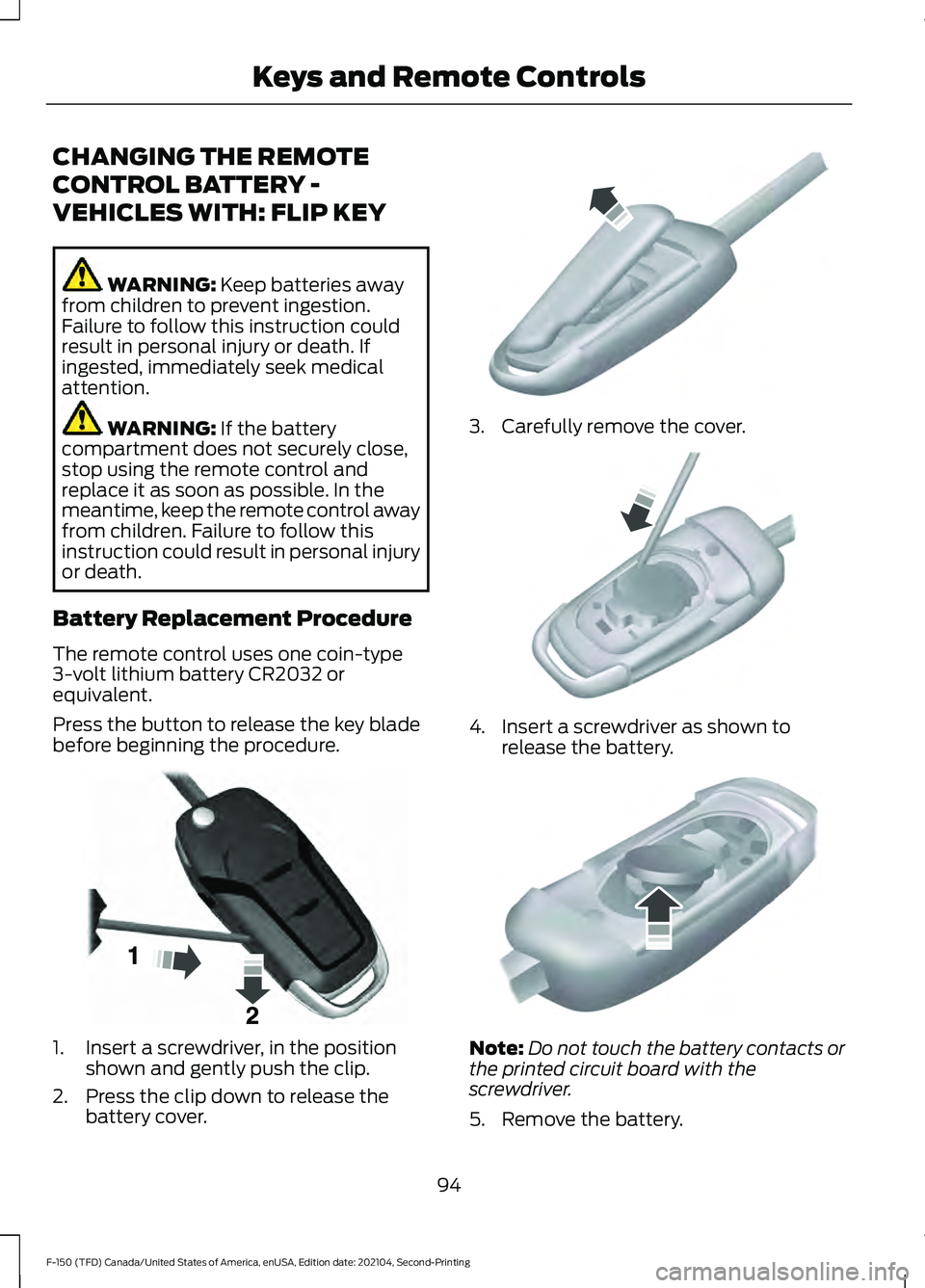
Press the button to release the key blade
before beginning the procedure. 1. Insert a screwdriver, in the position
shown and gently push the clip.
2. Press the clip down to release the battery cover. 3. Carefully remove the cover.
4. Insert a screwdriver as shown to
release the battery. Note:
Do not touch the battery contacts or
the printed circuit board with the
screwdriver.
5. Remove the battery.
94
F-150 (TFD) Canada/United States of America, enUSA, Edition date: 202104, Second-Printing Keys and Remote ControlsE191533 E151799 E151800 E151801
Page 99 of 796
6. Install a new battery with the + facing
up.
7. Replace the battery cover. Dispose of old batteries in an
environmentally friendly way.
Seek advice from your local
authority about recycling old batteries.
Note: Do not wipe off any grease on the
battery terminals or on the back surface of
the circuit board.
Note: Replacing the battery does not erase
the programmed key from your vehicle. The
remote control should operate normally.
REPLACING A LOST KEY OR
REMOTE CONTROL
You can purchase replacement keys or
remote controls from an authorized dealer.
Authorized dealers can program remote
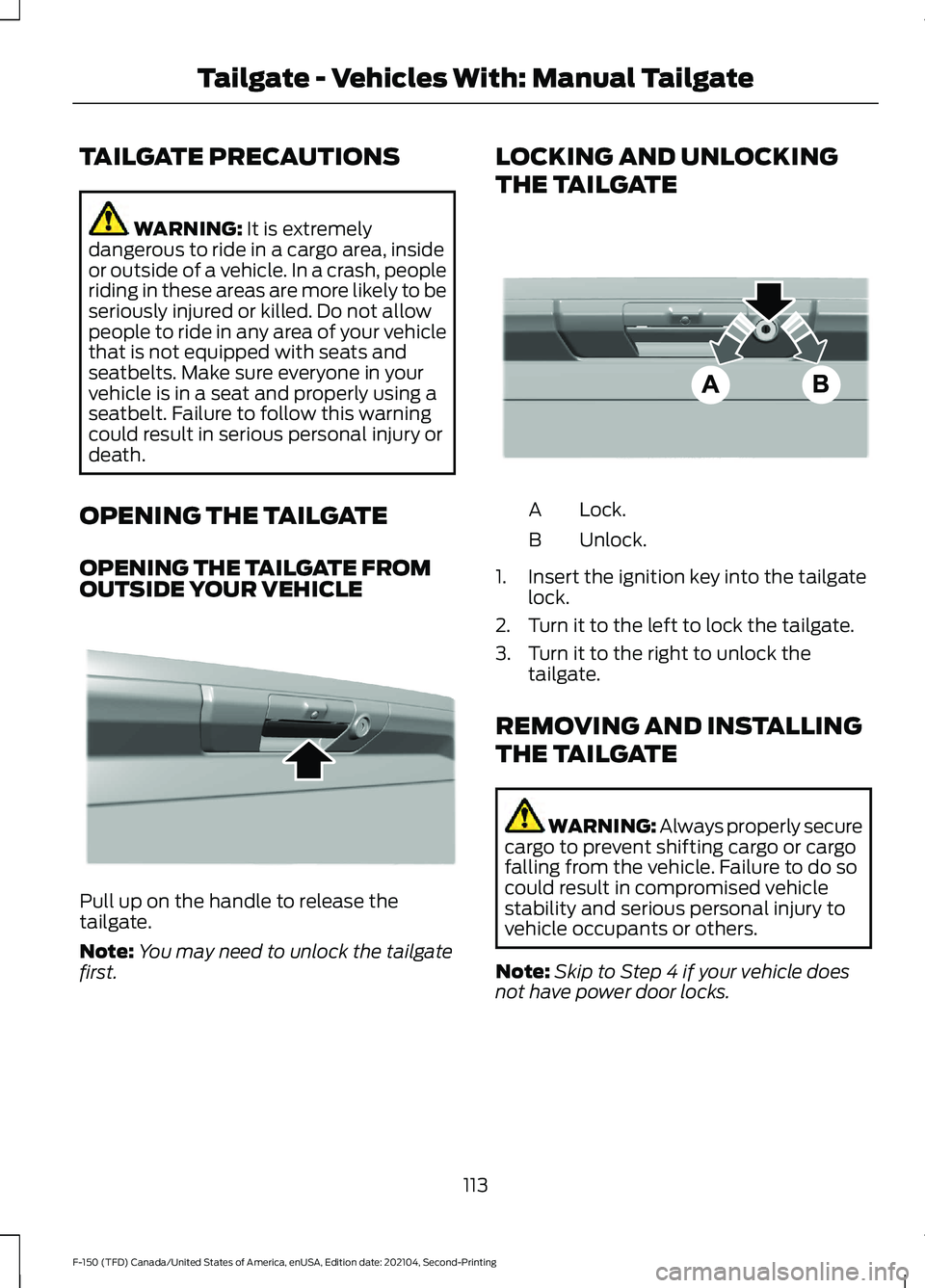
controls for your vehicle. Note:
Your vehicle keys came with a
security label that provides important key
cut information. Keep the label in a safe
place for future reference. PROGRAMMING THE REMOTE
CONTROL - VEHICLES WITH:
PUSH BUTTON START
General Information
You must have two previously
programmed remote controls inside your
vehicle and the new unprogrammed
remote controls readily accessible. Contact
an authorized dealer to have the spare
remote control programmed if two
previously programmed remotes are not
available. Make sure that your vehicle is
off before beginning this procedure. Make
sure that you close all the doors before
beginning and that they remain closed
throughout the procedure. Perform all
steps within 30 seconds of starting the
sequence. Stop and wait for at least one
minute before starting again if you perform
any steps out of sequence.
Read and understand the entire procedure
before you begin.
Note:
You can program a maximum of four
remote controls to your vehicle.
Note: If your programmed remote controls
are lost or stolen and you do not have an
extra coded remote, you need to have your
vehicle towed to an authorized dealer. Store
an extra programmed remote away from
your vehicle in a safe place to help prevent
any inconvenience. Contact an authorized
dealer to purchase additional spare or
replacement remotes.
Steps for Programming Your Spare
Remote Control
Note: Your vehicle is equipped with one of
the following center consoles.
95
F-150 (TFD) Canada/United States of America, enUSA, Edition date: 202104, Second-Printing Keys and Remote ControlsE107998 E151795
Page 117 of 796
TAILGATE PRECAUTIONS
WARNING: It is extremely
dangerous to ride in a cargo area, inside
or outside of a vehicle. In a crash, people
riding in these areas are more likely to be
seriously injured or killed. Do not allow
people to ride in any area of your vehicle
that is not equipped with seats and
seatbelts. Make sure everyone in your
vehicle is in a seat and properly using a
seatbelt. Failure to follow this warning
could result in serious personal injury or
death.
OPENING THE TAILGATE
OPENING THE TAILGATE FROM
OUTSIDE YOUR VEHICLE Pull up on the handle to release the
tailgate.
Note:
You may need to unlock the tailgate
first. LOCKING AND UNLOCKING
THE TAILGATE
Lock.
A
Unlock.
B
1. Insert the ignition key into the tailgate lock.
2. Turn it to the left to lock the tailgate.
3. Turn it to the right to unlock the tailgate.
REMOVING AND INSTALLING
THE TAILGATE WARNING: Always properly secure
cargo to prevent shifting cargo or cargo
falling from the vehicle. Failure to do so
could result in compromised vehicle
stability and serious personal injury to
vehicle occupants or others.
Note: Skip to Step 4 if your vehicle does
not have power door locks.
113
F-150 (TFD) Canada/United States of America, enUSA, Edition date: 202104, Second-Printing Tailgate - Vehicles With: Manual TailgateE333071 E332901
Page 119 of 796
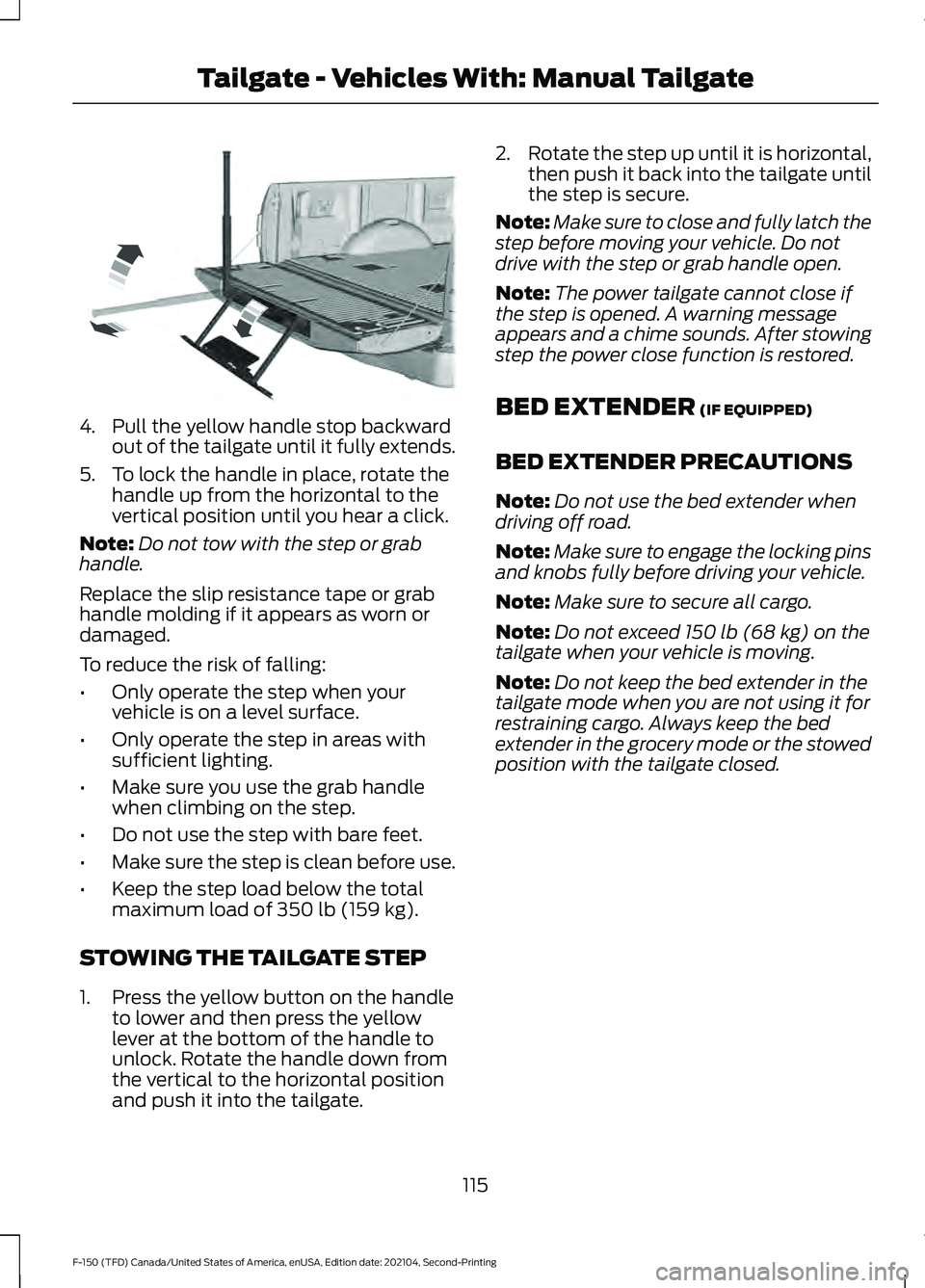
4. Pull the yellow handle stop backward
out of the tailgate until it fully extends.
5. To lock the handle in place, rotate the handle up from the horizontal to the
vertical position until you hear a click.
Note: Do not tow with the step or grab
handle.
Replace the slip resistance tape or grab
handle molding if it appears as worn or
damaged.
To reduce the risk of falling:
• Only operate the step when your
vehicle is on a level surface.
• Only operate the step in areas with
sufficient lighting.
• Make sure you use the grab handle
when climbing on the step.
• Do not use the step with bare feet.
• Make sure the step is clean before use.
• Keep the step load below the total
maximum load of 350 lb (159 kg).
STOWING THE TAILGATE STEP
1. Press the yellow button on the handle to lower and then press the yellow
lever at the bottom of the handle to
unlock. Rotate the handle down from
the vertical to the horizontal position
and push it into the tailgate. 2.
Rotate the step up until it is horizontal,
then push it back into the tailgate until
the step is secure.
Note: Make sure to close and fully latch the
step before moving your vehicle. Do not
drive with the step or grab handle open.
Note: The power tailgate cannot close if
the step is opened. A warning message
appears and a chime sounds. After stowing
step the power close function is restored.
BED EXTENDER
(IF EQUIPPED)
BED EXTENDER PRECAUTIONS
Note: Do not use the bed extender when
driving off road.
Note: Make sure to engage the locking pins
and knobs fully before driving your vehicle.
Note: Make sure to secure all cargo.
Note: Do not exceed
150 lb (68 kg) on the
tailgate when your vehicle is moving.
Note: Do not keep the bed extender in the
tailgate mode when you are not using it for
restraining cargo. Always keep the bed
extender in the grocery mode or the stowed
position with the tailgate closed.
115
F-150 (TFD) Canada/United States of America, enUSA, Edition date: 202104, Second-Printing Tailgate - Vehicles With: Manual TailgateE189557
Page 121 of 796
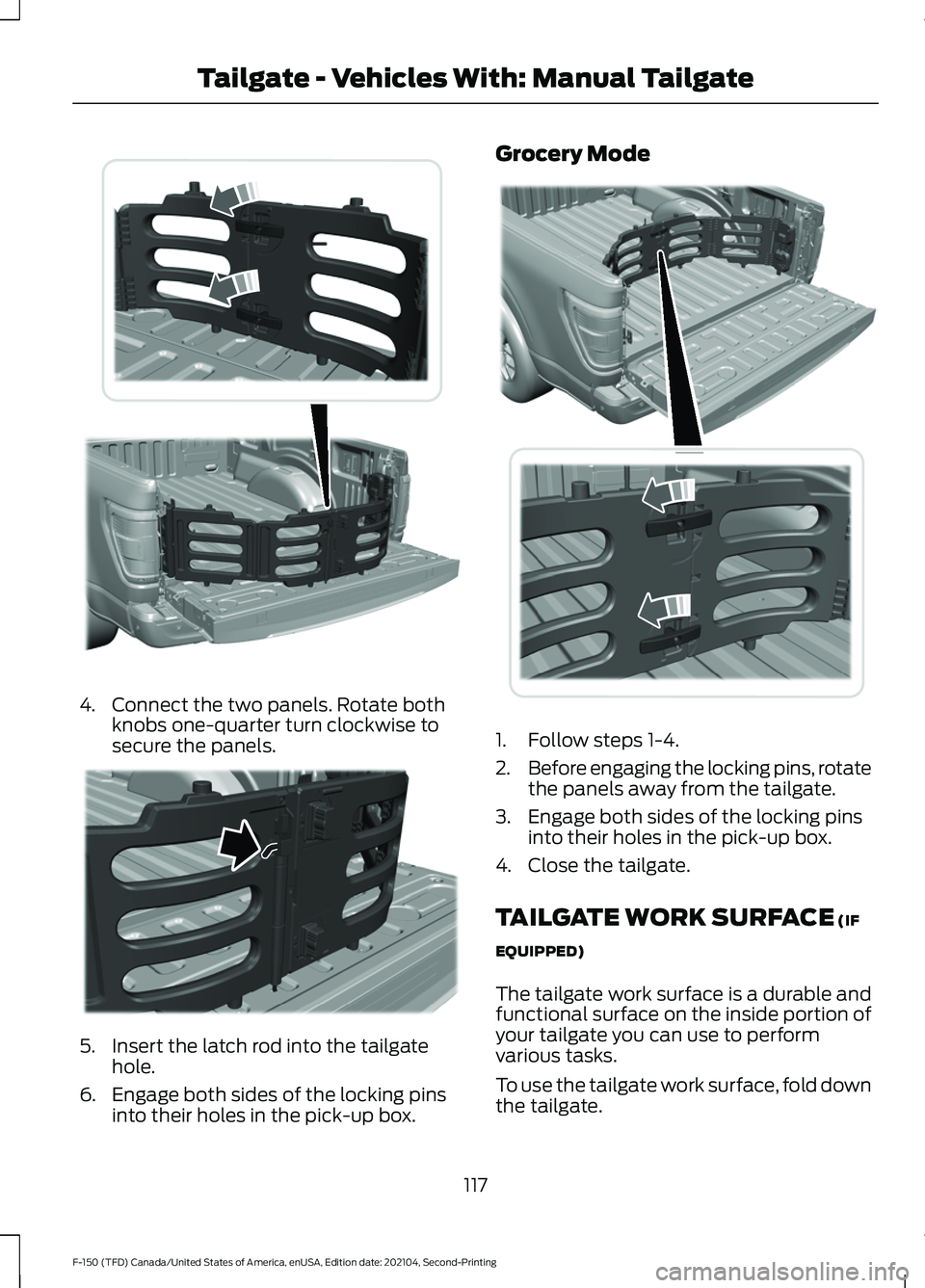
4. Connect the two panels. Rotate both
knobs one-quarter turn clockwise to
secure the panels. 5. Insert the latch rod into the tailgate
hole.
6. Engage both sides of the locking pins into their holes in the pick-up box. Grocery Mode
1. Follow steps 1-4.
2.
Before engaging the locking pins, rotate
the panels away from the tailgate.
3. Engage both sides of the locking pins into their holes in the pick-up box.
4. Close the tailgate.
TAILGATE WORK SURFACE (IF
EQUIPPED)
The tailgate work surface is a durable and
functional surface on the inside portion of
your tailgate you can use to perform
various tasks.
To use the tailgate work surface, fold down
the tailgate.
117
F-150 (TFD) Canada/United States of America, enUSA, Edition date: 202104, Second-Printing Tailgate - Vehicles With: Manual TailgateE311524 E311520 E311519
Page 122 of 796
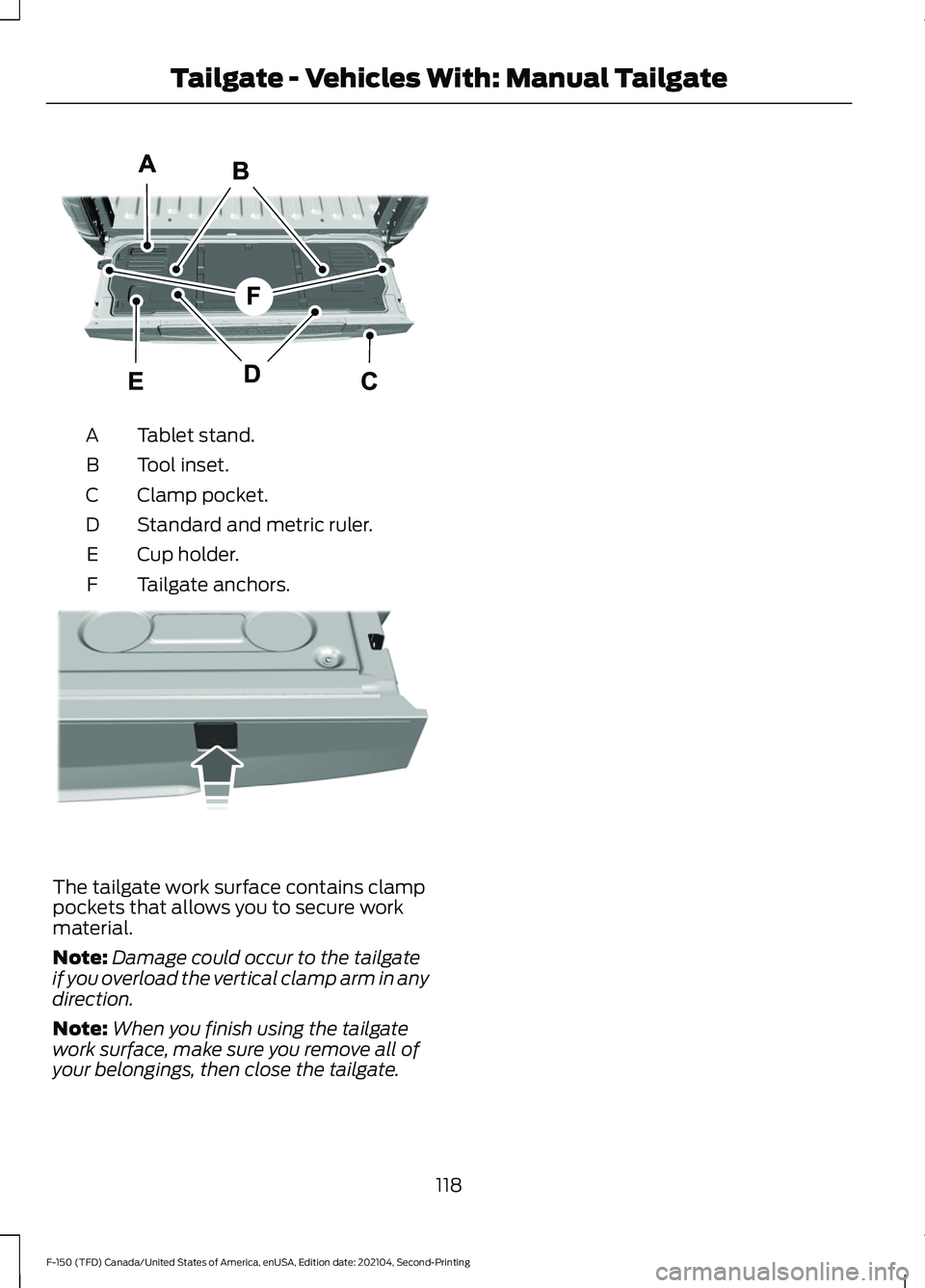
Tablet stand.
A
Tool inset.
B
Clamp pocket.
C
Standard and metric ruler.
D
Cup holder.
E
Tailgate anchors.
F The tailgate work surface contains clamp
pockets that allows you to secure work
material.
Note:
Damage could occur to the tailgate
if you overload the vertical clamp arm in any
direction.
Note: When you finish using the tailgate
work surface, make sure you remove all of
your belongings, then close the tailgate.
118
F-150 (TFD) Canada/United States of America, enUSA, Edition date: 202104, Second-Printing Tailgate - Vehicles With: Manual TailgateE308677 E336605