ECO mode FORD F-150 2021 Owner's Guide
[x] Cancel search | Manufacturer: FORD, Model Year: 2021, Model line: F-150, Model: FORD F-150 2021Pages: 796, PDF Size: 13.89 MB
Page 121 of 796
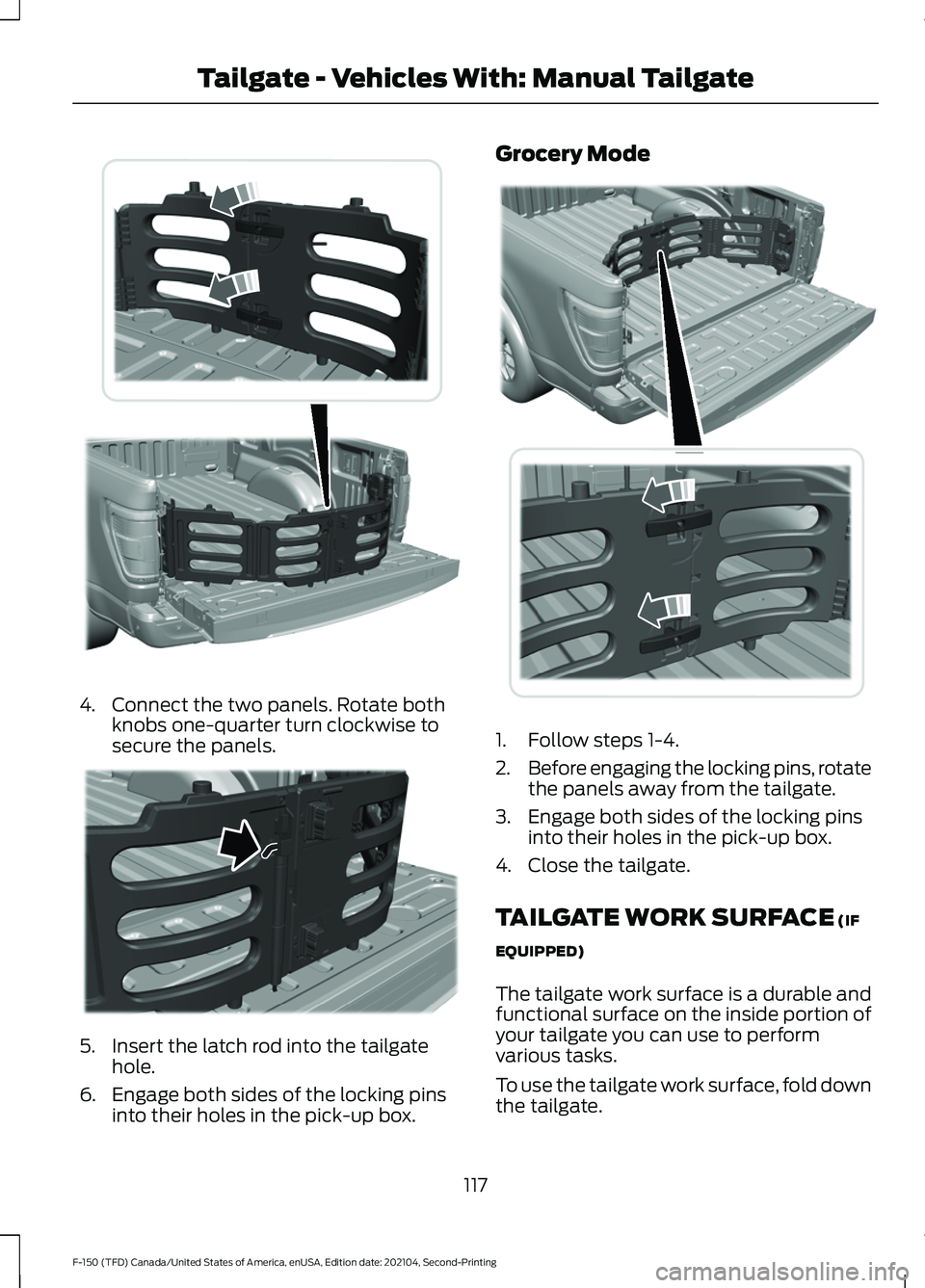
4. Connect the two panels. Rotate both
knobs one-quarter turn clockwise to
secure the panels. 5. Insert the latch rod into the tailgate
hole.
6. Engage both sides of the locking pins into their holes in the pick-up box. Grocery Mode
1. Follow steps 1-4.
2.
Before engaging the locking pins, rotate
the panels away from the tailgate.
3. Engage both sides of the locking pins into their holes in the pick-up box.
4. Close the tailgate.
TAILGATE WORK SURFACE (IF
EQUIPPED)
The tailgate work surface is a durable and
functional surface on the inside portion of
your tailgate you can use to perform
various tasks.
To use the tailgate work surface, fold down
the tailgate.
117
F-150 (TFD) Canada/United States of America, enUSA, Edition date: 202104, Second-Printing Tailgate - Vehicles With: Manual TailgateE311524 E311520 E311519
Page 124 of 796
Note:
The tailgate stops and reverses if it
detects an obstruction when closing.
Lift-to-Close
To close the tailgate automatically using
lift-to-close, lift the tailgate approximately
4 in (10 cm) and hold it for a few seconds.
Note: If the tailgate position is more than
halfway between open and close, it may not
close automatically.
Manual Close
You can close the tailgate manually when
you lift the tailgate in a continuous motion.
If you stop the tailgate motion, the
lift-to-close feature can engage and power
close the tailgate.
Putting the Tailgate in Manual Mode
You can put the tailgate in manual mode
through the vehicle settings in your
touchscreen.
Note: In manual mode, the tailgate only
functions by the tailgate release button and
messaging is reduced.
CLOSING THE TAILGATE USING
THE REMOTE CONTROL Press the remote control button
twice within three seconds.
REMOVING AND INSTALLING
THE TAILGATE WARNING: Always properly secure
cargo to prevent shifting cargo or cargo
falling from the vehicle. Failure to do so
could result in compromised vehicle
stability and serious personal injury to
vehicle occupants or others. 1. Put the tailgate into manual mode by
accessing the vehicle settings using the
touchscreen.
2. Open the tailgate.
3. Disconnect the power door locks in-line
connector. It is under the pickup box
on the right-hand side of the vehicle
near the spare tire.
4. Install a protective cap on the in-line connector portion that remains under
the pickup box.
Note: The protective cap is in the glove
compartment.
5. Partially raise the tailgate. Carefully feed the tailgate harness up through
the gap between the pickup box and
the bumper and place it out of the way
under the pickup box.
6. Fully lower the tailgate.
120
F-150 (TFD) Canada/United States of America, enUSA, Edition date: 202104, Second-Printing Tailgate - Vehicles With: Power TailgateE191530 E189556
Page 126 of 796
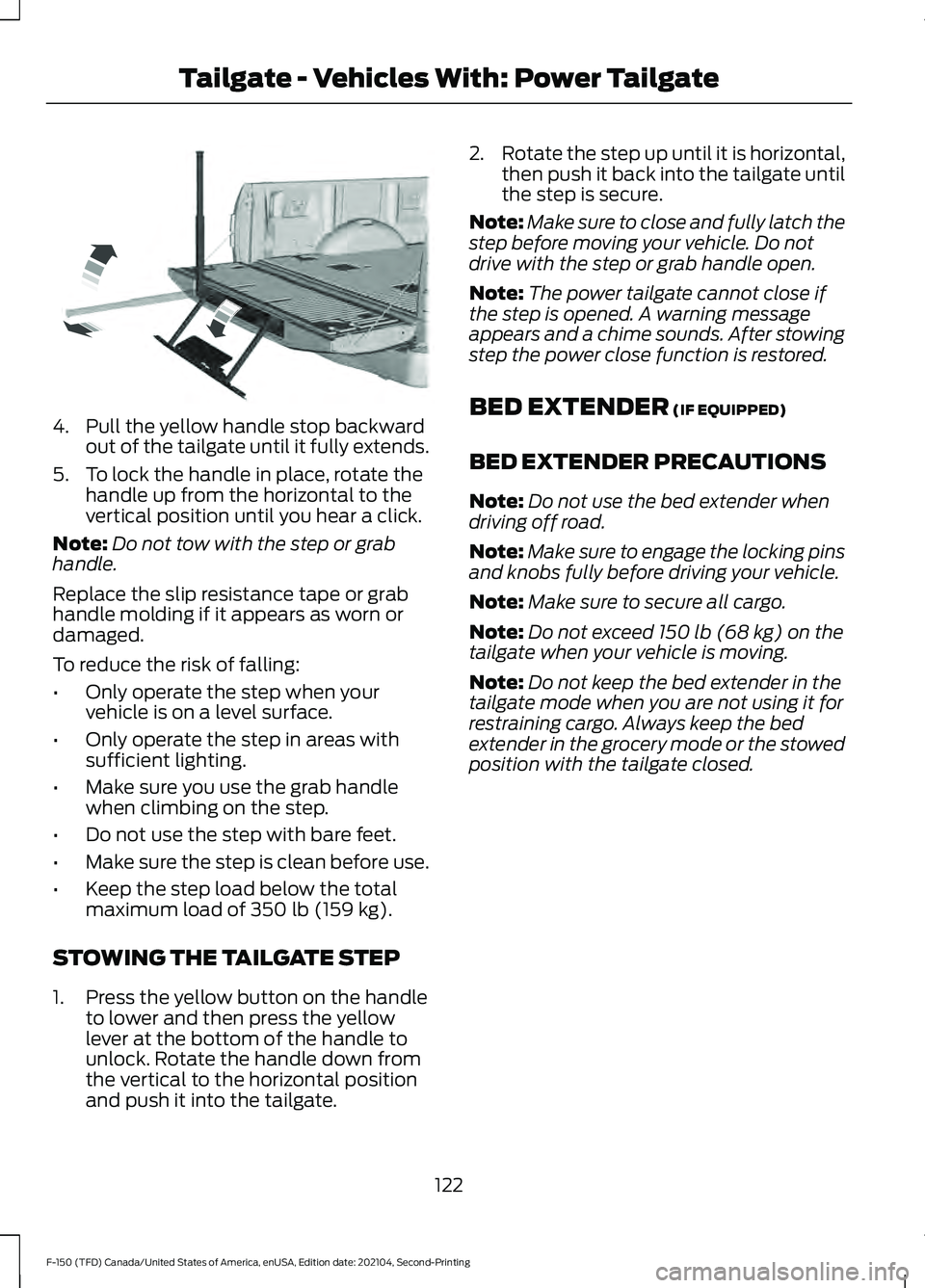
4. Pull the yellow handle stop backward
out of the tailgate until it fully extends.
5. To lock the handle in place, rotate the handle up from the horizontal to the
vertical position until you hear a click.
Note: Do not tow with the step or grab
handle.
Replace the slip resistance tape or grab
handle molding if it appears as worn or
damaged.
To reduce the risk of falling:
• Only operate the step when your
vehicle is on a level surface.
• Only operate the step in areas with
sufficient lighting.
• Make sure you use the grab handle
when climbing on the step.
• Do not use the step with bare feet.
• Make sure the step is clean before use.
• Keep the step load below the total
maximum load of 350 lb (159 kg).
STOWING THE TAILGATE STEP
1. Press the yellow button on the handle to lower and then press the yellow
lever at the bottom of the handle to
unlock. Rotate the handle down from
the vertical to the horizontal position
and push it into the tailgate. 2.
Rotate the step up until it is horizontal,
then push it back into the tailgate until
the step is secure.
Note: Make sure to close and fully latch the
step before moving your vehicle. Do not
drive with the step or grab handle open.
Note: The power tailgate cannot close if
the step is opened. A warning message
appears and a chime sounds. After stowing
step the power close function is restored.
BED EXTENDER
(IF EQUIPPED)
BED EXTENDER PRECAUTIONS
Note: Do not use the bed extender when
driving off road.
Note: Make sure to engage the locking pins
and knobs fully before driving your vehicle.
Note: Make sure to secure all cargo.
Note: Do not exceed
150 lb (68 kg) on the
tailgate when your vehicle is moving.
Note: Do not keep the bed extender in the
tailgate mode when you are not using it for
restraining cargo. Always keep the bed
extender in the grocery mode or the stowed
position with the tailgate closed.
122
F-150 (TFD) Canada/United States of America, enUSA, Edition date: 202104, Second-Printing Tailgate - Vehicles With: Power TailgateE189557
Page 128 of 796
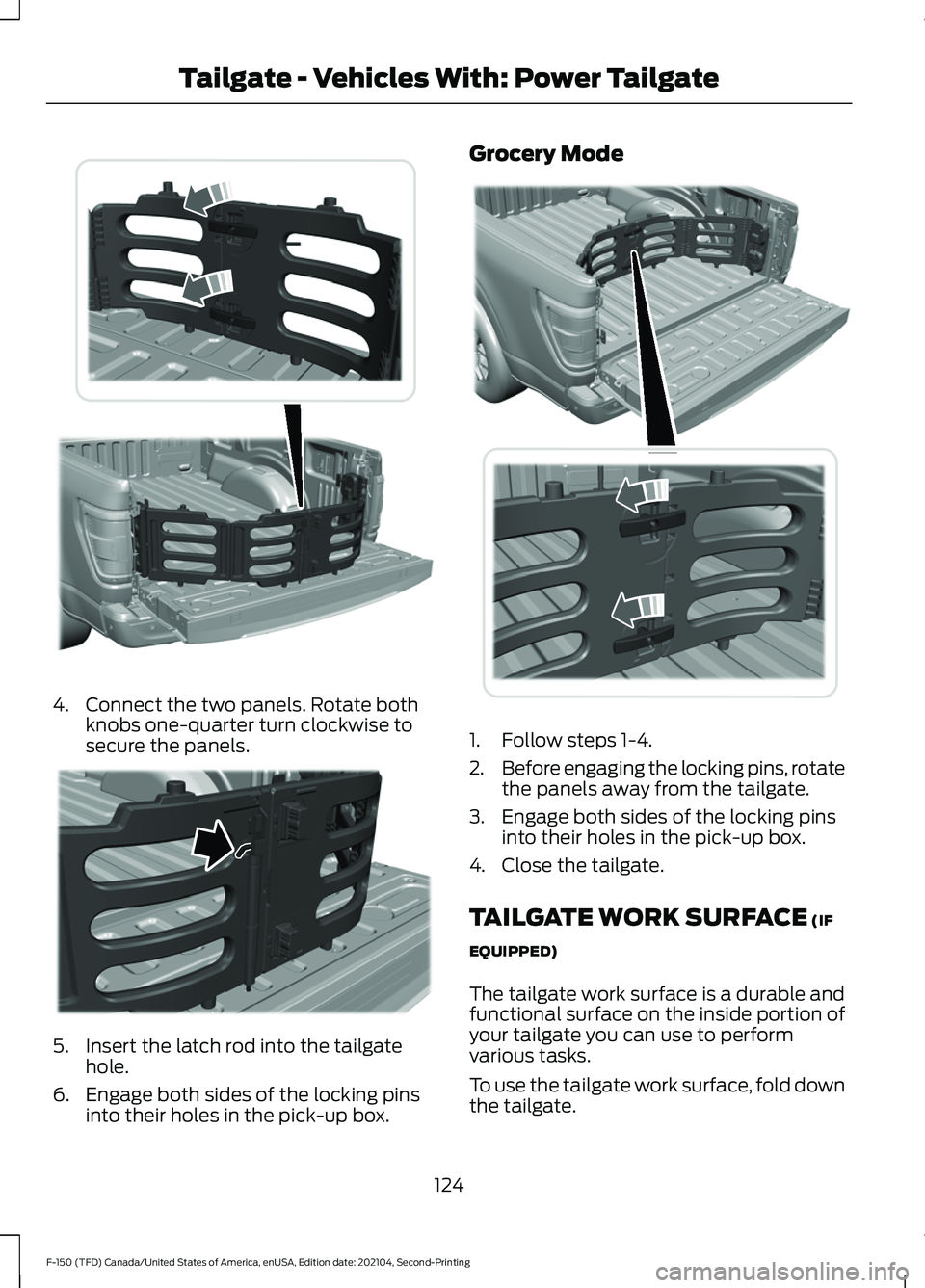
4. Connect the two panels. Rotate both
knobs one-quarter turn clockwise to
secure the panels. 5. Insert the latch rod into the tailgate
hole.
6. Engage both sides of the locking pins into their holes in the pick-up box. Grocery Mode
1. Follow steps 1-4.
2.
Before engaging the locking pins, rotate
the panels away from the tailgate.
3. Engage both sides of the locking pins into their holes in the pick-up box.
4. Close the tailgate.
TAILGATE WORK SURFACE (IF
EQUIPPED)
The tailgate work surface is a durable and
functional surface on the inside portion of
your tailgate you can use to perform
various tasks.
To use the tailgate work surface, fold down
the tailgate.
124
F-150 (TFD) Canada/United States of America, enUSA, Edition date: 202104, Second-Printing Tailgate - Vehicles With: Power TailgateE311524 E311520 E311519
Page 133 of 796
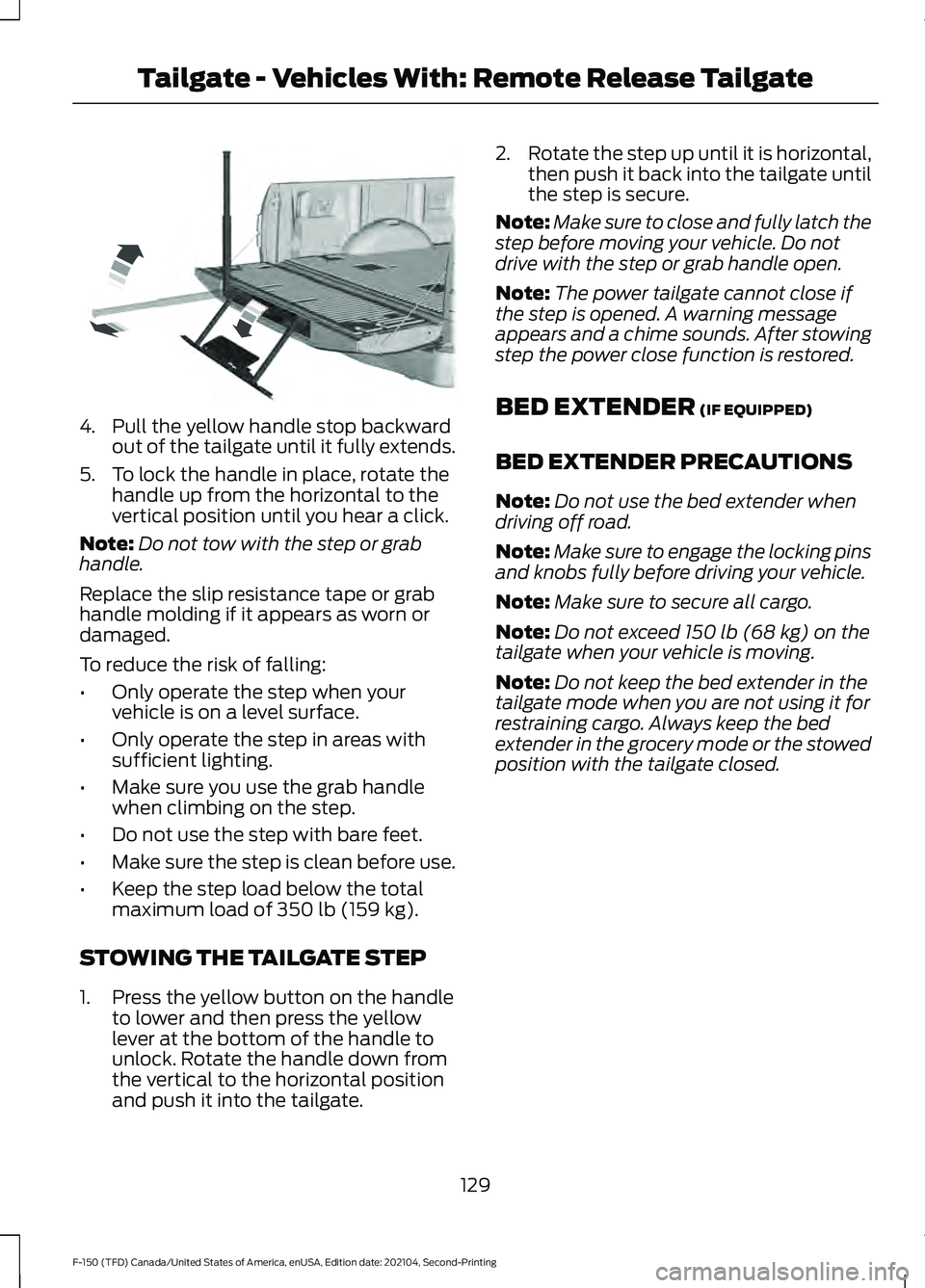
4. Pull the yellow handle stop backward
out of the tailgate until it fully extends.
5. To lock the handle in place, rotate the handle up from the horizontal to the
vertical position until you hear a click.
Note: Do not tow with the step or grab
handle.
Replace the slip resistance tape or grab
handle molding if it appears as worn or
damaged.
To reduce the risk of falling:
• Only operate the step when your
vehicle is on a level surface.
• Only operate the step in areas with
sufficient lighting.
• Make sure you use the grab handle
when climbing on the step.
• Do not use the step with bare feet.
• Make sure the step is clean before use.
• Keep the step load below the total
maximum load of 350 lb (159 kg).
STOWING THE TAILGATE STEP
1. Press the yellow button on the handle to lower and then press the yellow
lever at the bottom of the handle to
unlock. Rotate the handle down from
the vertical to the horizontal position
and push it into the tailgate. 2.
Rotate the step up until it is horizontal,
then push it back into the tailgate until
the step is secure.
Note: Make sure to close and fully latch the
step before moving your vehicle. Do not
drive with the step or grab handle open.
Note: The power tailgate cannot close if
the step is opened. A warning message
appears and a chime sounds. After stowing
step the power close function is restored.
BED EXTENDER
(IF EQUIPPED)
BED EXTENDER PRECAUTIONS
Note: Do not use the bed extender when
driving off road.
Note: Make sure to engage the locking pins
and knobs fully before driving your vehicle.
Note: Make sure to secure all cargo.
Note: Do not exceed
150 lb (68 kg) on the
tailgate when your vehicle is moving.
Note: Do not keep the bed extender in the
tailgate mode when you are not using it for
restraining cargo. Always keep the bed
extender in the grocery mode or the stowed
position with the tailgate closed.
129
F-150 (TFD) Canada/United States of America, enUSA, Edition date: 202104, Second-Printing Tailgate - Vehicles With: Remote Release TailgateE189557
Page 135 of 796
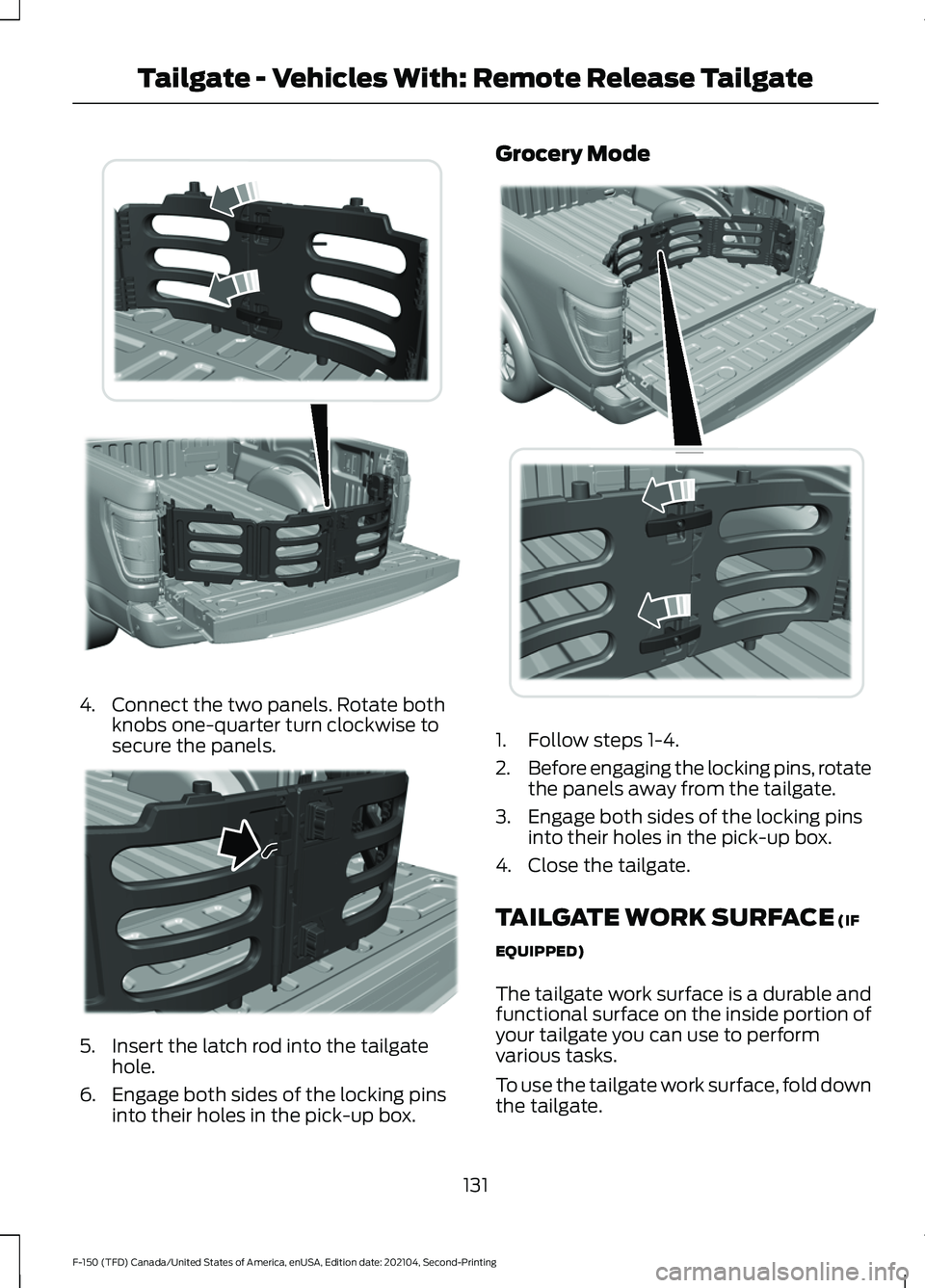
4. Connect the two panels. Rotate both
knobs one-quarter turn clockwise to
secure the panels. 5. Insert the latch rod into the tailgate
hole.
6. Engage both sides of the locking pins into their holes in the pick-up box. Grocery Mode
1. Follow steps 1-4.
2.
Before engaging the locking pins, rotate
the panels away from the tailgate.
3. Engage both sides of the locking pins into their holes in the pick-up box.
4. Close the tailgate.
TAILGATE WORK SURFACE (IF
EQUIPPED)
The tailgate work surface is a durable and
functional surface on the inside portion of
your tailgate you can use to perform
various tasks.
To use the tailgate work surface, fold down
the tailgate.
131
F-150 (TFD) Canada/United States of America, enUSA, Edition date: 202104, Second-Printing Tailgate - Vehicles With: Remote Release TailgateE311524 E311520 E311519
Page 139 of 796
WHAT ARE THE INCLINATION
SENSORS (If Equipped)
The inclination sensor is designed to detect
an attempt to raise your vehicle, for
example to remove a wheel or to tow it
away.
WHAT IS THE BATTERY BACKUP
ALARM
The battery backup alarm is an additional
alarm sounder that has its own battery. It
can detect if the vehicle battery is
disconnected to overcome the alarm
system.
ARMING THE ANTI-THEFT ALARM
SYSTEM
The alarm is ready to arm when your
vehicle is switched off.
Lock your vehicle with your remote control
to arm the alarm.
DISARMING THE ANTI-THEFT
ALARM SYSTEM
Disarm the alarm by performing any of the
following actions:
• Unlock the doors or luggage
compartment with the remote control.
• Switch your vehicle on or start your
vehicle.
ANTI-THEFT ALARM SYSTEM
SETTINGS
(IF EQUIPPED)
WHAT ARE THE ALARM SECURITY
LEVELS
You can select two levels of alarm security,
all sensors and perimeter sensing. All Sensors
All sensors is the standard setting.
In all sensors, all equipped sensors are on
when you arm the alarm.
Note:
Do not arm the alarm with all sensors
if passengers, animals or other moving
objects are inside your vehicle.
Perimeter Sensing
In perimeter sensing, the interior sensors
are off when you arm the alarm.
All the other equipped sensors activate
when you arm the alarm in this mode.
SETTING THE ALARM SECURITY
LEVEL
1. Press
Settings on the touchscreen.
2. Press
Vehicle Settings.
3. Press
Alarm System.
4. Press
Motion Sensors.
5. Press a setting.
WHAT IS ASK ON EXIT
You can choose which level of security you
require after you switch the ignition off.
Note: If you do not choose a setting, the
system defaults to all sensors.
SWITCHING ASK ON EXIT ON AND
OFF
1. Press
Settings on the touchscreen.
2. Press
Vehicle Settings.
3. Press
Alarm System.
4. Switch
Ask on Exit on or off.
135
F-150 (TFD) Canada/United States of America, enUSA, Edition date: 202104, Second-Printing Security
Page 142 of 796
POWER RUNNING BOARD
PRECAUTIONS
WARNING: In extreme climates,
excessive ice buildup may occur, causing
the running boards not to deploy. Make
sure that the running boards have
deployed, and have finished moving
before attempting to step on them. The
running boards will resume normal
function once the blockage is cleared. WARNING:
Switch off the running
boards before jacking or placing any
object under your vehicle. Never place
your hand between the extended running
board and your vehicle. A moving running
board may cause injury.
Do not use the running boards, front and
rear hinge assemblies, running board
motors, or the running board underbody
mounts to lift your vehicle when jacking.
Use proper jacking points.
The running boards could move slower in
cold temperatures.
POWER RUNNING BOARD
SETTINGS
1. Press
Features on the touchscreen.
2. Press
Running Boards.
3. Press a setting.
Running Boards (Modes)
Off
The power running boards remain stowed,
regardless of door position. Auto
The power running boards deploy when
you approach your vehicle with a remote
control, unlock the door or open the door.
The power running boards stow:
•
After a few seconds when you close
the doors.
• If you unlock the door but do not open
it.
• If you have switched
Approach
detection on and do not open a door
before the Auto Timer setting expires.
Note: When you select this mode, an option
displays that allows you to select how long
the running boards stay deployed without
opening the door.
Out
The power running boards remain
deployed, regardless of door position.
Approach detection
When you switch
Approach detection on
with Auto switched on, the running boards
deploy when you approach your vehicle
with a remote control.
POWER RUNNING BOARD
KICK SWITCH
You can use the power running board kick
switch to deploy and stow the running
board without opening or closing the door.
138
F-150 (TFD) Canada/United States of America, enUSA, Edition date: 202104, Second-Printing Power Running Boards
(If Equipped)
Page 143 of 796
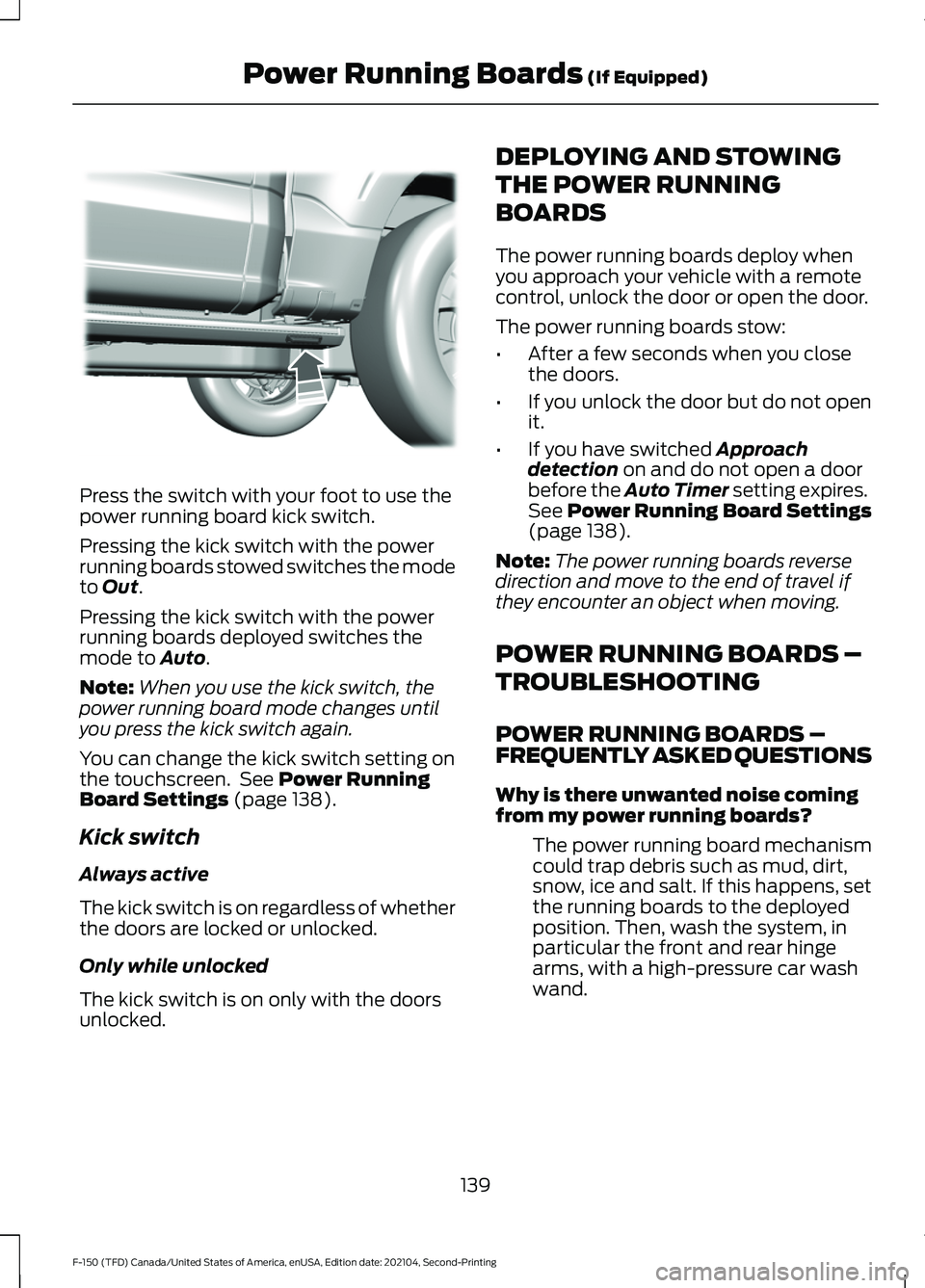
Press the switch with your foot to use the
power running board kick switch.
Pressing the kick switch with the power
running boards stowed switches the mode
to Out.
Pressing the kick switch with the power
running boards deployed switches the
mode to
Auto.
Note: When you use the kick switch, the
power running board mode changes until
you press the kick switch again.
You can change the kick switch setting on
the touchscreen. See
Power Running
Board Settings (page 138).
Kick switch
Always active
The kick switch is on regardless of whether
the doors are locked or unlocked.
Only while unlocked
The kick switch is on only with the doors
unlocked. DEPLOYING AND STOWING
THE POWER RUNNING
BOARDS
The power running boards deploy when
you approach your vehicle with a remote
control, unlock the door or open the door.
The power running boards stow:
•
After a few seconds when you close
the doors.
• If you unlock the door but do not open
it.
• If you have switched
Approach
detection on and do not open a door
before the Auto Timer setting expires.
See
Power Running Board Settings
(page 138).
Note: The power running boards reverse
direction and move to the end of travel if
they encounter an object when moving.
POWER RUNNING BOARDS –
TROUBLESHOOTING
POWER RUNNING BOARDS –
FREQUENTLY ASKED QUESTIONS
Why is there unwanted noise coming
from my power running boards?
The power running board mechanism
could trap debris such as mud, dirt,
snow, ice and salt. If this happens, set
the running boards to the deployed
position. Then, wash the system, in
particular the front and rear hinge
arms, with a high-pressure car wash
wand.
139
F-150 (TFD) Canada/United States of America, enUSA, Edition date: 202104, Second-Printing Power Running Boards
(If Equipped)E334917
Page 169 of 796
ADJUSTING THE EXTERIOR
MIRRORS
WARNING: Do not adjust the
mirrors when your vehicle is moving. This
could result in the loss of control of your
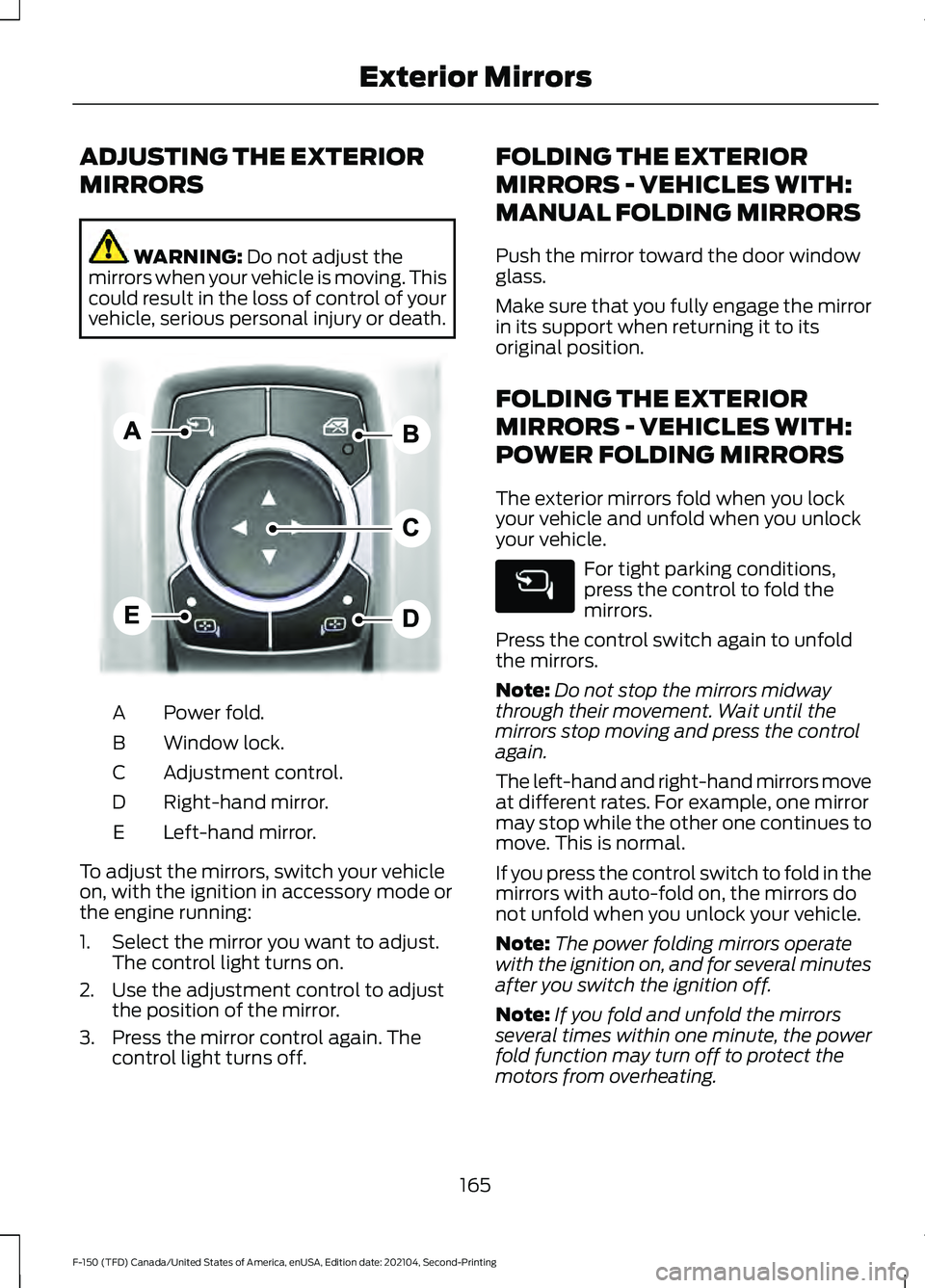
vehicle, serious personal injury or death. Power fold.
A
Window lock.
B
Adjustment control.
C
Right-hand mirror.
D
Left-hand mirror.
E
To adjust the mirrors, switch your vehicle
on, with the ignition in accessory mode or
the engine running:
1. Select the mirror you want to adjust. The control light turns on.
2. Use the adjustment control to adjust the position of the mirror.
3. Press the mirror control again. The control light turns off. FOLDING THE EXTERIOR
MIRRORS - VEHICLES WITH:
MANUAL FOLDING MIRRORS
Push the mirror toward the door window
glass.
Make sure that you fully engage the mirror
in its support when returning it to its
original position.
FOLDING THE EXTERIOR
MIRRORS - VEHICLES WITH:
POWER FOLDING MIRRORS
The exterior mirrors fold when you lock
your vehicle and unfold when you unlock
your vehicle.
For tight parking conditions,
press the control to fold the
mirrors.
Press the control switch again to unfold
the mirrors.
Note: Do not stop the mirrors midway
through their movement. Wait until the
mirrors stop moving and press the control
again.
The left-hand and right-hand mirrors move
at different rates. For example, one mirror
may stop while the other one continues to
move. This is normal.
If you press the control switch to fold in the
mirrors with auto-fold on, the mirrors do
not unfold when you unlock your vehicle.
Note: The power folding mirrors operate
with the ignition on, and for several minutes
after you switch the ignition off.
Note: If you fold and unfold the mirrors
several times within one minute, the power
fold function may turn off to protect the
motors from overheating.
165
F-150 (TFD) Canada/United States of America, enUSA, Edition date: 202104, Second-Printing Exterior MirrorsE311081