warning FORD F-150 2021 Workshop Manual
[x] Cancel search | Manufacturer: FORD, Model Year: 2021, Model line: F-150, Model: FORD F-150 2021Pages: 796, PDF Size: 13.89 MB
Page 144 of 796
ADJUSTING THE STEERING
WHEEL - VEHICLES WITH:
MANUAL ADJUSTABLE
STEERING COLUMN
WARNING: Do not adjust the
steering wheel when your vehicle is
moving.
Note: Make sure that you are sitting in the
correct position. See
Sitting in the Correct
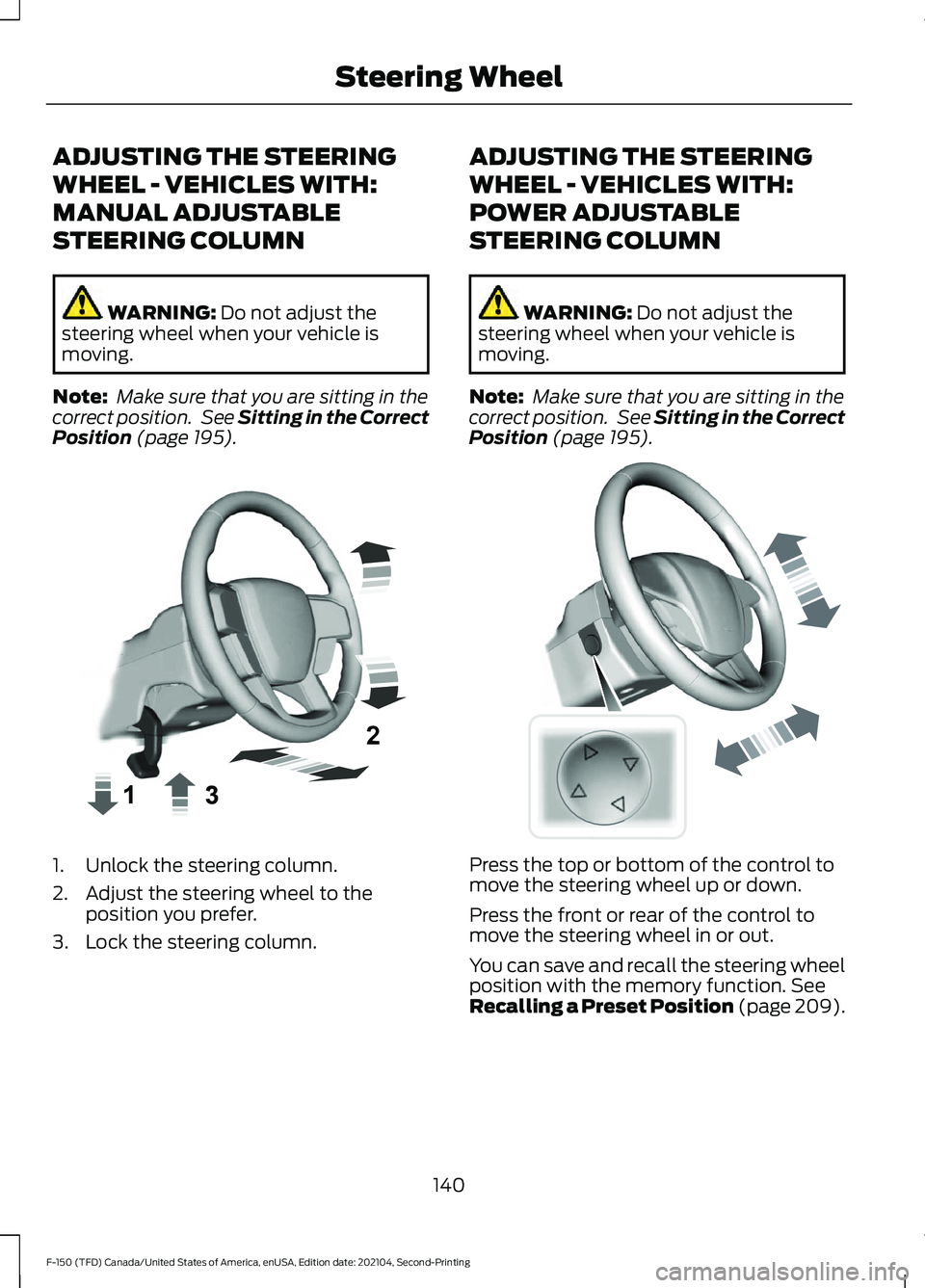
Position (page 195). 1. Unlock the steering column.
2. Adjust the steering wheel to the
position you prefer.
3. Lock the steering column. ADJUSTING THE STEERING
WHEEL - VEHICLES WITH:
POWER ADJUSTABLE
STEERING COLUMN WARNING:
Do not adjust the
steering wheel when your vehicle is
moving.
Note: Make sure that you are sitting in the
correct position. See
Sitting in the Correct
Position (page 195). Press the top or bottom of the control to
move the steering wheel up or down.
Press the front or rear of the control to
move the steering wheel in or out.
You can save and recall the steering wheel
position with the memory function.
See
Recalling a Preset Position (page 209).
140
F-150 (TFD) Canada/United States of America, enUSA, Edition date: 202104, Second-Printing Steering WheelE359744 E261582
Page 146 of 796
ADJUSTING THE PEDALS
WARNING: Do not use the pedal
adjustment controls when the vehicle is
moving. Failure to follow this instruction
could result in personal injury or death.
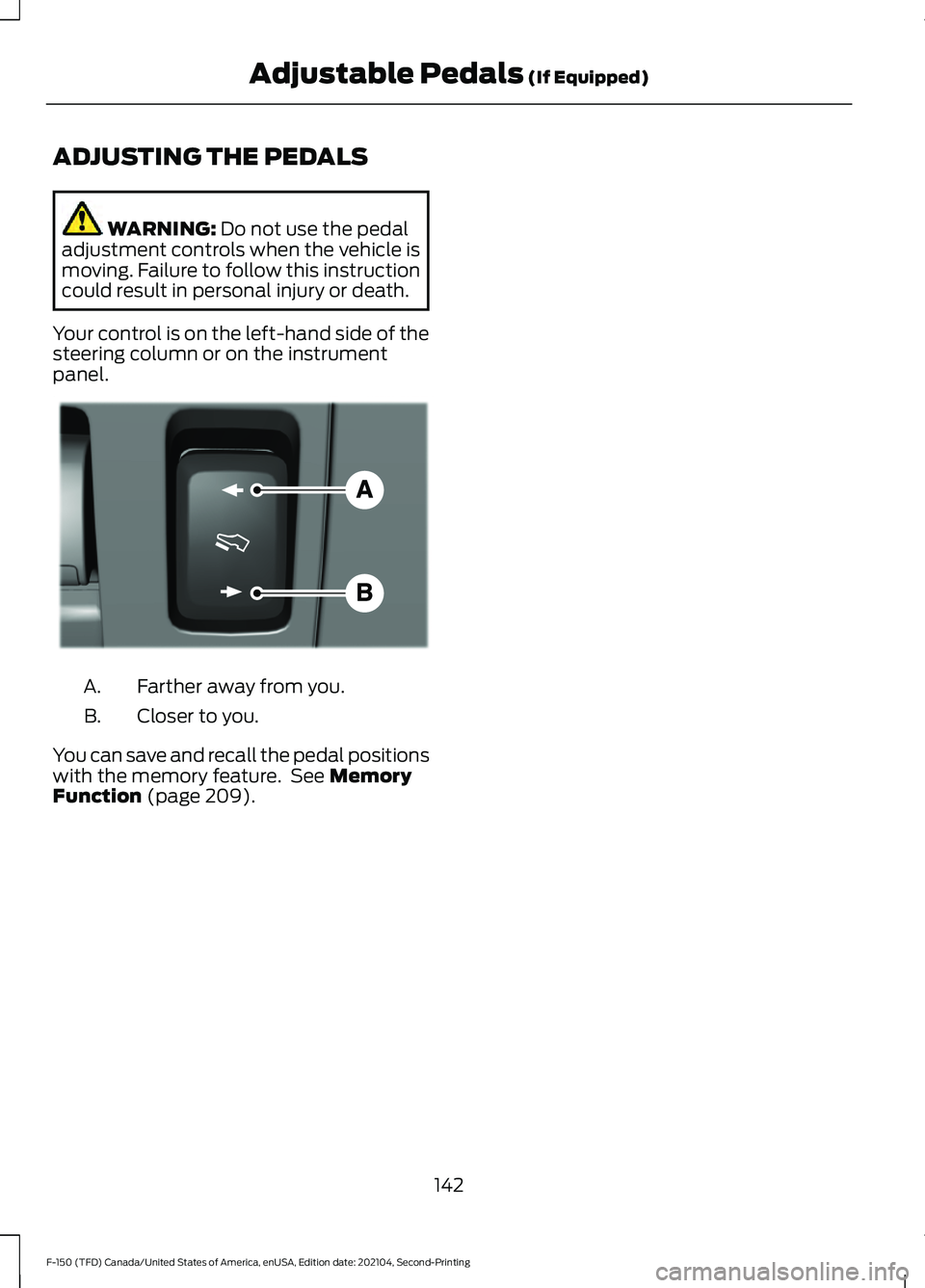
Your control is on the left-hand side of the
steering column or on the instrument
panel. Farther away from you.
A.
Closer to you.
B.
You can save and recall the pedal positions
with the memory feature. See
Memory
Function (page 209).
142
F-150 (TFD) Canada/United States of America, enUSA, Edition date: 202104, Second-Printing Adjustable Pedals
(If Equipped)E176213
Page 149 of 796
WASHERS
WASHER PRECAUTIONS
WARNING: If you operate your
vehicle in temperatures below 41°F
(5°C), use washer fluid with antifreeze
protection. Failure to use washer fluid
with antifreeze protection in cold
weather could result in impaired
windshield vision and increase the risk
of injury or accident.
Do not operate the washers when the
washer reservoir is empty. This could cause
the washer pump to overheat.
Keep the outside of the windshield clean.
The rain sensor is very sensitive and the
wipers may operate if dirt, mist or insects
hit the windshield.
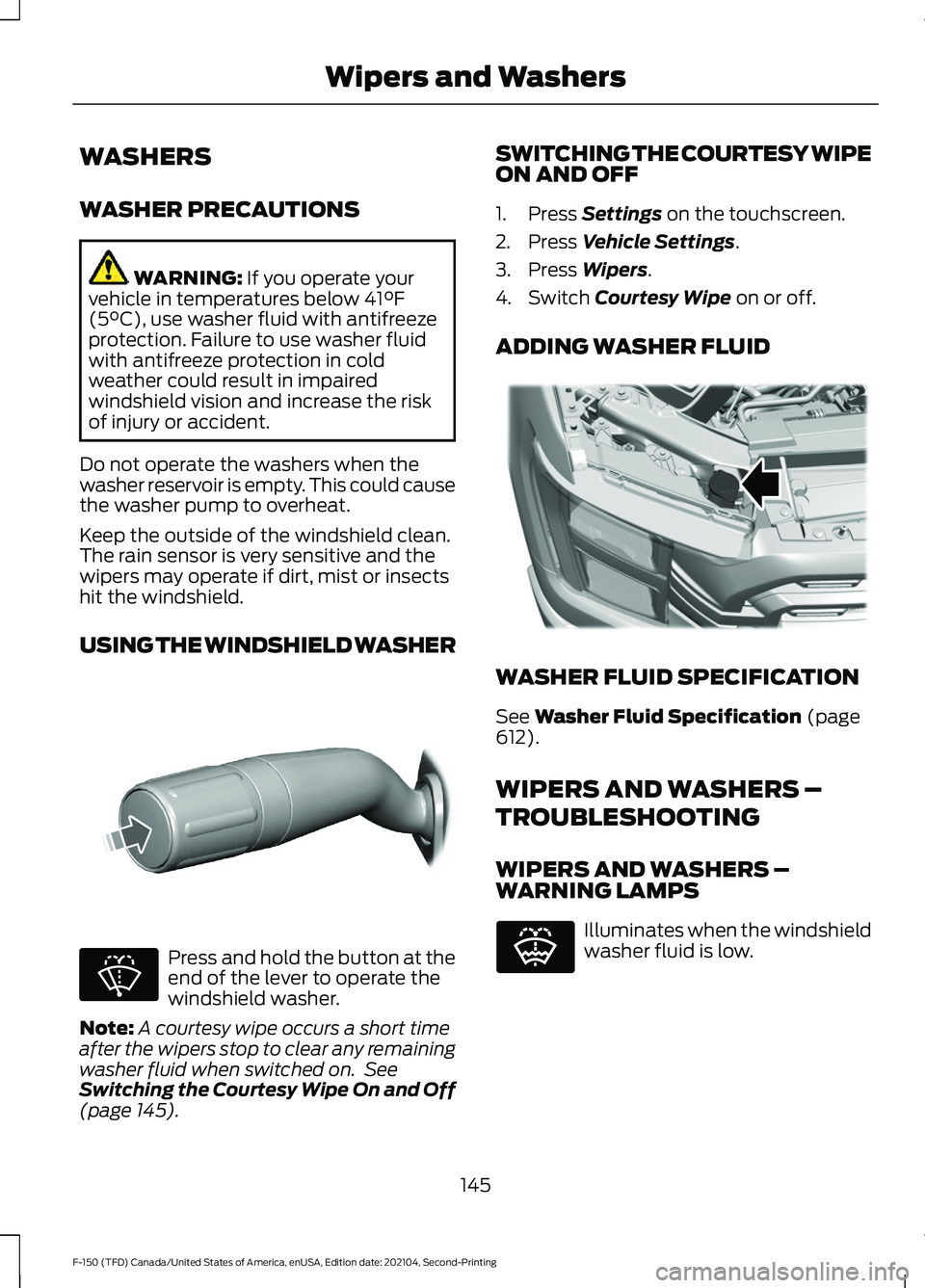
USING THE WINDSHIELD WASHER Press and hold the button at the
end of the lever to operate the
windshield washer.
Note: A courtesy wipe occurs a short time
after the wipers stop to clear any remaining
washer fluid when switched on. See
Switching the Courtesy Wipe On and Off
(page
145). SWITCHING THE COURTESY WIPE
ON AND OFF
1. Press
Settings on the touchscreen.
2. Press
Vehicle Settings.
3. Press
Wipers.
4. Switch
Courtesy Wipe on or off.
ADDING WASHER FLUID WASHER FLUID SPECIFICATION
See
Washer Fluid Specification (page
612).
WIPERS AND WASHERS –
TROUBLESHOOTING
WIPERS AND WASHERS –
WARNING LAMPS Illuminates when the windshield
washer fluid is low.
145
F-150 (TFD) Canada/United States of America, enUSA, Edition date: 202104, Second-Printing Wipers and WashersE311291 E270967 E328222 E132353
Page 152 of 796
HEADLAMPS –
TROUBLESHOOTING
HEADLAMPS – FREQUENTLY
ASKED QUESTIONS
Why is there condensation in the
headlamps?
Headlamps have vents to
accommodate normal changes in air
pressure. Condensation can be a
natural by-product of this design.
When moist air enters the lamp
assembly through the vents, there is a
possibility that condensation can
occur when the temperature is cold.
When normal condensation occurs, a
fine mist can form on the interior of the
lens. The fine mist eventually clears
and exits through the vents during
normal operation.
How much condensation is
acceptable? The presence of a fine mist, for
example no streaks, drip marks or
large droplets. A fine mist covers less
than 50% of the lens.
How long may it take for the
acceptable condensation to be
cleared? Clearing time may take as long as 48
hours under dry weather conditions.
How much condensation is
unacceptable? A water puddle inside the lamp.
Streaks, drip marks or large droplets
present on the interior of the lens.
What should I do if unacceptable
condensation is present? Have your vehicle checked as soon as
possible. Why do my headlamps turn off when I
have them switched on when I switch
my vehicle off?
The battery saver turns the headlamps
off after a short period of time after
you switch your vehicle off.
AUTOLAMPS
WHAT ARE AUTOLAMPS WARNING: The system does not
relieve you of your responsibility to drive
with due care and attention. You may
need to override the system if it does not
turn the headlamps on in low visibility
conditions, for example daytime fog.
Autolamps turn the headlamps on in low
light situations or when the windshield
wipers operate.
AUTOLAMP SETTINGS
1. Press
Settings on the touchscreen.
2. Press
Vehicle Settings.
3. Press
Lighting.
4. Press
Autolamp Delay.
5. Press a setting.
148
F-150 (TFD) Canada/United States of America, enUSA, Edition date: 202104, Second-Printing Exterior Lighting
Page 153 of 796
EXTERIOR LAMPS
SWITCHING THE TURN SIGNAL
LAMPS ON AND OFF
Push the lever up or down to
switch the turn signal lamps on.
Set the lever to the middle position to
switch the turn signal lamps off.
Note: Tap the lever up or down to make the
turn signal lamps flash three times.
HOW DO CORNERING LAMPS
WORK (If Equipped)
The cornering lamps illuminate the inside
of a corner when you are turning the
steering wheel or when you switch the turn
signal lamps on. They turn on when the
vehicle speed is below 25 mph (40 km/h).
Note: Only the cornering lamp on the side
your vehicle is turning illuminates.
Note: Cornering lamps do not operate if
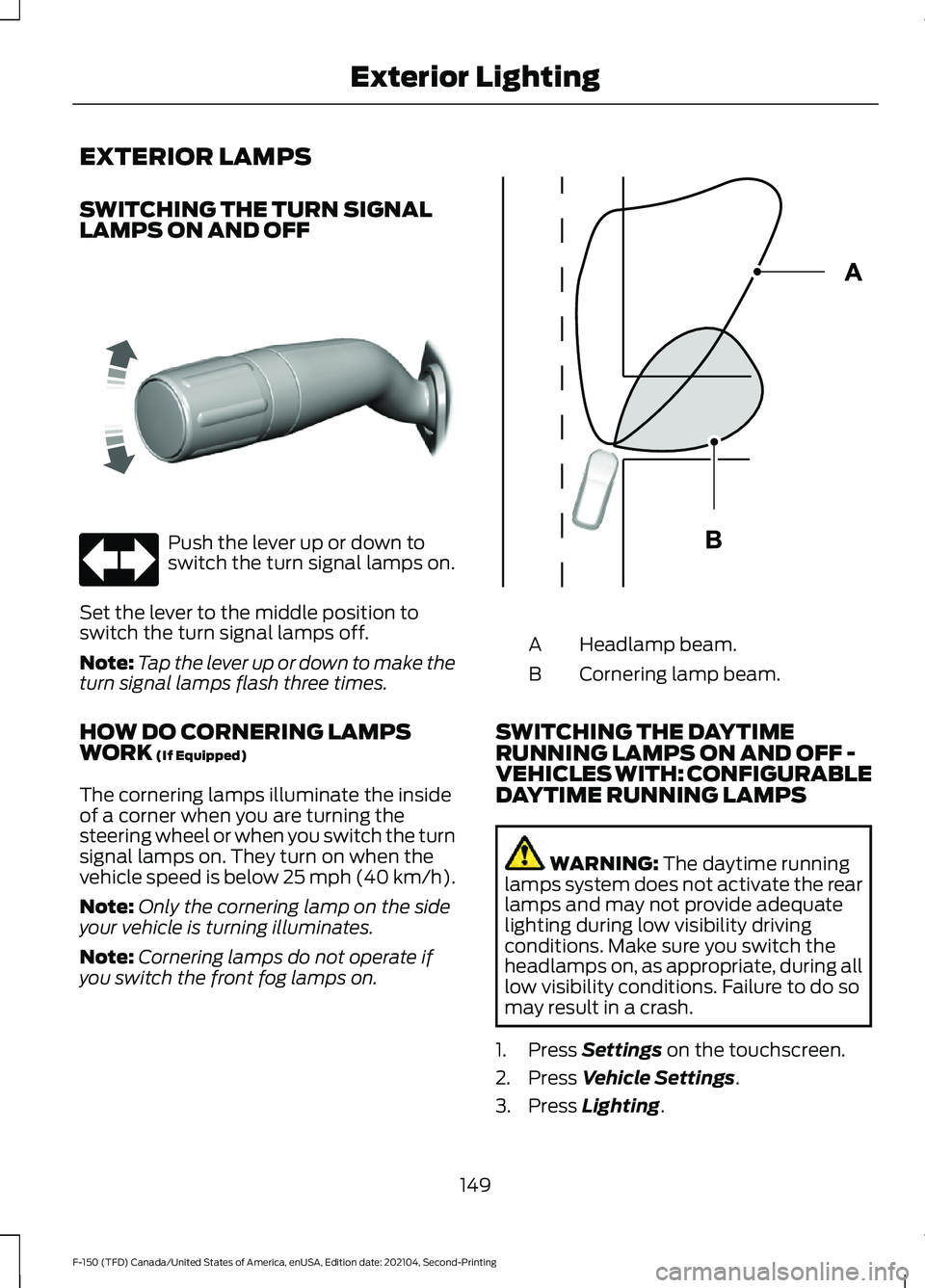
you switch the front fog lamps on. Headlamp beam.
A
Cornering lamp beam.
B
SWITCHING THE DAYTIME
RUNNING LAMPS ON AND OFF -
VEHICLES WITH: CONFIGURABLE
DAYTIME RUNNING LAMPS WARNING:
The daytime running
lamps system does not activate the rear
lamps and may not provide adequate
lighting during low visibility driving
conditions. Make sure you switch the
headlamps on, as appropriate, during all
low visibility conditions. Failure to do so
may result in a crash.
1. Press
Settings on the touchscreen.
2. Press
Vehicle Settings.
3. Press
Lighting.
149
F-150 (TFD) Canada/United States of America, enUSA, Edition date: 202104, Second-Printing Exterior LightingE311431 E327599
Page 154 of 796
4. Switch Daytime Running Lights on or
off.
The daytime running lamps turn on when
all of the following occur:
• You switch the system on.
• You switch your vehicle on.
• The transmission is not in park (P) for
vehicles with automatic transmissions
or you release the parking brake for
vehicles with manual transmissions.
• The lighting control is in the autolamps
position.
• The headlamps are off.
Note: Other lighting control positions do
not turn on the daytime running lamps.
SWITCHING THE DAYTIME
RUNNING LAMPS ON AND OFF -
VEHICLES WITH: DAYTIME
RUNNING LAMPS (DRL) WARNING:
The daytime running
lamps system does not activate the rear
lamps and may not provide adequate
lighting during low visibility driving
conditions. Make sure you switch the
headlamps on, as appropriate, during all
low visibility conditions. Failure to do so
may result in a crash.
Daytime running lamps are always on
unless you switch on the headlamps or
your vehicle is in park (P).
SWITCHING THE FRONT FOG
LAMPS ON AND OFF
(If Equipped)
The front fog lamp button is on the lighting
control. Press the button to switch the
front fog lamps on or off. Note:
Only switch the front fog lamps on
during reduced visibility.
Note: The brightness of the daytime running
lamps may decrease when the front fog
lamps are switched on.
Note: When the lighting control is in the
autolamps position, you cannot switch the
fog lamps on unless the headlamps are on.
SWITCHING THE FRONT FOG
LAMPS ON AND OFF - RAPTOR
The front fog lamp button is on the lighting
control. Press the button to switch the
front fog lamps on or off.
Note: Only switch the front fog lamps on
during reduced visibility.
Note: The brightness of the daytime running
lamps may decrease when you switch the
front fog lamps on.
Note: When the lighting control is in the
autolamps position, you cannot switch the
fog lamps on unless the headlamps are on.
Switching the Off-Road Lamps On
and Off
(If Equipped)
Use auxiliary switch 1 to switch the off-road
lamps on and off. See
What Are the
Auxiliary Switches (page 659).
SWITCHING THE CARGO LAMPS
ON
(If Equipped) Press the button in the lighting
control or in the rear cargo box.
SWITCHING THE SPOT LAMPS ON
AND OFF
(If Equipped)
The spot lamp buttons are near the lighting
control.
150
F-150 (TFD) Canada/United States of America, enUSA, Edition date: 202104, Second-Printing Exterior Lighting E189587
Page 155 of 796
Press the button to switch on the
left-hand spot lamp.
Press the button to switch on the
right-hand spot lamp.
Move the position of the exterior mirrors
to adjust the aim.
Note: The lighting control must be set to
the parking lamp position.
Note: The spot lamps illuminate the area
in front of and to the side of your vehicle.
EXTERIOR LAMP INDICATORS
Front Fog Lamp It illuminates when you switch
the front fog lamps on.
Turn Signal Lamp It flashes when you switch the
turn signal lamps on.
Note: An increase in the rate of flashing
warns of a failed turn signal lamp.
EXTERIOR LAMP AUDIBLE
WARNING
Exterior Lamps On
Sounds when you open the driver door and
the exterior lamps are on. EXTERIOR ZONE LIGHTING (IF
EQUIPPED)
WHAT IS EXTERIOR ZONE
LIGHTING
Exterior zone lighting divides the exterior
lighting into zones and allows you to switch
them on and off to provide lighting around
the perimeter of your vehicle.
USING THE EXTERIOR ZONE
LIGHTING
1. Press
Features on the touchscreen.
2. Press
Zone Lighting. On and off button.
A
Settings menu.
B
Exterior lamp indicators.
C
Individual zones on and off.
D
All zones on and off.
E
You can use zone lighting when your
vehicle is on or off. When it is off, the
lighting turns off after a certain period of
time.
151
F-150 (TFD) Canada/United States of America, enUSA, Edition date: 202104, Second-Printing Exterior LightingE340436 E340437 E339129
Page 157 of 796
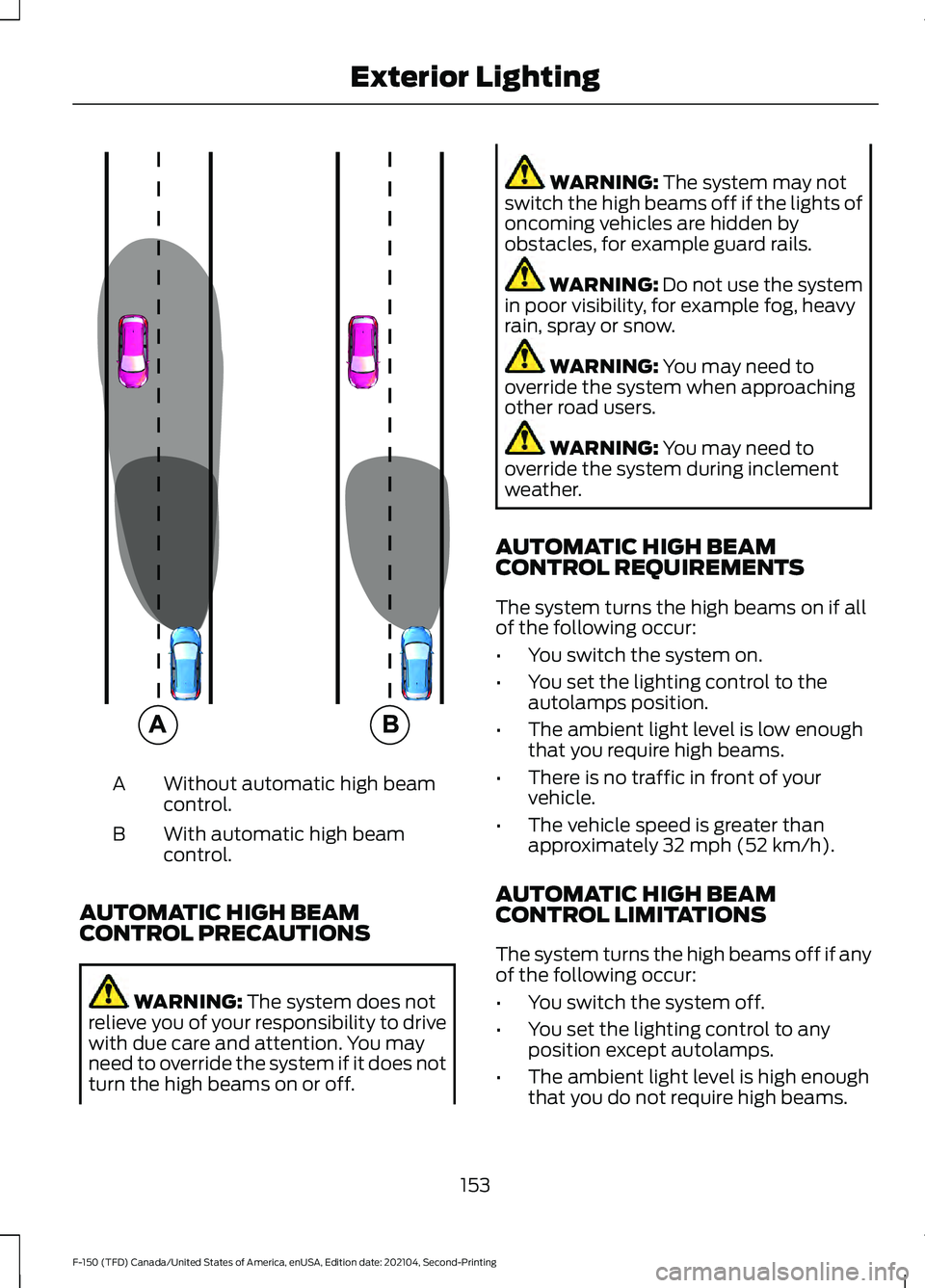
Without automatic high beam
control.
A
With automatic high beam
control.
B
AUTOMATIC HIGH BEAM
CONTROL PRECAUTIONS WARNING: The system does not
relieve you of your responsibility to drive
with due care and attention. You may
need to override the system if it does not
turn the high beams on or off. WARNING:
The system may not
switch the high beams off if the lights of
oncoming vehicles are hidden by
obstacles, for example guard rails. WARNING:
Do not use the system
in poor visibility, for example fog, heavy
rain, spray or snow. WARNING:
You may need to
override the system when approaching
other road users. WARNING:
You may need to
override the system during inclement
weather.
AUTOMATIC HIGH BEAM
CONTROL REQUIREMENTS
The system turns the high beams on if all
of the following occur:
• You switch the system on.
• You set the lighting control to the
autolamps position.
• The ambient light level is low enough
that you require high beams.
• There is no traffic in front of your
vehicle.
• The vehicle speed is greater than
approximately
32 mph (52 km/h).
AUTOMATIC HIGH BEAM
CONTROL LIMITATIONS
The system turns the high beams off if any
of the following occur:
• You switch the system off.
• You set the lighting control to any
position except autolamps.
• The ambient light level is high enough
that you do not require high beams.
153
F-150 (TFD) Canada/United States of America, enUSA, Edition date: 202104, Second-Printing Exterior Lighting E327596
Page 159 of 796
GLARE FREE LIGHTING (IF
EQUIPPED)
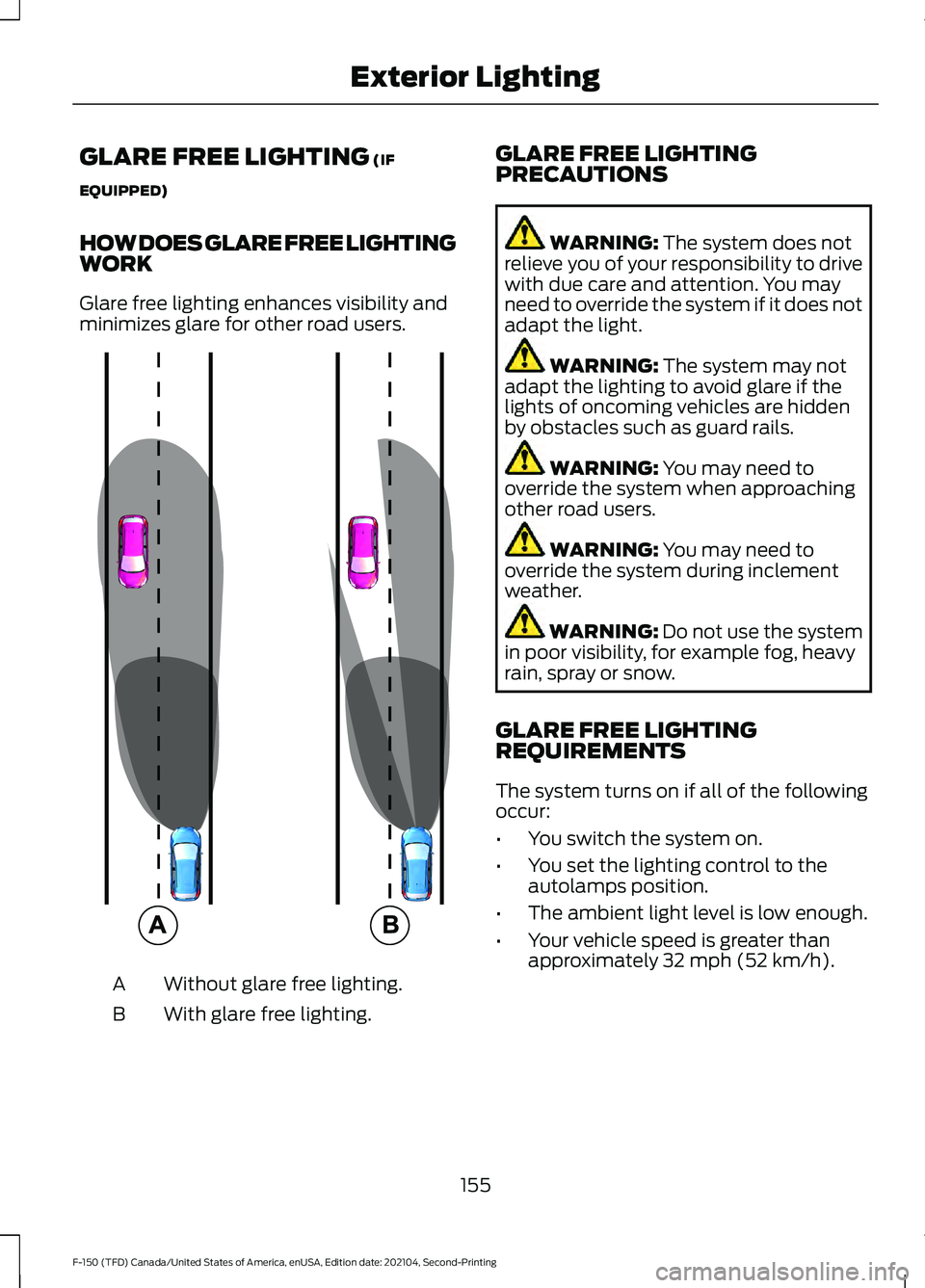
HOW DOES GLARE FREE LIGHTING
WORK
Glare free lighting enhances visibility and
minimizes glare for other road users. Without glare free lighting.
A
With glare free lighting.
B GLARE FREE LIGHTING
PRECAUTIONS WARNING:
The system does not
relieve you of your responsibility to drive
with due care and attention. You may
need to override the system if it does not
adapt the light. WARNING:
The system may not
adapt the lighting to avoid glare if the
lights of oncoming vehicles are hidden
by obstacles such as guard rails. WARNING:
You may need to
override the system when approaching
other road users. WARNING:
You may need to
override the system during inclement
weather. WARNING:
Do not use the system
in poor visibility, for example fog, heavy
rain, spray or snow.
GLARE FREE LIGHTING
REQUIREMENTS
The system turns on if all of the following
occur:
• You switch the system on.
• You set the lighting control to the
autolamps position.
• The ambient light level is low enough.
• Your vehicle speed is greater than
approximately
32 mph (52 km/h).
155
F-150 (TFD) Canada/United States of America, enUSA, Edition date: 202104, Second-Printing Exterior Lighting E220921
Page 166 of 796
OPENING AND CLOSING THE
WINDOWS
WARNING: Do not leave children
unattended in your vehicle and do not
let them play with the power windows.
Failure to follow this instruction could
result in personal injury. WARNING:
When closing the
power windows, verify they are free of
obstruction and make sure that children
and pets are not in the proximity of the
window openings. Press the window control switch
to open the window. Lift the
window control switch to close
the window.
Note: The power windows operate with the
ignition on, and for several minutes after you
switch the ignition off or until you open a
front door.
To reduce wind noise or pulsing noise when
one window is open, slightly open the
opposite window.
One-Touch Open
Fully press the window control switch and
release it. Press again or lift it to stop the
window.
One-Touch Close
Fully lift the window control switch and
release it. Press again or lift it to stop the
window.
Resetting One-Touch Close
Carry out all steps within 30 seconds of
starting the sequence.
1. Close the window. 2. Press and hold the window control
switch until the window is fully open.
Keep the window control switch
pressed for a few seconds.
3. Lift and hold the window control switch
until the window is fully closed. Keep
the window control switch held for a
few seconds.
4. Press and hold the window control switch until the window is fully open.
Keep the window control switch
pressed for a few seconds.
5. Lift and hold the window control switch
until the window is fully closed. Keep
the window control switch held for a
few seconds.
Note: Repeat the procedure if the window
does not close when you use one-touch.
WINDOW BOUNCE-BACK
WHAT IS WINDOW BOUNCE-BACK
The window stops and reverses if it detects
an obstruction when closing.
OVERRIDING WINDOW BOUNCE-
BACK WARNING:
If you override
bounce-back, the window does not
reverse if it detects an obstacle. Take
care when closing the windows to avoid
personal injury or damage to your
vehicle.
1. Close the window until it reaches the point of resistance and let it reverse.
2. Lift and hold the window control switch
within two seconds to override
bounce-back and close the window.
Bounce-back is now disabled and you
can close the window manually.
162
F-150 (TFD) Canada/United States of America, enUSA, Edition date: 202104, Second-Printing Windows