warning FORD F-150 2021 Manual Online
[x] Cancel search | Manufacturer: FORD, Model Year: 2021, Model line: F-150, Model: FORD F-150 2021Pages: 796, PDF Size: 13.89 MB
Page 214 of 796
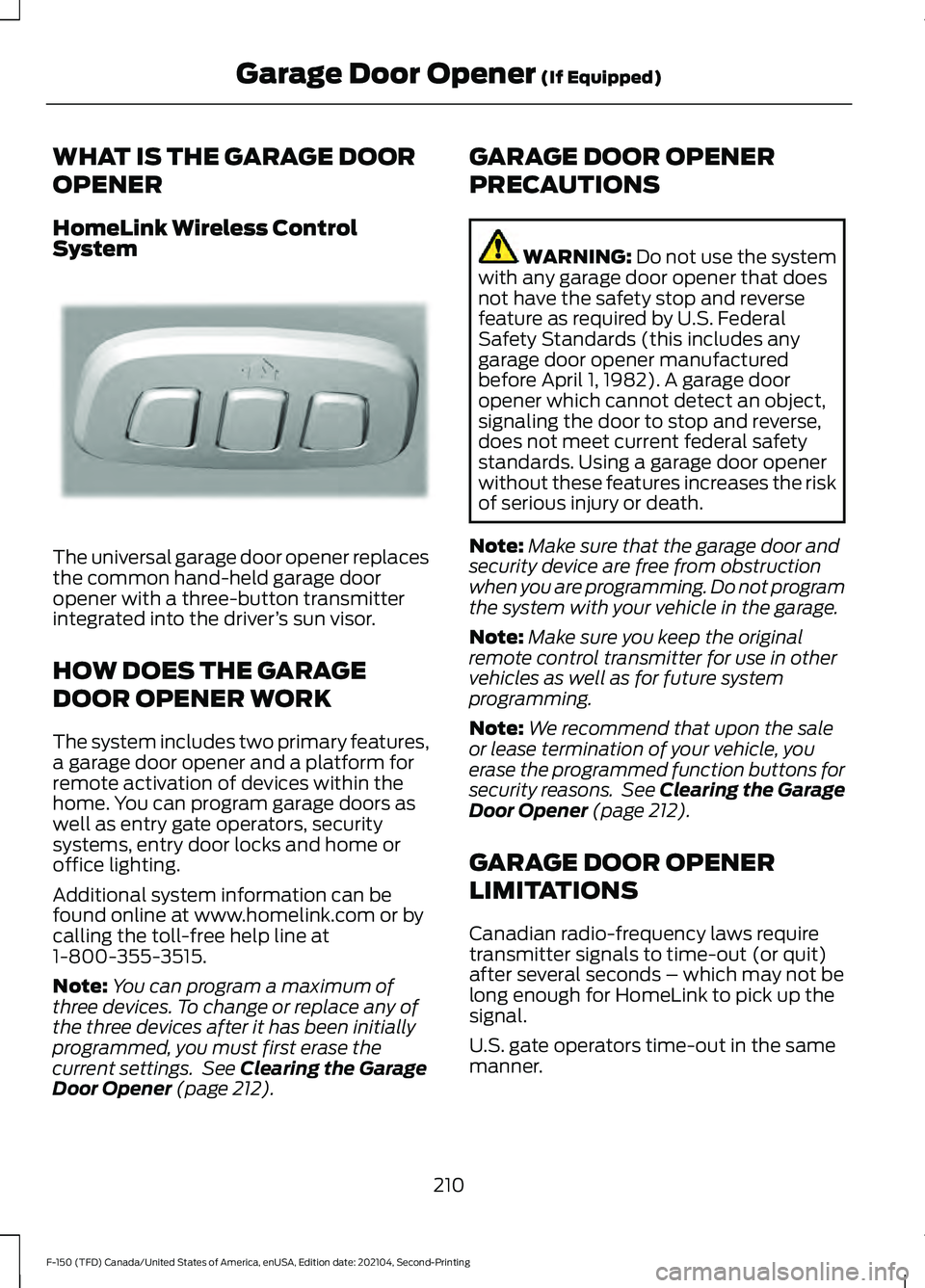
WHAT IS THE GARAGE DOOR
OPENER
HomeLink Wireless Control
System
The universal garage door opener replaces
the common hand-held garage door
opener with a three-button transmitter
integrated into the driver
’s sun visor.
HOW DOES THE GARAGE
DOOR OPENER WORK
The system includes two primary features,
a garage door opener and a platform for
remote activation of devices within the
home. You can program garage doors as
well as entry gate operators, security
systems, entry door locks and home or
office lighting.
Additional system information can be
found online at www.homelink.com or by
calling the toll-free help line at
1-800-355-3515.
Note: You can program a maximum of
three devices. To change or replace any of
the three devices after it has been initially
programmed, you must first erase the
current settings. See Clearing the Garage
Door Opener (page 212). GARAGE DOOR OPENER
PRECAUTIONS WARNING:
Do not use the system
with any garage door opener that does
not have the safety stop and reverse
feature as required by U.S. Federal
Safety Standards (this includes any
garage door opener manufactured
before April 1, 1982). A garage door
opener which cannot detect an object,
signaling the door to stop and reverse,
does not meet current federal safety
standards. Using a garage door opener
without these features increases the risk
of serious injury or death.
Note: Make sure that the garage door and
security device are free from obstruction
when you are programming. Do not program
the system with your vehicle in the garage.
Note: Make sure you keep the original
remote control transmitter for use in other
vehicles as well as for future system
programming.
Note: We recommend that upon the sale
or lease termination of your vehicle, you
erase the programmed function buttons for
security reasons. See Clearing the Garage
Door Opener
(page 212).
GARAGE DOOR OPENER
LIMITATIONS
Canadian radio-frequency laws require
transmitter signals to time-out (or quit)
after several seconds – which may not be
long enough for HomeLink to pick up the
signal.
U.S. gate operators time-out in the same
manner.
210
F-150 (TFD) Canada/United States of America, enUSA, Edition date: 202104, Second-Printing Garage Door Opener
(If Equipped)E188211
Page 217 of 796
2. When the indicator light flashes,
release the buttons.
Note: You cannot erase individual buttons.
REPROGRAMMING THE
GARAGE DOOR OPENER
To program a device to a previously trained
button, follow these steps:
1. Press and hold the desired button. Do NOT release the button.
2. The indicator light begins to flash after
20 seconds. Without releasing the
button, follow programming steps.
GARAGE DOOR OPENER
RADIO FREQUENCIES
FCC and RSS-210 Industry Canada
Compliance WARNING: Changes or
modifications not expressively approved
by the party responsible for compliance
could void the user's authority to operate
the equipment. The term "IC:" before the
radio certification number only signifies
that Industry Canada technical
specifications were met.
This device complies with Part 15 of the
FCC Rules and with RSS-210 of Industry
Canada. Operation is subject to the
following two conditions: (1) this device
may not cause harmful interference, and
(2) this device must accept any
interference received, including
interference that could cause undesired
operation. This equipment complies with FCC
radiation exposure limits set forth for an
uncontrolled environment. End Users must
follow the specific operating instructions
for satisfying RF exposure compliance. This
transmitter must be at least
8 in (20 cm)
from the user and must not be co-located
or operating in conjunction with any other
antenna or transmitter.
213
F-150 (TFD) Canada/United States of America, enUSA, Edition date: 202104, Second-Printing Garage Door Opener
(If Equipped)
Page 218 of 796
LOCATING THE USB PORTS
Data Transfer USB Ports
The USB ports could be in the following
locations:
•
On the lower instrument panel below
the climate control.
• Inside the center console.
Note: These USB ports can also charge
devices.
Note: Not all USB ports in your vehicle have
data transfer capabilities.
Note: We recommend using only USB-IF
certified cables and adapters. Non-certified
cables and adapters may not work.
Charge Only USB Ports The USB ports could be in the following
locations:
•
On the lower instrument panel.
• On the upper instrument panel.
• Inside the media bin.
• Inside the center console.
• On the rear of the center console.
• In the cargo area.
LOCATING THE USB PORTS -
RAPTOR
Data Transfer USB Ports The USB Ports could be in the following
locations: •
Inside the media bin.
• Inside the center console.
Note: These USB ports can also charge
devices.
Note: Not all USB ports in your vehicle have
data transfer capabilities.
Note: We recommend using only USB-IF
certified cables and adapters. Non-certified
cables and adapters may not work.
Charge Only USB Ports The USB ports could be in the following
locations:
•
On the lower instrument panel.
• On the upper instrument panel.
• Inside the media bin.
• Inside the center console.
• On the rear of the center console.
• In the cargo area.
PLAYING MEDIA USING THE
USB PORT WARNING: Driving while distracted
can result in loss of vehicle control, crash
and injury. We strongly recommend that
you use extreme caution when using any
device that may take your focus off the
road. Your primary responsibility is the
safe operation of your vehicle. We
recommend against the use of any
hand-held device while driving and
encourage the use of voice-operated
systems when possible. Make sure you
are aware of all applicable local laws
that may affect the use of electronic
devices while driving.
214
F-150 (TFD) Canada/United States of America, enUSA, Edition date: 202104, Second-Printing USB Ports
Page 220 of 796
WHAT IS THE POWER OUTLET
The vehicle functions as a portable
generator and can power devices that
require up to the rating listed on power
outlet label.
POWER OUTLET
PRECAUTIONS - VEHICLES
WITH: 2KW
WARNING: Do not start the engine
in a closed garage or in other enclosed
areas. Exhaust fumes are toxic. Always
open the garage door before you start
the engine. Failure to follow this
instruction could result in personal injury
or death. WARNING: Exhaust leaks may
result in entry of harmful and potentially
lethal fumes into the passenger
compartment. If you smell exhaust
fumes inside your vehicle, have your
vehicle inspected immediately. Do not
drive if you smell exhaust fumes. WARNING:
Do not connect any
vehicle power outlets to any premises.
This can create a backfeed to utility lines.
Failure to follow this instruction could
result in property damage, fire, electrical
shock or death. WARNING:
The vehicle's engine
runs while the generator is switched on.
Running engines emit carbon monoxide.
Only use the generator when the vehicle
is outdoors. Failure to follow this
instruction could result in personal injury
or death.
Note: Automatic engine stop is disabled
and the gasoline engine will continue to idle
when the outlet is switched on.
Note: We recommend using UL approved
devices for use with the power outlet.
Note: Unplug electrical devices from the
power outlet when they are not switched
on.
Note: Make sure there is no damage to the
outlets before driving your vehicle.
Note: Make sure that objects are not
blocking the inverter inlet and exhaust near
the rear underseat storage compartment.
Note: The climate control system may turn
on and power may be limited during extreme
hot or cold temperatures to optimize the
performance of the system.
Note: When the outlet is switched on and
the vehicle is in Park (P) the engine turns
off 30 minutes after the low fuel warning is
displayed. After the vehicle is turned off,
generator mode only operates while driving
or until the vehicle is refueled.
216
F-150 (TFD) Canada/United States of America, enUSA, Edition date: 202104, Second-Printing Power Outlet - Vehicles With: Pickup Bed Power Generator
Outlet
Page 221 of 796
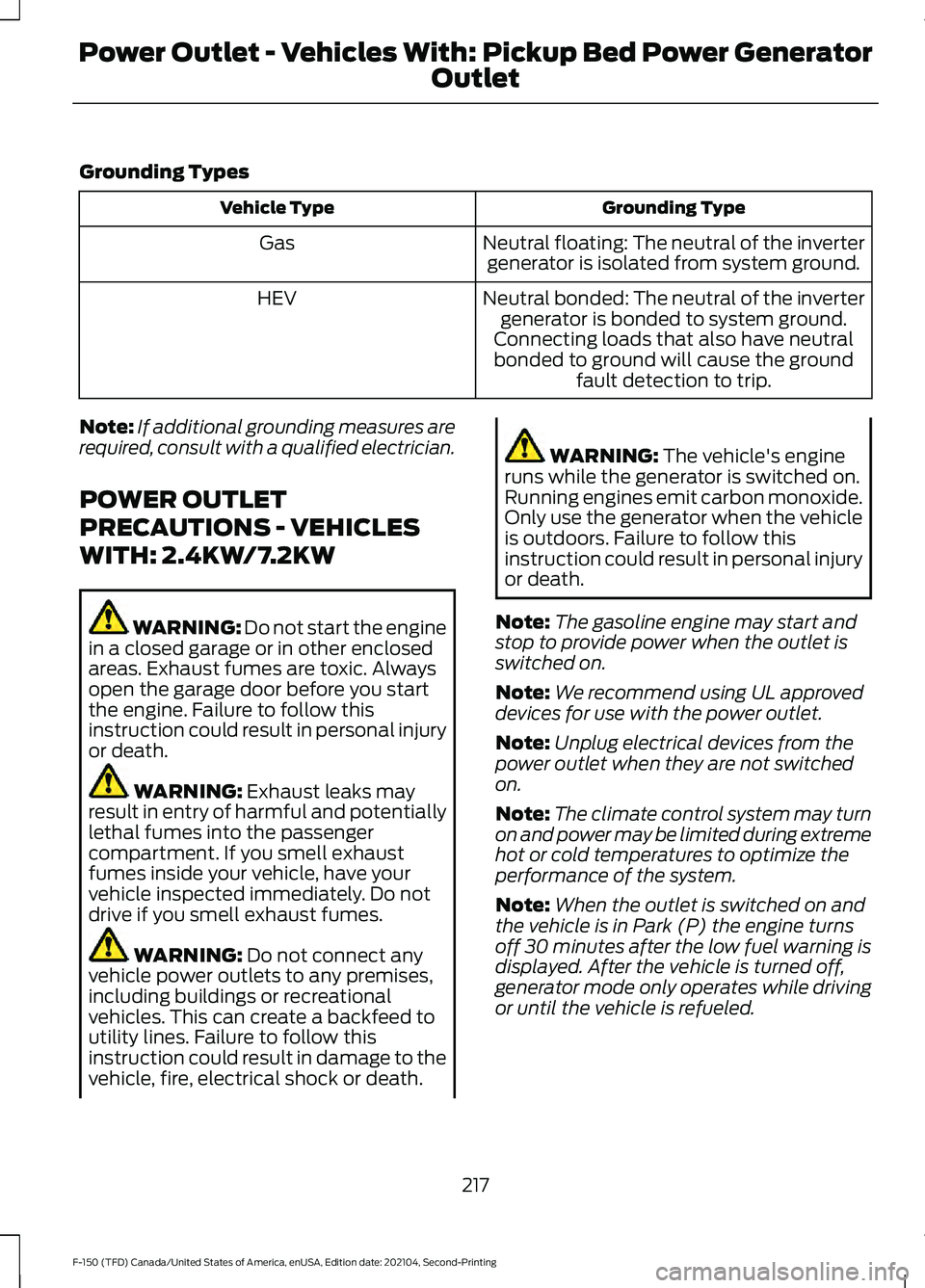
Grounding Types
Grounding Type
Vehicle Type
Neutral floating: The neutral of the invertergenerator is isolated from system ground.
Gas
Neutral bonded: The neutral of the invertergenerator is bonded to system ground.
Connecting loads that also have neutral bonded to ground will cause the ground fault detection to trip.
HEV
Note: If additional grounding measures are
required, consult with a qualified electrician.
POWER OUTLET
PRECAUTIONS - VEHICLES
WITH: 2.4KW/7.2KW WARNING: Do not start the engine
in a closed garage or in other enclosed
areas. Exhaust fumes are toxic. Always
open the garage door before you start
the engine. Failure to follow this
instruction could result in personal injury
or death. WARNING: Exhaust leaks may
result in entry of harmful and potentially
lethal fumes into the passenger
compartment. If you smell exhaust
fumes inside your vehicle, have your
vehicle inspected immediately. Do not
drive if you smell exhaust fumes. WARNING:
Do not connect any
vehicle power outlets to any premises,
including buildings or recreational
vehicles. This can create a backfeed to
utility lines. Failure to follow this
instruction could result in damage to the
vehicle, fire, electrical shock or death. WARNING:
The vehicle's engine
runs while the generator is switched on.
Running engines emit carbon monoxide.
Only use the generator when the vehicle
is outdoors. Failure to follow this
instruction could result in personal injury
or death.
Note: The gasoline engine may start and
stop to provide power when the outlet is
switched on.
Note: We recommend using UL approved
devices for use with the power outlet.
Note: Unplug electrical devices from the
power outlet when they are not switched
on.
Note: The climate control system may turn
on and power may be limited during extreme
hot or cold temperatures to optimize the
performance of the system.
Note: When the outlet is switched on and
the vehicle is in Park (P) the engine turns
off 30 minutes after the low fuel warning is
displayed. After the vehicle is turned off,
generator mode only operates while driving
or until the vehicle is refueled.
217
F-150 (TFD) Canada/United States of America, enUSA, Edition date: 202104, Second-Printing Power Outlet - Vehicles With: Pickup Bed Power Generator
Outlet
Page 228 of 796
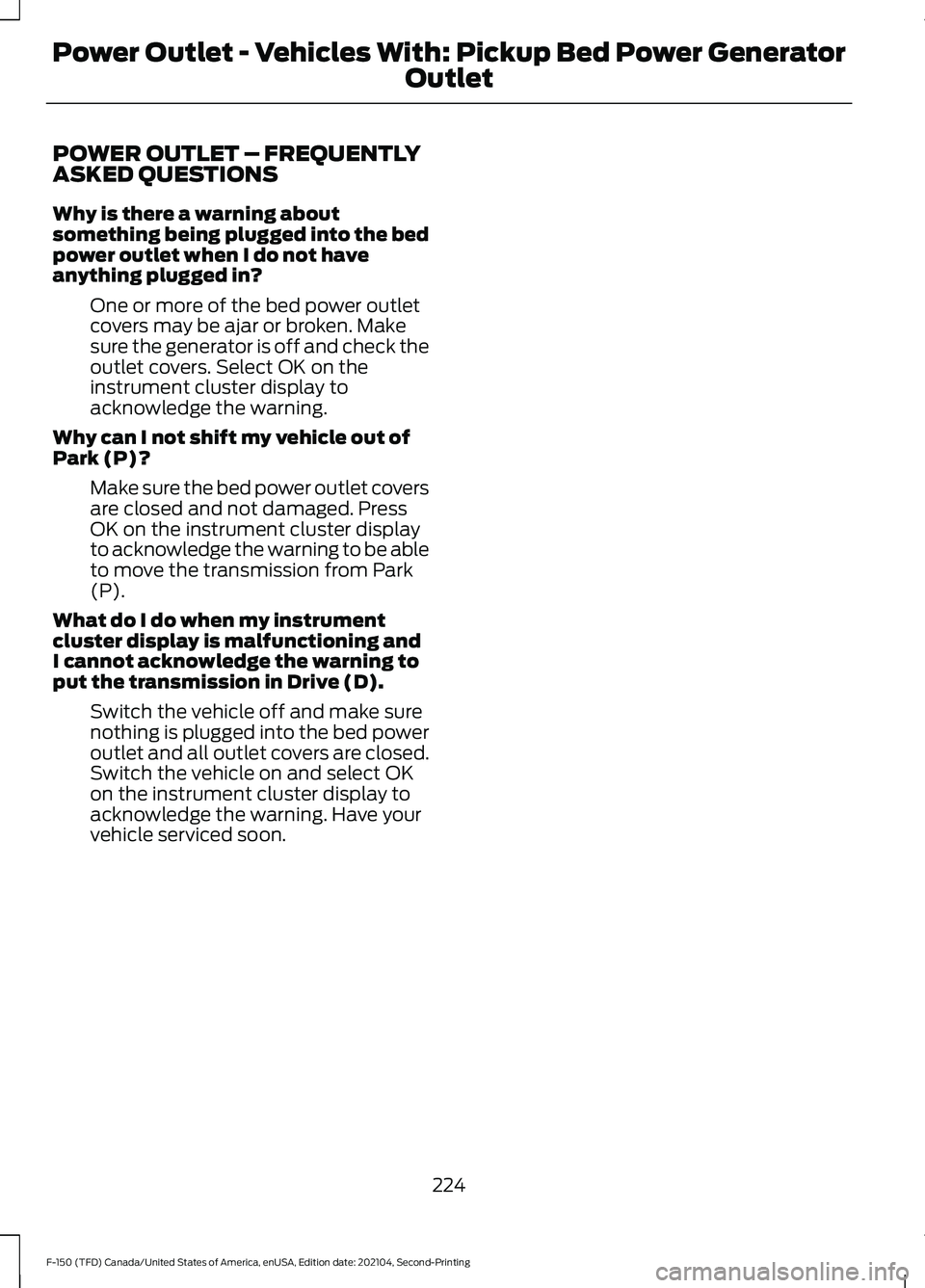
POWER OUTLET – FREQUENTLY
ASKED QUESTIONS
Why is there a warning about
something being plugged into the bed
power outlet when I do not have
anything plugged in?
One or more of the bed power outlet
covers may be ajar or broken. Make
sure the generator is off and check the
outlet covers. Select OK on the
instrument cluster display to
acknowledge the warning.
Why can I not shift my vehicle out of
Park (P)? Make sure the bed power outlet covers
are closed and not damaged. Press
OK on the instrument cluster display
to acknowledge the warning to be able
to move the transmission from Park
(P).
What do I do when my instrument
cluster display is malfunctioning and
I cannot acknowledge the warning to
put the transmission in Drive (D). Switch the vehicle off and make sure
nothing is plugged into the bed power
outlet and all outlet covers are closed.
Switch the vehicle on and select OK
on the instrument cluster display to
acknowledge the warning. Have your
vehicle serviced soon.
224
F-150 (TFD) Canada/United States of America, enUSA, Edition date: 202104, Second-Printing Power Outlet - Vehicles With: Pickup Bed Power Generator
Outlet
Page 229 of 796
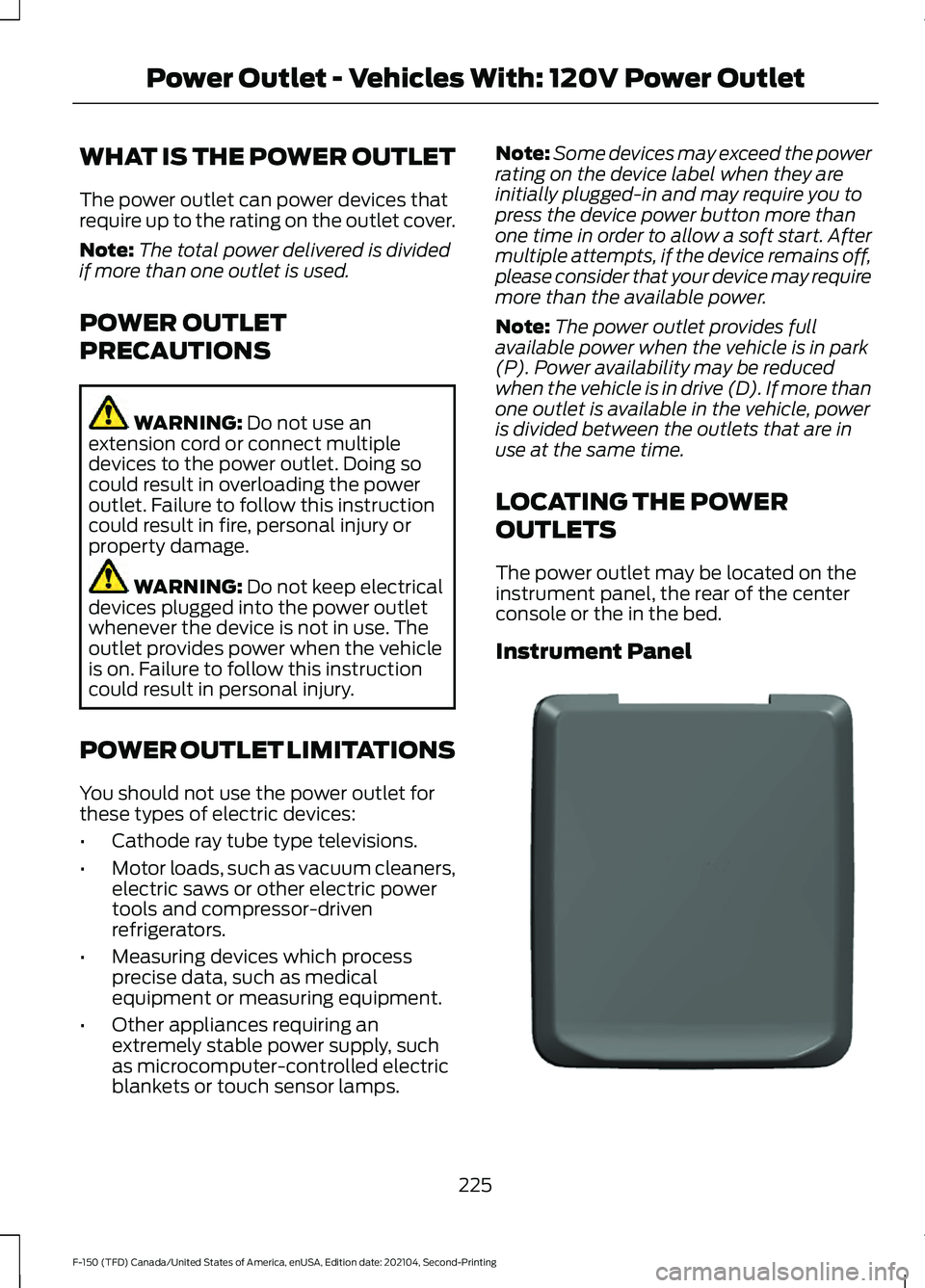
WHAT IS THE POWER OUTLET
The power outlet can power devices that
require up to the rating on the outlet cover.
Note:
The total power delivered is divided
if more than one outlet is used.
POWER OUTLET
PRECAUTIONS WARNING: Do not use an
extension cord or connect multiple
devices to the power outlet. Doing so
could result in overloading the power
outlet. Failure to follow this instruction
could result in fire, personal injury or
property damage. WARNING:
Do not keep electrical
devices plugged into the power outlet
whenever the device is not in use. The
outlet provides power when the vehicle
is on. Failure to follow this instruction
could result in personal injury.
POWER OUTLET LIMITATIONS
You should not use the power outlet for
these types of electric devices:
• Cathode ray tube type televisions.
• Motor loads, such as vacuum cleaners,
electric saws or other electric power
tools and compressor-driven
refrigerators.
• Measuring devices which process
precise data, such as medical
equipment or measuring equipment.
• Other appliances requiring an
extremely stable power supply, such
as microcomputer-controlled electric
blankets or touch sensor lamps. Note:
Some devices may exceed the power
rating on the device label when they are
initially plugged-in and may require you to
press the device power button more than
one time in order to allow a soft start. After
multiple attempts, if the device remains off,
please consider that your device may require
more than the available power.
Note: The power outlet provides full
available power when the vehicle is in park
(P). Power availability may be reduced
when the vehicle is in drive (D). If more than
one outlet is available in the vehicle, power
is divided between the outlets that are in
use at the same time.
LOCATING THE POWER
OUTLETS
The power outlet may be located on the
instrument panel, the rear of the center
console or the in the bed.
Instrument Panel 225
F-150 (TFD) Canada/United States of America, enUSA, Edition date: 202104, Second-Printing Power Outlet - Vehicles With: 120V Power OutletE337927
Page 231 of 796
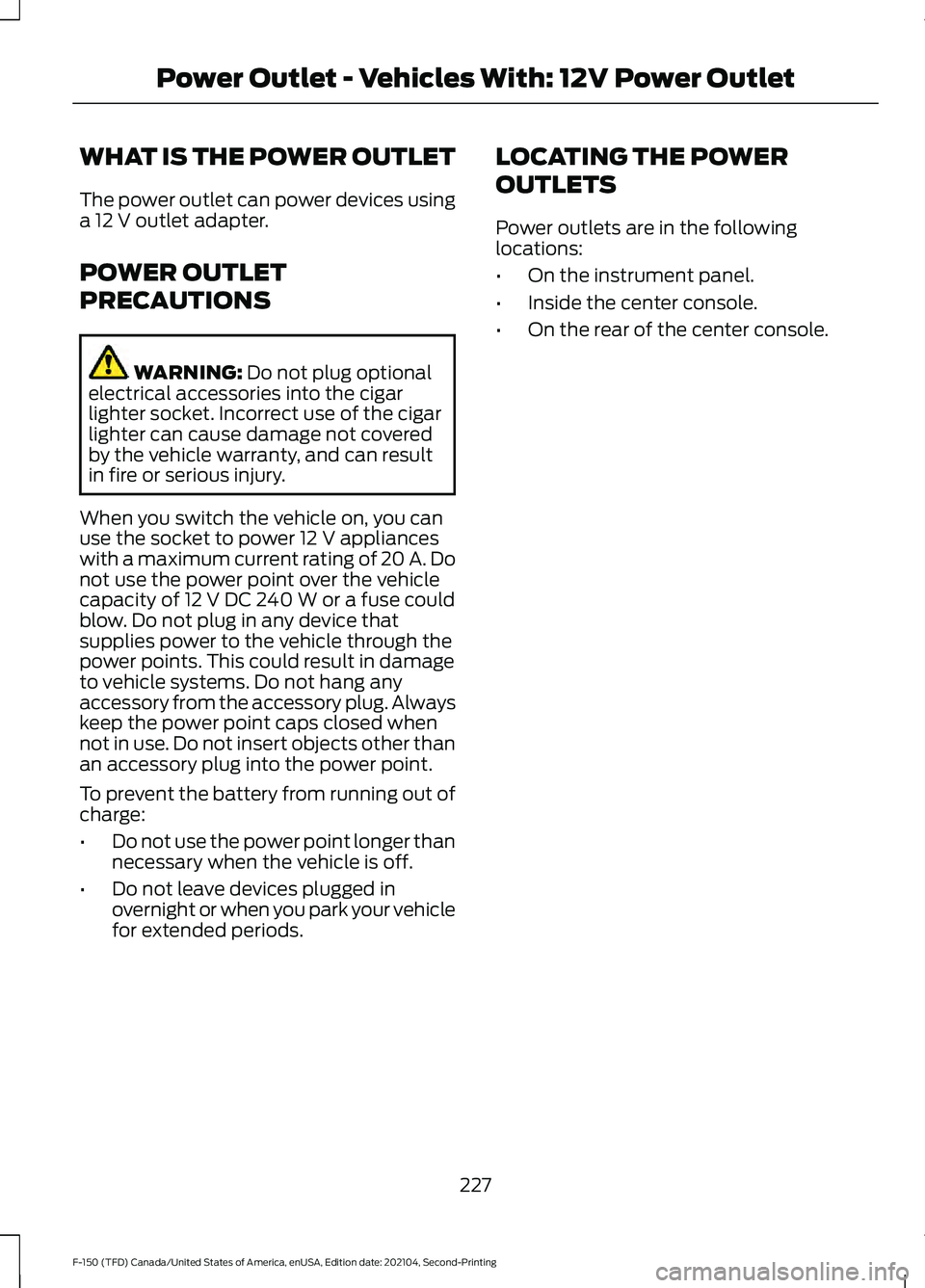
WHAT IS THE POWER OUTLET
The power outlet can power devices using
a 12 V outlet adapter.
POWER OUTLET
PRECAUTIONS WARNING:
Do not plug optional
electrical accessories into the cigar
lighter socket. Incorrect use of the cigar
lighter can cause damage not covered
by the vehicle warranty, and can result
in fire or serious injury.
When you switch the vehicle on, you can
use the socket to power
12 V appliances
with a maximum current rating of 20 A. Do
not use the power point over the vehicle
capacity of
12 V DC 240 W or a fuse could
blow. Do not plug in any device that
supplies power to the vehicle through the
power points. This could result in damage
to vehicle systems. Do not hang any
accessory from the accessory plug. Always
keep the power point caps closed when
not in use. Do not insert objects other than
an accessory plug into the power point.
To prevent the battery from running out of
charge:
• Do not use the power point longer than
necessary when the vehicle is off.
• Do not leave devices plugged in
overnight or when you park your vehicle
for extended periods. LOCATING THE POWER
OUTLETS
Power outlets are in the following
locations:
•
On the instrument panel.
• Inside the center console.
• On the rear of the center console.
227
F-150 (TFD) Canada/United States of America, enUSA, Edition date: 202104, Second-Printing Power Outlet - Vehicles With: 12V Power Outlet
Page 235 of 796
WHAT IS THE WIRELESS
ACCESSORY CHARGER
The wireless accessory charger allows you
to charge one compatible Qi wireless
charging device on the charging area.
WIRELESS ACCESSORY
CHARGER PRECAUTIONS
WARNING: Wireless charging
devices can affect the operation of
implanted medical devices, including
cardiac pacemakers. If you have any
implanted medical devices, we
recommend that you consult with your
physician.
Keep the charging area clean and remove
foreign objects prior to charging a device.
Do not place items with a magnetic strip
or radio-frequency identification chip, for
example passports, parking tickets,
transportation passes or credit cards, near
the charging area when charging a device.
Damage could occur to the magnetic strip
or radio-frequency identification chip.
Do not place metal objects, for example
remote controls, coins and candy
wrappers, on or near the charging area
when charging a device. Metal objects may
heat up and degrade the charging
performance, in addition to causing
interruptions in charging.
Charging could be interrupted, degraded,
or could stop if any of the following occur:
• The system detects a foreign object.
• The device is misaligned on the
charging area.
• The device moves on the active
charging area when the vehicle is in
motion. •
The vehicle ambient temperature is too
high.
• You attempt to charge a non-Qi
compatible device on the wireless
charger.
Note: During charging, the device and the
charger could heat up, this is normal. If the
battery gets hotter than usual, the device
may stop charging.
LOCATING THE WIRELESS
ACCESSORY CHARGER The charging area is on the
center console or in the media
bin below the instrument panel.
CHARGING A WIRELESS
DEVICE
Place the device on the center of the
charging surface with the charging side
down. The charging stops after your device
reaches a full charge.
You can use the charger when the vehicle
is in accessory mode, when the vehicle is
running, or when SYNC is on. Displays on the status bar when
wireless charging is in progress.
Note: The charging performance may be
affected if your device is in a case. It may be
necessary to remove the case to wirelessly
charge your device.
Note: Software and firmware updates may
affect device compatibility, including the
use of unofficial software or firmware. You
should verify charging functionality with your
specific devices in-vehicle.
231
F-150 (TFD) Canada/United States of America, enUSA, Edition date: 202104, Second-Printing Wireless Accessory Charger
(If Equipped)E297549
Page 236 of 796
CUP HOLDERS
CUP HOLDER PRECAUTIONS
WARNING: Use caution when
stowing items or hot drinks in the cup
holders. Items could become loose or
spill during hard braking, acceleration or
crashes. Failure to follow this instruction
could result in personal injury.
GLOVE COMPARTMENT
OPENING THE GLOVE
COMPARTMENT
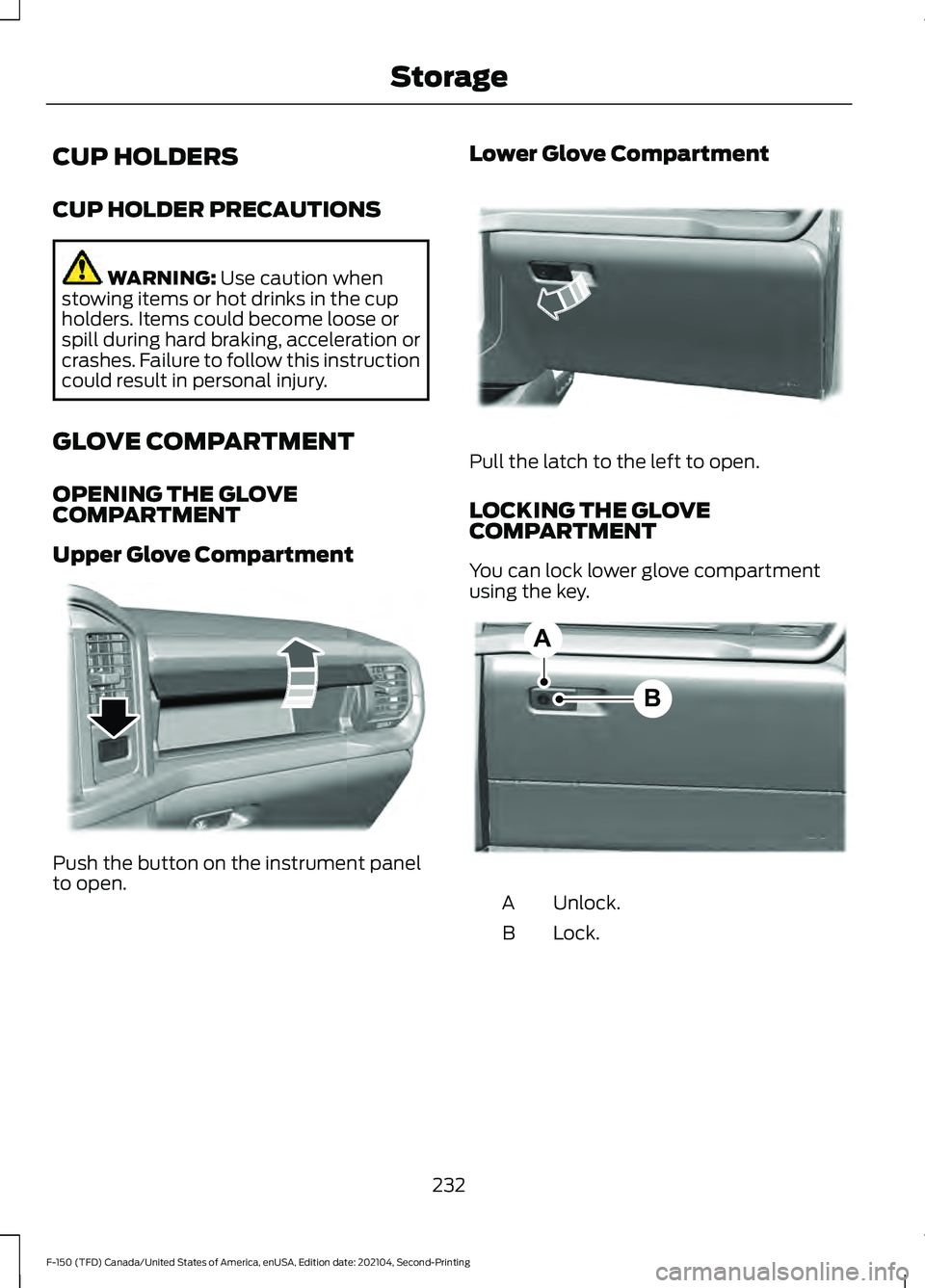
Upper Glove Compartment Push the button on the instrument panel
to open. Lower Glove Compartment Pull the latch to the left to open.
LOCKING THE GLOVE
COMPARTMENT
You can lock lower glove compartment
using the key.
Unlock.
A
Lock.
B
232
F-150 (TFD) Canada/United States of America, enUSA, Edition date: 202104, Second-Printing StorageE310219 E310218 B
AE351063