warning FORD F-150 2021 Repair Manual
[x] Cancel search | Manufacturer: FORD, Model Year: 2021, Model line: F-150, Model: FORD F-150 2021Pages: 796, PDF Size: 13.89 MB
Page 167 of 796
Note:
The window goes past the point of
resistance and you can fully close it.
Note: If the window does not close, have
your vehicle checked as soon as possible.
LOCKING THE REAR WINDOW
CONTROLS (IF EQUIPPED) Press the window control switch
to lock or unlock the rear window
controls. It illuminates when you
lock the rear window controls.
OPENING AND CLOSING THE
SLIDING WINDOWS
(IF EQUIPPED) WARNING:
When closing the
power windows, verify they are free of
obstruction and make sure that children
and pets are not in the proximity of the
window openings. WARNING:
Do not leave children
unattended in your vehicle and do not
let them play with the power windows.
Failure to follow this instruction could
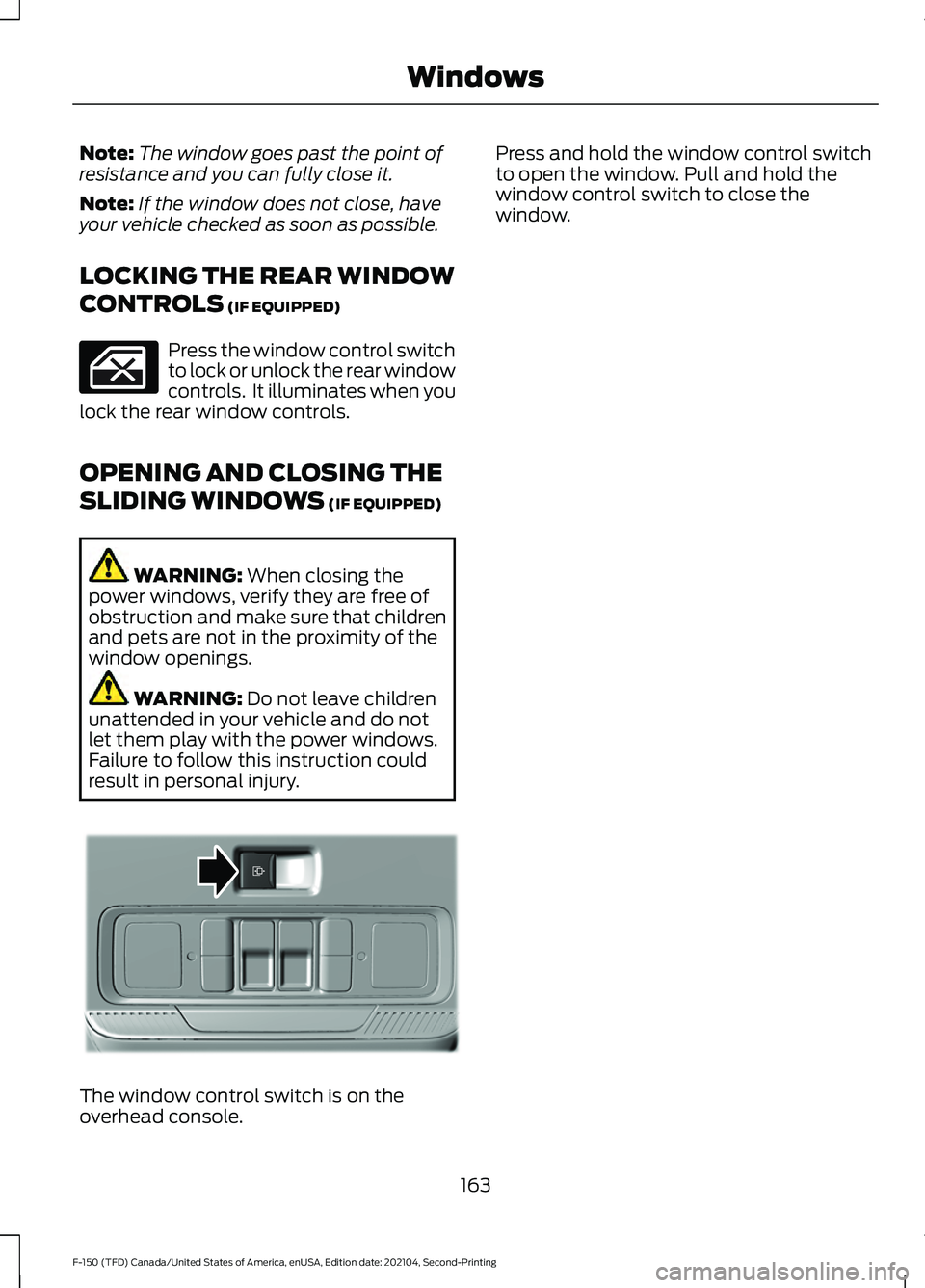
result in personal injury. The window control switch is on the
overhead console. Press and hold the window control switch
to open the window. Pull and hold the
window control switch to close the
window.
163
F-150 (TFD) Canada/United States of America, enUSA, Edition date: 202104, Second-Printing Windows E311430
Page 168 of 796
INTERIOR MIRROR
PRECAUTIONS
WARNING: Do not adjust the
mirrors when your vehicle is moving. This
could result in the loss of control of your
vehicle, serious personal injury or death.
Note: Do not clean the mirror housing or
glass with harsh abrasives, fuel or other
petroleum-based cleaning products.
MANUALLY DIMMING THE
INTERIOR MIRROR
Pull the tab below the mirror toward you
to reduce glare at night.
AUTO-DIMMING INTERIOR
MIRROR
(IF EQUIPPED)
WHAT IS THE AUTO-DIMMING
INTERIOR MIRROR
The mirror dims to reduce the effect of
bright light from behind. It returns to
normal when the bright light from behind
is no longer present or if you shift into
reverse (R).
AUTO-DIMMING INTERIOR
MIRROR LIMITATIONS
Do not block the sensors on the front and
back of the mirror.
Note: A rear center passenger or raised rear
center head restraint could prevent light
from reaching the sensor.
164
F-150 (TFD) Canada/United States of America, enUSA, Edition date: 202104, Second-Printing Interior Mirror
Page 169 of 796
ADJUSTING THE EXTERIOR
MIRRORS
WARNING: Do not adjust the
mirrors when your vehicle is moving. This
could result in the loss of control of your
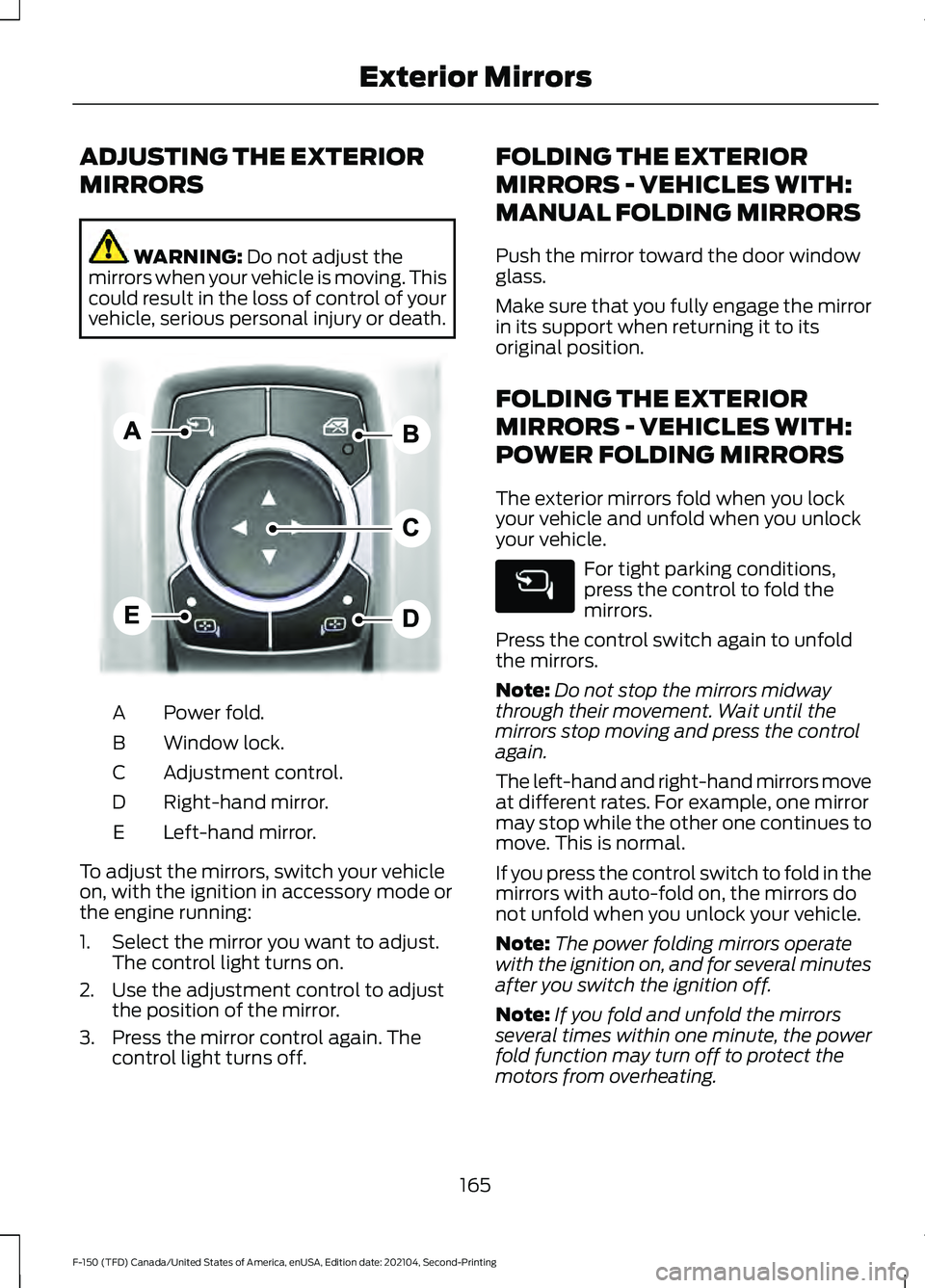
vehicle, serious personal injury or death. Power fold.
A
Window lock.
B
Adjustment control.
C
Right-hand mirror.
D
Left-hand mirror.
E
To adjust the mirrors, switch your vehicle
on, with the ignition in accessory mode or
the engine running:
1. Select the mirror you want to adjust. The control light turns on.
2. Use the adjustment control to adjust the position of the mirror.
3. Press the mirror control again. The control light turns off. FOLDING THE EXTERIOR
MIRRORS - VEHICLES WITH:
MANUAL FOLDING MIRRORS
Push the mirror toward the door window
glass.
Make sure that you fully engage the mirror
in its support when returning it to its
original position.
FOLDING THE EXTERIOR
MIRRORS - VEHICLES WITH:
POWER FOLDING MIRRORS
The exterior mirrors fold when you lock
your vehicle and unfold when you unlock
your vehicle.
For tight parking conditions,
press the control to fold the
mirrors.
Press the control switch again to unfold
the mirrors.
Note: Do not stop the mirrors midway
through their movement. Wait until the
mirrors stop moving and press the control
again.
The left-hand and right-hand mirrors move
at different rates. For example, one mirror
may stop while the other one continues to
move. This is normal.
If you press the control switch to fold in the
mirrors with auto-fold on, the mirrors do
not unfold when you unlock your vehicle.
Note: The power folding mirrors operate
with the ignition on, and for several minutes
after you switch the ignition off.
Note: If you fold and unfold the mirrors
several times within one minute, the power
fold function may turn off to protect the
motors from overheating.
165
F-150 (TFD) Canada/United States of America, enUSA, Edition date: 202104, Second-Printing Exterior MirrorsE311081
Page 171 of 796
OPENING AND CLOSING THE
SUN SHADE
WARNING: Do not leave children
unattended in your vehicle and do not
let them play with the sun shades.
Failure to follow this instruction could
result in personal injury.
The controls are on the overhead console.
Opening the Sun Shade Press and release the switch to
activate the one-touch open
feature. To stop movement,
press the switch a second time. The sun
shade also opens when you open the
moonroof.
Note: The sun shade stops short of its fully
opened position for the comfort of rear
passengers. To fully open the sun shade,
press the switch again.
Closing the Sun Shade Press and release the switch to
activate the one-touch close
feature. To stop movement,
press the switch a second time.
OPENING AND CLOSING THE
MOONROOF WARNING:
Do not leave children
unattended in your vehicle and do not
let them play with the moonroof. Failure
to follow this instruction could result in
personal injury. WARNING:
When closing the
moonroof, verify that it is free of
obstruction and make sure that children
and pets are not in the proximity of the
roof opening.
The controls are on the overhead console.
Opening the Moonroof Press and release the switch to
activate the one-touch open
feature. To stop movement,
press the switch a second time.
Note: The moonroof stops short of the fully
opened position to reduce wind noise or
rumbling that may happen with the
moonroof fully open.
Press and release the switch again to fully
open the moonroof.
Closing the Moonroof Press and release the switch to
activate the one-touch close
feature, from either the open or
vent positions. To stop movement, press
the switch a second time.
VENTING THE MOONROOF WARNING:
Do not leave children
unattended in your vehicle and do not
let them play with the moonroof. Failure
to follow this instruction could result in
personal injury.
The moonroof controls are on the
overhead console.
167
F-150 (TFD) Canada/United States of America, enUSA, Edition date: 202104, Second-Printing Moonroof
(If Equipped)E312249 E312250 E312251 E312252
Page 176 of 796
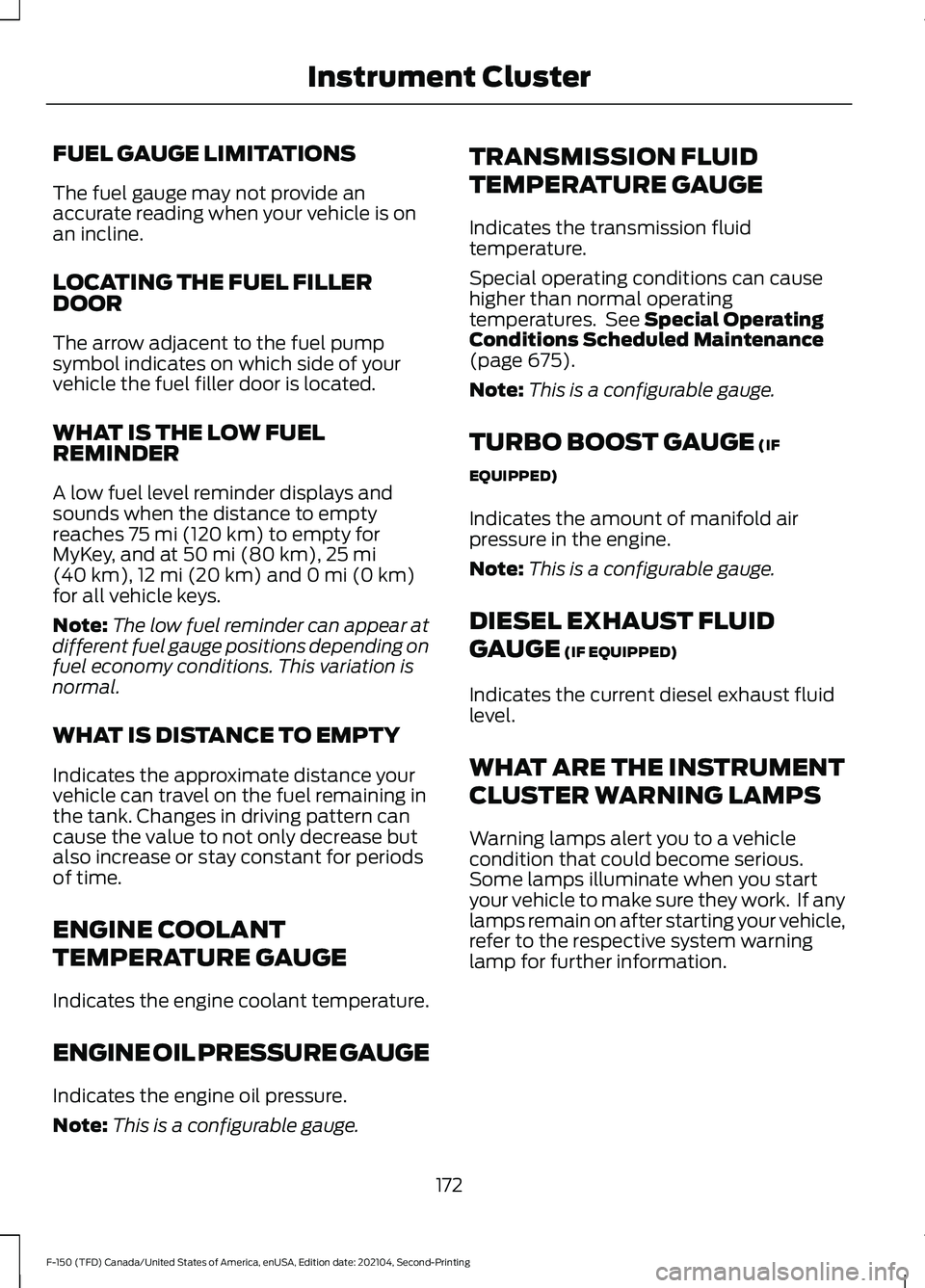
FUEL GAUGE LIMITATIONS
The fuel gauge may not provide an
accurate reading when your vehicle is on
an incline.
LOCATING THE FUEL FILLER
DOOR
The arrow adjacent to the fuel pump
symbol indicates on which side of your
vehicle the fuel filler door is located.
WHAT IS THE LOW FUEL
REMINDER
A low fuel level reminder displays and
sounds when the distance to empty
reaches 75 mi (120 km) to empty for
MyKey, and at 50 mi (80 km), 25 mi
(40 km), 12 mi (20 km) and 0 mi (0 km)
for all vehicle keys.
Note: The low fuel reminder can appear at
different fuel gauge positions depending on
fuel economy conditions. This variation is
normal.
WHAT IS DISTANCE TO EMPTY
Indicates the approximate distance your
vehicle can travel on the fuel remaining in
the tank. Changes in driving pattern can
cause the value to not only decrease but
also increase or stay constant for periods
of time.
ENGINE COOLANT
TEMPERATURE GAUGE
Indicates the engine coolant temperature.
ENGINE OIL PRESSURE GAUGE
Indicates the engine oil pressure.
Note: This is a configurable gauge. TRANSMISSION FLUID
TEMPERATURE GAUGE
Indicates the transmission fluid
temperature.
Special operating conditions can cause
higher than normal operating
temperatures. See
Special Operating
Conditions Scheduled Maintenance
(page
675).
Note: This is a configurable gauge.
TURBO BOOST GAUGE
(IF
EQUIPPED)
Indicates the amount of manifold air
pressure in the engine.
Note: This is a configurable gauge.
DIESEL EXHAUST FLUID
GAUGE
(IF EQUIPPED)
Indicates the current diesel exhaust fluid
level.
WHAT ARE THE INSTRUMENT
CLUSTER WARNING LAMPS
Warning lamps alert you to a vehicle
condition that could become serious.
Some lamps illuminate when you start
your vehicle to make sure they work. If any
lamps remain on after starting your vehicle,
refer to the respective system warning
lamp for further information.
172
F-150 (TFD) Canada/United States of America, enUSA, Edition date: 202104, Second-Printing Instrument Cluster
Page 177 of 796
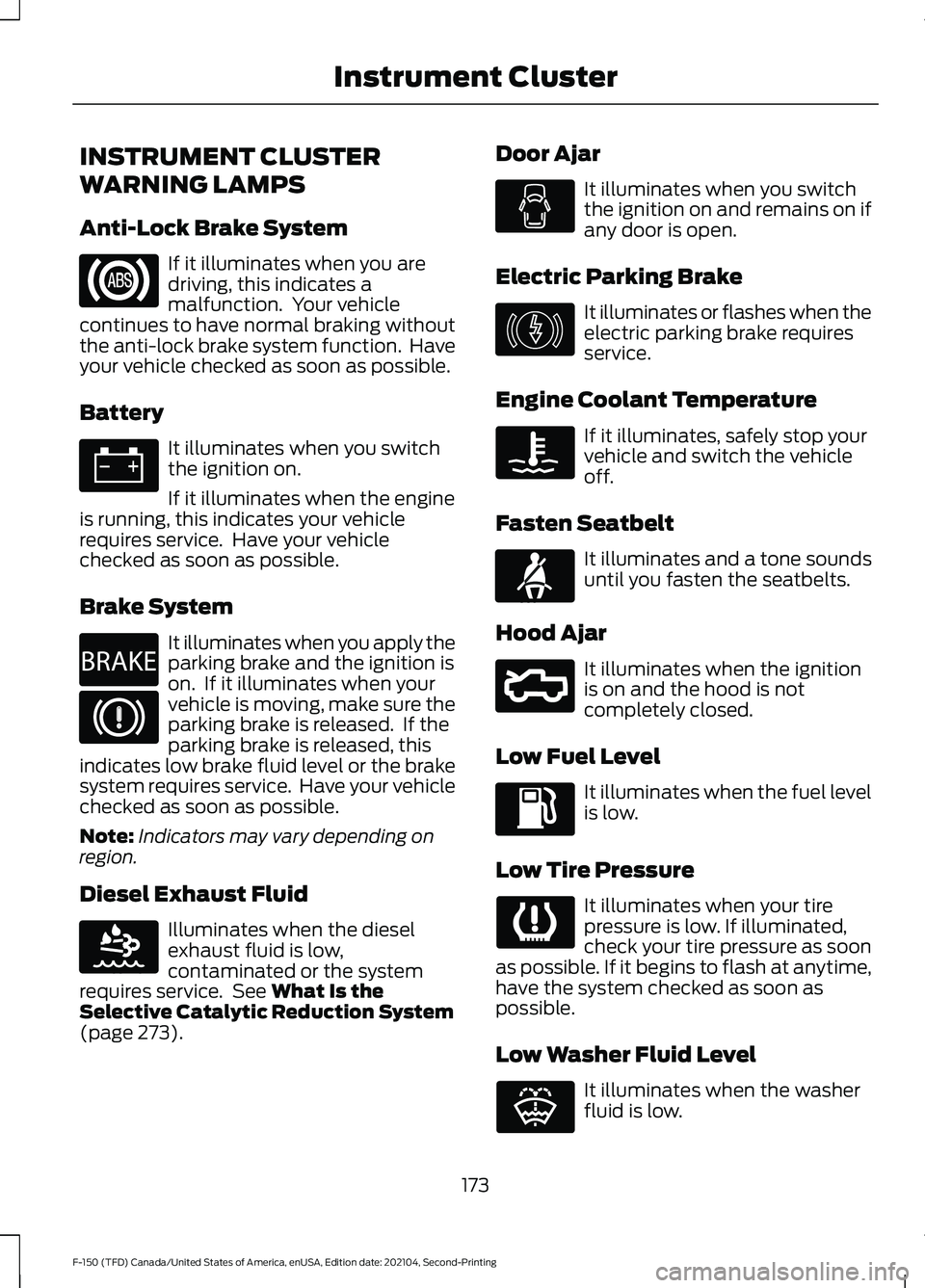
INSTRUMENT CLUSTER
WARNING LAMPS
Anti-Lock Brake System
If it illuminates when you are
driving, this indicates a
malfunction. Your vehicle
continues to have normal braking without
the anti-lock brake system function. Have
your vehicle checked as soon as possible.
Battery It illuminates when you switch
the ignition on.
If it illuminates when the engine
is running, this indicates your vehicle
requires service. Have your vehicle
checked as soon as possible.
Brake System It illuminates when you apply the
parking brake and the ignition is
on. If it illuminates when your
vehicle is moving, make sure the
parking brake is released. If the
parking brake is released, this
indicates low brake fluid level or the brake
system requires service. Have your vehicle
checked as soon as possible.
Note: Indicators may vary depending on
region.
Diesel Exhaust Fluid Illuminates when the diesel
exhaust fluid is low,
contaminated or the system
requires service. See What Is the
Selective Catalytic Reduction System
(page
273). Door Ajar It illuminates when you switch
the ignition on and remains on if
any door is open.
Electric Parking Brake It illuminates or flashes when the
electric parking brake requires
service.
Engine Coolant Temperature If it illuminates, safely stop your
vehicle and switch the vehicle
off.
Fasten Seatbelt It illuminates and a tone sounds
until you fasten the seatbelts.
Hood Ajar It illuminates when the ignition
is on and the hood is not
completely closed.
Low Fuel Level It illuminates when the fuel level
is low.
Low Tire Pressure It illuminates when your tire
pressure is low. If illuminated,
check your tire pressure as soon
as possible. If it begins to flash at anytime,
have the system checked as soon as
possible.
Low Washer Fluid Level It illuminates when the washer
fluid is low.
173
F-150 (TFD) Canada/United States of America, enUSA, Edition date: 202104, Second-Printing Instrument Cluster E270480 E163176 E146190 E71880 E296055 E132353
Page 178 of 796
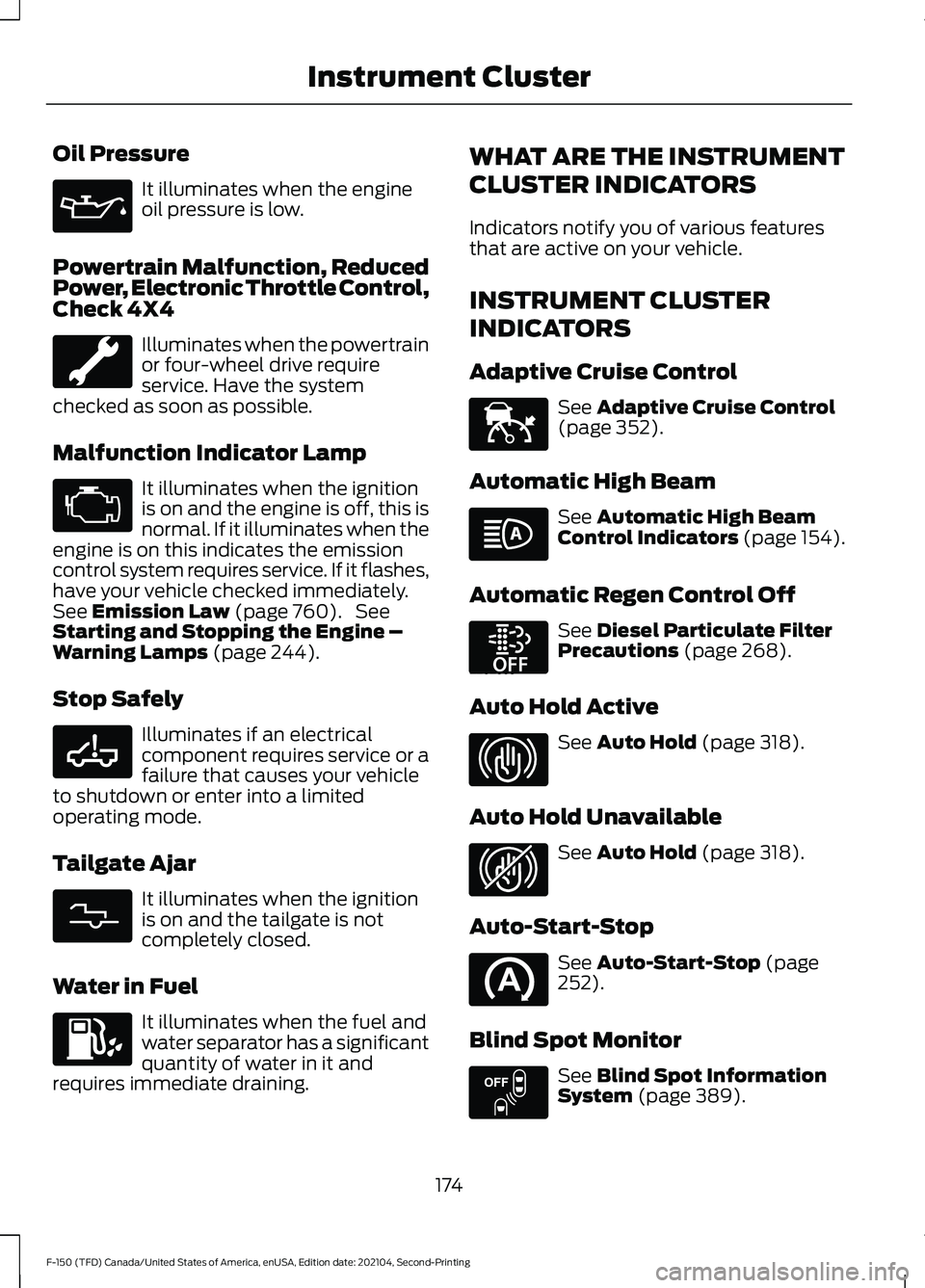
Oil Pressure
It illuminates when the engine
oil pressure is low.
Powertrain Malfunction, Reduced
Power, Electronic Throttle Control,
Check 4X4 Illuminates when the powertrain
or four-wheel drive require
service. Have the system
checked as soon as possible.
Malfunction Indicator Lamp It illuminates when the ignition
is on and the engine is off, this is
normal. If it illuminates when the
engine is on this indicates the emission
control system requires service. If it flashes,
have your vehicle checked immediately.
See Emission Law (page 760). See
Starting and Stopping the Engine –
Warning Lamps
(page 244).
Stop Safely Illuminates if an electrical
component requires service or a
failure that causes your vehicle
to shutdown or enter into a limited
operating mode.
Tailgate Ajar It illuminates when the ignition
is on and the tailgate is not
completely closed.
Water in Fuel It illuminates when the fuel and
water separator has a significant
quantity of water in it and
requires immediate draining. WHAT ARE THE INSTRUMENT
CLUSTER INDICATORS
Indicators notify you of various features
that are active on your vehicle.
INSTRUMENT CLUSTER
INDICATORS
Adaptive Cruise Control
See
Adaptive Cruise Control
(page 352).
Automatic High Beam See
Automatic High Beam
Control Indicators (page 154).
Automatic Regen Control Off See
Diesel Particulate Filter
Precautions (page 268).
Auto Hold Active See
Auto Hold (page 318).
Auto Hold Unavailable See
Auto Hold (page 318).
Auto-Start-Stop See
Auto-Start-Stop (page
252).
Blind Spot Monitor See
Blind Spot Information
System (page 389).
174
F-150 (TFD) Canada/United States of America, enUSA, Edition date: 202104, Second-Printing Instrument Cluster E332963 E311338 E144524 E252868 E323448 E323449 E151262
Page 182 of 796
USING THE INSTRUMENT
CLUSTER DISPLAY CONTROLS
WARNING: Driving while distracted
can result in loss of vehicle control, crash
and injury. We strongly recommend that
you use extreme caution when using any
device that may take your focus off the
road. Your primary responsibility is the
safe operation of your vehicle. We
recommend against the use of any
hand-held device while driving and
encourage the use of voice-operated
systems when possible. Make sure you
are aware of all applicable local laws
that may affect the use of electronic
devices while driving.
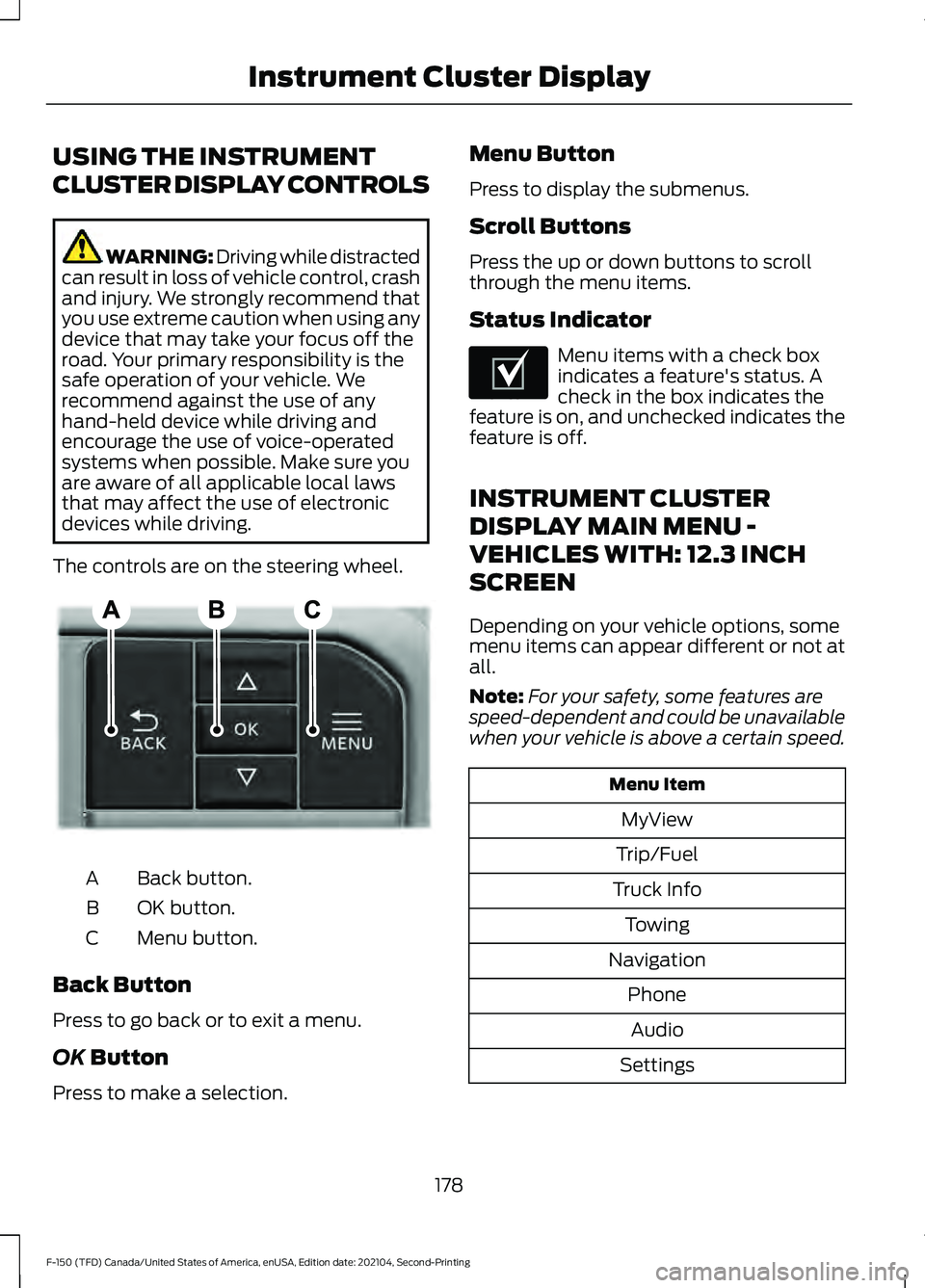
The controls are on the steering wheel. Back button.
A
OK button.
B
Menu button.
C
Back Button
Press to go back or to exit a menu.
OK Button
Press to make a selection. Menu Button
Press to display the submenus.
Scroll Buttons
Press the up or down buttons to scroll
through the menu items.
Status Indicator
Menu items with a check box
indicates a feature's status. A
check in the box indicates the
feature is on, and unchecked indicates the
feature is off.
INSTRUMENT CLUSTER
DISPLAY MAIN MENU -
VEHICLES WITH: 12.3 INCH
SCREEN
Depending on your vehicle options, some
menu items can appear different or not at
all.
Note: For your safety, some features are
speed-dependent and could be unavailable
when your vehicle is above a certain speed. Menu Item
MyView
Trip/Fuel
Truck Info Towing
Navigation PhoneAudio
Settings
178
F-150 (TFD) Canada/United States of America, enUSA, Edition date: 202104, Second-Printing Instrument Cluster DisplayE309379 E204495
Page 187 of 796
WHAT IS REMOTE START
The system allows you to remotely start
your vehicle and to adjust the interior
temperature according to the settings that
you chose.
REMOTE START
PRECAUTIONS
WARNING: Do not start the engine
in a closed garage or in other enclosed
areas. Exhaust fumes are toxic. Always
open the garage door before you start
the engine. Failure to follow this
instruction could result in personal injury
or death. WARNING: Do not keep electrical
devices plugged in the power point
whenever the device is not in use. Power
points power up during remote start. WARNING:
Do not keep electrical
devices plugged into the power outlet
whenever the device is not in use. The
outlet provides power when the vehicle
is on. Failure to follow this instruction
could result in personal injury.
REMOTE START LIMITATIONS
Remote start does not work under the
following conditions:
• The alarm horn is sounding.
• The hood is open.
• The transmission is not in park (P).
• The ignition is on.
• The battery voltage is below the
minimum operating voltage.
• Remote start is not enabled. Note:
Do not use remote start if the fuel
level is low.
Note: You can use remote start with
FordPass.
See Connecting the Vehicle to
a Wi-Fi Network (page 620).
ENABLING REMOTE START
1. Press
Settings on the touchscreen.
2. Press
Vehicle Settings.
3. Press
Remote Start Setup.
4. Switch
Remote Start on or off.
Note: To remote start with FordPass, make
sure that the modem is enabled.
See
Connecting FordPass to the Modem
(page
620).
REMOTELY STARTING AND
STOPPING THE VEHICLE
Remotely Starting the Vehicle Press the button on the remote
control.
Within three seconds, press the
button on the remote control.
Within three seconds, press the
button again.
Note: You can also use FordPass to start
the vehicle.
Note: The turn signal lamps flash twice.
Note: The parking lamps turn on when the
vehicle is running.
Note: The horn sounds if the system fails
to start.
Note: All other vehicle systems remain off
when you have remotely started the vehicle.
183
F-150 (TFD) Canada/United States of America, enUSA, Edition date: 202104, Second-Printing Remote Start
(If Equipped)E138623 E138625
Page 199 of 796
FRONT SEAT PRECAUTIONS
WARNING: Sitting improperly, out
of position or with the seatback reclined
too far can take weight off the seat
cushion and affect the decision of the
passenger sensing system, resulting in
serious injury or death in the event of a
crash. Always sit upright against your
seat back, with your feet on the floor. WARNING: Do not recline the seat
backrest too far as this can cause the
occupant to slide under the seatbelt,
resulting in personal injury in the event
of a crash. WARNING:
Do not place objects
higher than the top of the seat backrest.
Failure to follow this instruction could
result in personal injury or death in the
event of a sudden stop or crash. WARNING: Do not adjust the driver
seat or seat backrest when your vehicle
is moving. This may result in sudden seat
movement, causing the loss of control
of your vehicle. SITTING IN THE CORRECT
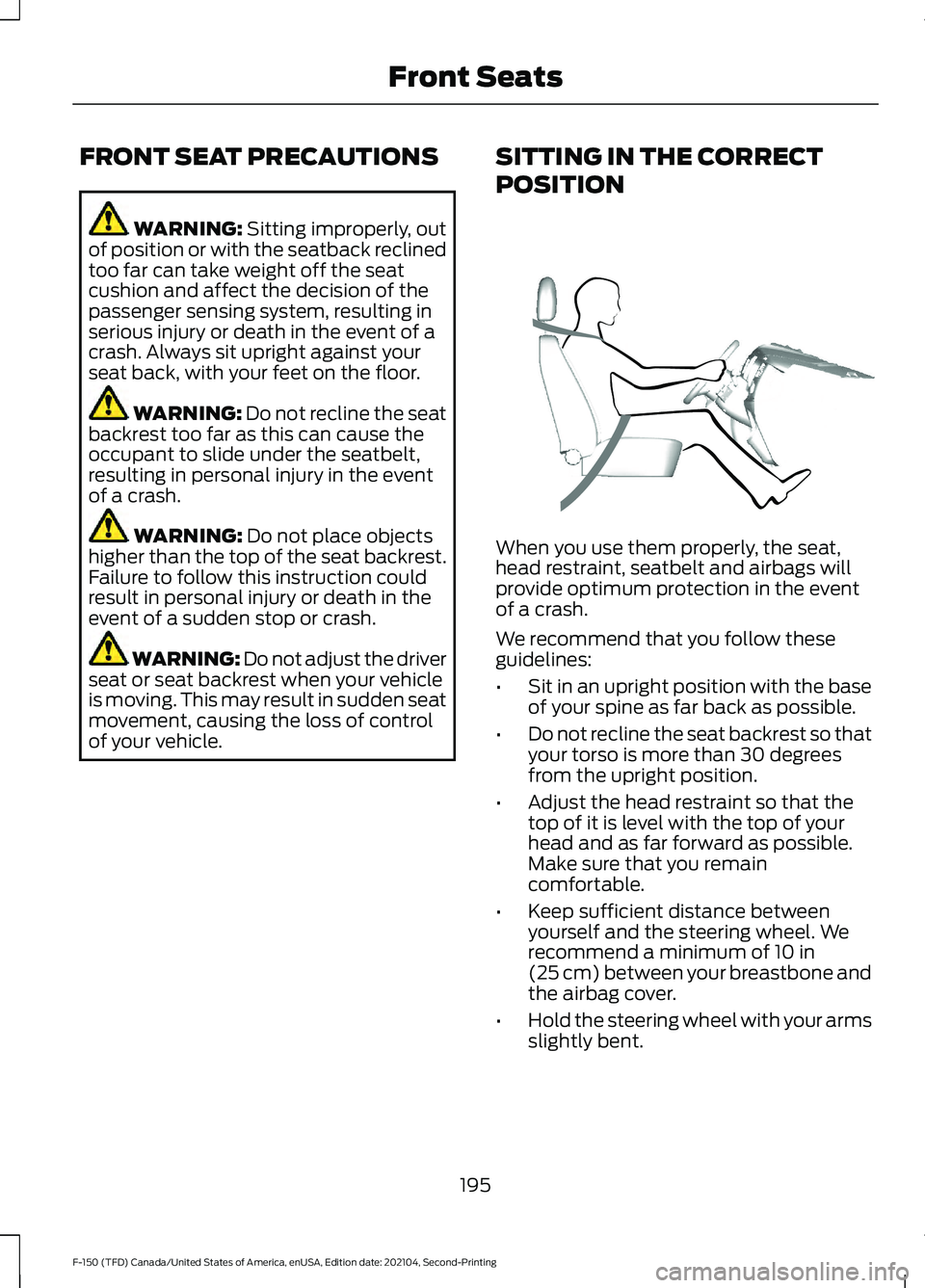
POSITION When you use them properly, the seat,
head restraint, seatbelt and airbags will
provide optimum protection in the event
of a crash.
We recommend that you follow these
guidelines:
•
Sit in an upright position with the base
of your spine as far back as possible.
• Do not recline the seat backrest so that
your torso is more than 30 degrees
from the upright position.
• Adjust the head restraint so that the
top of it is level with the top of your
head and as far forward as possible.
Make sure that you remain
comfortable.
• Keep sufficient distance between
yourself and the steering wheel. We
recommend a minimum of
10 in
(25 cm) between your breastbone and
the airbag cover.
• Hold the steering wheel with your arms
slightly bent.
195
F-150 (TFD) Canada/United States of America, enUSA, Edition date: 202104, Second-Printing Front SeatsE68595