lock FORD F-150 2022 Owners Manual
[x] Cancel search | Manufacturer: FORD, Model Year: 2022, Model line: F-150, Model: FORD F-150 2022Pages: 750, PDF Size: 12.96 MB
Page 399 of 750
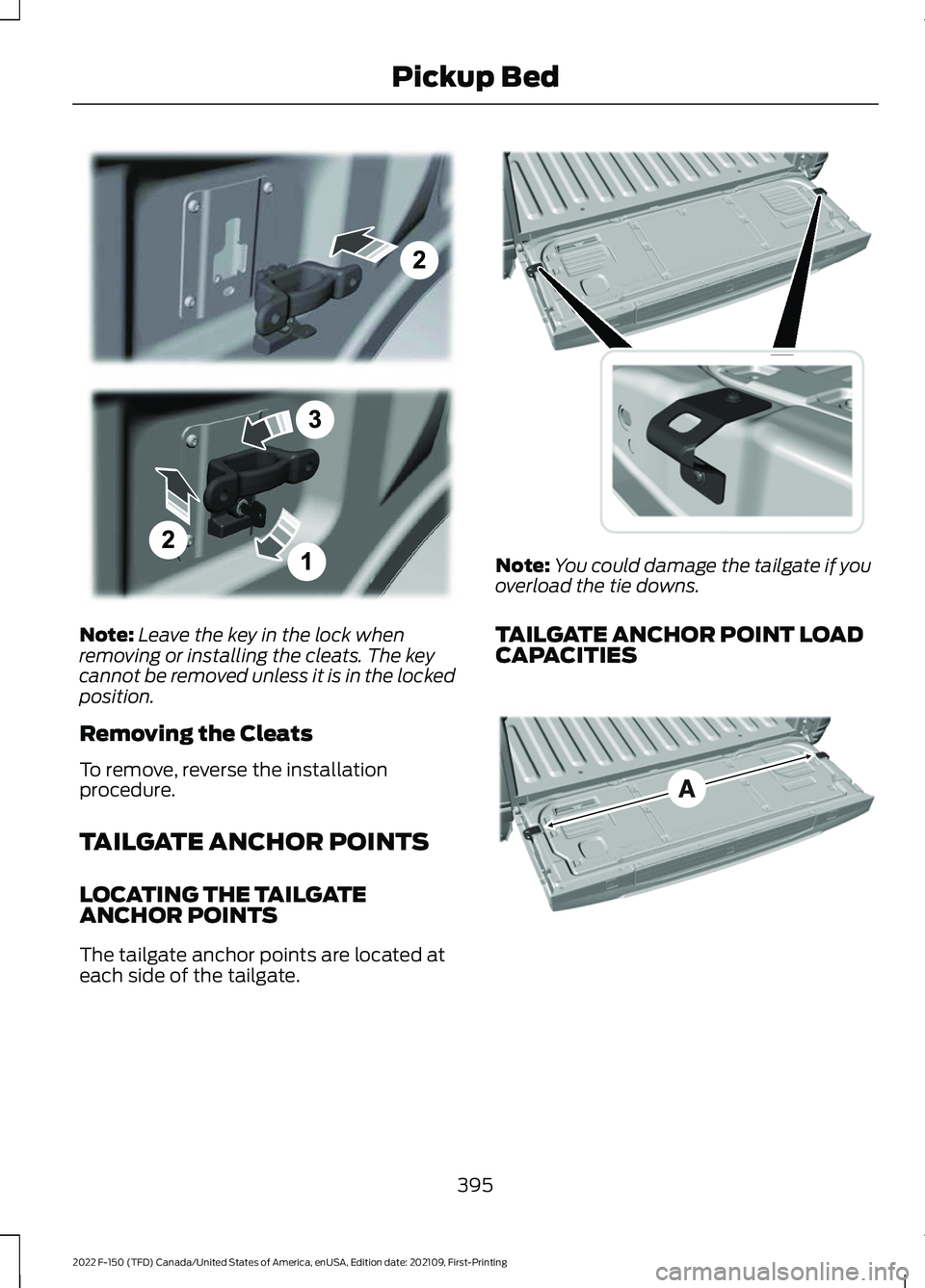
Note:
Leave the key in the lock when
removing or installing the cleats. The key
cannot be removed unless it is in the locked
position.
Removing the Cleats
To remove, reverse the installation
procedure.
TAILGATE ANCHOR POINTS
LOCATING THE TAILGATE
ANCHOR POINTS
The tailgate anchor points are located at
each side of the tailgate. Note:
You could damage the tailgate if you
overload the tie downs.
TAILGATE ANCHOR POINT LOAD
CAPACITIES 395
2022 F-150 (TFD) Canada/United States of America, enUSA, Edition date: 202109, First-Printing Pickup BedE327575 E327594 E327790
Page 402 of 750
6. Pull the location pin outward and
extend the ramp until the pin is seated
in the usage position, then set the ramp
on even ground.
Removing the Ramp
Remove in the reverse order.
STORING THE PICKUP BED
RAMPS
Storing the Bed Ramp
1. Pick up the ramp. Pull the location pin outward.
2. Slide the ramp into the storage position
until the location pin locks.
Note: Make sure the proper pin location has
been applied for your bed size.
3. Slide the ramp claw off of the tailgate plate.
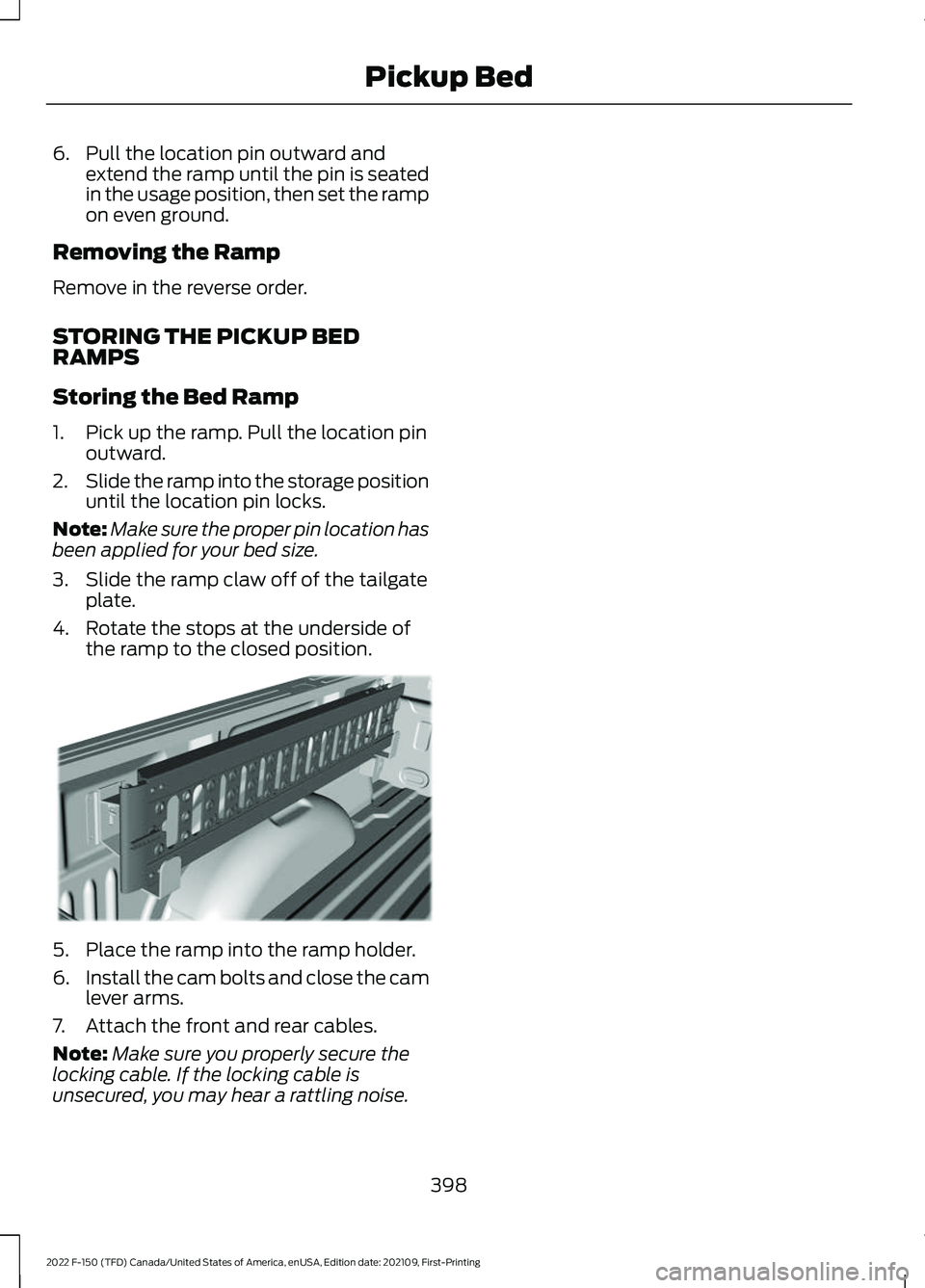
4. Rotate the stops at the underside of the ramp to the closed position. 5. Place the ramp into the ramp holder.
6.
Install the cam bolts and close the cam
lever arms.
7. Attach the front and rear cables.
Note: Make sure you properly secure the
locking cable. If the locking cable is
unsecured, you may hear a rattling noise.
398
2022 F-150 (TFD) Canada/United States of America, enUSA, Edition date: 202109, First-Printing Pickup BedE194391
Page 404 of 750
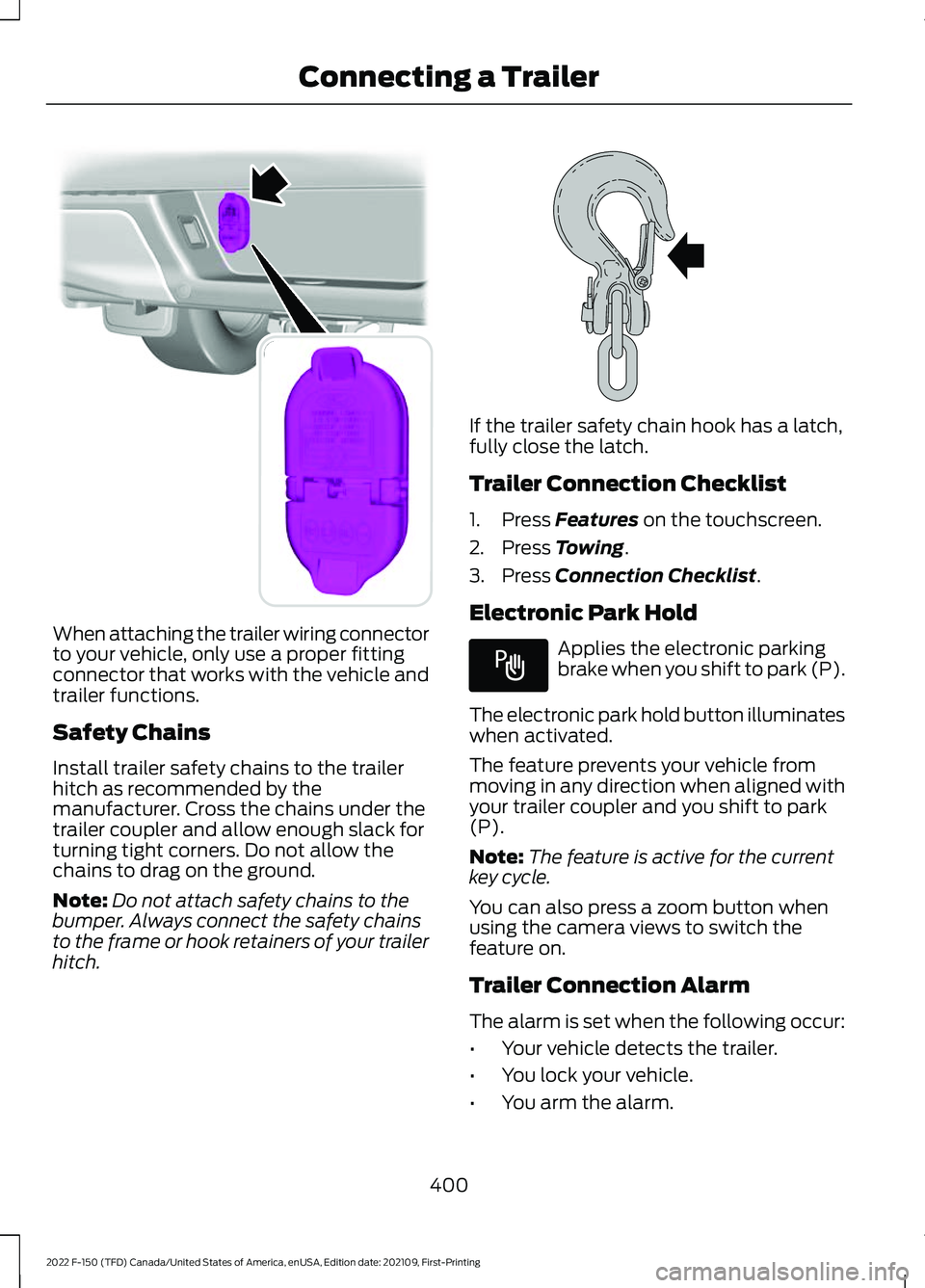
When attaching the trailer wiring connector
to your vehicle, only use a proper fitting
connector that works with the vehicle and
trailer functions.
Safety Chains
Install trailer safety chains to the trailer
hitch as recommended by the
manufacturer. Cross the chains under the
trailer coupler and allow enough slack for
turning tight corners. Do not allow the
chains to drag on the ground.
Note:
Do not attach safety chains to the
bumper. Always connect the safety chains
to the frame or hook retainers of your trailer
hitch. If the trailer safety chain hook has a latch,
fully close the latch.
Trailer Connection Checklist
1. Press Features on the touchscreen.
2. Press
Towing.
3. Press
Connection Checklist.
Electronic Park Hold Applies the electronic parking
brake when you shift to park (P).
The electronic park hold button illuminates
when activated.
The feature prevents your vehicle from
moving in any direction when aligned with
your trailer coupler and you shift to park
(P).
Note: The feature is active for the current
key cycle.
You can also press a zoom button when
using the camera views to switch the
feature on.
Trailer Connection Alarm
The alarm is set when the following occur:
• Your vehicle detects the trailer.
• You lock your vehicle.
• You arm the alarm.
400
2022 F-150 (TFD) Canada/United States of America, enUSA, Edition date: 202109, First-Printing Connecting a TrailerE193232 E265060 E337016
Page 407 of 750
TOWING A TRAILER
PRECAUTIONS
WARNING: Do not exceed
the GVWR or the GAWR
specified on the certification
label. WARNING:
Towing trailers
beyond the maximum
recommended gross trailer
weight exceeds the limit of your
vehicle and could result in engine
damage, transmission damage,
structural damage, loss of
vehicle control, vehicle rollover
and personal injury. WARNING:
Do not exceed
the lowest rating capacity for
your vehicle or trailer hitch.
Overloading your vehicle or
trailer hitch can impair your
vehicle stability and handling.
Failure to follow this instruction
could result in the loss of control
of your vehicle, personal injury or
death. WARNING: Make sure that
the vertical load on the tow ball
is between the minimum and
maximum recommended weight
at all times. Failure to follow this
instruction could result in the
loss of control of your vehicle,
personal injury or death. WARNING:
Do not cut,
drill, weld or modify the trailer
hitch. Modifying the trailer hitch
could reduce the hitch rating. WARNING:
The anti-lock
brake system does not control
the trailer brakes.
TRAILER BRAKE
PRECAUTIONS WARNING:
Do not connect a
trailer's hydraulic brake system directly
to your vehicle's brake system. Your
vehicle may not have enough braking
power and your chances of having a
collision greatly increase. WARNING:
Do not tow a trailer
fitted with electric trailer brakes unless
your vehicle is fitted with a compatible
aftermarket electronic trailer brake
controller. Failure to follow this
instruction could result in the loss of
control of your vehicle, personal injury or
death. For additional information and
assistance, we recommend that you
contact an authorized dealer.
Electric brakes and manual, automatic or
surge-type trailer brakes are safe if you
install them properly and adjust them to
the manufacturer's specifications. The
trailer brakes must meet local and federal
regulations.
The rating for the tow vehicle's braking
system operation is at the gross vehicle
weight rating, not the gross combined
weight rating.
403
2022 F-150 (TFD) Canada/United States of America, enUSA, Edition date: 202109, First-Printing Towing a Trailer
Page 411 of 750
WHAT IS THE MAXIMUM LOADED
TRAILER WEIGHT
The maximum loaded trailer
weight is the highest possible
weight of a fully loaded trailer the
vehicle can tow.
CALCULATING THE MAXIMUM
LOADED TRAILER WEIGHT FOR
YOUR VEHICLE
1. Start with the gross combined
weight rating for your vehicle
model and axle ratio.
2. Subtract all of the following
that apply to your vehicle:
• Vehicle curb weight.
• Hitch hardware weight, for
example a draw bar, ball, locks
or weight distributing hardware. •
Driver weight.
• Passenger weight.
• Payload, cargo and luggage
weight.
• Aftermarket equipment weight.
This equals the maximum loaded
trailer weight for this combination.
Note: The trailer tongue load is
considered part of the payload for
your vehicle. Reduce the total
payload by the final trailer tongue
weight.
Note: Consult an authorized dealer
to determine the maximum trailer
weight allowed for your vehicle if
you are not sure.
407
2022 F-150 (TFD) Canada/United States of America, enUSA, Edition date: 202109, First-Printing Towing a Trailer
Page 414 of 750
WHAT IS THE INTEGRATED
TRAILER BRAKE CONTROLLER
The trailer brake controller assists in
smooth and effective trailer braking based
on the towing vehicle
’s brake pressure.
INTEGRATED TRAILER BRAKE
CONTROLLER PRECAUTIONS WARNING: Use the integrated
trailer brake controller to properly adjust
the trailer brakes and check all
connections before towing a trailer.
Failure to follow this instruction could
result in the loss of control of your
vehicle, personal injury or death.
• Only use the manual control lever for
proper adjustment of the gain during
trailer setup. Misuse, such as
application during trailer sway, could
cause instability of trailer or tow
vehicle.
• Avoid towing in adverse weather
conditions. The trailer brake controller
does not provide anti-lock control of
the trailer wheels. Trailer wheels can
lock up on slippery surfaces, resulting
in reduced stability of trailer and tow
vehicle.
• The trailer brake controller is only a
factory-installed or dealer-installed
item. Ford is not responsible for
warranty or performance of the
controller due to misuse or customer
installation.
Note: Do not attempt removal of the trailer
brake controller without consulting the
Workshop Manual. Damage to the unit may
result. USING THE INTEGRATED
TRAILER BRAKE CONTROLLER
1.
Make sure the trailer brakes are in good
working condition, functioning normally
and properly adjusted. See your trailer
dealer if necessary.
Note: An authorized dealer can diagnose
the trailer brake controller to determine
exactly which trailer fault has occurred. Your
vehicle warranty does not cover issues with
your trailer.
2. Hook up the trailer and make the electrical connections according to the
trailer manufacturer's instructions.
Note: Select default mode if the trailer has
surge brakes, or no brakes at all. The system
has no effect on the braking performance
of the trailer in either of these cases.
Note: If a trailer is connected by a four-pin
connector, the trailer braking function will
not be supported.
3. When you plug in a trailer with electric or electric-over-hydraulic brakes, a
message confirming connection
appears in the information display.
4. Use the gain adjustment to find the desired starting point. A gain setting of
6.0 is a good starting point for heavier
loads.
Note: Use the following steps to adjust the
gain setting whenever road, weather and
trailer, or vehicle loading conditions, change
from when you initially set the gain.
5. In a traffic-free environment, tow the trailer on a dry, level surface and
squeeze the manual control lever
completely.
410
2022 F-150 (TFD) Canada/United States of America, enUSA, Edition date: 202109, First-Printing Integrated Trailer Brake Controller
(If Equipped)
Page 415 of 750
6. If the trailer wheels lock up, indicated
by squealing tires, reduce the gain
setting. If the trailer wheels turn freely,
increase the gain setting. Repeat Steps
5 and 6 until the gain setting is at a
point just below trailer wheel lock-up.
If towing a heavier trailer, trailer wheel
lock-up may not be attainable even
with the maximum gain setting of 10.
Note: Only perform this procedure at
speeds of approximately 20– 25 mph
(30–40 km/h).
Note: The trailer brake controller reduces
output at vehicle speeds below
11 mph
(18 km/h) so that trailer and vehicle braking
is not jerky or harsh. This feature is only
available when applying the brakes using
your vehicle's brake pedal, not the
controller.
Note: Your vehicle's brake system and the
trailer brake system work independently of
each other. Changing the gain setting on the
controller does not affect the operation of
your vehicle's brakes whether you attach a
trailer or not.
Note: With the proper electrical connection,
pressing your vehicle brake pedal or using
the manual control lever illuminates both
trailer and vehicle brake lamps.
Note: When you switch the engine off, the
controller output is disabled and the display
and module shut down. The controller
module and display turn on when you switch
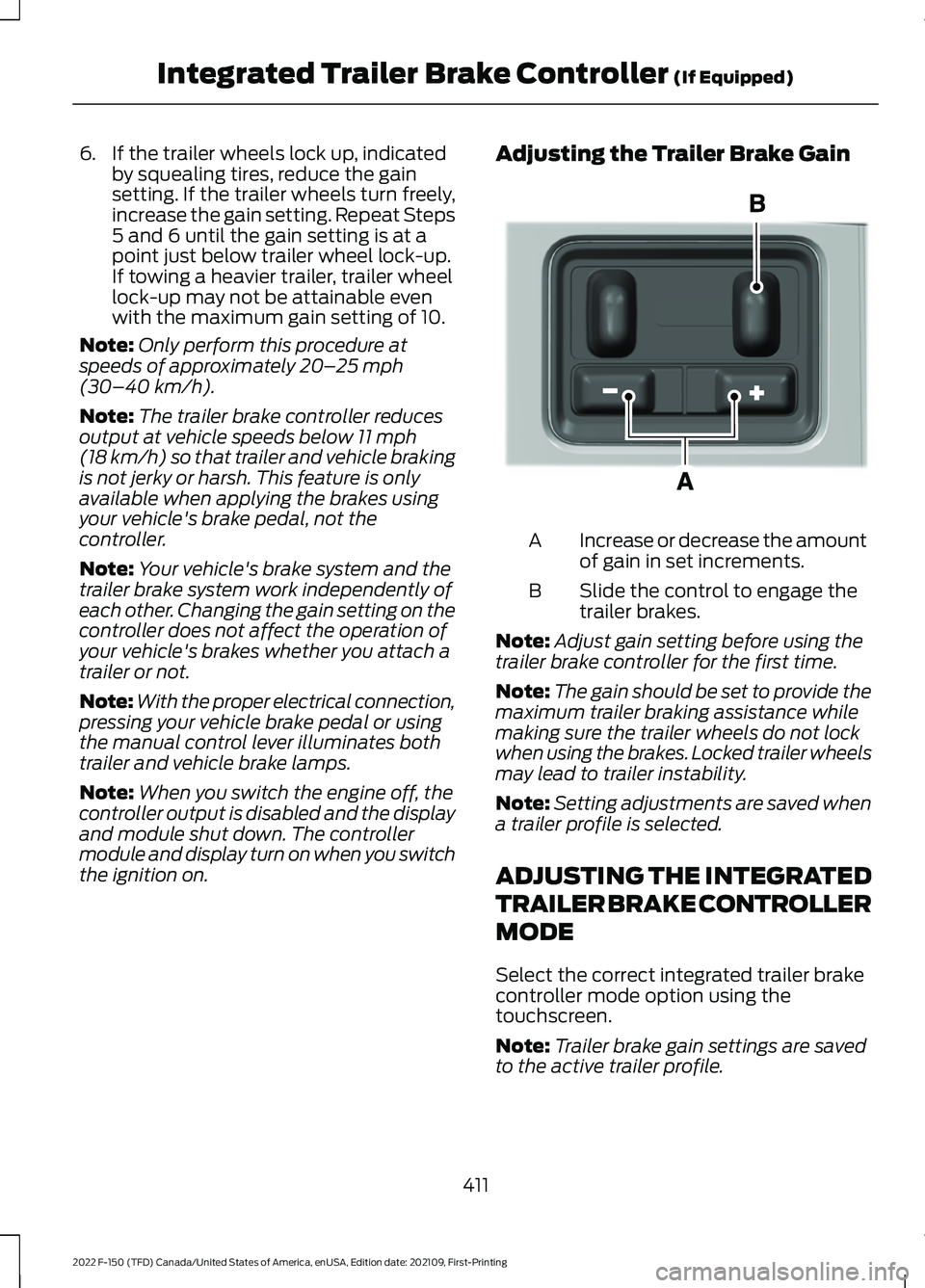
the ignition on. Adjusting the Trailer Brake Gain
Increase or decrease the amount
of gain in set increments.
A
Slide the control to engage the
trailer brakes.
B
Note: Adjust gain setting before using the
trailer brake controller for the first time.
Note: The gain should be set to provide the
maximum trailer braking assistance while
making sure the trailer wheels do not lock
when using the brakes. Locked trailer wheels
may lead to trailer instability.
Note: Setting adjustments are saved when
a trailer profile is selected.
ADJUSTING THE INTEGRATED
TRAILER BRAKE CONTROLLER
MODE
Select the correct integrated trailer brake
controller mode option using the
touchscreen.
Note: Trailer brake gain settings are saved
to the active trailer profile.
411
2022 F-150 (TFD) Canada/United States of America, enUSA, Edition date: 202109, First-Printing Integrated Trailer Brake Controller
(If Equipped)E333154
Page 419 of 750
WHAT IS TRAILER HITCHING
ASSISTANCE
Trailer hitching assistance helps the driver
align the vehicle hitch ball to a trailer
coupler.
HOW DOES TRAILER HITCHING
ASSISTANCE WORK
Trailer hitching assistance uses the
following to detect your trailer:
•
Rear view camera.
• Radar.
• Parking aid sensors.
• External rear lighting.
This feature also controls the following to
align the hitch ball with the trailer coupler:
• Steering.
• Shifting.
• Braking and acceleration.
Note: Blocked sensors could affect system
performance. Do not cover the sensors with
bumper stickers, tape, repair compound or
other objects.
TRAILER HITCHING
ASSISTANCE PRECAUTIONS WARNING: You are responsible for
controlling your vehicle at all times. The
system is designed to be an aid and does
not relieve you of your responsibility to
drive with due care and attention. Failure
to follow this instruction could result in
the loss of control of your vehicle,
personal injury or death. WARNING: The system is not
designed to detect cyclists,
motorcyclists, pedestrians or animals.
Apply the brakes when necessary. Failure
to follow this instruction could result
personal injury or death. WARNING:
The system may not
operate properly during severe weather
conditions, for example snow, ice, heavy
rain and spray. Always drive with due
care and attention. Failure to take care
may result in a crash.
Note: Trailer hitching assistance only works
with conventional trailers, couplers and
hitch balls.
Note: The hitch ball must be properly
installed on the vehicle for the system to
function as intended. An improperly
installed hitch ball could result in damage
to your vehicle or trailer.
Note: Certain aftermarket modifications
such as oversized tires or lift kits could make
trailer hitching assistance fail or not work
as intended.
Note: Keep the sensors and camera free
from snow, ice and dirt.
Note: Clean the camera lens with a soft,
lint-free cloth and non-abrasive cleaner.
TRAILER HITCHING
ASSISTANCE LIMITATIONS
The system could not function or could
function with reduced performance during
the following:
• When using trailer hitching assistance
in tall grass and weeds.
• When safety chains, cables or wiring
are dangling near the coupler.
• When using trailer hitching assistance
on slippery surfaces.
415
2022 F-150 (TFD) Canada/United States of America, enUSA, Edition date: 202109, First-Printing Trailer Hitching Assistance
(If Equipped)
Page 420 of 750
•
When using hitches that raise the hitch
ball more than 4 in (10 cm), lower the
hitch ball by more than 6 in (16 cm) or
extend the hitch ball away from the
vehicle more than
12 in (30 cm).
• When using objects taller than
8 in
(20 cm), such as large blocks, under
the jack stand.
• When you park the trailer on surfaces
that are similar in color to the trailer
coupler and hitch ball.
•A black coupler or hitch ball over a
dark asphalt surface.
• A light color coupler or hitch ball
over a light concrete surface.
• When there are low or no light sources,
such as at night.
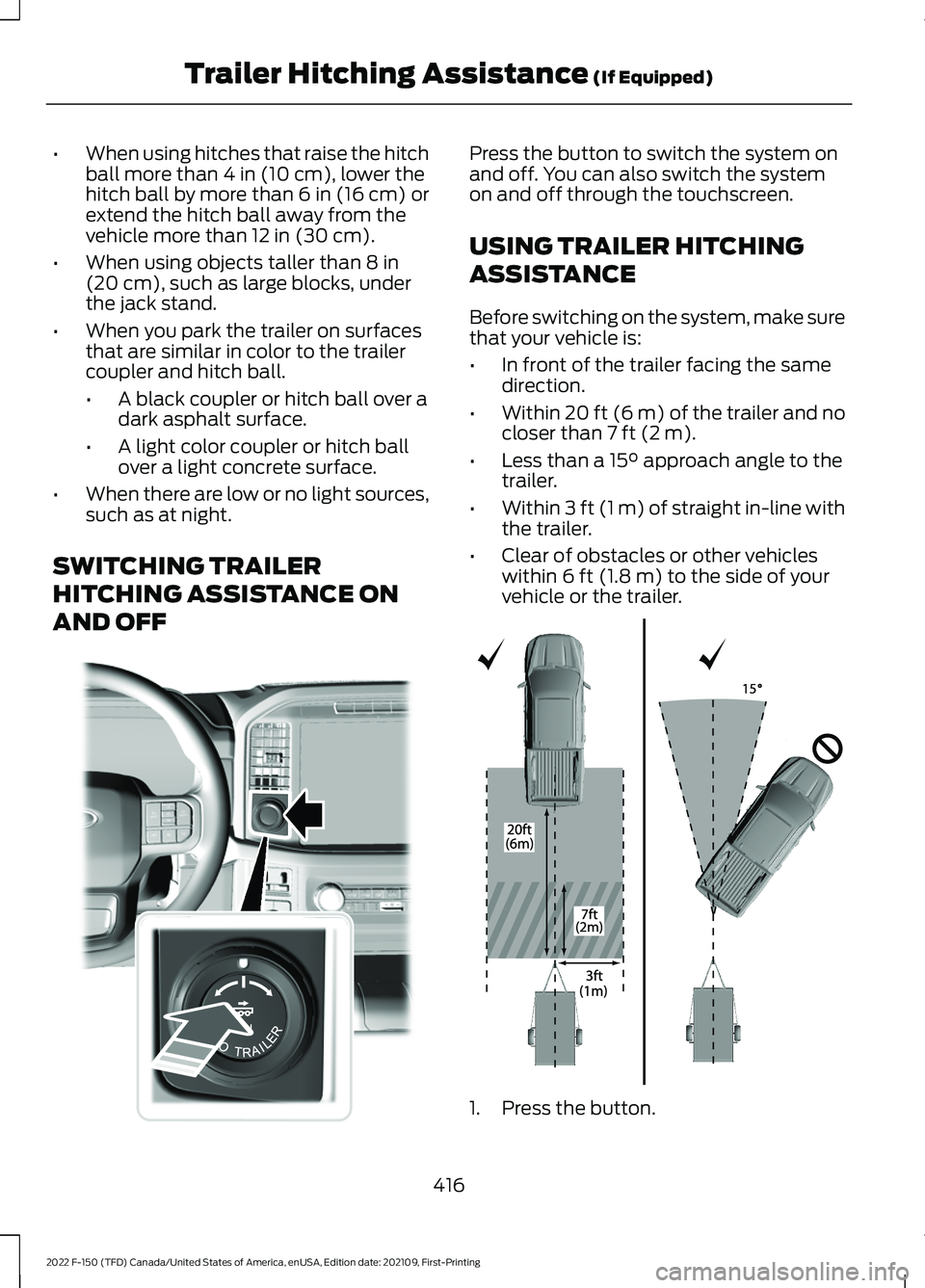
SWITCHING TRAILER
HITCHING ASSISTANCE ON
AND OFF Press the button to switch the system on
and off. You can also switch the system
on and off through the touchscreen.
USING TRAILER HITCHING
ASSISTANCE
Before switching on the system, make sure
that your vehicle is:
•
In front of the trailer facing the same
direction.
• Within
20 ft (6 m) of the trailer and no
closer than 7 ft (2 m).
• Less than a
15° approach angle to the
trailer.
• Within
3 ft (1 m) of straight in-line with
the trailer.
• Clear of obstacles or other vehicles
within
6 ft (1.8 m) to the side of your
vehicle or the trailer. 1. Press the button.
416
2022 F-150 (TFD) Canada/United States of America, enUSA, Edition date: 202109, First-Printing Trailer Hitching Assistance
(If Equipped)E310335 E348940
Page 431 of 750
USING THE TRAILER BACKUP
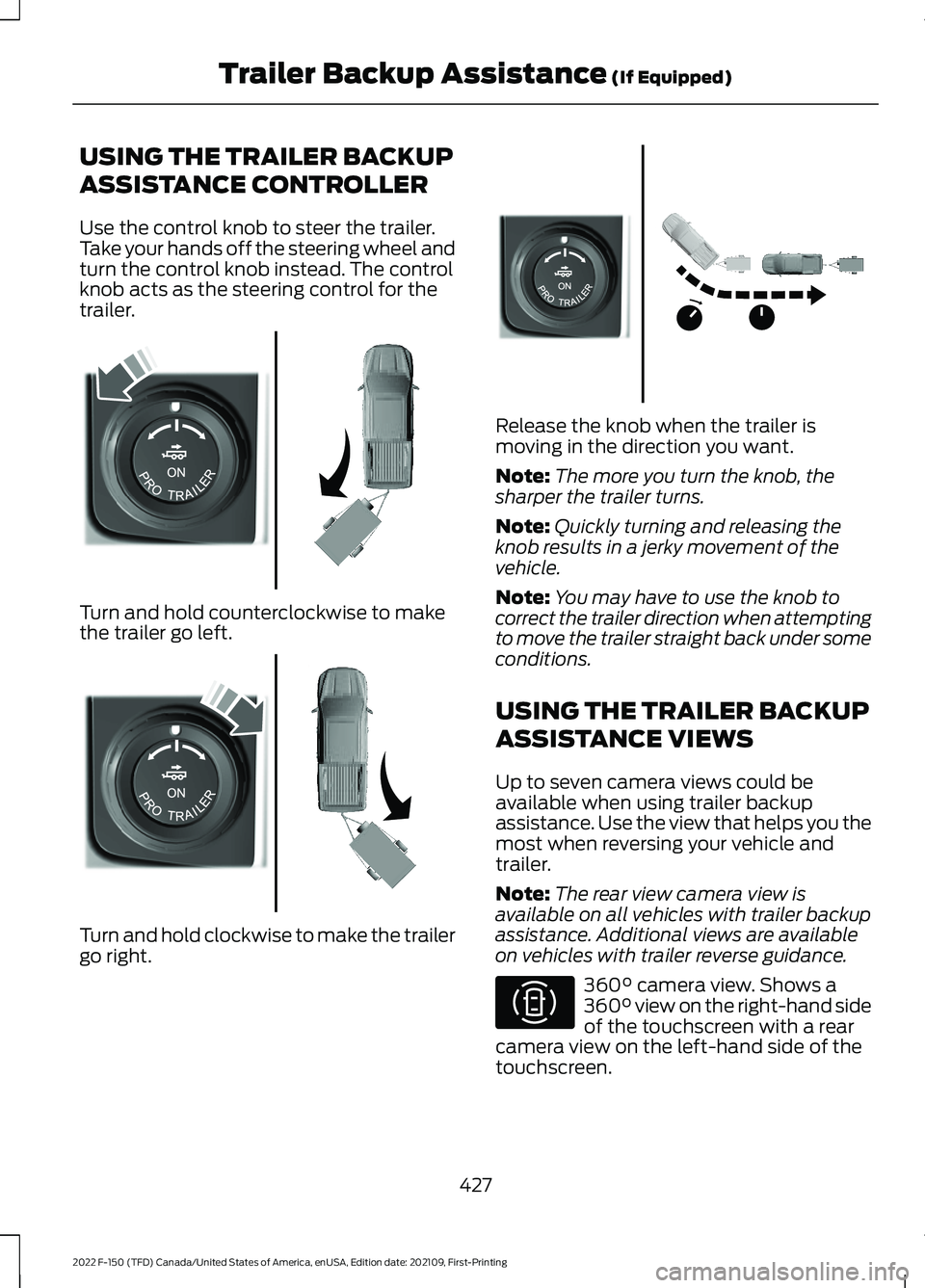
ASSISTANCE CONTROLLER
Use the control knob to steer the trailer.
Take your hands off the steering wheel and
turn the control knob instead. The control
knob acts as the steering control for the
trailer.
Turn and hold counterclockwise to make
the trailer go left.
Turn and hold clockwise to make the trailer
go right. Release the knob when the trailer is
moving in the direction you want.
Note:
The more you turn the knob, the
sharper the trailer turns.
Note: Quickly turning and releasing the
knob results in a jerky movement of the
vehicle.
Note: You may have to use the knob to
correct the trailer direction when attempting
to move the trailer straight back under some
conditions.
USING THE TRAILER BACKUP
ASSISTANCE VIEWS
Up to seven camera views could be
available when using trailer backup
assistance. Use the view that helps you the
most when reversing your vehicle and
trailer.
Note: The rear view camera view is
available on all vehicles with trailer backup
assistance. Additional views are available
on vehicles with trailer reverse guidance. 360° camera view. Shows a
360° view on the right-hand side
of the touchscreen with a rear
camera view on the left-hand side of the
touchscreen.
427
2022 F-150 (TFD) Canada/United States of America, enUSA, Edition date: 202109, First-Printing Trailer Backup Assistance
(If Equipped)E313025 E313026 E313027 E310996