lock FORD F-150 2022 Owners Manual
[x] Cancel search | Manufacturer: FORD, Model Year: 2022, Model line: F-150, Model: FORD F-150 2022Pages: 750, PDF Size: 12.96 MB
Page 289 of 750
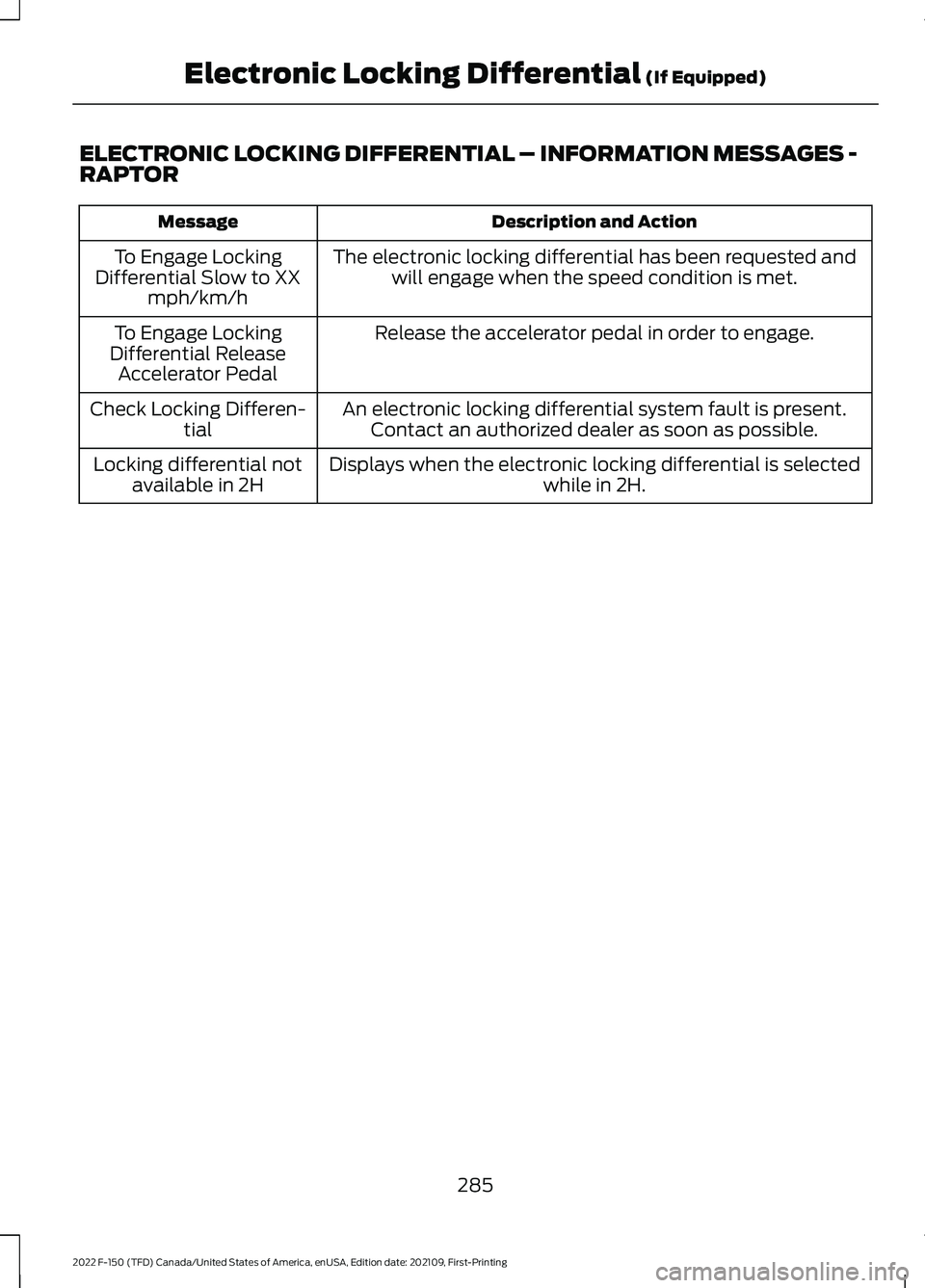
ELECTRONIC LOCKING DIFFERENTIAL – INFORMATION MESSAGES -
RAPTOR
Description and Action
Message
The electronic locking differential has been requested andwill engage when the speed condition is met.
To Engage Locking
Differential Slow to XX mph/km/h
Release the accelerator pedal in order to engage.
To Engage Locking
Differential Release Accelerator Pedal
An electronic locking differential system fault is present.Contact an authorized dealer as soon as possible.
Check Locking Differen-
tial
Displays when the electronic locking differential is selected while in 2H.
Locking differential not
available in 2H
285
2022 F-150 (TFD) Canada/United States of America, enUSA, Edition date: 202109, First-Printing Electronic Locking Differential (If Equipped)
Page 290 of 750
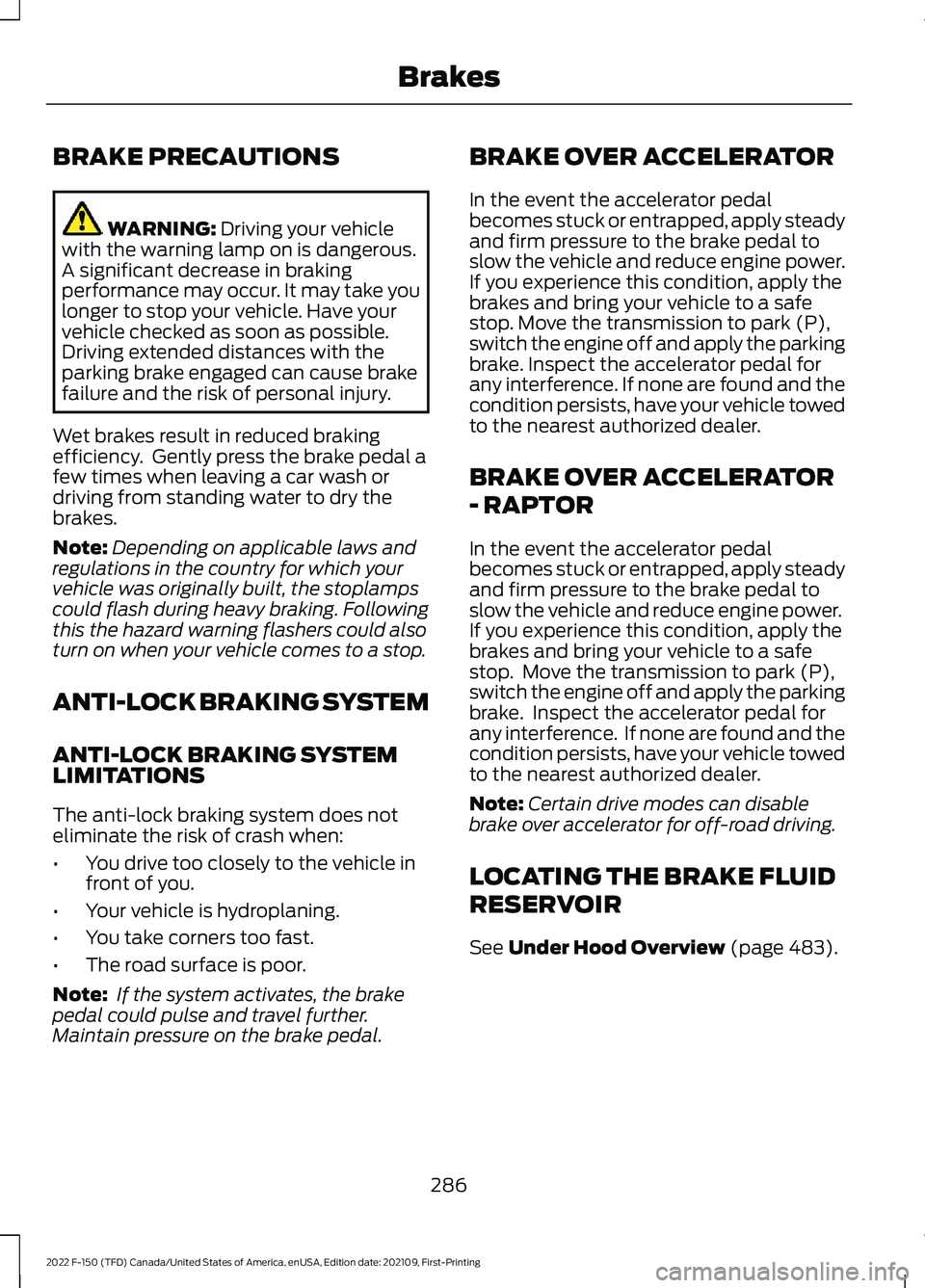
BRAKE PRECAUTIONS
WARNING: Driving your vehicle
with the warning lamp on is dangerous.
A significant decrease in braking
performance may occur. It may take you
longer to stop your vehicle. Have your
vehicle checked as soon as possible.
Driving extended distances with the
parking brake engaged can cause brake
failure and the risk of personal injury.
Wet brakes result in reduced braking
efficiency. Gently press the brake pedal a
few times when leaving a car wash or
driving from standing water to dry the
brakes.
Note: Depending on applicable laws and
regulations in the country for which your
vehicle was originally built, the stoplamps
could flash during heavy braking. Following
this the hazard warning flashers could also
turn on when your vehicle comes to a stop.
ANTI-LOCK BRAKING SYSTEM
ANTI-LOCK BRAKING SYSTEM
LIMITATIONS
The anti-lock braking system does not
eliminate the risk of crash when:
• You drive too closely to the vehicle in
front of you.
• Your vehicle is hydroplaning.
• You take corners too fast.
• The road surface is poor.
Note: If the system activates, the brake
pedal could pulse and travel further.
Maintain pressure on the brake pedal. BRAKE OVER ACCELERATOR
In the event the accelerator pedal
becomes stuck or entrapped, apply steady
and firm pressure to the brake pedal to
slow the vehicle and reduce engine power.
If you experience this condition, apply the
brakes and bring your vehicle to a safe
stop. Move the transmission to park (P),
switch the engine off and apply the parking
brake. Inspect the accelerator pedal for
any interference. If none are found and the
condition persists, have your vehicle towed
to the nearest authorized dealer.
BRAKE OVER ACCELERATOR
- RAPTOR
In the event the accelerator pedal
becomes stuck or entrapped, apply steady
and firm pressure to the brake pedal to
slow the vehicle and reduce engine power.
If you experience this condition, apply the
brakes and bring your vehicle to a safe
stop. Move the transmission to park (P),
switch the engine off and apply the parking
brake. Inspect the accelerator pedal for
any interference. If none are found and the
condition persists, have your vehicle towed
to the nearest authorized dealer.
Note:
Certain drive modes can disable
brake over accelerator for off-road driving.
LOCATING THE BRAKE FLUID
RESERVOIR
See
Under Hood Overview (page 483).
286
2022 F-150 (TFD) Canada/United States of America, enUSA, Edition date: 202109, First-Printing Brakes
Page 292 of 750
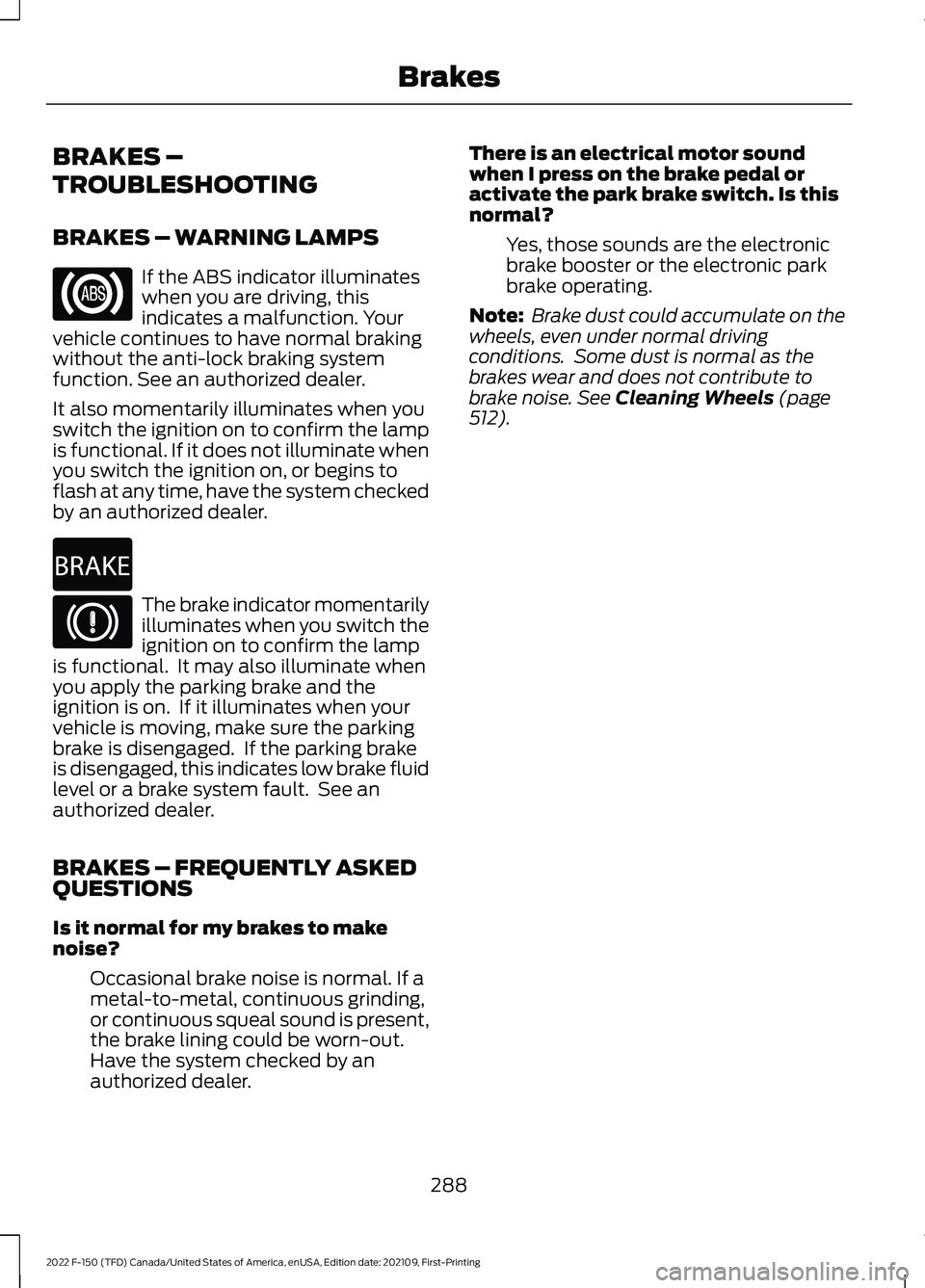
BRAKES –
TROUBLESHOOTING
BRAKES – WARNING LAMPS
If the ABS indicator illuminates
when you are driving, this
indicates a malfunction. Your
vehicle continues to have normal braking
without the anti-lock braking system
function. See an authorized dealer.
It also momentarily illuminates when you
switch the ignition on to confirm the lamp
is functional. If it does not illuminate when
you switch the ignition on, or begins to
flash at any time, have the system checked
by an authorized dealer. The brake indicator momentarily
illuminates when you switch the
ignition on to confirm the lamp
is functional. It may also illuminate when
you apply the parking brake and the
ignition is on. If it illuminates when your
vehicle is moving, make sure the parking
brake is disengaged. If the parking brake
is disengaged, this indicates low brake fluid
level or a brake system fault. See an
authorized dealer.
BRAKES – FREQUENTLY ASKED
QUESTIONS
Is it normal for my brakes to make
noise?
Occasional brake noise is normal. If a
metal-to-metal, continuous grinding,
or continuous squeal sound is present,
the brake lining could be worn-out.
Have the system checked by an
authorized dealer. There is an electrical motor sound
when I press on the brake pedal or
activate the park brake switch. Is this
normal?
Yes, those sounds are the electronic
brake booster or the electronic park
brake operating.
Note: Brake dust could accumulate on the
wheels, even under normal driving
conditions. Some dust is normal as the
brakes wear and does not contribute to
brake noise. See Cleaning Wheels (page
512).
288
2022 F-150 (TFD) Canada/United States of America, enUSA, Edition date: 202109, First-Printing Brakes E270480
Page 296 of 750
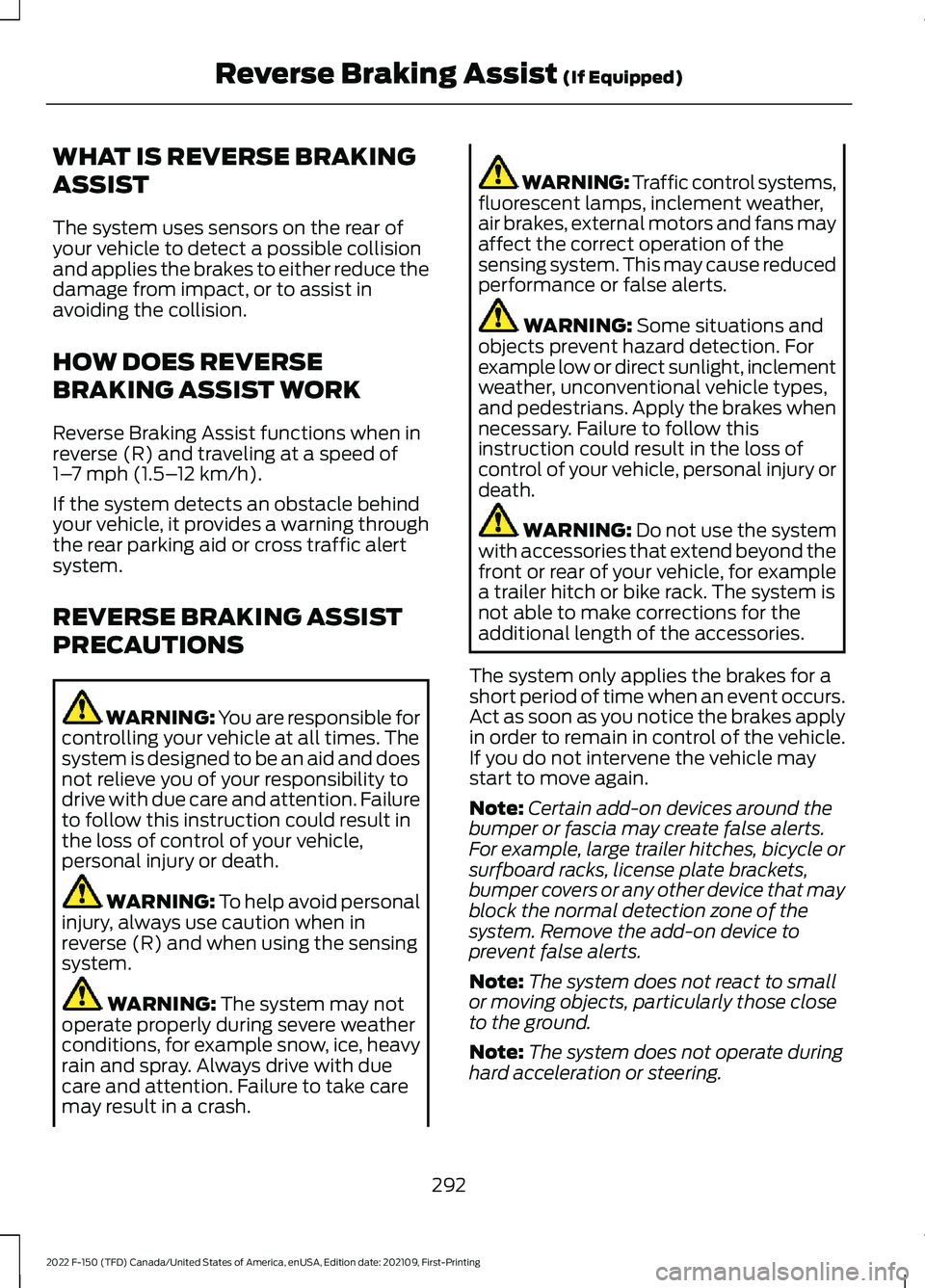
WHAT IS REVERSE BRAKING
ASSIST
The system uses sensors on the rear of
your vehicle to detect a possible collision
and applies the brakes to either reduce the
damage from impact, or to assist in
avoiding the collision.
HOW DOES REVERSE
BRAKING ASSIST WORK
Reverse Braking Assist functions when in
reverse (R) and traveling at a speed of
1–
7 mph (1.5– 12 km/h).
If the system detects an obstacle behind
your vehicle, it provides a warning through
the rear parking aid or cross traffic alert
system.
REVERSE BRAKING ASSIST
PRECAUTIONS WARNING: You are responsible for
controlling your vehicle at all times. The
system is designed to be an aid and does
not relieve you of your responsibility to
drive with due care and attention. Failure
to follow this instruction could result in
the loss of control of your vehicle,
personal injury or death. WARNING:
To help avoid personal
injury, always use caution when in
reverse (R) and when using the sensing
system. WARNING:
The system may not
operate properly during severe weather
conditions, for example snow, ice, heavy
rain and spray. Always drive with due
care and attention. Failure to take care
may result in a crash. WARNING: Traffic control systems,
fluorescent lamps, inclement weather,
air brakes, external motors and fans may
affect the correct operation of the
sensing system. This may cause reduced
performance or false alerts. WARNING:
Some situations and
objects prevent hazard detection. For
example low or direct sunlight, inclement
weather, unconventional vehicle types,
and pedestrians. Apply the brakes when
necessary. Failure to follow this
instruction could result in the loss of
control of your vehicle, personal injury or
death. WARNING:
Do not use the system
with accessories that extend beyond the
front or rear of your vehicle, for example
a trailer hitch or bike rack. The system is
not able to make corrections for the
additional length of the accessories.
The system only applies the brakes for a
short period of time when an event occurs.
Act as soon as you notice the brakes apply
in order to remain in control of the vehicle.
If you do not intervene the vehicle may
start to move again.
Note: Certain add-on devices around the
bumper or fascia may create false alerts.
For example, large trailer hitches, bicycle or
surfboard racks, license plate brackets,
bumper covers or any other device that may
block the normal detection zone of the
system. Remove the add-on device to
prevent false alerts.
Note: The system does not react to small
or moving objects, particularly those close
to the ground.
Note: The system does not operate during
hard acceleration or steering.
292
2022 F-150 (TFD) Canada/United States of America, enUSA, Edition date: 202109, First-Printing Reverse Braking Assist
(If Equipped)
Page 299 of 750
REVERSE BRAKING ASSIST –
FREQUENTLY ASKED QUESTIONS
Why is reverse braking assist unavailable?
•
Make sure the reverse braking assist is
on. See Switching Reverse Braking
Assist On and Off (page 293).
• Make sure that all doors and the
liftgate or tailgate are closed. Drive the
vehicle on a straight road for a short
period. If the message remains, contact
an authorized dealer.
• Make sure the cross traffic alert system
is on if equipped.
See Switching
Reverse Braking Assist On and Off
(page
293).
• Make sure the rear parking aid system
is on. See Rear Parking Aid
(page 314).
• Make sure the traction control is on.
See
Switching Reverse Braking
Assist On and Off (page 293).
Note: The traction control automatically
turns off if four-wheel drive low and certain
drive modes such as mud/ruts and
snow/sand is activated.
• The vehicle may have sustained a rear
end impact. Contact an authorized
dealer to have the sensors checked for
proper coverage and operation.
• An anti-lock brake, traction control or
stability control event may have
occurred. Reverse braking assist
resumes operation when the event is
complete.
• Make sure the rear view camera and
360 degree camera are not dirty or
obstructed. If dirty, clean the camera.
If the message still appears after
cleaning the camera, wait a short time
for the message to clear. If the
message does not clear, contact an
authorized dealer. •
Make sure the cross traffic alert and
rear parking aid sensors are not
blocked or faulty.
See Locating the
Cross Traffic Alert Sensors (page
373). See Locating the Rear Parking
Aid Sensors
(page 314).
• You recently had your vehicle serviced,
or the battery disconnected. Drive your
vehicle a short distance to resume
system operation.
• Reverse braking assist does not
function when you connect a trailer.
Operation resumes when you
disconnect the trailer.
Note: If the answers to why the system is
unavailable do not assist in returning reverse
braking assist to available, have the system
checked as soon as possible.
295
2022 F-150 (TFD) Canada/United States of America, enUSA, Edition date: 202109, First-Printing Reverse Braking Assist
(If Equipped)
Page 307 of 750
WHAT IS TRAIL CONTROL -
RAPTOR
WARNING: The system does not
control speed in low traction conditions
or extremely steep slopes. The system
is designed to be an aid and does not
relieve you of your responsibility to drive
with due care and attention. Failure to
follow this instruction could result in
personal injury.
Trail control lets you focus on steering
during low-speed and off-road use by
controlling your vehicle's acceleration and
braking to maintain the speed that you set.
You may hear a noise from the anti-lock
brake system pump motor when you use
the system. This is normal.
TRAIL CONTROL LIMITATIONS
- RAPTOR
Trail control is unavailable when any of the
following occur:
• Your vehicle speed is greater than
20 mph (32 km/h)
in two-wheel drive
high (2H) or four-wheel drive high (4H)
modes.
• Your vehicle speed is greater than
9 mph (15 km/h)
in four-wheel drive
low (4L) mode.
• Your vehicle speed is greater than
5 mph (8 km/h)
in reverse (R).
• The transmission is in park (P).
• The driver side door is open or your
seatbelt is off when the driver side door
is removed.
• Cruise control is on.
• Pro trailer backup assist is on. SWITCHING TRAIL CONTROL
ON AND OFF - RAPTOR Press the button.
The system switches off if you press the
button again or exceed 40 mph (64 km/h).
SETTING THE TRAIL CONTROL
SPEED - RAPTOR
Note: The buttons are located on the
steering wheel.
Drive to your preferred speed. Press button to increase the set
current speed.
Press button to decrease the set
current speed.
Note: The indicator changes color.
You can adjust the set speed in small or
large increments. Press the toggle button
upward or downward once to adjust the
set speed in small increments. Press and
hold the toggle button upward or
downward to adjust the set speed in large
increments.
You can also adjust the set speed by
braking.
Note: Pressing the brake pedal does not
switch off the system.
CANCELING THE SET SPEED -
RAPTOR Press the button.
303
2022 F-150 (TFD) Canada/United States of America, enUSA, Edition date: 202109, First-Printing Trail ControlE332910 E350925
Page 311 of 750
WHAT IS TRAIL TURN ASSIST
Trail turn assist can reduce the turning
radius of your vehicle by applying the
brakes to the inside rear wheel in
low-speed, high steering-angle maneuvers.
TRAIL TURN ASSIST
PRECAUTIONS
Note:
Do not use trail turn assist on dry,
hard surfaced roads. Doing so can produce
excessive noise, increase tire wear and may
damage drive line, or braking components.
Trail turn assist is only intended for slippery,
or loose surfaces.
You may hear noise from the anti-lock
brake system while trail turn assist is
active. This is normal operation.
TRAIL TURN ASSIST
LIMITATIONS
Trail turn assist can only be used when the
vehicle ’s four-wheel drive system is in the
four-wheel drive high (4H), or four-wheel
drive low (4L) modes.
Trail Turn Assist cannot be used when the
vehicle ’s rear differential is locked. If the
rear differential has recently been locked
prior to Trail Turn Assist being turned on,
Trail Turn Assist may not activate until it
can confirm that the rear differential is
unlocked.
SWITCHING TRAIL TURN
ASSIST ON AND OFF
You can switch the trail turn assist on or
off from the features section of the vehicle
on screen display.
1. Press Features on the touchscreen.
2. Press
Trail Turn Assist. 3. Switch
Trail Turn Assist on or off.
Switch trail turn assist on when your
vehicle is in four-wheel drive high (4H) or
four-wheel drive low (4L).
The system activates when the:
• Vehicle speed is less than
12 mph
(19.3 km/h).
• Rear differential is fully unlocked.
• Steering wheel is almost fully turned
to the left or right.
Switch trail turn assist off by performing
any of the following:
• Switch trail turn assist off from the
features section of the vehicle on
screen display.
• Select two-wheel drive high, or
four-wheel drive auto.
• Switch on the rear locking differential.
TRAIL TURN ASSIST
INDICATORS When trail turn assist is on, one
of these two indicators will be
displayed, depending on the
direction of the vehicle
’s last
turn. When the feature is on but
not in use, the indicator light will
be gray. When the feature is active the
indicator light will be green.
307
2022 F-150 (TFD) Canada/United States of America, enUSA, Edition date: 202109, First-Printing Trail Turn Assist
(If Equipped)E338899 E338900
Page 312 of 750
TRAIL TURN ASSIST –
TROUBLESHOOTING
TRAIL TURN ASSIST –
INFORMATION MESSAGES
Details
Message
Switch to four-wheel
drive low (4L) or four-
wheel drive high (4H) to activate trail turn assist. See Selecting a Four-
Wheel Drive Mode (page
272).
Trail Turn
Assist Avail- able in 4L or 4H
Trail turn assist systemmalfunction could be
present. if this condition persists, have yourvehicle serviced.
Trail Turn
Assist Not
Available See Manual
You have activated trailturn assist.
Trail Turn
Assist ON
You have switched trailturn assist off.
Trail Turn
Assist OFF
TRAIL TURN ASSIST –
FREQUENTLY ASKED QUESTIONS
Why does Trail Turn Assist not activate
after unlocking the rear differential? The rear differential may not be fully
disengaged. When possible, turn off
the rear axle locker while driving
straight before using trail turn assist.
If you are already in a tight turn when
you encounter this situation, driving
the vehicle for a short distance in
reverse could allow the differential to
fully disengage.
308
2022 F-150 (TFD) Canada/United States of America, enUSA, Edition date: 202109, First-Printing Trail Turn Assist
(If Equipped)
Page 315 of 750
ELECTRIC POWER STEERING
ELECTRIC POWER STEERING
PRECAUTIONS
WARNING: The electric power
steering system has diagnostic checks
that continuously monitor the system. If
a fault is detected, a message displays
in the information display. Stop your
vehicle as soon as it is safe to do so.
Switch the vehicle off. After at least 10
seconds, switch the vehicle on and
watch the information display for a
steering system warning message. If a
steering system warning message
returns, have the system checked as
soon as possible. WARNING:
If the system detects
an error, you may not feel a difference in
the steering, however a serious condition
may exist. Have your vehicle checked as
soon as possible. Failure to do so may
result in loss of steering control.
Adapt your speed and driving behavior
according to reduced steering assist.
Extreme continuous steering may increase
the effort to steer. This occurs to prevent
internal overheating and damage to the
steering system. If this occurs, you will not
lose the ability to steer your vehicle
manually nor will it cause damage to the
system. Normal steering and driving allows
the system to cool down and steering
assist returns to normal.
Note: There is no fluid reservoir to check or
fill. ELECTRIC POWER STEERING
ADAPTIVE STEERING - VEHICLES
WITH: ACTIVE STEERING
The adaptive steering system changes the
steering ratio with changes to vehicle
speed, optimizing the steering response in
all conditions. The system also changes
when you switch on the transmission
tow/haul feature. When you select the
tow/haul button, the adaptive steering
system reduces vehicle sensitivity to
steering inputs at higher vehicle speeds,
while maintaining the ease of parking and
maneuverability at low speeds.
Note:
The adaptive steering system
continuously monitors for faults. If the
system detects a fault, a message appears
in the information display. If a red warning
message displays, stop your vehicle as soon
as it is safe to do so. The message could
clear if the fault is no longer present. If an
adaptive steering system warning message
appears each time you start your vehicle,
have the system checked as soon as
possible.
Note: The system has a locking device. It
remains mechanically locked at a fixed
steering ratio with the lock engaged. You
may notice a click when you turn your
vehicle on or off.
Note: If your vehicle loses electrical power
or detects a fault when you are driving, the
system shuts down and you retain a normal
steering function with a fixed steering ratio.
During this time, it is possible that the
steering wheel could not be straight when
the vehicle is driving straight ahead. In
addition, you could notice that the steering
wheel angle required to steer your vehicle
could be different.
311
2022 F-150 (TFD) Canada/United States of America, enUSA, Edition date: 202109, First-Printing Steering
Page 316 of 750
Note:
During parking maneuvers, the
adaptive steering system balances the driver
workload for various steering wheel inputs
and vehicle loading conditions. Under
extreme operating conditions the system
locking device could engage. This strategy
prevents overheating and permanent
damage to the adaptive steering system.
Typical steering and driving maneuvers
allow the system to cool and return to
normal operation.
Adaptive Learning
Adaptive learning helps correct road
irregularities and improves overall handling
and steering. It communicates with the
brake system to help operate advanced
stability control and crash avoidance
systems. Additionally, whenever you
disconnect the battery or install a new
battery, you must drive your vehicle a short
distance before the system relearns the
strategy and reactivates all systems. STEERING –
TROUBLESHOOTING
STEERING – WARNING
INDICATORS The adaptive steering system
indicator illuminates if the
system detects a fault during the
continuous diagnostic checks.
Note: If a red warning message displays,
stop your vehicle as soon as it is safe to do
so.
STEERING – INFORMATION MESSAGES Action
Message
The power steering system has detected acondition that requires service. Have your vehicle checked as soon as possible.
Steering Fault Service Now
The power steering system is not working.
Stop your vehicle in a safe place. Have your vehicle checked as soon as possible.
Steering Loss Stop Safely
The power steering system has detected acondition that requires service. Have your vehicle checked as soon as possible.
Steering Assist Fault Service Required
The steering system has detected a condi-
tion that requires service. Have your vehiclechecked as soon as possible.
Steering Lock Malfunction Service Now
312
2022 F-150 (TFD) Canada/United States of America, enUSA, Edition date: 202109, First-Printing SteeringE223375