lock FORD F-150 2022 Owners Manual
[x] Cancel search | Manufacturer: FORD, Model Year: 2022, Model line: F-150, Model: FORD F-150 2022Pages: 750, PDF Size: 12.96 MB
Page 437 of 750
TRAILER BACKUP ASSISTANCE
– FREQUENTLY ASKED
QUESTIONS
What does it mean if the system
does not detect a trailer that is
setup with a sticker?
•
The system could be having trouble
identifying the sticker. The system
requires a clear view of the sticker
placed on the trailer. You must keep
the camera lens and sticker clean for
the system to correctly operate. If the
system cannot initially detect the
trailer, it could be necessary for you to
change the lighting conditions by
moving your vehicle and trailer or
waiting until the conditions change.
See Applying the Trailer Reversing
Aid Sticker (page 424). Deleting the
trailer and repeating the setup and
calibration could improve performance,
but some trailers are not compatible
with the sticker and camera system. If
the system consistently does not
detect the trailer with the sticker setup,
you may choose to setup the trailer
with a sensor.
Note: The system is designed to be used
with the same trailer connection every time
you choose the trailer from the touchscreen.
When using a different drawbar or a
different pin hole on drawbars with more
than one, connecting the drawbar to your
vehicle affects the trailer position and you
may need to repeat the trailer setup and
calibration process. Why does the trailer not reverse
straight?
•
The road conditions, such as road
camber and road slope, could affect
how straight the system can reverse.
You can compensate for the trailer
drifting to the right or left by slowly
turning the knob until the trailer is
following your desired path and then
holding the knob in that position.
• Other factors, such as the hitch
connection or trailer suspension, could
affect how straight the system can
reverse the trailer. You can
compensate for the trailer drifting to
the right or left by slowly turning the
knob until the trailer is following your
desired path and then holding the knob
in that position.
• The sensor could be incorrectly
installed. Make sure the sensor is
correctly installed.
What does it mean if the system
remains on one message for an
extended time during calibration
when setting up the system with
the sticker?
• The camera could require cleaning.
• You could have a blocked sticker. Verify
the sticker is in the proper location. See
Applying the Trailer Reversing Aid
Sticker
(page 424).
• The drawbar could be outside of the
allowed range of
4–19 in (10–48 cm).
433
2022 F-150 (TFD) Canada/United States of America, enUSA, Edition date: 202109, First-Printing Trailer Backup Assistance
(If Equipped)
Page 449 of 750
TRAILER REVERSE GUIDANCE –
FREQUENTLY ASKED QUESTIONS
What does it mean if the system
does not detect a trailer that is
setup with a sticker?
•
The system could be having trouble
identifying the sticker. The system
requires a clear view of the sticker
placed on the trailer. You must keep
the camera lens and sticker clean for
the system to correctly operate. If the
system cannot initially detect the
trailer, it could be necessary for you to
change the lighting conditions by
moving your vehicle and trailer or
waiting until the conditions change.
See Applying the Trailer Reverse
Aid Sticker (page 438). Deleting the
trailer and repeating the setup and
calibration could improve performance,
but some trailers are not compatible
with the sticker and camera system. If
the system consistently does not
detect the trailer with the sticker setup,
you may choose to setup the trailer
with a sensor.
Note: The system is designed to be used
with the same trailer connection every time
you choose the trailer from the touchscreen.
When using a different drawbar or a
different pin hole on drawbars with more
than one, connecting the drawbar to your
vehicle affects the trailer position and you
may need to repeat the trailer setup and
calibration process. Why does the trailer not reverse
straight?
•
The road conditions, such as road
camber and road slope, could affect
how straight the system can reverse.
You can compensate for the trailer
drifting to the right or left by slowly
turning the knob until the trailer is
following your desired path and then
holding the knob in that position.
• Other factors, such as the hitch
connection or trailer suspension, could
affect how straight the system can
reverse the trailer. You can
compensate for the trailer drifting to
the right or left by slowly turning the
knob until the trailer is following your
desired path and then holding the knob
in that position.
• The sensor could be incorrectly
installed. Make sure the sensor is
correctly installed.
What does it mean if the system
remains on one message for an
extended time during calibration
when setting up the system with
the sticker?
• The camera could require cleaning.
• You could have a blocked sticker. Verify
the sticker is in the proper location. See
Applying the Trailer Reverse Aid
Sticker
(page 438).
• The drawbar could be outside of the
allowed range of
4–19 in (10–48 cm).
445
2022 F-150 (TFD) Canada/United States of America, enUSA, Edition date: 202109, First-Printing Trailer Reverse Guidance
(If Equipped)
Page 457 of 750
DRIVING THROUGH WATER
LIMITATIONS - RAPTOR
Maximum Wading
Depth
Model
32 in (810 mm)
All.
When you are driving though water do not
exceed 4 mph (7 km/h).
WATER WADING WARNING:
Do not attempt to
cross a deep, fast flowing body of water.
Failure to follow this instruction could
result in the loss of control of your
vehicle, personal injury or death.
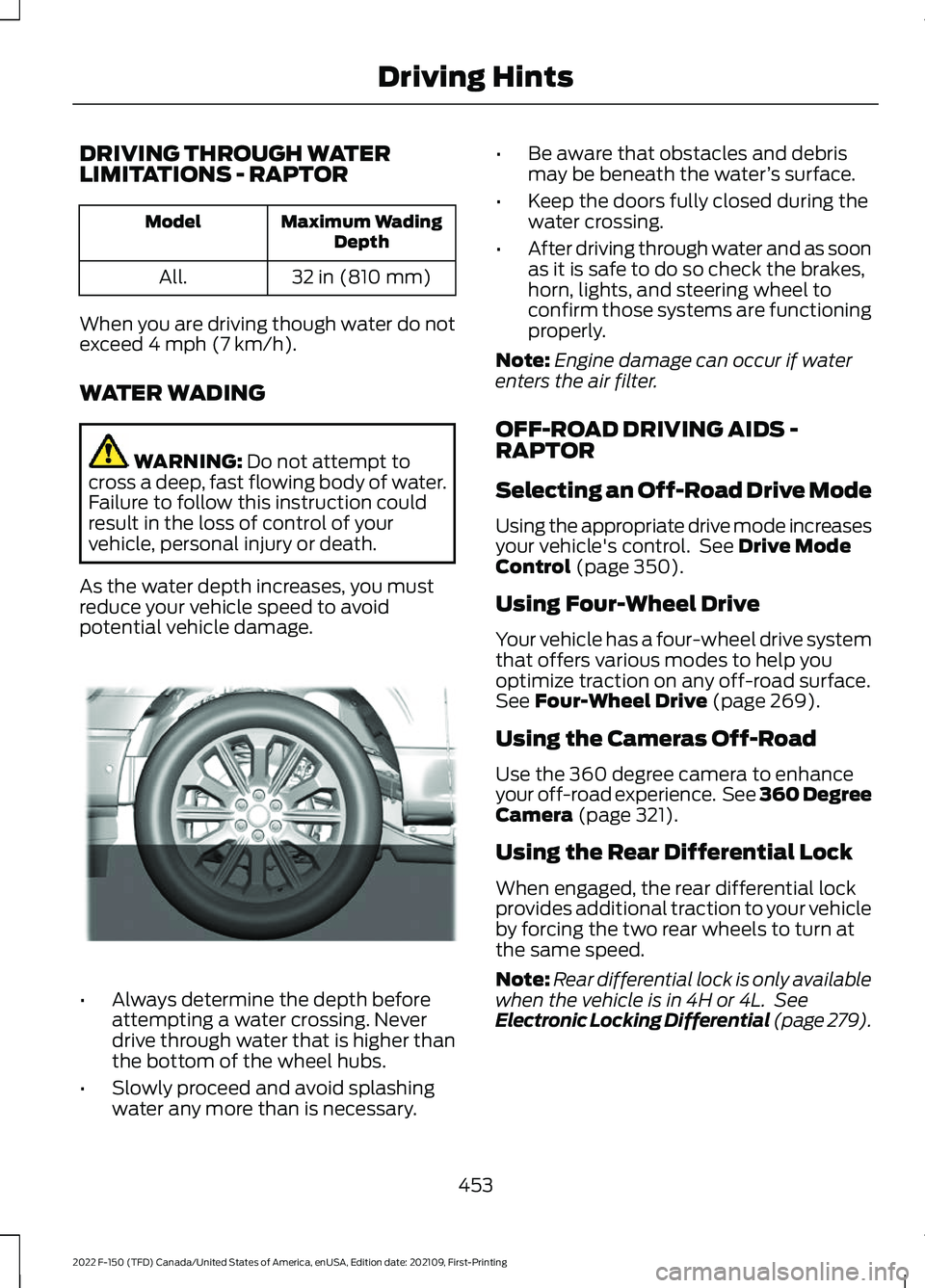
As the water depth increases, you must
reduce your vehicle speed to avoid
potential vehicle damage. •
Always determine the depth before
attempting a water crossing. Never
drive through water that is higher than
the bottom of the wheel hubs.
• Slowly proceed and avoid splashing
water any more than is necessary. •
Be aware that obstacles and debris
may be beneath the water ’s surface.
• Keep the doors fully closed during the
water crossing.
• After driving through water and as soon
as it is safe to do so check the brakes,
horn, lights, and steering wheel to
confirm those systems are functioning
properly.
Note: Engine damage can occur if water
enters the air filter.
OFF-ROAD DRIVING AIDS -
RAPTOR
Selecting an Off-Road Drive Mode
Using the appropriate drive mode increases
your vehicle's control. See
Drive Mode
Control (page 350).
Using Four-Wheel Drive
Your vehicle has a four-wheel drive system
that offers various modes to help you
optimize traction on any off-road surface.
See
Four-Wheel Drive (page 269).
Using the Cameras Off-Road
Use the 360 degree camera to enhance
your off-road experience. See 360 Degree
Camera
(page 321).
Using the Rear Differential Lock
When engaged, the rear differential lock
provides additional traction to your vehicle
by forcing the two rear wheels to turn at
the same speed.
Note: Rear differential lock is only available
when the vehicle is in 4H or 4L. See
Electronic Locking Differential (page 279).
453
2022 F-150 (TFD) Canada/United States of America, enUSA, Edition date: 202109, First-Printing Driving HintsE310941
Page 459 of 750
AFTER DRIVING YOUR VEHICLE
OFF-ROAD - RAPTOR
WARNING: After off-road use,
before returning to the road, check the
wheels and tires for damage. Off-road
use may cause damage to your wheels
and tires that can lead to tire failure, loss
of vehicle control, serious injury or death. WARNING:
Always re-inflate tires
to recommended tire pressures before
the vehicle is operated on-road. The
recommended pressure is located on the
tire label or safety certification label,
located on the B-pillar, inside the driver's
door.
Driving off-road places more stress on your
vehicle than most on-road driving. After
driving off-road, check for damage and, if
necessary, have your vehicle repaired by
an authorized dealer.
Inspect the underbody of your vehicle by
checking tires, body structure, steering,
suspension, and exhaust system for
damage.
Check the radiator for mud and debris and
clean as needed.
Remove accumulations of plants or brush.
These things could be a fire hazard or hide
damage to the fuel lines, brake hoses, and
propeller shafts.
After operation in mud, sand, water, or
similar dirty conditions, inspect the
underbody and clean your vehicle.
COLD WEATHER
PRECAUTIONS
The functional operation of some
components and systems can be affected
at temperatures below approximately
-13°F (-25°C)
. DRIVING ON SNOW AND ICE WARNING:
If you are driving in
slippery conditions that require tire
chains or cables, then it is critical that
you drive cautiously. Keep speeds down,
allow for longer stopping distances and
avoid aggressive steering to reduce the
chances of a loss of vehicle control
which can lead to serious injury or death.
If the rear end of your vehicle slides while
cornering, steer in the direction of the
slide until you regain control of your
vehicle.
On ice and snow, you should drive more
slowly than usual. Your vehicle has a four
wheel anti-lock brake system, do not pump
the brake pedal.
See Anti-Lock Braking
System Limitations (page 286).
BREAKING-IN
Your vehicle requires a break-in period. For
the first 1,000 mi (1,600 km), avoid driving
at high speeds, heavy braking, aggressive
shifting or using your vehicle to tow. During
this time, your vehicle may exhibit some
unusual driving characteristics.
DRIVING ECONOMICALLY
The following helps to improve fuel
consumption:
• Drive smoothly, accelerate gently and
anticipate the road ahead to avoid
heavy braking.
• Regularly check your tire pressures and
make sure that they are inflated to the
correct pressure.
• Follow the recommended maintenance
schedule and carry out the
recommended checks.
455
2022 F-150 (TFD) Canada/United States of America, enUSA, Edition date: 202109, First-Printing Driving Hints
Page 461 of 750
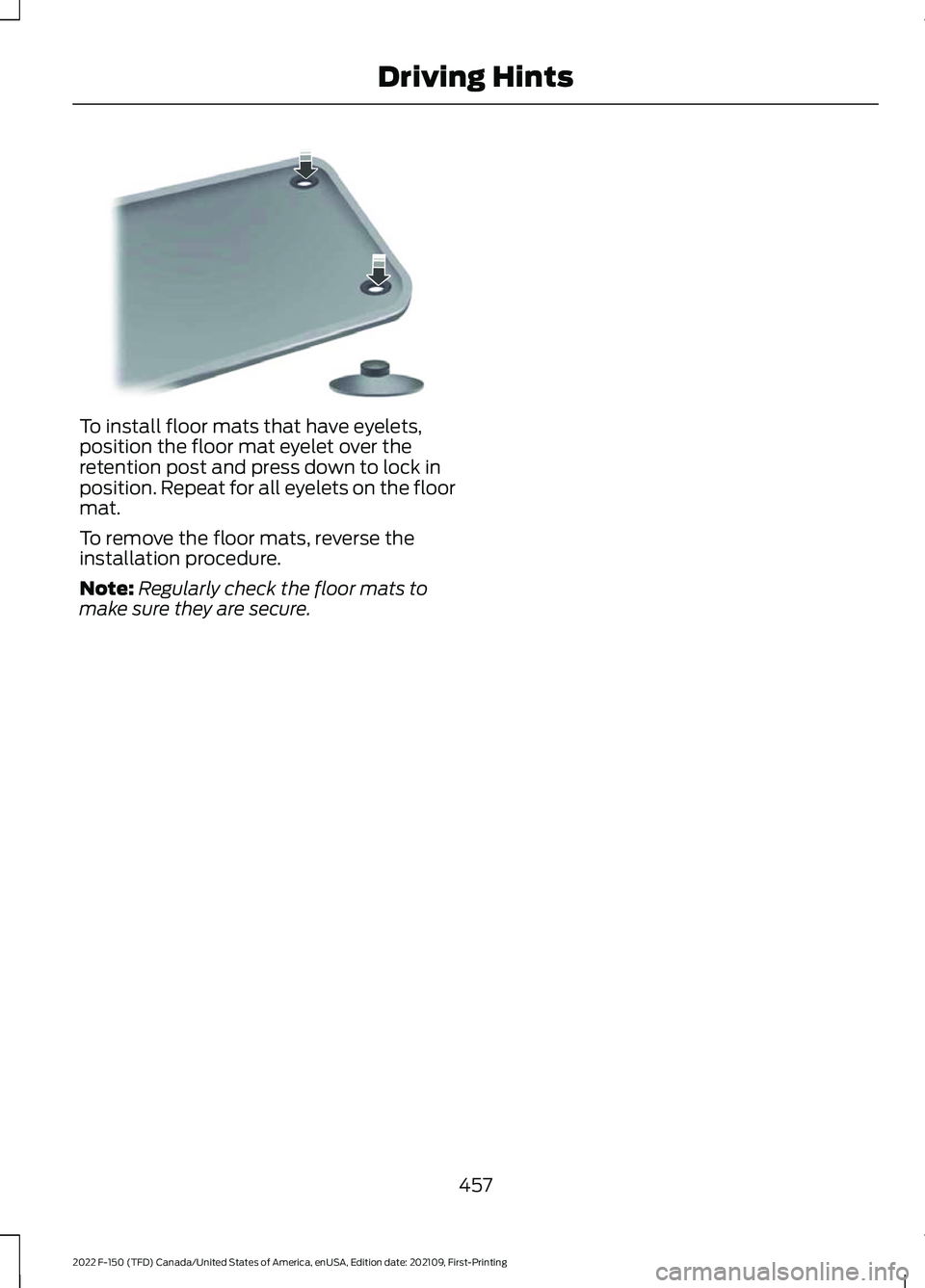
To install floor mats that have eyelets,
position the floor mat eyelet over the
retention post and press down to lock in
position. Repeat for all eyelets on the floor
mat.
To remove the floor mats, reverse the
installation procedure.
Note:
Regularly check the floor mats to
make sure they are secure.
457
2022 F-150 (TFD) Canada/United States of America, enUSA, Edition date: 202109, First-Printing Driving HintsE142666
Page 466 of 750
ROADSIDE ASSISTANCE
Vehicles Sold in the United States:
Getting Roadside Assistance
To fully assist you should you have a
vehicle concern, Ford Motor Company
offers a complimentary roadside
assistance program. This program is
separate from the New Vehicle Limited
Warranty.
The service is available:
•
24 hours a day, seven days a week.
• For the coverage period supplied with
your vehicle.
Roadside Assistance covers:
• A flat tire change with a good spare
(except vehicles supplied with a tire
inflation kit).
• Battery jump start.
• Lock-out assistance (key replacement
cost is the customer's responsibility).
• Fuel delivery — independent service
contractors, if not prohibited by state,
local or municipal law, shall deliver up
to 2 gal (8 L) of gasoline or 5 gal (20 L)
of diesel fuel to a disabled vehicle.
Roadside assistance limits fuel delivery
service to two no-charge occurrences
within a 12-month period.
• Winch out — available within 100 ft
(30 m) of a paved or county
maintained road, no recoveries. •
Towing — independent service
contractors, if not prohibited by state,
local or municipal law, shall tow Ford
eligible vehicles to an authorized dealer
within
35 mi (56 km) of the
disablement location or to the nearest
authorized dealer. If a member
requests a tow to an authorized dealer
that is more than
35 mi (56 km) from
the disablement location, the member
shall be responsible for any mileage
costs in excess of
35 mi (56 km).
• Roadside Assistance includes up to
$200 for a towed trailer if the disabled
eligible vehicle requires service at the
nearest authorized dealer. If the towing
vehicle is operational but the trailer is
not, then the trailer does not qualify for
any roadside services.
Vehicles Sold in the United States:
Using Roadside Assistance
Complete the roadside assistance
identification card and place it in your
wallet for quick reference. This card is in
the Owner's Manual kit.
United States vehicle customers who
require Roadside Assistance, call
1-800-241-3673.
If you need to arrange roadside assistance
for yourself, Ford Motor Company
reimburses a reasonable amount for
towing to the nearest dealership within
35 mi (56 km)
. To obtain reimbursement
information, United States vehicle
customers call 1-800-241-3673.
Customers need to submit their original
receipts.
462
2022 F-150 (TFD) Canada/United States of America, enUSA, Edition date: 202109, First-Printing Crash and Breakdown Information
Page 470 of 750
Removing the Jumper Cables
Remove the jumper cables in the reverse
order that they were connected.
Note:
Do not switch the headlamps on
when disconnecting the cables. The peak
voltage could blow the bulbs.
POST-CRASH ALERT SYSTEM
WHAT IS THE POST-CRASH
ALERT SYSTEM
The system helps draw attention to your
vehicle in the event of a serious impact.
HOW DOES THE POST-CRASH
ALERT SYSTEM WORK
The system is designed to turn the hazard
flashers on and to intermittently sound the
horn in the event of a serious impact that
deploys an airbag or the seatbelt
pretensioners.
POST-CRASH ALERT SYSTEM
LIMITATIONS
Depending on applicable laws in the
country your vehicle was built for, the horn
does not sound in the event of a serious
impact.
SWITCHING THE POST-CRASH
ALERT SYSTEM OFF
Press the hazard flasher switch or the
unlock button on the remote control to
switch the system off.
Note: The alert turns off when the vehicle
battery runs out of charge. AUTOMATIC CRASH SHUTOFF
WHAT IS AUTOMATIC CRASH
SHUTOFF
The automatic crash shutoff is designed
to stop the fuel going to the engine in the
event of a moderate or severe crash.
Note:
Not every impact causes a shutoff.
AUTOMATIC CRASH SHUTOFF
PRECAUTIONS WARNING: If your vehicle has been
involved in a crash, have the fuel system
checked. Failure to follow this instruction
could result in fire, personal injury or
death.
RE-ENABLING YOUR VEHICLE
1. Switch the ignition off.
2. Attempt to start your vehicle.
3. Switch the ignition off.
4. Attempt to start your vehicle.
Note: If your vehicle does not start after the
third attempt, have your vehicle checked as
soon as possible.
466
2022 F-150 (TFD) Canada/United States of America, enUSA, Edition date: 202109, First-Printing Crash and Breakdown Information
Page 474 of 750
6. Press and hold the brake pedal.
7. Using the instrument cluster controls
on the steering wheel, select Settings.
8. Select Neutral Tow.
9. Press and hold the
OK button until a
confirmation message appears in the
information display.
Note: If completed successfully, the
information display shows
Neutral Tow
Enabled Leave Transmission in Neutral.
This indicates that your vehicle is safe to
tow with all wheels on the ground.
Note: If you do not see a confirmation
message in the instrument cluster display,
you must perform the procedure again from
the beginning.
Note: You may hear noise as the transfer
case shifts into its neutral position. This is
normal.
10. Release the brake pedal.
11. Leave the transmission in neutral (N)
and switch your vehicle off by
pressing the push button ignition
switch once without pressing the
brake pedal or turning the key as far
toward the off position.
Note: Vehicles with keys do not turn to the
off position when the transmission is in
neutral (N). You must leave the key in the
ignition when towing. Use the keyless entry
keypad or an extra set of keys to lock and
unlock your vehicle.
Switching
Neutral Tow Off
1. With your vehicle properly secured to the tow vehicle, press and hold the
brake pedal and start the engine.
2. Switch your vehicle off by pressing the
push button ignition switch once or
turning the key as far towards the off
position and release the brake pedal. 3. Place your vehicle in accessory mode
by pressing the push button ignition
switch once without pressing the brake
pedal or by turning the ignition key to
the on position.
4. Press and hold the brake pedal.
5. Shift into park (P).
6. Release the brake pedal.
Note: If completed successfully, the
instrument cluster displays 2H and Neutral
Tow Disabled
.
Note: You must perform the switching
neutral tow on and switching neutral tow
off procedures again from the beginning if
the indicator light and message do not
display.
Note: You may hear a noise as the transfer
case shifts out of its neutral position. This
is normal.
7. Apply the parking brake, then disconnect your vehicle from the tow
vehicle.
8. Release the parking brake, start the engine, and shift into drive (D) to make
sure the transfer case is out of the
neutral tow position.
9. If the transfer case does not successfully shift out of its neutral
position, set the parking brake. Have
your vehicle checked as soon as
possible.
Resolving the
Shift Delayed Drive
Forward Message
1. Press and hold the brake pedal.
2. Start your vehicle.
3. Shift into neutral (N).
4. With the vehicle running, shift into drive
(D) and let the vehicle roll forward up
to
3 ft (1 m).
470
2022 F-150 (TFD) Canada/United States of America, enUSA, Edition date: 202109, First-Printing Towing Your Vehicle
Page 475 of 750
Note:
You may hear a noise as the transfer
case shifts out of its neutral position. This
is normal.
5. Make sure the instrument cluster displays Neutral Tow Disabled.
RECREATIONALLY TOWING
YOUR VEHICLE - 4X2
You cannot recreational tow your vehicle
with all wheels on the ground because
vehicle or transmission damage could
occur. You must recreational tow your
vehicle with all four wheels off the ground,
such as when using a car-hauling trailer.
Otherwise, you cannot recreational tow
your vehicle. EMERGENCY TOWING
If your vehicle becomes inoperable without
access to wheel dollies or a vehicle
transport trailer, it can be flat-towed with
all wheels on the ground, regardless of the
powertrain and transmission configuration,
under the following conditions:
•
Your vehicle is facing forward for
towing in a forward direction.
• Use the manual park release
procedure. See
Using Manual Park
Release (page 267). Failure to do so
may result in damage to the
transmission.
• Maximum speed is 35 mph (56 km/h).
• Maximum distance is
50 mi (80 km).
TOWING YOUR VEHICLE – TROUBLESHOOTING
TOWING YOUR VEHICLE – INFORMATION MESSAGES Description
Message
The transfer case is in the neutral position and your vehicleis safe to tow with all four wheels on the ground.
Neutral Tow Enabled
Leave Transmission in Neutral
There is a transfer case gear tooth blockage present. With
your vehicle on, shift the transmission into drive (D) and let the vehicle roll forward, up to
3 ft (1 m).
Shift Delayed Drive
Forward
The transfer case is not in the neutral position and your vehicleis not safe to tow with all four wheels on the ground.
Neutral Tow Disabled
471
2022 F-150 (TFD) Canada/United States of America, enUSA, Edition date: 202109, First-Printing Towing Your Vehicle
Page 486 of 750
MAINTENANCE PRECAUTIONS
Service your vehicle regularly to help
maintain its roadworthiness and resale
value. There is a large network of
authorized dealers that are there to help
you with their professional servicing
expertise. We believe that their specially
trained technicians are best qualified to
service your vehicle properly and expertly.
They are supported by a wide range of
highly specialized tools developed
specifically for servicing your vehicle.
If your vehicle requires professional service,
an authorized dealer can provide the
necessary parts and service. Check your
warranty information to find out which
parts and services are covered.
Use only recommended fuels, lubricants,
fluids and service parts conforming to
specifications. See Capacities and
Specifications (page 558).
• Do not work on a hot engine.
• Make sure that nothing gets caught in
moving parts.
• Do not work on a vehicle with the
engine running in an enclosed space,
unless you are sure you have enough
ventilation.
• Keep all open flames and other burning
material, such as cigarettes, away from
the battery and all fuel related parts.
• Set the parking brake, shift the
transmission to park (P) and block the
wheels. OPENING AND CLOSING THE
HOOD WARNING:
Make sure that you fully
latch the hood before driving. Failure to
follow this instruction could result in
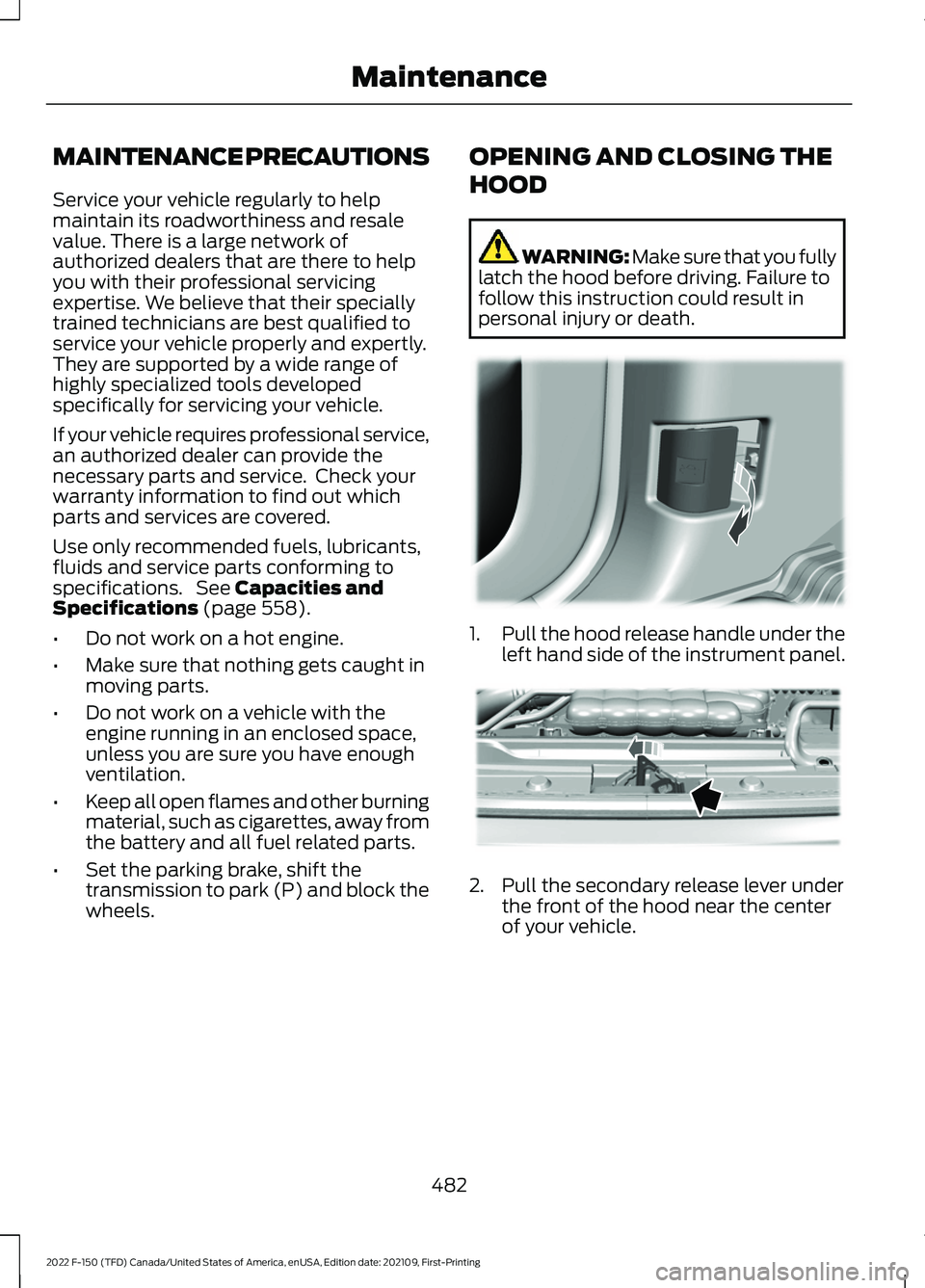
personal injury or death. 1.
Pull the hood release handle under the
left hand side of the instrument panel. 2. Pull the secondary release lever under
the front of the hood near the center
of your vehicle.
482
2022 F-150 (TFD) Canada/United States of America, enUSA, Edition date: 202109, First-Printing MaintenanceE337831 E338104