display FORD F-150 2022 Workshop Manual
[x] Cancel search | Manufacturer: FORD, Model Year: 2022, Model line: F-150, Model: FORD F-150 2022Pages: 750, PDF Size: 12.96 MB
Page 288 of 750
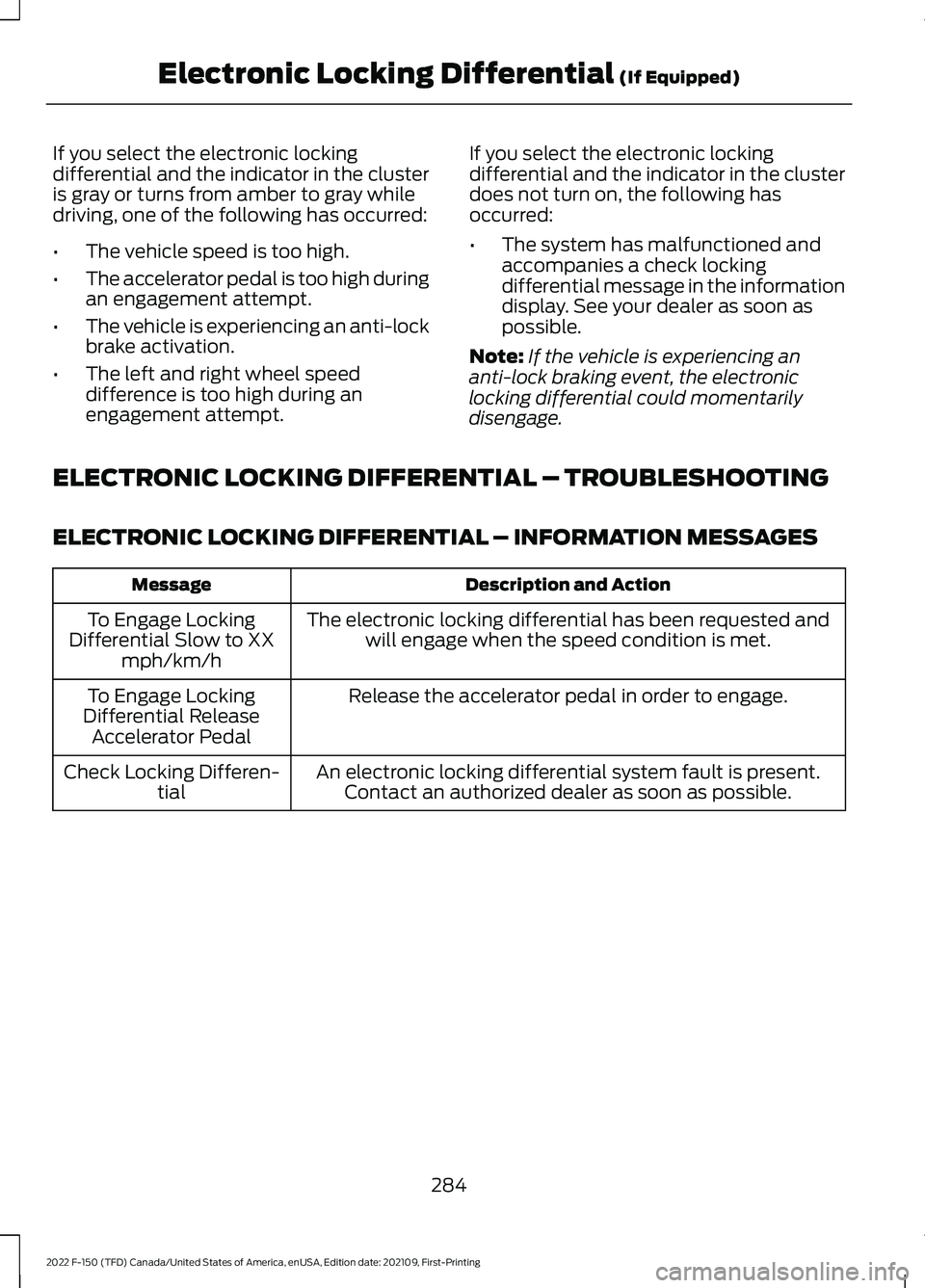
If you select the electronic locking
differential and the indicator in the cluster
is gray or turns from amber to gray while
driving, one of the following has occurred:
•
The vehicle speed is too high.
• The accelerator pedal is too high during
an engagement attempt.
• The vehicle is experiencing an anti-lock
brake activation.
• The left and right wheel speed
difference is too high during an
engagement attempt. If you select the electronic locking
differential and the indicator in the cluster
does not turn on, the following has
occurred:
•
The system has malfunctioned and
accompanies a check locking
differential message in the information
display. See your dealer as soon as
possible.
Note: If the vehicle is experiencing an
anti-lock braking event, the electronic
locking differential could momentarily
disengage.
ELECTRONIC LOCKING DIFFERENTIAL – TROUBLESHOOTING
ELECTRONIC LOCKING DIFFERENTIAL – INFORMATION MESSAGES Description and Action
Message
The electronic locking differential has been requested andwill engage when the speed condition is met.
To Engage Locking
Differential Slow to XX mph/km/h
Release the accelerator pedal in order to engage.
To Engage Locking
Differential Release Accelerator Pedal
An electronic locking differential system fault is present.Contact an authorized dealer as soon as possible.
Check Locking Differen-
tial
284
2022 F-150 (TFD) Canada/United States of America, enUSA, Edition date: 202109, First-Printing Electronic Locking Differential (If Equipped)
Page 289 of 750
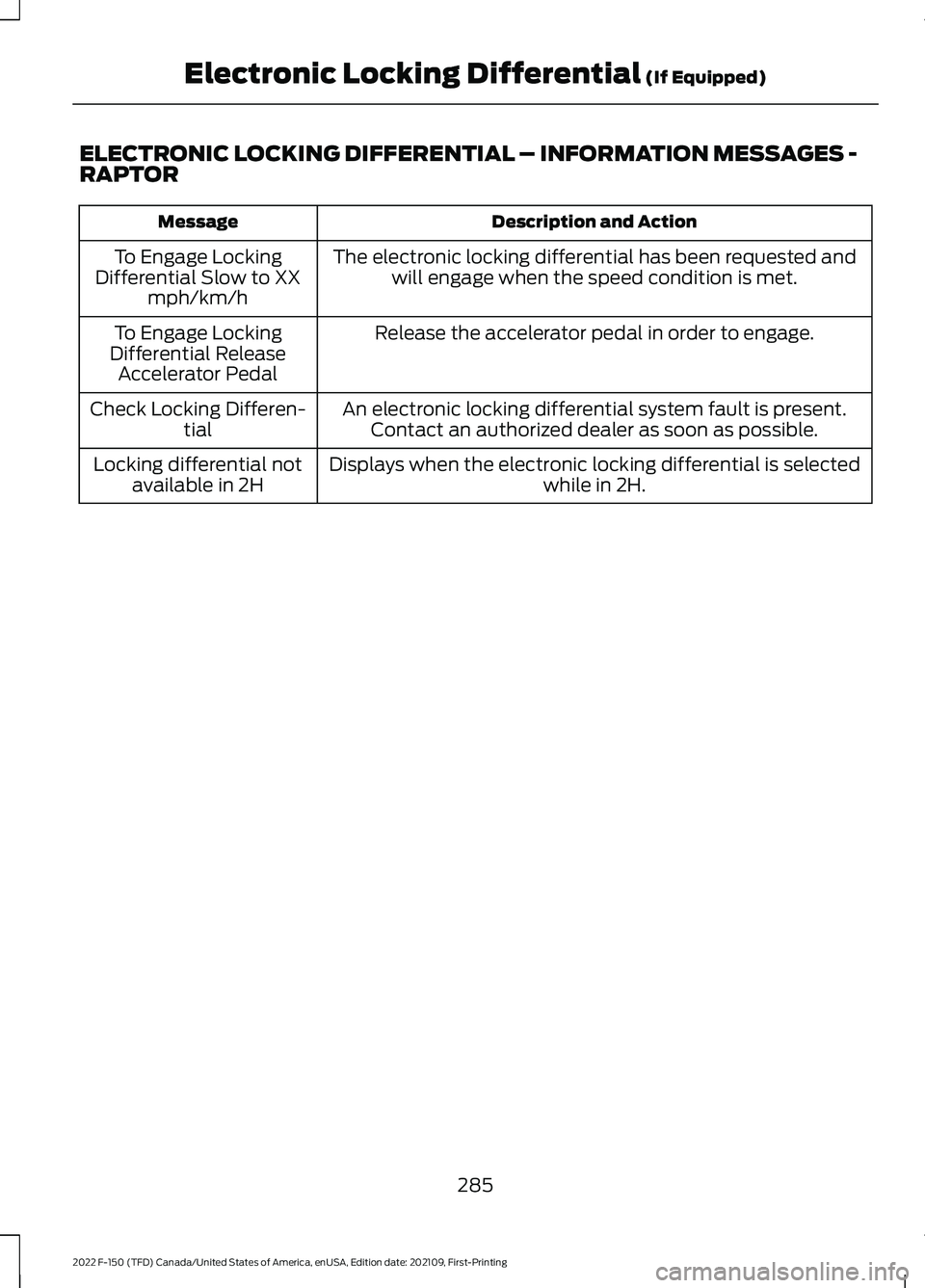
ELECTRONIC LOCKING DIFFERENTIAL – INFORMATION MESSAGES -
RAPTOR
Description and Action
Message
The electronic locking differential has been requested andwill engage when the speed condition is met.
To Engage Locking
Differential Slow to XX mph/km/h
Release the accelerator pedal in order to engage.
To Engage Locking
Differential Release Accelerator Pedal
An electronic locking differential system fault is present.Contact an authorized dealer as soon as possible.
Check Locking Differen-
tial
Displays when the electronic locking differential is selected while in 2H.
Locking differential not
available in 2H
285
2022 F-150 (TFD) Canada/United States of America, enUSA, Edition date: 202109, First-Printing Electronic Locking Differential (If Equipped)
Page 298 of 750
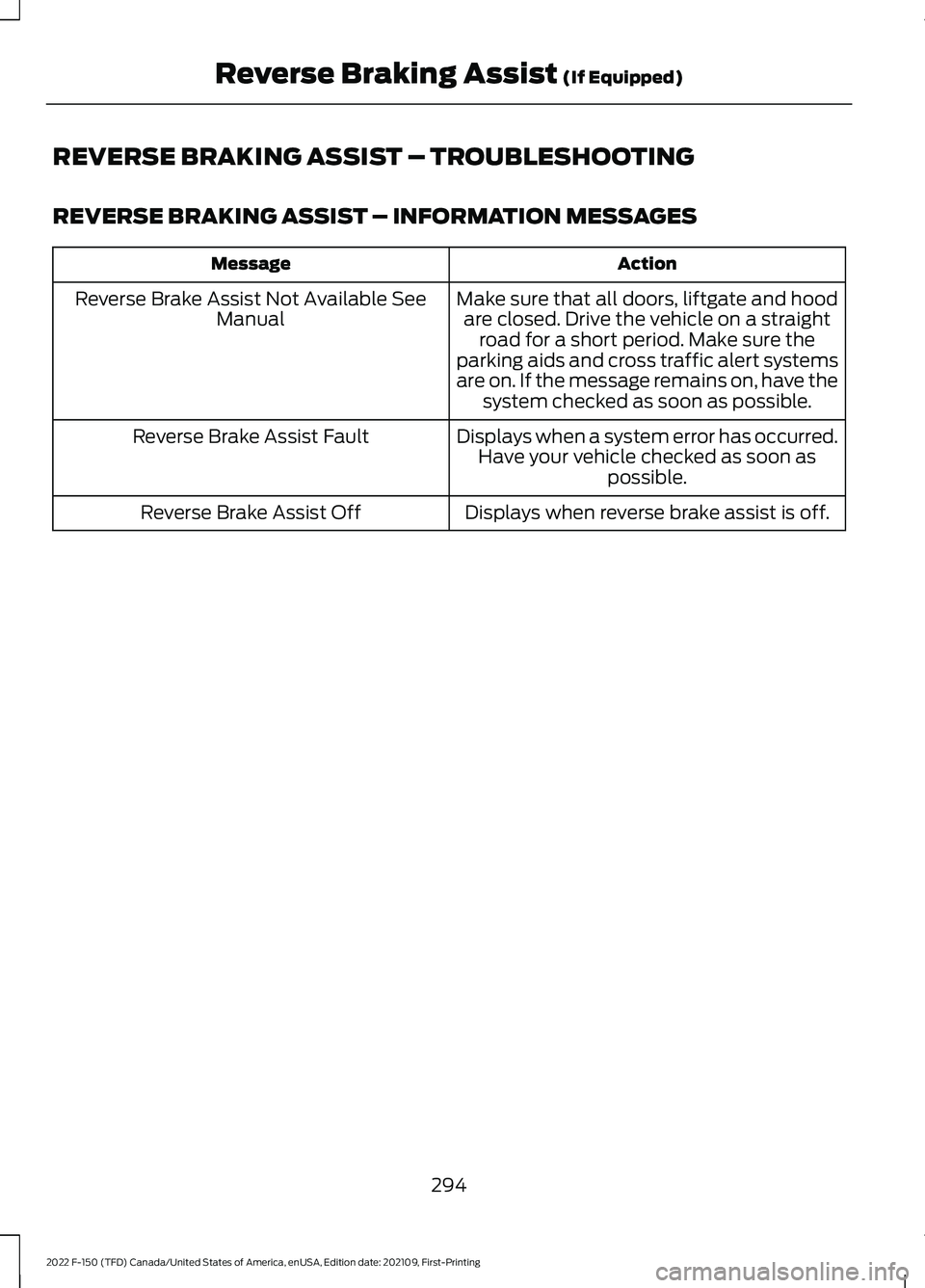
REVERSE BRAKING ASSIST – TROUBLESHOOTING
REVERSE BRAKING ASSIST – INFORMATION MESSAGES
Action
Message
Make sure that all doors, liftgate and hoodare closed. Drive the vehicle on a straight road for a short period. Make sure the
parking aids and cross traffic alert systems
are on. If the message remains on, have the system checked as soon as possible.
Reverse Brake Assist Not Available See
Manual
Displays when a system error has occurred.Have your vehicle checked as soon as possible.
Reverse Brake Assist Fault
Displays when reverse brake assist is off.
Reverse Brake Assist Off
294
2022 F-150 (TFD) Canada/United States of America, enUSA, Edition date: 202109, First-Printing Reverse Braking Assist (If Equipped)
Page 300 of 750
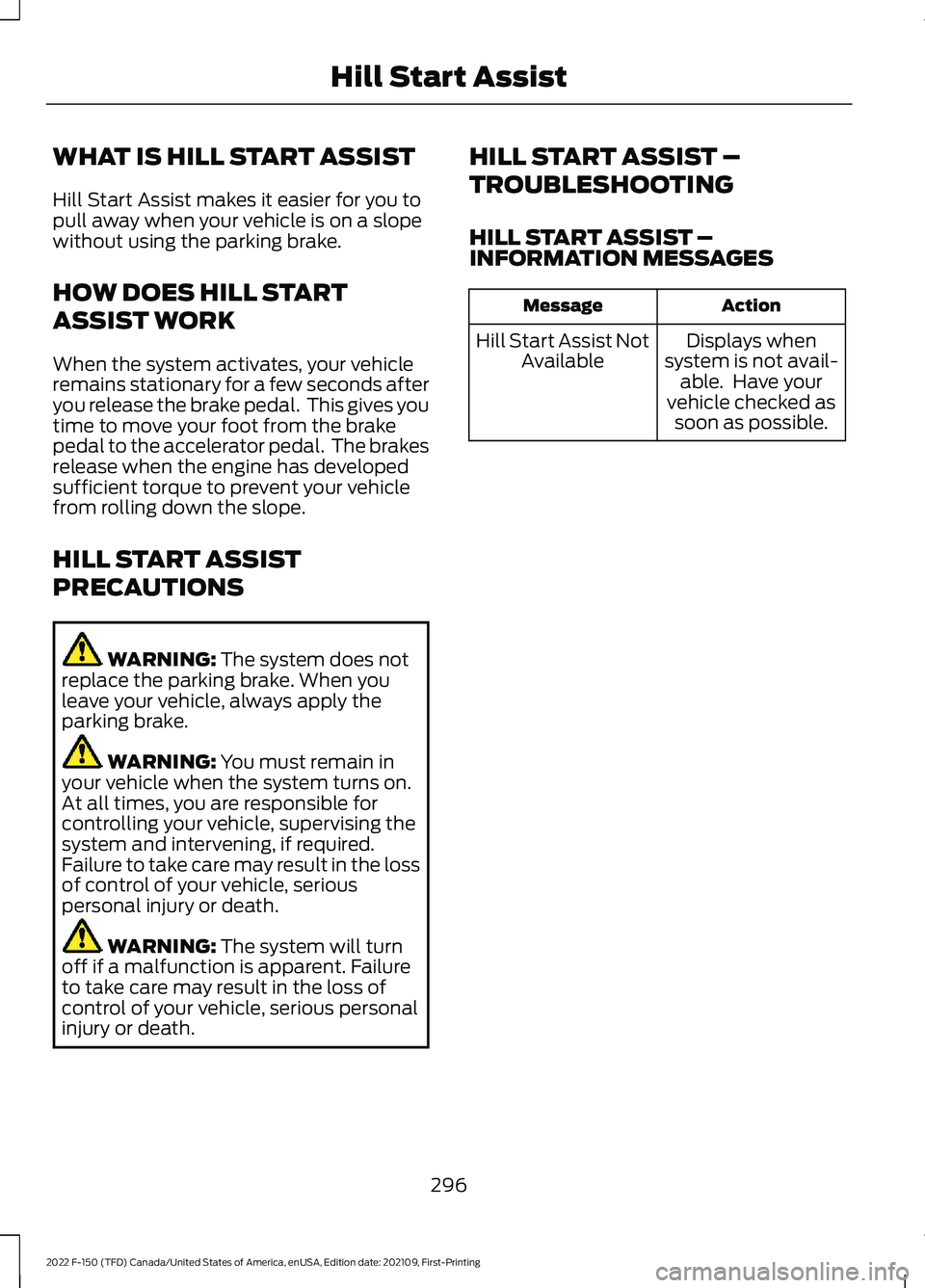
WHAT IS HILL START ASSIST
Hill Start Assist makes it easier for you to
pull away when your vehicle is on a slope
without using the parking brake.
HOW DOES HILL START
ASSIST WORK
When the system activates, your vehicle
remains stationary for a few seconds after
you release the brake pedal. This gives you
time to move your foot from the brake
pedal to the accelerator pedal. The brakes
release when the engine has developed
sufficient torque to prevent your vehicle
from rolling down the slope.
HILL START ASSIST
PRECAUTIONS
WARNING: The system does not
replace the parking brake. When you
leave your vehicle, always apply the
parking brake. WARNING:
You must remain in
your vehicle when the system turns on.
At all times, you are responsible for
controlling your vehicle, supervising the
system and intervening, if required.
Failure to take care may result in the loss
of control of your vehicle, serious
personal injury or death. WARNING:
The system will turn
off if a malfunction is apparent. Failure
to take care may result in the loss of
control of your vehicle, serious personal
injury or death. HILL START ASSIST –
TROUBLESHOOTING
HILL START ASSIST –
INFORMATION MESSAGES Action
Message
Displays when
system is not avail- able. Have your
vehicle checked as soon as possible.
Hill Start Assist Not
Available
296
2022 F-150 (TFD) Canada/United States of America, enUSA, Edition date: 202109, First-Printing Hill Start Assist
Page 301 of 750
HOW DOES AUTO HOLD WORK
Auto Hold applies the brakes to hold your
vehicle after you stop it and release the
brake pedal. This can help when waiting
on a hill or in traffic.
SWITCHING AUTO HOLD ON
AND OFF
WARNING: The system does not
replace the parking brake. When you
leave your vehicle, always apply the
parking brake. WARNING:
You must remain in
your vehicle when the system turns on.
At all times, you are responsible for
controlling your vehicle, supervising the
system and intervening, if required.
Failure to take care may result in the loss
of control of your vehicle, serious
personal injury or death.
You can switch the system on or off by
accessing the menu on the touchscreen.
1. Press
Settings on the touchscreen.
2. Press
Driver Assistance.
Note: You can only switch the system on
after you close the driver door and fasten
your seatbelt.
Note: The system remembers the last
setting when you start your vehicle.
Note: When using an automatic car wash,
make sure to switch auto hold off, or shift
to neutral (N) with the brake pedal applied
to ensure auto hold is not active. USING AUTO HOLD
1. Bring your vehicle to a complete stop.
The auto hold active indicator
illuminates in the information display.
2. Release the brake pedal. The system holds your vehicle at a standstill. The
auto hold active indicator remains
illuminated in the information display.
3. Pull away in the normal manner. The system releases the brakes and the
auto hold active indicator switches off.
Note: The system only activates if you
apply enough brake pressure on the brake
pedal to bring the vehicle to a standstill.
Note: Under certain conditions, the system
could apply the electric parking brake. The
brake system warning lamp illuminates. The
electric parking brake releases when you
press the accelerator pedal. See
Automatically Releasing the Electric
Parking Brake
(page 289).
Note: Auto hold cancels if you shift into
reverse (R), or neutral (N), and press the
brake pedal.
There could be actions that can cause the
auto hold system not to work when the
following occur:
• When you use active park assist.
• The driver door is open.
• You have not fastened your seatbelt.
• You shift into reverse (R), or neutral
(N) before the system is active.
AUTO HOLD INDICATORS Illuminates when the system is
active.
Illuminates when the system is
on but cannot hold your vehicle
at a standstill at this particular
time.
297
2022 F-150 (TFD) Canada/United States of America, enUSA, Edition date: 202109, First-Printing Auto HoldE323448 E323449
Page 306 of 750
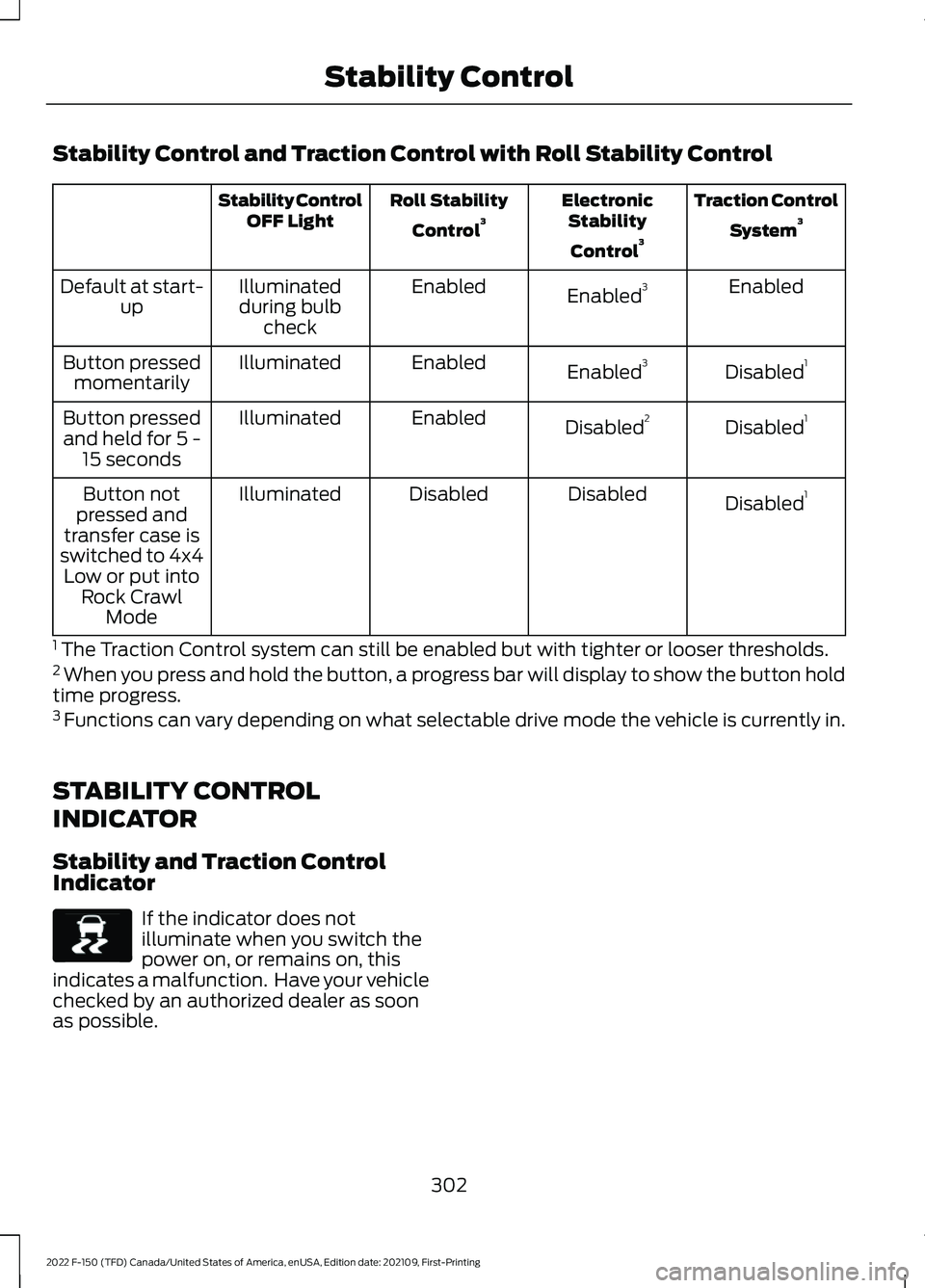
Stability Control and Traction Control with Roll Stability Control
Traction Control
System 3
Electronic
Stability
Control 3
Roll Stability
Control 3
Stability Control
OFF Light
Enabled
Enabled 3
Enabled
Illuminated
during bulb check
Default at start-
up
Disabled1
Enabled 3
Enabled
Illuminated
Button pressed
momentarily
Disabled1
Disabled 2
Enabled
Illuminated
Button pressed
and held for 5 - 15 seconds
Disabled1
Disabled
Disabled
Illuminated
Button not
pressed and
transfer case is
switched to 4x4 Low or put into Rock Crawl Mode
1 The Traction Control system can still be enabled but with tighter or looser thresholds.
2 When you press and hold the button, a progress bar will display to show the button hold
time progress.
3 Functions can vary depending on what selectable drive mode the vehicle is currently in.
STABILITY CONTROL
INDICATOR
Stability and Traction Control
Indicator If the indicator does not
illuminate when you switch the
power on, or remains on, this
indicates a malfunction. Have your vehicle
checked by an authorized dealer as soon
as possible.
302
2022 F-150 (TFD) Canada/United States of America, enUSA, Edition date: 202109, First-Printing Stability ControlE138639
Page 309 of 750
If you exceed 40 mph (65 km/h) trail one
pedal drive switches off. Pressing either button when trail
one pedal drive is active turns
trail control on and places trail
one pedal drive into standby
mode.
Switching from Trail Control to
Trail One Pedal Drive When using trail control in
four-wheel drive high or
four-wheel drive low modes, you
can switch to trail one pedal drive by
pressing the button on the steering wheel. TRAIL ONE PEDAL DRIVE
INDICATORS When trail one pedal drive is
active, the indicator displays
green in the instrument cluster.
When the system is switched on but is
unavailable or in standby mode, it displays
grey.
TRAIL ONE PEDAL DRIVE – TROUBLESHOOTING
TRAIL ONE PEDAL DRIVE – INFORMATION MESSAGES Action
Message
Displays when trail one pedal drive is active,use the SET+ or SET- to switch to trail control.
Trail 1-Pedal Drive Active Use SET Button
for Trail Control
Displays when you switch trail one pedaldrive off.
Trail Control with Trail 1- Pedal Drive Off
Trail control is in a driveline state not
supported for trail one pedal drive. Set a
speed to activate trail control or change the
driveline state to four-wheel drive high (4H) or four-wheel drive low (4L) modes to active trail one pedal drive.
Trail Control Enabled Use SET button to
Set Speed Trail 1-Pedal Drive Available in 4H or 4L
305
2022 F-150 (TFD) Canada/United States of America, enUSA, Edition date: 202109, First-Printing Trail Control E308130 1E328584
Page 310 of 750
TRAIL CONTROL – TROUBLESHOOTING - RAPTOR
TRAIL CONTROL – INFORMATION MESSAGES
Details
Message
Displays when you must reduce your vehicle speed touse trail control.
Reduce Speed To Enter Trail
Control
Displays when you must release the park brake to usetrail control.
Trail Control Not Available with
Park Brake Applied
Displays when you must switch off the trailer backupassist to use trail control.
Trail Control Not Available
While Pro Trailer Backup Assist™ Active
Displays when you successfully enabled trail controland can set a speed with the Set+ or Set- control.
Trail Control Enabled Use SET
Button to Set Speed
Displays when a system fault has occurred when trail
control was active and the driver must resume control.
Trail Control Off Driver Resume
Control
Displays when the system has turned off.
Trail Control Off
Displays when a system fault is present. See the trailcontrol section in your Owner's Manual. See your authorized dealer for diagnosis.
Trail Control Fault See Manual
Displays when you must be in drive (D), neutral (N) orreverse (R) to use trail control.
Trail Control To Activate Select
Gear
Displays when you must switch the cruise control offto use trail control.
Trail Control Not Available with
Cruise Control Active
Displays when you must close the driver door to usetrail control.
Trail Control Not Available with
Driver Door Open
Displays when the system detects you may be stuck
in sand and recommends using trail control on to the lowest set speed. Doing this could slowly pull sand under the tires to free the vehicle.
Set Trail Control to 1 MPH to Aid
in Getting Unstuck in Sand
Set Trail Control to 2 km/h to
Aid in Getting Unstuck in Sand
Due to some driver action, Trail Control propulsion wasturned off but the vehicle will still brake if descending
a hill. The driver must press the Trail Control switch to turn the feature OFF, they can then turn it back on.
Descent Control Now Active
Press Trail Control Switch To Exit
Displays when you must have the seatbelt on to use trail control.
Trail Control Not Available with
Seatbelt Off
306
2022 F-150 (TFD) Canada/United States of America, enUSA, Edition date: 202109, First-Printing Trail Control
Page 311 of 750
WHAT IS TRAIL TURN ASSIST
Trail turn assist can reduce the turning
radius of your vehicle by applying the
brakes to the inside rear wheel in
low-speed, high steering-angle maneuvers.
TRAIL TURN ASSIST
PRECAUTIONS
Note:
Do not use trail turn assist on dry,
hard surfaced roads. Doing so can produce
excessive noise, increase tire wear and may
damage drive line, or braking components.
Trail turn assist is only intended for slippery,
or loose surfaces.
You may hear noise from the anti-lock
brake system while trail turn assist is
active. This is normal operation.
TRAIL TURN ASSIST
LIMITATIONS
Trail turn assist can only be used when the
vehicle ’s four-wheel drive system is in the
four-wheel drive high (4H), or four-wheel
drive low (4L) modes.
Trail Turn Assist cannot be used when the
vehicle ’s rear differential is locked. If the
rear differential has recently been locked
prior to Trail Turn Assist being turned on,
Trail Turn Assist may not activate until it
can confirm that the rear differential is
unlocked.
SWITCHING TRAIL TURN
ASSIST ON AND OFF
You can switch the trail turn assist on or
off from the features section of the vehicle
on screen display.
1. Press Features on the touchscreen.
2. Press
Trail Turn Assist. 3. Switch
Trail Turn Assist on or off.
Switch trail turn assist on when your
vehicle is in four-wheel drive high (4H) or
four-wheel drive low (4L).
The system activates when the:
• Vehicle speed is less than
12 mph
(19.3 km/h).
• Rear differential is fully unlocked.
• Steering wheel is almost fully turned
to the left or right.
Switch trail turn assist off by performing
any of the following:
• Switch trail turn assist off from the
features section of the vehicle on
screen display.
• Select two-wheel drive high, or
four-wheel drive auto.
• Switch on the rear locking differential.
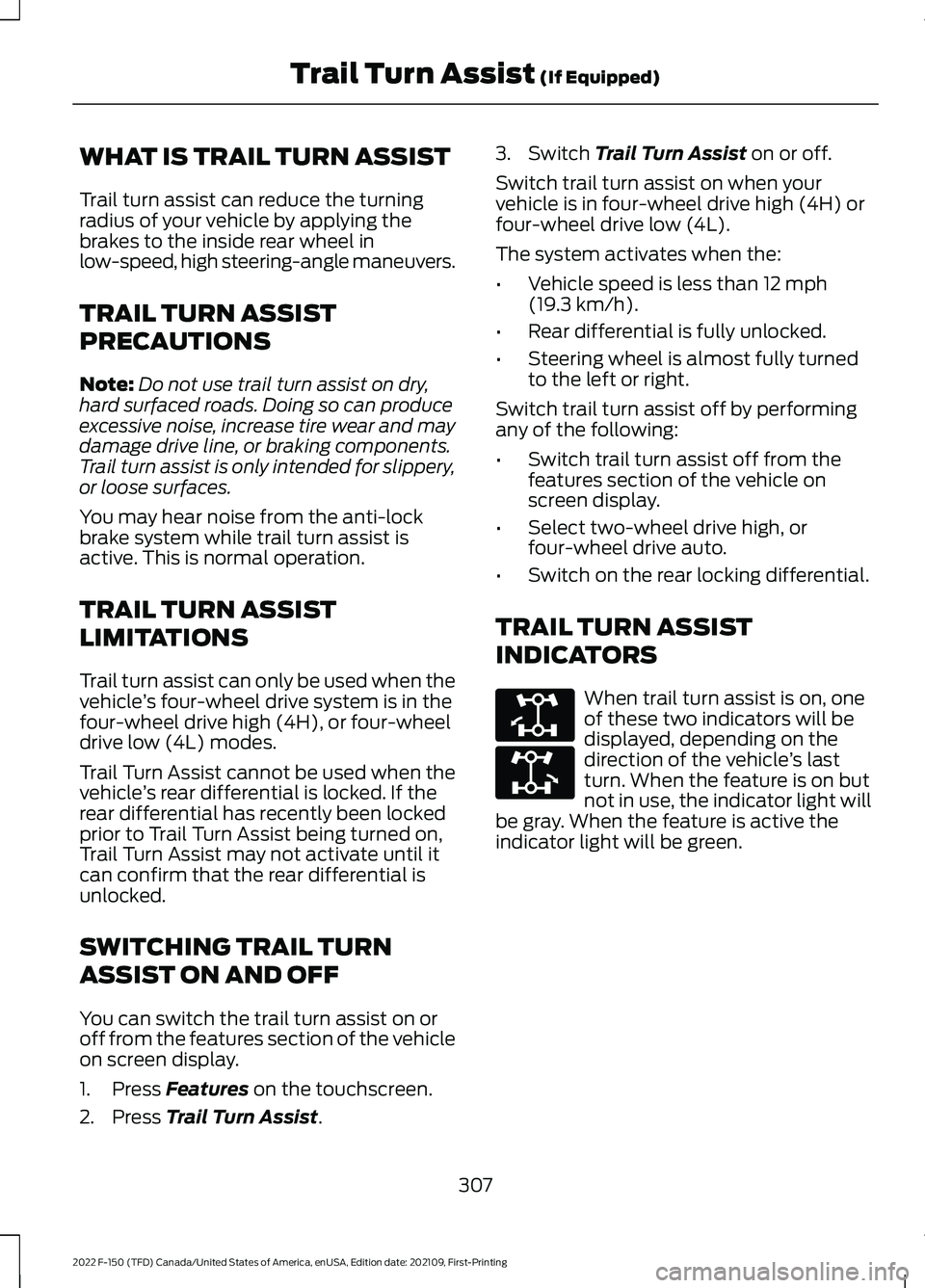
TRAIL TURN ASSIST
INDICATORS When trail turn assist is on, one
of these two indicators will be
displayed, depending on the
direction of the vehicle
’s last
turn. When the feature is on but
not in use, the indicator light will
be gray. When the feature is active the
indicator light will be green.
307
2022 F-150 (TFD) Canada/United States of America, enUSA, Edition date: 202109, First-Printing Trail Turn Assist
(If Equipped)E338899 E338900
Page 315 of 750
ELECTRIC POWER STEERING
ELECTRIC POWER STEERING
PRECAUTIONS
WARNING: The electric power
steering system has diagnostic checks
that continuously monitor the system. If
a fault is detected, a message displays
in the information display. Stop your
vehicle as soon as it is safe to do so.
Switch the vehicle off. After at least 10
seconds, switch the vehicle on and
watch the information display for a
steering system warning message. If a
steering system warning message
returns, have the system checked as
soon as possible. WARNING:
If the system detects
an error, you may not feel a difference in
the steering, however a serious condition
may exist. Have your vehicle checked as
soon as possible. Failure to do so may
result in loss of steering control.
Adapt your speed and driving behavior
according to reduced steering assist.
Extreme continuous steering may increase
the effort to steer. This occurs to prevent
internal overheating and damage to the
steering system. If this occurs, you will not
lose the ability to steer your vehicle
manually nor will it cause damage to the
system. Normal steering and driving allows
the system to cool down and steering
assist returns to normal.
Note: There is no fluid reservoir to check or
fill. ELECTRIC POWER STEERING
ADAPTIVE STEERING - VEHICLES
WITH: ACTIVE STEERING
The adaptive steering system changes the
steering ratio with changes to vehicle
speed, optimizing the steering response in
all conditions. The system also changes
when you switch on the transmission
tow/haul feature. When you select the
tow/haul button, the adaptive steering
system reduces vehicle sensitivity to
steering inputs at higher vehicle speeds,
while maintaining the ease of parking and
maneuverability at low speeds.
Note:
The adaptive steering system
continuously monitors for faults. If the
system detects a fault, a message appears
in the information display. If a red warning
message displays, stop your vehicle as soon
as it is safe to do so. The message could
clear if the fault is no longer present. If an
adaptive steering system warning message
appears each time you start your vehicle,
have the system checked as soon as
possible.
Note: The system has a locking device. It
remains mechanically locked at a fixed
steering ratio with the lock engaged. You
may notice a click when you turn your
vehicle on or off.
Note: If your vehicle loses electrical power
or detects a fault when you are driving, the
system shuts down and you retain a normal
steering function with a fixed steering ratio.
During this time, it is possible that the
steering wheel could not be straight when
the vehicle is driving straight ahead. In
addition, you could notice that the steering
wheel angle required to steer your vehicle
could be different.
311
2022 F-150 (TFD) Canada/United States of America, enUSA, Edition date: 202109, First-Printing Steering