display FORD F-150 2022 Owners Manual
[x] Cancel search | Manufacturer: FORD, Model Year: 2022, Model line: F-150, Model: FORD F-150 2022Pages: 750, PDF Size: 12.96 MB
Page 382 of 750
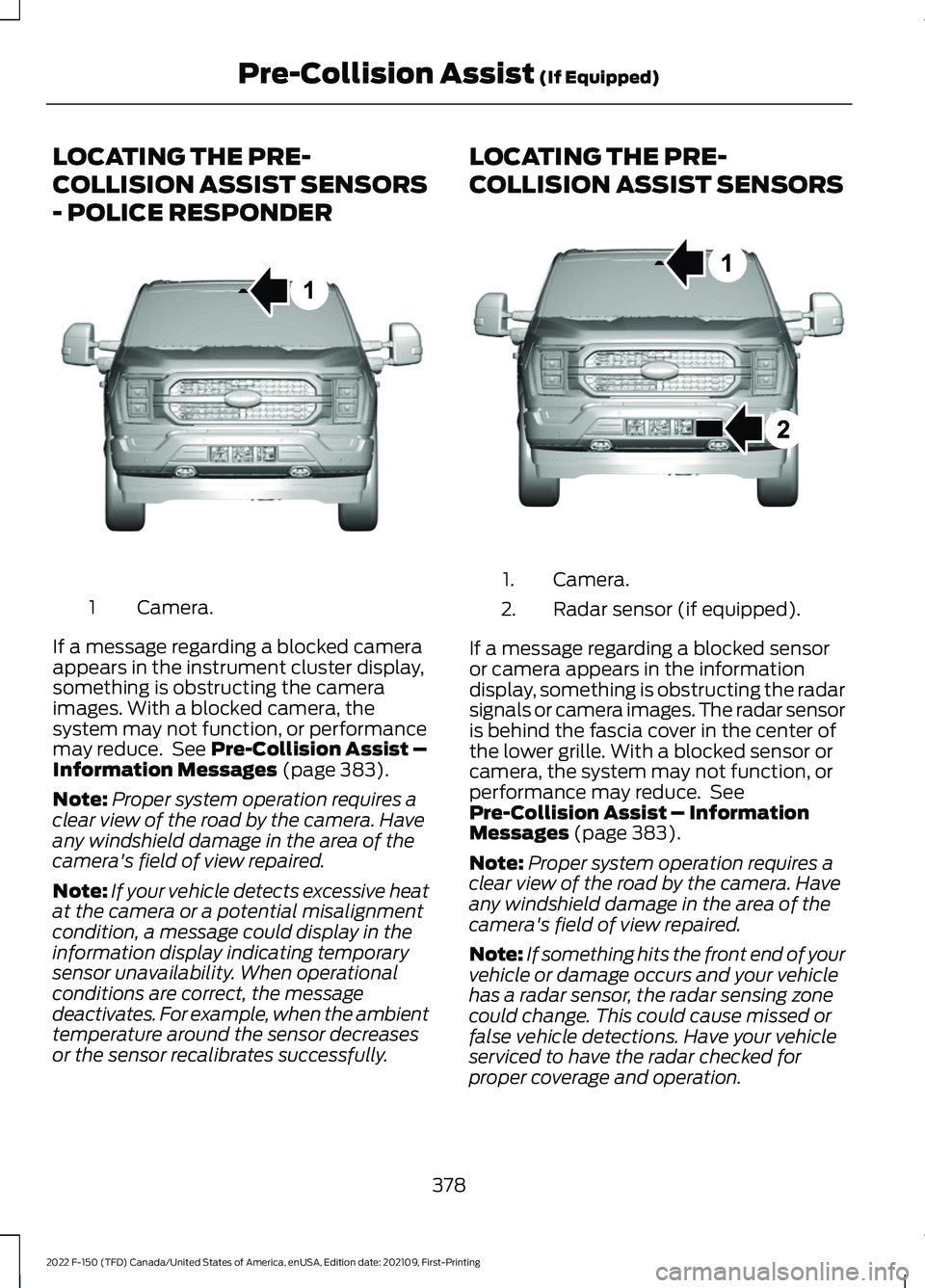
LOCATING THE PRE-
COLLISION ASSIST SENSORS
- POLICE RESPONDER
Camera.
1
If a message regarding a blocked camera
appears in the instrument cluster display,
something is obstructing the camera
images. With a blocked camera, the
system may not function, or performance
may reduce. See Pre-Collision Assist –
Information Messages (page 383).
Note: Proper system operation requires a
clear view of the road by the camera. Have
any windshield damage in the area of the
camera's field of view repaired.
Note: If your vehicle detects excessive heat
at the camera or a potential misalignment
condition, a message could display in the
information display indicating temporary
sensor unavailability. When operational
conditions are correct, the message
deactivates. For example, when the ambient
temperature around the sensor decreases
or the sensor recalibrates successfully. LOCATING THE PRE-
COLLISION ASSIST SENSORS
Camera.
1.
Radar sensor (if equipped).
2.
If a message regarding a blocked sensor
or camera appears in the information
display, something is obstructing the radar
signals or camera images. The radar sensor
is behind the fascia cover in the center of
the lower grille. With a blocked sensor or
camera, the system may not function, or
performance may reduce. See
Pre-Collision Assist – Information
Messages
(page 383).
Note: Proper system operation requires a
clear view of the road by the camera. Have
any windshield damage in the area of the
camera's field of view repaired.
Note: If something hits the front end of your
vehicle or damage occurs and your vehicle
has a radar sensor, the radar sensing zone
could change. This could cause missed or
false vehicle detections. Have your vehicle
serviced to have the radar checked for
proper coverage and operation.
378
2022 F-150 (TFD) Canada/United States of America, enUSA, Edition date: 202109, First-Printing Pre-Collision Assist
(If Equipped)1E346800 E328125
Page 383 of 750
Note:
If your vehicle detects excessive heat
at the camera or a potential misalignment
condition, a message could display in the
information display indicating temporary
sensor unavailability. When operational
conditions are correct, the message
deactivates. For example, when the ambient
temperature around the sensor decreases
or the sensor recalibrates successfully. DISTANCE INDICATION
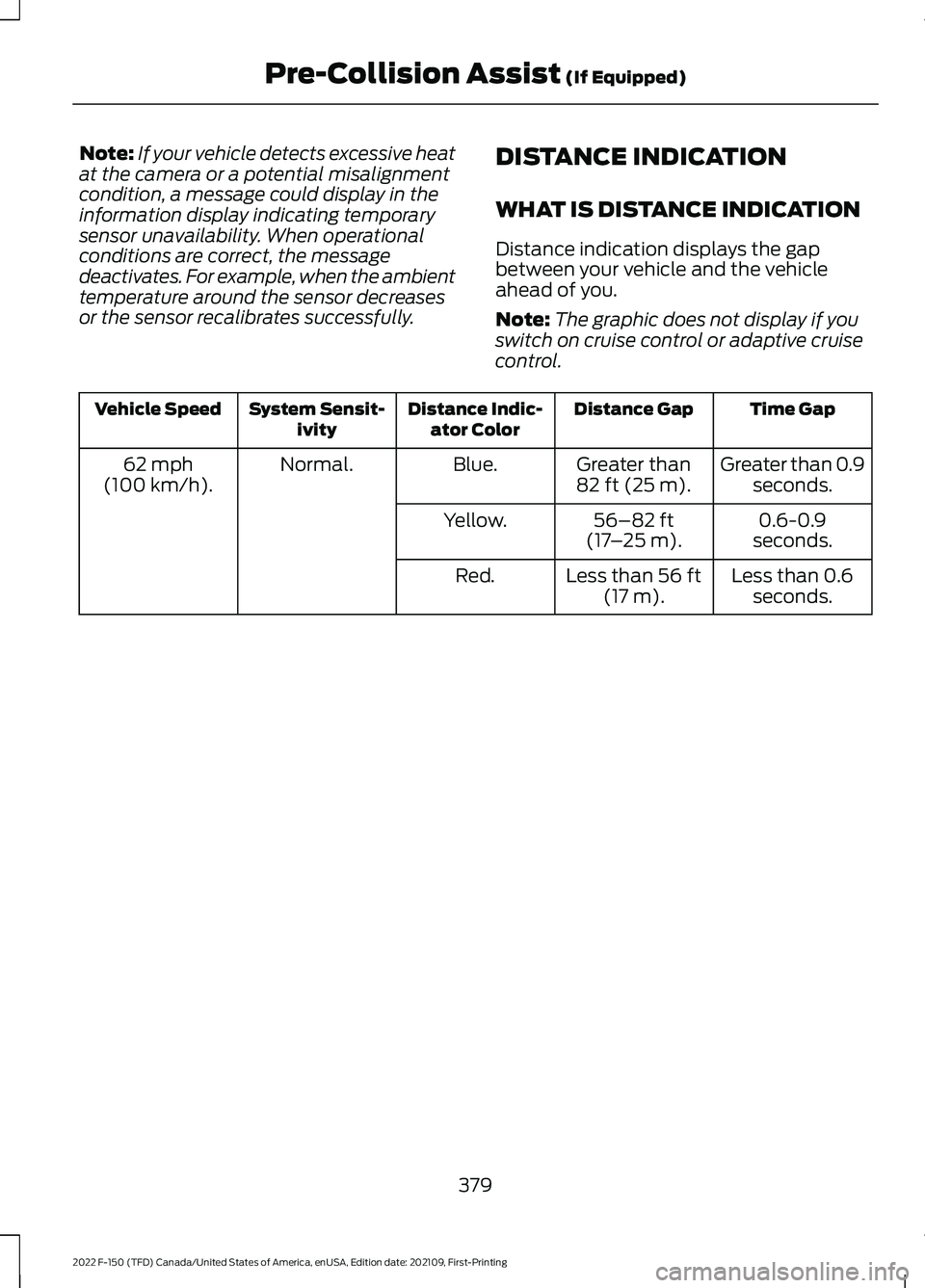
WHAT IS DISTANCE INDICATION
Distance indication displays the gap
between your vehicle and the vehicle
ahead of you.
Note:
The graphic does not display if you
switch on cruise control or adaptive cruise
control. Time Gap
Distance Gap
Distance Indic-
ator Color
System Sensit-
ivity
Vehicle Speed
Greater than 0.9seconds.
Greater than
82 ft (25 m).
Blue.
Normal.
62 mph
(100 km/h).
0.6-0.9
seconds.
56–82 ft
(17 –25 m)
.
Yellow.
Less than 0.6seconds.
Less than
56 ft
(17 m).
Red.
379
2022 F-150 (TFD) Canada/United States of America, enUSA, Edition date: 202109, First-Printing Pre-Collision Assist
(If Equipped)
Page 384 of 750
SWITCHING DISTANCE
INDICATION ON AND OFF
To switch the system on or off, use the
touchscreen:
1. Press Features on the touchscreen.
2. Press
Driver Assistance.
3. Press
Pre-Collision Assist.
4. Switch
Distance Indication on or off.
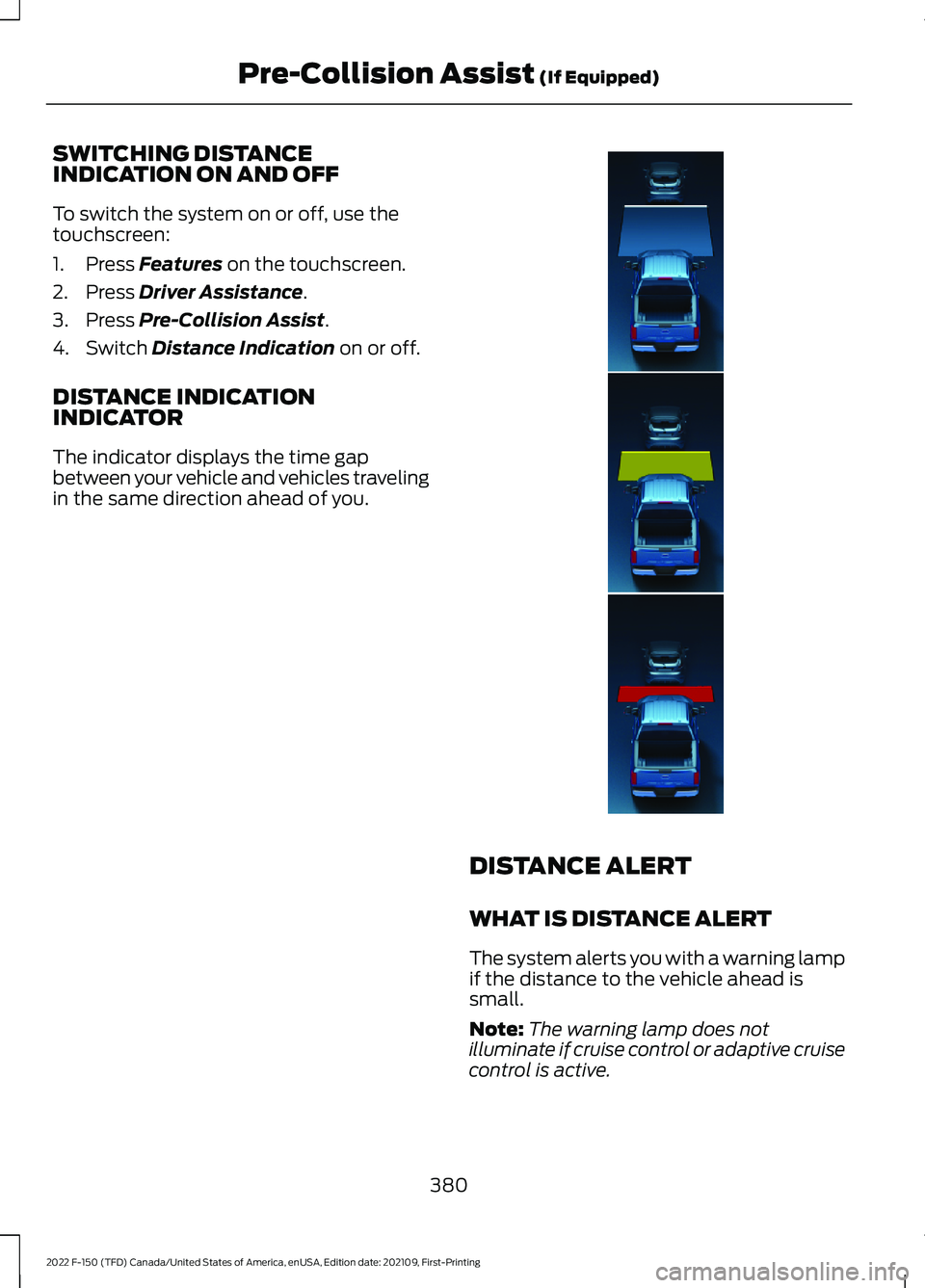
DISTANCE INDICATION
INDICATOR
The indicator displays the time gap
between your vehicle and vehicles traveling
in the same direction ahead of you. DISTANCE ALERT
WHAT IS DISTANCE ALERT
The system alerts you with a warning lamp
if the distance to the vehicle ahead is
small.
Note:
The warning lamp does not
illuminate if cruise control or adaptive cruise
control is active.
380
2022 F-150 (TFD) Canada/United States of America, enUSA, Edition date: 202109, First-Printing Pre-Collision Assist
(If Equipped)E358909
Page 388 of 750
PRE-COLLISION ASSIST –
FREQUENTLY ASKED QUESTIONS
- POLICE RESPONDER
Camera Troubleshooting
The windshield in front of the camera
is dirty or obstructed.
Clean the outside of the windshield in
front of the camera.
The windshield in front of the camera
is clean, but the message remains in
the instrument cluster display. Wait a short time. It could take several
minutes for the camera to detect that
there is no obstruction.
PRE-COLLISION ASSIST –
FREQUENTLY ASKED QUESTIONS
Camera Troubleshooting
The windshield in front of the camera
is dirty or obstructed. Clean the outside of the windshield in
front of the camera.
The windshield in front of the camera
is clean, but the message remains in
the instrument cluster display. Wait a short time. It could take several
minutes for the camera to detect that
there is no obstruction.
Radar Troubleshooting (If Equipped)
The surface of the radar in the grille is
dirty or obstructed. Clean the grille surface in front of the
radar or remove the object causing the
obstruction. The surface of the radar in the grille is
clean, but the message remains in the
instrument cluster display.
Wait a short time. It could take several
minutes for the radar to detect that
there is no obstruction.
Heavy rain, spray or fog is interfering
with the radar signals. The pre-collision assist system is
temporarily disabled. Pre-collision
assist reactivates a short time after
the weather conditions improve.
Swirling water or snow or ice on the
surface of the road is interfering with
the radar signals. The pre-collision assist system is
temporarily disabled. Pre-collision
assist reactivates a short time after
the weather conditions improve.
Radar is out of alignment due to a
front-end impact. Have your vehicle serviced to have the
radar checked for proper coverage and
operation.
PRE-COLLISION ASSIST –
FREQUENTLY ASKED QUESTIONS
- VEHICLES WITH: INTERSECTION
ASSIST
Camera Troubleshooting
The windshield in front of the camera
is dirty or obstructed. Clean the outside of the windshield in
front of the camera.
The windshield in front of the camera
is clean, but the message remains in
the instrument cluster display. Wait a short time. It could take several
minutes for the camera to detect that
there is no obstruction.
384
2022 F-150 (TFD) Canada/United States of America, enUSA, Edition date: 202109, First-Printing Pre-Collision Assist
(If Equipped)
Page 389 of 750
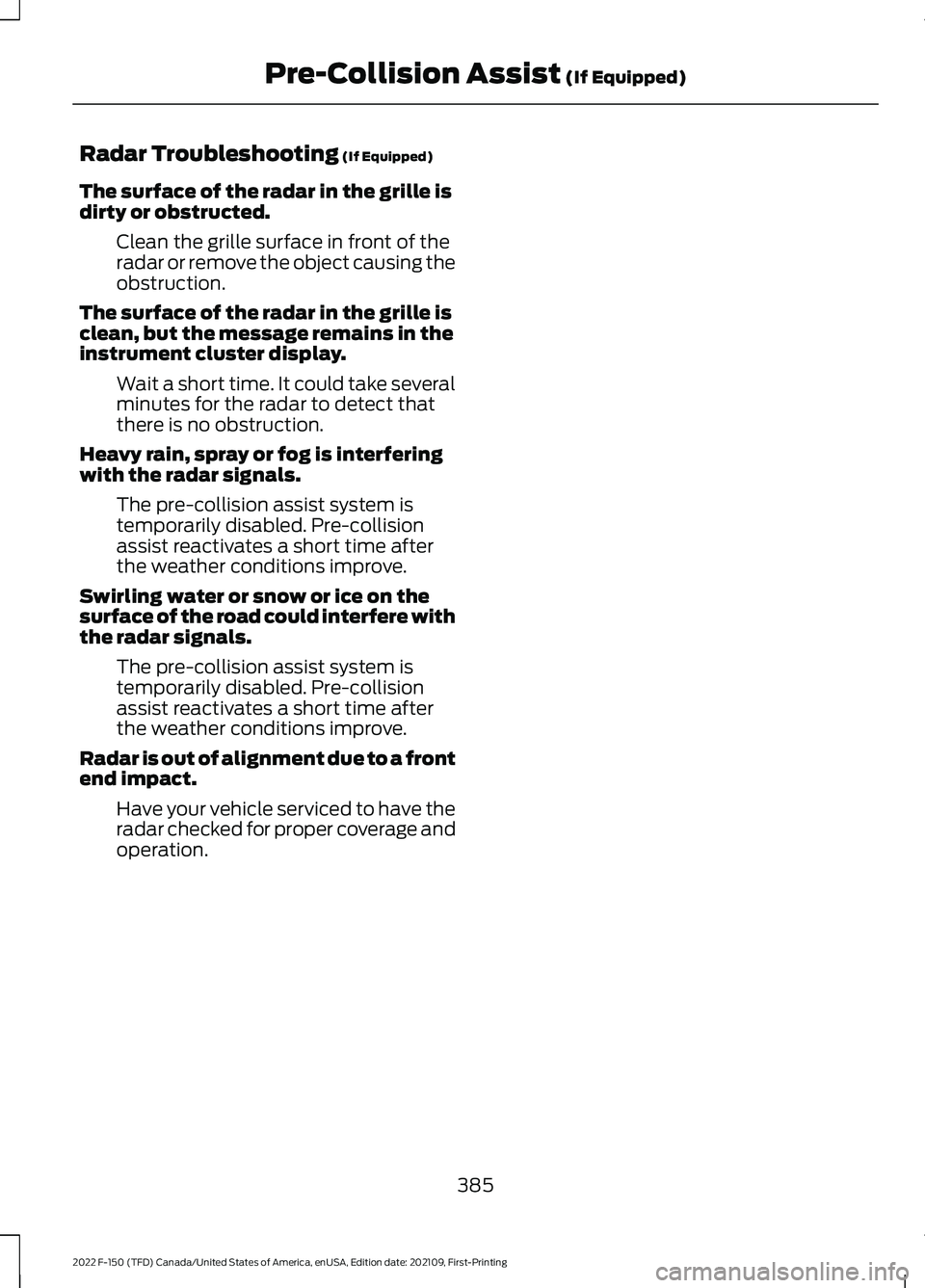
Radar Troubleshooting (If Equipped)
The surface of the radar in the grille is
dirty or obstructed. Clean the grille surface in front of the
radar or remove the object causing the
obstruction.
The surface of the radar in the grille is
clean, but the message remains in the
instrument cluster display. Wait a short time. It could take several
minutes for the radar to detect that
there is no obstruction.
Heavy rain, spray or fog is interfering
with the radar signals. The pre-collision assist system is
temporarily disabled. Pre-collision
assist reactivates a short time after
the weather conditions improve.
Swirling water or snow or ice on the
surface of the road could interfere with
the radar signals. The pre-collision assist system is
temporarily disabled. Pre-collision
assist reactivates a short time after
the weather conditions improve.
Radar is out of alignment due to a front
end impact. Have your vehicle serviced to have the
radar checked for proper coverage and
operation.
385
2022 F-150 (TFD) Canada/United States of America, enUSA, Edition date: 202109, First-Printing Pre-Collision Assist
(If Equipped)
Page 406 of 750
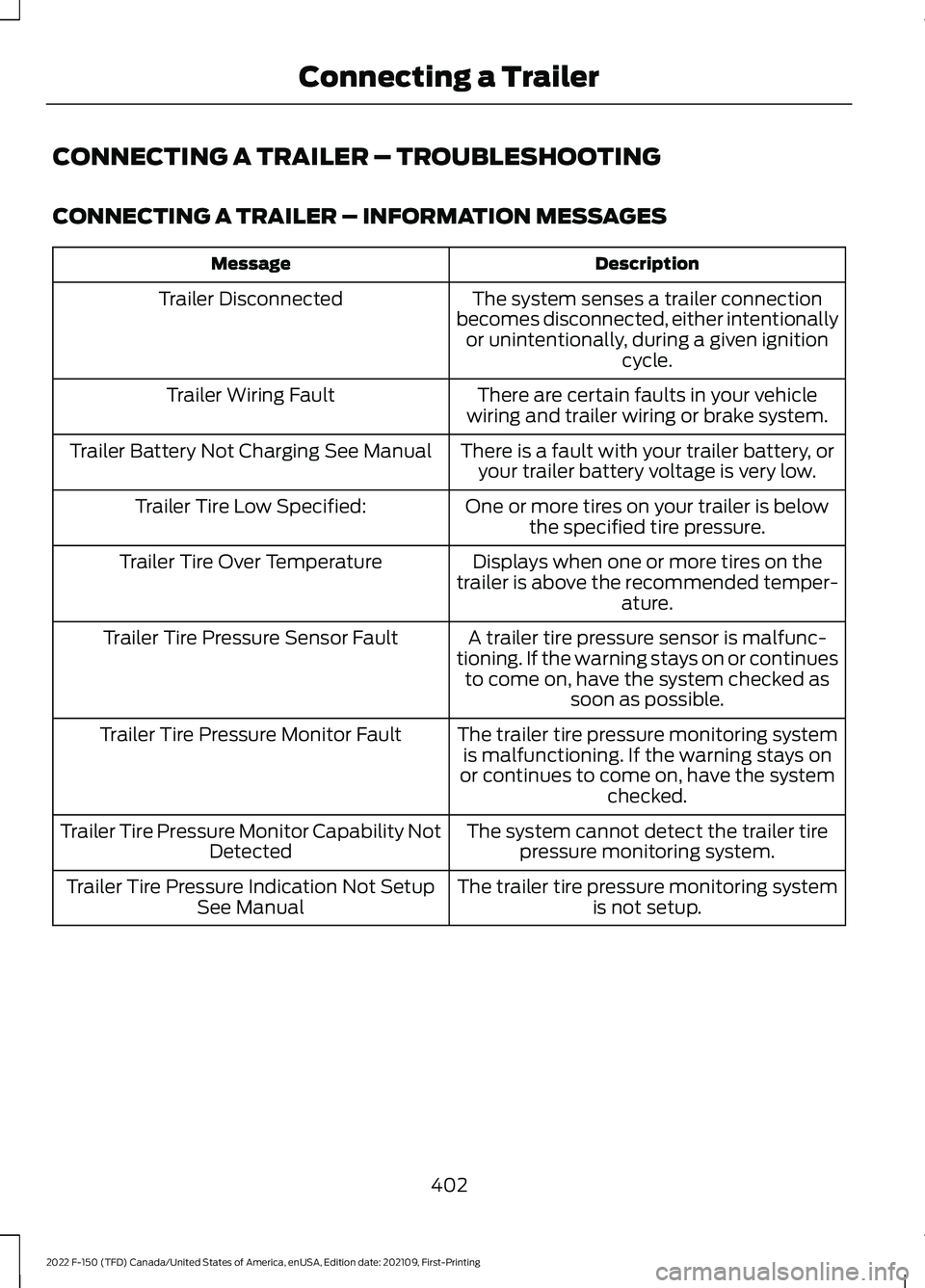
CONNECTING A TRAILER – TROUBLESHOOTING
CONNECTING A TRAILER – INFORMATION MESSAGES
Description
Message
The system senses a trailer connection
becomes disconnected, either intentionally or unintentionally, during a given ignition cycle.
Trailer Disconnected
There are certain faults in your vehicle
wiring and trailer wiring or brake system.
Trailer Wiring Fault
There is a fault with your trailer battery, oryour trailer battery voltage is very low.
Trailer Battery Not Charging See Manual
One or more tires on your trailer is belowthe specified tire pressure.
Trailer Tire Low Specified:
Displays when one or more tires on the
trailer is above the recommended temper- ature.
Trailer Tire Over Temperature
A trailer tire pressure sensor is malfunc-
tioning. If the warning stays on or continues to come on, have the system checked as soon as possible.
Trailer Tire Pressure Sensor Fault
The trailer tire pressure monitoring systemis malfunctioning. If the warning stays on
or continues to come on, have the system checked.
Trailer Tire Pressure Monitor Fault
The system cannot detect the trailer tirepressure monitoring system.
Trailer Tire Pressure Monitor Capability Not
Detected
The trailer tire pressure monitoring systemis not setup.
Trailer Tire Pressure Indication Not Setup
See Manual
402
2022 F-150 (TFD) Canada/United States of America, enUSA, Edition date: 202109, First-Printing Connecting a Trailer
Page 412 of 750
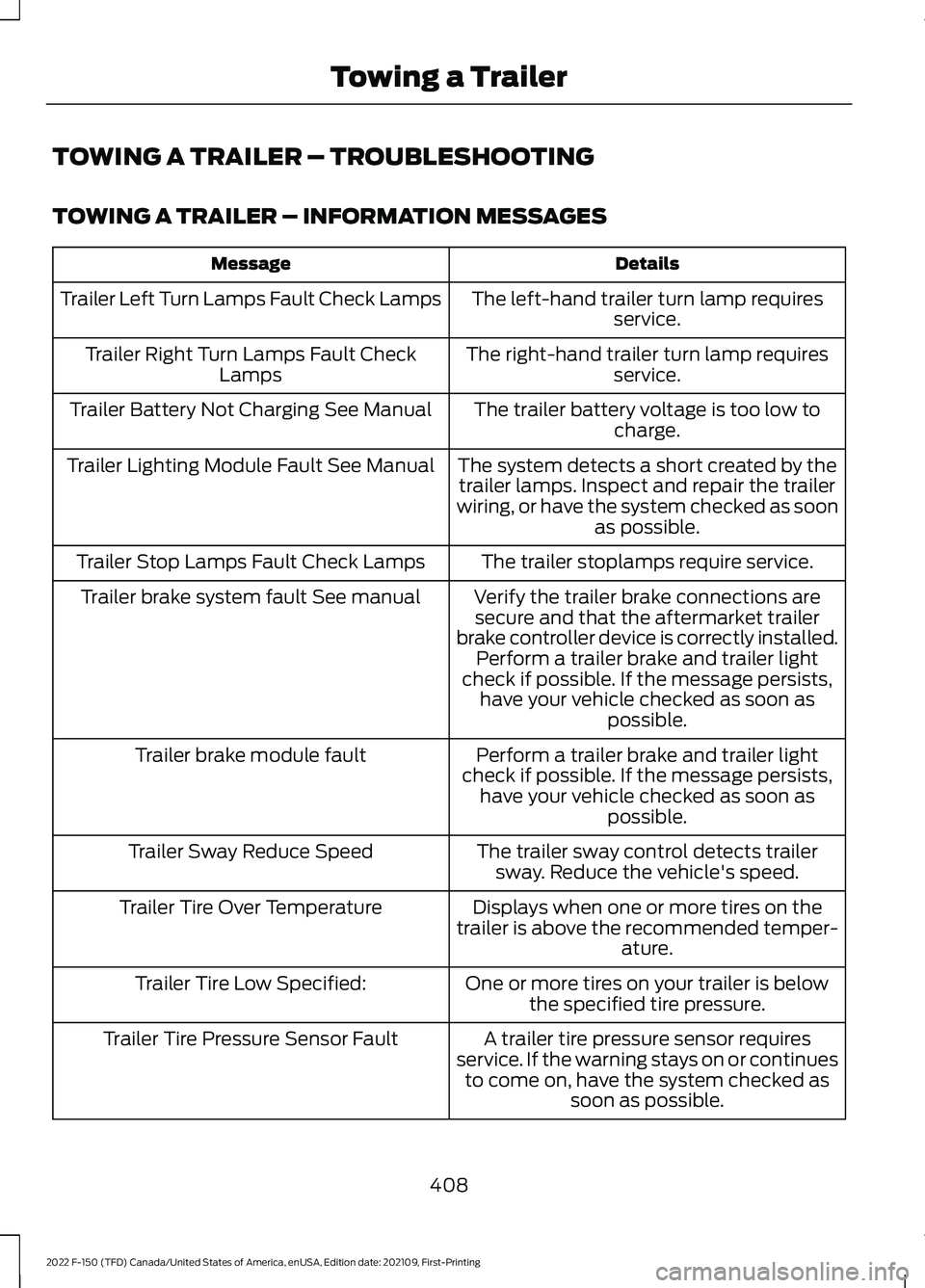
TOWING A TRAILER – TROUBLESHOOTING
TOWING A TRAILER – INFORMATION MESSAGES
Details
Message
The left-hand trailer turn lamp requiresservice.
Trailer Left Turn Lamps Fault Check Lamps
The right-hand trailer turn lamp requiresservice.
Trailer Right Turn Lamps Fault Check
Lamps
The trailer battery voltage is too low tocharge.
Trailer Battery Not Charging See Manual
The system detects a short created by thetrailer lamps. Inspect and repair the trailer
wiring, or have the system checked as soon as possible.
Trailer Lighting Module Fault See Manual
The trailer stoplamps require service.
Trailer Stop Lamps Fault Check Lamps
Verify the trailer brake connections aresecure and that the aftermarket trailer
brake controller device is correctly installed. Perform a trailer brake and trailer light
check if possible. If the message persists, have your vehicle checked as soon as possible.
Trailer brake system fault See manual
Perform a trailer brake and trailer light
check if possible. If the message persists, have your vehicle checked as soon as possible.
Trailer brake module fault
The trailer sway control detects trailersway. Reduce the vehicle's speed.
Trailer Sway Reduce Speed
Displays when one or more tires on the
trailer is above the recommended temper- ature.
Trailer Tire Over Temperature
One or more tires on your trailer is belowthe specified tire pressure.
Trailer Tire Low Specified:
A trailer tire pressure sensor requires
service. If the warning stays on or continues to come on, have the system checked as soon as possible.
Trailer Tire Pressure Sensor Fault
408
2022 F-150 (TFD) Canada/United States of America, enUSA, Edition date: 202109, First-Printing Towing a Trailer
Page 414 of 750
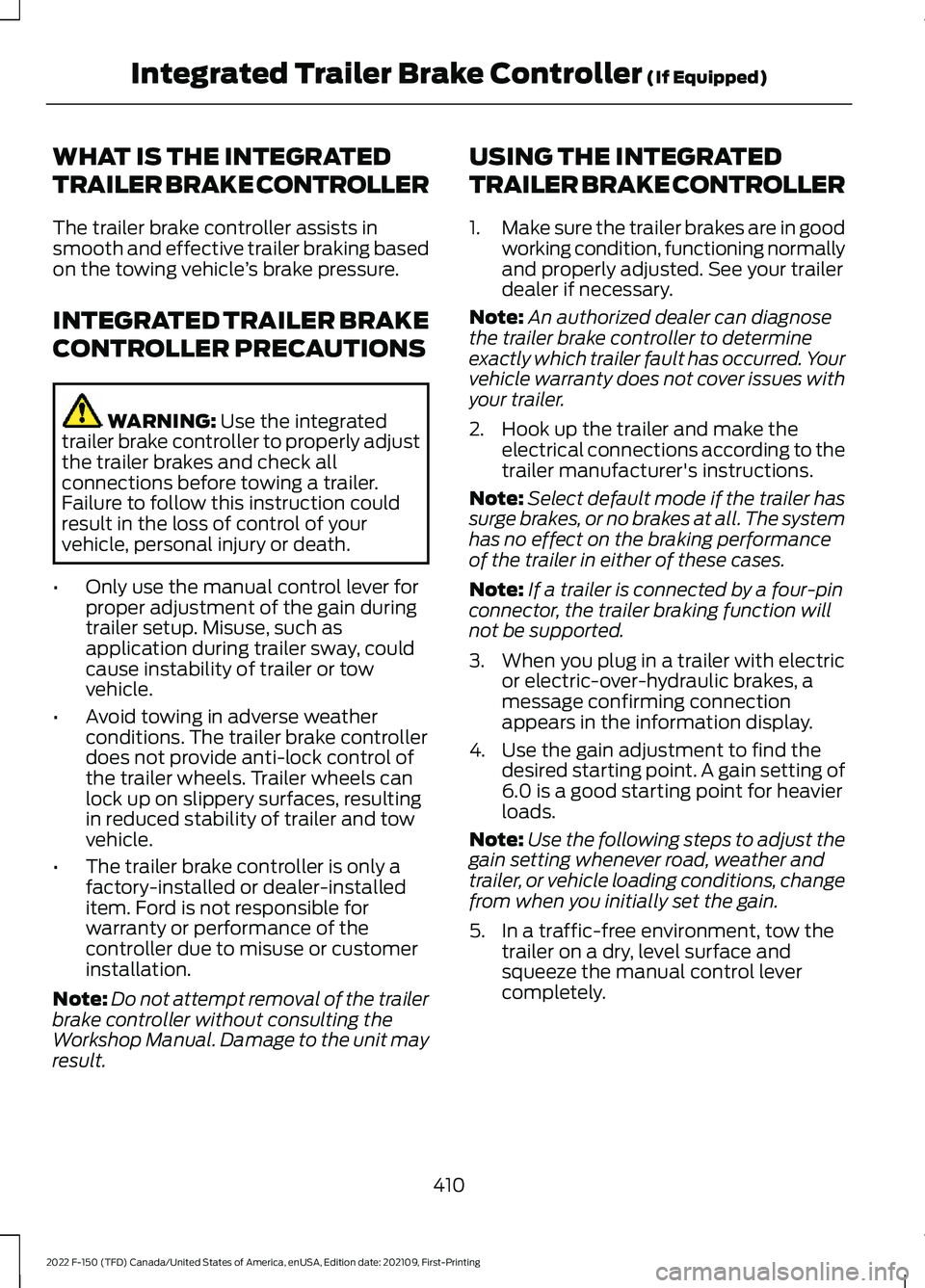
WHAT IS THE INTEGRATED
TRAILER BRAKE CONTROLLER
The trailer brake controller assists in
smooth and effective trailer braking based
on the towing vehicle
’s brake pressure.
INTEGRATED TRAILER BRAKE
CONTROLLER PRECAUTIONS WARNING: Use the integrated
trailer brake controller to properly adjust
the trailer brakes and check all
connections before towing a trailer.
Failure to follow this instruction could
result in the loss of control of your
vehicle, personal injury or death.
• Only use the manual control lever for
proper adjustment of the gain during
trailer setup. Misuse, such as
application during trailer sway, could
cause instability of trailer or tow
vehicle.
• Avoid towing in adverse weather
conditions. The trailer brake controller
does not provide anti-lock control of
the trailer wheels. Trailer wheels can
lock up on slippery surfaces, resulting
in reduced stability of trailer and tow
vehicle.
• The trailer brake controller is only a
factory-installed or dealer-installed
item. Ford is not responsible for
warranty or performance of the
controller due to misuse or customer
installation.
Note: Do not attempt removal of the trailer
brake controller without consulting the
Workshop Manual. Damage to the unit may
result. USING THE INTEGRATED
TRAILER BRAKE CONTROLLER
1.
Make sure the trailer brakes are in good
working condition, functioning normally
and properly adjusted. See your trailer
dealer if necessary.
Note: An authorized dealer can diagnose
the trailer brake controller to determine
exactly which trailer fault has occurred. Your
vehicle warranty does not cover issues with
your trailer.
2. Hook up the trailer and make the electrical connections according to the
trailer manufacturer's instructions.
Note: Select default mode if the trailer has
surge brakes, or no brakes at all. The system
has no effect on the braking performance
of the trailer in either of these cases.
Note: If a trailer is connected by a four-pin
connector, the trailer braking function will
not be supported.
3. When you plug in a trailer with electric or electric-over-hydraulic brakes, a
message confirming connection
appears in the information display.
4. Use the gain adjustment to find the desired starting point. A gain setting of
6.0 is a good starting point for heavier
loads.
Note: Use the following steps to adjust the
gain setting whenever road, weather and
trailer, or vehicle loading conditions, change
from when you initially set the gain.
5. In a traffic-free environment, tow the trailer on a dry, level surface and
squeeze the manual control lever
completely.
410
2022 F-150 (TFD) Canada/United States of America, enUSA, Edition date: 202109, First-Printing Integrated Trailer Brake Controller
(If Equipped)
Page 415 of 750
6. If the trailer wheels lock up, indicated
by squealing tires, reduce the gain
setting. If the trailer wheels turn freely,
increase the gain setting. Repeat Steps
5 and 6 until the gain setting is at a
point just below trailer wheel lock-up.
If towing a heavier trailer, trailer wheel
lock-up may not be attainable even
with the maximum gain setting of 10.
Note: Only perform this procedure at
speeds of approximately 20– 25 mph
(30–40 km/h).
Note: The trailer brake controller reduces
output at vehicle speeds below
11 mph
(18 km/h) so that trailer and vehicle braking
is not jerky or harsh. This feature is only
available when applying the brakes using
your vehicle's brake pedal, not the
controller.
Note: Your vehicle's brake system and the
trailer brake system work independently of
each other. Changing the gain setting on the
controller does not affect the operation of
your vehicle's brakes whether you attach a
trailer or not.
Note: With the proper electrical connection,
pressing your vehicle brake pedal or using
the manual control lever illuminates both
trailer and vehicle brake lamps.
Note: When you switch the engine off, the
controller output is disabled and the display
and module shut down. The controller
module and display turn on when you switch
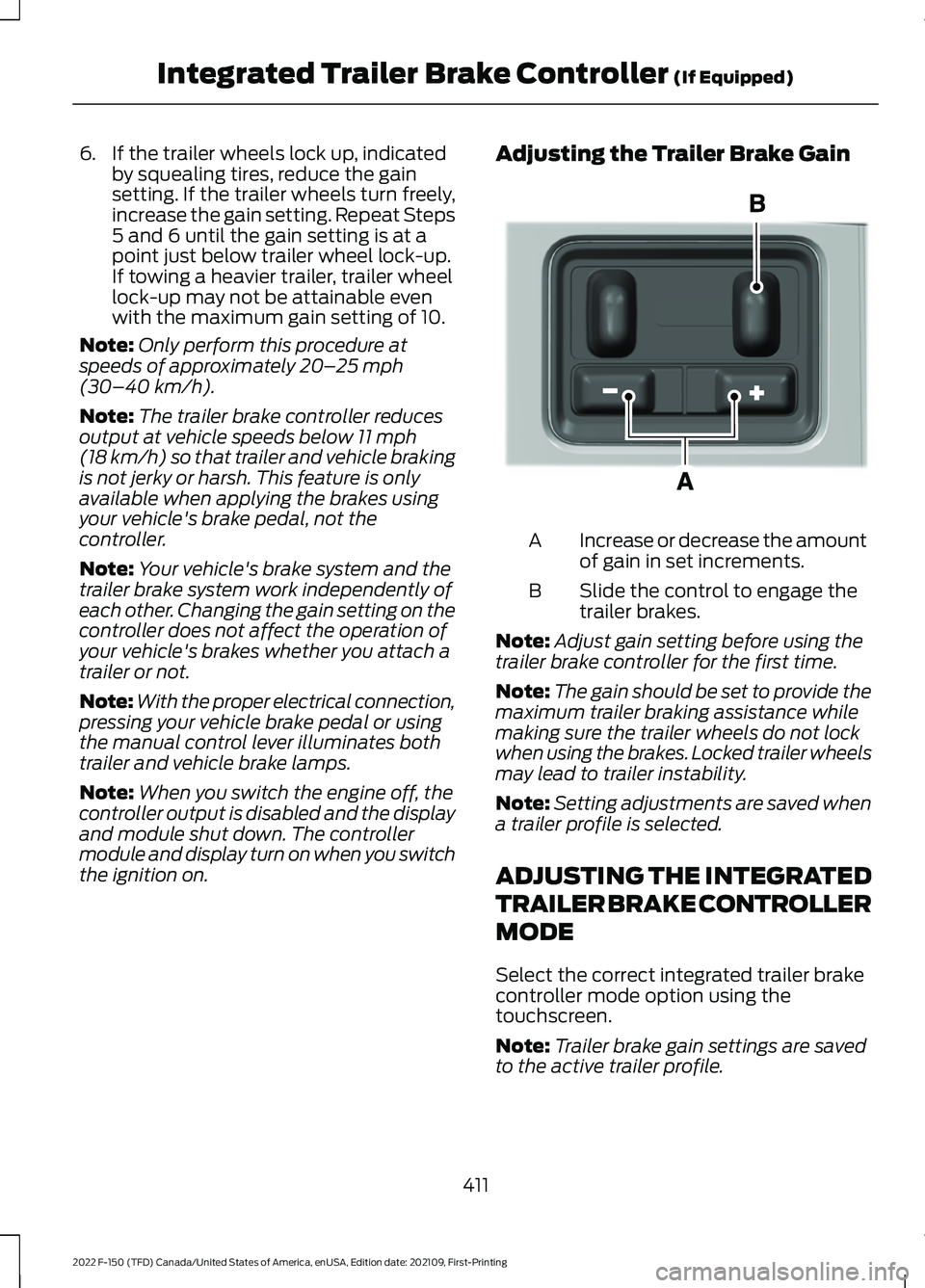
the ignition on. Adjusting the Trailer Brake Gain
Increase or decrease the amount
of gain in set increments.
A
Slide the control to engage the
trailer brakes.
B
Note: Adjust gain setting before using the
trailer brake controller for the first time.
Note: The gain should be set to provide the
maximum trailer braking assistance while
making sure the trailer wheels do not lock
when using the brakes. Locked trailer wheels
may lead to trailer instability.
Note: Setting adjustments are saved when
a trailer profile is selected.
ADJUSTING THE INTEGRATED
TRAILER BRAKE CONTROLLER
MODE
Select the correct integrated trailer brake
controller mode option using the
touchscreen.
Note: Trailer brake gain settings are saved
to the active trailer profile.
411
2022 F-150 (TFD) Canada/United States of America, enUSA, Edition date: 202109, First-Printing Integrated Trailer Brake Controller
(If Equipped)E333154
Page 416 of 750
Selecting the Trailer Brake Type
1. Press Default for trailers with
electromagnetic drum brake systems
or press
Electric over Hydraulic for
trailers with electrically actuated
hydraulic brake systems.
2. Press
Save. Selecting the Trailer Brake Effort
1. Select a setting for your trailer.
Note:
The default value is
Low and is the
recommended setting for most trailers.
Select a different setting if your trailer's
brakes require more initial voltage, or you
prefer more aggressive trailer braking.
2. Press
Save.
INTEGRATED TRAILER BRAKE CONTROLLER –
TROUBLESHOOTING
INTEGRATED TRAILER BRAKE CONTROLLER – INFORMATION
MESSAGES Details
Message
The system detects the trailer wiring
connection is disconnected, during a given ignition cycle.
Trailer Disconnected
The system detects an electrical fault inthe trailer brake circuit. If this message
appears without a trailer attached, see your authorized dealer. If a trailer is attached, inspect and repair the trailer wiring.
Trailer Wiring Fault
Displays the current gain setting for thetrailer brake.
Trailer Brake Gain: {trailer gain value:#0.0}
Displays the current gain setting for the
trailer brake when you do not have a trailer connected.
Trailer Brake Gain: {trailer gain value:#0.0}
No Trailer
412
2022 F-150 (TFD) Canada/United States of America, enUSA, Edition date: 202109, First-Printing Integrated Trailer Brake Controller
(If Equipped)