Side mirrors FORD F-150 2022 Owners Manual
[x] Cancel search | Manufacturer: FORD, Model Year: 2022, Model line: F-150, Model: FORD F-150 2022Pages: 750, PDF Size: 12.96 MB
Page 153 of 750
SWITCHING THE SPOT LAMPS ON
AND OFF (If Equipped)
The spot lamp buttons are near the lighting
control. Press the button to switch on the
left-hand spot lamp.
Press the button to switch on the
right-hand spot lamp.
Move the position of the exterior mirrors
to adjust the aim.
Note: The lighting control must be set to
the parking lamp position.
Note: The spot lamps illuminate the area
in front of and to the side of your vehicle.
EXTERIOR LAMP INDICATORS
Front Fog Lamp It illuminates when you switch
the front fog lamps on.
Turn Signal Lamp It flashes when you switch the
turn signal lamps on.
Note: An increase in the rate of flashing
warns of a failed turn signal lamp.
EXTERIOR LAMP AUDIBLE
WARNING
Exterior Lamps On
Sounds when you open the driver door and
the exterior lamps are on. EXTERIOR ZONE LIGHTING (IF
EQUIPPED)
WHAT IS EXTERIOR ZONE
LIGHTING
Exterior zone lighting divides the exterior
lighting into zones and allows you to switch
them on and off to provide lighting around
the perimeter of your vehicle.
USING THE EXTERIOR ZONE
LIGHTING
1. Press
Features on the touchscreen.
2. Press
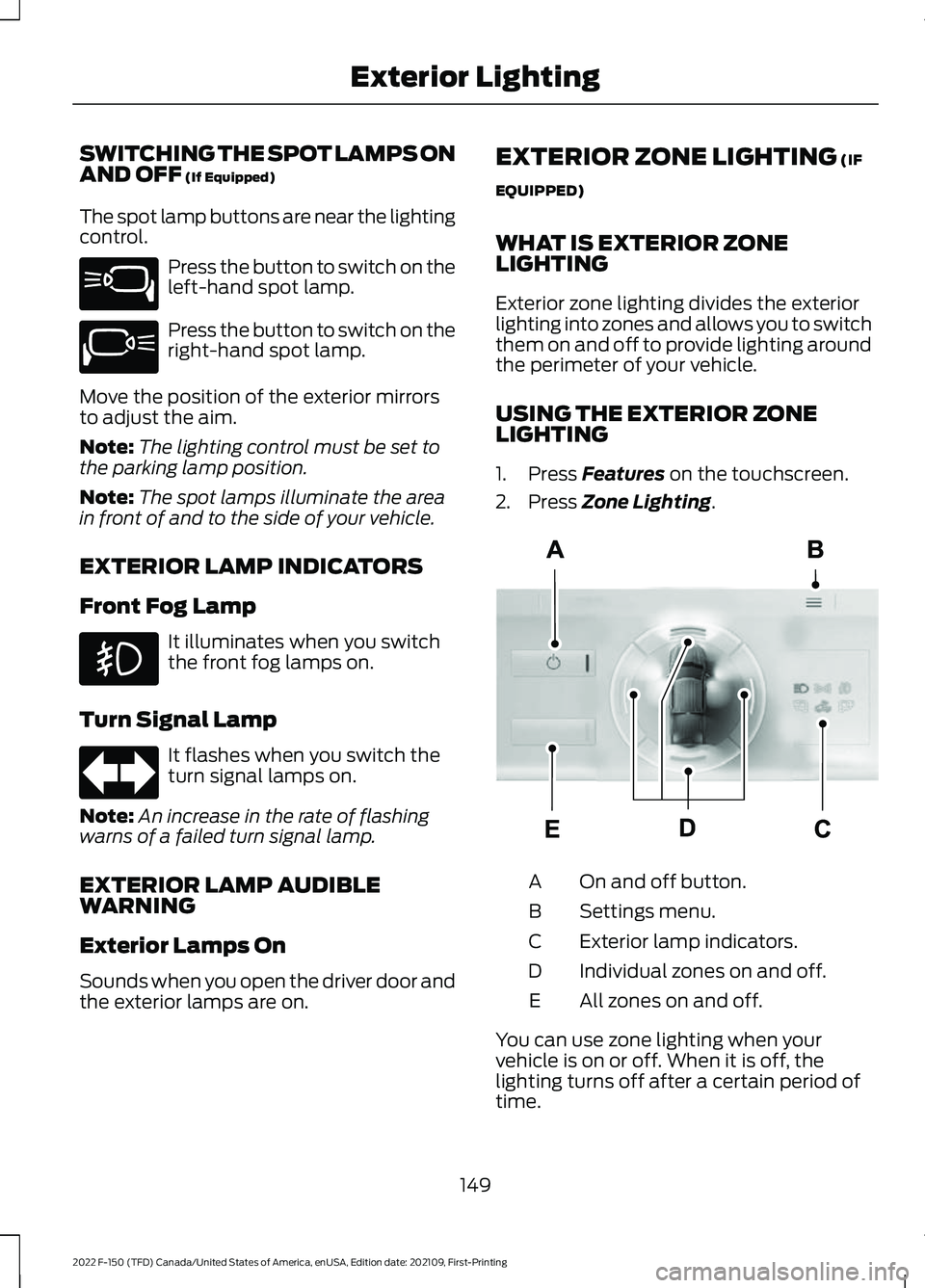
Zone Lighting. On and off button.
A
Settings menu.
B
Exterior lamp indicators.
C
Individual zones on and off.
D
All zones on and off.
E
You can use zone lighting when your
vehicle is on or off. When it is off, the
lighting turns off after a certain period of
time.
149
2022 F-150 (TFD) Canada/United States of America, enUSA, Edition date: 202109, First-Printing Exterior LightingE340436 E340437 E339129
Page 186 of 750
Note:
When maximum defrost is on, the air
conditioning compressor may continue to
operate even though you switch off the air
conditioning.
SWITCHING MAXIMUM
COOLING ON AND OFF Press the button.
Note: When you switch maximum cooling
off, air conditioning remains on.
SWITCHING THE HEATED
WIPER PARK ON AND OFF (IF
EQUIPPED) When you switch the heated rear
window on, the heated wiper
park also turns on.
SWITCHING THE HEATED
REAR WINDOW ON AND OFF Press the button to clear the rear
window of thin ice and fog. The
heated rear window turns off
after a short period of time.
Note: Do not use harsh chemicals, razor
blades or other sharp objects to clean or
remove decals from the inside of the heated
rear window as this could cause damage to
the heated rear window grid lines not
covered by the vehicle Warranty. SETTING THE BLOWER MOTOR
SPEED Press up or down on the control
to select the blower motor
speed.
Note: For Hybrid Electric Vehicle (HEV) and
Plug-In Hybrid Electric Vehicle (PHEV)
vehicles, the blower motor may run, and you
may feel airflow when the climate control
is off to provide cooling to the battery.
SWITCHING THE HEATED
MIRRORS ON AND OFF Press the button.
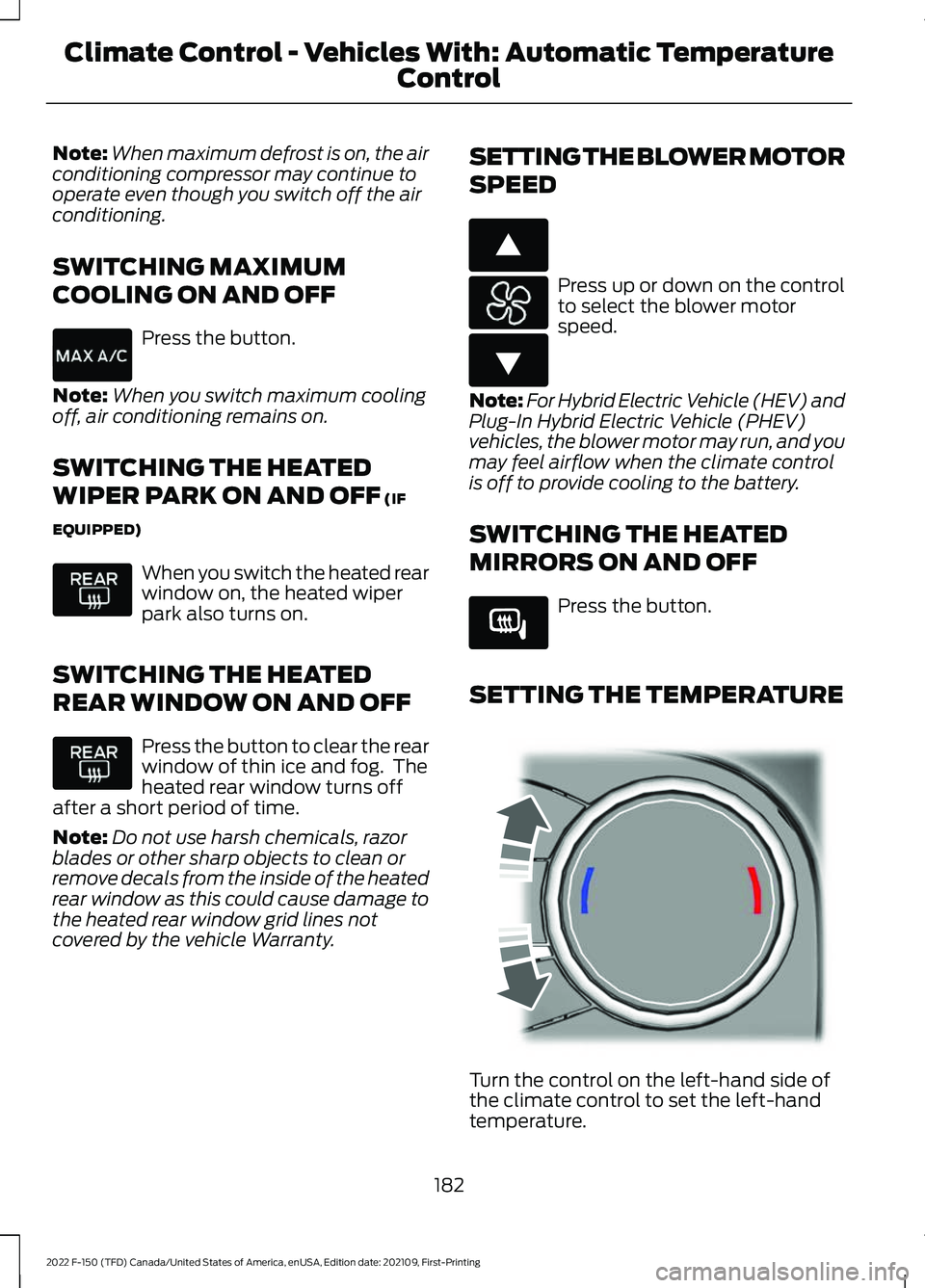
SETTING THE TEMPERATURE Turn the control on the left-hand side of
the climate control to set the left-hand
temperature.
182
2022 F-150 (TFD) Canada/United States of America, enUSA, Edition date: 202109, First-Printing Climate Control - Vehicles With: Automatic Temperature
Control E266187 E266186 E266189 E244115
Page 191 of 750
SWITCHING MAXIMUM
COOLING ON AND OFF
Turn the temperature control
counterclockwise past the
lowest setting to maximize
cooling.
Note: The temperature control springs back
to the lowest setting.
Note: When you switch maximum cooling
off, air conditioning remains on.
SWITCHING THE HEATED
REAR WINDOW ON AND OFF Press the button to clear the rear
window of thin ice and fog. The
heated rear window turns off
after a short period of time.
Note: Do not use harsh chemicals, razor
blades or other sharp objects to clean or
remove decals from the inside of the heated
rear window as this could cause damage to
the heated rear window grid lines not
covered by the vehicle Warranty.
SETTING THE BLOWER MOTOR
SPEED Note:
Lights on the control illuminate to
indicate the blower motor speed.
Note: When you switch the blower motor
off, air conditioning turns off and the
windows could fog up. SWITCHING THE HEATED
MIRRORS ON AND OFF Press the button.
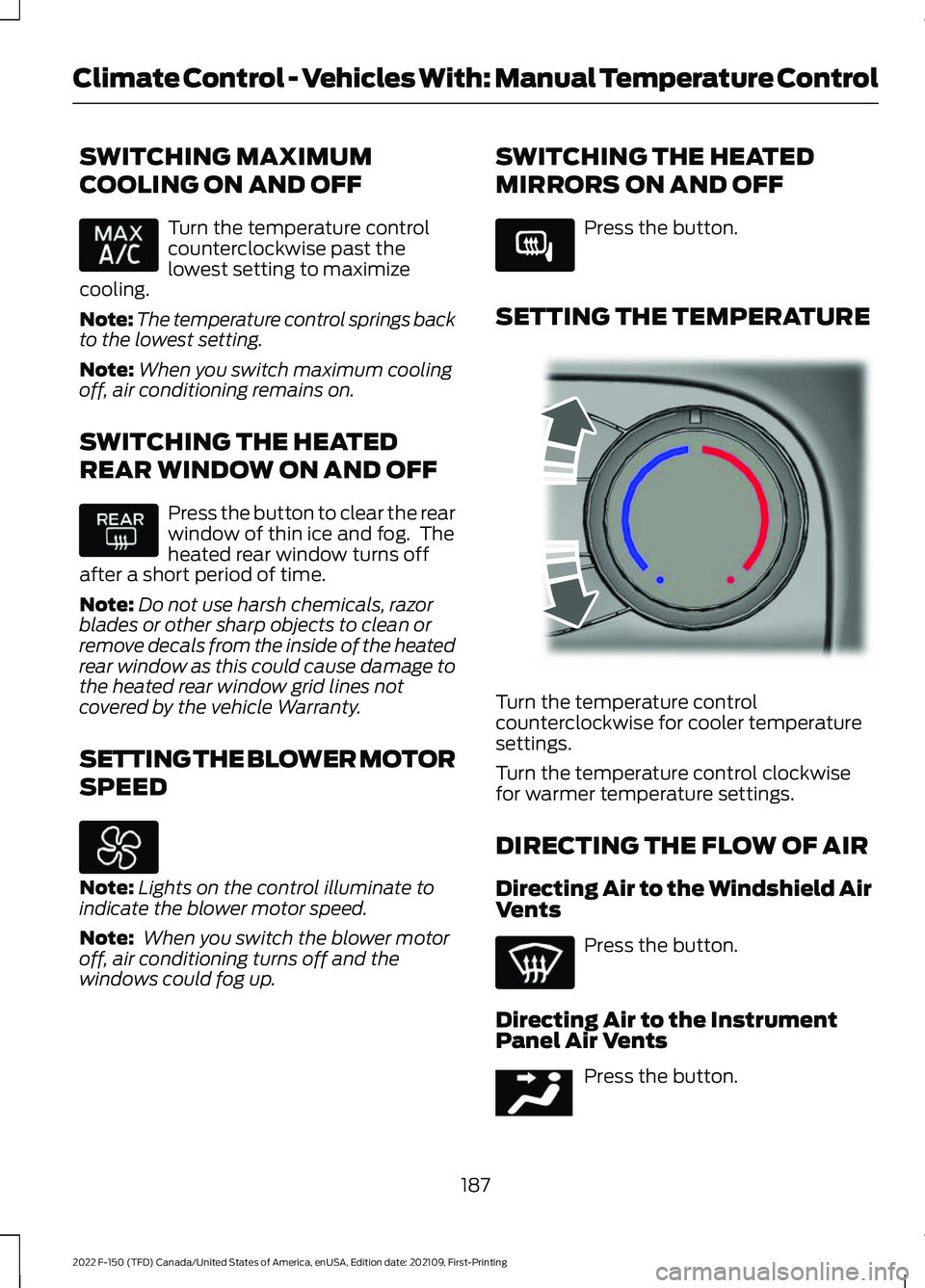
SETTING THE TEMPERATURE Turn the temperature control
counterclockwise for cooler temperature
settings.
Turn the temperature control clockwise
for warmer temperature settings.
DIRECTING THE FLOW OF AIR
Directing Air to the Windshield Air
Vents
Press the button.
Directing Air to the Instrument
Panel Air Vents Press the button.
187
2022 F-150 (TFD) Canada/United States of America, enUSA, Edition date: 202109, First-Printing Climate Control - Vehicles With: Manual Temperature Control E266189 E244106 E244097
Page 323 of 750
REAR VIEW CAMERA GUIDE
LINES
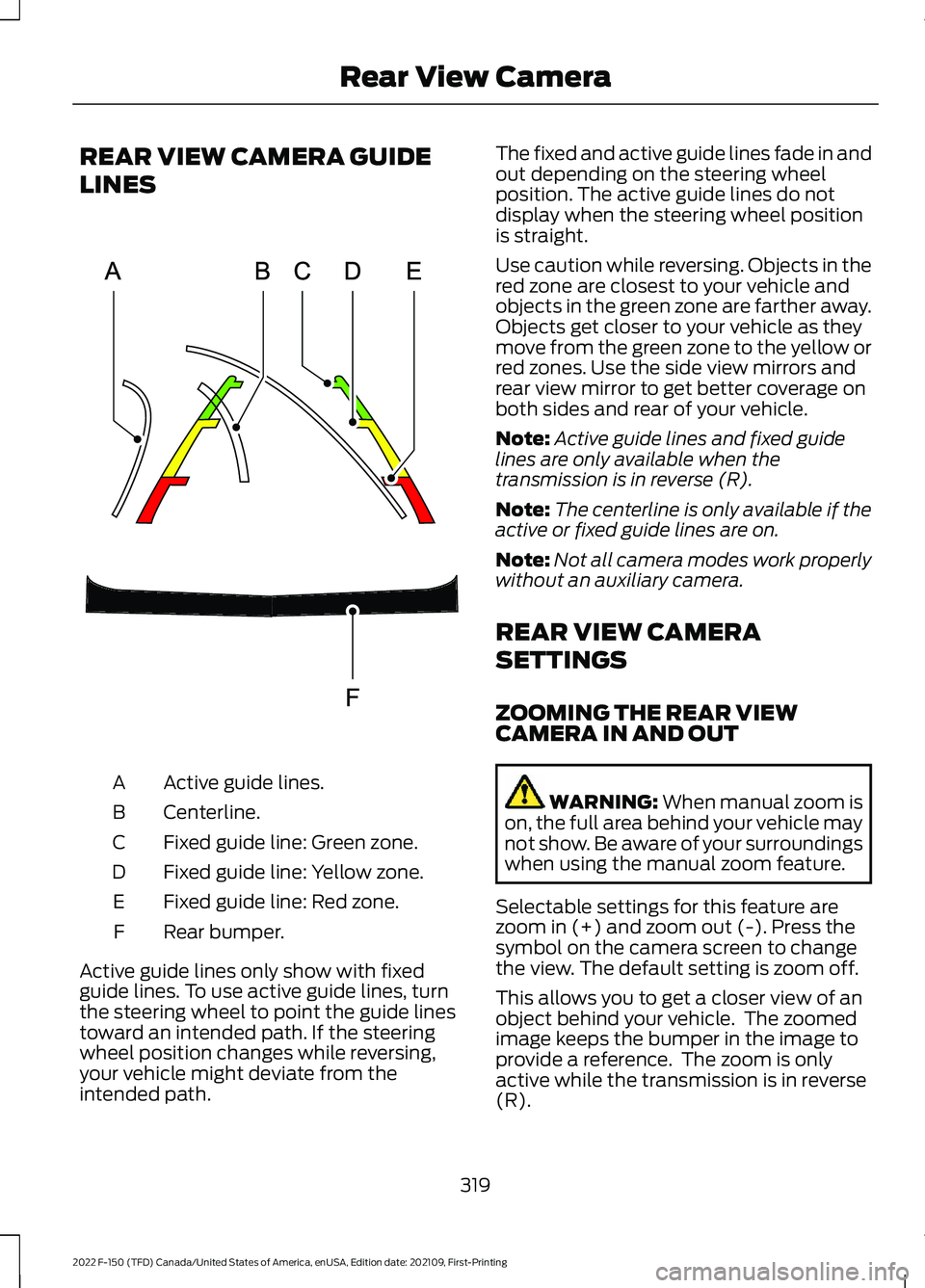
Active guide lines.
A
Centerline.
B
Fixed guide line: Green zone.
C
Fixed guide line: Yellow zone.
D
Fixed guide line: Red zone.
E
Rear bumper.
F
Active guide lines only show with fixed
guide lines. To use active guide lines, turn
the steering wheel to point the guide lines
toward an intended path. If the steering
wheel position changes while reversing,
your vehicle might deviate from the
intended path. The fixed and active guide lines fade in and
out depending on the steering wheel
position. The active guide lines do not
display when the steering wheel position
is straight.
Use caution while reversing. Objects in the
red zone are closest to your vehicle and
objects in the green zone are farther away.
Objects get closer to your vehicle as they
move from the green zone to the yellow or
red zones. Use the side view mirrors and
rear view mirror to get better coverage on
both sides and rear of your vehicle.
Note:
Active guide lines and fixed guide
lines are only available when the
transmission is in reverse (R).
Note: The centerline is only available if the
active or fixed guide lines are on.
Note: Not all camera modes work properly
without an auxiliary camera.
REAR VIEW CAMERA
SETTINGS
ZOOMING THE REAR VIEW
CAMERA IN AND OUT WARNING: When manual zoom is
on, the full area behind your vehicle may
not show. Be aware of your surroundings
when using the manual zoom feature.
Selectable settings for this feature are
zoom in (+) and zoom out (-). Press the
symbol on the camera screen to change
the view. The default setting is zoom off.
This allows you to get a closer view of an
object behind your vehicle. The zoomed
image keeps the bumper in the image to
provide a reference. The zoom is only
active while the transmission is in reverse
(R).
319
2022 F-150 (TFD) Canada/United States of America, enUSA, Edition date: 202109, First-Printing Rear View CameraE306774
Page 325 of 750
WHAT IS THE 360 DEGREE
CAMERA
The 360 degree camera system consists
of front, side and rear cameras which
provide visibility around your vehicle.
HOW DOES THE 360 DEGREE
CAMERA WORK
The 360 Degree Camera system:
•
Allows you to see what is directly in
front of or behind your vehicle.
• Provides a cross traffic view in front of
and behind your vehicle.
• Allows you to see a top-down view of
the area outside your vehicle, including
the blind spots and obstacles near your
vehicle.
360 DEGREE CAMERA
PRECAUTIONS WARNING: The 360 degree
camera system still requires the driver
to use it in conjunction with looking out
of the windows, and checking the interior
and exterior mirrors for maximum
coverage. WARNING:
Objects that are close
to either corner of the bumper or under
the bumper, might not be seen on the
screen due to the limited coverage of the
camera system. WARNING:
Use caution when
turning camera features on or off when
the transmission is not in park (P). Make
sure your vehicle is not moving. WARNING: You are responsible for
controlling your vehicle at all times. The
system is designed to be an aid and does
not relieve you of your responsibility to
drive with due care and attention. Failure
to follow this instruction could result in
the loss of control of your vehicle,
personal injury or death. WARNING:
Use caution when the
rear cargo door is ajar. If the rear cargo
door is ajar, the camera will be out of
position and the video image could be
incorrect. All guide lines disappear when
the rear cargo door is ajar. Failure to
follow this instruction could result in
personal injury. WARNING:
When manual zoom is
on, the full area behind your vehicle may
not show. Be aware of your surroundings
when using the manual zoom feature.
360 DEGREE CAMERA
LIMITATIONS
Note: Use caution if a door is ajar. The 360
degree camera could be out of position and
the image could be incorrect.
LOCATING THE 360 DEGREE
CAMERAS
Rear View Camera
The rear view camera is on the tailgate. It
provides a video image of the area behind
your vehicle.
Front View Camera
The front view camera is in the grille. It
provides a video image of the area in front
of your vehicle.
321
2022 F-150 (TFD) Canada/United States of America, enUSA, Edition date: 202109, First-Printing 360 Degree Camera
(If Equipped)
Page 327 of 750
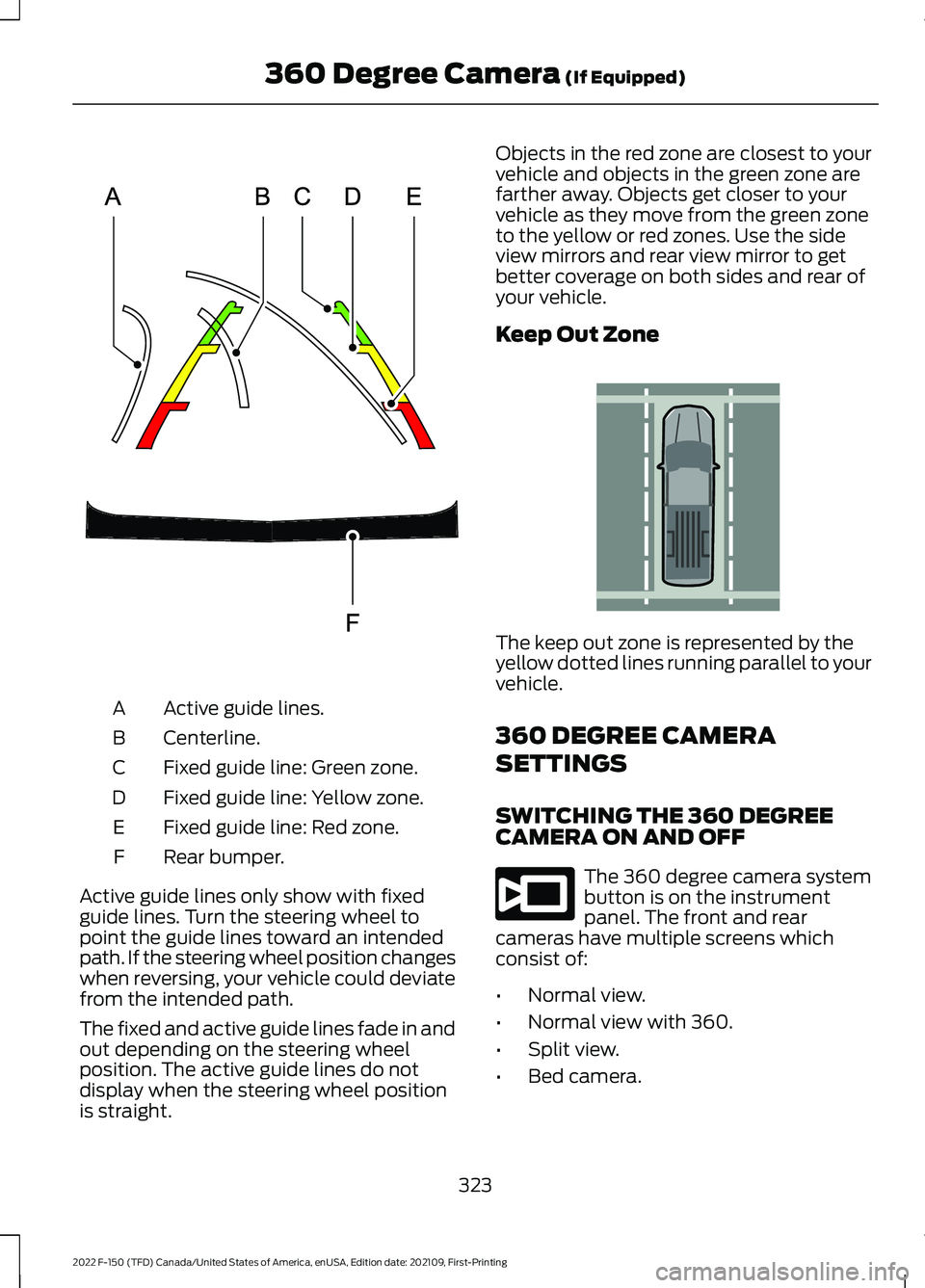
Active guide lines.
A
Centerline.
B
Fixed guide line: Green zone.
C
Fixed guide line: Yellow zone.
D
Fixed guide line: Red zone.
E
Rear bumper.
F
Active guide lines only show with fixed
guide lines. Turn the steering wheel to
point the guide lines toward an intended
path. If the steering wheel position changes
when reversing, your vehicle could deviate
from the intended path.
The fixed and active guide lines fade in and
out depending on the steering wheel
position. The active guide lines do not
display when the steering wheel position
is straight. Objects in the red zone are closest to your
vehicle and objects in the green zone are
farther away. Objects get closer to your
vehicle as they move from the green zone
to the yellow or red zones. Use the side
view mirrors and rear view mirror to get
better coverage on both sides and rear of
your vehicle.
Keep Out Zone
The keep out zone is represented by the
yellow dotted lines running parallel to your
vehicle.
360 DEGREE CAMERA
SETTINGS
SWITCHING THE 360 DEGREE
CAMERA ON AND OFF
The 360 degree camera system
button is on the instrument
panel. The front and rear
cameras have multiple screens which
consist of:
• Normal view.
• Normal view with 360.
• Split view.
• Bed camera.
323
2022 F-150 (TFD) Canada/United States of America, enUSA, Edition date: 202109, First-Printing 360 Degree Camera (If Equipped)E306774 E310341 E332186
Page 372 of 750
WHAT IS BLIND SPOT
INFORMATION SYSTEM
Blind spot information system detects
vehicles that may have entered the blind
spot zone.
HOW DOES BLIND SPOT
INFORMATION SYSTEM WORK
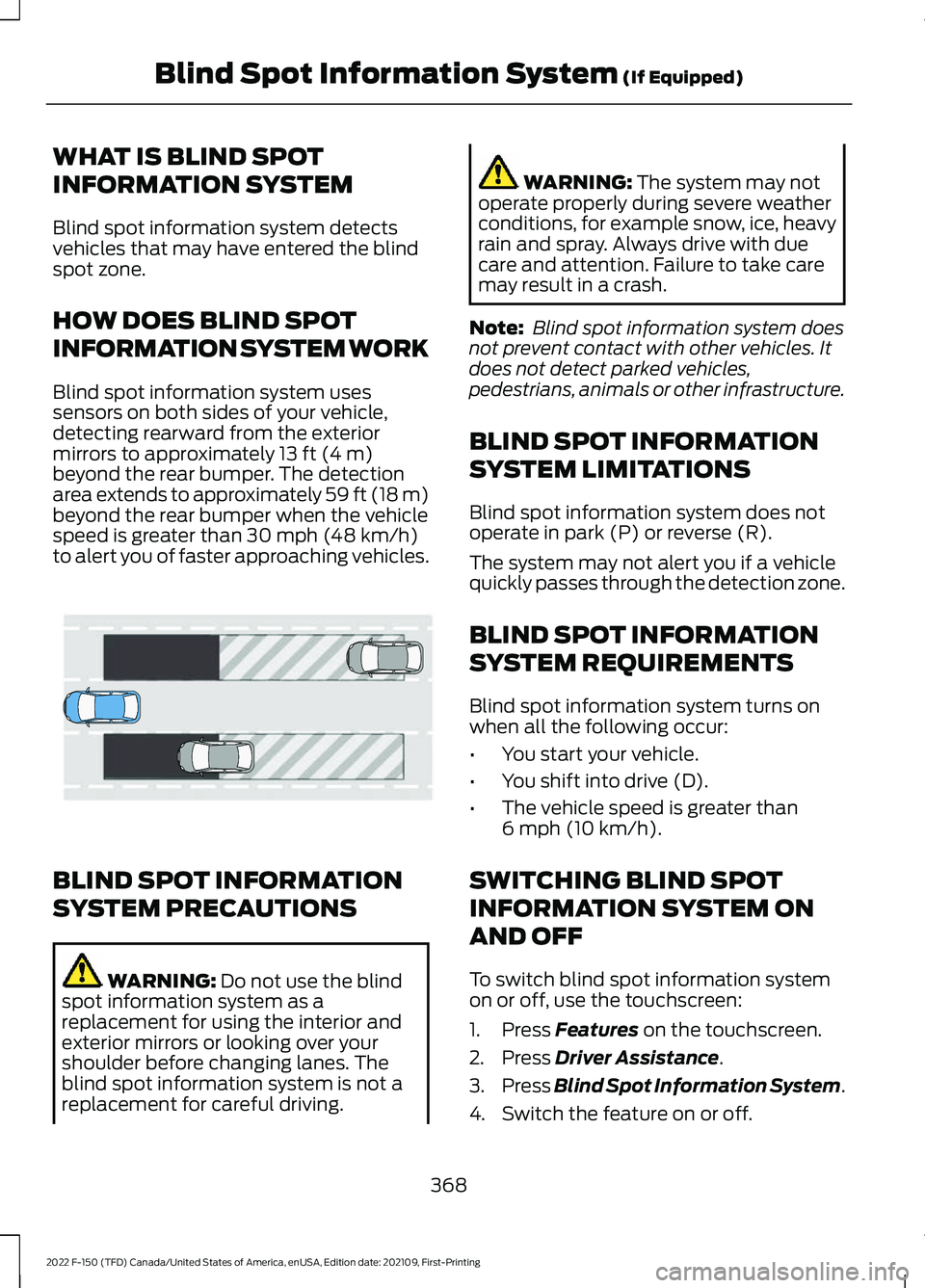
Blind spot information system uses
sensors on both sides of your vehicle,
detecting rearward from the exterior
mirrors to approximately 13 ft (4 m)
beyond the rear bumper. The detection
area extends to approximately 59 ft (18 m)
beyond the rear bumper when the vehicle
speed is greater than
30 mph (48 km/h)
to alert you of faster approaching vehicles. BLIND SPOT INFORMATION
SYSTEM PRECAUTIONS
WARNING:
Do not use the blind
spot information system as a
replacement for using the interior and
exterior mirrors or looking over your
shoulder before changing lanes. The
blind spot information system is not a
replacement for careful driving. WARNING:
The system may not
operate properly during severe weather
conditions, for example snow, ice, heavy
rain and spray. Always drive with due
care and attention. Failure to take care
may result in a crash.
Note: Blind spot information system does
not prevent contact with other vehicles. It
does not detect parked vehicles,
pedestrians, animals or other infrastructure.
BLIND SPOT INFORMATION
SYSTEM LIMITATIONS
Blind spot information system does not
operate in park (P) or reverse (R).
The system may not alert you if a vehicle
quickly passes through the detection zone.
BLIND SPOT INFORMATION
SYSTEM REQUIREMENTS
Blind spot information system turns on
when all the following occur:
• You start your vehicle.
• You shift into drive (D).
• The vehicle speed is greater than
6 mph (10 km/h)
.
SWITCHING BLIND SPOT
INFORMATION SYSTEM ON
AND OFF
To switch blind spot information system
on or off, use the touchscreen:
1. Press
Features on the touchscreen.
2. Press
Driver Assistance.
3. Press
Blind Spot Information System.
4. Switch the feature on or off.
368
2022 F-150 (TFD) Canada/United States of America, enUSA, Edition date: 202109, First-Printing Blind Spot Information System
(If Equipped)E255695
Page 373 of 750
When you switch blind spot information
system off, a warning lamp illuminates and
a message displays. When you switch the
system on or off, the alert indicators flash
twice.
Note:
The system remembers the last
setting when you start your vehicle.
To permanently switch the system off,
contact an authorized dealer.
LOCATING THE BLIND SPOT
INFORMATION SYSTEM
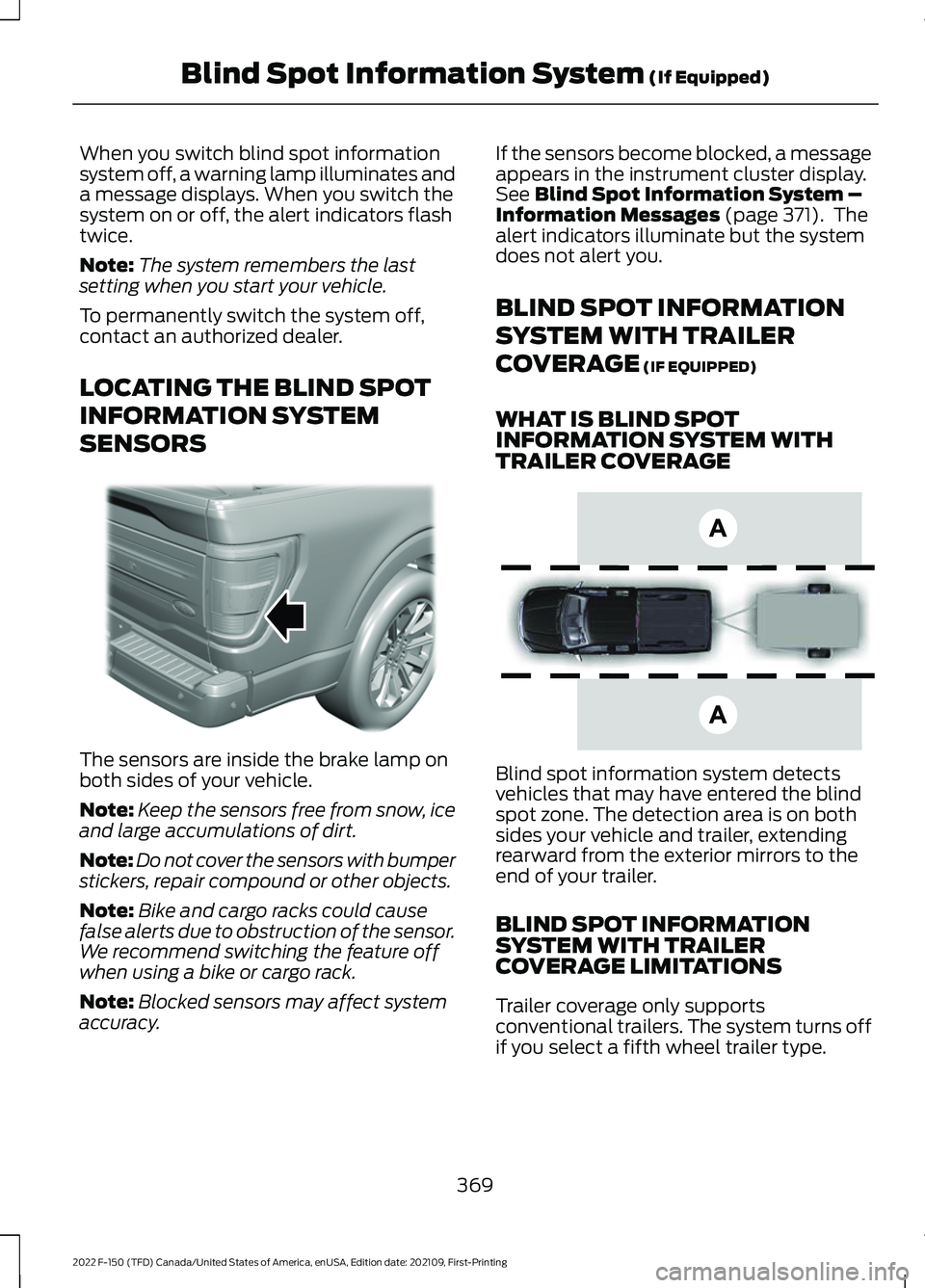
SENSORS The sensors are inside the brake lamp on
both sides of your vehicle.
Note:
Keep the sensors free from snow, ice
and large accumulations of dirt.
Note: Do not cover the sensors with bumper
stickers, repair compound or other objects.
Note: Bike and cargo racks could cause
false alerts due to obstruction of the sensor.
We recommend switching the feature off
when using a bike or cargo rack.
Note: Blocked sensors may affect system
accuracy. If the sensors become blocked, a message
appears in the instrument cluster display.
See Blind Spot Information System –
Information Messages (page 371). The
alert indicators illuminate but the system
does not alert you.
BLIND SPOT INFORMATION
SYSTEM WITH TRAILER
COVERAGE
(IF EQUIPPED)
WHAT IS BLIND SPOT
INFORMATION SYSTEM WITH
TRAILER COVERAGE Blind spot information system detects
vehicles that may have entered the blind
spot zone. The detection area is on both
sides your vehicle and trailer, extending
rearward from the exterior mirrors to the
end of your trailer.
BLIND SPOT INFORMATION
SYSTEM WITH TRAILER
COVERAGE LIMITATIONS
Trailer coverage only supports
conventional trailers. The system turns off
if you select a fifth wheel trailer type.
369
2022 F-150 (TFD) Canada/United States of America, enUSA, Edition date: 202109, First-Printing Blind Spot Information System
(If Equipped)E310325 E225007
Page 376 of 750
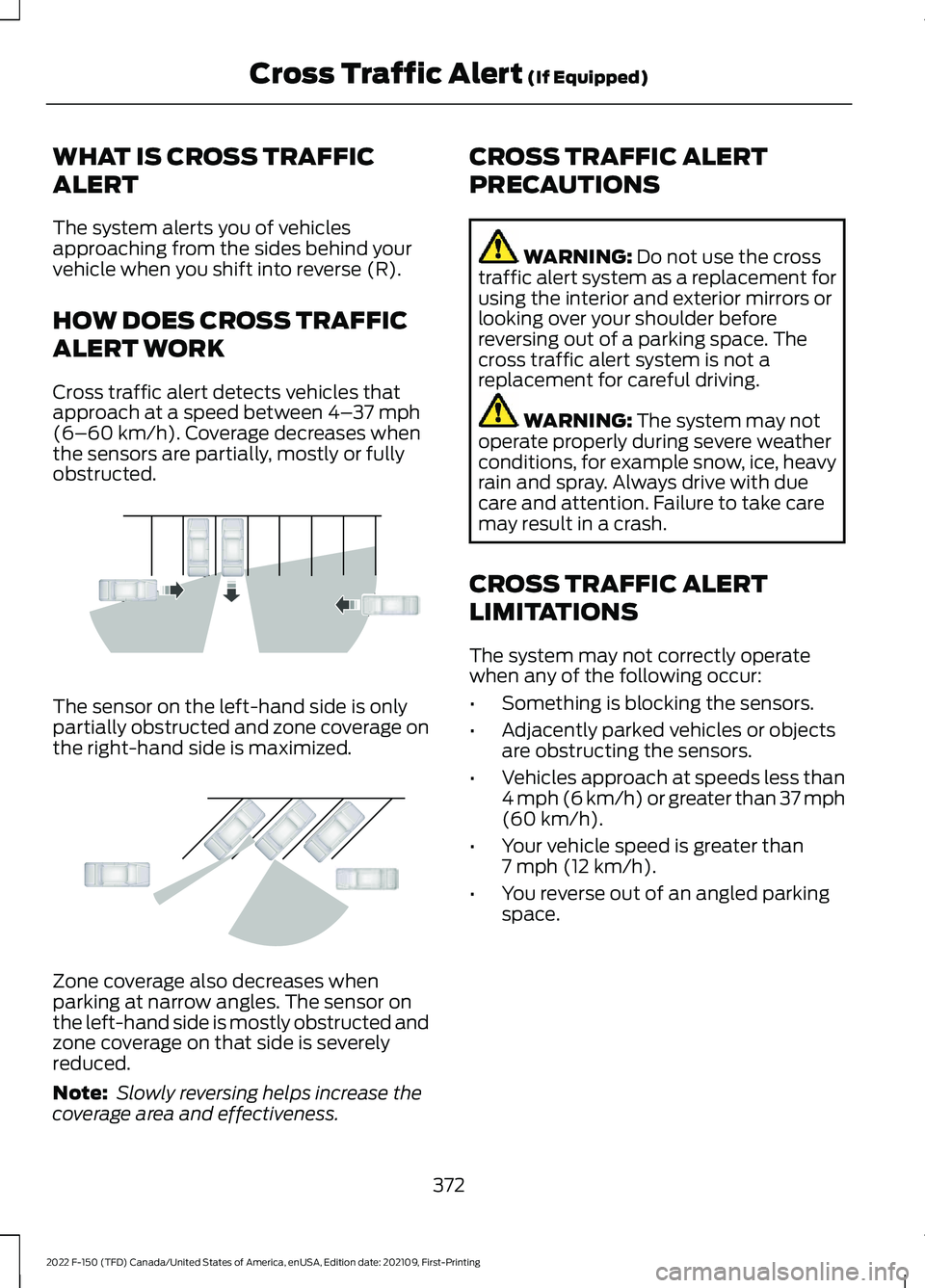
WHAT IS CROSS TRAFFIC
ALERT
The system alerts you of vehicles
approaching from the sides behind your
vehicle when you shift into reverse (R).
HOW DOES CROSS TRAFFIC
ALERT WORK
Cross traffic alert detects vehicles that
approach at a speed between 4–
37 mph
(6–60 km/h). Coverage decreases when
the sensors are partially, mostly or fully
obstructed. The sensor on the left-hand side is only
partially obstructed and zone coverage on
the right-hand side is maximized.
Zone coverage also decreases when
parking at narrow angles. The sensor on
the left-hand side is mostly obstructed and
zone coverage on that side is severely
reduced.
Note:
Slowly reversing helps increase the
coverage area and effectiveness. CROSS TRAFFIC ALERT
PRECAUTIONS WARNING:
Do not use the cross
traffic alert system as a replacement for
using the interior and exterior mirrors or
looking over your shoulder before
reversing out of a parking space. The
cross traffic alert system is not a
replacement for careful driving. WARNING:
The system may not
operate properly during severe weather
conditions, for example snow, ice, heavy
rain and spray. Always drive with due
care and attention. Failure to take care
may result in a crash.
CROSS TRAFFIC ALERT
LIMITATIONS
The system may not correctly operate
when any of the following occur:
• Something is blocking the sensors.
• Adjacently parked vehicles or objects
are obstructing the sensors.
• Vehicles approach at speeds less than
4 mph (6 km/h) or greater than 37 mph
(60 km/h)
.
• Your vehicle speed is greater than
7 mph (12 km/h)
.
• You reverse out of an angled parking
space.
372
2022 F-150 (TFD) Canada/United States of America, enUSA, Edition date: 202109, First-Printing Cross Traffic Alert
(If Equipped)E142440 E142441
Page 730 of 750
Enabling Apps on an Android
Device...........................................................626
Enabling Apps on an iOS Device...........626
Enabling or Disabling Personal Profiles.........................................................628
Enabling Remote Start...............................178
End User License Agreement.................689
Engine Air Filter............................................493
Changing the Engine Air Filter...................... 493
Engine Block Heater
...................................234
Engine Block Heater Precautions................234
How Does the Engine Block Heater
Work................................................................... 235
Using the Engine Block Heater..................... 235
Engine Coolant Temperature Gauge .............................................................
169
Engine Oil Capacity and Specification - 2.7L EcoBoost™.......................................569
Engine Oil Capacity and Specification - 3.3L.................................................................570
Engine Oil Capacity and Specification - 3.5L, Hybrid Electric Vehicle
(HEV).............................................................574
Engine Oil Capacity and Specification - 3.5L Ecoboost™
........................................572
Engine Oil Capacity and Specification - 5.0L................................................................576
Engine Oil.......................................................488 Adding Engine Oil.............................................. 488
Checking the Engine Oil Level...................... 488
Engine Oil Capacity and Specification.................................................. 489
Engine Oil Dipstick Overview........................ 488
Resetting the Engine Oil Change Reminder......................................................... 488
Engine Oil Pressure Gauge.......................169
Engine Specifications - 2.7L EcoBoost™.................................................558
Engine Specifications - 3.3L....................559
Engine Specifications - 3.5L, Hybrid Electric Vehicle (HEV).............................561
Engine Specifications - 3.5L Ecoboost™................................................560
Engine Specifications - 5.0L...................562
Entering a Parallel Parking Space.........325
Entering a Perpendicular Parking Space............................................................326 Evasive Steering Assist...............................381
Evasive Steering Assist Limitations.............381
Switching Evasive Steering Assist On and
Off....................................................................... 382
What Is Evasive Steering Assist.................... 381
Event Data........................................................28
Exiting a Parking Space.............................326
Export Unique Options
...............................715
Extending the Exterior Mirrors.................163
Extending the Remote Start Duration.........................................................179
Exterior Bulbs
...............................................499
Changing a Front Fog Lamp Bulb...............505
Changing a Front Side Marker Lamp
Bulb................................................................... 504
Changing a Front Turn Signal Lamp Bulb................................................................... 503
Changing a Headlamp Bulb........................... 501
Changing a High Mounted Stoplamp Bulb.................................................................... 507
Changing a License Plate Lamp Bulb........507
Changing a Rear Lamp Bulb......................... 505
Changing a Rear Turn Signal Lamp Bulb................................................................... 506
Changing a Reversing Lamp Bulb...............507
Changing a Stoplamp Bulb........................... 506
Exterior Bulb Specification Chart................499
Removing a Rear Lamp Assembly...............501
Exterior Lamps...............................................147 Exterior Lamp Audible Warning.................... 149
Exterior Lamp Indicators................................. 149
How Do Cornering Lamps Work.................... 147
Switching the Cargo Lamps On.................... 148
Switching the Daytime Running Lamps On and Off............................................................... 147
Switching the Front Fog Lamps On and Off....................................................................... 148
Switching the Spot Lamps On and Off....................................................................... 149
Switching the Turn Signal Lamps On and Off........................................................................\
147
Exterior Lighting Control
............................145
Exterior Lighting Control - Police Responder....................................................145
Exterior Lighting
............................................145
Adaptive Front Lighting.................................... 155
Autolamps............................................................ 146
Automatic High Beam Control...................... 150
726
2022 F-150 (TFD) Canada/United States of America, enUSA, Edition date: 202109, First-Printing Index