trailer FORD F-450 2022 Owner's Manual
[x] Cancel search | Manufacturer: FORD, Model Year: 2022, Model line: F-450, Model: FORD F-450 2022Pages: 740, PDF Size: 12.6 MB
Page 275 of 740
HOW DOES ADAPTIVE CRUISE
CONTROL WORK
Adaptive Cruise Control adjusts your
vehicle speed to maintain a selected gap
between you and the vehicle in front of you
in the same lane. The system uses sensors
to maintain the speed and gap. You can
select four different gap settings.
ADAPTIVE CRUISE CONTROL
PRECAUTIONS
WARNING: You are responsible for
controlling your vehicle at all times. The
system is designed to be an aid and does
not relieve you of your responsibility to
drive with due care and attention. Failure
to follow this instruction could result in
the loss of control of your vehicle,
personal injury or death. WARNING: Do not use adaptive
cruise control on winding roads, in heavy
traffic or when the road surface is
slippery. This could result in loss of
vehicle control, serious injury or death. WARNING:
Pay close attention to
changing road conditions such as
entering or leaving a highway, on roads
with intersections or roundabouts, roads
without visible lanes of travel, roads that
are winding, slippery, unpaved, or steep
slopes. WARNING:
The system is not a
crash warning or avoidance system. WARNING:
Do not use the system
when towing a trailer that has
aftermarket electronic trailer brake
controls. Failure to follow this instruction
could result in the loss of control of your
vehicle, personal injury or death. WARNING:
Do not use tire sizes
other than those recommended because
this can affect the normal operation of
the system. Failure to do so may result
in a loss of vehicle control, which could
result in serious injury. WARNING:
Do not use the system
with a snow plow blade installed. WARNING:
Do not use the system
in poor visibility, for example fog, heavy
rain, spray or snow.
When Following a Vehicle WARNING:
When following a
vehicle that is braking, your vehicle does
not always decelerate quickly enough to
avoid a crash without driver intervention.
Apply the brakes when necessary. Failure
to follow this instruction could result in
personal injury or death.
Hilly Condition and Trailer Tow
Usage
You should select a lower gear when the
system is active in situations such as
prolonged downhill driving on steep slopes,
for example in mountainous areas. The
system needs additional engine braking in
these situations to reduce the load on the
vehicle ’s regular brake system to prevent
it from overheating.
272
2022 Super Duty (TFE) Canada/United States of America, enUSA, Edition date: 202103, First-Printing Adaptive Cruise Control
(If Equipped)
Page 286 of 740
ROCK CRAWL - TREMOR, 4X4
For off-road driving and
optimum rock-climbing. Rock
crawl mode engages the
electronic locking differential, optimizes
throttle response and adjusts transmission
shift points to provide additional control
of your vehicle.
Four-wheel drive low is the only four-wheel
drive mode available in rock crawl mode.
The electronic locking differential engages
when you select this mode at any speed,
and you can disengage it at any time using
the button. See Switching the Electronic
Locking Differential On and Off (page
238).
TOW/HAUL - 4X4 For improved transmission
operation when towing a trailer
or a heavy load. This mode
moves upshifts to higher engine speeds to
reduce the frequency of transmission
shifting. This mode also provides engine
braking in all forward gears, which slows
your vehicle and assists you in controlling
your vehicle when descending a slope. The
amount of downshift braking provided
varies based on the amount you press the
brake pedal.
All four-wheel drive modes are selectable
in tow/haul mode. This mode does not
default to a certain four-wheel drive mode.
The system tunes the steering and
suspension to enhance driving comfort
when towing or carrying heavy loads. The electronic locking differential is
available below
25 mph (40 km/h). See
Switching the Electronic Locking
Differential On and Off
(page 238).
TOW/HAUL - 4X2 For improved transmission
operation when towing a trailer
or a heavy load. This mode
moves upshifts to higher engine speeds to
reduce the frequency of transmission
shifting. This mode also provides engine
braking in all forward gears, which slows
your vehicle and assists you in controlling
your vehicle when descending a slope. The
amount of downshift braking provided
varies based on the amount you press the
brake pedal.
The system tunes the steering and
suspension to enhance driving comfort
when towing or carrying heavy loads.
The electronic locking differential is
available below
25 mph (40 km/h). See
Switching the Electronic Locking
Differential On and Off
(page 238).
DRIVE MODE CONTROL –
TROUBLESHOOTING
DRIVE MODE CONTROL –
WARNING LAMPS Some drive modes reduce
traction and stability control
performance and the indicator
illuminates in the instrument cluster.
283
2022 Super Duty (TFE) Canada/United States of America, enUSA, Edition date: 202103, First-Printing Drive Mode ControlE225315 E246592 E246592 E130458
Page 298 of 740
BLIND SPOT INFORMATION
SYSTEM WITH TRAILER
COVERAGE
WHAT IS BLIND SPOT
INFORMATION SYSTEM WITH
TRAILER COVERAGE
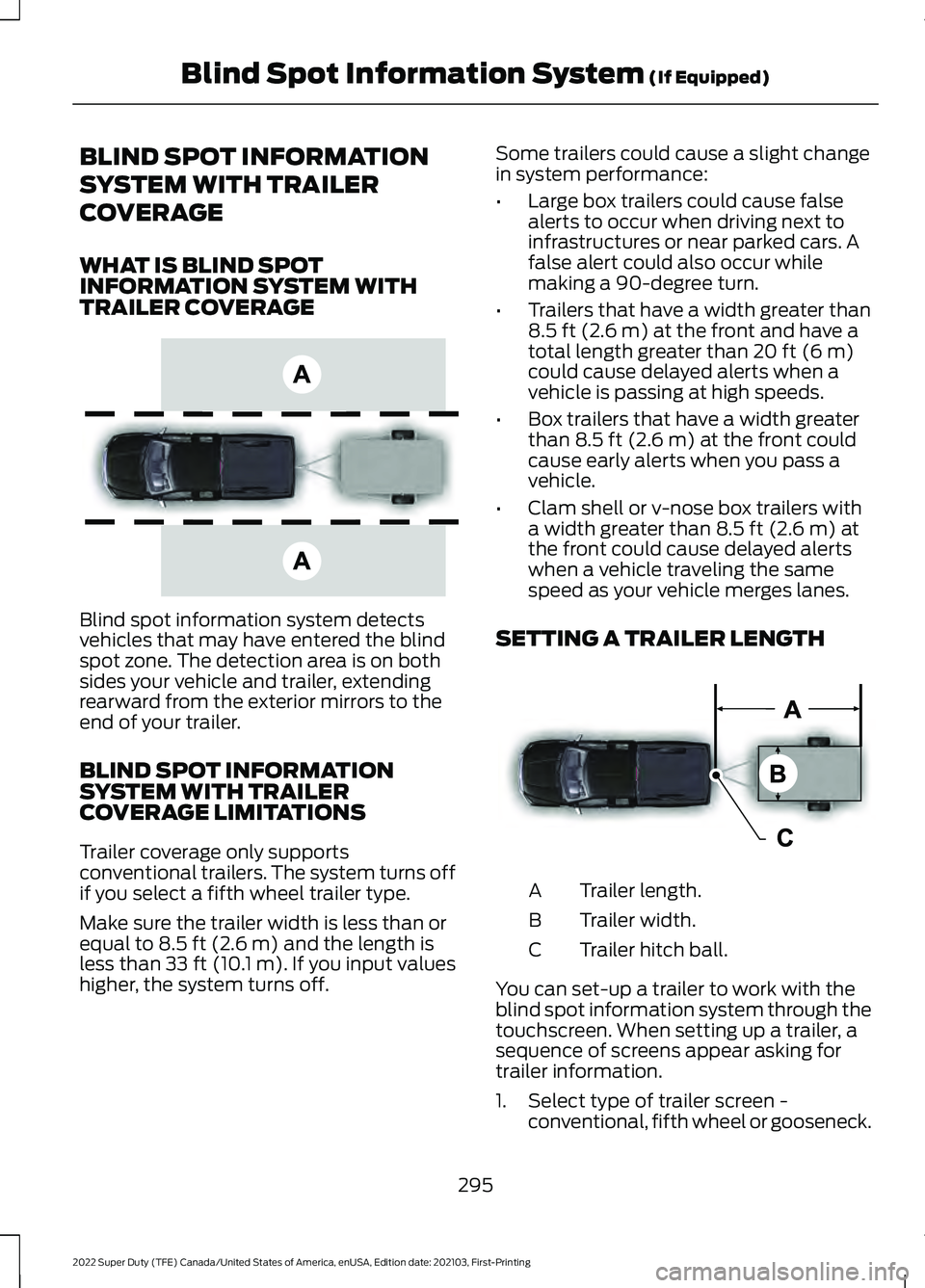
Blind spot information system detects
vehicles that may have entered the blind
spot zone. The detection area is on both
sides your vehicle and trailer, extending
rearward from the exterior mirrors to the
end of your trailer.
BLIND SPOT INFORMATION
SYSTEM WITH TRAILER
COVERAGE LIMITATIONS
Trailer coverage only supports
conventional trailers. The system turns off
if you select a fifth wheel trailer type.
Make sure the trailer width is less than or
equal to 8.5 ft (2.6 m) and the length is
less than 33 ft (10.1 m). If you input values
higher, the system turns off. Some trailers could cause a slight change
in system performance:
•
Large box trailers could cause false
alerts to occur when driving next to
infrastructures or near parked cars. A
false alert could also occur while
making a 90-degree turn.
• Trailers that have a width greater than
8.5 ft (2.6 m)
at the front and have a
total length greater than 20 ft (6 m)
could cause delayed alerts when a
vehicle is passing at high speeds.
• Box trailers that have a width greater
than
8.5 ft (2.6 m) at the front could
cause early alerts when you pass a
vehicle.
• Clam shell or v-nose box trailers with
a width greater than
8.5 ft (2.6 m) at
the front could cause delayed alerts
when a vehicle traveling the same
speed as your vehicle merges lanes.
SETTING A TRAILER LENGTH Trailer length.
A
Trailer width.
B
Trailer hitch ball.
C
You can set-up a trailer to work with the
blind spot information system through the
touchscreen. When setting up a trailer, a
sequence of screens appear asking for
trailer information.
1. Select type of trailer screen - conventional, fifth wheel or gooseneck.
295
2022 Super Duty (TFE) Canada/United States of America, enUSA, Edition date: 202103, First-Printing Blind Spot Information System
(If Equipped)E225007 E225008
Page 299 of 740
Note:
The system only supports
conventional trailers.
2. Do you want to set up blind spot with trailer screen? If no, the system turns
off. If yes, the menu goes to the next
screen.
3. Is the width less than 9 ft (2.7 m) and
length less than 33 ft (10.1 m)? If no,
the system turns off. If yes, the menu
goes to the next screen.
4. Trailer width measurement. Measure the width at the front of the trailer. It is
not measured at the widest point of
the trailer. The maximum width at the
front of the trailer the system can
support is
8.5 ft (2.6 m).
Note: You do not need to enter an exact
trailer width measurement. You only need
to confirm that the width of the trailer is less
than
9 ft (2.7 m).
5. Trailer length measurement. The trailer
length is the distance between the
trailer hitch ball and the rear of the
trailer. The maximum length that the
system can support is
33 ft (10.1 m).
6. Enter the length of trailer. The default setting is
18 ft (5.5 m). Toggling up or
down using the menu buttons
increases or decreases the
measurement by
3 ft (1 m). Select a
length that is equal to or within 3 ft
(1 m) of the actual measured length.
For example, if the actual measure
length is
25 ft (7.5 m), toggle the length
in the menu to 27 ft (8.2 m). The
system setup saves when you enter the
length of the trailer.
Note: If the trailer is a bike rack or cargo
rack with electrical lighting, enter a length
of
3 ft (1 m). Cross traffic alert remains on
for trailers with a length of 3 ft (1 m) or less. Note:
The system requires proper
measurement and measure entry to function
properly.
SELECTING A TRAILER
When you connect a trailer to your vehicle,
the trailer set up menu appears in the
touchscreen. This menu allows you to set
up a new trailer or choose from a
previously set up trailer. A warning
message appears and the system turns off
if you do not choose or add a new trailer.
Note: The warning message may not
appear until your vehicle reaches
22 mph
(35 km/h).
BLIND SPOT INFORMATION
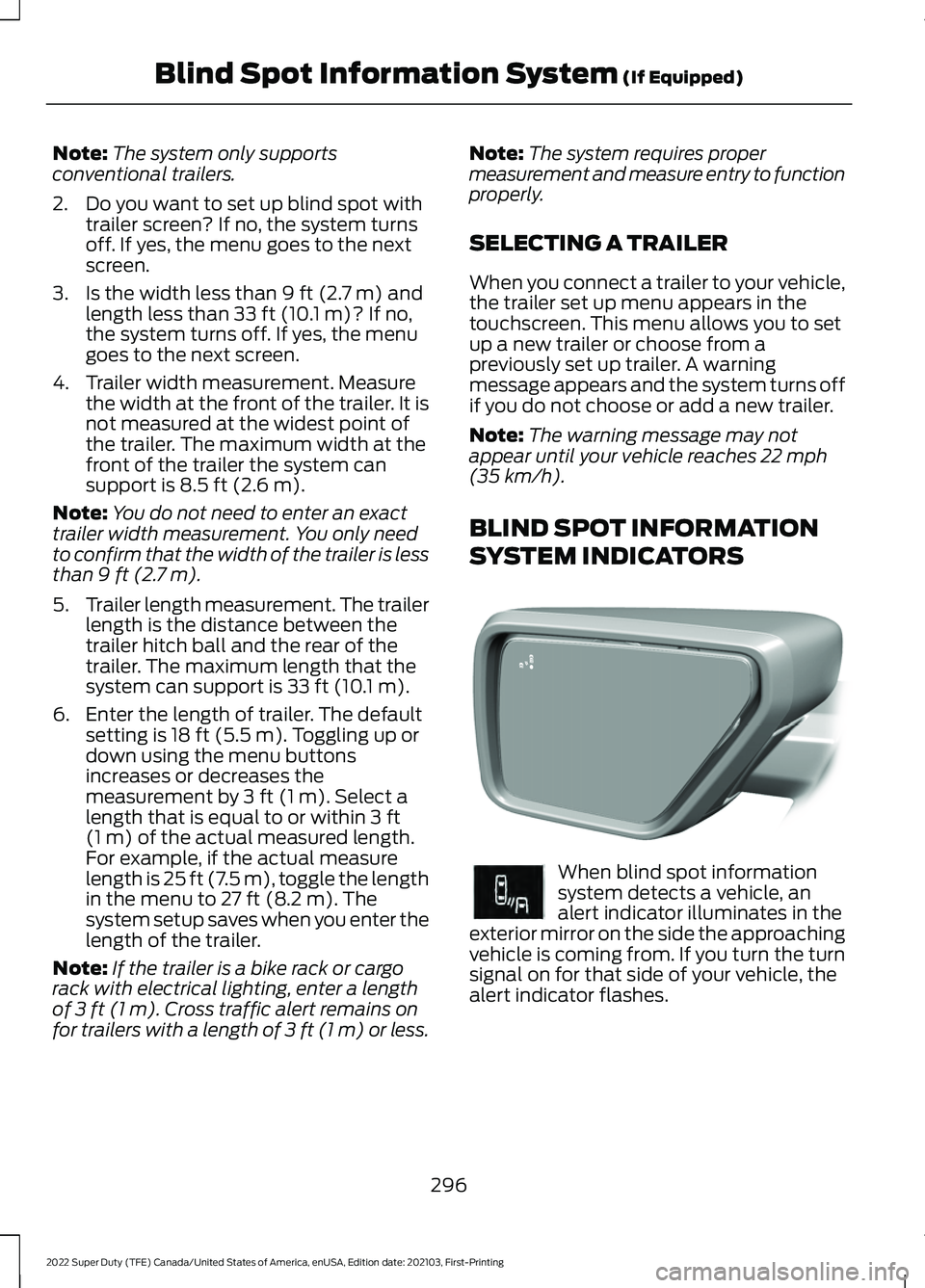
SYSTEM INDICATORS When blind spot information
system detects a vehicle, an
alert indicator illuminates in the
exterior mirror on the side the approaching
vehicle is coming from. If you turn the turn
signal on for that side of your vehicle, the
alert indicator flashes.
296
2022 Super Duty (TFE) Canada/United States of America, enUSA, Edition date: 202103, First-Printing Blind Spot Information System
(If Equipped)E309137 E249861E249861
Page 300 of 740
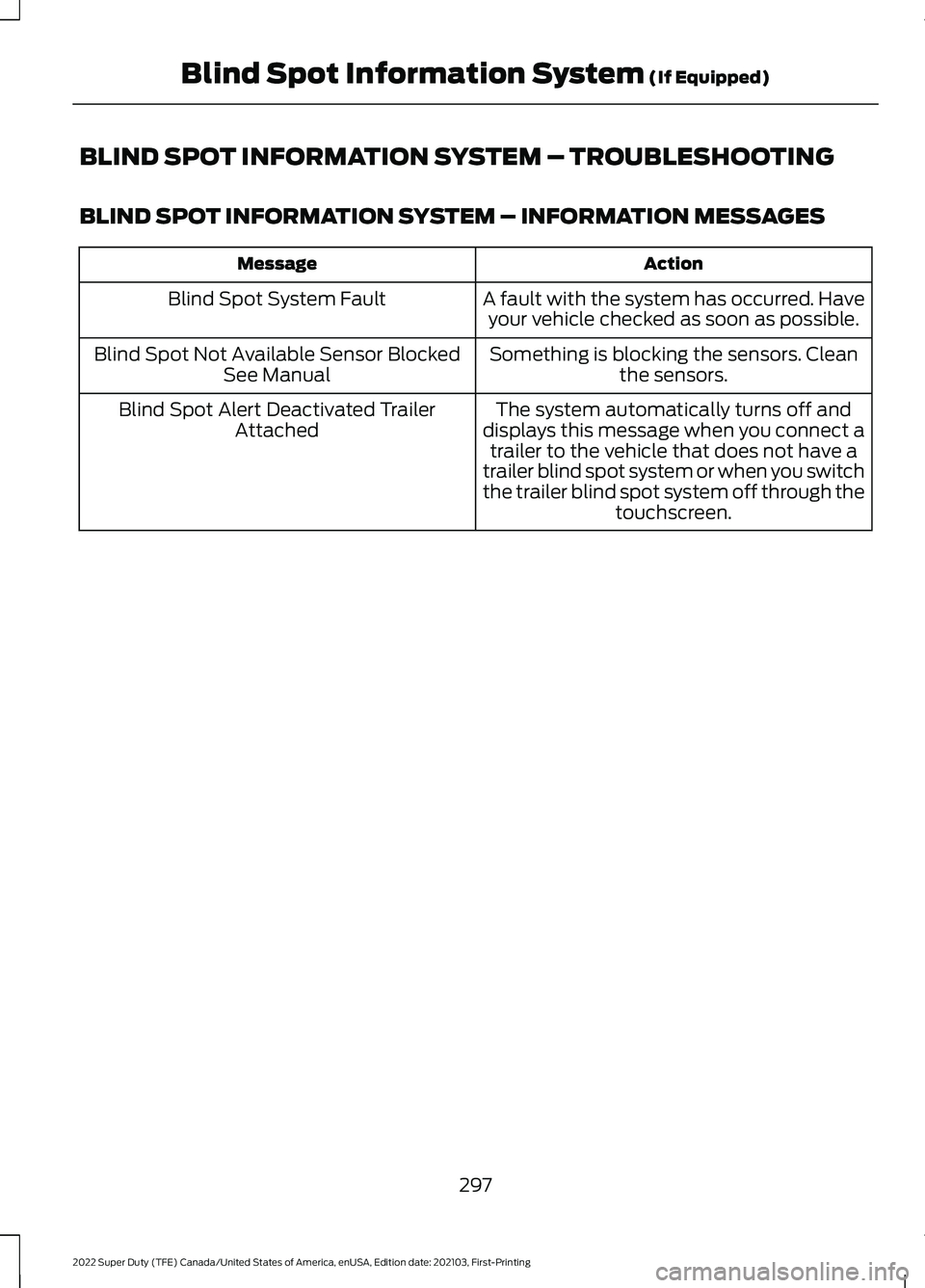
BLIND SPOT INFORMATION SYSTEM – TROUBLESHOOTING
BLIND SPOT INFORMATION SYSTEM – INFORMATION MESSAGES
Action
Message
A fault with the system has occurred. Haveyour vehicle checked as soon as possible.
Blind Spot System Fault
Something is blocking the sensors. Cleanthe sensors.
Blind Spot Not Available Sensor Blocked
See Manual
The system automatically turns off and
displays this message when you connect a trailer to the vehicle that does not have a
trailer blind spot system or when you switch
the trailer blind spot system off through the touchscreen.
Blind Spot Alert Deactivated Trailer
Attached
297
2022 Super Duty (TFE) Canada/United States of America, enUSA, Edition date: 202103, First-Printing Blind Spot Information System (If Equipped)
Page 302 of 740
Cross Traffic Alert Limitations
with a Trailer Attached
The system remains on when you attach
a trailer in vehicles with blind spot
information system with trailer tow under
the following conditions:
•
You connect a trailer.
• The trailer is a bike rack or cargo rack
with a maximum length of 3 ft (1 m).
• You set the trailer length to
3 ft (1 m)
in the instrument cluster display.
Note: The system may not correctly operate
when towing a trailer. For vehicles with an
approved trailer tow module and tow bar,
the system turns off when you attach a
trailer. For vehicles with an aftermarket
trailer tow module or tow bar, we
recommend that you switch the system off
when you attach a trailer.
SWITCHING CROSS TRAFFIC
ALERT ON AND OFF -
VEHICLES WITH: 4.2 INCH
SCREEN
To switch the system on or off, use the
instrument cluster display:
1. Select
Driver Assist.
2. Select
Cross Traffic Alert.
3. Switch the feature on or off.
Note: The system switches on every time
you switch the ignition on. To permanently
switch the system off, contact an authorized
dealer. SWITCHING CROSS TRAFFIC
ALERT ON AND OFF -
VEHICLES WITH: 8 INCH
SCREEN
To switch the system on or off, use the
instrument cluster display:
1. Select
Driver Assist.
2. Select
Cross Traffic Alert.
3. Switch the feature on or off.
Note: The system switches on every time
you switch the ignition on. To permanently
switch the system off, contact an authorized
dealer.
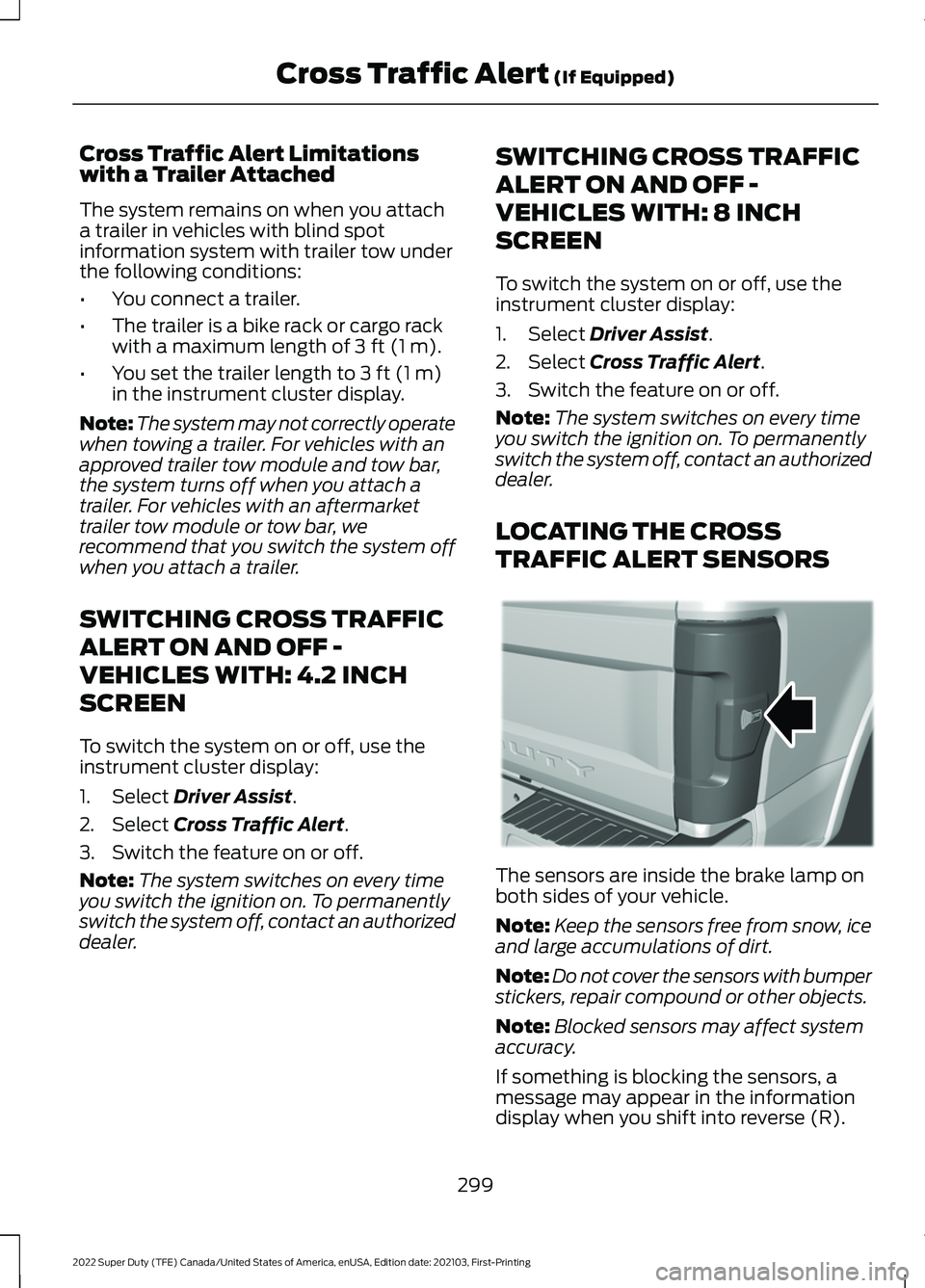
LOCATING THE CROSS
TRAFFIC ALERT SENSORS The sensors are inside the brake lamp on
both sides of your vehicle.
Note:
Keep the sensors free from snow, ice
and large accumulations of dirt.
Note: Do not cover the sensors with bumper
stickers, repair compound or other objects.
Note: Blocked sensors may affect system
accuracy.
If something is blocking the sensors, a
message may appear in the information
display when you shift into reverse (R).
299
2022 Super Duty (TFE) Canada/United States of America, enUSA, Edition date: 202103, First-Printing Cross Traffic Alert
(If Equipped)E231384
Page 303 of 740
Note:
Bike and cargo racks could cause
false alerts due to obstruction of the sensor.
We recommend switching the feature off
when using a bike or cargo rack.
CROSS TRAFFIC ALERT
INDICATORS When the cross traffic alert
detects an approaching vehicle,
a tone sounds, a warning lamp
illuminates in the relevant exterior mirror
and arrows appear in the information
display to show which side the vehicle is
approaching from. If the system malfunctions, a warning lamp
illuminates in the instrument cluster and
a message appears in the information
display. Have your vehicle checked as soon
as possible.
Note:
If arrows do not display, a message
appears in the information display.
Note: In some conditions, the system could
alert you, even when there is nothing in the
detection zone, for example a vehicle
passing further away from your vehicle.
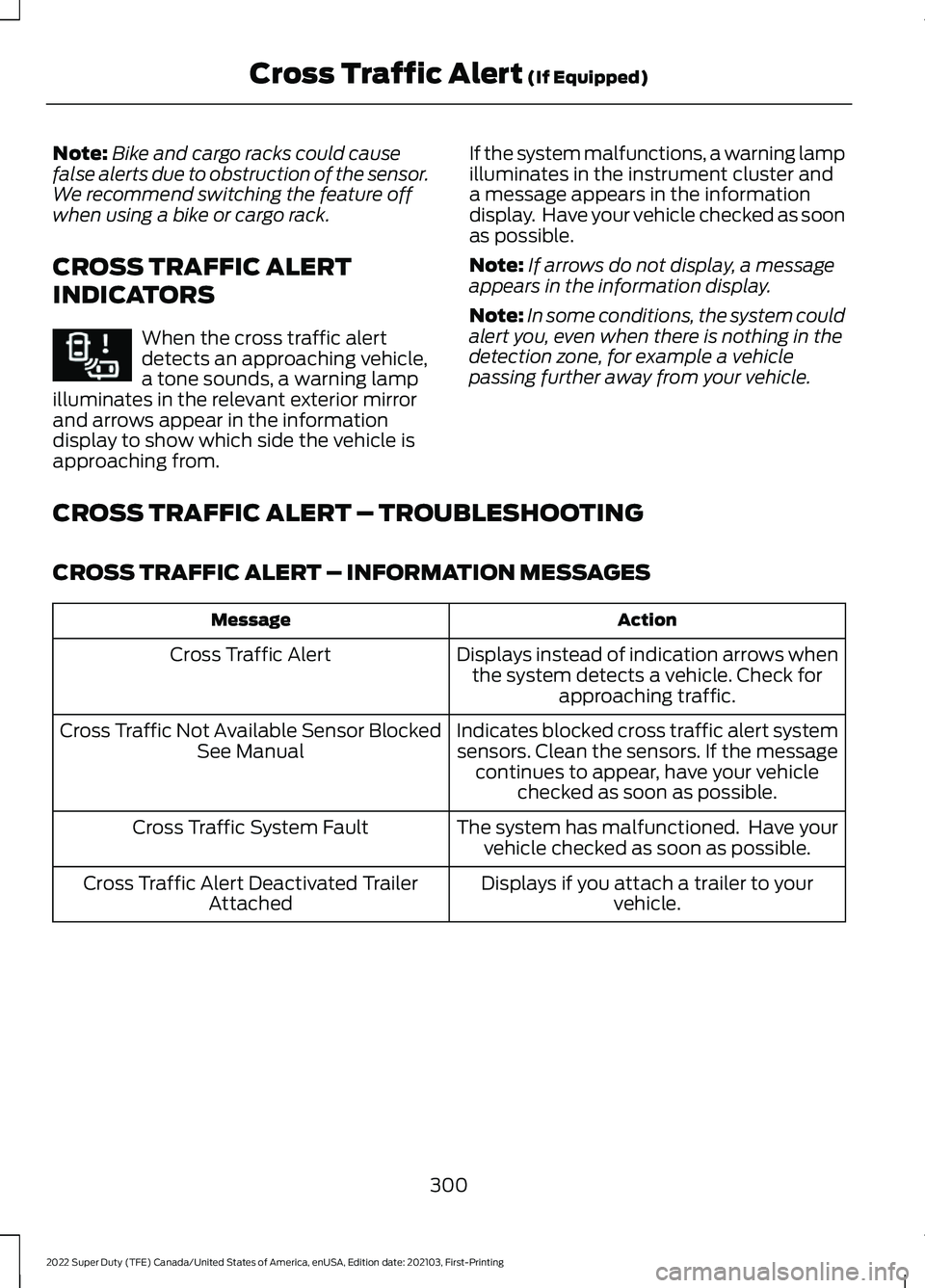
CROSS TRAFFIC ALERT – TROUBLESHOOTING
CROSS TRAFFIC ALERT – INFORMATION MESSAGES Action
Message
Displays instead of indication arrows whenthe system detects a vehicle. Check for approaching traffic.
Cross Traffic Alert
Indicates blocked cross traffic alert systemsensors. Clean the sensors. If the message continues to appear, have your vehicle checked as soon as possible.
Cross Traffic Not Available Sensor Blocked
See Manual
The system has malfunctioned. Have yourvehicle checked as soon as possible.
Cross Traffic System Fault
Displays if you attach a trailer to yourvehicle.
Cross Traffic Alert Deactivated Trailer
Attached
300
2022 Super Duty (TFE) Canada/United States of America, enUSA, Edition date: 202103, First-Printing Cross Traffic Alert (If Equipped)E268294
Page 305 of 740
WARNING: Take additional care if
your vehicle is heavily loaded or you are
towing a trailer. These conditions could
result in reduced performance of this
system. Failure to follow this instruction
could result in the loss of control of your
vehicle, personal injury or death. WARNING:
The system cannot
help prevent all crashes. Do not rely on
this system to replace driver judgment
and the need to maintain a safe distance
and speed. WARNING:
In situations where the
vehicle camera has limited detection
capability, this may reduce system
performance. These situations include
but are not limited to direct or low
sunlight, vehicles at night without tail
lights, unconventional vehicle types,
pedestrians with complex backgrounds,
running pedestrians, partly obscured
pedestrians, or pedestrians that the
system cannot distinguish from a group.
Failure to take care may result in the loss
of control of your vehicle, serious
personal injury or death.
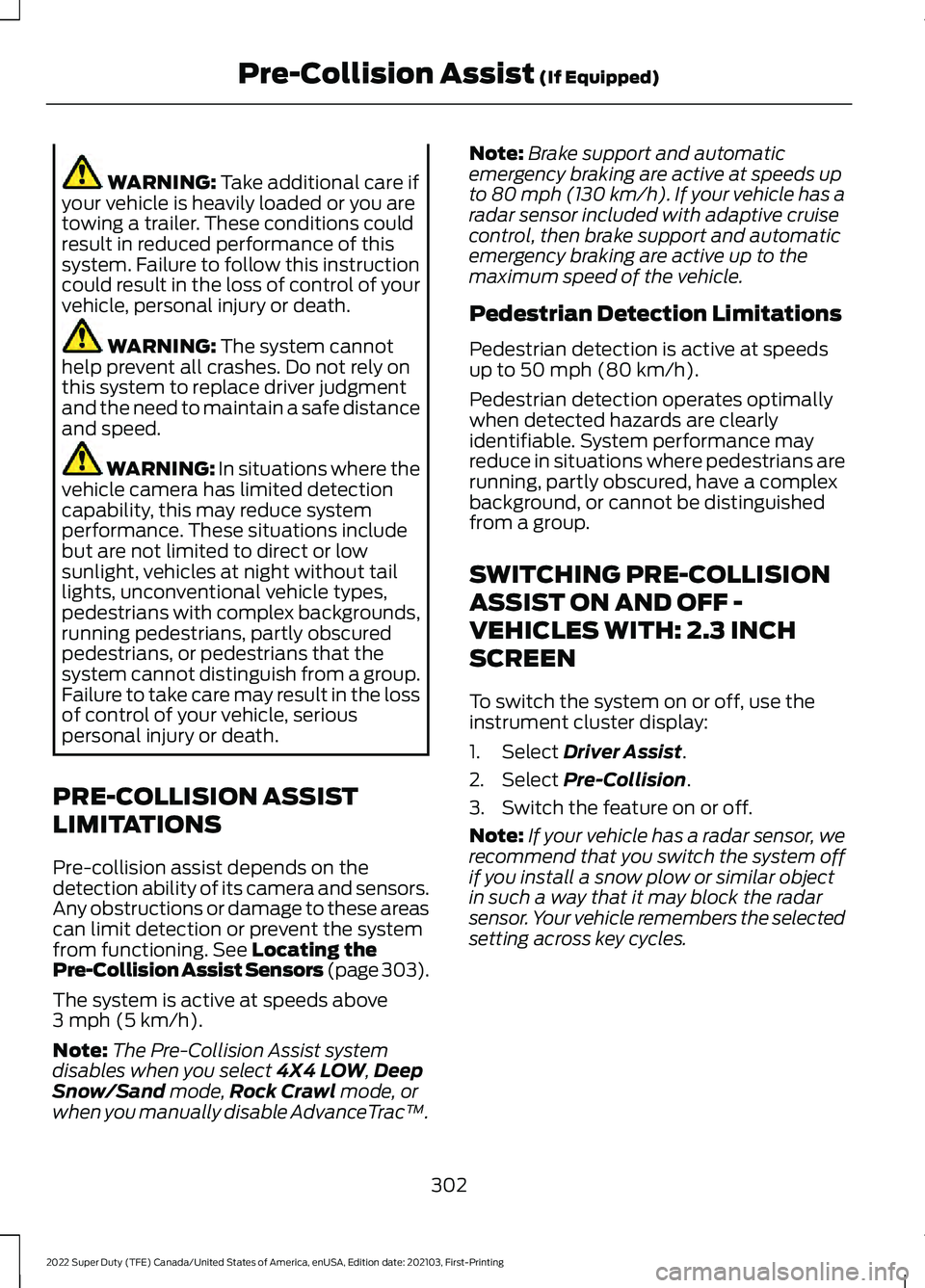
PRE-COLLISION ASSIST
LIMITATIONS
Pre-collision assist depends on the
detection ability of its camera and sensors.
Any obstructions or damage to these areas
can limit detection or prevent the system
from functioning.
See Locating the
Pre-Collision Assist Sensors (page 303).
The system is active at speeds above
3 mph (5 km/h)
.
Note: The Pre-Collision Assist system
disables when you select
4X4 LOW, Deep
Snow/Sand mode, Rock Crawl mode, or
when you manually disable AdvanceTrac ™.Note:
Brake support and automatic
emergency braking are active at speeds up
to 80 mph (130 km/h). If your vehicle has a
radar sensor included with adaptive cruise
control, then brake support and automatic
emergency braking are active up to the
maximum speed of the vehicle.
Pedestrian Detection Limitations
Pedestrian detection is active at speeds
up to
50 mph (80 km/h).
Pedestrian detection operates optimally
when detected hazards are clearly
identifiable. System performance may
reduce in situations where pedestrians are
running, partly obscured, have a complex
background, or cannot be distinguished
from a group.
SWITCHING PRE-COLLISION
ASSIST ON AND OFF -
VEHICLES WITH: 2.3 INCH
SCREEN
To switch the system on or off, use the
instrument cluster display:
1. Select
Driver Assist.
2. Select
Pre-Collision.
3. Switch the feature on or off.
Note: If your vehicle has a radar sensor, we
recommend that you switch the system off
if you install a snow plow or similar object
in such a way that it may block the radar
sensor. Your vehicle remembers the selected
setting across key cycles.
302
2022 Super Duty (TFE) Canada/United States of America, enUSA, Edition date: 202103, First-Printing Pre-Collision Assist
(If Equipped)
Page 314 of 740
LOAD CARRYING
PRECAUTIONS
Keep your loaded vehicle weight
within its design rating capability,
with or without a trailer. Properly
loading your vehicle provides
maximum return of vehicle design
performance. Before you load your
vehicle, become familiar with the
following terms for determining
your vehicle
’s weight rating, with
or without a trailer, from the
vehicle ’s Tire and Loading
Information label or Safety
Compliance Certification label. WARNING: Vehicles with
a higher center of gravity (utility
and four-wheel drive vehicles)
handle differently than vehicles
with a lower center of gravity
(passenger cars). Avoid sharp
turns, excessive speed and
abrupt steering in these vehicles.
Failure to drive cautiously
increases the risk of losing
control of your vehicle, vehicle
rollover, personal injury and
death. WARNING:
The
appropriate loading capacity of
your vehicle can be limited either
by volume capacity (how much
space is available) or by payload
capacity (how much weight the
vehicle should carry). Once you
have reached the maximum payload of your vehicle, do not
add more cargo, even if there is
space available. Overloading or
improperly loading your vehicle
can contribute to loss of vehicle
control and vehicle rollover.
WARNING:
Exceeding the
Safety Compliance Certification
label vehicle weight limits can
adversely affect the
performance and handling of
your vehicle, cause vehicle
damage and can result in the
loss of control of your vehicle,
serious personal injury or death. WARNING:
Do not use
replacement tires with lower
load carrying capacities than the
original tires because they may
lower your vehicle's GVWR and
GAWR limitations. Replacement
tires with a higher limit than the
original tires do not increase the
GVWR and GAWR limitations. WARNING:
Do not exceed
the GVWR or the GAWR
specified on the certification
label. WARNING: Exceeding any
vehicle weight rating can
adversely affect the
performance and handling of
your vehicle, cause vehicle
damage and can result in the
loss of control of your vehicle,
serious personal injury or death.
311
2022 Super Duty (TFE) Canada/United States of America, enUSA, Edition date: 202103, First-Printing Load Carrying
Page 316 of 740
WHAT IS THE GROSS
COMBINED WEIGHT RATING
Gross Combined Weight Rating
(GCWR) is the maximum
allowable weight of the vehicle
and the loaded trailer, including
all cargo and passengers, that the
vehicle can handle without risking
damage. (Important: The towing
vehicle
’s braking system is rated
for operation at Gross Vehicle
Weight Rating, not at Gross Combined Weight Rating.)
Separate functional brakes should
be used for safe control of towed
vehicles and for trailers where the
Gross Combined Weight of the
towing vehicle plus the trailer
exceed the Gross Vehicle Weight
Rating of the towing vehicle.
Note:
For trailer towing
information refer to the RV and
Trailer Towing Guide available at
an authorized dealer, or online at
the website that follows. RV & Trailer Towing Guide Online
www .fl e e t.f or d . c om/ t o wing-g uide sWebsite
313
2022 Super Duty (TFE) Canada/United States of America, enUSA, Edition date: 202103, First-Printing Load Carrying