rear view mirror FORD F150 2012 12.G Owners Manual
[x] Cancel search | Manufacturer: FORD, Model Year: 2012, Model line: F150, Model: FORD F150 2012 12.GPages: 462, PDF Size: 3.26 MB
Page 68 of 462
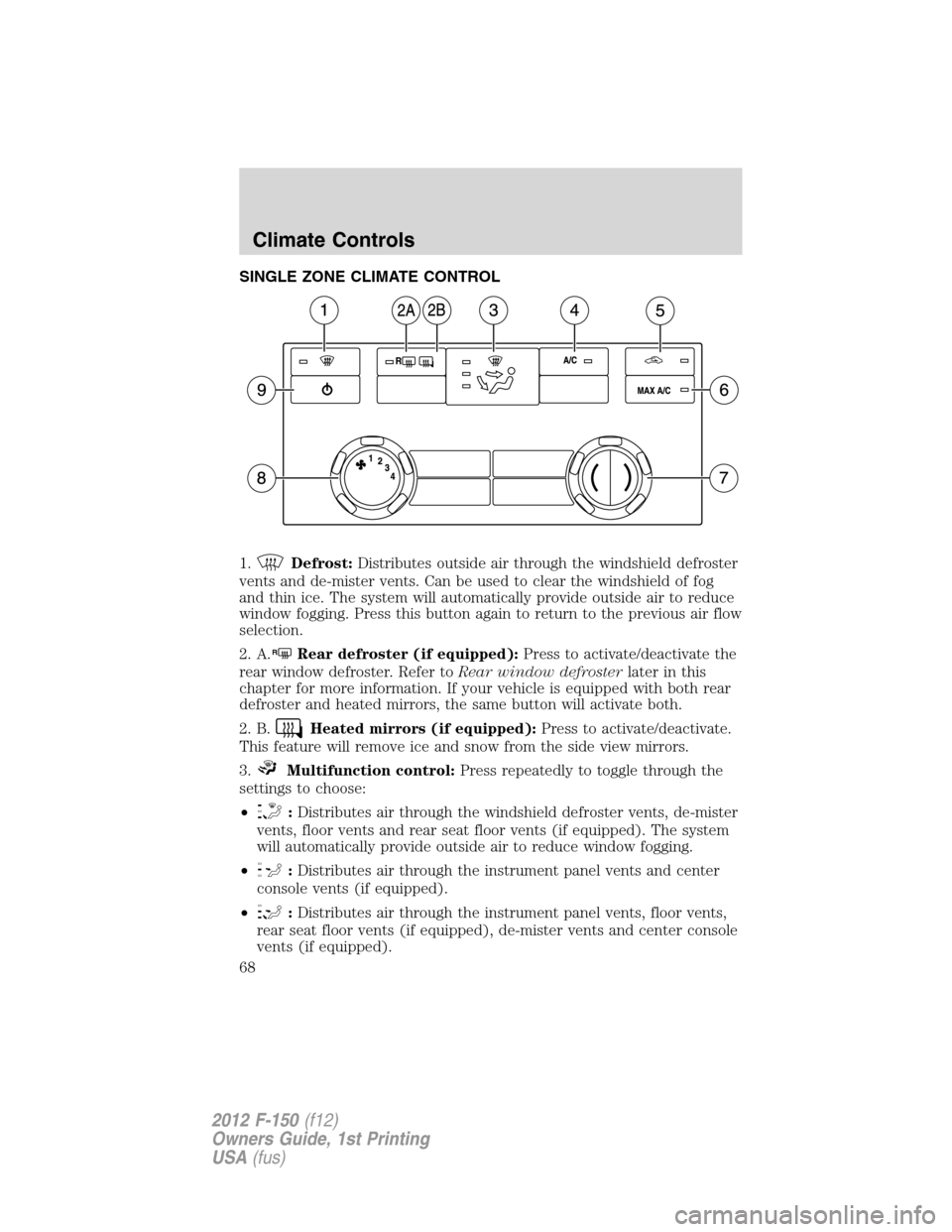
SINGLE ZONE CLIMATE CONTROL
1.
Defrost:Distributes outside air through the windshield defroster
vents and de-mister vents. Can be used to clear the windshield of fog
and thin ice. The system will automatically provide outside air to reduce
window fogging. Press this button again to return to the previous air flow
selection.
2. A.
RRear defroster (if equipped):Press to activate/deactivate the
rear window defroster. Refer toRear window defrosterlater in this
chapter for more information. If your vehicle is equipped with both rear
defroster and heated mirrors, the same button will activate both.
2. B.
Heated mirrors (if equipped):Press to activate/deactivate.
This feature will remove ice and snow from the side view mirrors.
3.
Multifunction control:Press repeatedly to toggle through the
settings to choose:
•
:Distributes air through the windshield defroster vents, de-mister
vents, floor vents and rear seat floor vents (if equipped). The system
will automatically provide outside air to reduce window fogging.
•
:Distributes air through the instrument panel vents and center
console vents (if equipped).
•
:Distributes air through the instrument panel vents, floor vents,
rear seat floor vents (if equipped), de-mister vents and center console
vents (if equipped).
Climate Controls
68
2012 F-150(f12)
Owners Guide, 1st Printing
USA(fus)
Page 73 of 462
adjusts the passenger side temperature when PASS TEMP is disengaged.
The recommended initial setting is between 72°F (22°C) and 75°F
(24°C), then adjust for comfort. The driver side temperature setting will
appear in the upper left corner of the display.
12.
–Front fan speed control:Press to decrease the fan speed.
13. A.
RRear defroster (if equipped):Press to activate/deactivate
the rear window defroster. Refer toRear window defrosterlater in this
chapter for more information. If your vehicle is equipped with both rear
defroster and heated mirrors, the same button will activate both.
13. B.
Heated mirrors (if equipped):Press to activate/deactivate.
This feature will remove ice and snow from the side view mirrors.
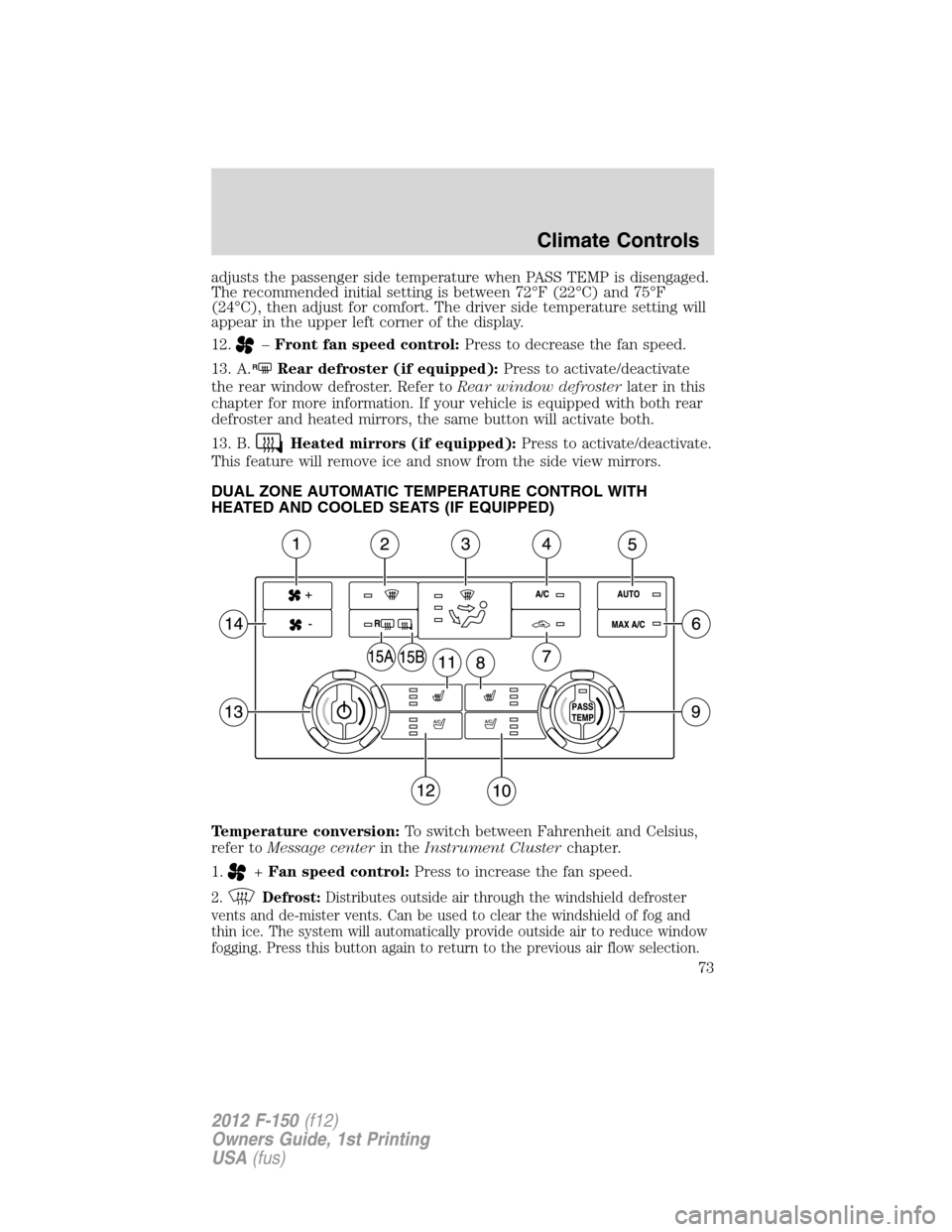
DUAL ZONE AUTOMATIC TEMPERATURE CONTROL WITH
HEATED AND COOLED SEATS (IF EQUIPPED)
Temperature conversion:To switch between Fahrenheit and Celsius,
refer toMessage centerin theInstrument Clusterchapter.
1.
+Fan speed control:Press to increase the fan speed.
2.Defrost:Distributes outside air through the windshield defroster
vents and de-mister vents. Can be used to clear the windshield of fog and
thin ice. The system will automatically provide outside air to reduce window
fogging. Press this button again to return to the previous air flow selection.
Climate Controls
73
2012 F-150(f12)
Owners Guide, 1st Printing
USA(fus)
Page 75 of 462
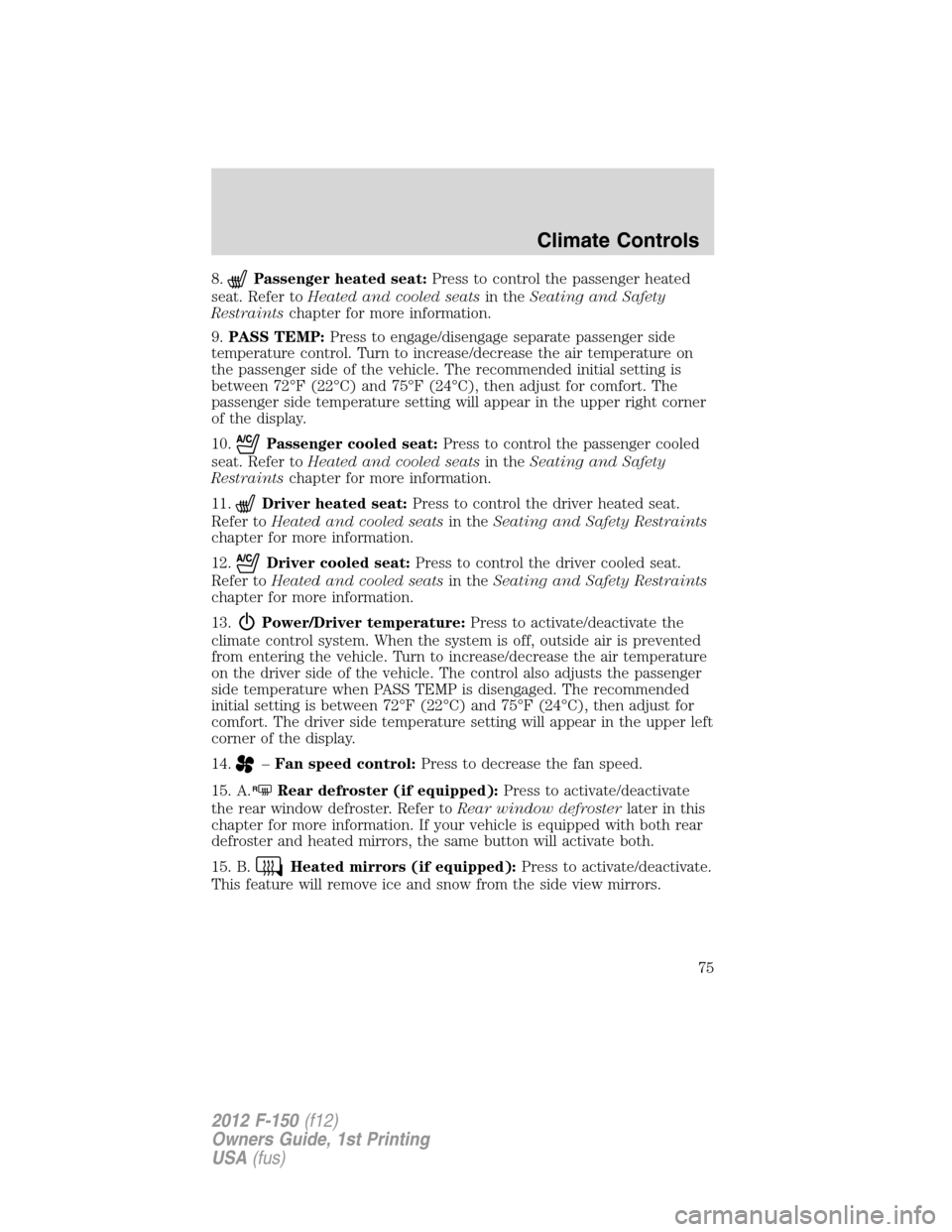
8.Passenger heated seat:Press to control the passenger heated
seat. Refer toHeated and cooled seatsin theSeating and Safety
Restraintschapter for more information.
9.PASS TEMP:Press to engage/disengage separate passenger side
temperature control. Turn to increase/decrease the air temperature on
the passenger side of the vehicle. The recommended initial setting is
between 72°F (22°C) and 75°F (24°C), then adjust for comfort. The
passenger side temperature setting will appear in the upper right corner
of the display.
10.
Passenger cooled seat:Press to control the passenger cooled
seat. Refer toHeated and cooled seatsin theSeating and Safety
Restraintschapter for more information.
11.
Driver heated seat:Press to control the driver heated seat.
Refer toHeated and cooled seatsin theSeating and Safety Restraints
chapter for more information.
12.
Driver cooled seat:Press to control the driver cooled seat.
Refer toHeated and cooled seatsin theSeating and Safety Restraints
chapter for more information.
13.
Power/Driver temperature:Press to activate/deactivate the
climate control system. When the system is off, outside air is prevented
from entering the vehicle. Turn to increase/decrease the air temperature
on the driver side of the vehicle. The control also adjusts the passenger
side temperature when PASS TEMP is disengaged. The recommended
initial setting is between 72°F (22°C) and 75°F (24°C), then adjust for
comfort. The driver side temperature setting will appear in the upper left
corner of the display.
14.
–Fan speed control:Press to decrease the fan speed.
15. A.
RRear defroster (if equipped):Press to activate/deactivate
the rear window defroster. Refer toRear window defrosterlater in this
chapter for more information. If your vehicle is equipped with both rear
defroster and heated mirrors, the same button will activate both.
15. B.
Heated mirrors (if equipped):Press to activate/deactivate.
This feature will remove ice and snow from the side view mirrors.
Climate Controls
75
2012 F-150(f12)
Owners Guide, 1st Printing
USA(fus)
Page 76 of 462
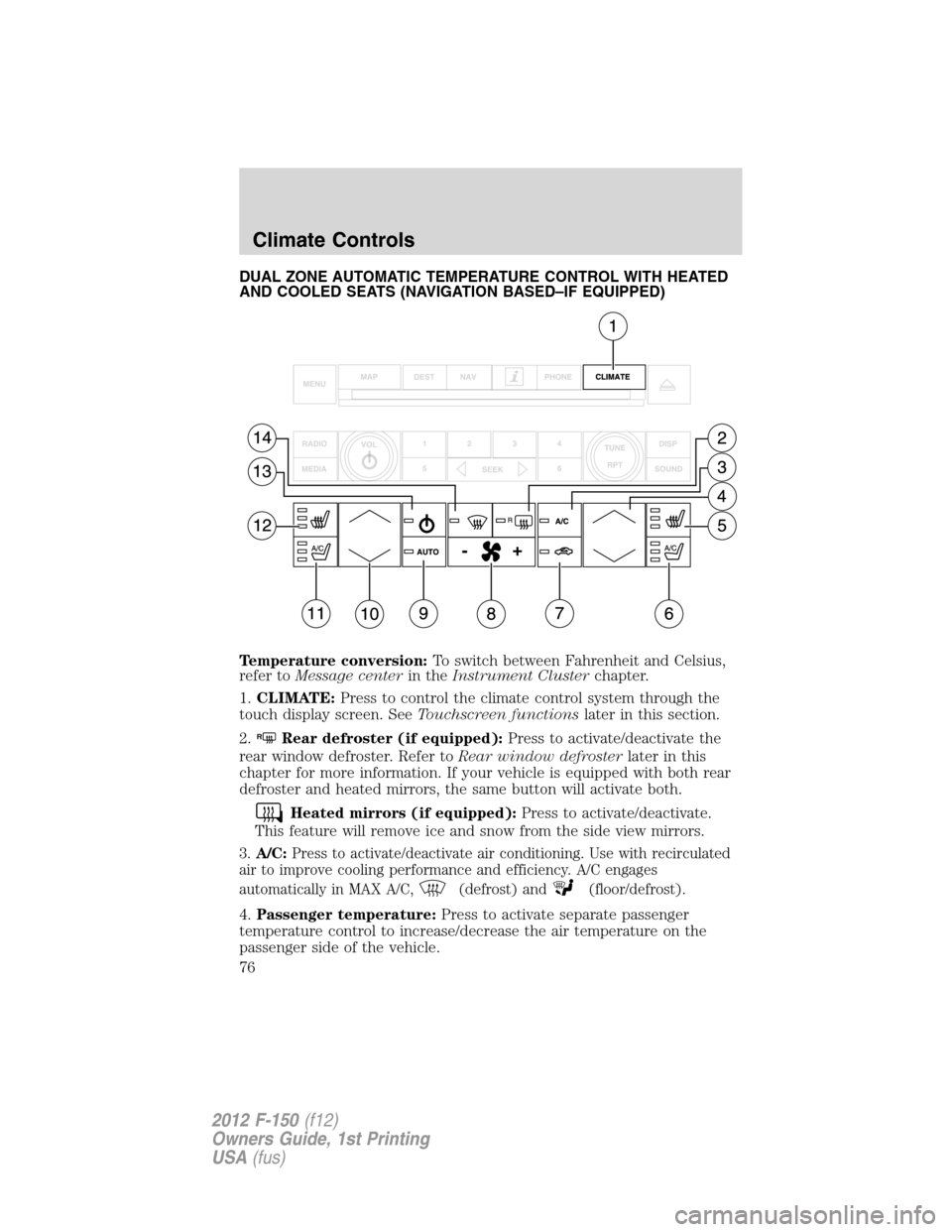
DUAL ZONE AUTOMATIC TEMPERATURE CONTROL WITH HEATED
AND COOLED SEATS (NAVIGATION BASED–IF EQUIPPED)
Temperature conversion:To switch between Fahrenheit and Celsius,
refer toMessage centerin theInstrument Clusterchapter.
1.CLIMATE:Press to control the climate control system through the
touch display screen. SeeTouchscreen functionslater in this section.
2.
RRear defroster (if equipped):Press to activate/deactivate the
rear window defroster. Refer toRear window defrosterlater in this
chapter for more information. If your vehicle is equipped with both rear
defroster and heated mirrors, the same button will activate both.
Heated mirrors (if equipped):Press to activate/deactivate.
This feature will remove ice and snow from the side view mirrors.
3.A/C:Press to activate/deactivate air conditioning. Use with recirculated
air to improve cooling performance and efficiency. A/C engages
automatically in MAX A/C,
(defrost) and(floor/defrost).
4.Passenger temperature:Press to activate separate passenger
temperature control to increase/decrease the air temperature on the
passenger side of the vehicle.
Climate Controls
76
2012 F-150(f12)
Owners Guide, 1st Printing
USA(fus)
Page 94 of 462
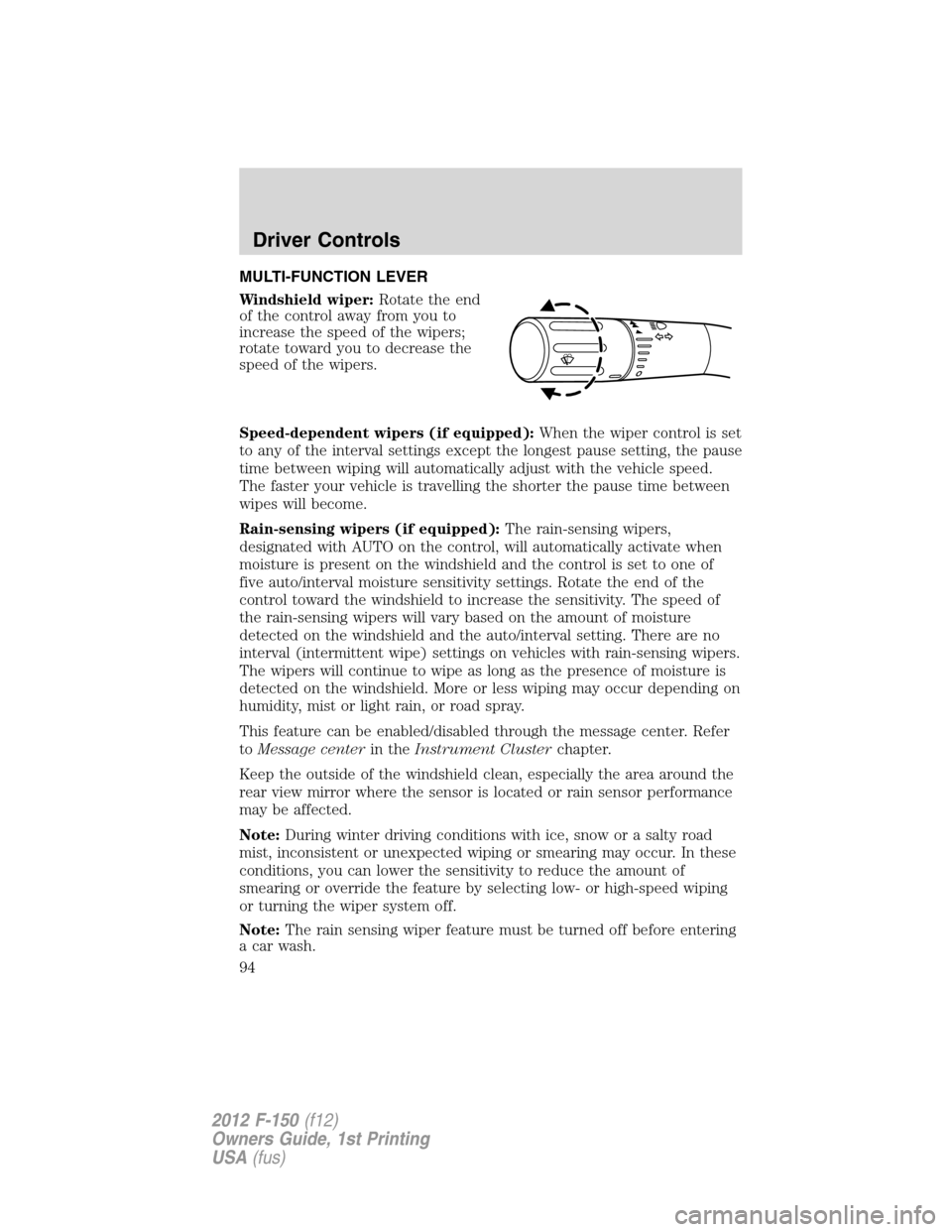
MULTI-FUNCTION LEVER
Windshield wiper:Rotate the end
of the control away from you to
increase the speed of the wipers;
rotate toward you to decrease the
speed of the wipers.
Speed-dependent wipers (if equipped):When the wiper control is set
to any of the interval settings except the longest pause setting, the pause
time between wiping will automatically adjust with the vehicle speed.
The faster your vehicle is travelling the shorter the pause time between
wipes will become.
Rain-sensing wipers (if equipped):The rain-sensing wipers,
designated with AUTO on the control, will automatically activate when
moisture is present on the windshield and the control is set to one of
five auto/interval moisture sensitivity settings. Rotate the end of the
control toward the windshield to increase the sensitivity. The speed of
the rain-sensing wipers will vary based on the amount of moisture
detected on the windshield and the auto/interval setting. There are no
interval (intermittent wipe) settings on vehicles with rain-sensing wipers.
The wipers will continue to wipe as long as the presence of moisture is
detected on the windshield. More or less wiping may occur depending on
humidity, mist or light rain, or road spray.
This feature can be enabled/disabled through the message center. Refer
toMessage centerin theInstrument Clusterchapter.
Keep the outside of the windshield clean, especially the area around the
rear view mirror where the sensor is located or rain sensor performance
may be affected.
Note:During winter driving conditions with ice, snow or a salty road
mist, inconsistent or unexpected wiping or smearing may occur. In these
conditions, you can lower the sensitivity to reduce the amount of
smearing or override the feature by selecting low- or high-speed wiping
or turning the wiper system off.
Note:The rain sensing wiper feature must be turned off before entering
a car wash.
o
Driver Controls
94
2012 F-150(f12)
Owners Guide, 1st Printing
USA(fus)
Page 105 of 462
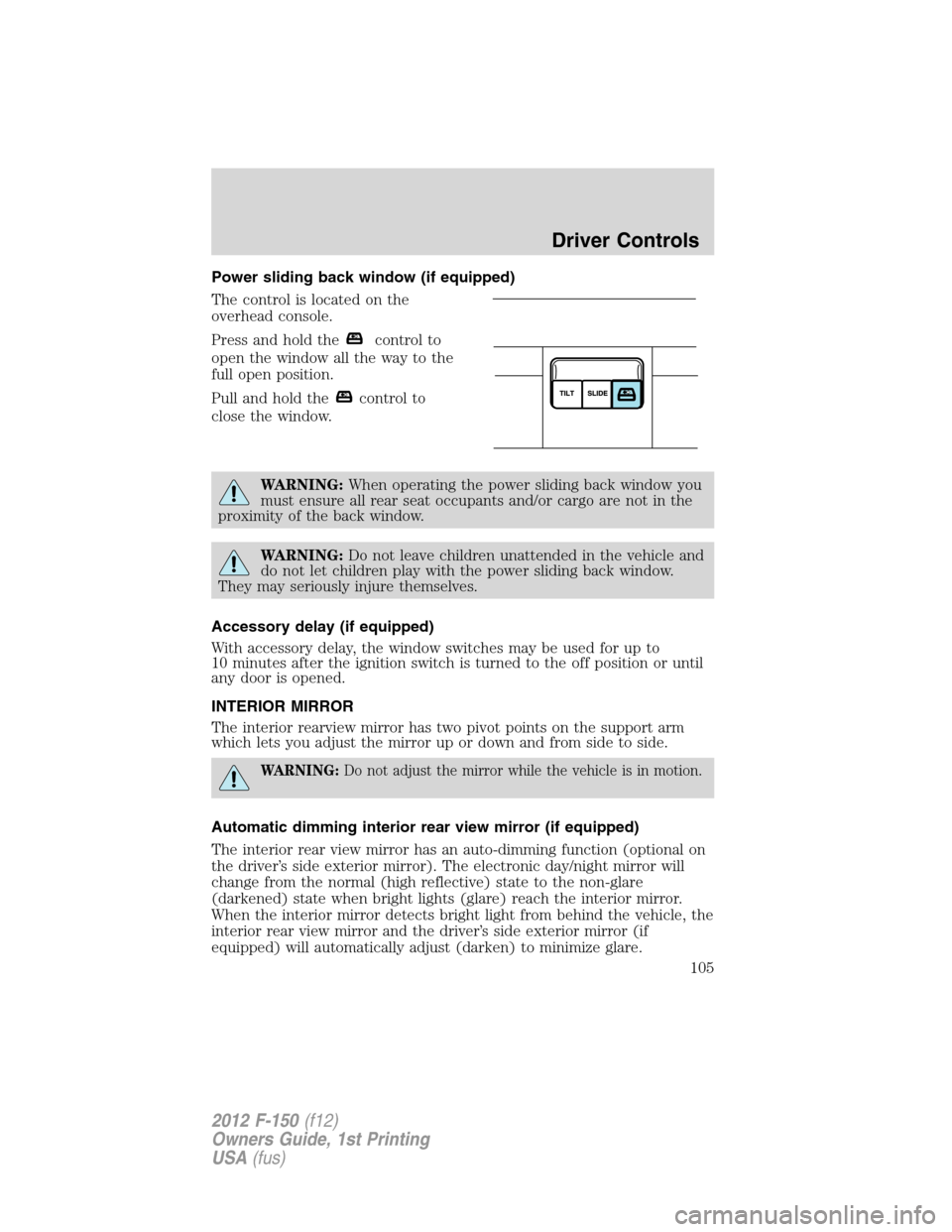
Power sliding back window (if equipped)
The control is located on the
overhead console.
Press and hold the
control to
open the window all the way to the
full open position.
Pull and hold the
control to
close the window.
WARNING:When operating the power sliding back window you
must ensure all rear seat occupants and/or cargo are not in the
proximity of the back window.
WARNING:Do not leave children unattended in the vehicle and
do not let children play with the power sliding back window.
They may seriously injure themselves.
Accessory delay (if equipped)
With accessory delay, the window switches may be used for up to
10 minutes after the ignition switch is turned to the off position or until
any door is opened.
INTERIOR MIRROR
The interior rearview mirror has two pivot points on the support arm
which lets you adjust the mirror up or down and from side to side.
WARNING:Do not adjust the mirror while the vehicle is in motion.
Automatic dimming interior rear view mirror (if equipped)
The interior rear view mirror has an auto-dimming function (optional on
the driver’s side exterior mirror). The electronic day/night mirror will
change from the normal (high reflective) state to the non-glare
(darkened) state when bright lights (glare) reach the interior mirror.
When the interior mirror detects bright light from behind the vehicle, the
interior rear view mirror and the driver’s side exterior mirror (if
equipped) will automatically adjust (darken) to minimize glare.
Driver Controls
105
2012 F-150(f12)
Owners Guide, 1st Printing
USA(fus)
Page 106 of 462
The mirrors will automatically return to the normal state whenever the
vehicle is placed in R (Reverse) to ensure a bright clear view when
backing up.
Do not block the sensors on the front and back of the interior rear
view mirror since this may impair proper mirror performance.
Note:A rear center passenger and/or raised rear center headrest (if
equipped) may also block the light from reaching the sensor.
Do not clean the housing or glass of any mirror with harsh
abrasives, fuel or other petroleum-based cleaning products.
Note:If equipped with a rearview camera system, a video image will
display in the mirror or the navigation system display (if equipped) when
the vehicle is put in R (Reverse). As you shift into any other gear from R
(Reverse), the image will remain for a few seconds and then turn off.
Refer toRearview camera systemin theDrivingchapter.
EXTERIOR MIRRORS
Power side view mirrors (if equipped)
WARNING:Do not adjust the mirror while the vehicle is in motion.
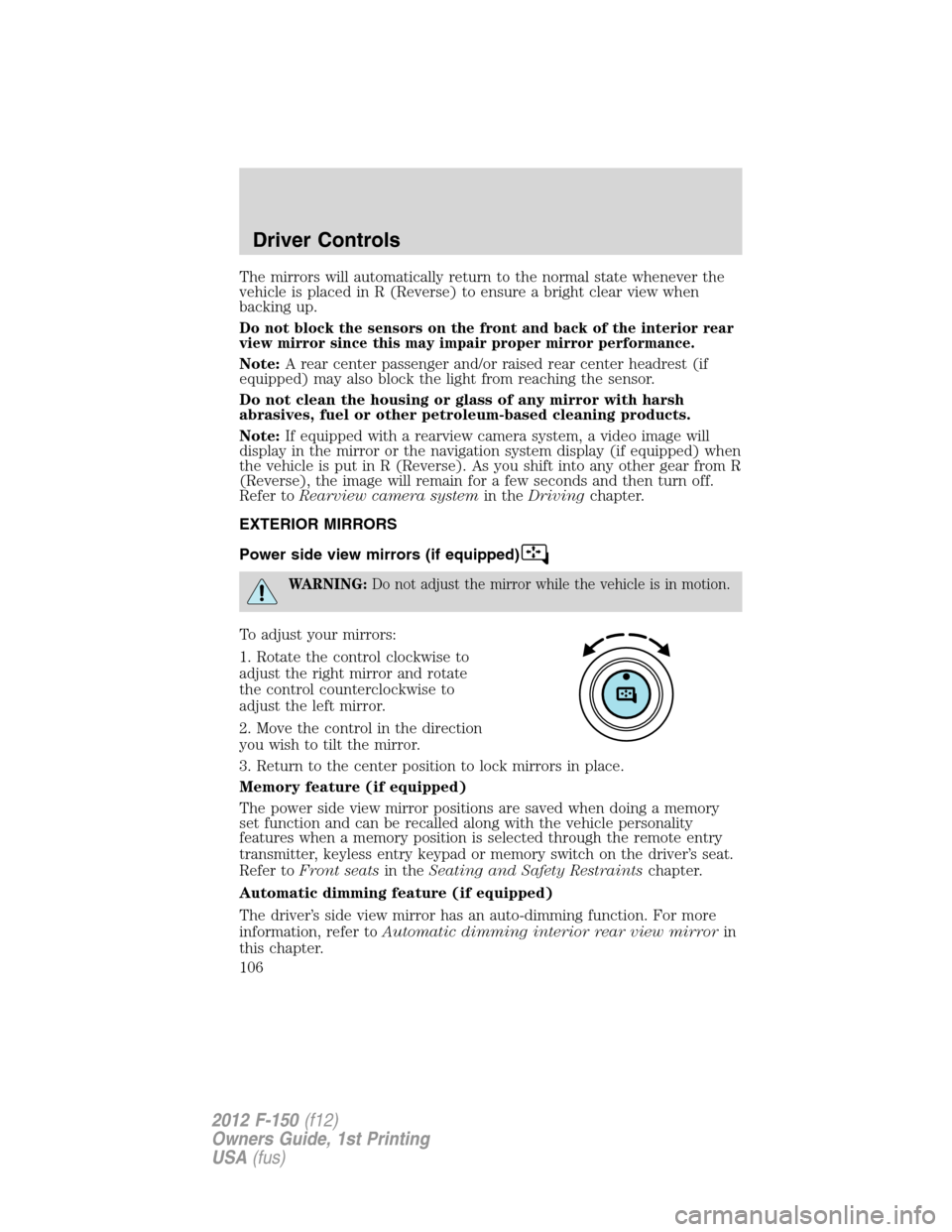
To adjust your mirrors:
1. Rotate the control clockwise to
adjust the right mirror and rotate
the control counterclockwise to
adjust the left mirror.
2. Move the control in the direction
you wish to tilt the mirror.
3. Return to the center position to lock mirrors in place.
Memory feature (if equipped)
The power side view mirror positions are saved when doing a memory
set function and can be recalled along with the vehicle personality
features when a memory position is selected through the remote entry
transmitter, keyless entry keypad or memory switch on the driver’s seat.
Refer toFront seatsin theSeating and Safety Restraintschapter.
Automatic dimming feature (if equipped)
The driver’s side view mirror has an auto-dimming function. For more
information, refer toAutomatic dimming interior rear view mirrorin
this chapter.
Driver Controls
106
2012 F-150(f12)
Owners Guide, 1st Printing
USA(fus)
Page 306 of 462
sensors with sharp objects). If the sensors are covered, it will
affect the accuracy of the RSS.
If your vehicle sustains damage to the rear bumper/fascia, leaving
it misaligned or bent, the sensing zone may be altered causing
inaccurate measurement of obstacles or false alarms.
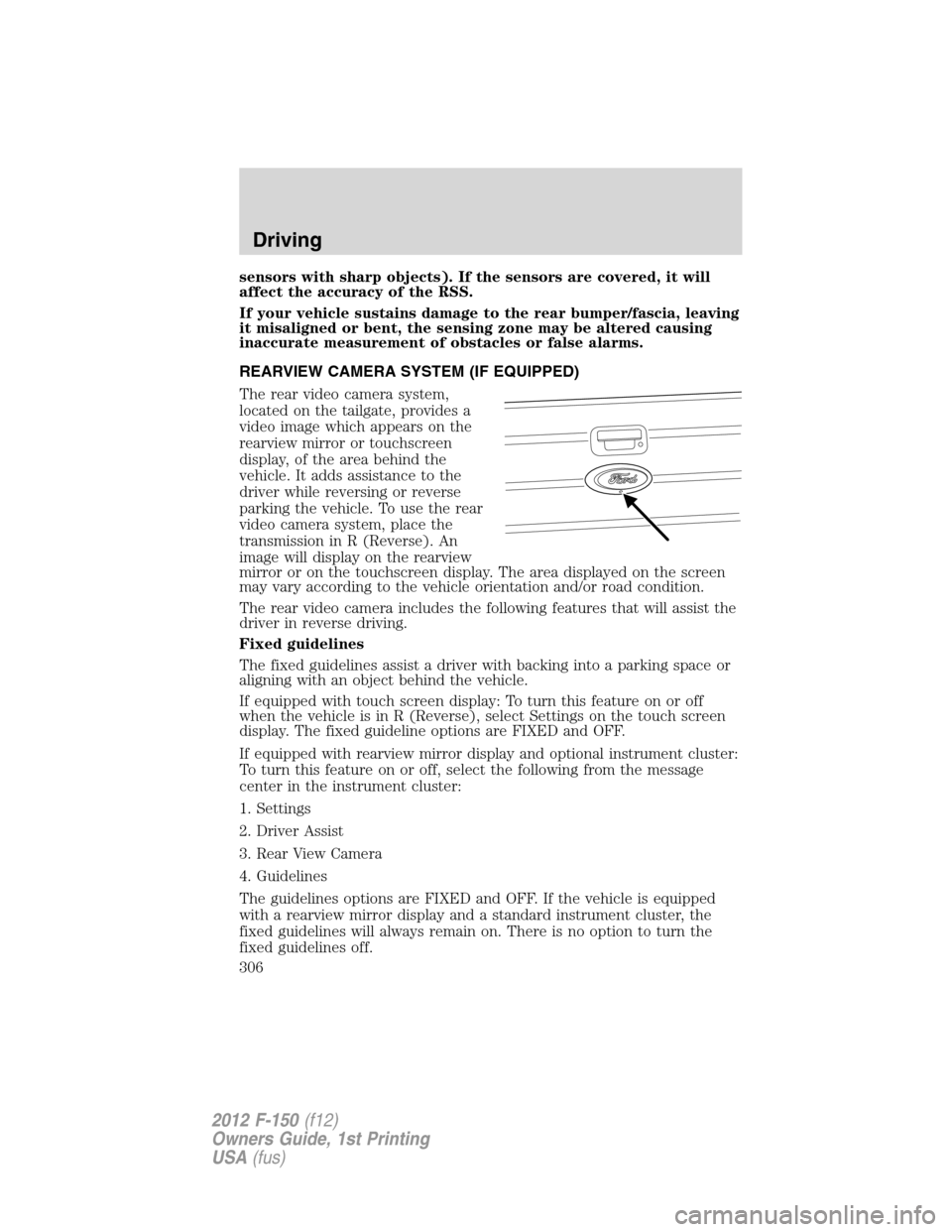
REARVIEW CAMERA SYSTEM (IF EQUIPPED)
The rear video camera system,
located on the tailgate, provides a
video image which appears on the
rearview mirror or touchscreen
display, of the area behind the
vehicle. It adds assistance to the
driver while reversing or reverse
parking the vehicle. To use the rear
video camera system, place the
transmission in R (Reverse). An
image will display on the rearview
mirror or on the touchscreen display. The area displayed on the screen
may vary according to the vehicle orientation and/or road condition.
The rear video camera includes the following features that will assist the
driver in reverse driving.
Fixed guidelines
The fixed guidelines assist a driver with backing into a parking space or
aligning with an object behind the vehicle.
If equipped with touch screen display: To turn this feature on or off
when the vehicle is in R (Reverse), select Settings on the touch screen
display. The fixed guideline options are FIXED and OFF.
If equipped with rearview mirror display and optional instrument cluster:
To turn this feature on or off, select the following from the message
center in the instrument cluster:
1. Settings
2. Driver Assist
3. Rear View Camera
4. Guidelines
The guidelines options are FIXED and OFF. If the vehicle is equipped
with a rearview mirror display and a standard instrument cluster, the
fixed guidelines will always remain on. There is no option to turn the
fixed guidelines off.
Driving
306
2012 F-150(f12)
Owners Guide, 1st Printing
USA(fus)
Page 307 of 462
Visual park aid alert (if equipped)
Visual park aid alert allows the driver to see the area that is causing the
reverse sensing system to beep. The visual alerts are red, yellow or green
highlights which appear on top of the video image when an object is
detected by the reverse sensing system. The visual alert will highlight
the closest object detected by the reverse sensing system. The reverse
sensing alert can be disabled and if visual park aid alert is enabled,
highlighted areas will still be displayed.
If equipped with touch screen display: To turn this feature on or off
when the vehicle is in R (Reverse), select Settings on the touch screen
display. The visual park aid alert options are ON and OFF.
If equipped with rearview mirror display and optional instrument cluster:
To turn this feature on or off, select the following from the message
center in the instrument cluster:
1. Settings
2. Driver Assist
3. Rear View Camera
4. Visual Park Aid
The visual park aid alert options are ON and OFF. The visual park aid
alert feature is not available on vehicles with a rearview mirror and a
standard instrument cluster.
Note:The reverse sensing system is not effective at speeds above 3 mph
(5 km/h) and may not detect certain angular or moving objects.
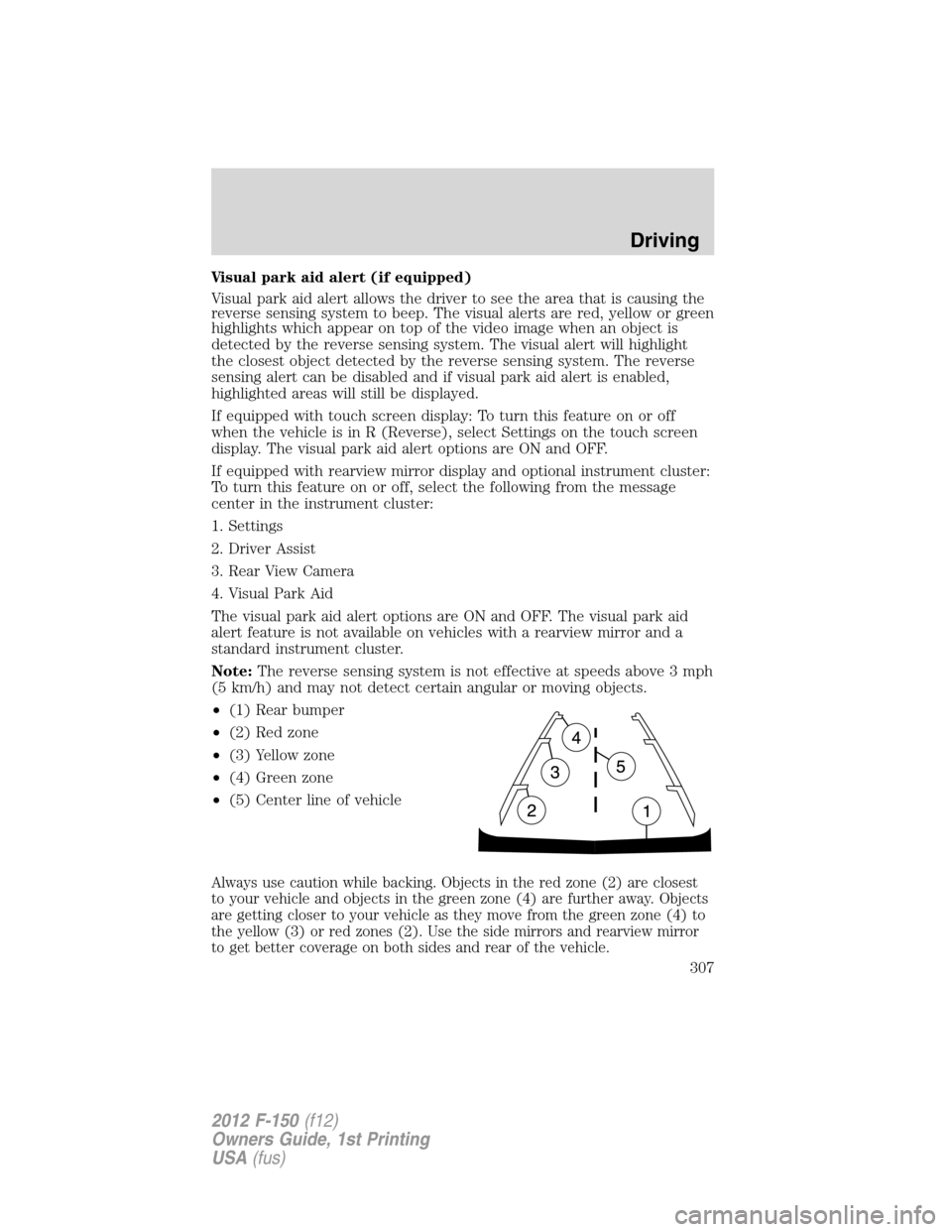
•(1) Rear bumper
•(2) Red zone
•(3) Yellow zone
•(4) Green zone
•(5) Center line of vehicle
Always use caution while backing. Objects in the red zone (2) are closest
to your vehicle and objects in the green zone (4) are further away. Objects
are getting closer to your vehicle as they move from the green zone (4) to
the yellow (3) or red zones (2). Use the side mirrors and rearview mirror
to get better coverage on both sides and rear of the vehicle.
Driving
307
2012 F-150(f12)
Owners Guide, 1st Printing
USA(fus)
Page 308 of 462
When towing, the reverse camera system will only see what is being
towed behind the vehicle. This might not provide adequate coverage as it
usually provides in normal operation and some objects might not be
seen.
Fixed guidelines and visual park aid alert features are only available
when the vehicle is in R (Reverse).
Manual zoom
The manual zoom feature assists drivers with connecting their vehicle to
a trailer for the purpose of towing. It allows the driver to manually zoom
closer to an object behind the vehicle. The zoomed image keeps the
bumper in the image to provide a reference.
If equipped with touch screen display: To turn the manual zoom feature
on or off, do the following:
1. Place the vehicle in R (Reverse).
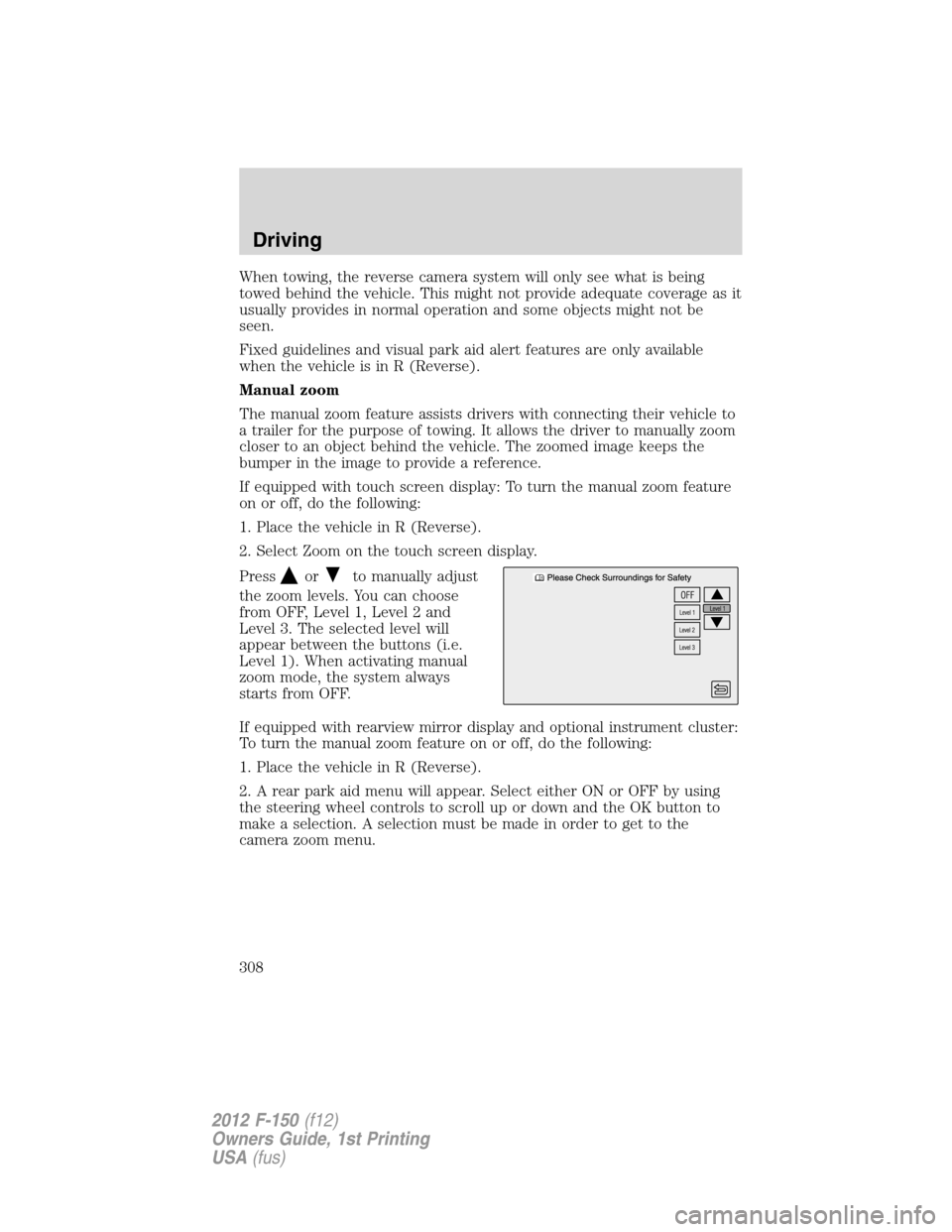
2. Select Zoom on the touch screen display.
Press
orto manually adjust
the zoom levels. You can choose
from OFF, Level 1, Level 2 and
Level 3. The selected level will
appear between the buttons (i.e.
Level 1). When activating manual
zoom mode, the system always
starts from OFF.
If equipped with rearview mirror display and optional instrument cluster:
To turn the manual zoom feature on or off, do the following:
1. Place the vehicle in R (Reverse).
2. A rear park aid menu will appear. Select either ON or OFF by using
the steering wheel controls to scroll up or down and the OK button to
make a selection. A selection must be made in order to get to the
camera zoom menu.
Driving
308
2012 F-150(f12)
Owners Guide, 1st Printing
USA(fus)