window FORD F150 2013 12.G Owner's Manual
[x] Cancel search | Manufacturer: FORD, Model Year: 2013, Model line: F150, Model: FORD F150 2013 12.GPages: 570, PDF Size: 6.13 MB
Page 154 of 570
Distributes air through the instrument panel vents, floor vents,
and demister vents.
Distributes air through the floor vents.
E.A/C:Press to turn air conditioning on or off. Air conditioning cools the
vehicle using outside air. To improve air conditioning when starting your
vehicle, drive with the windows slightly open for two to three minutes.
Use A/C with recirculated air to improve cooling performance and efficiency.
Note:A/C turns on automatically in MAX A/C, Defrost and Floor/Defrost.
F.MAX A/C:Distributes recirculated air through the instrument panel
vents to cool the vehicle. This position is more economical and efficient
than normal A/C.
G.Recirculated air:Press to switch between outside air and
recirculated air. When the LED on the button is lit, the air currently in
the passenger compartment is being recirculated. Using recirculated air
can reduce the time needed to cool the interior and reduce unwanted
odors from entering your vehicle. Even when this button is not selected,
air may still recirculate in some instances in order to reduce vehicle
warm-up time in cold conditions or to cool down time in hot conditions.
Note:Recirculated air engages automatically when MAX A/C is selected
or can be turned on manually in any airflow mode except Defrost.
Note:You may notice changes in sound between recirculated mode and
other airflow modes.
Note:For better cooling in hot conditions, recirculated air automatically
engages when the air distribution control is in panel or panel/floor modes
and the air conditioning is on. You can switch to fresh air by pressing the
recirculated air button again.
H.PASS TEMP:Press and turn to increase or decrease the air
temperature on the passenger side of the vehicle.
I.Fan speed control +:Press to increase the volume of air circulated in
your vehicle.
J.AUTO:Press to turn on fully automatic operation. Select the desired
temperature using the temperature control. The system automatically
determines fan speed, air distribution, A/C operation, and outside or
recirculated air, to heat or cool the vehicle to maintain the selected
temperature.
K.Fan speed control - :Press to decrease the volume of air circulated
in your vehicle.
154Climate Control
2013 F-150(f12)
Owners Guide gf, 1st Printing
USA(fus)
Page 155 of 570
GENERAL OPERATING TIPS
Manual Heating and Air Conditioning System
•To reduce fog build-up on the windshield during humid weather, select
Defrost. Temperature and fan speed can also be increased to improve
clearing.
•To reduce humidity build-up inside the vehicle, do not drive with the
system off or with recirculated air engaged.
•Do not put objects under the front seats that will interfere with the
airflow to the back seats.
•Remove any snow, ice or leaves from the air intake area at the base of
the windshield.
•To improve the A/C cool down, drive with the windows slightly open
for 2-3 minutes after start-up or until the vehicle has been aired out.
•A small amount of air may be felt from the floor vent regardless of the
air distribution setting that is selected.
During extreme high ambient temperatures when idling stationary for
extended periods of time in gear, it is recommended to run the A/C in
the MAX A/C mode, adjust the blower fan speed to the lowest setting
and put the vehicle’s transmission into positionP(vehicles equipped
with an automatic transmission) to continue to receive cool air from your
A/C system.
For maximum cooling performance in A/C mode, press MAX A/C.
For maximum cooling performance in panel or panel/floor modes:
1. Move temperature control to the coolest setting.
2. Select A/C and recirculated air to provide colder airflow.
3. Set the fan to the highest speed initially, then adjust to maintain
comfort.
To aid in side window defogging and demisting in cold or humid weather:
1. Select Floor/Panel.
2. Select A/C.
3. Adjust the temperature control to maintain comfort.
4. Set the fan speed to the highest setting.
5. Direct the outer instrument panel vents toward the side windows.
6. To increase airflow to the outer instrument panel vents, close the
vents located in the middle of the instrument panel.
Climate Control155
2013 F-150(f12)
Owners Guide gf, 1st Printing
USA(fus)
Page 156 of 570
Dual Zone Automatic Temperature Control
•To reduce fog build-up on the windshield during humid weather, select
Defrost. Temperature and fan speed can also be increased to improve
clearing.
•To reduce humidity build-up inside the vehicle, do not drive with the
system off or with recirculated air engaged.
•Do not put objects under the front seats that will interfere with the
airflow to the back seats.
•Remove any snow, ice or leaves from the air intake area at the base of
the windshield.
•To improve the A/C cool down, drive with the windows slightly open
for 2-3 minutes after start-up or until the vehicle has been aired out.
•A small amount of air may be felt from the floor vent regardless of the
air distribution setting that is selected.
During extreme high ambient temperatures when idling stationary for
extended periods of time in gear, it is recommended to run the A/C in
the MAX A/C mode, adjust the blower fan speed to the lowest setting
and put the vehicle’s transmission into positionP(vehicles equipped
with an automatic transmission) to continue to receive cool air from your
A/C system.
For maximum cooling performance in AUTO mode, press MAX A/C.
For maximum cooling performance in manual override control:
1. Choose Panel, A/C, and recirc controls.
2. Set the temperature to LO.
3. Set the fan to the highest blower setting.
To aid in side window defogging and demisting in cold or humid weather:
1. Select Floor/Panel.
2. Select A/C.
3. Adjust the temperature control to maintain comfort.
4. Set the fan speed to the highest setting.
5. Direct the outer instrument panel vents toward the side windows.
6. To increase airflow to the outer instrument panel vents, close the
vents located in the middle of the instrument panel.
156Climate Control
2013 F-150(f12)
Owners Guide gf, 1st Printing
USA(fus)
Page 157 of 570
HEATED WINDOWS AND MIRRORS (IF EQUIPPED)
Heated Rear Window
Note:The ignition must be switched on to use this feature.
Note:If your vehicle is equipped with a sliding rear window, the
defroster does not operate when the window is opened.
Press the button to clear the rear window of thin ice and fog. Press the
button again within 10 minutes to switch it off. It switches off
automatically after 10 minutes, or when you switch the ignition off.
Do not use razor blades or other sharp objects to clean the inside
of the rear window or to remove decals from the inside of the
rear window. This may cause damage to the heated grid lines and
will not be covered by your warranty.
Heated Exterior Mirror (If Equipped)
Note:Do not remove ice from the mirrors with a scraper or attempt to
readjust the mirror glass if it is frozen in place. These actions could
cause damage to the glass and mirrors.
Note:Do not clean the housing or glass of any mirror with harsh
abrasives, fuel or other petroleum-based cleaning products.
Note:If your driver side mirror is equipped with the auto-dimming
feature, the glass is thicker than the passenger side mirror and may take
longer to defrost.
Both mirrors are heated to remove ice, mist and fog when the rear
window defroster is activated.
REMOTE START CLIMATE OPERATION (IF EQUIPPED)
The climate control system adjusts the cabin temperature during remote
start.
You cannot adjust the system during remote start operation. Turn the
ignition on to return the system to its previous settings. You can now
make adjustments. You will need to turn certain vehicle-dependent
features back on, such as:
•heated seats
•cooled seats
•heated mirrors
•heated rear window.
You can adjust the settings using the information display controls. See
theInformation Displayschapter.
Climate Control157
2013 F-150(f12)
Owners Guide gf, 1st Printing
USA(fus)
Page 191 of 570
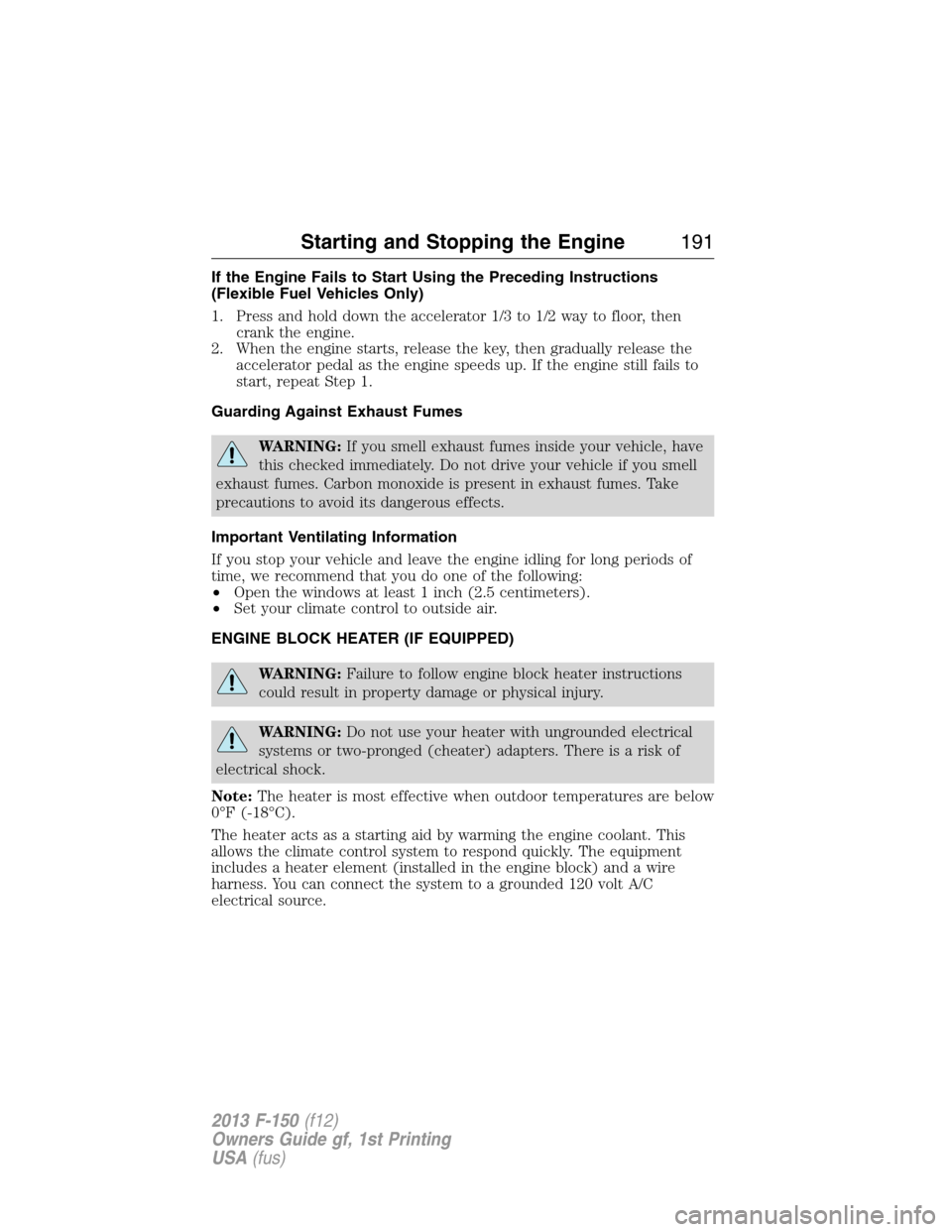
If the Engine Fails to Start Using the Preceding Instructions
(Flexible Fuel Vehicles Only)
1. Press and hold down the accelerator 1/3 to 1/2 way to floor, then
crank the engine.
2. When the engine starts, release the key, then gradually release the
accelerator pedal as the engine speeds up. If the engine still fails to
start, repeat Step 1.
Guarding Against Exhaust Fumes
WARNING:If you smell exhaust fumes inside your vehicle, have
this checked immediately. Do not drive your vehicle if you smell
exhaust fumes. Carbon monoxide is present in exhaust fumes. Take
precautions to avoid its dangerous effects.
Important Ventilating Information
If you stop your vehicle and leave the engine idling for long periods of
time, we recommend that you do one of the following:
•Open the windows at least 1 inch (2.5 centimeters).
•Set your climate control to outside air.
ENGINE BLOCK HEATER (IF EQUIPPED)
WARNING:Failure to follow engine block heater instructions
could result in property damage or physical injury.
WARNING:Do not use your heater with ungrounded electrical
systems or two-pronged (cheater) adapters. There is a risk of
electrical shock.
Note:The heater is most effective when outdoor temperatures are below
0°F (-18°C).
The heater acts as a starting aid by warming the engine coolant. This
allows the climate control system to respond quickly. The equipment
includes a heater element (installed in the engine block) and a wire
harness. You can connect the system to a grounded 120 volt A/C
electrical source.
Starting and Stopping the Engine191
2013 F-150(f12)
Owners Guide gf, 1st Printing
USA(fus)
Page 278 of 570
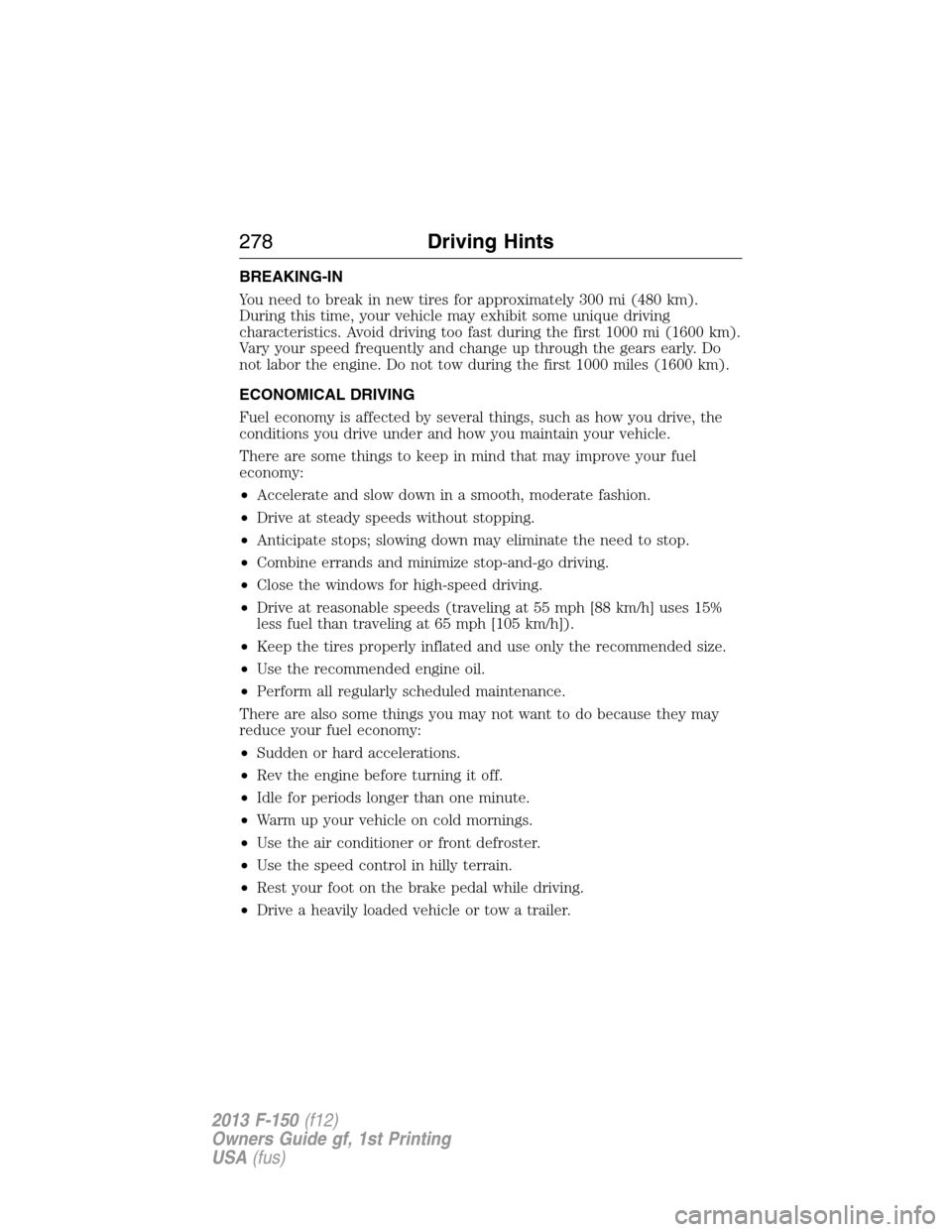
BREAKING-IN
You need to break in new tires for approximately 300 mi (480 km).
During this time, your vehicle may exhibit some unique driving
characteristics. Avoid driving too fast during the first 1000 mi (1600 km).
Vary your speed frequently and change up through the gears early. Do
not labor the engine. Do not tow during the first 1000 miles (1600 km).
ECONOMICAL DRIVING
Fuel economy is affected by several things, such as how you drive, the
conditions you drive under and how you maintain your vehicle.
There are some things to keep in mind that may improve your fuel
economy:
•Accelerate and slow down in a smooth, moderate fashion.
•Drive at steady speeds without stopping.
•Anticipate stops; slowing down may eliminate the need to stop.
•Combine errands and minimize stop-and-go driving.
•Close the windows for high-speed driving.
•Drive at reasonable speeds (traveling at 55 mph [88 km/h] uses 15%
less fuel than traveling at 65 mph [105 km/h]).
•Keep the tires properly inflated and use only the recommended size.
•Use the recommended engine oil.
•Perform all regularly scheduled maintenance.
There are also some things you may not want to do because they may
reduce your fuel economy:
•Sudden or hard accelerations.
•Rev the engine before turning it off.
•Idle for periods longer than one minute.
•Warm up your vehicle on cold mornings.
•Use the air conditioner or front defroster.
•Use the speed control in hilly terrain.
•Rest your foot on the brake pedal while driving.
•Drive a heavily loaded vehicle or tow a trailer.
278Driving Hints
2013 F-150(f12)
Owners Guide gf, 1st Printing
USA(fus)
Page 300 of 570
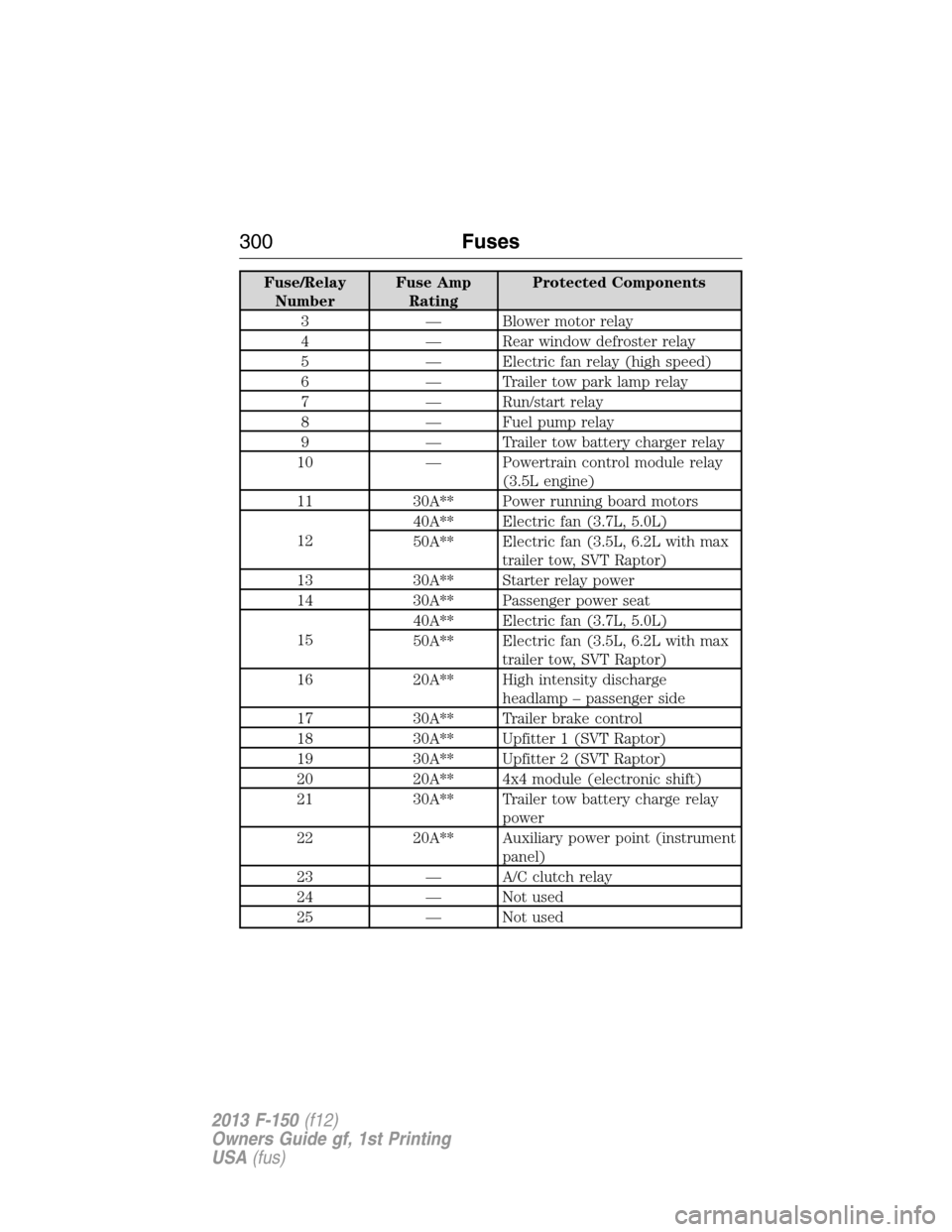
Fuse/Relay
NumberFuse Amp
RatingProtected Components
3 — Blower motor relay
4 — Rear window defroster relay
5 — Electric fan relay (high speed)
6 — Trailer tow park lamp relay
7 — Run/start relay
8 — Fuel pump relay
9 — Trailer tow battery charger relay
10 — Powertrain control module relay
(3.5L engine)
11 30A** Power running board motors
1240A** Electric fan (3.7L, 5.0L)
50A** Electric fan (3.5L, 6.2L with max
trailer tow, SVT Raptor)
13 30A** Starter relay power
14 30A** Passenger power seat
1540A** Electric fan (3.7L, 5.0L)
50A** Electric fan (3.5L, 6.2L with max
trailer tow, SVT Raptor)
16 20A** High intensity discharge
headlamp – passenger side
17 30A** Trailer brake control
18 30A** Upfitter 1 (SVT Raptor)
19 30A** Upfitter 2 (SVT Raptor)
20 20A** 4x4 module (electronic shift)
21 30A** Trailer tow battery charge relay
power
22 20A** Auxiliary power point (instrument
panel)
23 — A/C clutch relay
24 — Not used
25 — Not used
300Fuses
2013 F-150(f12)
Owners Guide gf, 1st Printing
USA(fus)
Page 301 of 570
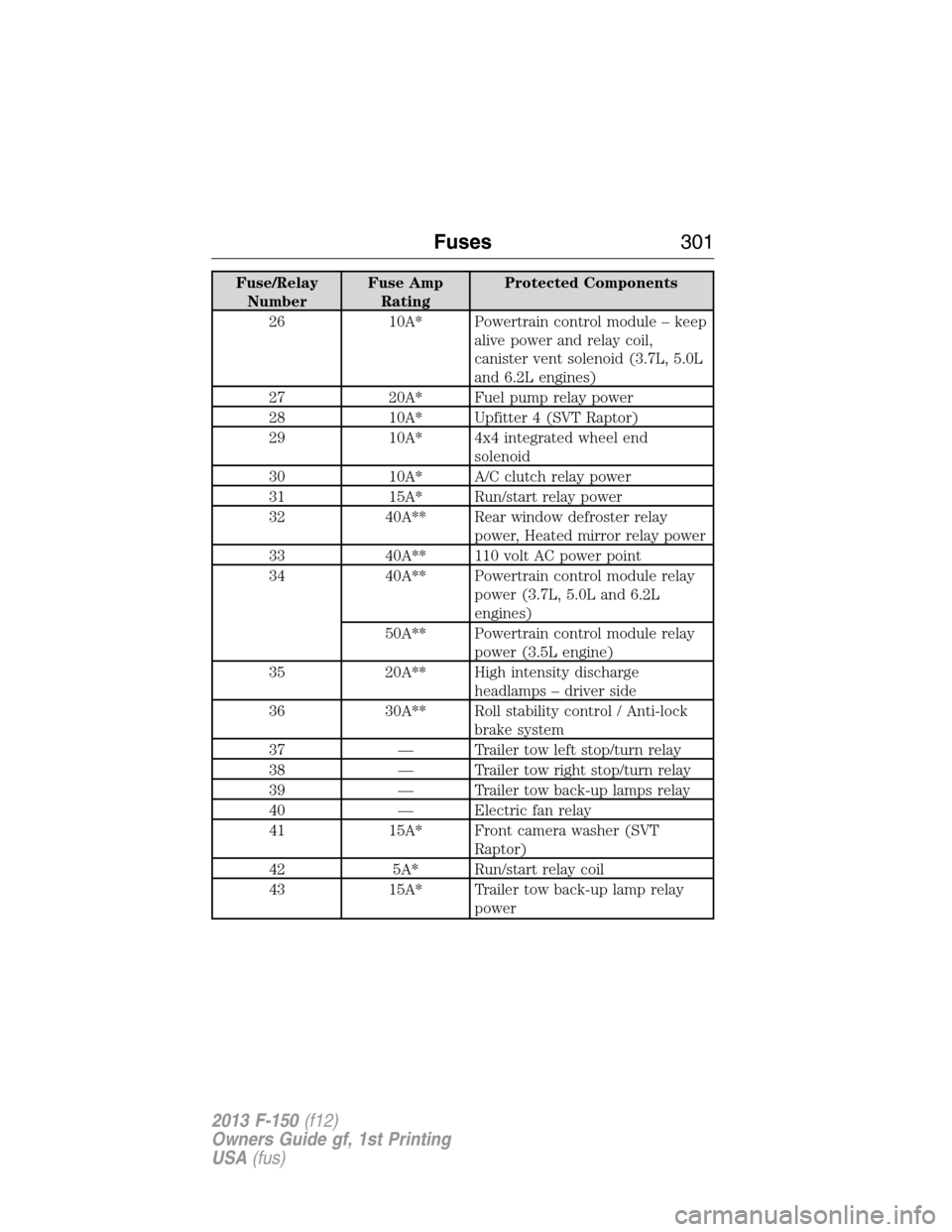
Fuse/Relay
NumberFuse Amp
RatingProtected Components
26 10A* Powertrain control module – keep
alive power and relay coil,
canister vent solenoid (3.7L, 5.0L
and 6.2L engines)
27 20A* Fuel pump relay power
28 10A* Upfitter 4 (SVT Raptor)
29 10A* 4x4 integrated wheel end
solenoid
30 10A* A/C clutch relay power
31 15A* Run/start relay power
32 40A** Rear window defroster relay
power, Heated mirror relay power
33 40A** 110 volt AC power point
34 40A** Powertrain control module relay
power (3.7L, 5.0L and 6.2L
engines)
50A** Powertrain control module relay
power (3.5L engine)
35 20A** High intensity discharge
headlamps – driver side
36 30A** Roll stability control / Anti-lock
brake system
37 — Trailer tow left stop/turn relay
38 — Trailer tow right stop/turn relay
39 — Trailer tow back-up lamps relay
40 — Electric fan relay
41 15A* Front camera washer (SVT
Raptor)
42 5A* Run/start relay coil
43 15A* Trailer tow back-up lamp relay
power
Fuses301
2013 F-150(f12)
Owners Guide gf, 1st Printing
USA(fus)
Page 302 of 570
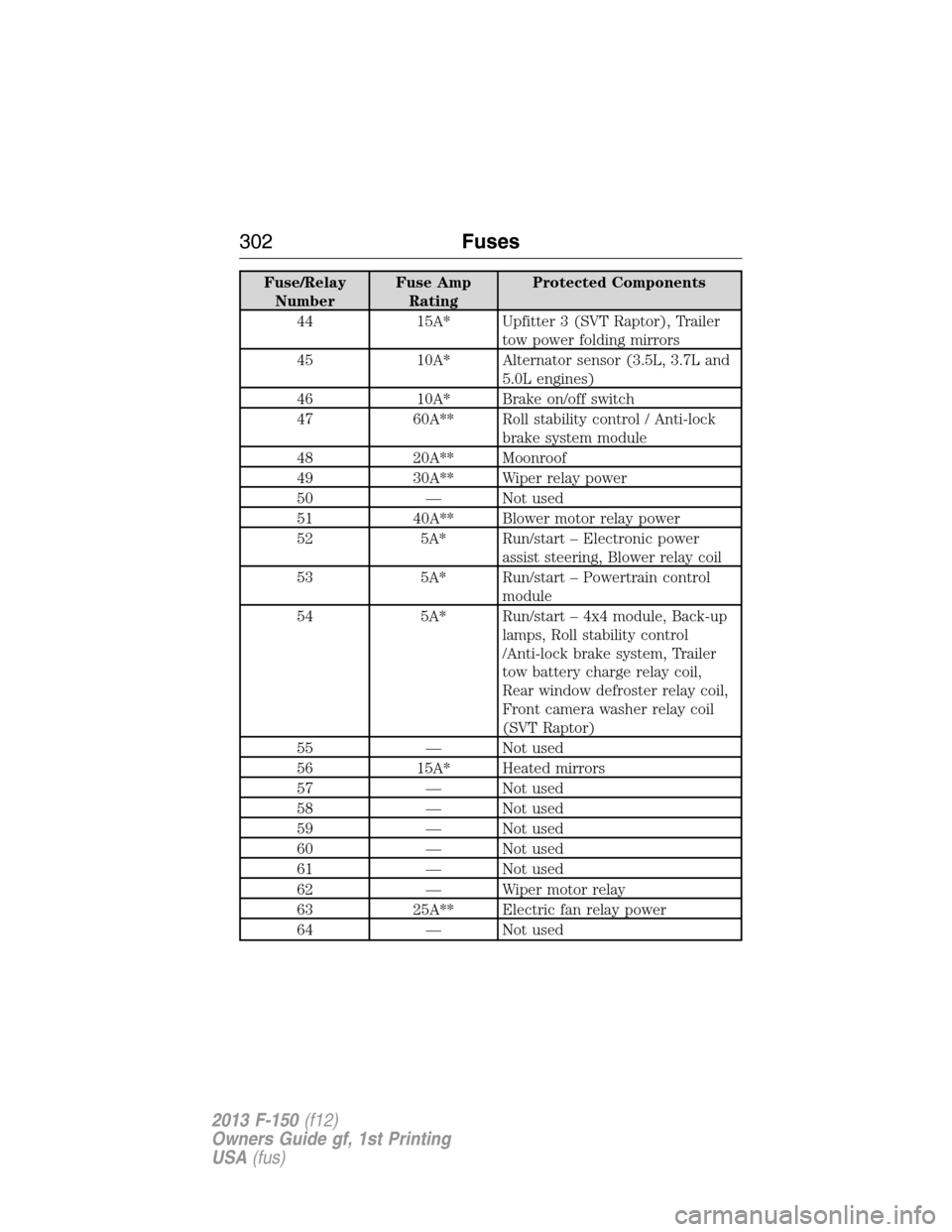
Fuse/Relay
NumberFuse Amp
RatingProtected Components
44 15A* Upfitter 3 (SVT Raptor), Trailer
tow power folding mirrors
45 10A* Alternator sensor (3.5L, 3.7L and
5.0L engines)
46 10A* Brake on/off switch
47 60A** Roll stability control / Anti-lock
brake system module
48 20A** Moonroof
49 30A** Wiper relay power
50 — Not used
51 40A** Blower motor relay power
52 5A* Run/start – Electronic power
assist steering, Blower relay coil
53 5A* Run/start – Powertrain control
module
54 5A* Run/start – 4x4 module, Back-up
lamps, Roll stability control
/Anti-lock brake system, Trailer
tow battery charge relay coil,
Rear window defroster relay coil,
Front camera washer relay coil
(SVT Raptor)
55 — Not used
56 15A* Heated mirrors
57 — Not used
58 — Not used
59 — Not used
60 — Not used
61 — Not used
62 — Wiper motor relay
63 25A** Electric fan relay power
64 — Not used
302Fuses
2013 F-150(f12)
Owners Guide gf, 1st Printing
USA(fus)
Page 305 of 570
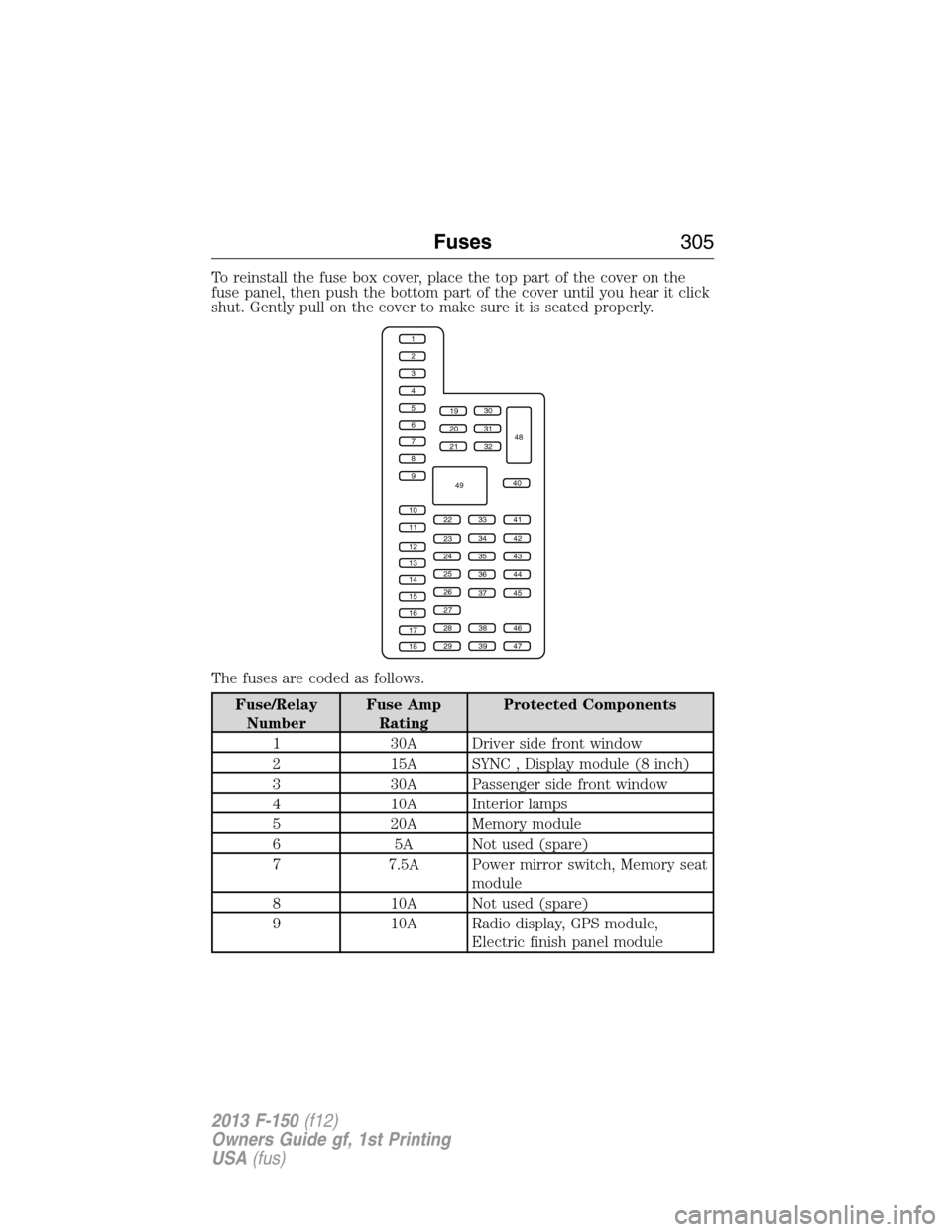
To reinstall the fuse box cover, place the top part of the cover on the
fuse panel, then push the bottom part of the cover until you hear it click
shut. Gently pull on the cover to make sure it is seated properly.
The fuses are coded as follows.
Fuse/Relay
NumberFuse Amp
RatingProtected Components
1 30A Driver side front window
2 15A SYNC , Display module (8 inch)
3 30A Passenger side front window
4 10A Interior lamps
5 20A Memory module
6 5A Not used (spare)
7 7.5A Power mirror switch, Memory seat
module
8 10A Not used (spare)
9 10A Radio display, GPS module,
Electric finish panel module
1
2
3
4
5
6
7
8
9
10
11
12
13
14
15
16
17
18
19
20
21
223341
42
43
44
45
34
35
36
37
23
24
25
26
27
283846
394729
32
40
31
30
48
49
Fuses305
2013 F-150(f12)
Owners Guide gf, 1st Printing
USA(fus)