ESP FORD F150 2014 12.G User Guide
[x] Cancel search | Manufacturer: FORD, Model Year: 2014, Model line: F150, Model: FORD F150 2014 12.GPages: 472, PDF Size: 4.62 MB
Page 90 of 472
GENERAL INFORMATION
WARNING
Driving while distracted can result in
loss of vehicle control, crash and
injury. We strongly recommend that
you use extreme caution when using any
device that may take your focus off the
road. Your primary responsibility is the safe
operation of your vehicle. We recommend
against the use of any handheld device
while driving and encourage the use of
voice-operated systems when possible.
Make sure you are aware of all applicable
local laws that may affect the use of
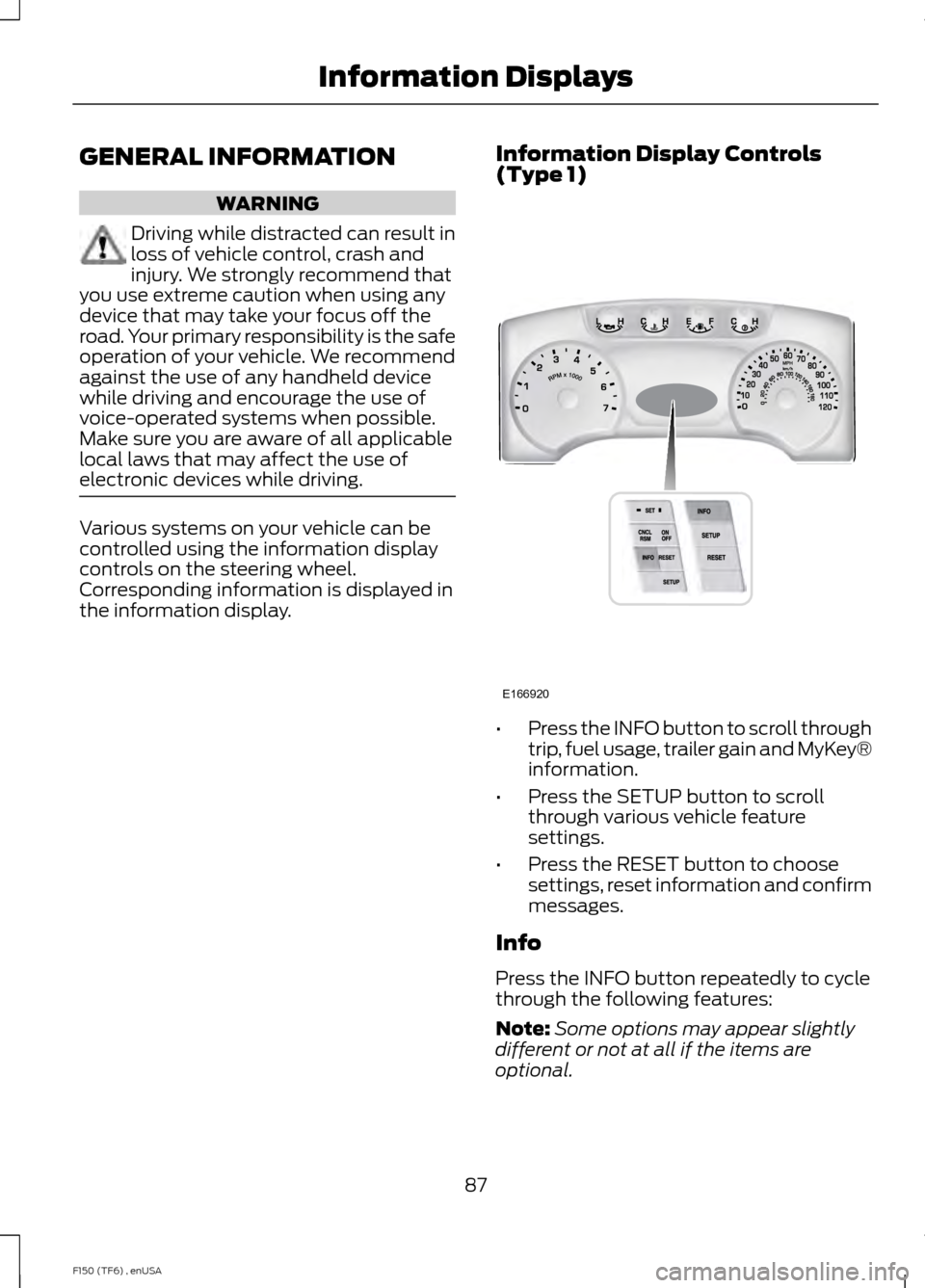
electronic devices while driving. Various systems on your vehicle can be
controlled using the information display
controls on the steering wheel.
Corresponding information is displayed in
the information display.
Information Display Controls
(Type 1) •
Press the INFO button to scroll through
trip, fuel usage, trailer gain and MyKey®
information.
• Press the SETUP button to scroll
through various vehicle feature
settings.
• Press the RESET button to choose
settings, reset information and confirm
messages.
Info
Press the INFO button repeatedly to cycle
through the following features:
Note: Some options may appear slightly
different or not at all if the items are
optional.
87
F150 (TF6) , enUSA Information DisplaysE166920
Page 100 of 472
Settings (cont’
d)
Hold OK to create MyKey
Create MyKey
MyKey
Always On or Selectable
AdvanceTrac
80 MPH (130 km/h) or Off
MAX Speed
45, 55 or 65 MPH (75, 90 or 105 km/h), Off
Speed Warning
On or Off
Volume Limiter
Hold OK to Clear MyKey
Clear MyKey
English, Español, Français (Hold OK to Set)
Language
Miles & Gallons
Distance
Units
L/100km
km/L
Celsius (°C)
Temperature
Fahrenheit (°F)
Information In this mode, you can view
different vehicle system
information and perform a
system check. Information
MyKeys (Number of MyKeys programmed)
MyKey
Admin Keys (Number of admin keys)
MyKey Miles (km) (Distance traveled using a programmed
MyKey)
Some items will only display during a system check if a
problem has been detected. If an issue exists on one of
the monitored systems, the number of warnings that need
immediate attention will display in red and the number of
informational warnings will display in amber. Use the up/
down arrow buttons to scroll through the list; press the
right arrow button to display specific information on the
highlighted warning
System Check
97
F150 (TF6) , enUSA Information DisplaysE144642
Page 107 of 472
Tire Pressure Monitoring System
Action
Message
Displays when one or more tires on your vehicle have low tire
pressure. See Tire Pressure Monitoring System (page 283).
LOW TIRE PRESSURE
Displays when the tire pressure monitoring system is
malfunctioning. If the warning stays on or continues to come on, contact your authorized dealer. See
Tire Pressure
Monitoring System (page 283).
TIRE PRESSURE
MONITOR FAULT
Displayed when a tire pressure sensor is malfunctioning, oryour spare tire is in use. For more information on how the
system operates under these conditions, see See Tire Pres-
sure Monitoring System (page 283). If the warning stays on or continues to come on, contact your authorized dealer as soon as possible.
TIRE PRESSURE
SENSOR FAULT
Trailer Action
Message
Displays the current gain setting for the trailer brake.
TRAILER BRAKE GAIN: XX.X
[OUTPUT]
Displays the current gain setting for the trailer brakewhen a trailer is not connected.
TRAILER BRAKE GAIN: XX.X NO
TRAILER
Displayed and accompanied by a single chime, in
response to faults sensed by the TBC. See
Trailer
Sway Control (page 192).
TRAILER BRAKE MODULE
FAULT
Displays when a correct trailer connection (a trailerwith electric trailer brakes) is sensed during a given ignition cycle.
TRAILER CONNECTED
104
F150 (TF6) , enUSA Information Displays
Page 123 of 472
Returning the Seat to the Seating
Position
WARNING
Make sure that cargo or any objects
are not trapped underneath the seat
cushion before returning the seat
cushion to its original position, and that the
seat cushion locks into place. Failure to do
so may prevent the seat from operating
properly in the event of a crash, which
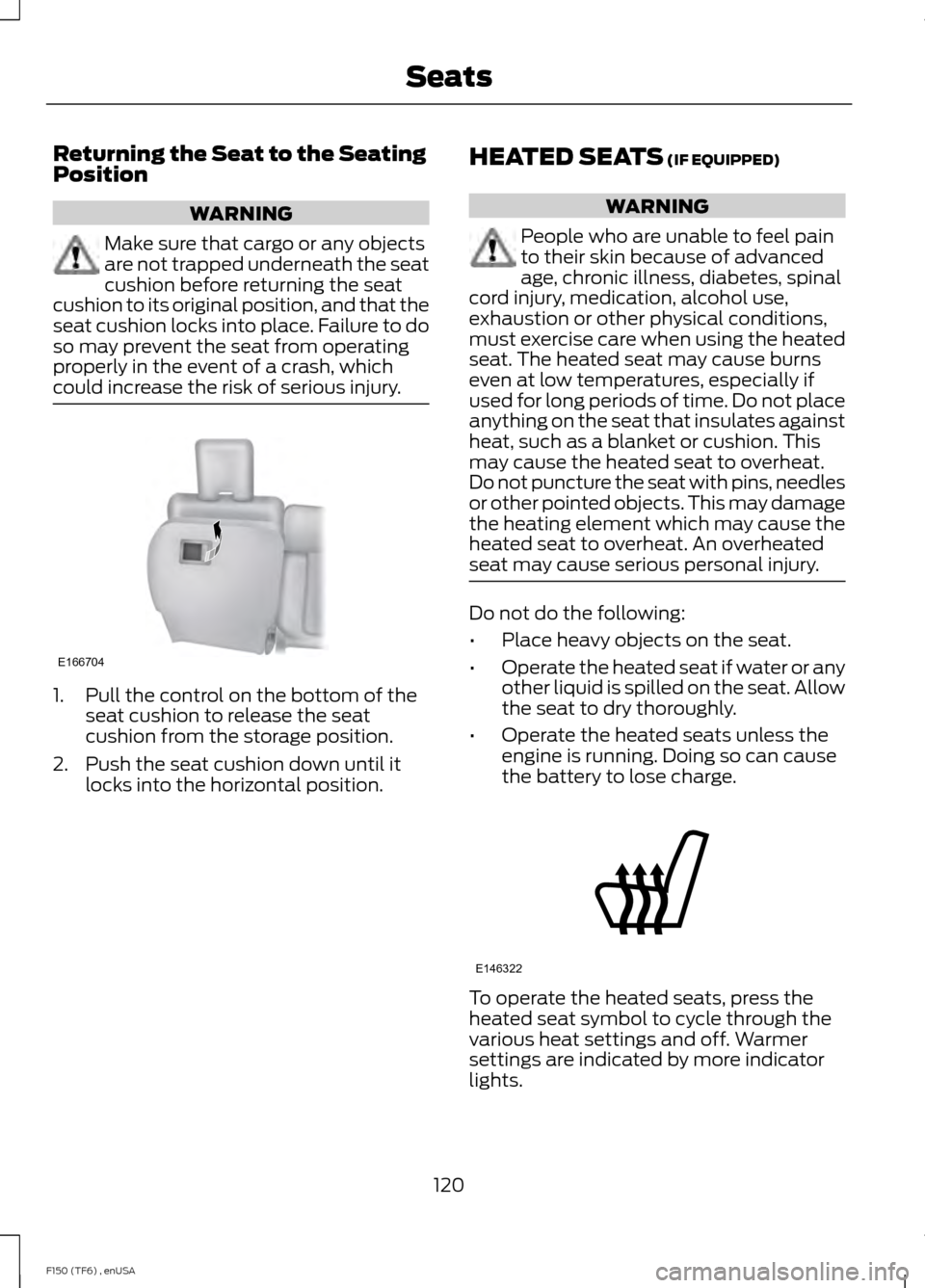
could increase the risk of serious injury. 1. Pull the control on the bottom of the
seat cushion to release the seat
cushion from the storage position.
2. Push the seat cushion down until it locks into the horizontal position. HEATED SEATS (IF EQUIPPED) WARNING
People who are unable to feel pain
to their skin because of advanced
age, chronic illness, diabetes, spinal
cord injury, medication, alcohol use,
exhaustion or other physical conditions,
must exercise care when using the heated
seat. The heated seat may cause burns
even at low temperatures, especially if
used for long periods of time. Do not place
anything on the seat that insulates against
heat, such as a blanket or cushion. This
may cause the heated seat to overheat.
Do not puncture the seat with pins, needles
or other pointed objects. This may damage
the heating element which may cause the
heated seat to overheat. An overheated
seat may cause serious personal injury. Do not do the following:
•
Place heavy objects on the seat.
• Operate the heated seat if water or any
other liquid is spilled on the seat. Allow
the seat to dry thoroughly.
• Operate the heated seats unless the
engine is running. Doing so can cause
the battery to lose charge. To operate the heated seats, press the
heated seat symbol to cycle through the
various heat settings and off. Warmer
settings are indicated by more indicator
lights.
120
F150 (TF6) , enUSA SeatsE166704 E146322
Page 124 of 472
Rear Heated Seats (If Equipped)
WARNING
People who are unable to feel pain
to the skin because of advanced age,
chronic illness, diabetes, spinal cord
injury, medication, alcohol use, exhaustion,
or other physical conditions, must exercise
care when using the seat heater. The seat
heater may cause burns even at low
temperatures, especially if used for long
periods of time. Do not place anything on
the seat that insulates against heat, such
as a blanket or cushion, because this may
cause the seat heater to overheat. Do not
puncture the seat with pins, needles, or
other pointed objects because this may
damage the heating element which may
cause the seat heater to overheat. An
overheated seat may cause serious
personal injury. Do not do the following:
•
Place heavy objects on the seat.
• Operate the seat heater if water or any
other liquid is spilled on the seat. Allow
the seat to dry thoroughly.
The rear seat heat controls are located on
the rear door armrest.
To operate the heated seats: •
Press this symbol for maximum heat.
• Press again to turn off. •
Press this symbol for minimum heat.
• Press again to turn off.
The heated seat module resets at every
ignition run cycle. While the ignition is in
the on position, press the high or low
heated seat switch to enable heating
mode. When activated, they will turn off
automatically when the engine is turned
off.
The indicator light will illuminate when the
heated seats have been activated.
VENTILATED SEATS
(IF EQUIPPED)
The ventilated seats will only function
when the engine is running. To operate the ventilated seats, press the
ventilated seat symbol to cycle through
the various cooling settings and off. Cooler
settings are indicated by more indicator
lights.
If the engine falls below 350 RPM while
the ventilated seats are on, the feature will
turn itself off. You will need to reactivate
it.
121
F150 (TF6) , enUSA SeatsE146322 E166817 E146309
Page 128 of 472
The system includes two primary features,
a garage door opener and a platform for
remote activation of devices within the
home. This functionality allows you to
program garage door openers as well as
security devices and home lighting
systems.
You can find additional system information
online at www.learcar2U.com or by calling
the toll-free help line on 1-866-572-2728.
Rolling Code Programming
Note:
If you do not follow the time-sensitive
instructions, the device will time out and
you will have to repeat the complete
procedure.
Note: It may be helpful to have another
person assist you in programming the
transmitter.
1. Switch the ignition on.
2. Press and hold the outer two buttons for
1– 2 seconds, then release. Note:
You may need a ladder to reach the
unit and you may need to remove the cover
or lamp lens. Note:
If you cannot locate the learn button,
see the Owner ’s Manual for your garage
door opener or call the toll-free help line at
1-866-572-2728.
3. Press the learn button on the garage
door opener motor. Note:
You will have 10– 30 seconds to
complete the following steps.
4. Return to your car.
5. Press and hold the function button you
would like to use to control the garage
door. You may need to hold the button
from 5– 20 seconds, during which time the
selected button LED lamp will flash slowly. 6. When the garage door moves, release
the button within one second. The LED
lamp will flash rapidly until programming
is complete.
7. Press and release the button again. The
garage door should move, confirming that
programming is successful. If your garage
door does not operate, repeat the previous
steps.
The LED lamp above the selected button
will illuminate to confirm that the system
is responding to the button command.
125
F150 (TF6) , enUSA Universal Garage Door Opener
(If Equipped)E164776 E164777 E142659 E164776
Page 129 of 472
To program another rolling code device,
repeat Steps 1 through 6, substituting a
different function button in Step 5.
Fixed Code Programming
Note:
It may be helpful to have another
person assist you in programming the
transmitter.
To program units with fixed code DIP
switches, you will need the garage door
hand-held transmitter, paper and a pen or
pencil.
1. Switch the ignition on.
2. Open the battery cover and note all the
switch settings from left to right. •
When the switch is in the up, on, or +
position, mark down “left button ”.
• When the switch is in the middle,
neutral, or 0 position, mark down
“middle button ”.
• When the switch is in the down, off, or
– position, mark down “right button”.
3. Press all three function buttons
simultaneously for a few seconds and then
release. The LED lamps will flash slowly. Note:
You must complete the following
step within 2.5 minutes.
4. Enter the corresponding DIP switch
settings from left to right into the system
by pressing and releasing the buttons
corresponding to the settings you noted.
5. Simultaneously press and release all
three function buttons. The LED lamps will
illuminate. 6. Press and hold the function button you
would like to use to control the garage
door.
Note:
You may need to hold the button
from 5–55 seconds before observing
movement of the garage door.
7. When the garage door moves, release
the button within one second. After you
release the button, the LED lamp will flash
slowly.
8. The LED lamp will begin to flash rapidly
until programming is complete. If your
garage door does not operate, repeat the
previous steps. Otherwise, call the toll-free
help line at 1-866-572-2728.
The LED lamp above the selected button
will illuminate to confirm that the system
is responding to the button command.
Erasing the Function Button Codes
Note: You cannot erase individual buttons.
1. Press and hold the outer two function
buttons simultaneously for approximately
20 seconds until the LED lamps above the
buttons flash rapidly
126
F150 (TF6) , enUSA Universal Garage Door Opener (If Equipped)E164778 E164776 E164776
Page 130 of 472
2. When the LED lamps flash, release the
buttons. You have erased all of the button
codes.
FCC and RSS-210 Industry Canada
Compliance
This device complies with Part 15 of the
FCC Rules and with RSS-210 of Industry
Canada. Operation is subject to the
following two conditions:
1. This device may not cause harmful
interference, and
2. This device must accept any interference received, including
interference that may cause undesired
operation.
Changes or modifications to your device
not expressly approved by the party
responsible for compliance can void the
user ’s authority to operate the equipment.
HomeLink Wireless Control
System (If Equipped) WARNING
Do not use the system with any
garage door opener that does not
have the safety stop and reverse
feature as required by U.S. Federal Safety
Standards (this includes any garage door
opener manufactured before April 1, 1982).
A garage door opener that cannot detect
an object, signaling the door to stop and
reverse, does not meet current federal
safety standards. Using a garage door
opener without these features increases
the risk of serious injury or death. Note:
Make sure that the garage door and
security device are free from obstruction
when you are programming. Do not program
the system with the vehicle in the garage.
Note: Make sure you keep the original
remote control transmitter for use in other
vehicles as well as for future system
programming.
Note: We recommend that, upon the sale
or lease termination of your vehicle, you
erase the programmed function buttons for
security reasons. See
Erasing the Button
Codes later in this section.
Note: You can program a maximum of
three devices. To change or replace any of
the three devices after you have
programmed them, you must first erase the
current settings. See
Erasing the Button
Codes later in this section. The universal garage door opener replaces
the common hand-held garage door
opener with a three-button transmitter,
integrated into the driver
’s sun visor.
The system includes two primary features,
a garage door opener and a platform for
remote activation of devices within the
home. This functionality allows you to
program garage door openers as well as
entry gate operators, security systems,
entry door locks and home or office
lighting.
You can find additional system information
online at www.homelink.com or by calling
the toll-free help line on 1-800-355-3515.
127
F150 (TF6) , enUSA Universal Garage Door Opener
(If Equipped)E164777 E142657
Page 134 of 472
FCC and RSS-210 Industry Canada
Compliance
This device complies with Part 15 of the
FCC Rules and with RSS-210 of Industry
Canada. Operation is subject to the
following two conditions: (1) this device
may not cause harmful interference, and
(2) this device must accept any
interference received, including
interference that may cause undesired
operation.
Changes or modifications to your device
not expressly approved by the party
responsible for compliance can void the
user
’s authority to operate the equipment.
131
F150 (TF6) , enUSA Universal Garage Door Opener (If Equipped)
Page 140 of 472
Do not crank the engine for more than 10
seconds at a time as starter damage may
occur. If the engine fails to start, turn the
key to off and wait 30 seconds before
trying again.
Do not use starting fluid such as ether in
the air intake system. Such fluid could
cause immediate explosive damage to the
engine and possible personal injury.
If you should experience cold weather
starting problems on E85 ethanol, and
neither an alternative brand of E85 ethanol
nor an engine block heater is available, the
addition of unleaded gasoline to your tank
improves cold starting performance. Your
vehicle is designed to operate on E85
ethanol alone, unleaded gasoline alone, or
any mixture of the two.
If the Engine Fails to Start Using the
Preceding Instructions (Flexible Fuel
Vehicles Only)
1. Press and hold down the accelerator
one-third to one-half the way to the
floor, then crank the engine.
2. When the engine starts, release the key, then gradually release the
accelerator pedal as the engine speeds
up. If the engine still fails to start,
repeat Step 1.
Guarding Against Exhaust Fumes WARNING
If you smell exhaust fumes inside
your vehicle, have your vehicle
checked by your authorized dealer
immediately. Do not drive your vehicle if
you smell exhaust fumes. Carbon
monoxide is present in exhaust fumes.
Take precautions to avoid its dangerous
effects. Important Ventilating Information
If you stop your vehicle and the leave the
engine idling for long periods of time, we
recommend that you do one of the
following:
•
Open the windows at least 1 inch (2.5
centimeters)
• Set your climate control to outside air.
ENGINE BLOCK HEATER (IF
EQUIPPED) WARNINGS
Failure to follow engine block heater
instructions could result in property
damage or serious personal injury.
Do not use your heater with
ungrounded electrical systems or
two-pronged adapters. There is a risk
of electrical shock. Note:
The heater is most effective when
outdoor temperatures are below 0°F
(-18°C).
The heater acts as a starting aid by
warming the engine coolant. This allows
the climate control system to respond
quickly. The equipment includes a heater
element (installed in the engine block) and
a wire harness. You can connect the
system to a grounded 120-volt AC
electrical source.
We recommend that you do the following
for a safe and correct operation:
• Use a 16-gauge outdoor extension cord
that is product certified by
Underwriter ’s Laboratory (UL) or
Canadian Standards Association
(CSA). This extension cord must be
suitable for use outdoors, in cold
137
F150 (TF6) , enUSA Starting and Stopping the Engine